From Reactive to Proactive: Why Dashboards Are Killing Your Focus
Welcome back, podcasters and modern workplace leaders! Today we are diving deep into a topic that has been generating massive buzz in our community: the dangerous allure of traditional reporting and why relying exclusively on manual dashboards is quietly draining your team's energy. If you have ever stared at a wall of Power BI charts or enterprise analytics platforms, hoping against hope that you would spot a critical anomaly before it exploded into a full-scale crisis, this blog post is for you. We are shifting from a reactive posture to a proactive mindset, tearing up the old playbooks, and exploring how push-based insights can completely revolutionize your workday.
This article expands heavily on our recent podcast discussion. If you want to catch the audio version where we break down the mechanics of modern workflows and automation, make sure to check out the related episode Replace Reactive Dashboards with Proactive Notifications.
Why Proactive Notification Matters
From Dashboards to Push-Based Insights
Traditional dashboards require you to hunt for information. You must log in, scan complex charts, and hope you spot important changes in time. This search-heavy approach often leads to missed opportunities because you react only after problems appear. Proactive notification changes this pattern completely. Instead of waiting for you to check, the system acts like an intelligent assistant, delivering insights directly to you when they matter most. This shift helps you stay ahead and focus on high-value growth.
You can see the operational difference between these two distinct approaches in the table below:
| Feature | Push-Based Insights | Dashboard-Based Insights |
|---|---|---|
| Responsiveness | Real-time and proactive, enabling swift action on trends and anomalies. | Provides a comprehensive view, simplifying long-term decision-making. |
| Missed Opportunities | Reduces missed opportunities by alerting teams immediately to emerging issues. | Helps teams spot historical trends and patterns, facilitating delayed responses. |
| Data Visualization | Often lacks dense visual representation, focusing strictly on immediate action alerts. | Utilizes rich visualizations to present historical data clearly and intuitively. |
| Collaboration | May not foster broad collaboration as effectively as shared workspace views. | Enhances cross-departmental collaboration through shared views of core metrics. |
With proactive notification, you receive alerts about critical events as they happen. This approach radically reduces the risk of missing urgent issues and helps your entire organization respond faster to dynamic challenges.
Key Benefits for Teams and Leaders
When you use a structured blueprint for proactive notification, your team gains several distinct operational advantages. You improve operational efficiency because everyone receives timely updates without unnecessary friction. You reduce downtime by acting quickly during critical events. Communication becomes more accurate, and you create a clear audit trail of messages and responses. These benefits help you build a resilient, future-proof organization.
Here are some measurable benefits you can expect to see:
| Benefit | Description |
|---|---|
| Improved Operational Efficiency | Organizations can quickly send alerts to large groups, ensuring timely communication. |
| Reduced Downtime | By minimizing response time during critical events, organizations maintain productivity. |
| Enhanced Communication Accuracy | Provides accurate information with a smaller margin of error, improving clarity. |
| Cost Reduction | Helps in reducing operational costs and developing resilience against disruptions. |
| Audit Trail Creation | Encourages accountability by maintaining a permanent record of messages and responses. |
You can see these benefits implemented across many industries. For example, in healthcare, AI-powered notifications help medical staff respond faster to patient needs. In enterprise business environments, teams avoid costly operational delays by acting on real-time alerts rather than lagging metrics.
Real-World Impact
Proactive notification systems have transformed how modern organizations operate. A major U.S. consumer bank recently moved from reactive audits to real-time anomaly detection. This single change allowed the bank to spot compliance issues long before they escalated. As a result, the bank reduced SLA breaches by 96% and avoided over $10 million in regulatory fines.
Similarly, a global software company uses targeted notifications to send implementation guides and FAQs right before releasing software updates. This smart strategy significantly reduces incoming support tickets and eases the daily workload for customer service teams. Utility companies send proactive weather-related alerts to customers, showing a thoughtful and customer-focused approach. Amazon keeps customers continuously informed about order statuses and potential delivery delays, sometimes offering compensation proactively for any inconvenience. These examples show how proactive notification can drive massive growth and radically improve the customer experience.
Tip: When you utilize proactive notification, you empower your team to act quickly and confidently. You turn your daily workflow into a smart assistant that supports your core business goals every single day.
Proactive Notification Blueprint Overview
Microsoft 365’s Approach
You can transform your workflow with Microsoft 365’s proactive notification system. This approach uses AI-driven orchestration to deliver timely, contextual insights. Unlike traditional enterprise solutions, Microsoft 365 integrates intelligent agents that act directly on your intent. You receive unified communications powered by modern AI, which empowers you to make decisions faster and with absolute confidence.
Here is a comparison of Microsoft 365’s proactive notification features with other legacy enterprise solutions:
| Feature | Microsoft 365 E7 / Modern Stack | Other Enterprise Solutions |
|---|---|---|
| Proactive Notifications | AI-driven orchestration | Traditional static notifications |
| Workflow Enhancement | AI agents act on user intent | Manual, rigid processes |
| Integration of Communication | Unified communications with native AI | Basic integration without intelligence |
| Employee Empowerment | Intelligent, productivity-enhancing tools | Standard tools without AI capabilities |
You gain access to intelligent tools that genuinely enhance productivity. You do not have to rely on manual dashboard checks or basic email alerts. Microsoft 365’s ecosystem helps you stay ahead by delivering actionable information directly into your daily workflow.
Six-Layer Architecture
The blueprint relies on a robust six-layer architecture to ensure notifications are always timely and relevant. Each layer serves a unique function and works in tandem to create a seamless experience.
| Layer | Function Description |
|---|---|
| SOURCE SYSTEMS | Where truth lives (ERP, CRM, service management, finance platforms, etc.) |
| EVENT DETECTION | Identifying meaningful change (threshold violations + statistical anomalies) |
| AI REASONING | Adding crucial context, summarization, and pattern understanding |
| ORCHESTRATION | Coordinating automated actions via Power Automate and background runners |
| DELIVERY | Sending messages to the right place (Teams chats, approvals, tasks, adaptive cards) |
| FEEDBACK LOOP | Tracking actual outcomes and continuously improving the system over time |
Source Systems
You connect your workflow directly to trusted enterprise data sources. These include ERP, CRM, customer service, and financial systems. You ensure that all outbound notifications originate from accurate and reliable data.
Event Detection
You identify meaningful changes within your data streams. The system detects specific threshold breaches and statistical anomalies. You receive alerts the moment something important happens, allowing you to act immediately.
AI Reasoning
You benefit from advanced AI that adds rich context and summarizes complex information. The system understands behavioural patterns and provides insights that help you make better operational decisions.
Orchestration
You coordinate multi-step actions using Power Automate. The system manages complex workflows and ensures that the correct validation steps happen at the exact right time, eliminating manual overhead.
Delivery
You receive notifications in the right medium and place. The system routes alerts to Microsoft Teams channels, approval workflows, or task managers. You stay fully informed without ever having to manually search for updates.
Feedback Loop
You track outcomes and improve the entire system over time. The feedback loop helps you learn from past user actions and system responses, letting you refine your notification strategy continuously.
How It Works in Practice
You can see this architectural blueprint in action across many successful industries. Amazon uses predictive analytics to offer hyper-personalized product recommendations. This approach drastically increases customer satisfaction and top-line sales. Zappos anticipates customer needs with highly personalized communications. Apple empowers users with self-service resources through the Genius Bar and online support portals.
- Amazon uses predictive analytics for personalized recommendations.
- Zappos focuses on anticipating customer needs with personalized communications.
- Apple provides self-service resources, empowering users to solve technical problems independently.
You integrate this blueprint into your organization by connecting trusted data sources, setting up precise event detection, and leveraging AI reasoning. You automate actions and deliver notifications where they matter most. You use operational feedback to constantly improve your system.
Tip: You can start small by connecting a single data source and setting up basic event detection. Over time, you can expand your blueprint to cover more complex processes and departments.
Assess Your Workflow
Identify Notification Gaps
You start your journey by looking for gaps in your current workflow. These gaps often appear when important operational updates fail to reach the right people at the right time. You can analyze unproductive workflows by examining specific roles, necessary skills, and current tooling. This helps you understand where your process slows down or misses critical events entirely.
- Review your workflow performance metrics to spot areas where communication fails.
- Use workflow process maps to visualize how information moves through your team.
- Apply Lean Concepts or Six Sigma methods to reduce operational inefficiencies.
- Value stream mapping helps you see where bottlenecks occur and where improvements are possible.
Tip: A home or enterprise digital assistant can help you track these gaps by monitoring your daily calendar and scheduling commitments, making your workflow significantly smarter and more responsive.
Map Key Processes
You need to map out each step in your operational workflow to see where notifications are most urgently needed. This process helps you decide which steps are essential and which can be automated. You also learn who benefits from each step and how to improve overall efficiency.
- Check if each individual step in your workflow is truly essential.
- Determine the exact purpose of each step and identify who it serves.
- Explore automation options to boost speed and execution efficiency.
You can use several powerful tools and frameworks to help with this assessment:
| Tool/Framework | Description |
|---|---|
| DMAIC Model | Structured process improvement framework: Define, Measure, Analyze, Improve, Control. |
| Fishbone Analysis | Cause and effect diagram used to find root causes of operational problems. |
| Process Mapping | Visualizes procedural steps and feedback loops for better efficiency. |
| Pareto Charts | Shows contributing factors by impact to highlight key systemic issues. |
| FMEA | Identifies potential process failures to prevent operational errors and improve safety. |
Note: Unique home and office assistant blueprints can automate notifications for routine administrative tasks, freeing up your valuable time for strategic growth.
Set Actionable Goals
You must set clear, actionable goals to make your workflow more effective. Clear goals help you avoid team confusion and keep everyone focused on core outcomes. You break the broader process down into simple tasks and assign explicit ownership roles so everyone knows their responsibility.
- Define specific tasks to keep things manageable.
- Assign roles and responsibilities to prevent ambiguity.
- Set clear dependencies to avoid operational bottlenecks.
- Automate repetitive tasks to reduce manual cognitive load.
Callout: When you use proactive notification in your enterprise blueprint, your digital assistant delivers timely updates. This keeps your calendar and scheduling organized while fully supporting your growth.
Design Your Notification Strategy
Prioritize Critical Events
You need to decide which events deserve immediate human attention. Not every update requires the same level of operational urgency. Start by listing the types of alerts your team receives. Use a structured table to help you sort them by priority:
| Alert Type | Priority Level |
|---|---|
| Life-threatening arrhythmias or critical failures | Highest |
| System device malfunctions or performance dips | Medium |
| Routine maintenance and standard informational notifications | Lowest |
Focus on reducing turnaround time for critical result notifications. Make sure the right people, such as technical leads or operational managers, receive these alerts instantly. Look for behavioral patterns that cause delays in reporting. When you address these factors, you help your organization respond faster and support sustainable growth.
- Aim to decrease turnaround time for critical notifications.
- Ensure notifications reach the correct designated person.
- Identify and fix root causes of delayed operational reporting.
Tip: Use your digital assistant to monitor your calendar and highlight urgent upcoming events. This keeps your scheduling on track and prevents missed deadlines.
Choose Notification Channels
You have many options for delivering notifications. Some teams prefer instant chat messages, while others rely on email digests or mobile push alerts. Think carefully about where your team spends most of their working hours. If your team lives inside Microsoft Teams, send alerts directly there. For field workers, mobile push notifications may work best. Always match the channel to the urgency and context of the message.
- Use chat applications for urgent, time-sensitive updates.
- Send emails for routine information and archival purposes.
- Mobile push notifications work exceptionally well for on-the-go staff.
Your blueprint should include a balanced mix of channels. This ensures everyone receives the right information at the right moment without suffering from channel fatigue.
Set Rules and Triggers
You need clear operational rules to decide when and how to send notifications. Well-timed alerts connect user emotions and expectations with your service delivery. Use external triggers, like push notifications, that match internal triggers, such as a user’s concern about an impending project deadline. Avoid sending too many or irrelevant alerts, as this quickly causes alert fatigue.
Urgent vs. Routine
Set fundamentally different rules for urgent versus routine events. For urgent issues, send immediate, high-priority alerts and require quick acknowledgment. For routine updates, group them into scheduled digests and send them at predetermined times. This keeps your team focused and minimizes daily distractions.
Individual vs. Team Alerts
Decide whether a specific alert should go to an individual or the entire team. Individual alerts work best for personal task approvals or single-user assignments. Team alerts help everyone stay informed about shared organizational goals. Your assistant can help you fine-grained set these preferences in your notification system.
Note: A proactive notification strategy helps you deliver the right message, at the exact right time, to the right person. This approach keeps your workflow efficient and your team ready for action.
Automate and Integrate
Tools and Platforms
You can automate your workflow using a variety of powerful tools within the Microsoft 365 ecosystem. Power Automate stands out as a primary solution for building proactive notifications. This tool connects seamlessly with SharePoint, Microsoft Teams, and email platforms, making it easy to enhance communication across your entire organization. You can trigger automated notifications when someone selects a specific item in SharePoint, ensuring your team receives immediate updates.
Here are some popular tools and platforms you can use:
- Power Automate for building custom workflows and automated notifications.
- Microsoft Teams for delivering alerts directly to chat spaces or dedicated channels.
- SharePoint for tracking document changes and triggering metadata updates.
- Outlook for sending structured email notifications.
- The Microsoft 365 Agents Toolkit for creating interactive notifications in Teams.
A home or office assistant can also help you manage routine reminders and keep your calendar organized. By combining these tools, you create a comprehensive system that supports your blueprint for proactive communication.
Setting Up Automated Alerts
You need to follow industry best practices to set up automated alerts that genuinely improve your daily workflow. Start by identifying the exact events that should trigger notifications. Decide who needs to receive each alert and group recipients carefully to avoid confusion. Write clear, concise messages that match the recipient’s exact operational role. Choose the best delivery channel to ensure your message arrives quickly.
Consider these steps for effective alert setup:
- Prioritize notifications based on strict urgency and business importance.
- Test your automated workflows regularly to confirm they execute as expected.
- Use built-in templates for common enterprise scenarios to save development time.
- Set up daily summaries for minor updates to prevent cognitive overload.
- Monitor error logs and use analytics to track system performance over time.
- Review and update your workflows frequently to keep them relevant.
- Gather ongoing feedback from users to refine your notification process.
Tip: Your assistant can help you monitor user feedback and suggest improvements, making your notification system smarter over time.
Integration with Microsoft 365 and Others
You can expand your proactive notification capabilities by integrating Microsoft 365 with third-party platforms. Bots can send alerts, updates, or reminders through multiple communication channels, ensuring your team stays informed regardless of location. Notifications can be triggered by user actions, system changes, or personalized AI recommendations. You can use the Microsoft 365 Agents Toolkit to build applications that send interactive notifications directly inside Teams.
Here are some ways to enhance enterprise integration:
- Use proactive engagement to automate workflows that trigger outbound messages or operational calls.
- Connect contact center systems with other enterprise platforms using robust APIs or Power Automate flows.
- Deploy specialized AI agents to start customer interactions and provide personalized support.
You can also categorize notifications as interactive, scheduled, or event-driven, depending on your operational needs. This flexibility helps you respond faster and close service cases more efficiently. By integrating these tools, you create a seamless experience that keeps your team focused and your workflow humming.
Note: When you automate and integrate your notifications, you free up valuable time for high-value strategic tasks and ensure your team never misses a critical update.
Quick Wins
You do not need to wait months to see tangible results from proactive notification automation. You can achieve quick wins that make an immediate difference in your workflow and customer experience. Start with simple automations that deliver instant value.
Here are some common use cases and the business benefits you can expect:
| Use Case | Benefit |
|---|---|
| Service outage alerts | Reduced contact center congestion and lower support overhead |
| Delivery delay updates | Lower operational costs and managed customer expectations |
| Appointment reminders | Improved customer trust and fewer no-shows |
| Billing anomaly notifications | Faster resolution times and improved cash flow |
| Policy or contract change updates | Enhanced overall enterprise experience |
You can set up service outage alerts to notify your technical team and customers right away. This action drastically reduces the number of inbound calls to your support center. Delivery delay updates help you manage expectations and cut down on extra operational costs. Appointment reminders keep your clients informed and build strong trust. Billing anomaly notifications allow your finance team to resolve issues faster.
You can also automate smaller tasks that save time and reduce frustration:
- Offer immediate help when a user tries to reset a password multiple times.
- Send automated notifications if a physical shipment or digital provisioning gets delayed.
- Deliver targeted offers to users based on their recent browsing and usage patterns.
These quick wins do not require a complex setup. You can use Microsoft 365 tools like Power Automate to create these workflows in just a few steps. You can start with pre-built templates and customize them for your unique needs without advanced technical skills.
Tip: Focus on one or two high-impact automations first. Measure the results and share the improvements with your team. Small changes can lead to massive gains in efficiency and satisfaction.
You will quickly notice fewer missed updates and much faster response times. Your team will spend less time on tedious manual tasks. Your customers will deeply appreciate the timely, contextual communication. As you build confidence, you can expand your automation strategy to cover more processes.
Quick wins prove the immense power of proactive notification. You can transform your workflow step by step and see positive results right away.
Optimize with Feedback Loops
Monitor Notification Effectiveness
You need to check if your notifications are actually helping your team respond quickly and stay organized. Start by conducting a thorough alert audit. Review delivery rates, open rates, and response times. Calculate acknowledgment rates for each notification type over a rolling 30-day period. If you find acknowledgment rates dropping below 60% or response times exceeding your service level agreement, consider redesigning those alerts immediately.
You can also track other important operational metrics:
- Time required to complete tasks after receiving notifications
- Error rates during task execution
- Number of workflow iterations needed to finish key projects
- Compliance adherence with established organizational standards
These metrics show where your workflow succeeds and where it needs improvement. Your digital assistant can help you monitor these numbers and highlight areas for growth.
Tip: Use your calendar to schedule regular reviews of notification performance. This keeps your workflow efficient and prevents missed updates.
Gather and Apply Feedback
You can continuously improve your notification strategy by listening carefully to your team and users. Try several proven methods to gather constructive feedback:
- Use in-app surveys and pulse polls to capture real-time opinions about notifications.
- Collect direct user reviews and ratings from internal portals or websites.
- Analyze behavioral usage data to see how users interact with notifications.
- Monitor customer support channels for signs of user dissatisfaction or confusion.
- Listen to team discussions for candid, qualitative feedback.
Apply what you learn to adjust your notification timing, content structure, and delivery channels. When you actively respond to feedback, you build deep organizational trust and make your workflow more effective.
Callout: A home or office assistant can help you collect feedback and suggest operational improvements, making your notification system smarter over time.
Continuous Improvement
You should always look for ways to make your workflow better. Use a structured approach to ensure continuous improvement. The table below outlines key optimization strategies:
| Strategy | Description |
|---|---|
| Regular Analysis | Continually analyze performance metrics to find areas for improvement. |
| User Feedback | Ask for direct feedback from users to refine workflows and meet their needs. |
| Integration | Seamlessly connect with productivity tools like Microsoft Teams and Office 365. |
| Workflow Review | Periodically review and refine automated workflows to keep them efficient. |
| Data Analysis | Use analytics tools to monitor performance and make informed adjustments. |
You can use your calendar to plan recurring workflow reviews and set reminders for ongoing analysis. When you integrate feedback and analytics, you create a virtuous cycle of improvement. This process helps your team stay agile and ready for new challenges.
Note: Continuous improvement keeps your operational workflow strong and supports long-term organizational growth.
Use Cases and Examples

Individual Productivity
You can dramatically boost your daily personal productivity by using proactive notification in your workflow. Imagine starting your workday with an intelligent summary of important meetings and deadlines sent straight to your calendar. You do not need to hunt for updates or manual reminders. Your assistant can highlight urgent tasks and suggest the best time blocks to complete them. This approach helps you focus on what matters most and reduces cognitive stress.
A digital assistant can remind you to prepare for upcoming meetings or follow up on critical emails. You can set up notifications for recurring administrative tasks, ensuring you never miss a deadline. When you automate these reminders, you free up mental space and stay impeccably organized. You can also track your daily progress and adjust your schedule on the fly.
Tip: Use your assistant to block dedicated time for deep work. This helps you avoid digital distractions and finish important projects faster.
Team Collaboration
You can drastically improve teamwork by sharing timely and relevant information with your group. Proactive notification keeps everyone aligned and encourages active engagement. Here are some ways it helps your team:
- You receive clear welcome messages that explain the context and purpose of each communication.
- You get explicit instructions on what actions to take following major operational updates.
- You stay informed about real-time changes, which helps your group work together smoothly.
When your team knows what to do and when to do it, you avoid costly confusion. You can use group chats or shared workspace documents to keep everyone updated. This approach builds trust and makes collaboration effortless.
Note: Teams that use proactive notification respond faster to market changes and solve complex problems together.
Project Management
You can manage enterprise projects more effectively by using proactive notification to track progress and address issues quickly. When you receive alerts about impending deadlines, budget variances, or resource needs, you can act before problems spiral out of control. This leads to drastically better outcomes for your projects.
The table below shows how project management improves with proactive notification:
| Outcome | Improvement Percentage |
|---|---|
| Reduced scope creep | 40% |
| Improved reporting accuracy | 35% |
| Increased team engagement | 45% |
| Better resource utilization | 30% |
| Higher project success rates | 35% |
| Better budget adherence | 40% |
| Improved stakeholder satisfaction | 45% |
| Faster issue resolution times | 50% |
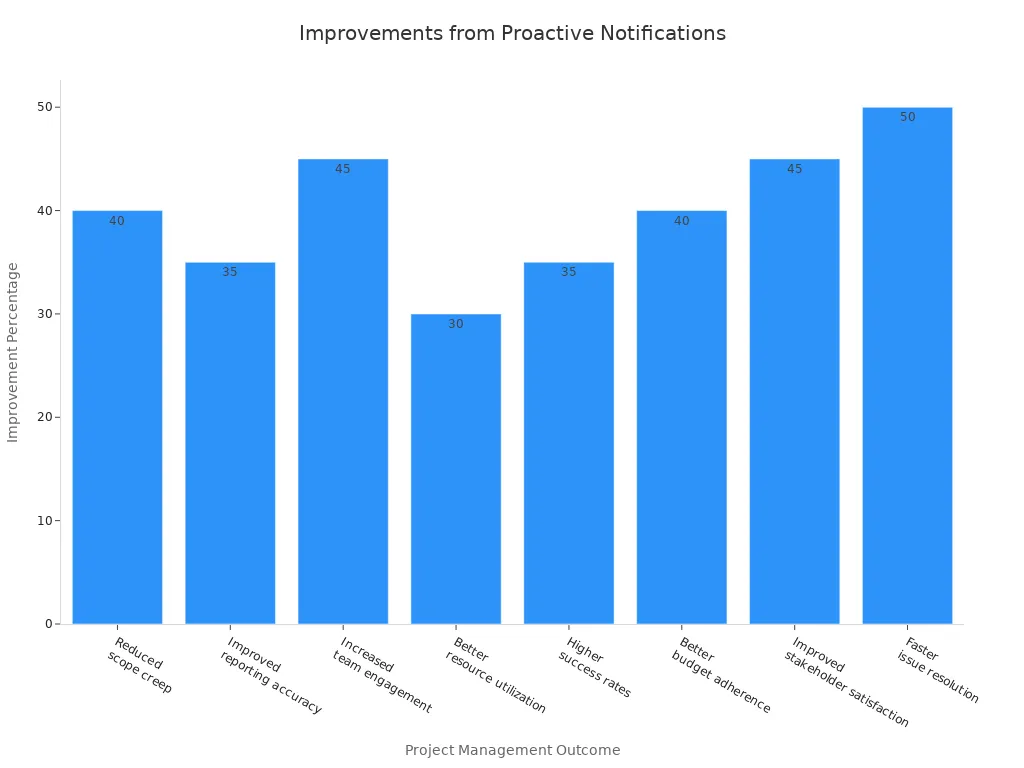
You can see drastically faster issue resolution times and much higher satisfaction among stakeholders. You also notice better budget control and fewer surprises during project execution. By utilizing proactive notification, you help your team stay on track and reach their milestones more often.
Callout: Start with one pilot project and set up simple notifications. You will see immediate improvements in teamwork and project results right away.
Customer Support
You can completely transform your customer support experience by using proactive notifications. Modern customers want fast answers and seamless help; they do not want to wait for problems to happen. When you use proactive notifications, you anticipate customer needs and address issues before they become formal complaints. This approach builds deep trust and shows that you truly value your customers.
Proactive notifications help you deliver support in real time. For example, you can send alerts about service outages, delivery delays, or billing discrepancies before customers even ask. You can also remind customers about upcoming appointments or policy changes. These actions eliminate confusion and prevent frustration.
Here are some ways proactive notifications improve customer support:
- You anticipate customer needs and solve problems quickly.
- You build deeper relationships with your customers, increasing loyalty and long-term retention.
- You stay ahead of customer expectations by addressing issues before they arise.
- You use real-time alerts and personalized messages to improve customer satisfaction metrics.
- You turn your support team into strategic partners in the customer journey, not just reactive problem-solvers.
A digital assistant can help you manage routine support tasks. For example, it can send reminders to your support team or update your calendar with follow-up customer actions. This makes your workflow more organized and ensures that no customer request ever falls through the cracks.
You can use the following table to compare traditional support models with proactive support:
| Traditional Support | Proactive Support |
|---|---|
| Waits passively for customer contact | Reaches out proactively before issues cause pain |
| Solves problems reactively | Anticipates and prevents operational problems |
| Focuses strictly on ticket closure | Builds long-term customer relationships |
| Measures simple response time | Measures holistic customer satisfaction |
When you use an assistant to automate notifications, you free up your support team to focus on complex, high-value cases. You also give customers the precise information they need, when they need it. This approach turns customer service into a strategic value driver rather than a simple cost center.
Tip: Start by automating simple alerts, such as appointment reminders or system outage notifications. Over time, expand your system to include personalized offers and follow-up messages. You will see higher satisfaction and stronger customer loyalty.
Proactive Cybersecurity Blueprint
Security-Driven Notifications
You face new digital threats every single day. Sophisticated attackers constantly look for vulnerabilities in your systems and try to exploit them before your team can react. A proactive cybersecurity blueprint helps you stay far ahead of adversaries. You do not wait for a cyber-attack to compromise your network; instead, you use security-driven notifications to warn you about risks the moment they appear. These alerts help you act fast and protect your sensitive data.
You can set up your assistant to monitor your entire digital attack surface. When the system detects an anomaly or threat, it dispatches an immediate notification directly to your calendar or communication channel. This approach gives you valuable time to respond before an attack causes structural damage. Security-driven notifications also support automated remediation, meaning the system can fix simple configuration problems right away without manual intervention.
Tip: Use security-driven notifications to keep your technical team informed and ready to act. Fast alerts dramatically reduce the probability of a successful security breach.
Embedding Cybersecurity Blueprint Principles
You can make your organization significantly safer by embedding cybersecurity blueprint principles into your daily workflow. This means you do not just react to threats as they occur. You build a preemptive mindset and focus on continuous threat exposure management, actively hunting for risks before they become active problems.
The table below shows how you can use these core principles to reduce enterprise data risks:
| Proactive Measure | Description | Mitigation Strategies |
|---|---|---|
| Identifying human error patterns | Understand the types of human errors that lead to enterprise data risks. | Classify errors into slips, mistakes, and rule-based violations. |
| Integrating behavioral analytics | Use data to detect risk precursors and improve decision-making. | Implement near-miss reporting and feedback mechanisms. |
| Fostering a culture of learning | Encourage transparency and continuous improvement in handling human errors. | Establish a Human Risk Committee and promote psychological safety. |
You can work closely with your CISO to create a robust preemptive security program. This program helps you spot hidden weaknesses and fix them early. You use vulnerability management and automated threat hunting to close security gaps. You also encourage your team to report near-misses and learn from mistakes openly. This strong culture of learning makes your overall security posture stronger every day.
Preventing Data Risks
You can prevent catastrophic data risks by using the proactive cybersecurity blueprint. You do not rely solely on traditional firewalls or static passwords. You use advanced cloud security tools to watch for threats in real time. You set up preemptive exposure management to find and fix vulnerabilities before attackers can leverage them.
Your blueprint should include continuous threat exposure management. This means you check your systems frequently and update your digital defenses. You use automated scanners to look for new risks. When the system finds a problem, it sends you an instant notification. You can act quickly and keep your enterprise data safe.
Note: A strong cybersecurity plan protects your business and your customers. You build profound trust by showing you care deeply about security.
Common Pitfalls to Avoid
Notification Overload
You might think more notifications mean better organizational awareness, but too many alerts can overwhelm you and your team. When you receive a constant flood of messages, you may start to ignore important ones. This cognitive overload can lead to missed deadlines or even ignored security risks. Your assistant should help you filter out background noise and highlight only the most urgent updates. Use your calendar to schedule regular reviews of your notification settings so you can adjust alert frequencies to match your actual needs.
Tip: Review your notification channels every month. Remove or combine alerts that do not add clear value. This keeps your workflow focused and efficient.
Ignoring Feedback
You need to listen carefully to feedback from your team and end-users. If you ignore their suggestions, your notification system will quickly become less effective. Feedback helps you spot critical gaps, such as missed threats or slow responses to vulnerabilities. You can use surveys, direct conversations, or usage analytics to gather opinions. When you act on this information, you improve your blueprint and make your workflow stronger. Remember, continuous threat exposure management depends heavily on learning from real user experiences.
| Feedback Method | Benefit |
|---|---|
| Surveys | Quick qualitative insights from users |
| Analytics | Data-driven optimization and improvement |
| Team Meetings | Open discussion of operational challenges |
Note: Always thank your team for their operational input. Show them how their feedback directly leads to better results.
Stagnant Processes
You should avoid letting your operational workflow become stagnant. If you never update your processes, you may miss new threat vectors or fail to spot emerging vulnerabilities. Attackers actively look for outdated systems because they are easier to exploit. Regularly review your blueprint and update your security measures. Preemptive exposure management helps you find and fix weaknesses before they turn into crises. Use your calendar to set reminders for recurring process reviews.
Callout: Stay proactive. Update your notification rules and security protocols frequently. This approach protects your organization from evolving risks.
By watching out for these common pitfalls, you keep your notification system effective and your team ready to respond. You build a culture of continuous improvement and resilience.
Measuring Success
Key Metrics
You need to measure the actual impact of your proactive notification system. Start by tracking how quickly your team responds to incoming alerts. Look at the time gap between when a notification is dispatched and when someone takes corrective action. You can also count the number of missed or ignored alerts. These metrics show if your notifications reach the right people at the right time.
Use your calendar to schedule regular reviews of these core metrics. This helps you spot trends and make adjustments before problems grow. You can also track the number of tasks completed after receiving a notification. If you see more tasks finished on time, your system is working well.
Here is a simple table to help you organize your performance data:
| Metric | What It Shows |
|---|---|
| Response Time | Speed of human action after an alert is received |
| Acknowledgment Rate | Percentage of dispatched alerts actually seen and acknowledged |
| Task Completion Rate | Number of tasks successfully finished following a notification |
| Missed Alerts | Unread or ignored notifications indicating potential fatigue |
Tip: Ask your digital assistant to remind you to check these performance numbers each month.
ROI and Business Outcomes
You want to see real, tangible results from your blueprint. Start by looking at direct cost savings. If your team spends less time searching for information in dashboards, you save valuable payroll hours. Fewer missed deadlines mean fewer financial penalties or lost customers. You can also measure customer satisfaction by sending short surveys after key service interactions.
Track how many operational risks you avoid because of early warnings. For example, if a cybersecurity alert stops a data breach, you protect your business reputation and financial standing. Use hard numbers to show the business value. If you reduce downtime or improve response times, you can easily demonstrate a clear return on investment.
Note: Your digital assistant can help you collect operational feedback and organize survey results effortlessly.
When to Revisit Your Blueprint
You should never set your automation system up and forget about it. Plan to review your blueprint every few months. Use your calendar to set recurring reminders for these check-ins. Look for signs that your notifications need updates. If you see more missed alerts or slower response times, it is time to make changes.
Ask your team for ongoing feedback. They can tell you if the notifications are truly helpful or if they need refinement. Stay alert for new business risks or changes in your organizational workflow. Preemptive exposure management means you always look for ways to improve and stay ahead of emerging threats.
Callout: A strong review process keeps your notification system effective and your entire organization ready for anything.
You can completely transform your workflow with the proactive notification blueprint. Start with small, manageable steps, like using your assistant to set reminders in your calendar or adding a home assistant for daily updates. These changes help you act faster, reduce noise, and stay organized. Share your results with your team and inspire others to try this modern approach. Begin today and see how much more you can achieve!
FAQ
What is the Proactive Notification Blueprint?
You use the Proactive Notification Blueprint to receive important operational updates automatically. This system sends alerts the moment key events happen, meaning you do not need to check dashboards manually all the time.
How do I start using proactive notifications?
You begin by connecting your core data sources. Then, you set up event detection rules and choose which notifications matter most to your role. You can use your calendar to schedule regular reviews of your notification settings.
Can I customize which notifications I receive?
Yes, you can fully choose which events trigger alerts. You set explicit rules for urgent or routine updates and decide whether notifications go to you individually or to your entire team.
How does a home or office assistant help with notifications?
A digital assistant can organize reminders and send you alerts for meetings or tasks. You stay on track and never miss important updates during your busy workday.
Will the system work with my current tools?
You can integrate the blueprint with Microsoft 365 tools like Teams, Outlook, and SharePoint, making it easy to fit proactive notifications into your existing workflow.
How does the assistant improve my workflow?
The assistant helps you by sending timely notifications and contextual reminders. You spend less time searching for information in dashboards and more time focusing on high-value tasks.
Is my enterprise data safe with proactive notifications?
You keep your data secure by using Microsoft 365’s built-in security features and compliance controls. The system sends alerts about security risks so you can act quickly and protect your information.
🎧 Listen to this episode
Want a practical explanation of Replace Reactive Dashboards with Proactive Notifications? This episode breaks down the topic in clear language and shows why it matters for Microsoft 365, Azure, Power Platform, security, AI, and modern work.
Listen to this episode if you want to:
- Understand the key concepts behind Replace Reactive Dashboards with Proactive Notifications
- See how it fits into the wider Microsoft technology ecosystem
- Learn where it can create practical value for your organization
You may also enjoy these related M365 FM episodes:
- Will Copilot Studio Replace Low-Code Developers?
- Replace Legacy Middleware with Policy-Driven Architecture
- Why Executives Ignore Power BI Dashboards
- Fix Microsoft 365 Compliance Drift Beyond Green Dashboards
- Replace Legacy RPA with Copilot Studio Computer Use
Discover more practical Microsoft conversations on M365 FM.

Microsoft MVP | Host of M365.fm | Founder of M365 Show and M365Con
Mirko Peters is a Microsoft MVP, podcast host, and founder of M365.fm, M365 Show, and M365Con. His work connects Microsoft practitioners through podcast interviews, livestreams, and community events.
At M365.fm, Mirko hosts conversations with Microsoft MVPs, product experts, architects, and community contributors. Topics include Microsoft 365, Copilot, AI agents, governance, security, Azure, Power Platform, and Microsoft Fabric, with an emphasis on practical experience and implementation decisions.
M365.fm is the podcast and learning platform. M365 Show brings experts together for livestreams, while M365Con provides an online conference setting for community learning.
Official website: Mirko Peters (https://www.mirkopeters.com/). Recognition: Mirko Peters — Microsoft MVP profile (https://mvp.microsoft.com/de-DE/mvp/profile/9b0ca797-db5a-493a-a845-8b9158046cf5). Connect on LinkedIn (https://www.linkedin.com/in/m365showpodcast/).