


 Apple Podcasts
 Spotify
 Youtube Music
 Spreaker
 Podchaser
 Amazon Music
 Dynamics 365 Dual-write - Simply Explained
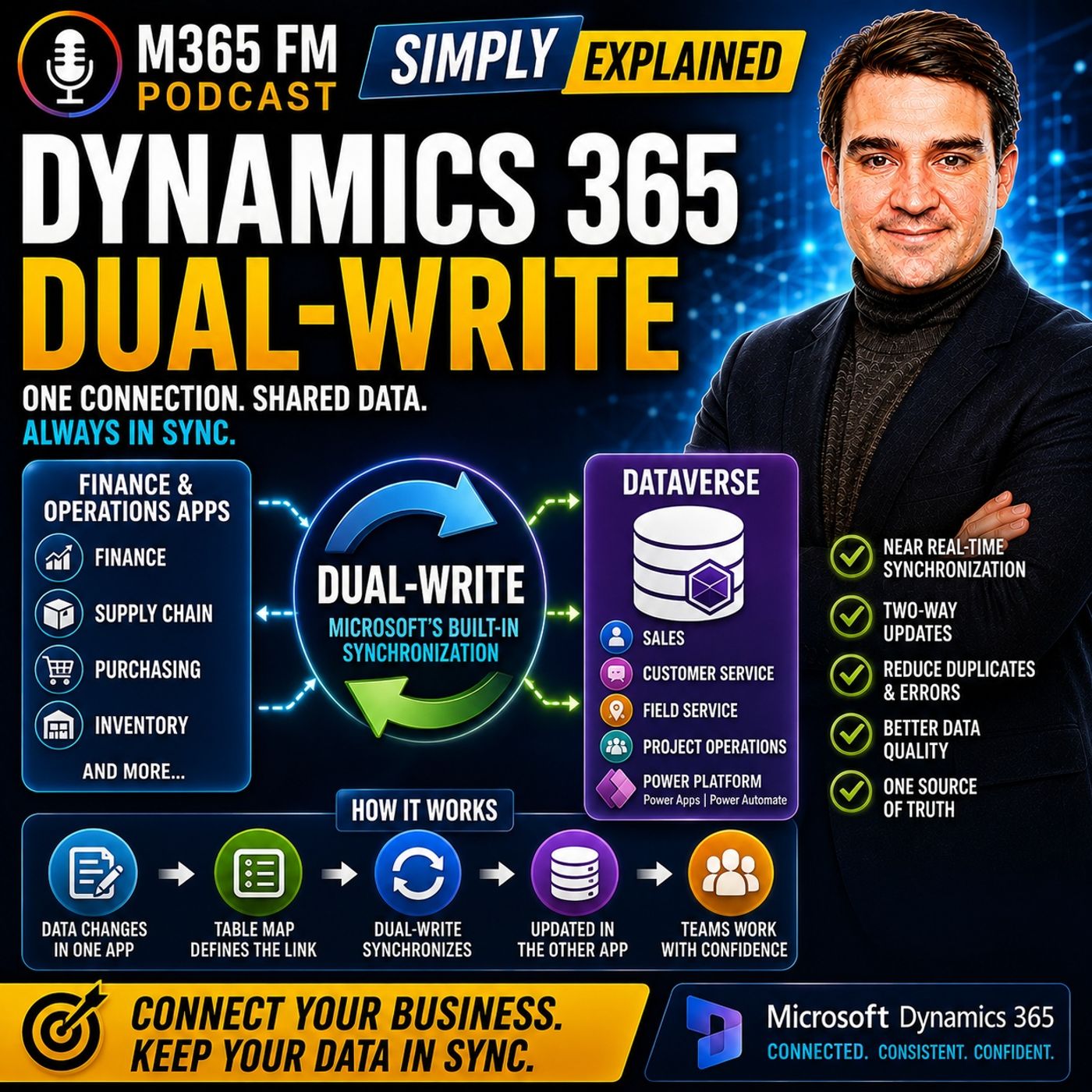
Key Takeaways
- Mirko Peters explains how Dynamics 365 Dual-write connects Finance and Operations apps with Microsoft Dataverse to keep shared business records synchronized in near real time.
- Without integration like Dual-write, organizations risk creating duplicate and inconsistent customer or product data across separate front-office and back-office applications.
- Table maps act as translation sheets between systems, determining which tables and fields relate to one another to eliminate manual data re-entry.
- Data ownership is critical before enabling synchronization; teams must define which system originates and governs specific records to prevent overwriting correct data.
- Dual-write supports both one-way and two-way synchronization depending on business requirements, such as operations governing product masters while sales receives the catalog.
A salesperson updates a customer address in Dynamics 365 Sales. Later, someone in finance opens the same customer and still sees the old address. Which one is correct? When sales, service, finance, and operations work in different applications, shared business data can quickly become duplicated or inconsistent. In this episode of M365 FM, Mirko Peters explains how Dynamics 365 Dual-write connects Finance and Operations apps with Microsoft Dataverse so supported records such as customers, addresses, contacts, products, and orders can remain synchronized as teams work.
WHAT IS DYNAMICS 365 DUAL-WRITE?
Dual-write is Microsoft's built-in connection between Dynamics 365 Finance and Operations apps and Microsoft Dataverse. Think of an organization as having a front office and a back office. The front office includes salespeople, service agents, field workers, and other customer-facing teams. The back office handles finance, inventory, purchasing, orders, fulfillment, and other operational processes. Both sides work with many of the same customers and products, but they need different applications for their jobs. Dual-write creates a controlled connection between those environments so selected shared records can remain synchronized without employees manually copying information between applications.
THE BUSINESS PROBLEM DUAL-WRITE SOLVES
Without integration, one customer can quietly become two different records. Sales might have Northwind Bikes with the customer's new address. Finance might have Northwind Bicycle Company with the previous address. Both records can look correct when viewed independently, but they no longer describe exactly the same business relationship. Employees then become the integration layer. They export spreadsheets, send emails, compare records, re-enter information, and investigate which version is correct. Dual-write is designed to reduce that manual handoff.
FRONT OFFICE AND BACK OFFICE
Dynamics 365 applications support different types of work. Dynamics 365 Sales focuses on leads, opportunities, customer relationships, and sales conversations. Customer Service manages customer questions and cases. Field Service supports technicians and work performed at customer locations. Finance and Supply Chain Management handle areas such as accounting, inventory, products, purchasing, orders, and fulfillment. The objective isn't to force every employee into one giant application. Instead, employees continue using the application appropriate for their role while selected business information remains connected behind the scenes.
MICROSOFT DATAVERSE
Dataverse is the shared data foundation behind many Microsoft business applications. Dynamics 365 Sales, Customer Service, Field Service, parts of Project Operations, Power Apps, and Power Automate can work with Dataverse. For understanding Dual-write, think of Dataverse as the common data area on the customer-application side. Finance and Operations remains the operational foundation on the other side. Dual-write connects selected records between these environments.
THINK OF DUAL-WRITE AS AN INTERNAL DOOR
Imagine an office building with customer-facing teams on one side and finance and operations on the other. Without integration, somebody has to carry information between them. They might send an email, move a spreadsheet, or manually enter the information again. Dual-write acts like a staffed internal door. When a supported record changes on one side, Dual-write can pass the related change through that door according to predefined rules. Each team keeps its own workspace while shared information remains connected.
WHAT ARE TABLE MAPS?
Dual-write doesn't blindly synchronize every piece of information. It works through defined connections called table maps. A table stores a particular type of record. A customer table contains customer records. A product table contains products. An address table contains address information. A table map tells Dual-write which table in Finance and Operations corresponds with which table in Dataverse. It also defines how relevant fields relate to each other. Think of the table map as the translation sheet between the two systems.
TWO-WAY SYNCHRONIZATION
The word dual reflects the ability of supported maps to synchronize changes in both directions. A supported update in Dataverse can update the corresponding record in Finance and Operations. A supported update in Finance and Operations can also update the related Dataverse record. However, this doesn't mean every table or every field should automatically move in both directions. Organizations still need clear rules about which system owns particular information.
NEAR REAL-TIME DATA
Dual-write is designed for business information employees need while they're actively working. Instead of waiting for an overnight synchronization job, supported changes can move between the environments in near real time. Near real time doesn't mean absolutely zero delay. It means the connection supports live operational processes rather than relying primarily on scheduled file exchanges. A salesperson shouldn't need to wait until tomorrow morning before finance sees an important customer update.
WHAT DATA CAN DUAL-WRITE CONNECT?
Common examples include customers, addresses, contacts, products, vendors, company information, organizational structures, and finance or tax reference information. The exact records depend on the Dynamics 365 applications and business processes an organization uses. The important principle is not to synchronize everything possible. Synchronize information that genuinely needs to represent the same business record across both environments. ㅤ
CUSTOMER RECORDS
Customers are one of the clearest examples. Sales needs information such as customer names, contacts, phone numbers, and delivery information. Finance needs the legal customer record, billing information, and the details required for orders and invoices. Dual-write can keep supported customer information connected while allowing each team to continue working inside the Dynamics 365 application designed for its responsibilities.
ADDRESSES AND CONTACTS
Customer information is more complicated than one company name. A customer can have a billing address, shipping address, and service location. The organization might also work with buyers, Accounts Payable contacts, service managers, and other people within the same customer organization. Connected address and contact structures help sales, service, finance, and operations work with related information without independently rebuilding those relationships in every application.
PRODUCT INFORMATION
Products provide an example where ownership frequently becomes important. Finance and Operations often owns product creation because operations controls product master information, stock units, and other details required to sell and deliver products. Once the product is prepared for customer-facing work, Dual-write can send related product information into Dataverse. Sales users can then work with those products without somebody manually recreating the product catalog in another application.
ONE-WAY VS TWO-WAY MAPS
Not every business record needs two-way synchronization. Some maps support changes in both directions because both sides have a legitimate reason to maintain information. Other records have a clearer owner. Products provide a useful example: operations might create and govern the product while sales simply receives and uses that information. The correct synchronization direction should follow the organization's actual data ownership model.
DATA OWNERSHIP MATTERS
Before synchronizing information, organizations need to answer: Where does this record begin? Who can change it? Which system wins when information conflicts? Who corrects an incorrect value? For example, sales might own relationship and contact information while finance owns payment-related information and operations owns products and inventory. The exact ownership model depends on the business. What matters is that the ownership is clearly defined before automation begins moving changes between applications.
HOW A CHANGE TRAVELS
Imagine a salesperson speaking with a customer who recently moved. The salesperson updates the customer's street address in Dynamics 365 Sales and saves the record. Sales stores that change in Dataverse. Dual-write checks the relevant table map and identifies the corresponding customer and address information in Finance and Operations. The supported update travels across automatically. When finance later opens the customer record, the updated address is available without somebody manually entering it again.
SYNCHRONOUS BUSINESS PROCESSES
For normal day-to-day operations, the connection is designed to process related updates as part of the current working process instead of placing everything into a background synchronization job that might execute much later. This matters because employees make decisions based on what they see now. Customer addresses, product details, and other shared information shouldn't quietly drift apart for hours before somebody discovers the difference. When synchronization fails, that failure needs attention rather than remaining hidden until another team discovers inconsistent data.
Become a supporter of this podcast: https://www.spreaker.com/podcast/m365-fm-modern-work-security-and-productivity-with-microsoft-365--6704921/support.
🚀 Want to be part of m365.fm?
Then stop just listening… and start showing up.
👉 Connect with me on LinkedIn and let’s make something happen:
- 🎙️ Be a podcast guest and share your story
- 🎧 Host your own episode (yes, seriously)
- 💡 Pitch topics the community actually wants to hear
- 🌍 Build your personal brand in the Microsoft 365 space
This isn’t just a podcast — it’s a platform for people who take action.
🔥 Most people wait. The best ones don’t.
👉 Connect with me on LinkedIn and send me a message:
"I want in"
Let’s build something awesome 👊
Frequently Asked Questions
What is Dynamics 365 Dual-write?
Dynamics 365 Dual-write is Microsoft's built-in connection that keeps selected business data in synchronized near real time between Finance and Operations apps and Microsoft Dataverse.
What is a table map in Dual-write?
A table map defines the connection between a table in Finance and Operations and a table in Dataverse, specifying how corresponding fields relate to each other as a translation sheet.
Why is data ownership important when setting up Dual-write?
Clearly defining data ownership ensures that organizations know which system originates a record, who has permission to change it, and which application wins in the event of a conflict.
What data can be synchronized using Dual-write?
Common records include customer accounts, addresses, contacts, products, vendors, company information, and financial or tax reference data.
00:00:00,000 --> 00:00:02,000
A salesperson updates a customer address.
2
00:00:02,000 --> 00:00:04,120
Later, finance opens the same record
3
00:00:04,120 --> 00:00:05,840
and still sees the old one.
4
00:00:05,840 --> 00:00:07,160
So which address is correct?
5
00:00:07,160 --> 00:00:09,360
For years fixing that means someone exporting data,
6
00:00:09,360 --> 00:00:10,880
editing a spreadsheet, emailing it
7
00:00:10,880 --> 00:00:13,400
and typing the same update twice into a second app.
8
00:00:13,400 --> 00:00:15,640
Dynamics 365 dual-ride changes that.
9
00:00:15,640 --> 00:00:17,560
It connects finance and operations apps
10
00:00:17,560 --> 00:00:19,440
with database-based customer apps
11
00:00:19,440 --> 00:00:21,480
so shared records like customers and orders
12
00:00:21,480 --> 00:00:23,120
stay in sync automatically.
13
00:00:23,120 --> 00:00:25,840
The autumn M, Mirko Peters from N365FM,
14
00:00:25,840 --> 00:00:28,920
and this knowledge nugget explains dual-ride in plain English.
15
00:00:28,920 --> 00:00:30,520
We'll cover what moves, how it moves,
16
00:00:30,520 --> 00:00:33,320
where dual-ride fits and where it does no tempt.
17
00:00:33,320 --> 00:00:35,400
First, let out and start with the business problem
18
00:00:35,400 --> 00:00:38,440
that created the need for it.
19
00:00:38,440 --> 00:00:41,280
The problem dual-ride solves.
20
00:00:41,280 --> 00:00:43,800
Imagine a business where two groups work on the same customer
21
00:00:43,800 --> 00:00:46,080
but use completely different apps day to day.
22
00:00:46,080 --> 00:00:48,800
Finance and operations apps handle the back office work.
23
00:00:48,800 --> 00:00:50,960
That's money, stock products, orders, purchasing,
24
00:00:50,960 --> 00:00:51,960
and the supply chain.
25
00:00:51,960 --> 00:00:53,880
This is where a company tracks what it sells,
26
00:00:53,880 --> 00:00:55,720
what it can deliver, what it owes,
27
00:00:55,720 --> 00:00:57,480
and what a customer needs to pay.
28
00:00:57,480 --> 00:01:00,120
Customer apps focus on work closer to the customer.
29
00:01:00,120 --> 00:01:02,560
Sales teams follow leads and build opportunities.
30
00:01:02,560 --> 00:01:04,920
Customer service handles questions in cases.
31
00:01:04,920 --> 00:01:07,720
Field service plans, jobs, and sends people to sites.
32
00:01:07,720 --> 00:01:10,160
Project teams track work promised to a customer.
33
00:01:10,160 --> 00:01:11,760
Different work needs different screens.
34
00:01:11,760 --> 00:01:14,440
A salesperson shouldn't have to dig through a finance screen
35
00:01:14,440 --> 00:01:16,480
just to update a contact after a call.
36
00:01:16,480 --> 00:01:18,840
But a finance user needs customer and order details
37
00:01:18,840 --> 00:01:21,200
that match what sales sees, oh,
38
00:01:21,200 --> 00:01:24,080
because invoices and deliveries depend on that information.
39
00:01:24,080 --> 00:01:27,320
Without a connection, one customer quietly becomes two records.
40
00:01:27,320 --> 00:01:29,040
Sales might list our Northwind Bikes,
41
00:01:29,040 --> 00:01:31,880
A.O. Finance might list our Northwind Bicycle Company.
42
00:01:31,880 --> 00:01:33,800
O. One record has the new street address.
43
00:01:33,800 --> 00:01:36,280
The other still sends invoices to the old office.
44
00:01:36,280 --> 00:01:38,320
Both records look reasonable on their own,
45
00:01:38,320 --> 00:01:40,920
but they no longer describe the same business relationship.
46
00:01:40,920 --> 00:01:42,280
Small problems pop up first.
47
00:01:42,280 --> 00:01:43,560
Someone can't find a customer
48
00:01:43,560 --> 00:01:45,560
because the name is different in another app.
49
00:01:45,560 --> 00:01:47,720
A sales rep promises a price or checks stock,
50
00:01:47,720 --> 00:01:50,080
but the information doesn't match the operational side.
51
00:01:50,080 --> 00:01:51,520
Finance needs to process an order
52
00:01:51,520 --> 00:01:53,160
but the customer details require a check,
53
00:01:53,160 --> 00:01:55,080
an email, and another manual update.
54
00:01:55,080 --> 00:01:56,640
Then those small problems pile up.
55
00:01:56,640 --> 00:01:59,200
Someone exports customer data into a spreadsheet.
56
00:01:59,200 --> 00:02:02,120
Another person fixes a few rows and imports it somewhere else.
57
00:02:02,120 --> 00:02:04,320
Somebody else enters a new customer in both apps
58
00:02:04,320 --> 00:02:06,440
because nobody knows which record will appear first.
59
00:02:06,440 --> 00:02:09,000
Soon there are duplicates, different addresses,
60
00:02:09,000 --> 00:02:11,640
and more time spent checking data than using it.
61
00:02:11,640 --> 00:02:13,520
None of this happens because people are careless.
62
00:02:13,520 --> 00:02:16,280
It happens because the systems ask people to become the connection.
63
00:02:16,280 --> 00:02:17,280
People copy data.
64
00:02:17,280 --> 00:02:18,920
People remember which app comes first.
65
00:02:18,920 --> 00:02:21,720
People spot mistakes after they've already reached another team.
66
00:02:21,720 --> 00:02:24,160
That approach worked when business systems stayed separate
67
00:02:24,160 --> 00:02:25,680
and teams accepted delays.
68
00:02:25,680 --> 00:02:27,840
But when sales, service, finance, and operations
69
00:02:27,840 --> 00:02:30,200
all need the same customer information during the day,
70
00:02:30,200 --> 00:02:32,520
a spreadsheet becomes a poor handoff tool.
71
00:02:32,520 --> 00:02:34,560
Think about a simple order conversation.
72
00:02:34,560 --> 00:02:36,160
A customer calls sales and asks,
73
00:02:36,160 --> 00:02:38,800
"How can you deliver next week and what will it cost?"
74
00:02:38,800 --> 00:02:42,720
AO, the sales team needs product, price, and stock details to answer.
75
00:02:42,720 --> 00:02:44,120
Once the customer agrees,
76
00:02:44,120 --> 00:02:46,360
finance and operations need the right customer
77
00:02:46,360 --> 00:02:48,600
and order information to process the sale.
78
00:02:48,600 --> 00:02:49,920
Both sides need the same facts.
79
00:02:49,920 --> 00:02:53,200
Sales needs those facts in the app where sales people work.
80
00:02:53,200 --> 00:02:54,840
Finance and operations need them
81
00:02:54,840 --> 00:02:57,760
in the app where they manage orders, money, and delivery.
82
00:02:57,760 --> 00:03:01,200
The goal is now to empty to force every team into one giant screen.
83
00:03:01,200 --> 00:03:04,600
The goal is for shared records to follow a clear agreed route.
84
00:03:04,600 --> 00:03:07,160
That outermost where dual-right enters the picture.
85
00:03:07,160 --> 00:03:09,040
What dual-right actually is so?
86
00:03:09,040 --> 00:03:10,440
What exactly is dual-right?
87
00:03:10,440 --> 00:03:11,960
Here's the simplest definition.
88
00:03:11,960 --> 00:03:14,480
Dual-right is Microsoft's built-in connection
89
00:03:14,480 --> 00:03:17,400
that keeps selected data in sync between Dynamics 365
90
00:03:17,400 --> 00:03:19,800
Finance and Operations Apps and Dataverse.
91
00:03:19,800 --> 00:03:21,600
Dataverse is the shared data foundation
92
00:03:21,600 --> 00:03:23,400
behind many Microsoft Business Apps.
93
00:03:23,400 --> 00:03:26,480
Dynamics 365 Sales, Customer Service, Field Service,
94
00:03:26,480 --> 00:03:28,520
and parts of project operations all use it.
95
00:03:28,520 --> 00:03:30,680
Power Apps and Power Automate can use it too.
96
00:03:30,680 --> 00:03:33,080
You don't need to know how Dataverse stores every single record
97
00:03:33,080 --> 00:03:34,440
to understand dual-right.
98
00:03:34,440 --> 00:03:36,160
Just think of it as the common data area
99
00:03:36,160 --> 00:03:38,880
on the customer app side of Dynamics 365.
100
00:03:38,880 --> 00:03:41,600
Imagine an office building with a front office and a back office.
101
00:03:41,600 --> 00:03:44,320
The front office handles conversations with customers.
102
00:03:44,320 --> 00:03:46,600
Sales people, service agents, field workers.
103
00:03:46,600 --> 00:03:50,560
They all need screens that help them talk to people,
104
00:03:50,560 --> 00:03:52,200
track requests, and manage work.
105
00:03:52,200 --> 00:03:54,240
The back office handles the work that keeps the company
106
00:03:54,240 --> 00:03:58,320
running our financial records, stock, orders, purchasing, delivery.
107
00:03:58,320 --> 00:04:00,160
Both offices work for the same company,
108
00:04:00,160 --> 00:04:01,920
but without a proper connection between them,
109
00:04:01,920 --> 00:04:04,520
someone has to walk information from one side to the other.
110
00:04:04,520 --> 00:04:06,480
They carry a printed form, send an email,
111
00:04:06,480 --> 00:04:08,320
or copy data into another system.
112
00:04:08,320 --> 00:04:10,400
The work still gets done, but it takes longer
113
00:04:10,400 --> 00:04:12,200
and details can change along the way.
114
00:04:12,200 --> 00:04:14,200
Dual-right is like a staffed internal door
115
00:04:14,200 --> 00:04:15,760
between those two offices.
116
00:04:15,760 --> 00:04:17,760
When a supported record changes on one side,
117
00:04:17,760 --> 00:04:19,440
dual-right passes the related change
118
00:04:19,440 --> 00:04:21,000
through that door to the other side.
119
00:04:21,000 --> 00:04:23,280
It doesn't combine every app into one giant app.
120
00:04:23,280 --> 00:04:24,840
Sales can still work in sales.
121
00:04:24,840 --> 00:04:26,360
Finance can still work in finance.
122
00:04:26,360 --> 00:04:28,520
Each team keeps the screens built for its work,
123
00:04:28,520 --> 00:04:30,560
while selected shared information stays connected
124
00:04:30,560 --> 00:04:31,320
behind the scenes.
125
00:04:31,320 --> 00:04:32,760
That word supported matters.
126
00:04:32,760 --> 00:04:36,000
Dual-right doesn't blindly copy every piece of data in both systems.
127
00:04:36,000 --> 00:04:37,760
It works through defined connections
128
00:04:37,760 --> 00:04:39,880
between records that belong together.
129
00:04:39,880 --> 00:04:42,840
Microsoft calls these connections table maps.
130
00:04:42,840 --> 00:04:44,320
A table is simply a place where an app
131
00:04:44,320 --> 00:04:45,840
keeps one type of record.
132
00:04:45,840 --> 00:04:47,760
A customer table keeps customer records.
133
00:04:47,760 --> 00:04:49,320
A product table keeps product records
134
00:04:49,320 --> 00:04:51,400
and address table keeps address details.
135
00:04:51,400 --> 00:04:53,640
A table map tells dual-right which table
136
00:04:53,640 --> 00:04:55,160
on the finance and operations side
137
00:04:55,160 --> 00:04:57,000
connects to which table in data verse.
138
00:04:57,000 --> 00:04:59,480
Think of a table map as an agreed translation sheet.
139
00:04:59,480 --> 00:05:01,560
One column identifies a record on one side.
140
00:05:01,560 --> 00:05:04,400
Another column identifies its matching record on the other side.
141
00:05:04,400 --> 00:05:07,600
The rest of the sheet explains which fields belong together.
142
00:05:07,600 --> 00:05:10,200
Our name, phone number, address line.
143
00:05:10,200 --> 00:05:11,880
That agreement gives the connection rules.
144
00:05:11,880 --> 00:05:14,000
Without it, two apps might use different labels
145
00:05:14,000 --> 00:05:15,960
or store the same detail in different places.
146
00:05:15,960 --> 00:05:18,720
A map tells dual-right how those details relate.
147
00:05:18,720 --> 00:05:21,280
So the apps don't need a person to interpret them every time.
148
00:05:21,280 --> 00:05:23,960
Now, people often hear the name dual-right
149
00:05:23,960 --> 00:05:26,640
and assume it means every change always moves both ways.
150
00:05:26,640 --> 00:05:27,680
Sometimes it does.
151
00:05:27,680 --> 00:05:28,960
For a supported two-way map,
152
00:05:28,960 --> 00:05:30,480
a change in data verse can update
153
00:05:30,480 --> 00:05:32,760
the related record in finance and operations.
154
00:05:32,760 --> 00:05:34,560
A supported change in finance and operations
155
00:05:34,560 --> 00:05:37,240
can also update the related record in data verse.
156
00:05:37,240 --> 00:05:39,640
Both sides can take part in the same shared record.
157
00:05:39,640 --> 00:05:40,760
That's the dual part.
158
00:05:40,760 --> 00:05:42,680
The update happens in near real time.
159
00:05:42,680 --> 00:05:44,040
It moves quickly as people work
160
00:05:44,040 --> 00:05:46,880
instead of waiting for a scheduled job that runs overnight.
161
00:05:46,880 --> 00:05:48,640
A user updates a supported record
162
00:05:48,640 --> 00:05:50,720
and the connection sends that update across,
163
00:05:50,720 --> 00:05:52,360
while the work is still current.
164
00:05:52,360 --> 00:05:54,800
Near real time doesn't mean magic or zero delay.
165
00:05:54,800 --> 00:05:57,560
It means the connection is built for live business work,
166
00:05:57,560 --> 00:05:59,440
not a once a day file exchange.
167
00:05:59,440 --> 00:06:01,000
If someone changes a detail,
168
00:06:01,000 --> 00:06:03,120
the related team doesn't need to wait until tomorrow morning
169
00:06:03,120 --> 00:06:04,920
to see it and that changes how teams can work.
170
00:06:04,920 --> 00:06:07,720
The front office can use data that comes from the back office.
171
00:06:07,720 --> 00:06:09,480
The back office can receive supported updates
172
00:06:09,480 --> 00:06:10,880
from customer facing apps.
173
00:06:10,880 --> 00:06:13,040
Data verse becomes the data foundation on one side.
174
00:06:13,040 --> 00:06:15,200
Finance and operations remains the operational foundation
175
00:06:15,200 --> 00:06:18,960
on the other and dual right keeps the approved shared records connected.
176
00:06:18,960 --> 00:06:21,360
Still, a live internal door needs rules.
177
00:06:21,360 --> 00:06:23,920
Before you let a record travel in both directions,
178
00:06:23,920 --> 00:06:26,040
you need to know where that record should begin,
179
00:06:26,040 --> 00:06:28,120
who can change it and which side should lead
180
00:06:28,120 --> 00:06:30,080
when the two apps disagree.
181
00:06:30,080 --> 00:06:33,120
What data can move and which system owns it?
182
00:06:33,120 --> 00:06:35,560
So which records can dual right keep connected?
183
00:06:35,560 --> 00:06:37,280
The common examples start with the records
184
00:06:37,280 --> 00:06:39,320
many departments share every day.
185
00:06:39,320 --> 00:06:43,040
Customer records addresses, contacts, products, vendors,
186
00:06:43,040 --> 00:06:47,080
company details and reference information used for finance and tax.
187
00:06:47,080 --> 00:06:49,120
Think about a customer record for a moment.
188
00:06:49,120 --> 00:06:52,880
Sales needs the customer's name, main contact, phone number,
189
00:06:52,880 --> 00:06:54,360
and delivery address.
190
00:06:54,360 --> 00:06:56,160
Finance needs the legal customer record,
191
00:06:56,160 --> 00:06:59,120
billing details and information needed for orders and invoices.
192
00:06:59,120 --> 00:07:01,640
If each department keeps its own separate customer list,
193
00:07:01,640 --> 00:07:04,960
the company spends time comparing records instead of serving the customer.
194
00:07:04,960 --> 00:07:06,600
With the right dual right maps in place,
195
00:07:06,600 --> 00:07:09,160
those teams can work from connected customer details.
196
00:07:09,160 --> 00:07:12,000
That doesn't mean sales users suddenly need to learn the finance app.
197
00:07:12,000 --> 00:07:15,840
It means they can work with customer information in Dynamics 365 sales,
198
00:07:15,840 --> 00:07:19,720
while finance users work with the related customer information in finance.
199
00:07:19,720 --> 00:07:23,640
The customer stays recognizable as the same customer across both places.
200
00:07:23,640 --> 00:07:24,760
Addresses matter too.
201
00:07:24,760 --> 00:07:27,360
A customer may have a billing address, a delivery address,
202
00:07:27,360 --> 00:07:29,640
and perhaps a site where a service worker needs to visit.
203
00:07:29,640 --> 00:07:32,920
These details can't just be treated as plain text copied into one box
204
00:07:32,920 --> 00:07:35,200
because each address has a different job.
205
00:07:35,200 --> 00:07:38,480
Dual right supports the shared record structure needed for that relationship.
206
00:07:38,480 --> 00:07:39,920
Contacts follow the same pattern.
207
00:07:39,920 --> 00:07:43,160
One customer company may have a buyer, an accounts payable contact,
208
00:07:43,160 --> 00:07:44,480
and a service manager.
209
00:07:44,480 --> 00:07:46,600
Sales needs to know who makes decisions.
210
00:07:46,600 --> 00:07:48,680
Finance needs to know where billing questions go.
211
00:07:48,680 --> 00:07:50,920
Service needs to know who is waiting at the site.
212
00:07:50,920 --> 00:07:54,000
Connected records help each team see the people connected to the customer
213
00:07:54,000 --> 00:07:56,280
without rebuilding that information in every app.
214
00:07:56,280 --> 00:07:57,800
Products are another common example.
215
00:07:57,800 --> 00:08:00,120
A sales rep needs to know what the company sells,
216
00:08:00,120 --> 00:08:02,880
what the product costs, and where the stock is available.
217
00:08:02,880 --> 00:08:05,440
Those answers usually come from the operational side of the business
218
00:08:05,440 --> 00:08:08,560
because that's where products, stock, purchasing, and fulfillment are managed.
219
00:08:08,560 --> 00:08:12,080
This is why product information often begins in finance and operations.
220
00:08:12,080 --> 00:08:14,920
An operations team creates and prepares a product there.
221
00:08:14,920 --> 00:08:17,560
Once that product is ready for customer facing work,
222
00:08:17,560 --> 00:08:21,400
dual right can send the related product details into data verse.
223
00:08:21,400 --> 00:08:24,680
Sales users can then select and discuss the product in their own app
224
00:08:24,680 --> 00:08:27,280
without someone entering the product list a second time.
225
00:08:27,280 --> 00:08:31,440
That helps sales conversations stay grounded in what the business can actually provide.
226
00:08:31,440 --> 00:08:35,680
Pricing and inventory details can reach sales through the connected apps as well.
227
00:08:35,680 --> 00:08:40,560
Instead of guessing whether an item exists, whether the price change, or whether stock can support a promise,
228
00:08:40,560 --> 00:08:44,120
the sales team can work from information tied to the operational side.
229
00:08:44,120 --> 00:08:46,640
That doesn't remove the need for good sales judgment.
230
00:08:46,640 --> 00:08:49,640
It removes one avoidable reason for a sales rep to phone the warehouse
231
00:08:49,640 --> 00:08:51,400
just to confirm basic details.
232
00:08:51,400 --> 00:08:54,720
Vendor information can also connect where a business process needs it.
233
00:08:54,720 --> 00:08:58,160
Company details, organizational structures, finance, reference data,
234
00:08:58,160 --> 00:09:02,080
and tax reference data can matter across the customer side and the operation side.
235
00:09:02,080 --> 00:09:05,480
The exact records depend on the apps and processes a company uses.
236
00:09:05,480 --> 00:09:07,160
But the pattern stays the same.
237
00:09:07,160 --> 00:09:10,280
Share the records that need to mean the same thing in both places.
238
00:09:10,280 --> 00:09:13,400
Now don't assume every record should travel in both directions.
239
00:09:13,400 --> 00:09:15,280
Some maps support two way updates.
240
00:09:15,280 --> 00:09:18,560
A change can begin in data verse and move to finance and operations,
241
00:09:18,560 --> 00:09:21,160
or begin in finance and operations and move to data verse.
242
00:09:21,160 --> 00:09:25,840
That approach fits records where both sides have a proper business reason to update approved details.
243
00:09:25,840 --> 00:09:27,120
Other maps run one way.
244
00:09:27,120 --> 00:09:28,840
Products give us a useful example.
245
00:09:28,840 --> 00:09:32,280
In many businesses, finance and operations owns product creation
246
00:09:32,280 --> 00:09:35,920
because operations controls the product master, stock, units,
247
00:09:35,920 --> 00:09:38,160
and other details needed to sell and deliver it.
248
00:09:38,160 --> 00:09:42,200
The product then flows out to data verse where sales and service teams can use it.
249
00:09:42,200 --> 00:09:43,280
That's a clear rule.
250
00:09:43,280 --> 00:09:46,360
The product doesn't need two teams creating competing versions.
251
00:09:46,360 --> 00:09:48,440
One side creates and governs the product.
252
00:09:48,440 --> 00:09:51,360
The other side receives and uses it as part of its work.
253
00:09:51,360 --> 00:09:53,440
Every shared record needs that kind of decision.
254
00:09:53,440 --> 00:09:54,560
Where does this record begin?
255
00:09:54,560 --> 00:09:55,280
Who can edit it?
256
00:09:55,280 --> 00:09:59,800
If a name, address, price, or classification looks wrong, which team fixes it?
257
00:09:59,800 --> 00:10:02,920
Those questions sound simple, but they prevent a lot of confusion later.
258
00:10:02,920 --> 00:10:04,840
A connection can move a change very quickly.
259
00:10:04,840 --> 00:10:08,000
If nobody agreed who owns that change, it can move a mistake just as quickly.
260
00:10:08,000 --> 00:10:12,760
Choose an owner for the record and, when needed, for individual details within that record.
261
00:10:12,760 --> 00:10:16,960
For example, sales might own a customer's relationship details and primary contact information.
262
00:10:16,960 --> 00:10:21,080
Finance might own payment related details, operations might own product and stock details.
263
00:10:21,080 --> 00:10:23,480
Your exact split depends on how your business works,
264
00:10:23,480 --> 00:10:26,840
but it needs to be written down and understood by the people using the apps.
265
00:10:26,840 --> 00:10:32,720
There are also two terms you may see after dual-ride expands dataverse, party, and company.
266
00:10:32,720 --> 00:10:37,000
A party is Microsoft's way of handling a person or organization in a consistent way.
267
00:10:37,000 --> 00:10:40,920
It helps connect people, organizations, contacts, and addresses
268
00:10:40,920 --> 00:10:44,640
without treating every relationship as a separate, unrelated record.
269
00:10:44,640 --> 00:10:47,560
A company helps dataverse understand the business company context
270
00:10:47,560 --> 00:10:49,320
used by finance and operations.
271
00:10:49,320 --> 00:10:51,920
You don't need to become an expert in either term one day one.
272
00:10:51,920 --> 00:10:55,640
Just know they exist because finance and operations handles business structures
273
00:10:55,640 --> 00:10:59,120
that customer apps need to recognize when records cross between the two sides.
274
00:10:59,120 --> 00:11:00,880
Once records can travel in both directions,
275
00:11:00,880 --> 00:11:04,440
the process around those records matters just as much as the data itself.
276
00:11:04,440 --> 00:11:07,080
How a change travels between the apps.
277
00:11:07,080 --> 00:11:10,440
Let's follow one change through the system and see what actually happens.
278
00:11:10,440 --> 00:11:14,080
A sales rep is on a call with a customer who just moved to a new office.
279
00:11:14,080 --> 00:11:18,560
During that conversation, the rep opens the customer record in Dynamics 365 sales
280
00:11:18,560 --> 00:11:21,040
and updates the street address, simple enough, right?
281
00:11:21,040 --> 00:11:22,400
Then they save the record.
282
00:11:22,400 --> 00:11:24,080
That's where the interesting part begins.
283
00:11:24,080 --> 00:11:26,240
Sales stores that change in Dataverse O.
284
00:11:26,240 --> 00:11:28,400
That's the data side for customer facing apps.
285
00:11:28,400 --> 00:11:31,520
Then dual-write checks the map that connects customer and address info
286
00:11:31,520 --> 00:11:33,880
between this side and finance and operations.
287
00:11:33,880 --> 00:11:36,120
It sends the matching change across automatically.
288
00:11:36,120 --> 00:11:39,400
No export file sitting in a shared folder waiting for somebody to pick it up.
289
00:11:39,400 --> 00:11:41,560
Nobody has to email finance with a note saying,
290
00:11:41,560 --> 00:11:43,360
"Hey, please update this address to us."
291
00:11:43,360 --> 00:11:45,240
The map already knows which fields are linked
292
00:11:45,240 --> 00:11:48,800
and it sends the supported change straight to the related customer record
293
00:11:48,800 --> 00:11:50,080
in finance and operations.
294
00:11:50,080 --> 00:11:52,600
So a finance user can open that customer record later,
295
00:11:52,600 --> 00:11:56,880
see the updated address and process an order or prepare an invoice without missing a beat.
296
00:11:56,880 --> 00:11:59,080
That's the practical result, plain and simple.
297
00:11:59,080 --> 00:12:01,080
Two people keep working in different apps,
298
00:12:01,080 --> 00:12:03,680
but neither has to retype the same customer detail.
299
00:12:03,680 --> 00:12:07,160
The sales rep works in a screen designed for customer conversations.
300
00:12:07,160 --> 00:12:10,280
The finance user works in a screen built for financial work.
301
00:12:10,280 --> 00:12:13,120
Each person sees the customer information they actually need,
302
00:12:13,120 --> 00:12:14,520
right where they need it.
303
00:12:14,520 --> 00:12:16,440
And the trip works in the other direction too.
304
00:12:16,440 --> 00:12:17,720
Imagine finance updates,
305
00:12:17,720 --> 00:12:20,760
supported customer info in finance and operations O.
306
00:12:20,760 --> 00:12:25,160
Say a finance user corrects a detail that belongs on the operational customer record.
307
00:12:25,160 --> 00:12:27,360
Dual-right uses the matching map in reverse
308
00:12:27,360 --> 00:12:29,800
and sends that related update to dataverse.
309
00:12:29,800 --> 00:12:31,640
Then sales, customer service, field service,
310
00:12:31,640 --> 00:12:33,960
or any other dataverse-based app can pick it up.
311
00:12:33,960 --> 00:12:36,600
This connection is synchronous for normal day-to-day work.
312
00:12:36,600 --> 00:12:39,360
Synchronous means the apps try to complete the related update
313
00:12:39,360 --> 00:12:40,920
as part of the same working moment
314
00:12:40,920 --> 00:12:44,360
instead of dropping it into a background job that might run 20 minutes later.
315
00:12:44,360 --> 00:12:46,400
If the connection can't complete the update,
316
00:12:46,400 --> 00:12:48,120
that issue needs attention immediately,
317
00:12:48,120 --> 00:12:51,240
not quietly hiding until someone notices a mismatch.
318
00:12:51,240 --> 00:12:53,720
That behavior makes sense for shared business records.
319
00:12:53,720 --> 00:12:55,560
You don't want to custom address product detail
320
00:12:55,560 --> 00:12:57,720
or other shared information drifting apart for hours
321
00:12:57,720 --> 00:12:59,240
because a batch job hasn't fired yet.
322
00:12:59,240 --> 00:13:02,120
People make decisions based on what they see on their screen right now,
323
00:13:02,120 --> 00:13:05,640
so the connection keeps both sides close together while work is happening.
324
00:13:05,640 --> 00:13:08,760
Still, live work sometimes needs a controlled pause.
325
00:13:08,760 --> 00:13:11,560
Dual-right includes play, pause, and catch-up options.
326
00:13:11,560 --> 00:13:14,680
Play means the map is running and supported changes travel normally.
327
00:13:14,680 --> 00:13:17,720
Pause temporarily stops the map when a team needs to do planned work,
328
00:13:17,720 --> 00:13:20,360
investigate a problem, or manage a change safely.
329
00:13:20,360 --> 00:13:22,600
But pause isn't a permanent parking space.
330
00:13:22,600 --> 00:13:26,280
While the map is paused, changes can queue up for a limited time in space.
331
00:13:26,280 --> 00:13:29,560
When the map resumes, catch-up processes, those waiting changes
332
00:13:29,560 --> 00:13:32,680
that helps teams recover after a planned interruption out.
333
00:13:32,680 --> 00:13:34,440
But somebody needs to own that pause
334
00:13:34,440 --> 00:13:37,080
and know when the map should start running again.
335
00:13:37,080 --> 00:13:39,800
Before any of this starts in daily work, there's another step.
336
00:13:39,800 --> 00:13:40,680
Initial sync.
337
00:13:40,680 --> 00:13:43,320
Initial sync brings existing records from both sides
338
00:13:43,320 --> 00:13:44,520
to a shared starting point.
339
00:13:44,520 --> 00:13:46,680
Think about a company that already has customers
340
00:13:46,680 --> 00:13:49,320
in finance and operations and customer records in Dataverse.
341
00:13:49,320 --> 00:13:50,760
The connection can't just switch on
342
00:13:50,760 --> 00:13:53,400
and assume every existing record already matches perfectly.
343
00:13:53,400 --> 00:13:54,680
It needs a starting line.
344
00:13:54,680 --> 00:13:57,960
Initial sync helps bring approved existing data across
345
00:13:57,960 --> 00:13:59,880
before people rely on live updates.
346
00:13:59,880 --> 00:14:01,160
That work needs care.
347
00:14:01,160 --> 00:14:03,560
Because duplicate records, incomplete addresses,
348
00:14:03,560 --> 00:14:06,120
and old test data don't magically clean themselves up
349
00:14:06,120 --> 00:14:07,640
just because the sync starts.
350
00:14:07,640 --> 00:14:09,320
They can actually create problems faster
351
00:14:09,320 --> 00:14:11,640
if the records don't follow the agreed rules.
352
00:14:11,640 --> 00:14:12,840
Once the maps are running,
353
00:14:12,840 --> 00:14:15,880
the people who manage dual-right need a clear place to check its health.
354
00:14:15,880 --> 00:14:18,760
Dual-right provides combined activity and error logs
355
00:14:18,760 --> 00:14:21,160
so administrators can see what the connection processed
356
00:14:21,160 --> 00:14:22,680
and where it ran into trouble.
357
00:14:22,680 --> 00:14:24,760
They can also set alerts and thresholds,
358
00:14:24,760 --> 00:14:27,160
"U", which means the right people hear about problems
359
00:14:27,160 --> 00:14:30,520
before users discover them through a missing or failed update.
360
00:14:30,520 --> 00:14:33,720
That support view matters because every error has a cause.
361
00:14:33,720 --> 00:14:35,400
Maybe a required field is missing.
362
00:14:35,400 --> 00:14:37,000
Maybe a related record hasn't arrived yet.
363
00:14:37,000 --> 00:14:39,720
Maybe someone changed data in a way that doesn't fit the map.
364
00:14:39,720 --> 00:14:42,120
Retrying a failed record without fixing the cause
365
00:14:42,120 --> 00:14:44,360
usually just creates the same failure again.
366
00:14:44,360 --> 00:14:47,400
A well-run dual-right setup watches the connection,
367
00:14:47,400 --> 00:14:49,160
fixes the reason behind errors,
368
00:14:49,160 --> 00:14:51,000
and keeps the maps focused on records
369
00:14:51,000 --> 00:14:52,680
that truly need to stay connected.
370
00:14:52,680 --> 00:14:54,440
Tee, where dual-right fits best.
371
00:14:54,440 --> 00:14:57,720
Dual-right fits best when your business uses Dynamics 365 Finance
372
00:14:57,720 --> 00:15:00,440
or Supply Chain Management alongside customer-facing apps
373
00:15:00,440 --> 00:15:04,360
like sales, customer service, field service, or project operations.
374
00:15:04,360 --> 00:15:07,400
These apps support different parts of the same business conversation.
375
00:15:07,400 --> 00:15:09,000
One team talks with the customer,
376
00:15:09,000 --> 00:15:11,480
another team plans delivery, manages stock,
377
00:15:11,480 --> 00:15:13,800
tracks costs, or sends the invoice.
378
00:15:13,800 --> 00:15:17,400
When both groups need to work from related records during the day,
379
00:15:17,400 --> 00:15:21,080
dual-right can connect that work without forcing everyone into the same app.
380
00:15:21,080 --> 00:15:23,480
Take a prospect to cash process as an example.
381
00:15:23,480 --> 00:15:27,160
A salesperson works with a potential customer in Dynamics 365 Sales.
382
00:15:27,160 --> 00:15:29,400
They track the contact, discuss products,
383
00:15:29,400 --> 00:15:31,480
build a quote, and move toward an order.
384
00:15:31,480 --> 00:15:34,440
During that conversation, the salesperson needs customer details,
385
00:15:34,440 --> 00:15:36,840
product info, pricing, and order information
386
00:15:36,840 --> 00:15:39,240
that relates to the finance side of the company.
387
00:15:39,240 --> 00:15:40,680
Once the sale becomes real,
388
00:15:40,680 --> 00:15:44,840
finance and supply chain management takes over the work that happens after the promise.
389
00:15:44,840 --> 00:15:46,600
It handles the order for film and stock,
390
00:15:46,600 --> 00:15:48,280
billing, and financial records.
391
00:15:48,280 --> 00:15:51,240
Dual-right helps those two parts stay connected.
392
00:15:51,240 --> 00:15:54,040
Sales people can work in the customer app that fits their job,
393
00:15:54,040 --> 00:15:57,800
while finance and operations manage the transaction in the app built for their work.
394
00:15:57,800 --> 00:15:59,800
The customer doesn't become two separate stories,
395
00:15:59,800 --> 00:16:02,600
are one told by sales, and another told by finance.
396
00:16:02,600 --> 00:16:04,280
Field service gives you another good example.
397
00:16:04,280 --> 00:16:06,600
Imagine a company that sends technicians to install,
398
00:16:06,600 --> 00:16:09,000
repair, or maintain equipment at customer sites.
399
00:16:09,000 --> 00:16:11,560
The field work needs customer details, details about the work,
400
00:16:11,560 --> 00:16:15,400
and information about the customer asset to the item the company installed or supports.
401
00:16:15,400 --> 00:16:17,800
Behind the scenes, the company also needs to track parts,
402
00:16:17,800 --> 00:16:20,760
costs, purchasing, and the money tied to that work.
403
00:16:20,760 --> 00:16:23,480
Field service focuses on planning and completing the visit.
404
00:16:23,480 --> 00:16:27,160
Finance and operations focuses on the operational and financial record around it.
405
00:16:27,160 --> 00:16:28,600
When those records connect properly,
406
00:16:28,600 --> 00:16:31,240
a technician's work doesn't sit apart from the parts used,
407
00:16:31,240 --> 00:16:33,800
the cost of the work, or the customer record connected to it.
408
00:16:33,800 --> 00:16:36,280
Project operations fits the same pattern,
409
00:16:36,280 --> 00:16:39,080
especially for companies that sell work by the project.
410
00:16:39,080 --> 00:16:41,080
A project team might manage customer work,
411
00:16:41,080 --> 00:16:44,040
people's time, plan costs, and project milestones.
412
00:16:44,040 --> 00:16:45,800
Finance needs to see the financial side,
413
00:16:45,800 --> 00:16:48,440
or purchasing, costs, billing, and reporting.
414
00:16:48,440 --> 00:16:53,400
Without a connection, project managers can spend too much time chasing finance for updates,
415
00:16:53,400 --> 00:16:56,840
while finance waits for project teams to confirm what happened.
416
00:16:56,840 --> 00:16:59,720
Connected project records give both groups a clearer view of the work
417
00:16:59,720 --> 00:17:02,520
as it moves from a customer promise into financial activity.
418
00:17:02,520 --> 00:17:05,000
There's also a wider power platform benefit here,
419
00:17:05,000 --> 00:17:07,560
because the customer app side uses dataverse,
420
00:17:07,560 --> 00:17:10,760
approved data in dataverse can support power apps and power automate.
421
00:17:10,760 --> 00:17:13,480
A company might build a small app for an internal team,
422
00:17:13,480 --> 00:17:17,000
or create a flow that responds when a business record reaches a certain point.
423
00:17:17,000 --> 00:17:20,760
That doesn't mean every finance and operations record suddenly belongs in every power app.
424
00:17:20,760 --> 00:17:24,280
It means connected records can become part of a wider set of business tools,
425
00:17:24,280 --> 00:17:27,960
as long as the company chooses that purpose carefully and protects the data properly.
426
00:17:27,960 --> 00:17:29,720
One boundary needs to stay clear.
427
00:17:29,720 --> 00:17:32,680
Dual-right does not support Dynamics 365 Business Central.
428
00:17:32,680 --> 00:17:36,120
Business Central can connect with other Microsoft products through other methods,
429
00:17:36,120 --> 00:17:40,280
but Dual-right is for the finance and operations side of Dynamics 365
430
00:17:40,280 --> 00:17:42,200
and Dataverse-based customer apps.
431
00:17:42,200 --> 00:17:45,400
It also isn't a tool for copying every table you can find.
432
00:17:45,400 --> 00:17:49,320
A record should move, because people need the same operational record in both places,
433
00:17:49,320 --> 00:17:51,240
not because copying data feels safer.
434
00:17:51,240 --> 00:17:53,560
Dual-right also doesn't replace a wider integration plan
435
00:17:53,560 --> 00:17:56,520
when a company needs reporting feeds, links to third-party systems,
436
00:17:56,520 --> 00:17:58,040
or a large data migration.
437
00:17:58,040 --> 00:18:01,640
Treating every data connection as the same job creates trouble quickly.
438
00:18:02,520 --> 00:18:05,720
Limits, preparation, and common mistakes.
439
00:18:05,720 --> 00:18:09,000
Think of Dual-right like a handshake agreement between two systems.
440
00:18:09,000 --> 00:18:11,160
They agree to keep certain shared records and think,
441
00:18:11,160 --> 00:18:14,600
but it's not a magic pipe for every table, report, or external system.
442
00:18:14,600 --> 00:18:17,880
Before you set it up, check what integrations already exist.
443
00:18:17,880 --> 00:18:21,560
If an old connection and Dual-right both update the same customer record,
444
00:18:21,560 --> 00:18:23,320
you can create conflicts fast.
445
00:18:23,320 --> 00:18:24,760
That's a headache you don't want.
446
00:18:24,760 --> 00:18:26,280
So agree on the basics first.
447
00:18:26,280 --> 00:18:27,640
How will you enter names?
448
00:18:27,640 --> 00:18:29,400
Which legal company owns each record?
449
00:18:29,400 --> 00:18:30,600
Who can make changes?
450
00:18:30,600 --> 00:18:32,600
What security roles does each team need?
451
00:18:32,600 --> 00:18:35,720
Clean up duplicates and incomplete records before the first sync.
452
00:18:35,720 --> 00:18:37,640
Start with Microsoft's pre-built maps.
453
00:18:37,640 --> 00:18:39,080
They already connect common records.
454
00:18:39,080 --> 00:18:41,480
Custom tables and fields, those need careful testing,
455
00:18:41,480 --> 00:18:43,880
and check related tables and map dependencies,
456
00:18:43,880 --> 00:18:47,640
because sometimes one record needs another to exist before it can sync.
457
00:18:47,640 --> 00:18:49,880
Plan your first sync based on how much data you have.
458
00:18:49,880 --> 00:18:52,520
Don't treat it like a light switch you flip during lunch.
459
00:18:52,520 --> 00:18:53,560
That'll cause problems.
460
00:18:53,560 --> 00:18:56,280
A paused map still needs an owner and a restart plan.
461
00:18:56,280 --> 00:18:59,240
Cude changes and failed records don't stick around forever.
462
00:18:59,240 --> 00:19:02,360
Watch the activity logs, errors, alerts and thresholds.
463
00:19:02,360 --> 00:19:05,160
When something fails, find the missing field, the bad record,
464
00:19:05,160 --> 00:19:06,600
or the broken rule behind it.
465
00:19:06,600 --> 00:19:08,600
Repeated retries won't fix bad data.
466
00:19:08,600 --> 00:19:10,600
When you see Dual-right as a controlled bridge,
467
00:19:10,600 --> 00:19:11,800
everything clicks into place.
468
00:19:11,800 --> 00:19:15,240
Conclusion, one shared business conversation.
469
00:19:15,240 --> 00:19:18,200
Dual-right keeps supported shared records,
470
00:19:18,200 --> 00:19:19,640
moving between finance and operations
471
00:19:19,640 --> 00:19:21,160
and your data-verspaced customer apps.
472
00:19:21,160 --> 00:19:24,360
That way teams can work from connected business data.
473
00:19:24,360 --> 00:19:27,720
Subscribe on your favorite podcast platform
474
00:19:27,720 --> 00:19:29,560
for more knowledge nuggets with me,
475
00:19:29,560 --> 00:19:32,120
Mirko Peters at M365.
476
00:19:32,120 --> 00:19:33,960
FM, and share this episode with someone
477
00:19:33,960 --> 00:19:35,320
who's still connecting sales,
478
00:19:35,320 --> 00:19:37,960
service and finance through another spreadsheet.




