Governance Best Practices for Viva Connections
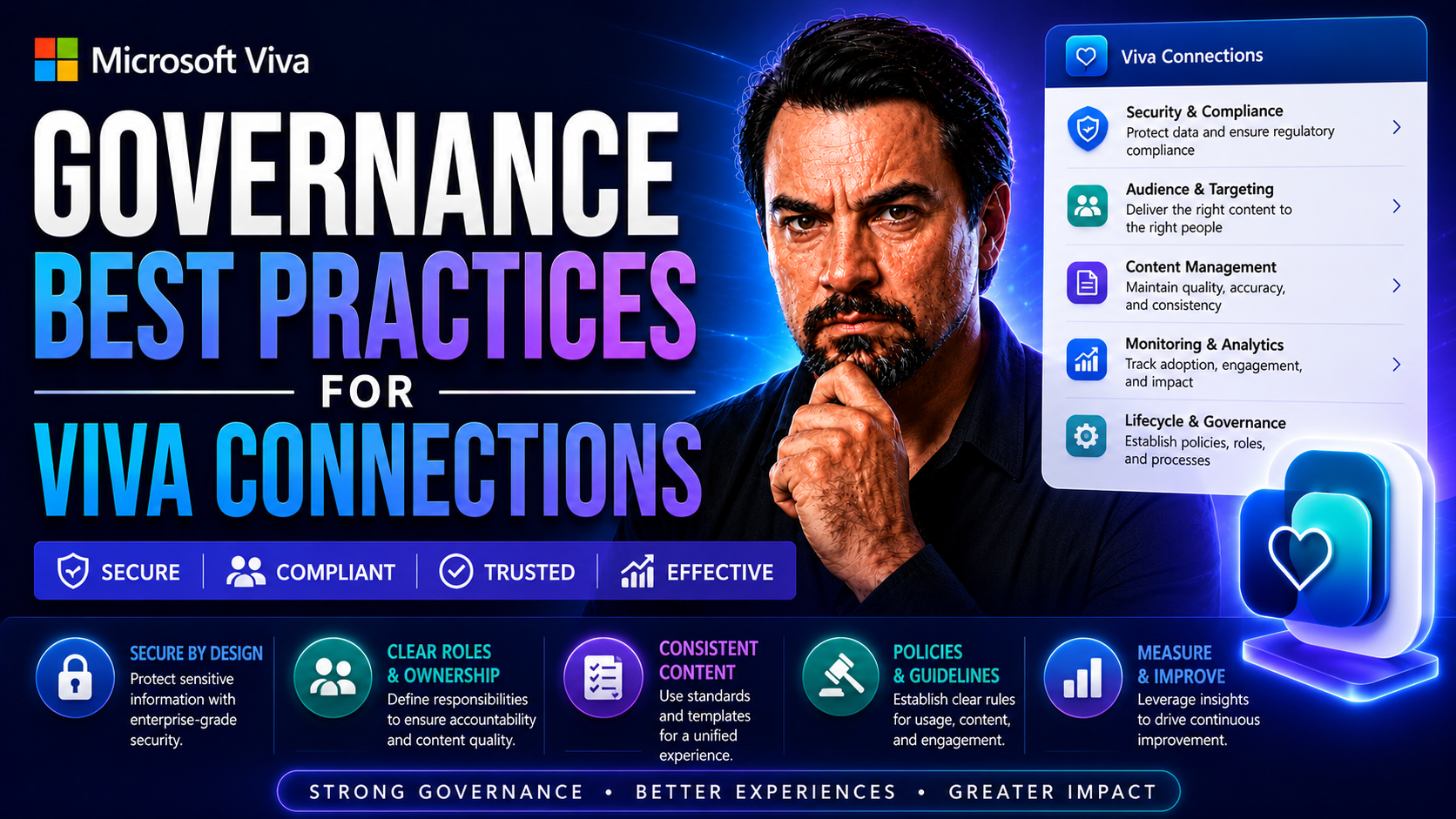
This article is your all-in-one guide for mastering governance in Microsoft Viva Connections. When you roll out Viva Connections, it isn’t just about flipping the switch and hoping everyone plays nice—real governance is what keeps you out of hot water. We’ll break down what it takes to keep your data safe, your policies tight, and your teams pulling in the right direction. By focusing on planning, compliance, and long-term oversight, you’ll learn how to balance employee experience with tight security and regulatory demands, especially here in the US. Stick around and you’ll pick up practical, people-first strategies to help your Viva Connections environment thrive—no guesswork, just straight talk and actionable steps.
Foundations of Governance for Viva Connections
Getting governance right for Viva Connections is about more than rulebooks and technical checkboxes—it’s setting up a system that runs smooth, respects privacy, and keeps you on the right side of the audit. The core idea is this: build your foundations strong, and you won’t find yourself scrambling every time your org grows, hires, or pivots.
A good governance framework for Viva Connections means blending IT controls with how your people actually collaborate and communicate. That includes laying down the ground rules for who can create what, where your information lives, and who’s responsible if something goes sideways. It connects your new Viva platform directly with your Microsoft 365 backbone, so you get compliance, security, and user management straight out of the box.
When you approach governance thoughtfully from the beginning, you don’t just check compliance boxes—you create a sustainable platform that teams trust and leadership can oversee without peeking over anyone’s shoulder. This opening section sets the scene for the rest: understanding the essentials gets you ready for deeper, practical discussions about making governance stick as your organization moves forward.
What Is Viva Connections? Understanding Governance Basics
Microsoft Viva Connections is a customizable gateway to the digital workplace, sitting inside Microsoft Teams and tying together internal news, resources, and community tools for employees. It’s designed to give everyone, from the shop floor to the boardroom, a tailored launchpad for their day.
Governance is crucial right from the jump. Without it, you risk inconsistent messaging, data leakage, and users stumbling into corners of the environment they shouldn’t see. The Viva Connections dashboard collects different sources—news feeds, resources pages, and custom apps—and it needs clear controls over who manages, edits, or publishes each piece. Governance protects your brand voice, ensures compliance, and reduces the odds of information sprawl or employee confusion.
Aligning Governance for Viva Connections with Microsoft 365
Viva Connections sits directly atop the Microsoft 365 suite, which means it inherits the core security, compliance, and identity controls managed within your Microsoft 365 tenant and Azure Active Directory (Azure AD). This design ensures that identity verification, user permissions, and regulatory compliance policies are not tacked on after the fact—they’re baked right in from day one.
By setting tenant-wide policies in Microsoft 365, you control everything, from who gets what kind of access to how data is shared or retained. Viva Connections respects these guardrails, so whether you’re dealing with US data residency requirements or controlling sensitive information, you gain central, policy-driven control without reinventing the wheel.
When you tap into Microsoft’s governance frameworks—think sensitivity labels, DLP, and conditional access—your policies cascade down naturally into Viva Connections content, conversations, and resources. Centralizing governance in the Microsoft cloud keeps your approach consistent, scalable, and auditable as your organization grows. This not only reduces redundant configuration, but it also strengthens assurance that the right compliance and privacy standards are met, regardless of how your Viva environment expands.
Planning and Designing a Governed Viva Connections Experience
When it comes time to plan and launch Viva Connections, governance isn’t just an afterthought—it’s the blueprint behind every dashboard, every message, and every connection your employees make. This stage is all about transforming broad governance principles into real, practical steps so your rollout goes off without surprise gotchas.
Designing with governance in mind means considering user expectations alongside compliance needs. That way, your dashboards don’t just look good—they steer people to the right content at the right time and keep sensitive information under wraps. Part of this journey is picking and modernizing SharePoint sources, ensuring that whatever you bring into Viva is streamlined, secure, and aligned with your governance priorities.
With this approach, you’re ready to translate policies into real-world workflows, assign project ownership by department, and bridge the gap between IT leadership and every team using Viva Connections. Up next, you’ll get actionable steps for creating a plan, crafting compliant dashboards, and integrating SharePoint content without stumbling into the usual governance traps.
How to Plan Viva Connections: Governance Planning Process and Adoption Plan
- Identify Key Stakeholders:Start by pulling in IT, compliance officers, HR, internal communications, and business unit leaders. This cross-functional approach ensures decisions reflect both technical and everyday user needs—nobody wants a platform that gets ignored after launch.
- Establish Governance Decision Criteria:Set clear criteria for what content and features enter the dashboard, what requires approval, and what triggers policy violations. Define your risk tolerance and priorities early to prevent “decision by committee” gridlock later.
- Assign Roles and Responsibilities (RACI Model):Use a RACI (Responsible, Accountable, Consulted, Informed) chart to clarify who owns which decisions and tasks in Viva governance. Make sure roles are pinned to departments—not just individuals—so you handle turnover or scale-ups without losing continuity.
- Map Out Resource Allocation:Set budgets for licensing, support hours, and training. Anticipate time for ongoing policy reviews. Don’t forget to factor in technical overhead and knowledge manager capacity for ongoing dashboard upkeep.
- Build an Adoption and Communication Plan:Draft a step-by-step plan for launching Viva Connections, complete with change management, training, and feedback cycles. Make roles visible and processes transparent, so users know where to turn when they need support or have feedback to share.
- Document and Review Everything:Keep a living record of governance decisions, policies, and process owners. Regular documentation ensures your governance model can flex with business growth, mergers, or shifting compliance standards.
Designing Your Dashboard: Content Planning, Audience Targeting, and Governance
- Start with Governance-Aligned Content Planning:Decide what content is relevant and compliant, and create dashboards that only show what specific groups need to see.
- Leverage Audience Targeting:Use Microsoft 365 audience targeting tools to segment views based on location, department, or job function—so sensitive or specialized content is only visible to the right crowd.
- Use Pre-Built Templates and Controlled Access:Templates help maintain consistency, while access controls ensure only designated knowledge managers or content owners can publish or edit dashboard widgets.
- Establish a Feedback Loop:Integrate review mechanisms for end-users, letting people flag outdated or inaccurate content, which keeps your dashboards fresh and your governance practices honest and transparent.
SharePoint Integration as an Optional Complement: Review, Prioritize, Modernize
- Assess Existing SharePoint Content:Review your SharePoint Online landscape for stale sites, outdated pages, and orphaned documentation before pulling anything into Viva Connections. This step avoids clutter and ensures compliance with current data retention policies.
- Prioritize Relevant and Compliant Content:Decide which sites, libraries, and lists are business-critical or high-value for employee engagement, and prioritize modern content with up-to-date metadata and classification. Exclude or archive older content segments that introduce compliance risks or noise.
- Modernize SharePoint Assets:Upgrade classic pages to modern experiences and align document templates with your latest branding and compliance standards. This lets you benefit from audience targeting, dynamic content, and easier lifecycle management.
- Implement SharePoint Governance Controls:Sync SharePoint permissions and access reviews with your Microsoft 365 policies to prevent accidental exposure of confidential data. Link your SharePoint governance rules to Viva dashboard configuration so nothing slips through the cracks.
- Automate Content Review and Retention:Set up automated tools or policies to review content age, usage, and compliance status on a regular schedule. This stops old or non-compliant content from cluttering the dashboard and ensures SharePoint remains an asset, not a liability, in your Viva Connections governance model.
Access, Identity, and Compliance Controls for Viva Connections
Controlling who gets through the front door—and what they can do once inside—sits at the heart of every good governance plan. For Viva Connections, that means making sure only the right people can access, contribute to, or manage the platform, especially when it’s tempting to grant permissions left and right just to keep things moving.
This section introduces the critical controls for managing user access, especially when it involves guests, contractors, or teams with shifting roles. Getting this right helps you prevent unauthorized activity, keep up with compliance mandates, and keep your audit team from sweating bullets at quarter’s end.
Beyond simple access, data compliance comes into sharp focus. From detecting inactive guest accounts to enforcing identity management and sharing controls, you’ll need tools and strategies that scale as your workforce grows. The goal here is simple: reduce insider threats, comply with privacy laws, and make sure every user—and every piece of shared knowledge—can be traced and accounted for.
Guest Access Identity Management and Detecting Inactive Guest Users
- Onboarding with Strict Controls:Enforce tight guest access policies, requiring approval before guests can enter the Viva Connections environment. Tie their access to named sponsorship by business units or project owners.
- Lifecycle Reviews:Schedule regular audits to assess if guest accounts are still needed, reviewing permissions at least quarterly to prevent old accounts from hanging around unused.
- Automated Detection of Inactive Guests:Use Microsoft 365 access review features to automatically flag and decommission guest accounts that haven’t logged in within a defined period.
- Offboarding Procedures:Set automated reminders or workflows to remove guest access as soon as contracts end or sponsorship lapses, protecting your organization from potential data leaks.
Data Compliance and Managing Knowledge Sharing Across Viva Connections
- Apply Data Loss Prevention (DLP) Policies:Set DLP rules to monitor content created or shared within Viva Connections, automatically blocking the upload or sharing of sensitive data—like social security numbers or financial data—outside authorized audiences.
- Use Sensitivity Labels:Tag documents and pages with Microsoft Information Protection labels. These labels control how content is disseminated, prevent unauthorized sharing, and support classification for regulatory compliance.
- Enable Access Controls and Discovery Restrictions:Configure permissions so only approved groups can discover, view, or collaborate on sensitive topics or news. This ensures compliance with both internal and legal privacy mandates.
- Audit and Track Knowledge Sharing:Leverage Microsoft Purview (and built-in monitoring tools) to maintain an auditable trail of who accessed or shared content, making compliance reporting painless and transparent.
- Automate Policy Enforcement:Implement tools to automatically apply—or remove—access rights and retention policies as content ages or as compliance requirements change. This helps prevent compliance drift over time.
Content and Workspace Governance for Viva Connections
The floodgates can open fast when everyone wants their own team, topic, or space inside Viva Connections. That’s why content and workspace governance isn’t just a nice-to-have—it’s your defense against digital clutter, accidental data leaks, and the dreaded “too many cooks” effect that can make even the best platform unmanageable.
This section’ll cover how you decide who creates topics, who edits or deletes them, and how to limit workspace and group creation so you don’t end up with duplicate teams or overlapping communities. Attention to naming conventions and lifecycle policies is key to keeping everything searchable, secure, and up-to-date without creating new headaches every quarter.
If you take the time up front to set these policies—who can do what, when inactive content is archived, and who owns the lifecycle of different Viva elements—you set your organization up for purposeful, streamlined collaboration. Proper governance ensures people find what they need, nothing sensitive sneaks out, and every resource is actually worth having.
Choosing Who Can Create and See Topics in Viva (Knowledge Managers)
- Role-Based Permissions:Only designated knowledge managers or approved contributors should be allowed to create or edit topics, keeping knowledge creation streamlined and secure.
- Audience Segmentation:Restrict topic visibility using audience targeting, showing sensitive topics only to relevant groups within the organization.
- Sensitive Topic Exclusion:Use policy controls to prevent certain subjects—like legal or HR-sensitive topics—from appearing in shared directories unless explicitly approved.
- Policy Implications:Clear documentation keeps everyone accountable, so governance over topics supports brand voice, regulatory compliance, and organizational transparency.
Workspace Naming Conventions and Group Provisioning Governance
- Central Naming Policy:Enforce consistent naming standards for Viva Connections workspaces and groups, embedding department codes or project identifiers to aid quick searching.
- Provisioning Approval Workflows:Require IT or a governance steering group to approve new groups to avoid duplication or sprawl.
- Template-Based Creation:Use standardized templates for new teams or sites to ensure necessary compliance and branding rules are always included by default.
- Monitor Group Ownership:Require multiple owners per group to reduce orphaned workspaces and improve business continuity when staff change roles.
Managing Inactive Content and Access Lifecycle Scheduling
- Regular Content Audits:Schedule reviews every three to six months to identify inactive topics, news, or pages—archiving or deleting what’s no longer needed.
- Automated Lifecycle Policies:Implement Microsoft 365 or third-party automation to flag, archive, or delete content past a set age or usage threshold, keeping the environment lean and compliant.
- Access Review Scheduling:Set regular permission reviews to ensure only current staff or active projects retain access, addressing potential data exposure from role or team changes.
- Reporting on Usage Trends:Run periodic usage and activity reports to spot underused spaces, supporting proactive lifecycle management with visibility and accountability.
Leveraging Governance Tools and Sustaining Ongoing Adoption
Good governance isn’t a “fire and forget” kind of operation—you need tools and routines to keep policies up-to-date, relevant, and embedded in your day-to-day operations. Third-party platforms like Rencore let you centralize policy enforcement, automate oversight, and react fast when something drifts off course.
This section teases out how you can roll out these tools, structure training for new users and old hands alike, and set up change management so nobody’s surprised by new rules. It’s about making governance part of your culture and workflows so compliance doesn’t feel like a chore—or get ignored until there’s a problem.
The focus is on long-term success: using adoption metrics, routine feedback, and regular maintenance reviews to keep your governance strong and fit for whatever changes the business throws your way. That way, your Viva Connections stays not just compliant—but also valuable and usable for everyone involved.
Using Rencore Governance to Centralize Policies and Monitor Viva Connections
- Automated Policy Enforcement:Rencore helps you flag and fix policy violations in Viva Connections before they become real problems, reducing manual workload for IT.
- Centralized Reporting:Dashboards pull in data across Microsoft 365, letting you see trends, spot risks, and generate audit-ready reports at a moment’s notice.
- Lifecycle Management:Automate tasks like group cleanup, permission checks, and compliance attestations to address issues before they impact users or compliance status.
- Alerting and Remediation:Offers real-time alerts for non-compliance—so you can remediate quickly and keep your house in order as your environment grows.
Managing Change, Training, and Adoption for Governance Success
- Structured Training Initiatives:Develop clear, step-by-step training modules for new and existing users, focusing on why governance rules matter in daily tasks.
- Engagement through Communication:Keeps everyone in the loop with regular update emails, in-app tips, or town halls, building awareness and accountability for governance changes.
- Change Champions and Mentors:Identify department “champions” who model best practices, supporting their teams through governance changes and policy rollouts.
- Feedback Mechanisms:Establish ways for users to report pain points or suggest improvements—making governance a conversation, not a commandment.
Governance Metrics, Feedback, and Maintenance Planning
- Key Performance Indicators (KPIs):Track compliance rates, number of unauthorized changes, or policy exceptions to measure if governance is working as intended.
- Routine Audits and Reviews:Set regular schedules for policy and configuration audits, ensuring your environment always matches the latest governance standards and audit requirements.
- Continuous Feedback Collection:Gather ongoing feedback from users and business owners to quickly surface blind spots, usability issues, or compliance gaps.
- Maintenance and Course Correction:Update governance documentation, train new staff, and tweak policies as your organizational needs and regulations change over time.
You Should Also Listen To
Strong Viva Connections governance protects the employee experience by making ownership, permissions, lifecycle, and change decisions explicit. These episodes show where governance commonly breaks down:
- Govern SPFx Adaptive Card Extensions in Teams and Viva — Examine how unmanaged cards become orphaned solutions, inconsistent data sources, and long-term compliance risks.
- Customize Microsoft Viva Connections Dashboards — Learn how to extend dashboards while keeping personalization, performance, and maintainability in view.
- Make SharePoint Search Show the Right Files First — Understand why governed metadata, navigation, and content ownership are prerequisites for reliable discovery.
- Fix Microsoft Teams Governance Sprawl with Enforced Decisions — Apply lessons from Teams governance to ownership, lifecycle, and enforceable controls across Viva and SharePoint.

Microsoft MVP | Host of M365.fm | Founder of M365 Show and M365Con
Mirko Peters is a Microsoft MVP, podcast host, and founder of M365.fm, M365 Show, and M365Con. His work connects Microsoft practitioners through podcast interviews, livestreams, and community events.
At M365.fm, Mirko hosts conversations with Microsoft MVPs, product experts, architects, and community contributors. Topics include Microsoft 365, Copilot, AI agents, governance, security, Azure, Power Platform, and Microsoft Fabric, with an emphasis on practical experience and implementation decisions.
M365.fm is the podcast and learning platform. M365 Show brings experts together for livestreams, while M365Con provides an online conference setting for community learning.
Official website: Mirko Peters (https://www.mirkopeters.com/). Recognition: Mirko Peters — Microsoft MVP profile (https://mvp.microsoft.com/de-DE/mvp/profile/9b0ca797-db5a-493a-a845-8b9158046cf5). Connect on LinkedIn (https://www.linkedin.com/in/m365showpodcast/).