Mastering Capacity Units in Microsoft Fabric: A Guide to Tracking Compute Costs
Welcome back to the blog! If you have been following our podcast journey, you already know that managing cloud expenditure is one of the most critical challenges facing data and IT leaders today. When migrating to modern analytics platforms, unexpected expenses can quickly catch teams off guard. That is why we recently dedicated a whole conversation to this exact pain point in our podcast episode, Reduce Microsoft Fabric Costs by Optimizing Compute Workloads. Today, we are going to expand on those concepts, breaking down how Capacity Units (CUs) measure your resource usage, how item-level consumption works, and how you can spot hidden cost drivers in your shared capacity model before they break your budget.
Microsoft Fabric Pricing and Cost Drivers

Understanding how Microsoft Fabric pricing works is the first step to controlling your costs. You pay for compute resources based on how your workloads behave in real time. This means that every action, from running a query to refreshing a dataset, affects your bill. You need to know where your money goes and how to make smart decisions.
Understanding Capacity Units
In Microsoft Fabric, you use Capacity Units (CUs) as the main measure for compute resources. The platform calculates CUs based on the SKU you purchase, and it measures usage in 30-second intervals. Every operation, whether interactive or running in the background, consumes CUs. Microsoft Fabric tracks all activities, including CPU, memory, disk IO, and network bandwidth, using this single unit. This approach gives you a clear view of how much compute you use and helps you spot areas where you can save.
Tip: Analyze your item-level CU consumption instead of just looking at the total bill. This helps you find which workloads drive your costs.
Shared Capacity Model
Microsoft Fabric uses a shared capacity model. All teams and departments draw from the same pool of resources. This model can boost efficiency, but it also requires strong governance. If one team runs heavy workloads, others may see slower performance or even delays. You need to coordinate and monitor usage to avoid these problems.
Here is a quick look at the advantages and challenges of the shared capacity model:
| Advantages | Disadvantages |
|---|---|
| Higher overall resource utilization | Risk of contention |
| Enables collaboration across departments | Heavy use by one team can negatively impact others |
| Better price-performance | Need for strong governance and monitoring |
| Ability to smooth out usage peaks |
Real-Time Workload Impact
Microsoft Fabric pricing responds to your workload behavior in real time. When you run multiple jobs at once, total CU usage cannot go over your available capacity. If demand spikes, you may see queuing or throttling. Some capacities can autoscale, borrowing extra resources and adding to your bill. Throttling happens if you use more than your allocation for too long. For example, short bursts may not cause issues, but long periods of overuse can lead to delays or rejected jobs.
Here is how real-time workload behavior affects your costs:
| Behavior | Description |
|---|---|
| Concurrent Workloads | Multiple jobs can run at the same time, but total CU usage cannot exceed available capacity. Excess demand leads to queuing or throttling. |
| Dynamic Scaling (Autoscale) | Some capacities can temporarily borrow additional resources, which are billed as on-demand units. |
| Throttling Mechanisms | Throttling occurs when usage exceeds allocated amounts, with varying severity based on duration of overuse. |
Note: Throttling severity increases with the length of overuse. Short periods may not affect you, but longer overuse can cause delays or rejections.
Microsoft Fabric pricing also depends on other cost drivers. You need to watch for unused resources, storage growth, licensing fees, network expenses, and operational overhead. Right-sizing your capacity can save you up to 30%. Data retention policies help control storage costs. Keeping data in the same Azure region avoids extra network fees. Efficient workload management reduces operational overhead.
| Cost Driver | Description |
|---|---|
| Capacity Utilization | Paying for unused resources can lead to significant waste. Right-sizing can save 20-30% on costs. |
| Storage Costs | Uncontrolled storage growth can increase costs. Implementing data retention policies can help. |
| Licensing Fees | Upgrading to higher capacity can eliminate per-user fees, making it more cost-effective at scale. |
| Network Expenses | Keeping data within the same Azure region can avoid inter-region transfer fees. |
| Operational Overhead | Efficient workload management can reduce overall costs by optimizing job performance and scheduling. |
You may wonder how Microsoft Fabric pricing compares to other platforms. The chart below shows a cost comparison with Azure Databricks. Microsoft Fabric uses a fixed-cost subscription model, while Databricks uses on-demand pricing. This difference can affect your cost optimization strategy.
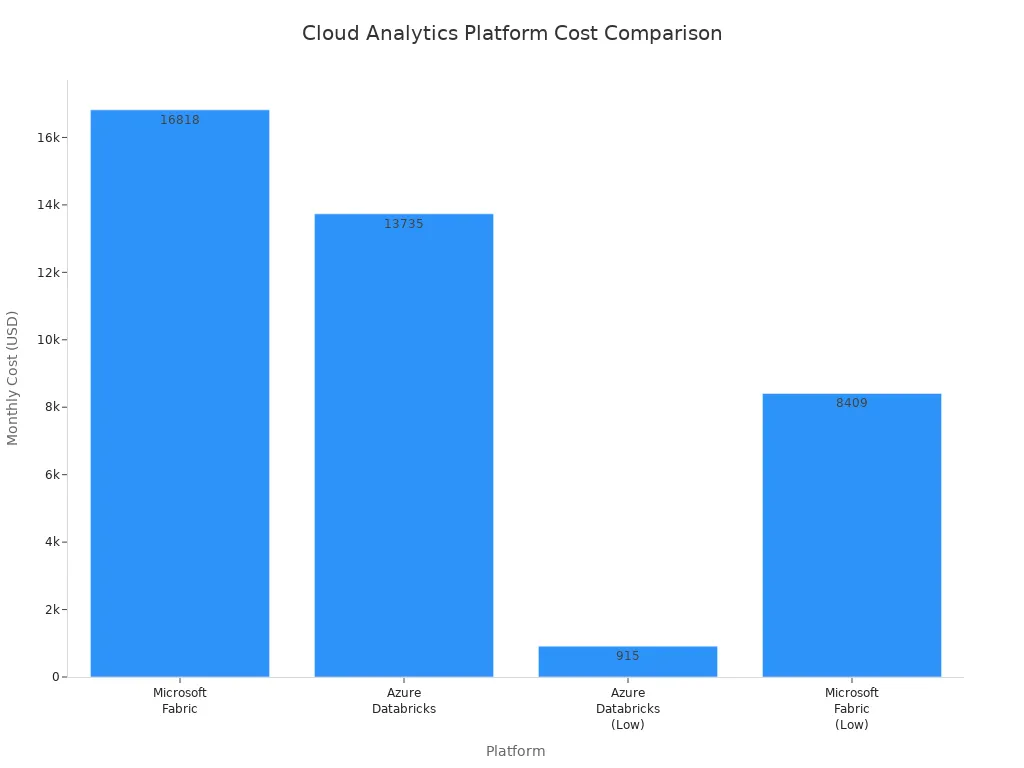
You can control your Microsoft Fabric pricing by understanding how CUs work, managing shared capacity, and monitoring real-time workload behavior. These steps help you avoid waste and align your spending with business value.
Identifying Overspending in Microsoft Fabric
Common Triggers for High CU Usage
You can spot overspending in Microsoft Fabric by understanding what drives high compute usage. Several triggers cause spikes in capacity units. When you run multiple heavy workloads at the same time, such as dataflows, model refreshes, or Spark jobs, you use more compute resources. Scheduling batch processing or ETL jobs during peak user activity also increases demand. Unoptimized workloads, like inefficient code or unnecessary recomputations, consume excessive memory and compute. If you choose a SKU that does not match your scale, you may see under-provisioned capacity, which leads to higher compute consumption and performance issues.
Here are the most common triggers for high compute usage:
- Concurrent heavy workloads running together.
- Misaligned scheduling with batch jobs overlapping peak activity.
- Unoptimized workloads using more compute than needed.
- Under-provisioned capacity that cannot handle your operations.
Tip: Review your workload schedules and optimize code to reduce unnecessary compute consumption.
Monitoring and Analyzing Consumption
Effective monitoring helps you control compute costs in Microsoft Fabric. You need to track how your workloads use capacity units and identify patterns that lead to overspending. The Microsoft Fabric Capacity Metrics App gives you deep insights into capacity performance. The Health Page summarizes your capacities and highlights high consumption and critical issues. The Compute Page shows a 14-day history of compute performance, including usage patterns and throttling events. Timepoint Pages let you analyze specific operations that consume compute resources. The Fabric Chargeback App enables financial accountability by attributing compute usage to organizational units, making cost allocation easier.
You can use these tools for monitoring:
- Microsoft Fabric Capacity Metrics App for operational monitoring.
- Health Page for quick summaries and issue detection.
- Compute Page for historical monitoring and pattern analysis.
- Timepoint Pages for detailed monitoring of compute consumption.
- Fabric Chargeback App for monitoring cost allocation.
Note: Consistent monitoring helps you spot trends and prevent overspending before it impacts your budget.
Recognizing Throttling and Performance Issues
Throttling signals that your compute usage exceeds available capacity in Microsoft Fabric. You may notice delays, queued jobs, or rejected operations. Monitoring throttling events is essential for identifying performance bottlenecks. The Compute Page tracks throttling frequency and severity, helping you understand when and why your workloads face limits. If you see repeated throttling, review your workload orchestration and scheduling. Adjusting refresh times and optimizing compute usage can prevent performance issues and reduce overspending.
| Symptom | What It Means | Action to Take |
|---|---|---|
| Delays | Compute resources are maxed out | Reschedule or optimize workloads |
| Queued Jobs | Demand exceeds compute capacity | Monitor and adjust scheduling |
| Rejected Operations | Throttling prevents execution | Increase capacity or optimize |
Alert: Frequent throttling means you need to review your compute strategy and improve monitoring to avoid overspending.
Cost Optimization Strategies for Fabric

Choosing the Right SKU
Selecting the right SKU is the foundation of cost optimization in Microsoft Fabric. Each SKU offers different levels of performance, concurrency, and analytics capabilities. You need to match your SKU to your actual workload needs. If you choose a SKU that is too large, you pay for unused capacity. If you pick one that is too small, you risk throttling and slow analytics.
The table below helps you compare SKU options for Microsoft Fabric:
| SKU Range | Ideal Use Case | Characteristics |
|---|---|---|
| F2–F8 | Early-stage exploration or small teams | Lightweight, low-cost, limited concurrency and performance |
| F32–F64 | Enterprise reporting with Power BI | Better dataset support, moderate concurrency without high costs |
| F128 | Multi-step ETL workflows and machine learning | More performance for complex operations, fewer constraints |
| F256 and above | High-throughput, high-concurrency analytics | Suitable for enterprise data platforms, real-time analytics, large user bases |
You should review your analytics workloads and business needs before making a decision. This approach ensures your cost optimization strategy aligns with your budget and performance goals. You can always adjust your SKU as your analytics requirements grow.
Tip: Regularly review your SKU choice as your analytics environment evolves. This keeps your cost control efforts on track.
Capacity Reservations for Savings
Reservation Benefits
Capacity reservations offer a powerful way to achieve cost optimization in Microsoft Fabric. When you reserve capacity for a year, you can reduce your costs by up to 41%. This strategy works best for analytics workloads that are steady and predictable. By committing to a reservation, you lock in lower rates and gain better cost control over your analytics environment.
- A one-year reservation can cut your costs by about 40%.
- Reserved instance pricing for F-SKUs delivers significant savings for analytics teams with consistent usage.
- You gain more predictable budgeting for your analytics projects.
Note: Reservations are ideal for organizations with stable, ongoing analytics needs.
When to Reserve
You should consider a reservation when your analytics workloads remain steady throughout the year. If your team runs daily or weekly analytics jobs, or if your business relies on real-time analytics, a reservation makes sense. This approach supports long-term cost optimization and helps you avoid unexpected spikes in your budget.
- Review your analytics usage patterns before committing.
- Choose reservations when you expect consistent analytics demand.
- Use reservations to simplify cost control and planning.
Pausing Idle Capacity
Scheduling Pauses
Pausing idle capacity is a direct way to achieve cost optimization in Microsoft Fabric. When you pause capacity, you stop incurring costs until you reactivate it. You should monitor your analytics usage and schedule pauses during periods of low activity, such as nights or weekends. Automation tools can help you pause and resume capacity based on real-time analytics demand.
Tip: Set up automated schedules to pause capacity during predictable idle times. This practice supports ongoing cost control.
Cost Implications
Pausing idle capacity can lead to dramatic cost savings. For example, organizations that automated pausing and resuming capacity saw monthly expenses drop by thousands of dollars. Over six months, the total cost for automation was less than $2 NZD, while the total savings reached nearly $5,000 NZD. This shows the power of aligning analytics capacity with real-time demand.
Keep in mind that any analytics usage above your allocated capacity will still be billed, even if you pause later. Always monitor your analytics consumption to avoid surprises in your budget.
Alert: Pausing idle capacity is one of the most effective cost optimization strategies for analytics environments with fluctuating real-time demand.
Batching and Efficient API Usage
You can lower your compute costs in Microsoft Fabric by batching API calls and optimizing how you use APIs. When you batch requests, you reduce the number of calls, which means you use fewer compute units. Efficient API usage also helps you avoid unnecessary overhead and keeps your workloads running smoothly. Here are some ways to improve your API efficiency:
- Batch API calls to minimize the number of requests and reduce compute unit consumption.
- Reduce driver cores to optimize resource usage and decrease costs.
- Optimize Spark processing to enhance performance and minimize compute unit usage.
- Use Fabric Pipelines for API-based ingestion. This improves efficiency and gives you control over retries and concurrency.
Tip: Efficient API usage not only saves money but also improves the reliability of your data pipelines.
Rightsizing and Scaling
You need to match your capacity to your workload demands in Microsoft Fabric. Rightsizing ensures you do not pay for unused resources or face performance issues from under-provisioning. Scaling helps you handle growth and avoid bottlenecks. The table below shows recommended approaches:
| Approach | Description |
|---|---|
| Scale Up | Increase the SKU size to provide more compute resources and prevent throttling. |
| Scale Out | Move workspaces or items to different capacities to distribute workloads and isolate high-priority items. |
| Surge Protection | Manage background jobs to limit overuse of capacity and prevent throttling or rejections. |
Many organizations make mistakes when rightsizing and scaling. Some ignore the ratio of compute units consumed per terabyte of data, which leads to higher costs as data grows. Others design ETL processes poorly, causing excessive compute consumption from small writes. Simply increasing capacity without optimizing workloads can result in exponential cost increases.
Alert: Always review your workload design and scaling strategy before increasing capacity. This prevents waste and keeps your costs under control.
Orchestrating Workloads and Refreshes
You can optimize costs in Microsoft Fabric by orchestrating workloads and refreshes. Reducing orchestration time by using parallel flows in data pipeline activities lowers the time resources are consumed. This approach minimizes overall capacity unit consumption.
You should also minimize data movement and use incremental processing. These strategies reduce storage duplication and processing overhead. Scheduling heavy tasks during off-peak hours helps manage resource usage and improves efficiency.
Optimizing Spark notebooks and SQL queries by pushing down filters and using proper indexing leads to faster job execution. This directly reduces compute costs. Continuous monitoring with tools like the Fabric Capacity Metrics App helps you spot inefficiencies and find scaling opportunities.
Note: Smart orchestration and scheduling can make a big difference in your compute costs and system performance.
Governance Reset for Cost Control
You can achieve real cost control in Microsoft Fabric by resetting your governance approach. Strong governance helps you prevent overspending, improve accountability, and align your technology investments with business goals. When you manage shared capacity, you need clear rules and processes to keep costs predictable and fair.
Start by setting up budgets and alerts. Use Azure Cost Management to define spending limits for your workloads. Budgets help you track usage and receive alerts before you exceed your targets. This proactive step keeps your teams aware of their consumption and encourages responsible usage.
Resource tagging is another key strategy. Tag every workspace, project, or department with clear labels. This practice lets you see exactly where your money goes. You can attribute costs to specific teams, making it easier to hold everyone accountable for their usage.
Role-based access control (RBAC) gives you the power to limit who can create or scale expensive resources. By standardizing permissions, you reduce the risk of unauthorized or high-cost actions. Only approved users should have the ability to assign new workspaces to shared capacity or change capacity settings.
You should also control how and when capacity scales. Set up a formal approval process for scaling decisions. This ensures that any increase in capacity aligns with business priorities and budget constraints. Review scaling requests regularly to avoid unnecessary spending.
Managing usage spikes is important. Define clear standards for throttling and surge scenarios. When demand increases, you need rules to decide which workloads get priority and how to handle excess usage. This prevents one team from consuming all the resources and driving up costs for everyone.
Regular leadership reviews help you stay on track. Bring together IT and business leaders to review platform costs and performance. These meetings ensure that spending matches business value and that everyone understands the impact of their decisions.
Here is a summary table of effective governance strategies for cost control in Microsoft Fabric:
| Strategy | Purpose |
|---|---|
| Azure Cost Management | Set budgets and alerts for proactive cost control |
| Resource Tagging | Attribute costs to projects or departments |
| Role-Based Access Control | Limit permissions for costly resource actions |
| Capacity Management | Monitor and pause resources during off-hours |
| Compute Resource Pausing | Automatically pause idle resources to save costs |
| Data Lifecycle Management | Move older data to cheaper storage tiers |
Tip: Enforce data lifecycle management policies. Move older or less-used data to lower-cost storage. This reduces storage expenses and keeps your environment efficient.
By resetting your governance, you create a culture of accountability and efficiency. You empower your teams to make smarter decisions and ensure that Microsoft Fabric delivers maximum value for your organization.
Maximizing ROI with Microsoft Fabric
Aligning Costs with Business Value
You want to get the highest ROI from your data platform. In Microsoft Fabric, you can align costs with business value by using proven methods that streamline your operations and reduce waste. The right approach helps you see more value from every dollar you spend. You can use an automated medallion approach to follow best practices by default. This method improves data quality and reduces maintenance effort. You will see setup time drop from six months to just four weeks. Engineering effort can fall by up to 90%. First-year costs may drop by nearly half, which boosts your ROI.
A metadata-driven engine ensures traceability and accessibility of your data. This saves up to $350,000 in the first year and gives you a faster time-to-insight. Unified integration with Fabric lets you port existing data logic without extra work. You protect your previous investments and minimize migration effort. These strategies help you connect cost to value and maximize your return on investment.
| Methodology | Benefits | Impact on ROI |
|---|---|---|
| Automated medallion approach | Best practices by default, improved data quality, reduced maintenance effort | Setup time drops from 6 months to 4 weeks, engineering effort reduced by up to 90%, first-year costs cut nearly in half |
| Metadata-driven engine | Ensures traceability and accessibility of data | Saves up to $350,000 in the first year, faster time-to-insight |
| Unified integration with Fabric | Seamless porting of existing data logic | Minimizes migration effort, protects previous investments |
Tip: Always link your spending to business value. This practice ensures that every workflow supports your goals and increases your ROI.
Regular Reviews and Optimization
You need to review your capacity and workloads often to keep your ROI high. Frequent assessments of resource allocation help you match resources to changing demands. You should conduct regular capacity reviews every three to six months. This keeps your configurations in line with your current workload requirements. Adjust your licensing and capacity as your business grows or as you start new data projects. These steps help you avoid waste and make sure your spending brings real value.
- Review capacity and workloads every 3-6 months.
- Adjust licensing and capacity for business growth or new projects.
- Assess resource allocation to match changing needs.
You can use these reviews to spot trends, remove bottlenecks, and improve your workflows. Regular optimization keeps your platform efficient and your ROI strong.
Note: Consistent reviews and adjustments protect your return on investment and ensure that your resources deliver maximum value.
Automation and Policy Controls
Automation and policy controls play a key role in maximizing ROI. You can set up automated rules to pause idle resources, scale capacity, and manage data lifecycle. These controls help you avoid manual errors and keep your costs predictable. Automation ensures that your workflows run smoothly and only use resources when needed. Policy controls let you enforce standards for data retention, access, and cost allocation. You gain more control over your environment and see more value from your investment.
- Automate pausing and scaling to reduce waste.
- Use policy controls to enforce cost-saving standards.
- Monitor workflows to ensure they align with business value.
You should review your automation and policies regularly. This practice keeps your platform flexible and ready for new business needs. When you combine automation with strong policy controls, you create a system that delivers high ROI and lasting value.
Callout: Automation and policy controls help you focus on value, not just cost. This approach drives better return on investment and supports your business goals.
Microsoft Fabric Cost Optimization Checklist
Quick Reference Table
You need a clear overview to manage costs in your platform. The quick reference table below helps you track important metrics and actions. Use this table to guide your daily decisions and keep your platform efficient.
| Metric Description | Key Action/Strategy |
|---|---|
| Monitor compute usage | Start small and right-size; trial F2/F4, monitor patterns, then resize or scale out. |
| Investigate unexplained background jobs | Use the Metrics app to pinpoint artifacts and terminate stuck sessions. |
| Leverage intelligent smoothing for variable workloads | Optimize costs by using a smaller SKU for average workloads and leverage smoothing for spikes. |
| Consider dynamically adjusting resources | Adjust resources based on real-time demands to maximize performance and minimize costs. |
| Monitor egress in Cost Management | Tag workspaces and set Azure cost alerts for bandwidth usage. |
| Plan network topology carefully | Design network topology to minimize cross-region transfer costs. |
Tip: Review this table regularly. It helps you spot trends and take action before costs rise in your platform.
Ongoing Best Practices
You can keep your platform cost-effective by following proven best practices. These steps help you avoid waste and maximize value.
- Audit your users to prevent unnecessary licensing costs in your platform.
- Right-size your capacity based on actual usage. Start with a small SKU and scale as your platform grows.
- Use Reserved Capacity for predictable workloads. This saves money and keeps your platform stable.
- Clean up storage by archiving cold data and deleting unused assets. This reduces storage costs in your platform.
- Automate cost awareness with budgets and alerts. Set up notifications to track spending in your platform.
- Minimize data movement. Keep data close to where it is processed to lower costs in your platform.
- Schedule scaling actions. Align resource scaling with peak demand times to optimize your platform.
- Use burstable instances for intermittent workloads. These are cost-effective options in your platform.
- Leverage spot instances for interruptible tasks. This strategy can provide significant savings in your platform.
- Implement tiered storage. Organize data based on access frequency to manage storage costs in your platform.
- Automate cost management. Use tools for real-time monitoring and budget alerts to control expenses in your platform.
Callout: Consistent use of these best practices keeps your platform efficient and supports your business goals.
You should review your platform regularly. Track your metrics, adjust your strategies, and stay proactive. This approach ensures your platform delivers value and avoids overspending.
You can stop overspending on Microsoft Fabric by combining smart technical choices with strong governance. Set up policies, classify your data, and use access controls to manage costs and security:
| Key Aspect | Description |
|---|---|
| Security and governance framework | Set policies early, including data classification and access control. |
| Data classification schema | Define categories like public, internal, confidential, and restricted. |
| Access control model | Use workspace roles and security at row and column levels. |
| Retention and lifecycle policies | Manage data lifecycle with clear retention rules. |
| Optimization phase | Fine-tune capacity and automate governance. |
| Cost savings areas | Save on licensing, infrastructure, and data overhead. |
Regularly review your capacity and workloads to keep savings on track. Many organizations see faster insights, lower costs, and a 379% ROI over three years.
"With Fabric, it's two clicks and that's it." – José Viegas, Senior Data Architect at IWG
You gain real business value when you manage costs proactively.
FAQ
What is Microsoft Fabric and how does it help with cost control?
You use Microsoft Fabric as a unified data platform. It lets you manage analytics, storage, and compute in one place. You gain better control over costs by monitoring workloads and using shared capacity. This approach supports data-driven decisions and real-time analytics.
How does the Microsoft Fabric pricing model work?
You pay for compute resources in Microsoft Fabric based on real-time workload behavior. The pricing model uses capacity units. You track usage in 30-second intervals. This model helps you align spending with business value and avoid waste.
Why do I see high costs in Microsoft Fabric?
You may see high costs if you run many workloads at once or schedule overlapping jobs. Unoptimized queries and poor orchestration also increase usage. Monitoring your environment helps you spot these issues and manage your Microsoft Fabric costs.
How can I optimize real-time analytics workloads in Microsoft Fabric?
You can schedule heavy jobs during off-peak hours. Use incremental refreshes and batch processing. Optimize queries and Spark jobs. These steps help you reduce compute usage and improve performance for real-time analytics in Microsoft Fabric.
What tools help me monitor Microsoft Fabric usage?
You use the Microsoft Fabric Capacity Metrics App to track compute usage. The Health Page and Compute Page show trends and highlight issues. The Fabric Chargeback App helps you allocate costs. These tools support data-driven management and cost control.
Can I pause resources in Microsoft Fabric to save money?
Yes, you can pause idle capacity in Microsoft Fabric. This stops charges until you resume activity. Scheduling pauses during low-use periods helps you save money and manage your data platform efficiently.
How does Microsoft Fabric support data-driven decisions?
Microsoft Fabric gives you unified data insights and real-time analytics. You can monitor workloads, optimize resources, and align costs with business goals. This approach helps you make data-driven decisions and maximize value from your data platform.
What are the benefits of Microsoft Fabric for organizations?
You gain a single platform for analytics, storage, and compute. Microsoft Fabric supports real-time analytics and unified governance. You can scale as needed, control costs, and drive business value with data-driven strategies.
🎧 Listen to this episode
Want a practical explanation of Reduce Microsoft Fabric Costs by Optimizing Compute Workloads? This episode breaks down the topic in clear language and shows why it matters for Microsoft 365, Azure, Power Platform, security, AI, and modern work.
Listen to this episode if you want to:
- Understand the key concepts behind Reduce Microsoft Fabric Costs by Optimizing Compute Workloads
- See how it fits into the wider Microsoft technology ecosystem
- Learn where it can create practical value for your organization
You may also enjoy these related M365 FM episodes:
- Reduce Fabric Dataflows Gen2 Compute Costs
- Reduce Support Costs with Dynamics 365 AI Agents
- Reduce Azure PostgreSQL Flexible Server Costs
- Speed Fabric and AKS Workloads with Local NVMe Storage
- Reduce Power BI Premium Costs with Better Data Models
Discover more practical Microsoft conversations on M365 FM.

Microsoft MVP | Host of M365.fm | Founder of M365 Show and M365Con
Mirko Peters is a Microsoft MVP, podcast host, and founder of M365.fm, M365 Show, and M365Con. His work connects Microsoft practitioners through podcast interviews, livestreams, and community events.
At M365.fm, Mirko hosts conversations with Microsoft MVPs, product experts, architects, and community contributors. Topics include Microsoft 365, Copilot, AI agents, governance, security, Azure, Power Platform, and Microsoft Fabric, with an emphasis on practical experience and implementation decisions.
M365.fm is the podcast and learning platform. M365 Show brings experts together for livestreams, while M365Con provides an online conference setting for community learning.
Official website: Mirko Peters (https://www.mirkopeters.com/). Recognition: Mirko Peters — Microsoft MVP profile (https://mvp.microsoft.com/de-DE/mvp/profile/9b0ca797-db5a-493a-a845-8b9158046cf5). Connect on LinkedIn (https://www.linkedin.com/in/m365showpodcast/).