Migrating Site Structures: Comprehensive Guide for SharePoint and Microsoft Teams
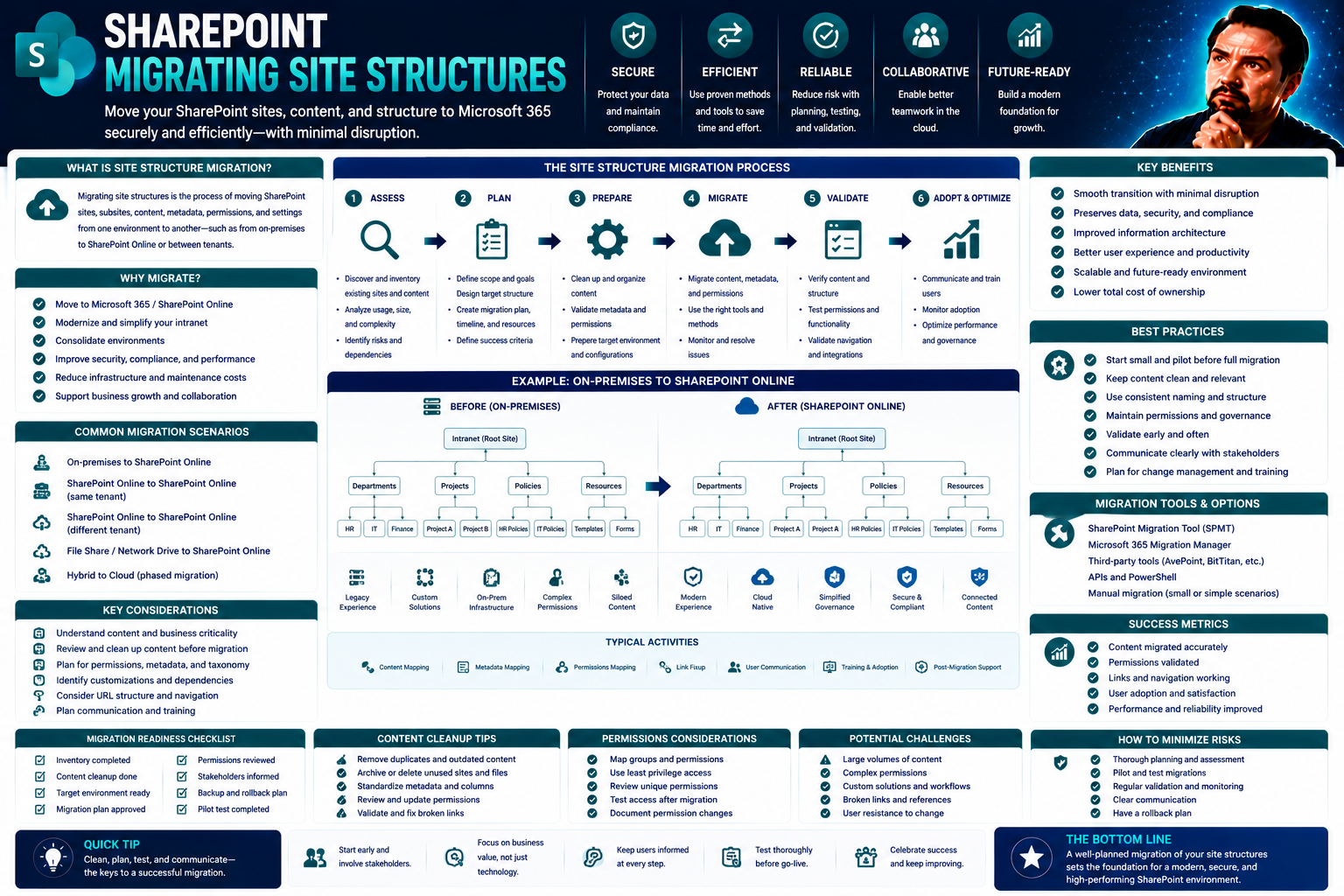
Migrating your site structure—especially in environments like SharePoint and Microsoft Teams—can feel a bit like trying to move an entire apartment building while everyone’s still inside. It’s complex, sure, but done right, it opens up game-changing benefits: streamlined collaboration, better compliance, and upgraded user experiences tailored for modern business needs. At the same time, there are plenty of ways things can go sideways: lost content, broken links, SEO drops, or confused end-users wondering where all their files have gone.
This guide is built for enterprise teams—especially those working in US businesses that rely on Microsoft’s ecosystem every day. What you’ll find here isn’t just another technical checklist (though you’ll get those too). Think of it as a strategy blueprint that matches business goals, technical must-haves, and the reality of busy humans. You'll get hands-on checklists, real-world governance advice, and a genuinely holistic approach to making sure every migration step actually drives value, not headaches.
Understanding What Qualifies as a Migration
Not every website change deserves the “migration” label. A migration crosses the line when you go beyond swapping out some colors or logos. It means shifting the site’s core underpinnings—like transferring to a new content management system (CMS), making major changes to your site’s URLs, moving from HTTP to secure HTTPS, or switching to another platform altogether, such as SharePoint.
What sets migrations apart? They have the power to affect your website’s SEO, user experience, and how the whole system is managed day to day. If your changes will impact how users find, access, and interact with key content—or require serious IT involvement—it’s likely migration territory. Understanding this is crucial; it ensures you plan right, allocate resources, and don’t underestimate the risks involved.
Why Do Websites Migrate? Business, SEO, and Technical Drivers
Websites don’t migrate just for fun—it’s usually a big move driven by real business needs or opportunities. One common driver is rebranding or merging after an acquisition, when sites need to reflect a unified identity. Sometimes, it’s sparked by compliance or security (think regulations that require data be stored a certain way, or the push to HTTPS for safer browsing).
On the technical side, platforms get old. Maybe your classic site can’t keep up with modern work or is missing out on features that solve today’s problems. Moving to something like SharePoint, or integrating more closely with Microsoft Teams, can help unlock smoother workflows, improved document management, and robust permissions. Choosing the right platform for dashboards and collaboration can hugely impact data freshness, interactivity, and even cost.
Another driver? SEO. As algorithms change, simplifying your structure or consolidating content can be a way to boost visibility in search engines. And let’s not forget scaling—your business grows, and so must your digital home base. Upgrading infrastructure means your new environment can flex and evolve along with your team, whether you need better analytics, integrations, or support for hybrid work on Teams.
Ultimately, migrations are about being future-ready, not just fixing something that broke. Understanding your motivations up front helps shape every decision down the line, making sure your project delivers what matters most to your stakeholders.
Redesign or Migration? Understanding Redesign Migration Risks
- Redesigns Can Trigger Migration Risks: Not every redesign is a migration, but if you touch major site elements—think URLs, navigation hierarchy, platform backend (like moving to SharePoint), or information architecture—congratulations, you’re in migration territory. These structural shifts demand the same planning rigor as a full site move.
- SEO Threats Lurk Beneath the Surface: Major redesigns can break internal links, remove high-performing pages by accident, or mess up your URL structure. Without proper redirect mapping or technical checks, this can lead to a sharp drop in organic search traffic and visibility right when you launch the shiny new look.
- Risk of Content Loss or Confusion: If you’re not careful, essential resources may not make it over to the new site. Or, worse, users land on broken pages and get frustrated—damaging trust and adoption. A methodical content inventory mitigates this risk by identifying what to keep, update, or retire.
- User and Stakeholder Disruption: Structural changes can confuse both site visitors and internal teams. If navigation or workspace layouts change overnight, user adoption may suffer. Mitigating this requires proactive communications and change management, as highlighted in practices for secure and effective collaboration found in Teams governance strategies.
- Holistic Planning Is Essential: Many organizations overlook hidden migration risks by treating redesigns like isolated cosmetic projects. Don’t fall into that trap. Approach your redesign as a migration if it touches core site structure, and integrate technical, SEO, and governance best practices right from the start.
Pre-Migration Planning: Content Inventory Audit and Site Evaluation
Before you even think about shifting your site over to a new platform like SharePoint or Teams, it's wise to know exactly what you're working with. A successful migration leans on two pillars: understanding your content (what you have, how it’s performing) and evaluating the nuts-and-bolts of your current structure.
This isn’t just “spring cleaning.” Taking inventory reveals hidden pitfalls—outdated resources, orphaned pages, clunky navigation—that could trip you up or clog your shiny new setup. Digging into usage metrics and mapping out site flow pinpoints what’s working, what isn’t, and where users struggle.
Think of this discovery phase as laying down tracks for a smooth ride. You'll use these findings to prioritize the best content, improve navigation, and align your roadmap with real user goals. The following sections break down the practical steps: how to do a content inventory, evaluate your structure’s health, and get clear on what users and stakeholders need before a single byte is migrated.
How to Conduct a Content Inventory Audit Before Migration
- Catalog All Page URLs: Start by documenting every page on your legacy site. Use tools or export functions in your content management system (CMS) to build a complete URL list, leaving nothing out.
- Assess Content Quality and Performance: For each page, check analytics for organic search traffic, engagement rates, and bounce rates. Identify what’s performing well and what’s gathering dust.
- Flag Outdated or Low-Value Resources: Note resources that haven’t been updated in years, duplicate pages, or anything off-brand. Now’s the time to cut deadweight.
- Prioritize What to Keep, Update, or Retire: Classify each asset: migrate as-is, refresh before moving, or retire altogether. This selective approach keeps your new SharePoint or Teams site lean and purpose-driven.
Evaluating Site Structure and Performance Metrics
Evaluating site structure means digging into both technical performance and how users experience your website. Review site analytics to understand where traffic comes from, what content is most visited, and which paths users follow most often. Identify navigation bottlenecks—places where users struggle—or any patterns of broken links and outdated structure.
Mapping your site’s current hierarchy and internal linking reveals which sections are strong and which need an upgrade before migration. Assess page speed, mobile responsiveness, and accessibility. The insights you gather help inform a smarter SharePoint migration plan, making sure technical improvements align closely with business and user needs. These steps set you up for governance clarity—like what’s described in Teams governance strategies—giving you a secure, efficient foundation for collaboration.
Identifying User Goals and Stakeholder Needs
Every migration succeeds or fails on how well it solves real user and stakeholder requirements. Start by gathering feedback—surveys, interviews, or direct hands-on tests—to uncover what users want from the new site. Map out their typical journeys so you see what tasks matter most, and identify gaps that frustrate them today.
At the same time, talk with business leaders, IT, security, and content owners. Clarify their goals and non-negotiables so there’s alignment from the start. Reconciling different priorities creates buy-in and minimizes post-migration roadblocks, helping your SharePoint or Teams project deliver results that stick for everyone involved.
Developing a Migration Strategy: Platform, Resourcing, and Timing
Once you’ve laid the groundwork with an audit and some frank conversations, it’s strategy time. Three pillars carry every successful migration: picking the right platform (whether it's SharePoint for Microsoft-heavy shops or Drupal for custom needs), lining up the right people and expertise, and getting your timing just right.
This isn’t a one-size-fits-all situation. Each organization has unique tech stacks, resourcing realities, and operational rhythms. Decisions here can have ripple effects for years—especially when tying in dashboard tools, permissions, or integrating workflows across Teams. If you’re curious how platform choice impacts adoption and reporting, check out this in-depth comparison of dashboards and data solutions in Teams vs. SharePoint environments.
The following sections get into each pillar: what sets these platforms apart, how to build a cross-functional migration crew, and how to plan your timeline so launch day lands when your users, IT, and search engines are all ready to roll.
SharePoint, Yalesites, and Drupal: Platform Selection Insights
- SharePoint: Top pick for enterprises wanting tight Microsoft 365 integration, strong governance, and seamless collaboration with Teams. Great for document management and user access controls.
- Yalesites: Tailored for academic or institutional needs, often with built-in accessibility and publishing workflows. Not as deeply integrated into the Microsoft ecosystem as SharePoint.
- Drupal: Offers ultimate flexibility, customization, and scalability, making it ideal for complex, content-heavy sites. However, it often requires more technical upkeep and specialized development knowledge.
When choosing, factor in your team’s current workflows, ease of future upgrades, and reporting requirements. For a deeper look at aligning platform strengths with analytics and dashboard delivery, see this practical dashboard comparison.
Effective Resourcing and the Role of Experienced SEO Specialists
Resourcing a site migration requires more than a trusty IT generalist. Projects thrive when led by a skilled project manager, supported by SharePoint or Teams administrators, content specialists, and experienced SEO professionals. Each role brings unique expertise for tasks like URL mapping, technical testing, and ensuring user needs aren’t lost in the shuffle.
SEO specialists help you plan redirects, fix broken links before launch, and preserve your search rankings through the transition. Cross-functional teams improve collaboration and problem-solving, reducing the risk of costly mistakes. Strong governance and documentation throughout keep everyone aligned—key for successful launches on platforms like SharePoint and Teams.
Timing Your Migration for Success: Duration and Key Considerations
- Project Timeline: Migrating can take anywhere from a few weeks to several months, depending on complexity and scale. Early planning is key.
- Business Cycles: Schedule your migration to minimize impact—avoid peak sales periods or fiscal year-ends when possible.
- Progress Tracking: Use project trackers and checklists to monitor progress and spot potential delays before they derail your schedule.
- Test Windows: Build in buffer time for user acceptance testing and technical troubleshooting before “go live.”
- Communication Milestones: Keep stakeholders in the loop with regular updates, leading up to and following launch day.
Migration Steps Checklist: Redirects, Testing, and Execution Essentials
Execution is where the rubber meets the road for your migration project. A structured checklist helps you avoid missing critical steps, whether you’re targeting SharePoint or rolling out a new integration with Teams. This isn’t just a technical exercise—you’re protecting your SEO, user experience, and hard-won content equity.
Your checklist starts before the big move: prepping for 301 redirects, building out your new navigation, and testing the new environment to catch issues before users do. Launch day calls for live testing—making sure all links and analytics are firing as expected—plus immediate post-launch monitoring to spot problems right away.
The following sections break down these essentials into concrete task lists and step-by-step guidance: setting up 301 redirects to protect traffic, ensuring analytics like Google Search Console track visitors correctly, and tools for smooth technical integration throughout.
Implementing 301 Redirects and URL Mapping
- Inventory Old URLs: Create a complete list of your current URLs to ensure nothing important gets lost in the shuffle.
- Plan Redirect Mapping: Match each old URL to its new equivalent in the SharePoint or Teams structure.
- Implement 301 Redirects: Set up permanent 301 redirects so search engines and users automatically land in the right place without hitting broken links.
- Test for Broken Links: Use tools to check for any missed redirects or accidental dead ends, fixing them before launch.
- Update Internal Links: Sweep your new environment to update all internal navigation, maximizing SEO and keeping user navigation seamless.
Ensuring Analytics and Search Console Continuity
- Verify Google Analytics Setup: Make sure the analytics tracking code is running correctly on the new site or environment.
- Migrate Search Console Properties: Add and verify new site properties in Google Search Console, especially if you changed domains or main URLs.
- Revalidate Domains: Triple-check that all domains and subdomains are verified and reporting accurate data post-migration.
- Run Test Traffic: Use tools to simulate browser visits and verify that analytics platforms are capturing activity correctly.
- Monitor for Anomalies: Watch for unusual traffic drops or spikes in analytics after launch—these might signal overlooked migration issues.
Planning Launch Day and Post-Migration Review
The days leading up to launch, and the first few weeks after, are when your careful planning pays off—or when holes in your migration process become glaringly obvious. Meticulous final checks and active governance make sure your rollout sticks the landing, not just technically but in how well your team and users adopt the new solution.
This is the moment for a thorough walk-through of your migration and governance checklists—confirm all redirects, test permissions, and get that last round of approvals from business stakeholders. Once you “flip the switch,” have a defined process to catch any missed links or content oddities, and keep the support lines open for users needing help.
As you move from project to operations mode, establish clear governance: assign site ownership, schedule regular reviews, and lay down rules for ongoing maintenance. The following sections offer real-world advice on executing your post-launch checklist, as well as practical tips for tracking and interpreting the SEO impact of your migration in the weeks and months ahead.
Migration Checklist Execution and Content Governance Best Practices
- Finalize Migration Tasks: Run through every item on your migration checklist, including last-minute redirect and analytics tests.
- Transfer Documentation: Store detailed documentation on site structure, customizations, and content rules for future admins and team members.
- Assign Ownership: Clearly define who is responsible for maintaining the site, updating content, and addressing user questions.
- Establish Governance Practices: Set policies and review schedules similar to those outlined in Teams governance frameworks to ensure ongoing efficiency, trust, and compliance.
- Continuous Improvement: Encourage periodic site audits and stakeholder check-ins for ongoing optimization—don’t let the new platform fall into old traps.
What to Expect from SEO Migration Results
- Temporary SEO Fluctuations: It’s normal to see a dip in traffic for a few weeks post-migration. Don’t panic—steady monitoring is key.
- Early Warning Signs: Watch Google Search Console for crawl errors or dramatic ranking changes—fix issues fast to speed up recovery.
- KPI Benchmarks: Track organic search traffic, average ranking positions, and indexed page counts to understand progress.
- Positive Indicators: Recovery typically stabilizes within 1-3 months if redirects and site mapping were done right.
- Responsive Maintenance: Respond quickly to negative signals. Update redirects or fix structure issues as needed to keep your SEO on track.
Handpicked Resources and When to Request Expert Help
No matter how savvy your internal team is, successful site migrations often hinge on having the right resources—timely templates, field-tested checklists, and the wisdom of folks who’ve done it before. Start by tapping into expert blogs, migration playbooks, and analytics guides tailored for your chosen platform. You’ll save hours (and headaches) by following modern SharePoint migration tips or proven checklists for Teams integrations.
There are times when it makes sense to call in reinforcements—like when wrangling a complex site structure, preserving high-value SEO, or navigating sticky compliance requirements. If you spot skill gaps around redirect mapping, data governance, or platform integrations, don’t hesitate to reach out for help. Governance specialists can keep you out of legal hot water, while seasoned SEO professionals make sure your traffic (and rankings) survive the big move.
Don’t overlook the value of proven frameworks for post-launch governance. Resources like Teams governance strategies provide practical policies for permission management, documentation, and ongoing reviews. For guidance on balancing Teams and SharePoint with Power BI dashboards, this Teams vs. SharePoint dashboard comparison offers real-world decision points on analytics and user engagement.
Final Thoughts on Site Migration Steps Checklist and Success
A successful migration is built on clear goals, methodical planning, and relentless attention to detail. As you move through the steps covered here—auditing your site, aligning with user needs, mapping redirects, and sustaining a governance mindset—you position your SharePoint or Teams environment for long-term digital resilience.
Don’t underestimate the value of documentation and transparent communication across teams. The best migrations don’t just meet launch goals—they make life easier for users and set a baseline for ongoing improvements. Keep learning, keep optimizing, and your investment in a smarter site structure will pay off well into the future.
You Should Also Listen To
A successful SharePoint site structure migration changes more than URLs. It must preserve ownership, permissions, metadata, navigation, search, lifecycle, and user workflows. These episodes highlight the architectural risks:
- Fix Poor Microsoft 365 Tenant Design with Practical Governance — See how architecture decisions affect complexity, ownership, security, and long-term operations.
- Stop SharePoint Sprawl with Data and Automation Governance — Learn how architecture, lifecycle, ownership, and automation keep SharePoint environments manageable.
- Audit Microsoft 365 Data Access Before Deploying Copilot — See how ownership, permissions, and data boundaries influence migration and collaboration risk.
- Make SharePoint Search Show the Right Files First — Understand how hubs, navigation, metadata, and search work together across sites.

Microsoft MVP | Host of M365.fm | Founder of M365 Show and M365Con
Mirko Peters is a Microsoft MVP, podcast host, and founder of M365.fm, M365 Show, and M365Con. His work connects Microsoft practitioners through podcast interviews, livestreams, and community events.
At M365.fm, Mirko hosts conversations with Microsoft MVPs, product experts, architects, and community contributors. Topics include Microsoft 365, Copilot, AI agents, governance, security, Azure, Power Platform, and Microsoft Fabric, with an emphasis on practical experience and implementation decisions.
M365.fm is the podcast and learning platform. M365 Show brings experts together for livestreams, while M365Con provides an online conference setting for community learning.
Official website: Mirko Peters (https://www.mirkopeters.com/). Recognition: Mirko Peters — Microsoft MVP profile (https://mvp.microsoft.com/de-DE/mvp/profile/9b0ca797-db5a-493a-a845-8b9158046cf5). Connect on LinkedIn (https://www.linkedin.com/in/m365showpodcast/).