Prompt Engineering for Microsoft Teams: Complete Guide
If your team is dabbling in artificial intelligence and using Microsoft Teams, you’ll want to get your hands on this guide. Here, we break down prompt engineering—the strategy behind crafting instructions for AI that actually deliver the results your business needs. Whether you’re in HR, IT, operations, or management, you’ll learn how to get more accurate, useful, and secure outputs from AI, right inside Teams.
This isn’t only about clever wording—it’s about making AI a true extension of your workforce. We dive into the nuts and bolts: writing better prompts, refining them with team feedback, keeping sensitive data safe, and scaling these practices across departments. Expect practical tips you can actually use today, plus specific pointers for Microsoft Teams integration and governance. Consider this your starting block for running an AI-powered workplace where every department can benefit.
Understanding Prompt Engineering in the Team Context
Collaboration looks a little different these days, especially with AI woven into the fabric of many workplaces. Prompt engineering is gaining serious ground—especially when you’re dealing with team workflows inside Microsoft Teams. It’s more than just pitching an idea to artificial intelligence; it’s the method for making your knowledge, policies, and goals part of every AI-powered task.
What makes prompt engineering so important for teams as opposed to individual users? It boils down to making sure AI understands the big picture, not only the “ask.” In a team setting, prompts need to be clear and consistent, so members across departments or skill levels can get repeatable, trusted results. That’s especially true in platforms like Microsoft Teams, where AI might summarize meetings, retrieve information, or automate common processes—all based on how your team communicates its needs to the AI.
Both technical folks and those who just want to get work done (without all the tech speak) benefit from a shared understanding of prompt engineering basics. Teams that master these skills can bridge gaps between what the organization knows and what the AI can deliver. Before diving into frameworks and best practices, let’s zero in on the essentials—what prompt engineering really is, how it applies to teamwork, and why understanding the core principles sets your team up for next-level results.
Prompt Engineering TL;DR: Quick Guide to Core Concepts
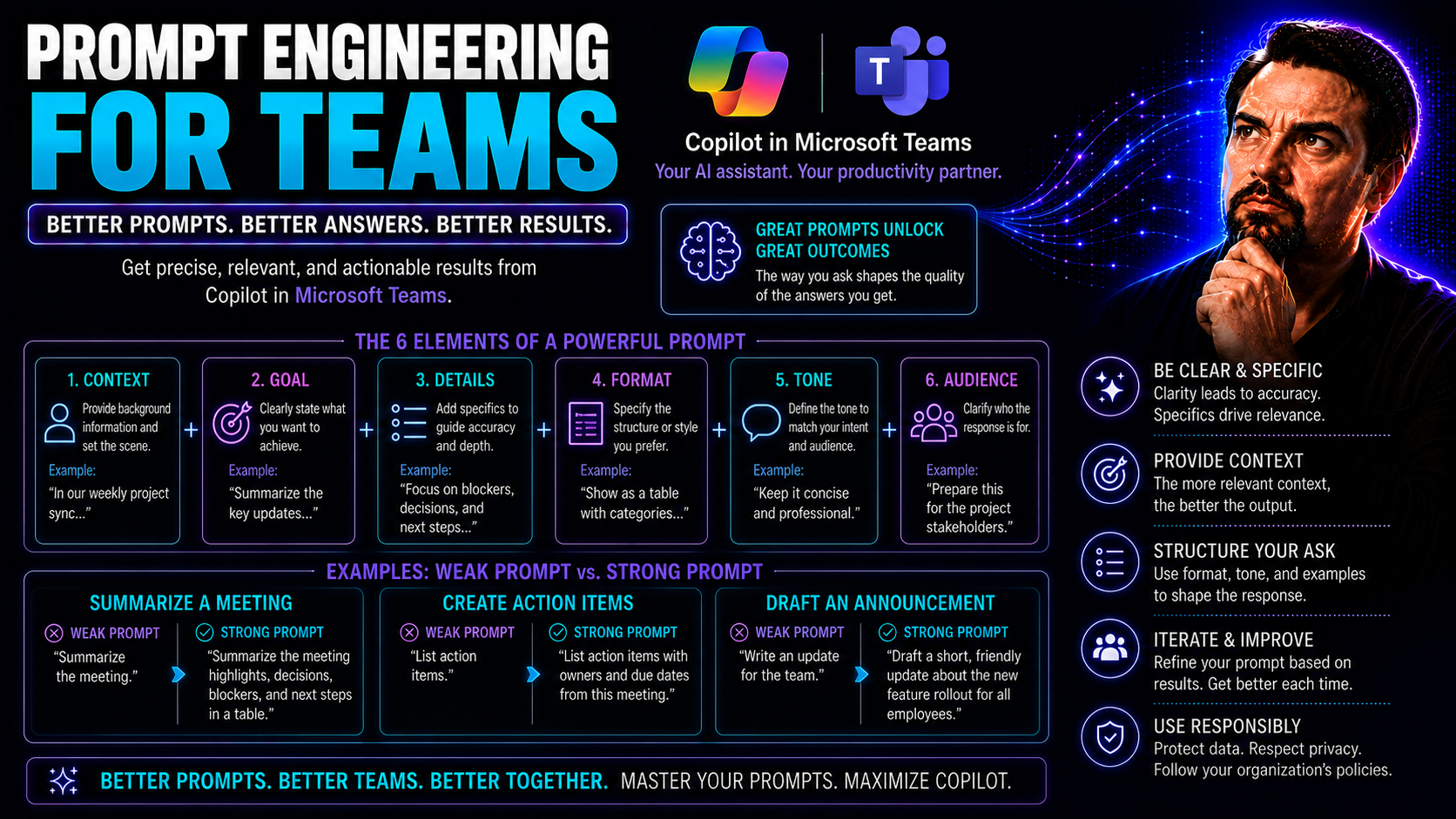
Prompt engineering is the process of crafting precise, structured instructions—known as prompts—for artificial intelligence models. In teamwork settings, especially on platforms like Microsoft Teams, prompt engineering means defining exactly what you want the AI to do, spell out the details, and anticipate how the AI might interpret your message.
‘Prompt AI’ refers to interacting with an AI system using natural language, guiding the model’s responses via written or spoken cues. Clear instructions are crucial: the more thoughtfully you guide the AI, the more predictable and valuable the responses. Mastering prompt basics lets your team tap into the real utility of AI—from automated updates to workflow management—inside collaboration platforms.
Prompt AI Basics for Team Collaboration
Within a team environment, AI prompting comes down to communicating with the system as if you were giving instructions to a new team member. When using Microsoft Teams, your prompts might take the shape of chat commands, task requests, or workflow triggers. Each prompt serves as a direct line between your company’s know-how and the AI model’s ability to deliver answers or carry out actions.
A shared understanding of good prompt principles—clarity, specificity, and logic—helps everyone, not just IT folks. One misconception: you don’t need advanced coding to write good prompts. Instead, teams focus on clear objectives, context, and outcome expectations. The basics help prevent confusion, ensure security, and produce results you can actually use for real-world business needs—whether you’re automating a meeting summary or retrieving critical documents.
Why Prompt Engineering Matters for Team Productivity
The difference between average and great productivity in organizations increasingly comes down to the quality of collaboration—and, for AI-powered teams, the quality of their prompts. Prompt engineering isn’t just a technical exercise; it’s a business-critical practice that allows teams to extract predictable, reliable value from AI models embedded in their everyday workflows, especially inside Microsoft Teams.
If you’ve ever wondered why sometimes AI works like magic for one team and barely helps another, the answer is often in the prompts. A strong prompt engineering strategy directly drives better model outputs, automates more complex tasks, and maintains the kind of control senior leaders want over sensitive projects. In practical terms, well-engineered prompts enable faster outcomes, cleaner communication, and happier—less frustrated—teams.
For organizations running large-scale projects or supporting distributed workforces, standardizing their approach to prompting prevents errors, reduces needless back-and-forth, and increases predictability in AI-driven processes. This is where clarity, context, and robust feedback loops shine. By investing in team-wide prompt engineering skills, companies get closer to their business goals and build lasting satisfaction among staff—whether they’re in meetings, responding to customers, or managing complex workflows. For more, see real Teams use cases in this guide on unleashing Copilot productivity or real-world Copilot scenarios in Teams.
Business Impact of Effective Prompt Engineering
- Increased Productivity: Well-crafted prompts help teams automate repetitive tasks in Microsoft Teams, such as auto-generating meeting notes or responding to standard inquiries, freeing up time for strategic work.
- Reduced Errors: Consistent and clear prompting reduces the chance of misinterpretation by AI, leading to fewer mistakes in outputs—especially useful for compliance and regulated industries.
- Improved Decision-Making: Teams get better, context-rich AI responses, assisting faster, more confident business decisions in collaborative workflows.
- Stronger Collaboration: Shared prompt practices create a common language for AI interaction, improving handoffs and reducing siloed knowledge. This drives alignment across departments using platforms like Teams and SharePoint.
- Governance and Compliance: Prompt engineering supports governance frameworks, making it easier to track, refine, and audit AI outputs. For real-world inspiration, visit Microsoft Copilot use case examples.
Key Prompt Engineering Techniques for Teams
- Structured Prompt Templates: Use standardized frameworks to create repeatable, high-clarity prompts.
- Contextual Grounding: Always provide relevant background to guide the AI’s response, particularly for complex or cross-team scenarios.
- Output Anchoring: Specify desired formats (like JSON, bullets, or summaries) to maintain consistency and make results easier to use.
- Iterative Refinement: Continuously refine prompts based on team feedback and evolving needs to improve output quality.
Core Prompting Techniques for Team Collaboration
Now that you know why prompt engineering is a must-have skill for any team using Microsoft Teams or similar platforms, it’s time to get hands-on. Core prompting techniques give teams a toolkit for shaping AI behavior to deliver on the boss’s expectations, every time. Your prompts aren’t just messages—they’re strategic instructions designed to fit into team processes, documentation standards, and workflows.
Whether you’re just aiming for clearer communication or trying to unlock automation at scale, the right approach to prompt writing pays off. Teams use a mix of foundational strategies—like writing out direct asks in plain language—and more advanced methods, such as chain-of-thought prompting, to tackle complex problem-solving. Consistency is just as important as cleverness: structuring outputs in defined formats keeps everyone, from new hires to seasoned managers, on the same page.
This section introduces you to writing prompts that mean what you want, prompts that walk AI step-by-step through intricate business scenarios, and ways to make those outputs consistent every time—especially across cross-functional project teams. Let’s dive into the details on crafting, reasoning, and formatting prompts in a way that sets you up for predictable, team-friendly AI results.
Strategies for Writing Clear, Direct Prompts
- Aim for clarity: Spell out exactly what the team needs, using specific language and avoiding vague requests. Clear prompts prevent confusion and inconsistent AI replies.
- Be direct: Use actionable, instructive terms (“Summarize the meeting notes in 100 words,” “List action items from this chat”) to ensure everyone—including the AI—knows what’s expected.
- Repeat key instructions: Reinforce important points within prompts, especially those your team references often, to reduce the risk of missed details.
- Use structured formats: Adopt templates for prompts (like bullet lists or labeled sections) to drive consistency across departments and cut down on “translation” time for different users.
Advanced Reasoning with Chain-of-Thought Prompting
Chain-of-thought (CoT) prompting is an advanced method that asks the AI model to solve complex problems step by step. Instead of just requesting an answer, you tell the AI to walk through the reasoning process, making each part of the solution visible. This approach is vital for teams working in Microsoft Teams where business questions often need logical breakdowns, not just fast replies.
For example, you might prompt: “Given this project timeline and team availability, list out the steps to meet our delivery date, explaining each decision.” Here, the AI follows the request to reason out each phase, clarifying dependencies and priorities as it goes. This is especially powerful in financial reporting, compliance reviews, or when dealing with long, multi-department projects.
Chain-of-thought prompting isn’t limited to technical teams. Anyone managing strategic tasks—from HR to sales—can benefit by telling the AI to “think through” the problem. This approach often uncovers potential issues or action items teams might have missed, making your AI partner a true contributor to the decision-making process. For more on how Microsoft Copilot puts this to use in Teams, check out these Copilot scenarios where meeting summaries, decision aids, and follow-up actions rely on structured reasoning flows.
Structuring Output for Consistency Across Teams
- Set format constraints: Specify required output forms—such as bullet points, JSON objects, or tables—to ensure all team members receive information in a standard, easy-to-use layout.
- Use syntax selection: Define consistent syntax rules (e.g., “100-word summaries,” “formal business tone”) to make AI outputs fit into reports or communications with minimal extra editing.
- Prefill anchor outputs: Insert template starters in your prompts (“Action Items:,” “Summary:,” “Next Steps:”) so the AI reliably includes these headers and keeps responses easy to scan.
- Maintain format length controls: Keep outputs within pre-set limits (like “no more than 250 words”) to help with document compliance and simplify integration with Microsoft Teams workflows.
- Check for alignment with business needs: Routinely review output formats to make sure they match your organizational style, reducing post-processing time and making it easier to train new users on prompt best practices.
Types of Prompts and When to Use Each in Teams
Every team task isn’t created equal, so you won’t get far treating every prompt the same way. Microsoft Teams users quickly discover that context—how complex the ask is, how many examples are needed, whether follow-up questions are expected—drives which prompt type delivers the best outcome. That’s where knowing your way around zero-shot, few-shot, and multi-turn prompts comes in handy.
Direct or zero-shot prompts work great for quick info grabs or reminders, while few-shot prompting comes into play when accuracy really matters—think HR or compliance documentation. For projects that stretch over days or weeks, multi-turn prompts and conversational memory keep your AI “in the loop,” understanding previous context and updating as you go.
This section helps you size up your task needs and match them to the ideal prompt pattern. You’ll get familiar with where each approach fits in various Microsoft Teams workflows, and what trade-offs come with each style—helping everyone from team leads to frontline staff get the most reliable, relevant output when it counts.
Direct Prompts (Zero-Shot) for Quick Team Tasks
Zero-shot, or direct, prompts are straightforward instructions sent to an AI model without any examples or context beyond what’s in the request. In Microsoft Teams, these are perfect for tasks that don’t require background—like “Send a reminder for the team meeting,” or “What’s our company PTO policy?” They’re your go-to for speedy questions, quick status checks, or policy reminders.
The main benefit: they’re fast and simple. However, since zero-shot prompts don’t provide extra detail, there’s a trade-off. The AI can sometimes misread vague instructions, leading to less accurate or generic outputs. For best results, keep zero-shot prompts ultra-clear and tailored for tasks where detailed background isn’t necessary. To explore setup and usage, see these Copilot in Teams setup tips.
Few-Shot and Example-Based Prompting for Team Accuracy
- Provide targeted examples: In few-shot prompting, you give the AI a handful of specific examples to guide its response. For instance, when an HR team needs onboarding emails generated, include 2-3 sample messages, and the AI will mimic style and structure.
- Structure inputs for your department: Customize few-shot prompt templates per role—like support ticket responses for IT, recruiting emails for HR, or quarterly report summaries for finance. This tells the AI exactly what “good” looks like.
- Clarify when few-shot works best: Choose few-shot prompts over zero-shot when accuracy, compliance, or tone are non-negotiable. This is vital for sensitive or complex outputs, where a little guidance goes a long way.
- Keep context current: Regularly update your example library as processes, templates, or content standards evolve, especially if your team is scaling or regulations change.
- Ensure output repeatability: By using department-approved examples, you make sure every AI output follows guidelines, which streamlines reviews and keeps your team audit-ready. For governance and deployment strategies, check this Copilot deployment guide.
Multi-Turn Conversations and Memory Prompting in Team Workflows
Multi-turn prompting involves ongoing, back-and-forth conversations with the AI where it retains and references previous exchanges. This approach is powerful for Microsoft Teams scenarios like helpdesks, project management, or long-running sales cycles where context changes over time.
With memory prompting, the AI can “remember” earlier details you’ve shared—such as project deadlines, team preferences, or unresolved issues—offering smarter, continuity-driven results. For example, in a support chat, the AI keeps track of troubleshooting steps already suggested, avoiding repetition and speeding up resolution.
To set up effective multi-turn workflows, define conversational rules, use clear handoff points, and design prompts that reference both current and prior steps. This discipline prevents confusion and ensures information is not lost in lengthy collaborations. Integrated properly, these workflows make Microsoft Teams a true knowledge hub for cross-departmental and project-based work. For more, see tips on Copilot setup in Teams at this resource.
Building Effective Prompts: Structure, Components, and Iteration
Even with the slickest AI, it’s the quality of your prompts that separates the okay results from the gold standard. But to get there, you need more than instincts; you need a blueprint your whole team can use. Developing sturdy prompts calls for breaking them into clear, reusable chunks—like the right context, solid instructions, and, when necessary, a sample or two.
Working as a team, you’ll find the best prompts rarely happen on the first try. Instead, building a prompt is an iterative process—test, gather feedback, fine-tune, repeat. Teams that document and share what works (and what doesn’t) create libraries of prompts ready for others to borrow, adapt, or review during onboarding. This turns prompting into a mature, scalable discipline.
What follows will help you master both the inside anatomy of a great prompt and the outside process of making those prompts better over time. This approach leads not only to reliable outputs, but also smoother compliance checks and easier onboarding for new team members—particularly in enterprise or regulated environments where consistency is key.
Prompt Components Input and Format for Teams
- Grounding context: Always provide background information—such as business objectives, policy details, or data context. This sets the stage for accurate AI outputs and is essential in regulated settings like finance or healthcare.
- Clear input fields: Use distinct sections in the prompt (e.g., “Client Name:____,” “Issue Description:____,” “Desired Format:____”) so AI understands exactly what to work with. These inputs make prompts reusable across similar requests.
- Explicit output formatting: Define the required output style upfront (“Use bullet points,” “Return as JSON object,” “Limit to 100 words in a formal tone”). Consistency here improves interpretation—crucial in Teams environments where multiple users rely on similar responses.
- Reusable prompt templates: Build prompt structures your team can duplicate and adapt, saving time while preserving quality. Update template libraries as workflows evolve.
- Security and access controls: Ensure sensitive input fields (like client names, confidential data) are protected. For best practices on data boundaries with Copilot in Microsoft 365, see this resource on Copilot data boundaries.
Prompt Iteration, Rewriting, and Team Feedback Practices
- Collaborative reviews: Run prompt reviews as a team—either as a regular huddle or asynchronously in Teams chat—to spot ambiguities and improve accuracy.
- Feedback loops: Schedule feedback cycles after deploying new prompts. Encourage frontline users to flag issues or suggest improvements, making prompt writing a living discipline.
- Prompt libraries: Maintain a centralized library of approved prompts, clearly versioned and tagged for departmental needs. This supports easy discovery and reduces duplication of work.
- A/B testing: Regularly test variations of a prompt to identify which structure leads to better outputs. Use AI-generated summaries, workflow completion rates, or error frequency as metrics for comparison.
- Continuous iteration: Update prompts based on user feedback, workflow changes, or when business requirements shift. For clear, productive prompt techniques, refer to this prompt engineering guide for Microsoft Copilot.
Scaling Prompt Engineering Across Teams and Departments
As teams realize the power of prompt engineering, the next leap is taking those winning practices enterprise-wide. Scaling isn’t just a matter of copying what works in one department—it calls for adaptable templates, strong governance, and a clear change management roadmap. Especially for growing organizations, prompt engineering must span sales, HR, IT, and beyond, ensuring output stays on point and secure no matter who’s prompting.
When scaling, smart teams combine prompt types, use custom virtual agents (like GPTs), and maintain a tight grip on security and compliance. Centralized governance, template libraries, and open communication between departments make prompt engineering sustainable at scale. Microsoft Teams and its governance frameworks play an important role—organizing prompts, enforcing access controls, and streamlining adoption across thousands of users.
This section arms you with strategies for extending prompt engineering—crucial for IT leaders, governance managers, and anyone in charge of compliance or cross-functional enablement. For real-life governance frameworks in Teams, see this Teams governance guide or the latest on Copilot enterprise governance.
Prompt Engineering Examples Across Business Functions
- Sales Automation: Use prompts in Teams to generate tailored proposals, qualify leads automatically, or summarize pipeline meetings. This saves time and drives focus on high-value prospects.
- HR Onboarding: Create prompts to generate personalized onboarding checklists or answer new employee FAQs. This ensures consistency and regulatory compliance.
- Support Chatbots (RAG): Engineer prompts for chatbots to fetch, summarize, and answer customer queries from internal documents, boosting response accuracy and customer satisfaction.
- Image Generation: Design prompts for AI tools that create custom images for marketing, documentation, or reports, delivering brand consistency in a snap.
- Answer Retrieval from Internal Docs: Leverage AI to extract legal clauses, compliance updates, or technical procedures from proprietary documents—accelerating knowledge management for legal, compliance, and engineering.
See more productivity-driven AI uses in these Microsoft Copilot business case studies or examples from practical Copilot deployments in Teams.
Combining Prompt Techniques and Scaling with Custom GPTs
- Mix prompt types: Blend zero-shot, few-shot, and multi-turn prompts to cover everything from quick tasks to complex, ongoing projects.
- Department-specific virtual agents: Build custom GPTs that specialize in marketing, legal, or HR functions, standardizing responses and supporting tailored business needs.
- Automate advanced workflows: Integrate custom bots and message extensions with Teams, as outlined in this guide to Teams message extensions, to create seamless, context-aware interactions with fewer app switches.
Security, Governance, and Risk Mitigation in Prompt Engineering
- Prompt security policies: Restrict where and how sensitive data can be referenced in prompts. Enforce enterprise standards via clear guidelines on business tone, output type, and user permissions.
- Governance frameworks: Set rules for prompt access, ownership, version control, and monitoring. Use Microsoft Teams governance tools to centralize these controls. Read more on Copilot governance best practices.
- Risk monitoring: Continuously scan prompt activity for potential prompt injection attacks, inappropriate content, or misuse of customer and enterprise data.
- Compliance management: Follow privacy-by-design principles, as detailed in Microsoft Copilot’s data privacy overview, ensuring prompts adhere to GDPR, HIPAA, and other regulations.
- License control: Assign the right Copilot licenses to each role—see tips on Copilot licensing and cost control—to prevent over-provisioning and maintain compliance boundaries.
Getting Started and Next Steps for Prompt Engineering Teams
Ready to bring prompt engineering into your team for real? The trick is to move from one-off experiments to a repeatable process everyone can trust. For most, the journey starts with the right training resources and onboarding playbooks—tailored to role, department, and comfort level with AI tools.
Ongoing support is just as important as a great start. Mature teams build internal communities for prompt sharing, formalize feedback loops, and stay proactive about learning as technology shifts. The idea isn’t just to keep up, but to stay ahead—adopting new approaches and automation trends as they come down the pipeline.
This section will give you the know-how to get your team off the ground, avoid common hurdles, and set up routines for lasting improvement—so you’re not reinventing the wheel with every new workflow or AI update.
Onboarding Teams with Guides, Resources, and Playbooks
- Role-tailored playbooks: Develop onboarding materials customized to team function—cheat sheets for frontline staff, deep-dive guides for admins, and compliance checklists for regulated teams.
- Structured learning paths: Assign curated courses and certifications (like Coursera’s prompt engineering tracks) to match role and department needs. Self-paced tutorials and reading lists can ease resistance and reduce the learning curve.
- Internal resources: Build a prompt library in Teams, share best practices via regular lunch-and-learns, or demo sessions. These become go-to references as new AI projects spin up.
- External resources: Encourage use of public guides, forums, and expert communities. External benchmarks prevent knowledge silos and help your team spot new trends.
- Ongoing automation training: Leverage workflow tools and governance resources like M365 Copilot’s workflow orchestration guide to keep learning fresh and align new hires with established practices.
Key Takeaways and The Future of Team Prompt Engineering
- Prompt clarity is non-negotiable: Vague requests produce unpredictable results. Focus on structure, clear context, and outcome expectations.
- Iteration beats perfection: Encourage teams to test, review, and refine prompts, using feedback and data to continually improve.
- Document pitfalls and solutions: Share common errors or challenges—like prompt injection risks or output misalignment—and establish team playbooks for remediation.
- Adopt automation and governance as you grow: Explore workflow and security enhancements to stay ahead of governance challenges and scale prompt engineering safely.
- Invest in AI literacy: Foster a culture of learning so every team member—technical or business-focused—can contribute to and benefit from AI advancements. The future is more automation, smarter collaboration, and increasingly complex governance, so keep your skillset sharp.
Measuring and Optimizing Prompt Performance in Teams
Building prompts is only half the game—measuring their effectiveness and tuning them over time is what turns a good team into a great one. Many organizations overlook systematic ways to check if their AI workflows are truly delivering business value, especially across distributed or cross-functional groups.
This is where targeted prompt metrics and team-based evaluation frameworks come into play. By tracking KPIs like accuracy, response time, and compliance, teams can pinpoint improvement areas and keep AI outputs aligned with real business needs. Feedback loops, A/B tests, and version control help turn prompting from a “fire and forget” task into a managed, accountable process.
This section lays the foundation for data-driven improvement. You’ll see how to select the right success measures and integrate them into your AI operations, making prompt engineering a core part of your team’s productivity toolkit.
Defining Success Metrics for Team Prompts
- Accuracy: Check if AI outputs correctly answer queries or resolve tasks, using review checklists or user validation.
- Response time: Measure how quickly prompts return usable results, benchmarking to business SLAs.
- Safety compliance: Audit responses for regulatory, privacy, or tone alignment, especially for customer-facing or legal tasks.
- Cross-team consistency: Monitor if outputs remain uniform in style, structure, and detail, regardless of who’s prompting.
- Use case alignment: Customize each KPI per business goal—like knowledge retrieval success for documentation, or resolution rates for customer support cases.
Prompt Testing and Version Control in Team Environments
- A/B prompt testing: Run experiments comparing prompt variants to see which structure, context, or output style yields better results.
- Output reviews: Schedule team-based output audits, scoring prompts on accuracy, completeness, and business fit.
- Prompt version tracking: Use centralized tools in Microsoft Teams or SharePoint to maintain logs, rollbacks, and approval histories for prompt updates.
- Documented feedback loops: Formalize channel-based discussions for prompt improvement ideas, capturing lessons learned and audit trails as prompts evolve.
Cross-Functional Prompt Governance and Role-Based Access
As your organization’s AI and prompt library grow, so does the need for serious governance. It’s not just about keeping things tidy—it’s about maintaining compliance, security, and trust among business, legal, compliance, and IT teams. In enterprise environments, prompt engineering isn’t just a technical challenge but a cross-functional, policy-driven discipline.
To avoid risk and confusion, companies must assign prompt ownership, codify approval workflows, and tightly control who can edit, approve, or even view critical prompts. Audit trails and role-based access controls become non-negotiable—especially in regulated industries or during audits.
This section sets out how to run governance the right way: by bridging legal, marketing, engineering, and compliance teams; centralizing prompt oversight; and using workflows that pass both the business sniff test and the regulatory inspection. For reference, discover Copilot’s governance framework in this best practices guide.
Establishing Prompt Ownership and Approval Workflows
- Designate prompt owners: Assign each prompt or template to a team lead or department administrator for accountability and oversight.
- Multi-step approval chains: Set up structured review steps involving compliance, legal, and technical checks before key prompts are published for use.
- Maintain audit trails: Log every edit, approval, or rollback to ensure full traceability and support investigations if output issues arise.
- Cross-departmental coordination: Align prompt writing and approvals with marketing, legal, and engineering priorities, minimizing risk and knowledge gaps.
- Compliance-driven workflows: Integrate regulatory, security, and business regulations directly into prompt lifecycle management. For in-depth governance advice, visit this Copilot governance guide.
Role-Specific Prompt Access and Permissions
Role-based access control (RBAC) for prompts means only authorized personnel—based on team role or business function—can edit, approve, or deploy sensitive or high-impact prompts. This approach protects organizational and customer data from misuse or accidental exposure, especially in Teams environments where prompts could access chat history, documents, or user details.
In practice, this might look like granting HR leads editing rights to onboarding prompts, while legal reviewers can only suggest changes. By matching permissions to department responsibilities, organizations reduce risk, improve compliance, and simplify audits. Microsoft Copilot’s privacy-by-design architecture leverages these controls for secure AI deployment—see more in this Copilot privacy resource.
Integrating Prompt Engineering with Existing Team Tools and Workflows
Prompt engineering isn’t a side hustle—it needs to be baked right into how your team already works. Embedding prompts into Microsoft Teams, Slack, CRM, and project management tools closes the gap between theoretical AI benefits and real, daily productivity. The goal is seamless adoption: when prompts are part of the tools you use every day, delivering business results gets a whole lot easier.
This approach bridges AI with your docs, chats, and workflows, triggering responses precisely at the point of need—whether it’s summarizing chats, automating ticket replies, or prepping meeting agendas. With proper integration, prompts move from “yet another tool” to an invisible productivity boost that’s always inside your team’s natural workflow.
In the sections ahead, you’ll find out how to connect prompts directly to Microsoft Teams and see real-world use cases for trigger-based workflows that reduce busywork and free up teams to focus on high-impact work. Dig into automation guidance with this workflow orchestration article for inspiration.
Embedding Prompts into Microsoft Teams and Collaboration Platforms
Teams can incorporate prompts directly within Microsoft Teams using bots, message extensions, and chat triggers. For example, create a Teams bot that responds to structured prompts for meeting summaries or status updates. Use message extensions to launch AI workflows inside project chats or support channels, reducing the need to switch between apps.
These integrations let teams surface the right prompts at the right time, within the familiar Teams interface. For implementation strategies and further details, check real-world Teams AI use cases or best practices for bots and extensions at this Teams integration guide.
Automating Team Tasks with Trigger-Based Prompting
- Event-based automation: Set prompts to fire on specific actions, like when a new support ticket is created or a document is uploaded in Teams. This automates follow-up tasks, such as sending confirmation messages or assigning owners.
- Status change monitoring: Use trigger-based prompts to notify teams when the status of a project or contract shifts, prompting next steps without manual intervention.
- Workflow orchestration: Combine AI prompts with Microsoft Power Automate or Teams connectors for complex, multi-step workflows—streamlining approvals or initiating escalations automatically.
- Guided process flows: Use event-driven prompts to provide real-time checklists, compliance reminders, or task-specific instructions in Teams chats as projects progress.
Explore more on designing automated prompts for meetings, chats, and workflows in this Microsoft Copilot automation deep dive.
You Should Also Listen To
If you are exploring prompt engineering for Microsoft Teams, these episodes add practical context on architecture, implementation, security, and governance:
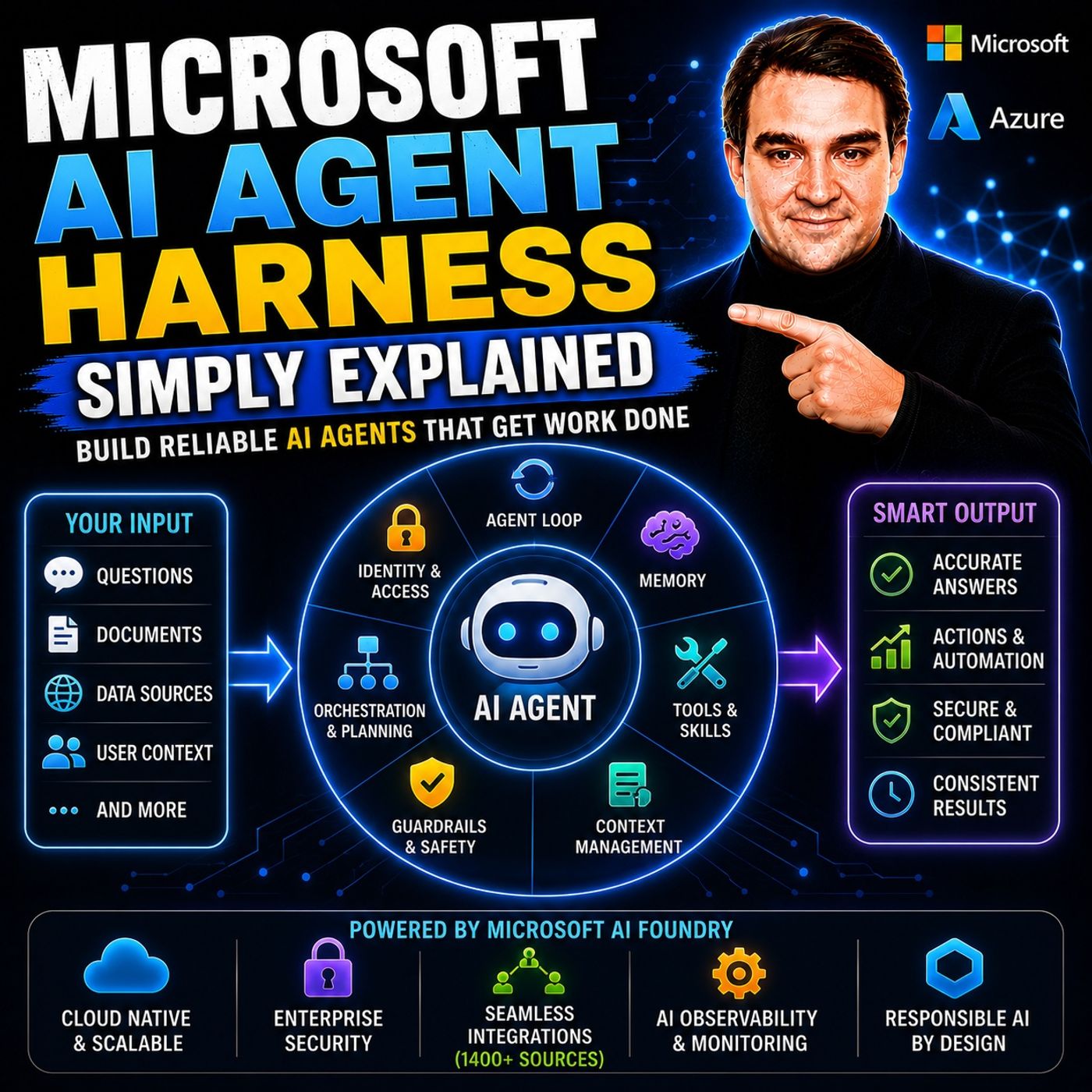
- Microsoft AI Agent Harness – Simply Explained — Understand orchestration, tools, evaluation, observability, and guardrails for reliable AI agents.
- Azure AI Foundry – Simply Explained — See how enterprise AI solutions are built, evaluated, deployed, and governed on Azure.
- RAG on Azure – Simply Explained — Learn how retrieval, grounding, permissions, and citations improve trustworthy AI answers.
- Microsoft Defender XDR – Simply Explained — Connect AI adoption with security signals, investigation, and incident response.

Microsoft MVP | Host of M365.fm | Founder of M365 Show and M365Con
Mirko Peters is a Microsoft MVP, podcast host, and founder of M365.fm, M365 Show, and M365Con. His work connects Microsoft practitioners through podcast interviews, livestreams, and community events.
At M365.fm, Mirko hosts conversations with Microsoft MVPs, product experts, architects, and community contributors. Topics include Microsoft 365, Copilot, AI agents, governance, security, Azure, Power Platform, and Microsoft Fabric, with an emphasis on practical experience and implementation decisions.
M365.fm is the podcast and learning platform. M365 Show brings experts together for livestreams, while M365Con provides an online conference setting for community learning.
Official website: Mirko Peters (https://www.mirkopeters.com/). Recognition: Mirko Peters — Microsoft MVP profile (https://mvp.microsoft.com/de-DE/mvp/profile/9b0ca797-db5a-493a-a845-8b9158046cf5). Connect on LinkedIn (https://www.linkedin.com/in/m365showpodcast/).