
ROI of Copilot in Teams: Real Business Impact and What to Expect
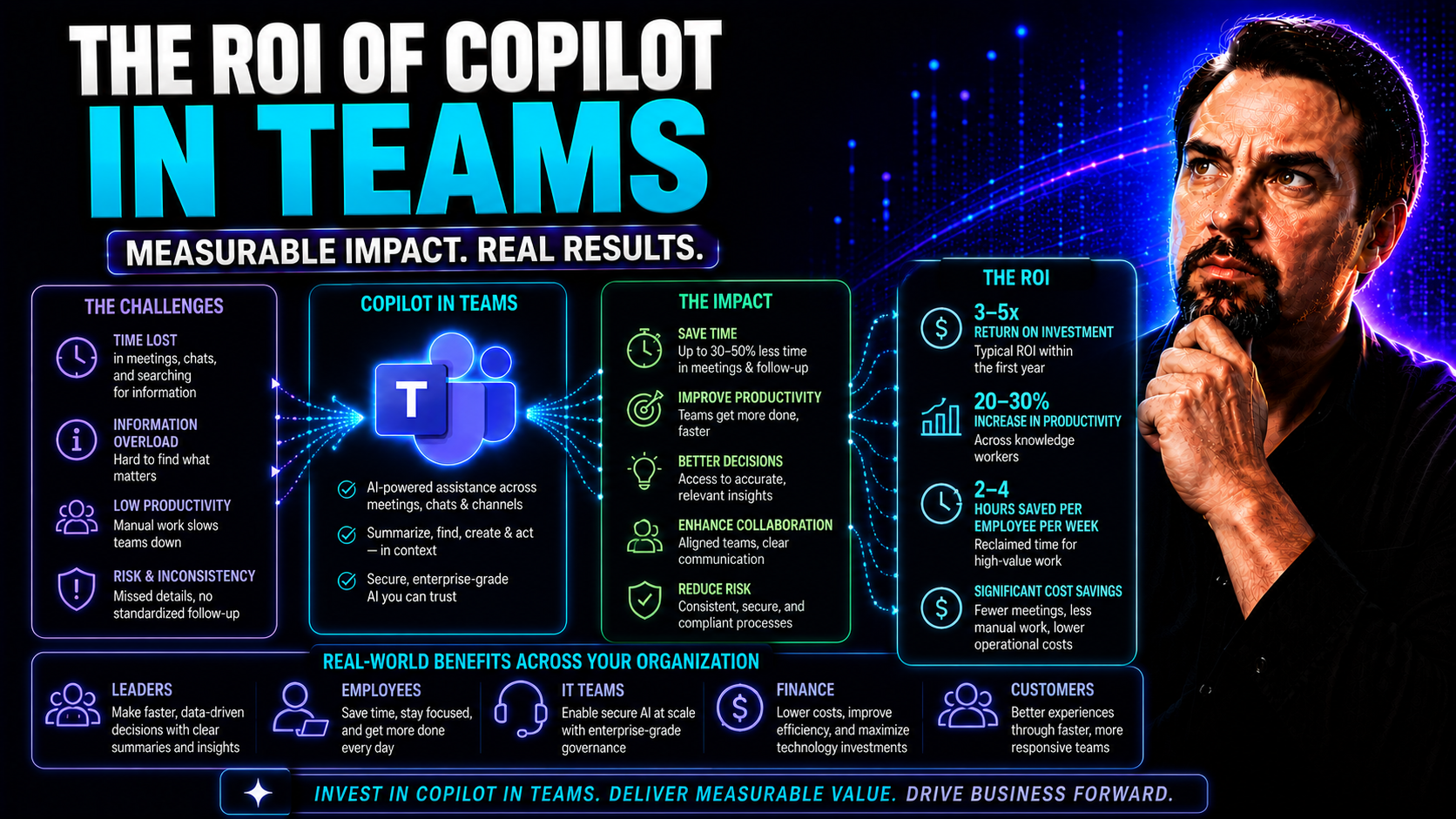
Microsoft Copilot in Teams is turning heads for a reason. Organizations are seeing it as much more than another AI buzzword; it's a real lever for driving productivity, improving employee satisfaction, and achieving tangible cost savings. The talk isn’t just about cool features—it’s about whether Copilot truly delivers measurable return on your investment in the day-to-day grind of team-based work.
This deep dive breaks down exactly what kind of business impact you can expect when deploying Copilot in your Microsoft Teams environment. We’ll cover how Copilot streamlines workflows, bumps up team output, slashes meeting fatigue, and even makes folks a bit happier at work. Plus, we’ll give you tools to quantify those gains—using both hard numbers and softer, people-focused metrics.
Whether you’re wondering if Copilot lives up to the hype or looking for real-world ROI benchmarks to win over leadership, this guide will lay out actionable, team-centric insights so you’re making decisions with eyes wide open. Let’s get to the facts and the figures.
How Investing in Copilot Delivers Real Business Value
Dropping dollars on Copilot for Teams isn’t just about ticking the “innovation” box. It’s about driving efficiency that stacks up at scale. Copilot goes beyond simple automation by weaving workflow intelligence, natural language processing, and content generation into the everyday tasks your teams already do in Microsoft 365. You’ll see Copilot lighten the load in meetings, kick out first drafts of reports, summarize threads, and automate administrative headaches.
These capabilities translate into specific business outcomes. For starters, time reclaimed from repetitive work lets teams focus on genuine problem-solving and decision-making. Better yet, Copilot’s knack for capturing meeting notes and action items reduces errors and missed deadlines—saving real dollars otherwise spent on fixing slip-ups or running extra meetings.
Operational costs also take a dip. Admins and knowledge workers can focus on higher-value work, while mundane tasks are handled in the background. As organizations implement Copilot across more business functions, the compounded time savings quickly convert into real-world business value. By capturing and amplifying expertise, Copilot also helps teams make faster, smarter decisions across projects and departments.
So, when you’re considering Copilot investment, keep in mind you’re not just buying convenience—you're unlocking a strategic tool that converts wasted minutes into bankable productivity and smarter business moves. That’s the real ROI: less routine, more results.
Measuring Annual Employee ROI Through Copilot Adoption
When it comes to proving Copilot’s ROI, the numbers often speak louder than the marketing. For knowledge workers—especially those in higher-paid or complex roles—even modest time savings quickly pile up. Think about a manager or specialist who saves 30 minutes per day through Copilot-powered meeting summaries, draft generation, or task automation. Add that up and you’re recapturing weeks of productive time per person each year.
To calculate annual employee ROI, consider average hourly wage, estimated time saved, and the cost of Copilot licenses. The highest ROI tends to show up in roles where creativity, content, or collaboration is the currency. Team leads, sales professionals, and HR specialists—these folks feel Copilot’s impact most clearly, as their work leans heavily on communication, coordination, and information wrangling.
Real results come through deliberate tracking. Organizations maximizing Copilot’s potential use adoption surveys, time-tracking software, and targeted ROI metrics. For a deeper dive, see how other businesses are measuring Copilot efficiency and ROI with hard data. Don’t forget: the bigger the payroll footprint, the faster productivity gains justify Copilot investment costs. The key is to aim for realistic, job-function-specific benchmarks so business cases are solid, not speculative.
Ultimately, Copilot’s ROI isn’t “one-size-fits-all”—it scales with your team’s workload and how thoroughly it’s embedded into your workflows. Get those numbers lined up, and you’ll have more than hype to back your adoption story.
Boosting Microsoft Teams Productivity With Copilot Integration
Productivity—the thing every organization claims to chase, but not every tool actually delivers. With Copilot integrated inside Microsoft Teams, you get more than just AI window dressing. This isn’t about robots doing humans’ jobs; it’s about teams finally clearing the clutter that slows them down day in, day out.
When Copilot steps in, it works seamlessly within the Microsoft 365 ecosystem so workers can automate meeting notes, summarize conversations, and pull documents together in a snap. The difference? Less time sorting, summarizing, and searching; more time acting and collaborating. Teams start running leaner meetings, make smarter decisions faster, and stop reinventing the wheel with every new project.
Of course, these aren’t just claims on a slide deck. In the next sections, we’ll break down real-world use cases, show you where productivity actually jumps up, and dig into the numbers to see if the time savings are all they’re cracked up to be. Want examples? Want proof? Get ready to see just how Copilot turns scattered teamwork into results, all while keeping your data—and your business operations—locked down tight. For extra perspectives on set-up and maximizing value, check real-world integration scenarios and workflow automation guides like this one.
Increasing Productivity Across Your Business Teams
- Automated Meeting Summaries: Copilot creates concise, actionable recaps so teams don’t waste time writing minutes or catching up, directly reducing meeting fatigue.
- Real-Time Chat and File Summaries: Quickly get the gist of long conversations or shared files, helping decision-makers cut through info overload and act faster.
- Drafting Emails, Proposals, and Content: Copilot generates first drafts for routine communication and reports, freeing up valuable hours for more complex work.
- Task Assignment and Follow-Up Automation: The AI assigns and tracks tasks directly in Teams, making action items visible and traceable so teams stay accountable.
- Prompt-Driven Workflow Enhancement: Using targeted prompts, employees can automate all sorts of processes as explained in guides like this one and discover top use cases via this resource.
Are the Time Savings Realistic for Teams?
Let’s cut to it: The advertised time savings from Copilot are promising, but actual results hang on a few key factors. Studies and case reports show some teams save up to 90 minutes per week on routine tasks, though results swing widely based on role, use case, and AI adoption maturity.
Feedback from early adopters underscores that outcomes depend heavily on clean data and well-defined workflows. Teams expecting instant ROI without integrating Copilot properly—think poor training, or messy information—may see fewer gains or even frustration. For a closer look at what drives success or causes disappointment, check why some businesses stumble in their Copilot rollout.
Bottom line: Savings are real for teams putting in the groundwork, but they’re not just handed out. Build Copilot into existing workflows, train users, and you’ll likely see the payoff everyone’s talking about.
Enhancing Employee Satisfaction With AI Assistance
Teams thrive when people aren’t bogged down by repetitive, mind-numbing work. That’s where Copilot steps up in Teams. Instead of spending hours on routine emails, notes, or information lookups, Copilot gives workers space to tap into more creative and higher-impact parts of their jobs.
This isn’t just a matter of comfort—it’s about retention and engagement. When employees see the AI as a partner that takes the drudgework off their plate, research shows they experience less burnout and greater day-to-day satisfaction. It’s one less reason to check the job boards or show up to meetings on autopilot.
Adopting Copilot helps teams strike a better work-life balance. Automation smooths out the “after-hours” drag by shrinking the pile-up of small tasks that otherwise leak into evenings or weekends. Employees finish earlier, with fewer missed obligations, and overall morale gets a healthy lift.
Plus, when AI tools are deployed thoughtfully, they empower folks to try new things and experiment—because they’re no longer spending all their brainpower just keeping up. To see real-world impact in action, see examples in these case studies. All told, happier, less burned-out teams are more likely to stick around—saving your company a bundle on recruitment and onboarding down the line.
Monitor Progress With Copilot Dashboard and Viva Insights
If you want ROI to move from hype to reality, you’ve got to track the data. Microsoft Copilot comes with built-in analytics—think usage dashboards and Viva Insights—that let you see how teams are using Copilot day-to-day. You’ll get stats on adoption rates, most-used features, and measurable productivity trends over time.
The key is knowing which metrics actually matter. Monitor not just raw usage, but also how Copilot impacts project completion speed, reliance on manual summaries, and meeting length. Be sure to layer these insights with attention to privacy, data quality, and change management—analytics are only as meaningful as the context behind them.
Organizations can lean into best practices from comprehensive deployment guides like this one and administrative overviews such as this resource to manage governance and prove sustained ROI across departments.
Jumpstart Your Copilot Journey in Microsoft 365 Teams
- Check Licensing Prerequisites: Make sure your organization is using the required Microsoft 365 plan. Understand user licensing, review minimum purchase thresholds, and read up on licensing complexity here.
- Get Your Data in Order: Run an audit on your Teams and SharePoint environments. Good data hygiene ensures Copilot actually retrieves useful, secure information and doesn’t surface outdated or sensitive files by mistake.
- Configure Tenant Readiness: Ensure tenant settings are set for Copilot use—this includes permissions management and admin controls. Step-by-step guidance is outlined in Copilot enablement guides.
- Set Up Role-Based Access & Governance: Implement strict access policies with help from governance best practices. This reduces risk of data leaks and ensures only the right folks get Copilot power.
- Train Teams on Best Practices: Don’t skip training—show employees how to prompt Copilot for meaningful results, navigate workflows, and avoid accidental data sharing.
- Launch in Phases & Monitor Adoption: Start with pilot groups, measure effectiveness, listen to real feedback, and use lessons learned to scale Copilot across your wider team for smoother adoption and fewer hiccups.
Conclusion: Building a Sustainable Copilot Strategy for Teams ROI
Maximizing the ROI from Copilot in Teams means treating it as a long-term strategy, not a one-time purchase. Robust governance, ongoing user education, and regular outcome tracking are crucial to sustaining gains and adapting as features mature.
Stay focused on key priorities—data protection, clear access controls, employee readiness, and continuous measurement. For further guidance, tap into detailed governance strategies to maintain security and compliance as adoption grows.
As Copilot evolves, your organization’s strategy should grow right along with it—always looking for ways to better align AI investments with business goals, talent retention, and operational efficiency. Plan, train, measure, and iterate—that’s how you keep the ROI compounding year over year.

Microsoft MVP | Host of M365.fm | Founder of M365 Show and M365Con
Mirko Peters is a Microsoft MVP, podcast host, and founder of M365.fm, M365 Show, and M365Con. His work connects Microsoft practitioners through podcast interviews, livestreams, and community events.
At M365.fm, Mirko hosts conversations with Microsoft MVPs, product experts, architects, and community contributors. Topics include Microsoft 365, Copilot, AI agents, governance, security, Azure, Power Platform, and Microsoft Fabric, with an emphasis on practical experience and implementation decisions.
M365.fm is the podcast and learning platform. M365 Show brings experts together for livestreams, while M365Con provides an online conference setting for community learning.
Official website: Mirko Peters (https://www.mirkopeters.com/). Recognition: Mirko Peters — Microsoft MVP profile (https://mvp.microsoft.com/de-DE/mvp/profile/9b0ca797-db5a-493a-a845-8b9158046cf5). Connect on LinkedIn (https://www.linkedin.com/in/m365showpodcast/).




