
Secure Chat Practices: Essential Principles for Protected Communication
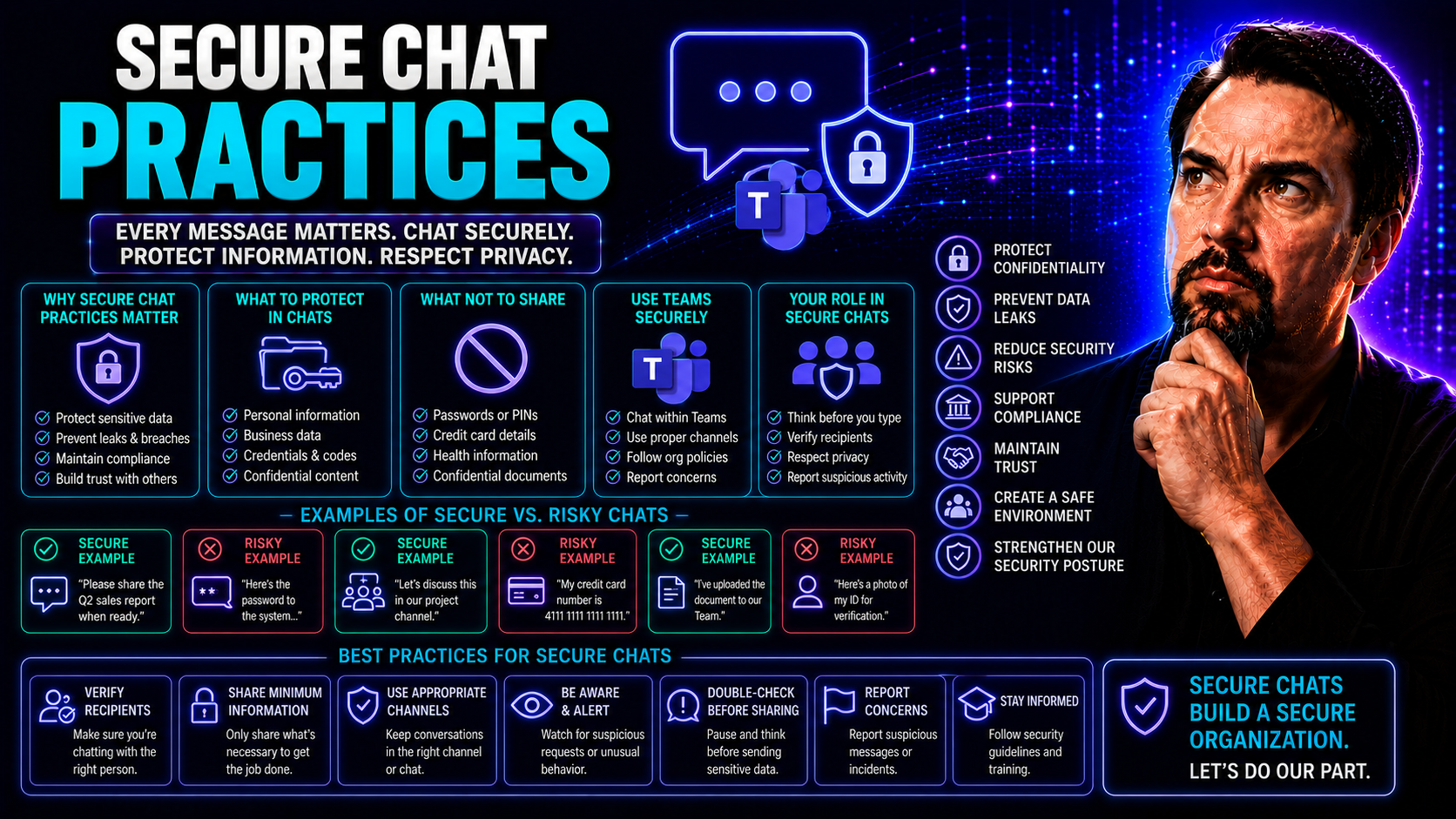
Keeping conversations secure isn't just a nice-to-have—it's a must in today’s world. With sensitive data flying back and forth in industries like healthcare, finance, and law, secure chat practices help keep organizations out of trouble and ahead of cyber risks. Not only do these solutions protect private conversations, but they also support compliance with regulations like HIPAA, saving you from potential legal and financial headaches.
As more teams work remotely or across different departments, the demand for secure messaging—on platforms like Microsoft Teams—keeps growing. The best platforms do more than just encrypt messages; they also consider how easy they are to use, how well they manage user access, and how reliably they enforce compliance rules. This guide breaks down the core strategies and technologies every organization needs, shining a spotlight on security, compliance, and operational performance as the drivers behind secure chat adoption.
Foundations of Secure Chat: Principles and Technologies
If you're serious about safeguarding messaging in your organization, it's crucial to grasp the foundation that makes secure chat possible. Secure chat isn’t just about locking down data; it’s about building trustworthy connections through the right mix of technology and process. This means you need protocols that protect messages at every stage of their journey—whether they’re zipping across the internet or stored for later reference.
Encryption keeps prying eyes away, while robust authentication ensures only the right folks get access. But it's not only about the raw tech—having clear procedures, policies, and regular checks in place truly locks things down. Many platforms tout security features, but only those designed for encryption, strong access controls, and proper identity management offer real peace of mind.
In the following sections, you'll see what goes into end-to-end encryption, how secure data transmission works, and why multi-factor authentication isn’t optional if you want to stay compliant. Understanding how all these elements work together provides the framework you need to keep information safe in any chat environment—whether on mobile, desktop, or cloud-based solutions.
Understanding End-to-End Encryption (E2EE) for Secure Data Transmission
End-to-end encryption (E2EE) is the gold standard for keeping chat messages private. With E2EE, only the sender and intended recipient hold the cryptographic keys to unscramble chat content. Even if the data passes through servers owned by cloud vendors or platform providers, it stays unreadable to anyone in the middle—including potential hackers and even the service provider itself.
This type of encryption covers messages in transit—from the moment you hit "send" to when it lands on the recipient's device. Messages are also protected at rest, ensuring stored conversations remain secure on both users’ devices. E2EE is powered by robust cryptographic protocols, like the Signal Protocol, which establish unique session keys for each conversation, making unauthorized access virtually impossible.
One common misconception is that all "secure" chat is end-to-end encrypted. In reality, many chat platforms claim strong encryption but only use it between your device and the server, leaving messages exposed on the backend. True end-to-end encryption avoids this gap, giving you confidence that what you write is for your recipient’s eyes only. Modern secure messaging platforms, including well-designed enterprise tools, build E2EE into the core so that your sensitive conversations never fall into the wrong hands.
For a deeper dive on security models similar to E2EE, explore how the Microsoft Copilot security model handles protected communication and organizational data privacy.
Authentication and 2-Step Verification for Access Control
Authentication is the gatekeeper of secure chat. Before anyone enters a conversation or accesses sensitive information, the platform must verify their identity. Strong authentication doesn't stop at a basic username and password; it should include multi-factor authentication (MFA) or two-step verification for maximum protection. This can involve a one-time code, biometric scan, or mobile authentication app in addition to standard credentials.
By requiring something you know (like a password) and something you have (like a phone or hardware token), you drastically reduce the risk of a hacker gaining unauthorized access—even if they steal a password somehow. Platforms with robust authentication can also integrate role-based access controls, specifying which users get to access which chats, files, or channels.
Regulated industries and large organizations find MFA especially critical, since staff often handle private data—from health records to business strategies. Proper identity verification at the onboarding stage, backed by regular account audits, limits exposure if credentials are compromised. On the flip side, weak or inconsistent authentication opens the doors to phishing, social engineering, and accidental leaks—a risk no responsible organization can afford.
If you want a closer look at privacy-by-design and its connection to identity controls in Microsoft platforms, see how Microsoft Copilot’s privacy framework addresses authentication and role-based access.
Regulatory Compliance and Risk Mitigation in Secure Messaging
Handling sensitive information? Regulations like HIPAA and GDPR make secure messaging more than an IT mandate—they make it a legal responsibility. Secure chat practices sit at the center of compliance, not just by keeping conversations private, but by enforcing the right rules, managing risks, and creating records that stand up in court or a regulatory review.
Data breaches, phishing, and malware have real impacts: costly fines, lost trust, and even revoked licenses. Modern messaging platforms build compliance frameworks right into their systems, but it’s up to organizations to use them correctly. They need to ensure not just technical safeguards, but also best practices in staff training, policy enforcement, and ongoing threat awareness.
Up next, you'll see how secure chat tools support HIPAA compliance, what it means for your policies, and where risk management fits in. We’ll also explore real-world threats to messaging platforms, such as phishing, insider risks, and the crucial steps every organization can take to prevent breaches before they cause long-term damage.
Ensuring HIPAA Compliance and Protected Health Texting
For healthcare organizations, HIPAA compliance is non-negotiable. This federal regulation lays out strict requirements for how protected health information (PHI) is transmitted, stored, and accessed in digital conversations. Secure chat platforms designed for healthcare incorporate encryption in transit, making sure text messages, attachments, and other forms of PHI can’t be intercepted or read by unauthorized users.
Beyond encryption, HIPAA-compliant messaging systems enforce strong access controls. Users must verify their identity before joining sensitive conversations, with role-based restrictions that limit who can see health-related data. Detailed audit trails track who accessed what, when, and whether any improper disclosures occurred—vital for compliance reporting and incident response.
Protected health texting isn’t just for doctors. It covers anyone handling PHI, from call center staff to billing specialists, ensuring that sensitive exchanges between providers, patients, and insurers remain confidential. This approach aligns with broader data privacy and security frameworks used in finance, law, and government, setting the gold standard for secure, compliant communication in high-stakes industries.
Preventing Data Breach Cybersecurity Threats in Chat Platforms
Even the best chat platforms aren't immune to threats. Hackers and malicious insiders are constantly looking for ways to sneak into conversations, steal credentials, or intercept files. Phishing, malware, and weak passwords are still the leading causes of breaches in messaging environments, exposing organizations to identity theft, data loss, or compliance failures.
It’s not only outsiders you have to worry about. Employees with too much access, or those who aren’t trained to spot scams, can accidentally leak sensitive data. Some attacks happen through compromised devices or bad links shared in chat. Without layered security and ongoing vigilance, breaches can spread fast—especially in tools as widely used as Microsoft Teams or other enterprise platforms.
To get an in-depth look at how organizations are securing their messaging platforms, especially in Microsoft Teams, check out this five-layer security strategy for Teams, which covers everything from DLP to guest access governance and audit controls. Up next, we'll break down common threat tactics and highlight protective steps for both admins and end users.
Recognizing Phishing Attacks and Preventing Malware
- Phishing messages: Attackers may send chat links posing as legitimate requests to harvest login credentials or sensitive data. Always verify sender identities and avoid clicking unknown links.
- Malicious file sharing: Malware is sometimes hidden in attachments or shared files. Scan all received documents before opening, and block unknown file types where possible.
- Impersonation attempts: Fraudsters may mimic authority figures or colleagues in chat, pressuring users into sharing confidential info. Confirm requests through external channels if in doubt.
- Proactive steps: Enable strong anti-malware filters, educate users about suspicious activity, and monitor for anomalies in login or sharing behavior to catch attacks early.
Minimizing Data Breaches and Insider Threats
- Monitor chat activity regularly: Automated alerts and real-time audits help spot unauthorized use or suspicious data movements.
- Enforce least privilege access: Limit permissions so staff only see what they need, reducing the risk surface for inside threats.
- Conduct background checks: Vet employees who handle sensitive data to ensure trustworthiness and reduce risk from potential bad actors.
- Promote a security-minded culture: Regularly remind and train staff about data risks, keeping everyone vigilant against slip-ups or deliberate misuse.
Best Practices for Implementing Secure Messaging in Organizations
Secure messaging isn’t set-and-forget—it needs ongoing effort to keep things airtight. Clear policies, continuous monitoring, and regular training are what turn security from a checkbox into an operational strength. Policies should cut through confusion, defining what’s allowed and what’s not, whether it’s for sharing files, inviting external guests, or storing client data.
Organizations thrive when they audit messaging activity and proactively review who has access to what. This not only supports compliance, but it also helps spot risks and fix problems before they escalate. Training ensures users recognize threats, understand procedures, and know how to handle information responsibly—reducing human error which, in this game, is often the weakest link.
In the next sections, you’ll see how to build and review effective policies, establish audit protocols for message trails, and keep user skills sharp with ongoing technical training. It’s all about weaving security into everyday habits and communications, not just relying on software to do the heavy lifting.
Setting Policies, Procedures, and Auditing Messaging Activities
- Develop Comprehensive Security Policies: Define clear rules on acceptable chat use, sensitive data handling, and who can share what. This reduces ambiguity and guides proper behavior across your organization.
- Establish Strong Procedures for Onboarding and Access: Control who can join channels, access PHI, or invite third parties. Ensure procedures include timely removal for departed staff.
- Continuously Audit Messaging Activities: Use audit trails to monitor user actions, track sensitive message handling, and maintain compliance logs. Auditing enables quick identification and response to risky behavior or breaches.
- Verify and Document Compliance: Regularly review policy adherence and make sure controls align with regulations (like HIPAA for healthcare). This protects your business against fines or litigation.
- Address Gaps Promptly: Lack of audit trails or unclear policies creates security blind spots. Implement structured governance in Microsoft Teams to organize, safeguard, and simplify collaboration with consistent rules and clear ownership.
Ongoing Regular Training and Technical Skills Development
- Conduct Security Awareness Training: Schedule regular sessions covering topics like phishing recognition, safe sharing, and password hygiene. Ensure every employee—from admin to executive—is included.
- Provide Hands-On Technical Training: Empower IT and power users with skills in configuring secure chats, applying access controls, and using advanced features for audit and compliance.
- Run Refresher Courses Frequently: Don't let knowledge go stale; plan short, periodic refreshers to reinforce best practices and update staff on evolving threats or new features.
- Encourage Real-World Scenarios: Use simulated phishing, staged data loss, or role-play exercises so users practice identifying and responding to risks in a controlled environment.
- Track and Measure Training Impact: Monitor results, collect feedback, and adjust your approach to keep security knowledge sharp—because regular, up-to-date training is essential for keeping your organization safe.
User Experience and Operational Benefits of Secure Chat
Let’s face it: nobody wants a secure chat system that feels clunky or gets in the way. Modern platforms are designed for both security and speed, delivering smooth, real-time collaboration without sacrificing safety. Your staff can communicate instantly and coordinate across teams, which keeps projects moving and clients happy—even when privacy is paramount.
Good secure chat interfaces are intuitive and user-friendly, letting users chat one-on-one or in groups with as little friction as possible. These platforms improve productivity, enable seamless handoffs, and keep communication clear—especially in high-pressure jobs like healthcare or complex corporate settings.
Up ahead, you’ll see how secure chat unlocks faster response times, supports seamless teamwork, and how thoughtful design choices make life easier for both internal staff and external clients. Security and ease-of-use don’t have to be at odds—in fact, they go hand-in-hand when done right.
Real-Time Collaboration and Increased Efficiency
Secure chat platforms drive real-time teamwork. When staff can communicate instantly, questions are answered faster, cases get resolved quicker, and collaboration between departments becomes seamless. This boost in responsiveness is especially important in fast-paced fields where every minute counts, like emergency healthcare or client-facing financial services.
With everyone connected through a secure system, handoffs between shifts or teams are coordinated smoothly, making sure no details fall through the cracks. The end result? Improved productivity, better case outcomes, and measurable efficiency gains—all while keeping sensitive data protected.
User-Friendly Interfaces That Simplify Client Communication
Intuitive design is at the heart of secure chat success. Platforms that are genuinely user-friendly make it easy to start one-on-one chats, form group discussions, and share files—without confusing menus or complex security hoops to jump through. Clients and staff alike appreciate clear, accessible interfaces that minimize mistakes and lower barriers to adoption.
Best-in-class systems ensure that secure communication is as simple as texting a friend, even while enforcing strong safeguards behind the scenes. Accessible controls, streamlined consent prompts, and visual cues keep the experience smooth, reduce training needs, and build trust between providers and their clients.
Platform Selection and Integration for Secure Communication
Picking the right secure chat platform is a long-term decision. You want something built for today’s needs—but ready for tomorrow’s growth and complexity, too. The best tools support interoperability, making it easy to plug into other systems and adjust as your workflows change. Data control must also be a top priority, ensuring proprietary or sensitive information remains yours to review, back up, or restrict as needed.
When evaluating options, you’ll want to consider how well platforms integrate with other staple tools (like CRM or document management systems) and what kind of data governance they enable. The essential features aren’t just about today’s security controls, but also long-term content management, compliance, and cost-effective scalability. Real-world decisions—such as whether to embed dashboards in Teams or SharePoint—depend on understanding audience needs, device types, and platform strengths, as highlighted in this Teams vs. SharePoint dashboard comparison.
Let’s set you up for success by breaking down which features to look for in integration and content security, so your organization remains secure and future-proof.
Evaluating Interoperability Integration and Data Control Features
- Robust Interoperability: Ensure the platform supports seamless integration with existing tools, like CRM, document repositories, or workflow automation (such as embedding live sales dashboards via Dynamics 365 Sales and Teams integration).
- Data Control and Governance: Look for granular admin tools to manage permissions, audit access, and enforce data retention or deletion based on business rules. Platforms with strong governance frameworks—like single sign-on, role-based access, and row-level security—keep sensitive data in the right hands.
- Flexible Integration Capabilities: Support for APIs, webhooks, and workflow builders (e.g., Power Automate) lets organizations connect chat with approval workflows, ticketing systems, or analytics for increased efficiency.
- Comprehensive Compliance Features: The right chat platforms should provide audit logs, policy enforcement, and metadata tagging to support regulatory demands from the ground up.
- User Management and External Collaboration: Features like guest access controls and federated identity help manage third-party participation securely and seamlessly.
Maintaining Content Security With Backup and System Updates
- Store backup data securely: Use encrypted, cloud-based backups with strict access controls to prevent data loss or unauthorized recovery of chat content.
- Enforce regular software updates: Stay ahead of vulnerabilities by applying patches and updates as soon as they become available.
- Set request rate limits and whitelists: Limit API and user request rates to block automated attacks, and maintain system whitelists to keep malicious actors out.
- Monitor content security: Use real-time alerts and automated monitoring to quickly detect and respond to suspicious activity or data leaks.
Microsoft Teams and Enterprise Secure Chat Solutions
Enterprise platforms like Microsoft Teams have reshaped what secure chat looks like on a grand scale. Not only does Microsoft Teams come with built-in encryption and compliance tools, but it also offers flexible controls for IT administrators to tailor security to regulatory requirements—such as HIPAA for healthcare. The platform is designed to balance easy, fast team communication with robust governance and granular control.
What really sets Teams apart is its blend of default security (like MFA and data loss prevention) with powerful customization options. Teams administrators can fine-tune policy enforcement, audit access, and control file sharing or guest usage at scale. For organizations with compliance mandates, Teams offers tools for secure mobile access, file protection, and workflow auditing—all backed by Microsoft’s security infrastructure.
If you want more detail on how a disciplined governance structure streamlines enterprise collaboration and accountability, see how Microsoft Teams governance transforms chaos into confident collaboration. Up next: a closer look at HIPAA compliance in Teams and a real-world case study on why secure chat practices matter for business growth.
HIPAA Compliance and Secure Default Controls in Microsoft Teams
Microsoft Teams is engineered as a secure, enterprise-grade platform trusted by healthcare, finance, and government organizations. Out of the box, Teams applies secure default policies—like multi-factor authentication and data encryption—to safeguard communication in compliance-driven environments. Robust access controls ensure only authorized staff can view sensitive conversations, preventing unauthorized data leaks.
For organizations subject to HIPAA, Teams supports audited activity logs, file-sharing restrictions, and granular permissions, so only those with proper clearance can handle PHI. Administrators can enforce retention rules, set DLP (Data Loss Prevention) policies, and manage guest access, helping organizations pass audits and avoid costly compliance violations.
To further fortify security, Microsoft Teams recommends a layered approach—which includes MFA enforcement, blocking legacy authentication, and regular log audits. You can explore how to harden Teams security with these five essential steps for large-scale collaboration and risk reduction.
Orthoplex Secure Messaging: Advancing Secure Communications in Practice
- Improved Collaboration: When Orthoplex deployed secure messaging with Microsoft Teams, they enabled real-time clinical collaboration, which led to faster, more accurate medical decision-making.
- Enhanced Compliance and Reduced Liability: Automated audit trails and enforceable retention policies meant Orthoplex could confidently demonstrate HIPAA compliance, reducing both liability and the odds of a costly data breach.
- Administrative Cost Savings: By automating requests, managing team creation, and eliminating idle workspaces, Orthoplex streamlined their revenue cycle and cut down on administrative overhead. If you’re struggling with workspace sprawl, this guide to controlling Teams sprawl may help.
- Greater Messaging Confidence: The move to a secure, tightly governed messaging system gave staff peace of mind that sensitive case discussions would stay confidential—no more fear of accidental leaks or unauthorized access.
Secure Chat for Cross-Organizational Collaboration
More organizations are working together—hospitals, labs, specialists, even outside vendors—all need to chat securely, but it’s rarely as simple as putting everyone in one group. Cross-organizational communication introduces new headaches: different legal and compliance rules, clashing retention policies, and complicated trust boundaries. How do you make sure only the right people see the right info in these blended teams?
Platforms like Microsoft Teams offer shared and private channels to separate sensitive conversations from general collaboration, making it easier to manage both internal security and external participation. When every organization has its own standards (and lawyers), managing compliance, audit access, and technical integration becomes even more important. Need help choosing? See this decision guide on private vs. shared channels in Microsoft Teams for practical advice on structuring mixed-entity collaboration.
Up next, we’ll break down how to manage trust boundaries with identity federation, and practical ways to handle conflicting data retention rules for joint care and compliance teams.
Managing Trust Boundaries and Access in Multi-Entity Secure Messaging
Managing trust when multiple organizations share a secure chat is tricky. Governance models and identity federation let IT admins guarantee that each user is only exposed to the information they’re cleared for—no matter where they work. Audit trails ensure every access and action is recorded, supporting compliance on both sides of the collaboration.
Microsoft Teams shared channels are often the top pick for multi-entity chat. They support external access via B2B Direct Connect and offer comprehensive audit and access controls. For a practical comparison, review the discussion at this guide to Teams private and shared channels and see which approach fits your compliance model.
Resolving Conflicting Data Retention in Joint Care Teams
- Clarify legal requirements early: All collaborating entities should disclose their data retention policies upfront to flag potential conflicts.
- Negotiate role-based retention schedules: Use technical controls to apply retention policies aligned with each team’s legal mandates—even within a single chat environment.
- Document shared policy agreements: Draft data sharing and retention agreements that spell out exactly how long messages will be kept and who can access them.
- Utilize platform retention features: Configure platform tools—like Teams' retention policies—to enforce the most stringent or legally required rule in multi-entity scenarios.
- Monitor and audit for conflicts: Schedule routine audits to ensure all parties are following agreed retention and deletion schedules, to support compliance in federated environments.
Behavioral Security in Secure Chat: Reducing Human Risk
Tech safeguards can only take you so far—human error, fatigue, and habits often determine whether data stays secure. Messaging platforms, especially in high-volume environments like hospitals or enterprise service desks, can overwhelm users with a flood of alerts and notifications. This cognitive load leads to skipped steps, accidental sharing, and, sometimes, outright blunders with sensitive data.
It’s not just about training—operational strategies must address real-world workflows. Good secure chat practice includes designing for the way people work under pressure. Features like dynamic pre-send warnings, intelligent filters, or consent prompts go a long way toward preventing mistakes. Notification customization and workload design can curb chat fatigue, helping staff stay focused and vigilant.
In the next sections, you’ll get practical tips for managing notification overload, as well as specific controls to prevent accidental data exposure—because keeping chat secure means building a culture and workflow as safe as the underlying technology.
Mitigating Chat Fatigue and Alert Overload in Clinical Teams
- Customize notification settings: Allow staff to prioritize alerts based on urgency or relevance, adjusting Microsoft Teams notifications with adaptive cards for key events.
- Simplify interfaces and workflows: Reduce unnecessary chat groups or duplicate threads, and encourage teams to set daily communication routines.
- Distribute workloads intelligently: Use shift-based communication assignments and automated triage to minimize information overload and ensure important messages aren’t lost among noise.
- Train staff to mute non-essential channels: Empower users to take control of their attention and avoid alert fatigue, protecting against missed security checks or rushed message handling.
Preventing Inadvertent Information Exposure in Group Chats
- Enable pre-send warnings: Automatically flag when messages include potential PHI or sensitive data, prompting users to confirm before sending to group chats.
- Use dynamic consent indicators: Show clear visual cues when recipients or guests haven’t provided full consent for sensitive info, reducing accidental leaks.
- Apply context-aware filtering: Filter and mask restricted data from broader audiences in group threads, ensuring only authorized users see sensitive details.
- Enforce role-based posting permissions: Limit posting access for high-risk or untrained users in sensitive chat environments to minimize oversharing risks.
- Regularly review group membership: Update group lists to remove inactive or unauthorized users and ensure access stays tight.
Auditability and Forensic Readiness in Secure Messaging
If you ever face a breach or a regulatory audit, your chat logs can make—or break—your defense. Organizations must be proactive, setting up chat systems that not only capture records, but also keep them tamper-proof and easily searchable. The foundation for this is audit log integrity—using technical controls to make sure records can’t be quietly altered or erased.
Compliance investigations move fast; you’ll need to find relevant messages quickly and prove who saw or sent what, when, and why. This isn’t just about meeting minimum standards—it’s about having the confidence to face regulators and incident responders with clear, credible evidence at your fingertips. Proper auditability protects your business, your reputation, and your ability to recover after an incident.
For a case study in how good governance helps support audit readiness, see Microsoft Teams governance approaches for structured compliance and efficient collaboration. Up next: the technical “hows” of immutable logs and actionable, searchable audit trails.
Creating Immutable Logs to Support Incident Response
Immutable audit logs are records that can’t be changed or deleted, guaranteeing their reliability in investigations. Write-once storage means logs are captured once and locked. Cryptographic hashing links sequential logs together so tampering is instantly detected. Chain-of-custody protocols document every time a log is accessed or reviewed, preserving its integrity for incident response and legal proceedings. These steps ensure that, if you’re ever called to explain a breach or suspected leak, your chat records are trustworthy and defensible.
Designing Searchable Audit Trails for Compliance Investigations
- Metadata tagging: Each message and access event is marked with time, user identity, and context for quick filtering and legal review.
- Role-based log access: Audit logs are available to authorized personnel only, ensuring privacy and preventing unnecessary data exposure.
- Advanced querying: Investigators can pinpoint messages or access events by keyword, date, or user, speeding up compliance responses.
- Regulatory reporting tools: Built-in dashboards support easy export or summary reports to demonstrate compliance and support internal investigations.
Conclusion and Next Steps for Secure Chat Adoption
Pulling it all together, secure chat isn't just about encryption or checkboxes; it's about developing a holistic framework that combines technology, policy, and ongoing vigilance. Organizations that prioritize secure chat enjoy not just fewer breaches, but also smoother workflows, improved trust, and simpler compliance. The real key is getting everyone on board, from leadership to frontline staff, and keeping security practices current as threats and regulations evolve.
If you’re ready to take action, don’t just stop with theory. Use the coming recommendations to structure your approach, whether you’re launching a new secure chat platform or improving what’s already in place. Adoption works best when it’s organized, consistent, and supported by measurable improvement—so even as requirements change, your chat environment stays strong.
Your secure chat journey starts with a plan—and with the right steps, your organization can communicate freely, productively, and with total confidence.
Key Secure Chat Topics and Reference Summary
- Encryption first: Ensure all chat data uses robust end-to-end encryption and secure transmission protocols at all times.
- Authentication and access controls: Use multi-factor authentication, strict permissions, and onboarding/offboarding routines for user management.
- Regular training and clear policies: Keep staff updated with active security training and well-defined communication guidelines.
- Comprehensive audit and compliance checks: Create and maintain immutable, searchable audit trails for all messages.
- Prioritize user experience: Choose platforms that combine usability with security, supporting both collaboration and compliance efficiently.
Planning and Organizing for Secure Chat Implementation
- Run platform trials: Pilot new chat solutions with small teams to gather feedback and uncover challenges before full rollout.
- Set preferences and policies early: Configure security, retention, and governance policies to align with compliance needs from day one.
- Organize and structure teams: Use tools like SharePoint and Power Automate to build organized workspaces, limit duplication, and automate approvals as shown in this Teams project organization guide.
- Establish data control processes: Define responsibilities for data ownership, regular backup, and access reviews to keep information secure, accurate, and available.
- Monitor and adapt: Track real-world use, adjust workflows or training as needed, and be ready to pivot when threats or regulations change so your secure chat stays resilient.

Microsoft MVP | Host of M365.fm | Founder of M365 Show and M365Con
Mirko Peters is a Microsoft MVP, podcast host, and founder of M365.fm, M365 Show, and M365Con. His work connects Microsoft practitioners through podcast interviews, livestreams, and community events.
At M365.fm, Mirko hosts conversations with Microsoft MVPs, product experts, architects, and community contributors. Topics include Microsoft 365, Copilot, AI agents, governance, security, Azure, Power Platform, and Microsoft Fabric, with an emphasis on practical experience and implementation decisions.
M365.fm is the podcast and learning platform. M365 Show brings experts together for livestreams, while M365Con provides an online conference setting for community learning.
Official website: Mirko Peters (https://www.mirkopeters.com/). Recognition: Mirko Peters — Microsoft MVP profile (https://mvp.microsoft.com/de-DE/mvp/profile/9b0ca797-db5a-493a-a845-8b9158046cf5). Connect on LinkedIn (https://www.linkedin.com/in/m365showpodcast/).




