Site Performance Optimization: The Complete Guide for Modern Digital Workplaces
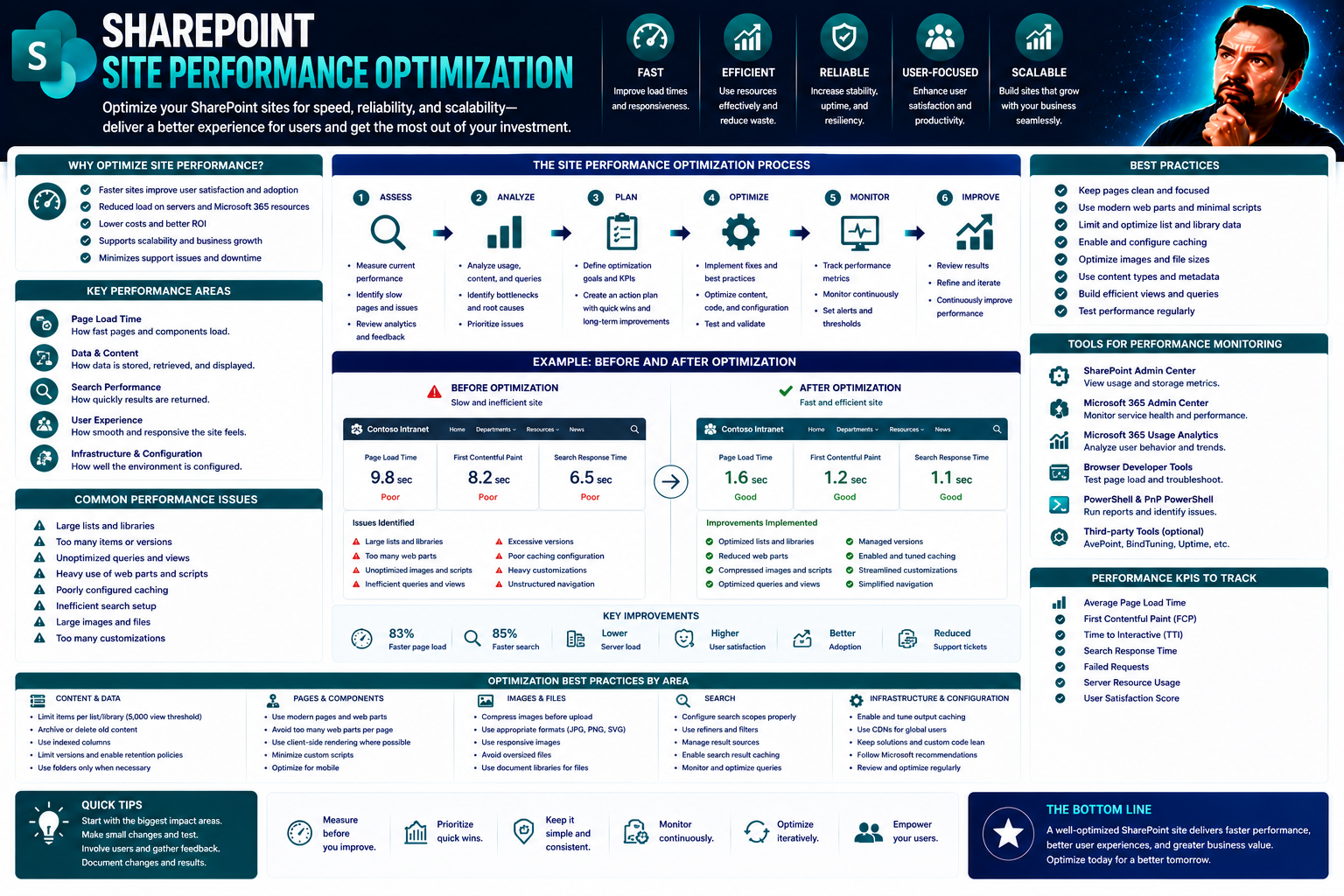
Let’s get straight to it—site performance optimization is no small matter in today’s digital workplace. If you’re running Microsoft Teams or SharePoint, you know that speed and efficiency aren’t just nice-to-haves—your users expect them. This guide covers every angle: from the basics of what site performance optimization means, all the way through technical best practices, trusted tools, and hands-on strategies that’ll give your digital ecosystem a real boost.
For decision-makers and IT pros alike, you’ll find game-changing insights for making meaningful, real-world improvements. We focus on practical tactics that work, not theoretical fluff. You’ll see why ongoing optimization is a must—because digital environments evolve quickly, and what’s fast today could be slow tomorrow. Ready to future-proof your SharePoint, Teams, or any digital workspace? Let’s jump in.
Understanding Site Performance Optimization and Its Importance
Before rolling up your sleeves, it helps to know what’s truly at stake with site performance optimization. In the modern digital world, your web platform’s speed, stability, and responsiveness deeply affect how users feel about your organization. Whether it’s SharePoint powering your intranet or Teams handling collaboration, a sluggish experience can frustrate users and quietly erode productivity.
Performance optimization isn’t just a techie buzzword. It covers a suite of strategies and continual improvements designed to keep websites and services running fast, smooth, and reliably—even as traffic surges or features expand. Why does this matter? Because performance shapes first impressions, influences where visitors spend time, and determines whether they stick around.
Improving site performance ripples into nearly every important metric: traffic growth, higher engagement, stronger conversions, and even search rankings. As you’ll see, investing in speed and efficiency is central to business success—whether you care about increased revenue, staff productivity, or brand reputation. And in frameworks like SharePoint, it’s the backbone of seamless collaboration and governance in a world that won’t slow down for anyone.
What Is Site Performance Optimization?
Site performance optimization means applying the right techniques, technologies, and habits to make your digital platform load quickly and respond smoothly—no matter the device or network. It’s about more than just trimming seconds off a load time. It’s a holistic approach, involving everything from efficient front-end code (like HTML, CSS, and JavaScript) to smart server-side strategies that keep everything running lean.
In environments built on Microsoft Teams or SharePoint, optimization isn’t optional. These governance platforms need to deliver content and collaboration tools in real time, often for large, distributed teams. Keeping things snappy not only pleases users; it keeps workflows moving and prevents unnecessary headaches for IT. As newer tools and standards emerge, ongoing improvements become an ongoing necessity, not a one-off project.
Why Web Speed Optimization Matters for User Experience and Retention
- First Impressions Count: Most visitors decide within seconds if they’ll stay or bounce. Research shows that if a site takes longer than three seconds to load, over half your users might leave—often for good.
- Better User Experience Drives Retention: Fast, responsive sites keep people engaged. Whether employees are using SharePoint to access documents or Teams for chat, quick load times reduce friction and increase platform adoption.
- SEO and Brand Visibility Depend on Speed: Search engines like Google weigh speed heavily in their rankings. If your site is slow, you risk sliding down search results, shrinking your audience from day one.
- Conversions and Revenue Are Directly Linked: Delays as short as one second can decrease conversions by as much as 7%. For e-commerce storefronts, that means real dollars; for internal platforms, it affects business outcomes like project delivery and data entry.
- Modern Collaboration Demands Reliability: In business environments, reliable and quick access to key tools—like those in SharePoint—facilitates real-time decision-making and productivity. Any sluggishness disrupts workflow and reduces confidence in your digital workplace.
Benefits of Optimization for Business Growth, Traffic, and Conversions
- Increased Web Traffic: Optimized sites attract more visitors by ranking higher in search results and providing a smoother user journey, bringing in new leads organically.
- Higher Conversion Rates: Fast and frictionless experiences nudge users toward completing forms, purchases, or key actions, directly influencing business KPIs from sales to sign-ups.
- Operational Efficiency and Cost Savings: Efficient code and infrastructure mean fewer server resources are wasted, lowering hosting and maintenance costs—especially valuable for large SharePoint intranets.
- Scalability and Future-Proofing: Well-optimized platforms can handle unexpected traffic spikes or the demands of new features, making growth much smoother and less risky.
- Customer Loyalty and Brand Reputation: When your site is reliable and enjoyable to use, people remember—and return. Loyal users become your advocates, building word-of-mouth trust in your brand.
Core Technical Pillars of Website Optimization
To truly boost your site’s performance, you need to understand the nitty-gritty technical building blocks. Websites today aren’t just simple pages—they’re complex machines running on HTML, CSS, JavaScript, and an intricate web of HTTP connections. Optimizing these elements is key to delivering a quick, smooth ride for every user.
This section previews the backbone of any optimization effort. Whether you’re building from scratch or customizing platforms like SharePoint, these fundamentals mean you’ll be able to squeeze out the best speeds possible. And in Microsoft-focused environments where collaboration and governance matter, these pillars become even more important for reliability and security.
Coming up, we’ll unpack the essential strategies for managing code delivery, HTTP requests, and static assets. Think of this as prepping your digital “engine” for a road trip: tune it right, and you’re set for speed and resilience—even with heavy traffic and a few unexpected bumps along the way.
Optimizing HTML, CSS, and JavaScript for Faster Loading
- Minify HTML, CSS, and JavaScript: Minification removes unnecessary spaces, comments, and formatting from your code—shrinking file size and speeding up load times. SharePoint scripts and Teams customizations especially benefit from lightweight resources.
- Bundle and Modularize Assets: Combine related files to cut down on HTTP requests, while breaking large scripts into manageable, reusable modules. Modular JavaScript reduces conflicts and helps developers maintain cleaner code for complex digital workplaces.
- Defer Non-Critical JavaScript: Delay scripts that aren’t vital for first paint, ensuring that important content gets displayed fast. This is particularly useful for SharePoint portals, where loading dashboards or widgets after the initial view keeps things snappy for users.
- Leverage Lazy Loading: Only load what’s needed, when it’s needed. For images, data, or extra scripts—especially those tucked away in lower sections of a page—lazy loading means quicker initial engagement, improving perceived performance on enterprise platforms.
- Real-World Example: Developers at a financial firm restructured SharePoint customizations by minifying JavaScript and deferring analytics scripts. The result? Homepage load times dropped from 5 to under 2 seconds, dramatically boosting user satisfaction and productivity.
Managing HTTP Requests and Network Bandwidth Usage
HTTP requests—a fancy way of saying the calls your browser makes to fetch files—can add up fast. Too many requests, or unoptimized ones, slow everything down. Combine files when possible, use CDNs to distribute load globally, and adopt protocols like HTTP/2 to accelerate transfer speeds.
In platforms handling heavy traffic, such as Teams and SharePoint, reducing redundant or duplicated calls lightens the network load. This helps ensure that collaboration tools and data stay accessible and responsive at all times. To learn more about optimizing other aspects of Microsoft 365, check out this guide to enabling Copilot securely.
Best Practices for Image and Static Asset Optimization
Optimizing images and static assets is one of the quickest wins for impactful performance gains. Choose the right formats for each use case (like WebP for modern browsers), and employ compression to shrink file sizes without sacrificing quality. For SharePoint portals, ensuring that images scale responsively across devices is crucial for accessibility and consistency.
Implement lazy loading for images and non-essential assets so that only visible content loads immediately. Serve assets from CDNs to reduce latency for geographically dispersed teams. These steps not only cut load times—they help make your SharePoint and collaborative workspaces far more mobile-friendly and reliable.
Performance Testing Tools and Methods That Deliver Results
What’s the point of tuning your site if you can’t measure the difference? This section gives you an essential roadmap for checking, tracking, and truly understanding your site’s performance—before and after you make changes. It’s not about guesswork; data and insight are your new best friends.
You’ll see why performance testing tools matter, and get a lay of the land for both manual methods and innovative automation. When dealing with sprawling digital workplaces like Teams and SharePoint, you need consistent visibility to spot bottlenecks and prevent headaches before they impact business.
Coming up, we’ll cover not only the “how” but also the “what”—which tools to use, how often to test, and why continuous monitoring and diagnostics ensure your improvements stick. The end game is a site that doesn’t just run fast once, but keeps doing so as you grow and evolve.
How to Test Website Performance Manually and Regularly
Manual testing starts with loading your site across different browsers and devices. Note load times and hunt for patterns like slow pages or inconsistent behavior. Use developer tools built into browsers (like Chrome DevTools) to profile resources, simulate mobile networks, and pinpoint heavy assets.
Regular testing—a weekly or monthly habit—catches issues before users notice. In Microsoft environments, you can script routine checks or use native tools in the ecosystem to automate these steps. Integrate these checks into your site governance plan to keep your platform in tip-top shape.
Essential Analytics and Monitoring Tools: PageSpeed, GTmetrix, Pingdom
- Google PageSpeed Insights: This tool analyzes your site and assigns both mobile and desktop speed scores. It offers recommendations ranked by impact, such as fixing unused JavaScript or deferring offscreen images—a quick way to see where your biggest opportunities are.
- Pingdom: With worldwide testing servers, Pingdom lets you analyze how your site loads from specific regions. It delivers a detailed waterfall chart illustrating each request, helping you optimize where delays actually occur—useful for global Teams or SharePoint deployments.
- GTmetrix: Combining Lighthouse and Web Vitals, GTmetrix goes deep, providing metrics, timelines, and optimization advice—such as compressing assets or prioritizing visible content. It’s powerful for benchmarking before-and-after results, making it easy to share evidence of progress with stakeholders.
- Choosing the Right Tool: Use PageSpeed for a broad audit, Pingdom for real-world testing across geographies, and GTmetrix for in-depth diagnostics. All tools are valuable for regular benchmarking and continuous improvement—especially as you scale content on collaboration platforms.
Using APIs and Profiling Tooling for Deep Performance Diagnostics
Advanced diagnostics take you below the surface. Performance APIs—like Navigation Timing or Resource Timing—let developers measure real user metrics directly within their apps. Tools like Chrome’s Performance or Lighthouse panels offer granular profiles, pinpointing script bottlenecks down to the millisecond.
For Teams and SharePoint, integrating custom API analytics reveals bottlenecks unique to specific customizations or user flows. Profiling allows root-cause analysis and iterative improvements—helping you focus not just on symptoms, but on solving the deeper issues for sustainable gains.
Practical Optimization Techniques That Move the Needle
Time to move from theory to action. This section highlights the practical, high-impact techniques that drive real-world improvements—faster load times, lower bounce rates, and happier users. We focus on tips that make sense whether you’re building on SharePoint, fine-tuning Teams, or optimizing a standalone website.
You’ll discover tactical approaches and strategies that work immediately. We’ll also explain architectural decisions, like caching and CDN integration, that take your optimization efforts to the next level. The goal here is to help you focus on changes with the largest payoffs, instead of chasing tiny, low-impact tweaks.
Throughout, you’ll learn how to measure the actual value of each change—so you don’t just hope for improvements, you know what’s working. Whether your workload is a busy intranet or a customer-facing portal, these methods are scalable and proven to deliver results in the environments that matter to you.
Top Tips for Speed: Optimization Strategies That Work
- Minify CSS and JavaScript: Strip out unnecessary characters, spaces, and comments to reduce file size. Use build tools or online services to automate minification—especially critical when packaging SharePoint web parts or Teams custom tabs.
- Compress Images and Use Modern Formats: Serve images in formats like WebP or AVIF for quick loading, and optimize file sizes with tools like TinyPNG or Imagify. Large images are one of the top culprits for slow load times.
- Avoid Unnecessary Redirects and Broken Links: Redirect chains slow down navigation and frustrate users. Regularly audit your links—both internal and external—to tighten up navigation and keep search engines (and users) happy.
- Prioritize Critical Rendering Paths: Only load what’s needed for the initial viewport. Defer or asynchronously load non-essential scripts and styles. In SharePoint, use “SPFx” lazy loading patterns to get content in front of users without delay.
- Leverage Browser Caching and CDNs: Store common resources in users’ browsers, reducing round trips to your server. Use a CDN like Cloudflare to ensure fast delivery across the globe, even during peak demand.
Implementing Caching and Content Delivery Networks with Cloudflare
Caching means telling browsers or proxy servers to keep copies of frequently used files. That way, users don’t have to download everything from scratch each visit. Cloudflare adds another layer by distributing your content to “edge” servers around the world, putting data physically closer to your users.
You control cache duration and invalidation to keep content fresh while minimizing unnecessary downloads. For SharePoint or enterprise platforms, CDNs like Cloudflare reduce strain on your origin server, improve resiliency, and cut page latency—especially for remote or hybrid workforces.
Finding and Measuring High-Impact Optimizations
Not every optimization is worth the same. Start by identifying slowest user flows or pages with the most traffic—this is where improvements pay off fastest. Validate changes using analytics: run A/B tests, monitor KPIs, and gather user feedback to confirm gains aren’t just theoretical.
Create a repeatable workflow: benchmark your current state, apply one improvement, and measure its effect. For SharePoint and Teams, reporting these impacts helps secure buy-in for future work. Always focus on real outcomes, not just shiny new techniques.
Optimizing for Mobile, Accessibility, and User-Centric Experiences
In today’s workplace, your users are everywhere: at home, in the office, on the move. Performance on mobile devices and accessibility for all users are no longer “nice extras”—they’re baseline expectations, especially for platforms like SharePoint and Teams where a diverse workforce depends on quick, reliable access.
This section sets up techniques aimed at not just making sites faster, but making them usable and friendly for every user. It’s where technical excellence meets a people-first approach. You’ll see how creating inclusive and speedy experiences drives both adoption and satisfaction—two keys to any digital rollout’s success.
Metrics like Core Web Vitals, and strategies like responsive design, come into play here. If you’re debating Teams vs. SharePoint for Power BI dashboards, performance and accessibility should guide your choice—learn more about aligning your approach with user needs in this dashboard comparison guide.
Mobile Optimization Techniques for Fast Load Times
- Responsive Design: Use media queries and fluid layouts so your site renders correctly on devices of all sizes. Mobile-first design ensures SharePoint portals and Teams tabs work seamlessly on phones and tablets.
- Adaptive Images: Serve smaller image sizes based on screen resolution, reducing unnecessary data transfer for mobile users. Use “srcset” and “sizes” attributes for smart delivery.
- Simplify User Interfaces: Streamline navigation and minimize interactive elements. Remove complex animations or heavy components that bog down performance on lower-powered devices.
- Prioritize Critical Resources: Load only what’s needed for above-the-fold content, deferring the rest. This minimizes wait times, especially vital when accessing SharePoint resources while commuting or in low-bandwidth areas.
- Monitor Mobile-Specific KPIs: Use analytics to track mobile load times, bounce rates, and engagement, ensuring optimizations deliver real improvements for every user.
Ensuring Accessibility Compliance Without Compromising Performance
Performance and accessibility go hand in hand when done right. Meeting standards like WCAG and ADA means your site is navigable by assistive technologies, responsive to keyboard input, and readable by screen readers. Use automated tools and manual checks to validate compliance as you optimize.
In SharePoint and Teams, choose high-contrast themes, alt text for images, and accessible navigation structures. Avoid performance tweaks—like hiding content with display:none—that break assistive experiences. Accessibility and performance improvements can reinforce each other for broader, more satisfied audiences.
User Experience Metrics and Core Web Vitals That Matter
Core Web Vitals include metrics like Largest Contentful Paint (LCP), measuring when key visuals load; Cumulative Layout Shift (CLS), tracking visual stability; and First Input Delay (FID), reflecting how fast users can interact. These numbers translate directly to how users feel about your site.
Regularly measure and improve these metrics using analytics tools and browser audits. In SharePoint or Teams customizations, strong Web Vitals scores mean better user experiences and higher adoption rates. Remember: performance is as much about perceived smoothness as it is technical speed.
Ongoing Optimization: Monitoring, Integration, and Strategic Next Steps
Site performance isn’t a “set it and forget it” situation—it’s a living process that needs checking, refining, and alignment with your business goals. This section weaves everything together: the tools, tracking, and strategy that make performance a permanent part of your site management habits.
If your digital platforms touch SharePoint, Teams, or any busy business-critical environment, you need workflows that catch issues before they spiral. Performance success is team sport, blending IT, business leadership, and everyday users. Integration into your workflows enables automation, continuous feedback, and strong reporting for stakeholders.
What you’ll see next are methods to embrace a performance-first culture—one that ties every improvement back to user satisfaction and hard business value. The best organizations keep performance front-of-mind, leveraging data-driven decision-making to sustain real results over the long haul.
Continuous Monitoring and Progress Tracking of Site Performance
Continuous monitoring means using real-time analytics and automated alerts to keep tabs on site performance 24/7. This lets you catch slowdowns or regressions before users notice. Monitor key metrics like page load times, resource usage, and error rates—especially after system changes or updates.
Set the frequency based on business needs—high-traffic portals might need daily tracking, while smaller sites can get by with weekly reviews. For SharePoint and Teams, integrate these checks into your site governance process to guarantee service quality and maintain user trust.
Integrating Optimization Tools into Your Tech Stack for Reporting and Automation
Modern organizations blend optimization tools with existing platforms for seamless analytics, reporting, and workflow automation. Connect performance scripts with your development pipeline, marketing analytics, and even SEO reporting tools for unified dashboards.
For Microsoft-centric businesses, automation turns routine checks into a background process—freeing up IT resources while ensuring problems don’t go unnoticed. For more about building secure and efficient collaboration environments, explore the role of governance structures in this guide on Teams governance. Well-integrated tech stacks empower IT to spot trends, prioritize fixes, and deliver optimization as part of daily business.
Strategic Steps for Prioritizing Optimization and Driving Business Value
- Conduct Performance Audits: Start by benchmarking current speeds and identifying bottlenecks—this makes quick wins visible and sets the stage for ongoing improvements.
- Align Fixes with Business Goals: Prioritize optimizations based on their direct impact on traffic, conversions, and user satisfaction. Focus on actions that drive measurable business metrics, not just tech metrics.
- Secure Stakeholder Buy-In: Share outcomes with leaders and staff to build support for future work—especially vital for company-wide platforms like Teams and SharePoint. Demonstrating ROI keeps optimization at the top of the agenda.
- Build Repeatable Workflows: Automate testing and reporting wherever possible, so every release includes performance checks by default. Make optimization a habit, not an afterthought.
- Leverage Governance Frameworks: Use clear rules and roles in Teams and SharePoint to streamline collaboration and minimize confusion. To see real-world impact, review this guide on transforming Teams workspaces with governance.
Resources, Guides, and Community Support for Continuous Learning
No one ever really finishes learning about site performance. The field keeps evolving—new tools, new techniques, new standards. This section wraps things up by pointing you toward beginner-friendly tutorials, curated references, and expert communities you can tap for support or troubleshooting as your needs grow.
Whether you’re new to Teams and SharePoint, or simply looking to sharpen your toolkit, there are pathways available for every stage. These resources help you stay on top of the latest in optimization, boost your confidence, and connect with others tackling similar challenges. Knowledge is best built—and shared—together.
In This Article: Beginner Tutorials and Step-By-Step Guides
- Step-By-Step Introduction to SharePoint Optimization: Walks you through improving portal load times and mobile friendliness from the ground up.
- Teams Performance Quick-Start: Simple fixes for speeding up Teams tabs and chat integrations—great for beginners and IT support teams.
- Performance Basics for Microsoft 365 Admins: How-to guides for auditing, monitoring, and reporting using the built-in tools in your Microsoft ecosystem.
- Best Practices with Real Examples: Tutorials apply generic web optimization tips specifically to the realities of business platforms, ensuring you’re not guessing what will work.
- Further Reading Hubs: Collections covering advanced coding, ongoing mobile strategies, and troubleshooting common pitfalls as your skills develop.
Handpicked References and Optimization Tool Essentials
- Siteimprove: Comprehensive site auditing for accessibility and performance—ideal for SharePoint admins aiming for compliance and optimization in one go.
- Cloudflare: World-class CDN and security platform that integrates smoothly with business-grade platforms, improving global delivery, reliability, and resilience.
- Google Lighthouse: Open-source toolset for deep auditing of Core Web Vitals and other critical site health metrics, providing actionable recommendations for every skill level.
- Microsoft 365 Admin Resources: Official documentation and support communities for optimizing both Teams and SharePoint, with advice, templates, and troubleshooting guides you can trust for enterprise use.
- Advanced Performance Budgeting Guides: References for setting and enforcing performance budgets—helping teams set coded standards and prevent regression as projects grow.
You Should Also Listen To
Effective SharePoint site performance optimization combines fast pages with simpler architecture, governed extensions, focused navigation, and content users can actually find. Continue with these episodes:
- Fix Poor Microsoft 365 Tenant Design with Practical Governance — See how technical choices create long-term operational consequences when architecture and ownership are weak.
- Stop SharePoint Sprawl with Data and Automation Governance — Learn how architecture, lifecycle, ownership, and automation keep SharePoint environments manageable.
- Make SharePoint Search Show the Right Files First — Understand how structure, navigation, metadata, and search affect discovery across sites.
- AI-Powered SharePoint Intranets: Beyond Static Design — Explore how AI, personalization, content delivery, and modern design are changing SharePoint intranets.

Microsoft MVP | Host of M365.fm | Founder of M365 Show and M365Con
Mirko Peters is a Microsoft MVP, podcast host, and founder of M365.fm, M365 Show, and M365Con. His work connects Microsoft practitioners through podcast interviews, livestreams, and community events.
At M365.fm, Mirko hosts conversations with Microsoft MVPs, product experts, architects, and community contributors. Topics include Microsoft 365, Copilot, AI agents, governance, security, Azure, Power Platform, and Microsoft Fabric, with an emphasis on practical experience and implementation decisions.
M365.fm is the podcast and learning platform. M365 Show brings experts together for livestreams, while M365Con provides an online conference setting for community learning.
Official website: Mirko Peters (https://www.mirkopeters.com/). Recognition: Mirko Peters — Microsoft MVP profile (https://mvp.microsoft.com/de-DE/mvp/profile/9b0ca797-db5a-493a-a845-8b9158046cf5). Connect on LinkedIn (https://www.linkedin.com/in/m365showpodcast/).