Standard vs Private vs Shared Teams Channels: Complete Guide
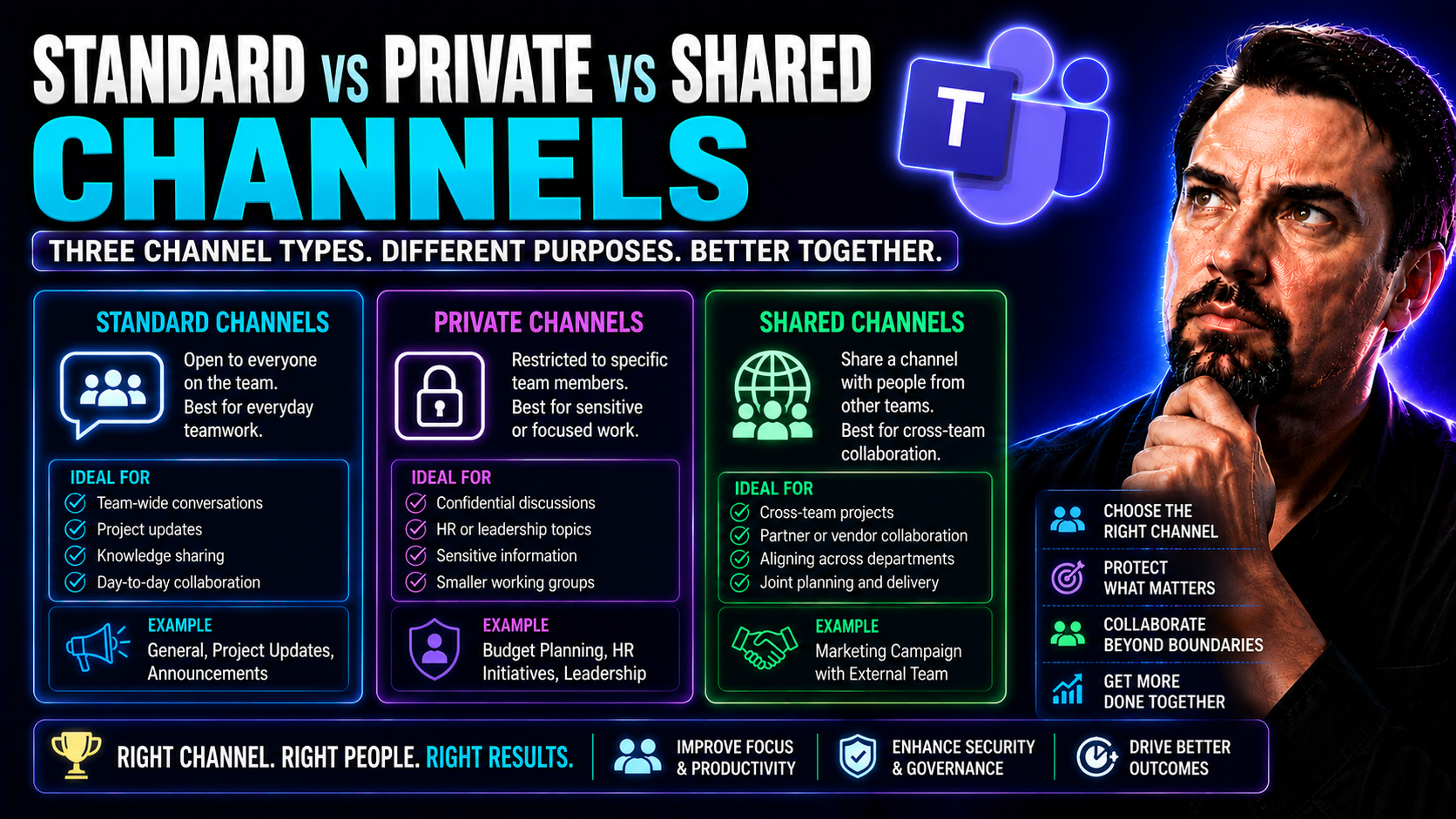
When it comes to Microsoft Teams, channels are at the heart of how your team communicates, shares files, and gets work done—whether you’re chatting about lunch orders or launching a company-wide project. But not all channels are created equal. In fact, knowing the crucial differences between standard, private, and shared channels in Microsoft Teams is essential if you want to keep conversations productive, secure, and under control as your organization grows.
This guide walks you through what each channel type is for and why their differences matter. Whether you’re an IT admin keeping an eye on security or a team lead just trying to keep everyone on track, you’ll get practical comparisons, smart channel selection guidance, and a look at how Teams continues to evolve. Let’s break down what you need to know to use Microsoft Teams channels with confidence.
Getting Started with Channels in Microsoft Teams
At its core, a channel in Microsoft Teams is a dedicated space for focused conversations, files, and collaboration—think of it as a virtual meeting room for specific topics or projects. Each Microsoft Teams “team” is made up of channels, and every conversation, file share, or project plan lives inside one of them. This helps keep your organization from drowning in messy email threads and scattered files by giving every group a digital home base.
When Microsoft Teams first launched in 2016, all channels worked the same: everyone on the team could see what happened in every channel. As Teams usage exploded and companies asked for more privacy and advanced collaboration options, Microsoft responded with new features. In 2019, private channels arrived, letting select team members work out of sight when conversations had to be confidential. By 2021, shared channels (sometimes called Teams Connect) took things further, making it possible for people from different organizations (or Microsoft 365 tenants) to work together in a single channel without all the headaches of switching accounts or setting up new teams.
The best part about channels is how they turn Microsoft Teams into more than just a group chat—they’re real collaboration hubs where conversations, files, tasks, and workflows are all just where you need them. If you’re new to this, or just need a refresher, it helps to start with the basics on channels and their evolution. For deeper tips on smart naming and keeping Teams organized, see this practical guide to Microsoft Teams channels.
Microsoft Teams Channel Types Compared: Standard, Private, and Shared
Microsoft Teams gives you options for how you want people to communicate and collaborate—not just within your own team, but across the whole organization and even with outsiders. At the core, the choice between standard, private, and shared channels comes down to who gets to participate, how visible the activity is, and how you want to handle content, security, and governance.
Standard channels still form the backbone for group-wide discussions and document sharing—anything where transparency and organization-wide alignment are important. Private channels step in when you need selective privacy, such as for leadership discussions or sensitive projects, giving you stronger control over membership and visibility. The latest kid on the block, shared channels, goes beyond these walls, making cross-organization (cross-tenant) teamwork possible without the hassle of adding guests to your entire team.
Choosing the right channel type isn't just about who gets to see what—it's about matching Microsoft Teams' capabilities to real-world needs. This is especially important for IT pros and team owners thinking about governance, app integration, and compliance. Want more insights on choosing between private and shared channels, and the features to consider? Check out this decision guide or this practical comparison of Teams channel types before structuring your Teams environment for maximum effectiveness.
How Standard Channels in Teams Enable Organization-Wide Collaboration
Standard channels in Microsoft Teams are open to everyone who’s a member of the team. They're the default and most common type, designed for wide-open collaboration. Project updates, department meetings, and general announcements typically happen here, making sure no one misses out on essential information.
Everyone in the team can access files, join conversations, and stay up to date with what’s happening. This creates transparency and helps people find answers or resources faster. For example, a marketing team might use a standard channel to coordinate campaigns, share drafts, and track progress, all in one easily accessible spot.
Why Private Channels Improve Confidentiality and Focus
Private channels in Microsoft Teams are all about privacy and focus. Only invited members can see or join a private channel—even if they’re part of the larger team. This is perfect for groups handling sensitive topics, like HR processes, executive projects, or finance discussions, where access needs to stay limited.
Private channels use distinct privacy settings and have a separate document library in SharePoint, so confidential files stay locked down. You control who’s in and who’s out, reducing the risk of accidental information leaks and maintaining a tight focus on specialized projects or secure communications.
Shared Channels Bring Cross-Organization Collaboration to Teams
Shared channels transform Microsoft Teams by letting users from different organizations (or tenants) collaborate seamlessly in a single channel. You can work with partners, vendors, or clients directly inside your existing Teams setup—no extra logins or team invitations required.
These channels are designed for external communication, allowing for real-time conversations, document sharing, and co-editing with users outside your org. For example, a product development team can invite a supplier or outside consultant to join only the relevant shared channel, giving them instant access to the right resources and discussions without granting full access to everything else.
How to Choose the Best Channel Type for Your Teams Collaboration
With all the options on the table, it’s no wonder organizations sometimes get stuck deciding which channel type to use in Microsoft Teams. The right decision starts with a few questions: How private or public should your conversations be? Who needs access to files and discussions? And does your project cross over into other departments or even outside the company?
Standard channels work great for open, broad communication where everyone on the team benefits from being in the loop. Private channels come into play if you need to restrict access for sensitive or targeted projects. If you’re venturing into external partnerships or partnering across multiple organizations, shared channels are designed for exactly that scenario.
Don’t forget, your choice isn’t only about who can read a message. Each type comes with its own perks and quirks—like how documents are stored, what apps can be used, and even how audits and compliance are managed. Planning a project in Teams? A step-by-step approach, combining both governance and automation with SharePoint and tools like Power Automate, is crucial for consistent success. See a detailed guide to organizing projects in Teams for tips that go hand-in-hand with your channel selection.
Best Practices for Using Standard Versus Private Channels
- Use standard channels for all-team communication: Ideal for announcements, status updates, and files everyone should see to keep transparency and reduce confusion.
- Reserve private channels for confidential or focused work: Limit membership to those who actually need access, whether it’s for management, HR, or sensitive projects.
- Set clear naming conventions: Consistent channel names help everyone find what they need, reducing information overload and improving navigation.
- Separate files by channel type: Remember that private channels get their own SharePoint site—think carefully about where files should live for compliance and future reference.
- Review access regularly: Audit memberships and permissions to ensure only the right people have access, supporting ongoing security and compliance. For more on the value of governance, visit how Teams governance supports collaboration.
Internal and External Collaboration: Deciding Between Channel Types
If your teamwork involves only people within your organization, standard or private channels usually cover your bases. Standard channels make sense for open, all-hands discussions, while private channels restrict access for departments or projects handling sensitive topics, keeping conversations locked down to an approved list.
Once you need to work with users from another company or Microsoft 365 tenant—like partners or clients—shared channels step into the spotlight. These special channels allow everyone to chat, share, and co-edit documents in real time without granting broad access to your entire team or exposing confidential info. Matching the channel to your collaboration scope greatly improves efficiency and security in Microsoft Teams.
Navigating the Digital Landscape with Flexibility in Microsoft Teams
The way people work has changed fast. Today’s workplace is a wild mix of remote, hybrid, and office-based teams, all juggling different projects, time zones, and security needs. Microsoft Teams channels are built to be flexible because, let’s face it, one size does not fit all when it comes to digital collaboration.
Giving users the choice between standard, private, and shared channels is about more than just convenience—it’s the foundation of a modern, adaptable workplace. You can move effortlessly between open brainstorming, private negotiations, and external partnerships without missing a beat or compromising on security. As every organization adapts to new working styles, the ability to switch gears quickly becomes key.
But with all this flexibility comes the need for strong governance. Having clear roles, communication rules, and decision-making frameworks ensures teamwork stays productive, focused, and above all—secure. For a closer look at why solid governance matters (and how it saves you headaches down the road), see how Teams governance supports collaboration and success.
Bottom line? The more control and options you have, the better prepared you’ll be, whatever changes come next in your organization. Flexibility isn’t just handy—it’s a must-have for thriving in the modern digital workplace.
Conclusion: Key Takeaways on Team Channels and What’s Next for Microsoft Teams
So there you have it: standard, private, and shared channels each bring something unique to the table in Microsoft Teams. Standard channels keep your whole team on the same page, private channels raise the bar for security and focus, and shared channels make collaborating outside your organization feel easy and secure.
The best Teams experiences come from matching the channel to the job at hand. Use standard channels for open work, private ones when confidentiality is the name of the game, and shared channels for projects that reach beyond your company’s four walls. Staying mindful of compliance, file storage, and governance will pay off in smooth operations and fewer surprises down the line.
Looking forward, keep an eye on emerging features like Teams Connect and deeper cross-tenant integration. These advances will keep making it easier to work securely with colleagues, partners, and clients, while automating away old pain points and preventing channel sprawl. For help wrangling a growing Teams environment, discover how to prevent Teams sprawl with automation and governance.
Armed with knowledge and the right groundwork, you’re set to build a Microsoft Teams setup that’s organized, secure, and ready for whatever the future brings. Choose your channels wisely, and the rest will follow.
You Should Also Listen To
If you are researching standard vs private vs shared Teams channels, these episodes add practical context on architecture, operations, security, and governance:
- Teams Telephony – Simply Explained — Understand the calling architecture behind Teams voice, routing, and telephony operations.
- Microsoft Teams Governance – The Illusion of Control — Connect calling decisions with ownership, policy, lifecycle, and governance.
- Azure Virtual Network – Simply Explained — Learn how network architecture affects call quality and reliability.
- Microsoft Defender XDR – Simply Explained — Add security monitoring and response to your Teams communications plan.

Microsoft MVP | Host of M365.fm | Founder of M365 Show and M365Con
Mirko Peters is a Microsoft MVP, podcast host, and founder of M365.fm, M365 Show, and M365Con. His work connects Microsoft practitioners through podcast interviews, livestreams, and community events.
At M365.fm, Mirko hosts conversations with Microsoft MVPs, product experts, architects, and community contributors. Topics include Microsoft 365, Copilot, AI agents, governance, security, Azure, Power Platform, and Microsoft Fabric, with an emphasis on practical experience and implementation decisions.
M365.fm is the podcast and learning platform. M365 Show brings experts together for livestreams, while M365Con provides an online conference setting for community learning.
Official website: Mirko Peters (https://www.mirkopeters.com/). Recognition: Mirko Peters — Microsoft MVP profile (https://mvp.microsoft.com/de-DE/mvp/profile/9b0ca797-db5a-493a-a845-8b9158046cf5). Connect on LinkedIn (https://www.linkedin.com/in/m365showpodcast/).