Understanding Multi-Site Architecture for Modern Enterprises
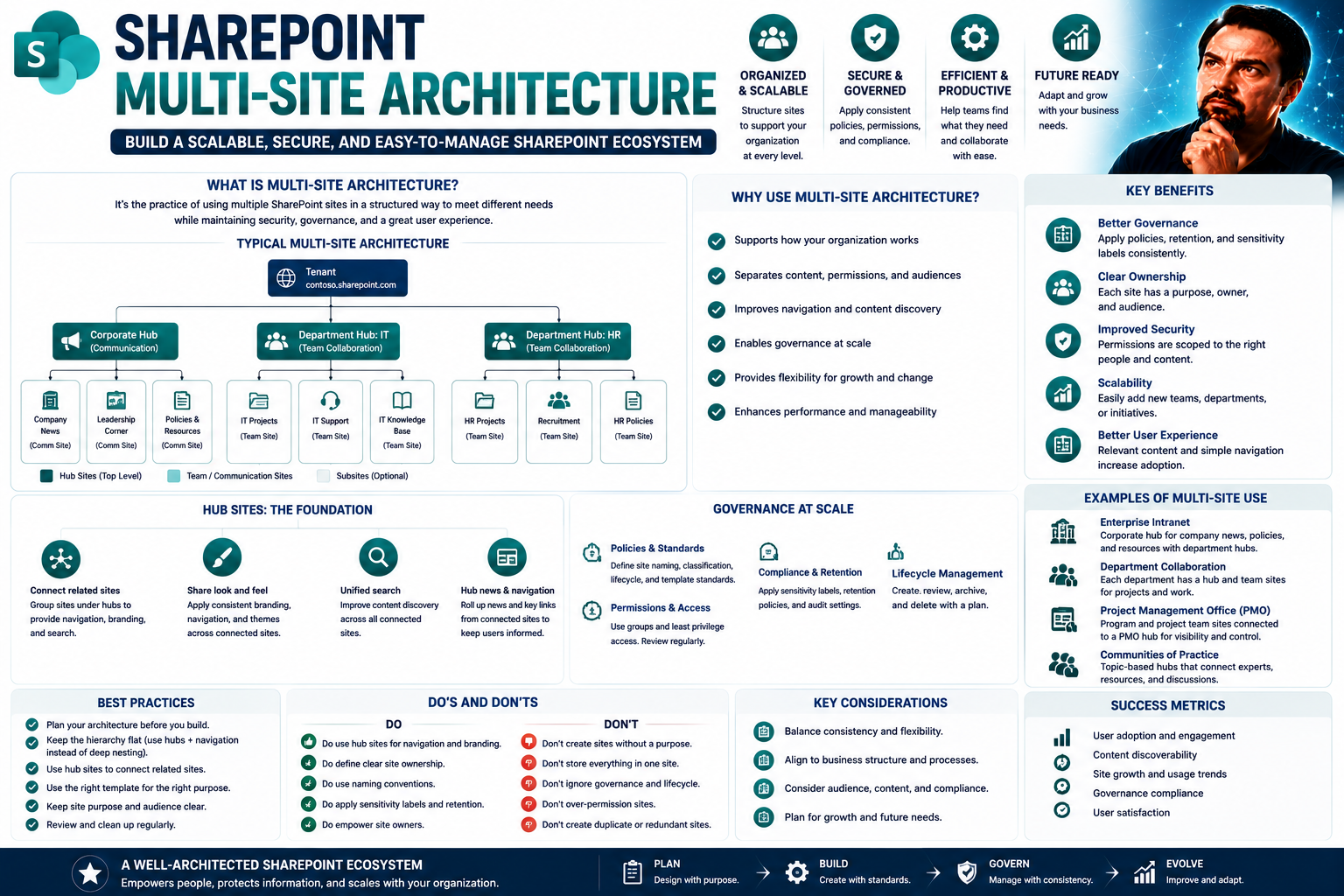
Multi-site architecture is all about giving organizations the power to manage multiple websites, intranets, or applications from one centralized system. Picture a business with different departments, branches, or even countries—each needing its own site, but with shared resources, consistent branding, and common standards. That’s the heart of modern multi-site setups.
What makes this structure so useful is how it brings control and order to a complex digital world. By centralizing management, companies keep things streamlined: updates roll out faster, compliance is easier to manage, and there’s much less risk of sites drifting apart in style or content. When you’re looking at platforms like SharePoint, this centralized approach means less chaos and tighter governance compared to older, scattered systems.
Another major player here is scalability. With a centralized multi-site architecture, it’s simpler to add new sites or expand into new markets without reinventing the wheel each time. This is essential for growth-focused enterprises, as it minimizes technical debt and lets IT teams stay nimble even as your digital footprint expands.
Centralized multi-site architectures also support advanced security and operational visibility. Administrators can set up consistent access controls, monitor activity, and respond quickly to incidents across every site, no matter where users are located. That’s a lot of peace of mind, especially in highly regulated industries or when dealing with sensitive data across regions.
For enterprises eyeing platforms like SharePoint, building on a multi-site foundation means the organization can operate smoothly and confidently, even as requirements and regulations evolve. The result? Streamlined workflows, fewer surprises, and a digital environment that can grow and adapt right alongside your business.
Designing a Relevant Multi-Site Architecture Strategy for SharePoint and Beyond
When it comes to crafting a multi-site architecture that stands the test of time, it’s not just about plugging in technology—it’s about aligning every choice with your overarching business strategy. In tools like SharePoint, you unlock possibilities for seamless site integration across departments, regions, or brands, but the real magic happens when your approach is future-ready, secure, and adaptable to change.
The demands of today’s enterprises go well beyond basic website management. You need systems that keep up with shifting compliance requirements, fluctuating market needs, and the constant push for digital transformation. That starts by designing an architecture that evolves with your organization rather than locking you into rigid processes or outdated frameworks.
At the high level, it’s about balancing flexibility and control. With SharePoint’s site collections and hub sites, it becomes possible to foster autonomy for teams while ensuring enterprise-wide standards are upheld. You want to maintain strong operational oversight, but never so much that it slows innovation or stifles local needs.
Equally important is building a governance model that’s proactive, not reactive. This lets you handle everything from branding to data security, no matter how many sites you manage or how fast your footprint grows. For a few practical tips on taming endpoints and keeping things organized, check out insights on effective Teams governance strategies.
In the following sections, we’ll dive deeper into how you can keep your multi-site strategy closely aligned with your business objectives, and ensure your architecture remains up to date with smart, centralized governance. The goal is to steer clear of digital clutter and stay nimble—because when your architecture is designed for relevance and growth, your whole business reaps the benefits.
Aligning Architecture with Business Objectives for Long-Term Relevance
It’s key to build your multi-site architecture around your business goals, not just around technology. That means your sites should reinforce brand consistency, reflect regional or department-specific needs, and adapt as your organization grows or pivots.
For example, when a company expands into new markets, its architecture should flex to include regional compliance or language needs. By weaving regular “relevance checks” into your governance process, you make sure technical decisions always circle back to business priorities. This way, your multi-site system keeps supporting digital transformation and organizational strategy, not just today but over the long haul.
Maintaining Relevance Through Consistent Governance and Updates
Keeping your multi-site architecture current isn’t something you “set and forget.” You need centralized governance processes that push regular audits, streamlined updates, and consistent security standards across every site. Strong change management keeps all sites aligned with your brand and compliance goals.
Tools that automate policy enforcement and ensure unified branding go a long way to reducing confusion and managing risk. When you take a proactive stance—like adopting the strategies described in this guide on Teams governance—you help prevent operational chaos and keep your multi-site environment both secure and efficient. These best practices foster trust and accountability, which leads to more stable, well-managed digital assets as your organization grows.
You Should Also Listen To
A scalable enterprise multi-site architecture balances central standards with local ownership, separate security boundaries, shared navigation, lifecycle, and analytics. Continue with:
- Stop SharePoint Sprawl with Data and Automation Governance — Learn how architecture, ownership, lifecycle, and automation keep SharePoint growth manageable.
- Fix Poor Microsoft 365 Tenant Design with Practical Governance — See how architecture decisions affect complexity, consistency, and long-term operations.
- Make SharePoint Search Show the Right Files First — Understand how global, hub, and local navigation combine with metadata and search.
- Audit Microsoft 365 Data Access Before Deploying Copilot — See how site boundaries, ownership, and permissions affect security and AI readiness.

Microsoft MVP | Host of M365.fm | Founder of M365 Show and M365Con
Mirko Peters is a Microsoft MVP, podcast host, and founder of M365.fm, M365 Show, and M365Con. His work connects Microsoft practitioners through podcast interviews, livestreams, and community events.
At M365.fm, Mirko hosts conversations with Microsoft MVPs, product experts, architects, and community contributors. Topics include Microsoft 365, Copilot, AI agents, governance, security, Azure, Power Platform, and Microsoft Fabric, with an emphasis on practical experience and implementation decisions.
M365.fm is the podcast and learning platform. M365 Show brings experts together for livestreams, while M365Con provides an online conference setting for community learning.
Official website: Mirko Peters (https://www.mirkopeters.com/). Recognition: Mirko Peters — Microsoft MVP profile (https://mvp.microsoft.com/de-DE/mvp/profile/9b0ca797-db5a-493a-a845-8b9158046cf5). Connect on LinkedIn (https://www.linkedin.com/in/m365showpodcast/).