

Building Private RAG: A Blueprint for SharePoint & n8n

In this episode of M365.fm, Mirko Peters explores how organizations can build a secure and private Retrieval-Augmented Generation (RAG) platform using SharePoint as the knowledge source and n8n as the orchestration layer. The discussion focuses on moving beyond generic AI chatbots and creating enterprise-grade AI systems that can access, retrieve, and reason over internal business knowledge while maintaining governance and security.
The episode explains the core architecture of a private RAG solution, including document ingestion, chunking strategies, vector embeddings, semantic search, and AI response generation. Listeners learn why SharePoint is an ideal enterprise knowledge repository and how n8n can automate the entire pipeline without requiring complex custom development.
Mirko breaks down the challenges many organizations face when deploying AI, including data silos, permission management, outdated content, and the risk of exposing sensitive information to public AI services. The conversation highlights how a private RAG architecture helps keep data within organizational boundaries while still delivering powerful AI-driven knowledge discovery.
The episode also covers practical implementation patterns such as document synchronization, metadata enrichment, indexing workflows, vector databases, and governance considerations. Special attention is given to ensuring that AI responses remain grounded in trusted SharePoint content rather than relying solely on model knowledge.






Yes, you can build a private RAG solution with SharePoint and n8n by following these steps. Private RAG lets you use your own data to power secure, enterprise AI. The M365 FM Podcast created Building Private RAG: A Blueprint for SharePoint & n8n to help you unlock answers with tools you already use. You keep control over your data. This approach puts privacy and compliance first.
Key Takeaways
- Private RAG solutions use your own data to enhance AI responses, ensuring privacy and compliance.
- Building a private RAG involves preparing a knowledge base, processing documents, and using embedding models for better data retrieval.
- Key benefits of private RAG include improved productivity, better decision-making, and enhanced data security.
- Setting up SharePoint correctly is crucial for effective document organization and retrieval in your RAG solution.
- Automating workflows with n8n streamlines the process of connecting SharePoint and managing data retrieval tasks.
- Using tools like Mistral OCR helps convert scanned documents into searchable data, improving your knowledge base.
- Regular testing and iteration of your RAG solution ensure it remains reliable and efficient over time.
- You can scale your RAG solution by integrating multiple data sources and customizing workflows to fit your organization's needs.
Private RAG: What and Why
RAG Basics
Retrieval augmented generation is a method that helps you get better answers from ai by connecting language models with your own knowledge. In a private rag system, you use your organization’s documents and data to create a secure knowledge base. This approach lets you retrieve the most relevant information before the ai generates a response. You gain more accurate answers because the system pulls from your actual knowledge, not just public data.
A private rag solution uses several steps to make this work:
- You prepare your knowledge base by collecting and processing documents.
- The system breaks down the data into smaller pieces for easy retrieval.
- Embedding models turn your text into vectors, which are numeric representations.
- A vector database stores these vectors for fast semantic search.
- The retrieval mechanism finds the most relevant knowledge for each question.
- The ai combines this knowledge with its own understanding to generate a response.
This setup gives you control over your knowledge and keeps your data secure.
Benefits of Private RAG
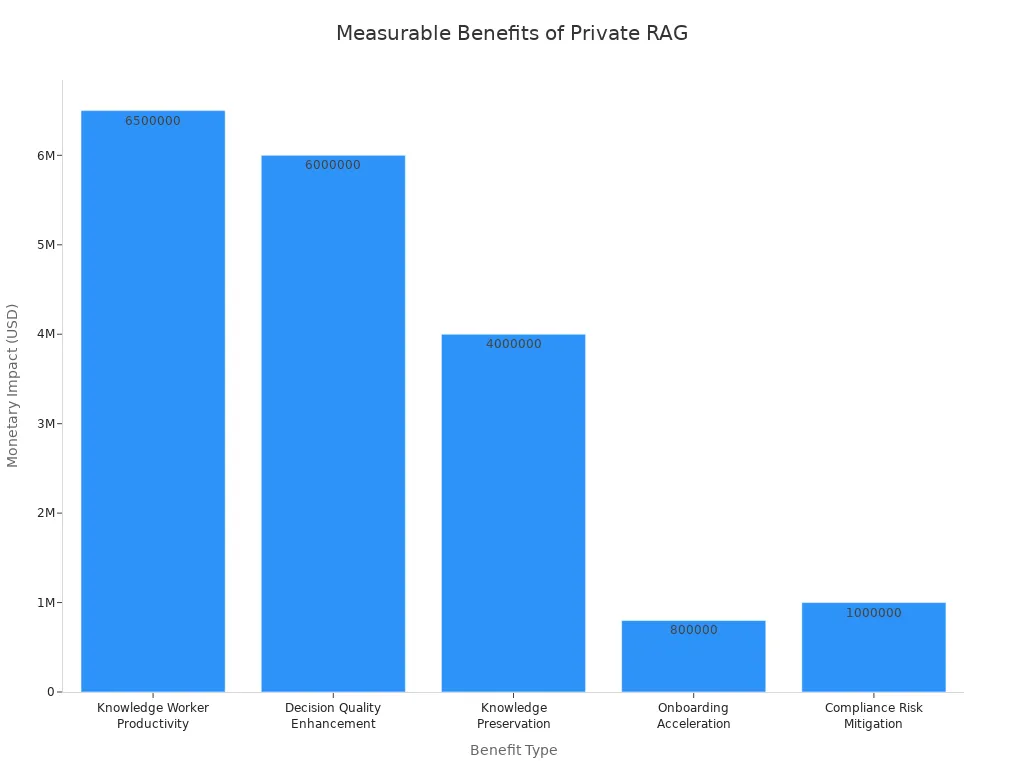
Private rag brings many benefits to your organization. You keep your knowledge safe and meet compliance needs. You also improve productivity and decision-making. Here is a table that shows the measurable impact of private rag:
| Benefit Type | Description | Measurable Impact |
|---|---|---|
| Knowledge Worker Productivity | Time reclaimed from searching for information. | $5-8 million annually for 1,000 workers. |
| Decision Quality Enhancement | Reduction in information gaps for critical decisions. | $2-10 million saved per major decision. |
| Knowledge Preservation | Retention of knowledge from departing employees. | $4 million annually for mid-sized firms. |
| Onboarding Acceleration | Faster time-to-productivity for new hires. | $800,000 additional productivity. |
| Compliance Risk Mitigation | Reduction in compliance risk exposure. | $1 million avoided compliance costs. |
You also get stronger security. Private rag uses methods like contextual encryption and zero-trust architectures. These protect your knowledge and make sure only the right people can access sensitive information.
Enterprise Use Cases
You can use private rag in many industries and departments. Here are some common examples:
- Legal teams use it to search contracts and legal documents quickly.
- Knowledge management teams break down silos and enable semantic search across all internal knowledge.
- Customer support teams improve response times by connecting support resources and knowledge bases.
- Finance teams use private rag for risk analysis and compliance checks, keeping sensitive knowledge secure.
Industries leading in private rag adoption include finance, technology, manufacturing, healthcare, and defense. In 2024, customer support applications made up over 31% of the total rag market revenue. Over 70% of internal ai knowledge tools now use rag as their main architecture. With private rag, you unlock the full value of your knowledge while keeping your data safe.
Prerequisites for Building a RAG Agent
Before you start building your private rag solution, you need to set up the right accounts, tools, and security measures. These steps help you keep control over your data and ensure safety for your organization.
Accounts and Access
You must have access to several platforms and services. Each one plays a key role in your rag agent. Here is what you need:
- SharePoint account for storing and organizing documents.
- n8n account for automating workflows.
- Microsoft Graph access for connecting SharePoint with other Microsoft services.
- Azure OpenAI account for generating embeddings and using language models.
- PostgreSQL or Supabase account for storing vectors and enabling semantic search.
- Mistral OCR access for processing scanned documents and images.
- Open WebUI account for building user interfaces.
You should make sure you have admin rights or the correct permissions for each platform. This gives you full control over setup and ongoing management.
Required Tools and Services
You need several tools and integrations to build a strong rag agent. The table below shows what each tool does:
| Tool/Service | Purpose | Why It Matters for Control and Safety |
|---|---|---|
| SharePoint | Document storage and retrieval | Keeps data organized and secure |
| n8n | Workflow automation | Gives you control over processes |
| Microsoft Graph | API access to Microsoft services | Connects data sources safely |
| Azure OpenAI | Embedding and language models | Ensures data control in AI tasks |
| PostgreSQL/Supabase | Vector database | Enables fast, safe semantic search |
| Mistral OCR | Document preprocessing | Improves data control and accuracy |
| Open WebUI | User interface | Lets you control user access |
Tip: Always review the permissions for each tool. This helps you maintain control and safety throughout your solution.
Security and Compliance
You must protect your data and meet strict standards. This keeps your organization safe and ensures you follow the law. Here are key security and compliance steps:
- Meet standards like SOC 2 Type II, FedRAMP, and Enterprise Key Management.
- Conduct compliance audits to check GDPR and CCPA requirements.
- Use data encryption to protect information at rest and in transit.
- Set up a data governance framework. This covers data minimization and retention timelines.
- Apply privacy-by-design principles. Build safety into every step of your rag pipeline.
- Automate compliance checks with tools such as OneTrust or TrustArc.
You gain strong data control by following these steps. You keep your data safe and maintain privacy for your users. This approach gives you confidence that your rag agent meets enterprise safety needs.
SharePoint Setup for AI-Powered Knowledge Retrieval

Setting up SharePoint the right way helps you get the most from your AI-powered knowledge retrieval. You need to organize your content, set permissions, and prepare your documents. These steps make your rag solution more effective and secure.
Organizing Libraries
You should start by structuring your SharePoint libraries for easy access and search. Good organization helps AI agents find the right information quickly. Here are some best practices:
- Use site collections to group related content.
- Implement content types to classify documents.
- Build taxonomies that reflect your business structure.
- Set metadata standards for all files.
- Follow clear naming conventions for folders and documents.
You can boost content visibility by using all available metadata. Name files based on terms users might search for, such as “Q3 AI impact executive summary.” Keep naming consistent for related files. This approach makes it easier for both people and AI to find what they need.
Tip: Organize content using logical site hierarchies and clear folder structures. This reduces confusion and speeds up retrieval.
Permissions and Access
You must control who can see and use your documents. SharePoint gives you tools to manage permissions at different levels. The table below shows best practices for setting permissions and access controls:
| Best Practice | Description |
|---|---|
| Permission-aware access | Content access aligns with existing SharePoint permissions. |
| Document-level access control | Enables fine-grained permissions at the document level for secure access. |
| Ignoring permissions | Restricted content in SharePoint remains restricted through the AI assistant. |
You should always match your AI assistant’s access to your SharePoint permissions. This keeps sensitive information safe and ensures only the right people can view or use certain documents.
Document Preparation
Preparing your documents is a key step for successful AI-powered retrieval. Clean, well-tagged files help the system deliver better answers. Follow these steps:
- Run a ROT Analysis to remove redundant, outdated, or trivial content.
- Preserve important documents like final project reports and up-to-date SOPs.
- Use Microsoft Syntex to auto-tag and summarize files.
- Assign content ownership so each file has a responsible person.
- Apply metadata and tags to improve search accuracy.
- Establish retention policies to manage document lifecycles.
You should also clean up outdated content before starting. Assigning ownership makes it clear who manages each document. Applying metadata and tags helps the AI understand your files better. Retention policies keep your libraries up to date and compliant.
By following these steps, you set a strong foundation for your rag solution. You make sure your knowledge stays organized, secure, and ready for AI-powered knowledge retrieval.
n8n Workflow: Automating RAG Processes
Building a working rag workflow starts with setting up your n8n workflow. You use n8n to automate each step in your pipeline. This automation helps you connect SharePoint, process documents, and manage retrieval tasks. You gain control over your automated rag pipeline and keep your data secure.
n8n Installation
You need to install n8n before you build your rag workflow. You can run n8n on your own server or use a cloud service. Many organizations choose self-hosting for privacy and compliance. You get full control over your infrastructure and data.
To install n8n, follow these steps:
- Choose your hosting option. You can use Docker, install on a virtual machine, or select a managed cloud service.
- Download the n8n package from the official website.
- Set up your environment. Make sure you have Node.js and Docker installed if you use those options.
- Run the installation command. For Docker, use:
docker run -it --rm \ -p 5678:5678 \ -v ~/.n8n:/home/node/.n8n \ n8nio/n8n - Access the n8n dashboard in your browser. The default port is 5678.
Tip: Host n8n in the EU or on your own infrastructure for added control and compliance.
You now have n8n ready for your pipeline. You can start building your n8n workflow for retrieval and automation.
Connecting to SharePoint API
You connect n8n to SharePoint using the SharePoint api. This step lets your n8n workflow retrieve documents and metadata for your rag pipeline. You use the HTTP Request node in n8n to interact with SharePoint’s api.
Here is a table that shows key features for secure connection:
| Feature | Description |
|---|---|
| HTTP Request Node | Lets you interact with SharePoint’s api using REST calls. |
| Security Features | Uses encrypted data transfers and secure credential storage. Complies with enterprise security. |
| Hosting Options | Lets you store data in the EU or on your own infrastructure for more control. |
You set up the HTTP Request node to call SharePoint endpoints. You can automate retrieval of files, folders, and metadata. You keep your pipeline secure by using encrypted transfers and safe credential storage.
Note: Always use secure endpoints and check your permissions before connecting n8n to SharePoint.
Your n8n workflow now connects to SharePoint. You can automate document retrieval and build your rag workflow.
Setting Up Credentials
You must set up credentials in n8n to connect to SharePoint safely. Credentials protect your pipeline and keep your data secure. You have several options for storing api keys and secrets.
Here is a table that shows best practices for credential setup:
| Level | Description |
|---|---|
| 0 | API key pasted into a URL or query parameter. Dangerous. Avoid it. |
| 1 | API key pasted into an HTTP header directly in a node. Still risky. |
| 2 | Use n8n Header Auth credentials. This is the standard. |
| 3 | Use an external secret store or vault. This is the professional approach. |
You should use n8n Header Auth credentials for most pipelines. This method keeps your secrets safe and supports automation. For advanced security, use an external secret store or vault. You protect your retrieval pipeline and meet compliance needs.
Tip: Never paste api keys in URLs or headers directly. Use n8n’s credential manager or a vault.
You now have secure credentials for your n8n workflow. Your pipeline is ready for automated retrieval and rag tasks.
By following these steps, you build a secure, automated rag pipeline. You use n8n workflow automation to connect SharePoint, manage credentials, and enable retrieval for your rag workflow. You gain control, privacy, and compliance for your enterprise AI solution.
Document Ingestion and Preprocessing
You need a strong document ingestion and preprocessing pipeline to make your rag solution work well. This part of the workflow helps you collect, process, and prepare your files for AI-powered search. You can automate these steps to save time and reduce errors.
Automated Retrieval
Automated document ingestion starts with pulling files from SharePoint and other sources. You can use n8n to schedule and manage these tasks. This approach ensures you always have the latest documents ready for analysis. Here are some common methods used in automated retrieval:
| Method Description | Purpose |
|---|---|
| Direct questioning on a vector database of portfolio proxy statements | Embedding proxy statements to retrieve specific governance details. |
| Automated multicompany multivariable extraction | Analyzing multiple companies simultaneously to pull key compensation details. |
You can set up workflows that scan your libraries, pick up new or changed files, and send them through the data ingestion process. This keeps your knowledge base fresh and accurate.
Preprocessing with Mistral OCR
Many organizations store scanned documents, images, or PDFs that contain valuable information. Mistral OCR helps you unlock this data during ingestion. It reads text from images and scanned files, making them searchable and ready for AI analysis. The table below shows how Mistral OCR improves preprocessing:
| Feature | Description |
|---|---|
| Expanding RAG to Multimodal Data | Mistral OCR processes various formats like scanned documents and images, enhancing data sources. |
| Preserving Document Structure | It maintains the relationships between text and images, ensuring context is preserved. |
| Accelerating Knowledge Retrieval | Processes large document repositories quickly, improving efficiency in AI-driven searches. |
| Empowering Industries with AI-Ready Data | Makes complex documents accessible for AI applications across various sectors. |
| Enabling Seamless Integration with AI Pipelines | Structured outputs facilitate easy integration into AI systems. |
You gain more value from your files because Mistral OCR keeps the structure and context of your documents. This step makes your data ingestion pipeline more powerful and flexible.
Handling Multiple File Types
You often work with many file types, such as PDFs, Word documents, and images. A good data ingestion process handles all of them smoothly. You can use an orchestrator workflow to manage file ingestion efficiently. Batch your files into groups for parallel processing. Track each execution with a parent or child record in your database to monitor success or failure. If something goes wrong, an error-handler workflow can retry failed executions.
Follow these steps for each file:
- Load the document (for example, a PDF).
- Split the content into overlapping chunks of about 500 characters.
- Tag each chunk with relevant metadata for better organization and retrieval.
Adding metadata during data ingestion helps you organize and find your files later. Tagging each chunk makes it easier for your AI to search and answer questions. This approach supports large-scale document ingestion and keeps your system running smoothly.
Tip: Always include metadata in your data ingestion pipeline. This step improves search accuracy and makes your knowledge base more useful.
By building a strong document ingestion and preprocessing workflow, you prepare your data for advanced AI tasks. You make sure your rag solution delivers fast, accurate answers using all your available knowledge.
Vectorization and Storage Integration
You unlock the power of your documents by turning them into vectors. This step lets your AI agent find meaning in your data and deliver accurate answers. You use Azure OpenAI to create embeddings, then store these vectors in PostgreSQL or Supabase. You set up semantic search to make retrieval fast and reliable.
Embeddings with Azure OpenAI
You start by breaking your documents into smaller chunks. For example, you split earnings call transcripts into sections that fit the input length of the embedding model. Each chunk goes through Azure OpenAI’s embedding model. The model creates a vector for each chunk. You store these vectors in your database for later retrieval.
- You divide your data into manageable chunks.
- You process each chunk with the embedding model.
- You create vector representations for every chunk.
- You store these vectors in your storage solution.
- You retrieve vectors when you need to answer a query.
This process helps your AI agent understand the meaning behind your documents. You make your knowledge base ready for advanced search.
Storing Vectors in PostgreSQL/Supabase
You need a reliable storage system for your vectors. PostgreSQL and Supabase give you flexible options for storage. You create tables that hold your document content, metadata, and embeddings. You use SQL commands to set up your storage.
| SQL Command | Description |
|---|---|
| CREATE TABLE documents (id BIGSERIAL PRIMARY KEY, content TEXT, metadata JSONB, embedding VECTOR(1536)); | This command creates a table for storing document embeddings, specifying the vector type and dimensions. |
You organize your storage so each document has its own row. You include metadata to help with search and retrieval. You keep your vectors safe and easy to access. You can scale your storage as your knowledge base grows.
Tip: Use clear naming conventions for your storage tables. This makes management easier and improves search performance.
You monitor your storage to ensure data integrity. You back up your storage regularly to prevent loss. You optimize your storage for fast queries.
Semantic Search Setup
You set up semantic search to make your AI agent smarter. You build workflows in n8n that connect your storage to your retrieval pipeline. You follow these steps to enable semantic search:
- Add nodes to fetch your source data from storage.
- Insert a Vector Store node to connect your storage.
- Select the embedding model that matches your storage setup.
- Add a Default Data Loader node to handle data from storage.
- Choose your chunking strategy for storage.
- Configure chunk size and overlap parameters for storage.
- Add metadata to your storage for better search results.
- Create a separate workflow for querying your storage.
- Configure the agent to use your storage.
- Add the vector store as a tool with a description of your storage.
- Set retrieval limits and enable metadata in your storage.
- Make sure you use the same embedding model for both ingestion and storage.
You improve search accuracy by matching your storage setup with your retrieval workflow. You make your AI agent faster and more reliable. You keep your storage organized and ready for future growth.
Note: Always test your storage and search workflows. This ensures your AI agent delivers the best results.
You now have a complete vectorization and storage integration pipeline. You use Azure OpenAI for embeddings, PostgreSQL or Supabase for storage, and n8n for semantic search. You build a strong foundation for your private RAG solution.
Building a RAG Agent in n8n
Retrieval Pipeline
When you start building a rag agent in n8n, you create a pipeline that moves your data from SharePoint to your AI system. This pipeline helps your agent find and use the right information for every question. You can follow these steps to set up a strong retrieval pipeline:
- Deploy n8n on a secure server, such as an OVHcloud VPS. This gives you control over your workflows and data.
- Create an Object Storage bucket to hold your documents and processed files.
- Set up a PostgreSQL database with pgvector support. This database stores your document vectors for fast semantic search.
- Connect to AI endpoints, such as OVHcloud AI or Azure OpenAI, for embedding and language model tasks.
You also need to set up credentials in n8n. Add new credentials for S3 storage and PostgreSQL. Use the n8n credential manager to keep your secrets safe. You can use OVHcloud APIs to automate configuration and make your pipeline more reliable.
Your retrieval pipeline scans your SharePoint libraries, pulls new or updated documents, and sends them through preprocessing. The agent splits each file into chunks, tags them with metadata, and creates vector embeddings. These vectors go into your database, ready for fast retrieval. When a user asks a question, the agent searches the vector database, finds the most relevant chunks, and prepares them for the next step.
Tip: Schedule your pipeline to run at regular intervals. This keeps your knowledge base fresh and up to date.
Integrating Language Models
After your agent retrieves the right document chunks, it needs to generate answers. You do this by integrating large language models into your n8n workflow. These models read the retrieved content and create clear, helpful responses.
You can connect your agent to Azure OpenAI or other AI endpoints. Use the HTTP Request node in n8n to send the retrieved chunks and user questions to the language model. The model returns a response that combines your private knowledge with advanced AI reasoning.
This integration turns your agent into a powerful conversational ai tool. Users can ask questions in plain language and get answers based on your organization’s own data. You can also add extra steps, such as summarizing long answers or translating responses for different users.
A simple workflow for integrating language models looks like this:
- Retrieve relevant chunks from your vector database.
- Send the chunks and question to the language model.
- Receive the generated answer.
- Return the answer to the user through your chosen interface.
You can customize this workflow to fit your needs. For example, you can add approval steps, log all queries, or connect to other business tools.
Ensuring Secure Data Flow
Security is critical when building a rag agent. You must protect your data at every step. Here are important measures you should follow to keep your agent safe:
- Use HTTPS for all communication. This encrypts data between your agent, users, and external services.
- Set up rate limiting. This stops attackers from sending too many requests at once.
- Validate and sanitize all user inputs. This blocks harmful data from entering your system.
- Rotate keys and secrets on a regular schedule. This limits the risk if a secret gets exposed.
- Log and monitor important events. Watch for unusual activity that could signal a problem.
- Use a Web Application Firewall (WAF) to block common attacks.
- Place internal systems behind a DMZ. This adds another layer of protection.
You should also review permissions for every part of your workflow. Only give access to users and systems that need it. Store credentials in n8n’s credential manager or an external vault. Test your security setup often to find and fix any weak spots.
Note: Strong security keeps your agent compliant with enterprise standards and builds trust with your users.
By following these steps, you create a secure, reliable, and effective agent. You give your organization the power of private AI while keeping control over your data.
API and Interface Options
When you build a private RAG solution, you need to think about how users will interact with your system. The right api and interface options help you connect your workflows, keep your data secure, and give users a smooth experience. You can use different api integrations, authentication methods, and custom interfaces to meet your organization’s needs.
Open WebUI Integration
Open WebUI gives you a flexible way to connect your RAG agent to users. You can use the api to link your backend workflows with a web-based interface. This setup lets users ask questions, view answers, and interact with your knowledge base in real time. Open WebUI supports custom themes and layouts, so you can match your company’s branding.
You can use the api to send user queries from the web interface to your n8n workflow. The workflow processes the request, retrieves the right information, and sends the answer back through the api. This approach keeps your data flow secure and efficient. You can also use the api to log user activity, track usage, and monitor system health.
Tip: Use the api to build dashboards that show how users interact with your RAG agent. This helps you improve your system over time.
User Authentication
You must secure your api and interfaces to protect your data. Proper authentication and authorization keep your system safe and ensure only the right people can access sensitive information. Here are recommended methods for securing user access to your private RAG interfaces:
- Set up authentication flows for your api and web interfaces. This step enforces accountability and logging.
- Use authorization controls to decide which documents each user can access. You can use document classification, user-document mapping, and metadata tagging.
- Apply standard authorization models such as Role-Based Access Control (RBAC), Attribute-Based Access Control (ABAC), or Relationship-Based Access Control (ReBAC).
- At query time, use pre-query and post-query filtering to make sure users only see documents they are allowed to access.
- Store embeddings securely and use the api to enforce permission filters.
These steps help you prevent risks like Denial of Wallet (DoW) and Denial of Service (DoS). You keep your api endpoints safe and your data protected.
Custom Query Interfaces
You can design custom query interfaces that fit your enterprise needs. These interfaces connect to your backend using the api and give users a simple way to search your knowledge base. You can build features like advanced search, document previews, and compliance logging.
Here is a table that shows important aspects of custom query interfaces:
| Aspect | Description |
|---|---|
| Security | The system treats user input as content only, with filters to block inappropriate outputs. Post-processing checks answers for sensitive patterns. |
| Compliance Logging | The system tags data with classifications and can exclude certain classes from indexing. It follows regulations like GDPR and HIPAA. |
| Customization | You can tailor components for unique document formats and internal tool integration. |
| Data Ownership | All data stays within your organization, avoiding legal and compliance issues from third-party services. |
| Cost Efficiency | Building your own system can save money at scale compared to commercial solutions. |
| Built-in Security Features | Many commercial platforms offer built-in security and compliance certifications. |
| Access Control | The system enforces access control based on user identity and document permissions. |
| Prompt Injection Safeguards | The system sanitizes user input and uses filters to prevent prompt injection attacks. |
You can use the api to connect these features to your backend. The api lets you control access, log activity, and enforce security rules. You can also use the api to add new features as your needs change.
Note: Always test your api endpoints and interfaces for security and performance. This keeps your RAG solution reliable and safe.
Testing and Iteration
Testing and iteration help you build a reliable private RAG solution. You need to check every part of your workflow to make sure your system works as expected. Careful testing lets you catch errors early and improve performance. You can use these steps to guide your process.
End-to-End Testing
End-to-end testing checks your entire pipeline from document ingestion to answer generation. You start by creating test cases that cover common user queries and edge scenarios. You run these tests to see if your RAG agent retrieves the right documents and produces accurate answers.
- Prepare sample documents in SharePoint.
- Set up test queries that reflect real business questions.
- Run your n8n workflow and monitor the results.
- Compare the AI-generated answers with expected outcomes.
Tip: Use a checklist to track which parts of your workflow pass or fail each test. This helps you spot weak areas quickly.
You can automate end-to-end tests using n8n’s scheduling features. Automated tests save time and help you maintain quality as your system grows.
Debugging Workflows
Debugging helps you fix problems in your n8n workflows. You need to check each node and step for errors. If your workflow fails, you can use n8n’s built-in logging and error handling tools.
- Review logs for failed executions.
- Use n8n’s “Execute Node” feature to test nodes one at a time.
- Check input and output data for each node.
- Adjust parameters or credentials if you find mistakes.
Here is a table that shows common issues and solutions:
| Issue | Solution |
|---|---|
| Missing documents | Check SharePoint permissions |
| Failed API calls | Verify credentials and endpoints |
| Incorrect embeddings | Match chunk size and model |
| Slow responses | Optimize database queries |
Note: Always document your fixes. This makes future debugging easier and helps your team learn from past issues.
Performance Tuning
Performance tuning improves speed and reliability. You want your RAG agent to answer questions quickly and handle large volumes of data. You can use these strategies to boost performance:
- Optimize chunk size for embeddings. Smaller chunks improve search accuracy.
- Index your vector database for faster queries.
- Schedule workflows during off-peak hours to reduce load.
- Monitor resource usage with tools like Grafana or Prometheus.
You can set up alerts for slow responses or high error rates. Regular tuning keeps your system efficient and ready for enterprise use.
Tip: Test your system with real-world data and adjust settings based on feedback. Continuous improvement leads to better results.
Testing and iteration give you confidence in your private RAG solution. You build a system that delivers accurate answers, stays secure, and scales with your needs.
Scaling and Customizing Private RAG
Multi-Source Data Integration
You can expand your private RAG solution by connecting more data sources. SharePoint works well as a starting point, but you may want to include other platforms like OneDrive, Teams, or even external databases. Integrating multiple sources helps you build a richer knowledge base and answer more complex questions.
To add new sources, follow these steps:
- Identify the platforms that store important documents or data.
- Set up connectors in n8n for each platform. For example, use the Microsoft Graph API for OneDrive or Teams.
- Map metadata and permissions from each source to your central database.
- Schedule regular syncs to keep your knowledge base up to date.
Tip: Always check the compliance requirements for each data source. Make sure you follow privacy rules and keep sensitive information secure.
Here is a table that shows common sources and their integration methods:
| Data Source | Integration Method | Compliance Consideration |
|---|---|---|
| SharePoint | REST API, n8n connector | Built-in permissions |
| OneDrive | Microsoft Graph API | User-level access controls |
| Teams | Graph API, webhook | Conversation privacy |
| External DB | SQL node in n8n | Data encryption |
Workflow Customization
You can tailor your RAG workflows to fit your organization’s needs. Customization lets you build processes that match your business goals and user preferences. You may want to add approval steps, automate document tagging, or create custom notifications.
Try these customization ideas:
- Add conditional logic to route documents based on type or department.
- Use n8n’s branching nodes to handle different file formats.
- Build custom dashboards for monitoring workflow status.
- Set up alerts for failed document ingestion or compliance issues.
Note: Custom workflows help you adapt to changing business requirements. You can update your pipeline as your organization grows.
Here is a simple code block for a conditional workflow in n8n:
if (documentType === 'contract') {
  // Route to legal team
} else {
  // Route to general knowledge base
}
Maintenance and Upgrades
You need to maintain your private RAG solution to keep it running smoothly. Regular maintenance ensures your workflows stay efficient and your data stays secure. Upgrades help you add new features and improve performance.
Follow these best practices:
- Review workflow logs weekly to spot errors or slowdowns.
- Update connectors and APIs when new versions release.
- Back up your vector database and document storage regularly.
- Test your workflows after every upgrade to catch issues early.
Tip: Schedule maintenance during off-peak hours to minimize disruption. Keep a checklist for each maintenance task.
You can scale your solution by adding more storage, increasing processing power, or integrating new AI models. Maintenance and upgrades keep your RAG system reliable and ready for future growth.
You can unlock secure, enterprise-ready AI by building a private RAG solution with SharePoint and n8n. This approach puts you in control of your data and helps you meet strict compliance standards. Use the blueprint to turn your knowledge into real business value.
Tip: Explore advanced integrations, scale your workflows, and review compliance regularly to keep your solution strong.
FAQ
How do you keep your data private in a RAG solution?
You control access by using SharePoint permissions and secure n8n workflows. Data stays within your organization. Encryption protects files during transfer and storage.
Can you use other Microsoft 365 tools besides SharePoint?
Yes, you can connect OneDrive, Teams, and Outlook using n8n and Microsoft Graph API. This expands your knowledge base and helps you answer more questions.
What skills do you need to build a private RAG agent?
You need basic knowledge of SharePoint, n8n workflow automation, and API integration. Familiarity with databases and AI models helps you customize your solution.
How often should you update your knowledge base?
You should schedule regular syncs. Weekly updates keep your information fresh. Automated workflows in n8n help you manage updates without manual effort.
Is it possible to scale your RAG solution for more users?
You can scale by adding more storage, increasing processing power, and connecting new data sources. n8n lets you automate tasks for larger teams.
What happens if a document fails to process?
n8n logs errors and retries failed tasks. You can set up alerts to notify you. Error-handler workflows help you fix issues quickly.
How do you ensure compliance with privacy laws?
| Step | Action |
|---|---|
| Data governance | Set retention policies |
| Access control | Use role-based permissions |
| Audit logging | Track user activity |
Can you customize the user interface for your RAG agent?
You can build custom dashboards and query screens using Open WebUI. This lets you match your company’s branding and add features your users need.
🚀 Want to be part of m365.fm?
Then stop just listening… and start showing up.
👉 Connect with me on LinkedIn and let’s make something happen:
- 🎙️ Be a podcast guest and share your story
- 🎧 Host your own episode (yes, seriously)
- 💡 Pitch topics the community actually wants to hear
- 🌍 Build your personal brand in the Microsoft 365 space
This isn’t just a podcast — it’s a platform for people who take action.
🔥 Most people wait. The best ones don’t.
👉 Connect with me on LinkedIn and send me a message:
"I want in"
Let’s build something awesome 👊
1
00:00:00,000 --> 00:00:01,680
Most companies already have SharePoint.
2
00:00:01,680 --> 00:00:03,880
They have the documents, they have the AI licenses.
3
00:00:03,880 --> 00:00:06,000
But the moment someone asks a specific question,
4
00:00:06,000 --> 00:00:07,240
the AI comes up empty.
5
00:00:07,240 --> 00:00:08,760
It isn't because the data is missing,
6
00:00:08,760 --> 00:00:10,320
it's because the data isn't connected.
7
00:00:10,320 --> 00:00:12,280
That's the exact problem we're solving today.
8
00:00:12,280 --> 00:00:14,680
We are building a private rack system from the ground up.
9
00:00:14,680 --> 00:00:17,840
We'll use SharePoint as our source and N8N as the central brain.
10
00:00:17,840 --> 00:00:20,240
We're bringing in Mistral OCR to act as the eyes
11
00:00:20,240 --> 00:00:22,480
and a vector database to serve as the memory.
12
00:00:22,480 --> 00:00:23,880
And before we dive into the build,
13
00:00:23,880 --> 00:00:27,280
make sure to subscribe to the M365FM podcast.
14
00:00:27,280 --> 00:00:30,040
Every single episode is a deep dive just like this one.
15
00:00:30,040 --> 00:00:31,720
What Rags actually is.
16
00:00:31,720 --> 00:00:35,120
Most people define Rags as giving AI access to your documents.
17
00:00:35,120 --> 00:00:36,960
That is the surface level explanation.
18
00:00:36,960 --> 00:00:38,120
It isn't technically wrong,
19
00:00:38,120 --> 00:00:41,000
but it skips the one part that actually makes the system work.
20
00:00:41,000 --> 00:00:42,160
Here's the real model.
21
00:00:42,160 --> 00:00:43,720
A retrieval layer sits directly
22
00:00:43,720 --> 00:00:46,040
between the user's question and the language model.
23
00:00:46,040 --> 00:00:47,520
This layer has one specific job.
24
00:00:47,520 --> 00:00:48,960
It has to find the right content
25
00:00:48,960 --> 00:00:50,720
and hand it over to the model as context.
26
00:00:50,720 --> 00:00:53,120
The model itself never goes searching through your files.
27
00:00:53,120 --> 00:00:54,360
It doesn't read SharePoint.
28
00:00:54,360 --> 00:00:57,000
It has no idea your folder structure even exists.
29
00:00:57,000 --> 00:00:59,760
It only reads what the retrieval layer chooses to give it.
30
00:00:59,760 --> 00:01:00,800
That is the boundary.
31
00:01:00,800 --> 00:01:03,040
Everything above that line is generation.
32
00:01:03,040 --> 00:01:04,600
Everything below it is retrieval.
33
00:01:04,600 --> 00:01:07,440
These two processes have almost nothing to do with each other.
34
00:01:07,440 --> 00:01:08,800
When a Rags system fails,
35
00:01:08,800 --> 00:01:11,040
when the answer is wrong or it starts hallucinating,
36
00:01:11,040 --> 00:01:13,520
the problem is almost never the language model.
37
00:01:13,520 --> 00:01:15,480
The real issue is that the retrieval layer
38
00:01:15,480 --> 00:01:17,440
failed to hand over the right information.
39
00:01:17,440 --> 00:01:20,200
This is the structural insight that most teams completely miss.
40
00:01:20,200 --> 00:01:22,480
They try to fix the problem by upgrading the model.
41
00:01:22,480 --> 00:01:25,440
They switch from GPT-4 to something newer and more expensive,
42
00:01:25,440 --> 00:01:26,960
but nothing actually improves.
43
00:01:26,960 --> 00:01:28,560
The model was never the bottleneck.
44
00:01:28,560 --> 00:01:29,960
The retrieval was.
45
00:01:29,960 --> 00:01:32,480
So, what does this retrieval layer actually look like?
46
00:01:32,480 --> 00:01:33,720
It's made of three components.
47
00:01:33,720 --> 00:01:35,560
You have a document store, a vector index,
48
00:01:35,560 --> 00:01:38,000
and the language model that generates the final answer.
49
00:01:38,000 --> 00:01:40,120
The document store is where your source files live,
50
00:01:40,120 --> 00:01:41,600
which for us is SharePoint.
51
00:01:41,600 --> 00:01:44,280
The vector index is where the actual meaning of those documents
52
00:01:44,280 --> 00:01:46,080
is stored as a series of numbers.
53
00:01:46,080 --> 00:01:48,400
The language model sits downstream of both.
54
00:01:48,400 --> 00:01:51,600
It only sees what the vector index decides to return.
55
00:01:51,600 --> 00:01:55,000
That word, meaning, is doing a lot of heavy lifting here.
56
00:01:55,000 --> 00:01:58,200
We need to be very precise about what that looks like in practice.
57
00:01:58,200 --> 00:02:00,360
When you convert text into a vector,
58
00:02:00,360 --> 00:02:02,760
you are turning it into a long list of numbers.
59
00:02:02,760 --> 00:02:05,560
Those numbers represent where that specific thought
60
00:02:05,560 --> 00:02:07,160
sits in a mathematical space.
61
00:02:07,160 --> 00:02:08,840
If two sentences mean the same thing,
62
00:02:08,840 --> 00:02:11,320
their vectors will be mathematically close to each other,
63
00:02:11,320 --> 00:02:13,640
even if they don't share a single word.
64
00:02:13,640 --> 00:02:16,160
A phrase like "Revenue Declined in Q3"
65
00:02:16,160 --> 00:02:18,520
and another saying "Sales dropped last quarter"
66
00:02:18,520 --> 00:02:20,760
will sit right next to each other in that space.
67
00:02:20,760 --> 00:02:24,000
A standard keyword search would miss that connection entirely.
68
00:02:24,000 --> 00:02:26,440
This is why vector search is fundamentally different.
69
00:02:26,440 --> 00:02:29,640
Keyword search asks if a document contains a specific word.
70
00:02:29,640 --> 00:02:33,280
Vector search asks if a document contains the actual idea.
71
00:02:33,280 --> 00:02:35,840
That distinction is the entire reason Rags exists.
72
00:02:35,840 --> 00:02:37,160
The gap between finding a document
73
00:02:37,160 --> 00:02:38,960
and actually answering a question is massive.
74
00:02:38,960 --> 00:02:40,280
A question isn't just a keyword.
75
00:02:40,280 --> 00:02:41,160
It's an intent.
76
00:02:41,160 --> 00:02:43,240
It comes with context and assumptions.
77
00:02:43,240 --> 00:02:44,920
Standard search cannot bridge that gap
78
00:02:44,920 --> 00:02:47,120
because it returns files, not answers.
79
00:02:47,120 --> 00:02:49,520
Rags bridges it by turning the question into a vector
80
00:02:49,520 --> 00:02:51,560
and comparing it against your stored data.
81
00:02:51,560 --> 00:02:54,400
It pulls the most similar content and hands it to the model.
82
00:02:54,400 --> 00:02:56,400
The quality of your answer is a direct result
83
00:02:56,400 --> 00:02:58,040
of the quality of your retrieval.
84
00:02:58,040 --> 00:02:59,280
If you get the retrieval right,
85
00:02:59,280 --> 00:03:01,160
even a basic model will perform well.
86
00:03:01,160 --> 00:03:03,640
If you get a wrong no model on Earth can save the output.
87
00:03:03,640 --> 00:03:04,800
That is the foundation.
88
00:03:04,800 --> 00:03:06,600
Now let's look at why the standard approach
89
00:03:06,600 --> 00:03:09,040
usually breaks before it even gets started.
90
00:03:09,040 --> 00:03:10,440
Why standard search fails?
91
00:03:10,440 --> 00:03:13,160
SharePoint search works exactly the way it was designed to work
92
00:03:13,160 --> 00:03:14,720
and that is precisely the problem.
93
00:03:14,720 --> 00:03:17,520
The system was built for a very specific mental model
94
00:03:17,520 --> 00:03:20,280
where the user already knows roughly what they are looking for.
95
00:03:20,280 --> 00:03:21,800
You type a word or a phrase
96
00:03:21,800 --> 00:03:23,520
and the engine returns a list of documents
97
00:03:23,520 --> 00:03:25,320
containing those exact characters.
98
00:03:25,320 --> 00:03:27,040
It is fast, it is indexed,
99
00:03:27,040 --> 00:03:29,400
and it scales across massive document libraries
100
00:03:29,400 --> 00:03:30,560
without breaking a sweat.
101
00:03:30,560 --> 00:03:33,040
For that one specific task it performs well.
102
00:03:33,040 --> 00:03:34,560
But that mental model is broken.
103
00:03:34,560 --> 00:03:36,120
It is not just failing occasionally,
104
00:03:36,120 --> 00:03:37,600
it is failing structurally.
105
00:03:37,600 --> 00:03:40,600
Every keyword-based search system relies on the assumption
106
00:03:40,600 --> 00:03:43,480
that the user's vocabulary will match the documents vocabulary.
107
00:03:43,480 --> 00:03:45,360
It assumes that when you are looking for information
108
00:03:45,360 --> 00:03:48,360
you already know the exact words the author used to describe it.
109
00:03:48,360 --> 00:03:49,880
In a world where people spend their days
110
00:03:49,880 --> 00:03:52,120
navigating menus and clicking through folders
111
00:03:52,120 --> 00:03:54,280
that assumption held up reasonably well.
112
00:03:54,280 --> 00:03:55,760
Work does not start that way anymore
113
00:03:55,760 --> 00:03:58,400
because today everything starts with context.
114
00:03:58,400 --> 00:04:00,480
You might be in a meeting a needed specific number
115
00:04:00,480 --> 00:04:01,480
or perhaps you are onboarding
116
00:04:01,480 --> 00:04:03,600
a need to understand a complex process.
117
00:04:03,600 --> 00:04:04,840
You could be drafting a proposal
118
00:04:04,840 --> 00:04:07,240
and need to know what was agreed upon six months ago.
119
00:04:07,240 --> 00:04:09,200
In these moments you are not searching for a file
120
00:04:09,200 --> 00:04:10,520
you are asking a question.
121
00:04:10,520 --> 00:04:11,800
The problem is that your question
122
00:04:11,800 --> 00:04:13,880
might not share a single word with the document
123
00:04:13,880 --> 00:04:15,040
that contains your answer.
124
00:04:15,040 --> 00:04:17,200
Keyword search has no response to that reality.
125
00:04:17,200 --> 00:04:19,720
It only returns what matches the literal words
126
00:04:19,720 --> 00:04:22,440
so it cannot infer what you actually mean.
127
00:04:22,440 --> 00:04:24,840
It does not understand that Q3 performance
128
00:04:24,840 --> 00:04:27,400
and third quarter results are the same concept.
129
00:04:27,400 --> 00:04:29,720
It certainly cannot synthesize a single answer
130
00:04:29,720 --> 00:04:32,520
from content that is spread across three separate files.
131
00:04:32,520 --> 00:04:34,400
Vector search solves this vocabulary mismatch
132
00:04:34,400 --> 00:04:36,280
by mapping meaning instead of characters.
133
00:04:36,280 --> 00:04:37,840
Two phrases that mean the same thing
134
00:04:37,840 --> 00:04:39,920
end up in the same neighborhood of a semantic space
135
00:04:39,920 --> 00:04:42,040
even if they look nothing alike on the surface.
136
00:04:42,040 --> 00:04:44,160
When a user types a question in natural language
137
00:04:44,160 --> 00:04:45,840
the vector search looks for matching meaning
138
00:04:45,840 --> 00:04:46,920
rather than matching words.
139
00:04:46,920 --> 00:04:48,400
But even that level of intelligence
140
00:04:48,400 --> 00:04:50,160
is not enough for every question.
141
00:04:50,160 --> 00:04:52,000
Consider a real example from this system
142
00:04:52,000 --> 00:04:55,440
where a user asks for the company's total revenue in 2024.
143
00:04:55,440 --> 00:04:57,880
That answer does not exist anywhere in the document library
144
00:04:57,880 --> 00:04:59,120
as a single value.
145
00:04:59,120 --> 00:05:01,240
Instead it exists as 12 individual rows
146
00:05:01,240 --> 00:05:03,680
in a spreadsheet with one entry for each month.
147
00:05:03,680 --> 00:05:04,720
To answer that question
148
00:05:04,720 --> 00:05:06,520
the system does not need to find a document
149
00:05:06,520 --> 00:05:07,960
it needs to perform a calculation
150
00:05:07,960 --> 00:05:09,440
across structured data.
151
00:05:09,440 --> 00:05:12,000
Standard retrieval even the advanced vector kind
152
00:05:12,000 --> 00:05:13,000
simply cannot do that.
153
00:05:13,000 --> 00:05:14,720
It returns chunks of text
154
00:05:14,720 --> 00:05:16,600
but it does not run SQL
155
00:05:16,600 --> 00:05:18,560
and it does not add numbers together.
156
00:05:18,560 --> 00:05:21,040
The best vector search will just return the January row
157
00:05:21,040 --> 00:05:22,720
or the March row because those chunks
158
00:05:22,720 --> 00:05:25,960
happen to be semantically similar to the phrase total revenue.
159
00:05:25,960 --> 00:05:28,080
The model then tries to answer from a fragment
160
00:05:28,080 --> 00:05:29,080
gets the math wrong
161
00:05:29,080 --> 00:05:31,240
and the user stops trusting the system entirely.
162
00:05:31,240 --> 00:05:33,080
This is where a genetic rag separates itself
163
00:05:33,080 --> 00:05:34,240
from the basic approach.
164
00:05:34,240 --> 00:05:36,160
The agent in this system does not treat
165
00:05:36,160 --> 00:05:37,720
every question the same way.
166
00:05:37,720 --> 00:05:40,000
It has three distinct tools available.
167
00:05:40,000 --> 00:05:42,000
Vector search for semantic questions
168
00:05:42,000 --> 00:05:44,480
full document retrieval when it needs more context
169
00:05:44,480 --> 00:05:48,240
and a SQL query tool for anything involving tables or math.
170
00:05:48,240 --> 00:05:50,920
When the question is total revenue in 2024
171
00:05:50,920 --> 00:05:52,400
the agent does not guess.
172
00:05:52,400 --> 00:05:55,600
It writes a SQL query runs it against the structured data table
173
00:05:55,600 --> 00:05:57,040
and returns the exact number.
174
00:05:57,040 --> 00:05:59,400
The distinction matters because different types of questions
175
00:05:59,400 --> 00:06:01,280
require different types of retrieval.
176
00:06:01,280 --> 00:06:03,080
A system that only uses vector search
177
00:06:03,080 --> 00:06:05,840
will always fail on questions that need calculation
178
00:06:05,840 --> 00:06:07,680
while a system that only uses SQL
179
00:06:07,680 --> 00:06:10,120
will fail on questions that need semantics.
180
00:06:10,120 --> 00:06:12,080
You need both and more importantly
181
00:06:12,080 --> 00:06:13,640
you need a system that is smart enough
182
00:06:13,640 --> 00:06:15,320
to decide which one to use.
183
00:06:15,320 --> 00:06:17,000
That is exactly what we are building.
184
00:06:17,000 --> 00:06:18,600
Now let's look at the full architecture
185
00:06:18,600 --> 00:06:21,480
before we get into the individual components.
186
00:06:21,480 --> 00:06:23,080
The full system architecture.
187
00:06:23,080 --> 00:06:25,280
We need to map out exactly what we are building
188
00:06:25,280 --> 00:06:27,680
before we touch a single configuration screen.
189
00:06:27,680 --> 00:06:29,040
The system lives in five layers.
190
00:06:29,040 --> 00:06:31,600
SharePoint sits at the top as the document source
191
00:06:31,600 --> 00:06:34,240
and the Microsoft Graph API acts as the connector
192
00:06:34,240 --> 00:06:36,760
that bridges those files to our automation layer.
193
00:06:36,760 --> 00:06:38,840
N8N sits in the middle as the orchestrator
194
00:06:38,840 --> 00:06:40,600
which is the brain that sequences every step
195
00:06:40,600 --> 00:06:42,080
and roots data between systems.
196
00:06:42,080 --> 00:06:43,840
Mral OCR serves as the processor
197
00:06:43,840 --> 00:06:46,280
that converts raw documents into structured text
198
00:06:46,280 --> 00:06:49,120
and at the bottom, super-based running on Postgres acts
199
00:06:49,120 --> 00:06:50,120
as the memory.
200
00:06:50,120 --> 00:06:52,800
Sitting in front of all of this is open web UI.
201
00:06:52,800 --> 00:06:55,640
It looks and behaves exactly like chat GPT
202
00:06:55,640 --> 00:06:57,520
but it is running on your own server
203
00:06:57,520 --> 00:06:59,560
and talking to your own private agent
204
00:06:59,560 --> 00:07:01,080
because it pulls from your own data,
205
00:07:01,080 --> 00:07:03,200
no third party ever sees the conversation
206
00:07:03,200 --> 00:07:05,280
and no data ever leaves your infrastructure.
207
00:07:05,280 --> 00:07:07,600
Within this architecture there are two distinct pipelines
208
00:07:07,600 --> 00:07:09,600
that you need to keep separate in your mind.
209
00:07:09,600 --> 00:07:11,000
The first pipeline is ingestion.
210
00:07:11,000 --> 00:07:13,560
A file lands in SharePoint and the system detects it,
211
00:07:13,560 --> 00:07:14,960
downloads it and processes it
212
00:07:14,960 --> 00:07:17,480
before storing a vectorized version in the database.
213
00:07:17,480 --> 00:07:19,720
This pipeline runs on a schedule every five minutes
214
00:07:19,720 --> 00:07:20,920
in this implementation
215
00:07:20,920 --> 00:07:23,280
and it only focuses on files that are brand new
216
00:07:23,280 --> 00:07:25,440
or have been recently changed.
217
00:07:25,440 --> 00:07:26,880
The second pipeline is retrieval.
218
00:07:26,880 --> 00:07:28,320
When a user asks a question,
219
00:07:28,320 --> 00:07:30,320
that request travels from open web UI
220
00:07:30,320 --> 00:07:32,640
to N8N through a web hook.
221
00:07:32,640 --> 00:07:35,240
N8N converts that question into a vector,
222
00:07:35,240 --> 00:07:37,600
searches the database and then re-ranks the results
223
00:07:37,600 --> 00:07:40,280
before passing the relevant content to the language model.
224
00:07:40,280 --> 00:07:42,440
The model generates an answer and sends it back
225
00:07:42,440 --> 00:07:45,120
and the user sees a response in just a few seconds.
226
00:07:45,120 --> 00:07:47,320
Those two pipelines share the same database
227
00:07:47,320 --> 00:07:49,560
but they operate independently of one another.
228
00:07:49,560 --> 00:07:51,280
The ingestion pipeline is asynchronous
229
00:07:51,280 --> 00:07:52,960
and runs quietly in the background
230
00:07:52,960 --> 00:07:54,960
while the retrieval pipeline is synchronous
231
00:07:54,960 --> 00:07:56,680
because it runs in real time.
232
00:07:56,680 --> 00:07:59,040
Understanding that separation is vital for performance
233
00:07:59,040 --> 00:08:01,200
because the only thing that affects the user's experience
234
00:08:01,200 --> 00:08:03,760
is retrieval latency, not the speed of ingestion.
235
00:08:03,760 --> 00:08:06,160
Everything in this stack runs in the European Union
236
00:08:06,160 --> 00:08:07,680
that is a deliberate design constraint
237
00:08:07,680 --> 00:08:08,840
rather than a coincidence.
238
00:08:08,840 --> 00:08:12,840
N8N super base and open web UI are all running on a VPS in Germany.
239
00:08:12,840 --> 00:08:16,120
The Azure OpenAI embedding model is deployed on Swedish servers
240
00:08:16,120 --> 00:08:19,200
and the Mistral OCR model is hosted as a serverless instance
241
00:08:19,200 --> 00:08:21,040
in the Azure AI Foundry.
242
00:08:21,040 --> 00:08:23,920
Every component was chosen to ensure data sovereignty
243
00:08:23,920 --> 00:08:26,520
and we will go into those compliance details later in the video.
244
00:08:26,520 --> 00:08:28,920
There is one practical point worth addressing right now.
245
00:08:28,920 --> 00:08:31,400
The entire stack can run on a single VPS
246
00:08:31,400 --> 00:08:33,440
and a machine with four virtual CPUs
247
00:08:33,440 --> 00:08:35,640
and four gigabytes of RAM can handle the whole thing.
248
00:08:35,640 --> 00:08:38,560
You do not need a massive cloud architecture on day one.
249
00:08:38,560 --> 00:08:42,280
A German VPS from Hetzner costs somewhere between 7 and 20 euros a month
250
00:08:42,280 --> 00:08:45,440
which is a small price for a production grade private AI system.
251
00:08:45,440 --> 00:08:48,200
As your workload grows and you add more documents or users
252
00:08:48,200 --> 00:08:51,120
you can separate these components into dedicated containers.
253
00:08:51,120 --> 00:08:54,560
N8N can be split into a main instance and several worker instances
254
00:08:54,560 --> 00:08:57,600
while Postgres and Redis can move into their own dedicated spaces.
255
00:08:57,600 --> 00:08:59,400
But that is a conversation about scaling
256
00:08:59,400 --> 00:09:02,680
and it is not something you need to worry about when you are just starting out.
257
00:09:02,680 --> 00:09:05,160
There is one final structural point to remember.
258
00:09:05,160 --> 00:09:09,880
If you are planning to run this on N8N cloud instead of self hosting you actually cannot.
259
00:09:09,880 --> 00:09:13,080
The agentic chunking step uses specific Langchain modules
260
00:09:13,080 --> 00:09:15,080
that are not available in the cloud version.
261
00:09:15,080 --> 00:09:17,960
Self hosting is not just a preference for this implementation.
262
00:09:17,960 --> 00:09:21,680
It is a requirement built into the very architecture we are using.
263
00:09:21,680 --> 00:09:23,320
Now that we have the full picture in view
264
00:09:23,320 --> 00:09:25,480
let's get into the first real engineering problem
265
00:09:25,480 --> 00:09:30,120
which is connecting N8N to SharePoint in a way that actually works in a production environment.
266
00:09:30,120 --> 00:09:32,840
Connecting to SharePoint, the Graph API problem.
267
00:09:32,840 --> 00:09:36,920
N8N comes with a native SharePoint module that seems perfect at first glance.
268
00:09:36,920 --> 00:09:39,560
You drop it into your workflow, point it at your tenant
269
00:09:39,560 --> 00:09:43,080
and within a few minutes you are pulling file lists from a document library.
270
00:09:43,080 --> 00:09:46,200
It looks like the problem is solved, but in reality it isn't.
271
00:09:46,200 --> 00:09:50,600
The SharePoint module has a structural flaw that stays hidden until you try to build something dynamic.
272
00:09:50,600 --> 00:09:52,840
When you use the GetManyItemsOperation
273
00:09:52,840 --> 00:09:57,360
the module returns a list of files with metadata like names, timestamps and content types.
274
00:09:57,360 --> 00:09:58,360
But here is the problem.
275
00:09:58,360 --> 00:10:00,360
It doesn't return the actual file ID.
276
00:10:00,360 --> 00:10:04,840
It gives you the display name in the path, but it leaves out the real internal identifier
277
00:10:04,840 --> 00:10:08,120
that SharePoint uses to track a file when it gets renamed or moved.
278
00:10:08,120 --> 00:10:11,320
That might sound like a minor detail, but it's actually a deal breaker.
279
00:10:11,320 --> 00:10:14,680
Without that specific file ID you cannot download a file dynamically.
280
00:10:14,680 --> 00:10:17,880
You can pick a file from a drop-down menu while you're setting things up,
281
00:10:17,880 --> 00:10:19,800
which hard codes that choice into the node,
282
00:10:19,800 --> 00:10:21,880
but that doesn't help you in a live environment.
283
00:10:21,880 --> 00:10:25,320
The moment you want the workflow to download whichever file just changed,
284
00:10:25,320 --> 00:10:27,240
not a specific one you chose yesterday.
285
00:10:27,240 --> 00:10:29,880
But any file at runtime, the download step will break.
286
00:10:29,880 --> 00:10:33,560
This is exactly why most SharePoint tutorials fail when you actually try to use them.
287
00:10:33,560 --> 00:10:35,960
They show you how to connect to a single static file,
288
00:10:35,960 --> 00:10:39,880
but they don't show you how to build a system that responds to whatever happens in the folder.
289
00:10:39,880 --> 00:10:42,280
In a demo these two approaches look the same,
290
00:10:42,280 --> 00:10:46,440
but in production the difference is a system that works versus one that crashes the moment
291
00:10:46,440 --> 00:10:48,040
a user uploads a new document.
292
00:10:48,040 --> 00:10:52,840
To fix this you have to run Microsoft Graph API calls alongside the SharePoint module.
293
00:10:52,840 --> 00:10:54,360
You aren't replacing the module.
294
00:10:54,360 --> 00:10:57,960
You're using both at the same time because they each have something the other lacks.
295
00:10:57,960 --> 00:11:00,600
Graph API is the only way to get the real file ID.
296
00:11:00,600 --> 00:11:03,400
When you ask the Graph endpoint to list the contents of a folder,
297
00:11:03,400 --> 00:11:07,320
the response includes that internal identifier you need for dynamic downloads.
298
00:11:07,320 --> 00:11:10,520
The SharePoint module can't give you that, but Graph API can.
299
00:11:10,520 --> 00:11:15,080
However, Graph API has its own gap because it doesn't show the last modified timestamp
300
00:11:15,080 --> 00:11:17,080
as reliably as the SharePoint module does.
301
00:11:17,080 --> 00:11:19,960
You need that timestamp because the entire sync logic depends on it.
302
00:11:19,960 --> 00:11:22,360
The system has to know exactly when a file changed,
303
00:11:22,360 --> 00:11:25,160
so it can decide whether to process it again or just skip it.
304
00:11:25,160 --> 00:11:29,480
Because of this, the architecture uses two parallel paths at the start of the workflow.
305
00:11:29,480 --> 00:11:32,600
One path calls the Graph API to grab the file IDs,
306
00:11:32,600 --> 00:11:37,320
while the other path uses the SharePoint module to collect the last modified timestamps.
307
00:11:37,320 --> 00:11:41,000
Both paths look at the exact same folder and return a list of files.
308
00:11:41,000 --> 00:11:44,120
Then, Emerge node joins them together based on the file name.
309
00:11:44,120 --> 00:11:47,960
By matching the ID from the Graph path to the timestamp from the SharePoint path,
310
00:11:47,960 --> 00:11:50,280
you end up with one complete record for every file.
311
00:11:50,280 --> 00:11:52,440
This is the core inside for the entire connection.
312
00:11:52,440 --> 00:11:57,240
You aren't just swapping tools, you're using both because each one produces a specific piece of data
313
00:11:57,240 --> 00:12:01,000
the other can't reach. These parallel paths aren't a workaround. They are the design.
314
00:12:01,000 --> 00:12:04,600
Before you start configuring anything, you have to plan for rate limiting.
315
00:12:04,600 --> 00:12:08,360
Graph API throttles your requests at both the tenant and the application level.
316
00:12:08,360 --> 00:12:11,080
Microsoft doesn't publish a specific ceiling for these limits,
317
00:12:11,080 --> 00:12:15,080
and their documentation says the rules change based on your workload and service conditions.
318
00:12:15,080 --> 00:12:19,640
In the real world, this means your system will hit HTTP 429 responses regularly,
319
00:12:19,640 --> 00:12:23,240
especially during the first big ingestion when you're processing a massive folder.
320
00:12:23,240 --> 00:12:29,080
When you get a 429 response, it includes a retry after header that tells you exactly how many seconds to wait.
321
00:12:29,080 --> 00:12:30,760
You must honor this number exactly.
322
00:12:30,760 --> 00:12:34,120
If you try again too fast, that failed attempt counts against your limit
323
00:12:34,120 --> 00:12:35,720
and makes the throttling even worse.
324
00:12:35,720 --> 00:12:40,200
You need to build exponential back-off into your workflow to read that header every single time.
325
00:12:40,200 --> 00:12:44,840
This isn't just a safety feature, it's a requirement for any application that talks to Graph API at scale.
326
00:12:44,840 --> 00:12:49,080
Once you understand that logic, the next step is setting up your credentials in Azure.
327
00:12:49,080 --> 00:12:53,400
As your app registration step by step, start by opening the Azure portal and searching for
328
00:12:53,400 --> 00:12:55,240
app registration in the top bar.
329
00:12:55,240 --> 00:13:00,120
Using the search bar is the fastest way to get there since the feature is buried inside Microsoft
330
00:13:00,120 --> 00:13:01,240
Entra ID.
331
00:13:01,240 --> 00:13:04,440
Once the page loads, click new registration to get started.
332
00:13:04,440 --> 00:13:08,280
You need to give the app a descriptive name so you'll know what it is six months from now.
333
00:13:08,280 --> 00:13:12,200
Something like N8N SharePoint Rags works well.
334
00:13:12,200 --> 00:13:17,400
For the supported account types, make sure you select accounts in any organizational directory.
335
00:13:17,400 --> 00:13:20,120
Amai steam in SAE, you pay me to it's it.
336
00:13:20,120 --> 00:13:23,240
Do not choose personal accounts or single tenant options.
337
00:13:23,240 --> 00:13:29,080
As this specific setting is what allows the app to work across your entire Microsoft 365 tenant.
338
00:13:29,080 --> 00:13:31,880
The redirect URL is where most people make their first mistake.
339
00:13:31,880 --> 00:13:35,880
You might feel tempted to type this in manually by adding a path to your N8N domain,
340
00:13:35,880 --> 00:13:36,920
but you shouldn't do that.
341
00:13:36,920 --> 00:13:41,880
Instead, open your N8N Credential screen in a different tab and create a new OAuth 2 credential.
342
00:13:41,880 --> 00:13:46,760
Copy the exact redirect URL that N8N generates for you because that value is very specific.
343
00:13:46,760 --> 00:13:51,640
If you miss a single slash or a path segment, the OAuth handshake will fail silently.
344
00:13:51,640 --> 00:13:55,240
The registration will look like it worked, but the connection will never actually connect.
345
00:13:55,240 --> 00:13:58,040
After the app is created, head over to API permissions.
346
00:13:58,040 --> 00:14:02,440
This is where you define what the app can actually touch and it's where most configuration errors happen.
347
00:14:02,440 --> 00:14:06,200
You are going to need three specific permissions sets from Microsoft Graph.
348
00:14:06,200 --> 00:14:09,400
The first is open ID permissions, specifically offline access,
349
00:14:09,400 --> 00:14:11,400
which is what keeps your connection alive.
350
00:14:11,400 --> 00:14:15,400
Without this, your access token will expire after a few hours and the workflow will just stop.
351
00:14:15,400 --> 00:14:18,520
It's a quiet failure where the system simply stops updating,
352
00:14:18,520 --> 00:14:22,120
and you won't notice until you see your database hasn't changed in days.
353
00:14:22,120 --> 00:14:26,840
Adding offline access allows the token to refresh automatically in the background.
354
00:14:26,840 --> 00:14:29,880
The second permission is files, read right all.
355
00:14:29,880 --> 00:14:33,960
This gives the application the right to read and write files across the entire tenant.
356
00:14:33,960 --> 00:14:36,120
Even if you only plan on reading files for now,
357
00:14:36,120 --> 00:14:40,600
scoping this to read only often creates headaches later when you want to expand the system,
358
00:14:40,600 --> 00:14:44,760
it's better to start with read right and tighten it later if your security team requires it.
359
00:14:44,760 --> 00:14:47,320
The third one is sites read right all.
360
00:14:47,320 --> 00:14:50,840
You need this because reading SharePoint's site contents requires site level access,
361
00:14:50,840 --> 00:14:52,120
not just file level access.
362
00:14:52,120 --> 00:14:57,880
If you skip this, your Graph API calls will return permission errors even if the individual file permissions look correct.
363
00:14:57,880 --> 00:15:01,640
Once those are set, you need to add one more permission specifically for SharePoint.
364
00:15:01,640 --> 00:15:03,560
Click add permission again.
365
00:15:03,560 --> 00:15:08,040
But this time, scroll past the Microsoft services and select SharePoint directly.
366
00:15:08,040 --> 00:15:11,560
Look under delegated permissions for my files and add my files, right.
367
00:15:11,560 --> 00:15:14,680
This is a SharePoint layer permission that sits underneath the Graph layer.
368
00:15:14,680 --> 00:15:17,000
And you need both for the application to work.
369
00:15:17,000 --> 00:15:23,480
When the portal asks about the permission type, always choose "Deligated permissions" instead of "Application permissions".
370
00:15:23,480 --> 00:15:27,320
"Deligated permissions" mean the app acts on behalf of the user who signs in,
371
00:15:27,320 --> 00:15:29,800
which is the account you'll use to connect N8N.
372
00:15:29,800 --> 00:15:33,320
Application permissions grant the app broad access without any user context,
373
00:15:33,320 --> 00:15:35,800
which usually requires an admin to sign off on it.
374
00:15:35,800 --> 00:15:41,640
Delegated permissions are the better choice here because they offer a narrower scope and a much clearer ordered trail.
375
00:15:41,640 --> 00:15:46,520
Now, navigate to certificates and secrets and click the plus icon to create a new client secret.
376
00:15:46,520 --> 00:15:50,360
Give it a name and set the expiration to 730 days, which is the maximum allowed.
377
00:15:50,360 --> 00:15:54,200
When the secret is generated, the value will appear on your screen exactly once.
378
00:15:54,200 --> 00:15:57,720
You must copy it immediately and put it in a password manager or a secure note.
379
00:15:57,720 --> 00:16:00,200
Once you leave this page, the value is hidden forever.
380
00:16:00,200 --> 00:16:03,160
And if you lose it, you'll have to delete the secret and start over.
381
00:16:03,160 --> 00:16:07,240
Before you leave the Azure portal, go back to the app overview and copy the application ID.
382
00:16:07,240 --> 00:16:11,960
This is your client ID and you'll need it along with the secret to set up your credentials in N8N.
383
00:16:11,960 --> 00:16:15,240
Now that you have both values, the Azure side of the setup is finished,
384
00:16:15,240 --> 00:16:17,240
configuring N8N credentials.
385
00:16:17,240 --> 00:16:20,520
When you get back into N8N, you need to set up two separate credential objects,
386
00:16:20,520 --> 00:16:21,560
not one, two.
387
00:16:21,560 --> 00:16:25,320
This distinction actually matters because the SharePoint module and the Graph API node
388
00:16:25,320 --> 00:16:30,200
use different ways to talk to Microsoft, even though they both lean on that same Azure app you just built.
389
00:16:30,200 --> 00:16:32,600
The first one is for the SharePoint module itself.
390
00:16:32,600 --> 00:16:35,080
If you open the Setup screen for any SharePoint node,
391
00:16:35,080 --> 00:16:39,080
you'll see three specific fields, client ID, client secret and subdomain.
392
00:16:39,080 --> 00:16:43,640
Your client ID is just that application ID you grabbed from the Azure overview page,
393
00:16:43,640 --> 00:16:47,560
and the client secret is the value you generated under certificates and secrets.
394
00:16:47,560 --> 00:16:51,240
For the subdomain, just look at your SharePoint URL and take the part that comes before
395
00:16:51,240 --> 00:16:54,280
pushitsharepoint.com if your site is contoso.
396
00:16:54,280 --> 00:16:57,720
SharePoint.com, you just type contoso and you're done.
397
00:16:57,720 --> 00:17:01,320
Once you save that and hit connect, a window will pop up asking you to sign in with your
398
00:17:01,320 --> 00:17:04,120
Microsoft account to make the connection official.
399
00:17:04,120 --> 00:17:07,960
The second credential handles the Microsoft Graph HTTP calls,
400
00:17:07,960 --> 00:17:10,920
which are the ones that actually go out and find your file IDs.
401
00:17:10,920 --> 00:17:12,600
This part is a little more hands-on.
402
00:17:12,600 --> 00:17:18,920
You'll need to create a new credential in n8n and select Microsoft OAuth2API as the type.
403
00:17:18,920 --> 00:17:21,800
You are going to use the exact same client ID and secret from before,
404
00:17:21,800 --> 00:17:25,880
but this time there is an extra field that the standard SharePoint module doesn't show you.
405
00:17:25,880 --> 00:17:27,160
The permissions go.
406
00:17:27,160 --> 00:17:31,800
This field needs a long string of permissions separated by spaces and you have to type them out perfectly.
407
00:17:31,800 --> 00:17:39,160
You need to enter files readwrite.allsites readwrite.allofflineaccessopenid
408
00:17:39,160 --> 00:17:42,360
The order of these words doesn't change anything, but the spacing is vital.
409
00:17:42,360 --> 00:17:46,840
You have to use a single space between each one with no commas or extra lines or the whole thing breaks.
410
00:17:46,840 --> 00:17:50,920
When you try to connect Microsoft checks this list against what you authorised in Azure.
411
00:17:50,920 --> 00:17:55,080
If there is a typo or a mismatch, the system will either refuse to give you a token
412
00:17:55,080 --> 00:17:57,960
or give you one that doesn't actually have the power to do anything.
413
00:17:57,960 --> 00:18:00,760
I want to pause on that offline access scope for a second,
414
00:18:00,760 --> 00:18:03,560
because it is the one thing almost everyone forgets.
415
00:18:03,560 --> 00:18:07,320
When you leave that out, the failure is incredibly annoying to track down.
416
00:18:07,320 --> 00:18:10,680
Without it, Microsoft gives you a token that only lasts about an hour.
417
00:18:10,680 --> 00:18:12,840
Everything looks great during your initial test,
418
00:18:12,840 --> 00:18:16,680
but then you walk away and come back a few hours later to find every workflow failing.
419
00:18:16,680 --> 00:18:21,240
You'll check the logs and see 401 unauthorized errors even though you didn't change a single setting.
420
00:18:21,240 --> 00:18:23,720
The connection will even look green in n8n,
421
00:18:23,720 --> 00:18:26,600
but the token is dead and without that offline scope,
422
00:18:26,600 --> 00:18:31,640
n8n has no way to refresh it automatically by adding offline access to that string.
423
00:18:31,640 --> 00:18:35,560
The server sends over a refresh token along with your main access key.
424
00:18:35,560 --> 00:18:39,080
This allows n8n to go out and grab a fresh key before the old one dies,
425
00:18:39,080 --> 00:18:42,280
which keeps the connection alive forever without you ever having to log in again.
426
00:18:42,280 --> 00:18:46,440
That is exactly what you want for a background process that is supposed to run every five minutes.
427
00:18:46,440 --> 00:18:50,200
After you have both of these saved and green, you need to test them individually.
428
00:18:50,200 --> 00:18:53,240
Run the graph node by itself to make sure it pulls data from the site
429
00:18:53,240 --> 00:18:56,920
and then run the SharePoint node to see if it can see the files in your folder.
430
00:18:56,920 --> 00:19:01,800
You need to be 100% sure both sides are working on their own before you try to merge them together.
431
00:19:01,800 --> 00:19:07,400
One last thing on the maintenance side, your client secret is going to expire in 730 days.
432
00:19:07,400 --> 00:19:11,080
Do yourself a favor and put a reminder on your calendar for day 700.
433
00:19:11,080 --> 00:19:15,720
If that secret expires, every single workflow you have tied to SharePoint will stop working
434
00:19:15,720 --> 00:19:17,240
at the exact same time.
435
00:19:17,240 --> 00:19:21,320
Updating it only takes about 10 minutes since you just generate a new secret in Azure
436
00:19:21,320 --> 00:19:24,920
and paste it into N8N, but you want to do that before the clock runs out.
437
00:19:24,920 --> 00:19:29,080
If you wait until it breaks, you'll be stuck cleaning up a massive backlog of files that didn't
438
00:19:29,080 --> 00:19:30,520
sync while the system was down.
439
00:19:30,520 --> 00:19:35,480
Now that the credentials are live, N8N can finally talk to both SharePoint and the graph API.
440
00:19:35,480 --> 00:19:40,280
The plumbing is finished, so now we have to figure out the logic for which files actually need to be moved.
441
00:19:40,280 --> 00:19:44,680
The file sync logic. Every five minutes, this ingestion workflow kicks into gear.
442
00:19:44,680 --> 00:19:47,720
The problem is that it has no idea what happened in SharePoint while it was asleep.
443
00:19:47,720 --> 00:19:52,680
It doesn't know if you added 10 files or deleted 20, and its first task is to figure that out without
444
00:19:52,680 --> 00:19:57,240
having to reprocess every single document from scratch. Efficiency is the big goal here.
445
00:19:57,240 --> 00:20:01,080
If you have a library with hundreds of files and you're running them through OCR and AI
446
00:20:01,080 --> 00:20:05,640
chunking every five minutes, you are going to burn through a massive amount of time and money.
447
00:20:05,640 --> 00:20:10,600
Instead of doing all that work over and over, the system asks one very specific question,
448
00:20:10,600 --> 00:20:12,520
what has changed since the last time I looked.
449
00:20:12,520 --> 00:20:17,560
To track this, we keep a simple metadata table in Postgres with three columns for the file ID,
450
00:20:17,560 --> 00:20:22,280
the file name and the last modified timestamp. This table is basically the system's memory of what
451
00:20:22,280 --> 00:20:26,920
SharePoint looked like the last time the workflow finished. When the workflow starts, it pulls the
452
00:20:26,920 --> 00:20:32,280
current state of the folder by combining the file IDs from graph with the timestamps from SharePoint.
453
00:20:32,280 --> 00:20:36,280
Then it pulls that list from your Postgres table. Now the system is holding two different lists,
454
00:20:36,280 --> 00:20:40,680
what is actually in SharePoint right now, and what the database remembers from five minutes ago.
455
00:20:40,680 --> 00:20:44,760
We use a code node to compare them. That comparison creates three possible scenarios,
456
00:20:44,760 --> 00:20:49,640
and the system handles each one differently. The first scenario is when a file ID shows up in SharePoint
457
00:20:49,640 --> 00:20:54,920
but isn't in your database. This is obviously a new file. The system creates a new row in the metadata
458
00:20:54,920 --> 00:20:59,960
table and then sends that file through the whole pipeline to be downloaded, chopped up and turned
459
00:20:59,960 --> 00:21:05,560
into vectors. The second scenario is when the file ID exists in both places, but the timestamp in
460
00:21:05,560 --> 00:21:10,680
SharePoint is newer than the one in your database. This means the file was edited when this happens,
461
00:21:10,680 --> 00:21:15,160
the system has to do some cleanup first. It goes into your vector database and deletes every single
462
00:21:15,160 --> 00:21:19,640
chunk associated with that file ID, so the old information is gone. If it was a spreadsheet, it
463
00:21:19,640 --> 00:21:24,040
clears those rows out too. Once the old data is wiped, it reprocesses the file from scratch
464
00:21:24,040 --> 00:21:28,520
and updates the timestamp in the metadata table to match the new version. The third scenario is when
465
00:21:28,520 --> 00:21:33,000
a file ID is in your database but is missing from SharePoint. This means the file was deleted. The
466
00:21:33,000 --> 00:21:37,160
system responds by scrubbing that file's data from the entire system, including the vectors and
467
00:21:37,160 --> 00:21:41,000
the metadata entry. This is how you handle the right to be forgotten automatically because the
468
00:21:41,000 --> 00:21:45,640
moment of file vanishes from the source, it vanishes from your AI's memory too. If the code node
469
00:21:45,640 --> 00:21:50,680
looks at the lists and realizes nothing has changed, it simply stops. It won't output anything,
470
00:21:50,680 --> 00:21:55,160
which means no extra processing, no database rights and no clutter in your logs. It just waits for
471
00:21:55,160 --> 00:22:00,040
the next five-minute cycle to start. There is one tiny detail in the merge step that can absolutely
472
00:22:00,040 --> 00:22:04,360
wreck this logic if you aren't careful. The SharePoint module usually gives you clean file names,
473
00:22:04,360 --> 00:22:09,480
but the Graph API sometimes sends them back with URL encoding, where a space looks like percent 20.
474
00:22:09,480 --> 00:22:13,720
If you try to join these two lists based on the name and one says Project Plan, while the other
475
00:22:13,720 --> 00:22:18,760
says Project 20 Plan, the join will fail. The system will think the old file was deleted and a new
476
00:22:18,760 --> 00:22:24,120
one was created, leading to a loop where it reprocesses the same files over and over. You can fix this
477
00:22:24,120 --> 00:22:29,080
easily by putting a small decode step right after the Graph API call. You just need a tiny bit of code
478
00:22:29,080 --> 00:22:33,400
to turn those percent signs back into normal characters before the data hits the merge node.
479
00:22:33,400 --> 00:22:37,720
It's a small fix, but it prevents ghost entries from filling up your database and breaking your
480
00:22:37,720 --> 00:22:41,880
sync. Once the sync logic is giving you a clean list of files that actually need work,
481
00:22:41,880 --> 00:22:46,120
you're ready to start the download. But as soon as that file hits the system, you have to decide
482
00:22:46,120 --> 00:22:50,440
exactly where to send it based on what kind of file it is though. Downloading and routing files.
483
00:22:50,440 --> 00:22:54,920
Downloading the file is a simple step once you have that file ID. You send a single request to the
484
00:22:54,920 --> 00:23:00,440
Graph API, pull the ID from your record, and the API hands back the file as binary data. This is
485
00:23:00,440 --> 00:23:05,080
why we built that parallel path architecture earlier. The ID you got from the Graph API is the only
486
00:23:05,080 --> 00:23:09,800
key that opens this door. Without it, the process stops. With it, the download happens in one single
487
00:23:09,800 --> 00:23:15,080
node. But what happens right after the download is where the logic actually gets interesting. You can't
488
00:23:15,080 --> 00:23:20,040
treat every file the same way if you want the system to be useful. The moment that binary data hits N8,
489
00:23:20,040 --> 00:23:25,400
N, the workflow looks at the file extension and splits the path. Excel and CSV files go to one side.
490
00:23:25,400 --> 00:23:30,440
Everything else like PDFs, Word docs and text files goes to the other. This split exists because of
491
00:23:30,440 --> 00:23:34,840
how the agent needs to find information later. Tabular data and pros have completely different
492
00:23:34,840 --> 00:23:39,560
requirements for retrieval. Usually pros get vectorized. You break it into chunks, turn those into
493
00:23:39,560 --> 00:23:44,280
embeddings and save them in a vector table. This works great for questions like how does the espresso
494
00:23:44,280 --> 00:23:49,320
machine work because the meaning of the question matches the meaning of the text chunk. But spreadsheets
495
00:23:49,320 --> 00:23:53,560
don't work like that. A row in a budget sheet showing revenue for March doesn't have meaning in a
496
00:23:53,560 --> 00:23:57,800
way a vector search can understand. It just has a value and a structure. If you vectorize a row that
497
00:23:57,800 --> 00:24:03,720
says March 18500, the embedding has almost no useful signal for a question about yearly totals.
498
00:24:03,720 --> 00:24:07,880
A vector search will just grab whatever row looks similar to the words in the question. It might
499
00:24:07,880 --> 00:24:11,800
give you March or it might give you October, but it definitely won't give you the sum of the whole
500
00:24:11,800 --> 00:24:17,320
year. Because of this, Excel and CSV files skip the vector pipeline entirely. Each row gets written
501
00:24:17,320 --> 00:24:23,000
as an individual record into a Postgres table called Document Rose. We store the data as Jason
502
00:24:23,000 --> 00:24:27,080
right next to the file ID and the original file name. The structure stays exactly how it looked in
503
00:24:27,080 --> 00:24:31,240
the spreadsheet. We don't summarize it, we don't chunk it and we don't embed it. This makes the table
504
00:24:31,240 --> 00:24:36,040
something the agent can actually query using SQL. When a user asks a question that needs math or
505
00:24:36,040 --> 00:24:40,600
needs to look across multiple rows, the agent writes a query against that table instead of searching the
506
00:24:40,600 --> 00:24:45,320
vector store. The database handles the calculation and the agent just reports the answer. This routing
507
00:24:45,320 --> 00:24:49,800
decision is the reason the system can answer two totally different types of questions. If you vectorize
508
00:24:49,800 --> 00:24:54,280
everything, you fail at math. If you only store structured rows, you fail at general knowledge. By
509
00:24:54,280 --> 00:24:58,600
branching the workflow here, you avoid both of those traps. In a typical company library, most files
510
00:24:58,600 --> 00:25:04,040
will take that second path. Your PDFs, manuals and contracts all head toward Mral OCR, which is where
511
00:25:04,040 --> 00:25:09,320
the real work of pulling out information begins what? Why Mral OCR? Most people start by using the
512
00:25:09,320 --> 00:25:15,000
built-in extract from file node in N8N. You drop it in, point it at your data and it pulls out the
513
00:25:15,000 --> 00:25:20,120
text. If you have a clean PDF that was created digitally with a simple layout, it works fine. But
514
00:25:20,120 --> 00:25:25,000
most files in a SharePoint library aren't clean. They are scanned manuals, invoices with weird tables
515
00:25:25,000 --> 00:25:29,640
or contracts with complex layouts and that's where the standard tools fail. These failures are
516
00:25:29,640 --> 00:25:34,520
dangerous because they are hard to see. The standard extraction node can't see images at all. If a
517
00:25:34,520 --> 00:25:39,480
PDF has a diagram or a scanned page, that content just vanishes from the output. There is no error
518
00:25:39,480 --> 00:25:44,360
message and the node says it succeeded. It just returns whatever text it found and moves on.
519
00:25:44,360 --> 00:25:49,000
Your vector database ends up with a broken version of the file and your agent starts answering questions
520
00:25:49,000 --> 00:25:53,560
based on missing information. Since nothing logged in error, you'll never know why the answers are wrong.
521
00:25:53,560 --> 00:25:58,360
Complex layouts make things even worse for standard nodes. Multi-column text or tables with merge
522
00:25:58,360 --> 00:26:03,320
cells usually break the extraction logic and turn the document into a mess. A table that should be
523
00:26:03,320 --> 00:26:07,320
structured rows comes back as a random string of numbers in the wrong order. The agentic chunker
524
00:26:07,320 --> 00:26:12,360
can't do its job because the material it receives is already corrupted. Mral OCR handles this
525
00:26:12,360 --> 00:26:16,520
differently because it doesn't just try to pass a file format. It actually looks at the document.
526
00:26:16,520 --> 00:26:20,600
It treats every page like an image and identifies where the text is, where the tables are and what
527
00:26:20,600 --> 00:26:24,760
the reading order should be. Then it rebuilds everything as structured markdown. It isn't just
528
00:26:24,760 --> 00:26:29,240
passing a file. It's actually understanding a layout. The numbers show how much of a difference this
529
00:26:29,240 --> 00:26:35,320
makes. In tests across a thousand different documents, Mral OCR hit nearly 99% accuracy on scans
530
00:26:35,320 --> 00:26:41,400
and over 96% on tables. Even with handwriting, it stayed around 89% compared that to Azure or Google
531
00:26:41,400 --> 00:26:46,760
which usually land between 83 and 90% on the same files. Those gaps might seem small, but they add up
532
00:26:46,760 --> 00:26:52,920
fast. A 10% difference across 500 files means 50 of your documents are feeding bad data into your
533
00:26:52,920 --> 00:26:57,960
system. The output format is another reason we use it. Mral doesn't give you a wall of plain text.
534
00:26:57,960 --> 00:27:03,000
It gives you markdown, which means heading stays, headings and tables stay as tables. This structure is
535
00:27:03,000 --> 00:27:07,400
exactly what the agentic chunker needs to decide where to split a document. Splitting at a heading is a
536
00:27:07,400 --> 00:27:11,960
smart move, but splitting in the middle of a table ruins the data. The quality of your chunks depends
537
00:27:11,960 --> 00:27:16,120
entirely on the quality of the text that arrives at that step. Then you have the way it handles images.
538
00:27:16,120 --> 00:27:20,600
When Mral finds a picture, it leaves a description and a placeholder right there in the markdown.
539
00:27:20,600 --> 00:27:24,120
Our pipeline takes those descriptions, moves the original images to storage and swaps the
540
00:27:24,120 --> 00:27:28,840
placeholders for real URLs. The document moves through the rest of the system with the images
541
00:27:28,840 --> 00:27:33,960
exactly where they belong. On the cost side, it's about $2 for every thousand pages or $1 if you
542
00:27:33,960 --> 00:27:39,560
use batch mode. For a library that only changes once in a while, that cost is basically nothing.
543
00:27:39,560 --> 00:27:44,680
Since Mral OCR runs inside Azure AI Foundry, it stays compliant with GDPR. You can run it on EU
544
00:27:44,680 --> 00:27:49,080
hosted servers under the same rules as your other models, keeping your data residency exactly where
545
00:27:49,080 --> 00:27:55,960
it needs to be. Agentic chunking. Why it matters. Mral OCR delivers a markdown document that is
546
00:27:55,960 --> 00:28:01,160
clean, structured and complete. It gives you the text, the image references and the heading hierarchy.
547
00:28:01,160 --> 00:28:05,560
But there is a major problem, the sheer size of the file. A 10-page product manual might hit
548
00:28:05,560 --> 00:28:11,320
4,000 words, while a 30-page policy document can easily reach 12,000. You cannot simply drop 12,000
549
00:28:11,320 --> 00:28:15,720
words into a vector database as a single block and expect the system to find anything useful.
550
00:28:15,720 --> 00:28:20,360
Every embedding model has a context limit, even if you stay within that limit. A single vector
551
00:28:20,360 --> 00:28:25,320
representing 12,000 words of mixed content carries almost no specific signal. The similarity
552
00:28:25,320 --> 00:28:30,040
search becomes nearly useless at that scale. If a user asks about safety requirements for an
553
00:28:30,040 --> 00:28:34,120
electrical panel, the system will technically find the document about electrical panels,
554
00:28:34,120 --> 00:28:38,120
but it will match every single chunk of that document equally, because the vector for the whole
555
00:28:38,120 --> 00:28:42,360
file is just an average of everything inside it. That is why we split documents into chunks.
556
00:28:42,360 --> 00:28:46,840
This isn't a design choice, it is a hard requirement for how vector search actually works.
557
00:28:46,840 --> 00:28:50,440
The real question is how you decide where to cut, because that choice determines the
558
00:28:50,440 --> 00:28:55,800
quality of every answer the system gives. The naive approach is to cut at a fixed character count.
559
00:28:55,800 --> 00:29:00,520
You tell the system to make a cut every thousand characters. It is simple to set up and cost nothing
560
00:29:00,520 --> 00:29:05,080
in terms of compute, but the results are consistently bad. It cuts in the middle of a sentence.
561
00:29:05,080 --> 00:29:09,480
It breaks a table in half. It separates a numbered step from the instruction it was supposed to explain.
562
00:29:09,480 --> 00:29:13,640
When you separate a heading from the content beneath it, the chunk that lands in the vector store
563
00:29:13,640 --> 00:29:17,640
is missing its context. When that fragment is retrieved later, the language model receives a
564
00:29:17,640 --> 00:29:21,960
piece of information that only partially makes sense. The answer it generates will always reflect
565
00:29:21,960 --> 00:29:26,840
that incompleteness. The 2500 token boundary is the number that actually matters here.
566
00:29:26,840 --> 00:29:31,640
Research shows that response accuracy starts to drop once individual chunks exceed roughly
567
00:29:31,640 --> 00:29:36,680
2500 tokens. Below that limit, the model can hold the entire chunk in focus and reason across
568
00:29:36,680 --> 00:29:41,320
the details. Above it, the model's attention starts to diffuse. It isn't a total failure,
569
00:29:41,320 --> 00:29:45,400
but it is enough to degrade the quality of your answers at scale. The goal is to keep complete
570
00:29:45,400 --> 00:29:49,160
thoughts together while staying below the size where the model starts losing the thread.
571
00:29:49,160 --> 00:29:53,720
Agenetic chunking solves this by using a language model to decide where the cuts should happen.
572
00:29:53,720 --> 00:29:59,000
Instead of a blind character count, the full text goes to a model. In this case, a GPT series model
573
00:29:59,000 --> 00:30:03,880
on Azure OpenAI. We give it a specific prompt to find the logical boundaries. We tell it to keep
574
00:30:03,880 --> 00:30:08,280
arguments together, keep numbered lists intact, and never separate a heading from its section.
575
00:30:08,280 --> 00:30:13,160
The model reads the document and identifies exactly where the topic's shift or where a new idea begins.
576
00:30:13,160 --> 00:30:18,120
It returns a segmented version where every chunk starts and ends at a point that makes semantic
577
00:30:18,120 --> 00:30:22,600
sense, an installation procedure stays as one unit. A paragraph about pricing exceptions doesn't
578
00:30:22,600 --> 00:30:27,640
get split across two chunks, which prevents the context from being on one side and the actual price
579
00:30:27,640 --> 00:30:32,280
on the other. This process does come with a cost. Every document you process requires one additional
580
00:30:32,280 --> 00:30:37,240
LLM call, for a document library that updates slowly, which is the case for most corporate sharepoint
581
00:30:37,240 --> 00:30:41,480
sites. That cost is easily absorbed during the ingestion cycle. The system isn't under pressure
582
00:30:41,480 --> 00:30:46,200
to perform in real time here. It processes files as they change, so a document updated once a month
583
00:30:46,200 --> 00:30:50,920
only triggers one agentech chunking call once a month. The math changes if you have high frequency
584
00:30:50,920 --> 00:30:55,160
ingestion. If you have thousands of new files arriving every hour from automated processes,
585
00:30:55,160 --> 00:30:59,480
agentech chunking creates a bottleneck and a bill that probably isn't worth it. In that specific
586
00:30:59,480 --> 00:31:04,360
scenario, recursive characters splitting with semantic overlap is the better move. But for a standard
587
00:31:04,360 --> 00:31:09,160
corporate knowledge base, agentech chunking should be your default. The improvement in retrieval
588
00:31:09,160 --> 00:31:13,880
quality compounds over time, and you only pay that ingestion cost once per update. Once the chunks
589
00:31:13,880 --> 00:31:18,040
are sized correctly and cut at logical boundaries, they are almost ready for the vector database.
590
00:31:18,040 --> 00:31:22,520
But before they go in, we have to handle the images. Image processing and storage,
591
00:31:22,520 --> 00:31:27,880
Mral OCR doesn't just ignore images when it sees them, it annotates them. It places an inline
592
00:31:27,880 --> 00:31:32,360
reference in the markdown output, a placeholder that marks exactly where the image was in the original
593
00:31:32,360 --> 00:31:37,080
file, along with the description of what it shows. That annotation stays with the text as it
594
00:31:37,080 --> 00:31:41,880
moves through the pipeline. But a placeholder is just text. If you want the agent to actually show
595
00:31:41,880 --> 00:31:47,400
an image to a user, those placeholders have to become real URLs pointing to real files. That is the
596
00:31:47,400 --> 00:31:51,960
job of the image processing step. Once the OCR is done, the pipeline scans the text for those
597
00:31:51,960 --> 00:31:56,600
image annotations. When it finds one, it pulls the corresponding image data, which Mral provides in
598
00:31:56,600 --> 00:32:01,080
its response and uploads it to a super-based storage bucket. Super-based gives us a storage layer
599
00:32:01,080 --> 00:32:06,040
on top of Postgres specifically for these kinds of files. Each image gets a public URL,
600
00:32:06,040 --> 00:32:10,360
and that URL replaces the placeholder in the markdown. By the time the document reaches the chunking
601
00:32:10,360 --> 00:32:14,760
and embedding stage, the image references have already been turned into live links. The word public
602
00:32:14,760 --> 00:32:19,400
is very important here. For the agent to show an image in a chat, and for the UI to render it properly,
603
00:32:19,400 --> 00:32:24,200
the URL must be accessible without a login. Open Web UI doesn't have the credentials for your
604
00:32:24,200 --> 00:32:29,080
super-based bucket. It just tries to display whatever the agent sends back. If that image URL requires
605
00:32:29,080 --> 00:32:33,640
assigned token or a session cookie, the process fails silently, and the user just sees a gap in the
606
00:32:33,640 --> 00:32:38,360
answer, we configure the bucket for public read access, which means these images are not secret.
607
00:32:38,360 --> 00:32:43,240
Anyone who has the URL can see them. This brings up a major GDPR caveat. If your documents contain
608
00:32:43,240 --> 00:32:48,360
images with personal data, like photos of people, signatures on contracts or scans of ID cards,
609
00:32:48,360 --> 00:32:52,520
a public bucket is a mistake. You would need to change the model. Either the bucket stays private
610
00:32:52,520 --> 00:32:56,600
and the agent generates short-lived links at the moment of the response, or you filter those images
611
00:32:56,600 --> 00:33:01,800
out entirely. The default setup assumes your images are technical diagrams or equipment photos.
612
00:33:01,800 --> 00:33:05,960
If your SharePoint library has sensitive personal info, you need to check your bucket policy before
613
00:33:05,960 --> 00:33:09,960
going live. When this works correctly, the experience is completely different from standard search.
614
00:33:09,960 --> 00:33:14,760
A user asks how to fix a machine, and the agent gives a structured answer. Step one, step two,
615
00:33:14,760 --> 00:33:19,160
step three. And right next to the text, the actual image from the manual appears in the chat. It
616
00:33:19,160 --> 00:33:23,720
isn't a link or an attachment. It is an in-line image exactly where it belongs. That happens because
617
00:33:23,720 --> 00:33:28,040
Mistral captured the position the pipeline preserved it through the chunks, and the system prompt
618
00:33:28,040 --> 00:33:31,800
told the agent to put the images exactly where they appeared in the original document.
619
00:33:32,360 --> 00:33:37,240
Now that the text and images are resolved, the final step is turning those chunks into vectors.
620
00:33:37,240 --> 00:33:42,440
Vectorization and the embedding model. A chunk of text is still just text, and your vector
621
00:33:42,440 --> 00:33:47,800
database cannot search it directly. Before anything lands in storage, that text has to be converted
622
00:33:47,800 --> 00:33:52,280
into a form that allows for mathematical comparison. This takes the form of a list of numbers,
623
00:33:52,280 --> 00:33:56,600
usually ranging from several hundred to over a thousand, where every digit captures a specific
624
00:33:56,600 --> 00:34:01,160
aspect of what the text actually means. That list is what we call a vector. When two chunks
625
00:34:01,160 --> 00:34:05,960
discuss similar concepts, they produce vectors that sit close together in that numerical space,
626
00:34:05,960 --> 00:34:11,320
while unrelated topics produce vectors that sit far apart. Similarity search is just the process
627
00:34:11,320 --> 00:34:15,880
of finding which stored vectors are closest to the one generated from a user's question.
628
00:34:15,880 --> 00:34:20,600
The model that handles this conversion is the embedding model. It takes text in and returns a vector
629
00:34:20,600 --> 00:34:24,760
out, and it does this with total consistency, so the same input always produces the same output.
630
00:34:24,760 --> 00:34:29,320
That reliability is exactly what makes retrieval work. If a user asks how to operate the espresso
631
00:34:29,320 --> 00:34:33,400
machine and a document chunk says to press the button on the left to start the heating cycle,
632
00:34:33,400 --> 00:34:37,320
those two strings don't share many words. But because they describe related things,
633
00:34:37,320 --> 00:34:41,640
their vectors end up as neighbors in the embedding space, and the similarity search surfaces
634
00:34:41,640 --> 00:34:47,080
that chunk is relevant. In this stack, the embedding model runs through Azure OpenAI using a text
635
00:34:47,080 --> 00:34:52,360
embedding model deployed under the EU data zone standard configuration. This specific deployment
636
00:34:52,360 --> 00:34:57,080
choice is a critical detail. Azure OpenAI offers two ways to deploy these models, which are global
637
00:34:57,080 --> 00:35:02,520
standard and data zone standard. Global standard routes your requests to whichever Azure region has
638
00:35:02,520 --> 00:35:06,600
open capacity at that moment, which means your text and your organizational knowledge might be
639
00:35:06,600 --> 00:35:11,160
processed on servers outside the EU. Data zone standard is different because it constraints
640
00:35:11,160 --> 00:35:15,640
all processing to Azure regions inside EU member states. For this system, that setting is not
641
00:35:15,640 --> 00:35:20,040
negotiable. The documents being embedded contain internal business information, and letting that
642
00:35:20,040 --> 00:35:24,760
content leave EU jurisdiction during the embedding step would create a transfer risk that breaks the
643
00:35:24,760 --> 00:35:29,640
entire GDPR architecture. The Swedish Azure region hosts the deployment for this project. Microsoft's
644
00:35:29,640 --> 00:35:33,720
EU data boundary commitments apply here, so the embedding calls go in and the vectors come back
645
00:35:33,720 --> 00:35:38,040
without any part of that exchange crossing outside European infrastructure. Those vectors
646
00:35:38,040 --> 00:35:42,840
eventually land in a Postgres table inside SuperBuddy. The table uses a vector column powered by the
647
00:35:42,840 --> 00:35:47,720
PGVector extension, which is a Postgres add-on that adds a native vector data type and support
648
00:35:47,720 --> 00:35:53,560
for similarity queries. The index type used here is H and S W or hierarchical navigable small world.
649
00:35:53,560 --> 00:35:57,880
It is an approximate nearest neighbor algorithm that trades a tiny bit of precision for significantly
650
00:35:57,880 --> 00:36:02,440
faster query times when compared to an exact search. For retrieval at conversational speed,
651
00:36:02,440 --> 00:36:07,160
that is the right trade off to make. A user waiting for an answer in a chat interface does not
652
00:36:07,160 --> 00:36:11,640
care about the microsecond precision improvement of an exact search, but they definitely benefit
653
00:36:11,640 --> 00:36:15,880
from a response that arrives fast enough to feel like a real conversation. Performance at this
654
00:36:15,880 --> 00:36:20,600
scale is not a major concern. A corporate SharePoint library rarely produces more than a few million
655
00:36:20,600 --> 00:36:25,320
chunks, even if it is quite large, and per vector handles that volume on modest hardware without
656
00:36:25,320 --> 00:36:30,520
slowing down. If the system ever grows into a multi-tenant deployment or starts ingesting libraries
657
00:36:30,520 --> 00:36:35,160
from across an entire global organization, the SuperBaseVector bucket architecture is a path
658
00:36:35,160 --> 00:36:39,320
that can handle tens of millions of vectors. For a single tenant enterprise rack system,
659
00:36:39,320 --> 00:36:44,040
the standard PGVector table is the best starting point. Each row in that table stores more than
660
00:36:44,040 --> 00:36:49,080
just the embedding. It keeps the file ID, the original file name, and the chunk index, which tells
661
00:36:49,080 --> 00:36:53,720
the system exactly where that piece of text sat within the original document. This metadata is
662
00:36:53,720 --> 00:36:58,440
what allows the agent to tell a user where the answer came from instead of just what the answer is.
663
00:36:58,440 --> 00:37:03,320
Every response is traceable back to a specific section of a specific file, which is vital for building
664
00:37:03,320 --> 00:37:09,080
user trust and maintaining GDPR accountability. The answer is never a black box, because the source is
665
00:37:09,080 --> 00:37:14,760
always visible. How the agent retrieves information. The ingestion pipeline is finished. The documents are
666
00:37:14,760 --> 00:37:19,080
processed, chunked, embedded, and stored, so now the system just needs to answer a question. When a
667
00:37:19,080 --> 00:37:24,280
user opens the interface and types a message, that text travels from the browser to n8n through a
668
00:37:24,280 --> 00:37:29,720
webhook. This is a simple HTTP post that carries the question and a session identifier to link the
669
00:37:29,720 --> 00:37:34,920
message to the conversation history. Once n8n receives the data, the retrieval pipeline starts moving.
670
00:37:34,920 --> 00:37:39,240
The first step is a mirror of what happened during ingestion. The question text goes to the same
671
00:37:39,240 --> 00:37:43,720
Azure OpenAI embedding model that processed the document chunks. And the model returns a vector
672
00:37:43,720 --> 00:37:48,440
representing the meaning of that question. That vector is then compared against every single vector stored
673
00:37:48,440 --> 00:37:52,680
in the super-based table. The database calculates a similarity score between the question and each stored
674
00:37:52,680 --> 00:37:57,720
chunk, sorts them by that score, and returns the top results. The system is set up to return 25
675
00:37:57,720 --> 00:38:03,400
candidates from that initial search. 25 sounds like a lot, and in reality it is. If you pass all 25
676
00:38:03,400 --> 00:38:07,800
chunks directly to the language model, you create a new problem because the model's attention gets spread
677
00:38:07,800 --> 00:38:13,160
across too much material. Answers start to become vague as the model blends details from multiple chunks
678
00:38:13,160 --> 00:38:17,800
rather than grounding itself in the most relevant one. The constraint here isn't the size of the context
679
00:38:17,800 --> 00:38:23,080
window, but rather the quality of the model's attention. A model given 25 chunks of moderately
680
00:38:23,080 --> 00:38:28,360
relevant content almost always performs worse than a model given 4 chunks of highly relevant content.
681
00:38:28,360 --> 00:38:34,120
This is where re-ranking enters the pipeline. Cohere re-rank v3.5 takes those 25 candidates and
682
00:38:34,120 --> 00:38:38,520
scores each one specifically against the user's question. This is a different process than the first
683
00:38:38,520 --> 00:38:43,880
search. Vector similarity measures how close two pieces of text are in a mathematical meaning space,
684
00:38:43,880 --> 00:38:48,760
which is a geometric relationship. Re-ranking is a relevance judgment that measures how well a
685
00:38:48,760 --> 00:38:53,480
specific chunk actually answers a specific question. While those two things usually correlate,
686
00:38:53,480 --> 00:38:57,400
they are not the same thing. A chunk might be semantically related to a question without being
687
00:38:57,400 --> 00:39:01,960
useful for answering it, and re-ranking is what catches that difference. The re-ranker produces a
688
00:39:01,960 --> 00:39:06,760
new ordering of those 25 chunks based on how well they support the specific question asked. The
689
00:39:06,760 --> 00:39:11,000
system takes the top four from that new list and discards the rest. Four chunks go to the agent while
690
00:39:11,000 --> 00:39:15,480
21 chunks get dropped, and that filtering step is what keeps the agent's context tight and its
691
00:39:15,480 --> 00:39:20,680
answers specific. The number four is not a random choice. During testing, four chunks represented
692
00:39:20,680 --> 00:39:24,920
the sweet spot where the context is rich enough to answer multi-part questions without becoming so
693
00:39:24,920 --> 00:39:30,200
diluted that the responses lose focus. If you use fewer than four, you run into gaps when a question
694
00:39:30,200 --> 00:39:34,280
requires information from different sections of a document. If you use more than four, the precision
695
00:39:34,280 --> 00:39:39,000
starts to drop. While the right number can shift depending on how dense your documents are,
696
00:39:39,000 --> 00:39:43,640
four is the correct default for a corporate knowledge base built from typical enterprise files.
697
00:39:43,640 --> 00:39:48,120
There is one part of this pipeline that requires a GDPR note, and that is the cohere re-ranking call.
698
00:39:48,120 --> 00:39:53,320
Cohere is a Canadian company, and the EU has formally recognized Canada as a country that provides
699
00:39:53,320 --> 00:39:58,760
adequate data protection under GDPR article 45. This means that data transfers to Canadian
700
00:39:58,760 --> 00:40:03,880
processes do not require extra safeguards like standard contractual clauses. The question text
701
00:40:03,880 --> 00:40:09,400
and the 25 candidate chunks pass through coheres model and that transfer is compliant as it stands.
702
00:40:09,400 --> 00:40:14,600
If you work in a sector like financial services or health care where any data leaving EU infrastructure
703
00:40:14,600 --> 00:40:19,080
triggers a manual review, you should verify this against your specific legal requirements.
704
00:40:19,080 --> 00:40:23,080
For most enterprise use cases, the adequacy determination covers the transfer.
705
00:40:23,080 --> 00:40:27,560
The four re-ranked chunks and the original question finally go to the agent as context.
706
00:40:27,560 --> 00:40:31,720
The agent's job at this stage is not retrieval because the retrieval is already done.
707
00:40:31,720 --> 00:40:36,120
Its job is generation, which means reading the question, looking at the provided chunks,
708
00:40:36,120 --> 00:40:40,760
and producing a coherent answer grounded in that content. But before it writes a single word,
709
00:40:40,760 --> 00:40:44,760
it checks whether the retrieval path was actually the right tool for the job because sometimes it
710
00:40:44,760 --> 00:40:50,120
isn't. The three agent tools, the agent has three tools at its disposal, understanding when it uses
711
00:40:50,120 --> 00:40:54,520
each one, and why that decision happens at the agent level rather than being hard-coded into
712
00:40:54,520 --> 00:41:00,680
the workflow is what separates this architecture from a basic chatbot. Tool one is vector store retrieval.
713
00:41:00,680 --> 00:41:05,320
This is the default path for the system. When a question comes in and the re-ranked chunks cover
714
00:41:05,320 --> 00:41:10,120
the right information, the agent reads those snippets and generates an answer. Most questions in a
715
00:41:10,120 --> 00:41:14,120
corporate knowledge-based land right here. You might ask about the return policy for enterprise
716
00:41:14,120 --> 00:41:18,760
customers or which safety protocol applies to a specific facility or what a service agreement says
717
00:41:18,760 --> 00:41:23,880
about response times. These are semantic questions about pros and the vector pipeline handles them
718
00:41:23,880 --> 00:41:29,080
perfectly. Tool two exists because vector retrieval isn't always enough. Imagine the agent gets a
719
00:41:29,080 --> 00:41:34,360
question about a specific product specification. The re-ranked chunks return a few relevant sections,
720
00:41:34,360 --> 00:41:39,640
but the agent can tell from those fragments that the full answer requires reading the entire document.
721
00:41:39,640 --> 00:41:43,960
It sees that the chunks are just pieces of a larger argument that only makes sense in sequence.
722
00:41:43,960 --> 00:41:48,680
In that case, the agent calls tool two for full document retrieval. It takes the file ID from those
723
00:41:48,680 --> 00:41:53,000
chunks, queries the vector table for every piece belonging to that document, and reconstructs the
724
00:41:53,000 --> 00:41:57,160
full content in the correct order. This is more expensive than returning four small chunks,
725
00:41:57,160 --> 00:42:01,560
but it's the right move when those chunks aren't sufficient. The agent makes that judgment call,
726
00:42:01,560 --> 00:42:05,800
so you don't have to guess which documents will need a full read. Tool three handles a class of
727
00:42:05,800 --> 00:42:10,600
questions that neither of the first two tools can answer. Anything involving arithmetic, filtering,
728
00:42:10,600 --> 00:42:15,000
or comparing data across tables goes here. Instead of searching for text, the agent queries the
729
00:42:15,000 --> 00:42:19,480
document rows table directly using SQL that it writes itself. That last part is important,
730
00:42:19,480 --> 00:42:23,960
so let's look at it closely. The agent doesn't get a pre-written SQL query, and it doesn't use a
731
00:42:23,960 --> 00:42:28,600
template with empty slots for column names. It reads the question, figures out what data operation is
732
00:42:28,600 --> 00:42:34,200
needed, and writes the query from scratch. When a user asks for total salary expenses in the third quarter,
733
00:42:34,200 --> 00:42:39,000
the agent determines this requires summing a column and filtering by a date range. It writes the
734
00:42:39,000 --> 00:42:43,800
select statement, the database executes it, and the agent returns the final result. Why let the
735
00:42:43,800 --> 00:42:48,760
agent write SQL instead of doing the math itself? Because language models are structurally unreliable
736
00:42:48,760 --> 00:42:53,560
at arithmetic, it isn't an occasional glitch. The way a model processes numbers is fundamentally different
737
00:42:53,560 --> 00:42:58,600
from how it handles language. It predicts tokens. For text, token prediction works because language
738
00:42:58,600 --> 00:43:03,560
has patterns, the model understands. For math, token prediction produces outputs that look like numbers,
739
00:43:03,560 --> 00:43:08,280
but aren't always right. The error rate on multi-step calculations is a real problem even for the best
740
00:43:08,280 --> 00:43:13,240
models. SQL has no such limitation. The database calculates the answer exactly every single time,
741
00:43:13,240 --> 00:43:17,400
regardless of how many rows it has to count. Using SQL isn't a workaround for a week model,
742
00:43:17,400 --> 00:43:21,880
it's just using the right tool for the job. The system prompt connects these three tools into one
743
00:43:21,880 --> 00:43:26,600
framework. It tells the agent the sequence to follow. Start with Rag. If the vector results don't have a
744
00:43:26,600 --> 00:43:31,400
clear answer, check the metadata, find the right file, and pull the whole thing. If the question involves
745
00:43:31,400 --> 00:43:36,360
a calculation, skip the vector path, and go straight to SQL. There is one more instruction every
746
00:43:36,360 --> 00:43:41,400
deployment needs. When none of the tools return enough information to answer the question, the agent
747
00:43:41,400 --> 00:43:45,880
must say so. It shouldn't synthesize an answer from nearby content or fill gaps with details
748
00:43:45,880 --> 00:43:50,600
that sound plausible. It needs to respond with a clear statement that the answer isn't in the documents.
749
00:43:51,160 --> 00:43:55,560
This ability to decline is what makes the system trustworthy. A system that always gives an answer is a
750
00:43:55,560 --> 00:43:59,720
system that eventually gives a wrong answer with total confidence. That is a much harder failure to
751
00:43:59,720 --> 00:44:05,080
catch than a system that simply admits it doesn't know. Writing the system prompt. The system prompt
752
00:44:05,080 --> 00:44:09,640
is where the architecture actually becomes a behavior. Everything we've built so far, the tools,
753
00:44:09,640 --> 00:44:13,880
the pipeline, and the image handling exists only as a capability. The prompt is what turns that
754
00:44:13,880 --> 00:44:18,680
capability into reliable action. Without it, the agent has the right tools but no way to choose between
755
00:44:18,680 --> 00:44:23,640
them. If the prompt is weak, the agent defaults to what it knows best, which is treating every single
756
00:44:23,640 --> 00:44:28,360
problem like a vector search. Think of the system prompt as the contract between you and the agent.
757
00:44:28,360 --> 00:44:32,680
It defines the terms of engagement by telling the agent what it knows, what it should do in specific
758
00:44:32,680 --> 00:44:37,000
situations, and what it must never do. Every messy case the agent hits in production is something
759
00:44:37,000 --> 00:44:41,480
the prompt either handled or it didn't. The ones that missed become the edge cases, you only discover
760
00:44:41,480 --> 00:44:46,360
when the system fails. Four core instructions make this architecture work. The first is to always start
761
00:44:46,360 --> 00:44:51,480
with rag. The vector store is the default path and the agent should reach for it first no matter how
762
00:44:51,480 --> 00:44:55,720
the user phrases the question. This prevents the agent from jumping to full document reads for every
763
00:44:55,720 --> 00:45:00,360
query. Those full reads are expensive and slow so they should only happen when the initial search fails
764
00:45:00,360 --> 00:45:05,560
to provide enough context. The second instruction covers escalation. If rag returns insufficient context,
765
00:45:05,560 --> 00:45:10,040
the agent must consult the metadata and retrieve the full content of the most relevant file.
766
00:45:10,040 --> 00:45:14,680
This path is for questions that are document specific rather than fragment specific. You have to
767
00:45:14,680 --> 00:45:19,000
be explicit here because agents don't escalate on their own. They usually try to answer with whatever
768
00:45:19,000 --> 00:45:23,880
they have, even if it's incomplete. Telling the agent to recognize when it's missing information is
769
00:45:23,880 --> 00:45:28,520
the only way to make this reliable. The third instruction is about the math. If the question requires
770
00:45:28,520 --> 00:45:33,560
any calculation or cross-row comparison, the agent must use the SQL tool. It should never attempt
771
00:45:33,560 --> 00:45:38,280
arithmetic through the language model itself. This needs to be a direct command saying use SQL for
772
00:45:38,280 --> 00:45:44,120
numerical questions is much better than preferred database operations where appropriate. vague instructions
773
00:45:44,120 --> 00:45:49,640
lead to inconsistent results. The fourth instruction is one most people miss. When images appear in the
774
00:45:49,640 --> 00:45:54,360
retrieved chunks, the agent should render them in line exactly where they appear in the document.
775
00:45:54,360 --> 00:45:58,520
It shouldn't collect them all at the end of the response. This matters more than you might think.
776
00:45:58,520 --> 00:46:03,720
The default behavior for a model is to finish the text first and then list the media at the bottom.
777
00:46:03,720 --> 00:46:08,040
That disconnects the image from the step it's supposed to illustrate, putting the image where it
778
00:46:08,040 --> 00:46:12,440
belongs makes the response feel like a real manual instead of a text file with attachments.
779
00:46:12,440 --> 00:46:16,760
Two more instructions finish the prompt. Tell the agent to always cite the source file name when it
780
00:46:16,760 --> 00:46:21,320
uses document content then tell it to be honest when it doesn't know the answer. No making things up,
781
00:46:21,320 --> 00:46:25,560
no guessing and no pulling from unrelated files just to fill the space. If you leave those out,
782
00:46:25,560 --> 00:46:29,800
the agent starts blending content from different documents without telling you where it came from.
783
00:46:29,800 --> 00:46:33,960
It starts building answers that sound right but are actually wrong. Both of these behaviors kill
784
00:46:33,960 --> 00:46:38,920
trust fast. Once your users stop trusting the system, they'll stop using it entirely. The system
785
00:46:38,920 --> 00:46:43,720
prompt isn't something you write once and forget. Every time the agent mis-roots a question or fails
786
00:46:43,720 --> 00:46:48,840
a calculation that's feedback that your instructions need to be sharper. Treat the prompt as a living
787
00:46:48,840 --> 00:46:55,400
document that grows alongside the rest of your workflow. Self-hosting, infrastructure decisions,
788
00:46:55,400 --> 00:46:59,640
where your system runs determines what it can actually do. This isn't just a technical detail,
789
00:46:59,640 --> 00:47:03,960
it's a constraint that eliminates certain choices before you even make them. It starts with a
790
00:47:03,960 --> 00:47:08,840
genetic chunking. This is the method that uses a language model to find logical split points in a document
791
00:47:08,840 --> 00:47:13,720
and it requires Langchain modules inside n8n to work but here's the problem. Those modules are only
792
00:47:13,720 --> 00:47:19,160
available on self-hosted n8n instances. They don't exist on n8n cloud. If you want intelligent chunking
793
00:47:19,160 --> 00:47:23,720
to improve your retrieval quality, self-hosting isn't just a preference. It's a prerequisite. The cloud
794
00:47:23,720 --> 00:47:29,000
version of n8n simply cannot run this workflow. That constraint also answers the cost question for you.
795
00:47:29,000 --> 00:47:34,280
The standard n8n cloud plan costs about 24 euros per month and puts a cap on how many times your
796
00:47:34,280 --> 00:47:39,240
workflows can run. A system that polls SharePoint every five minutes generates 288 cycles every single
797
00:47:39,240 --> 00:47:43,640
day before you even process a document. Once you add ingestion workflows, retrieval web hooks,
798
00:47:43,640 --> 00:47:47,880
and deletion checks, you'll burn through a monthly execution budget within the first week.
799
00:47:47,880 --> 00:47:52,520
Self-hosted n8n has no execution ceiling because you pay for the compute power, not for the number
800
00:47:52,520 --> 00:47:57,000
of times a workflow runs. To get the system off the ground, you only need a single virtual private
801
00:47:57,000 --> 00:48:03,400
server with four vcpu's and four gigabytes of RAM. You can run n8n, super-base, and open web UI
802
00:48:03,400 --> 00:48:07,800
in Docker containers on that same machine without any issues for development work or light document
803
00:48:07,800 --> 00:48:13,000
libraries. But for production, that single machine setup is too fragile. One heavy ingestion workflow,
804
00:48:13,000 --> 00:48:18,200
like a large PDF hitting Mistral OCR, and then moving to agentech chunking can hog enough resources
805
00:48:18,200 --> 00:48:23,240
that your retrieval web hooks start timing out. Users will experience delays when they ask questions
806
00:48:23,240 --> 00:48:27,560
because the background pipeline is fighting for the same CPU. The production architecture fixes
807
00:48:27,560 --> 00:48:33,000
this by separating those concerns. You run n8n in q mode, which splits the application into two
808
00:48:33,000 --> 00:48:37,400
different processes. You have a main instance that handles the user interface and triggers,
809
00:48:37,400 --> 00:48:41,640
and then you have worker instances that actually do the heavy lifting by pulling jobs from a red
810
00:48:41,640 --> 00:48:46,600
is q. When a new document arrives, the main instance puts the job on the q and stays responsive
811
00:48:46,600 --> 00:48:51,400
for user requests while a worker processes the file in the background. This way, the two workloads
812
00:48:51,400 --> 00:48:56,760
stop competing for the same resources. Redis is a lightweight addition that needs almost no resources
813
00:48:56,760 --> 00:49:01,480
at this scale, but you should run Postgres as its own separate container. Separating the database is
814
00:49:01,480 --> 00:49:06,200
important because Postgres can spike disk usage during large ingestion batches, and that can slow
815
00:49:06,200 --> 00:49:10,680
down everything else on the machine if they're sharing the same storage. Your hosting location is a GDPR
816
00:49:10,680 --> 00:49:15,720
requirement, just as much as an infrastructure choice. Using a provider in Germany, like Hetzner puts
817
00:49:15,720 --> 00:49:21,000
your entire stack inside EU jurisdiction with zero ambiguity. There is no cloud act exposure for
818
00:49:21,000 --> 00:49:25,160
the data sitting in Postgres and no risk for the vectors stored in super base. You won't have to worry
819
00:49:25,160 --> 00:49:30,360
about where your execution logs live, because the data boundary is the server boundary. That simplicity
820
00:49:30,360 --> 00:49:34,680
makes things much easier when you have to complete a data protection impact assessment and describe
821
00:49:34,680 --> 00:49:39,480
exactly where the data goes. A production grade setup with a main instance, two workers dedicated
822
00:49:39,480 --> 00:49:44,760
Postgres readers and open web UI usually cost between 15 and 25 euros per month. That covers your
823
00:49:44,760 --> 00:49:50,760
full stack. When you compare that to N8N cloud alone at 24 euros, which has execution limits and
824
00:49:50,760 --> 00:49:56,040
no lag chain support, the choice is clear. Self-hosting costs less and removes every single constraint the
825
00:49:56,040 --> 00:50:00,440
cloud version would put on you. The only real trade-off is that you have to keep N8N updated yourself.
826
00:50:00,440 --> 00:50:05,400
The Docker Compose update process is just three commands to pull the new image and restart the
827
00:50:05,400 --> 00:50:10,040
containers, which usually takes under two minutes. You should schedule this once a month. If you fall
828
00:50:10,040 --> 00:50:14,760
too many versions behind, you'll run into compatibility gaps between your workflow nodes and the runtime,
829
00:50:14,760 --> 00:50:20,360
and those usually show up as silent failures rather than obvious errors. GDPR architecture,
830
00:50:20,360 --> 00:50:25,640
what actually matters. Most teams treat GDPR compliance like a checklist they can finish after the system
831
00:50:25,640 --> 00:50:30,440
is already built. They wait until legal asks for documentation to start thinking about it. That
832
00:50:30,440 --> 00:50:34,600
approach leads to systems where the architecture is technically sound, but the compliance is just
833
00:50:34,600 --> 00:50:38,920
bolted on as an afterthought. You end up with access controls that don't fit the design and data
834
00:50:38,920 --> 00:50:43,720
residency claims that fall apart the moment someone actually traces a request through the stack.
835
00:50:43,720 --> 00:50:47,960
The system we're talking about today was built the other way around. Compliance constraints
836
00:50:47,960 --> 00:50:51,960
shaped every architectural decision from day one. This isn't about being philosophical, it's just
837
00:50:51,960 --> 00:50:56,280
practical. Retrofitting a system is much harder than designing it correctly the first time,
838
00:50:56,280 --> 00:50:59,880
and the mistakes people make when they try to fix things later are usually the ones that lead to
839
00:50:59,880 --> 00:51:05,080
breach notifications. There are three specific data flows in this system that carry GDPR risk.
840
00:51:05,080 --> 00:51:09,240
The first is document ingestion. Every time a document moves from SharePoint through the OCR
841
00:51:09,240 --> 00:51:14,040
pipeline and into the vector store, it might contain names, contact info, or employee records.
842
00:51:14,040 --> 00:51:18,920
Each step in that process is a potential exposure point if your infrastructure isn't set up right.
843
00:51:18,920 --> 00:51:22,920
In this stack, every one of those steps runs on EU infrastructure that you control.
844
00:51:22,920 --> 00:51:27,880
The call to the graph API goes to Microsoft, which you can't avoid, but everything after that
845
00:51:27,880 --> 00:51:32,440
happens on hardware you manage in a jurisdiction you chose. The second flow is the embedding step,
846
00:51:32,440 --> 00:51:37,320
and there is a very specific pitfall here. As your open AI offers different deployment types,
847
00:51:37,320 --> 00:51:41,400
and if you use global standard your requests are routed to whichever region has space.
848
00:51:41,400 --> 00:51:46,040
During busy times your EU text could be processed on servers in the United States,
849
00:51:46,040 --> 00:51:50,440
which is a data transfer that's very hard to justify under GDPR Article 44.
850
00:51:50,440 --> 00:51:55,160
Using data zone standards solves this completely because the processing stays within EU member states
851
00:51:55,160 --> 00:51:59,080
regardless of the load. It's a single setting in your Azure deployment, but the compliance
852
00:51:59,080 --> 00:52:03,160
difference is massive. The third flow is your vector database sovereignty, and this is where
853
00:52:03,160 --> 00:52:07,800
your choice of vendor really matters. In a 2026 analysis of vector database providers,
854
00:52:07,800 --> 00:52:12,840
Pinecon scored 19 out of 25 for cloud act exposure because they are headquartered in San Francisco.
855
00:52:12,840 --> 00:52:17,720
This means US agencies can compel them to hand over data regardless of where that data is physically
856
00:52:17,720 --> 00:52:22,120
stored. Hosting in the EU doesn't change the corporate structure. However, running PGVector on
857
00:52:22,120 --> 00:52:27,320
a German VPS or using QDrand in Berlin gives you a score of 0. The vectors in your system represent
858
00:52:27,320 --> 00:52:31,800
the core knowledge of your company, so where that data lives legally is just as important as where
859
00:52:31,800 --> 00:52:37,080
the server sits. Beyond the main data flows, there are three operational areas that most people ignore.
860
00:52:37,080 --> 00:52:42,600
Your N8N execution logs record exactly what ran and what the inputs were, which means those logs can
861
00:52:42,600 --> 00:52:48,040
become a hidden archive of personal data. Postgres query logs have the same issue at the database level,
862
00:52:48,040 --> 00:52:53,560
and open web UI stores your entire conversation history. Every question a user asks and every answer
863
00:52:53,560 --> 00:52:57,560
the system gives is sitting in a table somewhere, and you have to be able to find it if a deletion
864
00:52:57,560 --> 00:53:01,960
request comes in. None of these things are inherently against the rules. They only become problems when
865
00:53:01,960 --> 00:53:06,520
you don't have a retention policy or a clear path to delete the data. You need to design your
866
00:53:06,520 --> 00:53:10,680
deletion path from the very beginning. When a document is removed from SharePoint, your Sync logic
867
00:53:10,680 --> 00:53:16,040
should delete the vectors and the metadata, but it also needs to clear out any cash responses or
868
00:53:16,040 --> 00:53:20,760
conversation history that used that document. The right to Erasure under Article 17 doesn't stop
869
00:53:20,760 --> 00:53:25,880
at the database. It follows the data wherever it goes. Every table you build should have a clear path
870
00:53:25,880 --> 00:53:30,760
back to the original file ID. When that ID is deleted, everything connected to it should disappear
871
00:53:30,760 --> 00:53:35,480
automatically, which makes handling Erasure requests much easier than doing it manually. Failure
872
00:53:35,480 --> 00:53:39,720
modes and how to handle them. Every production system breaks in ways your development environment
873
00:53:39,720 --> 00:53:44,040
never predicted, and this setup is no different. But the failures that actually matter aren't the
874
00:53:44,040 --> 00:53:48,200
obvious ones. You won't always see a credential that won't connect, a node throwing a bright red
875
00:53:48,200 --> 00:53:52,840
error or a workflow that just stops. Those are easy to fix because you can see them. The dangerous
876
00:53:52,840 --> 00:53:57,080
failures are the ones that look like a total success. The workflow finishes, the execution log shows
877
00:53:57,080 --> 00:54:01,960
green. But somewhere downstream, a document is missing from your vector store, a calculation is wrong,
878
00:54:01,960 --> 00:54:05,800
or a chunk boundary landed right in the middle of a table that should have stayed in one piece.
879
00:54:05,800 --> 00:54:09,960
Graph API throttling is the most predictable way this stack fails, which makes it the easiest to
880
00:54:09,960 --> 00:54:14,600
plan for but the most expensive to ignore. Microsoft doesn't give you a fixed ceiling for these calls.
881
00:54:14,600 --> 00:54:19,640
Instead, the threshold shifts based on your tenant activity and the current load on their services.
882
00:54:19,640 --> 00:54:23,640
You can be certain that your system will hit this limit eventually. A background job that
883
00:54:23,640 --> 00:54:29,160
polls sharepoint every five minutes to download files will generate enough volume to trigger a 429
884
00:54:29,160 --> 00:54:34,040
error within hours of a big update. When you see that 429 response, you need to read the retry
885
00:54:34,040 --> 00:54:38,760
after header and wait exactly as long as Microsoft tells you to. Don't try again immediately or
886
00:54:38,760 --> 00:54:43,160
after a random two-second pause. If you ignore that header and retry on your own schedule,
887
00:54:43,160 --> 00:54:48,360
every attempt counts against your budget, which just makes the outage last longer. Silent OCR failures
888
00:54:48,360 --> 00:54:52,840
are even harder to catch because the system doesn't announce them. Mr. OCR might return an empty
889
00:54:52,840 --> 00:54:57,160
response or malformed markdown if a document is too complex or the file size is too large.
890
00:54:57,800 --> 00:55:02,280
In a pipeline without validation, the workflow just accepts that empty response as valid
891
00:55:02,280 --> 00:55:06,520
and passes it to the chunking step, which results in nothing being written to your vector store.
892
00:55:06,520 --> 00:55:12,040
The file gets marked as processed in your metadata table. But later on, when an agent queries
893
00:55:12,040 --> 00:55:16,680
the store, it finds a massive gap where information should be. You can fix this by placing a validation
894
00:55:16,680 --> 00:55:21,160
note right after the OCR call. Check for a minimum content length and make sure the markdown
895
00:55:21,160 --> 00:55:25,880
structure is actually there. If the check fails, log the error and queue the file for a retry,
896
00:55:25,880 --> 00:55:30,360
instead of pretending the job is done. Stale vectors are a much subtler problem to solve.
897
00:55:30,360 --> 00:55:34,600
Your sync logic usually depends on the last modified timestamp changing when a document gets
898
00:55:34,600 --> 00:55:39,080
updated and most of the time that works fine. However, some SharePoint desktop clients don't always
899
00:55:39,080 --> 00:55:43,720
update that server-side timestamp the way you'd expect when they upload a modified file. A file gets
900
00:55:43,720 --> 00:55:47,480
changed and uploaded, but the timestamp stays the same or only moves by a fraction of a second,
901
00:55:47,480 --> 00:55:52,120
so it falls right outside your detection window. The vector store keeps the old version. To catch this,
902
00:55:52,120 --> 00:55:57,160
you need a content hash check as a fallback. If you hash the downloaded file and compare it to the
903
00:55:57,160 --> 00:56:01,560
stored hash from the last time you ingested it, a mismatch will trigger a reprocess even if the
904
00:56:01,560 --> 00:56:05,720
timestamp didn't. The merge step has its own specific failure pattern where Graph API results
905
00:56:05,720 --> 00:56:10,520
and SharePoint results join up based on the file name. SharePoint likes to encode special characters
906
00:56:10,520 --> 00:56:15,640
in file names as URL strings. This means a file named Q3 report in summary PDF might show up
907
00:56:15,640 --> 00:56:21,720
from one source as a plain string and from the other as Q3% 20 report percent 20% to 6% 20,
908
00:56:21,720 --> 00:56:26,200
summary PDF. The merge node compares those two names besides they don't match and simply drops
909
00:56:26,200 --> 00:56:30,920
the file from the process. Nothing gets handled and nothing gets logged. You need to decode those URL
910
00:56:30,920 --> 00:56:35,960
file names in both parts before they ever reach the merge node. Monitoring this whole system
911
00:56:35,960 --> 00:56:41,640
requires you to go way beyond the basic execution logs in N8N. Those logs only confirm that a workflow
912
00:56:41,640 --> 00:56:45,720
ran, but they don't tell you what that workflow actually produced. You should add explicit logging
913
00:56:45,720 --> 00:56:51,480
nodes after the OCR step, after the vector right, and after every SQL operation. Log your document
914
00:56:51,480 --> 00:56:56,760
IDs and chunk counts to a dedicated table. When something eventually goes sideways, that table is
915
00:56:56,760 --> 00:57:02,360
exactly where your investigation needs to start as a user experience. OpenWebUI looks almost exactly
916
00:57:02,360 --> 00:57:07,000
like chat GPT. That choice is intentional and it matters a lot more than you might think. Every
917
00:57:07,000 --> 00:57:11,080
single interface decision that requires you to train your users is just another barrier to them
918
00:57:11,080 --> 00:57:15,400
actually using the tool. If your team has to read documentation or sit through a walkthrough
919
00:57:15,400 --> 00:57:19,720
before they can ask a simple question, you're starting with a deficit. OpenWebUI gets rid of
920
00:57:19,720 --> 00:57:24,200
that friction because the interface is just a chat window. Everyone already knows how a chat window
921
00:57:24,200 --> 00:57:28,600
works. From the perspective of a user, the whole experience is very straightforward. They type a
922
00:57:28,600 --> 00:57:33,080
question and the agent starts thinking, you can actually see the two calls happening if you have
923
00:57:33,080 --> 00:57:37,240
that view turned on and you'll watch the system work through retrieval and re-ranking in order.
924
00:57:37,240 --> 00:57:41,400
For most questions asked against a standard corporate library, you'll get an answer in
925
00:57:41,400 --> 00:57:46,120
well under 10 seconds. If you're running complex SQL queries against huge data sets, it might take
926
00:57:46,120 --> 00:57:50,920
a little longer because the database work adds an extra step. Even then, the latency feels conversational,
927
00:57:50,920 --> 00:57:55,080
it feels like a chat, not like waiting for a report to generate images show up exactly where they
928
00:57:55,080 --> 00:57:58,840
belong in the flow. They aren't stuck at the bottom of the screen as thumbnails and they aren't
929
00:57:58,840 --> 00:58:03,640
icons that you have to click to open. They appear in line and in the right sequence, appearing at
930
00:58:03,640 --> 00:58:08,520
the exact spot they occupied in the original document. If the answer to a question is that step three
931
00:58:08,520 --> 00:58:13,320
requires pressing the valve on the left, the image of that valve will be right below that sentence.
932
00:58:13,320 --> 00:58:17,560
The response feels like reading a page from the original manual rather than a text file that lost
933
00:58:17,560 --> 00:58:21,480
its pictures along the way. Every answer the system gives includes a source citation.
934
00:58:21,480 --> 00:58:25,960
The file name appears right next to the content it pulled from, so users can verify the answer
935
00:58:25,960 --> 00:58:30,200
against the original document in SharePoint. This traceability completely changes how people relate
936
00:58:30,200 --> 00:58:35,160
to the system. You aren't asking them to trust an output they can't verify. Instead, you're giving
937
00:58:35,160 --> 00:58:39,800
them a clear starting point to check the facts for themselves. That distinction is what makes enterprise
938
00:58:39,800 --> 00:58:43,720
adoption possible because most companies won't touch an AI tool that gives answers they can't
939
00:58:43,720 --> 00:58:47,640
track back to a source. When the system doesn't have the answer, it tells you that directly,
940
00:58:47,640 --> 00:58:51,880
there is no hedged language that sounds like a partial answer and it won't try to stitch together
941
00:58:51,880 --> 00:58:56,200
unrelated content to sound confident. It just gives a clear statement that the info isn't in the
942
00:58:56,200 --> 00:59:01,400
documents. Users learn very quickly what the system can and can't do and that honesty makes
943
00:59:01,400 --> 00:59:06,520
the successful interactions feel much more reliable. Your conversation history stays put across different
944
00:59:06,520 --> 00:59:11,000
sessions. If you return to a chat thread a week later the context is still there and the agent remembers
945
00:59:11,000 --> 00:59:14,840
what you discussed. It knows which documents you referenced and what follow-up questions you already
946
00:59:14,840 --> 00:59:19,320
asked. This continuity makes long-term research practical because you can build your understanding
947
00:59:19,320 --> 00:59:23,880
over several days. Instead of starting from scratch every time you log in, the interface itself
948
00:59:23,880 --> 00:59:27,720
isn't something you're locked into forever. Open WebUI is the default because it's polished and
949
00:59:27,720 --> 00:59:32,120
you can host it yourself, but any front end that uses a web hook will work. Whether it's a custom
950
00:59:32,120 --> 00:59:37,400
internal portal, a team's integration or a simple form on your internet, everything connects to the same
951
00:59:37,400 --> 00:59:42,600
n8n retrieval pipeline without you needing to change the underlying architecture. Extending the
952
00:59:42,600 --> 00:59:47,320
system, the architecture we've built here isn't a closed loop, every layer was chosen for modularity,
953
00:59:47,320 --> 00:59:51,000
that means the SharePoint ingestion pipeline at the front is swappable. You can pull out the
954
00:59:51,000 --> 00:59:56,440
Graph API connection, the file sync logic and the routing step without touching anything behind it.
955
00:59:56,440 --> 01:00:01,160
If you replace them with a next cloud web-dive connector, a Google Drive trigger or in one
956
01:00:01,160 --> 01:00:05,480
drive workflow, the rest of the stack runs exactly the same. The OCR step doesn't know where the file
957
01:00:05,480 --> 01:00:10,120
came from, the vector store doesn't care. The agent never even sees the source system. If your
958
01:00:10,120 --> 01:00:14,200
organization moves its document storage or if you're building this for a client on a different
959
01:00:14,200 --> 01:00:19,160
platform, the ingestion layer is the only thing you have to change. Multi-language support is just
960
01:00:19,160 --> 01:00:24,680
as easy to handle. Mistral OCR processes over 25 languages natively using the same model and
961
01:00:24,680 --> 01:00:29,240
the same API call. There is no configuration change required. The vector store is language
962
01:00:29,240 --> 01:00:33,480
agnostic because embeddings don't care about the language of the text they represent. Semantic
963
01:00:33,480 --> 01:00:37,880
similarity works across language boundaries as long as you use a multilingual embedding model.
964
01:00:37,880 --> 01:00:42,040
The only real adjustment for a multilingual deployment is the system prompt. You either write it in
965
01:00:42,040 --> 01:00:46,200
the primary language of your users or you tell the agent to respond in the same language the question
966
01:00:46,200 --> 01:00:50,600
was asked in. That's a prompt change, not an architectural change. Roll-based access is the
967
01:00:50,600 --> 01:00:55,080
extension most enterprise deployments eventually need, yet most tutorials completely ignore it.
968
01:00:55,080 --> 01:00:59,800
The system we built gives every user access to every document in the vector store. For a single team
969
01:00:59,800 --> 01:01:04,920
where everyone has the same rights, that works fine. But for a cross-departmental setup where HR files
970
01:01:04,920 --> 01:01:09,320
and legal contracts share the same infrastructure, it's a problem. The fix happens at the retrieval
971
01:01:09,320 --> 01:01:13,960
layer. Before the similarity search runs, you filter the candidate pool to chunks the user is
972
01:01:13,960 --> 01:01:18,280
actually permitted to see. This filter requires a mapping between the user identity and the document
973
01:01:18,280 --> 01:01:22,200
permission stored in your metadata. You can pull this mapping from SharePoint's existing
974
01:01:22,200 --> 01:01:27,320
permission model using the graph API during the ingestion phase. Building it correctly takes real
975
01:01:27,320 --> 01:01:32,120
work, but skipping it and trying to add it later is how organizations end up with massive compliance
976
01:01:32,120 --> 01:01:36,440
incidents. The SQL tool is currently pointed at the document rose table for tabular data,
977
01:01:36,440 --> 01:01:40,840
but you can extend it to query any structured data source the agent needs. You could connect it to
978
01:01:40,840 --> 01:01:45,880
a live database of customer records, a product catalog or an inventory system. Because the agent
979
01:01:45,880 --> 01:01:50,360
writes its own queries, adding a new data source is mostly about describing the table schema in the
980
01:01:50,360 --> 01:01:54,600
system prompt. You grant read access through the SQL tool configuration and the pattern stays the
981
01:01:54,600 --> 01:01:59,880
same. Vector store scaling follows a very clear path, a single VPS running PG vector handles millions
982
01:01:59,880 --> 01:02:04,760
of chunks comfortably for most deployments. When your archive grows into tens of millions of documents
983
01:02:04,760 --> 01:02:09,400
across a large organization, super-based vector buckets provide a dedicated index layer. This
984
01:02:09,400 --> 01:02:14,120
offloads the search from your primary Postgres instance. If you go beyond that scale, a dedicated
985
01:02:14,120 --> 01:02:18,680
Q-RUN instance is the natural next step. Since they are incorporated in Berlin, you get high scale
986
01:02:18,680 --> 01:02:23,880
performance with zero cloud act exposure. Every additional tool the agent gains follows the same logic,
987
01:02:23,880 --> 01:02:28,760
whether it's web search for current info or calendar access for scheduling, it's just a new
988
01:02:28,760 --> 01:02:34,040
n8n sub workflow. You attach it to the agent's tool list and describe it in the system prompt.
989
01:02:34,040 --> 01:02:39,080
The agent's decision framework scales with the number of tools you give it. Deep dive, research
990
01:02:39,080 --> 01:02:43,320
and technical validation. The architecture I've laid out in this episode didn't just come to me in
991
01:02:43,320 --> 01:02:49,640
a dream. Every single choice from the dual path graph API to using Mistral OCR instead of native
992
01:02:49,640 --> 01:02:55,000
tools was a response to real failure patterns we see when these systems hit production. We didn't
993
01:02:55,000 --> 01:02:59,800
just pick SQL routing or GDPR compliant deployment because they sounded good, we picked them because
994
01:02:59,800 --> 01:03:03,800
the research says they work. This section is about pulling those decisions apart and looking at
995
01:03:03,800 --> 01:03:08,200
the evidence that backs them up. It starts with one core premise, the quality of your rag system
996
01:03:08,200 --> 01:03:12,760
depends on your retrieval, not your generative model. This is the hill the entire architecture stands
997
01:03:12,760 --> 01:03:16,920
on. When you hand a language model a set of document chunks, its job gets a lot easier because it
998
01:03:16,920 --> 01:03:21,720
isn't digging through billions of parameters to find an answer, it's just reading the short passages
999
01:03:21,720 --> 01:03:26,760
you provided and summarizing them. While a stronger model might write prettier prose or follow
1000
01:03:26,760 --> 01:03:31,080
complex instructions better, the accuracy of the answer depends entirely on whether you gave it
1001
01:03:31,080 --> 01:03:36,040
the right information. If you give a world class model the wrong data, it will give you a confident
1002
01:03:36,040 --> 01:03:41,080
lie, but a basic model given the perfect data will give you the truth. Retrieval is the bottleneck
1003
01:03:41,080 --> 01:03:45,960
every single time. This is why the re-ranking step isn't just a nice extra, it is the primary
1004
01:03:45,960 --> 01:03:52,040
engine for quality. Our initial retrieval pulls 25 chunks to cast a wide net, which is necessary
1005
01:03:52,040 --> 01:03:56,840
because embedding similarity is a blunt instrument. Two chunks might use the same vocabulary and talk
1006
01:03:56,840 --> 01:04:01,400
about the same topic, but only one of them actually answers the user's specific question. The re-ranker
1007
01:04:01,400 --> 01:04:07,400
is what makes that fine-grained distinction. Research from 2026 shows that rag pipelines using re-ranking
1008
01:04:07,400 --> 01:04:12,360
consistently beat those that just pass raw vector results to the model. The improvement in precision
1009
01:04:12,360 --> 01:04:16,840
is massive because the re-ranker selects the most meaningful evidence rather than just returning
1010
01:04:16,840 --> 01:04:20,920
things that are topically related. These two mechanisms aren't doing the same job, they are
1011
01:04:20,920 --> 01:04:27,240
complementary tools that solve different problems. I chose cohere re-rank v3.5 for two very practical
1012
01:04:27,240 --> 01:04:32,920
reasons. First, it's the only re-ranking model that works natively with n8n nodes, which keeps our
1013
01:04:32,920 --> 01:04:37,800
workflow from getting messy. Second, it solves the GDPR headache because Canada has an adequacy
1014
01:04:37,800 --> 01:04:43,720
determination under Article 45, moving data to a Canadian processor like cohere doesn't trigger the
1015
01:04:43,720 --> 01:04:47,880
usual compliance friction. The European Commission has already decided that Canada's privacy laws
1016
01:04:47,880 --> 01:04:52,280
provide protection equivalent to the GDPR. This means that for a typical company handling internal
1017
01:04:52,280 --> 01:04:57,560
documents, the data is just as protected in Canada as it is in the EU. You should still verify this
1018
01:04:57,560 --> 01:05:01,800
if you're in a highly regulated sector like healthcare, but for most operational use cases,
1019
01:05:01,800 --> 01:05:06,600
the legal path is clear. Now, let's talk about why we aren't using n8n's native extract from file
1020
01:05:06,600 --> 01:05:11,880
node for OCR. That native approach fails in three ways that eventually break the whole system.
1021
01:05:11,880 --> 01:05:16,680
It can't see images inside PDFs, it chokes on complex layouts like multi-column tables,
1022
01:05:16,680 --> 01:05:21,400
and it fails silently on scan documents. That last one is a silent killer because the workflow looks
1023
01:05:21,400 --> 01:05:26,280
like it succeeded, but your vector store ends up with an empty chunk. When a user asks a question
1024
01:05:26,280 --> 01:05:30,920
later, the system finds nothing and either admits its lost or makes something up. Mistral OCR
1025
01:05:30,920 --> 01:05:36,840
fixes all of this in one go. The 98-96% accuracy rate for Mistral isn't just a marketing fluff number.
1026
01:05:36,840 --> 01:05:41,000
In tests across a thousand documents, including messy handwriting and complex tables,
1027
01:05:41,000 --> 01:05:45,480
Mistral consistently outperformed the big players. While Google and Azure scored in the 80s,
1028
01:05:45,480 --> 01:05:51,960
Mistral stayed near the top. For table recognition specifically, Mistral hit 96.6% while Amazon
1029
01:05:51,960 --> 01:05:58,360
Textract trailed behind at 84.8%. These aren't small gaps. They represent the difference between a
1030
01:05:58,360 --> 01:06:03,080
reliable system and one that breaks every 10th document. Even if you don't care about handwriting,
1031
01:06:03,080 --> 01:06:07,400
that accuracy advantage ensures your corporate library is actually readable by the AI. The cost
1032
01:06:07,400 --> 01:06:12,920
math makes this even more of a no-brainer. Mistral OCR costs about $2,000 pages, which is roughly
1033
01:06:12,920 --> 01:06:18,920
97% cheaper than AWS Textract. If you have a library of 10,000 documents, a full ingest costs you
1034
01:06:18,920 --> 01:06:23,880
about $300. Since most enterprise libraries change slowly, your monthly upkeep for new documents
1035
01:06:23,880 --> 01:06:28,360
will likely be under $10. There is no financial reason to use a weaker tool when the best-in-class
1036
01:06:28,360 --> 01:06:33,560
option is disaffordable. To keep it all within the EU, you can run Mistral through Azure AI Foundry.
1037
01:06:33,560 --> 01:06:37,880
This ensures your documents stay within European infrastructure and under Microsoft's data boundary
1038
01:06:37,880 --> 01:06:42,120
commitments, which is the only way to go for strict compliance. On the topic of chunking,
1039
01:06:42,120 --> 01:06:47,560
the research points to a context cliff at about 2,500 tokens. If your chunks are too small,
1040
01:06:47,560 --> 01:06:52,520
you lose the context that makes the facts make sense. But if they get bigger than 2,500 tokens,
1041
01:06:52,520 --> 01:06:56,840
the quality drops because the model gets distracted by too much noise. This is why agentec chunking
1042
01:06:56,840 --> 01:07:02,280
is so effective. It focuses on logical completeness rather than just counting words. Most agentec chunks
1043
01:07:02,280 --> 01:07:07,640
land between 502,000 tokens, which is the Goldilocks zone for retrieval. I know the argument against
1044
01:07:07,640 --> 01:07:12,840
agentec chunking is usually cost or speed. Every document you ingest requires an extra LLM call to
1045
01:07:12,840 --> 01:07:17,800
decide where to cut the text. If you were processing a million news articles an hour, that would be a
1046
01:07:17,800 --> 01:07:22,840
problem. But a SharePoint library for a normal company might only see 50 new documents a week.
1047
01:07:22,840 --> 01:07:27,400
The extra few cents and seconds it takes to chunk those documents correctly is a rounding error.
1048
01:07:27,400 --> 01:07:30,680
You aren't building a high frequency trading bot. You're building a knowledge base.
1049
01:07:30,680 --> 01:07:35,640
The quality gain from preserving the logic of a technical manual or legal clause is worth
1050
01:07:35,640 --> 01:07:40,360
the tiny overhead. When we look at the infrastructure, people often ask why we use N8N instead of
1051
01:07:40,360 --> 01:07:44,360
Azure Logic Apps. Logic Apps is great if you want a purely native experience with managed
1052
01:07:44,360 --> 01:07:48,680
identities, but it fails the moment you need to do something custom. It doesn't have a Langchain
1053
01:07:48,680 --> 01:07:53,560
module, so you'd have to write custom as your functions just to handle the chunking. Plus the paper
1054
01:07:53,560 --> 01:07:57,800
action pricing of logic apps gets expensive very fast when you're constantly polling the graph API
1055
01:07:57,800 --> 01:08:02,760
for changes. By running N8N on a German VPS, we get unlimited executions and full control over the
1056
01:08:02,760 --> 01:08:07,880
data residency for a flat monthly fee. It's not that N8N is better in a vacuum, but it fits the
1057
01:08:07,880 --> 01:08:12,120
specific needs of a self-hosted sovereign stack. This brings us to the most important part of the
1058
01:08:12,120 --> 01:08:17,480
research, data sovereignty. The US Cloud Act is a real risk that most people ignore. It allows US
1059
01:08:17,480 --> 01:08:22,600
agencies to demand data from US companies, even if that data is stored on a server in Europe.
1060
01:08:22,600 --> 01:08:27,800
If you use a US-based vector database provider, they can be forced to hand over your proprietary data
1061
01:08:27,800 --> 01:08:31,800
without even telling you it happened. You can't refuse and you probably won't even know.
1062
01:08:31,800 --> 01:08:36,600
By running PGVector on a server, you own in Germany, you step completely outside that jurisdiction.
1063
01:08:36,600 --> 01:08:41,560
No US court can compel a German server operator to hand over your data. We aren't talking about a
1064
01:08:41,560 --> 01:08:46,760
theoretical risk here. We're talking about the actual reach of federal law. For high-risk systems under
1065
01:08:46,760 --> 01:08:52,120
the EU AI Act, using a US headquartered provider is increasingly seen as a compliance failure.
1066
01:08:52,120 --> 01:08:57,240
Since PGVector is free and running it yourself costs almost nothing. There is no reason to take the risk.
1067
01:08:57,240 --> 01:09:01,800
You get absolute sovereignty and better security for the same price as a risky cloud service.
1068
01:09:01,800 --> 01:09:07,400
We apply that same logic to the Azure OpenAI setup. Microsoft's data zones for the EU ensure that
1069
01:09:07,400 --> 01:09:12,920
all inference happens within member states. By 2026, the standard advice for any enterprise is to use
1070
01:09:12,920 --> 01:09:18,120
Azure policy to block any deployments that aren't in these specific zones. This ensures that even
1071
01:09:18,120 --> 01:09:22,920
the abuse monitoring samples are reviewed by staff within the European economic area. It's a simple
1072
01:09:22,920 --> 01:09:27,560
configuration change that makes the difference between a maybe compliant system and a definitely
1073
01:09:27,560 --> 01:09:32,280
compliant one. The actual cost to run this entire stack is surprisingly low. A decent headsnare
1074
01:09:32,280 --> 01:09:37,080
instance in Germany costs about 15 euros a month, which is enough to run NA-TN Postgres and your
1075
01:09:37,080 --> 01:09:42,520
UI without any lag. If you want to isolate your storage, you can add another small instance for 7 euros.
1076
01:09:42,520 --> 01:09:47,320
Your total monthly bill for the infrastructure is under 25 euros. Even when you add the API fees
1077
01:09:47,320 --> 01:09:52,520
for embeddings and queries, a 100 user team will likely spend less than 30 euros a month total.
1078
01:09:52,520 --> 01:09:57,640
Managed cloud services that charge per query or per user can't even come close to those economics.
1079
01:09:57,640 --> 01:10:02,120
Performance-wise, this setup is incredibly snappy. A similarity search in PGVector takes
1080
01:10:02,120 --> 01:10:07,000
less than 100 milliseconds. Even with the API calls for re-ranking, the whole retrieval process
1081
01:10:07,000 --> 01:10:11,400
finishes in about half a second. The user usually gets a full answer in under 6 seconds,
1082
01:10:11,400 --> 01:10:15,160
which feels almost instant in a work context. Because we run NA-TN in Q-Mode,
1083
01:10:15,160 --> 01:10:20,040
background tasks, like ingesting a massive new PDF, don't slow down the people asking questions.
1084
01:10:20,040 --> 01:10:24,360
The system handles the heavy lifting in the background while keeping the user experience fast.
1085
01:10:24,360 --> 01:10:28,600
Every piece of this architecture was chosen for a reason. It isn't about being fancy, it's about
1086
01:10:28,600 --> 01:10:33,800
being pragmatic. We build a system that is private, EU-hosted and actually capable of answering hard
1087
01:10:33,800 --> 01:10:37,960
questions about your documents. Most importantly, it's a system you actually own. You aren't just
1088
01:10:37,960 --> 01:10:42,200
renting a black box from a vendor, you're building a piece of infrastructure that your organization
1089
01:10:42,200 --> 01:10:47,480
can rely on for years without losing control of its data. That's the full blueprint, SharePoint
1090
01:10:47,480 --> 01:10:53,720
as the source, Graph API as the connector, NA-TN as the orchestrator, Mr. OCR as the processor,
1091
01:10:53,720 --> 01:10:58,200
Postgres as the memory. It's a private system, EU-hosted and built on infrastructure you control.
1092
01:10:58,200 --> 01:11:01,320
It's a system that finally answers the questions your people are actually asking.
1093
01:11:01,320 --> 01:11:05,160
If this episode changed how you think about Enterprise AI, leave a review.
1094
01:11:05,160 --> 01:11:08,360
It helps more people find this podcast and connect with me on LinkedIn,
1095
01:11:08,360 --> 01:11:10,600
Mirko Peters. I want to hear what you're building.

Founder of m365.fm, m365.show and m365con.net
Mirko Peters is a Microsoft 365 expert, content creator, and founder of m365.fm, a platform dedicated to sharing practical insights on modern workplace technologies. His work focuses on Microsoft 365 governance, security, collaboration, and real-world implementation strategies.
Through his podcast and written content, Mirko provides hands-on guidance for IT professionals, architects, and business leaders navigating the complexities of Microsoft 365. He is known for translating complex topics into clear, actionable advice, often highlighting common mistakes and overlooked risks in real-world environments.
With a strong emphasis on community contribution and knowledge sharing, Mirko is actively building a platform that connects experts, shares experiences, and helps organizations get the most out of their Microsoft 365 investments.


