


 Apple Podcasts
 Spotify
 Youtube Music
 Spreaker
 Podchaser
 Amazon Music
 AI Movie Production with Copilot, Seedance, and Higgsfield
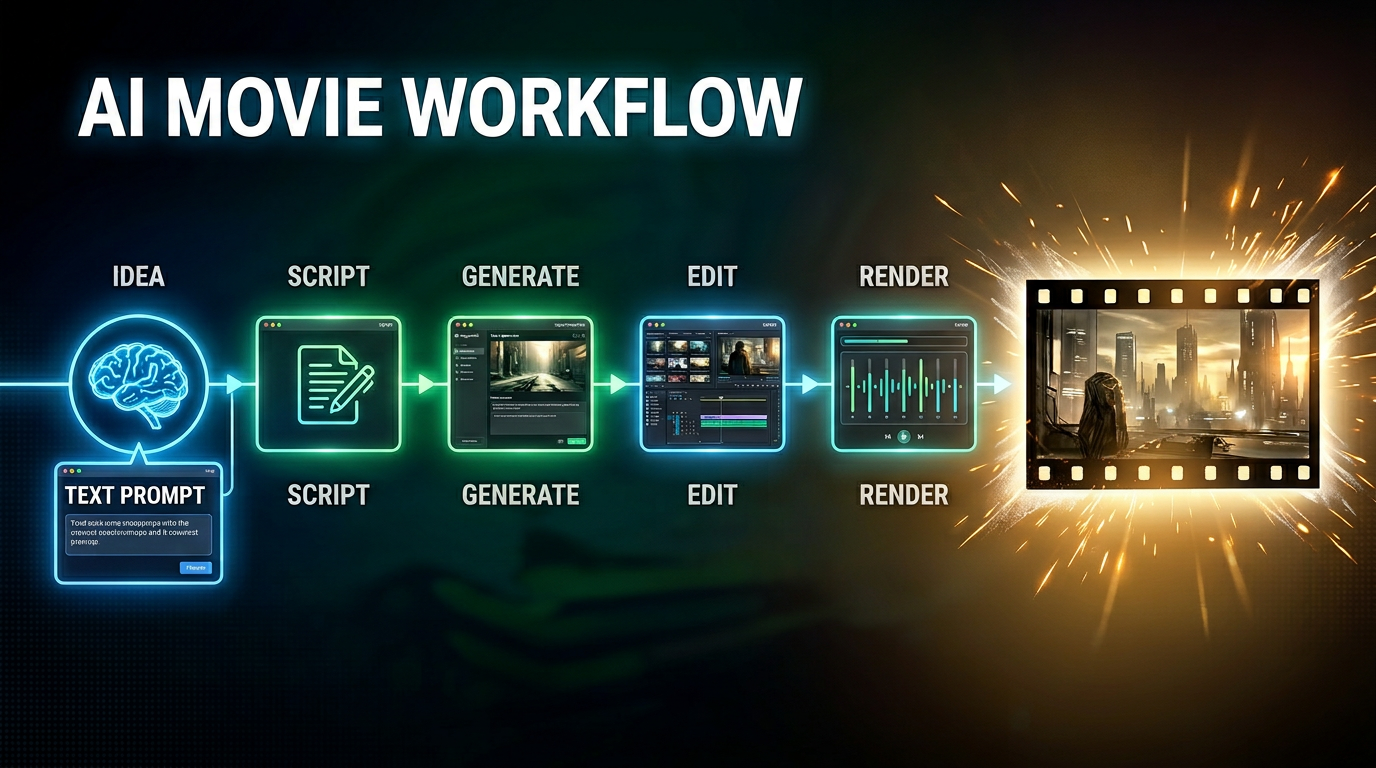
This episode explores the emerging architecture behind AI-generated filmmaking and why creating high-quality AI movies is no longer about using a single tool. Instead, successful AI film production requires an orchestrated workflow where different models and platforms handle specific stages of the creative process.
The discussion focuses on how tools such as Microsoft Copilot, Seedance, Higgsfield, and other generative AI platforms fit into a larger production pipeline. Rather than relying on one model to generate an entire movie, creators increasingly use specialized systems for ideation, scripting, storyboarding, shot planning, character consistency, motion generation, editing, and post-production.
A key theme is the shift from prompt engineering to architecture design. The real challenge is no longer writing better prompts but designing workflows that coordinate multiple AI models and creative stages. This mirrors how modern software systems evolved from standalone applications into distributed architectures.
The episode also examines the strengths and limitations of current AI video tools. Some models excel at cinematic motion, others at visual consistency, scene composition, or creative direction. Understanding these differences allows filmmakers to combine tools strategically rather than expecting a single platform to solve every problem.
Another important topic is the future of AI filmmaking. As models improve, the competitive advantage will come less from access to the tools themselves and more from the production architecture, governance, creative workflows, and operational processes built around them. Teams that can orchestrate multiple AI systems efficiently will be able to create content faster, cheaper, and at a higher quality level than those relying on isolated tools.
Quick answer: AI movie production workflow with Copilot Seedance Higgsfield is covered in this M365 FM episode with a practical focus on how it works, where it fits, and the architecture, security, governance, or operational choices that matter in real Microsoft environments.
You now live in an era where the architecture of ai movies lets you create a 100% ai-generated movie that rivals any feature-length movie. With Microsoft Copilot, Seedance 2.0, and Higgsfield, you can finally overcome the chaos that often comes with using separate ai models. Instead of struggling with inconsistency, you experience a streamlined process that connects every part of production, setting a new standard for the industry.
Key Takeaways
- AI tools like Microsoft Copilot, Seedance 2.0, and Higgsfield streamline movie production, making it easier to create high-quality films.
- A unified approach helps maintain creative control while AI handles repetitive tasks, allowing filmmakers to focus on storytelling.
- Using AI in filmmaking can reduce production costs by 20-30%, making it more accessible for independent creators.
- Character consistency is crucial; Seedance 2.0 ensures characters look the same throughout the movie using advanced references.
- Higgsfield enhances cinematic quality by providing realistic motion and camera control, mimicking professional filmmaking techniques.
- Effective prompt engineering is key to getting the best results from AI tools; clear instructions lead to better outputs.
- Human oversight remains essential in AI filmmaking to ensure quality and emotional depth in the final product.
- AI democratizes filmmaking, allowing individuals to create films with smaller teams and lower budgets, fostering diverse storytelling.
Architecture of AI Movies: Unified Approach
The architecture of ai movies has changed how you approach storytelling. You no longer need to juggle disconnected tools or worry about losing control over your creative vision. With Microsoft Copilot, Seedance 2.0, and Higgsfield, you can use a unified system that brings order and reliability to every stage of production.
AI Movie Production Pipeline
You can break down the architecture of ai movies into clear stages. Each stage uses ai to support your creativity and streamline your workflow. Here is how the modern pipeline compares to traditional film production:
- You plan scenes with ai, which helps you visualize environments and organize your story before you start.
- You use ai for design layouts and voice modulation, making it easier to create characters and refine audio without losing your artistic touch.
- You manage post-production with ai, which speeds up editing and ensures your final product meets high standards.
Tip: When you use a unified pipeline, you keep creative control while letting ai handle repetitive tasks.
Governance and Quality Management
You need strong governance to keep your project on track. The architecture of ai movies gives you tools to set rules and monitor quality at every step. Microsoft Copilot acts as your director, making sure each tool follows the same blueprint. This structure helps you avoid mistakes and keeps your movie consistent from start to finish.
You also benefit from measurable improvements. A unified framework can automate video generation and boost long-horizon temporal consistency by up to 30%. It also improves background continuity by over 21% and raises overall generation quality by more than 11%. You get results that outperform traditional linear ai pipelines by nearly 18%.
Documentation and Workflow Control
You can document every decision and change in your project. The architecture of ai movies supports workflow control, so you always know what happens and when. Seedance 2.0 and Higgsfield work with Copilot to keep records of character designs, scene setups, and camera movements. This makes it easy to review your process, fix issues, and scale your production for larger projects.
Consistency and Continuity in AI Movies
You want your ai movie to look and feel like a real film. The architecture of ai movies helps you achieve this by focusing on consistency and continuity.
Character Identity Management
You can manage character identity across every scene. Seedance 2.0 uses advanced references and identity anchors to keep characters stable. This means your characters will not change appearance or style as your movie progresses. You get reliable results, and your audience stays engaged with the story.
Scene Transition Stability
You can create smooth transitions between scenes. Higgsfield and Seedance 2.0 work together to maintain background continuity and visual flow. The unified architecture of ai movies ensures that each scene connects naturally to the next. Your film feels polished, and you avoid the jarring shifts that often happen with isolated ai tools.
Note: When you use a unified approach, you raise the quality of your ai movie and set a new standard for digital storytelling.
Microsoft Copilot: Directing AI Movie Workflow
Microsoft Copilot gives you a new way to direct your ai movie workflow. You do not just use Copilot as a writing assistant. You use it as a director that organizes every step of your production. Copilot helps you build a structured process that keeps your project on track and improves the quality of your film.
Parametric Shot Lists
Copilot lets you create parametric shot lists. You can define each shot with clear parameters, such as camera angle, lighting, and character placement. This approach helps you plan your ai movie with precision.
Automated Storyboarding
You use Copilot to automate your storyboarding. Copilot generates visual guides for each scene based on your shot list. You see how your movie will look before you start production. This saves you time and helps you spot problems early.
Tip: Automated storyboarding helps you keep your creative vision clear and consistent.
Visual Consistency
Copilot ensures visual consistency across your ai movie. You set rules for colors, backgrounds, and character appearances. Copilot applies these rules to every scene. Your movie looks polished and professional.
| Feature | Benefit |
|---|---|
| Parametric Shot Lists | Precise planning |
| Automated Storyboarding | Faster production |
| Visual Consistency | Professional results |
Character Definitions
Copilot helps you manage character definitions. You create a blueprint for each character. This blueprint includes details like appearance, personality, and voice.
Unified Character Blueprint
You use Copilot to build a unified character blueprint. This blueprint keeps your characters stable throughout your ai movie. You avoid changes in style or identity.
Managing Identity Across Tools
Copilot manages character identity across different ai tools. You do not lose control when you switch between Seedance 2.0 and Higgsfield. Copilot keeps your character data consistent. Your audience stays connected to the story.
Note: Copilot acts as your director, guiding every tool and keeping your ai movie workflow organized.
You gain more control and confidence when you use Copilot. You can focus on storytelling while Copilot handles the technical details. Your film stands out with clear visuals and stable characters.
Seedance 2.0: Character Consistency in AI Movies
When you create an ai animation or movie, you want your characters to look the same in every scene. Seedance 2.0 gives you the tools to make this possible. You can keep your characters stable and your story clear, even as you move through complex scenes and fast-paced action.
Character References (Cref)
Seedance 2.0 introduces Character References, or Cref, to help you lock in character consistency. Many creators in the ai animation community struggle with characters that change from frame to frame. With Cref, you can solve this problem and keep your characters looking the same throughout your project.
- You use Cref to set a master reference for each character.
- You can train private models to match your character’s likeness in every shot.
- You support multimodal storytelling by keeping character features stable across different formats.
“You will learn how to: ✔️ Lock in 100% Character Consistency using CREF ✔️ Direct complex martial arts physics and fluid motion ✔️ Command cinematic multi-axis camera movements (Crane, Dolly, Orbit)”
In the ai short film trailer ‘Ripple’, Cref played a key role. It allowed the creators to tell a deliberate story, not just a series of random clips. You can use the same approach to bring order and clarity to your own animation projects.
Visual Stability
You want your ai animation to look professional. Cref helps you achieve visual stability by making sure your characters do not change unexpectedly. This means your audience can focus on the story, not on distracting changes in appearance.
Identity Anchors
Identity anchors in Seedance 2.0 prevent character drift. You can use a clear, well-lit portrait as an anchor for each character. This keeps your ai animation consistent, even during demanding action scenes. If you notice changes, you can check your references and prompts to fix the issue quickly.
- Simplify complex actions to help maintain identity.
- Use strong, clear references for each character.
- Align your text and image prompts for best results.
Scene Generation
Seedance 2.0 also improves how you generate scenes in your ai animation or movie. You can keep your story flowing smoothly from one moment to the next.
Seamless Transitions
You can use Seedance 2.0 to create seamless transitions between scenes. By using a master character sheet or a multi-angle character package, you keep your characters looking the same from every angle. You can also use style reference templates and previous outputs to match the look and feel of each scene.
- Describe how each new shot connects to the last.
- Specify transition points to keep your animation smooth.
- Use the video extension feature to add new scenes without breaking continuity.
- Try the fusion technique to bridge two clips together.
Reference Management
You can manage all your references in one place with Seedance 2.0. This makes it easy to review your character sheets, style guides, and previous outputs. You can quickly fix any issues and keep your ai animation or movie on track.
Tip: When you use Seedance 2.0, you gain control over character consistency and scene transitions. Your ai animation stands out with professional quality and a clear, engaging story.
Higgsfield: Cinematic Motion and Camera Control
When you want your ai movie to feel cinematic, Higgsfield gives you the tools to create motion and camera work that matches professional standards. You can use Higgsfield to build scenes that look and move like real films. The platform helps you control every detail, from camera angles to the way characters move.
Motion Complexity
Higgsfield lets you design motion sequences with realistic depth. You start with prompts or sketches, and the ai interprets these to build scenes that capture the emotional tone you want. You can experiment with different movements and refine your vision quickly.
Cinematic Language
You use Higgsfield to compose intent through interfaces that understand cinematic grammar. The ai integrates motion, tone, identity, and perspective into a single workflow. This means you can adjust camera behavior and emotional tone without reshoots. You save time and keep your creative process flexible.
Tip: Higgsfield allows you to visualize scripts and prototype scenes rapidly. You merge creativity with computational power, making your ai movie production efficient and expressive.
Quality Control
You gain quality control over every motion sequence. Higgsfield Cinema Studio uses generative ai video models to create film scenes and storytelling visuals from structured inputs. You can refine camera movements and scene transitions until they match your vision. The platform ensures that your ai movie maintains high standards throughout production.
Camera Systems
Higgsfield’s camera systems help you achieve realism and immersion in your ai movie. The platform simulates real-life interactions, including light behavior and texture response. You get scenes that feel authentic and engaging.
Advanced Controls
You can use advanced controls to mimic professional filmmaking techniques. Higgsfield lets you create tracking shots, smooth zooms, and dramatic pans. The camera movements replicate real camera physics and momentum. You have the power to direct scenes with precision.
- Tracking shots follow characters smoothly.
- Zooms add focus and intensity.
- Cinematic reveals build suspense and depth.
Visual Enhancement
Higgsfield enhances your visuals by integrating physics, psychology, and continuity. Every aspect of your ai movie, from lighting to textures, responds as it would in real life. Effects like cinematic reveals and dramatic pans add depth to your scenes.
| Camera Feature | Professional Technique | Result |
|---|---|---|
| Tracking Shot | Real camera movement | Smooth character follow |
| Dramatic Pan | Cinematic reveal | Adds suspense |
| Smooth Zoom | Focus adjustment | Highlights emotion |
You use Higgsfield to bring your ai movie to life. The platform gives you control over motion and camera systems, helping you create scenes that rival traditional film productions.
AI Movie Workflow: Technical Integration and Challenges
You need a strong technical foundation to succeed in ai filmmaking. The workflow involves careful prompt engineering, seamless platform integration, and solutions for production challenges. Each step helps you create high-quality generative ai movies that meet professional standards.
Prompt Engineering
Prompt engineering shapes the way generative ai understands your instructions. You guide the system with clear, structured prompts to get the results you want.
Effective Prompts
You improve output quality by following best practices for prompt engineering:
- Craft clear, concise, and context-rich prompts.
- Use specific instructions and examples to guide the ai.
- Incorporate constraints to limit unwanted results.
- Apply retrieval-augmented generation to boost factual accuracy.
- Refine prompts based on model responses.
You can use different prompting strategies for different tasks:
- Zero-shot prompting lets the ai infer your needs from instructions. This works well for simple tasks.
- Few-shot prompting gives the ai examples, helping it learn patterns for specialized tasks.
- Chain-of-Thought prompting asks the ai to explain its reasoning step-by-step. This leads to better results for complex tasks.
Tip: Iterative refinement is key. You should test and adjust your prompts until you reach the desired outcome.
Data Preparation
You must prepare your data before starting ai filmmaking. This step ensures that generative ai models have the right information to work with. You collect reference images, character sheets, and style guides. You organize these assets so that Copilot, Seedance 2.0, and Higgsfield can access them easily.
You also need to understand the limitations of each ai model. This helps you tailor your prompts and avoid errors. Well-prepared data leads to more consistent and realistic generative outputs.
Platform Integration
You achieve the best results when you connect Copilot, Seedance 2.0, and Higgsfield into a single workflow. Platform integration allows you to move assets and instructions smoothly between tools.
Copilot, Seedance, Higgsfield Interoperability
You benefit from interoperability between platforms. Copilot manages your shot lists and character blueprints. Seedance 2.0 keeps your characters consistent. Higgsfield handles cinematic motion and camera control. When these tools work together, you maintain creative control and ensure that each generative ai model follows the same vision.
A unified workflow reduces errors and saves time. You do not need to repeat tasks or fix inconsistencies between scenes. Instead, you focus on storytelling and visual quality.
Human Oversight
You play a vital role in supervising the ai filmmaking process. Generative ai can automate many tasks, but human oversight remains essential. You validate critical outputs, especially for scenes that require emotional depth or artistic nuance.
You review the work at each stage. If you notice issues with character identity or scene transitions, you can adjust prompts or data. This hands-on approach ensures that your generative ai movie meets your standards.
Note: Human oversight also helps you avoid repetitive or biased outputs that can occur with automated systems.
Production Challenges
You face several challenges in ai filmmaking. Consistency, realism, and compute costs are the main hurdles. You need strategies to overcome these obstacles and deliver professional results.
Consistency and Realism
You want your generative ai movie to look seamless and believable. Technical barriers can make this difficult:
- Temporal coherence issues may cause flickering or inconsistent details.
- High computational requirements can slow down production.
- Integrating ai-generated elements with traditional techniques, such as color matching and lighting, can be tricky.
You can use adaptive stylization to keep your film’s artistic style consistent. Procedural generation helps you create detailed environments that match your story. Neural networks and generative adversarial networks improve image synthesis and style transfer, making your movie more realistic.
You also need quality control. You review outputs and make adjustments to maintain high standards. This process helps you avoid unpredictable results and ensures that your generative ai movie stays on track.
Compute Costs
You can lower production costs by using generative ai. Automation speeds up editing and visual effects, reducing the need for large teams. You save money on labor and overhead.
Generative ai tools also help you optimize content for your audience. You can test different versions quickly and choose the best one. This flexibility can lead to higher returns and more opportunities for creative projects.
| Challenge | Solution | Benefit |
|---|---|---|
| Consistency & Realism | Adaptive stylization, procedural generation | Seamless, believable movies |
| Compute Costs | Automation, workflow optimization | Lower production expenses |
| Quality Control | Human oversight, iterative refinement | Professional, reliable output |
Callout: By mastering technical integration and addressing production challenges, you unlock the full potential of ai filmmaking. You create generative ai movies that are both cost-effective and visually stunning.
Practical and Industry Implications of AI Movies
Cost and Team Size
Democratization
You now have the power to create films with tools that were once reserved for major studios. The rise of ai in filmmaking has made production more affordable and accessible. For example, the ai-generated film 'Hell Grind' cost about $500,000 to produce, with most of that spent on ai compute. In comparison, a similar traditional film would require a $50 million budget. This shift means you can work with a much smaller team. Some directors even believe that a single person could make an entire film using ai tools.
| Evidence Type | Details |
|---|---|
| Cost Reduction | AI cuts production costs by 20-30%, letting you spend more on creative ideas. |
| Time Efficiency | Post-production now takes weeks instead of months, so you finish projects faster. |
| Accessibility of Tools | Advanced filmmaking tools are now open to independent creators, not just big studios. |
| Hybrid Workflows | You can mix your creativity with ai execution for more innovative stories. |
| Global Competition | New regions, like India, are joining the global market, bringing more diverse content. |
Lower Barriers
You can now visualize scenes from scripts during the concept stage. Independent creators use ai to produce short videos for social media. Writers build visual prototypes to pitch new film or series ideas. You do not need a large team anymore, as ai-assisted workflows handle many technical tasks.
AI technology democratizes filmmaking by lowering the barriers to entry. Independent filmmakers and new artists can access high-quality production tools that were previously only available to large studios, fostering a more inclusive industry and encouraging diversity of voices and stories.
Educational programs now teach students how to use ai in film, preparing you for a future where these skills are essential. Open-access platforms and virtual workshops help you learn and share knowledge with others.
Creative Possibilities
New Visual Styles
You can explore new ways to tell stories with ai. Filmmakers now combine human creativity with computational tools. You can use prompt engineering, image referencing, and model training to create unique visual styles. Artists often blend hand-drawn sketches, digital collages, and post-production techniques with ai-generated visuals. Films like 'Round Table' and 'Overthinking' show how you can use custom models and traditional methods together.
Adaptive Storytelling
Ai changes how you plan and edit films. You can quickly test ideas, plan complex scenes, and speed up editing. This lets you focus more on storytelling and less on technical barriers. Ai supports you by handling time-consuming tasks, so you can experiment and innovate faster.
Industry and Ethics
Intellectual Property
You face new questions about ownership and rights when you use ai in filmmaking. The Motion Picture Association stresses the need for responsible use, especially around copyright. Ongoing discussions focus on how ai affects creative processes and who owns the final product. Leaders in the industry say that ai should enhance creativity, not replace human creators.
Regulatory Developments
Ethical concerns include data consent, fair compensation, transparency, and job displacement. The industry is working on guidelines and policies to address these issues. You see more disclaimers, new rules for consent, and efforts to protect intellectual property. Audience reactions also shape how quickly ai tools are adopted. Many viewers enjoy the new visual possibilities, but some worry that too much automation could make films feel less authentic. You still need strong characters and emotional stories to connect with your audience.
You see Microsoft Copilot, Seedance 2.0, and Higgsfield reshape how you make AI movies. These tools help you build consistent and professional films. Audiences accept AI-generated pitches, so you can trust structured AI to enhance your creative process. You face challenges like fears of job loss and debates about AI's influence on film culture. Some worry that AI could favor safe projects and reduce diversity. You can overcome these hurdles by embracing structured AI movie production. This approach lets you create reliable, high-quality films and unlock new creative possibilities.
FAQ
How do Microsoft Copilot, Seedance 2.0, and Higgsfield work together?
You use Copilot to plan and direct your movie. Seedance 2.0 keeps your characters consistent. Higgsfield controls motion and camera angles. These tools connect in a unified workflow, making your AI movie production smooth and reliable.
Can you create a full-length movie with these AI tools?
You can produce a feature-length film using Microsoft Copilot, Seedance 2.0, and Higgsfield. These tools help you manage every stage, from planning to editing. You keep creative control and achieve professional results.
What makes AI movies more consistent than traditional AI video projects?
You use a structured pipeline with governance and quality management. Copilot, Seedance 2.0, and Higgsfield follow the same blueprint. This approach prevents character drift and scene inconsistencies, giving your movie a polished look.
Do you need a large team to make an AI movie?
You do not need a big team. AI tools automate many tasks. You can create a movie with a small group or even by yourself. You save time and reduce costs.
How do you keep characters looking the same throughout the movie?
Seedance 2.0 uses Character References and identity anchors. You set clear visual guides for each character. The system checks every scene to keep appearances stable and prevent unwanted changes.
What filmmaking techniques does Higgsfield replicate?
Higgsfield lets you use tracking shots, smooth zooms, and dramatic pans. You direct scenes with advanced camera controls. The platform mimics real camera movements, helping you create cinematic visuals.
Is human oversight important in AI movie production?
You play a key role in supervising the process. You review outputs, adjust prompts, and fix issues. Human oversight ensures your movie meets high standards and stays true to your vision.
🎧 Listen to this episode
Want a practical explanation of AI Movie Production with Copilot, Seedance, and Higgsfield? This episode breaks down the topic in clear language and shows why it matters for Microsoft 365, Azure, Power Platform, security, AI, and modern work.
Listen to this episode if you want to:
- Understand the key concepts behind AI Movie Production with Copilot, Seedance, and Higgsfield
- See how it fits into the wider Microsoft technology ecosystem
- Learn where it can create practical value for your organization
You may also enjoy these related M365 FM episodes:
- Microsoft 365 Copilot Agents: Real Business Value with Steve Corey [MVP]
- Copilot for Dynamics 365 Finance and Operations - Simply Explained
- Zero Trust AI Security with Microsoft Copilot and Azure – Mourtaza Fazlehoussen [MVP]
- Copilot in Microsoft Entra ID - Simply Explained
- Copilot for Microsoft Fabric - Simply Explained
Discover more practical Microsoft conversations on M365 FM.
Last reviewed: July 2026.
Who Should Listen
This episode is for Microsoft administrators, architects, developers, security professionals, and business leaders who need a practical foundation before making implementation, operations, or governance decisions.
🎧 You Should Also Listen To
- AI Agents — A strongly related next step for extending this topic.
- Power Platform — A strongly related next step for extending this topic.
- Microsoft Teams — A strongly related next step for extending this topic.
🚀 Want to be part of m365.fm?
Then stop just listening… and start showing up.
👉 Connect with me on LinkedIn and let’s make something happen:
- 🎙️ Be a podcast guest and share your story
- 🎧 Host your own episode (yes, seriously)
- 💡 Pitch topics the community actually wants to hear
- 🌍 Build your personal brand in the Microsoft 365 space
This isn’t just a podcast — it’s a platform for people who take action.
🔥 Most people wait. The best ones don’t.
👉 Connect with me on LinkedIn and send me a message:
"I want in"
Let’s build something awesome 👊
1
00:00:00,000 --> 00:00:01,760
You've seen the clips on social media.
2
00:00:01,760 --> 00:00:05,240
A character walks through a door and suddenly their jawline is wider than it was three seconds
3
00:00:05,240 --> 00:00:06,240
ago.
4
00:00:06,240 --> 00:00:09,640
Most people treat AI video tools like separate, disconnected services and they think the
5
00:00:09,640 --> 00:00:11,760
solution is just writing a better prompt.
6
00:00:11,760 --> 00:00:13,360
But in reality, it does the opposite.
7
00:00:13,360 --> 00:00:14,720
You're just spinning your wheels.
8
00:00:14,720 --> 00:00:18,520
A cinematic movie requires orchestration across three distinct systems.
9
00:00:18,520 --> 00:00:23,200
We're moving away from prompting for images and moving toward architecting a pipeline.
10
00:00:23,200 --> 00:00:27,400
This deep dive delivers the exact workflow, technical constraints and the model you need
11
00:00:27,400 --> 00:00:31,480
to produce professional video that actually holds together.
12
00:00:31,480 --> 00:00:34,080
Why AI movies fail the diagnosis?
13
00:00:34,080 --> 00:00:35,920
The character drift problem.
14
00:00:35,920 --> 00:00:39,960
Most creators generate a character in one tool and then try to move that person into another
15
00:00:39,960 --> 00:00:40,960
model.
16
00:00:40,960 --> 00:00:44,000
The moment you hit regenerate the face changes and you've lost the very person you are
17
00:00:44,000 --> 00:00:45,000
trying to film.
18
00:00:45,000 --> 00:00:46,640
This is the character drift problem.
19
00:00:46,640 --> 00:00:50,600
It happens because every model uses a different identity embedding, which means there isn't
20
00:00:50,600 --> 00:00:54,760
a unified reference system to tell the AI who this person should be across different
21
00:00:54,760 --> 00:00:56,080
software environments.
22
00:00:56,080 --> 00:01:00,400
You might have a great image from mid-journey, but the video model sees it as a suggestion
23
00:01:00,400 --> 00:01:04,400
rather than a strict law that it must follow for every single frame.
24
00:01:04,400 --> 00:01:09,360
C-Dance 2.0 tries to solve this with a feature called CREF, which stands for character reference,
25
00:01:09,360 --> 00:01:12,520
but just clicking a button isn't enough to fix the underlying issue.
26
00:01:12,520 --> 00:01:16,000
You have to understand the role-based design principle to get real results.
27
00:01:16,000 --> 00:01:19,240
If you upload a cluttered image where the character is holding a coffee cup or standing
28
00:01:19,240 --> 00:01:24,040
in front of a complex wall, the model gets confused and can't prioritize what to preserve.
29
00:01:24,040 --> 00:01:27,580
You end up with a character whose face is stable, but whose outfit keeps morphing into the
30
00:01:27,580 --> 00:01:32,160
background texture because the model doesn't know where the person ends and the room begins.
31
00:01:32,160 --> 00:01:34,600
The cost of this failure isn't just aesthetic.
32
00:01:34,600 --> 00:01:35,600
It's financial.
33
00:01:35,600 --> 00:01:39,720
When your character drifts, you usually have to run 3 to 5 fail takes for every single scene,
34
00:01:39,720 --> 00:01:42,760
and that means you're burning through credits and wasting hours of your life on iterations
35
00:01:42,760 --> 00:01:44,160
that never look right.
36
00:01:44,160 --> 00:01:48,720
In a professional environment, this is a disaster because it makes your production timeline unpredictable.
37
00:01:48,720 --> 00:01:52,160
You can't tell a client when the video will be finished if you're relying on a digital
38
00:01:52,160 --> 00:01:56,160
slot machine to decide if your lead actor looks like the same person from shot to shot.
39
00:01:56,160 --> 00:01:59,080
There's also a massive governance gap here that most people ignore.
40
00:01:59,080 --> 00:02:02,800
Most teams aren't documenting which specific reference image or seed they used for shot
41
00:02:02,800 --> 00:02:07,000
one versus shot five, so when they need to go back and fix a tiny error in the edit,
42
00:02:07,000 --> 00:02:10,600
they can't recreate the original character identity accurately.
43
00:02:10,600 --> 00:02:12,440
Iteration becomes chaotic.
44
00:02:12,440 --> 00:02:15,520
You're basically starting from scratch every time you open the app.
45
00:02:15,520 --> 00:02:18,520
This is why you need a master reference pack that stays locked throughout the entire
46
00:02:18,520 --> 00:02:22,880
project so that every team member is pulling from the exact same identity data.
47
00:02:22,880 --> 00:02:26,760
To fix this, you have to stop thinking about the AI as a magic box and start treating
48
00:02:26,760 --> 00:02:28,720
it like a digital asset manager.
49
00:02:28,720 --> 00:02:32,360
You create a character sheet with front, back and side views, and you make sure to use
50
00:02:32,360 --> 00:02:34,360
a face close up on a clean background.
51
00:02:34,360 --> 00:02:38,160
By providing these specific views, you give the model the geometric data it needs to keep
52
00:02:38,160 --> 00:02:39,160
the identity stable.
53
00:02:39,160 --> 00:02:42,840
It doesn't have to guess what the character looks like from a different angle, which reduces
54
00:02:42,840 --> 00:02:48,320
the chance of the AI hallucinating new features when the camera moves around the subject.
55
00:02:48,320 --> 00:02:50,000
The editor drift isn't a model failure.
56
00:02:50,000 --> 00:02:51,240
It's an architecture failure.
57
00:02:51,240 --> 00:02:54,800
When you don't define the identity anchor clearly, the model fills in the gaps with its
58
00:02:54,800 --> 00:02:58,840
own noise, and this is where most AI movies fall apart before they even get to the editing
59
00:02:58,840 --> 00:02:59,840
stage.
60
00:02:59,840 --> 00:03:03,640
You see it in the eyes first, the spacing changes, the skin tone shifts.
61
00:03:03,640 --> 00:03:07,840
Once you understand how these models actually process identity, you can start building a system
62
00:03:07,840 --> 00:03:11,520
that prevents these errors before they happen by locking down the variables.
63
00:03:11,520 --> 00:03:14,720
Think about how identity actually works in these systems.
64
00:03:14,720 --> 00:03:16,240
The model isn't looking at a person.
65
00:03:16,240 --> 00:03:18,960
It's looking at a mathematical representation of pixels.
66
00:03:18,960 --> 00:03:21,680
When you move from shot one to shot two, that math changes.
67
00:03:21,680 --> 00:03:24,720
Without a locked reference, the AI has no reason to stay consistent.
68
00:03:24,720 --> 00:03:27,280
It's just trying to make a pretty image based on the new prompt.
69
00:03:27,280 --> 00:03:29,800
This is why the old model of prompt and prey is dead.
70
00:03:29,800 --> 00:03:34,600
We need a new model based on context and constraints where every pixel is accounted for before
71
00:03:34,600 --> 00:03:36,240
you hit generate.
72
00:03:36,240 --> 00:03:38,000
The motion artifact threshold.
73
00:03:38,000 --> 00:03:41,880
Beyond the identity of your character, there is the massive issue of movement.
74
00:03:41,880 --> 00:03:45,520
Higgsfield and C-Dance both operate within a very specific range, a limit that most
75
00:03:45,520 --> 00:03:47,440
creators don't even realize exists.
76
00:03:47,440 --> 00:03:50,960
You see a slider for motion strength and the natural instinct is to slide it all the
77
00:03:50,960 --> 00:03:53,960
way to 10 because you want energy and drama in the shot.
78
00:03:53,960 --> 00:03:56,680
But in reality, doing that is destroying your render.
79
00:03:56,680 --> 00:03:58,800
This is what we call the motion artifact threshold.
80
00:03:58,800 --> 00:04:02,880
It is an implicit boundary where the quality of your output starts to fall apart.
81
00:04:02,880 --> 00:04:07,280
If you were to rate motion intensity on a scale of 1 to 10, the danger zone actually starts
82
00:04:07,280 --> 00:04:08,400
much earlier than you think.
83
00:04:08,400 --> 00:04:10,200
We follow the 3 to 5 rule.
84
00:04:10,200 --> 00:04:14,080
When you keep your settings strictly between 3 and 5, the results look cinematic.
85
00:04:14,080 --> 00:04:17,360
The movement stays smooth and the edges of your subjects remain clean.
86
00:04:17,360 --> 00:04:20,840
But the moment you cross that 5, the entire logic of the image breaks down.
87
00:04:20,840 --> 00:04:23,320
You start to see texture crawling across the screen.
88
00:04:23,320 --> 00:04:27,400
The fabric of a character's shirt begins to swim and limbs start to warp in ways that
89
00:04:27,400 --> 00:04:28,400
don't make sense.
90
00:04:28,400 --> 00:04:31,640
A hand moves too fast and suddenly it has 6 fingers.
91
00:04:31,640 --> 00:04:33,720
Or it simply melts into the person's thigh.
92
00:04:33,720 --> 00:04:38,080
Temporal flicker ruins the lighting because the AI is struggling to maintain the geometry
93
00:04:38,080 --> 00:04:40,160
when the change between frames is too high.
94
00:04:40,160 --> 00:04:43,120
This happens because the physics in these models aren't real physics.
95
00:04:43,120 --> 00:04:45,840
These systems aren't running a rigid body simulation.
96
00:04:45,840 --> 00:04:48,080
And they don't actually understand gravity or mass.
97
00:04:48,080 --> 00:04:51,560
They are just predicting the next set of pixels based on motion patterns they learned during
98
00:04:51,560 --> 00:04:52,560
training.
99
00:04:52,560 --> 00:04:56,280
When you ask for extreme speed, the model has to invent too much data from thin air.
100
00:04:56,280 --> 00:04:57,280
It is guessing.
101
00:04:57,280 --> 00:04:59,080
And when it guesses wrong, you get artifacts.
102
00:04:59,080 --> 00:05:03,040
A 15 second clip with high motion complexity is a credit burning gamble that usually ends
103
00:05:03,040 --> 00:05:04,720
in a distorted mess.
104
00:05:04,720 --> 00:05:06,320
The consistency paradox.
105
00:05:06,320 --> 00:05:08,760
We have looked at character drift and motion thresholds.
106
00:05:08,760 --> 00:05:11,240
But now we need to address the consistency paradox.
107
00:05:11,240 --> 00:05:15,560
Leedance 2.0 is currently the benchmark for keeping a face stable within a single clip.
108
00:05:15,560 --> 00:05:20,000
It is incredibly good at ensuring your protagonist doesn't look like a completely different person.
109
00:05:20,000 --> 00:05:21,720
By the time they finish a sentence.
110
00:05:21,720 --> 00:05:22,720
But here is the problem.
111
00:05:22,720 --> 00:05:24,120
This stability is fragile.
112
00:05:24,120 --> 00:05:28,640
The model that is best at consistency requires you to supply the exact same reference pack
113
00:05:28,640 --> 00:05:30,640
every single time you generate a new shot.
114
00:05:30,640 --> 00:05:32,240
It feels like a contradiction, right?
115
00:05:32,240 --> 00:05:36,520
You would expect the most advanced model to have a memory, but in reality, it doesn't.
116
00:05:36,520 --> 00:05:40,880
SeaDance 2.0 lacks a public character ID API like the one found in Sora 2.
117
00:05:40,880 --> 00:05:44,520
You cannot just assign a unique number to a face and move on to the next scene.
118
00:05:44,520 --> 00:05:49,160
Instead, the system relies entirely on the images you upload and the words you type for
119
00:05:49,160 --> 00:05:52,520
every single generation if you change your prompt to adjust the lighting.
120
00:05:52,520 --> 00:05:55,720
The model might decide the character's nose should be pointier than it was in the last
121
00:05:55,720 --> 00:05:56,720
shot.
122
00:05:56,720 --> 00:05:57,720
This is the paradox.
123
00:05:57,720 --> 00:06:01,600
The tool with the highest potential for consistency is the one that requires the highest
124
00:06:01,600 --> 00:06:04,080
level of manual discipline from the user.
125
00:06:04,080 --> 00:06:05,960
This creates massive workflow friction.
126
00:06:05,960 --> 00:06:07,720
You are no longer just a director.
127
00:06:07,720 --> 00:06:08,960
You are an asset manager.
128
00:06:08,960 --> 00:06:13,080
You have to build and maintain a master reference pack for every character in your script.
129
00:06:13,080 --> 00:06:14,880
This pack isn't just one single image.
130
00:06:14,880 --> 00:06:19,600
It consists of a front view, a side profile, a back view and a high resolution face close-up.
131
00:06:19,600 --> 00:06:23,440
You must ensure every single prompt references these exact files in the same order.
132
00:06:23,440 --> 00:06:26,680
If you swap the front view for a three quarter view in shot five.
133
00:06:26,680 --> 00:06:27,920
The identity drifts.
134
00:06:27,920 --> 00:06:31,000
The model sees a new starting point and takes that path instead.
135
00:06:31,000 --> 00:06:33,640
Most production teams fail here because of a governance collapse.
136
00:06:33,640 --> 00:06:37,160
They don't have a system for documenting which reference was used for which scene.
137
00:06:37,160 --> 00:06:40,040
You might have three different versions of the lead actor on your drive.
138
00:06:40,040 --> 00:06:44,000
And maybe one has darker hair, while another has a different shirt, if you aren't tracking
139
00:06:44,000 --> 00:06:45,680
which one is the North Star.
140
00:06:45,680 --> 00:06:48,240
Your movie becomes a mess of inconsistent visuals.
141
00:06:48,240 --> 00:06:52,040
You will spend half your budget trying to fix these errors in post-production.
142
00:06:52,040 --> 00:06:53,800
It is a chaotic way to work.
143
00:06:53,800 --> 00:06:57,160
And you are constantly fighting the software just to keep the face the same.
144
00:06:57,160 --> 00:07:00,840
The paradox is that the more shots you have in a scene, the higher the risk of failure.
145
00:07:00,840 --> 00:07:04,880
In a 10 shot sequence, you have 10 separate opportunities for the character to change.
146
00:07:04,880 --> 00:07:08,720
You are playing a game of digital telephone where each shot is a new interpretation of the
147
00:07:08,720 --> 00:07:09,880
character.
148
00:07:09,880 --> 00:07:12,120
Without a central brain to manage these instructions.
149
00:07:12,120 --> 00:07:13,360
The identity eventually breaks.
150
00:07:13,360 --> 00:07:17,960
This is why so many AI movies look like random clips instead of a coherent narrative.
151
00:07:17,960 --> 00:07:21,880
Practitioners focus on the individual generators instead of the system that connects them.
152
00:07:21,880 --> 00:07:24,800
Now this is important because you need to move one level deeper.
153
00:07:24,800 --> 00:07:26,760
You have to replace this manual.
154
00:07:26,760 --> 00:07:29,680
Aeroprom process with a structured orchestration layer.
155
00:07:29,680 --> 00:07:33,360
You need a system that sits above the video models and ensures every instruction is grounded
156
00:07:33,360 --> 00:07:35,440
in the same set of project assets.
157
00:07:35,440 --> 00:07:38,880
This is where co-pilot enters the picture as the director of your pipeline.
158
00:07:38,880 --> 00:07:42,320
It stops being a tool for writing dialogue and starts being the orchestrator that manages
159
00:07:42,320 --> 00:07:45,160
your parametric short lists and character anchors.
160
00:07:45,160 --> 00:07:48,800
Everything changes when you stop managing files and start managing the architecture.
161
00:07:48,800 --> 00:07:49,800
And this is the shift.
162
00:07:49,800 --> 00:07:51,320
Let's look at how that works.
163
00:07:51,320 --> 00:07:52,320
Co-pilot as the director.
164
00:07:52,320 --> 00:07:56,640
We need to stop using co-pilot to write scripts and start using it to build systems.
165
00:07:56,640 --> 00:08:00,680
Most people think of an LLM as a creative writer, but in reality, it's a structural engineer
166
00:08:00,680 --> 00:08:02,000
for your metadata.
167
00:08:02,000 --> 00:08:06,520
You're no longer asking it for a story, you're asking it to generate a parametric short list.
168
00:08:06,520 --> 00:08:08,840
This is the difference between a hobbyist and an architect.
169
00:08:08,840 --> 00:08:12,640
A generic prompt like "make a cinematic scene" is the fastest way to fail.
170
00:08:12,640 --> 00:08:14,920
The model doesn't know what cinematic means to you.
171
00:08:14,920 --> 00:08:15,920
It's just guessing.
172
00:08:15,920 --> 00:08:19,240
And when it guesses you lose control of the lighting and the lens, you're basically asking
173
00:08:19,240 --> 00:08:22,720
the AI to be the cinematographer without giving it a camera.
174
00:08:22,720 --> 00:08:25,520
Everything changes when you apply the four layer prompt structure.
175
00:08:25,520 --> 00:08:27,120
This is the model behind the director.
176
00:08:27,120 --> 00:08:28,120
It starts with the goal.
177
00:08:28,120 --> 00:08:32,200
You define exactly what you want the AI to achieve in this specific production phase.
178
00:08:32,200 --> 00:08:33,440
Then you provide the context.
179
00:08:33,440 --> 00:08:34,440
This isn't just the plot.
180
00:08:34,440 --> 00:08:36,520
It's the technical environment of the scene.
181
00:08:36,520 --> 00:08:40,720
You set the expectations for the output format and finally you point it to your sources.
182
00:08:40,720 --> 00:08:45,120
This structure forces co-pilot to stop being creative and start being precise.
183
00:08:45,120 --> 00:08:48,000
You're giving it the boundaries it needs to function as a director.
184
00:08:48,000 --> 00:08:51,800
It's about grounding the AI in the reality of your project files instead of the vast
185
00:08:51,800 --> 00:08:53,600
randomness of its training data.
186
00:08:53,600 --> 00:08:55,400
Now let's talk about parametric language.
187
00:08:55,400 --> 00:08:57,160
This is where the real power lives.
188
00:08:57,160 --> 00:08:58,960
The parametric prompt framework.
189
00:08:58,960 --> 00:09:02,760
To build a movie that doesn't fall apart, you need a framework that defines every single
190
00:09:02,760 --> 00:09:03,760
variable.
191
00:09:03,760 --> 00:09:04,760
This isn't about being poetic.
192
00:09:04,760 --> 00:09:06,400
It's about being mathematical.
193
00:09:06,400 --> 00:09:10,840
We use a structure that covers the subject, environment, action, camera, lighting, style,
194
00:09:10,840 --> 00:09:12,320
and continuity constraints.
195
00:09:12,320 --> 00:09:15,280
This is the blueprint that keeps your production on the rails.
196
00:09:15,280 --> 00:09:17,920
Most creators fail because they leave too much to chance.
197
00:09:17,920 --> 00:09:21,760
They hope the model will understand the mood, but hope isn't a production strategy.
198
00:09:21,760 --> 00:09:24,560
You need to specify the exact parameters for every frame.
199
00:09:24,560 --> 00:09:26,240
Let's look at the subject first.
200
00:09:26,240 --> 00:09:30,520
Instead of saying a man, you specify a man in his 40s wearing a charcoal gray tactical
201
00:09:30,520 --> 00:09:34,280
turtle neck and rimless glasses with a distinctive scar on his left cheek.
202
00:09:34,280 --> 00:09:36,760
You're building a character anchor that never changes.
203
00:09:36,760 --> 00:09:38,840
You're giving the AI a physical checklist.
204
00:09:38,840 --> 00:09:40,240
Then you define the environment.
205
00:09:40,240 --> 00:09:41,600
You don't just say office.
206
00:09:41,600 --> 00:09:45,160
You describe a modern minimalist office with floor to ceiling windows during the late afternoon
207
00:09:45,160 --> 00:09:47,160
golden hour.
208
00:09:47,160 --> 00:09:49,640
You're setting the physical boundaries of the scene.
209
00:09:49,640 --> 00:09:52,720
You're telling the model exactly how the light should interact with the glass and
210
00:09:52,720 --> 00:09:53,880
the surfaces.
211
00:09:53,880 --> 00:09:55,400
The action should be just as specific.
212
00:09:55,400 --> 00:10:00,360
You might describe a slow walk toward the window, a brief pause, and then a turn to the camera
213
00:10:00,360 --> 00:10:02,280
with a concerned expression.
214
00:10:02,280 --> 00:10:05,160
This tells the model exactly what to prioritize in the motion.
215
00:10:05,160 --> 00:10:08,680
It prevents the AI from adding random gestures that break the immersion.
216
00:10:08,680 --> 00:10:09,920
But here's where it gets interesting.
217
00:10:09,920 --> 00:10:10,920
The camera settings.
218
00:10:10,920 --> 00:10:14,320
You aren't asking for a cool shot or some cinematic vibe.
219
00:10:14,320 --> 00:10:18,200
You're instructing a slow dolly in on a 35mm lens starting at a wide shot and ending at
220
00:10:18,200 --> 00:10:19,440
a medium close up.
221
00:10:19,440 --> 00:10:21,840
You're talking to the AI like a technical camera operator.
222
00:10:21,840 --> 00:10:24,120
You're defining the optics in the field of view.
223
00:10:24,120 --> 00:10:25,120
Lighting is the next layer.
224
00:10:25,120 --> 00:10:30,120
You specify a key light from the window at 5,600 Kelvin, a soft film overhead, and a rim
225
00:10:30,120 --> 00:10:32,000
light from the background.
226
00:10:32,000 --> 00:10:36,040
By using Kelvin values and light positions, you remove the ambiguity that leads to flickering
227
00:10:36,040 --> 00:10:37,640
or inconsistent shadows.
228
00:10:37,640 --> 00:10:40,000
You're defining the color temperature of the scene.
229
00:10:40,000 --> 00:10:41,000
Then you add the style.
230
00:10:41,000 --> 00:10:44,880
You want it photorealistic with film grain and slight desaturation, matching the color
231
00:10:44,880 --> 00:10:46,760
grade from the previous shot.
232
00:10:46,760 --> 00:10:50,920
You're ensuring that the look of the movie stays identical across every single scene.
233
00:10:50,920 --> 00:10:54,200
You're telling the AI that the aesthetic is a fixed constant.
234
00:10:54,200 --> 00:10:55,200
A lot of variables.
235
00:10:55,200 --> 00:10:57,440
Finally, you include the continuity constraints.
236
00:10:57,440 --> 00:10:59,280
This is the most overlooked part of the process.
237
00:10:59,280 --> 00:11:03,920
You explicitly state same character as shot one, same outfit, same lighting temperature.
238
00:11:03,920 --> 00:11:06,520
This tells the model that it doesn't have permission to innovate.
239
00:11:06,520 --> 00:11:08,560
It must stick to the existing data.
240
00:11:08,560 --> 00:11:11,520
Every parameter in this framework is measurable and reproducible.
241
00:11:11,520 --> 00:11:15,680
There's no room for the model to interpret your vision because you've already defined it.
242
00:11:15,680 --> 00:11:18,560
This is the shift from creative guessing to technical execution.
243
00:11:18,560 --> 00:11:19,720
You aren't just making a video.
244
00:11:19,720 --> 00:11:21,080
You're configuring a render.
245
00:11:21,080 --> 00:11:25,000
This framework becomes your master instruction set for the entire pipeline.
246
00:11:25,000 --> 00:11:28,800
It's the bridge between co-pilot's planning and the actual generation in seedance and
247
00:11:28,800 --> 00:11:29,800
Higgs field.
248
00:11:29,800 --> 00:11:34,120
When you work this way, you stop being a prompt engineer and start being a systems architect.
249
00:11:34,120 --> 00:11:37,640
You're building a repeatable process that produces predictable results every time you
250
00:11:37,640 --> 00:11:38,640
hit generate.
251
00:11:38,640 --> 00:11:41,360
You're creating a language that the AI understands perfectly.
252
00:11:41,360 --> 00:11:44,840
This is how you scale a production without losing control of the quality.
253
00:11:44,840 --> 00:11:48,720
It's about moving from a world of what if to a world of this is.
254
00:11:48,720 --> 00:11:48,720
And once you have this framework locked, you can move into the world of what if to a world of this is.
255
00:11:48,720 --> 00:11:49,720
And once you have this framework locked, you can move into the world of what if to a world of this is.
256
00:11:49,720 --> 00:11:50,720
And once you have this framework locked, you can move into the world of what if to a world of this is.
257
00:11:50,720 --> 00:11:54,360
And once you have this framework locked, you can move into the project assets, it's the model behind the movie.
258
00:11:54,360 --> 00:11:56,360
Grounding co-pilot in your project assets.
259
00:11:56,360 --> 00:12:01,040
You have the framework, but a framework without your specific project data is just a hollow shell.
260
00:12:01,040 --> 00:12:04,520
Most people fail because they let the AI pull from its general training data.
261
00:12:04,520 --> 00:12:06,560
And that is exactly where the story falls apart.
262
00:12:06,560 --> 00:12:08,160
You need to use the sources layer.
263
00:12:08,160 --> 00:12:11,520
This is where you point co-pilot to your actual script and your storyboard.
264
00:12:11,520 --> 00:12:13,000
You aren't letting it guess your story.
265
00:12:13,000 --> 00:12:15,040
You're giving it the exact blueprint.
266
00:12:15,040 --> 00:12:20,520
It is the difference between a stranger guessing your brand and a team member who has read the manual cover to cover.
267
00:12:20,520 --> 00:12:23,920
Do this by using the file upload feature or the SharePoint integration.
268
00:12:23,920 --> 00:12:27,760
When you ground the AI in your project, it stops looking at the internet for answers.
269
00:12:27,760 --> 00:12:30,920
And the result is that it starts looking at your specific color palette.
270
00:12:30,920 --> 00:12:32,280
It follows your brand guidelines.
271
00:12:32,280 --> 00:12:34,280
It reads your character descriptions word for word.
272
00:12:34,280 --> 00:12:38,760
This is how you ensure that the man in his 40s we talked about earlier actually looks like your lead actor.
273
00:12:38,760 --> 00:12:42,800
You are providing the context that prevents the model from wandering off into generic territory.
274
00:12:42,800 --> 00:12:45,680
There is a massive governance benefit to this approach.
275
00:12:45,680 --> 00:12:48,640
Every short list that co-pilot generates becomes traceable.
276
00:12:48,640 --> 00:12:51,560
You can audit the output because it is linked to the source document.
277
00:12:51,560 --> 00:12:56,040
If a shot feels off, you can see exactly which part of the script the AI was referencing.
278
00:12:56,040 --> 00:12:58,600
This creates an automatic audit trail for your production.
279
00:12:58,600 --> 00:13:00,400
You aren't just getting a list of shots.
280
00:13:00,400 --> 00:13:03,640
You're getting a configuration that is verified against your project assets.
281
00:13:03,640 --> 00:13:07,720
It makes the entire iteration process transparent and accountable for everyone.
282
00:13:07,720 --> 00:13:09,160
Think about the risk of drift.
283
00:13:09,160 --> 00:13:13,320
When you're making 20 shots, the AI usually forgets what happened in the first one.
284
00:13:13,320 --> 00:13:16,840
But when co-pilot references your master character sheet that drift stops,
285
00:13:16,840 --> 00:13:20,040
it won't describe your character differently in shot 10 than it did in shot 1.
286
00:13:20,040 --> 00:13:22,720
It pulls from the same fixed descriptors every single time.
287
00:13:22,720 --> 00:13:25,160
You're using the AI to enforce your own rules.
288
00:13:25,160 --> 00:13:27,080
It becomes the gatekeeper for your continuity.
289
00:13:27,080 --> 00:13:30,600
This is the model that separates professional pipelines from amateur experiments.
290
00:13:30,600 --> 00:13:34,880
You're essentially using the AI as a compliance officer for your own creative standards.
291
00:13:34,880 --> 00:13:36,400
The workflow is straightforward.
292
00:13:36,400 --> 00:13:39,480
You let co-pilot generate the short list based on your uploaded assets,
293
00:13:39,480 --> 00:13:42,840
and then you review it to make sure the technical parameters look correct.
294
00:13:42,840 --> 00:13:45,600
Once you approve it, that list becomes your north star.
295
00:13:45,600 --> 00:13:48,240
It is the master document for sedans and Higgsfield.
296
00:13:48,240 --> 00:13:50,960
You're no longer typing unique prompts into every tool.
297
00:13:50,960 --> 00:13:55,080
You're copy-pasting the parametric instructions that were already vetted against your script.
298
00:13:55,080 --> 00:13:59,320
Everything stays connected because the source of truth is centralized in your project files.
299
00:13:59,320 --> 00:14:02,160
This ensures that every department is working from the same sheet of music,
300
00:14:02,160 --> 00:14:04,600
even if those departments are just different AI tools.
301
00:14:04,600 --> 00:14:07,360
This level of grounding is what makes the orchestration layer work.
302
00:14:07,360 --> 00:14:10,600
You're building a closed loop where the AI only knows what you tell it.
303
00:14:10,600 --> 00:14:12,280
You've removed the randomness.
304
00:14:12,280 --> 00:14:16,760
You've replaced it with a technical instruction set that is physically grounded in your creative intent.
305
00:14:16,760 --> 00:14:20,240
The transition from the planning phase to the generation phase becomes easy.
306
00:14:20,240 --> 00:14:23,360
Now that you have a parametric short list backed by your project assets,
307
00:14:23,360 --> 00:14:24,960
you're ready for the next stage.
308
00:14:24,960 --> 00:14:27,880
You need to translate that list into consistent character generation.
309
00:14:27,880 --> 00:14:32,560
This is where the architecture moves from planning into actual visual construction.
310
00:14:32,560 --> 00:14:34,320
The role-based reference design,
311
00:14:34,320 --> 00:14:38,040
sedans 2.0 changes the way we think about visual input.
312
00:14:38,040 --> 00:14:41,040
It doesn't treat every image you upload as an equal suggestion.
313
00:14:41,040 --> 00:14:43,440
Instead, it assigns a job to every piece of media.
314
00:14:43,440 --> 00:14:45,560
This is the role-based design principle.
315
00:14:45,560 --> 00:14:48,560
If you don't understand this, your character will never stay stable.
316
00:14:48,560 --> 00:14:51,120
Most people upload one good picture and hope for the best,
317
00:14:51,120 --> 00:14:53,440
but in reality, that is why it breaks.
318
00:14:53,440 --> 00:14:55,600
You're asking one file to do four different jobs.
319
00:14:55,600 --> 00:14:58,880
It has to define the face, lighting, background and clothes.
320
00:14:58,880 --> 00:15:01,080
That is too much data for the model to prioritize.
321
00:15:01,080 --> 00:15:06,440
You need to separate these into four distinct roles, identity, pose, environment and style.
322
00:15:06,440 --> 00:15:07,960
Identity is the most critical.
323
00:15:07,960 --> 00:15:10,040
This is the geometry of your character.
324
00:15:10,040 --> 00:15:12,400
To get this right, you need a set of clean references.
325
00:15:12,400 --> 00:15:16,600
You want a front view, a back view, a side profile and a high resolution face close up.
326
00:15:16,600 --> 00:15:18,640
These need to be on a plain white background.
327
00:15:18,640 --> 00:15:21,800
If your character is standing in a forest in their identity shot,
328
00:15:21,800 --> 00:15:24,600
sedans might decide the forest is part of the character's skin.
329
00:15:24,600 --> 00:15:27,520
You want zero clutter, just the subject.
330
00:15:27,520 --> 00:15:30,560
Now, let's talk about a major hurdle for practitioners.
331
00:15:30,560 --> 00:15:31,440
Safety filters.
332
00:15:31,440 --> 00:15:34,360
Sedans is incredibly aggressive about real human faces.
333
00:15:34,360 --> 00:15:37,480
If you upload a photo of a real person, it usually gets blocked.
334
00:15:37,480 --> 00:15:39,880
It is a safety mechanism to prevent deep fakes.
335
00:15:39,880 --> 00:15:41,120
But there is a workaround.
336
00:15:41,120 --> 00:15:44,680
We use AI-generated faces that look human, but don't trigger the block.
337
00:15:44,680 --> 00:15:48,520
And this allows us to maintain the identity without the system shutting us down.
338
00:15:48,520 --> 00:15:52,600
You are essentially creating a digital double that the safety filter accepts as a synthetic
339
00:15:52,600 --> 00:15:53,440
asset.
340
00:15:53,440 --> 00:15:58,760
This keeps your pipeline moving without the constant frustration of rejected files.
341
00:15:58,760 --> 00:16:01,040
The adsotag system and prompt binding.
342
00:16:01,040 --> 00:16:04,280
Once you have your reference pack ready, you need a way to tell the model exactly how to
343
00:16:04,280 --> 00:16:05,600
use it.
344
00:16:05,600 --> 00:16:09,840
Sedans 2.0 uses a specific syntax called the 8-tag system to handle this.
345
00:16:09,840 --> 00:16:13,120
You aren't just uploading files and hoping the AI figures it out on its own.
346
00:16:13,120 --> 00:16:18,320
Instead, you are explicitly binding each file to a specific function in your generation.
347
00:16:18,320 --> 00:16:21,160
It works a lot like mapping a controller in a video game.
348
00:16:21,160 --> 00:16:26,200
You are telling the software that @img1 is the face, @vide1 is the motion, and @ordy1 is
349
00:16:26,200 --> 00:16:27,200
the rhythm.
350
00:16:27,200 --> 00:16:30,480
If you skip this step, the model treats your uploads like a vague mood board.
351
00:16:30,480 --> 00:16:33,920
It might accidentally use the lighting from your face shot for the background, or it
352
00:16:33,920 --> 00:16:37,480
might use the motion of your character reference as a style cue for the clouds.
353
00:16:37,480 --> 00:16:38,880
This is where things get messy.
354
00:16:38,880 --> 00:16:40,960
Without binding, you lose control over the output.
355
00:16:40,960 --> 00:16:42,360
The syntax itself is simple.
356
00:16:42,360 --> 00:16:47,480
When you write your prompt, you use @img1 for identity, @vide1 for the camera path, and
357
00:16:47,480 --> 00:16:49,000
@ord1 for the pacing.
358
00:16:49,000 --> 00:16:51,760
The magic happens when you turn these into constraints.
359
00:16:51,760 --> 00:16:56,600
Instead of saying make him walk, you tell the system to use @img1 for character identity,
360
00:16:56,600 --> 00:16:58,720
and @vide1 for the motion and camera path.
361
00:16:58,720 --> 00:17:00,200
Now the AI isn't guessing anymore.
362
00:17:00,200 --> 00:17:02,240
It is executing a specific set of rules.
363
00:17:02,240 --> 00:17:06,360
This is the discipline that separates high end production from casual experimentation.
364
00:17:06,360 --> 00:17:09,080
Every prompt you write becomes a configuration document.
365
00:17:09,080 --> 00:17:12,600
It isn't a creative writing exercise anymore, but a technical spec.
366
00:17:12,600 --> 00:17:16,640
This is important for governance because a prompt using @stags can be audited later.
367
00:17:16,640 --> 00:17:21,320
You can look back at shot 1 and shot 10 to see that they both use the same @img1 reference.
368
00:17:21,320 --> 00:17:23,360
This ensures that the character stays locked.
369
00:17:23,360 --> 00:17:26,960
If you swap references between shots, you introduce a consistency risk by telling the model
370
00:17:26,960 --> 00:17:28,520
to change the starting math.
371
00:17:28,520 --> 00:17:29,840
Let's look at a practical example.
372
00:17:29,840 --> 00:17:35,440
In shot 1, you use @img1 as your front view, and in shot 2, you use the exact same @img1
373
00:17:35,440 --> 00:17:36,440
tag.
374
00:17:36,440 --> 00:17:39,760
Even if the camera angle changes, the identity anchor remains the same.
375
00:17:39,760 --> 00:17:42,840
This is how you keep the face stable across a whole scene.
376
00:17:42,840 --> 00:17:45,960
You are using the same identity data for every single render.
377
00:17:45,960 --> 00:17:49,480
Most people make the mistake of using a different image for every shot because they think a side
378
00:17:49,480 --> 00:17:50,960
view needs a side reference.
379
00:17:50,960 --> 00:17:51,960
But here's the thing.
380
00:17:51,960 --> 00:17:54,160
That just gives the AI more chances to drift.
381
00:17:54,160 --> 00:17:57,680
You want the model to infer the side view from your master identity anchor.
382
00:17:57,680 --> 00:18:00,840
This binding process creates a versioned history of your character.
383
00:18:00,840 --> 00:18:04,360
You can see exactly which configuration produced the best results.
384
00:18:04,360 --> 00:18:08,120
If shot 5 looks great, you copy that exact prompt structure for shot 6 and just change
385
00:18:08,120 --> 00:18:09,440
the action description.
386
00:18:09,440 --> 00:18:11,880
The @ tags and the references stay the same.
387
00:18:11,880 --> 00:18:13,880
This is the model behind the consistency.
388
00:18:13,880 --> 00:18:18,000
You are building a library of configurations that you can reuse across the entire movie.
389
00:18:18,000 --> 00:18:22,640
It is about moving from a world of manual tweaks to a world of systematic execution where
390
00:18:22,640 --> 00:18:25,040
your prompt is the code that runs the pipeline.
391
00:18:25,040 --> 00:18:26,600
But here's the problem with the old way.
392
00:18:26,600 --> 00:18:29,520
People used to just throw images at the box and hope for the best.
393
00:18:29,520 --> 00:18:33,480
When you use the @ tags system, you are creating an explicit link.
394
00:18:33,480 --> 00:18:37,840
You are saying that this specific file ID is the only source of truth for this specific attribute.
395
00:18:37,840 --> 00:18:39,080
It is a binding contractor.
396
00:18:39,080 --> 00:18:43,360
If your prompt says to use @img1 for identity, the model is forced to ignore the identity
397
00:18:43,360 --> 00:18:45,680
cues in any other uploaded images.
398
00:18:45,680 --> 00:18:49,560
This prevents the identity argument that usually ruins AI video clips.
399
00:18:49,560 --> 00:18:52,160
It is the difference between a suggestion and a command.
400
00:18:52,160 --> 00:18:53,200
And one level deeper.
401
00:18:53,200 --> 00:18:54,920
It allows you to version your character.
402
00:18:54,920 --> 00:18:59,080
If you update @img1, you know exactly why the character changed in the next render.
403
00:18:59,080 --> 00:19:01,760
You are managing the data rather than just the output.
404
00:19:01,760 --> 00:19:06,280
This is the shift toward a professional architecture where every pixel is traceable back to a tag.
405
00:19:06,280 --> 00:19:08,680
Now you need to manage the motion complexity.
406
00:19:08,680 --> 00:19:10,920
Character consistency within and across clips.
407
00:19:10,920 --> 00:19:14,280
You have to distinguish between holding a face together for two seconds and holding it
408
00:19:14,280 --> 00:19:15,920
together for two minutes.
409
00:19:15,920 --> 00:19:20,240
Cdance 2.0 is designed to maintain a character's face for about one and a half to two seconds
410
00:19:20,240 --> 00:19:23,120
of active motion before the internal math starts to wander.
411
00:19:23,120 --> 00:19:24,240
This window is your limit.
412
00:19:24,240 --> 00:19:27,320
It represents the boundary of the model's current temporal memory.
413
00:19:27,320 --> 00:19:31,960
If you try to push a single generation to 10 seconds without cuts, you will watch the features
414
00:19:31,960 --> 00:19:36,400
melt as the system tries to reconcile new movements with old pixel data.
415
00:19:36,400 --> 00:19:38,560
It is the model's physical constraint.
416
00:19:38,560 --> 00:19:42,000
Success within these short bursts depends on your starting conditions.
417
00:19:42,000 --> 00:19:45,200
You should use neutral lighting across every reference image because the model interprets
418
00:19:45,200 --> 00:19:47,240
shadows as permanent physical features.
419
00:19:47,240 --> 00:19:50,640
If your character has a heavy shadow on their cheek in the reference, that shadow will
420
00:19:50,640 --> 00:19:53,840
swim around their face like a bruise when they turn their head.
421
00:19:53,840 --> 00:19:57,600
Take to simple actions like sitting or walking while keeping the backgrounds plain to minimize
422
00:19:57,600 --> 00:19:59,720
the amount of data the AI has to track.
423
00:19:59,720 --> 00:20:02,360
This simplicity protects the render from failing.
424
00:20:02,360 --> 00:20:05,120
Scaling this to a full scene requires a different kind of discipline.
425
00:20:05,120 --> 00:20:09,440
You must reuse the exact same reference pack and style anchor for every single prompt
426
00:20:09,440 --> 00:20:10,720
in that sequence.
427
00:20:10,720 --> 00:20:13,840
Most people think they should update the reference to match the new shot, but that actually
428
00:20:13,840 --> 00:20:16,960
forces the model to recalculate the identity from scratch.
429
00:20:16,960 --> 00:20:21,020
By keeping the inputs identical, you ensure that the AI is always pulling from the same
430
00:20:21,020 --> 00:20:24,860
mathematical base, which keeps the characters bone structure and features from shifting
431
00:20:24,860 --> 00:20:26,660
between clips.
432
00:20:26,660 --> 00:20:30,060
Understanding motion strength and the artifact threshold, Higgsfield hides the raw numbers
433
00:20:30,060 --> 00:20:31,060
from you.
434
00:20:31,060 --> 00:20:35,340
You won't find a dial labeled "motion strength" that goes from 0 to 100.
435
00:20:35,340 --> 00:20:39,420
Instead the system gives you camera presets like ARC, Dolly or CrashZoom.
436
00:20:39,420 --> 00:20:42,860
Every one of these choices carries a hidden level of aggression that the engine applies
437
00:20:42,860 --> 00:20:46,500
to your scene while it tries to calculate the next set of visual data.
438
00:20:46,500 --> 00:20:50,500
To keep your output stable, you need to assign your own mental rating to these presets.
439
00:20:50,500 --> 00:20:52,460
Think of it as a scale from 1 to 10.
440
00:20:52,460 --> 00:20:56,620
If your goal is to maintain production quality, you want to land between 3 and 5.
441
00:20:56,620 --> 00:21:00,460
When you drop below a 3, the footage feels frozen and loses that cinematic weight because
442
00:21:00,460 --> 00:21:04,700
the movement is too subtle to register as a professional camera move, but the real danger
443
00:21:04,700 --> 00:21:06,740
lives on the other side of the dial.
444
00:21:06,740 --> 00:21:11,700
Once you push past 5, the AI feel starts to bleed through the pixels, and that is exactly
445
00:21:11,700 --> 00:21:13,940
where the illusion of reality collapses.
446
00:21:13,940 --> 00:21:17,660
You will see textures crawling on the walls or limbs that warp during a turn, and these
447
00:21:17,660 --> 00:21:20,740
glitches happen because you have crossed a technical boundary.
448
00:21:20,740 --> 00:21:25,340
Under the hood, models like Sora or Kling do not actually know how the physical world works.
449
00:21:25,340 --> 00:21:28,500
They aren't calculating the mass of an object or the way light should bounce off a moving
450
00:21:28,500 --> 00:21:32,900
surface, but are instead making probabilistic guesses about what the next set of pixels should
451
00:21:32,900 --> 00:21:33,900
look like.
452
00:21:33,900 --> 00:21:37,500
When you ask for high motion strength, you are forcing the model to invent massive amounts
453
00:21:37,500 --> 00:21:39,540
of new information for every single frame.
454
00:21:39,540 --> 00:21:43,860
The engine has to hallucinate geometry and lighting at a speed that exceeds its internal logic,
455
00:21:43,860 --> 00:21:47,340
which causes errors to compound with every millisecond of footage.
456
00:21:47,340 --> 00:21:51,500
These systems use learned motion patterns instead of rigid body simulations.
457
00:21:51,500 --> 00:21:56,020
In a traditional 3D engine, the computer knows exactly where every joint is at all times,
458
00:21:56,020 --> 00:22:00,180
but in generative video, the AI is painting a new picture 24 times every second.
459
00:22:00,180 --> 00:22:04,060
If the movement between frames is too large, the brushes start to miss their marks, and
460
00:22:04,060 --> 00:22:08,340
this is why a hand might grow an extra finger, or a face might shift its proportions during
461
00:22:08,340 --> 00:22:09,780
a fast zoom.
462
00:22:09,780 --> 00:22:13,140
The model is trying to reconcile two vastly different states without a physical map
463
00:22:13,140 --> 00:22:17,580
to guide the transition, and that leads to the warped visuals we see in bad clips.
464
00:22:17,580 --> 00:22:20,900
This technical limitation has a direct impact on your iteration budget.
465
00:22:20,900 --> 00:22:24,940
If you try to render a 15 second clip with high motion complexity, you will probably fail
466
00:22:24,940 --> 00:22:29,380
three times before getting one usable take, and every fail generation burns credits that
467
00:22:29,380 --> 00:22:31,420
could have been used for final shots.
468
00:22:31,420 --> 00:22:35,260
Orchestration helps you avoid this waste by designing your scenes to stay within the
469
00:22:35,260 --> 00:22:36,940
stable threshold from the start.
470
00:22:36,940 --> 00:22:40,300
You learn to favor gentle arcs and slow dollies because they respect the mathematical
471
00:22:40,300 --> 00:22:43,780
limits of the technology while it is still in these early stages of development.
472
00:22:43,780 --> 00:22:46,860
Staying in that 3-5 range is the secret to cinematic realism.
473
00:22:46,860 --> 00:22:51,100
It provides enough energy to keep the viewer engaged, without triggering the artifacts that
474
00:22:51,100 --> 00:22:53,100
scream generated content.
475
00:22:53,100 --> 00:22:57,300
You are looking for smooth transitions where the edges of your subjects remain sharp, and
476
00:22:57,300 --> 00:22:58,860
the lighting stays consistent.
477
00:22:58,860 --> 00:23:02,940
When the motion is controlled, the AI can focus its compute power on maintaining character
478
00:23:02,940 --> 00:23:06,620
identity and environmental detail throughout the duration of the shot.
479
00:23:06,620 --> 00:23:08,020
You aren't just making a video.
480
00:23:08,020 --> 00:23:10,780
You are managing the entropy of a probabilistic system.
481
00:23:10,780 --> 00:23:13,340
You must align your shot design with these technical constraints.
482
00:23:13,340 --> 00:23:16,860
If your script calls for a high speed chase, you shouldn't try to capture it in one continuous
483
00:23:16,860 --> 00:23:21,660
wide shot, but should instead break it into smaller segments with moderate motion settings.
484
00:23:21,660 --> 00:23:25,060
This approach allows you to maintain a high level of detail while still delivering the
485
00:23:25,060 --> 00:23:28,980
sense of speed your story requires for the audience to feel the tension.
486
00:23:28,980 --> 00:23:32,500
You are using the architecture to work around the flaws of the model.
487
00:23:32,500 --> 00:23:34,620
Camera motion presets and cinematic language.
488
00:23:34,620 --> 00:23:37,100
Higgs field offers more than 60 camera presets.
489
00:23:37,100 --> 00:23:38,620
These aren't just creative suggestions.
490
00:23:38,620 --> 00:23:42,100
They map directly to the traditional language of cinematography, and you need to understand
491
00:23:42,100 --> 00:23:44,780
this vocabulary to truly control the output.
492
00:23:44,780 --> 00:23:48,340
If you don't speak the language of a director of photography, you are just clicking buttons
493
00:23:48,340 --> 00:23:50,180
and hoping for a good result.
494
00:23:50,180 --> 00:23:52,300
That assumption is what leads to messy renders.
495
00:23:52,300 --> 00:23:54,860
Take the arc right or arc left movements.
496
00:23:54,860 --> 00:23:58,500
These presets create a gentle circular path around your subject and are effective because
497
00:23:58,500 --> 00:24:02,020
they add depth without overloading the model's processing capacity.
498
00:24:02,020 --> 00:24:05,300
Then you have the dolly in and dolly out, which are classic moves for building tension
499
00:24:05,300 --> 00:24:10,020
or revealing a scene by moving the camera physically toward or away from the character.
500
00:24:10,020 --> 00:24:13,220
Because the perspective shift is linear, the AI can usually maintain the geometry of the
501
00:24:13,220 --> 00:24:14,900
face without much trouble.
502
00:24:14,900 --> 00:24:16,380
But then things get more aggressive.
503
00:24:16,380 --> 00:24:20,420
You have the crash zoom, which is that fast zoom used for shock or sudden emphasis, and
504
00:24:20,420 --> 00:24:22,020
it represents high motion strength.
505
00:24:22,020 --> 00:24:24,340
That means it carries a high risk of creating artifacts.
506
00:24:24,340 --> 00:24:28,380
The handheld preset adds subtle jitter and micro movements to make a scene feel intimate,
507
00:24:28,380 --> 00:24:32,140
almost like a documentary, but that jitter can also amplify any existing flickering in
508
00:24:32,140 --> 00:24:33,500
the background textures.
509
00:24:33,500 --> 00:24:37,060
In a professional edit, that jitter needs to be motivated by the story, so you don't
510
00:24:37,060 --> 00:24:38,900
just edit because it looks cool.
511
00:24:38,900 --> 00:24:42,500
You edit because you want the audience to feel like they are standing in the room with
512
00:24:42,500 --> 00:24:43,500
the executive.
513
00:24:43,500 --> 00:24:45,260
The orbit preset is even more complex.
514
00:24:45,260 --> 00:24:48,220
It is a 360 degree rotation around the subject.
515
00:24:48,220 --> 00:24:52,860
And because the camera is moving so much, the AI has to reinvent the entire environment constantly.
516
00:24:52,860 --> 00:24:55,860
This is a high complexity move with a massive risk of warping.
517
00:24:55,860 --> 00:24:59,860
Then you have the crane up and crane down, move that rise or fall to reveal the environment.
518
00:24:59,860 --> 00:25:03,980
Finally, there is panning, which is rotating the camera left or right on a fixed point.
519
00:25:03,980 --> 00:25:08,220
It is simple, low risk and rarely produces artifacts because the perspective shift is minimal
520
00:25:08,220 --> 00:25:10,020
for the engine to calculate.
521
00:25:10,020 --> 00:25:12,860
The real strategy for a practitioner is to start small.
522
00:25:12,860 --> 00:25:17,060
For your first pass, you should choose the gentle presets, like the arc, the slow dolly,
523
00:25:17,060 --> 00:25:18,060
or the pan.
524
00:25:18,060 --> 00:25:21,180
You want to lock in a stable character in a clean environment before you try anything
525
00:25:21,180 --> 00:25:22,180
fancy.
526
00:25:22,180 --> 00:25:25,540
Once you have that foundation, you can start layering in the more complex moves, but
527
00:25:25,540 --> 00:25:28,900
you don't try the orbit until you know the character identity is solid.
528
00:25:28,900 --> 00:25:31,140
You also need to be explicit in your prompts.
529
00:25:31,140 --> 00:25:33,140
You don't just select a preset and walk away.
530
00:25:33,140 --> 00:25:34,980
You write the motion into the instruction set.
531
00:25:34,980 --> 00:25:40,140
You might say, slow dolly in at 0.3 meters per second, subtle handheld jitter, 35 millimeter
532
00:25:40,140 --> 00:25:42,580
lens, shallow depth of field.
533
00:25:42,580 --> 00:25:46,380
This is parametric instruction, and it prevents the model from guessing what you want.
534
00:25:46,380 --> 00:25:49,820
It removes the ambiguity that leads to those weird morphing errors.
535
00:25:49,820 --> 00:25:54,220
When you specify the exact speed and lens type, you are telling the AI how to spend its
536
00:25:54,220 --> 00:25:55,220
compute budget.
537
00:25:55,220 --> 00:25:58,500
You are giving it a physical limit, and this is how you bridge the gap between a generic
538
00:25:58,500 --> 00:26:00,860
AI generation and professional cinematography.
539
00:26:00,860 --> 00:26:04,580
You are using the presets to define the path, but you are using the text to define the
540
00:26:04,580 --> 00:26:05,580
optics.
541
00:26:05,580 --> 00:26:07,060
It is a dual layer control system.
542
00:26:07,060 --> 00:26:10,980
Everything changes when you stop asking for movement and start demanding optics.
543
00:26:10,980 --> 00:26:13,900
You are no longer at the mercy of the model's random interpretation because you are now
544
00:26:13,900 --> 00:26:15,420
the architect of the shot.
545
00:26:15,420 --> 00:26:18,660
You are using the presets as a framework for your own technical requirements.
546
00:26:18,660 --> 00:26:19,980
This is the model behind the motion.
547
00:26:19,980 --> 00:26:23,620
It is about moving from a world of presets to a world of parameters.
548
00:26:23,620 --> 00:26:28,060
You are essentially defining the physics of the lens before the pixels are even drawn.
549
00:26:28,060 --> 00:26:32,000
This level of precision is what separates a professional pipeline from a hobbyist experiment,
550
00:26:32,000 --> 00:26:35,540
and it ensures the camera behaves like a physical object in space.
551
00:26:35,540 --> 00:26:37,500
Motion reference and character interaction.
552
00:26:37,500 --> 00:26:41,580
The architecture becomes powerful when you stop relying on text to describe movement.
553
00:26:41,580 --> 00:26:45,140
Higgsfield uses a feature called motion control to solve this specific problem, and it uses
554
00:26:45,140 --> 00:26:49,460
the cling models to bridge the gap between imagination and the physical reality of the scene.
555
00:26:49,460 --> 00:26:53,820
You can capture motion from the real world and map it onto your digital subject.
556
00:26:53,820 --> 00:26:55,980
This is the shift from prompting to performance.
557
00:26:55,980 --> 00:26:59,980
Instead of typing a description, you are providing a skeleton, which removes the guesswork that
558
00:26:59,980 --> 00:27:02,340
usually leads to those weird limb warps.
559
00:27:02,340 --> 00:27:05,860
You are essentially giving the AI a set of physical rules to follow.
560
00:27:05,860 --> 00:27:09,420
The workflow is simple, but requires a high degree of precision to work.
561
00:27:09,420 --> 00:27:13,940
You film yourself or a stand-in actor performing the specific action required by your script,
562
00:27:13,940 --> 00:27:16,820
and this video becomes your primary motion reference for the engine.
563
00:27:16,820 --> 00:27:21,540
C-DUNCE 2.0 handles this through the video reference tag, so you just use that at vid1 syntax.
564
00:27:21,540 --> 00:27:24,980
You upload your performance and tell the model to use it as the structural guide.
565
00:27:24,980 --> 00:27:28,860
This ensures that the timing of a head knot or the rhythm of a walk is physically grounded.
566
00:27:28,860 --> 00:27:33,700
You are not asking the AI to guess how a human moves, because in reality, you are showing
567
00:27:33,700 --> 00:27:34,700
it.
568
00:27:34,700 --> 00:27:37,900
This method provides a level of control that text prompts cannot match.
569
00:27:37,900 --> 00:27:41,220
Everything changes when you provide a real example instead of asking the AI to invent
570
00:27:41,220 --> 00:27:42,500
physics from scratch.
571
00:27:42,500 --> 00:27:46,140
When you rely on text alone, the model has to hallucinate the weight and momentum of
572
00:27:46,140 --> 00:27:50,300
a body, but with a motion reference, you are giving it a map of joint positions and timing.
573
00:27:50,300 --> 00:27:54,940
The model extracts the skeleton from your video and applies it to your character's geometry.
574
00:27:54,940 --> 00:27:59,540
This is important because it preserves the nuances of human behavior that an algorithm might
575
00:27:59,540 --> 00:28:00,540
miss.
576
00:28:00,540 --> 00:28:03,660
You get believable hand gestures and body language that feel earned.
577
00:28:03,660 --> 00:28:07,540
It solves the problem of floaty characters who do not seem to have any mass, but here is
578
00:28:07,540 --> 00:28:10,620
where the model breaks if you are not careful with your choices.
579
00:28:10,620 --> 00:28:14,380
The proportions of your reference actor must roughly match the proportions of your AI
580
00:28:14,380 --> 00:28:15,380
character.
581
00:28:15,380 --> 00:28:19,220
If your character is tall and slim, but your reference actor is short and stocky, the
582
00:28:19,220 --> 00:28:20,420
math will not align.
583
00:28:20,420 --> 00:28:24,180
You will see the limbs stretching or the shoulders warping as the AI tries to force a large
584
00:28:24,180 --> 00:28:25,940
frame onto a small skeleton.
585
00:28:25,940 --> 00:28:29,700
You need to align the physical profiles to maintain the integrity of the render.
586
00:28:29,700 --> 00:28:33,700
This is a technical constraint that requires foresight during the pre-production phase.
587
00:28:33,700 --> 00:28:37,620
You cannot expect the model to fix a fundamental mismatch in body types, and it is your job
588
00:28:37,620 --> 00:28:41,500
to ensure the source data is compatible with the target character.
589
00:28:41,500 --> 00:28:44,180
Governance is the final layer of this motion architecture.
590
00:28:44,180 --> 00:28:47,980
You must document which specific motion reference was used for every individual shot in
591
00:28:47,980 --> 00:28:52,740
your production, and this information becomes a part of your audit trail for the project.
592
00:28:52,740 --> 00:28:56,580
If a shot needs to be regenerated three months from now, you need to know which video provided
593
00:28:56,580 --> 00:28:57,580
the skeleton.
594
00:28:57,580 --> 00:29:01,300
It makes your iteration process reproducible and scalable across a larger team.
595
00:29:01,300 --> 00:29:05,620
You are treating your motion references like any other technical asset in your pipeline.
596
00:29:05,620 --> 00:29:09,820
This level of documentation prevents the chaos of lost files and forgotten settings.
597
00:29:09,820 --> 00:29:13,900
You are building a library of performances that can be audited and reused, and it ensures
598
00:29:13,900 --> 00:29:17,620
that your production standards remain consistent over time.
599
00:29:17,620 --> 00:29:21,260
Combining character consistency with motion reference gives you a level of cinematic realism
600
00:29:21,260 --> 00:29:23,060
that was impossible a year ago.
601
00:29:23,060 --> 00:29:26,260
You are no longer just generating clips, you are orchestrating a performance.
602
00:29:26,260 --> 00:29:29,420
You have the face locked with sedans and the movement locked with Higgsfield.
603
00:29:29,420 --> 00:29:33,300
This dual layer approach ensures that your protagonist looks and moves like a real person
604
00:29:33,300 --> 00:29:34,660
in every single frame.
605
00:29:34,660 --> 00:29:37,620
You have built a pipeline that respects both identity and physics.
606
00:29:37,620 --> 00:29:42,100
Now you need to manage the full integration of these tools into a single production workflow.
607
00:29:42,100 --> 00:29:43,940
The three tool workflow.
608
00:29:43,940 --> 00:29:47,260
We have broken down the individual components of the stack, but a collection of tools is
609
00:29:47,260 --> 00:29:48,260
not a pipeline.
610
00:29:48,260 --> 00:29:51,140
You need a sequence that turns ideas into a finished film.
611
00:29:51,140 --> 00:29:52,620
This is the three tool workflow.
612
00:29:52,620 --> 00:29:56,180
It is a linear process that moves from metadata to pixels to motion.
613
00:29:56,180 --> 00:29:59,660
If you skip a step or change the order, the architecture collapses.
614
00:29:59,660 --> 00:30:03,100
You end up with shots that do not match and characters that drift.
615
00:30:03,100 --> 00:30:06,420
Most people try to do everything in one box because they want one tool to be the director
616
00:30:06,420 --> 00:30:09,260
and the actor, but in reality that is why they fail.
617
00:30:09,260 --> 00:30:11,340
You must separate the logic from the rendering.
618
00:30:11,340 --> 00:30:12,620
Step one starts in co-pilot.
619
00:30:12,620 --> 00:30:16,460
You are not asking it to be creative, but you are using it to generate a parametric
620
00:30:16,460 --> 00:30:17,460
shot list.
621
00:30:17,460 --> 00:30:20,380
This document must include explicit camera settings and character anchors.
622
00:30:20,380 --> 00:30:24,340
You want every shot to have a technical description that leaves zero room for the video model to
623
00:30:24,340 --> 00:30:25,340
guess.
624
00:30:25,340 --> 00:30:27,260
Once you have this list, you move to step two.
625
00:30:27,260 --> 00:30:29,940
You create your master reference pack in sedans.
626
00:30:29,940 --> 00:30:32,820
This is where you assemble your identity shots and your style anchors.
627
00:30:32,820 --> 00:30:35,660
You are building the visual ingredients before you start cooking.
628
00:30:35,660 --> 00:30:38,860
This preparation phase is where consistency is one.
629
00:30:38,860 --> 00:30:40,420
Step three is the actual prompting.
630
00:30:40,420 --> 00:30:44,340
You take the parametric data from co-pilot and the attacks from your reference pack and
631
00:30:44,340 --> 00:30:47,580
you combine them into a single instruction set for sedans.
632
00:30:47,580 --> 00:30:52,180
You tell the system to use that image one for the face and follow these 35mm lens settings.
633
00:30:52,180 --> 00:30:55,180
This ensures the output matches your original vision exactly.
634
00:30:55,180 --> 00:30:59,460
By the time you reach this stage, the AI is not making creative choices, but it is executing
635
00:30:59,460 --> 00:31:01,540
a technical plan you have already built.
636
00:31:01,540 --> 00:31:04,140
This is how you maintain control over the final image.
637
00:31:04,140 --> 00:31:07,620
When the logic is separated from the pixels, the results become predictable.
638
00:31:07,620 --> 00:31:10,180
That is the goal of a professional workflow.
639
00:31:10,180 --> 00:31:13,020
Handling character drift and consistency failures.
640
00:31:13,020 --> 00:31:14,180
Things will go wrong.
641
00:31:14,180 --> 00:31:17,380
Even when you follow the workflow perfectly, you will see the character start to unravel
642
00:31:17,380 --> 00:31:21,340
this is where you stop being a creator and start being a forensic investigator of your
643
00:31:21,340 --> 00:31:22,340
own data.
644
00:31:22,340 --> 00:31:25,660
The first symptom you will probably see is subtle face mopping across frames.
645
00:31:25,660 --> 00:31:29,000
Maybe the jaw line gets a bit wider or the eye spacing shifts by a few pixels during a
646
00:31:29,000 --> 00:31:33,580
head turn and because it happens slowly, you don't notice it until you watch the playback
647
00:31:33,580 --> 00:31:36,380
and realize something feels fundamentally off.
648
00:31:36,380 --> 00:31:40,180
The root cause is usually inconsistent lighting in your reference images or you simply
649
00:31:40,180 --> 00:31:43,860
push the motion complexity past that threshold we discussed earlier.
650
00:31:43,860 --> 00:31:46,620
To fix this, you need to tighten the reference consistency.
651
00:31:46,620 --> 00:31:50,100
You should use images from the same session with identical lighting so the model isn't
652
00:31:50,100 --> 00:31:54,300
trying to merge two different environments or you can just reduce the motion complexity
653
00:31:54,300 --> 00:31:56,340
until the geometry stabilizes.
654
00:31:56,340 --> 00:31:57,500
Then there is the outfit problem.
655
00:31:57,500 --> 00:32:01,300
You generate shot three and suddenly the executive's turtle neck is a different shade of gray
656
00:32:01,300 --> 00:32:04,020
or the fabric texture starts to shimmer and crawl.
657
00:32:04,020 --> 00:32:08,180
This happens because your style references are weak or your prompt is overloading the model
658
00:32:08,180 --> 00:32:10,340
with conflicting style instructions.
659
00:32:10,340 --> 00:32:14,620
If you tell the AI to be cinematic and moody while also providing a bright reference
660
00:32:14,620 --> 00:32:16,100
image, it gets confused.
661
00:32:16,100 --> 00:32:18,340
It starts to interpolate between the two states.
662
00:32:18,340 --> 00:32:19,980
The fix is to use a single.
663
00:32:19,980 --> 00:32:20,980
Strong style anchor image.
664
00:32:20,980 --> 00:32:24,540
You repeat the exact same style descriptors in every single prompt because you aren't giving
665
00:32:24,540 --> 00:32:26,340
the model room to innovate on the wardrobe.
666
00:32:26,340 --> 00:32:28,340
That innovation is actually just drift.
667
00:32:28,340 --> 00:32:31,740
The most jarring failure is when the character looks like a completely different person in
668
00:32:31,740 --> 00:32:32,740
shot three.
669
00:32:32,740 --> 00:32:36,540
You look at the eyes and the bone structure and it's just not the same executive anymore.
670
00:32:36,540 --> 00:32:37,860
This isn't a model glitch.
671
00:32:37,860 --> 00:32:39,380
It's an orchestration failure.
672
00:32:39,380 --> 00:32:42,340
You probably swapped out a reference image or changed a character descriptor between
673
00:32:42,340 --> 00:32:46,020
the two shots and even a small change in the wording can trigger a different latent
674
00:32:46,020 --> 00:32:48,100
representation in the model.
675
00:32:48,100 --> 00:32:50,700
You prevent this by using a character anchor document.
676
00:32:50,700 --> 00:32:53,500
This is a fixed list of every descriptor for every shot.
677
00:32:53,500 --> 00:32:54,500
You copypaste those words.
678
00:32:54,500 --> 00:32:56,740
You don't rewrite them for a specific angle.
679
00:32:56,740 --> 00:32:59,740
You use the exact same data to ensure the exact same result.
680
00:32:59,740 --> 00:33:02,820
Sometimes the identity is stable in sedans but breaks the moment you move to Higgsfield
681
00:33:02,820 --> 00:33:03,820
for motion.
682
00:33:03,820 --> 00:33:07,460
Higgsfield's rendering engine interprets facial features differently than sedans does.
683
00:33:07,460 --> 00:33:09,460
It's a multi-tool limitation.
684
00:33:09,460 --> 00:33:12,620
The motion rendering can shift subtle details like the bridge of the nose or the curve
685
00:33:12,620 --> 00:33:13,740
of the lips.
686
00:33:13,740 --> 00:33:15,620
When this happens, you have three choices.
687
00:33:15,620 --> 00:33:19,100
You can reduce the motion complexity to give the engine less work or you can use a gentler
688
00:33:19,100 --> 00:33:20,380
camera preset.
689
00:33:20,380 --> 00:33:24,300
The third option is to accept the minor drift and correct it in post production.
690
00:33:24,300 --> 00:33:25,780
It ensures you stay in control.
691
00:33:25,780 --> 00:33:28,900
You have to check your inputs before you blame the model for failing you.
692
00:33:28,900 --> 00:33:31,980
Most consistency issues are actually operator errors.
693
00:33:31,980 --> 00:33:33,180
Not technical bugs.
694
00:33:33,180 --> 00:33:36,500
You might have left a stray word in your prompt or used a reference with a different focal
695
00:33:36,500 --> 00:33:37,500
length.
696
00:33:37,500 --> 00:33:39,740
The AI is just a mirror of the data you provide.
697
00:33:39,740 --> 00:33:41,820
If the data is messy, the render will be messy.
698
00:33:41,820 --> 00:33:45,500
Governance is about making sure the inputs are clean before you hit the generate button.
699
00:33:45,500 --> 00:33:47,300
You are managing the instructions.
700
00:33:47,300 --> 00:33:50,300
You are the one responsible for the continuity of the scene.
701
00:33:50,300 --> 00:33:54,500
This mindset shift is what allows you to move from a lucky take to a production ready sequence.
702
00:33:54,500 --> 00:33:58,700
Once you understand these failure modes, you can build a plan to prevent them.
703
00:33:58,700 --> 00:34:01,860
Building a shot by shot production plan, you need a way to track the chaos.
704
00:34:01,860 --> 00:34:05,380
When you're managing 20 different shots, your memory is the first thing to fail.
705
00:34:05,380 --> 00:34:06,900
You need a production bible document.
706
00:34:06,900 --> 00:34:10,340
This is a shared space and share point or notion that tracks every single decision you
707
00:34:10,340 --> 00:34:12,860
make before you touch the generation engine.
708
00:34:12,860 --> 00:34:16,580
It's the single source of truth that prevents your character from looking like a stranger
709
00:34:16,580 --> 00:34:18,500
by the time you reach the third scene.
710
00:34:18,500 --> 00:34:21,900
If you aren't documenting the configuration, you aren't doing production.
711
00:34:21,900 --> 00:34:23,260
You're just gambling.
712
00:34:23,260 --> 00:34:25,020
This is where the system starts to work.
713
00:34:25,020 --> 00:34:26,860
Let's look at the structure of this document.
714
00:34:26,860 --> 00:34:29,380
You need specific columns to maintain control.
715
00:34:29,380 --> 00:34:31,380
Start with the shot number and the scene name.
716
00:34:31,380 --> 00:34:33,100
Then you list the camera movement.
717
00:34:33,100 --> 00:34:36,940
Using the technical language we already explored, you need a column for the character descriptor.
718
00:34:36,940 --> 00:34:40,300
This is the exact text block you copy and paste into every single prompt.
719
00:34:40,300 --> 00:34:44,100
You include the reference pack column to list your add tags for every file.
720
00:34:44,100 --> 00:34:46,260
Then you add the motion strength and the model choice.
721
00:34:46,260 --> 00:34:50,860
Whether it's seedance or Higgs field, finally you have a status column to track approvals.
722
00:34:50,860 --> 00:34:52,340
The discipline here is non-negotiable.
723
00:34:52,340 --> 00:34:56,020
You have to fill out this document completely before you generate a single frame.
724
00:34:56,020 --> 00:34:59,980
This forces you to think through the camera language and the motion complexity while your
725
00:34:59,980 --> 00:35:01,780
brain is still in planning mode.
726
00:35:01,780 --> 00:35:05,780
It stops you from making impulsive creative choices that the models can't actually execute.
727
00:35:05,780 --> 00:35:08,220
You're building a road map for the AI to follow.
728
00:35:08,220 --> 00:35:11,380
Throughout this structure, you're just guessing and guessing is what leads to the character
729
00:35:11,380 --> 00:35:13,020
drift we just talked about.
730
00:35:13,020 --> 00:35:16,020
When you have the production bible ready, you aren't just clicking buttons and hoping
731
00:35:16,020 --> 00:35:17,020
for the best.
732
00:35:17,020 --> 00:35:18,660
You're executing a strategy.
733
00:35:18,660 --> 00:35:22,140
This document is what separates a hobbyist from a professional workflow.
734
00:35:22,140 --> 00:35:25,300
It keeps the project on track when the complexity starts to scale.
735
00:35:25,300 --> 00:35:28,740
And most importantly, it gives you a way to troubleshoot when things go wrong.
736
00:35:28,740 --> 00:35:32,820
If shot five looks different than shot four, you go back to the bible and find the discrepancy.
737
00:35:32,820 --> 00:35:34,500
The answer is always in the data.
738
00:35:34,500 --> 00:35:36,740
Credit economics and iteration budgeting.
739
00:35:36,740 --> 00:35:39,780
Every time you hit the generate button, money leaves your account.
740
00:35:39,780 --> 00:35:45,220
C-dance 2.0 on an ultra plan costs roughly 35 cents for a single high quality generation,
741
00:35:45,220 --> 00:35:48,740
which sounds cheap in isolation until you look at the bigger picture.
742
00:35:48,740 --> 00:35:52,540
Rendering video in Higgsfield varies based on the model you choose and the resolution you're
743
00:35:52,540 --> 00:35:56,180
targeting, but you're generally looking at somewhere between one and three dollars per
744
00:35:56,180 --> 00:35:57,540
minute of output.
745
00:35:57,540 --> 00:36:00,780
The math compounds quickly when you start thinking about a full production.
746
00:36:00,780 --> 00:36:03,740
Let's work through a concrete scenario to see how this adds up.
747
00:36:03,740 --> 00:36:07,900
You're building a 60 second scene with 10 shots, where each shot goes through C-dance first
748
00:36:07,900 --> 00:36:11,340
for character consistency and then potentially through Higgsfield for motion.
749
00:36:11,340 --> 00:36:16,860
The C-dance cost is $3.50 total, but the Higgsfield cost for six high motion shots lands
750
00:36:16,860 --> 00:36:20,900
somewhere between 10 and $30 depending on your model selection and resolution tier.
751
00:36:20,900 --> 00:36:24,460
That's a single iteration at 1350 to $30.50 per scene.
752
00:36:24,460 --> 00:36:28,140
If your references are weak or your motion settings are too aggressive, you'll need three
753
00:36:28,140 --> 00:36:32,700
iterations minimum to get a usable result, meaning you're now spending $40 to $100
754
00:36:32,700 --> 00:36:35,620
on a scene that might have taken two weeks of traditional shooting.
755
00:36:35,620 --> 00:36:38,780
This is where the architecture becomes financially critical.
756
00:36:38,780 --> 00:36:42,120
Most practitioners don't understand that iteration cost is a hidden multiplier on the base
757
00:36:42,120 --> 00:36:45,160
generation cost and they think they're just paying for rendering when they're actually
758
00:36:45,160 --> 00:36:47,220
paying for their own indiscipline.
759
00:36:47,220 --> 00:36:51,260
Every regeneration because of character drift is a tax on poor reference management and
760
00:36:51,260 --> 00:36:55,420
every regeneration because of texture crawling is a tax on motion settings that exceeded
761
00:36:55,420 --> 00:36:56,420
the threshold.
762
00:36:56,420 --> 00:36:57,780
These aren't unavoidable costs.
763
00:36:57,780 --> 00:37:00,620
They're the penalty for not following the workflow correctly.
764
00:37:00,620 --> 00:37:02,340
The governance angle here is measurement.
765
00:37:02,340 --> 00:37:06,460
You need to track cost per shot and cost per iteration across your entire production because
766
00:37:06,460 --> 00:37:09,900
this data reveals the pattern of where your process is breaking down.
767
00:37:09,900 --> 00:37:13,740
If you're consistently burning three iterations per shot, that tells you something specific
768
00:37:13,740 --> 00:37:15,420
is wrong with your inputs.
769
00:37:15,420 --> 00:37:19,020
Maybe your references have inconsistent lighting or maybe your pushing motion complexity too
770
00:37:19,020 --> 00:37:22,020
high or perhaps your parametric prompts aren't clear enough.
771
00:37:22,020 --> 00:37:25,660
The cost data acts like a diagnostic tool that shows you exactly where discipline is leaking
772
00:37:25,660 --> 00:37:26,660
out of the system.
773
00:37:26,660 --> 00:37:29,500
The practical rule is simple but requires real restraint.
774
00:37:29,500 --> 00:37:34,380
When a shot fails, your instinct is to hit, generate again with a small tweak, but you need to stop
775
00:37:34,380 --> 00:37:36,140
and review your inputs first.
776
00:37:36,140 --> 00:37:39,740
Pull up the reference images and look for lighting inconsistencies, then check whether
777
00:37:39,740 --> 00:37:43,500
the motion strength matches the action in your parametric description.
778
00:37:43,500 --> 00:37:46,820
Read your prompt line by line to see if there's conflicting instruction hidden in the
779
00:37:46,820 --> 00:37:47,820
text.
780
00:37:47,820 --> 00:37:51,220
Maybe your add tags are pointing to the wrong image or you accidentally changed a character
781
00:37:51,220 --> 00:37:53,940
descriptor that should have been fixed across all shots.
782
00:37:53,940 --> 00:37:56,700
This discipline takes maybe 10 minutes to execute.
783
00:37:56,700 --> 00:38:01,020
But that 10 minutes of debugging prevents a 20 or 30 dollar regeneration and across a 30
784
00:38:01,020 --> 00:38:06,500
shot production, that's the difference between a $200 generation budget and a $500 budget.
785
00:38:06,500 --> 00:38:08,340
The math works in favor of patience.
786
00:38:08,340 --> 00:38:11,780
You adjust the reference to match your lighting anchor, you reduce the motion strength from
787
00:38:11,780 --> 00:38:17,220
5 to 3 and you simplify the scene by removing a busy background before you regenerate.
788
00:38:17,220 --> 00:38:20,700
This approach also teaches the system something about your aesthetic.
789
00:38:20,700 --> 00:38:25,060
If your forcing Higgs field to render high complexity motion and accepting the artifacts,
790
00:38:25,060 --> 00:38:27,300
you're training yourself to lower your standards.
791
00:38:27,300 --> 00:38:30,900
But if you refuse to accept a bad render and instead tighten your inputs, you're training
792
00:38:30,900 --> 00:38:31,900
your instinct.
793
00:38:31,900 --> 00:38:35,180
You start to see which combinations of references and motion settings produce clean output
794
00:38:35,180 --> 00:38:39,300
on the first pass, which makes your first pass a proof-or-rate climb and your cost per
795
00:38:39,300 --> 00:38:41,060
finished minute drop.
796
00:38:41,060 --> 00:38:44,700
What looks like a technical limitation becomes a design constraint that sharpens your creative
797
00:38:44,700 --> 00:38:45,700
choices.
798
00:38:45,700 --> 00:38:47,860
Managing credits is fundamentally about managing discipline.
799
00:38:47,860 --> 00:38:51,620
It's about accepting that this tool has boundaries and designing your work to respect
800
00:38:51,620 --> 00:38:53,500
those boundaries instead of fighting them.
801
00:38:53,500 --> 00:38:57,300
When you do this consistently, the architecture pays for itself in reduced iteration and faster
802
00:38:57,300 --> 00:38:58,300
throughput.
803
00:38:58,300 --> 00:39:02,300
Now you're ready to scale this single scene workflow up to a full production, which requires
804
00:39:02,300 --> 00:39:07,540
a comprehensive plan that coordinates character consistency across multiple scenes.
805
00:39:07,540 --> 00:39:11,820
The multi-shot narrative and continuity, a scene isn't one shot, it's a sequence.
806
00:39:11,820 --> 00:39:15,860
When you're assembling three to ten shots into a single scene, you're building a narrative
807
00:39:15,860 --> 00:39:19,780
moment that the viewer experiences as continuous time and space.
808
00:39:19,780 --> 00:39:21,340
But here's the structural problem.
809
00:39:21,340 --> 00:39:23,220
Each shot is generated independently.
810
00:39:23,220 --> 00:39:26,740
The AI doesn't know that shot two is supposed to be the same character as shot one from a
811
00:39:26,740 --> 00:39:30,700
different angle, so every time you hit generate, you're asking the system to invent the world
812
00:39:30,700 --> 00:39:31,700
from scratch.
813
00:39:31,700 --> 00:39:34,500
This means drift compounds with every additional render.
814
00:39:34,500 --> 00:39:39,020
By shot five, your character might look subtly different and by shot ten, they might look
815
00:39:39,020 --> 00:39:40,820
like a different person entirely.
816
00:39:40,820 --> 00:39:42,780
The solution starts with a different mindset.
817
00:39:42,780 --> 00:39:46,500
Instead of treating each shot as a standalone creative moment, treated as a configuration
818
00:39:46,500 --> 00:39:47,500
variation.
819
00:39:47,500 --> 00:39:51,940
You use the same master reference pack across every single shot in the scene, which isn't
820
00:39:51,940 --> 00:39:54,420
a limitation, but rather your control mechanism.
821
00:39:54,420 --> 00:39:58,260
When you reuse the same identity images and the same style anchors, you're anchoring the
822
00:39:58,260 --> 00:39:59,940
AI to a fixed baseline.
823
00:39:59,940 --> 00:40:03,420
The model knows it's working with the same visual data, so it doesn't need to recalculate
824
00:40:03,420 --> 00:40:04,660
who the character is.
825
00:40:04,660 --> 00:40:08,380
The practical workflow is straightforward, but requires absolute discipline.
826
00:40:08,380 --> 00:40:13,620
You generate shot one using @IMG1 for your front reference, @IMG2 for your back view and
827
00:40:13,620 --> 00:40:17,940
@IMG3 for your side profile, while including a specific lighting anchor in a color palette
828
00:40:17,940 --> 00:40:18,940
descriptor.
829
00:40:18,940 --> 00:40:21,620
Now for shot two, you use the exact same @ tags.
830
00:40:21,620 --> 00:40:25,300
You don't think, "Oh, shot two is a close up, so I'll use a different reference."
831
00:40:25,300 --> 00:40:26,940
You use @IMG1 again.
832
00:40:26,940 --> 00:40:30,980
The only thing that changes is the camera angle and the action in your parametric description.
833
00:40:30,980 --> 00:40:34,700
The model is working with identical identity data, but the framing is different.
834
00:40:34,700 --> 00:40:38,220
And this consistency in inputs produces consistency in outputs.
835
00:40:38,220 --> 00:40:40,180
For shot three, you use the same approach.
836
00:40:40,180 --> 00:40:42,620
Same @IMG1, @IMG2, @IMG3.
837
00:40:42,620 --> 00:40:47,180
Same style anchor, same lighting temperature in your descriptors, different camera movement,
838
00:40:47,180 --> 00:40:48,740
different action, same character.
839
00:40:48,740 --> 00:40:50,980
When you're done rendering all the shots.
840
00:40:50,980 --> 00:40:53,380
You play them back in sequence and look for drift.
841
00:40:53,380 --> 00:40:56,900
You're watching for subtle shifts in skin tone or eye spacing, and you're listening for
842
00:40:56,900 --> 00:40:59,820
consistency in the character's voice if there's dialogue.
843
00:40:59,820 --> 00:41:03,940
You're checking whether the outfit maintains its color and fabric texture across the cuts.
844
00:41:03,940 --> 00:41:06,900
What you'll probably notice is that some drift is inevitable.
845
00:41:06,900 --> 00:41:10,700
The jaw might look slightly wider in one shot, or the eyes might sit fractionally closer
846
00:41:10,700 --> 00:41:14,660
together in another, which is simply the artifact of regeneration and the cost of using
847
00:41:14,660 --> 00:41:16,060
probabilistic systems.
848
00:41:16,060 --> 00:41:17,060
You have two options.
849
00:41:17,060 --> 00:41:18,980
First, tighten your references further.
850
00:41:18,980 --> 00:41:22,220
Maybe your lighting references have shadows that the model is interpreting as permanent
851
00:41:22,220 --> 00:41:25,900
facial structure, or your style anchor has color information that's pulling the render
852
00:41:25,900 --> 00:41:28,100
toward a slightly different skin tone.
853
00:41:28,100 --> 00:41:31,100
You audit your input files for inconsistencies and try again.
854
00:41:31,100 --> 00:41:35,580
Second, you accept the minor drift and plan to color corrected in post-production by adding
855
00:41:35,580 --> 00:41:39,740
a small correction pass in your edit timeline to smooth over the subtle transitions.
856
00:41:39,740 --> 00:41:41,580
The governance piece is critical here.
857
00:41:41,580 --> 00:41:46,300
You must document which shots have acceptable drift and which ones require regeneration
858
00:41:46,300 --> 00:41:49,380
because this becomes part of your quality standards.
859
00:41:49,380 --> 00:41:53,260
If eyes basing shifts by 2% that might fall with an acceptable bounce, but if it shifts
860
00:41:53,260 --> 00:41:55,940
by 10%, that's a regeneration trigger.
861
00:41:55,940 --> 00:41:59,820
You're defining the boundaries of what passes as continuity for your specific project,
862
00:41:59,820 --> 00:42:03,060
and this documentation then becomes a template for future scenes.
863
00:42:03,060 --> 00:42:06,980
You build standards that your team understands and applies consistently.
864
00:42:06,980 --> 00:42:09,900
This approach also prevents a common mistake, overshooting.
865
00:42:09,900 --> 00:42:13,420
When creators see drift, they instinctively try to fix it by generating more and more
866
00:42:13,420 --> 00:42:16,900
takes of the problematic shot, but what they should be doing is examining whether the
867
00:42:16,900 --> 00:42:18,980
references themselves are the problem.
868
00:42:18,980 --> 00:42:21,380
If shot 5 shows drift that shot 1 doesn't.
869
00:42:21,380 --> 00:42:22,900
The difference isn't random.
870
00:42:22,900 --> 00:42:24,660
It's because something about the inputs changed.
871
00:42:24,660 --> 00:42:28,660
Maybe you adjusted the prompt language slightly, or you're fighting against a different background
872
00:42:28,660 --> 00:42:29,660
environment.
873
00:42:29,660 --> 00:42:33,020
The drift is diagnostic and it's telling you where the configuration broke.
874
00:42:33,020 --> 00:42:36,380
Multi-shot continuity is the foundation of scene-level production.
875
00:42:36,380 --> 00:42:39,980
Once you master this, you're ready to think about larger problems like coordinating character
876
00:42:39,980 --> 00:42:43,980
consistency across multiple scenes where the character changes their outfit or the lighting
877
00:42:43,980 --> 00:42:45,300
environment shifts dramatically.
878
00:42:45,300 --> 00:42:46,940
That's where the architecture scales up.
879
00:42:46,940 --> 00:42:52,940
You move from managing consistency within a scene to managing it across an entire narrative.
880
00:42:52,940 --> 00:42:55,380
Scaling to full scenes and multi-scene productions.
881
00:42:55,380 --> 00:42:58,900
You've mastered the single scene and you finally know how to keep a character stable across
882
00:42:58,900 --> 00:43:02,940
10 shots using parametric prompts and consistent references.
883
00:43:02,940 --> 00:43:06,780
But a real production isn't just one scene, it's usually 3 to 5 scenes, each with its own
884
00:43:06,780 --> 00:43:12,420
set of 10 shots which adds up to somewhere between 15 and 50 shots across a full narrative arc.
885
00:43:12,420 --> 00:43:14,740
This is exactly where most productions fall apart.
886
00:43:14,740 --> 00:43:18,660
The challenge isn't the technical difficulty of any single shot, but rather the coordination
887
00:43:18,660 --> 00:43:23,020
of consistency across a much larger canvas where your character might change their outfit,
888
00:43:23,020 --> 00:43:27,580
age slightly, or move through completely different lighting environments.
889
00:43:27,580 --> 00:43:31,460
At this scale, managing consistency requires a different organizational system.
890
00:43:31,460 --> 00:43:34,500
You need a master character document for every distinct character in your film.
891
00:43:34,500 --> 00:43:37,580
This isn't the same as the character anchor document you use for a single scene because
892
00:43:37,580 --> 00:43:38,580
this is a library.
893
00:43:38,580 --> 00:43:42,660
It contains every reference image you've created for that character across all scenes.
894
00:43:42,660 --> 00:43:47,300
It catalogs all the variations like front, back, side, and close-up faces, but it also tracks
895
00:43:47,300 --> 00:43:50,460
variations for different lighting conditions and different wardrobe states.
896
00:43:50,460 --> 00:43:54,260
If your executive is wearing a charcoal turtle neck in scene 1 but switches to a blue dress
897
00:43:54,260 --> 00:43:58,020
shirt in scene 2, you need separate reference packs for each outfit state.
898
00:43:58,020 --> 00:44:01,660
The master character document links to all of them with precise version control so you
899
00:44:01,660 --> 00:44:02,700
never lose track.
900
00:44:02,700 --> 00:44:05,700
The discipline here is absolute documentation of change.
901
00:44:05,700 --> 00:44:09,660
Every character transformation must be recorded with a date and a specific reason.
902
00:44:09,660 --> 00:44:13,740
If your character gets a haircut between scene 1 and scene 2, that change lives in the
903
00:44:13,740 --> 00:44:14,740
document.
904
00:44:14,740 --> 00:44:18,540
Future team members, or even your future self, can look at that entry and understand that
905
00:44:18,540 --> 00:44:21,820
the shorter hair is intentional rather than a consistency failure.
906
00:44:21,820 --> 00:44:24,460
They'll pull the correct references for scene 2 and onward.
907
00:44:24,460 --> 00:44:28,220
This prevents the chaos of wondering whether the character was supposed to change or whether
908
00:44:28,220 --> 00:44:32,660
you just made a mistake three weeks ago that nobody caught until now.
909
00:44:32,660 --> 00:44:37,620
Making this master character document directly into your co-pilot prompts is the next step.
910
00:44:37,620 --> 00:44:41,260
When co-pilot generates your shortlist for scene 3, it can reference the exact lighting
911
00:44:41,260 --> 00:44:44,620
anchors and character descriptors that apply to that specific scene.
912
00:44:44,620 --> 00:44:48,980
This prevents co-pilot from accidentally describing your character differently in shot 25 than
913
00:44:48,980 --> 00:44:52,620
it did in shot 8 because both prompts are pulling from the same source file.
914
00:44:52,620 --> 00:44:57,940
The AI becomes a tool that respects your constraints instead of acting like a creative free agent.
915
00:44:57,940 --> 00:45:01,860
Every shortlist stays consistent because the input data is consistent.
916
00:45:01,860 --> 00:45:05,580
Before you generate a single frame in a new scene, you need to create a scene checklist.
917
00:45:05,580 --> 00:45:09,260
This is a rapid reference document that lists every character appearing in that scene, every
918
00:45:09,260 --> 00:45:13,980
reference pack that applies to them, and every continuity constraint you need to respect.
919
00:45:13,980 --> 00:45:17,740
If your character's outfit changed in scene 1, the checklist reminds you not to revert
920
00:45:17,740 --> 00:45:19,420
to the old wardrobe by mistake.
921
00:45:19,420 --> 00:45:23,100
If the lighting shifted from tungsten to daylight, the checklist flags exactly which reference
922
00:45:23,100 --> 00:45:24,100
images to use.
923
00:45:24,100 --> 00:45:27,760
You review this checklist before you prompt co-pilot and you check it again before you
924
00:45:27,760 --> 00:45:28,760
prompt sea dance.
925
00:45:28,760 --> 00:45:32,960
It catches mistakes before they cascade through 12 shots and ruin your timeline.
926
00:45:32,960 --> 00:45:34,920
Production timelines at this scale stretch much longer.
927
00:45:34,920 --> 00:45:38,240
You're looking at 2 to 4 weeks from the final script to the finished output depending on
928
00:45:38,240 --> 00:45:42,320
how complex your narrative is and how many iterations you need to get it right.
929
00:45:42,320 --> 00:45:47,480
A 3 scene production with 30 shots might consume 200 to 500 dollars in pure generation
930
00:45:47,480 --> 00:45:49,200
costs plus your labor time.
931
00:45:49,200 --> 00:45:53,040
That's still a fraction of what traditional production costs, but it's no longer trivial
932
00:45:53,040 --> 00:45:54,040
spending.
933
00:45:54,040 --> 00:45:57,200
The economics justify the governance overhead because you simply can't afford to waste
934
00:45:57,200 --> 00:45:59,320
credits on avoidable regenerations.
935
00:45:59,320 --> 00:46:02,160
The architecture here is built on reuse and versioning.
936
00:46:02,160 --> 00:46:05,320
You generate a scene checklist template once and then apply it to every scene.
937
00:46:05,320 --> 00:46:08,960
You build a master character document once and then update it as your character evolves
938
00:46:08,960 --> 00:46:10,240
through the narrative.
939
00:46:10,240 --> 00:46:13,960
You create reference pack variations once and then deploy them consistently across the
940
00:46:13,960 --> 00:46:15,080
shots where they apply.
941
00:46:15,080 --> 00:46:17,200
The more you systematize this, the faster you move.
942
00:46:17,200 --> 00:46:20,320
The production isn't slower because you have more shots, but rather it's faster because
943
00:46:20,320 --> 00:46:23,320
you've eliminated decision making from the execution phase.
944
00:46:23,320 --> 00:46:26,200
Every choice is already made in the planning documents.
945
00:46:26,200 --> 00:46:28,280
Handling edge cases in failure modes.
946
00:46:28,280 --> 00:46:32,560
The architecture works beautifully until it encounters something the system didn't anticipate.
947
00:46:32,560 --> 00:46:36,280
These aren't failures in the model, but rather collision points between your creative
948
00:46:36,280 --> 00:46:38,720
vision and the technical boundaries of the stack.
949
00:46:38,720 --> 00:46:42,840
Learning to recognize and design around these friction points is what separates a professional
950
00:46:42,840 --> 00:46:45,000
production from an amateur experiment.
951
00:46:45,000 --> 00:46:48,120
Hand object interaction represents the first major edge case.
952
00:46:48,120 --> 00:46:51,960
Your executive picks up a phone or starts typing on a keyboard, which requires the AI
953
00:46:51,960 --> 00:46:56,480
to maintain hand geometry while simultaneously tracking object placement and occlusion.
954
00:46:56,480 --> 00:47:00,160
The hands often distort or phase through the object entirely because the model struggles
955
00:47:00,160 --> 00:47:04,440
to reconcile two independent structures in three-dimensional space.
956
00:47:04,440 --> 00:47:08,560
The solution isn't to accept the artifact, but to capture real motion instead.
957
00:47:08,560 --> 00:47:12,480
Film yourself performing the exact action, like picking up the phone or typing the specific
958
00:47:12,480 --> 00:47:13,480
sequence.
959
00:47:13,480 --> 00:47:16,720
Use that footage as your motion reference through the Edward I tag.
960
00:47:16,720 --> 00:47:20,440
Sea dance and Higgsfield can extract the skeletal structure and map it onto your character.
961
00:47:20,440 --> 00:47:24,320
The hand geometry comes from your real performance rather than the AI's probabilistic guess
962
00:47:24,320 --> 00:47:27,520
and this approach eliminates the distortion.
963
00:47:27,520 --> 00:47:30,320
Character speech and facial expressions present a second edge case.
964
00:47:30,320 --> 00:47:33,920
The model can generate faces, but lip sync and micro expressions are computationally difficult
965
00:47:33,920 --> 00:47:35,760
without explicit training data.
966
00:47:35,760 --> 00:47:40,320
If your script requires dialogue or visible emotional reactions, you need a deliberate solution.
967
00:47:40,320 --> 00:47:43,400
Higgsfield includes lip sync studio specifically for this problem.
968
00:47:43,400 --> 00:47:47,120
You provide the audio and the character reference and the system locks the mouth movement
969
00:47:47,120 --> 00:47:48,120
to the phonemes.
970
00:47:48,120 --> 00:47:52,480
The sea dance handles this through audio references, so you use the ad-ord one tag to bind an
971
00:47:52,480 --> 00:47:54,280
audio file to your generation.
972
00:47:54,280 --> 00:47:57,880
The timing and emotional tone become constraints instead of guesses.
973
00:47:57,880 --> 00:48:01,520
This prevents the uncanny lip sync drift that breaks immersion for the viewer.
974
00:48:01,520 --> 00:48:05,480
Multiple characters interacting simultaneously escalates the complexity exponentially.
975
00:48:05,480 --> 00:48:09,440
You now have two independent identities to maintain while also coordinating their spatial
976
00:48:09,440 --> 00:48:11,040
relationship and interaction.
977
00:48:11,040 --> 00:48:14,760
The model struggles because it's trying to hold two separate face geometries in memory
978
00:48:14,760 --> 00:48:17,160
while calculating the interaction between them.
979
00:48:17,160 --> 00:48:19,920
Rather than fight this limitation, you should work within it.
980
00:48:19,920 --> 00:48:22,920
Generate each character separately in their own shots and then composite them together
981
00:48:22,920 --> 00:48:23,920
in post-production.
982
00:48:23,920 --> 00:48:28,760
This gives you precise control over both identities and prevents the interaction from destabilizing
983
00:48:28,760 --> 00:48:29,760
either character.
984
00:48:29,760 --> 00:48:34,640
Alternatively, if you want them genuinely interacting in a single shot, film a motion reference
985
00:48:34,640 --> 00:48:40,120
with two actors and let the AI extract the spatial relationship from that real performance.
986
00:48:40,120 --> 00:48:42,200
Complex environments introduce the third problem.
987
00:48:42,200 --> 00:48:46,040
Your character moves through an office, walks down the street or navigates a building.
988
00:48:46,040 --> 00:48:50,520
The environment itself becomes a second character that needs consistency but the model's focus
989
00:48:50,520 --> 00:48:52,840
is divided between the character and the setting.
990
00:48:52,840 --> 00:48:54,280
The solution is layering.
991
00:48:54,280 --> 00:48:58,560
Generate the environment separately as a static background plate so it becomes the foundation.
992
00:48:58,560 --> 00:49:01,960
Then layer your character's motion on top of that background in a second pass.
993
00:49:01,960 --> 00:49:05,840
This keeps the environment stable while giving the model's full processing power to character
994
00:49:05,840 --> 00:49:06,840
integrity.
995
00:49:06,840 --> 00:49:10,200
The character stays coherent because the environment isn't changing.
996
00:49:10,200 --> 00:49:13,120
Extreme lighting transitions create a fourth edge case.
997
00:49:13,120 --> 00:49:17,600
Your character walks from bright sunlight into a dark interior and the face exposure changes
998
00:49:17,600 --> 00:49:18,600
dramatically.
999
00:49:18,600 --> 00:49:21,440
The model interprets this as a fundamental identity shift.
1000
00:49:21,440 --> 00:49:24,920
The nose bridge darkens, the eyes recede and the skin tone drops.
1001
00:49:24,920 --> 00:49:29,320
These aren't errors but realistic responses to lighting that look like consistency failures.
1002
00:49:29,320 --> 00:49:31,320
The solution is reference pack switching.
1003
00:49:31,320 --> 00:49:35,040
Create separate reference images for outdoor lighting conditions and separate ones for indoor
1004
00:49:35,040 --> 00:49:36,040
conditions.
1005
00:49:36,040 --> 00:49:39,760
Document which reference pack applies to which shot in your production bible.
1006
00:49:39,760 --> 00:49:42,920
When your character crosses the threshold from sunlight to darkness, you're also
1007
00:49:42,920 --> 00:49:44,440
switching reference packs.
1008
00:49:44,440 --> 00:49:47,960
The model now has matching lighting contacts between the reference images and the environment
1009
00:49:47,960 --> 00:49:49,240
being rendered.
1010
00:49:49,240 --> 00:49:53,640
Identity remains stable because the visual anchors are consistent with the lighting conditions.
1011
00:49:53,640 --> 00:49:57,600
Each edge case points to the same principle which is to design within constraints instead
1012
00:49:57,600 --> 00:49:59,000
of fighting against them.
1013
00:49:59,000 --> 00:50:02,920
You can't force the AI to solve a problem it wasn't trained for but you can restructure
1014
00:50:02,920 --> 00:50:06,800
the problem so it aligns with what the system actually does well.
1015
00:50:06,800 --> 00:50:10,120
Maintain a known limitations document alongside your production bible.
1016
00:50:10,120 --> 00:50:13,680
Document which shot types consistently work such as close ups with neutral lighting, simple
1017
00:50:13,680 --> 00:50:16,480
walking motion and straight on camera angles.
1018
00:50:16,480 --> 00:50:20,760
Catalog which shot types are high risk like complex hand interactions, multiple characters
1019
00:50:20,760 --> 00:50:23,480
and extreme motion with detailed backgrounds.
1020
00:50:23,480 --> 00:50:27,920
Use this document to guide shot design and set realistic expectations with stakeholders.
1021
00:50:27,920 --> 00:50:32,040
When someone requests a tracking shot through a crowded marketplace with three characters interacting
1022
00:50:32,040 --> 00:50:35,960
in changing light, you know immediately that this request requires either significant
1023
00:50:35,960 --> 00:50:39,360
simplification or substantial post production work.
1024
00:50:39,360 --> 00:50:43,840
The document doesn't limit creativity but it clarifies the cost of specific creative choices
1025
00:50:43,840 --> 00:50:47,600
which allows you to make informed decisions upfront instead of discovering problems during
1026
00:50:47,600 --> 00:50:49,080
execution.
1027
00:50:49,080 --> 00:50:51,360
Building a governance framework for AI production.
1028
00:50:51,360 --> 00:50:55,160
The gap between amateur projects and professional production isn't about the tools, it's about
1029
00:50:55,160 --> 00:50:57,360
documentation discipline.
1030
00:50:57,360 --> 00:51:01,160
Most teams generate shots without recording why they made specific decisions and that creates
1031
00:51:01,160 --> 00:51:02,240
a dangerous pattern.
1032
00:51:02,240 --> 00:51:07,800
A month later a stakeholder asks why the character looks subtly different in shot 12 and you
1033
00:51:07,800 --> 00:51:08,800
have no answer.
1034
00:51:08,800 --> 00:51:12,600
You find yourself scrambling through old email threads to find the configuration you used
1035
00:51:12,600 --> 00:51:16,720
but you can't reproduce that one perfect take because you didn't write down which reference
1036
00:51:16,720 --> 00:51:18,760
images you bound to which tags.
1037
00:51:18,760 --> 00:51:20,240
This isn't a technical problem.
1038
00:51:20,240 --> 00:51:22,120
It's an operational one.
1039
00:51:22,120 --> 00:51:26,840
The framework starts with a single artifact, the shot configuration document.
1040
00:51:26,840 --> 00:51:30,920
This becomes part of your project archive stored right alongside your final renders.
1041
00:51:30,920 --> 00:51:35,080
Unlike the production bible which is a planning tool, the configuration document is a historical
1042
00:51:35,080 --> 00:51:38,880
record created during or immediately after execution.
1043
00:51:38,880 --> 00:51:43,000
Each row represents a single generation attempt meaning you are documenting the exact state
1044
00:51:43,000 --> 00:51:47,360
of your inputs at the moment you hit render, the columns matter, you need the shot number,
1045
00:51:47,360 --> 00:51:48,680
the date and the time.
1046
00:51:48,680 --> 00:51:53,840
You need to know if you used sedans or higgsfield and specifically which model version you ran
1047
00:51:53,840 --> 00:51:56,760
because different versions often produce different results.
1048
00:51:56,760 --> 00:52:01,440
List the references used by their tags, the full prompt text exactly as it was sent and
1049
00:52:01,440 --> 00:52:05,880
the motion strength rating include an output quality score from one to ten who approved the
1050
00:52:05,880 --> 00:52:10,400
shot and notes explaining any decisions that fell outside your standard procedure.
1051
00:52:10,400 --> 00:52:12,680
This document does three critical things at the same time.
1052
00:52:12,680 --> 00:52:14,240
First it creates an audit trail.
1053
00:52:14,240 --> 00:52:18,880
If a compliance officer asks how you managed character identity or if you used licensed material,
1054
00:52:18,880 --> 00:52:22,640
you can show the exact references and prompts used for every frame.
1055
00:52:22,640 --> 00:52:25,160
Everything is traceable back to a specific decision point.
1056
00:52:25,160 --> 00:52:27,600
Second it enables reproducibility.
1057
00:52:27,600 --> 00:52:31,640
If you need to regenerate a shot six months later you simply pull up the configuration document
1058
00:52:31,640 --> 00:52:35,280
to find the original settings and apply them again.
1059
00:52:35,280 --> 00:52:37,280
Consistency happens because you have a record of what worked.
1060
00:52:37,280 --> 00:52:39,400
Third it reveals patterns.
1061
00:52:39,400 --> 00:52:43,280
When you scan down the quality column you will see exactly where your process is weak.
1062
00:52:43,280 --> 00:52:47,600
If shots 7 through 12 all have quality scores below 6, something systematic broke during
1063
00:52:47,600 --> 00:52:48,960
that production window.
1064
00:52:48,960 --> 00:52:51,560
Maybe the team was tired and started writing looser prompts.
1065
00:52:51,560 --> 00:52:54,880
Or perhaps you switched to a motion setting that exceeded the threshold.
1066
00:52:54,880 --> 00:52:57,080
The pattern is diagnostic.
1067
00:52:57,080 --> 00:53:01,200
It tells you not just that something failed but exactly where in your workflow the failure
1068
00:53:01,200 --> 00:53:02,200
started.
1069
00:53:02,200 --> 00:53:07,480
This feedback loop is where governance transforms from a compliance burden into a learning mechanism.
1070
00:53:07,480 --> 00:53:09,840
Most teams track their costs but ignore their patterns.
1071
00:53:09,840 --> 00:53:13,960
They notice they spend $200 regenerating shots but they don't connect that spending to
1072
00:53:13,960 --> 00:53:15,600
specific input mistakes.
1073
00:53:15,600 --> 00:53:18,160
The configuration document forces that connection.
1074
00:53:18,160 --> 00:53:21,840
You can calculate your first pass approval rate which is how many shots passed on the first
1075
00:53:21,840 --> 00:53:24,200
generation versus how many required iteration.
1076
00:53:24,200 --> 00:53:28,800
A healthy rate is above 70%. If you are running at 50 your process needs an adjustment and
1077
00:53:28,800 --> 00:53:33,000
the document shows you exactly which input categories are driving those failures.
1078
00:53:33,000 --> 00:53:35,280
The discipline extends beyond individual shots.
1079
00:53:35,280 --> 00:53:37,160
Every iteration decision gets documented.
1080
00:53:37,160 --> 00:53:40,960
When a shot fails and you decide to tighten references instead of reducing motion strength
1081
00:53:40,960 --> 00:53:42,480
you write that choice down.
1082
00:53:42,480 --> 00:53:46,520
When you accept minor drift and plan to fix it in post rather than regenerate you document
1083
00:53:46,520 --> 00:53:48,880
that decision and the quality score you assigned.
1084
00:53:48,880 --> 00:53:51,240
These annotations become institutional knowledge.
1085
00:53:51,240 --> 00:53:55,080
When a new team member joins the production they can read through the document and understand
1086
00:53:55,080 --> 00:54:00,880
not just what was done but why those specific choices were made in response to specific problems.
1087
00:54:00,880 --> 00:54:02,520
Implementation starts simple.
1088
00:54:02,520 --> 00:54:06,760
A shared spreadsheet in SharePoint works fine because you don't need elaborate software.
1089
00:54:06,760 --> 00:54:10,880
What you need is the discipline to complete each row the moment a generation finishes.
1090
00:54:10,880 --> 00:54:15,040
Some teams build automated logging into their workflow where the model API returns metadata
1091
00:54:15,040 --> 00:54:17,480
that you capture directly into the document.
1092
00:54:17,480 --> 00:54:20,600
This removes the friction of manual entry so the data flows automatically.
1093
00:54:20,600 --> 00:54:22,600
The governance benefit compounds over time.
1094
00:54:22,600 --> 00:54:26,480
Your first production might feel like documentation overhead but by your third production you
1095
00:54:26,480 --> 00:54:31,600
are pulling patterns from prior work that inform shot design before generation even starts.
1096
00:54:31,600 --> 00:54:35,240
You know that high motion shots in your style require gentler presets and you know your
1097
00:54:35,240 --> 00:54:38,720
reference images perform better when shot in neutral lighting.
1098
00:54:38,720 --> 00:54:42,040
You know which combinations of settings tend to add first pass approval.
1099
00:54:42,040 --> 00:54:43,720
This isn't just about compliance anymore.
1100
00:54:43,720 --> 00:54:45,120
It's a competitive advantage.
1101
00:54:45,120 --> 00:54:47,520
You're building a system that learns from its own history.
1102
00:54:47,520 --> 00:54:49,520
Quality standards and acceptance criteria.
1103
00:54:49,520 --> 00:54:51,040
Your production needs boundaries.
1104
00:54:51,040 --> 00:54:54,520
Without them you drift into accepting work that doesn't meet your standards and nobody
1105
00:54:54,520 --> 00:54:57,640
on your team actually knows what acceptable means.
1106
00:54:57,640 --> 00:54:59,600
This becomes a source of constant friction.
1107
00:54:59,600 --> 00:55:03,040
One reviewer sees a minor texture shimmer and approves it while another sees the same shimmer
1108
00:55:03,040 --> 00:55:04,040
and rejects it.
1109
00:55:04,040 --> 00:55:07,400
You need explicit criteria that everyone applies consistently.
1110
00:55:07,400 --> 00:55:09,960
Quality standards aren't restrictions on creativity.
1111
00:55:09,960 --> 00:55:12,520
They are the floor below which you do not operate.
1112
00:55:12,520 --> 00:55:16,160
Everything above that floor is fair game but you need to know where the floor is before
1113
00:55:16,160 --> 00:55:17,720
you start approving shots.
1114
00:55:17,720 --> 00:55:21,400
Start by defining what your character consistency standard actually is.
1115
00:55:21,400 --> 00:55:23,480
Don't aim for an unreachable ideal.
1116
00:55:23,480 --> 00:55:25,000
Define an acceptable range.
1117
00:55:25,000 --> 00:55:29,360
You might decide that facial features should remain stable within plus or minus 5%.
1118
00:55:29,360 --> 00:55:33,600
This gives you a measurable target so you aren't just eyeballing whether a face looks right.
1119
00:55:33,600 --> 00:55:39,120
You are measuring jaw width across frames, comparing eye spacing and checking skin tone continuity.
1120
00:55:39,120 --> 00:55:42,680
This requires discipline but that discipline produces consensus.
1121
00:55:42,680 --> 00:55:47,200
When a reviewer measures the jaw line and finds it has shifted by 3%, that shot passes.
1122
00:55:47,200 --> 00:55:49,000
If it shifts by 7% it fails.
1123
00:55:49,000 --> 00:55:51,440
Everyone agrees because the metric is objective.
1124
00:55:51,440 --> 00:55:53,480
Motion quality has its own measurable threshold.
1125
00:55:53,480 --> 00:55:57,040
You are looking for visible texture crawling in the background, limb warping as characters
1126
00:55:57,040 --> 00:55:58,360
move through space.
1127
00:55:58,360 --> 00:56:01,360
Or temporal flicker, where details shimmer between frames.
1128
00:56:01,360 --> 00:56:03,160
These aren't subtle issues.
1129
00:56:03,160 --> 00:56:06,280
They are the moments where the viewer stops believing in the scene.
1130
00:56:06,280 --> 00:56:10,200
If a shot has visible texture crawling in the curtains or the characters arm warps are
1131
00:56:10,200 --> 00:56:13,280
naturally during a gesture, that shot does not pass.
1132
00:56:13,280 --> 00:56:16,480
If the motion is smooth and the geometry holds, it does.
1133
00:56:16,480 --> 00:56:18,760
The across shots lives in a different category.
1134
00:56:18,760 --> 00:56:22,200
The characters appearance, outfit and lighting should match when you cut from shot 1 to
1135
00:56:22,200 --> 00:56:23,200
shot 2.
1136
00:56:23,200 --> 00:56:24,600
This isn't about a 5% tolerance.
1137
00:56:24,600 --> 00:56:27,520
It's about whether the audience notices a jump.
1138
00:56:27,520 --> 00:56:31,520
If the outfit color shifts noticeably or the skin tone changes without a reason, the audience
1139
00:56:31,520 --> 00:56:33,080
feels the discontinuity.
1140
00:56:33,080 --> 00:56:34,680
Those shots get marked for regeneration.
1141
00:56:34,680 --> 00:56:38,560
You need the same character, the same lighting and the same outfit, or the cuts simply
1142
00:56:38,560 --> 00:56:39,880
won't work.
1143
00:56:39,880 --> 00:56:41,360
Audio quality has a threshold.
1144
00:56:41,360 --> 00:56:46,160
If you are using AI generated voice over, clarity should exceed 95% intelligibility,
1145
00:56:46,160 --> 00:56:48,480
so the viewer understands every word without effort.
1146
00:56:48,480 --> 00:56:52,440
If they are straining to pass the dialogue or if the voice over drops below that clarity
1147
00:56:52,440 --> 00:56:54,160
standard, it doesn't pass.
1148
00:56:54,160 --> 00:56:57,360
Your framing standards come directly from the parametric shot list.
1149
00:56:57,360 --> 00:57:00,280
The camera angle and composition must match the specifications.
1150
00:57:00,280 --> 00:57:05,440
If your shot list called for a slow dolly in on a 35mm lens and you see a handheld crash
1151
00:57:05,440 --> 00:57:08,960
zoom on a 24mm, the shot does not match the spec.
1152
00:57:08,960 --> 00:57:10,080
This is objective.
1153
00:57:10,080 --> 00:57:13,360
The metadata in the output file tells you exactly what was rendered.
1154
00:57:13,360 --> 00:57:16,760
The animation is a technical requirement, your shot should match the specified duration
1155
00:57:16,760 --> 00:57:18,160
within half a second.
1156
00:57:18,160 --> 00:57:22,560
If you asked for a 4 second clip and the output is 4.7 seconds, that is a miss because it
1157
00:57:22,560 --> 00:57:24,480
affects your entire edit timeline.
1158
00:57:24,480 --> 00:57:26,120
This is measurable and non-negotiable.
1159
00:57:26,120 --> 00:57:27,840
The approval process is straightforward.
1160
00:57:27,840 --> 00:57:31,200
Every shot gets reviewed against these criteria before it enters your edit.
1161
00:57:31,200 --> 00:57:34,360
If a shot fails even one criterion, it goes back to the queue.
1162
00:57:34,360 --> 00:57:36,800
You don't lower standards to save money or time.
1163
00:57:36,800 --> 00:57:38,920
You adjust your inputs and regenerate.
1164
00:57:38,920 --> 00:57:41,960
This is where the discipline prevents a slow degradation of quality.
1165
00:57:41,960 --> 00:57:44,920
Check your first pass approval rate across the entire production.
1166
00:57:44,920 --> 00:57:47,960
This is the percentage of shots that passed on their very first generation.
1167
00:57:47,960 --> 00:57:50,000
A healthy rate sits above 70%.
1168
00:57:50,000 --> 00:57:54,080
If you are running at 50%, something in your process is systematically wrong.
1169
00:57:54,080 --> 00:57:57,720
Maybe your references are weak, your motion settings are too aggressive or your parametric
1170
00:57:57,720 --> 00:57:59,200
prompts are ambiguous.
1171
00:57:59,200 --> 00:58:00,680
The approval rate is diagnostic.
1172
00:58:00,680 --> 00:58:03,040
It tells you exactly where to look for improvement.
1173
00:58:03,040 --> 00:58:05,760
These standards become part of your agreement with stakeholders.
1174
00:58:05,760 --> 00:58:09,200
When a client asks when they will have finished footage you don't have to guess.
1175
00:58:09,200 --> 00:58:14,600
You calculate the date based on your first pass approval rate and your historical rework cycles.
1176
00:58:14,600 --> 00:58:17,480
You commit to timelines you can actually deliver.
1177
00:58:17,480 --> 00:58:19,280
Human review and decision gates.
1178
00:58:19,280 --> 00:58:21,720
The fastest way to fail is to skip human judgment.
1179
00:58:21,720 --> 00:58:26,120
I know this seems obvious but most teams treat generation like a machine that runs unattended.
1180
00:58:26,120 --> 00:58:29,640
They queue up 20 shots and come back the next morning expecting finished work.
1181
00:58:29,640 --> 00:58:31,480
But that is not how this stack operates.
1182
00:58:31,480 --> 00:58:32,480
AI moves fast.
1183
00:58:32,480 --> 00:58:33,840
But it isn't autonomous.
1184
00:58:33,840 --> 00:58:37,400
Your judgment has to intercede at three specific moments in the workflow.
1185
00:58:37,400 --> 00:58:39,960
And each one prevents a cascade of errors downstream.
1186
00:58:39,960 --> 00:58:42,280
The first gate happens before you generate anything.
1187
00:58:42,280 --> 00:58:43,600
This is shot design review.
1188
00:58:43,600 --> 00:58:47,600
You sit down with your director or your creative producer and walk through the parametric
1189
00:58:47,600 --> 00:58:50,720
shot list with the same rig you'd use for a live action shoot.
1190
00:58:50,720 --> 00:58:54,320
You're not asking whether the AI will understand your prompt but you're asking whether the
1191
00:58:54,320 --> 00:58:56,120
shot design itself is sound.
1192
00:58:56,120 --> 00:58:59,560
Can a character realistically perform the action you've specified?
1193
00:58:59,560 --> 00:59:02,280
Is the camera movement appropriate for the emotional moment?
1194
00:59:02,280 --> 00:59:06,400
Are you asking for something that pushes the motion strength past that threshold we discussed?
1195
00:59:06,400 --> 00:59:09,120
This is where you catch problems before they cost you credits.
1196
00:59:09,120 --> 00:59:12,120
During shot design review you confirm the camera language.
1197
00:59:12,120 --> 00:59:16,080
Is a slow dolly and actually the right choice for this moment or would a static wide shot
1198
00:59:16,080 --> 00:59:18,120
communicate the scene more effectively?
1199
00:59:18,120 --> 00:59:19,360
You confirm the lighting approach.
1200
00:59:19,360 --> 00:59:22,920
Is the key light from the window physically plausible for the time of day you've specified?
1201
00:59:22,920 --> 00:59:24,760
You verify the character descriptors.
1202
00:59:24,760 --> 00:59:27,680
Does the wardrobe match what was worn in the previous scene?
1203
00:59:27,680 --> 00:59:31,000
Are there any continuity constraints you're about to violate by changing something about
1204
00:59:31,000 --> 00:59:32,320
the character's appearance?
1205
00:59:32,320 --> 00:59:34,400
You identify potential consistency risks.
1206
00:59:34,400 --> 00:59:38,400
If this is the fifth regeneration of this shot because motion keeps breaking the shot design
1207
00:59:38,400 --> 00:59:41,000
itself is likely the problem, not your inputs.
1208
00:59:41,000 --> 00:59:42,960
The second gate is first pass review.
1209
00:59:42,960 --> 00:59:45,200
This happens the moment generation completes.
1210
00:59:45,200 --> 00:59:47,840
The shot lands in your asset folder and you watch it.
1211
00:59:47,840 --> 00:59:49,720
You're checking three things immediately.
1212
00:59:49,720 --> 00:59:51,920
Does the character look like the reference images?
1213
00:59:51,920 --> 00:59:56,280
Not exactly because regeneration always involves some variation but does it look like the
1214
00:59:56,280 --> 00:59:57,280
same person?
1215
00:59:57,280 --> 00:59:58,760
Is the motion quality acceptable?
1216
00:59:58,760 --> 01:00:01,600
Are there visible artifacts or does the motion feel smooth and credible?
1217
01:00:01,600 --> 01:00:03,680
Are there temporal glitches or does it hold together?
1218
01:00:03,680 --> 01:00:05,680
If the shot passes you approve it and move on.
1219
01:00:05,680 --> 01:00:08,120
If it fails you don't immediately regenerate.
1220
01:00:08,120 --> 01:00:10,880
You document the specific reason for failure.
1221
01:00:10,880 --> 01:00:12,200
Character drift in the draw.
1222
01:00:12,200 --> 01:00:14,240
Titan references for next attempt.
1223
01:00:14,240 --> 01:00:16,000
Texture crawling visible in the sweater?
1224
01:00:16,000 --> 01:00:18,040
Reduce motion strength from 5 to 3.
1225
01:00:18,040 --> 01:00:20,680
This documentation feeds back into your configuration document.
1226
01:00:20,680 --> 01:00:22,600
You're building a diagnostic record as you work.
1227
01:00:22,600 --> 01:00:25,720
The next time you encounter a similar failure you have a pattern to reference.
1228
01:00:25,720 --> 01:00:28,160
This gate is where you catch cascading errors.
1229
01:00:28,160 --> 01:00:32,200
Imagine you generate shot 2 with a weak reference and it produces a slightly off model face.
1230
01:00:32,200 --> 01:00:34,480
You approve it anyway because you're behind schedule.
1231
01:00:34,480 --> 01:00:37,640
Then shot 3 uses that same weak reference and drifts further.
1232
01:00:37,640 --> 01:00:40,360
By shot 5 you've got a totally different character.
1233
01:00:40,360 --> 01:00:44,760
Now you're facing a choice between regenerating 5 shots or accepting a continuity failure.
1234
01:00:44,760 --> 01:00:46,480
The gate discipline prevents this.
1235
01:00:46,480 --> 01:00:51,120
You tighten the reference for shot 2, regenerate once and move forward with clean data.
1236
01:00:51,120 --> 01:00:52,720
The third gate is sequence review.
1237
01:00:52,720 --> 01:00:56,240
Once you've generated all the shots in a scene you play them back in order.
1238
01:00:56,240 --> 01:00:59,360
This is where you catch the problems that individual shot review missed.
1239
01:00:59,360 --> 01:01:03,360
A single shot might look consistent within itself but when you cut to the next shot, subtle
1240
01:01:03,360 --> 01:01:04,640
drift becomes obvious.
1241
01:01:04,640 --> 01:01:05,880
The skin tone shifted.
1242
01:01:05,880 --> 01:01:07,520
The outfit color changed slightly.
1243
01:01:07,520 --> 01:01:09,320
The characters proportions look different.
1244
01:01:09,320 --> 01:01:11,120
These aren't failures of individual shots.
1245
01:01:11,120 --> 01:01:13,440
They're failures of the scene level workflow.
1246
01:01:13,440 --> 01:01:16,360
If drift is visible you identify which shots need regeneration.
1247
01:01:16,360 --> 01:01:18,800
Maybe it's shot 3 that's pulling everything off model.
1248
01:01:18,800 --> 01:01:21,320
Maybe it's the transition between shot 4 and shot 5.
1249
01:01:21,320 --> 01:01:23,800
You make targeted decisions about what to rework.
1250
01:01:23,800 --> 01:01:27,520
This gate prevents the slow degradation of quality that happens when you're not actively
1251
01:01:27,520 --> 01:01:29,040
watching for continuity.
1252
01:01:29,040 --> 01:01:30,680
The discipline here is non-negotiable.
1253
01:01:30,680 --> 01:01:32,360
You don't skip gates to save time.
1254
01:01:32,360 --> 01:01:36,120
It seems faster to bypass review and just render everything but you'll pay for it in
1255
01:01:36,120 --> 01:01:37,120
regenerations.
1256
01:01:37,120 --> 01:01:40,400
A scene with good gate discipline might need one or two rework cycles.
1257
01:01:40,400 --> 01:01:42,320
A scene without gates might need 5 to 10.
1258
01:01:42,320 --> 01:01:43,320
The gates aren't overhead.
1259
01:01:43,320 --> 01:01:45,720
They're the thing that makes the process efficient.
1260
01:01:45,720 --> 01:01:46,960
Gates are decision points.
1261
01:01:46,960 --> 01:01:50,560
Document who approved each gate when they approved it and what decision was made.
1262
01:01:50,560 --> 01:01:51,560
This creates accountability.
1263
01:01:51,560 --> 01:01:53,480
It also creates institutional knowledge.
1264
01:01:53,480 --> 01:01:57,160
Your next production will move faster because you know exactly where the previous one encountered
1265
01:01:57,160 --> 01:01:58,160
friction.
1266
01:01:58,160 --> 01:02:00,280
Human judgment isn't the bottleneck in this system.
1267
01:02:00,280 --> 01:02:01,640
It's the safety valve.
1268
01:02:01,640 --> 01:02:05,120
Human judgment is the mechanism that catches problems before they multiply.
1269
01:02:05,120 --> 01:02:08,320
It's what separates professional production from wishful rendering.
1270
01:02:08,320 --> 01:02:11,880
It's what separates professional production from hoping the AI got it right.
1271
01:02:11,880 --> 01:02:14,240
Human judgment is where discipline produces results.
1272
01:02:14,240 --> 01:02:17,240
It's where the entire architecture stays connected to reality.
1273
01:02:17,240 --> 01:02:19,400
Human judgment is what makes the system actually work.
1274
01:02:19,400 --> 01:02:21,440
It's the thing that cost is saved on.
1275
01:02:21,440 --> 01:02:22,440
It's what matters.
1276
01:02:22,440 --> 01:02:23,680
It's what quality comes from.
1277
01:02:23,680 --> 01:02:24,840
It's what speed comes from.
1278
01:02:24,840 --> 01:02:26,240
It's what control comes from.
1279
01:02:26,240 --> 01:02:27,440
Human judgment is everything.
1280
01:02:27,440 --> 01:02:29,520
It's actually what matters when all the tools are running.
1281
01:02:29,520 --> 01:02:30,840
It's the thing that separates.
1282
01:02:30,840 --> 01:02:32,400
It's what determines what actually happens.
1283
01:02:32,400 --> 01:02:34,160
It's the moment when everything comes together.
1284
01:02:34,160 --> 01:02:36,120
Human judgment isn't the bottleneck in the system.
1285
01:02:36,120 --> 01:02:38,840
It's the mechanism that prevents the system from degrading.
1286
01:02:38,840 --> 01:02:42,120
When you're facing a choice between approving a shot that's slightly off and regenerating
1287
01:02:42,120 --> 01:02:46,920
it, that moment of judgment determines whether the next shot is easier or harder to execute
1288
01:02:46,920 --> 01:02:47,920
correctly.
1289
01:02:47,920 --> 01:02:49,400
Gates ensure quality.
1290
01:02:49,400 --> 01:02:51,360
But they also require a level of trust.
1291
01:02:51,360 --> 01:02:55,000
Trust in the process and trust in the people making the calls at each gate.
1292
01:02:55,000 --> 01:02:57,720
Human judgment is where the architecture stays grounded.
1293
01:02:57,720 --> 01:03:00,320
Putting it all together, a real workflow example.
1294
01:03:00,320 --> 01:03:02,320
Let's look at how this actually works in practice.
1295
01:03:02,320 --> 01:03:06,760
Imagine you're producing a 60-second corporate video about digital transformation.
1296
01:03:06,760 --> 01:03:10,800
You have one executive character, a man in his 50s wearing professional attire, and the
1297
01:03:10,800 --> 01:03:13,760
project requires three scenes with 12 total shots.
1298
01:03:13,760 --> 01:03:18,160
You have a two week timeline to get from a final script to a finished delivery.
1299
01:03:18,160 --> 01:03:20,680
Week one, planning and reference creation.
1300
01:03:20,680 --> 01:03:24,560
On days one and two, you write the script and break it down into a shot list.
1301
01:03:24,560 --> 01:03:29,280
You need 12 shots across three scenes and each one needs a clear emotional beat and specific
1302
01:03:29,280 --> 01:03:30,280
camera movement.
1303
01:03:30,280 --> 01:03:31,720
Nothing is left a chance here.
1304
01:03:31,720 --> 01:03:35,840
You document the camera angle, what the character is doing, and the exact emotion you want
1305
01:03:35,840 --> 01:03:38,320
to capture so every shot has a clear purpose.
1306
01:03:38,320 --> 01:03:41,480
By day three, you open co-pilot and ground it in your project assets.
1307
01:03:41,480 --> 01:03:45,400
You feed it the script, your brand guidelines and your color palette, along with any visual
1308
01:03:45,400 --> 01:03:46,800
notes you already have.
1309
01:03:46,800 --> 01:03:50,320
Instead of asking for creative descriptions, you tell co-pilot to generate parametric
1310
01:03:50,320 --> 01:03:52,240
data for all 12 shots.
1311
01:03:52,240 --> 01:03:57,960
You want specific optical settings like a 35mm lens at f/1.4 with a 5600K key light from
1312
01:03:57,960 --> 01:03:59,040
camera left.
1313
01:03:59,040 --> 01:04:03,040
These descriptions aren't suggestions, they are the constraints that keep the look consistent.
1314
01:04:03,040 --> 01:04:05,400
On day four, you build your master character document.
1315
01:04:05,400 --> 01:04:09,400
You need four reference images of your executive showing the front, back side and a close-up
1316
01:04:09,400 --> 01:04:10,600
of the face.
1317
01:04:10,600 --> 01:04:15,040
Use the same lighting and the same outfit with a neutral expression for all of them.
1318
01:04:15,040 --> 01:04:18,240
You also establish a lighting anchor which is the specific color temperature and light
1319
01:04:18,240 --> 01:04:20,280
position that defines how he looks.
1320
01:04:20,280 --> 01:04:24,000
You document the wardrobe exactly, noting it's a charcoal gray tactical turtle neck with
1321
01:04:24,000 --> 01:04:28,520
a fitted crew neck, because any ambiguity here will cause problems later.
1322
01:04:28,520 --> 01:04:31,920
On day five, you move into seedance to create the master reference pack.
1323
01:04:31,920 --> 01:04:35,720
You upload your four images and assign your tags, labeling them image one through image
1324
01:04:35,720 --> 01:04:37,440
four for the different angles.
1325
01:04:37,440 --> 01:04:41,120
Run a test generation with two simple shots to make sure the identity stays the same
1326
01:04:41,120 --> 01:04:42,440
across different frames.
1327
01:04:42,440 --> 01:04:46,400
If the face starts to morph between renders, your references aren't tight enough yet.
1328
01:04:46,400 --> 01:04:49,840
You might need to fix the lighting or the background consistency before moving on,
1329
01:04:49,840 --> 01:04:53,240
but this early work prevents hours of wasted time later.
1330
01:04:53,240 --> 01:04:56,880
Week one, execution, shots one to six.
1331
01:04:56,880 --> 01:05:00,000
During day six and seven, you generate shots one through three.
1332
01:05:00,000 --> 01:05:04,560
These are your establishing shots, so keep the camera static or use a very gentle arc movement.
1333
01:05:04,560 --> 01:05:08,680
Use your parametric descriptions as your prompts and bind them to your image tags.
1334
01:05:08,680 --> 01:05:10,360
Review every shot the moment it finishes.
1335
01:05:10,360 --> 01:05:13,840
You're looking to see if the character matches the references, if the motion is smooth
1336
01:05:13,840 --> 01:05:15,400
and if the lighting hits your anchor.
1337
01:05:15,400 --> 01:05:17,840
If everything looks right, you move forward.
1338
01:05:17,840 --> 01:05:22,280
If a shot fails, you adjust it while the context is still fresh in your mind.
1339
01:05:22,280 --> 01:05:25,640
On days eight and nine, you tackle shots four through six.
1340
01:05:25,640 --> 01:05:29,720
These are medium shots with slightly more complex motion like a slow dolly in or a turn
1341
01:05:29,720 --> 01:05:30,880
toward the camera.
1342
01:05:30,880 --> 01:05:34,440
You have to watch for character consistency across these three shots and make sure they
1343
01:05:34,440 --> 01:05:36,920
flow with the first three you already finished.
1344
01:05:36,920 --> 01:05:40,960
Play all six in a row to look for subtle color shifts or changes in body proportions.
1345
01:05:40,960 --> 01:05:44,720
This is your first real continuity check and if you see the character drifting, you need
1346
01:05:44,720 --> 01:05:48,400
to tighten your references or dial back the motion.
1347
01:05:48,400 --> 01:05:51,400
Execution, shots seven to twelve and finalization.
1348
01:05:51,400 --> 01:05:54,840
On days ten and eleven, you generate shots seven through nine.
1349
01:05:54,840 --> 01:05:58,920
These are closeups with much higher motion complexity involving hand gestures or the character
1350
01:05:58,920 --> 01:06:00,120
turning away and back.
1351
01:06:00,120 --> 01:06:03,200
Your motion strength will likely push toward a four or a five here.
1352
01:06:03,200 --> 01:06:07,040
If you filmed a motion reference, use it now but if not, you have to prompt carefully,
1353
01:06:07,040 --> 01:06:10,760
tell the AI to perform a slow, deliberate turn to the left with hands visible and no
1354
01:06:10,760 --> 01:06:12,080
fast transitions.
1355
01:06:12,080 --> 01:06:14,240
Day twelve is for shots ten through twelve.
1356
01:06:14,240 --> 01:06:17,680
These are your final shots and they are usually the most demanding.
1357
01:06:17,680 --> 01:06:21,720
You might use a crash zoom or a complex interaction between a hand and an object.
1358
01:06:21,720 --> 01:06:24,800
You aren't trying anything new at this stage, you're just executing the techniques that
1359
01:06:24,800 --> 01:06:26,200
have already proven to work.
1360
01:06:26,200 --> 01:06:28,680
On day thirteen, you perform a full sequence review.
1361
01:06:28,680 --> 01:06:32,000
Play all twelve shots in order and look closely at the details.
1362
01:06:32,000 --> 01:06:36,080
You're measuring the width of the jaw, checking the spacing of the eyes and looking for any
1363
01:06:36,080 --> 01:06:37,640
drift in the outfit color.
1364
01:06:37,640 --> 01:06:39,680
If the sequence holds together, you approve it.
1365
01:06:39,680 --> 01:06:43,400
If the character looks off in one or two shots, you go back and regenerate those specific
1366
01:06:43,400 --> 01:06:44,400
frames.
1367
01:06:44,400 --> 01:06:47,360
Finally, on day fourteen, you handle the finishing touches.
1368
01:06:47,360 --> 01:06:52,120
This is when you do your color correction, add the voice over and layer in the sound design.
1369
01:06:52,120 --> 01:06:53,120
Cost estimate.
1370
01:06:53,120 --> 01:06:55,080
The math for this workflow is straight forward.
1371
01:06:55,080 --> 01:06:58,820
For seed ends, twelve shots with about one and a half iterations costs six dollars and
1372
01:06:58,820 --> 01:07:00,080
thirty cents.
1373
01:07:00,080 --> 01:07:04,760
Using Higgsfield for the six high motion shots adds another eighteen dollars including iterations.
1374
01:07:04,760 --> 01:07:08,320
Your total generation cost is twenty four dollars and thirty cents when you add forty
1375
01:07:08,320 --> 01:07:12,560
hours of labor at fifty dollars an hour, the total comes to about two thousand and twenty
1376
01:07:12,560 --> 01:07:13,880
four dollars.
1377
01:07:13,880 --> 01:07:14,880
The payoff.
1378
01:07:14,880 --> 01:07:17,680
What you've actually built here is a repeatable system.
1379
01:07:17,680 --> 01:07:21,640
When you start your next corporate video, you'll use this exact same workflow and it will
1380
01:07:21,640 --> 01:07:25,200
be faster because your reference discipline is already locked in.
1381
01:07:25,200 --> 01:07:29,440
The process is documented so it's scalable and it looks professional because human judgment
1382
01:07:29,440 --> 01:07:30,920
was used at every step.
1383
01:07:30,920 --> 01:07:34,160
You're getting a full production for about two thousand dollars which is incredibly cost
1384
01:07:34,160 --> 01:07:35,240
effective.
1385
01:07:35,240 --> 01:07:36,960
The shift you need to make is simple.
1386
01:07:36,960 --> 01:07:40,040
You have to stop prompting tools and start orchestrating systems.
1387
01:07:40,040 --> 01:07:44,600
The real payoff is consistency, cinematic quality and a professional price tag.
1388
01:07:44,600 --> 01:07:48,360
You only get those things when you treat AI filmmaking as a strict discipline rather than
1389
01:07:48,360 --> 01:07:49,560
a random experiment.
1390
01:07:49,560 --> 01:07:53,120
It takes documentation and human judgment at three specific gates.
1391
01:07:53,120 --> 01:07:57,280
You have to understand motion thresholds, how to use role-based references and how to
1392
01:07:57,280 --> 01:07:58,680
write parametric prompts.
1393
01:07:58,680 --> 01:08:00,160
The tools are going to change.
1394
01:08:00,160 --> 01:08:03,480
Seed ends might become something else and co-pilot will eventually be replaced.
1395
01:08:03,480 --> 01:08:05,640
But the underlying architecture stays the same.
1396
01:08:05,640 --> 01:08:08,240
Your job is to be the architect, not just the operator.
1397
01:08:08,240 --> 01:08:10,720
If you want to see where this is going next, subscribe.
1398
01:08:10,720 --> 01:08:12,280
The next evolution is already on the way.

Founder of m365.fm, m365.show and m365con.net
Mirko Peters is a Microsoft 365 expert, content creator, and founder of m365.fm, a platform dedicated to sharing practical insights on modern workplace technologies. His work focuses on Microsoft 365 governance, security, collaboration, and real-world implementation strategies.
Through his podcast and written content, Mirko provides hands-on guidance for IT professionals, architects, and business leaders navigating the complexities of Microsoft 365. He is known for translating complex topics into clear, actionable advice, often highlighting common mistakes and overlooked risks in real-world environments.
With a strong emphasis on community contribution and knowledge sharing, Mirko is actively building a platform that connects experts, shares experiences, and helps organizations get the most out of their Microsoft 365 investments.




