


 Apple Podcasts
 Spotify
 Youtube Music
 Spreaker
 Podchaser
 Amazon Music
 Beyond the Prompt: Mastering Microsoft Copilot for Real Productivity with Jess Stratton [MVP]
![Beyond the Prompt: Mastering Microsoft Copilot for Real Productivity with Jess Stratton [MVP]](https://d3wo5wojvuv7l.cloudfront.net/t_rss_itunes_square_1400/images.spreaker.com/original/e12949e33ce1c9530191d5d54dbec1af.jpg "Beyond the Prompt: Mastering Microsoft Copilot for Real Productivity with Jess Stratton [MVP]")
You use AI tools. You want more than basic interactions. Microsoft Copilot is an advanced AI assistant. It integrates into Microsoft 365. It transforms enterprise productivity. This blog guides you in Mastering Microsoft Copilot. You gain significant productivity. Jess Stratton, an expert, shares insights. You will learn advanced prompt engineering. You will learn deep integration strategies across Microsoft 365 apps. You will conquer AI overwhelm. You will drive creative inspiration.
Key Takeaways
- Microsoft Copilot works inside Microsoft 365 apps. It connects Word, Excel, PowerPoint, Outlook, and Teams into one smart system.
- Copilot increases work output by thirty percent. It completes simple daily tasks quickly to free up your schedule.
- Jess Stratton recommends multi-part prompts. You divide big projects into small steps to get precise results from AI.
- Follow-up prompts help refine AI drafts. You adjust writing style, correct errors, and add missing context easily.
- Copilot creates slide decks from Word text instantly. It helps you design professional visual presentations without extra work.
- Microsoft Graph keeps your personal data safe. Copilot uses your permissions and protects internal company files securely.
AI Evolution: Why Microsoft Copilot Matters
AI's Impact on Modern Workflows
Shifting Productivity Paradigms
AI changes how you work. It shifts traditional productivity. You see new ways to complete tasks. For example, computer and math professionals use AI for 12% of their hours. They reduce task duration by 2.5%. Personal service workers use AI for 1.3% of their hours. They gain a 0.4% time reduction. The information services sector shows high AI use at 14% of hours. This yields a 2.6% productivity gain. Deloitte research shows AI integration improves forecasting accuracy by up to 30%. This minimizes blind spots. It gives you reliable insights.
| Metric / Scope | Key Finding / Impact | Source Authority |
|---|---|---|
| Organizational Adoption Rate | 78% of organizations utilized AI in 2024 (a 55% YoY increase) | U.S. Census Bureau |
| Workflow Time Savings | Zoom saved 133 work weeks annually via workflow automation | Asana Case Study |
| Customer Service Efficiency | AI chatbots process up to 70% of routine inquiries | Business Study |
The Need for Intelligent AI Assistance
You need intelligent AI assistance. Modern workflows are complex. You face many tasks. AI helps you manage these tasks. It provides smart support. This support makes your work easier. It helps you focus on important decisions.
Microsoft Copilot: More Than a Chatbot
Its Unique Microsoft 365 Integration
Microsoft Copilot is not just a chatbot. It integrates deeply with Microsoft 365. It works across Word, Excel, Teams, and Outlook. This seamless integration means you do not switch contexts. It is built into Windows, Microsoft 365, and Azure. It acts as a unified system for workplace AI automation. Microsoft distributes it standardly within Microsoft 365 plans. It functions as ambient intelligence for corporate environments.
| Target User Group | Key Capability Differentiator |
|---|---|
| Microsoft 365 Users | Seamless in-app automation across Word, Excel, Teams, and Outlook without context-switching. |
| IT & Compliance Teams | Direct alignment with Microsoft's enterprise governance, security, and compliance frameworks. |
| Data Analysts | Built-in Excel tools for formula generation, visualization, and analysis inside existing spreadsheets. |
| Existing Licensees | Zero platform onboarding friction for organizations already utilizing Microsoft 365. |
Core Value for Business Professionals
Copilot offers core value to business professionals. It boosts your output. Early studies show Copilot can increase productivity by up to 30%. This applies to routine office tasks. These tasks include drafting communications and summarizing virtual meetings. It also includes generating code. Copilot offers dual-layer operation. It works at the user experience level and the underlying OpenAI platform level. This drives higher customization for you.
Setting the Stage for Advanced AI Usage
Moving Beyond Basic AI Queries
You must move beyond basic AI queries. Simple questions give simple answers. You need more from your AI assistant. Think about complex tasks. Ask Copilot to help with these.
The Mindset for Copilot Mastery
You need a specific mindset for Copilot mastery. View Copilot as a partner. It helps you create and analyze. You guide it with clear instructions. This approach unlocks its full potential. Mastering Microsoft Copilot means you learn to collaborate with AI effectively.
Copilot's Core Capabilities: Beyond Basic Prompts
You have seen how AI changes your work. Now, explore Copilot's core functions. You will see how it integrates deeply with Microsoft 365 apps. This section highlights Copilot's ability to personalize your experience. It uses agents and skill frameworks for complex tasks.
Fundamental Copilot Functions Overview
Copilot offers essential functions. These functions help you with daily tasks. You can quickly summarize documents. You can generate drafts. You can also extract basic data.
Quick Summaries and Draft Generation
Copilot helps you create content fast. It summarizes long texts. It drafts new documents. You save time on initial writing.
Basic Data Extraction Features
You can use Copilot to pull out key information. It helps you find specific data points. This makes your analysis quicker.
| Core Capability | Supported Application | Primary Productivity Functions |
|---|---|---|
| Content & Document Creation | Word & PowerPoint | Generates initial drafts, refines written text, and builds presentations from prompt inputs or existing files. |
| Data Processing & Analysis | Excel | Automates formula generation, identifies key data trends, and presents visual insights to aid decision-making. |
| Meeting & Project Management | Teams | Captures real-time meeting notes, tracks project schedules, outlines action items, and summarizes discussions. |
| Email & Messaging Optimization | Outlook | Summarizes long email threads, extracts crucial action points, and drafts tailored messages with specific tones. |
Deep Integration with Microsoft 365 Apps
Copilot works seamlessly across your Microsoft 365 applications. It understands your context in each app. This deep integration makes your workflow smooth.
Word: Advanced Document Creation & Refinement
Copilot transforms your document creation in Word. It helps you refine your writing. You can summarize long texts. You can generate new content.
| Enhanced Feature | Capabilities | Practical Application |
|---|---|---|
| Summarization | Condenses lengthy text into concise summaries | Transform a 15-page document into a few tailored bullet points |
| Generative Creation | Drafts content from initial prompts | Generates detailed schedules or class agendas with specific tone controls |
| Cross-Document Integration | Uses existing files (emails, messages, Word/PowerPoint docs) as source material | Rewrites, expands, or elaborates on paragraphs using existing data |
| Interactive Queries & Formatting | Answers document-specific questions and restructures data | Converts unstructured text into formatted tables and generates instructional modules |
When you draft a new document, Copilot helps you find relevant information.
- Copilot automatically identifies and suggests relevant files, emails, meeting details, and contact information.
- You can select suggested references. This seamlessly inserts crucial details directly into your draft.
- As you type, Copilot generates live prompts and recommendations. It refines your document's tone and content. It does this without losing your unique voice.
Excel: Complex Data Analysis & Formula Generation
Copilot simplifies complex data analysis in Excel. It helps you generate formulas. It also provides insights from your data.
- Copilot translates natural language requests (e.g., computing quarterly averages) directly into active Excel functions.
- It detects syntax or logical issues instantly. It provides immediate correction advice.
- Copilot clarifies complicated, existing formulas. It explains their components step-by-step.
- It constructs multi-layered logical statements. It combines functions like IF, AND, and VLOOKUP based on your constraints.
Copilot simplifies analytical tasks. It assists you with prompt-driven commands. For example, you can ask it to calculate specific revenue totals. You can also seek clarity on conditional statements like pass/fail logic. Beyond individual formulas, it automates data interpretation across large datasets. It summarizes trends, builds pivot tables, and generates visual insights.
| Mode / Feature | Functionality | Application / Output |
|---|---|---|
| Agent Mode | Automated complex analytics | Builds interactive dashboards and pivot tables without manual setup |
=COPILOT() Function | Text analysis and task automation | Evaluates text, rates sentiment, and categorizes feedback |
| Formula AI | Natural language processing | Converts plain-text prompts into precise Excel formulas |
PowerPoint: Dynamic Presentation Design & Content
Copilot helps you create dynamic presentations in PowerPoint. It designs slides. It generates content.
- Copilot converts basic thematic descriptions directly into complete presentations. It includes recommended text and design layouts.
- It synthesizes downloadable custom visual assets, infographics, and slide backgrounds within the application.
- Copilot features a conversational chatbot interface. It writes context-aware speaker notes. This improves your delivery confidence.
| Feature Category | Copilot Capability | Dynamic Impact |
|---|---|---|
| Smart Design Suggestions | Evaluates slide content to recommend optimal layouts, fonts, and color palettes | Ensures presentations maintain a professional aesthetic tailored to brand guidelines or specific pitch themes |
| Automated Content Generation | Builds complete text, imagery, and slide structures from brief theme inputs or data points | Accelerates drafting and overcomes writer's block by automatically converting raw ideas into cohesive content |
| Data Visualization & Narrative | Transforms complex raw datasets into visual elements like graphs, charts, and infographics | Blends statistical data with visual storytelling to present information in an accessible manner |
You can generate complete, multi-slide pitch decks or updates from simple text prompts or uploaded Word documents. Copilot integrates with Microsoft Designer. It builds custom visual assets, illustrations, and line drawings based on your detailed prompt specifications. You can rapidly reorder slides. You can shorten sections. You can adjust narratives for your audience using basic commands. Copilot compresses extensive decks into concise executive summaries. It retains core messaging. It produces detailed narrative notes. These notes expand on bullet points and visual data during your presentation delivery. Copilot adapts generated content directly into your organization's pre-existing custom templates. Currently, it lacks the ability to automatically generate complex animations, transitions, or advanced custom graphic design work.
Outlook: Intelligent Email Management & Drafting
Copilot provides intelligent assistance for your email management in Outlook. It helps you draft messages. It manages your inbox.
| Feature Capability | Implementation Steps | Efficiency Impact |
|---|---|---|
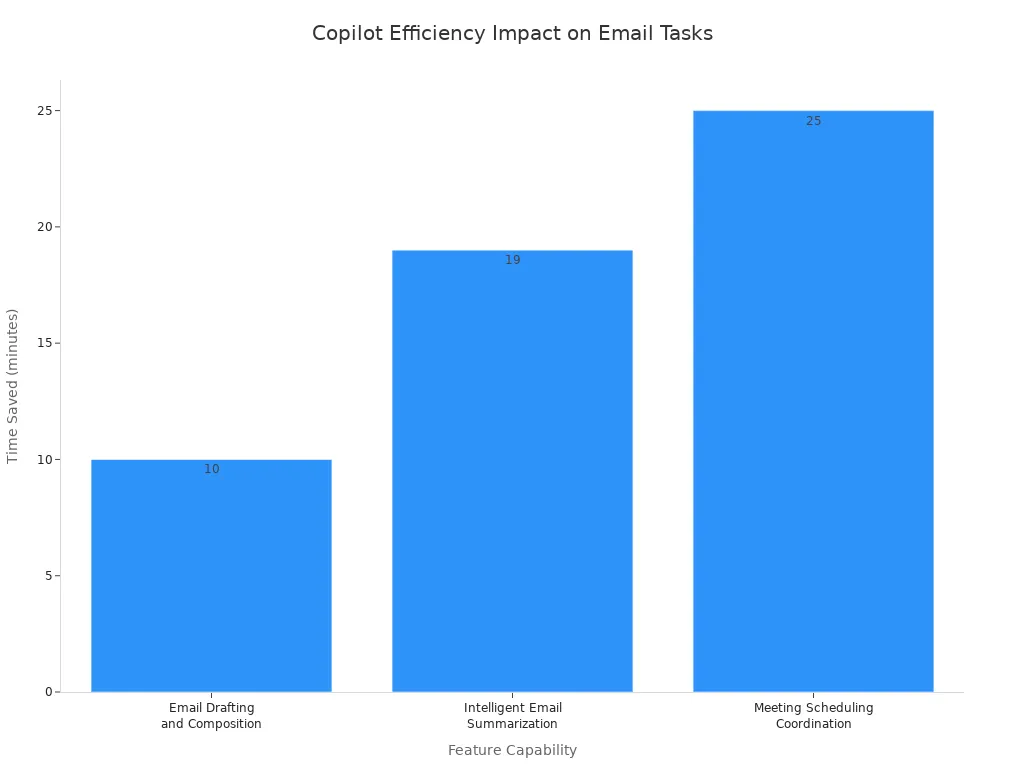
| Email Drafting and Composition | Open a new message, click the Copilot icon, choose 'draft with Copilot', and input details like recipient, goal, tone, and main points. | Cuts composition time from 10–15 minutes down to 2–3 minutes of quick editing. |
| Intelligent Email Summarization | Open an email chain, tap the Copilot icon, and run the summarization action to extract decisions and tasks. | Reduces 15–20 minutes of reading long threads down to under a minute. |
| Tone and Clarity Coaching | Draft the message, launch Copilot coaching to evaluate tone, simplicity, and engagement, then apply suggested tweaks. | Avoids workplace miscommunication and reduces time spent sending clarifying follow-ups. |
| Meeting Scheduling Coordination | Prompt Copilot with your scheduling goal, review suggested times and agendas based on context, and dispatch invites. | Replaces 5–10 back-and-forth emails and 20–30 minutes of calendar checking with a process under 5 minutes. |
| Shared & Delegated Mailbox Management | Gain required permissions, access the shared inbox, and execute standard Copilot prompts (drafting, summarizing, coaching). | Streamlines multi-inbox oversight, minimizes context switching, and prevents missed updates. |
- Copilot assists you by composing automated acknowledgments. It creates request-for-proposal guides. It drafts contextual replies (e.g., agreeing to project timelines).
- It filters and organizes communications. It uses targeted prompts to relocate messages or search for specific topic reports.
- Copilot retrieves @mentions across Microsoft Teams and Outlook. It isolates pending action items from unread messages. It configures Out-of-Office notifications.
- It polishes existing drafts. It aligns them with professional standards. It simplifies language for broader audiences.
Teams: Enhanced Meeting Summaries & Collaboration
Copilot upgrades your meeting experience in Microsoft Teams. It streamlines collaboration.
- Copilot automatically produces comprehensive post-meeting overviews. It captures key conclusions and assigned tasks directly in Teams or Microsoft Loop.
- It delivers real-time meeting summaries. It provides live context and time-tracking features during active sessions.
- Copilot facilitates the creation of post-meeting audio synopses and formatted Word documentation.
- It helps you refine and rewrite chat messages within Teams channels.
- Copilot can process and summarize calls without forcing active transcriptions or recordings.
Contextual Understanding: Copilot's Work Environment
Copilot understands your work environment. It leverages your organizational data. It understands your intent. This makes its assistance highly relevant.
Leveraging Organizational Data & Files
Copilot actively parses information from distinct files. These files are stored within your M365 environment (such as OneDrive or SharePoint). This enables it to locate targeted figures. For example, it can find total sales from a specific quarterly report. It summarizes those insights directly within your chat.
- Microsoft Graph Indexing functions as the foundation. It compiles and fetches data across your enterprise landscape. This includes files, messages, and documentation.
- Dual-Index Semantic Search evaluates your user intent. It uses both an enterprise-wide index for shared assets. It also uses an individualized index tracking your recent actions (e.g., meeting logs, file edits).
- LLM Synthesis translates and formats raw context. It retrieves this from search layers. It presents it in clear, natural language responses.
| Metadata Category | Role in Contextual Understanding |
|---|---|
| Sharing Permissions | Limits summaries and recommendations strictly to accessible content. |
| Timestamps | Determines document recency and current relevance. |
| File Relationships | Maps structural hierarchies and collaborative workflows. |
| Version History | Tracks modifications over time for auditability. |
| Embedded Links | Connects references across multiple documents to deepen context. |
Understanding User Intent & Preferences
Copilot learns your preferences. It adapts to your unique tone and style. You can set Outlook writing preferences. You can use Brand Kits. You can create custom meeting templates. Copilot also has persistent memory. This means it remembers your past interactions. It uses this memory to provide more personalized assistance. This deep personalization is key to Mastering Microsoft Copilot. It also uses agents and emerging skill frameworks. These help it handle complex, multi-step tasks.
Microsoft Graph's Role in Context
Microsoft Graph is the essential API architecture. It connects distinct Microsoft 365 services. These include Teams, Exchange, SharePoint, and Outlook. It forms a cohesive data layer. It provides a single access point to real-time enterprise information. This includes emails, calendar events, documents, and user interactions. It equips Copilot with the necessary live organizational context. Through semantic indexing, it grounds Copilot's responses, summaries, and actions. It bases them directly in your company's unique operational data. It does not rely on generic model outputs.
Mastering Microsoft Copilot: Jess Stratton's Prompt Strategies
You want to get the most from Microsoft Copilot. This means you move beyond simple questions. Jess Stratton, an expert, shows you how to craft powerful prompts. You learn to guide Copilot for precise results.
Crafting Effective Multi-Part Prompts
Complex tasks need smart prompts. You can break down your requests. This helps Copilot understand exactly what you need.
Deconstructing Complex Tasks
Think of a big project. You would not do it all at once. You break it into smaller steps. Do the same for Copilot. Divide your complex task into clear, manageable parts. For example, instead of asking for "a marketing plan," ask for "target audience analysis," then "key messaging," then "channel strategy." This step-by-step approach helps Copilot deliver better results.
Incorporating Specific Requirements
Copilot works best with details. You must tell it exactly what you want. Include specific requirements in your prompts. Do you need a certain word count? A particular format? A specific tone? Add these details. For instance, instead of "write an email," try "write a concise email, under 100 words, to a client about a project delay, using a reassuring tone."
Multi-Stage Prompt Construction Examples
You can build prompts in stages. This guides Copilot through a process.
- Stage 1: Define the Goal. Tell Copilot the main objective.
- Example: "I need a summary of our Q3 sales report."
- Stage 2: Add Context. Provide necessary background information.
- Example: "Focus on the performance of the new product line and key challenges."
- Stage 3: Specify Output. Describe how you want the information presented.
- Example: "Present the summary as three bullet points, each with a key takeaway and a supporting metric."
This multi-stage approach helps you achieve precise outcomes.
Leveraging Follow-Up Prompts for Refinement
Copilot often gives a good first draft. You can make it great with follow-up prompts. This is an iterative process. You guide the AI to improve its output.
Guiding Iterative AI Development
Think of Copilot as a team member. You give feedback on their work. You ask for revisions. Start with straightforward directives. Ask Copilot to refine the text further. You can also ask it to increase formality. Then, progressively add more constraints. This shapes the output until it meets your exact standard. You are in control of the development.
Techniques for Clarification & Correction
You can use specific techniques to refine Copilot's output. Sometimes, you need to ask Copilot to critique its own work.
Prompt Copilot to act as a prompt engineer to refine your inputs: "Act like a prompt engineer and write a better prompt to help me to achieve [goal]."
This meta-prompting helps you create even stronger initial requests. You can also use targeted questions to improve clarity and correctness.
| Prompt Strategy | Sample Follow-up Prompt | Purpose |
|---|---|---|
| Self-Critique | "What are 5 ways this could be wrong, incomplete, or misleading?" | Uncover output flaws and blind spots |
| Missing Information | "What information do you need to be confident in this?" | Determine necessary additional context |
| Force Structure | "Put this into a table with columns: claim, evidence, confidence, and what to verify." | Organize narrative output into structured analytical formats |
| Sensitivity Scan | "Flag anything that might be confidential, policy-sensitive, or risky to share externally." | Check for security and compliance risks |
To refine AI outputs progressively, apply focused follow-up prompts that perform the following adjustments:
- Modify the output tone to align with professional or client standards.
- Simplify text containing overly technical or complex jargon.
- Rearrange content sections to enhance logical progression and emphasis.
- Expand, reduce, or shift focus on targeted details.
You can also utilize meta-prompting. This directs the AI model to analyze and optimize your instructions through:
- Solicit alternative phrasings for queries.
- Ask for recommendations to increase prompt specificity and actionability.
- Identify missing context, hidden assumptions, or omitted constraints.
Building on Previous AI Outputs
Copilot remembers your conversation. You can build on its previous answers. If Copilot generates a summary, you can then ask, "Now, expand on the third point in that summary." This saves you time. You do not need to repeat information. You create a continuous flow of work.
Guiding Copilot to Specific Outcomes
You want Copilot to produce content that fits your exact needs. You can guide it to specific outcomes. This includes tone, format, and audience.
Specifying Tone and Style Parameters
You control how Copilot writes. You can set the tone and style.
- Set the primary role and task context. For example, specify an expert technical writer role.
- Mandate adherence to organizational voice and style guides. For instance, tell it to use Microsoft's tone and style.
- Outline quality criteria. Include clarity, logical structure, accessibility, and consistency.
- Define strict formatting and usage rules. Use provided reference files for this.
You can also use specialized agents within Copilot.
| Agent Type | Parameters Specified | Application Example |
|---|---|---|
| Document Summary Agent | Tone, audience, purpose, length, and focus areas | Customizes summaries to align with internal organizational standards and key metrics. |
| Style Editing Agent | Brand voice, writing standards, plain-language rules | Rewrites drafts like product emails or support macros to ensure regional consistency and brand alignment. |
Users can leverage specialized agents like the Writing Coach by using targeted prompts such as: "Review this LinkedIn post and make it more engaging without changing the meaning." to directly refine output tone.
Defining Output Format and Structure
Tell Copilot how to present the information. Do you need a bulleted list? A table? A paragraph? Specify the structure. For example, "Summarize this article in three bullet points" or "Create a table comparing features A and B." This ensures you get usable output immediately.
Tailoring Content for Diverse Audiences
Your audience matters. You need to adjust content for different groups. Copilot can help you tailor content.
- Automated Integration: Allow tools like Breeze Copilot to pull insights directly from connected platforms. This includes CRM records and existing published articles. It captures the brand's baseline style.
- Manual Guidelines: Supply specific voice documentation and clear brand parameters. This guides the AI's output tone.
- Authentic Demonstrations: Feed the system real-world writing samples and explicit examples. This enhances tone precision.
- Platform & Persona Adjustments: Shift the tone to align with specific target demographic preferences and the chosen publishing medium.
Incorporating Brand Voice Guidelines
Your brand has a unique voice. You want Copilot to match it. Provide Copilot with your brand guidelines. You can upload style guides or give examples of your brand's writing. This helps Copilot produce content that sounds like your company. This consistency is key for professional communication. Mastering Microsoft Copilot involves teaching it your brand's identity.
Real-World Copilot Productivity Scenarios

You can use Copilot to boost your daily work. It helps you with many tasks. You will see how Copilot makes your work easier.
Automating Document Creation & Summarization
Copilot helps you create and summarize documents. It saves you time.
Generating Comprehensive Reports
You can generate recurring business reports with Copilot. It works with Microsoft 365 Copilot and Power Automate. You verify the data and the final message. Copilot reduces the time to produce reports. It also cuts down revision cycles.
Condensing Lengthy Documents
Copilot summarizes files and internal knowledge. You cross-reference critical decisions with original sources. This reduces your search time. It also decreases repeated questions.
Drafting Policy & Proposal Documents
You can draft sales notes and follow-up communications. Copilot works with Power Automate and CRM Integrations. You review commercial details and client-facing text. This speeds up follow-ups. It improves CRM data quality. It also reduces sales admin time.
| Practical Use Case / Example | Primary & Supporting Tools | Human Responsibilities | Key Performance Metrics |
|---|---|---|---|
| Generating Recurring Business Reports | Microsoft 365 Copilot, Power Automate | Verify underlying data, final analysis, and executive message | Time to produce reports, revision cycles, stakeholder approval |
| Summarizing Files & Internal Knowledge | Microsoft 365 Copilot | Cross-reference critical decisions with original sources | Reduced search time, decrease in repeated questions |
| Drafting Sales Notes & Follow-up Communications | Microsoft 365 Copilot, Power Automate / CRM Integrations | Review commercial details, commitments, and client-facing text | Follow-up speed, CRM data quality, reduced sales admin time |
Streamlining Data Analysis & Presentations
Copilot makes data analysis and presentations simpler. It helps you work faster.
Extracting Excel Data Insights
Copilot optimizes data workflows in Excel. It automates repetitive tasks. It writes formulas. It builds visual charts. It helps you uncover actionable insights directly from spreadsheets.
Creating Dynamic PowerPoint Decks
You can structure content directly into slides using voice commands. Copilot uses the Narrative Builder tool. It offers 43 recommended master layout templates. It pulls material from web data or documents. This includes Word files and PDFs. It builds initial slide layouts for you.
Automating Chart & Graph Generation
Copilot helps you visualize data. It generates automated reports and real-time dashboards. This streamlines multi-source datasets. It runs what-if simulations. It evaluates strategy impacts. It forecasts business trends in Excel. It distills analytical findings into narrative summaries. This helps with stakeholder review in Word and Teams.
| Functionality | Description | Associated Tools |
|---|---|---|
| Data Visualization & Reporting | Generates automated reports and real-time dashboards to streamline multi-source datasets | Power BI, Excel, SharePoint |
| Predictive & Scenario Modeling | Runs what-if simulations, evaluates strategy impacts, and forecasts business trends | Excel |
| Strategic Summarization | Distills analytical findings into understandable narrative summaries for stakeholder review | Word, Teams |
Enhancing Communication & Meeting Management
Copilot improves your communication and meeting management. It helps you before, during, and after meetings.
Preparing Agendas & Briefs
Before meetings, Copilot helps you. It evaluates participant calendars in Outlook. It suggests optimal time slots. It gathers relevant documents and emails. It creates tailored talking points. It answers specific preparation questions. You can automatically create structured meeting agendas in Outlook. Use / prompts or email threads.
Summarizing Meetings & Action Items
During meetings, Copilot provides real-time support. It transcribes discussions live. It identifies unanswered questions. It offers multilingual support. After meetings, it generates concise topic and speaker breakdowns. It creates customizable podcast-style audio recaps. It centralizes meeting insights in Teams. It automatically drafts follow-up emails. It creates action items. It integrates notes directly into CRM platforms like Salesforce.
Drafting Professional Communications
Copilot helps you draft professional communications. It converts messages instantly across Teams and Outlook. It uses native languages. It maintains context accuracy for cross-cultural communication. It extracts action items directly from emails, chats, or meeting transcripts. It distributes them based on roles and workloads.
| Meeting Phase | Copilot Feature | Enhancements & Specific Actions |
|---|---|---|
| Pre-Meeting | AI-Powered Scheduling | Evaluates participant calendars in Outlook to automatically suggest optimal time slots. |
| Pre-Meeting | Contextual Preparation | Gathers relevant documents, emails, and M365 insights into tailored talking points and answers specific preparation questions. |
| Pre-Meeting | Agenda Generation | Automatically creates structured meeting agendas in Outlook via / prompts or email threads. |
| In-Meeting | Real-Time Support | Transcribes discussions live, identifies unanswered questions via the Facilitator agent, and provides multilingual support. |
| Post-Meeting | Recap & Summaries | Generates concise topic/speaker breakdowns, customizable podcast-style audio recaps, and centralized meeting insights in Teams. |
| Post-Meeting | Follow-Up & Action Items | Automatically drafts follow-up emails, creates action items, and integrates notes directly into CRM platforms like Salesforce. |
Jess Stratton's Personalized Copilot Examples
Jess Stratton, a Microsoft MVP and technology coach, shows you how to unlock Copilot's full potential. She provides real-world examples. These examples demonstrate how you can transform your daily tasks. You will see how Copilot moves beyond basic assistance. It becomes a strategic partner.
Case Study: Transforming Word to PowerPoint
You often need to convert detailed reports into presentations. This task can take hours. Jess Stratton demonstrates how Copilot streamlines this process. You simply open your Word document. You then prompt Copilot to "Create a presentation from this document." Copilot analyzes the content. It identifies key sections and headings. It then generates a complete PowerPoint deck. This deck includes slides with titles, bullet points, and even suggested images. You save significant time. You can then focus on refining the presentation. You add your personal touch.
Case Study: Generating Custom Training Scenarios
Training new employees or developing new skills requires tailored content. Jess Stratton uses Copilot to generate custom training scenarios. Imagine you need a scenario for customer service training. You provide Copilot with the learning objectives. You also give it details about the product or service. Copilot drafts realistic dialogues. It creates problem-solving exercises. It even suggests role-playing prompts. This capability allows you to quickly develop engaging and relevant training materials. You ensure your team is well-prepared.
Case Study: Analyzing Complex Financial Data
Financial analysis often involves large datasets. You need to extract insights quickly. Jess Stratton shows how Copilot assists with complex financial data. You can ask Copilot in Excel to "Summarize the quarterly revenue trends." You can also ask it to "Identify the top 5 performing products." Copilot processes the data. It generates summaries. It creates charts. It even explains complex formulas. This helps you understand financial performance faster. You make informed decisions with greater confidence. You turn raw data into actionable intelligence.
Copilot Adoption: Challenges & Best Practices
You want to successfully bring Microsoft Copilot into your organization. This means you must understand common challenges. You also need to know best practices for integration, ethical use, and team training.
Addressing Common Pitfalls & Limitations
You might encounter some issues when adopting Copilot. Knowing these helps you prepare.
Managing AI Expectation Realities
You must set realistic expectations for AI tools. Think of AI as an enabler. It helps automate repetitive tasks. It does not fully replace human thought. Organizations sometimes buy a few licenses to test. They then see low usage. This makes them unsure about the return on investment (ROI). You can fix this. Talk to current license holders. Analyze their daily work. Evaluate user satisfaction. Host Q&A sessions. Use small pilot findings to plan your adoption. Define your ROI metrics before buying more licenses.
Handling Inaccurate AI Outputs
Sometimes, Copilot might give you incorrect information. This is called a "hallucination." You must always check AI-generated outputs. This filters out mistakes before you use the information. You can also tell Copilot to only use specific source data. Ask it to tell you if information is missing. This helps reduce wrong outputs. Treat Copilot's answers as suggestions, not final decisions.
Strategies for Prompt Troubleshooting
You can improve Copilot's accuracy with better prompts. Give Copilot clear instructions. Provide specific background information. Set clear goals. This helps avoid general or misleading answers. Your team can also create shared practices. Use validated prompt templates. Always review outputs carefully.
| Pitfall / Limitation | Impact / Concern | Recommended Solution |
|---|---|---|
| Compliance & Legal Risks | Violating rules like GDPR or HIPAA leads to fines and lost trust. | Align setup with rules, update data governance, and ask legal for advice. |
| Technical & Integration Obstacles | Old software or bad IT infrastructure stops deployment. | Check IT before deployment. Train IT staff on integration. |
| Governance & Security | Wrong permissions risk data leaks. | Set strong governance rules. Set M365 security permissions correctly. |
| Inaccurate Outputs (Hallucinations) | False information causes bad business decisions. | Clean data regularly. Always have a human check critical outputs. |
| Over-dependence on AI | Skills get worse when you let AI do all the thinking. | Use AI as a support tool. Hold workshops to stress human critical thinking. |
| Skill Gap & Learning Curve | Users do not know how to use AI effectively. | Provide hands-on training on prompt engineering. Offer guides and safe practice areas. |
Integrating Copilot into Workflows
You need to integrate Copilot smoothly into your daily work. This makes it truly useful.
Identifying High-Impact Use Cases
Focus your initial Copilot use where it helps most. Target roles that create a lot of content. Look for roles that do complex data analysis. Consider roles that need a lot of team coordination. Finance analysts, operations managers, legal counsel, sales teams, and HR partners are good examples. These roles often see the biggest benefits.
Gradual Rollout & Phased Adoption
Do not try to implement Copilot everywhere at once. Start small. Allocate licenses to positions where they will have the greatest effect. Teach users about how Copilot helps their everyday tasks. Do not just talk about high-level features. Embed Copilot into regular work routines. Measure success by looking at productivity and business results. Do not just track login activity.
Customizing Copilot for Team Needs
You can tailor Copilot to fit your team. This makes it more effective. You can create specific prompt galleries for different departments. These galleries can include company acronyms and local workflows. This helps HR, Finance, Legal, Sales, and Operations teams. Customization helps your team adopt Copilot faster.
Ethical AI & Data Privacy Considerations
You must use AI responsibly. This includes thinking about ethics and data privacy.
Understanding Data Handling & Security
Microsoft takes data security seriously. It encrypts all your data. This happens when data is stored and when it moves across networks. Microsoft does not use your inputs or documents to train its core AI models. It follows many security and privacy standards. These include GDPR, HIPAA, and ISO 27001.
| Security Pillar | Mechanism & Policy |
|---|---|
| Data Residency & Boundary | Keeps prompts and responses inside the Microsoft cloud. Your data does not go to outside models. |
| Identity & Access Control (IAM) | Enforces user permissions. Copilot cannot access files you do not have rights to see. It works with Microsoft Purview sensitivity labels. |
| Data Retention | Prevents data leaks. Copilot inputs and outputs are deleted after a session. They are never kept for model training. |
| Data Governance | Copilot activities follow Microsoft Purview features. This includes eDiscovery, audit logging, and retention policies. |
Ensuring Responsible AI Usage
You need to ensure Copilot is used responsibly. This means thinking about fairness and transparency. You must work to prevent bias in AI outputs. Promote inclusiveness. Keep the system reliable and safe. Follow all legal and regulatory rules.
Maintaining Human Oversight & Verification
Always keep a human in charge. You must oversee Copilot's work. This means checking its outputs for truthfulness and accuracy. Do not rely solely on AI. Human judgment is always important. This helps you make ethical decisions.
Training & Upskilling Your Team
You need to prepare your team for Microsoft Copilot. This involves training and upskilling. You ensure everyone can use Copilot effectively. This maximizes its benefits.
Developing Internal Copilot Champions
You can identify key individuals within your organization. These people become "Copilot Champions." They are power users. They advocate for Copilot. They assist their peers. You cultivate these specialized users across various departments. They help others learn the tool. They also share best practices. This creates a network of support. You also secure executive champions. They provide visible support. This encourages continuous skill adoption.
Creating Best Practice Guides
You need clear resources for your team. You can create best practice guides. These guides offer foundational to advanced learning. They help your team understand Copilot. You can also provide on-demand micro-learning modules. These are brief and accessible. They facilitate continuous learning. Formal training programs also help. For example, Microsoft MS-4004/MS-4018 courses specifically focus on Copilot capabilities. They teach prompt engineering techniques. You can integrate hands-on labs and simulations. These mirror actual tools. They tie learning directly to daily work tasks.
| Strategy Area | Action Item | Intended Outcome |
|---|---|---|
| Skill Assessment | Conduct organization-wide capability evaluations | Identify knowledge gaps and target high-impact roles |
| Program Structure | Create tiered learning paths and dedicated study time | Offer foundational to advanced learning during work hours |
| Practical Application | Integrate hands-on labs, simulations, and real-world projects | Mirror actual tools and tie learning directly to daily work tasks |
| Organizational Support | Secure executive champions and offer skill incentives | Drive visible support and encourage continuous skill adoption |
Fostering a Culture of AI Exploration
You want your team to embrace AI. You foster a culture of exploration. You establish open communication channels. This addresses employee concerns about job security or AI risks. You create spaces for transparent dialogue. You emphasize practical benefits. Clearly communicate how Copilot enhances efficiency. Explain how it improves work quality. Show how it builds on existing skill sets. You can implement pilot projects. These offer targeted training. They allow hands-on exploration of Copilot's capabilities. This helps your team discover new ways to work. You encourage continuous learning and adaptation.
Future of Work with Microsoft Copilot
You have mastered Copilot's current features. Now, look ahead. Microsoft Copilot continues to evolve. It will change how you work even more.
Anticipated Updates & New Features
Microsoft constantly improves Copilot. You can expect new features and better performance.
Roadmap for Enhanced AI Capabilities
Copilot's AI capabilities will grow. You will see more intelligent assistance.
| Feature / Upgrade Area | Enhanced AI Capabilities | Platform Integration & Target Availability | Current Rollout Status |
|---|---|---|---|
| Desktop & App Support | Core Copilot AI functionality and image generation models | Windows and Mac apps, expanding beyond iOS, Android, Copilot.com, Edge, and GroupMe | Expected in the coming weeks following staged rollouts |
| Quiz Cards | Interactive active-learning mode generating natural language quizzes across subjects | Live on Copilot.com and Copilot Mobile; pending on Windows/Mac desktop apps | Broadening deployment after evaluating user engagement and accuracy |
| Android Assistant Status | Conversational AI assisting with messaging, timers, alarms, and rideshare booking | Native Android OS integration as the default digital assistant | Currently live on Android home screens globally |
| Enhanced Copilot Vision | Real-time visual 'show me how' guidance and simultaneous dual-app analysis | Windows OS multi-app workspace integration | Available to U.S. Windows Insiders prior to full public release |
| Cross-Platform Deployment | Staged feature deployment strategy driven by user feedback | Unified availability across Microsoft ecosystem platforms | Incremental release schedule for system stability testing |
Expanding Platform Integration
Copilot will integrate more deeply across platforms. You will find it in more places. It will work seamlessly on Windows and Mac apps. It will also expand beyond mobile and web versions. You can use Copilot as your default Android assistant. It helps with messages and alarms. You will also see "Quiz Cards" for interactive learning. These features roll out incrementally.
Evolution of AI Models
The AI models behind Copilot will become smarter. They will understand your needs better. This means more accurate and helpful responses for you.
Long-Term Impact on Productivity
Copilot will significantly impact your productivity over time. It will change how you approach tasks.
Reshaping Job Roles & Responsibilities
Copilot will reshape job roles. It automates routine tasks. This frees you to focus on strategic work. You will spend less time on repetitive duties. You will have more time for creative problem-solving.
Driving Innovation & Efficiency
Copilot drives innovation and efficiency. Organizations like PepsiCo use Copilot daily. They integrate AI into Teams workflows. This eliminates friction between tools. It saves hours each day. A financial service organization saw 93% adoption. They streamline admin tasks. They automate routine workloads. This gives them real-time access to policies.
| Organization Context | Key Adoption Metrics | Efficiency & Innovation Impact | Augmented Workforce Outcome |
|---|---|---|---|
| PepsiCo | 90%–95% daily usage | Integrates AI into daily Teams workflows; eliminates cross-tool friction and saves hours daily. | Frees employee capacity to focus on strategic, higher-impact initiatives. |
| Financial / Service Organization | 93% adoption; 90% weekly usage | Streamlines admin tasks, automates routine workloads, and enables real-time access to policies/context. | Accelerates decision-making, shifting focus toward high-value human connections and client growth. |
The Augmented Workforce Vision
This leads to an augmented workforce. Copilot helps you make faster decisions. It shifts your focus to high-value human connections. You can concentrate on client growth.
Jess Stratton's AI-Assisted Work Vision
Jess Stratton sees a future where AI and humans work closely.
Strategic Human-AI Collaboration
You will collaborate strategically with AI. Copilot becomes a true partner. It helps you achieve more. You guide the AI. The AI supports your efforts.
Preparing for Next-Gen AI Tools
You must prepare for future AI tools. The technology evolves quickly. Stay informed about new features. Understand how they can benefit your work.
Continuous Learning & Adaptation
Continuous learning is key. You must adapt to new AI capabilities. Embrace change. Explore how Copilot can enhance your skills. This ensures you remain productive and competitive.
You now see that Mastering Microsoft Copilot is crucial. It unlocks significant, real productivity gains beyond basic prompts. You learned advanced prompt engineering. You explored deep integration across Microsoft 365 apps. You discovered strategic applications to transform business workflows. Jess Stratton's expert insights show Copilot's transformative potential when you use it effectively. Apply these advanced techniques. Conquer AI overwhelm. Drive unexpected creative inspiration. Reshape your daily work for new levels of efficiency and meaningful business outcomes. The evolving landscape of AI-assisted productivity demands continuous learning.
FAQ
What is Microsoft Copilot?
Microsoft Copilot is an advanced AI assistant. It integrates with Microsoft 365 apps. It helps you with many tasks. It boosts your productivity.
How does Copilot integrate with Microsoft 365?
Copilot works directly inside Word, Excel, PowerPoint, Outlook, and Teams. It uses your existing files and data. This seamless integration helps you stay in your workflow.
Can Copilot handle complex tasks?
Yes, Copilot handles complex tasks. You can use multi-part prompts. You can also use follow-up prompts. This guides Copilot to achieve specific outcomes.
Is my data safe with Copilot?
Microsoft protects your data. It encrypts your data. It does not use your inputs to train its core AI models. Copilot follows strict security and privacy standards.
How can I improve Copilot's answers?
You improve Copilot's answers with clear prompts. Give specific details. Tell Copilot your desired tone and format. This helps Copilot understand your needs better.
What if Copilot gives wrong information?
Copilot might sometimes give incorrect information. You must always verify its outputs. Treat Copilot's answers as suggestions. Human oversight remains important.
Will Copilot replace my job?
Copilot automates routine tasks. It frees you for strategic work. It helps you focus on higher-value activities. Copilot augments your abilities. It does not replace your role.
🚀 Want to be part of m365.fm?
Then stop just listening… and start showing up.
👉 Connect with me on LinkedIn and let’s make something happen:
- 🎙️ Be a podcast guest and share your story
- 🎧 Host your own episode (yes, seriously)
- 💡 Pitch topics the community actually wants to hear
- 🌍 Build your personal brand in the Microsoft 365 space
This isn’t just a podcast — it’s a platform for people who take action.
🔥 Most people wait. The best ones don’t.
👉 Connect with me on LinkedIn and send me a message:
"I want in"
Let’s build something awesome 👊
1
00:00:00,000 --> 00:00:05,600
Welcome to another episode of the MC65FFM podcast.
2
00:00:05,600 --> 00:00:10,920
Today I'm joining my someone who has spent years helping people get a million from technology
3
00:00:10,920 --> 00:00:13,760
instead of just talking about it.
4
00:00:13,760 --> 00:00:20,600
My guest is Jess Chatton, Microsoft MVP, Ted Xt speaker, founder of NORDGILJS LLC, Outro
5
00:00:20,600 --> 00:00:25,920
of the Co-Pilot for Microsoft 365, harness the power of Generation AI and Microsoft
6
00:00:25,920 --> 00:00:32,240
apps, use every day and one of the most recognized Microsoft 365 trainers.
7
00:00:32,240 --> 00:00:37,520
Millions of learners have watched her courses on LinkedIn, learning, organization, rank
8
00:00:37,520 --> 00:00:45,040
and from university to healthcare providers have trusted training and she is focused on
9
00:00:45,040 --> 00:00:47,760
one of the biggest challenges in AI.
10
00:00:47,760 --> 00:00:53,760
How do you make Microsoft co-cilot work for you, not just generate AI content?
11
00:00:53,760 --> 00:01:00,400
Today we are going beyond prompt engineering, talk about personalization, adaption productivity
12
00:01:00,400 --> 00:01:06,000
and why the future belongs to people who know how to collaborate with AI instead of simply
13
00:01:06,000 --> 00:01:07,000
using it.
14
00:01:07,000 --> 00:01:10,000
Jess, welcome to the MC65FM.
15
00:01:10,000 --> 00:01:11,000
Thank you.
16
00:01:11,000 --> 00:01:12,000
Thank you for having me.
17
00:01:12,000 --> 00:01:13,000
Definitely along when didn't draw.
18
00:01:13,000 --> 00:01:14,000
I need to shorten that a bit.
19
00:01:14,000 --> 00:01:15,000
I'm going to work on that.
20
00:01:15,000 --> 00:01:18,640
I'm going to see what co-pilot can come up with for me.
21
00:01:18,640 --> 00:01:19,640
Yeah.
22
00:01:19,640 --> 00:01:26,600
Yeah, I think you are really famous or on LinkedIn, but for the people who didn't know you,
23
00:01:26,600 --> 00:01:32,800
who is Jess and what's your journey through the Microsoft technology?
24
00:01:32,800 --> 00:01:33,800
Yeah.
25
00:01:33,800 --> 00:01:41,400
So, I was a senior staff instructor with LinkedIn learning and that just opened up doors to
26
00:01:41,400 --> 00:01:42,400
me.
27
00:01:42,400 --> 00:01:49,520
I started doing courses in PowerPoint and all the Microsoft 365 suite and just because LinkedIn
28
00:01:49,520 --> 00:01:56,080
learning is so integrated with companies, everybody is on it, we are in with LinkedIn, we need
29
00:01:56,080 --> 00:01:58,360
to be very current.
30
00:01:58,360 --> 00:02:03,280
So I was so lucky and it gave me all these great opportunities to really force me to learn
31
00:02:03,280 --> 00:02:08,200
everything new and make sure I could keep up, you know, stay one step ahead of everything.
32
00:02:08,200 --> 00:02:10,240
And that's been a journey.
33
00:02:10,240 --> 00:02:14,400
So when co-pilot came out, you know, we were trying to learn it really quickly.
34
00:02:14,400 --> 00:02:20,280
So I've just become good at being agile, right, keeping up with things and getting them,
35
00:02:20,280 --> 00:02:24,960
getting the courses updated and over time it was really hard because we had to learn how
36
00:02:24,960 --> 00:02:30,160
to add new features into these courses where at the same time grow with the changing needs
37
00:02:30,160 --> 00:02:32,320
of people in shorter attention span.
38
00:02:32,320 --> 00:02:37,800
So it's almost like, you know, teach more, but also at the same time make the course shorter.
39
00:02:37,800 --> 00:02:41,960
So we just had to learn how to be really efficient in that.
40
00:02:41,960 --> 00:02:44,160
And it just kind of grew from there.
41
00:02:44,160 --> 00:02:48,640
Now I'm on my own, I'm doing contract courses with LinkedIn learning, I'm trying to create
42
00:02:48,640 --> 00:02:55,240
some more of my own courses and just keep up with co-pilot, which is, you know, as you know,
43
00:02:55,240 --> 00:02:57,240
a full time job in itself.
44
00:02:57,240 --> 00:02:59,080
Yeah, yeah, yeah, yeah.
45
00:02:59,080 --> 00:03:04,440
It's a, I know that's content creator.
46
00:03:04,440 --> 00:03:11,040
I think you are the first guest that's the most MVP's, but you are also the LinkedIn,
47
00:03:11,040 --> 00:03:17,480
how is called LinkedIn learning instructor, how did you become a LinkedIn learning instructor?
48
00:03:17,480 --> 00:03:19,080
So it was actually quite funny.
49
00:03:19,080 --> 00:03:24,800
I was on my own as an independent developer and administrator for Lotus nodes.
50
00:03:24,800 --> 00:03:29,400
So this is like going way back like last century is weird as that sounds.
51
00:03:29,400 --> 00:03:36,040
And I was doing the conference circuit there, speaking at a lot of conferences and just networking.
52
00:03:36,040 --> 00:03:40,120
And this is kind of a testament to how important it really is to just network and meet people,
53
00:03:40,120 --> 00:03:44,200
which is one of the reasons why I'm super excited that I'm an actual Microsoft MVP now.
54
00:03:44,200 --> 00:03:48,640
I get to meet unbelievable people and continue that networking.
55
00:03:48,640 --> 00:03:53,720
But what happened is LinkedIn learning at the time they were called Linda.com.
56
00:03:53,720 --> 00:03:57,120
And they were much smaller than hadn't yet been purchased.
57
00:03:57,120 --> 00:04:03,000
And I was approached by somebody who said, hey, so we're trying to get a customer and we
58
00:04:03,000 --> 00:04:06,760
don't have anything on our courses about Lotus nodes.
59
00:04:06,760 --> 00:04:10,600
And I've talked to certain people at IBM and they say that you're the person to go to.
60
00:04:10,600 --> 00:04:11,600
So it was fantastic.
61
00:04:11,600 --> 00:04:13,400
So I did a course for them.
62
00:04:13,400 --> 00:04:17,640
And at the time, apparently the benchmark for quality was really low because I just handed
63
00:04:17,640 --> 00:04:19,480
everything in on time.
64
00:04:19,480 --> 00:04:22,800
And then they were, I did a course on Outlook and then they were like, hey, well, you work
65
00:04:22,800 --> 00:04:24,400
full time for us.
66
00:04:24,400 --> 00:04:25,400
So it was great.
67
00:04:25,400 --> 00:04:26,400
That was all she wrote.
68
00:04:26,400 --> 00:04:30,600
And then I just started cranking out courses and having a great time and learning all sorts
69
00:04:30,600 --> 00:04:32,600
of new technologies.
70
00:04:32,600 --> 00:04:36,440
Awesome.
71
00:04:36,440 --> 00:04:37,920
So yeah, that's really interesting.
72
00:04:37,920 --> 00:04:42,960
But yeah, how will you say have has teaching changed funds?
73
00:04:42,960 --> 00:04:46,640
Yeah, generative AI there.
74
00:04:46,640 --> 00:04:52,520
It's changed in that we have to kind of more of what I was talking about before.
75
00:04:52,520 --> 00:04:59,880
We have to find ways to teach people in a much shorter amount of time, a lot more information.
76
00:04:59,880 --> 00:05:03,560
And it's also, there's so many different levels, right?
77
00:05:03,560 --> 00:05:08,760
So when it comes to co-pilot and I find this when I teach live in front of webinars or
78
00:05:08,760 --> 00:05:14,520
in person, you know, you could take a group of five people, you could take a group of 200
79
00:05:14,520 --> 00:05:18,720
people and half the people will never have used it before or will just have played around
80
00:05:18,720 --> 00:05:21,960
with a little bit or just don't fully understand what it is.
81
00:05:21,960 --> 00:05:26,920
And the other half are almost experts and just use it daily and can't imagine their lives
82
00:05:26,920 --> 00:05:28,160
without it.
83
00:05:28,160 --> 00:05:33,800
So it's really challenging to try to cater to everybody at every different level because
84
00:05:33,800 --> 00:05:37,240
there's people looking for advanced tips and there's people who are still just looking
85
00:05:37,240 --> 00:05:38,720
how to get started.
86
00:05:38,720 --> 00:05:42,320
And we need to remember that, you know, there's a lot of people that just don't have a lot
87
00:05:42,320 --> 00:05:44,160
of experience with this.
88
00:05:44,160 --> 00:05:53,920
Yeah, I think also couple of these headmasters, so many experienced with this, I think a lot
89
00:05:53,920 --> 00:06:01,800
of companies buy these co-pilot license, but yeah, they're struggle to see business value.
90
00:06:01,800 --> 00:06:05,040
Why does this happen so often?
91
00:06:05,040 --> 00:06:09,360
Because a lot of the training is not just about making sure they know how to use it and this
92
00:06:09,360 --> 00:06:13,160
is something that we've had to pivot a lot when we teach.
93
00:06:13,160 --> 00:06:16,920
Even in one of my LinkedIn learning courses right now, I'm actually recording a course right
94
00:06:16,920 --> 00:06:21,040
now, redoing a course on learning co-pilot.
95
00:06:21,040 --> 00:06:24,600
And it's a beginner course, but we're pivoting how we teach this course.
96
00:06:24,600 --> 00:06:28,280
So it was more of a, here's how to use co-pilot.
97
00:06:28,280 --> 00:06:34,720
Here's how you use it in each of the courses, but now we're changing it to, here's how it
98
00:06:34,720 --> 00:06:35,960
can help you.
99
00:06:35,960 --> 00:06:37,480
And here's what you can do with it.
100
00:06:37,480 --> 00:06:41,360
And here's how you're going to get some real productivity gains with it.
101
00:06:41,360 --> 00:06:44,680
So it's not just a matter of saying like, here's where all the features are and here's
102
00:06:44,680 --> 00:06:45,680
how to use it.
103
00:06:45,680 --> 00:06:47,760
It's why you need to be using it.
104
00:06:47,760 --> 00:06:49,760
How it's going to really help you.
105
00:06:49,760 --> 00:06:54,080
So a lot of times the mission is not the same, right?
106
00:06:54,080 --> 00:06:58,560
Companies need to learn that when they're trying to get people to adopt co-pilot, they have
107
00:06:58,560 --> 00:07:04,120
to teach them how it's really going to help them and why and what kinds of things they
108
00:07:04,120 --> 00:07:06,520
can do with it.
109
00:07:06,520 --> 00:07:13,560
Will you say the biggest obstacle is technology, governance or simply human behavior?
110
00:07:13,560 --> 00:07:16,160
Human behavior, I think.
111
00:07:16,160 --> 00:07:21,120
I don't think it's quite the governance because I think that enough admins that are setting
112
00:07:21,120 --> 00:07:28,440
up co-pilot are pretty clear on what needs to happen and the risks.
113
00:07:28,440 --> 00:07:31,920
And most admins know like, this is a pretty serious thing.
114
00:07:31,920 --> 00:07:34,560
We need to do our due diligence and learn about it.
115
00:07:34,560 --> 00:07:37,760
And Microsoft has a lot of safeguards in place.
116
00:07:37,760 --> 00:07:39,840
You can do your test runs, your pilots.
117
00:07:39,840 --> 00:07:45,840
You can see where you're oversharing information and you need to lock down some confidentiality
118
00:07:45,840 --> 00:07:48,680
and some files.
119
00:07:48,680 --> 00:07:54,240
So I don't think that's what's happening, but I think it's really just this showing your
120
00:07:54,240 --> 00:07:58,200
employees what it can really do for you and how it can really help them.
121
00:07:58,200 --> 00:08:00,920
And I think that's where we all need to start catching up.
122
00:08:00,920 --> 00:08:05,240
So we're definitely learning that we need to start, we need to change how we're teaching
123
00:08:05,240 --> 00:08:06,760
people these things.
124
00:08:06,760 --> 00:08:08,920
And even Microsoft, they're making it easier, right?
125
00:08:08,920 --> 00:08:12,480
As you know, like this, this is changing daily.
126
00:08:12,480 --> 00:08:15,240
It's so it's like a full time job keeping up with the changes.
127
00:08:15,240 --> 00:08:18,160
And one of the new features, it's relatively new.
128
00:08:18,160 --> 00:08:24,800
I think that I'm really excited about is the fact that organizations can now create custom
129
00:08:24,800 --> 00:08:27,280
prompt galleries, right?
130
00:08:27,280 --> 00:08:29,520
And the admin tool, it's right in co-pilot.
131
00:08:29,520 --> 00:08:32,360
You can put in your own suggested prompts now.
132
00:08:32,360 --> 00:08:34,840
You can sort them out by department.
133
00:08:34,840 --> 00:08:39,000
So previously when employees could go to the prompt gallery, right?
134
00:08:39,000 --> 00:08:41,240
That's been there's right since the beginning to help us out.
135
00:08:41,240 --> 00:08:47,120
And you can sort them by department and by task and just to get some inspiration.
136
00:08:47,120 --> 00:08:53,320
But now companies can put in your own prompts specific to your own organization.
137
00:08:53,320 --> 00:08:58,120
And I think that it's going to be a game changer because people have and companies have very
138
00:08:58,120 --> 00:09:00,560
specific workflows, very specific apps.
139
00:09:00,560 --> 00:09:04,720
I mean, they even have their own acronyms and terminologies that they use.
140
00:09:04,720 --> 00:09:08,920
And now all of these things can be put in the actual prompt gallery.
141
00:09:08,920 --> 00:09:14,520
And it's going to give a lot of users that aha moment as to how it can help them.
142
00:09:14,520 --> 00:09:16,920
I think it's trainer you have.
143
00:09:16,920 --> 00:09:20,080
Yeah, you get I think you get a lot of feedback from from users.
144
00:09:20,080 --> 00:09:28,800
So what are the biggest misconceptions people have about Microsoft co-pilot?
145
00:09:28,800 --> 00:09:35,000
The biggest misconceptions are a lot of them tried using it early on.
146
00:09:35,000 --> 00:09:36,000
And it was slow.
147
00:09:36,000 --> 00:09:38,000
It was clunky.
148
00:09:38,000 --> 00:09:39,000
It didn't always work.
149
00:09:39,000 --> 00:09:42,480
It was very limited in its functionality.
150
00:09:42,480 --> 00:09:47,920
And people are still a little bit jaded about that experience.
151
00:09:47,920 --> 00:09:52,560
And so I'm trying to explain to people, you know, even in the past couple of months, it's
152
00:09:52,560 --> 00:09:54,120
just come leaves and bounds.
153
00:09:54,120 --> 00:10:01,000
It's a different co-pilot than it was, you know, especially with the ability to choose models.
154
00:10:01,000 --> 00:10:04,720
So one, a misconception is that it just doesn't do a lot.
155
00:10:04,720 --> 00:10:06,720
And of course, we know that's wrong.
156
00:10:06,720 --> 00:10:11,840
Another misconception is, you know, I should just be able to use it right out of the box and
157
00:10:11,840 --> 00:10:16,200
type of prompt and it's going to like instantly think or snap to everything I wanted to do.
158
00:10:16,200 --> 00:10:17,680
And that's really not how it works.
159
00:10:17,680 --> 00:10:19,320
I'm as you know, right?
160
00:10:19,320 --> 00:10:21,880
You got to really get in there and you got to make it work for you.
161
00:10:21,880 --> 00:10:26,920
You got to, you got to get real good at writing a prompt and getting it lots of context
162
00:10:26,920 --> 00:10:28,240
and telling it what you want.
163
00:10:28,240 --> 00:10:31,920
And you have to get, you have to learn that you're going to get a better result if you
164
00:10:31,920 --> 00:10:34,640
can change the model from that drop down.
165
00:10:34,640 --> 00:10:41,240
So it's almost like you kind of have to be a power user and to get like the really good
166
00:10:41,240 --> 00:10:43,480
benefits from co-pilot.
167
00:10:43,480 --> 00:10:46,080
Awesome.
168
00:10:46,080 --> 00:10:54,480
If you're drawing a company on day one, and yeah, they are co-pilot coach, what will your
169
00:10:54,480 --> 00:10:59,800
first week look like?
170
00:10:59,800 --> 00:11:01,720
As a co-pilot, well, let's see.
171
00:11:01,720 --> 00:11:04,040
So they're already using co-pilot.
172
00:11:04,040 --> 00:11:05,040
That's my question.
173
00:11:05,040 --> 00:11:06,040
Yeah, they're all.
174
00:11:06,040 --> 00:11:11,080
Yeah, I would definitely, I like to get everybody on board.
175
00:11:11,080 --> 00:11:17,480
So my first order of business and even as a trainer, if you're going to do courses and if
176
00:11:17,480 --> 00:11:22,120
you're going to do webinars, I always like to do my intro to co-pilot session.
177
00:11:22,120 --> 00:11:24,480
And I call it the getting excited session.
178
00:11:24,480 --> 00:11:28,760
And even if a company said, hey, we've been using co-pilot for a year, I would say, guess
179
00:11:28,760 --> 00:11:29,760
what?
180
00:11:29,760 --> 00:11:30,800
We're still going to do this.
181
00:11:30,800 --> 00:11:34,040
Is that important?
182
00:11:34,040 --> 00:11:39,120
I like to get everybody on the same page because you can't, the company, I feel like I can't
183
00:11:39,120 --> 00:11:42,320
assume that everybody is on the same level.
184
00:11:42,320 --> 00:11:47,560
I can't assume they all know how to be responsible with their problems.
185
00:11:47,560 --> 00:11:51,320
And even with things like, I'm just sure you know, with enterprise data protection, that
186
00:11:51,320 --> 00:11:53,040
little green shields, right?
187
00:11:53,040 --> 00:11:56,200
We can't assume that everybody knows what that means.
188
00:11:56,200 --> 00:12:02,040
You know, a big, and I'm sure you know, this is a big comment is a lot of companies, people
189
00:12:02,040 --> 00:12:04,920
and businesses are like, well, why can't I use Chanjee PT?
190
00:12:04,920 --> 00:12:05,920
Right?
191
00:12:05,920 --> 00:12:09,360
You're saying I can use co-pilot, but how come I can't use this other AI tool?
192
00:12:09,360 --> 00:12:12,520
And so I like to take them through everything, right?
193
00:12:12,520 --> 00:12:14,880
Here's what introduction to chatting.
194
00:12:14,880 --> 00:12:17,760
Here's why co-pilot secure.
195
00:12:17,760 --> 00:12:22,760
We talk about enterprise data protection and what that gives you.
196
00:12:22,760 --> 00:12:27,400
We talk about responsible AI, right?
197
00:12:27,400 --> 00:12:28,400
How you got it?
198
00:12:28,400 --> 00:12:32,080
You still got a fact check, you know, you can't leave everything up to co-pilot.
199
00:12:32,080 --> 00:12:33,680
Here's how to write a good prompt, right?
200
00:12:33,680 --> 00:12:39,080
Why can't you even assume that people have learned Microsoft's four pillars, you know, goal,
201
00:12:39,080 --> 00:12:42,480
context, source, expectation, all of that?
202
00:12:42,480 --> 00:12:46,160
They're basic to you and me and sometimes I forget, which is not everybody knows those
203
00:12:46,160 --> 00:12:47,160
things.
204
00:12:47,160 --> 00:12:51,600
So I would always, like week one would definitely be like, food camp, you know, we're going
205
00:12:51,600 --> 00:12:56,080
back to basics and make sure everybody is on the same page.
206
00:12:56,080 --> 00:12:58,600
Yeah, you can't do this, doctor.
207
00:12:58,600 --> 00:13:02,520
I'm a little bit nicer, right?
208
00:13:02,520 --> 00:13:03,520
We're going to try to have fun.
209
00:13:03,520 --> 00:13:05,080
It is called the get excited session.
210
00:13:05,080 --> 00:13:07,400
So I want people to actually enjoy using co-pilot.
211
00:13:07,400 --> 00:13:10,000
That's the other call of it.
212
00:13:10,000 --> 00:13:18,520
It's a prompt, how much productivity comes from puns and versus changing the way you actually
213
00:13:18,520 --> 00:13:20,720
work?
214
00:13:20,720 --> 00:13:23,440
Yes, it's crazy.
215
00:13:23,440 --> 00:13:24,440
Yes.
216
00:13:24,440 --> 00:13:28,880
And that's even such a big question because it's not even just prompts anymore, right?
217
00:13:28,880 --> 00:13:31,640
As you know, it's agents and it's skills.
218
00:13:31,640 --> 00:13:40,200
I loved, loved one of your podcasts and your articles about how you're talking about skills
219
00:13:40,200 --> 00:13:46,240
are great because agents are now just kind of wasting computing power.
220
00:13:46,240 --> 00:13:47,240
Like I love that.
221
00:13:47,240 --> 00:13:48,840
You nailed it.
222
00:13:48,840 --> 00:13:53,600
If you guys don't know, it's in one of the previous podcasts that Merco did.
223
00:13:53,600 --> 00:13:54,600
It was great.
224
00:13:54,600 --> 00:13:59,240
And he's saying like skills are going to be the way to go, right?
225
00:13:59,240 --> 00:14:03,680
Because you were, you were talking about how they just, they hold on to, they don't release
226
00:14:03,680 --> 00:14:07,680
every single bit of resource until it knows it neatly.
227
00:14:07,680 --> 00:14:08,680
Yeah.
228
00:14:08,680 --> 00:14:14,640
Yeah, I think that it's because really, really interesting all it's, yeah, it's so fast,
229
00:14:14,640 --> 00:14:15,880
fast growing, I think.
230
00:14:15,880 --> 00:14:21,960
Yeah, it's a little bit hard to do a course because you have, you get every, I think every,
231
00:14:21,960 --> 00:14:22,960
yeah, weak.
232
00:14:22,960 --> 00:14:26,440
We see new announcement from Microsoft.
233
00:14:26,440 --> 00:14:30,760
Yeah, that affects everything, new and now.
234
00:14:30,760 --> 00:14:33,880
And then you have to kind of retrain everybody.
235
00:14:33,880 --> 00:14:38,160
So yeah, and agents are a little bit, they're a little bit tough to teach because they're
236
00:14:38,160 --> 00:14:43,160
so, and I, I feel like skills are going to be easier to teach because, okay, you can
237
00:14:43,160 --> 00:14:44,160
kind of get behind that.
238
00:14:44,160 --> 00:14:45,840
You can say, all right, I understand.
239
00:14:45,840 --> 00:14:47,840
But what this is doing, right?
240
00:14:47,840 --> 00:14:50,120
I'm, I get to just kind of plug in what I want.
241
00:14:50,120 --> 00:14:56,480
Whereas an agent, it's almost like giving somebody a piece of paper and being like, be creative,
242
00:14:56,480 --> 00:14:59,080
you know, people need boundaries and, and what to do.
243
00:14:59,080 --> 00:15:02,880
And agents are kind of, you know, how do I do it?
244
00:15:02,880 --> 00:15:04,360
How do I, how do I create an agent?
245
00:15:04,360 --> 00:15:09,120
Whereas at least with a skill, you can say, all right, I'm in PowerPoint, you know, I know
246
00:15:09,120 --> 00:15:10,640
I can, I can do this thing.
247
00:15:10,640 --> 00:15:14,480
It's kind of, there's some boundaries that I think people need.
248
00:15:14,480 --> 00:15:22,720
Also, yeah, yeah, this is, there are, or what habits do people need to unlearn before
249
00:15:22,720 --> 00:15:24,720
AI can really help them?
250
00:15:24,720 --> 00:15:28,640
Oh, that's a good one.
251
00:15:28,640 --> 00:15:29,920
That's a good one.
252
00:15:29,920 --> 00:15:35,800
I think, and I'm answering this question as me because this was something that I've had
253
00:15:35,800 --> 00:15:37,040
a lot of issues with.
254
00:15:37,040 --> 00:15:43,000
So I'm going to assume that other people have to, especially if you're kind of a power
255
00:15:43,000 --> 00:15:46,840
user and you're really productive and you're really independent.
256
00:15:46,840 --> 00:15:49,320
Sometimes you're just like, well, it's just easier if I do it myself.
257
00:15:49,320 --> 00:15:51,200
The, you know, I know how to do this routine.
258
00:15:51,200 --> 00:15:55,160
I know how to like move things into folders and I know how to create rules in outlet, you
259
00:15:55,160 --> 00:15:56,160
know.
260
00:15:56,160 --> 00:16:02,320
And so I think sometimes it's hard to give up that control and just let an agent do it.
261
00:16:02,320 --> 00:16:07,600
Now, cowork is obviously changing that because cowork can take, you know, it can, it
262
00:16:07,600 --> 00:16:11,840
can create a ballet of things that are going on, obviously.
263
00:16:11,840 --> 00:16:14,080
But everybody is going to get to use cowork.
264
00:16:14,080 --> 00:16:16,360
I'm still not even really teaching it yet.
265
00:16:16,360 --> 00:16:20,960
I'm still kind of doing catching up, teaching everybody, co-pilot.
266
00:16:20,960 --> 00:16:27,920
But at the same time, I think a big thing that everybody has to unlearn is giving up some
267
00:16:27,920 --> 00:16:34,520
of that control to let co-pilot and to trust it and, or to learn how to prompt.
268
00:16:34,520 --> 00:16:40,280
If you're really feeling stressed about it, how to prompt some checks and balances into
269
00:16:40,280 --> 00:16:45,080
the output so that you can learn to trust it.
270
00:16:45,080 --> 00:16:57,840
Do you think we also often, I don't know, we, we, yeah, pressure, old workflows in AI instead
271
00:16:57,840 --> 00:17:01,520
of redesigning work itself?
272
00:17:01,520 --> 00:17:04,800
Yeah, that's interesting.
273
00:17:04,800 --> 00:17:11,040
So here's the thing, I feel like companies have a huge opportunity in which they're getting
274
00:17:11,040 --> 00:17:15,360
to start fresh, right, with this, with this co-pilot thing, right?
275
00:17:15,360 --> 00:17:19,640
And still going back to even my days is a Lotus Notes developer.
276
00:17:19,640 --> 00:17:26,280
And if you, I don't, can't remember if you do developing or not, but so many enterprise
277
00:17:26,280 --> 00:17:31,840
pieces of software just start out with, hey, can you create this quick thing?
278
00:17:31,840 --> 00:17:34,320
We're only going to use it for this one project, right?
279
00:17:34,320 --> 00:17:40,040
And so you put together kind of this hack that's terrible, that's not been designed for,
280
00:17:40,040 --> 00:17:43,640
you know, future expansion or scale or anything.
281
00:17:43,640 --> 00:17:48,000
And that sucker will get used for 10 solid years, right?
282
00:17:48,000 --> 00:17:52,960
Everybody will use it until it's been like sliced and diced and thrashed within an inch
283
00:17:52,960 --> 00:17:53,960
of its life.
284
00:17:53,960 --> 00:17:57,080
Like, this is just kind of the way it goes.
285
00:17:57,080 --> 00:18:02,760
And so hopefully, with co-pilot, I feel like, okay, we've been, this is brand new technology,
286
00:18:02,760 --> 00:18:03,760
right?
287
00:18:03,760 --> 00:18:04,760
Let's start.
288
00:18:04,760 --> 00:18:11,560
So let's learn how to do things right, like create tidy agents, you know, like use that,
289
00:18:11,560 --> 00:18:16,280
use that prompt gallery, like make, make them nice, make them like clean and organized,
290
00:18:16,280 --> 00:18:19,760
like don't, don't do like hack jobs right now.
291
00:18:19,760 --> 00:18:23,600
I feel like we're at a crossroads where it, whereas, okay, we're going to, you know, this
292
00:18:23,600 --> 00:18:28,080
is going to leave some serious, like enterprise clutter if it's not done right.
293
00:18:28,080 --> 00:18:32,040
So I'm hoping that people treated as a fresh start.
294
00:18:32,040 --> 00:18:42,640
Yeah, I think one of the topics, yeah, I think your passionate about is how to make co-pilot
295
00:18:42,640 --> 00:18:47,760
sound at, yeah, yourself instead of sounding like AI.
296
00:18:47,760 --> 00:18:50,200
Why is that so important?
297
00:18:50,200 --> 00:18:55,560
People, it's, I feel like it's especially apparent on LinkedIn.
298
00:18:55,560 --> 00:19:01,400
And I don't, I don't want to sound like I'm obviously not ungrateful about the amount
299
00:19:01,400 --> 00:19:04,480
of posts there because I'm learning a lot, but it is true.
300
00:19:04,480 --> 00:19:07,720
Like let's face it, they're all starting to look the same, right?
301
00:19:07,720 --> 00:19:11,480
Everybody's post kind of looked the same, every infographic looks the same.
302
00:19:11,480 --> 00:19:13,200
And people are starting to get tired of it.
303
00:19:13,200 --> 00:19:16,480
Like you can tell, there's people are starting to resent it.
304
00:19:16,480 --> 00:19:21,680
And when I'm scrolling, I will get those infographics and I will get those posts.
305
00:19:21,680 --> 00:19:27,280
And I will also see posts of people complaining about how much the posts look like everybody
306
00:19:27,280 --> 00:19:29,360
else's posts.
307
00:19:29,360 --> 00:19:33,440
I think there's a lot of tools now in co-pilot to help avoid that, right?
308
00:19:33,440 --> 00:19:39,600
And one of them is obviously good prompt writing and, you know, be clear on how, what you
309
00:19:39,600 --> 00:19:41,800
want and make it yours.
310
00:19:41,800 --> 00:19:44,280
But there's so many ways to avoid this now.
311
00:19:44,280 --> 00:19:47,720
And you can, you can use those methods, for example, and PowerPoint, right?
312
00:19:47,720 --> 00:19:53,920
If you're creating infographics, you're creating a social media post, right?
313
00:19:53,920 --> 00:19:56,160
You can now put brand kits.
314
00:19:56,160 --> 00:20:00,080
You can specify how you want them to look every time.
315
00:20:00,080 --> 00:20:05,320
So if I just say, you know, create an infographic using my brand, boom, it's going to be my colors,
316
00:20:05,320 --> 00:20:08,480
it's going to be my fonts, it's going to be uniquely mine.
317
00:20:08,480 --> 00:20:10,760
You know, and it's so easy to take advantage of that.
318
00:20:10,760 --> 00:20:12,920
You can do it right in the create tool, actually.
319
00:20:12,920 --> 00:20:16,440
That's where you can create a brand kit for yourself.
320
00:20:16,440 --> 00:20:20,480
And you can also do it in PowerPoint with templates, of course.
321
00:20:20,480 --> 00:20:21,480
So there's that.
322
00:20:21,480 --> 00:20:29,560
But in just about every app now, for example, Excel, you can go into the settings and you
323
00:20:29,560 --> 00:20:34,240
can specify how you like things to be outputted, right?
324
00:20:34,240 --> 00:20:37,720
So you can make it sound like you and you can do that in co-pilot.
325
00:20:37,720 --> 00:20:40,760
And even in, in Outlook now, you can do that.
326
00:20:40,760 --> 00:20:43,560
You can tell what your voice is going to be in those settings.
327
00:20:43,560 --> 00:20:50,120
So something that I like to do is a fun exercise that I like to do with people.
328
00:20:50,120 --> 00:20:53,880
And I actually did it in one of my LinkedIn learning courses.
329
00:20:53,880 --> 00:20:54,880
I illustrated this.
330
00:20:54,880 --> 00:21:02,120
I'm trying to find a prompt, but it involves just going to a co-pilot prompt and saying,
331
00:21:02,120 --> 00:21:08,640
look through the last two weeks, ten weeks, whatever of my send messages and Outlook and create
332
00:21:08,640 --> 00:21:12,280
customer instructions for me based on my voice.
333
00:21:12,280 --> 00:21:17,480
And it's actually really funny because, you know, I am not the mode, I love writing.
334
00:21:17,480 --> 00:21:23,200
I don't use co-pilot a lot to help with writing, but I am sometimes not the most professional
335
00:21:23,200 --> 00:21:24,200
writer.
336
00:21:24,200 --> 00:21:28,480
Like I may put in like a few extra exclamation marks that I don't need.
337
00:21:28,480 --> 00:21:29,480
And it's very funny.
338
00:21:29,480 --> 00:21:34,800
It's almost like a little character study when Outlook comes back and tells you about yourself
339
00:21:34,800 --> 00:21:36,240
to create these rules.
340
00:21:36,240 --> 00:21:39,800
Like for me, it was, you know, exclamation marks are, oh, pay.
341
00:21:39,800 --> 00:21:41,760
You know, you need a friendly tone.
342
00:21:41,760 --> 00:21:45,760
And it says, I'm citing this example where you said, yay.
343
00:21:45,760 --> 00:21:48,040
It's really funny.
344
00:21:48,040 --> 00:21:53,240
Like it's definitely a character study in yourself, but I tested it and I asked it to send
345
00:21:53,240 --> 00:21:57,720
out an email and sure enough, like the change was instant.
346
00:21:57,720 --> 00:22:01,440
Like this email sounded like me, you know, so that the tools were there.
347
00:22:01,440 --> 00:22:02,440
You use them.
348
00:22:02,440 --> 00:22:04,160
I'm trying to tell everybody.
349
00:22:04,160 --> 00:22:15,160
I think if Excel sounds like me, it's have to done five times the view look up wrong.
350
00:22:15,160 --> 00:22:20,360
But that is me.
351
00:22:20,360 --> 00:22:30,280
What did you think what mistakes prevent copilot from, yeah, producing personal results?
352
00:22:30,280 --> 00:22:34,280
What mistakes, like what mistakes do we make when we prompt or what mistakes does copilot
353
00:22:34,280 --> 00:22:36,280
make?
354
00:22:36,280 --> 00:22:38,760
What, what we do.
355
00:22:38,760 --> 00:22:43,200
I think that we don't, we're not clear enough about what we want.
356
00:22:43,200 --> 00:22:48,800
So like sometimes it's, well, think about it and we'll say, hey, I want copilot to do this.
357
00:22:48,800 --> 00:22:54,040
I want it to like, I'll put this report for me, this executive summary for me.
358
00:22:54,040 --> 00:22:56,760
And then we get mad when it doesn't look right.
359
00:22:56,760 --> 00:23:03,320
And well, we didn't tell it, you know, you can expectations, I see expectations part of
360
00:23:03,320 --> 00:23:05,840
that or pillar framework, right?
361
00:23:05,840 --> 00:23:06,840
There's a goal.
362
00:23:06,840 --> 00:23:08,840
And that's what everybody starts with, right?
363
00:23:08,840 --> 00:23:11,520
Right mean executive summary.
364
00:23:11,520 --> 00:23:12,800
And you can give it context.
365
00:23:12,800 --> 00:23:18,840
You can say like, I, I need to be able to read this fast because I have a meeting coming up.
366
00:23:18,840 --> 00:23:23,320
All of that helps copilot, but what we forget most often is the expectations.
367
00:23:23,320 --> 00:23:24,320
Right.
368
00:23:24,320 --> 00:23:26,160
How do we want it to come out?
369
00:23:26,160 --> 00:23:28,680
Do you want it really rebose?
370
00:23:28,680 --> 00:23:29,680
Do you want it long?
371
00:23:29,680 --> 00:23:32,600
Do you want it professional?
372
00:23:32,600 --> 00:23:34,160
Do you want to implement points?
373
00:23:34,160 --> 00:23:36,280
And it's hard to tell people.
374
00:23:36,280 --> 00:23:42,520
And this is again, part of that, you know, be creative on a blank piece of paper issue.
375
00:23:42,520 --> 00:23:45,520
It's hard to tell people like, well, you can, you can do whatever you want.
376
00:23:45,520 --> 00:23:47,440
You just need to ask for it, right?
377
00:23:47,440 --> 00:23:53,680
So some people might forget like, oh, I can say like, I actually just want three sentences
378
00:23:53,680 --> 00:23:58,840
or this is for, this is for a dialogue box on the web and you have them, you know,
379
00:23:58,840 --> 00:24:00,280
I've got 500 characters.
380
00:24:00,280 --> 00:24:06,080
So, so tell me, do all of this and keep it within, you know, 500 characters.
381
00:24:06,080 --> 00:24:11,760
All of those rules and boundaries, that's really helpful and you can, you can write all of
382
00:24:11,760 --> 00:24:12,760
that.
383
00:24:12,760 --> 00:24:17,440
So it's just, we have to be good at actually identifying what we really want before we
384
00:24:17,440 --> 00:24:18,440
do things.
385
00:24:18,440 --> 00:24:24,280
So it's almost like, you can take some of that extra time and just think about how it would
386
00:24:24,280 --> 00:24:26,600
most help you to get the result.
387
00:24:26,600 --> 00:24:27,840
It's not just about doing it.
388
00:24:27,840 --> 00:24:31,280
It's about, obviously, this is about making things easier for you.
389
00:24:31,280 --> 00:24:35,720
And it's not easier for you if you have to sit there for hours and refine it.
390
00:24:35,720 --> 00:24:41,400
But if you just asked for it the first time that way, what exactly what you need, you know,
391
00:24:41,400 --> 00:24:47,920
it's astounding how specific you can get the instructions of what you're looking for.
392
00:24:47,920 --> 00:24:48,920
Awesome.
393
00:24:48,920 --> 00:24:49,920
Yeah.
394
00:24:49,920 --> 00:24:58,040
I think, I think a little bit about personalization.
395
00:24:58,040 --> 00:25:11,160
How many contexts need co-pilot yet to become dramatically better in answering?
396
00:25:11,160 --> 00:25:17,760
That depends on, so I used to teach, all right, it's as many as, it's whatever will get you
397
00:25:17,760 --> 00:25:19,000
what you're looking for, right?
398
00:25:19,000 --> 00:25:26,120
But now there's, it's a little more nuance than that because you can add lots of contexts.
399
00:25:26,120 --> 00:25:31,080
I'm trying to remember how many, what is it like 8,000 characters, some like, you can make
400
00:25:31,080 --> 00:25:35,960
these prompts crazy and you can go on YouTube and you can see some people prompting and their
401
00:25:35,960 --> 00:25:42,200
prompts are met like they're using up that whole thing.
402
00:25:42,200 --> 00:25:45,720
And some prompts are really short and I feel like there's a happy medium right there in
403
00:25:45,720 --> 00:25:51,920
the middle, but it's also important that while you're giving this prompt that, and I, we
404
00:25:51,920 --> 00:25:57,080
talked about this earlier that it's also important that you're changing the model to suit whatever
405
00:25:57,080 --> 00:25:59,000
task you're asking for.
406
00:25:59,000 --> 00:26:02,600
And that's really going to affect what you get as a result.
407
00:26:02,600 --> 00:26:03,760
Like it really is.
408
00:26:03,760 --> 00:26:07,320
So it's almost like everybody kind of has to be a power user in order to make this work
409
00:26:07,320 --> 00:26:08,840
really well.
410
00:26:08,840 --> 00:26:12,360
What I like to tell people if you really want to know what they're doing for you, you know,
411
00:26:12,360 --> 00:26:17,680
put in your prompt, keep it on auto and then clear the chat, change the model and run
412
00:26:17,680 --> 00:26:21,760
the same prompt and just watch how vastly different it is.
413
00:26:21,760 --> 00:26:24,880
And sometimes it takes longer, right, but it depends.
414
00:26:24,880 --> 00:26:30,160
So what, with, to answer your question, some of those nuances are, you know, how much time
415
00:26:30,160 --> 00:26:32,480
do you have to wait for the response?
416
00:26:32,480 --> 00:26:37,160
How important is it that this information is factually correct?
417
00:26:37,160 --> 00:26:41,000
Obviously, you know, what's on the line here?
418
00:26:41,000 --> 00:26:45,920
And all of that depends on what kind of prompt you should be in what model you should choose.
419
00:26:45,920 --> 00:26:46,920
Yeah.
420
00:26:46,920 --> 00:26:58,600
Is there also information I never showed, yeah, or never become a part of the personalization?
421
00:26:58,600 --> 00:27:05,440
So personalization is in just about every aspect of co-pilot now.
422
00:27:05,440 --> 00:27:09,840
And you can access them from that settings tool.
423
00:27:09,840 --> 00:27:12,160
But you should also check it in everything.
424
00:27:12,160 --> 00:27:13,800
And it's in word, right?
425
00:27:13,800 --> 00:27:18,680
There's little places that you can customize everything that you do and it's all over the
426
00:27:18,680 --> 00:27:19,680
place.
427
00:27:19,680 --> 00:27:26,680
For example, even in teens, something that's huge is for every meeting you go into, you can
428
00:27:26,680 --> 00:27:29,080
customize those meeting minutes.
429
00:27:29,080 --> 00:27:34,160
So if you have a specific meeting and you want your output, you want your meeting minutes
430
00:27:34,160 --> 00:27:38,680
and your action items like in a certain way every time, you can customize that.
431
00:27:38,680 --> 00:27:43,760
And not only that, you can have multiple pieces of customization per meeting.
432
00:27:43,760 --> 00:27:47,720
So like if you just want a quick summary for your teen that's super informal with action
433
00:27:47,720 --> 00:27:50,960
items, you know, you can it'll set it out and you can save it.
434
00:27:50,960 --> 00:27:53,840
And so every week after that meeting, there it is.
435
00:27:53,840 --> 00:27:58,440
But at the same time, if you're also giving those leadership and management, you can have
436
00:27:58,440 --> 00:28:02,520
a much more formal one, like right next to it that you can just copy and paste and send
437
00:28:02,520 --> 00:28:04,080
in to an email.
438
00:28:04,080 --> 00:28:10,320
So these little places where you can customize everything, you know, they're kind of everywhere.
439
00:28:10,320 --> 00:28:16,960
And of course, the co-pilot memory, you know, you can, that's something else that you can't
440
00:28:16,960 --> 00:28:19,720
easily see and it's hard to remember that it's there.
441
00:28:19,720 --> 00:28:23,960
But if you're constantly adding the same context over and over again, right, we can just go
442
00:28:23,960 --> 00:28:28,640
into a co-pilot chat and say, remember that I am this, right?
443
00:28:28,640 --> 00:28:34,920
Remember that I like, you know, I like bull face headings or remember that I am a computer
444
00:28:34,920 --> 00:28:37,920
trainer, things like that.
445
00:28:37,920 --> 00:28:46,240
What did you think about personal prompt libraries and how can you build this, yeah, in a useful
446
00:28:46,240 --> 00:28:47,840
way?
447
00:28:47,840 --> 00:28:48,840
I love it.
448
00:28:48,840 --> 00:28:55,040
So what I like to do is find, and this comes down to kind of an adoption, an adoption
449
00:28:55,040 --> 00:28:56,040
technique, right?
450
00:28:56,040 --> 00:28:58,600
These managers, you know who your champions are.
451
00:28:58,600 --> 00:29:02,520
And I just watched a great LinkedIn live event.
452
00:29:02,520 --> 00:29:06,920
And I'm going to go look up the names of them because they were fantastic.
453
00:29:06,920 --> 00:29:14,440
And one of the key takeaways for me that I remember is she was saying that adoption and finding
454
00:29:14,440 --> 00:29:18,240
champions is not the smartest person.
455
00:29:18,240 --> 00:29:20,280
It's not the person that knows everything about co-pilot.
456
00:29:20,280 --> 00:29:23,960
It's the person that's the most excited to share it with others, right?
457
00:29:23,960 --> 00:29:27,960
So in every department, you're going to want to find those people.
458
00:29:27,960 --> 00:29:32,360
There's a perfect marriage of people that use co-pilot and that love sharing it.
459
00:29:32,360 --> 00:29:35,200
And I do find that there is that in every organization.
460
00:29:35,200 --> 00:29:39,800
There's always that one person that just really gets it and figures out how to help it.
461
00:29:39,800 --> 00:29:42,440
You know, they've created an amazing agent already.
462
00:29:42,440 --> 00:29:45,000
They're kind of off to the races.
463
00:29:45,000 --> 00:29:50,720
And there's somebody that doesn't really know how to use it that well in their department.
464
00:29:50,720 --> 00:29:52,640
And so that's where the big trick is, right?
465
00:29:52,640 --> 00:29:56,640
You got to take these people that are doing very similar job functions and you got to put
466
00:29:56,640 --> 00:29:57,640
them in the same room.
467
00:29:57,640 --> 00:30:04,760
And that's where the magic happens because they'll talk to each other about it.
468
00:30:04,760 --> 00:30:07,680
That's interesting.
469
00:30:07,680 --> 00:30:10,320
I think a little bit.
470
00:30:10,320 --> 00:30:12,480
Yeah, yeah, I think that's cool.
471
00:30:12,480 --> 00:30:15,720
But more personal questions.
472
00:30:15,720 --> 00:30:25,120
Have you or can you share the three of your prompts that you almost, yeah, or what you
473
00:30:25,120 --> 00:30:32,080
are most most in use with what's kind of most most in some most of my prompts are actually
474
00:30:32,080 --> 00:30:35,080
just kind of trying to grow my business right now.
475
00:30:35,080 --> 00:30:39,120
And it's amazing how much co-pilot has helped me do that.
476
00:30:39,120 --> 00:30:47,120
For example, when I'm trying to, you know, like I'm working on the second chapter, the second
477
00:30:47,120 --> 00:30:53,040
edition of the book that I'm writing for co-pilot and it's taking a very long time when it's
478
00:30:53,040 --> 00:30:56,000
co-pilot, it just doesn't stand still.
479
00:30:56,000 --> 00:31:03,160
But it's been great because a lot of times when I'll do a course online or if I'll do a chapter
480
00:31:03,160 --> 00:31:09,240
of my book and I include screenshots, I can then very easily take those documents and
481
00:31:09,240 --> 00:31:17,120
tell PowerPoint, use this reference document, make a presentation for this amount of people.
482
00:31:17,120 --> 00:31:22,520
It's this length there, this, it's this target audience that has this level of technical
483
00:31:22,520 --> 00:31:27,360
knowledge and create a presentation and include all the screenshots.
484
00:31:27,360 --> 00:31:31,760
And you do that and it takes everything that was in that document and it just makes a beautiful
485
00:31:31,760 --> 00:31:32,760
presentation.
486
00:31:32,760 --> 00:31:36,560
So that's one area where it's really helped me.
487
00:31:36,560 --> 00:31:41,000
And then another area that it's really helped me is I'm kind of, so I'm, I would love to
488
00:31:41,000 --> 00:31:43,240
hire an intern and I'm getting ready to do that.
489
00:31:43,240 --> 00:31:49,320
And so a big part of my daily duties are going to be creating things like standard operating
490
00:31:49,320 --> 00:31:52,600
procedures and here's how I like to do things.
491
00:31:52,600 --> 00:32:00,720
So I'm using co-pilot a lot to just chat and say, okay, help me create, these are, this is
492
00:32:00,720 --> 00:32:01,720
where I'm struggling.
493
00:32:01,720 --> 00:32:07,640
So help me create some job descriptions and lists of duties and I can talk about how
494
00:32:07,640 --> 00:32:12,960
much time would be required to do all that and what level and where can I find a paid
495
00:32:12,960 --> 00:32:14,160
intern, things like that.
496
00:32:14,160 --> 00:32:16,600
So it's been really helpful with that.
497
00:32:16,600 --> 00:32:22,360
And then the final way, you get the third way that I really love using co-pilot and as a
498
00:32:22,360 --> 00:32:26,680
trainer, obviously you can't use any real data.
499
00:32:26,680 --> 00:32:27,680
Right.
500
00:32:27,680 --> 00:32:34,840
So one of my biggest time sinks as a trainer is creating scenarios, right?
501
00:32:34,840 --> 00:32:39,120
Creating these fictional, fictional people, right?
502
00:32:39,120 --> 00:32:43,360
And I always joke with LinkedIn learning, like some of these fictional people, like I was
503
00:32:43,360 --> 00:32:47,240
closer friends with people that didn't exist than people in my real life, right?
504
00:32:47,240 --> 00:32:50,920
I had more conversations with these people.
505
00:32:50,920 --> 00:32:53,840
So a lot of times creating these, these scenarios.
506
00:32:53,840 --> 00:33:01,440
So I can use co-pilot and especially I was so excited once Claude became built co-pilot
507
00:33:01,440 --> 00:33:04,240
because it just can create these fantastic documents.
508
00:33:04,240 --> 00:33:10,480
So I would say, you know, create scripts for teams conversations, you know, we have questions
509
00:33:10,480 --> 00:33:14,360
that need to be answered.
510
00:33:14,360 --> 00:33:16,960
We're a fictional company that puts on conferences, you know, and I can, in my demo accounts,
511
00:33:16,960 --> 00:33:20,320
I can tell co-pilot, like, remember that these are for training courses.
512
00:33:20,320 --> 00:33:25,560
Remember, this is a fictional company and it's so good about coming up with scenarios for
513
00:33:25,560 --> 00:33:26,560
me.
514
00:33:26,560 --> 00:33:28,240
It's like, oh, you want it, you need to teach this.
515
00:33:28,240 --> 00:33:31,640
We're going to, we're going to set up this environment for you because it's going to
516
00:33:31,640 --> 00:33:35,160
help you really demonstrate what you need to demonstrate that day.
517
00:33:35,160 --> 00:33:40,440
So yeah, yeah, that's cool for a, for a while, I think for two months or so.
518
00:33:40,440 --> 00:33:51,320
I've built an, yeah, AI prediction tool inside AI Foundry that's generated more than 1000
519
00:33:51,320 --> 00:33:57,480
companies with employees and families and then you can ask a question.
520
00:33:57,480 --> 00:33:59,200
I don't know.
521
00:33:59,200 --> 00:34:09,360
How can I put my training course into my target group and then all the companies and the
522
00:34:09,360 --> 00:34:17,280
employees are all working and discussed and then you get completely, yeah, long reports.
523
00:34:17,280 --> 00:34:19,440
It's like, yeah, I don't know.
524
00:34:19,440 --> 00:34:21,520
Yeah, it's like what's in English.
525
00:34:21,520 --> 00:34:27,320
I don't know the English word for this market research tool and it's really cool what you
526
00:34:27,320 --> 00:34:30,680
can also build with with with AI actually.
527
00:34:30,680 --> 00:34:33,600
So that was a really funny experiment.
528
00:34:33,600 --> 00:34:40,560
I have used it for finding our, to I must then how cybersecurity issues come in companies
529
00:34:40,560 --> 00:34:45,200
and then it's works for, for, yeah, it's really or long log rank.
530
00:34:45,200 --> 00:34:48,400
It's out, I think it was seven days.
531
00:34:48,400 --> 00:34:53,400
It was running and yeah, this was cool, a cool project.
532
00:34:53,400 --> 00:34:54,400
Yeah.
533
00:34:54,400 --> 00:34:59,080
It's funny because cybersecurity was one of the examples I use.
534
00:34:59,080 --> 00:35:04,200
I created a presentation on cybersecurity when I was updating my course on using power,
535
00:35:04,200 --> 00:35:05,280
co-pilot with PowerPoint.
536
00:35:05,280 --> 00:35:06,280
It was funny.
537
00:35:06,280 --> 00:35:10,680
It's like, let's teach everybody that these fictional, that's what we're teaching them today.
538
00:35:10,680 --> 00:35:11,680
Yeah.
539
00:35:11,680 --> 00:35:21,840
I think, yeah, the most, I don't know if there any product has not a co-pilot integration,
540
00:35:21,840 --> 00:35:29,760
but yeah, I think every, every product now has, I say, has co-pilot integration now.
541
00:35:29,760 --> 00:35:33,400
What are your favorite co-pilots?
542
00:35:33,400 --> 00:35:42,600
Well, where, where works co-pilot best with, with what Microsoft products from your perspective?
543
00:35:42,600 --> 00:35:48,760
I would say I'm having the best luck with co-pilot with PowerPoint and maybe that's just because
544
00:35:48,760 --> 00:35:50,920
that's where I spend a lot of my time.
545
00:35:50,920 --> 00:35:54,200
So I've just gotten to know it really well.
546
00:35:54,200 --> 00:35:57,640
There's a lot of nuances.
547
00:35:57,640 --> 00:36:04,360
I think for each product, whether it's Excel or PowerPoint or Word, you kind of got to know,
548
00:36:04,360 --> 00:36:08,240
like, this is how it's going to work best, right?
549
00:36:08,240 --> 00:36:13,800
With Excel, there's definitely certain ways to ask things to get the best results, right?
550
00:36:13,800 --> 00:36:15,400
And PowerPoint is the same way.
551
00:36:15,400 --> 00:36:20,440
So when you create slides and PowerPoint, sometimes people get frustrated because you
552
00:36:20,440 --> 00:36:27,600
go in and you try to change the slide layout and it's just a blank square.
553
00:36:27,600 --> 00:36:33,560
And it's like, okay, well, yes, when you create slides and PowerPoint, co-pilot is 100%
554
00:36:33,560 --> 00:36:35,040
favoring AI.
555
00:36:35,040 --> 00:36:37,200
So it's just kind of placing things on the slide.
556
00:36:37,200 --> 00:36:39,600
It's not a real layout.
557
00:36:39,600 --> 00:36:44,240
But I've learned that if you have a reference document, if you're trying to create a presentation
558
00:36:44,240 --> 00:36:48,160
from a document, you can set yourself up for success.
559
00:36:48,160 --> 00:36:49,400
There's things they can do.
560
00:36:49,400 --> 00:36:54,160
You know, like if you have a Word document, you're going to really want to make sure your
561
00:36:54,160 --> 00:36:56,520
header styles are all in a row.
562
00:36:56,520 --> 00:36:59,120
Like your ducks are in a row and it's a neat document, right?
563
00:36:59,120 --> 00:37:01,520
You're not just bull-facing titles.
564
00:37:01,520 --> 00:37:07,040
You have actual headers and they're nested because co-pilot uses all of that.
565
00:37:07,040 --> 00:37:15,520
And it's best if you're trying to use co-pilot to create slides that look like an existing
566
00:37:15,520 --> 00:37:17,920
design.
567
00:37:17,920 --> 00:37:23,840
All of those design elements, they need to actually be baked into the slide master.
568
00:37:23,840 --> 00:37:27,040
It's not going to clear that you have images there and it's not going to care that you
569
00:37:27,040 --> 00:37:29,160
have objects on that slide.
570
00:37:29,160 --> 00:37:33,480
Unless they're actually part of the slide master, it's not going to use them.
571
00:37:33,480 --> 00:37:35,000
It's just the nature of the beast.
572
00:37:35,000 --> 00:37:36,800
So I do love it.
573
00:37:36,800 --> 00:37:41,480
I feel like now that I've really gotten to handle a PowerPoint, I can create really great
574
00:37:41,480 --> 00:37:46,280
useful presentations right off the bat with just by answering some questions, but you
575
00:37:46,280 --> 00:37:47,280
just have to use them.
576
00:37:47,280 --> 00:37:52,000
And learn their quirks, you have to accept it and find ways around it.
577
00:37:52,000 --> 00:37:54,120
And I think that's where we are now with it.
578
00:37:54,120 --> 00:38:00,600
Yeah, I would say I have been here for at the start, I think, oh, cool.
579
00:38:00,600 --> 00:38:07,240
I use co-pilot on PowerPoint and then it gives me all, yeah, it's also like Kippy.
580
00:38:07,240 --> 00:38:11,880
It says, you click there, click there, click there and I was so happy with co-pilot and
581
00:38:11,880 --> 00:38:12,880
then PowerPoint.
582
00:38:12,880 --> 00:38:15,720
It's like, I never have four points in time.
583
00:38:15,720 --> 00:38:19,560
I remember when I was talking about earlier, like a lot of people got like use it in the beginning
584
00:38:19,560 --> 00:38:23,720
and were like, you know, thumbs down and then just never came back to it.
585
00:38:23,720 --> 00:38:30,000
Yeah, this was really frustrating.
586
00:38:30,000 --> 00:38:32,760
Can you say, what's your tip for people?
587
00:38:32,760 --> 00:38:37,560
They will become an eye professional.
588
00:38:37,560 --> 00:38:41,560
What's the main tip you can give them?
589
00:38:41,560 --> 00:38:45,320
Yeah, keep up.
590
00:38:45,320 --> 00:38:51,160
It's kind of what I think, I think it's here to stay obviously.
591
00:38:51,160 --> 00:38:54,840
It's not going away and it's changing really quickly.
592
00:38:54,840 --> 00:39:01,600
And I think part of what we do and, you know, just looking, learning on LinkedIn and learning
593
00:39:01,600 --> 00:39:08,440
is just keeping up because if you get far behind, it's so hard, you know.
594
00:39:08,440 --> 00:39:13,840
And now even if you really want to practice AI at the same time, like a great thing to do
595
00:39:13,840 --> 00:39:21,240
is to build yourself agents and find mechanisms to use AI to keep you informed about what's
596
00:39:21,240 --> 00:39:22,480
new with AI, right?
597
00:39:22,480 --> 00:39:28,000
So that's like a great exercise in using it to build yourself something to do that.
598
00:39:28,000 --> 00:39:33,840
But I think the really the biggest thing is just keep up, you know, find out what's new,
599
00:39:33,840 --> 00:39:35,560
what it's doing where it's integrated.
600
00:39:35,560 --> 00:39:37,640
You're hearing all these words, right?
601
00:39:37,640 --> 00:39:41,560
And even me, like, I remember when Claude came out, I was like, I don't know what this
602
00:39:41,560 --> 00:39:45,240
word is, Claude, that everybody's talking about sounds really important.
603
00:39:45,240 --> 00:39:47,440
I'm going to go see what it's all about.
604
00:39:47,440 --> 00:39:50,280
That's just what it's all about.
605
00:39:50,280 --> 00:39:55,880
You've got to learn like the, what's sticking and that's what you need to learn, you know.
606
00:39:55,880 --> 00:40:01,480
Yeah, I think that's, yeah, really important.
607
00:40:01,480 --> 00:40:03,120
What did you think?
608
00:40:03,120 --> 00:40:14,520
You say you don't use really copilot for writing your post and so on.
609
00:40:14,520 --> 00:40:23,560
Did you think the writing skill for people become more and more important skill or is it
610
00:40:23,560 --> 00:40:27,960
some less important skill with AI?
611
00:40:27,960 --> 00:40:33,800
I think, yeah, I think that's the million dollar question right now.
612
00:40:33,800 --> 00:40:40,600
I think this is what's happening because it's easy for us as older people.
613
00:40:40,600 --> 00:40:42,840
We have that, that baseline, right?
614
00:40:42,840 --> 00:40:44,760
So one of the things, this is kind of a two-parter.
615
00:40:44,760 --> 00:40:49,720
So the first, the first thing is I always say, you know, use AI for the things that you
616
00:40:49,720 --> 00:40:50,720
don't like doing.
617
00:40:50,720 --> 00:40:52,880
Like don't, you don't have to use AI for everything.
618
00:40:52,880 --> 00:40:55,680
If there's something you enjoy doing, then please keep doing it.
619
00:40:55,680 --> 00:41:00,280
Obviously use AI for the things you hate or you don't have time for and that's what it's
620
00:41:00,280 --> 00:41:01,280
great.
621
00:41:01,280 --> 00:41:02,280
It's great.
622
00:41:02,280 --> 00:41:03,760
I personally love writing.
623
00:41:03,760 --> 00:41:09,120
I always have and sometimes it's not professional.
624
00:41:09,120 --> 00:41:13,800
So 100% I'll use AI to help me polish it sometimes, right?
625
00:41:13,800 --> 00:41:18,040
But I have that baseline of existing writing.
626
00:41:18,040 --> 00:41:24,080
So if I wanted to, I could teach copilot, this is how I write, you know, like my writing's
627
00:41:24,080 --> 00:41:31,680
all over the place in various forms, blog entries, you know, fiction, things like that, books.
628
00:41:31,680 --> 00:41:36,800
So it's easy to train copilot, just like for all of us who are older, right?
629
00:41:36,800 --> 00:41:42,640
We've got, we can feed it all of our old things and say like, right like me, where I think
630
00:41:42,640 --> 00:41:48,000
it's going to be way more challenging is for younger people coming forward who don't have
631
00:41:48,000 --> 00:41:51,240
that, they don't have that baseline writing.
632
00:41:51,240 --> 00:41:54,160
So they don't know what their writing style is, right?
633
00:41:54,160 --> 00:41:58,640
And maybe we might even get to a point where they just don't have one, which would be a big
634
00:41:58,640 --> 00:41:59,960
shame, obviously.
635
00:41:59,960 --> 00:42:04,520
But this is where we're getting into that gray area where, okay, it's all kind of starting
636
00:42:04,520 --> 00:42:08,440
to sound the same on LinkedIn, you know, you got to really, you got to stand out, you
637
00:42:08,440 --> 00:42:09,480
got to have a voice.
638
00:42:09,480 --> 00:42:16,560
So what I would tell people is have a voice, you know, if you don't know what your writing
639
00:42:16,560 --> 00:42:19,280
voice is, you just got to, you got to do it.
640
00:42:19,280 --> 00:42:21,220
You got to find out what it is.
641
00:42:21,220 --> 00:42:29,580
And it may even be that in the future, we're not, we're not teaching it our voice by showing
642
00:42:29,580 --> 00:42:33,740
it our old writings, but instead we're, we're describing it, right?
643
00:42:33,740 --> 00:42:35,380
This is, this is my voice.
644
00:42:35,380 --> 00:42:37,220
This is what I want it to be.
645
00:42:37,220 --> 00:42:39,140
And I think that's where we're going, right?
646
00:42:39,140 --> 00:42:41,900
I want to be friendly yet confident.
647
00:42:41,900 --> 00:42:42,900
I want to be quirky.
648
00:42:42,900 --> 00:42:48,180
I want to use, well, you know, we're going to have to start teaching how we want our voice
649
00:42:48,180 --> 00:42:49,180
to be.
650
00:42:49,180 --> 00:42:51,020
And that's how it's going to stand out.
651
00:42:51,020 --> 00:42:53,020
What I think is going to happen.
652
00:42:53,020 --> 00:42:56,780
Yeah, that's really, really interesting.
653
00:42:56,780 --> 00:43:08,020
I think a little bit about the, yeah, I think how your teacher, you get all the disinformation
654
00:43:08,020 --> 00:43:16,580
with say, say it before, but how did you, yeah, I don't know, cluster it or how did you
655
00:43:16,580 --> 00:43:22,420
not become overwhelmed with all this information, Microsoft dropped and all the other companies
656
00:43:22,420 --> 00:43:26,020
like Claude and so on.
657
00:43:26,020 --> 00:43:29,180
I am constantly overwhelmed with it.
658
00:43:29,180 --> 00:43:33,860
Well, that question is invalid because there is no way there is like no timeline in which
659
00:43:33,860 --> 00:43:38,060
I'm not completely overwhelmed by all, you know, all the new things.
660
00:43:38,060 --> 00:43:42,500
And I honestly think that this is something that I've been meaning to even bring up on
661
00:43:42,500 --> 00:43:49,540
LinkedIn is how do we, as trainers, deal with just burnout, trying to catch up, trying to
662
00:43:49,540 --> 00:43:53,100
keep up, trying to update our courses.
663
00:43:53,100 --> 00:43:55,940
And it's, we're kind of getting into crisis mode.
664
00:43:55,940 --> 00:44:02,660
I kind of feel like, you know, it is hard, constantly updating, constantly feeling like you're
665
00:44:02,660 --> 00:44:04,900
behind.
666
00:44:04,900 --> 00:44:07,900
So we can make these things easier.
667
00:44:07,900 --> 00:44:14,220
Like I was saying, like build yourself the tools to get the new features to you quickly.
668
00:44:14,220 --> 00:44:18,500
So you don't have to go out looking for them, have them come to you, you know, like create
669
00:44:18,500 --> 00:44:22,380
an agent to tell you what's new.
670
00:44:22,380 --> 00:44:26,820
Instead of watching Netflix, watch the watch YouTube videos on what new, you know, that's
671
00:44:26,820 --> 00:44:28,220
kind of my life now.
672
00:44:28,220 --> 00:44:32,060
And I think it's, it'll be interesting to see if that ever slows down.
673
00:44:32,060 --> 00:44:34,300
If it ever changes, is this sustainable?
674
00:44:34,300 --> 00:44:35,300
I don't know.
675
00:44:35,300 --> 00:44:36,940
Like that's really where I am right now.
676
00:44:36,940 --> 00:44:41,780
This is kind of like the million dollar question for me right now is how do I, how do I deal
677
00:44:41,780 --> 00:44:42,780
with this and grow?
678
00:44:42,780 --> 00:44:47,260
And that's partly why I was just saying, I need an inter, you know, I'm getting ready to
679
00:44:47,260 --> 00:44:49,700
grow and scale and hire somebody.
680
00:44:49,700 --> 00:44:51,380
And then maybe they can help me with that.
681
00:44:51,380 --> 00:44:55,340
So it is the crisis right now.
682
00:44:55,340 --> 00:45:03,700
That thing, when we think about cool pilot and, yeah, you can make it better in one, one
683
00:45:03,700 --> 00:45:04,700
thing.
684
00:45:04,700 --> 00:45:11,580
So, certainly, Dalia comes and say, hey, Jess, you get all the money and the resources you
685
00:45:11,580 --> 00:45:18,620
need to make a co-pilot a better, better product or a, build a better feature.
686
00:45:18,620 --> 00:45:21,460
What will you, what will you do to make it better?
687
00:45:21,460 --> 00:45:22,980
You, I like that.
688
00:45:22,980 --> 00:45:28,260
I like that.
689
00:45:28,260 --> 00:45:32,980
I would say, okay, I, well, one, I would say just stop change, you know, kind of slow down
690
00:45:32,980 --> 00:45:40,060
the changes, but I would probably create more of a unified approach to everything, right?
691
00:45:40,060 --> 00:45:42,820
Because right now everything is everywhere.
692
00:45:42,820 --> 00:45:49,580
You know, I would, I would love it if there was just ways to customize, like, like, give
693
00:45:49,580 --> 00:45:53,980
me one app that's like customize co-pilot and you can just go in and set everything
694
00:45:53,980 --> 00:45:54,980
right there.
695
00:45:54,980 --> 00:45:56,620
I think there's too many things all over the place.
696
00:45:56,620 --> 00:45:59,620
And I think that's, it's really confusing.
697
00:45:59,620 --> 00:46:06,580
And from the admin side, like, admin settings are just everywhere, you know, and from the
698
00:46:06,580 --> 00:46:11,860
update side, from the, here's what's new side, I think things are, again, just everywhere.
699
00:46:11,860 --> 00:46:15,660
I would love just to see everything just consolidated into less places.
700
00:46:15,660 --> 00:46:20,980
And I think that would be life changing.
701
00:46:20,980 --> 00:46:24,020
Let's just jump in the, in the rapid fire round.
702
00:46:24,020 --> 00:46:28,660
I asked some questions, did we give a short answer?
703
00:46:28,660 --> 00:46:33,700
One Microsoft 365 feature everyone should start using tomorrow.
704
00:46:33,700 --> 00:46:37,460
Ooh, Microsoft 365 feature.
705
00:46:37,460 --> 00:46:42,580
I would say, this is still kind of co-pilot, but I love the create feature.
706
00:46:42,580 --> 00:46:44,140
I think that it's amazing.
707
00:46:44,140 --> 00:46:45,980
You can just create everything in the create tool.
708
00:46:45,980 --> 00:46:49,660
You can do, like, graphics, infographic surveys, forms.
709
00:46:49,660 --> 00:46:50,660
I love it.
710
00:46:50,660 --> 00:46:52,660
I tell everybody.
711
00:46:52,660 --> 00:47:01,620
What's the most underrated co-pilot capability?
712
00:47:01,620 --> 00:47:03,980
Saved prompts, I think.
713
00:47:03,980 --> 00:47:07,300
I had to, like, this is rapid fire, so it's just kind of, a lot of people don't know about
714
00:47:07,300 --> 00:47:08,300
it.
715
00:47:08,300 --> 00:47:10,700
A lot of people will just kind of do the same thing over and over again.
716
00:47:10,700 --> 00:47:12,980
It's like, just save it and reuse it.
717
00:47:12,980 --> 00:47:13,980
And it's kind of buried.
718
00:47:13,980 --> 00:47:17,100
I think it's too buried for how powerful it is.
719
00:47:17,100 --> 00:47:22,580
If co-pilot become, I say, a person, you can meet anywhere.
720
00:47:22,580 --> 00:47:27,460
What will you do with them?
721
00:47:27,460 --> 00:47:29,660
I would create, like, the physical embodiment.
722
00:47:29,660 --> 00:47:31,660
Like, I would get a rock and put googly eyes on them.
723
00:47:31,660 --> 00:47:35,580
So I'm actually talking to somebody.
724
00:47:35,580 --> 00:47:38,980
They always say, like, don't anthropore, you know, promote-fized things.
725
00:47:38,980 --> 00:47:40,660
I would be like, nope, I'm all for it.
726
00:47:40,660 --> 00:47:42,860
I'm naming it and I'm putting googly eyes on it.
727
00:47:42,860 --> 00:47:46,180
That's what I would do.
728
00:47:46,180 --> 00:47:53,580
What's the most overrated AI trend?
729
00:47:53,580 --> 00:47:59,780
The most overrated AI trend.
730
00:47:59,780 --> 00:48:03,540
That's a good one.
731
00:48:03,540 --> 00:48:07,860
See, I'm a writer, so I'm still going to say, like, writing, using it to write your LinkedIn
732
00:48:07,860 --> 00:48:08,860
posts.
733
00:48:08,860 --> 00:48:10,540
I don't like that.
734
00:48:10,540 --> 00:48:11,540
I don't like that.
735
00:48:11,540 --> 00:48:12,540
Yeah.
736
00:48:12,540 --> 00:48:13,540
You say you are a nerd girl.
737
00:48:13,540 --> 00:48:15,540
Why not a geek?
738
00:48:15,540 --> 00:48:19,540
So, this actually goes back to my Lotus Notes days.
739
00:48:19,540 --> 00:48:26,820
We had all less girls and I think it's just because, you know, the vocal structure of it just
740
00:48:26,820 --> 00:48:28,940
worked better, nerd girl.
741
00:48:28,940 --> 00:48:34,740
We all had, back then, there just wasn't a lot of women in tech still, so we would do panels
742
00:48:34,740 --> 00:48:38,780
and we would be like a panel of all the nerd girls and I was very honored to sometimes
743
00:48:38,780 --> 00:48:40,900
be on those panels.
744
00:48:40,900 --> 00:48:43,260
And they were still great to be in the audience watching them.
745
00:48:43,260 --> 00:48:47,980
We would just talk about, you know, what it meant to be a woman in technology field and
746
00:48:47,980 --> 00:48:51,580
what was changing and how we felt about things.
747
00:48:51,580 --> 00:48:57,180
And so over time, I was just kind of evolved into nerd girl, Jess, nerd girl, Jess.
748
00:48:57,180 --> 00:49:02,820
And then when I got laid off from LinkedIn learning and then went off on my own, I was like,
749
00:49:02,820 --> 00:49:07,180
you know, well, I'm just going to take this, like, I've been using nerd girl, Jess for a while.
750
00:49:07,180 --> 00:49:09,100
I'm just going to take it and run with it.
751
00:49:09,100 --> 00:49:15,060
And then even a couple of months ago, I finally decided to actually trademark it and inform
752
00:49:15,060 --> 00:49:16,060
an LLC.
753
00:49:16,060 --> 00:49:22,100
So it was just kind of one of those things that it has a very fond history of these amazing
754
00:49:22,100 --> 00:49:26,820
women that I used to do panels with and that I'm still friends with.
755
00:49:26,820 --> 00:49:32,740
So, um, coffee, tea or energy during trainings?
756
00:49:32,740 --> 00:49:36,740
Coffee all the way, all the way.
757
00:49:36,740 --> 00:49:42,460
And though I am my mother, oh, I have a, you know, my, my heritage is English, but I'm not
758
00:49:42,460 --> 00:49:43,460
a tea drinker.
759
00:49:43,460 --> 00:49:46,820
I'm a coffee drinker and I'm very jealous of people they can drink coffee all day.
760
00:49:46,820 --> 00:49:48,620
I cannot do that.
761
00:49:48,620 --> 00:49:51,300
I would have I could 100%.
762
00:49:51,300 --> 00:49:55,820
Um, what's the best thing to be a Microsoft MVP?
763
00:49:55,820 --> 00:49:57,500
I'm so excited.
764
00:49:57,500 --> 00:50:03,700
I'm excited about getting to me and hang out with other MVP's.
765
00:50:03,700 --> 00:50:04,700
That's the one thing.
766
00:50:04,700 --> 00:50:09,740
I worked at home for 25 years and I've worked by myself for 25 years.
767
00:50:09,740 --> 00:50:14,300
I've talked to myself, you know, and my animals all day long and my fictional characters that
768
00:50:14,300 --> 00:50:16,060
I use for training purposes.
769
00:50:16,060 --> 00:50:21,780
So I'm super excited to actually have other people to talk with and bounce ideas off of
770
00:50:21,780 --> 00:50:25,620
and hear their thoughts about things like I'm so excited for that.
771
00:50:25,620 --> 00:50:34,660
If you meet your younger Jess, I think, I think for 20 years, what, what will she, yeah,
772
00:50:34,660 --> 00:50:39,220
are most exciting about your self today?
773
00:50:39,220 --> 00:50:42,020
Oh, probably.
774
00:50:42,020 --> 00:50:45,180
Um, I'm more confident.
775
00:50:45,180 --> 00:50:47,580
I'm a lot more confident.
776
00:50:47,580 --> 00:50:52,180
And, you know, I may not have everything together at all on the inside, but I feel like I'm
777
00:50:52,180 --> 00:50:57,620
better about Haley's projecting that outwardly that I have that I kind of look like I know
778
00:50:57,620 --> 00:50:59,420
what I'm doing a little bit.
779
00:50:59,420 --> 00:51:03,380
Um, I think definitely a confidence level.
780
00:51:03,380 --> 00:51:06,780
And that's something that I think just comes from everybody when you get older, you're just
781
00:51:06,780 --> 00:51:09,900
more experienced and you're more sure of yourself.
782
00:51:09,900 --> 00:51:13,500
And I feel that young, young women especially need that.
783
00:51:13,500 --> 00:51:17,500
So hopefully they can get some.
784
00:51:17,500 --> 00:51:30,020
If you say one book to understand AI without AI in it, what book should people read?
785
00:51:30,020 --> 00:51:36,060
Ooh, one book to understand AI without AI in it.
786
00:51:36,060 --> 00:51:48,540
Uh, I'm going to say it's one of my favorite books, The Phantom Toll Booth, because all about,
787
00:51:48,540 --> 00:51:53,940
you know, it's about a little boy who's, you know, facing depression.
788
00:51:53,940 --> 00:51:59,300
And so he comes along and this Toll Booth helps him just appreciate life, right?
789
00:51:59,300 --> 00:52:06,180
So, I think it's not just about the way he's been doing the sounds, the sights, the colors, the smells, the, you know, so it's great for describing things.
790
00:52:06,180 --> 00:52:11,940
It's a great, if you were going to tell up an AI about, OK, this is our world and this is what makes it amazing.
791
00:52:11,940 --> 00:52:15,420
That's the book to teach it.
792
00:52:15,420 --> 00:52:20,780
Yeah, so yeah, thank you for for for being my guest today.
793
00:52:20,780 --> 00:52:26,860
So then my closing question is if, let's not remember all we won a lesson from today's session.
794
00:52:26,860 --> 00:52:29,300
What show did be?
795
00:52:29,300 --> 00:52:39,900
Ooh, if we remember, I, I feel like it's important for companies to really, um, do adoption right?
796
00:52:39,900 --> 00:52:54,460
Do right? Get everybody excited about a copilot? Get, get that departmental training, build that prompt gallery by department that your company can use to get some actual like win so that they can feel successful in their own job right now.
797
00:52:54,460 --> 00:52:57,300
That's what it would be, yeah.
798
00:52:57,300 --> 00:53:10,780
Yeah, awesome. So yeah, I say, yeah, thank you for just thank you for joining me today and yeah, the listeners find all the information and links in the show notes on the podcast side from you.
799
00:53:10,780 --> 00:53:16,740
And yeah, I think this conversation made, oh, yeah, one thing very key from here.
800
00:53:16,740 --> 00:53:31,300
It's, it's not about right, the perfect prompt. It's, yeah, building better habits, providing better context and making eye, I work the way you work, not the like it's work.
801
00:53:31,300 --> 00:53:38,460
So yeah, if you'd like to learn more from just book also, you've got it in the, in the show notes.
802
00:53:38,460 --> 00:53:42,700
So yeah, thank you for for being here and thank you for listening.
803
00:53:42,700 --> 00:53:43,780
Thank you. Bye.
804
00:53:43,780 --> 00:53:47,260
Jess. Thanks for having me. Thanks so much. Bye, everybody.
805
00:53:47,260 --> 00:53:49,580
(chuckles)

Founder of m365.fm, m365.show and m365con.net
Mirko Peters is a Microsoft 365 expert, content creator, and founder of m365.fm, a platform dedicated to sharing practical insights on modern workplace technologies. His work focuses on Microsoft 365 governance, security, collaboration, and real-world implementation strategies.
Through his podcast and written content, Mirko provides hands-on guidance for IT professionals, architects, and business leaders navigating the complexities of Microsoft 365. He is known for translating complex topics into clear, actionable advice, often highlighting common mistakes and overlooked risks in real-world environments.
With a strong emphasis on community contribution and knowledge sharing, Mirko is actively building a platform that connects experts, shares experiences, and helps organizations get the most out of their Microsoft 365 investments.

Technology Trainer
Jess Stratton is a trusted technology coach, Microsoft MVP, TEDx speaker, and founder of Nerd Girl Jess LLC. A prolific live trainer, Jess has presented on topics such as Microsoft 365 and Copilot, as well as Google Workspace. She is the author of the book Copilot for Microsoft 365: Harness the Power of Generative AI in the Microsoft Apps You Use Everyday and has provided in-person training and webinars for universities, law firms, and healthcare organizations such as Kaiser Permanente. As a previous Senior Staff Instructor at LinkedIn Learning, her courses have reached a global audience and have even been featured on several in-flight entertainment systems, allowing travelers to learn new tech skills at 30,000 feet.


