Basic vs. Standard Azure Load Balancer: Which One Do You Need?
When architecting cloud infrastructure in Microsoft Azure, ensuring high availability, optimal performance, and fault tolerance is non-negotiable. At the heart of many resilient cloud architectures sits the Azure Load Balancer. However, once you decide to implement a load balancer, you are immediately met with a critical design decision: Should you choose the Basic tier or the Standard tier? Making the wrong choice can either lead to unnecessary expenditure or leave your mission-critical applications vulnerable to scaling bottlenecks and downtime.
In this comprehensive guide, we will break down everything you need to know about the Basic and Standard Azure Load Balancers. We will explore their core capabilities, architectural differences, performance metrics, diagnostics, and deployment scenarios to help you confidently select the right tier for your specific application requirements.
Introduction to Azure Load Balancer
Before diving into the tiers, it is important to understand what the Azure Load Balancer actually does. Operating at Layer 4 of the OSI model, the Azure Load Balancer handles both TCP and UDP traffic, providing ultra-low latency and high throughput. It acts as the traffic cop for your cloud infrastructure, sitting between your clients and your backend server pools.
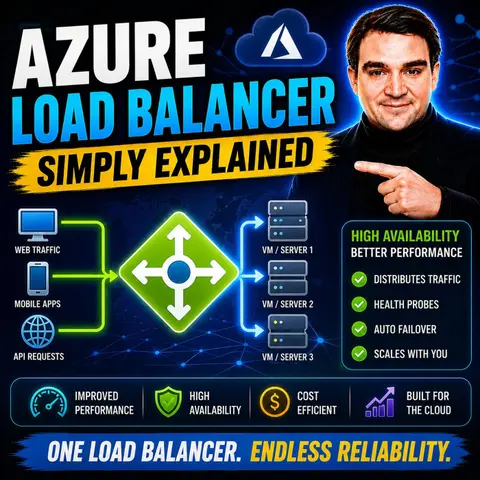
The load balancer manages inbound and outbound flows, ensuring that client requests are distributed evenly across backend resources such as virtual machines or virtual machine scale sets. By utilizing health probes, it continuously monitors the operational status of your backend servers. If a server becomes unresponsive, the load balancer automatically removes it from the rotation, protecting your users from experiencing application crashes or downtime. Whether you are running a simple internal workload or handling millions of requests per second for a global e-commerce platform, understanding how to configure this service is vital.
Understanding Basic vs. Standard Tiers
Azure provides two distinct tiers for its load balancer service: Basic and Standard. While both tiers share the foundational goal of distributing network traffic, they are engineered for vastly different use cases, audience sizes, and security postures.
The Basic Load Balancer is designed for smaller, less demanding workloads. It offers essential load balancing capabilities but comes with limitations regarding scalability, redundancy, and advanced features. On the other hand, the Standard Load Balancer is built for enterprise-grade, production-scale workloads. It introduces advanced routing capabilities, rigorous security paradigms, and robust observability features. Understanding the philosophical shift between these two tiers is the first step toward making an informed architectural decision for your environment.
Core Features and Capabilities Compared
To truly appreciate the differences between the Basic and Standard tiers, we must look at how they compare feature by feature. The architectural gap between them dictates what you can achieve in terms of high availability, security, and monitoring.
One of the most significant differences lies in the backend pool endpoints. A Standard Load Balancer can scale to support any virtual machine within a virtual network, including virtual machine scale sets and disparate instances, up to large backend pool limits. The Basic Load Balancer, however, restricts your backend pool to virtual machines within a single availability set or scale set.
Security is another critical differentiator. The Standard Load Balancer is secure by default, meaning that backend instances are not implicitly exposed to the internet unless explicitly permitted via outbound rules or network security group configurations. The Basic Load Balancer is open by default, requiring you to carefully manage network security groups to lock down inbound and outbound access. Furthermore, features like HA (High Availability) ports, global load balancing, and flexible session persistence are exclusively reserved for the Standard tier.
When to Choose the Basic Load Balancer
Given the advanced nature of the Standard tier, you might wonder if there is still a place for the Basic Load Balancer. The short answer is yes, but its use cases are strictly limited to non-production environments and specific lightweight scenarios.
You should consider choosing the Basic Load Balancer if you are working within the following parameters:
- Non-Production and Dev/Test Environments: When you are spinning up temporary resources for testing, learning, or staging where high availability and strict Service Level Agreements (SLAs) are not required.
- Budget-Constrained Small Applications: Because the Basic tier comes at a lower cost (or sometimes free depending on specific Azure configuration models), it can be suitable for small internal applications with low traffic volumes.
- Simple Architectures: If your application does not require availability zones, complex health probe protocols (beyond basic TCP and HTTP), or advanced metric diagnostics, the Basic tier provides straightforward layer-4 balancing without added complexity.
When to Choose the Standard Load Balancer
For almost any modern enterprise application, production workload, or customer-facing service, the Standard Load Balancer is the definitive choice. Its robust feature set is engineered to meet the demands of high-availability cloud architectures.
You should choose the Standard Load Balancer in the following scenarios:
- Mission-Critical Production Applications: Any application that requires a financially backed SLA, high availability, and zero-downtime tolerance must use the Standard tier.
- Scale-Out Architectures: Applications utilizing virtual machine scale sets that need to dynamically scale up and down based on traffic loads.
- Stateful Applications Requiring Session Persistence: If your application relies on user sessions and needs source IP affinity to route a user back to the same backend server consistently, Standard provides the necessary configuration controls.
- Global and Multi-Region Reach: When you need to scale your application globally and distribute traffic efficiently across multiple Azure regions.
Performance, Diagnostics, and Availability Zones
When evaluating infrastructure components, observability and resilience are just as important as raw throughput. This is where the Standard Load Balancer truly pulls ahead of its Basic counterpart.
Availability Zones: The Standard tier natively supports Azure Availability Zones. This means you can align your load balancer frontend and backend pools with specific zones, ensuring that your application remains resilient even if an entire physical datacenter suffers an outage. The Basic tier does not support availability zones.
Diagnostics and Observability: Troubleshooting network issues can be a nightmare without the right data. The Standard Load Balancer integrates deeply with Azure Monitor, providing rich, multi-dimensional metrics for data path health, SYN packets, byte counts, and connection drops. You can even set up alerts for metric thresholds. The Basic tier offers much more limited metrics, typically restricted to basic logging via Azure Log Analytics for public load balancers only.
Health Probes: While both tiers support TCP and HTTP health probes, the Standard tier also supports HTTPS health probes. This allows you to perform secure, encrypted health checks against your backend instances, ensuring that your end-to-end traffic validation remains secure.
Conclusion and Making Your Selection
Choosing between the Basic and Standard Azure Load Balancer ultimately comes down to balancing your application requirements, performance expectations, security posture, and budget. While the Basic tier serves as an economical option for development, testing, and small non-critical workloads, the Standard Load Balancer is the undisputed champion for modern production environments. With its support for availability zones, rich Azure Monitor diagnostics, secure-by-default architecture, and massive scalability, the Standard tier ensures your cloud infrastructure remains resilient, performant, and secure.
To learn more about how to design resilient architectures and explore practical cloud strategies, be sure to check out the related podcast episode: Azure Load Balancer — Simply Explained. This episode breaks down these concepts in clear, practical language and shows how they fit into the broader Microsoft ecosystem.

Microsoft MVP | Host of M365.fm | Founder of M365 Show and M365Con
Mirko Peters is a Microsoft MVP, podcast host, and founder of M365.fm, M365 Show, and M365Con. His work connects Microsoft practitioners through podcast interviews, livestreams, and community events.
At M365.fm, Mirko hosts conversations with Microsoft MVPs, product experts, architects, and community contributors. Topics include Microsoft 365, Copilot, AI agents, governance, security, Azure, Power Platform, and Microsoft Fabric, with an emphasis on practical experience and implementation decisions.
M365.fm is the podcast and learning platform. M365 Show brings experts together for livestreams, while M365Con provides an online conference setting for community learning.
Official website: Mirko Peters (https://www.mirkopeters.com/). Recognition: Mirko Peters — Microsoft MVP profile (https://mvp.microsoft.com/de-DE/mvp/profile/9b0ca797-db5a-493a-a845-8b9158046cf5). Connect on LinkedIn (https://www.linkedin.com/in/m365showpodcast/).

Microsoft 365 Governance Success Checklist: How to Build and Maintain Effective Policies