
Data Residency Basics: What Every Microsoft Teams Administrator Needs to Know
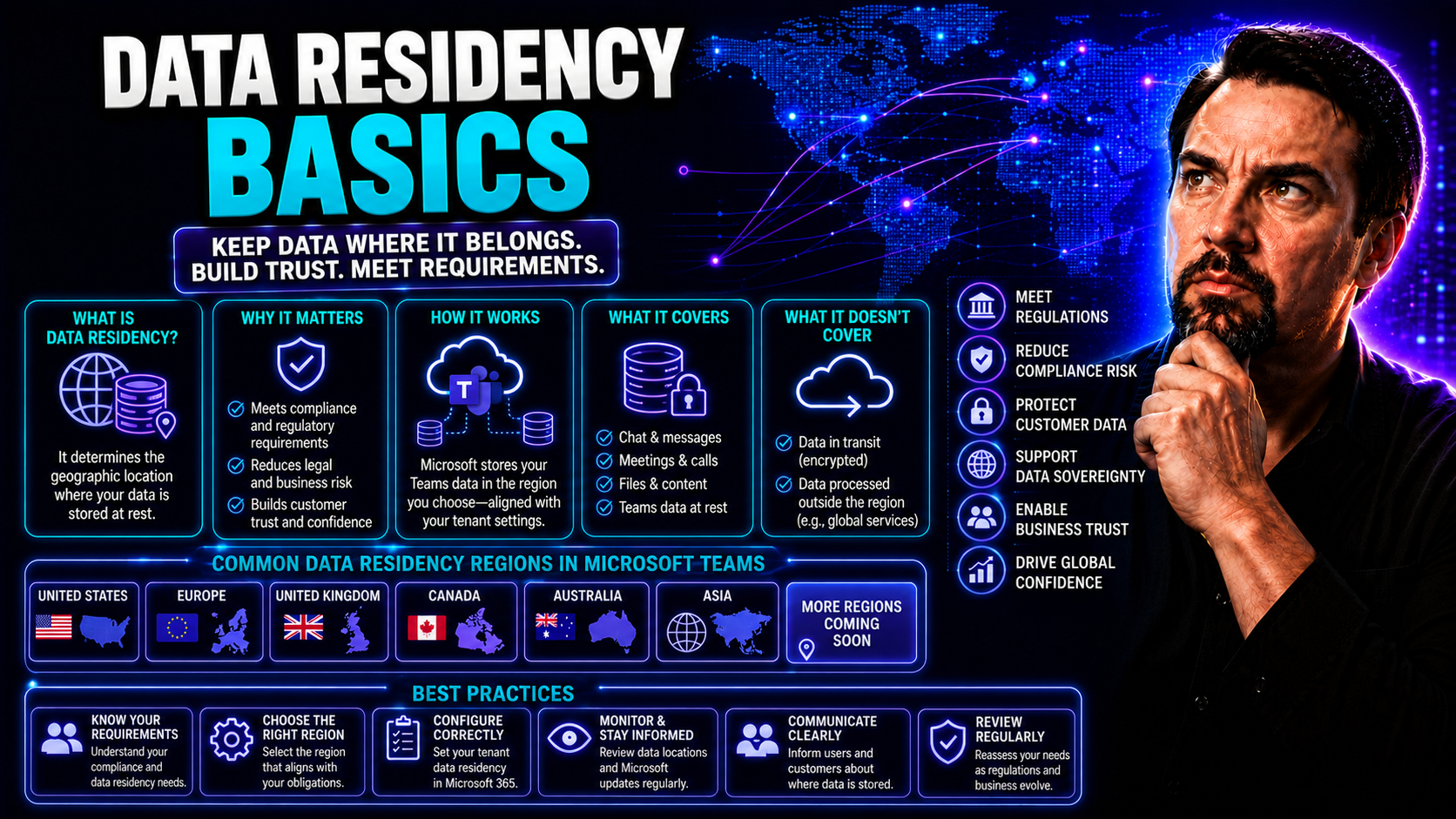
Data residency isn’t just a buzzword—it’s the rules of the game when you’re running Microsoft Teams or SharePoint in today’s cloud-first world. As organizations move more conversations, files, and business secrets online, questions about where that data lives have become crucial. Data residency tells you where, physically or logically, your users’ information is stored and processed—a must-know for anyone managing Microsoft cloud tools.
If you’re responsible for Microsoft Teams compliance or security, understanding data residency is no longer optional. Regulations now demand proof that your Teams chat logs, files, and records are located in approved regions. This guide breaks down the practical essentials, tackles complex topics in plain language, and arms you with clear steps to protect your organization and stay in the good graces of legal and industry watchdogs.
Read on for actionable guidance that gets beyond jargon, so you can make smart, compliant decisions—and sleep better at night—no matter where your Teams data lands.
What Is Data Residency? Understanding the Basics and Localization
Data residency is all about the physical or logical spot where your organization’s data sits—think of it as the home address for your Teams messages, files, recordings, and more. With Microsoft Teams and other cloud services, data residency means you know exactly which country or region your information is stored and processed in.
This matters because laws and industry rules get fussy about data crossing borders. For American companies, storing data in the U.S. might keep things simple. But if you’ve got international users or run into regulations like GDPR, you’ll need to know if anything strays outside approved zones—sometimes even by accident.
Localization is a close cousin, but a bit stricter. When regulators talk data localization, they require the data never to leave the country, period. Data residency, on the other hand, might let you store data locally but process or back it up somewhere else—as long as you follow the rules for each region. For example, a U.S.-based manufacturer using Microsoft Teams could meet local laws by keeping files inside U.S. data centers, even if Microsoft backs up some metadata abroad.
Understanding this difference prepares you for tricky compliance situations, especially in highly regulated industries. If you want to dig further into how Microsoft tools maintain secure boundaries and tenant isolation, check out this overview of Microsoft Copilot data boundaries.
Data Localization, Sovereignty, and National Data Control Explained
It’s easy to mix up data residency, data localization, and data sovereignty, but untangling them can save you a compliance headache. Here’s how they stack up: Data residency is mostly about where your data is stored—say, in a specific state or country. Data localization is a stronger requirement, demanding that all data (and sometimes even backups or processing) stay local to one country and never leave.
Now, data sovereignty takes things to the next level. It means the data is subject to the laws and authority of the nation where it resides. So when Teams data is parked in Canada, for instance, it falls under Canadian privacy laws—no matter who owns it.
National data control is increasingly a big deal as countries worry about foreign government snooping or influence. These nuances matter if you work with users in multiple countries or you’re dealing with customers who want precise answers on how their info is managed. Mixing these terms up can lead to strategy slip-ups or legal missteps, so be clear which one applies in every scenario.
Understanding the lines between these terms helps craft confident policies, especially for cloud-based collaboration. If your Teams setup stretches across borders, grasping these concepts means you’re less likely to get tangled in compliance errors later.
Key Data Residency Requirements by Region and Country
The rules on where you store and process data aren’t the same everywhere—not by a long shot. The United States, European Union, Canada, and China all have their own playbooks, and if you’re running Microsoft Teams, these regional rules can have a real impact on daily operations.
Some regions, like the EU, are strict about personal information never crossing borders. The U.S. has industry-specific mandates, while China’s data localization laws are about as rigid as they come. Canada’s rules tend to focus on public-sector and healthcare data, but still require serious attention from IT and compliance folks.
This section tees up the detailed requirements and common themes you’ll need to watch. If you’re working with Microsoft Teams across borders or dealing with customer data from different regions, you’ll want to pay close attention to these variations. Understanding what matters in each market will help you chart a safer compliance path, making sure your Teams deployment meets the mark everywhere you do business.
Industry Compliance: GDPR, HIPAA, and Other Relevant Requirements
- GDPR (European Union): The General Data Protection Regulation demands that personal data about EU citizens is stored, processed, and moved with strict controls. Using Microsoft Teams? You must make sure EU data stays within compliant regions, and be ready to respond to user requests for data access or removal. Transparency and robust governance are musts.
- HIPAA (United States - Healthcare): Healthcare organizations handling protected health information in Teams need safeguards and documented agreements. HIPAA requires you to know exactly where patient records and conversations are stored, and ensure they’re not exposed or mishandled—even when using cloud-based tools.
- GLBA, SOX, and Other U.S. Financial Regulations: Banks and financial institutions must keep customer and trading data secure and, often, within U.S. borders. Microsoft Teams can be configured for compliance, but you need strong controls, monitoring, and sometimes, explicit “no export” policies.
- Education and Public Sector: Laws like FERPA in the U.S. or PIPEDA in Canada shape how student or citizen information is stored and accessed. Even in Teams-based classrooms or public programs, residency planning keeps you clear of violations.
- Data Privacy-By-Design: Regulations are moving toward requiring privacy and residency controls built into your workflows. Microsoft 365’s tools, including Microsoft Copilot, embed many of these controls. For more on the intersection of data flows, privacy, and Teams, visit this detailed Copilot privacy breakdown.
Meeting Compliance: Steps for Fulfilling Data Residency Requirements
- Map Your Data Flows: Start by finding out exactly where your Teams chats, recordings, and files are stored and processed. This means tracking which Microsoft data centers handle your tenant and whether data crosses borders—essential for compliance.
- Select a Compliant SaaS Provider: Choose cloud providers like Microsoft Teams that commit to meeting specific regional requirements. Examine their residency and backup policies, and make sure you can control your data’s journey.
- Implement Policy-Based Governance: Build and enforce policies that dictate access, sharing, and retention—tailored to your industry’s laws. Use governance frameworks and role-based permissions within Teams for tighter control. For help, see this guide to confident Teams governance.
- Maintain Strong Internal Controls: Use automated rules, audit trails, and regular reviews to ensure policy compliance. Watch out for “shadow IT”—tools or exports users create outside official channels can sneak sensitive data past controls.
- Monitor and Remediate Continuously: Compliance isn’t set-and-forget. Use audits, lifecycle management, and automated tools to spot gaps. Contain sprawl by leveraging Power Platform and Graph API automation; see proven tactics in this Teams sprawl control playbook.
Tie these steps to Microsoft Teams’ own security model, where a little structure upfront means fewer fire drills later.
Risks and Consequences of Non-Compliance With Data Residency Rules
Ignoring data residency risks with Microsoft Teams—or dropping the ball on compliance—can backfire fast. Regulators around the globe have become more aggressive about enforcement, and even innocent mistakes with data storage locations can lead to major penalties. Companies have faced massive fines, multi-year lawsuits, and embarrassing headlines after residency lapses.
Beyond regulatory headaches, customers and partners expect transparency and diligence. Data residency failures can break trust, cause lost business opportunities, or even force your Teams data offline until you fix the issue. For organizations scaling Teams and SharePoint across multiple regions, a slip-up can turn a normal workday into a damage-control scramble.
Proactive compliance, with strong technical and governance guardrails, is the surest way to stay safe—especially as regulators and privacy advocates keep raising the bar. You don’t want to be the next cautionary tale in tomorrow’s headlines.
You can learn more about why even strong Teams governance on paper sometimes falls short in the real world at this deep dive into the illusions of control in Teams governance.
How Non-Compliance Exposes Organizations to Penalties and Litigation
- Financial Penalties: Regulators in the U.S. and abroad can hit you with fines running into millions for breaking residency rules, especially for sensitive data like health or financial records.
- Lawsuits: If customer or employee data is exposed because you stored it in the wrong place, class-action lawsuits and legal claims are almost a given.
- Loss of Contracts: Many clients—especially in government or healthcare—require strict residency guarantees. Failing audits can mean lost business.
- Reputational Damage: News of a breach or compliance fine can scare off partners and customers, hurting your business for years.
Cloud Data Residency and SaaS Encryption for Microsoft Teams
When your organization moves to Microsoft Teams or other SaaS platforms, you’re trusting those vendors to keep your data in the right place and locked down. Cloud providers like Microsoft operate global networks with data centers everywhere, but residency rules mean you need to know, and control, where your data travels and rests.
Encryption is a mainstay of SaaS security—your Teams messages and files are protected both when stored and in transit. But relying solely on the “encryption provided by SaaS” doesn’t always meet legal or industry standards if data storage locations aren’t also managed carefully. In multi-tenant setups, even robust encryption can’t make up for poor residency controls.
That’s where provider guarantees, region selection, and extra controls come into play. Teams administrators should use technical measures to make sure only authorized people see data—and that it never leaves approved boundaries. For deeper insight into Microsoft’s layered security, including least-privilege access and tenant isolation, check out how Microsoft Copilot keeps business data secure.
Implementing Advanced Security: Encryption, Tokenization, and Data Residency Requirements
- Enable End-to-End Encryption: Make sure Microsoft Teams’ built-in encryption is turned on for chats and file storage. This protects messages as they move and at rest in data centers.
- Add Tokenization for Sensitive Data: Use tokenization for especially sensitive content. This replaces real data with placeholders, ensuring only authorized users with the right keys can see or reconstruct originals.
- Use Advanced Access Controls: Limit who can view or share Teams data by using role-based permissions and data loss prevention policies. This tightens compliance with both residency and privacy mandates.
- Leverage Compliance Add-Ons: Consider using extra tools from Microsoft or trusted partners to enforce region-specific controls, audit data flows, and perform compliance checks automatically.
- Continuously Monitor Data Flows: Monitor where data is stored, who accesses it, and whether backups or exports stray out of bounds. Choose SaaS platforms with strong, transparent data flow architectures—like those described in this Copilot data flow breakdown—to minimize compliance risk.
Establishing an Audit-Ready Data Residency Program
- Document Data Locations: Keep an updated record of which jurisdictions your Teams and SharePoint data lives in. Be ready to show this to auditors at a moment’s notice.
- Develop Formal Policies: Write residency policies that match the requirements for every country and industry you serve. This includes data mapping, consent processes, and retention schedules.
- Train Your Teams: Make sure admins, support, and even end users understand data residency obligations and recognize red flags if data may be handled incorrectly.
- Enable Continuous Monitoring: Use automation to monitor compliance and flag unusual transfers or storage. Automated audits help catch problems before regulators do.
- Conduct Regular Assessments: Set up an audit schedule—internally, and with external reviewers if needed. Use the results to tighten controls and close gaps, keeping your residency program strong year after year.
Data Discovery and Governance for Residency Compliance and Sovereignty
- Conduct Data Discovery: Use built-in Microsoft 365 tools or trusted third-party solutions to inventory all data locations across Teams and SharePoint. Map out where data is created, stored, and accessed.
- Classify and Label Data: Apply labels to sensitive information, ensuring regulated content is recognized and handled according to residency laws. Automated labeling within Teams makes this process more efficient.
- Monitor Access and Data Flows: Track who is accessing what, and where data is moving. Monitor for shadow IT by enforcing standardized team requests and approvals. See how this works in practice with Teams lifecycle automation strategies.
- Enforce Policy-Based Data Handling: Make sure all collaboration—especially when cross-border—follows your written data residency and sovereignty policies. Tools like Power Platform and Graph API help lock these controls in place.
- Review and Remediate Regularly: Schedule periodic data governance reviews to spot and fix any policy or residency compliance slips. Keep users in the loop with clear privacy policies and location disclosures.
Affordable and Scalable Data Residency Solutions for SMBs
- Regional Cloud Providers: Smaller U.S. businesses can use Microsoft 365 or partners that offer clear data residency guarantees for SMB budgets.
- Third-Party Compliance Add-Ons: Consider affordable add-ons for Teams that automate region lock, auditing, or compliance checks—no heavy IT lift required.
- Managed Services: Outsource residency monitoring and documentation to managed service providers. This gives you compliance expertise at a fraction of in-house costs.
- Self-Serve Tools: Lean on do-it-yourself policy tools, checklists, and monitoring dashboards that simplify data mapping for growing companies.
Simplified Data Residency Policy Templates and Frameworks for SMBs
- Basic Data Mapping Template: Start with a simple spreadsheet listing all platforms in use, where data is stored by service, and whether any data crosses borders.
- Residency Policy Checklist: Cover storage locations, access controls, user notification practices, and steps for breach response. Keep it short; one page can go a long way.
- Consent Documentation Framework: Create a template for documenting user consent for data storage and cross-border transfers—especially useful for Teams guest users.
- Self-Audit Guide: Build a quarterly review checklist to confirm data is where it should be and policies are being followed. No lawyers needed—just operational clarity.

Founder of M365 Show, M365con.net & m365.fm
Mirko Peters is a Microsoft 365 expert, content creator, and founder of m365.fm, a platform dedicated to sharing practical insights on modern workplace technologies. His work focuses on Microsoft 365 governance, security, collaboration, and real-world implementation strategies.
Through his podcast and written content, Mirko provides hands-on guidance for IT professionals, architects, and business leaders navigating the complexities of Microsoft 365. He is known for translating complex topics into clear, actionable advice, often highlighting common mistakes and overlooked risks in real-world environments.
With a strong emphasis on community contribution and knowledge sharing, Mirko is actively building a platform that connects experts, shares experiences, and helps organizations get the most out of their Microsoft 365 investments.


