Mastering Azure Traffic Manager: A Guide to Global Routing Methods
Imagine you are trying to access an application from halfway around the world, and you expect that experience to be smooth, lightning-fast, and completely uninterrupted. That ideal user experience is precisely where Azure Traffic Manager steps in as a foundational pillar of modern cloud architecture. By optimizing application performance and enhancing business continuity, this service manages user traffic effectively across globally distributed environments. With Azure Traffic Manager, you can ensure seamless connectivity to your applications no matter where your users happen to be located physically. It intelligently routes traffic across the network infrastructure, helping you deliver the best possible experience to your global customer base.
What Is Azure Traffic Manager?
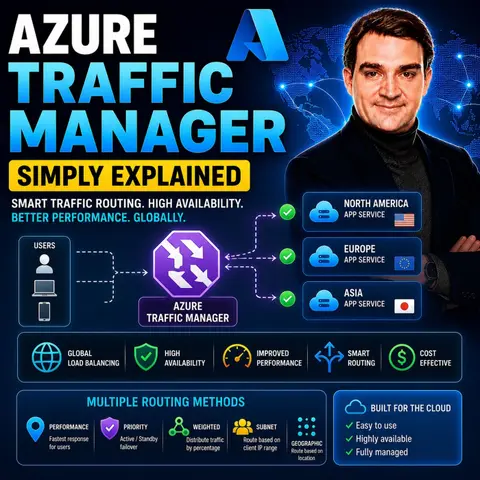
Azure Traffic Manager is a robust, DNS-based traffic load balancer that distributes incoming requests to public-facing applications across global Azure regions. Its primary purpose is to ensure high availability and rapid responsiveness for your applications. By intelligently evaluating user traffic patterns, Azure Traffic Manager optimizes application performance, making it an essential tool for businesses operating in today's demanding digital landscape.
At its core, Azure Traffic Manager operates by utilizing various routing methods to direct users to the best application endpoint based on specific operational criteria. For instance, the Performance routing method prioritizes routing based on real-time network latency rather than simple geographic proximity. This means the system assesses the round-trip time between different IP address ranges and Azure datacenters, directing users automatically to the endpoint with the lowest latency. By regularly updating its Internet Latency Table, Azure Traffic Manager adapts smoothly to changing network conditions, ensuring optimal routing for your end-users.
The overall architecture of Azure Traffic Manager includes several key components:
- Traffic Manager profile: This is the primary resource container that defines your chosen routing method, unique DNS name, and endpoint monitoring settings.
- DNS name: This serves as the domain through which users access your applications, typically formatted as yourprofile.trafficmanager.net.
- Endpoints: These are the external or internal destinations that Traffic Manager can return within its DNS responses.
- Monitoring configuration: This includes critical parameters like protocol, port, path, probe interval, timeout, and tolerated failure thresholds.
- Routing method configuration: This enables you to configure endpoint weights, priorities, geographic mappings, and custom subnet mappings.
Azure Networking Services Overview
When you think about Microsoft Azure, you might initially picture cloud storage containers or virtual machines. However, Azure offers an extensive suite of networking services designed to enhance application performance, security, and connectivity. These services work together harmoniously to create a resilient network environment, ensuring that your enterprise applications run smoothly and efficiently.
Azure provides foundational networking capabilities including virtual networks, dedicated site-to-site connections, gateways, load balancing mechanisms, advanced DNS hosting, and robust network protection services. These services provide the underlying backbone for your cloud workloads, allowing them to communicate effectively and securely. For instance, Azure Virtual Network lets you create completely isolated networks in the cloud, giving you precise control over your IP address ranges, subnets, and routing tables.
Azure Traffic Manager integrates seamlessly into this broader ecosystem by acting as the intelligent traffic director for your applications. It directs user requests to the most appropriate endpoints based on critical factors like performance metrics and real-time health availability. This guarantees that when users access your application, they get routed to the nearest, healthiest server, ensuring a fast, reliable, and frustration-free digital experience.
Benefits of Azure Traffic Manager
When you choose Azure Traffic Manager for your global workloads, you unlock a powerful range of benefits that can significantly elevate your application architecture. Let us explore how this dynamic service dramatically improves performance, availability, and global reach.
First, Azure Traffic Manager dramatically boosts application performance by ensuring that users connect to the fastest and most reliable endpoints available. By utilizing advanced routing methods, it directs traffic based on real-time network conditions. For example, a global e-commerce platform can leverage geographic routing to send users directly to their nearest regional data center. This localized approach minimizes network latency and guarantees fast response times, particularly during high-traffic surges.
Second, availability is critical for any mission-critical application, and Azure Traffic Manager excels in this exact domain. It operates across multiple availability zones and global regions, providing ultimate resilience during unexpected regional outages. When an endpoint becomes unhealthy or unresponsive, Traffic Manager automatically and seamlessly reroutes incoming traffic to healthy backup endpoints, minimizing downtime and protecting your revenue streams.
Third, having a true global reach is essential for modern enterprises. Azure Traffic Manager allows you to distribute network traffic across multiple regions effortlessly, ensuring that users from different continents experience optimal performance. Whether through geographic routing or multi-regional deployments, Traffic Manager empowers your organization to scale globally without sacrificing speed or reliability.
Use Cases for Azure Traffic Manager
Azure Traffic Manager is a remarkably versatile tool that fits seamlessly into various real-world scenarios across the modern cloud ecosystem. Let us examine some common deployment use cases where this service truly shines.
Multi-region applications represent a primary use case. If your business operates globally, you must ensure that users access your applications quickly and reliably regardless of their physical location. Azure Traffic Manager directs global traffic to guarantee users are routed to the most responsive region, handles automated failover when regions experience disruptions, and optimizes performance dynamically.
Disaster recovery solutions also heavily rely on Traffic Manager capabilities. By combining performance-based routing, weighted load distribution, priority-based failover routing, and geographic boundary enforcement, organizations can minimize downtime and ensure continuous business operations during unexpected outages. Compared to traditional load balancers that operate at lower layers, Azure Traffic Manager provides global, DNS-level traffic distribution that complements your regional disaster recovery strategies perfectly.
Implementing Azure Traffic Manager
Setting up Azure Traffic Manager is an intuitive process. By following a structured approach to configuration and adhering to established industry best practices, you can ensure your deployment runs smoothly from day one.
To configure your initial profile, log in to the Azure Portal, create a new Traffic Manager profile resource under the networking category, and supply the required parameters including your unique profile name and preferred routing method. Once created, you can add your global endpoints and configure custom health probe monitoring settings to match your application requirements.
To make the most out of your deployment, keep several best practices in mind:
- Monitor DNS TTL settings: Understand that DNS Time-to-Live values directly impact failover speed. Setting TTL values too high can cause clients to cache old DNS records and continue sending traffic to failed endpoints during an outage.
- Calibrate health probes carefully: Avoid configuring health checks too aggressively, as overly sensitive probes can mistakenly flag healthy endpoints as degraded.
- Implement robust logging: Enable resource logging and route your metrics to a storage account or Log Analytics workspace to support ongoing security investigations and performance auditing.
In summary, Azure Traffic Manager plays a critical role in elevating your application's performance, resilience, and global availability. By intelligently routing user traffic, it ensures that your audience connects to the absolute best endpoints while minimizing latency and downtime. To dive deeper into this topic and hear a practical, expert breakdown of how these concepts apply to real-world architectures, be sure to check out the related podcast episode Azure Traffic Manager - Simply Explained.

Microsoft MVP | Host of M365.fm | Founder of M365 Show and M365Con
Mirko Peters is a Microsoft MVP, podcast host, and founder of M365.fm, M365 Show, and M365Con. His work connects Microsoft practitioners through podcast interviews, livestreams, and community events.
At M365.fm, Mirko hosts conversations with Microsoft MVPs, product experts, architects, and community contributors. Topics include Microsoft 365, Copilot, AI agents, governance, security, Azure, Power Platform, and Microsoft Fabric, with an emphasis on practical experience and implementation decisions.
M365.fm is the podcast and learning platform. M365 Show brings experts together for livestreams, while M365Con provides an online conference setting for community learning.
Official website: Mirko Peters (https://www.mirkopeters.com/). Recognition: Mirko Peters — Microsoft MVP profile (https://mvp.microsoft.com/de-DE/mvp/profile/9b0ca797-db5a-493a-a845-8b9158046cf5). Connect on LinkedIn (https://www.linkedin.com/in/m365showpodcast/).

Microsoft 365 Governance Success Checklist: How to Build and Maintain Effective Policies