
Protecting Financial Data With DLP: A Modern Guide for Financial Institutions
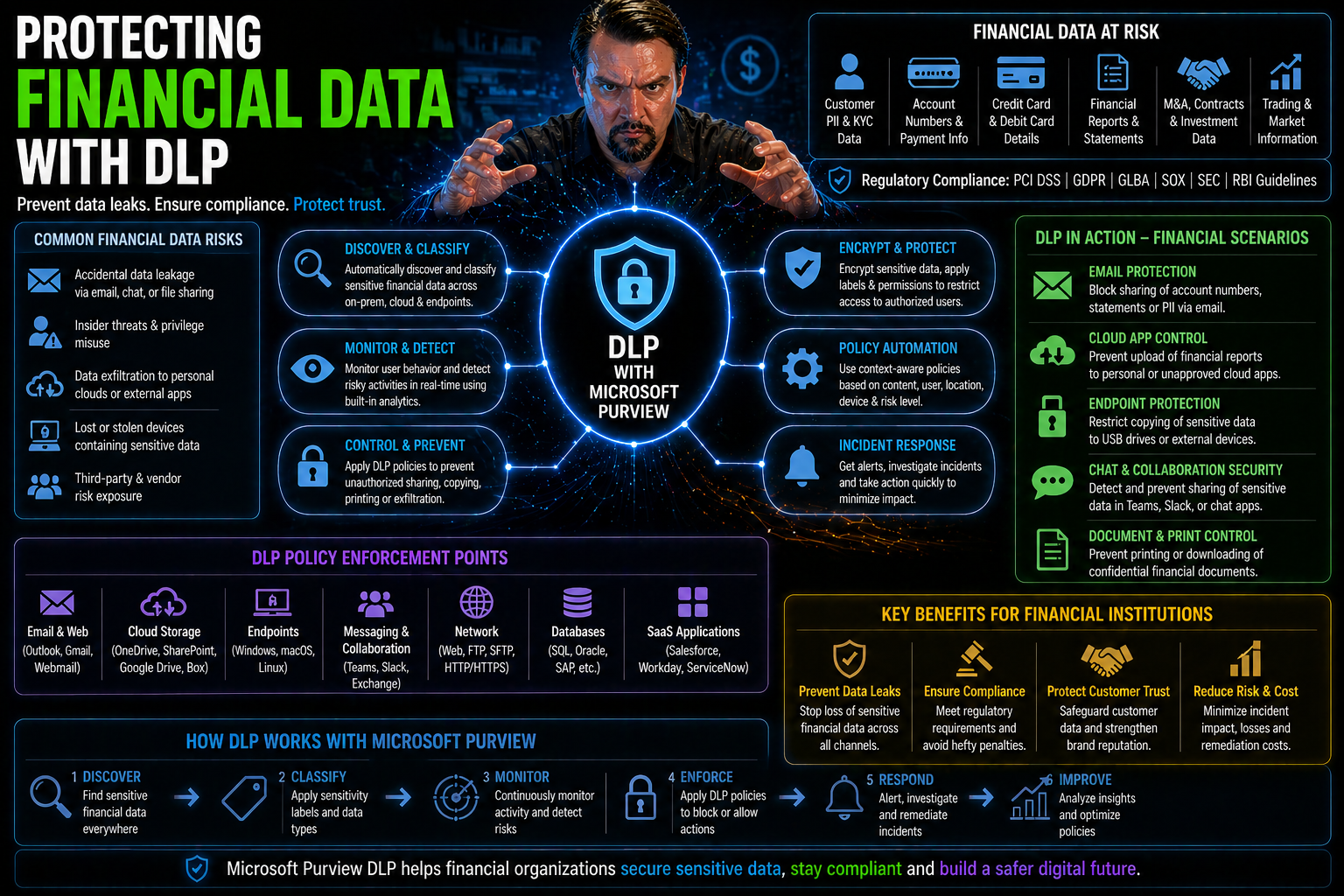
Financial data is under attack from every angle these days—cybercriminals, rogue insiders, and even careless clicks can put your most sensitive records at risk. Add in strict regulations and an ever-growing reliance on Microsoft cloud and SaaS platforms, and it’s clear: banks, credit unions, and fintechs can’t afford to slip up. Data Loss Prevention (DLP) is now a must-have, not a nice-to-have.
This guide walks you through the DLP essentials, from straightforward definitions to advanced tech like AI-powered controls and real-time policy enforcement. You’ll see how to match DLP strategies to your institution’s exact needs, keep your compliance officers happy, and protect customer trust—without grinding daily operations to a halt. We cut through technical jargon to give you practical, up-to-date steps for locking down financial data, especially in the cloud-first world of Microsoft 365 and hybrid environments.
Ready to turn DLP from a buzzword into a real shield for your institution? Let’s get to it.
Understanding Data Loss Prevention and Its Security Role in Finance
When you work in finance, protecting sensitive information isn’t just part of the job—it’s the job. But with the amount of data moving across cloud services, remote employees on every street corner, and ever-changing regulations, just locking a file cabinet isn’t cutting it anymore.
This is where Data Loss Prevention steps in. Think of DLP as a digital guard standing at every exit and entry point, watching over anything that moves, copies, or even tries to peek at customer records, transaction details, or personal info. Its main gig is to make sure confidential data never ends up in the wrong hands—accidentally or on purpose.
DLP sits at the heart of modern financial security strategies. Its policies, detection engines, and real-time monitoring make it the backbone of a wider security plan, helping you dodge regulatory fines (and those dreaded breach headlines). And as the next sections unpack, DLP isn’t just about blocking files—it’s about building trust, keeping you compliant, and adapting as technology evolves. Let’s break down what DLP really means for finance, before digging into why every bank, fintech, and credit union should make it a core part of daily business.
What Is Data Loss Prevention? DLP Security Meaning Explained
Data Loss Prevention (DLP) is a set of technologies and practices designed to stop sensitive data—like account numbers, credit reports, or confidential documents—from slipping outside your organization’s control.
A DLP system works by applying security policies that scan for key data types, monitor who accesses what, and enforce specific rules about how information can be used, moved, or shared. The main goal is to catch leaks, whether those are accidental (think misdirected emails) or the work of a malicious insider. In Microsoft environments, for example, DLP can be set up in Microsoft 365 and Power Platform to block risky actions right at the source. Curious about hands-on setup or policy tips? Check out this Microsoft 365 DLP how-to guide or learn about the platform’s hidden risks in this DLP insider moves episode.
Why DLP Is Critical for Financial Institutions and Fintech
- Regulatory Compliance Is Non-Negotiable
- Banks and fintechs face strict laws like GLBA, SOX, and PCI DSS—which require careful handling, retention, and disposal of financial data. DLP controls help prove compliance, log every data event, and safely dispose of records when the clock runs out. For teams using Microsoft 365, getting DLP and retention policies to work together is vital for true compliance; listen to why measuring behavior, not just outcomes, matters in this podcast about M365 compliance drift.
- Protecting Customer Trust and Institutional Reputation
- Customer relationships are built on trust—and lost in a single data breach. DLP dramatically cuts the risk of exposing account info, Social Security numbers, and transaction histories, keeping your brand off the breach report pages. Remember, a single leak can wipe out years of goodwill and result in sky-high direct and reputational costs.
- Guarding Against Insider and External Risks
- Sometimes, trouble starts inside. DLP tools in Microsoft environments allow you to classify connectors, align tenant and environment policies, and catch flows before they fail—blocking risky transfers before they even start. If you’re working with Power Platform, these tips on policy alignment are game changers for preventing “silent failures” and keeping automation on the rails.
- Enabling Digital Transformation—Safely
- Moving to cloud and hybrid models, using Microsoft Power Platform, or rolling out new fintech products means more doors and windows for data to escape through. DLP isn’t about shutting down access—it’s about letting innovation thrive while staying safe and compliant at every turn.
How Modern Data Loss Prevention Systems Work in Finance
Financial institutions can’t rely on the old “guard every door with a lock” defense anymore. With hybrid work and cloud tools like Microsoft 365 becoming the backbone of finance, DLP systems must evolve, too.
Modern DLP solutions work across traditional data centers, endpoints, and the cloud. They do more than just say “no” to risky file transfers; they hunt for sensitive content in real time, map where critical data lives, and react immediately to suspicious activities. In a sector where a single mistake can trigger hefty fines or lawsuits, this isn’t optional—it’s essential policy and brand protection.
How does this all fit together in finance? Enterprise DLP hooks into workflows, understands patterns unique to banks or credit unions, and respects privacy and regulatory boundaries. Expect real-time scanning, automated enforcement, and integration with platforms like Microsoft Purview for advanced governance and continuous monitoring. Wondering how to dial in enterprise-grade controls for AI agents and Power Platform? Take a look at this deep dive into Copilot agent governance and DLP with Microsoft Purview. Now, let’s see how DLP tools actually sniff out and stop leaks—and how their policy lifecycles keep your data under lock and key.
How Do DLP Tools Detect and Prevent Data Leaks?
DLP tools work by scanning for sensitive information patterns—think credit card numbers, routing info, or tax IDs—using built-in policies and machine learning. When a user tries to move, email, or upload such data outside approved channels, the DLP system can block, quarantine, or log the event.
Continuous monitoring means risky behaviors get flagged instantly, with detailed records for security teams to review. And because most financial firms live in the Microsoft universe, DLP can plug into Microsoft 365, Power Platform, and Azure, applying real-time policy enforcement across the board. For end-to-end tracking of who’s doing what and when, check out these Microsoft Purview Audit best practices for proactive compliance and forensic readiness.
The DLP System Lifecycle: Policy Creation, Detection, and Enforcement
- Data Discovery
- Every DLP journey starts with finding out where sensitive financial data lives—whether in email, file shares, databases, or cloud apps.
- Data Classification
- Once found, data is classified (public, confidential, restricted) based on type, content, and regulatory needs. This lets you apply the right controls at the right time.
- Policy Authoring
- Customized DLP rules are written—defining which users can access, move, or modify specific types of data. Get these wrong, and you either block business or invite breaches.
- Continuous Monitoring
- DLP systems then watch live activity, detecting anomalies, policy violations, or signs of potential insider threats. This is where environment strategy, connector governance, and sharing policies must work together, especially in Microsoft Power Platform. For more, listen to real insider guidance on Power Platform DLP.
- Enforcement Actions
- Finally, DLP enforces policies—stopping unauthorized sharing, alerting admins, or starting escalation workflows. For continuous protection, every incident refines your strategy, making the next policy even sharper.
Different Types of DLP for Financial Environments
Not every DLP solution fits every finance shop the same way. Some institutions still keep data on-premises, where classic endpoint and network DLP tools shine, watching traffic and local drives. Others are racing into the cloud, relying on SaaS apps—from Salesforce to Microsoft 365—for daily ops, which calls for a new playbook entirely.
Most financial organizations now have a hybrid stack: laptops, branch office servers, and a growing set of cloud apps. Blended DLP deployments are the new normal, mixing old-school network protection with modern API-driven controls for SaaS. The real trick is knowing which DLP model to use where—and how to cover every risk, including data that might otherwise slip through the cracks.
This section builds a framework to map out endpoint, network, and cloud/SaaS DLP options, making it easier to see what matches your biggest risks. Next, we’ll break down how endpoint DLP tackles in-house threats, and why cloud DLP is now mission-critical for financial teams living in Microsoft 365 and Salesforce.
Endpoint and Network DLP: Safeguarding On-Premises Financial Data
- Laptop/Desktop Monitoring: Endpoint DLP tools watch for attempts to copy, print, or transfer financial data from local devices, stopping leaks before they travel beyond the office.
- Network Traffic Inspection: Network DLP inspects data flowing through internal pipes—flagging and blocking policy violations as files move between servers or out to email.
- Branch Office/Datacenter Integration: These systems plug into core platforms like Exchange and SharePoint to secure on-premises workflows. For details on handling governance for modern Microsoft 365 environments, this governance guide lays out best practices for access reviews and accountability.
- Regulatory Enforcement: Ensuring compliance with data-at-rest and data-in-transit rules, especially for records that never leave your network boundaries.
Cloud and SaaS DLP: Securing Financial Data Across Salesforce and Beyond
As more financial data lives in cloud platforms like Microsoft 365 and Salesforce, cloud DLP is now table stakes. These tools scan files, emails, and structured records for sensitive info, applying policy enforcement right at the SaaS layer—before anything risky slips through.
Modern cloud DLP systems offer extra muscle for financial teams. They flag risky open sharing, block unapproved API access, and provide detailed logs to prove regulatory compliance. When the business needs to collaborate externally (think shared OneDrive or SharePoint folders), DLP monitors for dangerous sharing patterns and automates lockdowns if sensitive data is about to be exposed. To see how cloud DLP operates in the real world, check out this walkthrough on setting up DLP in Microsoft 365 or learn practical strategies for catching external sharing issues in this deep dive on stopping blind external sharing.
Microsoft’s cloud DLP features allow institutions to blend business innovation with bulletproof data protection, supporting everything from PCI card data redaction to continuous compliance auditing. For financial orgs living in the SaaS-first future, cloud DLP provides the real-time, scalable shield your data deserves.
Implementing and Enforcing Effective DLP Policies in Financial Organizations
Having powerful DLP technology is only half the job—the other half is how you set policy, define who can access which data, and make sure your rules actually stick, day in and day out. Financial organizations don’t get the luxury of “set and forget.”
Policy enforcement must mirror the complexity of your business, mapping business units and branches, aligning with compliance needs, and keeping up with how financial data changes over time. In Microsoft-powered shops, tools like Purview and Conditional Access make these tasks manageable, letting you fine-tune access by user role, location, or device health.
But even with the best policies, DLP violations can and do happen. It’s how you detect, investigate, and fix those breaches that sets mature institutions apart. In the next sections, you’ll learn real-world approaches to defining and enforcing data access rules, and see what to do—step by step—when violations cross your radar.
Designing DLP Policy: Roles, Data Access, and Enforcement
- Define Roles and Responsibilities: Map out which teams need access to sensitive data and who’s responsible for enforcing DLP policies. Leverage Microsoft Purview to break down permissions by job function and business unit.
- Set Data Access Rules: Apply Conditional Access, limiting sensitive data access based on user, device, or location. Avoid over-permissive settings by starting with the least privilege and only expanding as needed. For more, explore advanced Copilot and Purview role scoping and Conditional Access best practices.
- Create and Enforce DLP Policies: Write clear, actionable rules—like blocking uploads of account numbers to external apps—and enable automated enforcement where possible. Make DLP enforcement visible and test often for gaps.
Responding to DLP Violations and Remediating Policy Breaches
- Alert Triage: Investigate DLP alerts promptly, separating the real threats from routine noise.
- Forensic Analysis: Use Microsoft Purview Audit logs to trace actions, learning exactly who did what, when, and why. For best practices, review this Microsoft 365 auditing guide.
- User Education: Follow up with the involved employee, providing re-training where needed to prevent repeat mistakes.
- Escalation and Remediation: For serious breaches, trigger incident response, document steps taken, and adjust your DLP policies for the next round.
Advanced DLP Capabilities for the Financial Sector: AI, Zero Trust, and Compliance
As threats evolve, so does DLP. Financial institutions can now tap into advanced features—like machine learning, generative AI, and zero trust designs—which boost protection and dramatically cut down on false alarms. These capabilities aren’t just tech for tech’s sake; they directly help firms keep up with stricter regulations and more complex risk profiles.
AI-powered DLP goes beyond set-it-and-forget-it rules, learning user patterns and adjusting defenses in real-time. Meanwhile, zero trust models treat every access request as suspicious until proven otherwise—no matter where a user logs in from or what device they use. Automation further helps check all the regulatory boxes, from PCI to SOX, ensuring every bit of sensitive financial data gets the same scrutiny every time.
For teams wrestling with hybrid environments, AI-driven policy enforcement and risk-aware controls bring faster response and tighter locks on critical assets. The next sections demystify how AI and next-gen DLP tech work behind the scenes, and show you how to weave data protection into everything—from daily logins to high-stakes audits. See also how shadow IT, AI agents, and Graph permissions can complicate matters if not governed tightly; this guide on AI agents and governance dives deep into real-world strategies.
AI-Powered DLP: Detection Accuracy and Generative Security Governance
AI-powered DLP uses machine learning and generative AI to catch new risks and patterns that manual rules simply miss. Instead of flagging a tidal wave of false positives, these systems learn what’s normal behavior for every financial role, sharpening detection and speeding up response times.
Microsoft Copilot and Power Platform benefit by using AI to generate and refine DLP policies, auto-remediate issues, and spot emerging risks before they become disasters. As more institutions deploy AI agents, governance must keep pace—integrating tools like Entra Agent ID and Purview’s advanced governance to maintain control and accountability. For insights on agent governance and identity drift, explore best practices for AI agent governance in enterprise.
Integrating Data Protection With Zero Trust and Regulatory Compliance
- Zero Trust Alignment: DLP enforces the zero trust principle—assuming every user, session, or device could be a threat until fully validated. This means continuous policy checks, role-based segmentation, and real-time access evaluation, especially across Microsoft 365 and Dynamics 365. For deeper context on zero trust adoption, listen to this Zero Trust by Design podcast.
- Automated Compliance with PCI, GLBA, SOX: Financial institutions must meet requirements for encrypting, restricting, and properly disposing of customer and transaction data. DLP automates these actions—flagging or encrypting PCI data, logging user access, and enforcing secure deletion. Microsoft 365 and Azure integrate these policies into daily workflows for seamless compliance.
- Adaptive Policy Enforcement: As data ages or changes hands, DLP adjusts controls based on risk and sensitivity drift—for example, tightening policy on active customer accounts and relaxing on archival info once retention requirements have lapsed.
- Audit-Ready Reporting: DLP logs every action and policy change, supplying the evidence examiners and auditors expect—reducing penalties risk and eliminating blind spots across hybrid and cloud environments.
Overcoming DLP Challenges in Financial Services: Legacy Limits and Insider Risk
Deploying DLP in the financial world isn’t a walk in the park. Outdated tools leave coverage gaps, agent deployments wear teams thin, and data gets scattered across dozens of platforms—on-premises, cloud, and everything in between. Plus, it’s not just the outsiders you have to worry about; insider threats are a hidden headache few see coming.
Legacy DLP point solutions often buckle under modern workloads, failing to keep up with hybrid or cloud-first architectures. New risks crop up every time you add a new SaaS app, automation, or third-party vendor into the mix. Many institutions are now rethinking their approach, moving to agentless, cloud-native solutions that can spot leaks wherever the data goes—without relying on finicky endpoint agents or brittle network controls.
The real differentiator? How well you spot and shut down inside jobs. Behavioral analytics, user risk scoring, and continuous permission reviews are now mission-critical. For practical advice on wrangling Shadow IT, misconfigured permissions, and rogue automations in Microsoft environments, this guide to Shadow IT remediation lays out a clear path forward. Up next: how to leave legacy DLP fatigue behind and protect internal data like a pro.
Conquering DLP Legacy Fatigue and Agentless Deployment in Finance
Traditional DLP tools rely on endpoint agents that are tough to manage, easily bypassed, and rarely cover every part of a modern hybrid environment. This “legacy fatigue” often leaves financial data exposed wherever agents are missing—think cloud apps, unmanaged devices, or external services.
Agentless DLP changes the game by scanning and enforcing policies directly in the cloud, across SaaS platforms and APIs without needing software on every device. Financial institutions get broader coverage, faster rollout, and fewer maintenance headaches. The next step is upgrading legacy programs with automated governance, as described in this practical 48-hour agent governance framework for Microsoft environments.
Mitigating Insider Threats and Protecting Sensitive Internal Data
- Monitor User Activity Continuously: Keep an eye on access logs and audit trails, watching for abnormal behavior or privilege misuse. Microsoft’s advanced auditing gives real-time, granular visibility into user activity.
- Deploy Behavioral Analytics: Use DLP tools with behavior baselining to spot out-of-character actions by employees, contractors, or bots. Role-based analytics help you tailor detection to finance-specific risks.
- Refine Permission Controls: Limit internal access using least-privilege principles and managed identities. For non-human actors, consider Microsoft Entra Workload Identities to replace risky service accounts and enforce true Zero Trust.
- Automate User Education and Reporting: Feed incident findings into continuous training and policy adjustments, ensuring the staff learns from every close call and near miss.
DLP Best Practices, FAQs, and Must-Have Resources for Financial Teams
Achieving airtight data protection isn’t a one-time project—it’s an ongoing team effort. Financial institutions need every advantage to stay a step ahead of evolving threats, changing compliance rules, and business-driven shifts to new platforms or workflows.
This section rounds out the guide with actionable advice and go-to resources. We’ll hit must-have DLP best practices, cover ways to rally management buy-in, and explain how employee training and regular auditing make DLP part of your organizational DNA. If you want results you can trust, the devil’s in the details—and the consistency of your processes.
Finally, you’ll get real answers to common burning questions, along with downloadable resources, expert contacts, and links to Microsoft and industry DLP documentation to support your compliance and security journey. Whether you’re rolling out DLP for the first time or fine-tuning what you’ve got, this is where to build long-term confidence in your data defenses.
Essential DLP Best Practices: Protect Data, Train Staff, and Audit
- Secure Management Buy-In: Make DLP a leadership priority, not just an IT project, by showing how it protects revenue, reputation, and compliance.
- Train Employees Continuously: Regular workshops and targeted micro-training reduce accidental data leaks and keep everyone aware of evolving threats. For platform-specific guidance, see Power Platform governance best practices.
- Implement Continuous Auditing: Monitor and review data movement, policy violations, and user activity using automated tools in Microsoft 365. Get started with the DLP setup guide.
- Harden by Design: Regularly test policies, tighten controls, and don’t forget to align DLP with data lifecycle stages, including secure deletion and compliance-driven retention.
DLP FAQs, Resources, and Where to Get Expert Support
- What if my DLP system flags too many false positives?
- Adjust policy thresholds and use AI-driven detection to filter noise. For hybrid environments with Power Platform, learn about policy refinement in this insider advice episode.
- How do I stop accidental external sharing in Microsoft 365?
- Automate auditing and use layered alerts for SharePoint and OneDrive, as shown in this practical Microsoft 365 external sharing framework.
- Where can I get the latest resource guides and datasheets?
- Download Microsoft 365 and Power Platform security guides, best practices, and downloadable checklists directly from trusted Microsoft community hubs and official docs.
- Who can I talk to for expert support and strategy reviews?
- Schedule calls or consultations with certified Microsoft security architects. Many vendors and consultants specializing in financial DLP offer tailored roadmaps, including risk assessments and compliance gap remediation.
- What’s the 60-second “tl;dr” for financial DLP?
- DLP is your front-line defense: monitor constantly, adapt policies fast, train your people, and audit often. Use automation and AI to stay compliant and keep customer trust—otherwise, the cost of cleanup will always be higher than prevention.

Microsoft MVP | Host of M365.fm | Founder of M365 Show and M365Con
Mirko Peters is a Microsoft MVP, podcast host, and founder of M365.fm, M365 Show, and M365Con. His work connects Microsoft practitioners through podcast interviews, livestreams, and community events.
At M365.fm, Mirko hosts conversations with Microsoft MVPs, product experts, architects, and community contributors. Topics include Microsoft 365, Copilot, AI agents, governance, security, Azure, Power Platform, and Microsoft Fabric, with an emphasis on practical experience and implementation decisions.
M365.fm is the podcast and learning platform. M365 Show brings experts together for livestreams, while M365Con provides an online conference setting for community learning.
Official website: Mirko Peters (https://www.mirkopeters.com/). Recognition: Mirko Peters — Microsoft MVP profile (https://mvp.microsoft.com/de-DE/mvp/profile/9b0ca797-db5a-493a-a845-8b9158046cf5). Connect on LinkedIn (https://www.linkedin.com/in/m365showpodcast/).




