
Purview vs Third-Party Compliance Tools: Which Is Right For Your Compliance Strategy?
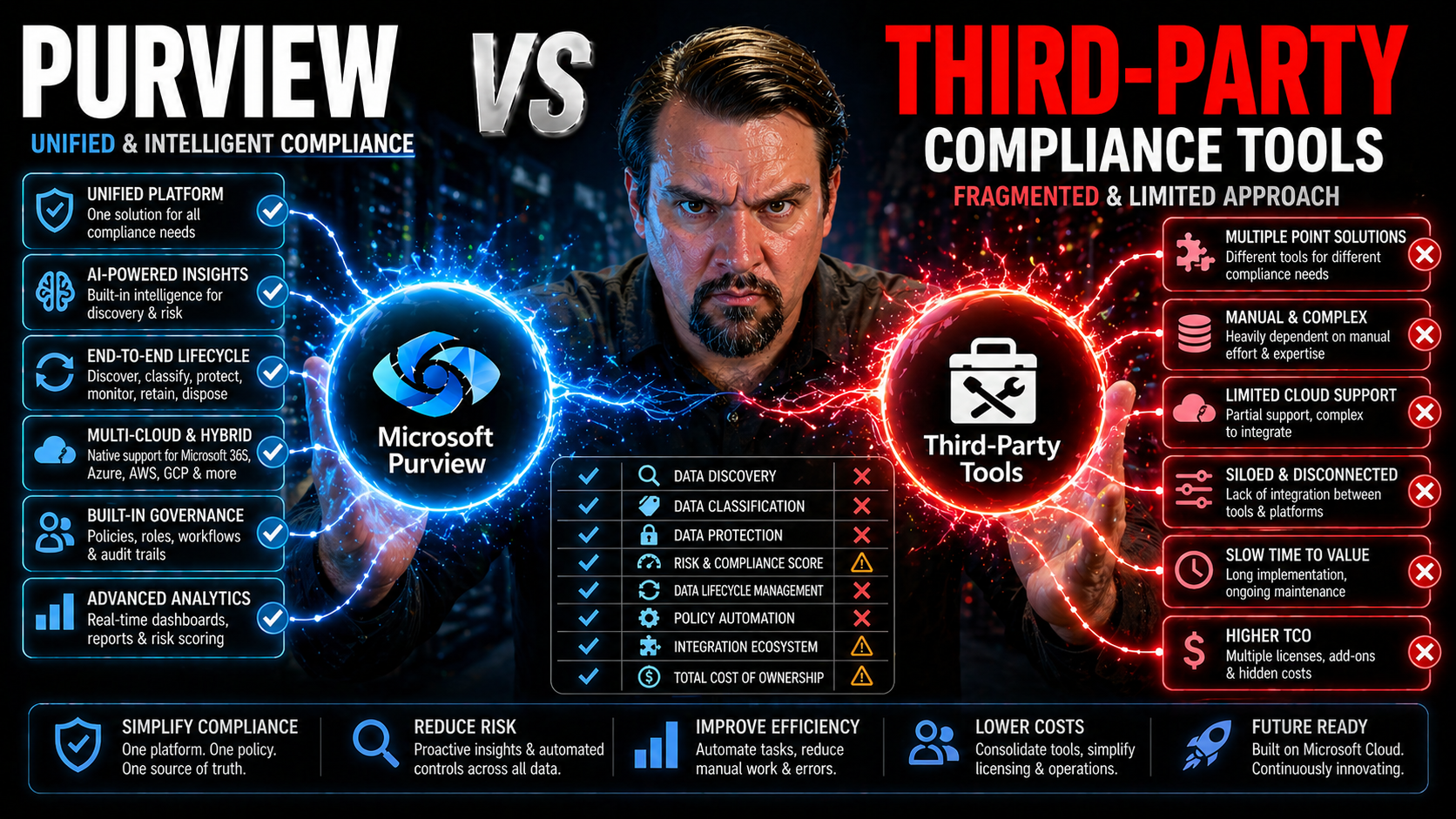
Quick Answer: Purview vs third-party compliance tools is an operating-model choice, not simply a feature checklist. Define the data sources, regulatory scenarios, integrations, skills, support model, and evidence requirements first. Then test the tools against representative use cases and choose the approach that gives accountable owners reliable controls without creating unnecessary complexity.
If you’ve ever tried steering a business through today’s regulatory minefield, you know compliance is no walk in the park. With an alphabet soup of laws like GDPR, HIPAA, and CCPA, organizations have to make serious moves to keep their data, users, and reputations safe. Microsoft Purview bursts onto the scene promising unified data governance across Microsoft 365 and Azure, while third-party compliance tools try to win hearts (and budgets) with deep integrations and features that go beyond Redmond’s backyard.
The question isn’t just “Which is cheaper?” or “Who’s got the most checkboxes?” It’s about which solution actually makes life easier in a world where your data sits everywhere—on-prem, in cloud apps, and beyond. You’ll want tools that actually talk to each other, can keep up with evolving laws, and won’t eat up your whole IT budget with hidden costs or maintenance headaches.
This guide digs into where Microsoft Purview shines, where it falls short, and how today’s leading third-party compliance tools step in to cover the gaps. You’ll see real challenges for hybrid and multi-cloud stacks, how different solutions play with industry regulations, and what it all means for your bottom line. Whether you’re a Microsoft loyalist, juggling multiple platforms, or somewhere in between, you’ll find context, clear comparisons, and actionable insights to make informed decisions and avoid compliance chaos.
Understanding Microsoft Purview and Third-Party Compliance Tools
Before rushing into tool lists and feature smackdowns, let’s set the stage for what this comparison really means. Microsoft Purview is Microsoft’s all-in-one answer to growing demands for data compliance and governance. It’s purpose-built for folks knee-deep in the Microsoft world, seeking an integrated platform to handle oversight, reporting, and discovery across their digital estate.
But not everyone’s living inside a Microsoft bubble. Third-party compliance tools exist to hit requirements that go beyond the Microsoft ecosystem, often stepping up for scenarios Microsoft doesn’t cover out-of-the-box. These vendors offer flexibility, deeper integrations, and multi-cloud support, catching the attention of hybrid IT leaders and companies in highly regulated spaces.
Think of this landscape as a spectrum: Purview leans into native, seamless Microsoft integration, while third-party solutions flex toward customization, broader reach, and niche regulatory needs. Understanding the essence of each approach—what they were built for, and where they naturally excel—will help you decide where to set your anchors. Up next, we’ll dig into core features, but for now, just remember: this isn’t just about checking boxes. It’s about finding a fit that’s right for your business model, your cloud journey, and your risk appetite.
Key Features of Microsoft Purview
- Data classification and labeling: Purview uses AI and machine learning to automatically discover and categorize sensitive data, then apply sensitivity labels that enforce protection and compliance policies.
- Compliance reporting and dashboards: Robust audit trails and compliance scorecards make it easier to prepare for regulatory reviews. You can dive deep into user actions by leveraging Purview Audit for advanced monitoring across your Microsoft estate.
- Native Microsoft 365 and Azure integration: Purview is built into the Microsoft stack, covering email, SharePoint, Teams, OneDrive, and even extending to Azure data sources for unified governance.
- Automated policies for insider risk and DLP: Automate detection of risky user behaviors and apply policies to prevent data loss, especially when paired with enterprise content management strategies.
Popular Third-Party Compliance Tools Explained
- OneTrust: Known for privacy management, consent tracking, and cookie compliance, OneTrust shines in organizations grappling with strict privacy mandates and needing granular control across cloud, on-prem, and SaaS apps.
- Varonis: Specializing in data security and analytics, Varonis offers deep visibility into file access, usage patterns, and insider threats—not only in Microsoft environments, but also across platforms like AWS and on-premises storage.
- Symantec (Broadcom): The Symantec Data Loss Prevention suite is favored by enterprises managing diverse endpoints and looking for powerful cross-platform DLP, email monitoring, and policy enforcement tied into enterprise security operations.
- TrustArc: With a focus on risk assessments, audit readiness, and ongoing privacy compliance, TrustArc suits businesses juggling global regulations and vendor risk management.
- Collibra: Often sitting atop multi-cloud data lakes, Collibra organizes enterprise data catalogs and manages governance workflows even in sprawling, non-Microsoft landscapes.
Unlike Purview, these vendors emphasize multi-cloud compatibility, complex third-party integrations, and industry-specific compliance workflows. They’re often chosen by organizations with one foot in Microsoft and the other everywhere else, or with requirements that demand deeper customization than Microsoft’s native tools provide out-of-the-box.
Comparing Compliance Coverage and Regulatory Support
So, you’ve picked your tools. But will they actually keep the regulators off your back? Modern compliance isn’t just about ticking off checklists—it’s about showing you’ve got controls in place for the regulations that matter most to your industry, wherever your data lives. Microsoft Purview promises strong coverage for mainstream standards like GDPR, CCPA, and SOX when your data is firmly in the Microsoft camp.
Third-party tools take a broader swing, targeting more niche and industry-specific regulations like GLBA, HIPAA, and PCI-DSS—sometimes getting down to tailored controls for financial services, healthcare, or global data residency quirks. For organizations with customer data spread everywhere—and with regulations looming large—the difference between “good enough” and “fully covered” can be costly.
This section will help you compare how Purview stacks up against leading third-party tools in meeting both general and sector-specific regulatory requirements. We’ll show you where coverage gaps lurk and how to pinpoint areas needing extra scrutiny, so your compliance program stands up to audits and won’t leave you blindsided when the next new law drops.
Industry-Specific Compliance Gaps: HIPAA, GLBA, CCPA, and More
- HIPAA (Healthcare): Purview covers basic data loss prevention and audit trails, but gaps emerge for healthcare orgs that need end-to-end protection for ePHI across non-Microsoft clouds. Third-party solutions often provide templates, risk assessments, and integrations tailored to HIPAA, making it easier to tick all the right boxes and avoid accidental data leaks.
- GLBA (Financial Services): Regulatory pressure in banking isn’t just heavy—it’s specialized. Purview can classify and label sensitive data, but mapping all GLBA requirements sometimes pushes teams to layer on extra controls. Vendors like Varonis and OneTrust offer prebuilt frameworks and detailed audit logs to address the granular needs of the financial sector.
- CCPA (California Privacy): Purview provides basic tools for data subject rights and DSRs, but competing products often excel in orchestrating deletion requests, automated consumer notifications, and consent tracking across complex app landscapes, ensuring businesses can respond quickly and comprehensively under CCPA.
- AI and Automation Risks: As AI-powered tools like Microsoft Copilot take off, compliance challenges change shape. Effective enforcement now means extending data loss prevention and sensitivity labels to AI-generated content, as highlighted in resources such as this guide on Copilot security and governance. Third-party vendors may outpace Purview in governing AI outputs and risky automation scenarios.
- Global Multicloud Deployments: Purview’s native controls work best in Microsoft data centers, but global businesses often need to meet overlapping, region-specific mandates. Third-party platforms like TrustArc or Collibra step up to handle multi-jurisdictional privacy, cross-border transfer rules, and hybrid-cloud edge cases Microsoft isn’t built to manage.
Support for FINRA, HIPAA, and PCI-DSS Standards in Purview and Third-Party Solutions
- FINRA: Purview delivers solid archiving and retention for communications in Microsoft 365, but third-party vendors fill gaps with surveillance, advanced auditability, and integration with broker-dealer systems common in financial markets.
- HIPAA: While Purview supports policies on data handling and user access, comprehensive HIPAA enforcement—especially involving connected apps—often needs advanced third-party controls. Data loss prevention across platforms is key to meeting cross-environment complexities.
- PCI-DSS: Purview’s out-of-the-box controls help, but documenting data flows and automating reporting for payment card data works better when paired with a third-party tool that can monitor network, storage, and cloud touchpoints in tandem.
- Configuration Nuances: Native features minimize manual setup in Purview, but third-party tools shine when you need tailored controls, connector management, and advanced policy mapping. This is especially relevant as businesses aim to reliably secure cloud automations and prevent compliance failures—check out these DLP setup strategies for more context.
Integration Challenges in Hybrid and Multi-Cloud Environments
Now let’s get honest about where things can get hairy: integrating compliance tools in real-world, multi-cloud setups. Middleware fixes and dashboards only get you so far before the seams start to show. Microsoft Purview is laser-focused on the Microsoft universe—plug it into Teams, SharePoint, or Azure and you’re rolling. But once you need to sync data from Salesforce, AWS, or SAP, you’ll face API quirks, laggy data syncs, and all sorts of headaches your vendor brochure didn’t mention.
If your organization’s infrastructure includes a mix of apps, clouds, or on-premises systems, maintaining unified compliance isn’t just a technical buzzword—it's a daily grind. The complexity multiplies when every vendor insists on setting up their own “single pane of glass,” making it tough to avoid gaps and cross-talk in compliance monitoring.
As you read on, you’ll see where integration bottlenecks actually come from, why data isn’t always as “real-time” as it should be, and how juggling multiple compliance dashboards can disrupt your workflow. For those tasked with enterprise governance, these operational hurdles can add up to real risks and resource drains that keep you up at night. Identify these pitfalls early so your compliance stack stays strong, even when your technology footprint gets complicated. For a broader context on keeping Azure governance tight, check out these governance strategy approaches.
API Limitations and Data Synchronization Delays
- Limited API Coverage: Microsoft Purview’s APIs focus on Microsoft data sources. When you try extending it to third-party platforms like AWS, Salesforce, or SAP, you’ll quickly find that only basic data types and events are covered. This limits the ability to build robust, bidirectional compliance flows outside the Microsoft family.
- Slow Data Syncs: Even if integration is possible, syncs between Purview and external apps are rarely real-time. Expect delays—sometimes hours or even a full day—when pulling compliance events or data lake updates into a centralized dashboard. This lag can derail quick incident response and compliance monitoring.
- Schema Mismatches: Purview’s data models often do not align perfectly with external platforms. Mapping user attributes, permissions, or data classification tags can require custom connectors or translation layers, which increases the risk of error and complicates audits.
- Security and Access Limitations: Third-party integrations may need elevated permissions or service accounts, opening up exposure to “shadow IT” risks or misconfigured roles. For insight on prowling for rogue third-party apps and shoring up governance, see this guide on managing Shadow IT in Microsoft 365 environments.
- Maintenance Burdens and Vendor Lock-in: Once you build custom syncs, you must constantly maintain them as APIs change. Microsoft’s roadmap can move fast, breaking integrations overnight and putting you at the mercy of two (or more) vendors’ upgrade schedules.
Workflow Disruptions When Using Multiple Compliance Tools
- Fragmented User Experience: Staff must jump between separate dashboards or tools, making compliance a patchwork task and decreasing productivity.
- Alert Fatigue: Multiple tools spit out duplicate or conflicting alerts, causing users to overlook real threats.
- Policy Conflicts: Different tools may enforce similar, but slightly misaligned, policies—leading to inconsistent controls or outright errors.
- Inconsistent Reporting: When compliance evidence is split across platforms, audits become marathon data hunts instead of streamlined checks.
- Best Practices: Consolidate alerts, centralize policy management where possible, and keep communication tight between admin teams to reduce confusion and errors.
Cost Considerations and Total Cost of Ownership
The price tag on a compliance tool is rarely the whole story. Sure, Microsoft Purview might come baked into your Microsoft 365 license or show up as a simple add-on. Third-party vendors, on the other hand, break out cost by features, users, and sometimes the number of integrations you enable. But the true cost of ownership lies beneath the surface—especially when you start tying everything together in a hybrid environment.
Big surprises often come from professional services, custom connector development, and ongoing maintenance. If you’re merging Purview with other tools, you’re not just budgeting for purchase price and subscriptions; you’re also footing the bill for integration, troubleshooting, and upgrading to keep up with compliance law changes and vendor API shifts.
In the next sections, we’ll peel back the layers around integration costs, licensing differences, and the sunk costs that can eat away at your ROI. This way, your procurement and governance teams can budget wisely and avoid sticker shock down the road. Want a deeper dive on why transparency alone isn’t enough for true IT cost control? You might want to check out how real accountability beats showback alone in managing cloud and compliance spend.
Hidden Costs of Custom Integrations and Maintenance
- Professional Services: Building and deploying custom integrations—especially those that bridge Microsoft Purview with third-party tools—often needs outside experts. Consulting fees quickly add up during initial setup, requirements gathering, and cross-platform troubleshooting.
- Custom Connector Development: If your compliance needs require linking systems not natively supported by Purview, you’re likely investing in custom code or middleware. This means extra testing, documentation, and, often, support contracts for ongoing updates.
- Integration Maintenance: Once connectors are in place, maintenance becomes recurring. API changes, underlying schema tweaks, or vendor upgrades can break workflows, forcing you to keep development resources on standby or pay for managed support.
- Scaling Costs: As your organization grows or adopts more cloud platforms, scaling integrations gets pricey—both financially and operationally. More endpoints mean more orchestration, support hours, and sometimes hardware or SaaS expansion.
- Training and Change Management: Each new integration or tool twist means training compliance officers and admins. Documentation, help desk tickets, and disruption to daily routines must be budgeted, not just the initial rollout costs.
Smart budgeting means planning for these hidden costs, not just the bill from your main vendor. Robust integration planning early on pays dividends compared to chasing issues as they pop up down the road.
Licensing Differences Explained: Purview Versus Third-Party Tools
Microsoft Purview licenses are typically bundled as part of the Microsoft 365 E5 or via add-ons, with pricing tied to features and storage/consumption. This is convenient for those all-in on Microsoft. Third-party compliance tools often use per-user, per-feature, or tiered subscription models—sometimes charging extra for connectors, managed services, or advanced modules.
For procurement, this means a careful review of user counts, data volumes, and projected regulatory demands is necessary. Hybrid environments should expect costs to rise as the number of integrated applications and regulated domains grows. Compare each vendor’s pricing model against your current and as-you-grow needs to avoid licensing surprises.
Strengths and Weaknesses: Purview vs Third-Party Compliance Tools
Let’s face it—no compliance tool is perfect, and picking the right one depends on your ecosystem, complexity, and regulatory headaches. Microsoft Purview plays to its strengths with tight Microsoft 365 and Azure integration, seamless labeling, and automation that’s hard to match for all-in tenants. But like any specialized platform, it stumbles when you step too far outside the Microsoft world or add too many bespoke requirements.
Third-party tools punch above their weight when enterprises run multi-cloud, multi-vendor, or hybrid setups, offering customization, partnerships, and integration scripts built for the messy realities of modern IT. They also tend to shine in regulated industries that expect fast responses to new mandates and demand controls that fit more than just the Microsoft bill.
This section explores the major pros and cons of each approach, arming you with the context needed for a scenario-driven evaluation. Don’t get caught up imagining governance is solved once you snag a tool. It takes a blend of people, process, and technology—a point hammered home by these perspectives on the real discipline behind Microsoft 365 governance and what’s required for true control in complex data environments.
Purview Strengths and Limitations
- Strengths: Seamless integration with Microsoft 365 and Azure; unified policies for DLP, audit, and classification; outstanding automation for discovery and reporting. Native controls help teams manage document lifecycle, as outlined in this guide on preventing document chaos with Purview.
- Limitations: Limited out-of-the-box support for non-Microsoft platforms; friction and potential gaps when integrating third-party data sources; slower to adapt to new industry-specific regulations or hybrid cloud quirks.
When Third-Party Tools Make Sense
Third-party compliance tools deliver the most value in organizations with extensive non-Microsoft apps, complex multi-cloud architecture, or specialized regulatory demands (like HIPAA, PCI-DSS, or financial sector rules). These solutions excel when granular integration across platforms is critical, when you need flexible policy management beyond Microsoft defaults, or when handling compliance for hybrid or geographically distributed environments where a single-vendor approach simply can’t stretch far enough.
If regulatory agility, cross-platform coverage, or deep customization is on your must-have list, pairing Purview with the right third-party tools often makes the compliance journey smoother, safer, and more future-proof.
Choosing the Best Path Forward for Compliance and Governance
Finding the sweet spot between Purview and third-party compliance tools is less about hype and more about what really protects your business. According to Gartner, over 70% of enterprises using only native compliance tools in hybrid environments report hidden gaps or blind spots in coverage—especially with industry regulations like HIPAA, PCI-DSS, and FINRA. If your stack includes AWS, Salesforce, or SAP, be ready for API headaches and surprise integration costs.
Expert opinion from Forrester points out that hybrid approaches (combining Purview with specialized third-party tools) offer broader coverage but demand solid change management and technical alignment. For example, a global bank found that connecting Purview to non-Microsoft apps required $220K in custom development and ongoing maintenance every year. That’s a serious dent in the so-called “single pane of glass” promise.
If you’re in a tightly regulated sector, don’t sleep on niche tools—a healthcare provider using only Purview missed a major HIPAA audit metric, while a retail finance team had to add third-party PCI tools for transaction traceability. The choice isn’t binary: let your industry standards, risk appetite, and budget do the talking.
No matter your ecosystem, governance frameworks that anticipate tool sprawl—especially as AI agents start roaming your systems—are just as critical as selecting the right compliance software. The best path forward is one that matches your real-world risks, plugs regulatory holes, and can bend without breaking as technology rolls on.
Evaluate compliance tooling beyond feature lists
- Map the highest-risk data and compliance scenarios.
- Assess Microsoft 365 integration, cross-platform coverage, and evidence requirements.
- Include policy ownership, support, implementation, and ongoing operating cost.
- Test alert quality, investigation workflow, exports, and user impact with real cases.
Use Microsoft Learn’s Purview documentation as the current reference for Microsoft-native capabilities.
Frequently asked questions
Do third-party tools always provide better governance?
No. The best choice depends on the required scenarios, existing platform investment, and ability to operate the controls consistently.
🎧 You Should Also Listen To
These episodes expand the governance and protection context behind this Microsoft Purview topic.
- Microsoft Purview – Simply Explained provides the broad platform view for compliance, audit, retention, and information governance.
- Microsoft Purview Information Protection – Simply Explained explains classification and persistent protection for sensitive data.
- Microsoft Purview Data Loss Prevention (DLP) – Simply Explained adds the policy and prevention layer for risky data movement.
Last reviewed: July 2026. Compliance-tool capabilities and integrations change frequently.

Microsoft MVP | Host of M365.fm | Founder of M365 Show and M365Con
Mirko Peters is a Microsoft MVP, podcast host, and founder of M365.fm, M365 Show, and M365Con. His work connects Microsoft practitioners through podcast interviews, livestreams, and community events.
At M365.fm, Mirko hosts conversations with Microsoft MVPs, product experts, architects, and community contributors. Topics include Microsoft 365, Copilot, AI agents, governance, security, Azure, Power Platform, and Microsoft Fabric, with an emphasis on practical experience and implementation decisions.
M365.fm is the podcast and learning platform. M365 Show brings experts together for livestreams, while M365Con provides an online conference setting for community learning.
Official website: Mirko Peters (https://www.mirkopeters.com/). Recognition: Mirko Peters — Microsoft MVP profile (https://mvp.microsoft.com/de-DE/mvp/profile/9b0ca797-db5a-493a-a845-8b9158046cf5). Connect on LinkedIn (https://www.linkedin.com/in/m365showpodcast/).




