
Secure Meetings Best Practices for Microsoft Teams and Beyond
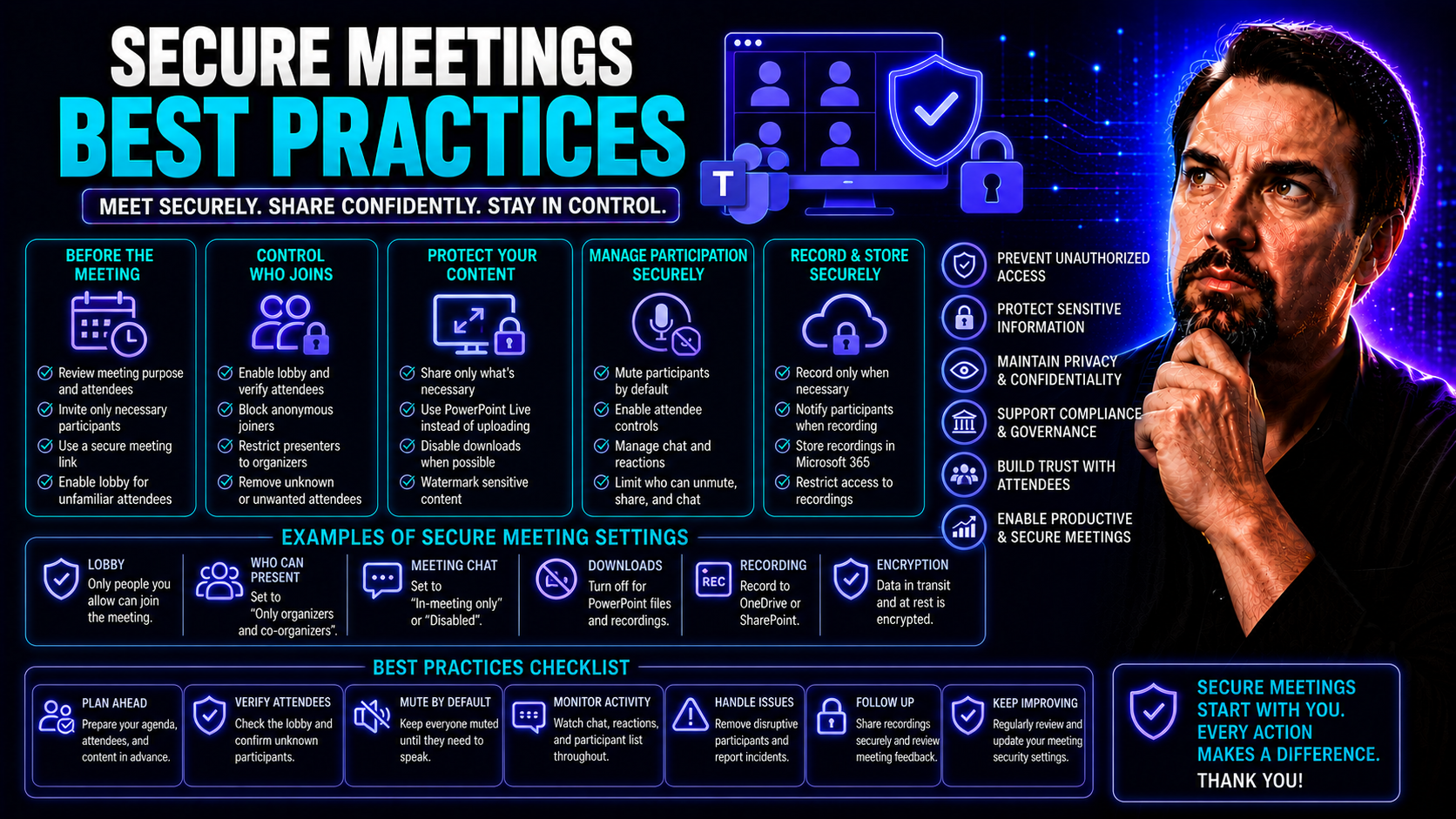
Keeping your virtual meetings secure isn’t just a nice-to-have—it’s non-negotiable these days. Sensitive business, customer, and personal information regularly gets shared across platforms like Microsoft Teams. If you don’t protect that data, you risk leaks, disruptions, and even regulatory fines.
Meeting security is about more than passwords or closing the door after everyone arrives. It’s a full package—using the right platforms, setting up access controls, enforcing team habits, and understanding who’s really on the other end of the video line. Both individuals and organizations share responsibility for protecting every session.
We’ll walk through all the essentials, from choosing platforms with enterprise-grade security, to managing links, monitoring participants, and keeping communication tools safe. Special attention is given to regulated fields like healthcare and government, but everyone gets value from a strong, layered approach. You’ll see how these best practices work on Microsoft Teams and beyond, setting you up to lock down your meetings the right way.
Core Security Measures for Secure Virtual Meetings
Getting virtual meetings secure starts with the basics: the choices you make before anyone even joins the call. The two pillars are picking a trusted, secure platform and then configuring all those security settings so you’re not just leaving things to chance. These foundational moves work as your front line against unwanted guests or leaks—think of them as your locks and alarms.
Whether you use Microsoft Teams for work, another platform for client chats, or a mix of tools, the real art is knowing what features support your security goals. It’s not just about what’s “in the box”—it’s also about turning on, fine-tuning, and managing things like encryption, multi-factor authentication, and access approvals so they actually make a difference.
Start smart, and you make life tough for attackers and easy for your teammates. The sections below dig into why platform selection and access controls—especially passwords and waiting room approval—are critical. Stick to proven steps and you’ll have a strong foundation, no matter what kind of meetings you run.
Choose a Secure Virtual Platform With Enterprise-Grade Security
- Look for End-to-End Encryption: The gold standard for any secure virtual platform is end-to-end encryption. This means only the participants in your meeting can see or hear what happens—nobody else, not even the service provider. If your provider doesn’t offer it, think twice before trusting them with sensitive data.
- Check for Compliance Certifications: Top choices like Microsoft Teams and Zoom advertise certifications like SOC 2, ISO 27001, and, if you’re in healthcare, HIPAA compliance. These aren’t just logos for show—they signal that your meeting platform is held to strict security and privacy standards.
- Evaluate Integration with Your Existing Ecosystem: Platforms that play nice with your company’s existing tools reduce weak spots. If your team’s invested in Microsoft 365, Microsoft Teams is built for connecting with SharePoint, OneDrive, and even Power BI. For advice on which option best fits your situation—say, comparing dashboard integration—see this deep dive: Teams vs. SharePoint dashboard showdown.
- Look for Advanced Access Controls and Activity Logs: The best meeting platforms allow you to restrict access, set up waiting rooms, and get a full audit trail of who joined, when, and from where. Audit logs and security reports help you investigate any incident quickly, providing real accountability.
- Don’t Settle for Default Settings: Platforms often ship with security features turned off for convenience. For example, Microsoft Teams defaults aren’t very strict, which can make it easier for data leaks to happen through guest access or careless sharing. Take inspiration from this practical guidance on strengthening Teams environments: hardening Microsoft Teams security.
- Insist on User Lifecycle and Permission Management: Make sure the platform lets you easily add and remove users, reset credentials, and manage permissions in one place. This keeps things clean as people come and go from your team.
Smart security starts with your choice of tools. Take time to select the right platform and get the most out of its security features—your future self (and your compliance manager) will thank you.
Require Strong Passwords and Waiting Room Approval
- Set Unique Passwords for Every Meeting: Never stick with the default password or reuse passwords across meetings. If your meeting platform allows, enable random password generation and set a minimum strength—no “12345” allowed.
- Use Waiting Rooms or Lobbies for All Sessions: Activate the waiting room feature so each attendee needs to be manually approved before joining. This blocks unwanted guests even if someone gets ahold of the invite link. Microsoft Teams, for example, lets you admit only verified users or restrict entry to people in your organization.
- Change Passcodes Regularly: Mix up passwords for recurring meetings—especially when attendees change. Making it a habit to rotate passcodes trains your team to take access control seriously.
- Train Hosts to Verify Attendees: Before admitting anyone from the waiting room, have hosts double-check names and emails. This reduces the risk of impersonators sneaking in with fake identities.
Layering passwords and waiting rooms together puts a solid roadblock in front of uninvited guests and keeps disruptions to a minimum—no crashers, no nonsense.
Preventing Unauthorized Access and Managing Participants
Even with passwords and quality platforms, your meeting isn’t automatically safe once it starts. Real security means keeping your eyes open during every session. Managing who’s in the room and what they’re allowed to do is how you prevent leaks, disruptions, or unexpected surprises that no one wants to deal with.
Hosts and co-hosts need to be proactive about watching participant lists, flagging suspicious behavior, and intervening when necessary. This is especially important in large meetings or whenever the stakes are high—think legal reviews, product launches, or anything involving sensitive data. Just because someone made it into the meeting doesn’t mean they belong there.
Using built-in tools and having clear rules helps everyone stay sharp. Actively managing participants shows both your team and your guests that you’re serious about protecting the content and the people involved. The next section breaks down exactly how to spot and handle issues in real time.
Watch Uninvited Guests and Monitor Participants Closely
- Regularly Review the Participant List: Keep an eye on who joins and who’s still present throughout the meeting—especially if it’s a public or widely shared link. Look for names you don’t recognize or anyone doubling up (same name, multiple logins).
- Use Platform Alerts or Security Features: Microsoft Teams and other platforms can notify you when someone tries to join anonymously or from a new device. Set up these notifications whenever possible to catch irregular access instantly.
- Watch for Behavioral Red Flags: If someone starts asking odd questions, attempts to redirect the conversation, or uses a profile picture or name you’ve never seen before, take action. Don’t be afraid to boot suspicious participants and investigate after.
- Leverage Teams Audit Controls: A five-layer approach for Teams—like enforcing multi-factor authentication (MFA), managing guest access, and maintaining audit logs—provides forensic tools for tracing any incident. Check this resource on security hardening for more tips: Teams security hardening best practices.
Active monitoring is how you spot trouble before it turns into a bigger problem. If securing the front door was important, minding the living room makes sure no one’s hiding in the closet.
Secure Communication and Collaboration Tools
Security during a virtual meeting isn’t just about who’s in the room; it’s also about how your team communicates and shares files while the call is live. The right platforms give you features—like encrypted chat and structured file permissions—that help keep sensitive content from straying into the wrong hands.
When people can drop links, files, or screenshots with a click, risks ramp up. Attackers often use chat links or fake documents to slip in malware or phish for credentials. This is where both the technology and your team’s habits make all the difference. Knowing what counts as a safe share, and what should be ignored, keeps everyone better protected.
Microsoft Teams, for example, offers governance features and compliance guardrails that keep conversations and files locked up tight. Platforms like Teams empower organizations to define the rules, and users to stick to them. The upcoming section zooms in on what to look for and how to make chat and file-sharing a security asset, not a liability.
For further tips on how Microsoft Teams structures secure, efficient collaboration, see Teams Governance and how it transforms chaos into secure collaboration.
Secure File-Sharing and Be Cautious With Chat Links
- Rely on Built-In, Encrypted File Sharing: Microsoft Teams and similar platforms offer secure channels for sharing sensitive documents. Files stay encrypted both in transit and at rest, cutting the risk of interception or accidental leaks.
- Control Document Access and Permissions: Only share files with those who need them, and use structured permissions to avoid accidental exposure. Governance tools allow you to set granular file access rules and track who opens what, addressing mistakes before they become disasters (see examples in this Teams governance overview).
- Be Skeptical of Unexpected Chat Links: If a link appears in chat and wasn’t expected, treat it as suspicious—even if it looks like it came from a colleague. Phishing and malware often sneak in as seemingly harmless URLs. When in doubt, double-check directly with the sender on another channel before clicking.
- Educate your Team About Social Engineering Tactics: Train everyone to spot urgent requests for credentials or odd link formats in chat. Teams can fall for impersonation schemes during live meetings. Create easy reporting processes if anyone notices something off.
- Vet All Content Before Downloading: Never download files from unknown sources, and always review the sender’s identity, especially if the document “requires urgent attention.” Fake files can look deceptively legit.
Safe sharing and vigilant clicking cuts off a whole avenue of attacks before they can start. It’s not about paranoia—it’s just smart, practical protocol.
Meeting Lifecycle and Link Management Best Practices
Security doesn’t end once everyone’s in the virtual room. How you create, distribute, and end meetings matters just as much. Every step in a meeting’s life—the invitation, link sharing, admitting participants, wrapping up—offers opportunities for things to go right or very wrong.
One big pitfall is link management. Publicly sharing invite links (say, posting them to social media or a public web page) opens the door for anyone to crash your session. Just as risky is leaving meetings running after business wraps up, giving unwelcome guests a chance to slip in while no one’s watching.
The key is to keep meeting links well-guarded and to end virtual meetings promptly. Organizational policies and platform features can help enforce these habits, but everyone—from IT to your meeting hosts—plays a role in reducing risk at each lifecycle stage. Next, let’s cover the practical steps to manage links and session durations the right way.
Keep Meeting Links Private and Close Meetings Promptly
- Never Share Meeting Links Publicly: Keep your meeting URLs out of social media, public forums, or unsecured calendars. Only distribute invitations through platforms like Microsoft Teams, secure company emails, or trusted calendar invites.
- Use Secure Distribution Channels: Within Teams, use the built-in invitation tools to limit distribution to authenticated users. If you need to invite outside guests, double-check their addresses and avoid generic “anyone can join” links.
- End Meetings as Soon as Business Wraps: Don’t leave meetings running, even if it’s convenient. A session left wide open is an open door for eavesdroppers or uninvited participants to listen, record, or hijack the discussion. Always wrap up and close the session as soon as your agenda is done.
- Review Attendees Before Ending the Meeting: Quickly scan the participant list before everyone logs off. Remove any unknown or duplicate entries, and check for late-joiners you don’t recognize.
- Audit and Manage Past Meeting Links: After meetings end, make sure that recurring links are reset or invalidated when group membership changes. Close out old sessions on your platform to avoid “zombie” meetings staying accessible longer than intended.
Paying attention to these link and session controls minimizes the risk of outsiders dropping into your sessions, even after everyone else has gone home. It’s the online equivalent of locking up after you leave the building.
User Education and Building Security Awareness
You can buy great tools and set all the right platform controls, but meeting security quickly falls apart if your team doesn’t know what to watch for. User education is the underdog hero of the security world—a well-informed team can spot risks and block threats before they take root.
Keeping employees updated goes beyond annual training modules. You want to build an ongoing culture that rewards curiosity, shares security stories, and keeps everyone engaged with the latest threats—especially for folks working remote or joining meetings from home.
Organizations using Microsoft Teams should supplement technical controls with regular reminders, success stories, blog updates, and easy-to-digest tips. For a practical look at how governance creates confident, secure collaboration, check out this Teams governance guide. The next part shows how to train and empower users so the security mindset sticks for good.
Train Employees to Stay Secure and Leverage Educational Resources
- Help Remote Employees Secure Their Home Network: Encourage using strong, unique Wi-Fi passwords and updating router firmware regularly. Advise employees to avoid public Wi-Fi for sensitive meetings whenever possible. Even a basic firewall can make a big difference.
- Share Educational Blogs, Success Stories, and Security Tips: Regularly send out short, practical tips—either by email, chat, or internal wiki—to highlight emerging attacks and remind users of practical safeguards. Storytelling (“customer stories”) sticks better than dry lists of rules. For example, Teams governance case studies can illustrate what works.
- Develop Strong Security Habits: Teach users to log out of meetings promptly, lock devices when stepping away, and double-check any chat links or file shares before clicking. Simple routines are the backbone of real security.
- Invest in Ongoing Training Initiatives: Offer role-based training, regular refreshers, and self-paced resources—so everyone knows what’s expected of them. For more on using Teams and its broader capabilities, show users how new tools like Microsoft Copilot can help reduce mistakes while boosting productivity (see Microsoft Copilot productivity prompts).
- Emphasize Reporting and Peer Vigilance: Make it easy (and encouraged) for anyone to report suspicious messages, odd attendees, or possible mistakes. Learning from near-misses or real incidents is how you get better as a team.
Continuous education and peer support transform a bunch of individuals into a real security-conscious workforce. Tools protect the data, but it’s people who stop the mistakes.
Secure Meeting Practices for Healthcare, Government, and Regulated Industries
Some industries—like healthcare, government, manufacturing, and retail—face regulations so strict that “good enough” meeting security simply isn’t an option. Here, compliance isn’t just about a checklist; it’s legal and ethical responsibility, backed by the threat of major fines or even criminal penalties if you get it wrong.
Collaboration in these sectors means juggling patient records, state secrets, or supply chain blueprints, all while proving to auditors your meetings are locked down with ironclad trails and identity checks. HIPAA, FISMA, GDPR, and industry-specific standards shape not just what you secure but how you prove it’s secure in everyday use.
Smart organizations don’t just lean on platform defaults—they tighten controls, use specialized tools, and document everything. Real customer stories and digital transformation journeys showcase the value of tailored approaches that protect core operations without slowing innovation. The next section lays out what these high-stakes environments require to keep remote employees and sensitive data safe.
Compliant Security Approaches for Healthcare, Government, Manufacturing, and Retail
- Enable Audit Logs and Detailed Access Reports: Keep a record of every login, link click, and file share during meetings. Microsoft Teams and similar platforms offer audit trail features, which are vital for passing regulatory audits and spotting suspicious patterns.
- Use Industry-Specific Compliance Certifications: Platforms must support healthcare (HIPAA), government (FISMA), or retail (PCI DSS) requirements—both technically and with transparent documentation. Pick tools that regularly update compliance features as rules change.
- Leverage Strong Identity Management: Require multi-factor authentication (MFA), strict guest access controls, and user lifecycle management controls to block former employees and unauthorized devices from ever joining a session. Only “need-to-know” staff get access.
- Provide Secure, Region-Specific Data Handling: For global meetings—especially in healthcare and government—choose platforms that let you route data through local, regulated data centers to avoid cross-border privacy concerns.
- Highlight Proven Success Stories: Real-world examples—like digital transformation projects that streamlined healthcare collaboration without breaching patient privacy—make a case for blending innovation and compliance. Customer stories from manufacturing firms show how restricting team access prevented intellectual property leaks while maintaining high productivity.
- Tailor Governance Policies and Training: Go beyond technical controls; develop clear, industry-focused rules for meeting etiquette, device use, and data sharing. Comprehensive user training ensures compliance is part of day-to-day habits, not just enforced once a year.
For high-compliance sectors, these steps aren’t a wish list—they’re the new minimum. Building your meeting security playbook around real-world risks and industry regulations keeps your people and your business truly protected.

Microsoft MVP | Host of M365.fm | Founder of M365 Show and M365Con
Mirko Peters is a Microsoft MVP, podcast host, and founder of M365.fm, M365 Show, and M365Con. His work connects Microsoft practitioners through podcast interviews, livestreams, and community events.
At M365.fm, Mirko hosts conversations with Microsoft MVPs, product experts, architects, and community contributors. Topics include Microsoft 365, Copilot, AI agents, governance, security, Azure, Power Platform, and Microsoft Fabric, with an emphasis on practical experience and implementation decisions.
M365.fm is the podcast and learning platform. M365 Show brings experts together for livestreams, while M365Con provides an online conference setting for community learning.
Official website: Mirko Peters (https://www.mirkopeters.com/). Recognition: Mirko Peters — Microsoft MVP profile (https://mvp.microsoft.com/de-DE/mvp/profile/9b0ca797-db5a-493a-a845-8b9158046cf5). Connect on LinkedIn (https://www.linkedin.com/in/m365showpodcast/).




