Uncovering the True Cost of Enterprise AI Beyond the $30 License Fee
When organizations first encounter the pricing structure for enterprise artificial intelligence assistants, the conversation usually stops at the flat per-user subscription rate. For many IT leaders, budgeting for modern productivity tools feels straightforward: take the head count, multiply by the monthly sticker price, and project the annual software expense. However, experienced technology executives quickly discover that the initial software quote is merely the entry ticket to a much broader economic ecosystem. Beyond the standard baseline fee lies a complex matrix of operational demands, hidden infrastructure dependencies, and unexpected workflow adjustments that quietly reshape IT budgets.
To truly understand why enterprise deployments often hemorrhage cash without delivering the expected returns, we must examine the comprehensive financial footprint of modern AI adoption. This phenomenon—frequently referred to in technology circles as the "Copilot tax"—encompasses everything from underlying compute consumption and token overhead to data governance remediation and operational inefficiencies. Leaders who fail to account for these variables often find themselves facing inflated overhead, underutilized seats, and stalled digital transformation initiatives. Fortunately, by implementing rigorous tracking, proactive governance, and strategic contract negotiations, organizations can regain control of their AI spending and turn these powerful tools into genuine drivers of productivity.
This comprehensive blog post explores the hidden financial realities of enterprise AI deployments, breaking down the specific cost drivers that frequently catch IT budgets off guard. We will also explore actionable auditing strategies, alternative tooling options, and best practices for building a sustainable financial model that protects your bottom line while maximizing innovation.
If you want to dive deeper into this subject with real-world architectural insights and security considerations, be sure to check out the accompanying podcast episode, The Copilot Tax: Hidden Costs of Enterprise AI Strategy.
What Is the Copilot Tax?
Defining Copilot Tax
When technology leaders discuss the true price of implementing tools like Microsoft Copilot within an organization, they are rarely referring solely to the standard monthly user fee. The term "copilot tax" describes the full economic and operational impact that generative AI introduces to a business ecosystem. Investing in an enterprise AI assistant is not merely a software purchase; it is an organizational commitment that establishes a completely new baseline for daily workflows, data handling, and infrastructure readiness. Because these tools rely heavily on unstructured internal data, companies are forced to immediately address long-standing technical debt, particularly regarding data governance, access controls, and information architecture.
Microsoft and other enterprise software vendors introduce these tools to shift the baseline of global productivity upward, but the structural adjustments required to support them fall squarely on the enterprise. Consequently, technology leaders must evaluate how an AI deployment alters not only individual worker tasks but also departmental budgets, cloud resource consumption, and administrative workloads across the entire enterprise.
Why Copilot Costs Add Up
It is easy to assume that software expenditures will remain static based on active user counts, but several invisible factors routinely inflate enterprise AI spending. Without continuous monitoring, organizations frequently encounter unexpected line items that drain financial resources:
- Billing rates shift dynamically depending on the specific feature tiers, premium models, and advanced capabilities utilized by different departments.
- Credits and consumption pools deplete rapidly as internal developers design, test, and run custom multi-agent workflows.
- Enterprise licensing models often pool capacity across the entire organization, obscuring which business units are driving the heaviest compute consumption.
- Token consumption scales aggressively as user adoption deepens and employees engage in longer, more complex iterative prompt sessions.
- Compute demands multiply exponentially when assistants process massive enterprise documents, transcripts, and extensive code repositories.
- Idle licenses—often called zombie licenses—continue to draw monthly fees even when assigned to employees who rarely use the software.
- The "verification tax" demands valuable human working hours to review, validate, and fact-check AI-generated outputs for accuracy and compliance.
- Operational inefficiencies, stemming from inadequate onboarding and poor prompt engineering, waste both valuable employee time and system resources.
Tip: Technology auditors and financial advisors strongly recommend conducting regular, automated reviews of software utilization to prevent paying indefinitely for idle user seats and wasted consumption tokens.
Impact on AI Budgets
The financial ripple effects of deploying enterprise AI can destabilize even carefully planned annual budgets. Organizations frequently budget for the initial rollout phase only to watch operating costs accelerate as employees discover new ways to integrate the assistant into daily tasks. Because generative AI usage is fluid and highly dependent on user behavior, forecasting these expenses accurately remains a significant challenge for IT financial management teams.
| Cost Factor | Description |
|---|---|
| Licensing Costs | The baseline monthly or annual price per active user seat. |
| Usage-Based Fees | Variable charges driven by compute scaling, API calls, and premium model access. |
| Training Costs | Investments in internal education, workshops, and change management programs. |
| Auto-Enabled Seats | Expenses incurred from user licenses provisioned automatically but left unutilized. |
| Storage Growth | Expanded cloud storage requirements as AI assistants index and process enterprise data. |
| Shadow AI | Unsanctioned tools adopted by individual departments that create surprise organizational expenses. |
| Unmanaged Renewals | Contract renewals processed automatically without auditing actual user engagement. |
| Optimization Strategies | Investments in governance software, auditing platforms, and administrative oversight. |
Industry research indicates that only a fraction of organizations achieve successful, large-scale deployment across their entire workforce. Many companies purchase enterprise licenses eagerly but struggle to move past initial pilot phases. Often, the promised plug-and-play user experience requires extensive backend configuration, permission remediation, and custom integration that management did not anticipate. This execution gap leads directly to wasted capital and unrealized strategic value.
Main Cost Drivers of Copilot AI

Subscription and Usage Fees
Per-User and Usage-Based Pricing
While base licensing fees establish the foundation of software expenditures, the total cost of ownership routinely outpaces initial estimates. Standard enterprise tiers typically start at $30 per user monthly, but organizations quickly encounter auxiliary charges for consumption-based compute, advanced AI API routing, and premium reasoning models. Depending on the complexity of the deployment, these variable fees can inflate total expenditures significantly.
| Feature/Cost Aspect | Microsoft Copilot | Other Enterprise AI Tools |
|---|---|---|
| Base Licensing Fee | $30 per user/month | Varies widely by vendor and tier |
| Additional Usage Charges | Frequent (Compute, AI APIs, premium model calls) | Varies by vendor |
| Total Cost Increase | 40% to 100% over base licensing depending on utilization | Varies by vendor |
| Complexity of Pricing | High (mandatory ecosystem prerequisites, tiered add-ons) | Varies by vendor |
Unpredictable pay-as-you-go billing structures complicate long-term financial forecasting, forcing IT departments to maintain generous budgetary buffers just to cover unexpected spikes in automated workflow executions.
Idle Licenses and Token Waste
Zombie licenses represent one of the most persistent drains on corporate software budgets. When employees leave the company, change roles, or simply lose interest in the tool, their assigned licenses frequently remain active indefinitely. Simultaneously, token waste occurs when users submit inefficient, redundant, or overly broad queries that consume excessive compute cycles without yielding actionable results. Regular administrative audits are vital for identifying and reclaiming these wasted resources.
Engineering Overhead
Training, Onboarding, and Support
Unlocking the true potential of an enterprise AI assistant requires more than simply flipping a provisioning switch. Organizations must invest heavily in comprehensive training programs, continuous onboarding, and internal helpdesk support. If end users lack adequate instruction on prompt engineering and workflow integration, projects frequently stall out in "pilot purgatory"—a state where the software is technically deployed but provides minimal return on investment while consuming ongoing administrative bandwidth.
| Cost Category | Primary Cost Driver |
|---|---|
| Platform licensing | Total active user count and required feature tiers |
| Model usage | Query volume, context window size, and agent complexity |
| Operations and support | Number of active business workflows and supported departments |
Integration and Workflow Challenges
Compatibility Issues
Connecting modern generative AI tools to legacy enterprise data stores and line-of-business applications is rarely a trivial exercise. Organizations frequently need to engage specialized consultants, purchase middleware, or build custom connectors to establish secure data pathways. These technical hurdles extend project timelines and increase overall implementation costs.
Workflow Disruptions
When an AI tool fails to integrate smoothly into daily business processes, employee productivity can actually experience a temporary decline. Low adoption rates mean companies continue paying for advanced capabilities that go unused. Furthermore, the lack of native, granular analytics within many enterprise platforms makes it difficult to measure true return on investment accurately.
Note: Establishing strong cross-functional governance and scheduling routine usage reviews are essential practices for avoiding hidden operational expenses and maximizing technological efficiency.
Hidden and Operational Expenses
Productivity Losses
Deploying generative AI without a clear strategy can inadvertently introduce friction into daily operations. While assistants are designed to automate repetitive tasks, employees who lack proper training often spend more time attempting to craft effective prompts or troubleshooting incorrect outputs than they would have spent completing the task manually. This confusion frequently drives up query volumes and token consumption without yielding meaningful productivity gains. Administrative oversight teams frequently emphasize that unmonitored deployments create a heavy operational burden that masks itself as technological progress.
Tip: Implement quarterly usage audits to identify inactive user seats, eliminate wasted token allocations, and refocus training efforts on high-value business workflows.
Security and Compliance Risks
Overlooking security and compliance considerations during an AI rollout can expose an organization to severe financial and reputational liabilities. Because enterprise AI tools search across connected document repositories, misconfigured permissions frequently allow unauthorized users to access sensitive corporate information, triggering compliance violations and potential regulatory penalties.
| Risk Factor | Impact on Operational Expenses |
|---|---|
| Misconfigured permissions | Unauthorized data access, compliance violations, and expensive remediation exercises |
| Oversharing of sensitive data | Potential data breaches, severe financial losses, and reputational damage |
| Content sprawl | Inefficient resource allocation, bloated storage costs, and difficult discovery processes |
- Licensing costs frequently escalate when departments scramble to purchase additional security modules to remediate permission gaps.
- Non-compliance penalties arise swiftly when sensitive intellectual property or personally identifiable information is exposed improperly.
- Cybersecurity incidents resulting from unmanaged AI connectors can inflict catastrophic financial damage on the enterprise.
Mitigating these risks requires establishing crystal-clear data governance policies, applying sensitivity labels consistently, and conducting rigorous, ongoing access reviews across all connected document stores.
Data and API Costs
Integrating generative AI into core business systems inevitably drives up underlying data and API expenses. Beyond the flat per-user software fee, organizations must account for supporting infrastructure, professional services, professional development, and ongoing management overhead. Many enterprises report a measurable percentage increase in overall cloud and software spending following a full-scale AI integration.
| Cost Component | Description |
|---|---|
| Licensing | Base per-user subscription fees plus required underlying platform licenses |
| Professional Services | External consulting costs for architecture, deployment, and security configuration |
| Training Programs | Internal and external expenses dedicated to end-user education and change management |
| Ongoing Management Overhead | Internal administrative resources required to maintain integrations over time |
| Overall Spending Increase | Measurable rise in total software expenditures following AI adoption |
Organizations can maintain financial control over these variables by carefully aligning subscription tiers with actual employee requirements, enforcing prompt discipline, and monitoring API consumption patterns closely.
Copilot vs. Alternatives

Open Source and In-House AI
Many technology leaders evaluate open-source models and internally hosted AI solutions as a viable strategy to bypass the ongoing software tax entirely. Open-source tools eliminate per-user token subscription fees and reduce strategic dependency on a single proprietary vendor. While maintaining internal AI models requires significant infrastructure and engineering talent, organizations often realize substantial long-term savings.
Key considerations when evaluating open-source alternatives include:
- Eliminating per-token subscription fees to lower the total cost of ownership over multi-year deployment cycles.
- Retaining absolute control over data residency, model weights, and system architecture.
- Balancing proprietary convenience features against the internal engineering resources required to support open-source models.
- Enhancing compliance posture and audit readiness through completely isolated, on-premises deployments.
Competing AI Tools
The enterprise marketplace offers a wide variety of AI assistants designed for different organizational needs. Comparing foundational tools across standard pricing tiers helps leaders determine the most cost-effective solution for their specific user base.
| Tier | ChatGPT / OpenAI | Microsoft Copilot |
|---|---|---|
| Free | Basic access with usage limitations | Basic session context functionality |
| Individual Professional | Standard monthly pro subscriptions | Standard per-user monthly add-on |
| Team / Small Business | Per-seat team pricing models | Per-seat Microsoft 365 add-on pricing |
| Enterprise | Custom enterprise agreements | M365 ecosystem-bundled enterprise tiers |
| API Access | Consumption-based developer token pricing | Azure OpenAI consumption-based billing |
| Annual Discount | Tiered volume discounts available | Enterprise agreement bundling options |
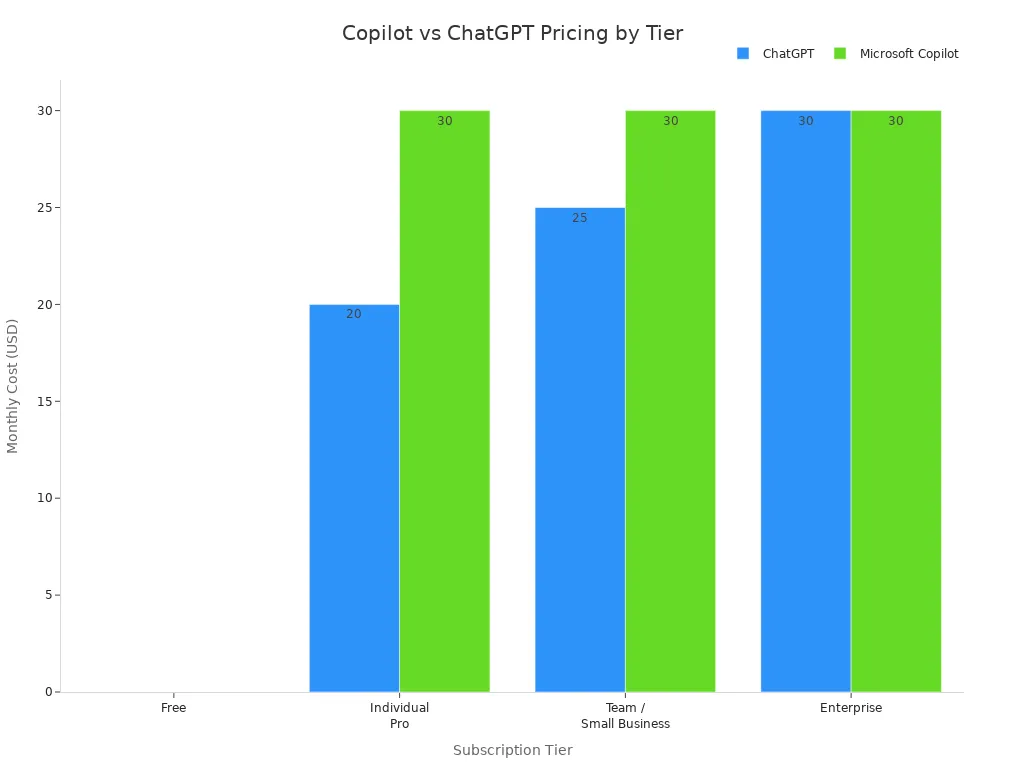
Organizations heavily embedded in specific software ecosystems often find that native assistants offer the smoothest integration, while independent teams may benefit from flexible, platform-agnostic tools.
Cost Divergence Explained
Cost divergence between competing platforms is driven primarily by native ecosystem integration, compliance guarantees, and administrative management overhead. While some developer-focused tools offer inexpensive code completions, comprehensive enterprise suites include advanced security controls, intellectual property indemnification, and cross-application data grounding that justify higher per-user price points for corporate legal teams.
Auditing Your Copilot Spending
Identifying Cost Centers
Establishing clear cost centers for individual departments or business units is an essential first step toward reigning in AI spending. Tagging software allocations by department allows finance teams to track precisely which business units consume the heaviest resources and hold managers accountable for utilization rates.
Practical steps for identifying major cost centers include:
- Utilizing usage-based analytics to project future compute and licensing expenses accurately.
- Tracking departmental budgets to ensure individual business units remain within allocated financial limits.
- Monitoring spending patterns for sudden anomalies that indicate runaway token consumption or unmanaged agent execution.
- Identifying opportunities to reallocate or downgrade underutilized licenses based on empirical activity reports.
Tracking Usage and Value
Quantifying the tangible value generated by an AI investment is critical for justifying ongoing subscription expenses. Organizations should rely on clear metrics to evaluate the return on their software investment.
| Metric | Description |
|---|---|
| Cost per hour saved | Financial savings realized for each hour of work automated by AI assistants. |
| Payback period | The timeframe required for productivity gains to offset initial deployment costs. |
| Productivity lift | Measured percentage increase in operational efficiency among active users. |
| License utilization rates | The exact percentage of provisioned licenses actively engaged by employees. |
| Training completion rates | Employee adoption rates following mandatory or optional educational programs. |
| User satisfaction levels | Qualitative feedback regarding tool reliability, accuracy, and workflow fit. |
Tip: Review these performance and financial metrics on a quarterly basis to identify emerging usage trends and make informed decisions regarding license renewals.
Tools for Expense Auditing
Utilizing dedicated software auditing and license management tools can save organizations thousands of dollars every month in wasted subscription fees. Automated license reclamation workflows can flag accounts that show no activity for 30 consecutive days, allowing administrators to reassign or cancel seats immediately.
Note: Regular auditing habits and automated reporting mechanisms prevent software budget bloat and ensure that capital is directed exclusively toward engaged, productive users.
Reducing the Copilot Tax
License and Contract Negotiation
Procurement teams can significantly lower their enterprise AI expenditures by approaching software vendor negotiations strategically. Larger organizations possess substantial bargaining power, and account executives eager to close enterprise AI deals are frequently open to creative structuring.
Effective negotiation strategies include:
- Proposing phased implementations that allow the organization to evaluate software impact before committing to enterprise-wide licensing.
- Maintaining open, transparent dialogue with licensing resellers to uncover promotional discounts and bundled offerings.
- Offering to participate in customer case studies or advisory councils in exchange for preferred pricing terms.
- Reviewing contract renewal clauses meticulously to eliminate auto-renewals and hidden penalty fees.
Optimizing Adoption and Training
Maximizing the return on your AI investment requires continuous user engagement and structured educational campaigns. Organizations that implement creative internal engagement programs routinely see higher adoption rates and lower rates of wasted software licenses.
- Launching internal adoption campaigns featuring daily tips, challenge events, and departmental success showcases.
Rightsizing software licenses based on actual utilization data allows many enterprises to reduce total software spending substantially without sacrificing employee efficiency.
Governance and Deployment Discipline
Maintaining strict governance and deployment discipline is essential for controlling operational costs and protecting sensitive corporate data. Clear responsibilities must be assigned across departments.
| Function | Responsibility |
|---|---|
| IT | Permissions architecture, tenant configuration, admin controls, and audit logging. |
| Security | Threat monitoring, data loss prevention policies, and incident response. |
| Legal | Acceptable use policy development, compliance framework mapping, and IP risk assessment. |
| HR | Employee training coordination, policy acknowledgment, and compliance enforcement. |
| Business leaders | Use case approval, team-level rollout decisions, and shadow AI monitoring. |
Implementing structured administrative frameworks ensures adherence to regulatory standards such as GDPR, HIPAA, SOC 2, and ISO 27001, protecting the organization from costly compliance failures.
Reviewing AI Tool Usage
Regular reviews of software utilization ensure that deployment strategies evolve alongside business needs. Tracking engagement stages—from early pilot deployment to full organizational maturity—allows administrators to optimize costs continually and verify that tools align with overarching corporate objectives.
Building a Sustainable AI Budget
Forecasting Ongoing Costs
Building a resilient financial model requires conducting thorough pilot deployments before launching organization-wide rollouts. Measuring active usage, token consumption, and compute scaling during a controlled test phase provides accurate data for forecasting long-term operational expenses.
Aligning AI Spend with Goals
Connecting software expenditures directly to specific business objectives ensures that AI investments drive measurable revenue and efficiency gains. Prioritizing licenses for high-impact roles and embedding assistants into core workflows guarantees that technology investments deliver tangible value.
Accountability for AI Expenses
Holding business units financially accountable for their assigned software licenses prevents wasteful spending. Maintaining a complete inventory of AI assets, establishing centralized governance dashboards, and fostering a culture of cost awareness ensures long-term fiscal health.
Tip: Fostering shared budget ownership across business units creates a sustainable AI funding model that supports continuous innovation without threatening the corporate bottom line.
Navigating the financial realities of modern enterprise AI requires looking far beyond the initial subscription sticker price. By acknowledging the hidden operational expenses—ranging from data remediation and security governance to token consumption and administrative overhead—technology leaders can take proactive steps to protect their budgets. Through disciplined usage tracking, strategic contract negotiations, and robust internal governance, organizations can successfully minimize the copilot tax and unlock genuine, sustainable value from their enterprise AI strategy.
To explore these architectural choices, governance frameworks, and real-world implementation strategies in greater detail, listen to the complete discussion on the related episode, The Copilot Tax: Hidden Costs of Enterprise AI Strategy.
FAQ
What is the Copilot Tax?
The Copilot Tax refers to the total economic impact of adopting enterprise AI, encompassing not just the baseline per-user license fee, but also hidden costs like token consumption, compute overhead, data governance remediation, and productivity friction.
How can I spot zombie licenses?
Administrators can review software activity reports to identify user accounts that show zero engagement or login activity for 30 consecutive days, allowing organizations to reassign or cancel those seats.
Does Copilot require extra Microsoft subscriptions?
Yes. Enterprise AI tools typically require foundational productivity suite subscriptions such as Microsoft 365 E3, E5, or Business Standard/Premium tiers. Employees on lower-tier foundational licenses may require mandatory upgrades.
How do I reduce token waste?
Training employees in effective prompt engineering, discouraging repetitive automated queries, and auditing automated agent executions regularly will significantly reduce unnecessary token consumption.
What is the verification tax?
The verification tax represents the valuable human working hours spent reviewing, fact-checking, and validating AI-generated outputs to ensure accuracy and compliance before operational use.
Can I negotiate Copilot pricing?
Organizations purchasing high volumes of enterprise licenses can negotiate contract terms, request phased rollout schedules, or explore bundled discounts with software vendors and licensing partners.
What tools help track Copilot costs?
| Tool Type | Example Use |
|---|---|
| License Auditing | Identify idle, inactive, and zombie user accounts |
| Usage Analytics | Monitor token consumption and compute scaling |
| Cost Dashboards | Visualize departmental spending trends and ROI |
Implementing these monitoring tools helps leadership maintain strict control over overall AI expenditures.
🎧 Listen to this episode
Want a practical explanation of The Copilot Tax? This episode breaks down the topic in clear language and shows why it matters for Microsoft 365, Azure, Power Platform, security, AI, and modern work.
Listen to this episode if you want to:
- Understand the key concepts behind The Copilot Tax
- See how it fits into the wider Microsoft technology ecosystem
- Learn where it can create practical value for your organization
You may also enjoy these related M365 FM episodes:
- Microsoft 365 Copilot Enterprise Transformation Strategy
- Agentic Operating Model for Enterprise AI and Copilot
- Mixture of Experts for Enterprise Copilot and AI Agents
- Grounding Microsoft Copilot for Trusted Enterprise AI
- How to Govern Microsoft Copilot in the Enterprise
Discover more practical Microsoft conversations on M365 FM.
Last reviewed: July 2026.
Who Should Listen
This episode is for Microsoft administrators, architects, developers, security professionals, and business leaders who need a practical foundation before making implementation, operations, or governance decisions.
🎧 You Should Also Listen To
- AI Agents — A strongly related next step for extending this topic.
- Power Platform — A strongly related next step for extending this topic.
- Microsoft Teams — A strongly related next step for extending this topic.

Microsoft MVP | Host of M365.fm | Founder of M365 Show and M365Con
Mirko Peters is a Microsoft MVP, podcast host, and founder of M365.fm, M365 Show, and M365Con. His work connects Microsoft practitioners through podcast interviews, livestreams, and community events.
At M365.fm, Mirko hosts conversations with Microsoft MVPs, product experts, architects, and community contributors. Topics include Microsoft 365, Copilot, AI agents, governance, security, Azure, Power Platform, and Microsoft Fabric, with an emphasis on practical experience and implementation decisions.
M365.fm is the podcast and learning platform. M365 Show brings experts together for livestreams, while M365Con provides an online conference setting for community learning.
Official website: Mirko Peters (https://www.mirkopeters.com/). Recognition: Mirko Peters — Microsoft MVP profile (https://mvp.microsoft.com/de-DE/mvp/profile/9b0ca797-db5a-493a-a845-8b9158046cf5). Connect on LinkedIn (https://www.linkedin.com/in/m365showpodcast/).