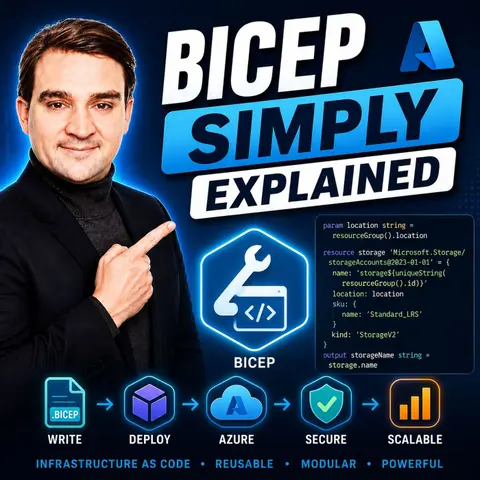
Why Azure Teams Are Finally Leaving ARM Templates Behind
For years, cloud engineers and developers working with Microsoft Azure faced a bittersweet reality when adopting Infrastructure as Code (IaC). On one hand, Azure Resource Manager (ARM) templates provided a native, powerful way to provision and manage cloud infrastructure reliably. On the other hand, writing and maintaining those templates meant wrestling with verbose JSON files, deep nesting, bloated code structures, and painful merge conflicts every time a team member touched the repository. If you have ever spent hours debugging a misplaced bracket or an invisible comma in a thousand-line JSON document, you know the exact brand of frustration that comes with traditional Azure deployments.
Fortunately, the cloud landscape has evolved. Azure teams are steadily abandoning raw ARM templates in favor of Bicep—a cleaner, more human-friendly domain-specific language designed to abstract away the pain points of JSON without sacrificing the underlying reliability of Azure Resource Manager. In this comprehensive guide, we will explore why this shift is happening, how Bicep works under the hood, and why making the transition can reduce your infrastructure code base by up to 60%.
Introduction to ARM Template Fatigue
To understand why Bicep has taken the Azure community by storm, we first need to diagnose the root cause of ARM template fatigue. When Azure first popularized template-driven deployments, JSON was the universal standard for data exchange. However, JSON was never designed to be a programming language or an infrastructure definition tool. As cloud environments grew larger and more sophisticated, the limitations of JSON became glaringly obvious.
Complexity scales exponentially with traditional ARM templates. A standard enterprise deployment involving virtual networks, subnets, key vaults, and managed identities quickly balloons into bloated files that span thousands of lines. Because JSON lacks native looping constructs or advanced modularization out of the box, engineers frequently resort to complex copy functions and messy nesting. When multiple team members attempt to collaborate on the same monolithic template file, frequent merge conflicts become an inevitability rather than an exception. Debugging these files often feels like searching for a needle in a digital haystack, leading many teams to abandon automated IaC altogether in favor of error-prone manual portal clicks—which completely defeats the purpose of DevOps automation.
Bicep Overview
Recognizing these widespread developer pain points, Microsoft introduced Bicep as a transparent abstraction layer over ARM templates. Bicep is not a replacement for Azure Resource Manager; rather, it is a smarter, more concise way to interact with it. Anything you can do in an ARM template, you can do in Bicep, but with a fraction of the cognitive load.
At its core, Bicep features a simplified syntax that reads almost like plain English. It removes the syntax noise of JSON—say goodbye to endless quotation marks, brackets, and commas—and replaces it with clean, declarative declarations. Because Bicep is a compiled language, your code acts as the source of truth, which is then transpiled down into standard ARM JSON during the deployment phase. This clever architecture ensures 100% compatibility with Azure's underlying deployment engine while drastically improving the day-to-day developer experience.
How Bicep Works
Understanding the mechanics of Bicep helps clarify how it bridges the gap between human readability and machine execution. When you write infrastructure code using Bicep, you author files ending with the .bicep extension. These files utilize a domain-specific language optimized specifically for Azure resource provisioning.
The workflow is refreshingly straightforward:
- Authoring: You create and edit your
.bicepfiles locally using modern integrated development environments like Visual Studio Code, taking advantage of rich extensions that offer IntelliSense, syntax validation, and real-time linting. - Compilation: Using the Bicep CLI command
bicep build main.bicep, your clean code is compiled into a standard ARM JSON template. - Deployment: You deploy the resulting template directly to Azure using the Azure CLI or Azure PowerShell just as you always have.
This compilation step ensures that Azure's core deployment engine remains untouched, meaning your enterprise policies, role-based access controls, and deployment safety checks continue to operate seamlessly.
Benefits of Bicep
The transition from JSON-based ARM templates to Bicep yields immediate, measurable dividends for engineering organizations. First and foremost is the dramatic reduction in code volume. Teams regularly report code reductions of up to 50% to 60%, meaning fewer lines to write, review, and maintain.
Furthermore, Bicep supercharges team collaboration. By allowing infrastructure definitions to be broken down into smaller, reusable modules, different team members can work on separate components of the architecture simultaneously without stepping on each other's toes. Version control becomes significantly cleaner, code reviews take minutes instead of hours, and onboarding new engineers to cloud projects becomes a seamless experience rather than a daunting trial by fire.
Getting Started with Bicep
Jumping into Bicep requires very little overhead. Because the Bicep CLI is lightweight and integrates natively with the Azure CLI, you can get up and running on Windows, macOS, or Linux in just a few minutes.
To begin, ensure you have the Azure CLI installed along with Visual Studio Code. Install the official Bicep extension for VS Code to unlock advanced features like code completion, parameter validation, and resource type auto-discovery. Once configured, writing your first resource—such as an Azure Storage Account or a Virtual Network—takes only a few clean lines of code, replacing what would have been dozens of lines of dense JSON boilerplate.
Use Cases for Bicep
Bicep shines particularly brightly in two major enterprise scenarios: foundational Infrastructure as Code implementations and multi-environment deployments.
In standard IaC pipelines, Bicep integrates effortlessly with CI/CD platforms like GitHub Actions and Azure DevOps, enabling fully automated, repeatable deployments that eliminate configuration drift. For multi-environment architectures—such as development, testing, staging, and production—Bicep's support for parameters and modular templates allows you to maintain a single, standardized codebase while safely injecting environment-specific variables and configurations on the fly.
FAQ
What is Bicep?
Bicep is a transparent, open-source domain-specific language created by Microsoft for deploying Azure resources declaratively with a cleaner syntax than traditional ARM templates.
How does Bicep differ from ARM templates?
While ARM templates use verbose JSON syntax that is difficult to read and maintain, Bicep provides a concise, readable syntax with advanced tooling support. Bicep files are compiled into ARM templates prior to deployment.
Can I convert existing ARM templates into Bicep?
Yes! You can easily decompile existing ARM JSON templates into Bicep files using the Bicep CLI to immediately start taking advantage of its simplified syntax.
Is Bicep free to use?
Yes, Bicep is completely free and open-source, fully supported by Microsoft as a first-class citizen for Azure infrastructure management.
Does Bicep support modularity?
Absolutely. Bicep was built from the ground up to support modular code design, allowing you to break large infrastructure deployments into reusable, manageable components.
Leaving legacy ARM templates behind is no longer just an experimental choice for forward-thinking teams—it is becoming the baseline standard for efficient, scalable Azure engineering. By slashing code complexity, enhancing collaboration, and streamlining multi-environment deployments, Bicep empowers cloud professionals to focus on building great software rather than fighting with configuration files.
To dive deeper into this topic and hear practical insights on how modern teams are modernizing their cloud strategies, make sure to check out our related podcast episode: Bicep - Simply Explained.

Microsoft MVP | Host of M365.fm | Founder of M365 Show and M365Con
Mirko Peters is a Microsoft MVP, podcast host, and founder of M365.fm, M365 Show, and M365Con. His work connects Microsoft practitioners through podcast interviews, livestreams, and community events.
At M365.fm, Mirko hosts conversations with Microsoft MVPs, product experts, architects, and community contributors. Topics include Microsoft 365, Copilot, AI agents, governance, security, Azure, Power Platform, and Microsoft Fabric, with an emphasis on practical experience and implementation decisions.
M365.fm is the podcast and learning platform. M365 Show brings experts together for livestreams, while M365Con provides an online conference setting for community learning.
Official website: Mirko Peters (https://www.mirkopeters.com/). Recognition: Mirko Peters — Microsoft MVP profile (https://mvp.microsoft.com/de-DE/mvp/profile/9b0ca797-db5a-493a-a845-8b9158046cf5). Connect on LinkedIn (https://www.linkedin.com/in/m365showpodcast/).

Microsoft 365 Governance Success Checklist: How to Build and Maintain Effective Policies