
Why Report-Only Differs From Enforced in Content Security Policy
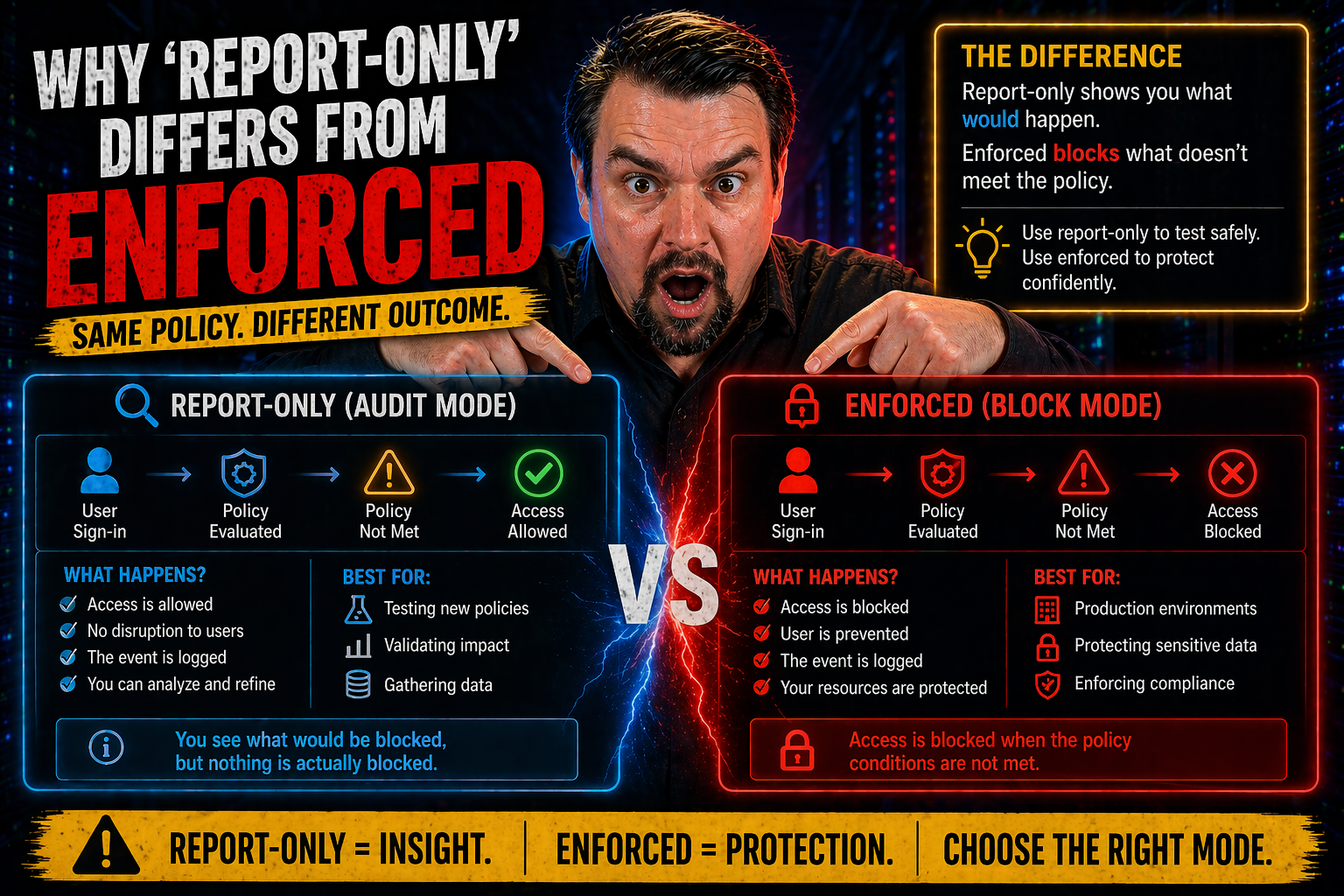
If you’re serious about web security, understanding the difference between ‘report-only’ and ‘enforced’ modes in Content Security Policy (CSP) isn’t just a detail—it’s the whole ball game. Report-only mode lets you see what would be blocked by your policy without actually stopping anything, turning your website into a kind of security testing ground. Enforced mode, on the other hand, isn’t here to play; it blocks anything that goes against your policy, locking down your site in real time.
This article breaks down why these modes matter, what they do to browser and user experience, and how to make the journey from simple monitoring to real protection. It’s specifically tailored for Microsoft-focused security pros and developers who want to get their CSP setup right—covering definitions, hands-on techniques, and best practices for a secure rollout and smart compliance.
Understanding CSP Modes and Their Impact
Before you start tossing CSP headers around, you’ve got to get a handle on CSP’s two main modes: report-only and enforced. These modes are more than just settings—they shape how modern browsers protect (or just observe) your web application’s security boundaries. What you choose directly impacts your site’s risk level, audit capacity, and how smoothly your rollout goes, especially in large Microsoft environments or multi-cloud setups.
CSP modes were designed to give web teams flexibility. Report-only mode is the gentle entry point, letting you monitor for issues without fear of accidentally breaking something for users. It supports risk assessment, helps spot policy gaps, and can identify legacy code or unexpected third-party behaviors, all while keeping your application fully operational.
Enforced mode is the main event: it tells the browser to actually carry out your instructions. If content doesn’t match your policy, it’s blocked—instantly reducing the attack surface for things like cross-site scripting or malicious third-party scripts. But it also means that mistakes or incomplete policies could interrupt your application if you’re not careful with testing and adoption.
The idea behind having both CSP modes is simple: let developers and security teams perfect their rules in the wild before pulling the trigger. Think of it as training wheels for your application’s security, but with a finish line where you cross over to full enforcement. Up next, we’ll get into exactly how report-only gives you that real-world feedback and what changes when enforcement enters the picture.
How Content-Security-Policy-Report-Only Works for Violation Reporting
Report-only mode is CSP’s way of letting you watch from the bleachers before you step onto the court. When you use the Content-Security-Policy-Report-Only HTTP header, you instruct the browser to “watch for violations, but don’t block anything—just report it.” This way, you get a stream of violation reports delivered to your specified endpoint, giving you a full rundown of what would be blocked if the policy was enforced.
Browsers will send these violation reports (often as JSON payloads) whenever a resource breaks your CSP rules. For example, if a page tries to load a script from an unapproved source, no script is blocked in report-only mode—but you’ll still get an alert and details such as the offending URL, which directive was violated, and sometimes a sample of the suspicious code.
This mode is priceless for risk assessments and safe testing. You can deploy new rules across a fleet of web apps, monitor what gets triggered, and tune the policy based on actual data, not just best guesses. If you’re running legacy systems or have mission-critical business workflows, you won’t risk site outages or support calls by moving too fast.
Report-only also supports gradual rollouts. Start open, see what needs adjusting, and move step-by-step toward tighter security. It lets teams discover issues with third-party scripts, CDN content, or obfuscated JavaScript that might otherwise hide until enforcement causes a dramatic failure. Plus, it’s a compliance win—you have proof that you’re actively monitoring, which can help with audits when your organization needs to show due diligence.
How Enforced Mode Increases Security
Enforced mode is where your CSP policy stops being a suggestion and becomes a rule. When you use the Content-Security-Policy header, browsers actually block any content that doesn’t match your directives—no warnings, just action.
This mode dramatically hardens your web app against attacks like XSS and unauthorized script injection. But be careful: if your policy isn’t ready for prime time, you could accidentally block necessary resources and break site functionality. Testing in report-only mode first is the smart move. Ultimately, enforced mode is what turns theoretical policy into practical protection, making it the gold standard for strong web security.
Implementing Reporting with Report-URI and Report-To Endpoints
Setting up reporting is where your CSP policy gains real teeth—and a pair of eyes. CSP lets you specify one or more endpoints (using report-uri or report-to) where browsers should send violation reports. When a violation occurs, the browser packages details like which resource was blocked and which policy failed into a neat JSON or HTTP POST message, then ships it out to your endpoint.
The report-uri directive is the legacy method: you set a URL, and browsers send reports there directly. However, for modern flexibility and richer reporting, report-to is the newer, more robust option—especially as browsers expand their Reporting API support. report-to works with a named group that can handle different types of reports and offers better filtering control.
When configuring these endpoints, you want them to be secured—think HTTPS, access controls, and monitoring for unexpected spikes (which might signal an attack or a broken policy). And don’t forget privacy: reports may contain URLs or even snippets of offending script, which means you need to be prepared to scrub sensitive information before storing or sharing them, staying mindful of regulations like GDPR and CCPA.
The real power here is in visibility. With properly configured reporting, you get a live feed of where your policy is catching violations—so you can adjust, tune, and eventually move safely into enforcement without surprises. This level of monitoring is essential, whether you’re managing a single app or a sprawling Microsoft 365 environment.
Navigating CSP Syntax and Directives for Effective Policy Design
Writing a solid CSP header isn’t rocket science, but it does require attention to detail—especially when juggling complex apps and Microsoft cloud integrations. At the foundation, a CSP policy is a structured list of directives, each one telling browsers what’s allowed and what’s not. You send these policies through HTTP headers, typically as Content-Security-Policy or Content-Security-Policy-Report-Only, formatted as strings of semicolon-separated rules.
The heart of your policy lies in key directives like default-src, script-src, and img-src. default-src is your fallback—if a specific type of content doesn’t have its own rule, the browser checks this one. script-src and img-src home in on scripts and images, letting you tightly control trusted sources (think: your domains, trusted CDNs, and maybe a Microsoft Azure blob or two).
Syntax matters. Each directive lists allowed values: URLs, schemes like ‘https:’, or keywords like ‘self’. If you allow inline scripts (sometimes required for legacy code), you might need ‘unsafe-inline’, but be careful—this weakens your protection unless you use script hashes or nonces for extra validation.
For Microsoft pros, pay attention to how cloud services inject dependencies. Complex enterprise apps often load assets dynamically, use service workers, or integrate third-party providers. Your policy has to balance being tight (for security) and flexible enough to let the app function. Get the basics right up front and testing will be much smoother down the line.
Best Practices for Moving From Report-Only to Enforced Mode
The smartest move with CSP is to start in report-only mode, gather your data, and only then turn on enforcement. Don’t treat CSP deployment as a one-and-done checklist. Instead, approach it as a phased project, where you monitor, tweak, and gradually harden policies to avoid breaking functionality for your end users or business-critical workflows.
Begin by rolling out a broad but sensible policy in report-only mode. Collect violation reports—ideally, aggregate them using dashboards or analytics tools to highlight recurring offenders. This helps you cut through noise, filter out false positives, and focus on true risks. If you find lots of routine or redundant reports (which is common), tune your log analytics or even script filters by user agent or resource type.
Once violation volumes drop and most issues are ironed out, start gradually enforcing rules while continuing to watch for new breakages. Move high-risk, low-traffic sections into enforcement first and monitor. If all goes smoothly, expand to the rest of the project. Document changes and get feedback from developers and stakeholders throughout the process—especially in complex Microsoft 365 or Azure apps where conditional access layers add extra twists. For related strategies and rollout plans, it’s worth checking out this guide on conditional access trust issues and this identity security episode.
Never underestimate testing. Use browser dev tools, CSP status testers, and even automated CI/CD scans to confirm your policies work as expected. The end goal? A locked-down, compliant, resilient application—secured by a policy that’s been honed in the real world, not wishful thinking.
Real-World Examples of CSP in Report-Only and Enforced Modes
Nothing brings CSP to life like real examples. In report-only mode, you might use a header like: Content-Security-Policy-Report-Only: default-src 'self'; report-uri https://csp-report.example.com. This setup logs every violation but leaves your users undisturbed, making it perfect for testing in production without risk.
Contrast that with an enforced policy: Content-Security-Policy: default-src 'self'; script-src 'self' https://trusted.cdn.com; img-src 'self'; report-uri https://csp-report.example.com. Now, the browser actively stops any script or image that doesn’t fit the rules—protecting your users from unapproved content immediately.
In practice, organizations begin with report-only mode to surface which vendors, scripts, or business features would break under mimic-lockdown. For example, a government web portal might discover legacy scripts or a marketing analytics CDN that triggers repeated violations. They iterate, whitelist safe providers, and then enforce the finished policy in stages to minimize disruptions.
Migrating from report-only to enforced can reveal hidden landmines—especially with third-party scripts or dynamic content. Teams often encounter “phantom” violations that appear only on certain browsers or under specific conditions. Using live data from the report-only phase, they adjust the policy until enforcement is not just secure, but stable for everyone involved.
Summary of Key Differences Between Report-Only and Enforced Modes
- Behavior: Report-only mode only reports policy violations—no content gets blocked. Enforced mode actively blocks anything that violates your CSP policy.
- Purpose: Report-only lets you test and tune policies with zero risk to users. Enforced mode is for actual protection, making security rules real.
- Impact on Users: Report-only is invisible—users never notice it. Enforced mode can break features or content if you haven’t pre-tested your rules.
- Use Cases: Report-only is ideal for gradual rollouts, risk analysis, and legacy compatibility checks. Enforced mode is the final step for achieving robust, compliant security.
- Compliance & Risk: Report-only helps with monitoring and documentation during audits, while enforced mode directly prevents security breaches in real time.

Microsoft MVP | Host of M365.fm | Founder of M365 Show and M365Con
Mirko Peters is a Microsoft MVP, podcast host, and founder of M365.fm, M365 Show, and M365Con. His work connects Microsoft practitioners through podcast interviews, livestreams, and community events.
At M365.fm, Mirko hosts conversations with Microsoft MVPs, product experts, architects, and community contributors. Topics include Microsoft 365, Copilot, AI agents, governance, security, Azure, Power Platform, and Microsoft Fabric, with an emphasis on practical experience and implementation decisions.
M365.fm is the podcast and learning platform. M365 Show brings experts together for livestreams, while M365Con provides an online conference setting for community learning.
Official website: Mirko Peters (https://www.mirkopeters.com/). Recognition: Mirko Peters — Microsoft MVP profile (https://mvp.microsoft.com/de-DE/mvp/profile/9b0ca797-db5a-493a-a845-8b9158046cf5). Connect on LinkedIn (https://www.linkedin.com/in/m365showpodcast/).




