Why Traditional M365 Training Fails (And How to Fix It)
Welcome back to the podcast blog! If you have ever sat through a lengthy, multi-hour slide deck presentation on new workplace software only to realize twenty-four hours later that you have forgotten almost everything, you are definitely not alone. In fact, studies show that a staggering sixty-seven percent of employees report deep dissatisfaction with traditional training approaches. Why? Because they are rarely relevant, entirely inaccessible when you actually need them, and built around a "one-and-done" mentality that simply does not work for modern digital tools.
Today, we are expanding on a topic we recently explored on the air: how to move away from frustrating, outdated training methods and build a truly sustainable educational model. For a deeper dive into this exact subject, make sure to check out our related episode on how to Build a Governed Microsoft 365 Copilot Learning Center. In this post, we will break down the exact pitfalls of conventional training, look at why continuous learning is non-negotiable in the age of artificial intelligence, and explore how you can build a centralized hub that actually drives productivity and employee confidence.
The Problem with Traditional M365 Training
Common Pitfalls
Traditional training within the enterprise space typically relies heavily on static slide decks and one-off live workshops. These methods overwhelm teams by cramming weeks of functional knowledge into a few hours, resulting in severe information overload. When an organization forces employees to sit through a massive information dump, retention rates plummet. Unless that knowledge is immediately applied and continuously reinforced, individuals forget up to seventy percent of what they learned within the first twenty-four hours.
| Pitfall | Description |
|---|---|
| Information Overload | Overwhelming users with too much information at once instead of digestible, role-specific steps. |
| Outdated Materials | Failing to update onboarding materials as software evolves, leading to confusion. |
| Lack of User Feedback | Skipping user feedback opportunities, which can refine training flows. |
| Sole Reliance on Live Training | Relying only on live training without in-app reinforcement, causing frustration and poor retention. |
Another major trap is the reliance on outdated training assets. Software ecosystems, particularly cloud platforms and generative AI utilities, evolve at a blistering pace. If your organization relies on training documentation that was written six months ago, your teams are likely missing out on critical user interface updates, new automation features, and vital security compliance protocols. Without updated content, users risk mishandling sensitive data, which inadvertently introduces severe privacy and security risks.
Furthermore, traditional programs rarely incorporate structured user feedback loops. Training is pushed down from leadership without asking the end users what challenges they face on the floor. When companies rely exclusively on live classroom sessions without providing digital tools or prompts for just-in-time learning, employees are left completely stranded when a real-world problem arises at their desks.
Impact on Users
The downstream effects of ineffective training directly harm employee productivity, engagement, and overall job satisfaction. When staff members do not fully understand how to leverage workplace technologies like Microsoft 365 Copilot, they spend valuable hours trying to troubleshoot basic functions or correcting avoidable mistakes. This friction delays project timelines and generates an endless wave of repetitive support tickets for your help desk.
| Negative Impact | Description |
|---|---|
| Decreased Productivity | Employees lacking necessary skills take longer to complete tasks, leading to delays and reduced output. |
| Increased Employee Turnover | Insufficient training can make employees feel undervalued, prompting them to seek other job opportunities. |
| Quality Issues | Poor training increases the likelihood of errors, resulting in product defects and customer dissatisfaction. |
| Poor Employee Morale and Engagement | Lack of training can demotivate employees, leading to absenteeism and reduced commitment to company goals. |
When employees feel constantly unprepared, morale dips sharply. Workers become discouraged and disengaged, which often translates into higher staff turnover rates. Organizations lose valuable institutional knowledge when frustrated talent walks out the door. Without proper enablement, employees might also bypass critical security guidelines, putting the entire corporate network in jeopardy.
Why One-Off Slide Decks Lead to Information Overload
The human brain is simply not wired to absorb complex software logic through passive listening and massive slide presentations. When learning is detached from daily workflow tasks, it feels like an abstract chore rather than a practical tool. One-off slide decks treat training as an administrative box-checking exercise rather than a strategic business capability. To truly empower your people, you have to dismantle the slide deck paradigm and embrace an agile, continuous educational framework.
The Case for Continuous Learning in the Age of AI
Many organizations operate under the dangerous assumption that training finishes the moment a new software license is provisioned or an AI assistant is activated. In reality, tools like Microsoft 365 Copilot evolve weekly. New prompt capabilities, security governance updates, and integrations drop regularly. If your training model stops at deployment, your organization will quickly fall behind.
| Training Type | Knowledge Retention Effectiveness | Key Features |
|---|---|---|
| One-off Training | Less effective | Rapid forgetting without reinforcement. |
| Continuous Learning | More effective | Spaced repetition, microlearning, and integration into daily workflows enhance retention. |
Continuous learning provides ongoing access to updated prompt engineering libraries, security guidelines, and microlearning modules. It allows users to apply skills right when they need them, driving long-term confidence and lowering help desk volumes.
Tip: Stop training your users wrong by shifting from one-off sessions to a structured training system that supports continuous learning. This change helps you stay current with security, privacy, and compliance requirements while maximizing the value of your digital transformation.
Introducing the Copilot Learning Center
To solve the widespread frustration caused by legacy training, organizations are turning to the Copilot Learning Center. This centralized ecosystem acts as a revolutionary platform designed to upgrade your entire educational framework. By embedding seamlessly into your everyday enterprise applications, the Copilot Learning Center delivers contextual guidance, role-specific courses, and instant access to updated resources right when your employees need them.
Key Features for Better User Engagement and Retention
The Copilot Learning Center shifts the educational experience away from passive observation and toward active, hands-on participation. Key components include:
- Training Courses: Comprehensive modules that integrate AI capabilities directly into standard workflows across Word, Excel, PowerPoint, Outlook, and Teams.
- Interactive Learning: Real-world exercises, guided walkthroughs, and scenarios that drastically improve knowledge retention.
- Just-in-Time Resources: On-demand reference materials and prompt templates that reduce dependency on IT support.
This structured approach ensures your workforce rapidly gains proficiency in drafting content, analyzing complex datasets, summarizing missed meetings, and streamlining communications without burning out.
A Centralized Knowledge Hub
Maintaining a single source of truth for all enablement materials is vital. The Copilot Learning Center acts as a centralized knowledge hub that brings immense operational value to your business.
| Advantage | Description |
|---|---|
| Faster onboarding | New hires can quickly become productive, reducing the time and resources needed for training. |
| Fewer errors | Accessible knowledge leads to correct application, enhancing safety and customer satisfaction. |
| Greater confidence | Employees feel empowered and engaged, improving morale and decision-making. |
| Less retraining | On-demand access to information reduces the need for repeated training sessions. |
| Business continuity | Captured knowledge remains within the organization, ensuring processes and best practices are retained. |
By keeping all learning materials unified, searchable, and up-to-date, organizations preserve critical institutional knowledge and accelerate time-to-productivity for every new hire.
Governance and Structure
Content quality and regulatory alignment are major concerns when deploying enterprise AI tools. The governance framework built into the Copilot Learning Center ensures that educational materials stay accurate, secure, and compliant. By training users on sensitivity labeling, data access controls, and acceptable AI use, organizations foster an internal culture of accountability and digital safety.
How Personalized Learning Paths Drive Proficiency

One of the primary reasons standard training fails is its "one-size-fits-all" approach. A financial analyst does not need to learn Copilot in the exact same way as a human resources manager or a software developer. The Copilot Learning Center solves this by offering personalized learning paths tailored to specific roles and daily workflows.
- Role-Specific Training: Targeted course tracks designed around the unique responsibilities of distinct business units.
- Flexible Learning: Self-paced modules that allow employees to fit professional development into busy schedules.
- Skill Assessment: Built-in progress tracking to help individuals identify competency gaps and master new functions.
When training aligns directly with a person's daily responsibilities, engagement skyrockets, technostress decreases, and employees feel genuinely empowered to experiment with new capabilities.
Improved Productivity and Measurable Outcomes
Organizations implementing a structured, continuous training framework report massive gains in overall operational efficiency. Data indicates that employees using generative AI tools note a significant improvement in the speed and quality of their work. Organizations frequently realize an average time savings of up to ten hours per employee each month.
That is the equivalent of gaining an extra workday every single month—time that can be redirected toward strategic planning, relationship building, and high-value creative problem-solving.
Implementation Strategies for Long-Term Success
Deploying a learning center requires careful planning and execution. To ensure your initiative delivers lasting value, follow a structured implementation roadmap.
- Establish baseline productivity metrics before rollout to measure ongoing progress.
- Survey employees to uncover daily workflow pain points and specific use cases.
- Develop role-based training content tailored to individual departments.
- Run pilot programs with early adopters and champions to refine course materials.
- Incorporate official Microsoft Learn paths alongside your custom internal resources.
- Schedule foundational training sessions prior to provisioning user licenses.
- Publish quick-reference guides, prompt libraries, and video tutorials for on-demand access.
- Establish dedicated communication channels for user questions and peer support.
- Monitor usage analytics and confidence scores to continuously identify training gaps.
- Plan your training preparation at least thirty days before software deployment.
Training Administrators
System administrators play an essential role in maintaining the health and security of your learning platform. Key administrative learning objectives include mastering Copilot configuration settings, controlling web access permissions, monitoring compliance policies, utilizing the Copilot Dashboard for value tracking, and ensuring data security protocols align with Microsoft Purview standards.
Success Stories with Copilot
Organizations across the globe have successfully transformed their operational models by embracing structured learning systems and AI enablement hubs. Companies in travel, banking, and municipal services have utilized advanced training frameworks to boost customer satisfaction, cut down administrative overhead, and streamline complex workflows.
"The Copilot Learning Center transformed how we approach training. Our team feels more confident using Microsoft 365 Copilot, and we see fewer support tickets." - Sarah, Project Manager
"I used to struggle with understanding the tools. Now, I access resources on-demand, which makes my work much easier." - James, Data Analyst
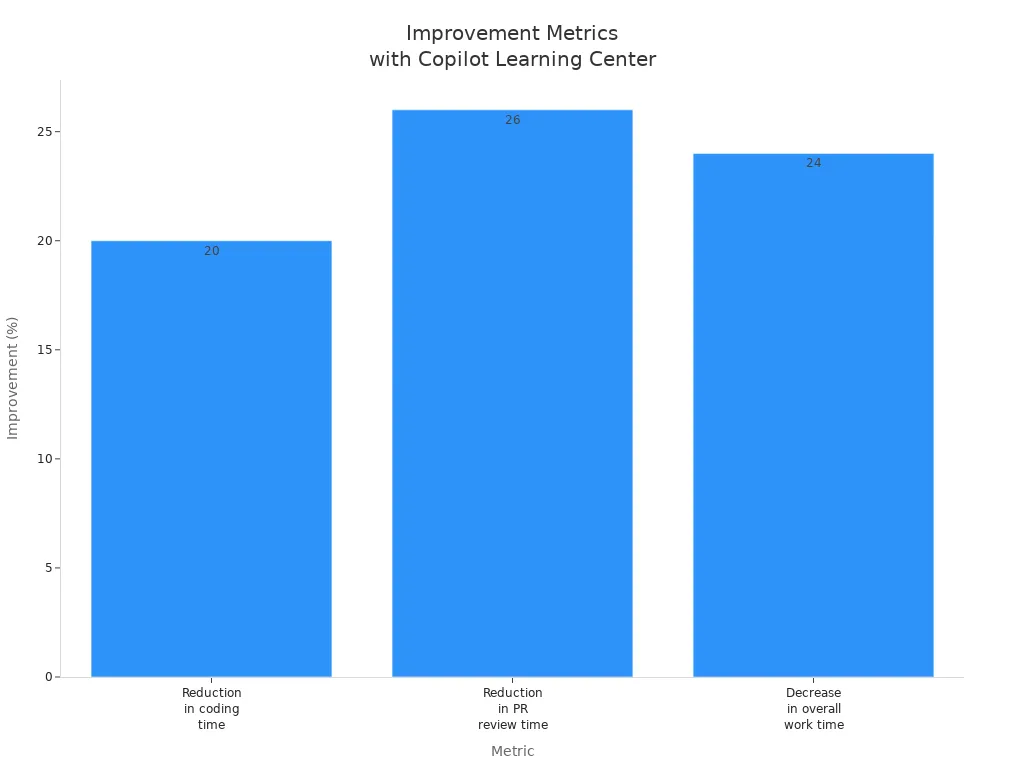
The metrics speak for themselves. Organizations report a substantial drop in task completion times, dramatic reductions in support tickets, and unprecedented gains in overall employee satisfaction. By moving away from stale, one-off presentations and embracing continuous enablement, you set your entire organization up for sustainable digital success.
Traditional training methods are holding your workforce back. By moving away from overwhelming slide decks and stepping into a model built on continuous learning, role-based paths, and contextual resources, you can unlock the full potential of your digital investments. To take a deep dive into building your own internal portal, be sure to listen to our complete discussion in the related episode on how to Build a Governed Microsoft 365 Copilot Learning Center.
Remember: effective training is never a one-time event. It is an ongoing journey that empowers your people, safeguards your data, and drives your business forward with confidence.
FAQ
What is the Copilot Learning Center?
The Copilot Learning Center is a centralized hub designed to enhance your training experience with Microsoft 365 Copilot. It provides access to resources, training courses, and just-in-time support for navigating AI tools effectively.
How does the Copilot Learning Center improve user training?
The Copilot Learning Center offers personalized learning paths, interactive content, and ongoing resources. This approach helps you stay updated on new features and security measures, ensuring you maximize your use of Copilot.
Can I access the Copilot Learning Center on mobile devices?
Yes, you can access the Copilot Learning Center on mobile devices. This flexibility allows you to learn and access important prompts and resources anytime, anywhere, enhancing your training experience.
How does the Copilot Learning Center ensure data security?
The Copilot Learning Center emphasizes security by providing training on sensitivity labeling and data governance. This training helps you understand how to handle sensitive data safely while using Copilot.
What types of prompts are available in the Copilot Learning Center?
The Copilot Learning Center offers a variety of prompts tailored to different applications within Microsoft 365. These prompts guide you in using Copilot effectively for tasks like drafting, summarizing, and automating workflows.
How can I assess my training needs before using the Copilot Learning Center?
You can assess your training needs by surveying users about their daily workflows and pain points. This feedback helps tailor the training content to fit specific roles and applications within your organization.
Is there ongoing support after initial training?
Yes, the Copilot Learning Center provides ongoing support through access to updated materials and resources. This ensures you can continuously improve your skills and stay informed about new features and best practices.
How can I track my progress in the Copilot Learning Center?
You can track your progress through regular assessments and usage analytics provided within the Copilot Learning Center. These tools help you identify areas for improvement and measure your readiness.

Microsoft MVP | Host of M365.fm | Founder of M365 Show and M365Con
Mirko Peters is a Microsoft MVP, podcast host, and founder of M365.fm, M365 Show, and M365Con. His work connects Microsoft practitioners through podcast interviews, livestreams, and community events.
At M365.fm, Mirko hosts conversations with Microsoft MVPs, product experts, architects, and community contributors. Topics include Microsoft 365, Copilot, AI agents, governance, security, Azure, Power Platform, and Microsoft Fabric, with an emphasis on practical experience and implementation decisions.
M365.fm is the podcast and learning platform. M365 Show brings experts together for livestreams, while M365Con provides an online conference setting for community learning.
Official website: Mirko Peters (https://www.mirkopeters.com/). Recognition: Mirko Peters — Microsoft MVP profile (https://mvp.microsoft.com/de-DE/mvp/profile/9b0ca797-db5a-493a-a845-8b9158046cf5). Connect on LinkedIn (https://www.linkedin.com/in/m365showpodcast/).

Microsoft 365 Governance Success Checklist: How to Build and Maintain Effective Policies