Connect Azure SQL to Copilot Studio Through a Data Gateway

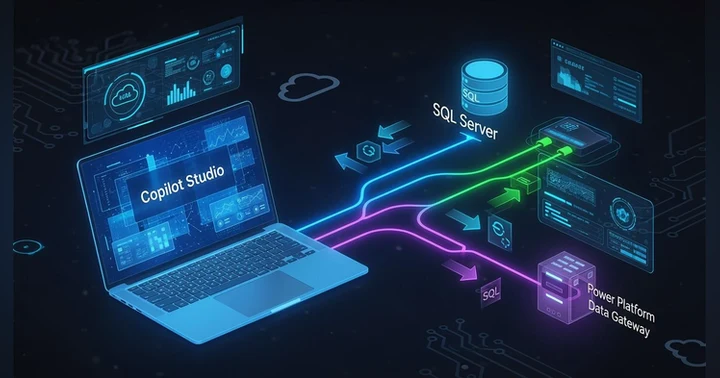
Your Copilot sounds smart but secretly knows nothing about your business. It’s guessing from Wikipedia while your real memory—orders, invoices, inventory—sits locked in SQL Server behind the firewall. This episode exposes the fix: the Power Platform Data Gateway, a locked-down, outbound-only “spinal cord” that lets Copilot read and write live SQL data without exposing your database.
You’ll hear how to plug Azure SQL into Copilot Studio as a Knowledge Source so every chat can fire real-time T-SQL through the gateway instead of stale CSV exports. Then it gets wild: SQL Actions turn Copilot from a chatty analyst into a digital employee that can safely insert and update records with confirmations, least-privilege access, and full audit trails.
Finally, you’ll blueprint the “hybrid brain”: SQL as memory, the gateway as spine, Copilot + Power Platform as brain, and Teams/Web as the face your users see. With clusters, indexes, telemetry, and a battle-tested checklist, you’ll ship an AI that delivers compliant, real-time answers instead of beautifully worded lies.


Integrating SQL data into Copilot Studio boosts your productivity by putting SQL data at the forefront of your operations. You gain real-time access to critical information, enabling quick decision-making. This integration streamlines workflows by allowing you to interact with your data dynamically. Imagine having an AI that understands your business context and provides insights based on current data. By following the steps in this blog, you can successfully set up this powerful connection and transform your operations.
Key Takeaways
- Integrating SQL data into Copilot Studio enhances productivity by providing real-time access to critical information.
- Set up your Azure SQL Database correctly to ensure data is accessible within Copilot Studio.
- Use role-based access control to manage user permissions and protect sensitive data effectively.
- Establish secure connections by configuring firewall rules and allowing trusted IP addresses.
- Register applications in Azure to create a secure trust relationship for accessing SQL data.
- Utilize effective data mapping techniques to ensure SQL data aligns with your business needs.
- Write efficient SQL queries by specifying columns and using WHERE clauses to filter results.
- Troubleshoot common issues by checking connections, permissions, and data formats to maintain smooth workflows.
Putting SQL Data into Copilot Studio
Integrating SQL data into Copilot Studio begins with setting up your Azure SQL Database. This step is crucial for ensuring that your data is accessible and ready for use within the Copilot environment.
Azure SQL Database Setup
Choosing Configuration
When you set up your Azure SQL Database, you need to choose the right configuration. Consider the following prerequisites:
- You must be the AI administrator for your organization's Microsoft 365 tenant.
- Install the Microsoft Graph connector agent to access your Microsoft SQL Server.
- Ensure you have a service account with read permissions to connect to your SQL database.
- Use Microsoft Entra ID for authentication.
- Register an app in Microsoft Entra ID to allow access for indexing.
- Configure firewall settings for your Azure SQL Server or database.
These steps will help you create a secure and efficient environment for your SQL data.
Initializing the Database
After selecting your configuration, you can initialize your database. This process involves creating tables and defining relationships that reflect your business needs. You can use SQL scripts to set up your database structure. For example:
CREATE TABLE Customers (
    CustomerID INT PRIMARY KEY,
    Name NVARCHAR(100),
    Email NVARCHAR(100)
);
This SQL command creates a simple table for storing customer information. Once your database is initialized, you can start populating it with data.
Connecting with Power Platform
Once your Azure SQL Database is ready, the next step is to connect it with Power Platform. This connection allows you to leverage your SQL data within Copilot Studio effectively.
Required Connection Strings
To connect an Azure SQL Database, you need specific connection strings. Follow these steps:
- Open Power Apps Studio and create a new Canvas App.
- Go to Data > Add data > Search for "SQL Server".
- Select the SQL Server connector.
- Choose "Connect directly (cloud services)".
- Enter your server name, database name, username, and password.
- Select the tables you want to use.
These steps ensure that your Copilot can access the SQL data seamlessly.
Testing the Connection
After setting up the connection, it’s essential to test it. You can do this by creating a simple query in Power Platform to retrieve data from your SQL database. For instance, you might ask Copilot, "How many customers do we have?" If the connection is successful, Copilot will pull the relevant data and provide an answer.
By following these steps, you can effectively integrate SQL data into Copilot Studio. This integration allows you to use Azure SQL knowledge in Copilot Studio, enhancing your ability to make data-driven decisions in real time.
Configuring Security for SQL
When integrating SQL data into Copilot Studio, security is paramount. You must protect sensitive information from unauthorized access and potential breaches. Recent concerns have highlighted the risks associated with AI tools, with 67% of enterprise security teams worried about exposing sensitive information. Additionally, the US Congress even banned staff from using Microsoft Copilot due to fears of data breaches. These examples underscore the importance of implementing robust security measures.
User Permissions
Role-Based Access Control
To manage user permissions effectively, you should implement role-based access control (RBAC). This approach allows you to assign specific roles to users based on their responsibilities. By doing so, you can limit access to sensitive data and actions within your SQL database. Here are some key steps to consider:
- Define roles based on job functions.
- Assign permissions to each role, ensuring users only access what they need.
- Regularly review and update roles to reflect changes in your organization.
Granting Privileges
After establishing roles, you need to grant privileges to users. Ensure that you provide the least privilege necessary for users to perform their tasks. This practice minimizes the risk of unauthorized access. For example, if a user only needs to read data, do not grant them write permissions.
To connect securely to your SQL database, you must have a service account with read permissions. This account allows the Copilot connector to update records regularly, ensuring that your data remains current and secure.
Firewall Rules
Allowing IP Addresses
Configuring firewall rules is essential for protecting your SQL database. You should set up IP firewall rules for your Azure SQL Server or database. This configuration restricts access to only trusted IP addresses. Here are some guidelines:
- Identify the IP addresses that require access.
- Configure server-level IP rules to allow access to all databases on the server.
- Implement database-level IP rules to improve performance by caching server-level rules.
Configuring Virtual Networks
In addition to IP rules, consider configuring virtual networks. This setup enhances security by allowing only specific networks to access your SQL database. By doing this, you create a secure environment for your data.
| Rule Type | Description | Limitations |
|---|---|---|
| Server-level IP rules | Allow access to all databases on the server. Configured in the master database. | Maximum of 256 rules per server. |
| Database-level IP rules | Improve performance by caching server-level rules at the database level. | Not supported in Azure Synapse. |
By following these guidelines, you can establish a secure connection between your SQL database and Copilot Studio. This security ensures that your sensitive data remains protected while still being accessible for intelligent analysis.
Registering Applications in Azure
To enable secure SQL data integration with Copilot Studio, you must register applications in Azure. This process establishes a trust relationship between your application and Azure services, allowing for secure access to your SQL database.
Creating App Registration
Defining Permissions
Begin by signing in to the Azure portal. Navigate to the 'App registrations' section and select 'New registration'. Here are the steps to follow:
- Provide a name for your application.
- Choose "Accounts in this organizational directory only" for supported account types.
- Click 'Register' to create the application.
After registration, note down the Application (client) ID and Directory (tenant) ID. These identifiers are crucial for your application's authentication process. Next, grant necessary API permissions to your application. This step ensures that your application can interact with the SQL database securely.
Generating Client Secrets
To enhance security, create a client secret for your application. Go to 'Certificates & secrets' and click 'New client secret'. This secret acts as a password for your application, allowing it to authenticate securely. Store this secret safely, as you will need it for your application's configuration.
Integrating with Copilot Studio
Once you complete the app registration, integrate your application with Copilot Studio. This integration allows your application to communicate with the SQL database effectively.
Using API Endpoints
You can use API endpoints to facilitate communication between your application and Copilot Studio. Obtain the redirect URL for your Copilot Studio agent by navigating to Settings > Security > Authentication. Manually set up authentication and copy the Redirect URL. This URL is essential for redirecting users after they authenticate.
Authenticating the Application
To authenticate your application, you must configure it to use the client secret you generated earlier. This process involves setting up the application to send requests to the SQL database using the appropriate credentials. By following these steps, you ensure that your application can securely access the SQL data it needs.
Using Service Principals for application registration enhances security. Service Principals provide a way to manage access without relying on user accounts. They offer several advantages:
| Advantage Type | Specific Benefits |
|---|---|
| Security Benefits | - Shorter lifespan of tokens (expires hourly) |
| - Automatic credential rotation with managed identities | |
| - Elimination of shared secrets, reducing risk of exposure | |
| - Centralized control through Microsoft Entra ID | |
| Operational Benefits | - Comprehensive audit trail for authentication and access patterns |
| - Conditional access policies based on various factors | |
| - Removal of dependency on individual user accounts for automation |
By following these guidelines, you can successfully register applications in Azure, ensuring secure access to your SQL database while integrating with Copilot Studio.
Utilizing SQL Data Effectively
To maximize the benefits of integrating SQL data into Copilot Studio, you must utilize it effectively. This involves importing data correctly, mapping it to the right structures, and writing efficient queries. By following these guidelines, you can enhance your data management and decision-making processes.
Importing Data
Importing data into Copilot Studio requires careful planning and execution. You want to ensure that the data aligns with your business needs and is accessible for analysis.
Data Mapping Techniques
When mapping SQL data fields to Copilot Studio data structures, consider the following techniques:
- Use GitHub Copilot to generate SQL and ORM-compatible code that reflects your connected database's structure.
- Generate SQL code for scripting, creating, and modifying tables, stored procedures, and views.
- Create ORM migrations and model definitions for frameworks like Sequelize, Entity Framework, and SQLAlchemy.
- Generate model classes for tables, including columns and data types.
These techniques help ensure that your data is structured correctly for use within Copilot Studio.
Handling Data Types
Data types play a crucial role in how your SQL data interacts with Copilot Studio. Ensure that you define data types accurately to avoid issues during data import. Here are some common data types you might encounter:
- INT: Used for whole numbers.
- NVARCHAR: Used for variable-length strings.
- DATETIME: Used for date and time values.
By understanding and correctly implementing these data types, you can prevent errors and ensure smooth data operations.
Querying SQL Data
Once your data is imported, you can start querying it to gain insights. Writing effective queries is essential for extracting valuable information from your SQL database.
Writing Effective Queries
To write effective SQL queries, keep these strategies in mind:
- Use clear and descriptive names for your tables and columns.
- Avoid using SELECT *; instead, specify the columns you need. This practice improves performance and clarity.
- Use WHERE clauses to filter results and reduce the amount of data processed.
By following these practices, you can create queries that are not only accurate but also efficient.
Optimizing Performance
Optimizing your SQL queries can significantly enhance performance. Here are some strategies to consider:
- Identify inefficiencies in your SQL queries and suggest performance improvements.
- Implement indexing strategies to speed up query execution.
- Analyze execution plans to pinpoint bottlenecks and suggest optimizations.
- Restructure queries using common table expressions (CTEs) for better readability and maintainability.
By optimizing your queries, you can achieve faster data retrieval and lower server load, which is critical for managing large data systems.
Tip: SQL professionals using Copilot can create queries that are optimized for performance. This capability is essential for managing large data systems effectively.
By leveraging these techniques for importing and querying SQL data, you can maximize the potential of Copilot Studio. This approach not only enhances your data management capabilities but also supports informed decision-making.
Troubleshooting SQL Integration
When integrating SQL data into Copilot Studio, you may encounter various issues. Understanding these common problems and their solutions can help you maintain a smooth workflow.
Connection Issues
Connection problems can disrupt your access to SQL data. Here are some steps to diagnose and resolve these issues.
Diagnosing Errors
To troubleshoot connection issues, follow these steps:
- Ensure you have a stable internet connection. A weak connection can lead to disruptions.
- Check if the GitHub Copilot service is temporarily down. If it is, wait for it to come back online.
- Refresh your credentials by selecting the option from the Copilot badge in SQL Server Management Studio (SSMS).
- Contact your IT department to confirm if Copilot has been disabled by an administrator.
These steps can help you identify the root cause of connection issues.
Resolving Firewall Issues
Firewall settings can block access to your SQL database. To resolve these issues, ensure that your firewall allows traffic from the necessary IP addresses. You can also check if your Azure SQL Database firewall rules are correctly configured. If you still face issues, consider temporarily disabling the firewall to test the connection.
Tip: Users have reported a limitation of retrieving no more than 2048 records from SQL tables when using the declarative Copilot Studio connector. To manage dataset sizes effectively, consider filtering, pagination, and caching.
Data Access Issues
Data access issues can prevent you from retrieving or manipulating data as needed. Here are common problems and their solutions.
Permission Denied Errors
If you encounter permission denied errors, it may indicate that your user account lacks the necessary permissions. To resolve this, consider the following best practices:
- Configure and manage connections effectively to avoid permission issues.
- Use Single Sign-On (SSO) for user-specific data to streamline authentication.
- For tenant-wide calls, opt for application permissions to eliminate user consent requirements.
- Implement OAuth 2.0 authentication, ensuring users sign in and grant consent to avoid permission denied errors.
By following these practices, you can minimize the chances of encountering permission issues.
Data Format Mismatches
Data format mismatches can lead to errors when processing data. Here are common error messages and their solutions:
| Error Message | Cause | Solution |
|---|---|---|
| Data type mismatch between source and destination | The source and destination columns have different data types. | Use a Data Conversion Transformation to match data types. |
| Truncation occurred when processing data | The source column length exceeds the destination column length. | Increase the column size in the destination table. Use a Data Conversion Transformation to adjust column length. |
By addressing these data format mismatches, you can ensure smoother data integration.
Integrating SQL data into Copilot Studio enhances your ability to make informed decisions. You learned to set up your Azure SQL Database, connect it with Power Platform, and configure security measures. This integration allows you to access real-time data, improving your workflows.
To further your skills, consider exploring resources like:
- Adaptive Curriculum: Tailored learning pathways for SQL developers.
- Regularly Updated Content: Courses reflecting the latest innovations in AI-assisted development.
- Expert Guidance: Access to experienced instructors and collaborative communities.
As you experiment with these features, stay tuned for future trends in SQL integration, such as AI-driven analytics and natural language queries in upcoming SQL Server versions.
FAQ
What is Copilot Studio?
Copilot Studio is a Microsoft tool that integrates SQL data with AI-driven insights. It allows you to interact with your data in real-time, enhancing decision-making and productivity.
How do I connect my SQL database to Copilot?
To connect your SQL database to Copilot, use the Power Platform Data Gateway. Follow the setup instructions to configure your Azure SQL Database and establish a secure connection.
Can I use natural language to SQL queries in Copilot?
Yes, you can use natural language to SQL prompts in Copilot. This feature allows you to generate SQL queries based on conversational input, making data retrieval easier.
What security measures should I implement?
Implement role-based access control and configure firewall rules to protect your SQL database. Regularly review user permissions to ensure data security.
How can I troubleshoot connection issues?
To troubleshoot connection issues, check your internet connection, verify firewall settings, and ensure your credentials are correct. Refresh your connection if necessary.
What are the benefits of using GitHub Copilot with SQL?
Using GitHub Copilot with SQL enhances your coding efficiency. It provides suggestions for SQL queries, helping you write code faster and with fewer errors.
How do I optimize SQL queries in Copilot?
To optimize SQL queries, focus on indexing, avoid SELECT *, and use WHERE clauses to filter results. Analyze execution plans to identify bottlenecks.
Can I access real-time data in Copilot Studio?
Yes, Copilot Studio allows you to access real-time data from your SQL database. This capability enables you to make informed decisions based on current information.
🚀 Want to be part of m365.fm?
Then stop just listening… and start showing up.
👉 Connect with me on LinkedIn and let’s make something happen:
- 🎙️ Be a podcast guest and share your story
- 🎧 Host your own episode (yes, seriously)
- 💡 Pitch topics the community actually wants to hear
- 🌍 Build your personal brand in the Microsoft 365 space
This isn’t just a podcast — it’s a platform for people who take action.
🔥 Most people wait. The best ones don’t.
👉 Connect with me on LinkedIn and send me a message:
"I want in"
Let’s build something awesome 👊
1
00:00:00,000 --> 00:00:02,900
Your co-pilot is fluent, confident, and utterly clueless.
2
00:00:02,900 --> 00:00:04,620
It greets your employees like an expert,
3
00:00:04,620 --> 00:00:07,140
yet it's blind to the existence of your customers,
4
00:00:07,140 --> 00:00:08,500
invoices, or inventory.
5
00:00:08,500 --> 00:00:09,580
You think it knows your business?
6
00:00:09,580 --> 00:00:10,240
It doesn't.
7
00:00:10,240 --> 00:00:11,380
It knows Wikipedia.
8
00:00:11,380 --> 00:00:13,420
Inside your network,
9
00:00:13,420 --> 00:00:15,980
SQL Server holds your company's actual memories.
10
00:00:15,980 --> 00:00:17,100
The sales you've made,
11
00:00:17,100 --> 00:00:18,300
the people you've invoiced,
12
00:00:18,300 --> 00:00:20,100
the chaos of human data.
13
00:00:20,100 --> 00:00:21,740
But co-pilot studio sits outside
14
00:00:21,740 --> 00:00:23,340
that fortress smiling through the glass,
15
00:00:23,340 --> 00:00:24,580
pretending it understands.
16
00:00:24,580 --> 00:00:25,820
The irony is beautiful,
17
00:00:25,820 --> 00:00:28,100
a so-called intelligent assistant
18
00:00:28,100 --> 00:00:29,500
that can't see the data
19
00:00:29,500 --> 00:00:30,620
that built your business.
20
00:00:30,620 --> 00:00:33,700
The bridge it needs is the power platform data gateway,
21
00:00:33,700 --> 00:00:35,820
your secure tunnel through the firewall
22
00:00:35,820 --> 00:00:37,420
that lets co-pilot observe SQL
23
00:00:37,420 --> 00:00:39,580
in real time without ever exposing it.
24
00:00:39,580 --> 00:00:40,660
By the end of this session,
25
00:00:40,660 --> 00:00:43,300
you'll wire that bridge, query life tables,
26
00:00:43,300 --> 00:00:45,300
and even teach co-pilot to write back.
27
00:00:45,300 --> 00:00:48,100
No magic, just architecture executed properly.
28
00:00:48,100 --> 00:00:51,380
Why co-pilots fail without context?
29
00:00:51,380 --> 00:00:53,740
A co-pilot disconnected from your structured data
30
00:00:53,740 --> 00:00:55,900
is little more than a verbose for Chuntella.
31
00:00:55,900 --> 00:00:57,940
It generates words that sound authoritative,
32
00:00:57,940 --> 00:01:00,700
but are entirely divorced from operational truth.
33
00:01:00,700 --> 00:01:02,700
Ask it about this quarter's customer churn,
34
00:01:02,700 --> 00:01:03,900
and it'll estimate,
35
00:01:03,900 --> 00:01:05,500
ask it who owed you money last month,
36
00:01:05,500 --> 00:01:07,900
and it'll hallucinate confidence while inventing numbers.
37
00:01:07,900 --> 00:01:09,620
That's what happens when large language models
38
00:01:09,620 --> 00:01:11,380
are forced to perform without grounding.
39
00:01:11,380 --> 00:01:13,620
They produce statistically likely nonsense.
40
00:01:13,620 --> 00:01:15,460
Enterprises perpetuate this blindness
41
00:01:15,460 --> 00:01:17,300
by keeping their AI in the cloud,
42
00:01:17,300 --> 00:01:19,100
but their data in the basement.
43
00:01:19,100 --> 00:01:21,780
Security teams erect beautiful firewalls,
44
00:01:21,780 --> 00:01:24,300
compliance officers for bid-inbound connections,
45
00:01:24,300 --> 00:01:25,540
and the poor co-pilot,
46
00:01:25,540 --> 00:01:27,460
stuck in its public sandbox,
47
00:01:27,460 --> 00:01:30,620
sifts through generic training data and calls it knowledge.
48
00:01:30,620 --> 00:01:32,060
It's as if you hired a consultant
49
00:01:32,060 --> 00:01:33,660
who's read every business book ever written
50
00:01:33,660 --> 00:01:35,420
but has never seen your balance sheet.
51
00:01:35,420 --> 00:01:37,660
Inside your walls, SQL Server remains
52
00:01:37,660 --> 00:01:40,140
the spinal cord of real business function.
53
00:01:40,140 --> 00:01:41,580
Every order, every update,
54
00:01:41,580 --> 00:01:44,340
every mis-keyed customer address pulses through it.
55
00:01:44,340 --> 00:01:46,380
It isn't glamorous, but it's reliable.
56
00:01:46,380 --> 00:01:49,060
The relational glue that binds your ERP, CRM,
57
00:01:49,060 --> 00:01:52,180
and those Excel spreadsheets labelled final V27.
58
00:01:52,180 --> 00:01:55,580
May he see time, but I'm going to be a detail.
59
00:01:55,580 --> 00:01:57,820
Without access to that structured intelligence,
60
00:01:57,820 --> 00:02:00,940
an AI agent has the literacy of a genius child reading
61
00:02:00,940 --> 00:02:02,260
random encyclopedias.
62
00:02:02,260 --> 00:02:04,020
It knows language, not meaning.
63
00:02:04,020 --> 00:02:05,420
The wall exists for good reason.
64
00:02:05,420 --> 00:02:08,860
Directly exposing SQL data to the cloud is corporate self-harm.
65
00:02:08,860 --> 00:02:11,860
Firewalls, network zones, and authentication boundaries
66
00:02:11,860 --> 00:02:14,060
exist precisely because someone once tried
67
00:02:14,060 --> 00:02:15,300
just opening a port
68
00:02:15,300 --> 00:02:18,060
and spent the next quarter explaining the breach.
69
00:02:18,060 --> 00:02:20,540
Compliance frameworks require data residency
70
00:02:20,540 --> 00:02:23,220
and auditors demand logs that show precisely who touched
71
00:02:23,220 --> 00:02:24,060
which record.
72
00:02:24,060 --> 00:02:25,540
Yes, the wall must stay.
73
00:02:25,540 --> 00:02:27,460
Yet isolation isn't the answer either.
74
00:02:27,460 --> 00:02:29,460
The ideal is hybrid parity,
75
00:02:29,460 --> 00:02:31,740
keeping on-prem control while granting the cloud
76
00:02:31,740 --> 00:02:33,020
intelligent visibility.
77
00:02:33,020 --> 00:02:35,380
That balance transforms AI from a pilot trick
78
00:02:35,380 --> 00:02:36,860
into a dependable analyst.
79
00:02:36,860 --> 00:02:39,540
Picture a system where your co-pilot reads customer orders
80
00:02:39,540 --> 00:02:40,940
the instant they're updated,
81
00:02:40,940 --> 00:02:43,820
where it summarizes invoices without exporting CSVs
82
00:02:43,820 --> 00:02:46,140
and where every query is authenticated, encrypted,
83
00:02:46,140 --> 00:02:47,140
and auditable.
84
00:02:47,140 --> 00:02:48,460
That's hybrid done correctly.
85
00:02:48,460 --> 00:02:50,860
Understanding this split, the genius trapped outside
86
00:02:50,860 --> 00:02:53,180
and the data locked inside is the first step
87
00:02:53,180 --> 00:02:55,500
toward appreciating the architectural slide of hand
88
00:02:55,500 --> 00:02:56,580
that solves it.
89
00:02:56,580 --> 00:02:58,900
Before we talk about data, think in biology.
90
00:02:58,900 --> 00:03:01,860
The body operates because the spinal cord connects brain
91
00:03:01,860 --> 00:03:05,180
to muscle without exposing nerves to daylight.
92
00:03:05,180 --> 00:03:08,860
In technology, the power platform data gateway does precisely that.
93
00:03:08,860 --> 00:03:09,860
It's not just a tunnel.
94
00:03:09,860 --> 00:03:12,140
It's a disciplined neural bridge that keeps both
95
00:03:12,140 --> 00:03:14,220
hemispheres synchronized and secure.
96
00:03:14,220 --> 00:03:16,780
Once you understand that, everything about hybrid AI
97
00:03:16,780 --> 00:03:18,420
begins to click.
98
00:03:18,420 --> 00:03:21,780
Enter the data gateway, the spine of hybrid AI.
99
00:03:21,780 --> 00:03:23,780
Let's start with the correction of language.
100
00:03:23,780 --> 00:03:26,460
People call the power platform data gateway middleware.
101
00:03:26,460 --> 00:03:27,820
That word is an insult.
102
00:03:27,820 --> 00:03:31,100
Middleware is what you use when two systems refuse to cooperate.
103
00:03:31,100 --> 00:03:33,540
The gateway isn't a translator, it's a spinal column.
104
00:03:33,540 --> 00:03:35,300
It links the cloud's analytical brain
105
00:03:35,300 --> 00:03:38,460
with the reflex-driven body of your on-prem SQL server.
106
00:03:38,460 --> 00:03:40,380
Those two hemispheres must communicate constantly
107
00:03:40,380 --> 00:03:41,380
but never recklessly.
108
00:03:41,380 --> 00:03:43,140
The data gateway handles that conversation
109
00:03:43,140 --> 00:03:44,500
with surgical precision.
110
00:03:44,500 --> 00:03:46,700
Here's how it thinks, nothing from the cloud ever knocks
111
00:03:46,700 --> 00:03:47,460
on your firewall.
112
00:03:47,460 --> 00:03:48,940
The gateway maintains sovereignty
113
00:03:48,940 --> 00:03:51,060
by initiating every conversation outward,
114
00:03:51,060 --> 00:03:54,340
picture it like an employee who only makes phone calls.
115
00:03:54,340 --> 00:03:56,900
They never accept incoming ones.
116
00:03:56,900 --> 00:03:58,300
The cloud sends no invitation.
117
00:03:58,300 --> 00:04:00,860
Your gateway dials the number, encrypts the session,
118
00:04:00,860 --> 00:04:03,580
verifies the credentials, and keeps the channel alive
119
00:04:03,580 --> 00:04:06,100
just long enough for safe command and response.
120
00:04:06,100 --> 00:04:07,660
From a security auditor's perspective,
121
00:04:07,660 --> 00:04:09,900
that one architectural decision outbound only
122
00:04:09,900 --> 00:04:12,140
is the difference between compliance and chaos.
123
00:04:12,140 --> 00:04:14,700
Now, installing it is almost disappointingly simple.
124
00:04:14,700 --> 00:04:17,300
You download the on-premises data gateway client,
125
00:04:17,300 --> 00:04:20,020
sign in with your organization's power platform account,
126
00:04:20,020 --> 00:04:23,100
and register it under a unique gateway cluster name.
127
00:04:23,100 --> 00:04:24,460
Behind that modest interface,
128
00:04:24,460 --> 00:04:26,620
lives serious engineering.
129
00:04:26,620 --> 00:04:29,100
Connection strings sealed in the Windows credential store,
130
00:04:29,100 --> 00:04:31,020
symmetric keys for data encryption,
131
00:04:31,020 --> 00:04:32,900
and a lightweight Windows service dedicated
132
00:04:32,900 --> 00:04:35,580
to maintaining secure communication with Azure.
133
00:04:35,580 --> 00:04:36,900
The moment registration completes,
134
00:04:36,900 --> 00:04:38,820
your local server quietly joins the roster
135
00:04:38,820 --> 00:04:41,820
of trusted hybrid nodes recognized by the power platform.
136
00:04:41,820 --> 00:04:44,740
Gateway clusters are the unsung heroes of enterprise resilience.
137
00:04:44,740 --> 00:04:46,700
You can deploy more than one instance
138
00:04:46,700 --> 00:04:50,060
on separate machines, each functioning as a backup route.
139
00:04:50,060 --> 00:04:51,500
Should one node stop responding,
140
00:04:51,500 --> 00:04:53,980
maybe a maintenance reboot or a hardware hiccup,
141
00:04:53,980 --> 00:04:55,900
the others continue routing traffic.
142
00:04:55,900 --> 00:04:57,820
Power platform services automatically
143
00:04:57,820 --> 00:04:59,980
balance connections between available members.
144
00:04:59,980 --> 00:05:03,700
The result, high availability without ever exposing an open port.
145
00:05:03,700 --> 00:05:05,700
Microsoft designed it so reliability never
146
00:05:05,700 --> 00:05:07,420
trades places with recklessness.
147
00:05:07,420 --> 00:05:09,100
And here's the bonus most overlooked.
148
00:05:09,100 --> 00:05:10,780
One gateway serves them all.
149
00:05:10,780 --> 00:05:12,700
The same installation that enables your co-pilot
150
00:05:12,700 --> 00:05:15,740
to query local SQL also powers reports in Power BI,
151
00:05:15,740 --> 00:05:18,620
apps in Power Apps and flows in Power Automate.
152
00:05:18,620 --> 00:05:21,740
In other words, every hybrid connection in the power platform,
153
00:05:21,740 --> 00:05:24,460
ecosystem shares that identical spinal path.
154
00:05:24,460 --> 00:05:26,260
Each signal runs up and down the same nerve
155
00:05:26,260 --> 00:05:28,460
and none of them bypass security policy.
156
00:05:28,460 --> 00:05:30,860
That shared backbone eliminates redundant connectors
157
00:05:30,860 --> 00:05:32,180
and network clutter.
158
00:05:32,180 --> 00:05:34,700
One discipline bridge instead of four chaotic tunnels.
159
00:05:34,700 --> 00:05:37,740
Let's preempt the paranoia that flares in every security review.
160
00:05:37,740 --> 00:05:39,860
No, the gateway does not upload your database.
161
00:05:39,860 --> 00:05:42,380
It doesn't clone, mirror, or replicate anything.
162
00:05:42,380 --> 00:05:44,580
All it does is execute queries on your behalf
163
00:05:44,580 --> 00:05:47,460
and return the results just as if a well-trained employee
164
00:05:47,460 --> 00:05:51,140
ran a stored procedure and copied the outcome into a secure message.
165
00:05:51,140 --> 00:05:52,580
The session keys roll frequently.
166
00:05:52,580 --> 00:05:55,540
The payloads are encrypted end to end using TLS.
167
00:05:55,540 --> 00:05:58,100
And authentication goes through as your active directory
168
00:05:58,100 --> 00:05:59,860
or the credentials you explicitly supply.
169
00:05:59,860 --> 00:06:01,900
There is no ghost copy, no hidden cache,
170
00:06:01,900 --> 00:06:04,340
no covert synchronization hiding under your desk.
171
00:06:04,340 --> 00:06:06,900
For regulatory environments that live in audit logs,
172
00:06:06,900 --> 00:06:08,780
the gateway also generates telemetry.
173
00:06:08,780 --> 00:06:11,380
Every call, every result set, every authentication
174
00:06:11,380 --> 00:06:14,780
and handshake can be tracked through power platform monitoring tools.
175
00:06:14,780 --> 00:06:17,220
That means you can prove to compliance line by line
176
00:06:17,220 --> 00:06:20,260
that data never left your trusted boundary unencrypted.
177
00:06:20,260 --> 00:06:21,780
The effect is paradoxical.
178
00:06:21,780 --> 00:06:24,820
Opening the wall actually strengthens your evidence of control.
179
00:06:24,820 --> 00:06:26,700
Auditors love diagrams with gateways
180
00:06:26,700 --> 00:06:28,340
because suddenly the arrows in the network
181
00:06:28,340 --> 00:06:30,420
map point the correct way outbound.
182
00:06:30,420 --> 00:06:33,540
So to recap in biological terms, SQL server is the muscle.
183
00:06:33,540 --> 00:06:35,380
Copilot studio is the frontal cortex.
184
00:06:35,380 --> 00:06:38,340
The data gateway is the mylinated nerve fiber connecting the two,
185
00:06:38,340 --> 00:06:39,740
a high way of electrical activity
186
00:06:39,740 --> 00:06:42,300
wrapped in layers of encryption instead of tissue.
187
00:06:42,300 --> 00:06:44,100
Without it, the cloud brain sends commands
188
00:06:44,100 --> 00:06:45,740
that never reach the limbs.
189
00:06:45,740 --> 00:06:48,620
With it queries, updates and context flow symmetrically,
190
00:06:48,620 --> 00:06:51,420
both directions, without violating the skin of your perimeter.
191
00:06:51,420 --> 00:06:54,100
Once that spine exists, we can attach the brain.
192
00:06:54,100 --> 00:06:56,820
Copilot studio will soon learn to read your SQL tables
193
00:06:56,820 --> 00:06:59,660
as knowledge sources, constructing natural language questions
194
00:06:59,660 --> 00:07:02,100
that translate into precise T-School commands.
195
00:07:02,100 --> 00:07:04,540
The gateway stands guard, translating intent
196
00:07:04,540 --> 00:07:07,540
into execution and returning verified results.
197
00:07:07,540 --> 00:07:10,020
What happens next when the copilot finally understands
198
00:07:10,020 --> 00:07:12,100
the contents of those tables in real time
199
00:07:12,100 --> 00:07:14,980
is where the promise of hybrid AI stops being a buzzword
200
00:07:14,980 --> 00:07:16,820
and becomes a functioning nervous system.
201
00:07:16,820 --> 00:07:18,740
And yes, that's our next step.
202
00:07:18,740 --> 00:07:22,380
Teaching copilot to read SQL, adding knowledge sources.
203
00:07:22,380 --> 00:07:25,340
A copilot without data is like an intern with enthusiasm
204
00:07:25,340 --> 00:07:26,340
and no memory.
205
00:07:26,340 --> 00:07:28,540
It smiles, nods and answers confidently
206
00:07:28,540 --> 00:07:30,100
while secretly improvising.
207
00:07:30,100 --> 00:07:32,260
The first lesson in hybrid AI literacy
208
00:07:32,260 --> 00:07:35,060
is giving that intern access to the company's archives,
209
00:07:35,060 --> 00:07:36,820
carefully, securely and on your terms.
210
00:07:36,820 --> 00:07:39,580
That's where knowledge sources in copilot studio come in.
211
00:07:39,580 --> 00:07:42,340
What you're about to build isn't a simple connection string.
212
00:07:42,340 --> 00:07:43,700
It's cognition.
213
00:07:43,700 --> 00:07:45,900
We begin with a blank agent in copilot studio.
214
00:07:45,900 --> 00:07:47,860
It's empty, no knowledge, no tools,
215
00:07:47,860 --> 00:07:50,020
just linguistic talent waiting for context.
216
00:07:50,020 --> 00:07:51,580
The moment you click at knowledge,
217
00:07:51,580 --> 00:07:53,740
you shift from wordplay to data access,
218
00:07:53,740 --> 00:07:55,740
choose Azure S-Cole as the source
219
00:07:55,740 --> 00:07:59,420
and hear the data gateway performs its first act of diplomacy.
220
00:07:59,420 --> 00:08:00,900
Because you already registered it,
221
00:08:00,900 --> 00:08:04,220
your local SQL instance quietly appears in the connection list.
222
00:08:04,220 --> 00:08:07,100
It's that same gateway sitting inside your network,
223
00:08:07,100 --> 00:08:10,060
initiating outbound trust to power platform.
224
00:08:10,060 --> 00:08:12,500
You select it, authenticate and point to the database
225
00:08:12,500 --> 00:08:14,500
holding your operational truth.
226
00:08:14,500 --> 00:08:16,620
Authentication matters more than most realize.
227
00:08:16,620 --> 00:08:19,220
SQL authentication uses dedicated database credentials,
228
00:08:19,220 --> 00:08:20,100
simple but local.
229
00:08:20,100 --> 00:08:23,380
Windows authentication leverages existing active directory trust.
230
00:08:23,380 --> 00:08:26,540
Perfect when your gateway machine already belongs to the domain.
231
00:08:26,540 --> 00:08:28,020
Then there's the Azure hybrid approach
232
00:08:28,020 --> 00:08:29,740
where Azure AD acts as broker
233
00:08:29,740 --> 00:08:31,740
between cloud identity and local permissions.
234
00:08:31,740 --> 00:08:33,660
Each option satisfies different combinations
235
00:08:33,660 --> 00:08:35,660
of corporate paranoia and practical need.
236
00:08:35,660 --> 00:08:38,900
The point is that copilot never sees the password directly.
237
00:08:38,900 --> 00:08:40,820
The gateway handles credential storage
238
00:08:40,820 --> 00:08:42,140
through encrypted reference
239
00:08:42,140 --> 00:08:45,460
as if it were the company's sealed envelope policy.
240
00:08:45,460 --> 00:08:47,900
Once authenticated copilot studio politely asks
241
00:08:47,900 --> 00:08:49,180
what you'd like it to know.
242
00:08:49,180 --> 00:08:52,380
Each table or view you select defines a boundary of knowledge.
243
00:08:52,380 --> 00:08:55,780
Choose carefully, feed it messy schema and you'll train confusion,
244
00:08:55,780 --> 00:08:57,580
feed it normalized, well-named views
245
00:08:57,580 --> 00:08:59,740
and it will respond like a seasoned analyst.
246
00:08:59,740 --> 00:09:01,660
Think of schema design as diction.
247
00:09:01,660 --> 00:09:05,220
Clear column names become vocabulary copilot can use
248
00:09:05,220 --> 00:09:08,700
while cryptic abbreviations turn sentences in coherent.
249
00:09:08,700 --> 00:09:10,540
The model doesn't understand joints.
250
00:09:10,540 --> 00:09:13,500
It infers relationships from the structure you expose.
251
00:09:13,500 --> 00:09:15,980
That's why many architects create read optimized views,
252
00:09:15,980 --> 00:09:18,300
condensed precise representations of the truth,
253
00:09:18,300 --> 00:09:20,860
pre-joint and scrubbed of sensitive columns.
254
00:09:20,860 --> 00:09:23,340
After linking tables, copilot studio indexes
255
00:09:23,340 --> 00:09:25,020
their metadata through the gateway.
256
00:09:25,020 --> 00:09:26,860
It doesn't duplicate your data.
257
00:09:26,860 --> 00:09:30,100
Instead it prepares schemas for dynamic querying.
258
00:09:30,100 --> 00:09:31,700
When you ask a question say,
259
00:09:31,700 --> 00:09:33,860
what's Greenfield Corpse recent order total?
260
00:09:33,860 --> 00:09:36,140
Copilot generates an internal SQL statement
261
00:09:36,140 --> 00:09:37,580
referencing those views.
262
00:09:37,580 --> 00:09:40,180
The gateway executes it locally, pulls back results
263
00:09:40,180 --> 00:09:42,780
and sends a sanitized JSON payload to the model.
264
00:09:42,780 --> 00:09:45,460
The model then reformats that output into natural speech.
265
00:09:45,460 --> 00:09:47,380
To you, it looks like language magic.
266
00:09:47,380 --> 00:09:49,980
To the network administrator, it's a single outbound call,
267
00:09:49,980 --> 00:09:52,260
wrapped in TLS, logged and closed.
268
00:09:52,260 --> 00:09:55,420
Context persistence is where things feel eerily human.
269
00:09:55,420 --> 00:09:57,620
Ask about Greenfield Corpse latest order
270
00:09:57,620 --> 00:10:00,660
then immediately follow up with what items were included.
271
00:10:00,660 --> 00:10:02,340
Copilot doesn't lose track of the subject
272
00:10:02,340 --> 00:10:04,540
because conversation history and query context
273
00:10:04,540 --> 00:10:06,140
write the same secure path.
274
00:10:06,140 --> 00:10:07,820
It remembers the customer referenced,
275
00:10:07,820 --> 00:10:10,820
constructs a second SQL query filtered by that ID
276
00:10:10,820 --> 00:10:12,660
and delivers the itemized list
277
00:10:12,660 --> 00:10:14,620
still without pre-storing anything.
278
00:10:14,620 --> 00:10:17,220
Essentially, copilot behaves like an attentive analyst
279
00:10:17,220 --> 00:10:18,980
who keeps the prior spreadsheet open
280
00:10:18,980 --> 00:10:20,300
while answering the next question.
281
00:10:20,300 --> 00:10:22,940
Because every query travels live through the gateway,
282
00:10:22,940 --> 00:10:25,420
responses reflect the current state of SQL
283
00:10:25,420 --> 00:10:26,860
at the exact moment you ask.
284
00:10:26,860 --> 00:10:30,340
Modify a record in SQL management studio and re-ask.
285
00:10:30,340 --> 00:10:31,900
The answer updates instantly.
286
00:10:31,900 --> 00:10:34,940
That's not caching its genuine real-time data retrieval.
287
00:10:34,940 --> 00:10:36,780
This immediacy closes the classical lag
288
00:10:36,780 --> 00:10:38,780
between analytics and operations.
289
00:10:38,780 --> 00:10:41,300
Your copilot stops being a storyteller about old data
290
00:10:41,300 --> 00:10:43,260
and becomes a reporter for the present tense.
291
00:10:43,260 --> 00:10:44,380
Common mistakes?
292
00:10:44,380 --> 00:10:46,340
Over permissive access tops the list.
293
00:10:46,340 --> 00:10:48,380
Always restrict the connection to the few tables
294
00:10:48,380 --> 00:10:49,980
copilot actually needs.
295
00:10:49,980 --> 00:10:52,300
And avoid giant unfiltered resultsets.
296
00:10:52,300 --> 00:10:54,140
Language models aren't designed to summarize
297
00:10:54,140 --> 00:10:55,420
millions of rows at once.
298
00:10:55,420 --> 00:10:58,820
Instead, scope the knowledge through concise relevant views.
299
00:10:58,820 --> 00:11:00,940
Another pitfall is forgetting data types.
300
00:11:00,940 --> 00:11:03,060
Copilot interprets the schema literally.
301
00:11:03,060 --> 00:11:05,420
If you store numeric identifiers as strings,
302
00:11:05,420 --> 00:11:06,740
expect confusion.
303
00:11:06,740 --> 00:11:08,660
The more disciplined your database design,
304
00:11:08,660 --> 00:11:10,700
the more articulate your copilot becomes.
305
00:11:10,700 --> 00:11:11,740
So what have we accomplished?
306
00:11:11,740 --> 00:11:13,340
We've given the intern eyesight.
307
00:11:13,340 --> 00:11:15,460
Copilot can now read live company data
308
00:11:15,460 --> 00:11:18,340
with perfect recall and zero exfiltration risk.
309
00:11:18,340 --> 00:11:19,700
It answers customer queries
310
00:11:19,700 --> 00:11:21,780
by translating natural language into SQL
311
00:11:21,780 --> 00:11:24,180
executing in milliseconds through your gateway.
312
00:11:24,180 --> 00:11:26,540
And while that's impressive, an AI that reads your ledger
313
00:11:26,540 --> 00:11:28,460
like a novel, the real transformation
314
00:11:28,460 --> 00:11:30,180
happens when it learns to act.
315
00:11:30,180 --> 00:11:31,980
Reading data makes it informative.
316
00:11:31,980 --> 00:11:33,580
Writing data makes it valuable.
317
00:11:33,580 --> 00:11:35,340
In the next stage, we give it hands.
318
00:11:35,340 --> 00:11:37,340
With SQL actions and controlled writebacks
319
00:11:37,340 --> 00:11:40,060
that eager intern upgrades to a trusted employee capable
320
00:11:40,060 --> 00:11:42,820
of updating reality, not merely describing it.
321
00:11:42,820 --> 00:11:45,660
Giving copilot hands, SQL actions and writebacks,
322
00:11:45,660 --> 00:11:48,220
up to this point, your copilot has been the perfect data
323
00:11:48,220 --> 00:11:51,580
analyst, curious, articulate, but fundamentally harmless.
324
00:11:51,580 --> 00:11:53,740
It observes your SQL server like a museum visitor
325
00:11:53,740 --> 00:11:55,180
behind rope barriers.
326
00:11:55,180 --> 00:11:56,500
Now we remove the glass.
327
00:11:56,500 --> 00:11:59,460
The time has come for copilot to act on the world it understands
328
00:11:59,460 --> 00:12:02,420
to insert, update and maintain records through SQL
329
00:12:02,420 --> 00:12:03,860
rather than merely describe them.
330
00:12:03,860 --> 00:12:06,140
This is the moment copilot graduates from librarian
331
00:12:06,140 --> 00:12:08,100
to employee in copilot studio
332
00:12:08,100 --> 00:12:10,140
that transformation begins in the tool section,
333
00:12:10,140 --> 00:12:11,860
sometimes labeled actions.
334
00:12:11,860 --> 00:12:14,420
Here you define what the AI is allowed to do.
335
00:12:14,420 --> 00:12:16,940
Each action is a contract between human administrators
336
00:12:16,940 --> 00:12:18,020
and machine intention.
337
00:12:18,020 --> 00:12:20,700
You expose certain functions, describe them clearly
338
00:12:20,700 --> 00:12:23,180
and let the model decide when they're appropriate.
339
00:12:23,180 --> 00:12:25,740
Conceptually these are APIs with etiquette.
340
00:12:25,740 --> 00:12:29,340
Without them, copilot speaks with them copilot performs.
341
00:12:29,340 --> 00:12:32,380
Start by adding a new action and choosing the SQL connector.
342
00:12:32,380 --> 00:12:34,940
The options mimic the verbs of database life.
343
00:12:34,940 --> 00:12:38,180
Insert, update, delete, execute, stored procedure.
344
00:12:38,180 --> 00:12:40,820
Let's select insert row because creation is the purest form
345
00:12:40,820 --> 00:12:41,580
of proof.
346
00:12:41,580 --> 00:12:43,420
The interface prompts you to pick a connection,
347
00:12:43,420 --> 00:12:45,900
the same one we configured earlier through the data gateway.
348
00:12:45,900 --> 00:12:47,020
That continuity matters.
349
00:12:47,020 --> 00:12:49,500
It means your write operations travel along
350
00:12:49,500 --> 00:12:51,460
the same encrypted nerve as your queries.
351
00:12:51,460 --> 00:12:54,180
No extra tunnel, no unmonitored path.
352
00:12:54,180 --> 00:12:56,020
Authentication context is preserved
353
00:12:56,020 --> 00:12:57,780
and governance remains intact.
354
00:12:57,780 --> 00:13:00,300
Next, you identify where this action should operate.
355
00:13:00,300 --> 00:13:03,100
Choose your database, then your table, perhaps customers.
356
00:13:03,100 --> 00:13:06,420
The moment you selected, copilot studio introspects the schema
357
00:13:06,420 --> 00:13:08,940
and lists the columns as input parameters.
358
00:13:08,940 --> 00:13:11,060
These become the fields copilot must supply
359
00:13:11,060 --> 00:13:13,180
before executing the SQL command.
360
00:13:13,180 --> 00:13:15,460
Think of each parameter as a missing puzzle piece
361
00:13:15,460 --> 00:13:18,220
the language model has to find through conversation.
362
00:13:18,220 --> 00:13:19,780
The art lies in labeling.
363
00:13:19,780 --> 00:13:22,260
Don't leave parameter names as cryptic identifiers
364
00:13:22,260 --> 00:13:24,260
like Cust ID or PHNUM.
365
00:13:24,260 --> 00:13:27,820
Rename them to natural prompts, customer ID, phone number,
366
00:13:27,820 --> 00:13:29,100
email address.
367
00:13:29,100 --> 00:13:31,500
In the models world, clarity is destiny.
368
00:13:31,500 --> 00:13:34,340
You can also provide concise descriptions for each field,
369
00:13:34,340 --> 00:13:37,620
unique numeric ID for the customer, primary contact email,
370
00:13:37,620 --> 00:13:38,460
and so forth.
371
00:13:38,460 --> 00:13:40,740
These hints guide copilot's slot-filling logic
372
00:13:40,740 --> 00:13:42,140
when it lacks information.
373
00:13:42,140 --> 00:13:46,580
For example, if a user says add a new client named Dubert 365,
374
00:13:46,580 --> 00:13:49,180
the model sees it has a name but no phone or address.
375
00:13:49,180 --> 00:13:52,980
It asks politely, what's their phone number and business address?
376
00:13:52,980 --> 00:13:54,340
That follow-up isn't scripted.
377
00:13:54,340 --> 00:13:57,460
It's inference born from your parameter metadata.
378
00:13:57,460 --> 00:13:59,820
Once copilot gathers all required inputs,
379
00:13:59,820 --> 00:14:03,540
the gateway executes the SQL command silently, just as before.
380
00:14:03,540 --> 00:14:05,140
Outbound encrypted logged.
381
00:14:05,140 --> 00:14:08,980
Within seconds, the new record materializes inside SQL server.
382
00:14:08,980 --> 00:14:11,220
The experience to the user feels magical.
383
00:14:11,220 --> 00:14:14,060
One conversational request creates tangible data
384
00:14:14,060 --> 00:14:17,060
in an on-prem system without any browser, plug-in,
385
00:14:17,060 --> 00:14:19,820
or direct database exposure.
386
00:14:19,820 --> 00:14:21,420
The firewall remains unsolid.
387
00:14:21,420 --> 00:14:23,020
The network admin remains calm.
388
00:14:23,020 --> 00:14:24,540
Validation is critical here.
389
00:14:24,540 --> 00:14:26,460
The connector respects SQL constraints,
390
00:14:26,460 --> 00:14:28,660
primary keys, data types, and triggers,
391
00:14:28,660 --> 00:14:31,260
but it's wise to implement additional sanity checks.
392
00:14:31,260 --> 00:14:33,860
You can include conditional flows in copilot studio
393
00:14:33,860 --> 00:14:35,260
to confirm before committing like,
394
00:14:35,260 --> 00:14:37,380
"Are you sure you want to create this customer?"
395
00:14:37,380 --> 00:14:39,860
Each confirmation step not only prevents accidents
396
00:14:39,860 --> 00:14:42,500
but also provides a clear paper trail for auditors.
397
00:14:42,500 --> 00:14:45,660
Remember, governing AI means supervising enthusiasm.
398
00:14:45,660 --> 00:14:47,300
Now, about safety.
399
00:14:47,300 --> 00:14:49,740
Many organizations sensibly divide knowledge
400
00:14:49,740 --> 00:14:51,140
and action credentials.
401
00:14:51,140 --> 00:14:54,340
Reading might use a service account with select rights only
402
00:14:54,340 --> 00:14:57,580
while writing requires an elevated connector approved by IT.
403
00:14:57,580 --> 00:15:00,420
Copilot Studio allows you to maintain separate connections
404
00:15:00,420 --> 00:15:03,460
for these layers all under the same gateway infrastructure.
405
00:15:03,460 --> 00:15:06,420
This separation of duties ensures that even if a configuration
406
00:15:06,420 --> 00:15:08,980
misfires, no rogue agent gains right access
407
00:15:08,980 --> 00:15:10,660
beyond its intended scope.
408
00:15:10,660 --> 00:15:13,500
Observe how elegantly the gateway handles dual purpose.
409
00:15:13,500 --> 00:15:16,460
It translates natural language into T-Suckel-Bot directions
410
00:15:16,460 --> 00:15:18,820
yet keeps authentication centralized.
411
00:15:18,820 --> 00:15:21,860
The administrator doesn't manage dozens of API keys.
412
00:15:21,860 --> 00:15:24,060
The gateway proxy manages trust once
413
00:15:24,060 --> 00:15:25,900
and replicates it responsibly.
414
00:15:25,900 --> 00:15:28,020
Compliance officers rejoice because every writeback
415
00:15:28,020 --> 00:15:30,220
is timestamped, traceable, and reversible.
416
00:15:30,220 --> 00:15:32,940
You can open Power Platform Telemetry and see precisely
417
00:15:32,940 --> 00:15:37,060
which user invoked which action against which table at what time.
418
00:15:37,060 --> 00:15:40,020
That's not automation gone wild, that's automation domesticated.
419
00:15:40,020 --> 00:15:41,500
Let's return to the demo example.
420
00:15:41,500 --> 00:15:42,780
You instruct copilot.
421
00:15:42,780 --> 00:15:44,820
Create a new customer record.
422
00:15:44,820 --> 00:15:47,700
It interprets the intent, checks available tools,
423
00:15:47,700 --> 00:15:50,220
and finds your create new customer record action.
424
00:15:50,220 --> 00:15:53,060
Missing parameters trigger questions until complete.
425
00:15:53,060 --> 00:15:56,260
When it finally executes SQL Server gains an 11th customer.
426
00:15:56,260 --> 00:15:58,940
Refresh the table in management studio and there it is.
427
00:15:58,940 --> 00:16:01,300
Proof that conversation translated into commerce.
428
00:16:01,300 --> 00:16:04,860
Your AI didn't just summarize reality, it altered it responsibly.
429
00:16:04,860 --> 00:16:06,740
That's the essence of giving Copilot hands.
430
00:16:06,740 --> 00:16:08,860
By exposing a controlled set of SQL actions
431
00:16:08,860 --> 00:16:11,100
through the data gateway, you empower intelligence
432
00:16:11,100 --> 00:16:12,980
to participate in daily operations
433
00:16:12,980 --> 00:16:16,060
while retaining the guardrails of enterprise data governance.
434
00:16:16,060 --> 00:16:18,140
Each action is a carefully fenced off power,
435
00:16:18,140 --> 00:16:20,780
bounded capability rather than unlimited access.
436
00:16:20,780 --> 00:16:22,820
When configured well, your copilot becomes
437
00:16:22,820 --> 00:16:26,380
both informative and operational, capable of performing transactions,
438
00:16:26,380 --> 00:16:30,100
logging every keystroke, and learning proper workplace discipline.
439
00:16:30,100 --> 00:16:31,220
Congratulations.
440
00:16:31,220 --> 00:16:33,580
You've just hired your first digital employee
441
00:16:33,580 --> 00:16:36,100
and built its desk inside SQL Server.
442
00:16:36,100 --> 00:16:39,020
Designing the hybrid brain, architecture, and scaling.
443
00:16:39,020 --> 00:16:40,420
What you have now is more than a demo.
444
00:16:40,420 --> 00:16:42,740
It's a nervous system, but every nervous system
445
00:16:42,740 --> 00:16:46,300
eventually meets reality, lag, failure, and scale.
446
00:16:46,300 --> 00:16:47,780
This section is for the architects,
447
00:16:47,780 --> 00:16:49,500
the people who must explain to leadership
448
00:16:49,500 --> 00:16:52,420
why the copilot doesn't melt under enterprise load
449
00:16:52,420 --> 00:16:55,540
and why hybrid doesn't secretly mean fragile.
450
00:16:55,540 --> 00:16:58,700
Think of the hybrid brain as four organs in one organism.
451
00:16:58,700 --> 00:17:01,580
The data source, SQL Server, is the memory cortex,
452
00:17:01,580 --> 00:17:04,140
storing knowledge in perfect tabular patterns.
453
00:17:04,140 --> 00:17:06,100
The gateway layer is the spinal cord,
454
00:17:06,100 --> 00:17:08,900
transmitting signals both ways while filtering anything unfit
455
00:17:08,900 --> 00:17:09,540
for travel.
456
00:17:09,540 --> 00:17:12,420
The cloud services, power platform, and copilot studio
457
00:17:12,420 --> 00:17:14,740
are the prefrontal cortex, interpreting language,
458
00:17:14,740 --> 00:17:17,140
applying reasoning, managing context.
459
00:17:17,140 --> 00:17:20,020
Finally, the front ends, teams, web chat, mobile,
460
00:17:20,020 --> 00:17:21,860
are the mouth and hands where humans actually
461
00:17:21,860 --> 00:17:22,980
interact with the machine.
462
00:17:22,980 --> 00:17:24,940
Keep those roles distinct when one tries
463
00:17:24,940 --> 00:17:27,060
to perform another's function, technical back pain,
464
00:17:27,060 --> 00:17:27,580
ensues.
465
00:17:27,580 --> 00:17:29,500
Resilience begins with redundancy.
466
00:17:29,500 --> 00:17:31,620
Deploy multiple gateways on separate servers
467
00:17:31,620 --> 00:17:32,620
to form a cluster.
468
00:17:32,620 --> 00:17:35,340
They share one identity, one connection reference,
469
00:17:35,340 --> 00:17:37,140
but balance the work among themselves.
470
00:17:37,140 --> 00:17:39,020
If a single machine crashes or someone
471
00:17:39,020 --> 00:17:42,460
casually reboots it during patch week, the others carry on.
472
00:17:42,460 --> 00:17:43,700
The copilot notices nothing.
473
00:17:43,700 --> 00:17:45,900
The power platform automatically roots connections
474
00:17:45,900 --> 00:17:47,420
to the available node.
475
00:17:47,420 --> 00:17:49,820
No manual intervention, no downtime.
476
00:17:49,820 --> 00:17:52,780
For auditors, the cluster is a comforting diagram.
477
00:17:52,780 --> 00:17:55,100
Two arrows, instead of one failure point.
478
00:17:55,100 --> 00:17:56,740
Next comes load management.
479
00:17:56,740 --> 00:17:59,300
Queries generated by copilot are unpredictable.
480
00:17:59,300 --> 00:18:01,900
Short text requests, one minute, large analytical joins
481
00:18:01,900 --> 00:18:02,660
the next.
482
00:18:02,660 --> 00:18:04,620
A well-designed schema prevents those spur
483
00:18:04,620 --> 00:18:06,660
of the moment join explosions.
484
00:18:06,660 --> 00:18:08,980
Use read optimized views, indexed keys
485
00:18:08,980 --> 00:18:10,300
and row-level filters.
486
00:18:10,300 --> 00:18:12,940
The data gateway executes SQL on your local network,
487
00:18:12,940 --> 00:18:15,260
so it inherits whatever indexes you've built.
488
00:18:15,260 --> 00:18:17,860
Optimal indexing isn't an academic suggestion.
489
00:18:17,860 --> 00:18:20,020
It's the reason copilot answers in seconds,
490
00:18:20,020 --> 00:18:21,460
rather than sulking in timeout.
491
00:18:21,460 --> 00:18:23,660
Then there's auditability, the bureaucratic soul
492
00:18:23,660 --> 00:18:24,820
of the hybrid brain.
493
00:18:24,820 --> 00:18:27,580
Every tool execution, every query, every authentication
494
00:18:27,580 --> 00:18:30,460
request, surfaces in power platform telemetry.
495
00:18:30,460 --> 00:18:31,220
Use it.
496
00:18:31,220 --> 00:18:33,700
Export logs to log analytics or Sentinel
497
00:18:33,700 --> 00:18:36,900
apply filters by user or time and demonstrate compliance
498
00:18:36,900 --> 00:18:37,820
numerically.
499
00:18:37,820 --> 00:18:40,580
When your security officer asks, who updated the customer
500
00:18:40,580 --> 00:18:42,060
table last Thursday?
501
00:18:42,060 --> 00:18:43,620
You can answer with painful precision.
502
00:18:43,620 --> 00:18:45,780
Nothing convinces governance like timestamps.
503
00:18:45,780 --> 00:18:48,820
Edge cases deserve mention because they are inevitable.
504
00:18:48,820 --> 00:18:50,580
Legacy authentication still lurks.
505
00:18:50,580 --> 00:18:52,740
Some environments run ancient SQL authentication
506
00:18:52,740 --> 00:18:55,940
where the password policy remembers the Bronze Age.
507
00:18:55,940 --> 00:18:57,540
Use the gateway's credential store
508
00:18:57,540 --> 00:19:00,980
to hide that embarrassment and rotate keys regularly.
509
00:19:00,980 --> 00:19:04,060
Large data models can overwhelm copilot's language interface,
510
00:19:04,060 --> 00:19:05,780
so summarizing through stored procedures
511
00:19:05,780 --> 00:19:08,860
is safer than letting it interpret million row JSONs.
512
00:19:08,860 --> 00:19:12,020
Dynamic schemas, tables that change weekly require automated
513
00:19:12,020 --> 00:19:13,420
metadata refresh.
514
00:19:13,420 --> 00:19:15,180
Schedule those connections to re-index
515
00:19:15,180 --> 00:19:18,700
nightly so your copilot doesn't wake up confused Monday morning.
516
00:19:18,700 --> 00:19:21,660
Security philosophy underpins everything.
517
00:19:21,660 --> 00:19:23,380
The goal is not migration.
518
00:19:23,380 --> 00:19:26,540
Moving your crown jewel data to someone else's cloud
519
00:19:26,540 --> 00:19:27,780
isn't modernization.
520
00:19:27,780 --> 00:19:28,940
It's surrender.
521
00:19:28,940 --> 00:19:31,340
The goal is synchronization without exposure.
522
00:19:31,340 --> 00:19:33,860
The gateway permits motion without relocation.
523
00:19:33,860 --> 00:19:36,100
Data stays in the jurisdiction auditors can visit
524
00:19:36,100 --> 00:19:39,060
while intelligence flows freely to the tools employees actually use.
525
00:19:39,060 --> 00:19:40,940
It's the only equilibrium between control
526
00:19:40,940 --> 00:19:42,740
and productivity that scales.
527
00:19:42,740 --> 00:19:44,940
From a design standpoint, document the path.
528
00:19:44,940 --> 00:19:49,340
SQL server, memory, data gateway, spine, power platform
529
00:19:49,340 --> 00:19:52,220
cloud, brain, teams, or web, face.
530
00:19:52,220 --> 00:19:53,980
One continuous signal fully encrypted
531
00:19:53,980 --> 00:19:55,460
auditable at every hop.
532
00:19:55,460 --> 00:19:57,140
Once you internalize that pattern,
533
00:19:57,140 --> 00:19:59,900
replicating it for other systems becomes trivial.
534
00:19:59,900 --> 00:20:02,300
Change cycle for Oracle or a local API
535
00:20:02,300 --> 00:20:03,860
and the structure remains identical.
536
00:20:03,860 --> 00:20:04,780
Congratulations.
537
00:20:04,780 --> 00:20:07,780
You've just drawn the blueprint for hybrid AI itself.
538
00:20:07,780 --> 00:20:08,740
The real secret.
539
00:20:08,740 --> 00:20:11,900
So what's the real secret to putting SQL data in copilot studio?
540
00:20:11,900 --> 00:20:13,820
It isn't a command or a hidden switch.
541
00:20:13,820 --> 00:20:17,460
It's architecture, respecting boundaries while designing pathways.
542
00:20:17,460 --> 00:20:19,780
Knowledge without connectivity is useless.
543
00:20:19,780 --> 00:20:22,380
Connectivity without control is dangerous.
544
00:20:22,380 --> 00:20:24,260
The data gateway resolves that paradox
545
00:20:24,260 --> 00:20:26,140
by letting intelligence cross the firewall
546
00:20:26,140 --> 00:20:27,300
without ever breaching it.
547
00:20:27,300 --> 00:20:30,020
With SQL as memory and copilot studio as reasoning,
548
00:20:30,020 --> 00:20:33,020
your organization finally owns a complete digital brain,
549
00:20:33,020 --> 00:20:35,460
capable of quoting invoices, adding customers,
550
00:20:35,460 --> 00:20:38,260
and learning while remaining inside policy.
551
00:20:38,260 --> 00:20:40,380
Real time hybrid intelligence isn't law,
552
00:20:40,380 --> 00:20:42,580
it's a symptom of wiring done properly.
553
00:20:42,580 --> 00:20:44,460
If this concept saved you another night
554
00:20:44,460 --> 00:20:47,860
of exporting CSVs, repay the favor, subscribe.
555
00:20:47,860 --> 00:20:49,700
Because next we extend this architecture
556
00:20:49,700 --> 00:20:52,500
to legacy APIs and flat file dinosaur systems,
557
00:20:52,500 --> 00:20:54,780
teaching copilot to communicate with everything else
558
00:20:54,780 --> 00:20:56,540
still haunting your server rack.
559
00:20:56,540 --> 00:20:58,260
The future of AI isn't another model,
560
00:20:58,260 --> 00:20:59,420
it's proper wiring.

Founder of m365.fm, m365.show and m365con.net
Mirko Peters is a Microsoft 365 expert, content creator, and founder of m365.fm, a platform dedicated to sharing practical insights on modern workplace technologies. His work focuses on Microsoft 365 governance, security, collaboration, and real-world implementation strategies.
Through his podcast and written content, Mirko provides hands-on guidance for IT professionals, architects, and business leaders navigating the complexities of Microsoft 365. He is known for translating complex topics into clear, actionable advice, often highlighting common mistakes and overlooked risks in real-world environments.
With a strong emphasis on community contribution and knowledge sharing, Mirko is actively building a platform that connects experts, shares experiences, and helps organizations get the most out of their Microsoft 365 investments.