


 Apple Podcasts
 Spotify
 Youtube Music
 Spreaker
 Podchaser
 Amazon Music
 What Is SharePoint Premium - Simply Explained
Quick answer: SharePoint Premium extends Microsoft 365 content management with intelligent document-processing and governance capabilities. This episode explains what it is, where it fits in a SharePoint environment, and the practical questions to ask before using it for business processes and content at scale.
SharePoint Premium is an AI-powered add-on that enhances SharePoint Online, a vital component of Microsoft 365. This innovative solution transforms document management by automating organization and processing tasks, which allows you to focus on productivity. With features like e-signatures, document processing, and compliance tools, SharePoint Premium significantly improves how you manage digital content. In today’s fast-paced environment, effective document management is crucial. SharePoint Premium equips you with the tools to achieve this efficiently.
Key Takeaways
- SharePoint Premium is an AI-powered add-on that enhances document management in SharePoint Online.
- It automates tasks like document organization and compliance, allowing you to focus on productivity.
- Key features include advanced document processing, e-signatures, and content governance tools.
- SharePoint Premium improves collaboration by centralizing content and enabling real-time co-authoring.
- Automation can reduce manual tasks by up to 70%, significantly boosting productivity.
- The platform ensures data security with features like restricted access controls and compliance tools.
- Implementing SharePoint Premium involves assessing your current environment, piloting use cases, and rolling out to departments.
- Consider the pricing structure, as SharePoint Premium is a pay-per-use add-on that offers advanced features for complex needs.
SharePoint Premium Features

SharePoint Premium offers a range of innovative features that enhance document management through its three core pillars: Content Experiences, Content Processing, and Content Governance. Each pillar plays a crucial role in streamlining workflows and improving user interaction with documents.
Content Experiences
The Content Experiences pillar focuses on enriching how you interact with documents. It leverages AI to create a more intuitive and engaging user interface. Here are some key features:
| Feature | Description |
|---|---|
| SharePoint Embedded | A headless version of SharePoint for developers and vendors to create customized user interfaces while utilizing SharePoint’s secure backend for data storage, ensuring compliance and data governance. |
| Integrated Teams Applications | New Teams apps, like the Agreements app, facilitate the management of important documents within Microsoft Teams, enhancing visibility and streamlining workflows for team collaboration. |
These features allow you to navigate and manage documents more effectively, reducing the time spent searching for information.
Content Processing
Content Processing automates the organization and classification of documents. This pillar utilizes advanced AI technologies to enhance document handling. Key features include:
| Feature | Description |
|---|---|
| Taxonomy tagging | Uses generative AI to analyze document content and automatically select relevant metadata from a managed term set. |
| Advanced Document Processing | AI analyzes, classifies, tags, and categorizes business documents for better organization. |
| Boost Content Accessibility | Automatic metadata extraction enhances content searchability, facilitating quick access to needed documents. |
| Content Assembly | AI utilizes modern templates to generate new documents like contracts and invoices. |
| Document Understanding Models | Leverages Azure Cognitive Services to teach SharePoint to interpret content, suggest metadata, and apply compliance labels. |
With these tools, you can automate tedious tasks, ensuring that your documents are well-organized and easily accessible.
Content Governance
Content Governance ensures that your documents comply with industry standards and organizational policies. This pillar provides essential features to maintain security and compliance:
- Data Access Governance reports: Provides sitewide reports on overshared content and exposure levels.
- Restricted access control: Allows site access to be limited to specific security groups.
- Block download policy: Enables view-only access to sites while preventing file downloads.
- Inactive site policy: Automatically detects inactive sites for review and potential deletion.
- Site lifecycle governance: Enforces workflows for site creation approval and ownership audits.
- Conditional access for SharePoint: Implements session-based access with compliance checks.
- Sharing links audit: Generates quarterly reports on external sharing links.
These features help you manage permissions effectively, ensuring that sensitive information remains secure while meeting compliance requirements.
By integrating these three pillars, SharePoint Premium transforms document management into a streamlined, intelligent process. You can focus on your work while the platform handles the complexities of organization and compliance.
Benefits of SharePoint Premium

SharePoint Premium offers numerous benefits that significantly enhance your organization's document management and collaboration capabilities. By leveraging its advanced features, you can improve teamwork, boost productivity, and ensure robust security.
Improved Collaboration
With SharePoint Premium, you can foster better collaboration among your team members. Here are some key ways it enhances teamwork:
- Centralized Collaboration: SharePoint Premium provides a single hub for all your content. This reduces confusion and improves organization, making it easier for everyone to find what they need.
- Real-Time Co-Authoring: You can edit documents simultaneously with your colleagues. This feature enhances teamwork and minimizes lengthy email chains.
- Structured Repositories: The platform organizes content logically, allowing you to find and share documents quickly. This saves valuable time during projects.
- Mobile Access: You can collaborate from anywhere, ensuring that remote and hybrid teams stay connected and productive.
To measure the impact of SharePoint Premium on your collaborative workflows, consider tracking user adoption rates and collaboration metrics. Aim for 80% weekly active users within 90 days. Monitor how many documents are co-authored and how many lists are updated. Conduct quarterly surveys to assess perceived productivity improvements, targeting 70% acknowledgment that SharePoint enhances work efficiency.
Increased Productivity
SharePoint Premium streamlines document management processes, leading to significant productivity gains. Here are some ways it helps you work more efficiently:
- Automating Manual Tasks: You can reduce manual work by up to 70% through automation. This frees up your time for more critical tasks.
- Faster Document Processing: The platform automates legacy document processes, decreasing the time it takes to find content, obtain eSignatures, and manage documents.
- Enhanced Workflow Efficiency: SharePoint Premium integrates seamlessly with other applications, allowing for data-driven decisions and improved operations.
| Productivity Metric | Description |
|---|---|
| Reduce Manual Work | Up to 70% reduction in manual tasks through automation. |
| Automate Contract Reviews | Streamlined compliance through automated processes. |
| Enhanced Workflow Efficiency | Seamless data integration across applications. |
By utilizing these features, you can enhance the overall content lifecycle from creation to retention, improving your team's efficiency.
Enhanced Security
Security is a top priority for any organization, and SharePoint Premium excels in this area. It includes several features that enhance security and compliance:
| Feature | SharePoint Standard | SharePoint Premium |
|---|---|---|
| Automatic Document Tagging | No | Yes |
| Advanced Threat Protection | No | Yes |
| User Insights | No | Yes |
SharePoint Premium also addresses compliance requirements for regulated industries. It provides features such as sensitivity labels for protected health information (PHI), access logging, and encryption. This integrated compliance approach ensures that governance policies are consistently applied across your Microsoft 365 environment, reducing the complexity of compliance management.
By investing in SharePoint Premium, you not only enhance collaboration and productivity but also ensure that your sensitive information remains secure.
SharePoint Premium vs. Standard SharePoint
When considering SharePoint Premium, it's essential to understand how it differs from Standard SharePoint. This comparison will help you determine which option best suits your organization's needs.
Feature Comparison
The features of SharePoint Premium significantly enhance its capabilities compared to Standard SharePoint. Here’s a detailed comparison:
| Feature | SharePoint | SharePoint Premium |
|---|---|---|
| Advanced Analytics and Reporting | No | Yes |
| AI Capabilities | Offers AI-assistant, Copilot | Offers advanced AI features |
| Automation | Only with Power Automate integration | Yes |
| Content Assembly | No | Yes |
| eSignature | No | Yes |
| Governance | Provides access controls & content lifecycle management | Provides data access governance reports, restricted access controls, site access reviews & AI recommendations |
| Intelligent Document Processing | No | Yes |
SharePoint Premium provides advanced features such as AI-powered content understanding and automation. These features make it more suitable for complex enterprise needs, enhancing user experience significantly.
Pricing Structure
Understanding the pricing structure is crucial when deciding between SharePoint Premium and Standard SharePoint. Here’s a breakdown of the costs:
| Plan Type | Monthly Cost per User | Annual Cost for 50 Users | Annual Cost for 200 Users |
|---|---|---|---|
| Microsoft 365 Business Standard | $12.50 | $7,500 | $30,000 |
| Microsoft 365 Business Premium | $22.00 | $13,200 | $52,800 |
- SharePoint Premium is a separate pay-per-use add-on.
- AI document processing starts at $0.01 per page.
- eSignature costs $0.10 per request.
These pricing details indicate that while Standard SharePoint offers a lower base cost, SharePoint Premium provides advanced features that can justify the additional investment for organizations with complex content management needs.
Use Cases for SharePoint Premium
Enterprise Content Management
Organizations can leverage SharePoint Premium to enhance their enterprise content management strategies. This platform helps unify multiple content sources and break down information silos. You can prevent content sprawl while automating document processing. Here are some key benefits:
- Centralized Access: SharePoint Premium serves as a single hub for all your content. This setup allows teams to access, share, and co-create over 600,000 sites and 350 million pieces of content seamlessly.
- Improved Discoverability: With advanced AI capabilities, SharePoint Premium makes it easier to find relevant documents. You can automate tagging and classification, reducing manual efforts by up to 80% through Microsoft Syntex.
- Compliance Assurance: The platform supports compliance with various regulations, including HIPAA, SOX, GDPR, and FERPA. This ensures that your organization meets industry standards while managing sensitive information.
| Outcome | Metric |
|---|---|
| Reduction in content sprawl | Up to 60% |
| Decrease in manual tagging | Up to 80% through Microsoft Syntex |
| Compliance coverage | HIPAA, SOX, GDPR, FERPA, etc. |
By implementing SharePoint Premium, you can streamline your content management processes and enhance collaboration across your organization.
Project Management
SharePoint Premium also excels in facilitating project management for cross-functional teams. You can create a structured environment that supports collaboration and keeps everyone on track. Here’s how you can use it effectively:
- Consistent Project Layout: Establish a uniform layout for every project. Create one SharePoint site per project to store files, links, and essential information. Embed a Planner board for task tracking and use Loop or OneNote for meeting notes.
- Structured Data Tracking: Utilize Lists to manage structured project data, such as milestones, risks, and deliverables. This organization helps teams stay focused on their goals.
| Tool | Purpose / Use Case |
|---|---|
| SharePoint | Central hub for each project or team: files, links, status pages. |
| Planner | Task assignment, tracking progress, managing small to medium task lists. |
| Loop | Real-time, collaborative notes, checklists, and brainstorming. |
| OneNote | Detailed documentation, meeting notes, long-term knowledge. |
| Lists | Structured data tracking (e.g., milestones, risks, deliverables). |
By using SharePoint Premium for project management, you can enhance communication and ensure that all team members remain aligned on project objectives.
Getting Started with SharePoint Premium
To begin using SharePoint Premium, you need to understand the licensing options and the steps for implementation. This guide will help you navigate the process smoothly.
Licensing Options
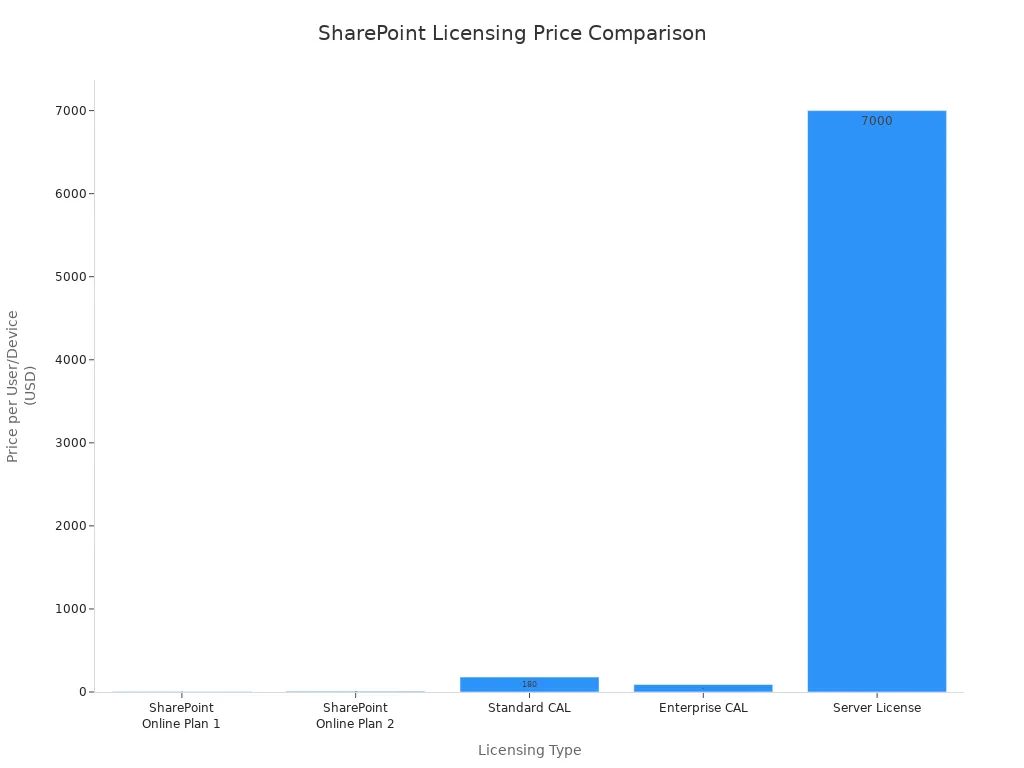
SharePoint Premium offers various licensing options to fit your organization's needs. Here’s a comparison of the available plans:
| Licensing Type | Price per User/Device | Features |
|---|---|---|
| SharePoint Online Plan 1 | $5.00 | Core collaboration features including document management, task management, and basic intranet functionality. |
| SharePoint Online Plan 2 | $10.00 | Everything in Plan 1 plus advanced features such as enterprise search, eDiscovery, compliance tools, and unlimited storage. |
| Standard CAL | $180 | Access to core capabilities including sites, collaboration, content management, and basic search. |
| Enterprise CAL | $90 | Adds advanced features like business intelligence tools, Access Services, InfoPath Services, and Power View. |
| Server License | Approx. $7,000 | Required for each running instance of SharePoint Server. |
Before you can obtain SharePoint Premium licenses, ensure you meet these prerequisites:
- A Microsoft 365 subscription with SharePoint Online enabled
- The SharePoint Admin role from within Microsoft 365
- A Microsoft Azure subscription
- The Azure Owner permission on the subscription to create Azure Resource Groups.
Implementation Steps
Implementing SharePoint Premium involves several key steps. Follow this structured approach to ensure a successful rollout:
- Assessment (2-4 weeks): Evaluate your current SharePoint environment, including workflows and user adoption patterns.
- Pilot (4-6 weeks): Select high-impact use cases and train document understanding models.
- Rollout (8-12 weeks): Extend implementation to additional departments and integrate with existing applications.
By following these steps, you can effectively implement SharePoint Premium and enhance your document management capabilities.
In summary, SharePoint Premium offers powerful features that enhance document management and collaboration. You can benefit from intelligent automation, which streamlines tasks like document categorization and data extraction. This allows you to focus on strategic work. A comprehensive governance framework helps manage the content lifecycle, ensuring data security and compliance.
Here are some key benefits of SharePoint Premium:
- Improved Collaboration: Advanced features enhance teamwork and productivity.
- Enhanced Security: Robust compliance tools protect sensitive information.
- AI Integration: Seamless integration with tools like Microsoft Copilot optimizes workflows.
As you consider adopting SharePoint Premium, keep an eye on future developments:
| Key Development | Description |
|---|---|
| AI Integration | Microsoft Copilot will automate content creation and enhance user interaction. |
| Cloud-First Approach | A shift towards cloud-based services will redefine document management. |
| Enhanced Security | Focus on compliance features will address regulatory requirements. |
Explore SharePoint Premium today to transform your document management experience!
FAQ
What is SharePoint Premium?
SharePoint Premium is an AI-powered add-on for SharePoint Online. It enhances document management by automating organization, processing, and compliance tasks.
How does SharePoint Premium improve collaboration?
SharePoint Premium centralizes content, allowing real-time co-authoring and structured repositories. This setup enhances teamwork and reduces confusion.
What are the key features of SharePoint Premium?
Key features include advanced document processing, content governance, and enriched content experiences. These features streamline workflows and improve user interaction.
Is SharePoint Premium suitable for small businesses?
Yes, SharePoint Premium benefits small businesses by automating document management tasks. It enhances collaboration and security, making it a valuable tool for growth.
How does SharePoint Premium ensure data security?
SharePoint Premium includes features like restricted access controls, data access governance reports, and compliance tools. These features help protect sensitive information.
Can I integrate SharePoint Premium with other Microsoft 365 tools?
Absolutely! SharePoint Premium integrates seamlessly with other Microsoft 365 applications, enhancing productivity and enabling data-driven decision-making.
What is the pricing structure for SharePoint Premium?
SharePoint Premium is a pay-per-use add-on. Pricing starts at $0.01 per page for AI document processing and $0.10 per eSignature request.
How can I get started with SharePoint Premium?
To get started, ensure you have a Microsoft 365 subscription. Then, follow the licensing options and implementation steps outlined in the blog.
Last reviewed: July 2026.
What You’ll Learn
- What SharePoint Premium adds to everyday document and content management.
- How to evaluate suitable business processes before introducing intelligent processing.
- Why governance, permissions, and information architecture remain essential.
Who Should Listen
This episode is for Microsoft 365 administrators, IT professionals, architects, and business owners who need a practical understanding of SharePoint Premium before planning, configuring, or supporting it.
🎧 You Should Also Listen To
- OneDrive Sync — Understand the file-access and collaboration experience that many users rely on every day.
- Microsoft Viva Learning — Connect governed content with a more structured employee learning experience.
🚀 Want to be part of m365.fm?
Then stop just listening… and start showing up.
👉 Connect with me on LinkedIn and let’s make something happen:
- 🎙️ Be a podcast guest and share your story
- 🎧 Host your own episode (yes, seriously)
- 💡 Pitch topics the community actually wants to hear
- 🌍 Build your personal brand in the Microsoft 365 space
This isn’t just a podcast — it’s a platform for people who take action.
🔥 Most people wait. The best ones don’t.
👉 Connect with me on LinkedIn and send me a message:
"I want in"
Let’s build something awesome 👊
1
00:00:00,000 --> 00:00:03,880
Welcome to another episode of Microsoft Knowledge Nuggets on M365,
2
00:00:03,880 --> 00:00:05,160
FM, I'm Mirko Peters,
3
00:00:05,160 --> 00:00:07,080
and today we're tackling SharePoint Premium.
4
00:00:07,080 --> 00:00:08,960
But first, here's a number that might surprise you.
5
00:00:08,960 --> 00:00:11,000
Around two billion new documents are created
6
00:00:11,000 --> 00:00:13,560
in Microsoft 365 every single day.
7
00:00:13,560 --> 00:00:15,880
Two billion, and most of them are a mess.
8
00:00:15,880 --> 00:00:19,800
Wrong names, no tags, buried in the wrong folders.
9
00:00:19,800 --> 00:00:22,120
So what is SharePoint Premium and why should you care?
10
00:00:22,120 --> 00:00:23,360
By the end of this episode,
11
00:00:23,360 --> 00:00:25,640
you'll understand what it adds to regular SharePoint
12
00:00:25,640 --> 00:00:26,920
and whether it's worth your time.
13
00:00:26,920 --> 00:00:29,360
Grab your coffee and let's dive in.
14
00:00:29,360 --> 00:00:31,920
The problem that SharePoint Premium solves.
15
00:00:31,920 --> 00:00:33,840
Let's start with a plain English definition.
16
00:00:33,840 --> 00:00:37,040
SharePoint Premium is an AI-powered add-on for SharePoint online.
17
00:00:37,040 --> 00:00:38,120
It is not a replacement.
18
00:00:38,120 --> 00:00:40,680
Your existing SharePoint stays exactly where it is.
19
00:00:40,680 --> 00:00:42,560
Premium sits on top and adds features
20
00:00:42,560 --> 00:00:44,520
that regular SharePoint doesn't have.
21
00:00:44,520 --> 00:00:46,400
Let's clear up a common myth first.
22
00:00:46,400 --> 00:00:49,080
Many people think Premium is a new version of SharePoint.
23
00:00:49,080 --> 00:00:49,920
It isn't.
24
00:00:49,920 --> 00:00:52,160
It's an add-on that improves what you already have.
25
00:00:52,160 --> 00:00:53,240
Think of it this way.
26
00:00:53,240 --> 00:00:54,920
Regular SharePoint is a filing cabinet
27
00:00:54,920 --> 00:00:56,360
where your toss files into drawers.
28
00:00:56,360 --> 00:00:57,720
Premium is the same cabinet,
29
00:00:57,720 --> 00:00:59,960
but now it automatically labels each folder,
30
00:00:59,960 --> 00:01:02,000
sorts every document and locks the drawers
31
00:01:02,000 --> 00:01:03,040
that shouldn't be open.
32
00:01:03,040 --> 00:01:03,840
For small teams,
33
00:01:03,840 --> 00:01:05,320
Base SharePoint works fine.
34
00:01:05,320 --> 00:01:06,840
You create a library, add folders,
35
00:01:06,840 --> 00:01:09,000
and everyone knows where things go.
36
00:01:09,000 --> 00:01:10,560
But that approach breaks at scale.
37
00:01:10,560 --> 00:01:13,120
When you have hundreds of sites and thousands of users,
38
00:01:13,120 --> 00:01:14,720
manual tagging stops working.
39
00:01:14,720 --> 00:01:18,560
Files get named Final V3 actual Doc X, metadata gets ignored
40
00:01:18,560 --> 00:01:20,320
and permissions turn into a tangle.
41
00:01:20,320 --> 00:01:21,480
Now nobody can find anything.
42
00:01:21,480 --> 00:01:23,320
The real pain is unstructured content
43
00:01:23,320 --> 00:01:24,960
piling up with no system.
44
00:01:24,960 --> 00:01:27,080
Missing metadata makes search useless.
45
00:01:27,080 --> 00:01:28,560
Files, you know, exist,
46
00:01:28,560 --> 00:01:31,160
become impossible to locate and permissions leak
47
00:01:31,160 --> 00:01:33,440
because someone shared a folder with everyone
48
00:01:33,440 --> 00:01:34,880
and forgot about it.
49
00:01:34,880 --> 00:01:35,800
Why does this matter now?
50
00:01:35,800 --> 00:01:38,600
Because Copilot needs clean tagged content to be useful.
51
00:01:38,600 --> 00:01:39,760
If your files are a mess,
52
00:01:39,760 --> 00:01:41,200
Copilot returns garbage.
53
00:01:41,200 --> 00:01:43,120
It's the contents fault, not Copilot's.
54
00:01:43,120 --> 00:01:45,360
SharePoint Premium gives that clean foundation.
55
00:01:45,360 --> 00:01:46,640
It takes messy files
56
00:01:46,640 --> 00:01:47,960
and turns them into structured,
57
00:01:47,960 --> 00:01:49,560
searchable, managed knowledge.
58
00:01:49,560 --> 00:01:50,720
So in one sentence,
59
00:01:50,720 --> 00:01:52,840
Premium turns SharePoint from a filing cabinet
60
00:01:52,840 --> 00:01:54,680
into an active content brain.
61
00:01:54,680 --> 00:01:55,960
It understands files,
62
00:01:55,960 --> 00:01:58,080
organizes them and keeps them secure.
63
00:01:58,080 --> 00:01:59,680
Let's break down exactly what that means,
64
00:01:59,680 --> 00:02:01,440
starting with the first pillar.
65
00:02:01,440 --> 00:02:03,280
Pillar one, content experiences.
66
00:02:03,280 --> 00:02:04,680
Content experiences is the pillar
67
00:02:04,680 --> 00:02:06,080
that makes your documents smarter.
68
00:02:06,080 --> 00:02:08,160
It's not about more folders or better menus.
69
00:02:08,160 --> 00:02:10,040
It's about giving you better ways to interact
70
00:02:10,040 --> 00:02:12,960
with your files without digging through endless folder trees.
71
00:02:12,960 --> 00:02:14,440
Let me show you a real example.
72
00:02:14,440 --> 00:02:16,720
The Business Documents app inside Microsoft Teams,
73
00:02:16,720 --> 00:02:18,280
instead of hunting through separate libraries
74
00:02:18,280 --> 00:02:20,680
for contracts, invoices and statements of work,
75
00:02:20,680 --> 00:02:23,360
you get one unified view, everything in one place.
76
00:02:23,360 --> 00:02:25,040
And it's smart enough to show you alerts
77
00:02:25,040 --> 00:02:26,720
when contracts are about to expire
78
00:02:26,720 --> 00:02:28,400
or when something needs your attention.
79
00:02:28,400 --> 00:02:29,280
You don't have to check.
80
00:02:29,280 --> 00:02:30,680
The app surfaces it for you.
81
00:02:30,680 --> 00:02:31,600
Here's another one,
82
00:02:31,600 --> 00:02:33,480
the document portal for external sharing.
83
00:02:33,480 --> 00:02:36,320
If you've ever tried to share files with a vendor or partner,
84
00:02:36,320 --> 00:02:37,800
you know how painful that can be.
85
00:02:37,800 --> 00:02:39,440
Emailing attachments back and forth,
86
00:02:39,440 --> 00:02:41,840
giving temporary access to a SharePoint folder
87
00:02:41,840 --> 00:02:43,520
and hoping permissions don't break.
88
00:02:43,520 --> 00:02:45,800
The document portal gives you branded external sites
89
00:02:45,800 --> 00:02:47,200
with security built in.
90
00:02:47,200 --> 00:02:48,680
Your partners get a clean experience.
91
00:02:48,680 --> 00:02:50,360
You keep control over who sees what.
92
00:02:50,360 --> 00:02:52,160
Then there's the integrated file viewer.
93
00:02:52,160 --> 00:02:54,040
It supports over 400 file types,
94
00:02:54,040 --> 00:02:56,680
HD drawings, PDFs, images, videos, you name it,
95
00:02:56,680 --> 00:02:58,040
and it's more than a viewer.
96
00:02:58,040 --> 00:03:00,640
You can add annotations, leave comments, tag colleagues,
97
00:03:00,640 --> 00:03:02,800
and assign tasks directly on the file.
98
00:03:02,800 --> 00:03:04,600
No more downloading, editing, re-uploading
99
00:03:04,600 --> 00:03:06,760
and hoping nobody overroads your changes.
100
00:03:06,760 --> 00:03:08,160
Everything happens in one place.
101
00:03:08,160 --> 00:03:09,400
Why does this matter for you?
102
00:03:09,400 --> 00:03:10,680
Less context switching?
103
00:03:10,680 --> 00:03:11,680
Fewer, I can't find it.
104
00:03:11,680 --> 00:03:13,000
Tickets better collaboration
105
00:03:13,000 --> 00:03:15,280
because the system does the organizing.
106
00:03:15,280 --> 00:03:17,360
Users don't need to change their habits,
107
00:03:17,360 --> 00:03:19,360
the system surfaces, what they need.
108
00:03:19,360 --> 00:03:20,360
That's the whole point,
109
00:03:20,360 --> 00:03:22,280
but experiences are only half the story.
110
00:03:22,280 --> 00:03:24,240
Content also needs to be processed automatically,
111
00:03:24,240 --> 00:03:26,520
which brings us to the second pillar.
112
00:03:26,520 --> 00:03:28,640
Pillar 2, content processing.
113
00:03:28,640 --> 00:03:31,360
Content processing is where the AI does the heavy lifting.
114
00:03:31,360 --> 00:03:32,920
This pillar reads, classifies,
115
00:03:32,920 --> 00:03:35,840
and extracts metadata from documents without human help.
116
00:03:35,840 --> 00:03:37,440
No more relying on someone in accounting
117
00:03:37,440 --> 00:03:39,280
to remember to tag an invoice correctly.
118
00:03:39,280 --> 00:03:40,800
The system handles it automatically.
119
00:03:40,800 --> 00:03:42,400
These are the core capabilities.
120
00:03:42,400 --> 00:03:45,840
Pre-built AI models for invoices, receipts, and contracts.
121
00:03:45,840 --> 00:03:49,720
Optical character recognition, or OCR, for scanned PDFs,
122
00:03:49,720 --> 00:03:51,880
so text and images become searchable.
123
00:03:51,880 --> 00:03:54,080
Image tagging to identify what's in a picture.
124
00:03:54,080 --> 00:03:56,680
Content assembly to build new documents from templates,
125
00:03:56,680 --> 00:03:59,120
translation to convert files into different languages
126
00:03:59,120 --> 00:04:01,200
that covers most of what organizations need.
127
00:04:01,200 --> 00:04:02,640
How does it work in practice?
128
00:04:02,640 --> 00:04:05,160
You enable payers you go through and as your subscription.
129
00:04:05,160 --> 00:04:07,320
Once that's set, the AI runs on files
130
00:04:07,320 --> 00:04:09,640
as they get uploaded to your document libraries.
131
00:04:09,640 --> 00:04:11,600
You don't trigger it manually, it just happens.
132
00:04:11,600 --> 00:04:13,240
Let me give you a concrete example.
133
00:04:13,240 --> 00:04:16,240
A PDF invoice arrives in your document library.
134
00:04:16,240 --> 00:04:18,520
OCR reads the text from that scanned document,
135
00:04:18,520 --> 00:04:21,040
then autofill columns kicks in and pulls out the vendor name,
136
00:04:21,040 --> 00:04:22,840
the invoice amount, and the due date,
137
00:04:22,840 --> 00:04:25,720
storing all of that as metadata columns on the file.
138
00:04:25,720 --> 00:04:27,760
Now that invoice is searchable, filterable,
139
00:04:27,760 --> 00:04:29,040
and usable in workflows.
140
00:04:29,040 --> 00:04:31,280
Nobody had to open it, read it, or type anything.
141
00:04:31,280 --> 00:04:32,520
Why does this matter?
142
00:04:32,520 --> 00:04:34,640
Clean metadata is the foundation for everything,
143
00:04:34,640 --> 00:04:37,000
search, automated workflows, and copilot.
144
00:04:37,000 --> 00:04:38,800
Without it, your AI tools are guessing.
145
00:04:38,800 --> 00:04:40,920
Copilot can't answer, show me all invoices
146
00:04:40,920 --> 00:04:43,560
from Fabricum over $5,000 if the invoices don't have
147
00:04:43,560 --> 00:04:45,640
vendor names and amounts stored as metadata.
148
00:04:45,640 --> 00:04:47,760
It's not magic, it's preparation.
149
00:04:47,760 --> 00:04:49,160
What this means for you is simple.
150
00:04:49,160 --> 00:04:51,320
You get to automate the busy work your team hates
151
00:04:51,320 --> 00:04:52,760
and does inconsistently.
152
00:04:52,760 --> 00:04:55,320
Manual metadata entry is boring and error prone.
153
00:04:55,320 --> 00:04:56,880
Nobody does it the same way twice.
154
00:04:56,880 --> 00:04:58,240
AI does it the same way every time,
155
00:04:58,240 --> 00:05:00,800
but processing without oversight is dangerous,
156
00:05:00,800 --> 00:05:03,160
which brings us to the third pillar.
157
00:05:03,160 --> 00:05:04,960
Pillar three, content governance.
158
00:05:04,960 --> 00:05:06,760
Content governance is the bouncer at the door.
159
00:05:06,760 --> 00:05:08,800
It controls who sees what, cleans up,
160
00:05:08,800 --> 00:05:11,320
stale content, and enforces your policies.
161
00:05:11,320 --> 00:05:14,520
Once you start processing thousands of files automatically,
162
00:05:14,520 --> 00:05:16,520
you need to make sure those files don't end up
163
00:05:16,520 --> 00:05:17,680
in the wrong hands.
164
00:05:17,680 --> 00:05:19,240
Let me walk you through the main tools.
165
00:05:19,240 --> 00:05:21,440
Data access governance reports, dag for short,
166
00:05:21,440 --> 00:05:23,800
shine a light on oversharing by showing you which sites
167
00:05:23,800 --> 00:05:26,800
are wide open, where permissions don't match your policies,
168
00:05:26,800 --> 00:05:29,400
and where sensitive content might be exposed.
169
00:05:29,400 --> 00:05:32,200
Site access reviews force site owners to validate permissions
170
00:05:32,200 --> 00:05:33,960
on a regular schedule, so instead of hoping
171
00:05:33,960 --> 00:05:36,960
someone remembers to check, the system sends them a notification
172
00:05:36,960 --> 00:05:38,440
and requires a response.
173
00:05:38,440 --> 00:05:40,880
Restricted access control lets you lock content down,
174
00:05:40,880 --> 00:05:43,200
so only pre-approved security groups can touch it,
175
00:05:43,200 --> 00:05:45,000
even if someone tries to share it more broadly.
176
00:05:45,000 --> 00:05:46,560
Then there's lifecycle management.
177
00:05:46,560 --> 00:05:50,320
It automatically archives inactive sites, detects sites
178
00:05:50,320 --> 00:05:53,520
that have lost their owners, and sends batch notifications,
179
00:05:53,520 --> 00:05:56,880
so owners don't get flooded with individual emails.
180
00:05:56,880 --> 00:05:59,320
If a project team stopped using their site six months ago,
181
00:05:59,320 --> 00:06:02,360
the system can flag it, notify the owner, and archive it
182
00:06:02,360 --> 00:06:03,360
if nobody responds.
183
00:06:03,360 --> 00:06:04,560
Here's a real example.
184
00:06:04,560 --> 00:06:06,880
Your DAG report flags a finance site that's
185
00:06:06,880 --> 00:06:09,600
shared with everyone except external users.
186
00:06:09,600 --> 00:06:10,680
That's a red flag.
187
00:06:10,680 --> 00:06:13,760
It means every internal employee can see whatever's in there,
188
00:06:13,760 --> 00:06:16,040
including bonus spreadsheets or tax IDs.
189
00:06:16,040 --> 00:06:18,120
You run a site access review, the finance team
190
00:06:18,120 --> 00:06:19,840
validates who actually needs access,
191
00:06:19,840 --> 00:06:22,200
you restrict permissions, and the leak is fixed.
192
00:06:22,200 --> 00:06:24,800
Before premium, you might not have caught that until an audit,
193
00:06:24,800 --> 00:06:26,800
or worse, until after a data breach.
194
00:06:26,800 --> 00:06:28,280
Why is governance so important here?
195
00:06:28,280 --> 00:06:31,040
Because AI automation can multiply your mistakes.
196
00:06:31,040 --> 00:06:33,400
If you're processing thousands of files automatically
197
00:06:33,400 --> 00:06:34,880
and your permissions are a mess,
198
00:06:34,880 --> 00:06:37,120
you're just speeding up the spread of bad access.
199
00:06:37,120 --> 00:06:38,520
Premium gives you the guardrails,
200
00:06:38,520 --> 00:06:40,120
so you can automate with confidence
201
00:06:40,120 --> 00:06:42,240
knowing the system is watching for problems.
202
00:06:42,240 --> 00:06:44,280
What this means for you is fewer compliance headaches
203
00:06:44,280 --> 00:06:46,080
and less cleanup after the fact.
204
00:06:46,080 --> 00:06:48,040
Instead of spending your weekends fixing permissions
205
00:06:48,040 --> 00:06:50,440
and chasing site owners, the system does the monitoring
206
00:06:50,440 --> 00:06:51,560
and the nagging for you.
207
00:06:51,560 --> 00:06:53,840
These three pillars don't exist in isolation.
208
00:06:53,840 --> 00:06:56,240
Here's how they work together as one system.
209
00:06:56,240 --> 00:06:57,720
How the three pillars connect.
210
00:06:57,720 --> 00:06:59,320
Here's where it all comes together.
211
00:06:59,320 --> 00:07:01,560
These three pillars aren't separate products you buy
212
00:07:01,560 --> 00:07:03,000
and use independently.
213
00:07:03,000 --> 00:07:05,120
There is system where each one feeds the next.
214
00:07:05,120 --> 00:07:07,200
Experiences surface content for users,
215
00:07:07,200 --> 00:07:09,520
processing structures that content automatically,
216
00:07:09,520 --> 00:07:12,560
governance keeps it secure, and they all depend on each other.
217
00:07:12,560 --> 00:07:14,440
Think about a real-world flow.
218
00:07:14,440 --> 00:07:17,080
A contract gets uploaded to your SharePoint library
219
00:07:17,080 --> 00:07:19,520
and content processing kicks in immediately.
220
00:07:19,520 --> 00:07:21,920
AI reads the document, classifies it as a contract,
221
00:07:21,920 --> 00:07:23,200
extracts the expiration date,
222
00:07:23,200 --> 00:07:26,120
and the party's involved and stores those as metadata columns.
223
00:07:26,120 --> 00:07:28,040
Now that contract appears in the business documents
224
00:07:28,040 --> 00:07:30,440
app in Teams, complete with its metadata,
225
00:07:30,440 --> 00:07:31,800
ready for someone to review.
226
00:07:31,800 --> 00:07:33,600
And because governance policies are in place,
227
00:07:33,600 --> 00:07:35,280
only the right people can see it.
228
00:07:35,280 --> 00:07:37,960
The finance team, the legal department, the contract owner.
229
00:07:37,960 --> 00:07:39,320
Everyone else is locked out.
230
00:07:39,320 --> 00:07:40,480
That's the key insight.
231
00:07:40,480 --> 00:07:42,640
SharePoint Premium isn't three separate things
232
00:07:42,640 --> 00:07:43,800
you bolt onto your tenant.
233
00:07:43,800 --> 00:07:46,240
It's one platform where each pillar makes the others better.
234
00:07:46,240 --> 00:07:48,440
Without content processing, the Business Documents app
235
00:07:48,440 --> 00:07:50,920
just shows you a list of files with no useful information.
236
00:07:50,920 --> 00:07:51,680
It's junk.
237
00:07:51,680 --> 00:07:53,840
Without governance, all that automated processing
238
00:07:53,840 --> 00:07:55,520
creates risk because you're classifying
239
00:07:55,520 --> 00:07:57,560
and surfacing content that might be overshared.
240
00:07:57,560 --> 00:07:58,840
And without content experiences,
241
00:07:58,840 --> 00:08:00,880
governance is just a rule book that nobody reads.
242
00:08:00,880 --> 00:08:03,400
Here's why this matters if you're just getting started.
243
00:08:03,400 --> 00:08:05,080
You don't need to buy all three pillars at once.
244
00:08:05,080 --> 00:08:06,760
You can start with content processing
245
00:08:06,760 --> 00:08:09,040
for one document library and see how it works.
246
00:08:09,040 --> 00:08:11,040
Or you can start with governance reports
247
00:08:11,040 --> 00:08:13,440
to understand what's happening in your tenant right now.
248
00:08:13,440 --> 00:08:16,040
But understanding the whole picture helps you plan.
249
00:08:16,040 --> 00:08:17,040
You know where you're headed,
250
00:08:17,040 --> 00:08:19,560
even if you're only taking the first step today.
251
00:08:19,560 --> 00:08:21,240
And the biggest reason to care about this picture
252
00:08:21,240 --> 00:08:22,800
is what it enables for co-pilot.
253
00:08:22,800 --> 00:08:24,040
Let's talk about that.
254
00:08:24,040 --> 00:08:26,360
Why co-pilot demands SharePoint Premium?
255
00:08:26,360 --> 00:08:27,200
Imagine this.
256
00:08:27,200 --> 00:08:29,640
Your company buys co-pilot licenses for everyone.
257
00:08:29,640 --> 00:08:31,760
The execs are excited, the demos look amazing,
258
00:08:31,760 --> 00:08:33,920
and then someone asks co-pilot to show all invoices
259
00:08:33,920 --> 00:08:37,000
over $10,000 from Fabricum in 2023.
260
00:08:37,000 --> 00:08:40,080
Instead of a clean list, co-pilot returns a random mix
261
00:08:40,080 --> 00:08:42,480
of PDFs, meeting notes, and an email that
262
00:08:42,480 --> 00:08:44,960
happened to mention the word invoice.
263
00:08:44,960 --> 00:08:46,360
Users get frustrated.
264
00:08:46,360 --> 00:08:48,840
Leadership starts wondering why they spent all that money.
265
00:08:48,840 --> 00:08:51,160
The problem isn't co-pilot, it's the content.
266
00:08:51,160 --> 00:08:53,320
Co-pilot can only work with what it has.
267
00:08:53,320 --> 00:08:55,920
And if your documents don't have clean metadata,
268
00:08:55,920 --> 00:08:58,760
if invoices aren't tagged with vendor names and amounts,
269
00:08:58,760 --> 00:09:02,280
if contracts don't have expiration dates stored as data,
270
00:09:02,280 --> 00:09:04,120
then co-pilot is just guessing.
271
00:09:04,120 --> 00:09:05,640
And guessing doesn't look like magic.
272
00:09:05,640 --> 00:09:06,680
It looks like a mess.
273
00:09:06,680 --> 00:09:09,080
SharePoint Premium fixes that by providing
274
00:09:09,080 --> 00:09:11,800
the structured metadata, classified documents,
275
00:09:11,800 --> 00:09:14,080
and governed access that co-pilot needs to deliver
276
00:09:14,080 --> 00:09:15,200
useful answers.
277
00:09:15,200 --> 00:09:17,920
When an invoice arrives, premium extracts the vendor,
278
00:09:17,920 --> 00:09:21,120
the amount, and the due date, then stores them as columns.
279
00:09:21,120 --> 00:09:23,280
Now, when someone asks co-pilot about invoices
280
00:09:23,280 --> 00:09:25,080
from Fabricum, it doesn't have to guess.
281
00:09:25,080 --> 00:09:27,520
It filters by the vendor column returns exactly
282
00:09:27,520 --> 00:09:29,800
what was asked for and looks like a hero.
283
00:09:29,800 --> 00:09:31,520
Microsoft's own guidance is clear.
284
00:09:31,520 --> 00:09:34,080
Preparing content for AI is the primary use case
285
00:09:34,080 --> 00:09:35,400
for SharePoint Premium.
286
00:09:35,400 --> 00:09:36,600
They've said it directly.
287
00:09:36,600 --> 00:09:38,240
If you want co-pilot to work well,
288
00:09:38,240 --> 00:09:40,120
you need to get your content in order first.
289
00:09:40,120 --> 00:09:42,120
And premium is the tool for that job.
290
00:09:42,120 --> 00:09:43,280
The warning is simple.
291
00:09:43,280 --> 00:09:46,160
Don't expect magic from co-pilot if your tenant is a mess.
292
00:09:46,160 --> 00:09:47,640
Co-pilot is not a cleanup crew.
293
00:09:47,640 --> 00:09:48,560
It's an amplifier.
294
00:09:48,560 --> 00:09:50,440
If your content is organized and governed,
295
00:09:50,440 --> 00:09:52,280
co-pilot makes you faster and smarter.
296
00:09:52,280 --> 00:09:54,040
If your content is a disaster,
297
00:09:54,040 --> 00:09:57,000
co-pilot just surfaces that disaster more efficiently.
298
00:09:57,000 --> 00:09:58,720
What this means for you is straightforward.
299
00:09:58,720 --> 00:10:00,320
If you're planning a co-pilot rollout,
300
00:10:00,320 --> 00:10:02,440
start with SharePoint Premium or at minimum,
301
00:10:02,440 --> 00:10:03,720
start cleaning your content.
302
00:10:03,720 --> 00:10:05,680
Don't wait until after the rollout to discover
303
00:10:05,680 --> 00:10:08,040
that your AI assistant can't find anything useful.
304
00:10:08,040 --> 00:10:09,520
Get the foundation right first.
305
00:10:09,520 --> 00:10:11,240
All of this sounds great in theory,
306
00:10:11,240 --> 00:10:13,880
but every admin has the same practical question.
307
00:10:13,880 --> 00:10:15,600
What does it actually cost?
308
00:10:15,600 --> 00:10:17,360
Licensing costs and what's free.
309
00:10:17,360 --> 00:10:18,680
Here's the bottom line.
310
00:10:18,680 --> 00:10:20,240
SharePoint Premium is not included
311
00:10:20,240 --> 00:10:22,480
in any Microsoft 365 ECU-RES plan.
312
00:10:22,480 --> 00:10:24,960
Not E3, not E5, not the new E7.
313
00:10:24,960 --> 00:10:27,000
It's an add-on, built through Azure,
314
00:10:27,000 --> 00:10:28,440
on a pay-as-you-go basis.
315
00:10:28,440 --> 00:10:30,440
You pay for what you use, nothing more.
316
00:10:30,440 --> 00:10:31,720
But here's some good news.
317
00:10:31,720 --> 00:10:33,960
Through December 2025, Microsoft is offering
318
00:10:33,960 --> 00:10:36,360
limited monthly capacity at no cost.
319
00:10:36,360 --> 00:10:38,680
You can try the core document processing features,
320
00:10:38,680 --> 00:10:41,680
autofill columns, OCR, translation and e-signature,
321
00:10:41,680 --> 00:10:43,000
without spending a dime.
322
00:10:43,000 --> 00:10:45,520
It's a genuine free trial, not a marketing trick.
323
00:10:45,520 --> 00:10:47,000
If you've been curious about premium,
324
00:10:47,000 --> 00:10:48,440
now is the time to test it.
325
00:10:48,440 --> 00:10:50,320
After December, you'll need to pay.
326
00:10:50,320 --> 00:10:51,440
One thing to keep straight.
327
00:10:51,440 --> 00:10:53,840
SharePoint Advanced Management, Backup and Archive
328
00:10:53,840 --> 00:10:56,120
are separate products with their own licensing.
329
00:10:56,120 --> 00:10:58,520
They used to be bundled under the premium umbrella,
330
00:10:58,520 --> 00:10:59,960
but Microsoft split them out.
331
00:10:59,960 --> 00:11:01,840
They're not part of the pay-as-you-go services,
332
00:11:01,840 --> 00:11:04,200
so if you need those, you license them separately.
333
00:11:04,200 --> 00:11:05,680
The cost management tip is simple.
334
00:11:05,680 --> 00:11:07,600
You can turn on pay-as-you-go services
335
00:11:07,600 --> 00:11:09,080
per site, not tenant-wide.
336
00:11:09,080 --> 00:11:12,280
Start with one library, one site, one document type,
337
00:11:12,280 --> 00:11:14,800
set a budget in Azure and monitor the first month's bill.
338
00:11:14,800 --> 00:11:16,720
Then decide if the value justifies the cost.
339
00:11:16,720 --> 00:11:18,400
Don't flip the switch for everything at once,
340
00:11:18,400 --> 00:11:20,280
and yes, the name has changed multiple times.
341
00:11:20,280 --> 00:11:21,960
Project Cortex became syntax.
342
00:11:21,960 --> 00:11:23,760
Syntex became SharePoint Premium.
343
00:11:23,760 --> 00:11:25,280
And now Microsoft is quietly referring
344
00:11:25,280 --> 00:11:26,840
to the pay-as-you-go services
345
00:11:26,840 --> 00:11:29,760
as document processing for Microsoft 365.
346
00:11:29,760 --> 00:11:30,960
It's confusing, I know.
347
00:11:30,960 --> 00:11:33,880
Here's my advice, ignore the name and focus on the capability.
348
00:11:33,880 --> 00:11:36,840
Whether it's called syntax, premium, or document processing,
349
00:11:36,840 --> 00:11:38,840
the underlying technology is the same.
350
00:11:38,840 --> 00:11:41,200
It reads your documents, extracts metadata,
351
00:11:41,200 --> 00:11:42,920
and makes your content usable.
352
00:11:42,920 --> 00:11:44,560
What this means for you is straightforward.
353
00:11:44,560 --> 00:11:46,560
Test with the free promotion, measure the ROI,
354
00:11:46,560 --> 00:11:48,880
and then scale only where the value proves itself.
355
00:11:48,880 --> 00:11:50,600
Don't buy the whole platform upfront.
356
00:11:50,600 --> 00:11:52,280
Let the results tell you where to invest.
357
00:11:52,280 --> 00:11:54,360
So where should you actually start?
358
00:11:54,360 --> 00:11:55,640
Your first steps.
359
00:11:55,640 --> 00:11:58,080
The smartest move you can make is to start small.
360
00:11:58,080 --> 00:12:00,280
Pick one high-volume document type.
361
00:12:00,280 --> 00:12:02,200
Invoices are the classic example,
362
00:12:02,200 --> 00:12:04,840
and turn on a pre-built processing model on a single site.
363
00:12:04,840 --> 00:12:05,520
That's all.
364
00:12:05,520 --> 00:12:08,200
One document type, one site, see what happens from there.
365
00:12:08,200 --> 00:12:08,960
Why invoices?
366
00:12:08,960 --> 00:12:11,600
Because they show up regularly and look the same every time.
367
00:12:11,600 --> 00:12:13,080
The metadata inside them,
368
00:12:13,080 --> 00:12:16,920
vendor name, amount, due date, feeds straight into accounts payable.
369
00:12:16,920 --> 00:12:18,240
If you automate that extraction,
370
00:12:18,240 --> 00:12:20,120
you're saving real human hours that people
371
00:12:20,120 --> 00:12:21,560
can spend on more important work.
372
00:12:21,560 --> 00:12:24,360
Your next step is running a data access governance report.
373
00:12:24,360 --> 00:12:26,080
This is the report that shows you exactly
374
00:12:26,080 --> 00:12:27,680
where your content is overshared.
375
00:12:27,680 --> 00:12:28,920
Who has access to what?
376
00:12:28,920 --> 00:12:30,240
Which sites are wide open?
377
00:12:30,240 --> 00:12:31,920
And the results usually surprise people.
378
00:12:31,920 --> 00:12:34,720
Most organizations find that 30 to 40% of their sites
379
00:12:34,720 --> 00:12:35,600
need attention.
380
00:12:35,600 --> 00:12:37,000
Nobody was being malicious.
381
00:12:37,000 --> 00:12:40,200
Permissions drift over time as people leave and projects end.
382
00:12:40,200 --> 00:12:42,640
Access just doesn't get cleaned up unless you check.
383
00:12:42,640 --> 00:12:44,800
The DAG report shows you the problem spots.
384
00:12:44,800 --> 00:12:46,200
After that, set up a content center
385
00:12:46,200 --> 00:12:48,360
and push your first model to a pilot team.
386
00:12:48,360 --> 00:12:51,080
The content center is where you manage your AI models.
387
00:12:51,080 --> 00:12:52,680
You create the model there, publish it,
388
00:12:52,680 --> 00:12:55,040
and apply it to specific document libraries.
389
00:12:55,040 --> 00:12:57,320
Start with a small pilot, maybe five to 10 users,
390
00:12:57,320 --> 00:12:59,560
who actually work with those documents every day,
391
00:12:59,560 --> 00:13:01,280
get their feedback, make changes,
392
00:13:01,280 --> 00:13:02,760
and then roll it out wider.
393
00:13:02,760 --> 00:13:04,600
Before you dive into any document process,
394
00:13:04,600 --> 00:13:06,840
ask yourself four quick questions.
395
00:13:06,840 --> 00:13:09,200
Is the volume high enough that nobody will ever tag files
396
00:13:09,200 --> 00:13:09,960
manually?
397
00:13:09,960 --> 00:13:11,280
Is the document type repeatable
398
00:13:11,280 --> 00:13:13,280
with the same fields and structure every time?
399
00:13:13,280 --> 00:13:16,200
Does the metadata you extract feed something downstream?
400
00:13:16,200 --> 00:13:19,000
A workflow, a report, co-pilot?
401
00:13:19,000 --> 00:13:20,640
And does someone actually own the outcome?
402
00:13:20,640 --> 00:13:23,000
Someone who will use those columns once they're populated?
403
00:13:23,000 --> 00:13:25,000
If any answer is no, that document type
404
00:13:25,000 --> 00:13:26,360
might not be worth your time.
405
00:13:26,360 --> 00:13:27,640
Here's the common mistake.
406
00:13:27,640 --> 00:13:30,080
People want to build 50 custom models right away.
407
00:13:30,080 --> 00:13:31,800
It's tempting to think you need a unique model
408
00:13:31,800 --> 00:13:32,960
for every document type.
409
00:13:32,960 --> 00:13:33,840
You don't.
410
00:13:33,840 --> 00:13:36,880
Pre-built models cover about 80% of common scenarios.
411
00:13:36,880 --> 00:13:39,640
In voices, receipts, contracts, start there.
412
00:13:39,640 --> 00:13:41,680
Only add a custom model when you've proven the value
413
00:13:41,680 --> 00:13:43,800
and found a gap that pre-built ones can't fill.
414
00:13:43,800 --> 00:13:44,760
One more thing.
415
00:13:44,760 --> 00:13:48,120
The free pay as you go promotion runs through December 2025.
416
00:13:48,120 --> 00:13:51,080
That's your window to test this technology with no cost.
417
00:13:51,080 --> 00:13:52,960
Don't let it close without giving it a shot.
418
00:13:52,960 --> 00:13:53,720
That's the system.
419
00:13:53,720 --> 00:13:54,800
Let's wrap it up.
420
00:13:54,800 --> 00:13:57,000
SharePoint Premium is the engine that turns
421
00:13:57,000 --> 00:13:58,720
messy files into structured knowledge
422
00:13:58,720 --> 00:14:01,280
and makes co-pilot a tool that actually works.
423
00:14:01,280 --> 00:14:03,520
Start with one document type, one side, one pilot.
424
00:14:03,520 --> 00:14:04,720
Test the free promotion.
425
00:14:04,720 --> 00:14:06,400
Let the results guide your next move.
426
00:14:06,400 --> 00:14:09,120
Subscribe to Microsoft Knowledge Nuggets on M365.
427
00:14:09,120 --> 00:14:10,920
FM for more plain English breakdowns.
428
00:14:10,920 --> 00:14:13,360
Drop a comment with your biggest content pain point.
429
00:14:13,360 --> 00:14:15,800
We'll answer it in a future episode.

Founder of m365.fm, m365.show and m365con.net
Mirko Peters is a Microsoft 365 expert, content creator, and founder of m365.fm, a platform dedicated to sharing practical insights on modern workplace technologies. His work focuses on Microsoft 365 governance, security, collaboration, and real-world implementation strategies.
Through his podcast and written content, Mirko provides hands-on guidance for IT professionals, architects, and business leaders navigating the complexities of Microsoft 365. He is known for translating complex topics into clear, actionable advice, often highlighting common mistakes and overlooked risks in real-world environments.
With a strong emphasis on community contribution and knowledge sharing, Mirko is actively building a platform that connects experts, shares experiences, and helps organizations get the most out of their Microsoft 365 investments.




