


 Apple Podcasts
 Spotify
 Youtube Music
 Spreaker
 Podchaser
 Amazon Music
 Azure NetApp Files - Simply Explained
Azure NetApp Files is Microsoft's enterprise-grade, high-performance file storage service built for demanding workloads that require extremely low latency, massive throughput, and advanced data management capabilities. Powered by NetApp technology and fully integrated into Azure, it enables organizations to migrate business-critical applications to the cloud without redesigning their storage architecture.
In this episode of Microsoft Knowledge Nuggets, Mirko Peters explains Azure NetApp Files in simple terms and shows why it is much more than just another cloud file share. You'll learn how Azure NetApp Files delivers enterprise NAS capabilities for Linux and Windows workloads using familiar SMB and NFS protocols, making it ideal for applications that demand exceptional performance and reliability.
The episode covers key concepts including NetApp accounts, capacity pools, volumes, performance tiers, snapshots, replication, backups, security, and high availability. It also explains how Azure NetApp Files supports enterprise workloads such as SAP HANA, Oracle databases, Azure VMware Solution, Azure Virtual Desktop, AI, analytics, and high-performance computing. You'll discover how the service integrates seamlessly with Azure networking, identity, monitoring, and disaster recovery features while providing sub-millisecond latency and dynamic performance scaling.
Quick answer: Azure NetApp Files is covered in this M365 FM episode with a practical focus on what it is, how it works, and the decisions that matter for architecture, adoption, security, governance, or day-to-day operations.
Azure NetApp Files is a high-performance file storage solution designed for enterprise needs. This service allows you to manage mission-critical workloads with ease. You benefit from ultra-low latency and exceptional throughput, making it ideal for demanding applications like SAP HANA and Oracle databases. Azure NetApp Files integrates seamlessly with Azure tools, simplifying management and enhancing your user experience. Its flexible service levels allow you to optimize performance and costs based on specific workload requirements.
| Feature | Description | Benefit |
|---|---|---|
| Volumes as a service | Quickly provision and manage volumes with minimal clicks. | Reduces complexity and hardware needs for businesses. |
| High availability | Automatic failover ensures data accessibility. | Minimizes downtime and operational disruptions. |
With Azure NetApp Files, you can focus on your core operations while enjoying reliable, high-performance storage.
Key Takeaways
- Azure NetApp Files provides high-performance file storage for mission-critical applications, ensuring fast access and reliability.
- The service supports both SMB and NFS protocols, allowing seamless integration with Windows and Linux applications.
- With ultra-low latency and high throughput, Azure NetApp Files enhances user experience and productivity for demanding workloads.
- Flexible service levels let you optimize performance and costs based on specific workload requirements, ensuring you only pay for what you need.
- Automatic failover and cross-region replication features guarantee high availability and disaster recovery, minimizing downtime.
- Azure NetApp Files simplifies management with a fully managed service, reducing administrative overhead and allowing focus on core business activities.
- Efficient snapshots enable quick backup and restore, ensuring data consistency and business continuity during disruptions.
- Regularly review and manage regional quotas and resource limits to maintain performance and adapt to evolving workload needs.
What is Azure NetApp Files

Overview of the Service
Azure NetApp Files is Microsoft’s enterprise-grade, high-performance file storage service designed specifically for mission-critical workloads. This cloud-native, fully managed service allows you to create volumes within a NetApp account and capacity pool. You can share these volumes using protocols like SMB and NFS, which makes it easy to integrate into both Windows and Linux environments. Azure NetApp Files optimizes performance and cost while ensuring scalability and data protection. This makes it suitable for various applications, including file sharing, databases, and high-performance computing.
Key Use Cases
Azure NetApp Files supports a wide range of use cases in enterprise environments. Here are some of the most common applications:
- Enabling advanced data analytics
- Supporting AI workflows
- Integration with Microsoft OneLake for governed analytics
- Direct operation with Azure Databricks on file-based datasets
In industries such as finance, healthcare, and manufacturing, Azure NetApp Files excels in supporting mission-critical workloads. The following table highlights key features and their benefits:
| Feature | Benefit |
|---|---|
| High-performance storage | Supports mission-critical applications with fast data access and processing capabilities. |
| Secure and compliant storage | Meets regulatory requirements for industries like finance and healthcare, ensuring data protection. |
| Scalable | Adapts to changing workload requirements, providing flexibility for growing businesses. |
For example, Baptist Health modernized its virtual desktop environment for clinicians using Azure NetApp Files. This upgrade enabled real-time access to patient data while ensuring high performance and availability. The service also facilitated rapid recovery and business continuity through real-time data replication.
Additionally, a major distributor of plumbing, lighting, and HVAC supplies showcased how Azure NetApp Files maintained connectivity between employees and customers. This real-world application demonstrates the service's effectiveness in enhancing operational efficiency.
With the latest updates, Azure NetApp Files has introduced new features aimed at improving file share experiences for enterprise workloads. These enhancements focus on flexibility, resilience, and performance, ensuring that your data storage needs are met effectively.
Azure NetApp Files Features

Performance and Scalability
Azure NetApp Files delivers exceptional performance and scalability, making it a top choice for demanding workloads.
Ultra-Low Latency
You can expect ultra-low latency with Azure NetApp Files. In minimal load environments, latency can drop to submillisecond levels. For medium to heavy loads, latency typically ranges from 2 to 3 milliseconds. This performance ensures that your applications respond quickly, enhancing user experience and productivity.
High Throughput
High throughput is another hallmark of Azure NetApp Files. The service can handle significant data loads, which is crucial for applications that require fast data processing. For instance, throughput can reach impressive levels, but it may be limited by network bandwidth or service level ceilings. Distributing workloads across multiple datastores can further enhance performance.
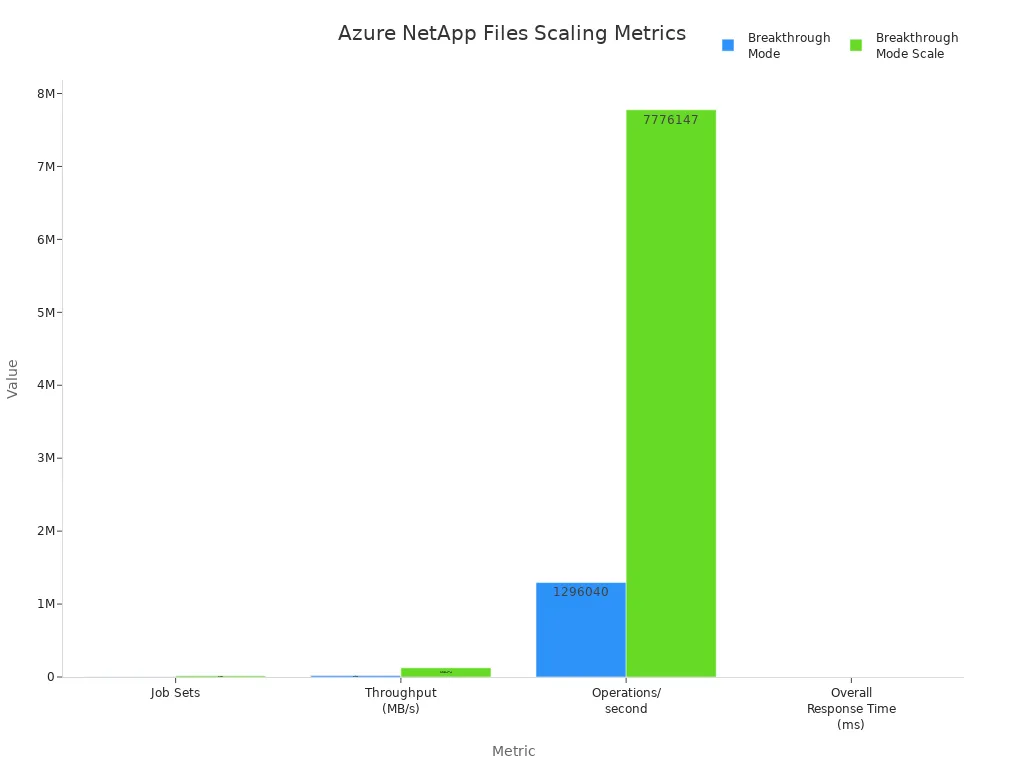
| Metric | Breakthrough Mode | Breakthrough Mode Scale | Factor |
|---|---|---|---|
| Job Sets | 2,880 | 17,280 | 6.00x |
| Throughput (MB/s) | 20,910 | 125,474 | 6.00x |
| Operations/second | 1,296,040 | 7,776,147 | 6.00x |
| Overall Response Time (ms) | 0.51 | 0.60 | 1.18x |
Flexible Service Levels
Azure NetApp Files offers flexible service levels that allow you to tailor performance and capacity to your specific needs.
Decoupled Capacity and Performance
One of the standout features is the ability to decouple storage capacity from performance. This means you can choose the amount of storage you need without being tied to a specific performance level. This flexibility allows you to optimize costs based on your workload requirements.
Cost Efficiency
By allowing independent adjustments of throughput and size limits, Azure NetApp Files enhances cost efficiency. You can scale performance during peak times and reduce it when demand decreases, ensuring you only pay for what you need.
| Service Level | Throughput per TiB | Description |
|---|---|---|
| Elastic | 32 MiB/s | High-availability with zero data loss, ideal for mission-critical workloads. |
| Flexible | 128 MiB/s minimum | Allows independent adjustment of throughput and size limits for demanding applications. |
| Standard | 16 MiB/s | Basic service level for general use. |
| Premium | 64 MiB/s | Enhanced performance for more intensive workloads. |
| Ultra | 128 MiB/s | Highest performance for the most demanding applications. |
Protocol Support and Integration
Azure NetApp Files supports multiple protocols, enhancing its integration capabilities with existing applications.
SMB and NFS Protocols
You can utilize both SMB and NFS protocols with Azure NetApp Files. This dual support enables seamless file sharing for Windows applications and high-performance computing for Linux applications. It also allows for dual-protocol volumes, giving you flexibility in application deployment without needing code changes.
| Protocols Supported | Impact on Integration |
|---|---|
| SMB | Enables seamless file sharing for Windows applications. |
| NFS | Facilitates high-performance computing and Linux application support. |
| Dual-protocol volumes | Allows flexibility in application deployment without code changes. |
Azure Integration
Azure NetApp Files integrates smoothly with other Azure services, enhancing your cloud experience.
| Feature | Description |
|---|---|
| Object REST API | Enables seamless integration with modern cloud-native services without data duplication. |
| Native S3-compatible access | Allows real-time analytics and AI workloads directly on existing datasets. |
| Enhanced security | Data remains protected within Azure NetApp Files. |
| Cost efficiency | Eliminates redundant copies and data movement. |
| Identity service support | Integrates with FreeIPA, OpenLDAP, and Red Hat Directory Server for improved identity management. |
With these features, Azure NetApp Files stands out as a robust solution for enterprises looking to optimize their storage needs while ensuring high performance and reliability.
Benefits of Using Azure NetApp Files
Simplicity and Management
Fully Managed Service
With Azure NetApp Files, you enjoy a fully managed service that simplifies storage management. You no longer need to worry about hardware maintenance or complex configurations. The service automates many tasks, allowing you to focus on your core business activities. This approach significantly reduces administrative overhead compared to traditional on-premises storage solutions. For instance, provisioning storage takes only minutes instead of weeks, and management complexity is low.
Easy Integration
Azure NetApp Files integrates seamlessly with existing applications. You can connect it to your cloud environment without extensive reconfiguration. This ease of integration allows you to leverage your current infrastructure while enhancing performance. The centralized data protection features, such as SnapCenter, enable you to manage application-consistent snapshots from a single console. This capability simplifies data protection and ensures that your data remains secure.
| Advantage | Description |
|---|---|
| Centralized Data Protection | SnapCenter enables management of application-consistent snapshots from a single console. |
| Application-Aware Management | SnapCenter provides application-aware snapshots, ensuring data integrity and recoverability. |
| Efficient Space Management | Utilizes space-efficient Snapshot technology, reducing storage costs and improving efficiency. |
| Quick Recovery | Facilitates rapid restoration from snapshots, enhancing data recovery speed. |
| Secured | SnapCenter can be deployed in a secure environment, minimizing data transmission risks. |
| Lower TCO | SnapCenter is available at no additional cost for Azure NetApp Files customers, lowering total cost of ownership. |
Availability and Reliability
High Availability
Azure NetApp Files guarantees high availability with an SLA of 99.99%. This reliability ensures that your data is always accessible. The service employs automatic failover, which minimizes downtime during unexpected outages. You can trust that your critical applications remain operational, even in challenging situations.
Disaster Recovery
The service also supports robust disaster recovery solutions. Features like cross-region replication allow you to replicate storage volumes to another Azure region. This capability ensures that your data remains safe and accessible, even in the event of a regional failure. Additionally, snapshots enable point-in-time copies of your data, which you can use for recovery in case of data loss.
| Feature | Description |
|---|---|
| High Availability | Azure NetApp Files provides a high-availability SLA with automatic failover, ensuring data is always accessible. |
| Cross-Region Replication | This feature allows for replication of storage volumes to another Azure region, facilitating disaster recovery. |
| Snapshots | Snapshots enable point-in-time copies of data, which can be used for recovery in case of data loss. |
Data Management and Security
Backup and Restore
Azure NetApp Files offers advanced data management features for backup and restore. You can quickly restore a file or entire volumes using efficient snapshots. This capability minimizes downtime and ensures business continuity. The application-aware snapshots guarantee that your data remains consistent and recoverable.
| Feature | Description |
|---|---|
| Efficient snapshots and backup | Provides advanced data protection and faster recovery using block-efficient, incremental snapshots. |
| Snapshot restore to a new volume | Allows instant restoration of data from previous snapshots, minimizing downtime. |
| Snapshot revert | Enables reverting a volume to a previous snapshot state, ensuring business continuity. |
| Application-aware snapshots | Guarantees application-consistent snapshots, automating creation and deletion processes. |
| Advanced data-protection features | Includes single-file restores, volume restores, clones, cross-region replication, and long-term retention. |
Encryption and Compliance
Security is a top priority with Azure NetApp Files. The service implements strict identity and access management to protect your data resources. All data at rest is encrypted by default, ensuring confidentiality and integrity. Azure NetApp Files also supports compliance with industry standards, making it suitable for regulated environments.
- Azure NetApp Files ensures confidentiality, integrity, and availability of data through its architecture best practices.
- It implements strict identity and access management to protect data resources, utilizing custom role-based access control (RBAC) and storage policies.
- The service establishes a security baseline that aligns with compliance requirements and industry standards.
Using Azure NetApp Files in Azure Environments
Setting Up Azure NetApp Files
To set up Azure NetApp Files in your Azure subscription, follow these steps:
- Log in to the Azure portal.
- In the Azure portal's search box, enter Subscriptions and select your subscription.
- Under Settings, select Resource providers.
- Find and select the provider Microsoft.NetApp and click Register.
- Use PowerShell or Azure CLI to specify the subscription and register the resource provider.
- Create a NetApp account by accessing the Azure NetApp Files pane and providing the required information.
Before you begin, ensure you meet these prerequisites:
- Validate that your subscription is registered to the
CloudSanExperiencefeature in theMicrosoft.AVSnamespace. - If not registered, register it using the command:
az feature register --name "CloudSanExperience" --namespace "Microsoft.AVS". - Verify that the subscription is registered to the
AnfDatastoreExperiencefeature. - Ensure the
vmwareextension is installed and is version3.0.0. If not, update or install it as necessary. - Log into the Azure Portal and verify access to the Azure NetApp Files service, registering the Azure NetApp Files Resource Provider.
Best Practices for Deployment
To optimize performance and reliability when deploying Azure NetApp Files, consider these best practices:
| Best Practice | Description |
|---|---|
| Test Deployments | Use cloning via snapshot restore to quickly create a new volume for testing. This ensures application stability and ease of upgrades. |
| Test Environments | Create and manage test environments to keep testing activities separate from production. This allows for effective disaster recovery solutions. |
| Short-term Clones | Utilize short-term clones for rapid, space-efficient testing and development workflows. This reduces storage costs and administrative overhead. |
| Manage Regional Quotas | Regularly review and manage regional quotas and resource limits to maintain performance and capacity as workloads evolve. |
| File Access Logs | Incorporate file access logs into operational monitoring. This helps identify usage trends and detect anomalies for data-driven optimizations. |
| Redundancy Features | Use snapshots and backup features to enhance data protection and recovery capabilities. This ensures reliability and fast recovery times. |
By following these practices, you can ensure that your Azure NetApp Files deployment runs smoothly and efficiently. Additionally, you can monitor and manage your deployments effectively. Here are some steps to help you with ongoing optimization:
- Create capacity pools based on your performance needs.
- Assign throughput to individual volumes based on their requirements.
- Regularly check the utilization of pools and volumes using Azure CLI commands.
- Implement strategies such as right-sizing pools and using tiered service levels to manage costs effectively.
With these guidelines, you can maximize the benefits of Azure NetApp Files in your Azure environment.
Azure NetApp Files stands out as a premier solution for high-performance, mission-critical workloads. Its features, such as high availability, efficient snapshots, and multi-protocol support, ensure that you can manage your data effectively.
Here are some key benefits:
| Feature/Benefit | Description |
|---|---|
| Volumes as a service | Quickly provision and manage volumes without dedicated hardware or complex configurations. |
| Cross-region replication | Offers disaster recovery capabilities and ensures data availability across different regions. |
| Application migration | Enables quick migration of applications to Azure without refactoring. |
With Azure NetApp Files, you gain a reliable, scalable, and secure storage solution tailored to your needs. Explore Azure NetApp Files today to elevate your storage capabilities and optimize your operations!
FAQ
What is Azure NetApp Files used for?
Azure NetApp Files provides high-performance file storage for mission-critical applications. You can use it for databases, virtual desktops, and data analytics, ensuring fast access and reliability.
How does Azure NetApp Files ensure data security?
Azure NetApp Files encrypts data at rest and in transit. It also implements strict identity and access management, ensuring only authorized users can access your data.
Can I integrate Azure NetApp Files with existing applications?
Yes, Azure NetApp Files supports both SMB and NFS protocols. This compatibility allows seamless integration with Windows and Linux applications without requiring code changes.
What are the benefits of using Azure NetApp Files?
You gain high availability, low latency, and flexible service levels. These features help optimize performance and costs, making it suitable for demanding workloads.
How do I set up Azure NetApp Files?
To set up Azure NetApp Files, log in to the Azure portal, register the Microsoft.NetApp provider, and create a NetApp account. Follow the prompts to configure your storage.
What is the SLA for Azure NetApp Files?
Azure NetApp Files offers a Service Level Agreement (SLA) of 99.99% availability. This ensures your data remains accessible and minimizes downtime during outages.
Can I scale my storage with Azure NetApp Files?
Yes, Azure NetApp Files allows you to scale storage capacity and performance independently. You can adjust these settings based on your workload requirements, optimizing costs.
What types of workloads benefit from Azure NetApp Files?
Azure NetApp Files is ideal for high-performance workloads like SAP HANA, Oracle databases, and high-performance computing. It excels in environments where speed and reliability are crucial.
🎧 Listen to this episode
Want a practical explanation of Azure NetApp Files? This episode breaks down the topic in clear language and shows why it matters for Microsoft 365, Azure, Power Platform, security, AI, and modern work.
Listen to this episode if you want to:
- Understand the key concepts behind Azure NetApp Files
- See how it fits into the wider Microsoft technology ecosystem
- Learn where it can create practical value for your organization
You may also enjoy these related M365 FM episodes:
- Azure Files - Simply Explained
- How to Run Local Llama on SharePoint Files Securely
- Scaling Microsoft Copilot to 35 Million Pages: The Epstein Files
- Connect Copilot Studio to Word Policy Files
- Make SharePoint Search Show the Right Files First
Discover more practical Microsoft conversations on M365 FM.
Last reviewed: July 2026.
Who Should Listen
This episode is for Microsoft 365 administrators, architects, IT leaders, and practitioners who need a practical understanding of Azure NetApp Files before planning, implementing, or supporting it.
🚀 Want to be part of m365.fm?
Then stop just listening… and start showing up.
👉 Connect with me on LinkedIn and let’s make something happen:
- 🎙️ Be a podcast guest and share your story
- 🎧 Host your own episode (yes, seriously)
- 💡 Pitch topics the community actually wants to hear
- 🌍 Build your personal brand in the Microsoft 365 space
This isn’t just a podcast — it’s a platform for people who take action.
🔥 Most people wait. The best ones don’t.
👉 Connect with me on LinkedIn and send me a message:
"I want in"
Let’s build something awesome 👊
1
00:00:00,000 --> 00:00:02,360
Azure already gives you plenty of storage options,
2
00:00:02,360 --> 00:00:04,080
blob, files, disk.
3
00:00:04,080 --> 00:00:06,240
So why does Azure NetApp files even exist?
4
00:00:06,240 --> 00:00:08,720
That's the first question people ask when they hear about it.
5
00:00:08,720 --> 00:00:09,560
And it's a fair one.
6
00:00:09,560 --> 00:00:11,400
Microsoft keeps adding storage services
7
00:00:11,400 --> 00:00:13,800
and it can feel like a new option appears every quarter.
8
00:00:13,800 --> 00:00:14,760
So why another one?
9
00:00:14,760 --> 00:00:15,600
Here's the thing.
10
00:00:15,600 --> 00:00:18,320
Most Azure storage handles general use just fine.
11
00:00:18,320 --> 00:00:20,640
Web apps, file shares, backups,
12
00:00:20,640 --> 00:00:22,760
the everyday things that keep a business running,
13
00:00:22,760 --> 00:00:24,560
but some workloads don't fit that mold.
14
00:00:24,560 --> 00:00:25,800
They need ridiculous speed.
15
00:00:25,800 --> 00:00:28,080
They need consistent performance under pressure,
16
00:00:28,080 --> 00:00:30,600
and they can't afford extra milliseconds of delay.
17
00:00:30,600 --> 00:00:32,760
Azure NetApp files is built specifically
18
00:00:32,760 --> 00:00:34,040
for those workloads.
19
00:00:34,040 --> 00:00:35,320
By the end of this episode,
20
00:00:35,320 --> 00:00:37,200
you'll know exactly what A and F is,
21
00:00:37,200 --> 00:00:40,000
when to use it, and when to stick with something simpler.
22
00:00:40,000 --> 00:00:41,160
We'll cover what it actually is,
23
00:00:41,160 --> 00:00:43,120
the three main use cases where it shines
24
00:00:43,120 --> 00:00:44,920
and how it compares to Azure files.
25
00:00:44,920 --> 00:00:46,920
Let's start with a simple definition.
26
00:00:46,920 --> 00:00:49,320
What Azure NetApp files actually is.
27
00:00:49,320 --> 00:00:51,000
Azure NetApp files is a managed,
28
00:00:51,000 --> 00:00:53,400
high performance enterprise file storage service
29
00:00:53,400 --> 00:00:55,000
that lives right inside Azure.
30
00:00:55,000 --> 00:00:56,640
This is not some third party add-on
31
00:00:56,640 --> 00:00:58,200
or something you bolt on later.
32
00:00:58,200 --> 00:00:59,960
It's the first party Microsoft service
33
00:00:59,960 --> 00:01:01,600
fully built into the Azure portal,
34
00:01:01,600 --> 00:01:02,840
but what sets it apart?
35
00:01:02,840 --> 00:01:05,440
Under the hood, it runs on NetApp technology.
36
00:01:05,440 --> 00:01:07,160
The same storage system that's been powering
37
00:01:07,160 --> 00:01:09,240
on premises data centers for decades,
38
00:01:09,240 --> 00:01:11,120
NetApp has been doing enterprise file storage
39
00:01:11,120 --> 00:01:12,680
since the 1990s.
40
00:01:12,680 --> 00:01:14,840
They understand fast and reliable data.
41
00:01:14,840 --> 00:01:17,560
Microsoft partnered with them to bring that expertise
42
00:01:17,560 --> 00:01:19,480
into Azure as a managed service.
43
00:01:19,480 --> 00:01:20,720
So what does that mean for you?
44
00:01:20,720 --> 00:01:23,240
A and F supports both SMB and NFS protocols
45
00:01:23,240 --> 00:01:24,320
right out of the box.
46
00:01:24,320 --> 00:01:26,560
Windows workloads, Linux workloads,
47
00:01:26,560 --> 00:01:27,680
it handles both.
48
00:01:27,680 --> 00:01:29,280
You don't have to choose one or the other.
49
00:01:29,280 --> 00:01:31,320
The same volume can serve both types of clients
50
00:01:31,320 --> 00:01:32,240
if you need it.
51
00:01:32,240 --> 00:01:34,080
Performance is where it really stands out.
52
00:01:34,080 --> 00:01:35,680
We're talking sub millisecond latency
53
00:01:35,680 --> 00:01:38,160
and massive throughput, not fast enough.
54
00:01:38,160 --> 00:01:40,200
It's genuinely blazing fast.
55
00:01:40,200 --> 00:01:41,160
Here's an analogy.
56
00:01:41,160 --> 00:01:43,320
If Azure files is the reliable family sedan
57
00:01:43,320 --> 00:01:44,920
that gets you where you need to go,
58
00:01:44,920 --> 00:01:46,720
Azure NetApp files is the sports car,
59
00:01:46,720 --> 00:01:48,640
built for speed and it handles unlike anything else
60
00:01:48,640 --> 00:01:49,480
in the garage.
61
00:01:49,480 --> 00:01:50,920
And the best part, it's fully managed.
62
00:01:50,920 --> 00:01:52,760
No patching service, no replacing hardware.
63
00:01:52,760 --> 00:01:54,200
You just create a volume,
64
00:01:54,200 --> 00:01:56,640
choose your performance tier and start using it.
65
00:01:56,640 --> 00:01:58,520
Azure and NetApp take care of the rest,
66
00:01:58,520 --> 00:02:00,320
but why would you need a sports car for storage?
67
00:02:00,320 --> 00:02:03,200
Let's look at the problems regular storage can't solve.
68
00:02:03,200 --> 00:02:06,760
The problems, regular storage can't solve.
69
00:02:06,760 --> 00:02:09,560
Most cloud storage handles everyday IT, just fine.
70
00:02:09,560 --> 00:02:11,600
Web apps, file shares, backups.
71
00:02:11,600 --> 00:02:12,760
For most people that's enough,
72
00:02:12,760 --> 00:02:14,120
you don't need a Formula One engine
73
00:02:14,120 --> 00:02:15,720
to drive to the grocery store.
74
00:02:15,720 --> 00:02:17,280
But some workloads are different.
75
00:02:17,280 --> 00:02:18,880
Think of them like demanding athletes
76
00:02:18,880 --> 00:02:21,120
who need every millisecond and can't afford to wait.
77
00:02:21,120 --> 00:02:21,960
Here's the problem.
78
00:02:21,960 --> 00:02:24,160
High latency kills database performance.
79
00:02:24,160 --> 00:02:25,920
A few extra milliseconds on a log ride
80
00:02:25,920 --> 00:02:28,360
can slow down an entire transaction system.
81
00:02:28,360 --> 00:02:30,040
Low throughput chokes simulations,
82
00:02:30,040 --> 00:02:32,320
turning jobs that should take hours into days.
83
00:02:32,320 --> 00:02:34,040
Inconsistent IOPS is another issue.
84
00:02:34,040 --> 00:02:36,040
It frustrates VDI users the most.
85
00:02:36,040 --> 00:02:37,440
One minute everything's fine.
86
00:02:37,440 --> 00:02:39,960
The next, the desktop lags because storage can't keep up.
87
00:02:39,960 --> 00:02:41,760
Let me give you a concrete example.
88
00:02:41,760 --> 00:02:44,680
A 2.3 terabyte, SAP HANA database backup
89
00:02:44,680 --> 00:02:46,600
on regular storage might take an hour.
90
00:02:46,600 --> 00:02:48,600
That's an hour of waiting and potential issues.
91
00:02:48,600 --> 00:02:49,840
On Azure NetApp files,
92
00:02:49,840 --> 00:02:52,000
the same backup completes in two minutes.
93
00:02:52,000 --> 00:02:53,680
Not a typo, two minutes.
94
00:02:53,680 --> 00:02:55,760
The issue isn't that Azure files is bad.
95
00:02:55,760 --> 00:02:58,080
It's a great service for what it's designed to do.
96
00:02:58,080 --> 00:02:59,640
But it's optimized for cost.
97
00:02:59,640 --> 00:03:00,560
Not peak performance.
98
00:03:00,560 --> 00:03:02,480
It gives you good enough speed at a reasonable price
99
00:03:02,480 --> 00:03:03,640
and that's fine for most workloads,
100
00:03:03,640 --> 00:03:06,080
but not all Azure NetApp files fills that gap.
101
00:03:06,080 --> 00:03:07,960
It's built for workloads that can't compromise
102
00:03:07,960 --> 00:03:09,520
on speed or consistency.
103
00:03:09,520 --> 00:03:11,920
When every millisecond counts, ANF is the answer.
104
00:03:11,920 --> 00:03:14,040
So who actually needs this kind of performance?
105
00:03:14,040 --> 00:03:16,080
Let's start with one of the biggest users.
106
00:03:16,080 --> 00:03:16,920
SAP HANA.
107
00:03:16,920 --> 00:03:18,760
Use case number one, SAP HANA.
108
00:03:18,760 --> 00:03:20,240
Let's talk about SAP HANA.
109
00:03:20,240 --> 00:03:22,200
If you're not in the enterprise database world,
110
00:03:22,200 --> 00:03:23,320
you might not have heard of it.
111
00:03:23,320 --> 00:03:25,040
But it's one of the most demanding workloads
112
00:03:25,040 --> 00:03:26,360
you can run in the cloud.
113
00:03:26,360 --> 00:03:28,400
SAP HANA is an in-memory database,
114
00:03:28,400 --> 00:03:30,800
meaning it keeps all its data in RAM for speed.
115
00:03:30,800 --> 00:03:32,320
But even though data lives in memory,
116
00:03:32,320 --> 00:03:34,120
HANA still needs ultra-fast storage
117
00:03:34,120 --> 00:03:35,720
for logs, backups, and snapshots.
118
00:03:35,720 --> 00:03:37,960
Those rights have to happen quickly and reliably.
119
00:03:37,960 --> 00:03:40,320
If storage can't keep up, the whole database slows down.
120
00:03:40,320 --> 00:03:43,360
That's why Azure NetApp files is SAP certified.
121
00:03:43,360 --> 00:03:47,160
It's listed in the official SAP HANA hardware directory,
122
00:03:47,160 --> 00:03:50,160
meaning it's been tested and approved by SAP themselves.
123
00:03:50,160 --> 00:03:51,120
That's not a small thing.
124
00:03:51,120 --> 00:03:54,080
SAP doesn't certify just any storage solution.
125
00:03:54,080 --> 00:03:57,280
They test it thoroughly and only the ones that pass make the list.
126
00:03:57,280 --> 00:03:59,120
What kind of performance are we talking about?
127
00:03:59,120 --> 00:04:01,240
Submily second latency consistently,
128
00:04:01,240 --> 00:04:04,520
and up to four times 500 might be per second of throughput per volume.
129
00:04:04,520 --> 00:04:05,640
To put that in perspective,
130
00:04:05,640 --> 00:04:08,280
SAP's minimum requirement for HANA log rights
131
00:04:08,280 --> 00:04:10,160
is under one millisecond of latency
132
00:04:10,160 --> 00:04:12,680
and ANF lives comfortably below that threshold.
133
00:04:12,680 --> 00:04:15,040
That matters because latency above one millisecond
134
00:04:15,040 --> 00:04:17,240
can slow down database transactions.
135
00:04:17,240 --> 00:04:19,160
When you're processing thousands of transactions
136
00:04:19,160 --> 00:04:21,280
per second, every extra millisecond adds up.
137
00:04:21,280 --> 00:04:23,280
Microsoft even built a special deployment tool
138
00:04:23,280 --> 00:04:25,640
called Application Volume Group for HANA.
139
00:04:25,640 --> 00:04:27,760
It optimizes volume layout by spreading them
140
00:04:27,760 --> 00:04:29,520
across multiple storage endpoints,
141
00:04:29,520 --> 00:04:31,920
so no single endpoint becomes a bottleneck.
142
00:04:31,920 --> 00:04:34,160
Think of it like having multiple lanes on a highway
143
00:04:34,160 --> 00:04:35,600
instead of one narrow road.
144
00:04:35,600 --> 00:04:37,680
And the backup numbers are worth talking about.
145
00:04:37,680 --> 00:04:40,240
A 2.3 terabyte HANA backup completes in about two minutes
146
00:04:40,240 --> 00:04:41,200
on ANF.
147
00:04:41,200 --> 00:04:44,920
On conventional storage, that same backup could take 30 to 60 minutes.
148
00:04:44,920 --> 00:04:46,040
That's not just a convenience.
149
00:04:46,040 --> 00:04:48,360
It changes what's possible with your backup windows.
150
00:04:48,360 --> 00:04:49,880
The cost side is interesting too.
151
00:04:49,880 --> 00:04:51,120
With flexible service levels,
152
00:04:51,120 --> 00:04:52,720
you can match performance exactly
153
00:04:52,720 --> 00:04:55,080
to what HANA needs without over-provisioning.
154
00:04:55,080 --> 00:04:56,640
You're not paying for extra capacity
155
00:04:56,640 --> 00:04:58,440
just to get the throughput you need.
156
00:04:58,440 --> 00:05:01,520
SAP is one big use case, but ANF also powers
157
00:05:01,520 --> 00:05:04,800
a very different kind of workload, high performance computing.
158
00:05:04,800 --> 00:05:07,200
High performance computing, HPC.
159
00:05:07,200 --> 00:05:09,720
High performance computing covers a lot of ground.
160
00:05:09,720 --> 00:05:13,200
Simulations, rendering, financial modeling, scientific research,
161
00:05:13,200 --> 00:05:15,640
anything where you're running massive parallel jobs
162
00:05:15,640 --> 00:05:18,200
across hundreds or even thousands of compute nodes.
163
00:05:18,200 --> 00:05:20,160
These workloads have a very specific need.
164
00:05:20,160 --> 00:05:23,520
They need shared file access with high throughput and low latency.
165
00:05:23,520 --> 00:05:25,640
Multiple nodes must read and write the same data sets
166
00:05:25,640 --> 00:05:26,680
at the same time.
167
00:05:26,680 --> 00:05:28,920
If your storage can't keep up, your compute nodes
168
00:05:28,920 --> 00:05:30,600
sit idle waiting for data.
169
00:05:30,600 --> 00:05:33,200
And idle compute time is wasted money.
170
00:05:33,200 --> 00:05:36,640
Azure NetApp files delivers up to 652,000 IOPS
171
00:05:36,640 --> 00:05:39,600
with under 2 milliseconds of latency in benchmark tests.
172
00:05:39,600 --> 00:05:41,800
That's a lot of input output operations.
173
00:05:41,800 --> 00:05:44,040
And it's fast enough that storage rarely
174
00:05:44,040 --> 00:05:45,440
becomes the bottleneck anymore.
175
00:05:45,440 --> 00:05:46,920
For really large data sets, there's
176
00:05:46,920 --> 00:05:48,480
the large volumes feature.
177
00:05:48,480 --> 00:05:51,280
It supports capacities up to two petabytes per volume.
178
00:05:51,280 --> 00:05:53,680
That's 2,000 terabytes in a single volume.
179
00:05:53,680 --> 00:05:55,560
Think about what that means for a research team
180
00:05:55,560 --> 00:05:57,520
working with massive simulation outputs,
181
00:05:57,520 --> 00:05:59,680
or a media studio rendering a feature film.
182
00:05:59,680 --> 00:06:01,800
Then this breakthrough mode, it pushes throughput up
183
00:06:01,800 --> 00:06:04,560
to 50 gigabits per second from a single large volume.
184
00:06:04,560 --> 00:06:07,120
That's enough bandwidth to move enormous data sets quickly.
185
00:06:07,120 --> 00:06:10,640
Here's a real world example, electronic design automation,
186
00:06:10,640 --> 00:06:13,520
or EDA in the chip design industry.
187
00:06:13,520 --> 00:06:16,680
Companies like Nvidia and AMD run thousands of simulations
188
00:06:16,680 --> 00:06:19,360
at once to verify chip designs before manufacturing.
189
00:06:19,360 --> 00:06:21,800
Each simulation reads and writes shared data.
190
00:06:21,800 --> 00:06:23,880
The storage system has to handle that concurrent load
191
00:06:23,880 --> 00:06:25,080
without slowing down.
192
00:06:25,080 --> 00:06:27,120
ANF is built for exactly that pattern.
193
00:06:27,120 --> 00:06:29,120
So why not just use Azure files for this?
194
00:06:29,120 --> 00:06:31,520
Because Azure files has file level throughput caps,
195
00:06:31,520 --> 00:06:33,800
300 megabytes per second, egress per file.
196
00:06:33,800 --> 00:06:36,520
That means even if your storage back end has more capacity,
197
00:06:36,520 --> 00:06:38,800
a single large file can't push past that limit.
198
00:06:38,800 --> 00:06:40,360
ANF has no file level caps.
199
00:06:40,360 --> 00:06:42,640
Each file can saturate the network connection.
200
00:06:42,640 --> 00:06:44,720
For workloads dealing with large simulation files,
201
00:06:44,720 --> 00:06:46,040
that difference matters.
202
00:06:46,040 --> 00:06:49,640
Microsoft's own guidance recommends ANF for HBC workloads
203
00:06:49,640 --> 00:06:53,320
up to about 4,000 cores and 6.5 gigabytes per second
204
00:06:53,320 --> 00:06:54,080
of throughput.
205
00:06:54,080 --> 00:06:56,280
Beyond that, you might need a different architecture,
206
00:06:56,280 --> 00:06:59,160
but for the vast majority of HBC scenarios,
207
00:06:59,160 --> 00:07:00,880
ANF fits the bill.
208
00:07:00,880 --> 00:07:03,720
Third major use case, virtual desktop infrastructure,
209
00:07:03,720 --> 00:07:05,760
where user experience is everything.
210
00:07:05,760 --> 00:07:07,960
Virtual desktop infrastructure, VDI.
211
00:07:07,960 --> 00:07:10,680
Now let's talk about something almost everyone deals with.
212
00:07:10,680 --> 00:07:11,960
The desktop experience.
213
00:07:11,960 --> 00:07:13,960
Virtual desktop infrastructure or VDI
214
00:07:13,960 --> 00:07:16,240
means hosting Windows desktops in the cloud,
215
00:07:16,240 --> 00:07:18,680
think as you are virtual desktop or Citrix.
216
00:07:18,680 --> 00:07:20,640
Instead of running a full PC on your desk,
217
00:07:20,640 --> 00:07:22,560
the desktop lives on a server somewhere
218
00:07:22,560 --> 00:07:24,160
and you connect to it remotely.
219
00:07:24,160 --> 00:07:25,040
Here's the challenge.
220
00:07:25,040 --> 00:07:27,720
User profiles and app data must be stored centrally
221
00:07:27,720 --> 00:07:29,040
and accessed quickly.
222
00:07:29,040 --> 00:07:31,640
Every time someone logs in, their profile has to load,
223
00:07:31,640 --> 00:07:33,960
settings, files, application data.
224
00:07:33,960 --> 00:07:36,160
If that storage is slow, the login is slow,
225
00:07:36,160 --> 00:07:38,400
and slow logins make people unhappy very fast.
226
00:07:38,400 --> 00:07:40,520
This is where ANF makes a real difference.
227
00:07:40,520 --> 00:07:43,160
Slow profile load times have been the number one complaint
228
00:07:43,160 --> 00:07:44,920
in VDI deployments for years.
229
00:07:44,920 --> 00:07:47,520
Users compare it to their old on-premises desktop.
230
00:07:47,520 --> 00:07:50,760
And if the cloud version feels slower, they notice immediately.
231
00:07:50,760 --> 00:07:54,280
Azure NetApp files solves this with high IOPS and low latency.
232
00:07:54,280 --> 00:07:56,400
And I'm not talking about theoretical improvements.
233
00:07:56,400 --> 00:07:58,480
Real-world results show logon times dropping
234
00:07:58,480 --> 00:08:01,080
from 20 to 30 seconds down to under five seconds
235
00:08:01,080 --> 00:08:02,960
when organizations switch from Azure files
236
00:08:02,960 --> 00:08:05,360
to ANF for their profile storage.
237
00:08:05,360 --> 00:08:07,440
That's the kind of improvement users actually feel.
238
00:08:07,440 --> 00:08:08,280
Why does it work so well?
239
00:08:08,280 --> 00:08:12,800
Because ANF supports up to 450,000 IOPS per volume,
240
00:08:12,800 --> 00:08:14,240
that matters when hundreds of users
241
00:08:14,240 --> 00:08:16,560
all log on at the same time in the morning.
242
00:08:16,560 --> 00:08:17,800
That's the logon storm.
243
00:08:17,800 --> 00:08:19,120
Everyone arrives at nine,
244
00:08:19,120 --> 00:08:21,880
and suddenly every profile needs to load simultaneously.
245
00:08:21,880 --> 00:08:24,400
A storage system that can't handle that concurrency
246
00:08:24,400 --> 00:08:25,720
will slow everyone down.
247
00:08:25,720 --> 00:08:27,240
ANF handles it.
248
00:08:27,240 --> 00:08:29,960
There's another feature that's incredibly useful for VDI.
249
00:08:29,960 --> 00:08:32,880
ANF supports up to 255 snapshots per volume.
250
00:08:32,880 --> 00:08:34,760
That means you can instantly revert
251
00:08:34,760 --> 00:08:36,680
a user's profile to yesterday's state.
252
00:08:36,680 --> 00:08:38,160
If someone's profile gets corrupted
253
00:08:38,160 --> 00:08:39,920
or a bad update breaks something,
254
00:08:39,920 --> 00:08:41,520
you don't have to restore from backup.
255
00:08:41,520 --> 00:08:43,960
You just point to yesterday's snapshot and it's done.
256
00:08:43,960 --> 00:08:45,680
That saves hours of support time
257
00:08:45,680 --> 00:08:47,880
and the reliability piece matters too.
258
00:08:47,880 --> 00:08:51,000
ANF comes with a 99.99% availability SLA.
259
00:08:51,000 --> 00:08:52,600
For mission-critical VDI deployments
260
00:08:52,600 --> 00:08:54,560
where downtime means lost productivity,
261
00:08:54,560 --> 00:08:56,320
that level of reliability is essential.
262
00:08:56,320 --> 00:08:58,120
Here's a cost angle you might not expect
263
00:08:58,120 --> 00:09:00,520
because ANF is so fast you can actually use smaller,
264
00:09:00,520 --> 00:09:03,080
cheaper virtual machines and still get good performance.
265
00:09:03,080 --> 00:09:04,400
The storage handles the heavy lifting
266
00:09:04,400 --> 00:09:05,800
so your compute doesn't have to.
267
00:09:05,800 --> 00:09:08,680
That can offset some of the premium storage cost.
268
00:09:08,680 --> 00:09:11,840
And you now see the three pillars SAP HPC VDI.
269
00:09:11,840 --> 00:09:15,240
But how does ANF actually compare to its cousin Azure files?
270
00:09:15,240 --> 00:09:17,960
How Azure NetApp files compares to Azure files?
271
00:09:17,960 --> 00:09:20,000
So both Azure NetApp files and Azure files
272
00:09:20,000 --> 00:09:21,760
are managed file shares in Azure.
273
00:09:21,760 --> 00:09:24,440
That means you don't patch servers or replace hardware.
274
00:09:24,440 --> 00:09:27,080
The real difference comes down to performance and price.
275
00:09:27,080 --> 00:09:28,560
Let's compare the raw numbers.
276
00:09:28,560 --> 00:09:31,600
Azure files premium caps at 100,000 IOPS per share,
277
00:09:31,600 --> 00:09:33,520
which is plenty for many workloads.
278
00:09:33,520 --> 00:09:36,720
But ANF hits up to 450,000 IOPS per volume,
279
00:09:36,720 --> 00:09:38,600
more than four times that ceiling.
280
00:09:38,600 --> 00:09:41,280
When you're running workloads that need serious concurrent access,
281
00:09:41,280 --> 00:09:42,840
that gap really matters.
282
00:09:42,840 --> 00:09:44,720
Latency tells a similar story.
283
00:09:44,720 --> 00:09:47,120
Azure files standard runs around 10 milliseconds
284
00:09:47,120 --> 00:09:49,640
and premium brings that down to two to three milliseconds.
285
00:09:49,640 --> 00:09:50,600
That's respectable.
286
00:09:50,600 --> 00:09:52,680
But ANF delivers sub millisecond latency
287
00:09:52,680 --> 00:09:55,520
around 0.5 milliseconds on the ultra tier.
288
00:09:55,520 --> 00:09:58,040
That's the difference between storage being a minor factor
289
00:09:58,040 --> 00:09:59,880
and storage being essentially invisible.
290
00:09:59,880 --> 00:10:02,600
Throughput is where the gap gets even wider.
291
00:10:02,600 --> 00:10:04,560
Azure files has file level caps.
292
00:10:04,560 --> 00:10:06,400
300 megabytes per second egress
293
00:10:06,400 --> 00:10:08,840
and 200 megabytes per second egress per file.
294
00:10:08,840 --> 00:10:11,000
So even if your backend has more capacity,
295
00:10:11,000 --> 00:10:13,720
a single large file can't push past that limit.
296
00:10:13,720 --> 00:10:15,520
ANF has no file level caps.
297
00:10:15,520 --> 00:10:18,760
Each file can use as much throughput as the network allows.
298
00:10:18,760 --> 00:10:20,000
And maximum share size,
299
00:10:20,000 --> 00:10:22,560
Azure files tops out at 100 terabytes per share.
300
00:10:22,560 --> 00:10:25,080
ANF goes up to two petabytes with large volumes.
301
00:10:25,080 --> 00:10:27,000
That's 20 times the capacity.
302
00:10:27,000 --> 00:10:28,200
So when do you use each one?
303
00:10:28,200 --> 00:10:30,880
Azure files is the right choice for general file sharing,
304
00:10:30,880 --> 00:10:32,520
department shares, backup targets,
305
00:10:32,520 --> 00:10:34,160
and cost sensitive workloads.
306
00:10:34,160 --> 00:10:35,480
Think of it as the sedan.
307
00:10:35,480 --> 00:10:37,760
Reliable affordable gets the job done.
308
00:10:37,760 --> 00:10:40,880
ANF is for workloads where latency and throughput are critical.
309
00:10:40,880 --> 00:10:44,280
SAPI Hana, Oracle, SQL Server, HPC, VDI.
310
00:10:44,280 --> 00:10:46,160
Any scenario where sub millisecond latency
311
00:10:46,160 --> 00:10:47,560
and high IOPS make a real difference
312
00:10:47,560 --> 00:10:48,920
to application performance.
313
00:10:48,920 --> 00:10:50,280
Now here's the thing about cost.
314
00:10:50,280 --> 00:10:53,200
Azure files is cheaper for most use cases and that's by design.
315
00:10:53,200 --> 00:10:56,080
But ANF can actually save money in specific scenarios.
316
00:10:56,080 --> 00:10:59,600
If it lets you use smaller VMs because the storage is faster,
317
00:10:59,600 --> 00:11:01,360
you save on compute costs.
318
00:11:01,360 --> 00:11:03,480
If it prevents over provisioning capacity,
319
00:11:03,480 --> 00:11:05,920
just to get enough throughput, you save on storage costs.
320
00:11:05,920 --> 00:11:08,240
So the total cost picture isn't always straightforward.
321
00:11:08,240 --> 00:11:11,080
There's one feature that changes the cost equation entirely,
322
00:11:11,080 --> 00:11:13,440
the flexible service level.
323
00:11:13,440 --> 00:11:16,200
The flexible service level, right sizing performance.
324
00:11:16,200 --> 00:11:17,960
Here's a feature that changes the cost equation.
325
00:11:17,960 --> 00:11:21,320
Traditionally, ANF capacity pools had a fixed ratio.
326
00:11:21,320 --> 00:11:23,760
The bigger your pool, the more throughput you got,
327
00:11:23,760 --> 00:11:26,360
and the smaller your pool, the less throughput you got.
328
00:11:26,360 --> 00:11:27,880
That sounds reasonable on the surface,
329
00:11:27,880 --> 00:11:29,440
but it created a real problem.
330
00:11:29,440 --> 00:11:32,200
Imagine you have a small database, say one terabyte,
331
00:11:32,200 --> 00:11:34,000
but it needs high throughput to run properly.
332
00:11:34,000 --> 00:11:36,640
Under the old model, you'd have to over provision capacity
333
00:11:36,640 --> 00:11:38,080
just to get enough performance.
334
00:11:38,080 --> 00:11:41,200
You might need to buy 64 terabytes of storage on the standard tier
335
00:11:41,200 --> 00:11:43,600
just to get the throughput that one terabyte actually needs
336
00:11:43,600 --> 00:11:45,800
with the other 63 terabytes sitting empty.
337
00:11:45,800 --> 00:11:47,440
You're paying for space you don't use.
338
00:11:47,440 --> 00:11:49,120
That's not efficient and it's not cheap.
339
00:11:49,120 --> 00:11:51,440
Flexible service level changes that completely.
340
00:11:51,440 --> 00:11:53,520
It decouples capacity from throughput,
341
00:11:53,520 --> 00:11:55,520
two independent knobs instead of one.
342
00:11:55,520 --> 00:11:57,040
You decide how much storage you need
343
00:11:57,040 --> 00:11:59,120
and separately how much performance you need.
344
00:11:59,120 --> 00:12:00,160
They don't have to match.
345
00:12:00,160 --> 00:12:01,920
So now you can have a one terabyte pool
346
00:12:01,920 --> 00:12:04,480
with one gigabyte per second of throughput.
347
00:12:04,480 --> 00:12:05,400
Under the old model,
348
00:12:05,400 --> 00:12:07,160
that same performance on the standard tier
349
00:12:07,160 --> 00:12:09,720
would have required 64 terabytes of capacity.
350
00:12:09,720 --> 00:12:11,520
That's a 64 to one difference.
351
00:12:11,520 --> 00:12:12,760
With flexible service level,
352
00:12:12,760 --> 00:12:14,320
you pay for exactly what you need.
353
00:12:14,320 --> 00:12:15,680
The cost savings are real.
354
00:12:15,680 --> 00:12:18,360
In many scenarios, you're looking at 30% or more
355
00:12:18,360 --> 00:12:20,920
compared to using the ultra tier for the same performance.
356
00:12:20,920 --> 00:12:23,880
And that's before you factor in reserve capacity discounts.
357
00:12:23,880 --> 00:12:26,200
The disaster recovery scenario makes this even clearer.
358
00:12:26,200 --> 00:12:29,320
Say you need 100 terabytes of capacity for a DR side,
359
00:12:29,320 --> 00:12:30,880
but you don't need much throughput
360
00:12:30,880 --> 00:12:32,520
until an actual failover happens.
361
00:12:32,520 --> 00:12:33,440
Under the old model,
362
00:12:33,440 --> 00:12:35,040
you'd have to provision for the performance
363
00:12:35,040 --> 00:12:36,360
you might need someday.
364
00:12:36,360 --> 00:12:37,760
With flexible service level,
365
00:12:37,760 --> 00:12:39,360
you pay for capacity only.
366
00:12:39,360 --> 00:12:43,120
128 megabytes per second baseline throughput and nothing more.
367
00:12:43,120 --> 00:12:44,360
When failover happens,
368
00:12:44,360 --> 00:12:46,560
you scale throughput up on demand.
369
00:12:46,560 --> 00:12:48,480
When it's over, you scale it back down
370
00:12:48,480 --> 00:12:50,600
after a 24 hour cool down period.
371
00:12:50,600 --> 00:12:51,520
Speaking of scaling,
372
00:12:51,520 --> 00:12:53,360
you can increase throughput whenever you need it
373
00:12:53,360 --> 00:12:55,000
within limits and after 24 hours,
374
00:12:55,000 --> 00:12:56,200
you can scale back down.
375
00:12:56,200 --> 00:12:58,120
That's perfect for handling peak loads.
376
00:12:58,120 --> 00:13:00,840
Month and processing migration windows, seasonal spikes,
377
00:13:00,840 --> 00:13:03,360
without permanently paying for that extra capacity.
378
00:13:03,360 --> 00:13:05,120
This feature is currently available in preview
379
00:13:05,120 --> 00:13:06,760
across all A and F regions.
380
00:13:06,760 --> 00:13:09,080
It's one of the most requested additions to the service
381
00:13:09,080 --> 00:13:10,960
and it's already changing how customers think
382
00:13:10,960 --> 00:13:12,160
about storage cost.
383
00:13:12,160 --> 00:13:14,320
That's the flexible service level in a nutshell,
384
00:13:14,320 --> 00:13:16,640
a simple change that solves a big problem.
385
00:13:16,640 --> 00:13:18,320
Connection section, putting it all together.
386
00:13:18,320 --> 00:13:20,200
So here's the aha moment.
387
00:13:20,200 --> 00:13:22,880
Azure NetApp files doesn't compete with Azure files.
388
00:13:22,880 --> 00:13:24,840
It fills a specific performance gap,
389
00:13:24,840 --> 00:13:26,960
a gap that matters for the right workloads.
390
00:13:26,960 --> 00:13:28,840
Now those three use cases we covered,
391
00:13:28,840 --> 00:13:32,080
SAP HANA, HPC, VDI, they all share one thing.
392
00:13:32,080 --> 00:13:33,720
They need consistent low latency,
393
00:13:33,720 --> 00:13:35,120
high throughput, file access.
394
00:13:35,120 --> 00:13:36,680
That's the common thread through all of them.
395
00:13:36,680 --> 00:13:38,840
Whether it's a database transaction,
396
00:13:38,840 --> 00:13:42,280
a simulation job, or a user logging into their desktop,
397
00:13:42,280 --> 00:13:45,080
the storage has to deliver without hesitation.
398
00:13:45,080 --> 00:13:46,160
No waiting around.
399
00:13:46,160 --> 00:13:48,880
Flexible service level makes that performance affordable.
400
00:13:48,880 --> 00:13:51,360
Instead of over provisioning capacity you don't need,
401
00:13:51,360 --> 00:13:53,040
you pay only for what you use.
402
00:13:53,040 --> 00:13:55,880
That changes the whole economics of high performance storage.
403
00:13:55,880 --> 00:13:57,120
It makes speed accessible.
404
00:13:57,120 --> 00:14:00,520
On top of that, ANF integrates with the rest of the Azure ecosystem.
405
00:14:00,520 --> 00:14:02,680
It uses EntraID for access control,
406
00:14:02,680 --> 00:14:04,080
snapshots handle backups,
407
00:14:04,080 --> 00:14:06,120
and replication covers disaster recovery.
408
00:14:06,120 --> 00:14:08,760
It's not an isolated tool, it's part of the broader platform.
409
00:14:08,760 --> 00:14:10,560
The real power lies in the combination,
410
00:14:10,560 --> 00:14:12,160
not in any single feature.
411
00:14:12,160 --> 00:14:15,280
Performance, flexibility, and managed simplicity altogether,
412
00:14:15,280 --> 00:14:16,640
you get enterprise grade storage
413
00:14:16,640 --> 00:14:18,320
without the enterprise grade overhead.
414
00:14:18,320 --> 00:14:21,080
Think of ANF as the specialized tool in your storage toolbox.
415
00:14:21,080 --> 00:14:23,400
You don't use it for everything, but when you need it,
416
00:14:23,400 --> 00:14:25,040
nothing else works as well.
417
00:14:25,040 --> 00:14:26,040
That's its job.
418
00:14:26,040 --> 00:14:27,240
Two things you can do right now.
419
00:14:27,240 --> 00:14:30,400
First, if you have a workload that complains about storage speed,
420
00:14:30,400 --> 00:14:33,320
like slow backups, laggy VDI, or long simulation times,
421
00:14:33,320 --> 00:14:34,400
take a closer look.
422
00:14:34,400 --> 00:14:36,920
Evaluate whether ANF could solve that bottleneck.
423
00:14:36,920 --> 00:14:39,000
It might be the fix you've been searching for.
424
00:14:39,000 --> 00:14:40,720
Second, head to the Azure website
425
00:14:40,720 --> 00:14:43,320
and use the Azure NetApp files cost calculator.
426
00:14:43,320 --> 00:14:46,440
Model your workload, especially with the flexible service level option.
427
00:14:46,440 --> 00:14:49,680
You might find that the performance you need costs less than you think.
428
00:14:49,680 --> 00:14:50,840
That's often the surprise.
429
00:14:50,840 --> 00:14:54,840
One caution though, don't migrate everything to ANF just because it's fast.
430
00:14:54,840 --> 00:14:56,320
Use it where it matters most.
431
00:14:56,320 --> 00:14:58,720
For general file shares and everyday workloads,
432
00:14:58,720 --> 00:15:00,920
Azure files is still the right choice.
433
00:15:00,920 --> 00:15:02,480
Save the sports car for the racetrack.
434
00:15:02,480 --> 00:15:03,480
That analogy works here.
435
00:15:03,480 --> 00:15:04,560
So what's the bottom line?
436
00:15:04,560 --> 00:15:07,360
Azure NetApp files is Azure's high performance file storage
437
00:15:07,360 --> 00:15:09,520
for workloads that can't compromise on speed.
438
00:15:09,520 --> 00:15:12,320
It's the specialized tool for the jobs that need it most.
439
00:15:12,320 --> 00:15:14,480
If this episode made ANF click for you,
440
00:15:14,480 --> 00:15:16,160
subscribe to Microsoft Knowledge Nuggets
441
00:15:16,160 --> 00:15:18,080
for more plain English explanations.
442
00:15:18,080 --> 00:15:20,480
Share it with someone starting their Azure journey.
443
00:15:20,480 --> 00:15:21,960
And drop a comment if something clicked.
444
00:15:21,960 --> 00:15:22,880
We always read them.
445
00:15:22,880 --> 00:15:23,800
I'm Mirko Peters.

Founder of m365.fm, m365.show and m365con.net
Mirko Peters is a Microsoft 365 expert, content creator, and founder of m365.fm, a platform dedicated to sharing practical insights on modern workplace technologies. His work focuses on Microsoft 365 governance, security, collaboration, and real-world implementation strategies.
Through his podcast and written content, Mirko provides hands-on guidance for IT professionals, architects, and business leaders navigating the complexities of Microsoft 365. He is known for translating complex topics into clear, actionable advice, often highlighting common mistakes and overlooked risks in real-world environments.
With a strong emphasis on community contribution and knowledge sharing, Mirko is actively building a platform that connects experts, shares experiences, and helps organizations get the most out of their Microsoft 365 investments.




