


 Apple Podcasts
 Spotify
 Youtube Music
 Spreaker
 Podchaser
 Amazon Music
 Azure Files - Simply Explained

Azure Files is Microsoft's fully managed cloud file sharing service that allows organizations to create secure, scalable, and highly available file shares without maintaining traditional file servers. Using familiar SMB and NFS protocols, Azure Files enables Windows, Linux, and macOS systems to access shared storage from anywhere, making it an ideal solution for both cloud-native and hybrid environments.
In this episode of Microsoft Knowledge Nuggets, Mirko Peters explains Azure Files in simple terms and explores how it helps organizations modernize file storage while preserving the familiar experience of traditional network drives. You'll learn how Azure Files fits into Azure Storage, how file shares work, and why businesses increasingly replace or extend on-premises file servers with this managed service.
The episode covers key concepts including SMB and NFS shares, Azure File Sync, redundancy options, authentication, security, snapshots, backups, and performance tiers. It also explains how Azure Files integrates with services such as Azure Virtual Desktop, FSLogix, Azure Backup, and hybrid Windows Server environments, making it a flexible solution for both legacy and modern applications.
You'll also discover common use cases such as migrating file servers to Azure, sharing application data, storing user profiles, supporting container workloads, and enabling hybrid cloud architectures. Understanding when Azure Files is the right choice—and when Blob Storage or Azure NetApp Files may be more appropriate—can help optimize both cost and performance.
Whether you're an IT administrator, Azure architect, system engineer, or cloud professional, this episode provides a practical introduction to Azure Files and its role in modern cloud infrastructure. By the end, you'll understand how Azure Files delivers enterprise-grade shared storage with the scalability, security, and simplicity of a fully managed Azure service.
Azure Files serves as a cloud file sharing service from Microsoft, designed to simplify your file storage management. In today's digital landscape, cloud storage has become essential. It allows you to access and share files from anywhere, enhancing collaboration and efficiency. Whether you are a small business, a large enterprise, or an individual user, Azure Files offers a flexible solution tailored to your needs. As the market for cloud storage solutions grows, projected to reach $200.7 billion by 2035, embracing Azure Files can help you stay ahead in this evolving environment.
Key Takeaways
- Azure Files is a cloud-based file sharing service that simplifies file storage management for users of all backgrounds.
- Enjoy a fully managed service that eliminates the need for hardware maintenance, allowing you to focus on your work.
- Access your files from anywhere, enhancing collaboration and efficiency for remote teams.
- Choose from flexible pricing options to fit your budget, including pay-as-you-go and reserved capacity plans.
- Benefit from built-in security features like encryption and access control to protect your data.
- Easily integrate Azure Files with various operating systems and other Azure services for seamless workflows.
- Utilize Azure Files for backup solutions, ensuring your data remains safe and easily recoverable.
- Start using Azure Files by setting up an Azure account and following simple configuration steps.
What Are Azure Files?

Azure Files is a cloud-based file sharing service from Microsoft. It simplifies how you manage your file storage needs. With Azure Files, you can create secure and scalable file shares without the complexities of traditional on-premises solutions. This service allows you to access your files from anywhere, making it easier to collaborate with others.
Key Features of Azure Files
Azure Files offers several key features that enhance your file storage management:
-
Fully Managed Service: You do not need to worry about hardware maintenance or server management. Azure Files takes care of these tasks, allowing you to focus on your work.
-
Seamless Integration: This service works with various operating systems, including Windows, Linux, and macOS. You can easily migrate your files to the cloud and synchronize them with on-premises servers. This integration minimizes latency and boosts file access performance.
-
Flexible Pricing: Azure Files provides multiple pricing options, allowing you to choose a plan that fits your budget. You can also select from various redundancy options to ensure your data remains secure.
-
Support for Multiple Protocols: Azure Files supports both SMB and NFS protocols. This flexibility means you can use familiar tools and processes to access your files without needing to adapt to new systems.
-
Independent File Shares: The introduction of standalone file shares allows each share to function as an independent resource. This change improves performance management, as each share has its own limits for IOPS, throughput, and capacity.
How Azure File Service Works
Security and Management
Azure Files operates on a robust architecture designed to provide secure and efficient file storage. The service allows you to create file shares in the cloud, which you can access just like a traditional network drive. This architecture supports both SMB and NFS protocols, ensuring compatibility with various operating systems. You can easily mount Azure file shares on Windows, Linux, and macOS systems, making it a versatile solution for your storage needs.
Security is a top priority for Azure Files. The service implements several key measures to protect your data:
- Encryption at Rest and in Transit: Azure Files encrypts your data both when stored and during transfer. This encryption safeguards your information from unauthorized access.
- Access Control Using Shared Access Signatures (SAS): SAS tokens provide limited, time-bound access to resources. This feature enhances security by preventing unauthorized use of your file shares.
- Identity-Based Authentication: You can utilize Microsoft Entra ID for authentication, which is recommended over shared keys. This approach follows the principle of least privilege, ensuring that only authorized users can access your data.
In addition to security, Azure Files integrates seamlessly with other Azure services, enhancing its functionality. Here are some examples of how Azure Files works with other Microsoft services:
- Azure Files can integrate with Business Central using the Azure File Services API module. This integration allows you to manage Azure Files through REST API, making it easier to handle your storage needs.
- You can mount Azure file shares for both cloud and on-premises deployments. This capability facilitates easy access to files within Business Central, streamlining your workflow.
- Developers can use AL to perform various operations on directories and files within Azure File Share Services, enhancing the overall user experience.
Moreover, Azure Files supports integration with Files.com, allowing you to access Azure file shares as folders. This feature enhances user accessibility and supports various access methods, including web browsers and command line tools.
Azure Files also provides disaster recovery options and data redundancy configurations. After a failover, the storage account can be set to be locally redundant in the new primary region. You can configure it for geo-redundancy, which copies data to a secondary region. This setup ensures that your data remains safe and accessible, even in the event of an outage.
Benefits of Azure Files

Use Cases for Azure Files
Azure Files offers numerous benefits that can significantly enhance your business operations. One of the most compelling advantages is its cost-effectiveness. By utilizing Azure Files, you can achieve substantial operational savings. Here’s how:
| Feature | Benefit |
|---|---|
| Pay-as-you-go model | You only pay for the capacity and performance provisioned, avoiding large upfront costs. |
| Elasticity | Start small and scale as needed, preventing over-provisioning and wasted capital. |
| Automatic cost reduction | Features like cool access tiering lower costs for infrequently accessed data. |
| Space-efficient snapshots | Minimize storage consumption for backup or test copies, leading to further savings. |
| Built-in cost management tools | Monitor usage, set budgets, and apply policies for cost governance. |
| Reserved capacity pricing | Discounts for committing to 1 or 3 years of usage, aiding financial planning for enterprises. |
These features make Azure Files a smart choice for businesses looking to optimize their storage costs while maintaining high performance.
In addition to cost savings, Azure Files provides remarkable scalability and flexibility. You can access your data 24/7 from virtually any location. This capability is crucial for remote work and collaboration. Azure Files includes built-in backup and redundancy options, ensuring your data remains safe and accessible. You also reduce overhead from physical device maintenance, allowing you to focus on your core business activities.
Here are some common use cases for Azure Files in enterprise environments:
- Lift-and-shift shared storage: Migrate applications that rely on on-premises file servers to Azure Files without code changes.
- Hybrid access: On-premises servers and Azure VMs can mount the same share using Azure File Sync.
- Configuration and settings shares: Store config files in a share accessible from multiple App Service instances or containers.
- Developer tool shares: Share IDE plugins, build tools, and scripts across a development team.
Azure Files presents a flexible and scalable solution for organizations aiming to modernize their file storage without disrupting existing workflows. It offers various deployment models and redundancy options, enabling businesses to customize their setup according to performance requirements and budget constraints. With fully managed file shares accessible via SMB and NFS protocols, you can easily add additional storage capacity with just a few clicks.
Getting Started with Azure Storage Pricing
Setting up Azure Files is straightforward. Follow these steps to get started:
- Configure identity-based authentication for your storage account. If you authenticate hybrid identities, sync your Active Directory user accounts to Microsoft Entra ID.
- Modify the Service Principal Name (SPN) of the storage account using the
setspntool. You can find<DomainDnsRoot>by running the following Active Directory PowerShell command:(Get-AdDomain).DnsRoot. - Add a CNAME entry using Active Directory DNS Manager. If you use a private endpoint, map the CNAME entry to the private endpoint name.
Once you complete these steps, you can begin using Azure Files for your storage needs.
Pricing Options and Considerations
Azure storage pricing offers various tiers to accommodate different needs. Understanding these tiers helps you choose the best option for your organization. Here’s a comparison of the pricing tiers available for Azure Files:
| Pricing Tier | Azure Files | Azure Blob Storage |
|---|---|---|
| Provisioned Model | Yes | No |
| Pay-as-you-go Model | Yes (with access tiers) | Yes (hot, cool, archive) |
| Access Tiers | Transaction optimized, hot, cool | Hot, cool, archive |
| Storage Cost | Varies by tier | Varies by tier |
| Transaction Cost | Varies by tier | Per-operation charges |
| Data Retrieval Charges | Higher for cool/cold tiers | Higher for cool/cold/archive tiers |
| Region & Redundancy | Affects pricing | Affects pricing |
| Reservations | Yes (up to 36% savings) | Yes (for predictable usage) |
When estimating the total cost of ownership for Azure Files, consider the following factors:
- Azure File Sync Costs: Include capital and operational costs of Windows File Servers, licensing costs for registered servers, and discounts for Software Assurance.
- Azure Files Costs: Consider storage utilization, snapshot utilization, and IOPS/throughput utilization.
- Azure Backup Costs: Involve protected instance licensing costs, differential costs from snapshots, and transaction costs from restore operations.
- Microsoft Defender for Storage Costs: Additional transaction costs incurred from using Microsoft Defender for Storage.
Using the Azure pricing calculator can help you estimate costs based on your specific usage patterns. This tool allows you to input your expected storage needs and provides a detailed breakdown of potential expenses.
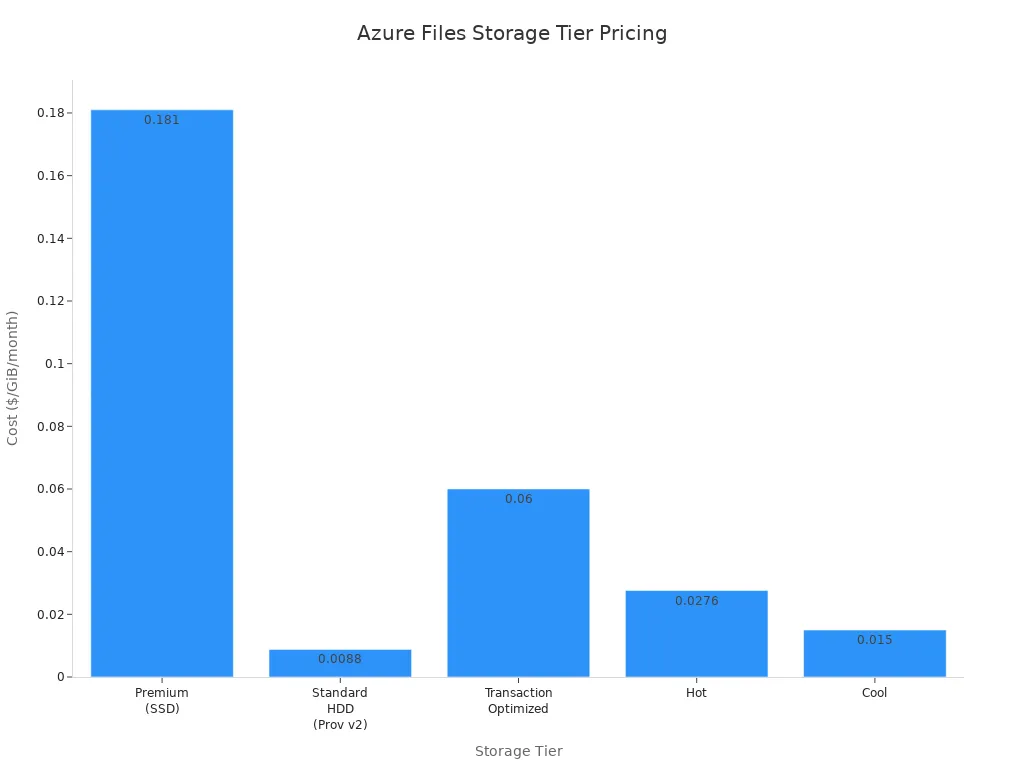
By understanding Azure storage pricing and the various tiers available, you can make informed decisions that align with your business needs.
In summary, Azure Files offers a powerful solution for your cloud storage needs. You can enjoy a fully managed service that simplifies file sharing and enhances collaboration. With features like global accessibility and built-in security, Azure Files caters to users of all technical backgrounds.
| Feature/Benefit | Description |
|---|---|
| Fully managed storage | Eliminates the need for on-premises file servers, simplifying access. |
| Global Accessibility | Users can access files from anywhere with an internet connection. |
| Easy Access | No special setup required; users can simply navigate to the mounted share. |
| Scalability | Easily scale storage capacity as needs grow, accommodating different users. |
| Built-in security | Provides encryption and access control, enhancing user confidence. |
Explore Azure Files today and experience the ease of use and flexibility it brings to your storage solutions.
FAQ
What is Azure Files?
Azure Files is a cloud file sharing service from Microsoft. It simplifies file storage management, allowing you to access and share files securely from anywhere.
How do I access Azure Files?
You can access Azure Files by mounting it as a network drive on Windows, Linux, or macOS. This process allows you to use familiar tools to manage your files.
Is Azure Files secure?
Yes, Azure Files provides robust security features. It encrypts data both in transit and at rest, ensuring your information remains protected from unauthorized access.
Can I use Azure Files for backup?
Absolutely! Azure Files supports backup solutions, allowing you to create snapshots and restore data easily. This feature helps you maintain data integrity and availability.
What are the pricing options for Azure Files?
Azure Files offers various pricing tiers based on your storage needs. You can choose from pay-as-you-go models or reserved capacity pricing for cost savings.
Can I integrate Azure Files with other services?
Yes, Azure Files integrates seamlessly with other Azure services. You can use it alongside Azure File Sync, Business Central, and more to enhance your workflows.
What protocols does Azure Files support?
Azure Files supports both SMB and NFS protocols. This flexibility allows you to access your files using different operating systems without changing your existing workflows.
How do I get started with Azure Files?
To get started, create an Azure account, set up a storage account, and configure your file shares. Follow the setup guide provided by Azure for detailed instructions.
🎧 Listen to this episode
Want a practical explanation of Azure Files? This episode breaks down the topic in clear language and shows why it matters for Microsoft 365, Azure, Power Platform, security, AI, and modern work.
Listen to this episode if you want to:
- Understand the key concepts behind Azure Files
- See how it fits into the wider Microsoft technology ecosystem
- Learn where it can create practical value for your organization
You may also enjoy these related M365 FM episodes:
- Azure NetApp Files - Simply Explained
- How to Run Local Llama on SharePoint Files Securely
- Scaling Microsoft Copilot to 35 Million Pages: The Epstein Files
- Connect Copilot Studio to Word Policy Files
- Make SharePoint Search Show the Right Files First
Discover more practical Microsoft conversations on M365 FM.
🚀 Want to be part of m365.fm?
Then stop just listening… and start showing up.
👉 Connect with me on LinkedIn and let’s make something happen:
- 🎙️ Be a podcast guest and share your story
- 🎧 Host your own episode (yes, seriously)
- 💡 Pitch topics the community actually wants to hear
- 🌍 Build your personal brand in the Microsoft 365 space
This isn’t just a podcast — it’s a platform for people who take action.
🔥 Most people wait. The best ones don’t.
👉 Connect with me on LinkedIn and send me a message:
"I want in"
Let’s build something awesome 👊
1
00:00:00,000 --> 00:00:04,120
If you've ever had a file server crash on a Friday afternoon, you know the panic, the
2
00:00:04,120 --> 00:00:07,160
frantic calls, the "is the backup working?"
3
00:00:07,160 --> 00:00:10,760
Question nobody wants to answer, and the drive to the office just to poke at a blinking
4
00:00:10,760 --> 00:00:11,760
box.
5
00:00:11,760 --> 00:00:15,240
I'm Mirko Peters and today we're looking at a better way, as your files.
6
00:00:15,240 --> 00:00:17,560
Here's the thing about traditional file servers.
7
00:00:17,560 --> 00:00:21,100
They're physical, which means they need maintenance, security patches, backup management
8
00:00:21,100 --> 00:00:23,400
and someone to swap a hard drive when it fails.
9
00:00:23,400 --> 00:00:25,120
For small teams, that's a huge burden.
10
00:00:25,120 --> 00:00:27,800
You're not running a data center, you're trying to get work done.
11
00:00:27,800 --> 00:00:31,400
By the end of this episode, you'll understand what Azure files really is, why the new file
12
00:00:31,400 --> 00:00:34,880
shares resource makes setup much simpler, and when it's the right choice for your team.
13
00:00:34,880 --> 00:00:37,160
Grab your coffee and let's dive in.
14
00:00:37,160 --> 00:00:38,520
What is Azure files?
15
00:00:38,520 --> 00:00:40,080
So what exactly is Azure files?
16
00:00:40,080 --> 00:00:41,400
Here's the simplest definition.
17
00:00:41,400 --> 00:00:45,760
Azure files is a cloud-based file share you can mount like a network drive with no server
18
00:00:45,760 --> 00:00:50,600
to manage, no hardware, no operating system updates, no backup schedules to lose sleep
19
00:00:50,600 --> 00:00:51,600
over.
20
00:00:51,600 --> 00:00:55,880
With the traditional file server, you're the admin, with Azure files Microsoft is the admin.
21
00:00:55,880 --> 00:00:59,800
Think of it as a filing cabinet that lives in Microsoft's data center instead of under your
22
00:00:59,800 --> 00:01:00,800
desk.
23
00:01:00,800 --> 00:01:04,640
You still open the drawer and grab a file, but the cabinet itself, the locks, the fireproofing,
24
00:01:04,640 --> 00:01:06,960
the maintenance, that's all handled for you.
25
00:01:06,960 --> 00:01:10,280
The difference is, you never have to worry about the cabinet breaking down as your files
26
00:01:10,280 --> 00:01:12,320
works with Windows, Linux and Mac.
27
00:01:12,320 --> 00:01:17,760
Any device that supports SMB, that's the standard Windows file sharing language or NFS,
28
00:01:17,760 --> 00:01:19,440
the standard for Linux can connect.
29
00:01:19,440 --> 00:01:23,240
You access it over the internet or through a private network if you want to keep traffic
30
00:01:23,240 --> 00:01:24,560
off the public web.
31
00:01:24,560 --> 00:01:26,000
And it's fully managed.
32
00:01:26,000 --> 00:01:30,680
Microsoft handles the hardware, software updates, backups and higher availability.
33
00:01:30,680 --> 00:01:34,040
If a disk fails in their data center, they swap it without you ever seeing it.
34
00:01:34,040 --> 00:01:37,000
Most users never notice it's there, but it's a core service.
35
00:01:37,000 --> 00:01:39,360
No more late night emergency trips to the office.
36
00:01:39,360 --> 00:01:42,720
Now to understand why you'd want this, let's look at the old way first.
37
00:01:42,720 --> 00:01:44,560
The pain of traditional file servers.
38
00:01:44,560 --> 00:01:47,880
So imagine you run a small business with 15 employees.
39
00:01:47,880 --> 00:01:50,560
Somewhere in the office closet, there's a physical server.
40
00:01:50,560 --> 00:01:53,960
Maybe it's an old desktop you repurposed, or maybe it's an actual server that costs a
41
00:01:53,960 --> 00:01:55,840
few thousand dollars a few years ago.
42
00:01:55,840 --> 00:01:58,700
Either way, it's running Windows server and serving up file shares for everyone in the
43
00:01:58,700 --> 00:01:59,700
company.
44
00:01:59,700 --> 00:02:02,360
Here's the thing, hard drives fail, they always do.
45
00:02:02,360 --> 00:02:04,680
And when that drive dies, the file share goes down.
46
00:02:04,680 --> 00:02:06,320
Maybe you have a backup, maybe you don't.
47
00:02:06,320 --> 00:02:09,000
Maybe the backup has been failing silently for six months.
48
00:02:09,000 --> 00:02:10,640
That's a conversation nobody wants to have.
49
00:02:10,640 --> 00:02:13,400
Then there's the space issue, file servers fill up fast.
50
00:02:13,400 --> 00:02:16,480
Someone drops 15 gigs of vacation photos in the shared drive.
51
00:02:16,480 --> 00:02:19,960
Another department holds old project files from three years ago.
52
00:02:19,960 --> 00:02:24,400
You add storage, you either buy more hardware or spend hours reconfiguring what you have.
53
00:02:24,400 --> 00:02:26,520
Neither option is fun and patching.
54
00:02:26,520 --> 00:02:29,800
Windows server needs regular security updates, which means downtime.
55
00:02:29,800 --> 00:02:33,600
Someone has to log in on a weekend, apply the updates, cross their fingers, and hope
56
00:02:33,600 --> 00:02:35,120
the server comes back up.
57
00:02:35,120 --> 00:02:37,800
If it doesn't, you're spending Sunday afternoon troubleshooting.
58
00:02:37,800 --> 00:02:39,120
Ransomware is another worry.
59
00:02:39,120 --> 00:02:43,040
One click on the wrong email attachment and your file server gets encrypted.
60
00:02:43,040 --> 00:02:44,040
Every file is locked.
61
00:02:44,040 --> 00:02:47,640
The recovery process is painful and it assumes your backups are actually working.
62
00:02:47,640 --> 00:02:51,120
If your office has multiple locations, things get worse.
63
00:02:51,120 --> 00:02:54,320
Sharing files between branches means setting up VPNs or slow replication.
64
00:02:54,320 --> 00:02:56,960
The remote office gets a fraction of the speed the main office has.
65
00:02:56,960 --> 00:02:59,000
People complain, you spend time tuning connections.
66
00:02:59,000 --> 00:03:00,160
Here's a real example.
67
00:03:00,160 --> 00:03:04,640
A small construction company I know had 15 employees and an aging server sitting in the
68
00:03:04,640 --> 00:03:06,400
corner of the break room.
69
00:03:06,400 --> 00:03:11,320
Every time someone said the file server is slow, the owner felt that not in his stomach.
70
00:03:11,320 --> 00:03:12,320
Was it dying?
71
00:03:12,320 --> 00:03:14,760
Was it time to spend another $5,000 on hardware?
72
00:03:14,760 --> 00:03:17,080
Should he hire an IT guy just to manage one box?
73
00:03:17,080 --> 00:03:20,920
It's stressed that constant, low grade worry about a single piece of hardware is exactly
74
00:03:20,920 --> 00:03:22,400
what Azure Files removes.
75
00:03:22,400 --> 00:03:25,800
It's not just about the features, it's about not having to think about it at all.
76
00:03:25,800 --> 00:03:27,840
Azure Files takes all that overhead away.
77
00:03:27,840 --> 00:03:29,640
Let's look at how it actually works.
78
00:03:29,640 --> 00:03:33,440
How Azure Files works, SMB, NFS, and mounting.
79
00:03:33,440 --> 00:03:35,480
Azure Files uses standard protocols.
80
00:03:35,480 --> 00:03:36,880
What does that mean in plain English?
81
00:03:36,880 --> 00:03:39,920
It means you don't need special software or custom tools to connect.
82
00:03:39,920 --> 00:03:44,200
If your computer can talk to a network drive, it can talk to Azure Files.
83
00:03:44,200 --> 00:03:47,520
The Windows machines that's SMB serve a message block.
84
00:03:47,520 --> 00:03:50,080
It's the same protocol your current file server uses.
85
00:03:50,080 --> 00:03:54,280
For Linux systems, its NFS network file system both are industry standards that have been
86
00:03:54,280 --> 00:03:55,680
around for decades.
87
00:03:55,680 --> 00:03:57,960
Azure Files speaks both languages fluently.
88
00:03:57,960 --> 00:03:59,400
So how do you actually use it?
89
00:03:59,400 --> 00:04:05,280
You mount it on Windows, you map it as a drive letter, Z or S or whatever letter you want.
90
00:04:05,280 --> 00:04:07,120
On Linux, you mount it to a folder path.
91
00:04:07,120 --> 00:04:09,680
Either way, it looks and feels like local storage.
92
00:04:09,680 --> 00:04:11,160
Open file explorer, there it is.
93
00:04:11,160 --> 00:04:14,360
You can drop files just like you would to a folder on your own hard drive.
94
00:04:14,360 --> 00:04:16,280
Here's the part that surprises people.
95
00:04:16,280 --> 00:04:20,720
Data travels encrypted by default when you use SMB 3.0 or higher, which modern Windows
96
00:04:20,720 --> 00:04:22,400
and Mac OS system support.
97
00:04:22,400 --> 00:04:26,000
The connection between your computer and Azure Files is encrypted in transit.
98
00:04:26,000 --> 00:04:28,320
Nobody on the network can sniff your files as they move.
99
00:04:28,320 --> 00:04:31,080
That's a big deal for security and it's on by default.
100
00:04:31,080 --> 00:04:34,160
You can mount Azure Files shares from practically anywhere.
101
00:04:34,160 --> 00:04:36,880
From a virtual machine running in Azure obviously.
102
00:04:36,880 --> 00:04:40,760
From an on-premises server connected through VPN or ExpressRoute, even from your laptop
103
00:04:40,760 --> 00:04:42,880
over the internet if you set it up correctly.
104
00:04:42,880 --> 00:04:45,080
The file share lives in the cloud but it feels local.
105
00:04:45,080 --> 00:04:46,360
Let me give you a concrete example.
106
00:04:46,360 --> 00:04:49,720
Say your accounting team needs access to the same set of spreadsheets.
107
00:04:49,720 --> 00:04:53,160
In the old world, you'd set up a file server, configure permissions and hope the network
108
00:04:53,160 --> 00:04:54,320
doesn't go down.
109
00:04:54,320 --> 00:04:58,400
With Azure Files, you create a single file share, map it as drive Z.
110
00:04:58,400 --> 00:05:00,360
On each accounting machine and they're done.
111
00:05:00,360 --> 00:05:03,160
They never know it's in the cloud, they just see a drive letter that works.
112
00:05:03,160 --> 00:05:05,440
Authentication is handled through identity.
113
00:05:05,440 --> 00:05:08,520
Instead of managing storage account keys, those long strings that look like passwords
114
00:05:08,520 --> 00:05:12,800
on steroids, you use Azure Active Directory or your on-premises Active Directory.
115
00:05:12,800 --> 00:05:14,640
Users log in with their normal credentials.
116
00:05:14,640 --> 00:05:17,280
The same username and password they use for email.
117
00:05:17,280 --> 00:05:19,760
No extra keys to store, no shared secrets to rotate.
118
00:05:19,760 --> 00:05:22,400
Now the way Azure Files was originally set up had a twist.
119
00:05:22,400 --> 00:05:24,520
That's where the new change comes in.
120
00:05:24,520 --> 00:05:25,840
The old way.
121
00:05:25,840 --> 00:05:26,840
Storage accounts.
122
00:05:26,840 --> 00:05:28,640
Here's where things get a little technical.
123
00:05:28,640 --> 00:05:30,560
But trust me, it's worth sticking with me.
124
00:05:30,560 --> 00:05:33,240
So originally, file shares weren't their own thing in Azure.
125
00:05:33,240 --> 00:05:35,400
They lived inside something called a storage account.
126
00:05:35,400 --> 00:05:37,800
Imagine a storage account as a big container.
127
00:05:37,800 --> 00:05:40,520
Inside that container, you could put blobs for unstructured data,
128
00:05:40,520 --> 00:05:43,280
queues for messages, tables for structured data.
129
00:05:43,280 --> 00:05:45,440
And yes, you could also create file shares.
130
00:05:45,440 --> 00:05:48,040
But here's the problem, that storage account had limits.
131
00:05:48,040 --> 00:05:50,880
IOPs limits, throughput limits, capacity limits.
132
00:05:50,880 --> 00:05:54,120
And every file share inside that container had to share those limits.
133
00:05:54,120 --> 00:05:58,120
So if you had five file shares in one storage account, they were all fighting for the same pool
134
00:05:58,120 --> 00:05:59,200
of performance.
135
00:05:59,200 --> 00:06:01,760
One busy share could slow down all the others.
136
00:06:01,760 --> 00:06:03,760
Network settings worked the same way.
137
00:06:03,760 --> 00:06:07,760
Firewall rules, private endpoints, those applied to the whole storage account.
138
00:06:07,760 --> 00:06:11,800
You couldn't say this file share is only accessible from the finance department's network,
139
00:06:11,800 --> 00:06:14,360
and that file share is open to everyone.
140
00:06:14,360 --> 00:06:16,040
The network rules were all on nothing.
141
00:06:16,040 --> 00:06:18,160
Then there were the storage account keys.
142
00:06:18,160 --> 00:06:22,400
Every storage account had two access keys, and those keys gave full access to everything
143
00:06:22,400 --> 00:06:26,520
inside, every blob, every queue, every table, every file share.
144
00:06:26,520 --> 00:06:30,280
If you only needed access to one file share too bad, the key opened everything.
145
00:06:30,280 --> 00:06:31,320
Billing was another headache.
146
00:06:31,320 --> 00:06:33,720
All the costs showed up at the storage account level.
147
00:06:33,720 --> 00:06:38,280
So if you wanted to charge back to different departments, you had to do manual calculations.
148
00:06:38,280 --> 00:06:43,520
Well, the marketing teams share used about 30% of the storage, so they owe 30% of the bill.
149
00:06:43,520 --> 00:06:44,920
That gets old fast.
150
00:06:44,920 --> 00:06:45,920
Here's an analogy.
151
00:06:45,920 --> 00:06:47,560
Imagine you're renting a warehouse.
152
00:06:47,560 --> 00:06:49,720
Inside that warehouse you've got several rooms.
153
00:06:49,720 --> 00:06:53,480
But the warehouse has a single entrance, a single security guard, and a single electricity
154
00:06:53,480 --> 00:06:54,480
meter.
155
00:06:54,480 --> 00:06:57,840
Every room shares the same power, the same access rules, and the same bill.
156
00:06:57,840 --> 00:07:01,160
If one room cranks up the AC, all the other rooms get warmer.
157
00:07:01,160 --> 00:07:04,360
If you want to secure one room separately, you can't.
158
00:07:04,360 --> 00:07:05,640
Because there's only one door.
159
00:07:05,640 --> 00:07:07,920
That's what the old storage account model felt like.
160
00:07:07,920 --> 00:07:11,000
One big container with shared limits, shared security, and shared billing.
161
00:07:11,000 --> 00:07:15,400
It worked, but it wasn't elegant, especially when all you wanted was a simple file share.
162
00:07:15,400 --> 00:07:17,960
But Microsoft heard the feedback and built something better.
163
00:07:17,960 --> 00:07:19,880
The new file shares resource.
164
00:07:19,880 --> 00:07:21,440
The new file shares resource.
165
00:07:21,440 --> 00:07:22,920
So here's what changed.
166
00:07:22,920 --> 00:07:24,960
Microsoft created a brand new top level resource.
167
00:07:24,960 --> 00:07:27,800
You now create a file share directly with no storage account parent.
168
00:07:27,800 --> 00:07:28,800
It's its own thing.
169
00:07:28,800 --> 00:07:29,800
Think of it like managed disks.
170
00:07:29,800 --> 00:07:32,280
Remember how it used to work with virtual machines?
171
00:07:32,280 --> 00:07:36,000
You had to create a storage account, then create a page blob inside it, then attach that
172
00:07:36,000 --> 00:07:37,320
blob to your VM.
173
00:07:37,320 --> 00:07:38,640
It was a whole process.
174
00:07:38,640 --> 00:07:40,480
Then Microsoft introduced managed disks.
175
00:07:40,480 --> 00:07:41,480
You just create a disk.
176
00:07:41,480 --> 00:07:42,480
Done.
177
00:07:42,480 --> 00:07:43,480
No storage account.
178
00:07:43,480 --> 00:07:44,480
No page blob.
179
00:07:44,480 --> 00:07:45,480
No messing around.
180
00:07:45,480 --> 00:07:47,000
The new file shares resource works the same way.
181
00:07:47,000 --> 00:07:50,920
Behind the scenes, there's a new resource provider called Microsoft file shares.
182
00:07:50,920 --> 00:07:52,280
It's independent and standalone.
183
00:07:52,280 --> 00:07:55,840
When you create a file share now, you're not creating a child of something else.
184
00:07:55,840 --> 00:07:57,600
You're creating the resource itself.
185
00:07:57,600 --> 00:07:59,160
So what does that actually buy you?
186
00:07:59,160 --> 00:08:00,960
Let me walk through the benefits.
187
00:08:00,960 --> 00:08:04,320
First each share has its own limits, IOPS, throughput, capacity.
188
00:08:04,320 --> 00:08:05,720
They're all per share now.
189
00:08:05,720 --> 00:08:08,200
No more sharing a pool with other file shares.
190
00:08:08,200 --> 00:08:10,240
One busy share can't slow down another.
191
00:08:10,240 --> 00:08:14,240
If your engineering team is hammering their share with build artifacts, the HR department
192
00:08:14,240 --> 00:08:15,760
share keeps humming along.
193
00:08:15,760 --> 00:08:18,320
Second, network configuration is per share.
194
00:08:18,320 --> 00:08:22,080
Private endpoints, firewall rules, you set them on the individual file share.
195
00:08:22,080 --> 00:08:25,920
Want one share accessible only from the finance department's virtual network and another
196
00:08:25,920 --> 00:08:27,320
open to the whole company?
197
00:08:27,320 --> 00:08:28,320
No problem.
198
00:08:28,320 --> 00:08:29,120
They're independent.
199
00:08:29,120 --> 00:08:31,600
Third, there's no storage account key.
200
00:08:31,600 --> 00:08:35,640
Remember that all powerful key that gave access to everything gone.
201
00:08:35,640 --> 00:08:38,240
Authentication is identity based or through network rules.
202
00:08:38,240 --> 00:08:39,920
Users log in with their normal credentials.
203
00:08:39,920 --> 00:08:41,520
No shared secrets to manage.
204
00:08:41,520 --> 00:08:42,960
No keys to rotate.
205
00:08:42,960 --> 00:08:46,360
No risk of a leaked key exposing all your file shares.
206
00:08:46,360 --> 00:08:48,120
Fourth, building is per share.
207
00:08:48,120 --> 00:08:51,440
In Azure cost management, you see exactly what each file share costs.
208
00:08:51,440 --> 00:08:54,040
If you need to charge back to departments, it's right there.
209
00:08:54,040 --> 00:08:56,760
No manual calculations, no spreadsheets, no guesswork.
210
00:08:56,760 --> 00:08:59,080
Fifth, the control plane has its own quotas.
211
00:08:59,080 --> 00:09:03,200
The control plane is the layer that handles operations like creating shares, modifying them,
212
00:09:03,200 --> 00:09:04,720
deleting them, taking snapshots.
213
00:09:04,720 --> 00:09:08,880
In the old model, lots of administrators working on lots of file shares inside one storage
214
00:09:08,880 --> 00:09:10,760
account could hit management limits.
215
00:09:10,760 --> 00:09:13,200
Now each share has its own bucket for those operations.
216
00:09:13,200 --> 00:09:14,800
It's much harder to hit a limit.
217
00:09:14,800 --> 00:09:15,800
Now there's a catch.
218
00:09:15,800 --> 00:09:19,360
At general availability, this new resource is currently limited to the SSD tier and the
219
00:09:19,360 --> 00:09:20,600
NFS protocol.
220
00:09:20,600 --> 00:09:21,960
That's a specific use case.
221
00:09:21,960 --> 00:09:25,920
High performance Linux file shares, but SMB support and HDD tier are coming.
222
00:09:25,920 --> 00:09:27,520
Microsoft has been clear about that roadmap.
223
00:09:27,520 --> 00:09:31,240
So instead of managing a big bucket with many shares that all share the same limits, the
224
00:09:31,240 --> 00:09:35,840
same network rules, the same keys and the same bill, now each share is its own small bucket
225
00:09:35,840 --> 00:09:37,160
with its own lock.
226
00:09:37,160 --> 00:09:38,160
Simple.
227
00:09:38,160 --> 00:09:40,720
So when does it make sense to actually use Azure files?
228
00:09:40,720 --> 00:09:42,120
When to use Azure files?
229
00:09:42,120 --> 00:09:43,840
So when does Azure files actually make sense?
230
00:09:43,840 --> 00:09:45,640
Let me walk you through the scenarios.
231
00:09:45,640 --> 00:09:46,640
First up is lift and shift.
232
00:09:46,640 --> 00:09:49,360
You've got an old application that depends on file shares.
233
00:09:49,360 --> 00:09:50,920
Maybe it's a legacy business app.
234
00:09:50,920 --> 00:09:53,600
Maybe it's a custom tool your team built years ago.
235
00:09:53,600 --> 00:09:58,120
Normally moving that to the cloud means rewriting code, changing configurations, rethinking
236
00:09:58,120 --> 00:09:59,760
how data gets accessed.
237
00:09:59,760 --> 00:10:02,640
With Azure files though you don't touch a single line of code.
238
00:10:02,640 --> 00:10:04,200
The app just sees a network drive.
239
00:10:04,200 --> 00:10:08,320
It doesn't care if that drive lives in your office closet or inside a Microsoft data center,
240
00:10:08,320 --> 00:10:09,960
same protocol, same behavior.
241
00:10:09,960 --> 00:10:10,960
That's the whole point.
242
00:10:10,960 --> 00:10:15,280
Another big use case is sharing configuration files, logs or data across multiple virtual
243
00:10:15,280 --> 00:10:16,280
machines.
244
00:10:16,280 --> 00:10:17,680
So you have a cluster of web servers.
245
00:10:17,680 --> 00:10:19,360
They all need the same config.
246
00:10:19,360 --> 00:10:22,960
Instead of copying files to each VM and hoping they stay in sync, you mount one Azure
247
00:10:22,960 --> 00:10:24,760
file share on every server.
248
00:10:24,760 --> 00:10:25,760
Change one file.
249
00:10:25,760 --> 00:10:26,760
Every server sees it instantly.
250
00:10:26,760 --> 00:10:29,000
No more chasing mismatched versions.
251
00:10:29,000 --> 00:10:30,640
Development and testing teams love this too.
252
00:10:30,640 --> 00:10:35,080
You can spin up a file share in minutes, use it for a week, then delete it when you're done.
253
00:10:35,080 --> 00:10:37,560
No hardware to buy, no server to decommission.
254
00:10:37,560 --> 00:10:41,160
For anyone who needs temporary shared storage, this is a huge time saver.
255
00:10:41,160 --> 00:10:43,040
Then there's the hybrid cloud scenario.
256
00:10:43,040 --> 00:10:46,960
Azure file syncs lets you cache files on a local server while keeping Azure files as
257
00:10:46,960 --> 00:10:48,240
the source of truth.
258
00:10:48,240 --> 00:10:51,960
Your on-premises users get local performance for the files they access most.
259
00:10:51,960 --> 00:10:54,680
Meanwhile, the cloud copy stays up to date automatically.
260
00:10:54,680 --> 00:10:56,840
Branch officers love this, remote teams love this.
261
00:10:56,840 --> 00:10:59,240
It gives you the best of both worlds without the headache.
262
00:10:59,240 --> 00:11:01,600
But Azure files isn't the answer for everything.
263
00:11:01,600 --> 00:11:03,440
Don't use it for high performance databases.
264
00:11:03,440 --> 00:11:06,760
If you need database-level speed, go with Azure SQL or manage disks.
265
00:11:06,760 --> 00:11:09,760
Azure files is a file share, not a database engine.
266
00:11:09,760 --> 00:11:13,040
It's optimized for file access patterns, not transactional workloads.
267
00:11:13,040 --> 00:11:14,760
There are different tools for different jobs.
268
00:11:14,760 --> 00:11:18,200
Don't use it where SharePoint or Microsoft Teams already covers the need.
269
00:11:18,200 --> 00:11:21,720
If you're sharing documents that people edit together in real time, SharePoint is the
270
00:11:21,720 --> 00:11:22,720
better fit.
271
00:11:22,720 --> 00:11:28,280
You get version history, co-authoring, and deep integration with the rest of Microsoft 365.
272
00:11:28,280 --> 00:11:31,440
Azure files is for the scenarios where SharePoint doesn't quite work.
273
00:11:31,440 --> 00:11:36,160
And don't use it for applications that need custom file system features like symbolic links,
274
00:11:36,160 --> 00:11:38,040
hard links, or extended attributes.
275
00:11:38,040 --> 00:11:42,200
Azure files handle standard file system behavior just fine, but it doesn't support every edge
276
00:11:42,200 --> 00:11:43,200
case.
277
00:11:43,200 --> 00:11:44,800
Know your requirements before you commit.
278
00:11:44,800 --> 00:11:46,120
Let me give you a real world example.
279
00:11:46,120 --> 00:11:49,080
A construction company has field offices in three cities.
280
00:11:49,080 --> 00:11:53,680
Each office needs access to the same set of blueprints, contracts, and inspection reports.
281
00:11:53,680 --> 00:11:56,200
In the old setup, they'd have a server at headquarters.
282
00:11:56,200 --> 00:11:59,280
And remote workers would connect through a slow VPN.
283
00:11:59,280 --> 00:12:00,880
Opening a blueprint could take minutes.
284
00:12:00,880 --> 00:12:03,720
With Azure files, they create a single share in the cloud.
285
00:12:03,720 --> 00:12:06,200
Every office mounted, blueprints open in seconds.
286
00:12:06,200 --> 00:12:07,760
Contracts are always the latest version.
287
00:12:07,760 --> 00:12:08,760
Know VPN required.
288
00:12:08,760 --> 00:12:10,080
No server to maintain.
289
00:12:10,080 --> 00:12:11,800
It just works.
290
00:12:11,800 --> 00:12:15,680
But performance and security matter too, so let's touch on those.
291
00:12:15,680 --> 00:12:18,320
Performance, security, and cost at a glance.
292
00:12:18,320 --> 00:12:19,920
It starts with performance.
293
00:12:19,920 --> 00:12:24,640
If you need speed, the premium tier runs on SSDs and delivers single millisecond latency.
294
00:12:24,640 --> 00:12:29,360
We're talking up to 102,400 IOPS per share with the provisioned V2 model.
295
00:12:29,360 --> 00:12:31,600
That's serious throughput for demanding workloads.
296
00:12:31,600 --> 00:12:33,800
The standard tier uses regular hard drives.
297
00:12:33,800 --> 00:12:35,320
It's slower but much cheaper.
298
00:12:35,320 --> 00:12:39,760
Perfect for archival storage or general file sharing, where speed isn't critical.
299
00:12:39,760 --> 00:12:43,040
Microsoft recently added metadata caching for SSD shares.
300
00:12:43,040 --> 00:12:47,720
This cuts latency by up to 55% when you're listing directories or browsing folders.
301
00:12:47,720 --> 00:12:52,240
If your workflow involves lots of small files and frequent folder navigation, this makes a
302
00:12:52,240 --> 00:12:53,640
noticeable difference.
303
00:12:53,640 --> 00:12:54,640
Now security.
304
00:12:54,640 --> 00:12:57,520
Azure files has encryption at rest enabled by default.
305
00:12:57,520 --> 00:13:00,120
Every byte you write gets encrypted before it hits the disk.
306
00:13:00,120 --> 00:13:01,480
You don't have to configure anything.
307
00:13:01,480 --> 00:13:06,040
It's just on encryption in transit is also on by default for SMB 3.0 and higher.
308
00:13:06,040 --> 00:13:09,480
Your data stays encrypted while traveling between your computer and the cloud.
309
00:13:09,480 --> 00:13:11,000
Nobody on the network can read it.
310
00:13:11,000 --> 00:13:14,720
Microsoft recommends using identity-based access instead of storage account keys.
311
00:13:14,720 --> 00:13:17,440
That means your user is logging with their normal work credentials.
312
00:13:17,440 --> 00:13:19,520
The same ones they use for email and teams.
313
00:13:19,520 --> 00:13:22,080
No shared keys to manage, no risk of a key leaking.
314
00:13:22,080 --> 00:13:24,200
For network isolation you have options.
315
00:13:24,200 --> 00:13:28,640
Private endpoints give your file share a private IP address inside your own virtual network.
316
00:13:28,640 --> 00:13:31,520
Service endpoints keep traffic on the Microsoft backbone.
317
00:13:31,520 --> 00:13:35,040
Firewall rules let you restrict access to specific IP ranges.
318
00:13:35,040 --> 00:13:38,640
You can layer these however you like and there's Microsoft Defender for storage.
319
00:13:38,640 --> 00:13:41,200
It monitors your file shares for suspicious activity.
320
00:13:41,200 --> 00:13:44,680
If someone uploads malware through the rest API, Defender can catch it.
321
00:13:44,680 --> 00:13:48,160
It's an extra layer of protection for sensitive environments.
322
00:13:48,160 --> 00:13:50,840
Cost wise the premium tier uses provisioned pricing.
323
00:13:50,840 --> 00:13:55,920
You reserve a certain amount of capacity, IOPS and throughput and you pay for what you reserve.
324
00:13:55,920 --> 00:13:57,200
Standard is pay as you go.
325
00:13:57,200 --> 00:13:59,480
You only pay for the storage you actually use.
326
00:13:59,480 --> 00:14:04,800
If your workloads are predictable, Azure files reservations can save you up to 36%.
327
00:14:04,800 --> 00:14:07,480
Commit to one or three years and Microsoft gives you a discount.
328
00:14:07,480 --> 00:14:10,160
No performance impact, just lower bills.
329
00:14:10,160 --> 00:14:11,160
One practical tip.
330
00:14:11,160 --> 00:14:13,840
Keep your compute and storage in the same Azure region.
331
00:14:13,840 --> 00:14:16,120
This region data transfer costs add up fast.
332
00:14:16,120 --> 00:14:19,960
Collocate your VMs and your file shares and you avoid those egress charges entirely.
333
00:14:19,960 --> 00:14:20,960
That's a lot of info.
334
00:14:20,960 --> 00:14:22,400
Let me tie it together.
335
00:14:22,400 --> 00:14:24,360
The big picture, why this matters.
336
00:14:24,360 --> 00:14:25,600
Here's the core idea.
337
00:14:25,600 --> 00:14:29,600
The old storage account model made you manage all that complexity even when all you wanted
338
00:14:29,600 --> 00:14:31,200
was a simple file share.
339
00:14:31,200 --> 00:14:34,640
You needed to understand storage accounts, shared limits, network rules that applied to
340
00:14:34,640 --> 00:14:37,120
everything and billing that lumped everything together.
341
00:14:37,120 --> 00:14:39,680
It was like renting a whole building just to use one room.
342
00:14:39,680 --> 00:14:41,600
The new file shares resource fixes that.
343
00:14:41,600 --> 00:14:43,320
Now you're renting just that room.
344
00:14:43,320 --> 00:14:49,760
One file share, one set of limits, one network configuration, one bill, no extra baggage.
345
00:14:49,760 --> 00:14:51,640
For beginners, this changes everything.
346
00:14:51,640 --> 00:14:53,680
You can start with a single file share in minutes.
347
00:14:53,680 --> 00:14:57,200
No deep Azure knowledge required, created, mounted and you're done.
348
00:14:57,200 --> 00:14:59,040
For IT pros, it's even better.
349
00:14:59,040 --> 00:15:00,840
Granular control over each share.
350
00:15:00,840 --> 00:15:04,160
Better security because there's no all powerful storage account key.
351
00:15:04,160 --> 00:15:07,160
Simpler billing because each share shows up separately in cost reports.
352
00:15:07,160 --> 00:15:09,920
And remember, Azure files isn't just a drive in the sky.
353
00:15:09,920 --> 00:15:12,640
It connects to Azure backup for automated backups.
354
00:15:12,640 --> 00:15:15,920
It works with Azure file sync for hybrid scenarios.
355
00:15:15,920 --> 00:15:18,960
And it integrates with Microsoft Defender for security monitoring.
356
00:15:18,960 --> 00:15:20,760
That's the larger ecosystem at work.
357
00:15:20,760 --> 00:15:22,760
So what should you do with this info?
358
00:15:22,760 --> 00:15:26,080
Azure files gives you a cloud file server without the server hassle.
359
00:15:26,080 --> 00:15:28,960
And the new standalone file shares resource makes it even easier.
360
00:15:28,960 --> 00:15:32,120
No storage accounts, no shared limits, no complex billing.
361
00:15:32,120 --> 00:15:35,520
If you're still running a physical file server, this is your sign to try Azure files.
362
00:15:35,520 --> 00:15:38,760
Start small, create a single share for a test team and see how it feels.
363
00:15:38,760 --> 00:15:40,720
Subscribe on your favorite podcast platform and
364
00:15:40,720 --> 00:15:43,740
share this with someone who manages backups on a Friday afternoon.

Founder of m365.fm, m365.show and m365con.net
Mirko Peters is a Microsoft 365 expert, content creator, and founder of m365.fm, a platform dedicated to sharing practical insights on modern workplace technologies. His work focuses on Microsoft 365 governance, security, collaboration, and real-world implementation strategies.
Through his podcast and written content, Mirko provides hands-on guidance for IT professionals, architects, and business leaders navigating the complexities of Microsoft 365. He is known for translating complex topics into clear, actionable advice, often highlighting common mistakes and overlooked risks in real-world environments.
With a strong emphasis on community contribution and knowledge sharing, Mirko is actively building a platform that connects experts, shares experiences, and helps organizations get the most out of their Microsoft 365 investments.




