Bridging the Front and Back Office: Why Your Business Needs Dual-write
Welcome back to our continuing exploration of modern business technology, workflows, and Microsoft ecosystems. If you have ever spent a frustrating morning trying to figure out why a customer address in your sales platform does not match the billing address in your finance system, you already know the hidden tax of fragmented data structures. Organizations invest heavily in best-of-breed software to empower their teams, yet they often accidentally trap those teams in isolated data silos. When customer-facing employees work in one application and operational or financial teams work in another, shared business records can quickly duplicate, diverge, and drift out of sync.
In this blog post, we are going to expand on the core themes we discussed in our recent podcast episode, Dynamics 365 Dual-write - Simply Explained. We will break down how Microsoft addresses this architectural headache using a built-in framework that bridges the gap between customer engagement applications and operational systems. By the end of this guide, you will understand how proper system integration eliminates manual employee handoffs, ensures continuous data accuracy, and establishes a harmonious relationship between your front office and back office.
The Business Problem: Silos and Manual Bridges
To truly appreciate the value of modern integration frameworks, we first need to examine the traditional operational friction that plagues growing enterprises. Imagine a typical mid-sized business. On the customer-facing side, you have salespeople, customer service representatives, and field technicians building relationships, managing leads, and solving client problems. On the operational and financial side, you have accountants, inventory managers, and fulfillment coordinators handling billing, purchasing, warehousing, and general ledger accounting.
Both halves of the organization fundamentally need to interact with the exact same customers, vendors, and products. However, they rely on entirely different application environments optimized for their specific tasks. Without a reliable automated link between these environments, a single business entity can quietly morph into two distinct records. For instance, your sales team might update an account name and physical address for a client named Northwind Bikes, while your finance department still retains the legacy record under Northwind Bicycle Company with the old street address.
Independently, both records might appear entirely valid and correct to the respective teams viewing them. Yet, they no longer describe the exact same underlying business relationship. When these discrepancies happen, employees are forced to become the manual integration layer. Staff members spend valuable hours exporting records into cumbersome spreadsheets, sending internal emails, cross-referencing identification numbers, manually re-entering data, and launching internal investigations to determine which system holds the truth. This manual data entry slows down transaction speeds, increases error rates, and frustrates employees who just want to do their jobs without administrative bottlenecks. This is precisely the operational challenge that architectural integration aims to eradicate.
Understanding Dynamics 365 Dual-write and Microsoft Dataverse
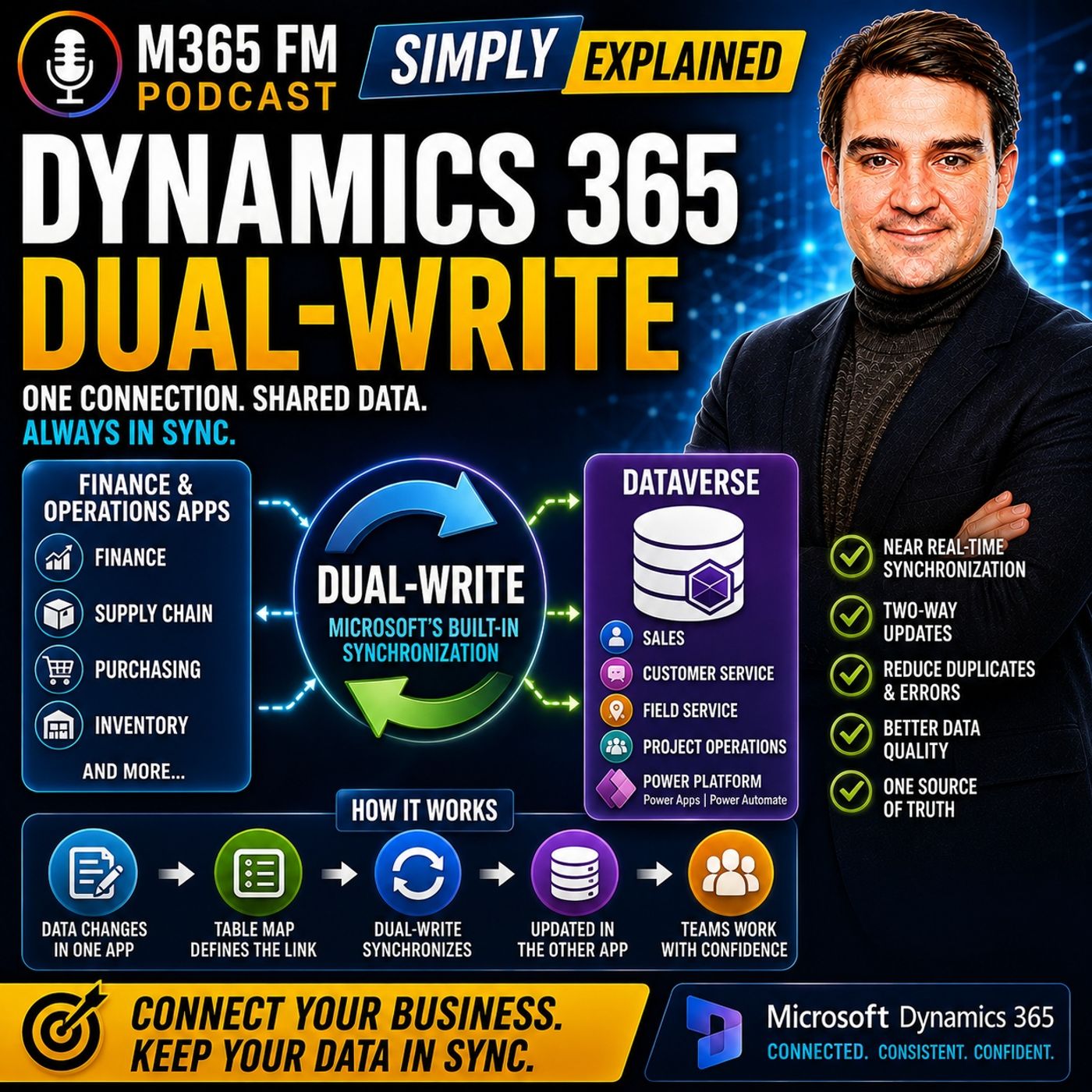
To solve the challenge of fragmented data across business applications, Microsoft provides a robust, native integration mechanism known as Dual-write. At its core, Dual-write is a built-in, out-of-the-box infrastructure that directly couples Dynamics 365 Finance and Operations applications with Microsoft Dataverse. To grasp how this works, it helps to visualize your organization as a large office building with customer-facing departments on one side and financial operations on the other.
On the customer-engagement side, Microsoft Dataverse acts as the shared metadata and data foundation. Applications like Dynamics 365 Sales, Customer Service, Field Service, and various Power Platform solutions all sit on top of and leverage Dataverse. On the operational side, Dynamics 365 Finance and Supply Chain Management serve as the powerhouse for heavy-duty accounting, asset management, supply chain execution, and inventory control. Historically, keeping these two architectural worlds synchronized required custom integration scripts, external middleware, or complex asynchronous batch jobs.
Dual-write changes this paradigm by acting like a heavily staffed, secure internal door directly connecting the two sides of the building. When a supported business record is modified on either side of the enterprise ecosystem, Dual-write passes that update through the door instantly according to predetermined logic. Employees can continue working exclusively within the software interface that best fits their daily responsibilities—whether that is managing sales pipelines or processing accounts payable invoices—while critical business data remains unified behind the scenes.
How Dual-write Works: Table Maps and Near Real-Time Synchronization
One common misconception about integration tools is that they blindly mirror every piece of data from one system to another, creating bloated databases and chaotic data conflicts. Dual-write avoids this pitfall by utilizing a highly structured, configurable framework powered by table maps.
To understand table maps, it helps to look at how relational databases organize information. A table stores a specific type of record, such as a customer table, a product catalog table, or a vendor list. A table map in Dual-write serves as the explicit translation sheet between a table in Finance and Operations and its corresponding table in Dataverse. It defines precisely which fields relate to each other, how data types should be converted, and which direction information is allowed to flow.
Furthermore, Dual-write is engineered to operate in near real time. Unlike legacy integration designs that rely on scheduled batch jobs running overnight—meaning a critical address update entered by a salesperson on Monday morning would remain invisible to finance until Tuesday—Dual-write processes changes as part of the live operational workflow. Near real time does not imply absolute zero latency, but it does mean the connection supports active, day-to-day business processes. If a salesperson updates a shipping destination, finance can view that updated information immediately, ensuring that invoices and packing slips are generated correctly the first time.
Core Data Connections: Customers, Addresses, and Products
What kind of information actually flows across this architectural bridge? Organizations can configure Dual-write to connect a wide variety of reference and transactional data, including customer profiles, vendors, contacts, site structures, tax configurations, and product catalogs. However, best practices dictate that you should never synchronize everything simply because the technical capability exists. You should strictly synchronize information that genuinely needs to represent a singular, unified truth across both environments.
Customer records provide the most intuitive use case for this technology. A sales team requires customer names, primary contact numbers, communication preferences, and delivery specifications. Conversely, the finance department requires legal entity names, credit limits, tax exemption numbers, billing profiles, and accounts receivable data. Dual-write keeps these disparate facets of the customer record harmonized while allowing sales and finance personnel to remain inside their preferred workspaces.
Beyond basic customer profiles, organizational data structures often involve complex hierarchies. A single corporate client frequently maintains multiple physical delivery addresses, distinct billing locations, and a diverse roster of contacts—including purchasing agents, accounts payable clerks, and service managers. Connected address and contact structures ensure that every department references the exact same relationship map without manually recreating organizational charts in multiple applications.
Product information represents another critical area of data connection, though it introduces unique governance requirements. In many enterprises, operations and supply chain teams govern the creation of new products, establishing stock units, dimensions, and operational characteristics required for manufacturing and delivery. Once a product is fully defined and ready for the market, Dual-write can automatically push that product catalog information into Dataverse, making those items instantly available for salespeople to quote and sell without manual re-entry.
Data Ownership and Synchronization Rules
Because Dual-write supports bi-directional data flow, implementing it successfully requires careful strategic planning around data ownership and governance. The word "dual" highlights the system's ability to synchronize updates in both directions—an update in Dataverse can update Finance and Operations, and an update in Finance and Operations can update Dataverse.
However, bi-directional capability does not mean that every single field should be freely editable from both sides. Organizations must answer critical governance questions before turning on synchronization:
- Where does a specific business record originate?
- Which department or role has the authority to modify that record?
- Which system serves as the definitive source of truth when a data conflict arises?
- How are validation errors handled and resolved if data transmission fails?
For example, in many business models, the sales team naturally owns relationship management, customer names, and day-to-day contact details. Meanwhile, the finance department owns credit terms and payment structures, and operations owns product specifications and inventory pricing. Establishing these boundaries dictates whether a table map should be fully bi-directional or restricted to a strict one-way synchronization flow. By establishing clear data ownership rules upfront, businesses prevent conflicting updates from overwriting critical information and maintain absolute integrity across their software landscape.
Conclusion: Streamlining Operations with Dual-write
Bridging the operational divide between your front office and back office is no longer just an IT nice-to-have; it is a fundamental requirement for modern business agility. When customer-facing teams and financial operators look at fragmented, contradictory data, productivity plummets, customer satisfaction suffers, and employees burn valuable time acting as manual data-transfer bridges between isolated applications.
By leveraging Microsoft Dynamics 365 Dual-write, organizations can unite Microsoft Dataverse and Finance and Operations through controlled table maps, near real-time synchronization, and well-defined data ownership rules. This technical architecture eliminates data silos, ensures absolute consistency across customer, product, and vendor records, and empowers every employee to make informed decisions based on accurate, up-to-the-minute information. If you want to dive deeper into how this synchronization framework works in practice and learn more expert implementation tips, be sure to listen to our complete podcast episode, Dynamics 365 Dual-write - Simply Explained.

Microsoft MVP | Host of M365.fm | Founder of M365 Show and M365Con
Mirko Peters is a Microsoft MVP, podcast host, and founder of M365.fm, M365 Show, and M365Con. His work connects Microsoft practitioners through podcast interviews, livestreams, and community events.
At M365.fm, Mirko hosts conversations with Microsoft MVPs, product experts, architects, and community contributors. Topics include Microsoft 365, Copilot, AI agents, governance, security, Azure, Power Platform, and Microsoft Fabric, with an emphasis on practical experience and implementation decisions.
M365.fm is the podcast and learning platform. M365 Show brings experts together for livestreams, while M365Con provides an online conference setting for community learning.
Official website: Mirko Peters (https://www.mirkopeters.com/). Recognition: Mirko Peters — Microsoft MVP profile (https://mvp.microsoft.com/de-DE/mvp/profile/9b0ca797-db5a-493a-a845-8b9158046cf5). Connect on LinkedIn (https://www.linkedin.com/in/m365showpodcast/).