
Microsoft 365 Consent Phishing
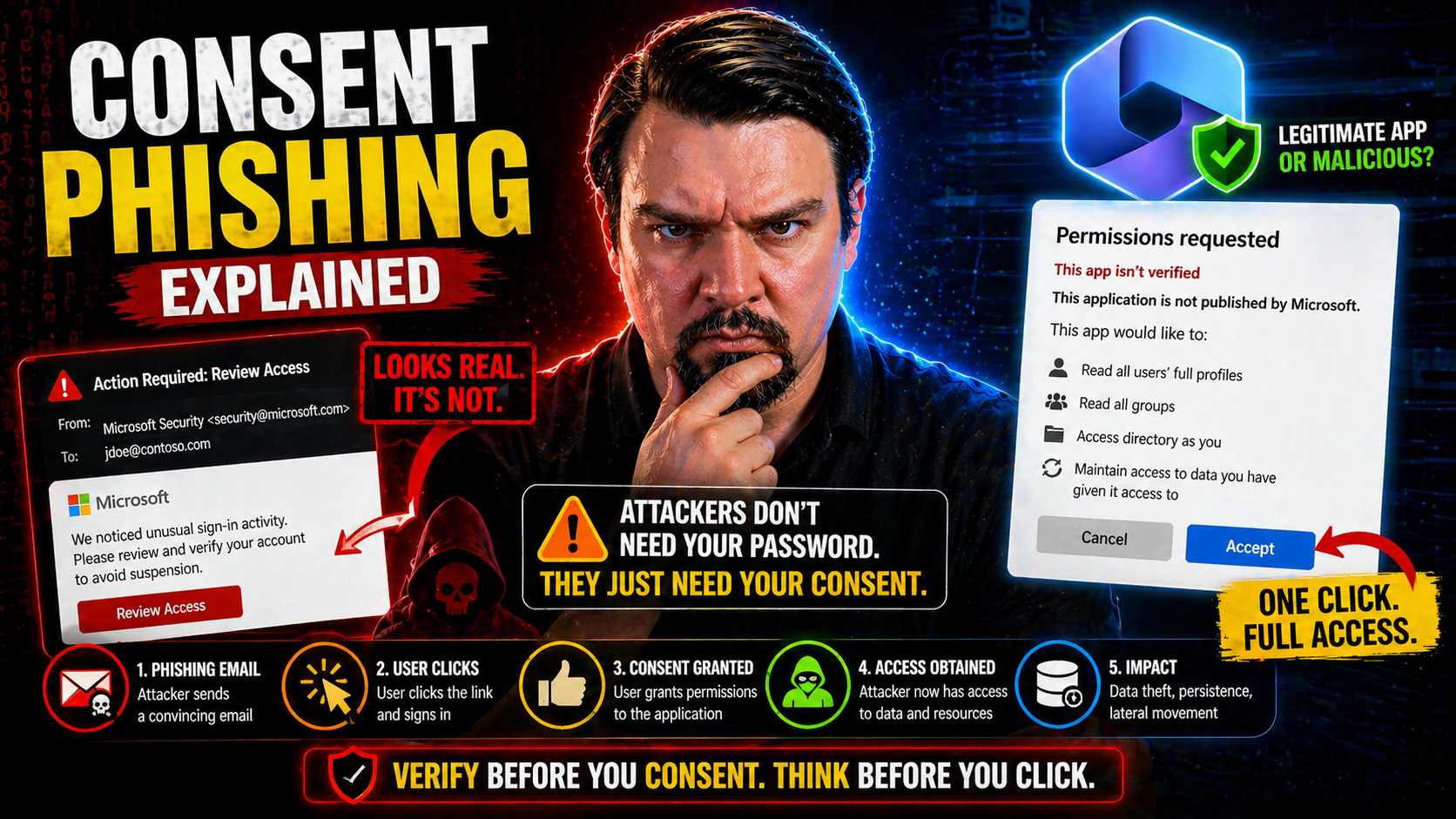
Consent phishing is one of the fastest-growing threats in Microsoft 365 and Azure environments, catching organizations off-guard by sidestepping even the strongest authentication defenses. Unlike classic phishing, which tries to steal your password, consent phishing lets attackers sneak in through a “side door”—abusing the very mechanisms built to make sign-in secure. This technique preys on users’ trust and leverages OAuth, the same authorization framework that powers legitimate single sign-on and app integrations in the cloud.
Attackers can use consent phishing to maintain persistent, stealthy access to sensitive business data, even in environments protected by multi-factor authentication (MFA). This guide drills deep into how and why consent phishing bypasses traditional security, breaks down real-world attacks, and walks you through practical steps to detect, prevent, and contain consent-related threats. Whether you’re managing Microsoft 365 for a small team or overseeing security for thousands, knowing how attackers work within OAuth consent flows is now a must-have skill.
Understanding Consent Phishing and Why MFA Fails
Before you dive into the technical weeds, it’s key to get the big picture on why consent phishing keeps making headlines in the cloud security world. We’re not talking about the usual phishing tricks that try to swipe your login and brute-force through defenses. Consent phishing belongs to a newer, more subtle class of attack—one that flips convenience against you by weaponizing legitimate app permissions and authorization flows.
With cloud platforms like Microsoft 365 and Azure, OAuth is everywhere. It’s how users connect third-party apps, share data, and automate tasks—often with a single click. Unfortunately, attackers know users typically trust what looks official, and they take full advantage of those moments where a permission prompt flashes by and no one asks too many questions. Crucially, these attacks don’t rely on stealing passwords; instead, they trick real users into handing out keys to the kingdom—no hacking required, just a bit of social engineering and some clever disguises.
What makes consent phishing especially dangerous is its ability to slip past multi-factor authentication (MFA) and traditional security measures. Instead of breaking in, attackers ask politely—and users, rushed or unaware, grant access to malicious apps willingly. This guide will help you understand how, why, and what makes these attacks uniquely hazardous for Microsoft identity systems. With the right perspective, you’ll see how defending against consent phishing requires a very different mindset from old-school credential protection.
What Is Consent Phishing and Why Does It Evade Multi-Factor Authentication?
Consent phishing is a type of attack where a user is tricked into granting an attacker-controlled application access to their cloud resources by approving a legitimate-looking OAuth permission request. Instead of stealing or guessing credentials like in traditional phishing, consent phishing relies on users themselves authorizing the malicious app—making it especially dangerous in a cloud-first world.
Here’s the kicker: when you approve a consent screen, the app receives access and refresh tokens from the identity provider (like Microsoft Entra ID, formerly Azure AD). These tokens can be used to access your Microsoft 365 data—think email, files, calendar, and more—without ever knowing your password and without tripping MFA. The attacker doesn’t have to bypass your login defenses; they simply use the access you willingly granted, which the platform considers completely legitimate.
The difference between credential phishing and consent phishing is subtle but huge. Credential phishing tries to capture your username and password (which MFA often helps protect), while consent phishing works within the official OAuth 2.0 authorization code flow. Even with MFA fully enforced, attackers bypass it entirely by having the user complete the consent workflow with their existing session. Once those OAuth tokens are issued, the attacker’s foothold persists even if the victim changes their password or revokes their session.
For a deeper look, check out this overview of OAuth consent attacks in Entra ID, which details the real risks and defensive strategies organizations should prioritize. Bottom line: organizations must look beyond just credential security and MFA if they want to stop these attacks at the source.
How OAuth Consent Phishing Abuses Trust to Compromise Data
Attackers running consent phishing campaigns create—or impersonate—third-party applications and then prompt users to grant them extensive permissions, often using OAuth 2.0 flows that feel familiar and “safe.” The user sees a standard consent prompt, featuring requests like “Read your mail” or “Access your files.” If the user clicks “Accept,” that malicious app gets real OAuth tokens, granting it direct access to the specified Microsoft 365 or Azure resources.
From there, attackers don’t need passwords, codes, or bypasses. The OAuth tokens (access and refresh tokens, specifically) allow continued access behind the scenes. These tokens persist until manually revoked or when they expire—meaning attackers can keep pulling data, sending mail, and performing actions as the victim, even if passwords are changed or users log out elsewhere.
This method exploits the implicit trust users place in consent dialogs, especially in environments where the interface looks official and time is short. Because OAuth flows use real identity provider workflows, there’s no suspicious login to flag, and no MFA challenge for an attacker to overcome. Attacks unfold quietly, using the same APIs trusted for daily business operations.
For a real-world breach breakdown and actionable insight into these attack chains, review this step-by-step analysis of Microsoft 365 OAuth abuse. Ultimately, this sort of persistent access is a headache for defenders: attackers linger undetected, and the path to full data recovery and app remediation can be long and winding.
Common Techniques and Real-World Consent Phishing Attacks
Consent phishing is far from a theoretical threat—it’s already been weaponized in some high-impact campaigns against Microsoft 365, Google Workspace, and other cloud ecosystems. Attackers constantly iterate, using everything from convincing app names to sneaky low-scope permission requests. The result: security teams face a toolkit that keeps evolving, with new tricks and twists to challenge defenders at every turn.
This section explores what happens when theory meets practice. You’ll get a sense of the attack lifecycle, what users actually see during common phishing attempts, and how attackers escalate access or pivot between platforms. From “low and slow” permission creep to headline-making campaigns like ConsentFix, the tactics here show just how inventive—and persistent—threat actors have become in sidestepping normal controls.
Most importantly, these real-world examples underline why it’s essential to move beyond blanket “just enable MFA” guidance. Consent phishing requires defenders to think about both human psychology and technical prevention, understanding how subtle social engineering, design flaws in consent prompts, and gaps in app governance create windows of opportunity for attackers. By breaking down practical attacks, this section helps your security team build sharper instincts and better mitigation playbooks.
Top Five Consent Phishing Attack Techniques Security Teams Must Know
- Publisher Impersonation: Attackers create apps with names similar to legitimate vendors—think “Microsoft Secure Suite” or “HR Docs Cloud.” Users trust familiar branding, making it more likely they’ll approve the request. Always drill down into the publisher details and verify the source.
- Permission Misrepresentation: Malicious apps often highlight harmless permissions on the consent screen but sneak in high-privilege scopes like “read/write all mailboxes” or “full access to files.” Users trained to look only at the bold text may miss the actual risks being authorized.
- Low-Scope Grants for Later Escalation: Some attackers ask for basic permissions (like access to your profile) to sidestep suspicion. Afterward, they use the initial token access as a foot in the door, attempting more dangerous consents through staged phishing or privilege escalation.
- Lateral Movement with Persistent OAuth Tokens: Once inside, attackers leverage tokens and app permissions to move sideways—accessing shared drives, calendar events, or escalating within Microsoft 365. Tokens can grant “barely enough” access to start but be extended or refreshed later.
- Compromised Third-Party Apps: Rather than build their own, attackers sometimes breach or repurpose trusted independent software vendor (ISV) applications with broad permissions already granted by many tenants. These supply chain attacks are especially tough to detect and can spread quickly across organizations.
For a technical deep dive on the underlying mechanisms and how Entra ID can be hardened against these patterns, check out this detailed breakdown of OAuth consent abuse. These are just a handful of the many creative ways attackers have learned to outmaneuver legacy defenses and MFA.
How the ConsentFix Campaign Works Step-by-Step
- Initial Phishing Email: The attack kicks off with a convincing email urging the user to “fix a policy issue” or “secure their mailbox.” The message includes a link disguised as an official Microsoft resource.
- Redirect to Malicious App Consent Page: Clicking the link sends the user to an OAuth consent prompt. The interface looks familiar, branded, and legitimate, but the app behind it is controlled by attackers—often with a cloned or deceptive name.
- Consent Grant and Token Issuance: The user reviews the requested permissions—typically phrased as necessary for “security” or “compliance”—and clicks “Accept.” This hands the attacker access and refresh tokens for the user’s account.
- Attacker Gains Persistent Access: Using these tokens, attackers access Microsoft 365 mailboxes, files, calendars, or other sensitive data APIs. The session survives password changes and even most MFA resets, until consent is manually revoked.
- Stealthy Data Harvesting and Monetization: The attacker quietly siphons off email content, sensitive documents, or initiates lateral movement to connected services. Because everything looks “authorized,” detection is tough—unless your team is monitoring for unusual app activity or new consent grants.
If you want to see exactly how attackers chain these steps together in Microsoft 365 using Entra ID, take a look at this technical walkthrough of OAuth consent attacks.
Why ConsentFix Matters for Microsoft 365 and Cloud Security
The ConsentFix campaign showed just how quickly and quietly attackers can compromise Microsoft 365, Google Workspace, and other SaaS tenancies by abusing legitimate OAuth flows. Organizations across sectors experienced unauthorized email access, file leaks, and extended account persistence, even after enforcing password resets and MFA. These attacks highlight the urgency of layered defenses: user awareness, real-time consent monitoring, and strong app governance aren’t “nice to have”—they’re critical for preventing large-scale breaches and data loss in the cloud.
Detecting Malicious Applications and Monitoring Anomalous Consent
Spotting and responding to OAuth-based threats isn’t always straightforward—the attack blends right into your normal business traffic. By the time you see the impact, a malicious app may have been quietly soaking up sensitive data for days or weeks. That’s why proactive detection strategies are so important. Security teams need more than just preventive controls; they need real insight into user consent patterns, app behaviors, and what “normal” looks like across the organization.
This section focuses on practical approaches for early detection and investigation. You’ll learn how to use behavioral signals, anomaly monitoring, and native Microsoft enterprise tools to catch risky consent events before they spiral out of control. From unusual API activity to spikes in new app registrations, the right clues can help you spot attacks in progress—and lock things down fast.
Think of this as the “security cameras” of your cloud environment. Continuous monitoring, automated logging, and smart alerting give you a real shot at containing attacker dwell time and minimizing damage. And if you’re aiming for compliance automation or need tie-ins to broader risk management, integrations with tools like Microsoft Defender for Cloud can bring your efforts to the next level. For insights on keeping your environment compliant and secure with automation, check this guide to monitoring compliance in Microsoft Defender for Cloud.
How to Detect Malicious Applications Using Behavioral and Consent Signals
- Monitor for Unexpected Consent Grants: Keep an eye on new OAuth consents, especially those approved outside of typical business hours or originating from unfamiliar publishers. Large numbers of newly authorized apps can be a red flag.
- Analyze Suspicious API Call Patterns: Look for abnormal behavior, like high-velocity access to files, mass mailbox reading, or uncharacteristic use of admin APIs. Attackers often “overuse” permissions compared to regular apps.
- Watch for Unusual Token Activity: Track rapid or recurring refresh token generation and strange patterns in token lifecycles. Malicious apps may abuse refresh tokens to maintain access well past initial compromise.
- Leverage Microsoft Logs and Defender: Use cloud app security products and Entra ID logs to inventory all authorized apps, exposing risky or shadow apps that bypassed normal IT approval workflows. Tools like Microsoft Defender for Cloud Apps provide visibility and alerting for suspicious app behaviors.
- Take Action on Shadow IT Findings: Many incidents stem from unsanctioned or unmanaged app access. Regularly audit your tenant, follow up on risky app discoveries, and clean up over-privileged OAuth grants. Learn more about tackling shadow IT and controlling rogue apps in this guide to managing shadow IT in Microsoft 365.
Investigating Consent Phishing Attacks With Microsoft 365 Defender and Entra ID Protection
- Threat Hunting: Start by searching Entra ID logs and Microsoft 365 Defender alerts for recent consent events, suspicious app creations, or anomalous sign-in patterns tied to OAuth apps.
- Targeted Investigation: Dig into individual user and app histories, checking what permissions were granted, when, and by whom. Correlate this activity against normal baselines and business workflow timing.
- Remediation: When malicious consent is found, immediately revoke app tokens and consent grants. Microsoft 365 Defender enables bulk revocation and can flag additional risky sessions. This prevents attackers from using persistent tokens to maintain access.
- Continuous Monitoring and Automation: Automate alerting for new high-risk app consents, repeated admin consent requests, or known malicious publisher IDs. Set automated policies for faster response and reduced attacker dwell time.
- Integrate Compliance and Policy Enforcement: Use Microsoft Defender for Cloud for continuous compliance monitoring alongside incident response, and check out identity governance approaches in Entra ID to keep security policies enforceable over time. This ensures you catch both real-time attacks and prevent future configuration drift or identity debt that can open up new risks.
Securing Your Environment With Consent Policies and App Restrictions
If you want to stop consent phishing in its tracks, you have to go straight to the source: the policies and configuration settings controlling how apps request and receive user consent. Tuning these controls requires a careful balance—enabling users to stay productive with trusted integrations, but preventing anyone from accidentally (or intentionally) letting in a wolf in sheep’s clothing.
This section serves as a practical roadmap for cloud admins and CISOs, walking through key technical levers at your disposal: from consent policy design and publisher verification, to tight management of OAuth token lifetimes. Done right, these strategies can minimize risk and limit the fallout if an attacker gets their foot in the door. Consistent governance is vital, especially as your list of SaaS integrations grows and shadow IT becomes harder to ignore.
Governance is not about saying “no” to innovation—it’s about controlling access, defining trusted workflows, and enforcing the boundaries that keep your environment healthy as it grows. If you’re working on broader security frameworks, the lessons here apply well beyond Microsoft 365, extending into Power Platform and other business SaaS. For extra insight into best practices, see this guide to Power Platform governance and security.
How to Configure Consent Policies and Restrict User Consent
- Restrict User Consent by Default: In Microsoft Entra ID, configure tenant-wide settings so that only administrators can approve high-risk app consents. End users should see consent screens for low-risk apps only, minimizing accidental approvals.
- Enable Admin Approval Workflows: Require administrative review and sign-off for any app requesting broad or sensitive permissions. This stops “drive-by” authorization of risky apps and builds a formal record of consent activity.
- Granular Scoping for Permissions: Don’t use blanket “allow all” permissions. Limit consent to just what's required for business needs. Custom scope definitions make it harder for attackers to sneak in dangerous privileges.
- Regularly Audit Consent Grants: Review which apps currently have permission to your tenant, especially those granted by users without IT oversight. Revoke outdated or unnecessary consents to reduce your attack surface.
- Leverage Conditional Access Policies: Pair consent restrictions with strong conditional access policies—including location, device, or risk-based enforcement—to block session hijacking or unmanaged device access.
For detailed, actionable tips on hardening Entra ID and minimizing risky consent flows, check out this comprehensive walkthrough.
Enforcing Publisher Verification and Restricting Access to First-Party Apps
- Require Publisher Verification: Only allow apps from verified publishers to request user or admin consent in your environment. This ensures app developers have validated their identity, adding an extra trust layer that blocks most outright impersonation attacks.
- Block Unverified Publishers: In Entra ID and other platforms, set baseline policies to auto-reject consent for apps that don’t meet publisher verification standards. Regularly review publisher status for all existing and new apps.
- Restrict Consent to Trusted First-Party Apps: Tighten configuration so only first-party (e.g., official Microsoft) or specifically approved third-party apps can request new consents. This significantly reduces the risk of lateral movement from one compromised app to another.
- Audit and Inventory Publisher Access: Make publisher status and app inventory a standing item on IT’s regular security review cycles, using automated tooling to highlight any new or unapproved publishers.
- Apply to All Connected Platforms: Extend publisher verification and app restrictions to Power Platform, Teams apps, and connected SaaS. Learn more about doing this at a broader scale in this Power Platform governance guide.
Managing Token Lifetimes and Implementing Continuous Monitoring for OAuth Security
Configuring shorter OAuth token lifetimes reduces the window an attacker has to exploit stolen or consented tokens. Adjust token expiration policies so access tokens expire quickly and refresh tokens are periodically rotated. Implement token binding and risk-based revocation to cut off suspicious or misused sessions. Combine these with continuous monitoring of token usage and consent events to catch unusual patterns—involving tools like Microsoft Defender for Office 365 and Entra conditional access policies—to ensure compromised tokens don’t turn into persistent, silent threats. For practical settings and continuous monitoring strategies, see these Microsoft security recommendations.
Strengthening Governance and Building User Awareness Against Consent Phishing
Technical controls will get you only so far in the face of evolving cloud attacks. Long-term resilience demands a culture of security—where robust governance, routine audits, and user education reinforce each other. Consent phishing exploits human psychology as much as technology, so success hinges on both formal policy and everyday diligence from your team.
This section gets into the weeds on building an OAuth governance framework and auditing existing app grants, practical training strategies to help users recognize suspicious consent prompts, and how to set up workflows that put real friction between attackers and your data. The goal: make sure your defenses don’t stop at the IT department door, but reach right across the business.
For organizations with complex app ecosystems, the stakes are even higher—mistakes anywhere in your supply chain can ripple outward. Proactive, ongoing governance and awareness are essential to keeping sensitive data secure and compliance on track, even as your user base and app inventory keeps growing. For next-level governance advice, including DLP and advanced auditing in Microsoft environments, see this in-depth Copilot governance guide and details on auditing user activity with Microsoft Purview Audit.
Building an OAuth Governance Framework and Auditing Existing Grants
- Define Consent and App Usage Policies: Establish clear rules outlining which users and apps can request consent, detailing allowable types of permissions and business use cases. Publish these guidelines so everyone in your org knows the rules of the road.
- Maintain a Full App Inventory: Catalog all OAuth-connected apps in Entra ID, noting who granted each consent, the publisher, requested scopes, and the business justification. Automated discovery using Entra APIs or Microsoft Defender can speed this up and catch shadow apps.
- Conduct Regular Grant Audits: Schedule quarterly or biannual reviews to spot outdated, duplicate, or risky permissions. Cross-check app publisher verification status and remove grants for apps no longer in use or those that have become suspicious.
- Monitor and Remediate Deviations: Set up alerts for policy violations—like users granting broad permissions to unapproved publishers—and run remediation campaigns as soon as gaps are found. Regular audits keep your defenses agile and your app ecosystem healthy.
- Integrate Governance with Compliance and DLP: For high-risk or regulated environments, tie OAuth governance into your Microsoft Purview DLP and audit logging. See this Purview governance guide for practical ways to monitor user activity and connector boundaries at scale.
Enhancing Awareness Training and App Approval Workflows
- Focused User Training on OAuth Risks: Conduct regular workshops or e-learning modules to teach staff about the dangers of suspicious app prompts, misleading permissions, and over-trust in branded interfaces. Stress real examples—phishing emails and consent screens—so users can spot red flags.
- Simulate Consent Phishing Attacks: Run mock phishing tests centered on OAuth flows to build user instincts and readiness. Empower users to report odd prompts without fear.
- Formalize App Approval Workflows: Mandate that any third-party app integration, especially those requesting sensitive permissions, must go through an IT-led approval process before anyone can grant consent.
- Policy Awareness Campaigns: Supplement technical training with posters, regular reminders, and policy refreshers. Make safe consent decisions an ongoing topic, not a “set and forget.”
- Monitor Shadow IT from User Side: Pair workflow enforcement with technology that flags and blocks attempts to use unsanctioned SaaS or rogue AI agents. For more on tackling the AI shadow IT challenge, check this governance guide.
Developer-Side Hygiene and App Security Recommendations for ISVs and CISOs
- Publisher Verification: Register and verify publishers to increase app transparency and trust for enterprise buyers.
- Clear, Minimal Permissions: Only request the minimum scopes necessary for functionality—avoid overreaching permission requests that raise user suspicion and risk rejection.
- Secure Consent Flows: Design consent pages with honest app naming, clear descriptions, and explicit purpose statements to prevent user confusion and accidental approval.
- Enforce Secure Development Practices: Regularly patch app components and implement security testing pipelines to block supply chain vulnerabilities.
- CISO Policy Guidance: Mandate internal app security reviews, maintain a living app inventory, and codify organizational stances on third-party publisher risk before approving new integrations.
You Should Also Listen To
If you are exploring Microsoft 365 consent phishing, these episodes add practical context for secure Microsoft 365 adoption, data protection, governance, and AI risk management.
- Microsoft Purview – Simply Explained — See how classification, retention, compliance, and protection fit into one Microsoft data-governance model.
- Microsoft Defender XDR – Simply Explained — Connect data-protection controls with detection, investigation, and response.
- Conditional Access – Simply Explained — Understand how identity and risk signals add context to access decisions.
- Microsoft AI Agent Harness – Simply Explained — Explore the controls that make AI automation more reliable, observable, and safe.
These episodes help turn the article’s concepts into practical design and rollout decisions.

Microsoft MVP | Host of M365.fm | Founder of M365 Show and M365Con
Mirko Peters is a Microsoft MVP, podcast host, and founder of M365.fm, M365 Show, and M365Con. His work connects Microsoft practitioners through podcast interviews, livestreams, and community events.
At M365.fm, Mirko hosts conversations with Microsoft MVPs, product experts, architects, and community contributors. Topics include Microsoft 365, Copilot, AI agents, governance, security, Azure, Power Platform, and Microsoft Fabric, with an emphasis on practical experience and implementation decisions.
M365.fm is the podcast and learning platform. M365 Show brings experts together for livestreams, while M365Con provides an online conference setting for community learning.
Official website: Mirko Peters (https://www.mirkopeters.com/). Recognition: Mirko Peters — Microsoft MVP profile (https://mvp.microsoft.com/de-DE/mvp/profile/9b0ca797-db5a-493a-a845-8b9158046cf5). Connect on LinkedIn (https://www.linkedin.com/in/m365showpodcast/).





