
Decommissioning On-Prem AD: The Shift to Modern Identity with Entra ID
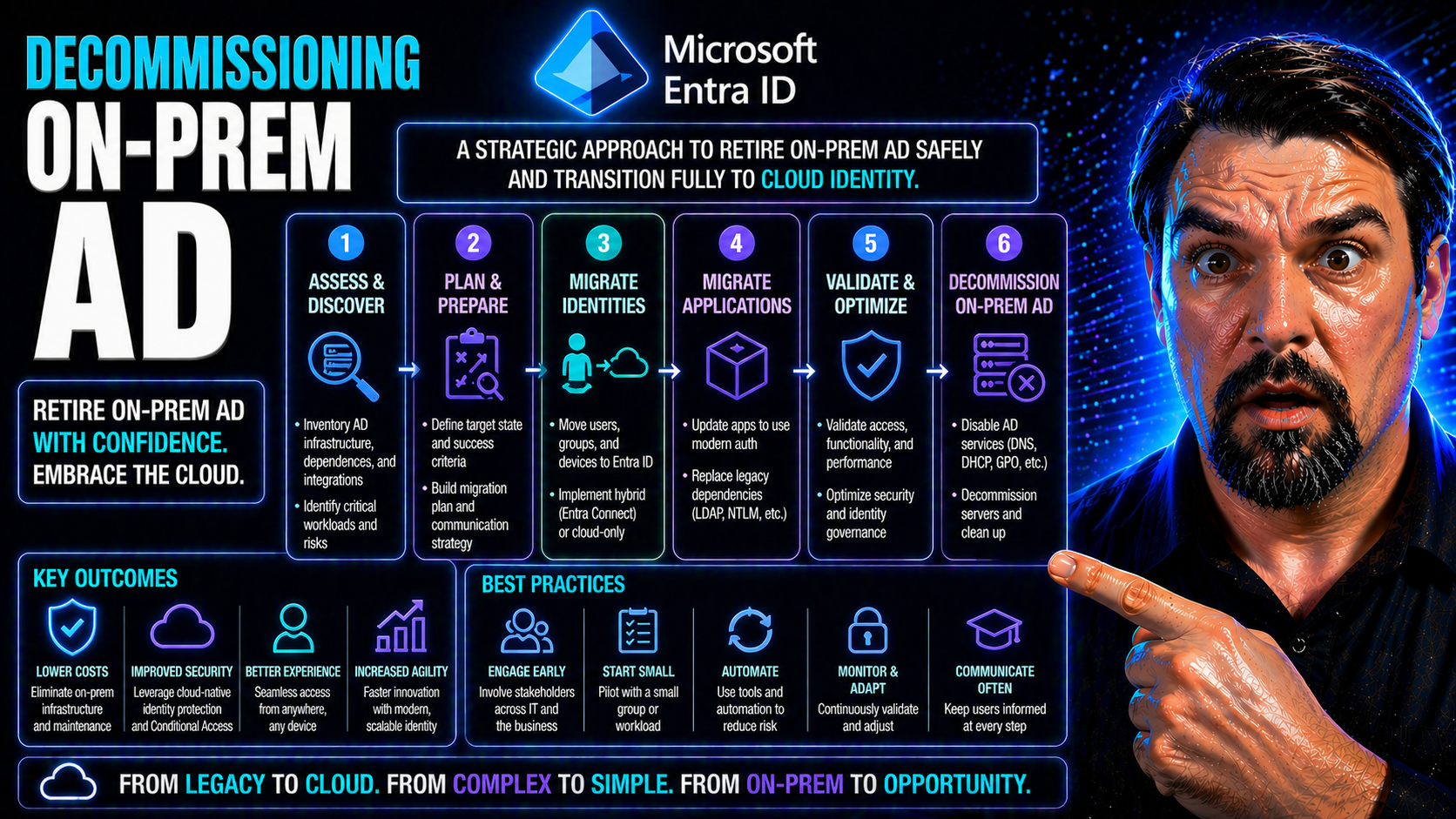
Organizations are rethinking their old on-premises Active Directory (AD) in a big way. The world is moving fast toward cloud-first identity, and Microsoft Entra ID sits right at the center of this new landscape. With digital transformation, hybrid work, and SaaS platforms like Microsoft 365 becoming the new normal, holding onto aging domain controllers is starting to look like carrying a brick phone in an iPhone world.
This article cuts through the hype and gives you a clear rundown—why businesses are decommissioning on-prem AD, how Entra ID fits the bill, and what the practical steps look like for IT leaders. You’ll get real context, step-by-step strategies, and a straight talk view of the road ahead—from the business case to life after those old domain controllers are finally powered down.
Why Organisations Are Decommissioning On-Prem AD
So, what’s the big deal about moving off on-premises Active Directory? Let’s be real—keeping those Windows Server domain controllers humming along used to be a badge of honor for IT teams. But now, every corner office, remote worker, and cloud app is screaming for something more nimble, less expensive, and modern.
First up, there’s the hard push to transform everything to the cloud. The old AD was built for a world where everyone sat in the same building. But now, applications, users, and even printers are hiding out in the cloud or scattered across the globe. It makes sense to have your identity platform move with them instead of dragging around a server room full of legacy tech.
Cost reduction is another powerhouse driver. Maintaining on-prem AD means paying for hardware, backup, patching, disaster recovery, and specialist skills. By shifting to Entra ID and other cloud-native solutions, organizations are trimming all that overhead and unlocking more predictable, subscription-based expenses.
Of course, the Microsoft 365 effect is impossible to ignore. If you’re living in Teams, SharePoint Online, or Exchange Online, tying yourself to old-school AD seems backwards. Modern SaaS demands modern identity—passwordless authentication, Conditional Access, and seamless integration with cloud security controls. That’s where Entra ID steps up.
Let’s not forget remote work. The pandemic tore up the rulebook. Organizations need to enable workers everywhere, securely, and without VPN drama. Managing identities in the cloud knocks down these barriers and allows single sign-on from anywhere, any device, any time.
In short, decommissioning on-prem AD isn’t just about chasing shiny new tech. It’s about agility, security, cost, and making IT more of a business enabler than a bottleneck. The ‘why’ is stacking up—and if you’re reading this, your organization is probably feeling that pressure too. The rest of this article guides you through the next steps, from technical choices to everyday life after AD.
Entra Defining Target: Choosing Your Identity Future
Choosing between Microsoft Entra ID and Entra Domain Services (Entra DS) shapes how future-proof your identity platform will really be. Entra ID, formerly known as Azure AD, is all about cloud-only identity—built big for SaaS, mobile, and web apps. It’s sleek, light, and ditches the baggage of legacy protocols. But is that enough for everyone?
If your business still runs apps demanding old-school authentication (think: Kerberos or NTLM), Entra DS brings a hybrid compromise. It gives you enough of those familiar domain controller features, minus the old servers in your rack. Entra DS essentially offers managed domain services—meaning fewer headaches, but you’re not fully rid of legacy protocols.
The big question: How much legacy do you need? Cloud-only with Entra ID gets you streamlined security, easier compliance, and powerful controls like Conditional Access. But Entra DS covers your bases if you’re tied to older software, classic applications, or printer dependencies that aren’t ready for retirement.
This isn’t a one-size-fits-all move. You’ll want to inventory every app and line-of-business system—what do they depend on? Which ones play nice with SAML, OAuth, or modern auth? Are there ghosts in your network using LDAP or NTLM that nobody talks about? Your future state comes down to matching business needs with authentication reality. And if you’re wrangling cloud policy sprawl or worried about loopholes, check out how identity and access controls work in practice in resources like this deep dive into Entra ID policy governance or learn about cloud-era attacks on OAuth consent.
Identity Fabric Architecture for Secure Cloud Transitions
Here’s where things get interesting: the “identity fabric.” That’s not a marketing buzzword—it’s how organizations glue everything together across cloud and any on-prem leftovers during the move off AD. The identity fabric acts as your digital border patrol, enforcing policies no matter where users, devices, or data sit.
Think of it like the new perimeter: Instead of firewalls and building doors, security travels with the user and app, not the network. With a solid identity fabric, you can tie mobile devices, remote offices, cloud apps, and the random legacy system together in a secure, manageable way.
Can’t flip the switch from AD to cloud overnight? You need a bridge—something like Azure AD Connect or pass-through authentication—to keep everyone logging in smoothly while you transition. Hybrid join lets your Windows devices stack up the best of both worlds, and directory sync ensures nobody gets left out in the move to cloud-first access.
Zero Trust is baked in, too. Instead of assuming “inside” users are safe, every access attempt gets re-checked. Want help building tough but fair policies? Dive into practical insights on Conditional Access in this exploration of trust issues in Microsoft policy, or learn about designing Zero Trust across your business with real-world strategy and architecture advice. The upshot: a cloud-centric identity fabric gives you a foundation for resilience, flexibility, and tighter security than dusty server rooms ever could.
Migration Roadmap: How Do We Get There?
You can’t just walk into the server room, unplug AD, and call it a day. You need a solid roadmap—preferably one that doesn’t break anything, annoy users, or trigger yet another IT fire drill. The journey from on-prem AD to cloud identity is about smart phases and steady progress, not big leaps off a cliff.
Discovery comes first: dig deep and map every user, group, printer, and ancient app that still whispers to AD. This is your time to uncover any forgotten service accounts and understand who relies on what—think of it as prepping for an AD archaeology dig, avoiding nasty surprises mid-migration.
With your inventory set, run a pilot with a small group. See what breaks. Learn fast, fix quickly, refine your approach. Next up is directory synchronization using tools like Azure AD Connect—this keeps your cloud and on-prem identities in line while you plan for a cutover.
Cutover planning is mission-critical. This is where authentication flips from on-prem to the cloud. Communication is key—users need to know what’s happening, why, and how to get help. Only when you’re certain everything’s solid is it safe to decommission that old AD.
Throughout this, always keep your rollback plan handy. Backup your AD state, maintain a recovery window, and check for any “point of no return” changes—like DNS switches or mass object deletions. If a critical app fails to work post-cutover, having the ability to revert is worth its weight in gold. This phased roadmap saves you drama, downtime, and keeps stakeholders happy as you climb to cloud identity.
Life Without the DC: Authentication and Access in a Cloud-Only World
Welcome to the other side—life with no domain controllers spinning in the back room. So, what’s it really like? Your users now log in through cloud-based authentication. No more ancient password prompts or being chained to onsite servers. Expect a bit of retraining, sure, but for most folks it boils down to smoother, consistent single sign-on from anywhere, any device.
Device management shifts, too. Old-school Group Policy goes out the window. Instead, tools like Microsoft Intune step up, letting you enforce device compliance, push out settings, and even handle BYOD policies with less drama. For security, Conditional Access rules run the show—deciding who gets to access what, when, and from where.
This is where keeping your house in order gets easier and harder at the same time. Every device, from work laptop to mobile, needs to be properly enrolled and compliant. It’s less about trusting the device just because it’s “inside the network” and more about checking identity and status every single time.
Want to avoid security gaps or users running wild with access? Lean on best practices—tune up your Conditional Access to seal off trust loopholes, or head over to Microsoft 365 security guides for practical tips on balancing protection and a friendly user experience. With the right cloud-native tools, operating without on-prem AD can actually make IT life easier—and a lot safer—than before.
Managing Exchange Server and Microsoft 365 After Decommissioning AD
After the lights go out on your on-prem AD, Exchange management changes gears. If you’re running Exchange Server, you’ll need to move mailboxes to Exchange Online or ensure coexistence is handled properly. It’s critical to align mailbox ownership and permissions with your new cloud identity model, especially during transition.
For Microsoft 365, authentication now leans fully on Entra ID or hybrid directory sync. Compliance doesn’t stop—use unified audit tools like Microsoft Purview Audit to cover administrative actions, monitor mail flow, and keep a record for investigations. As your Exchange footprint moves, make sure user experience and compliance stay front and center.
Security and Compliance Implications of Decommissioning On-Prem AD
Pulling the plug on on-prem AD brings new security and compliance wrinkles. Let’s start with audit records: Legal teams and auditors love historical authentication logs, so you need a plan to archive and access old AD data for years to come. Regulations like GDPR, HIPAA, and SOX can’t be ignored—your compliance posture depends on proper data retention and easy retrieval for forensics.
The threat landscape changes, too. With cloud-only identity like Entra ID, attacks evolve—think token theft, misconfigured Conditional Access, and privilege escalation if you’re not diligent. Cloud platform security is all about keeping an eye on who’s doing what, from where, and how often. Your monitoring game needs to step up with robust tools and real-time alerts.
Governance is the name of the game moving forward. Make sure your controls aren’t just checkboxes—watch for compliance drift caused by new collaboration and file versions. Implement continuous monitoring with solutions like Defender for Cloud for real-time visibility across your environment and tie it all together into actionable reporting for management.
Don’t sleep on identity governance either. Use premium audit logs and proper access reviews—see Microsoft Purview Audit—to make sure privilege isn’t out of control. The bottom line: after decommissioning, prioritize modern governance, smart policies, and strong monitoring to keep your organization secure, compliant, and protected from new breed identity threats.
Conclusion: Reflecting on the Watershed Moment
Retiring on-prem AD isn’t just a technical box to tick—it marks a true milestone in modernizing your entire IT estate. This shift brings powerful benefits: lower infrastructure costs, faster response to business needs, and tighter security via cloud-native controls.
You’ve learned how the journey unfolds and what to watch for, from migration to compliance and day-to-day operations. The job isn’t done after cutover, though. Ongoing optimization, vigilant identity governance, and process review keep your organization ready for whatever the future throws at it. This transition is more than an endpoint—it’s a new, better beginning.
Comments, Podcast Apps, and Community Insights
- Share your experience: What’s your biggest challenge with moving off on-prem AD? Drop your stories or best advice in the comments below.
- Listen and learn: Check out related Microsoft cloud identity and security podcast episodes for insights and interviews with real-world experts.
- Keep up with the community: Follow technical experts on LinkedIn or Twitter for the latest tips and migration lessons.
- Join the conversation: Engage in online forums, webinars, or Microsoft tech community groups to see how your peers are solving similar challenges.

Microsoft MVP | Host of M365.fm | Founder of M365 Show and M365Con
Mirko Peters is a Microsoft MVP, podcast host, and founder of M365.fm, M365 Show, and M365Con. His work connects Microsoft practitioners through podcast interviews, livestreams, and community events.
At M365.fm, Mirko hosts conversations with Microsoft MVPs, product experts, architects, and community contributors. Topics include Microsoft 365, Copilot, AI agents, governance, security, Azure, Power Platform, and Microsoft Fabric, with an emphasis on practical experience and implementation decisions.
M365.fm is the podcast and learning platform. M365 Show brings experts together for livestreams, while M365Con provides an online conference setting for community learning.
Official website: Mirko Peters (https://www.mirkopeters.com/). Recognition: Mirko Peters — Microsoft MVP profile (https://mvp.microsoft.com/de-DE/mvp/profile/9b0ca797-db5a-493a-a845-8b9158046cf5). Connect on LinkedIn (https://www.linkedin.com/in/m365showpodcast/).




