
Demystifying OAuth 2.0 in Microsoft Graph: Delegated vs. Application Permissions
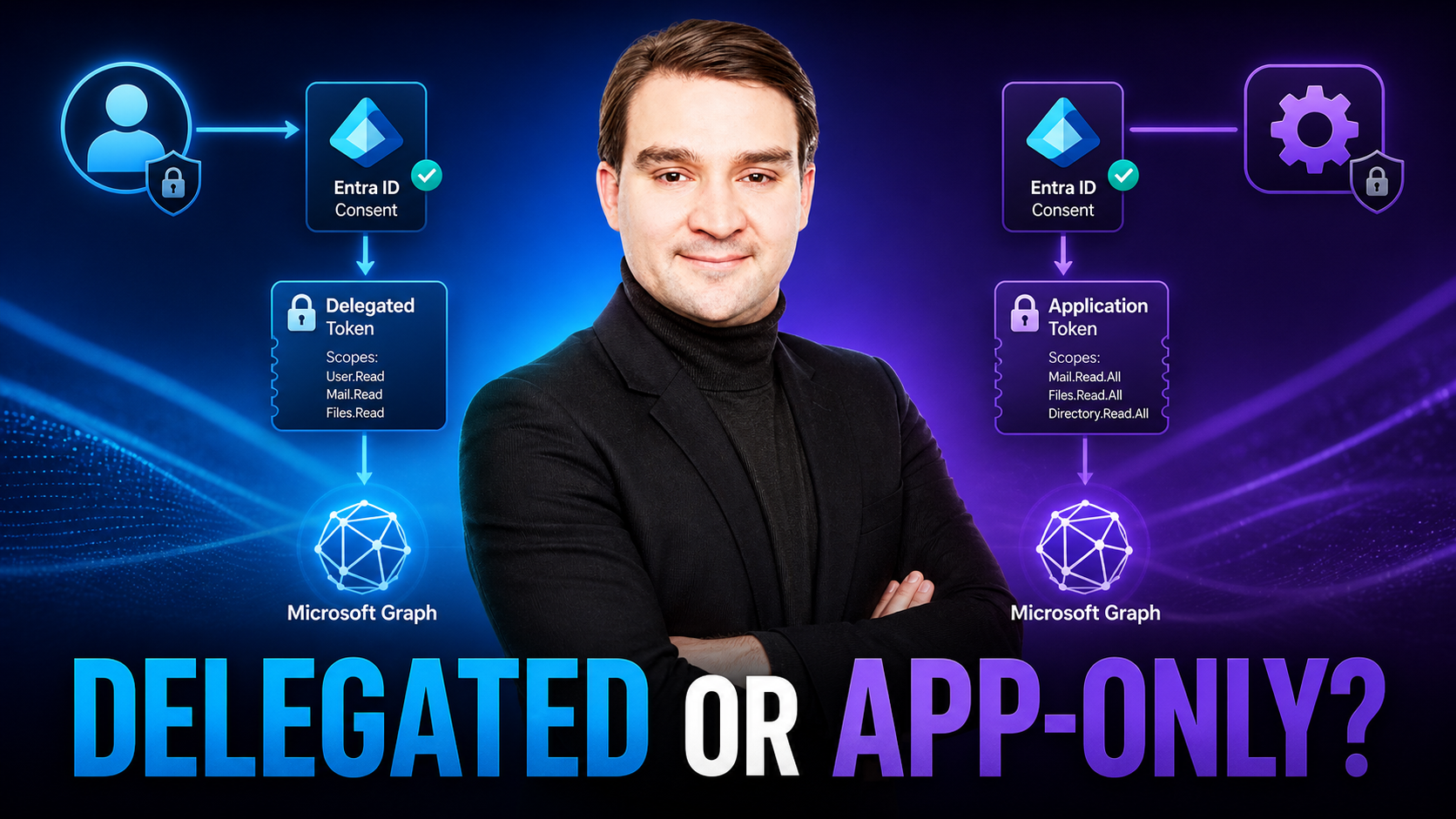
Welcome back to the blog! If you have been diving deep into Microsoft 365 automation, you have likely run into the walls built by native connectors and traditional scripting limits. Navigating the complexities of authentication can be tricky when automating M365, especially when trying to balance robust security with seamless functionality. Whether you are building custom enterprise applications or setting up automated background processes, getting a firm grasp on authentication models is critical. This post breaks down tokens, scopes, and consent flows to help you choose the right model for user-centric or unattended background jobs. Let us dive right in and demystify how OAuth 2.0 powers the Microsoft Graph API.
Introduction to Microsoft Graph Authentication
Microsoft Graph is the unified gateway to the entire Microsoft 365 ecosystem. Instead of interacting with separate, fragmented APIs for Exchange, SharePoint, Teams, and Azure Active Directory (now Microsoft Entra ID), developers and IT administrators can access all of these services through a single endpoint. However, because Graph controls access to sensitive corporate data, securing this gateway requires a strict authentication framework. Understanding how identity, access tokens, and permissions intersect is the first step toward building reliable, secure automations that will not fall apart under pressure or trigger security flags.
Understanding OAuth 2.0 in the Context of Microsoft 365
At its core, Microsoft Graph relies on the OAuth 2.0 protocol for authorization. When your application or script wants to talk to Graph, it cannot simply send credentials raw over the wire. Instead, it must request an access token from the Microsoft identity platform (Entra ID). This access token acts as a secure digital passport. It tells Microsoft Graph who is making the request, what application is being used, and—most importantly—what specific permissions (scopes) have been granted to that token. Without a valid token, Graph will immediately reject the request with a standard unauthorized error.
Delegated Permissions: When to Run as the User
Choosing the right permission model depends entirely on the nature of your workload. Delegated permissions are designed for apps that run with the backing of a signed-in user. When an application uses delegated permissions, the app acts on behalf of the user who is actively logged in. If a user runs a script to read their own calendar or update their profile picture, Graph evaluates the request based not only on what the application is allowed to do, but also on what the individual user has permission to access. If the user does not have permission to view a specific mailbox, the delegated token will not grant it either. This model is ideal for user-facing applications, interactive tools, and personal productivity scripts.
Application Permissions: Powering Unattended Background Jobs
On the flip side, what happens when you need to run a script or service at midnight without any user sitting at a keyboard? For unattended background jobs, daemon services, and tenant-wide reporting tools, you need application permissions. In this model, the application operates independently of any user context—it runs as its own identity. Because there is no human user to sign in and grant consent interactively, application permissions require explicit pre-authorization from a tenant administrator. Once granted, the app can access data across the entire organization, making this model exceptionally powerful for administrative automation, onboarding scripts, and compliance monitoring, but also requiring strict security oversight.
Navigating Scopes, Tokens, and Consent Flows
Authentication and authorization vocabulary can sometimes feel overwhelming, but breaking down the workflow clarifies the process. Scopes are the specific permissions your application requests—such as User.Read.All or Mail.Read. When a user or admin authorizes an app, they are reviewing and approving these scopes. Once approved, the identity platform issues a JSON Web Token (JWT). Your code includes this token in the HTTP Authorization header for every request sent to Microsoft Graph. Managing consent correctly ensures your app can acquire these tokens smoothly without hitting unexpected roadblocks.
Avoiding Admin-Consent Purgatory
One of the most common friction points developers and administrators face is getting stuck waiting for administrative approval. When an application requests high-privilege application scopes or sensitive delegated scopes, Microsoft Entra ID may require an administrator to consent to the application before any tokens can be issued. If your deployment pipeline assumes users can self-consent and they are suddenly blocked by tenant policies, your automation halts entirely. To avoid admin-consent purgatory, always map out your required permissions beforehand, document the business justification, and coordinate with your global or application administrators to pre-configure tenant-wide consent where necessary.
Common Pitfalls and How to Fix Them
Even experienced developers occasionally run into frustrating authorization hurdles when working with Microsoft Graph. Let us look at a few common issues and how to resolve them:
- Works for me, fails for others: Usually caused by missing consent or incorrect scopes. Fix: Document required scopes clearly and configure tenant-wide admin consent where appropriate.
- Overfetching giant payloads: Pulling entire user lists without filtering leads to timeouts and throttling. Fix: Use $select, $top, pagination, and delta queries.
- Infinite 401/403 loops: Caused by an expired token or using a delegated permission type for a userless job. Fix: Implement robust token refreshing and switch to application permissions for background tasks.
- Hitting rate limits: Receiving 429 responses means you are sending requests too fast. Fix: Implement exponential backoff, respect the Retry-After header, and batch operations.
- Secret sprawl: Hardcoding client secrets in scripts is a massive security risk. Fix: Utilize Azure Key Vault, managed identities, or secure environment variables.
Security and Governance Best Practices
When you open the door to your Microsoft 365 tenant via API, security must be your top priority. Adhering to the principle of least privilege means you should only request the absolute minimum scopes required for your application to function—never request Directory.AccessAsUser.All just to read a user's display name. Maintain a clear consent ledger detailing which apps have access to your tenant, isolate your development, test, and production application registrations completely, and establish a strict schedule for rotating client secrets and certificates.
Your First Real Queries (Examples)
Once your authentication model is squared away, you can start running queries against the Graph API. Here are a few practical examples you can adapt:
- New hires since a date:
GET /users?$filter=createdDateTime ge 2025-10-01T00:00:00Z&$select=id,displayName,mail,department - My next meetings:
GET /me/events?$top=10&$select=subject,start,end,organizer,webLink - Team members of a group:
GET /groups/{group-id}/members?$select=id,displayName,mail - Changed users (delta):
GET /users/delta?$select=id,displayName,mail
Recommended Tools
Leveraging the right tooling makes building and debugging Microsoft Graph queries significantly easier. The Graph Explorer is an invaluable web-based playground for testing endpoints and checking consent hints. For writing code, the Microsoft Graph SDKs (.NET, JavaScript, Python) abstract away much of the underlying HTTP plumbing. Postman or REST Client extensions in your IDE are fantastic for managing collections and environments, while Power Automate, Logic Apps, and PowerShell handle visual and operational workflow automation brilliantly.
FAQs
Delegated vs. Application—how do I pick?
User-centric tasks map best to Delegated permissions. Unattended jobs, background daemons, and broad administrative tasks require Application permissions paired with proper admin consent.
How do I avoid throttling?
Use $select to limit payload sizes, implement pagination and delta queries, batch requests where possible, and always build your scripts to gracefully handle 429 status codes with retry logic.
Can I use Graph without coding?
Yes! You can prototype endpoints in Graph Explorer and orchestrate workflows using Power Automate. For complex logic, transition into using official SDKs or PowerShell scripts.
Is Graph secure enough for compliance reports?
Absolutely. When implemented with the principle of least privilege, centralized logging, audited consent flows, and secure secret management, Microsoft Graph meets rigorous enterprise compliance standards.
Conclusion
Mastering authentication within Microsoft Graph is the ultimate unlock for any administrator, architect, or developer looking to truly harness the power of Microsoft 365. By understanding the critical distinction between delegated and application permissions, carefully managing your scopes and tokens, and following strict security governance, you can build automation that is both powerful and secure. To dive even deeper into this topic, explore code samples, and learn advanced strategies for error handling and throttling, make sure to check out the related podcast episode: Automate Microsoft 365 with Microsoft Graph API. Happy automating!

Microsoft MVP | Host of M365.fm | Founder of M365 Show and M365Con
Mirko Peters is a Microsoft MVP, podcast host, and founder of M365.fm, M365 Show, and M365Con. His work connects Microsoft practitioners through podcast interviews, livestreams, and community events.
At M365.fm, Mirko hosts conversations with Microsoft MVPs, product experts, architects, and community contributors. Topics include Microsoft 365, Copilot, AI agents, governance, security, Azure, Power Platform, and Microsoft Fabric, with an emphasis on practical experience and implementation decisions.
M365.fm is the podcast and learning platform. M365 Show brings experts together for livestreams, while M365Con provides an online conference setting for community learning.
Official website: Mirko Peters (https://www.mirkopeters.com/). Recognition: Mirko Peters — Microsoft MVP profile (https://mvp.microsoft.com/de-DE/mvp/profile/9b0ca797-db5a-493a-a845-8b9158046cf5). Connect on LinkedIn (https://www.linkedin.com/in/m365showpodcast/).





