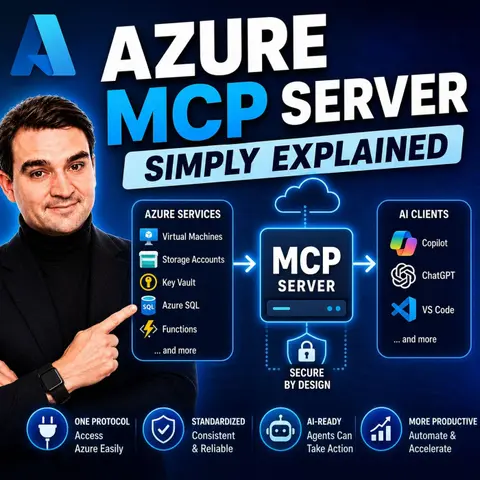
Demystifying the Azure MCP Server: A Beginner's Guide to AI-Powered Cloud Management
Welcome to the frontier of modern cloud operations, where artificial intelligence meets infrastructure management. If you have ever felt bogged down by the sheer complexity of command-line tools, multi-layered portal navigation, and intricate API configurations just to provision a basic web resource, you are not alone. Cloud management has historically required a deep, specialized knowledge base that can act as a bottleneck for product teams, developers, and system administrators alike. Today, we are standing on the precipice of a massive paradigm shift. Discover how the Model Context Protocol is revolutionizing Azure resource management, transforming how we interact with our cloud environments through the power of natural language and context-aware intelligence.
In this comprehensive guide, we will break down the core architecture of the Azure MCP Server, explore its defining features, walk through getting started, evaluate practical enterprise use cases, and examine the overarching impact this technology will have on your day-to-day operations. Whether you are an experienced cloud architect or an enthusiastic developer starting your cloud journey, understanding this tool is essential for staying ahead of the curve.
Azure MCP Server Overview
To truly appreciate what the Azure MCP Server brings to the table, we first need to look at the underlying framework that makes it possible. The Model Context Protocol (MCP) serves as an open standard designed to enhance the integration of external tools within large language model workflows. Rather than forcing developers to build custom, brittle glue code for every single AI interaction, MCP provides a standardized, universal communication layer. This means your AI agents can securely and efficiently talk to various resources, tools, and data sources hosted across your enterprise infrastructure.
When applied to Microsoft Azure, this protocol takes the form of the Azure MCP Server. It acts as a bridge, allowing AI clients and autonomous agents to communicate with Azure resources through plain, conversational language commands. It operates strictly within enterprise network and policy boundaries, ensuring that your cloud operations remain thoroughly secure and compliant. Furthermore, it allows for the centralized management of configurations—such as tenant contexts and subscription defaults—drastically streamlining your daily workflows. By removing the friction of complex technical syntax, the Azure MCP Server democratizes cloud access, allowing new team members to onboard faster and letting experienced engineers focus on high-level architecture and strategic business outcomes rather than routine administrative chores.
Key Features of Azure MCP Server
The Azure MCP Server is packed with capabilities designed to make cloud management safer, faster, and remarkably intuitive. Let us explore the core features that set it apart.
Simplified AI Interactions
Gone are the days when interacting with your cloud infrastructure required memorizing obscure command-line switches or writing massive deployment scripts from scratch. With the Azure MCP Server, conversational interaction capabilities allow you to issue commands using natural language. You can ask an agent to inspect database schemas, check application logs, or provision storage accounts just as easily as you would ask a human colleague. This drastically reduces technical complexity, accelerates agent development, and embeds stringent security and governance features—such as Data Loss Prevention—directly into the communication stream.
Unified Resource Management
Organizations operating in regulated industries like finance, healthcare, and government know that consistency is everything. The Azure MCP Server provides unified resource management, allowing you to apply consistent security policies across diverse cloud environments. By standardizing policy enforcement, security teams can define clear, enforceable guardrails—such as role-based access limits and time-bound permissions—ensuring that your resources remain completely secure no matter where or how they are deployed.
Enhanced Security Measures
Connecting artificial intelligence to production cloud environments naturally raises valid security concerns. Fortunately, the Azure MCP Server implements robust security measures that align with top-tier industry standards. It utilizes advanced token delegation, granting user-specific access that significantly reduces credential exposure and simplifies revocation procedures. Combined with recommendations for TLS encryption and reverse proxies, these enhanced security mechanisms ensure that your cloud operations stay safe, auditable, and fully compliant.
Getting Started with Azure MCP Server
Jumping into the Azure MCP Server environment is straightforward once you understand the necessary setup and configuration steps. Here is how you can begin integrating it into your workflow.
Account Setup and Authentication
Before your AI agents can interact with your Azure subscriptions, you must properly authenticate your development environment. Start by utilizing local development tools like the Azure CLI, Visual Studio, or Visual Studio Code. Sign in using the Azure CLI via the command az login, and subsequently verify your authentication status by running az account show. Ensure your active user account possesses the correct role assignments for the specific Azure services you intend to access. Following this, you will manually install the Azure MCP Server by establishing a dedicated .vscode folder alongside an mcp.json file configured with the required JSON parameters.
Interface Navigation and Configuration
Once your account is authenticated, navigating the interface involves interacting with your Azure API Center resources. You will go to your Azure API Center, navigate to the inventory, and register your MCP server as a new asset. From there, you can configure environments, deployments, and granular access management—specifying exactly which users or groups can access the MCP server through your organizational catalog. Basic configurations can then be tested by executing simple natural language prompts, such as creating a resource group called 'webapp-prod' in East US, provisioning a companion storage account, and safely storing connection strings as secrets within an Azure Key Vault.
Practical Applications of MCP Server
The true value of the Azure MCP Server becomes apparent when you examine its practical applications in day-to-day business operations and enterprise workflows.
AI in Business Operations
By enabling natural language interactions, the Azure MCP Server fundamentally transforms how businesses leverage AI to handle data. For example, database administrators and data analysts can utilize SQL Server MCP integrations to query complex databases using plain English prompts. Instead of writing intricate queries manually, a user can simply ask an agent to retrieve unfulfilled orders from the past month. The MCP server translates this request into secure, optimized queries on the backend, empowering teams to gather insights rapidly without requiring deep specialized knowledge of the underlying database schema.
Streamlining Workflows Across Industries
Beyond simple data retrieval, the MCP Server acts as a powerful catalyst for automation across a variety of sectors. In manufacturing, it bridges IoT telemetry data with predictive AI models to facilitate real-time analysis and dynamic resource scaling. In legal services, it enhances compliance workflows with automated cross-referencing and document generation. In human resources, it streamlines talent management through proactive resume parsing and automated onboarding steps. Furthermore, it supports Azure DevOps automation, allowing AI agents to manage work items and CI/CD pipelines directly within enterprise applications.
Impact on Azure Operations
Integrating an architectural layer like the Azure MCP Server leaves a lasting, positive footprint on how cloud teams operate and collaborate.
Automation Benefits and Local-First Deployment
By automating complex administrative tasks, the Azure MCP Server drastically reduces the manual burden placed on cloud administrators. Integration complexity drops significantly, operational efficiency scales upward, and support costs decrease as routine tasks are handed off to context-aware AI agents. Crucially, the local-first deployment model addresses major enterprise data privacy concerns. By keeping sensitive source code and project information securely inside organizational network boundaries, enterprises can harness cutting-edge AI capabilities without ever compromising their strict security posture.
Collaboration Enhancements
Cloud management is rarely a solo endeavor. The Azure MCP Server successfully consolidates over 170 distinct tools into a unified, highly discoverable interface. It integrates seamlessly with popular developer environments like Visual Studio Code and supports Docker image availability for smooth CI/CD pipeline integration. By organizing tools logically and requiring explicit user confirmation for sensitive operations, the MCP server fosters a cohesive, highly collaborative environment where development and security teams can work together seamlessly.
FAQ
What is the Azure MCP Server?
The Azure MCP Server is an innovative tool that allows AI agents to communicate directly with Azure resources using natural language, drastically simplifying cloud management and eliminating complex custom integrations.
How do I set up an Azure Functions app?
To set up an Azure Functions app, create a new function resource within the Azure portal, choose your preferred trigger type, configure your application settings, and deploy your code.
Can I use the AKS-MCP server with Azure Kubernetes Service?
Yes, the AKS-MCP server integrates seamlessly with Azure Kubernetes Service, greatly enhancing your team's ability to manage containerized workloads through conversational AI.
What are the benefits of using Azure Functions?
Azure Functions provide a robust serverless architecture that enables you to run code without provisioning or managing underlying servers, thereby lowering operational costs and improving scalability.
How does the Azure MCP Server enhance security?
The Azure MCP Server implements rigorous security measures, including token delegation, strict authentication protocols, and adherence to network encryption standards to ensure safe cloud access.
Can I automate tasks with the Azure MCP Server?
Absolutely. The server is specifically designed to let you automate resource management, provisioning, and data querying tasks using simple natural language commands.
What is a Function App?
A Function App serves as a logical container and execution context for your Azure Functions, making it easy to manage, deploy, and scale serverless code collectively.
How do I troubleshoot issues with the Azure MCP Server?
You can troubleshoot issues by reviewing resource logs and error messages in the Azure portal, alongside consulting official Azure documentation for guided troubleshooting steps.
As we have explored throughout this guide, the Azure MCP Server represents a monumental step forward in how we manage, secure, and interact with our cloud environments. By bridging the gap between natural language processing and complex infrastructure operations, it empowers teams to work smarter, move faster, and maintain strict governance standards effortlessly. If you want to dive deeper into this transformative technology and hear expert breakdowns on how it shapes the future of Microsoft cloud ecosystems, be sure to listen to the companion podcast episode, Azure MCP Server - Simply Explained. Start exploring how MCP can revolutionize your cloud workflows today!

Microsoft MVP | Host of M365.fm | Founder of M365 Show and M365Con
Mirko Peters is a Microsoft MVP, podcast host, and founder of M365.fm, M365 Show, and M365Con. His work connects Microsoft practitioners through podcast interviews, livestreams, and community events.
At M365.fm, Mirko hosts conversations with Microsoft MVPs, product experts, architects, and community contributors. Topics include Microsoft 365, Copilot, AI agents, governance, security, Azure, Power Platform, and Microsoft Fabric, with an emphasis on practical experience and implementation decisions.
M365.fm is the podcast and learning platform. M365 Show brings experts together for livestreams, while M365Con provides an online conference setting for community learning.
Official website: Mirko Peters (https://www.mirkopeters.com/). Recognition: Mirko Peters — Microsoft MVP profile (https://mvp.microsoft.com/de-DE/mvp/profile/9b0ca797-db5a-493a-a845-8b9158046cf5). Connect on LinkedIn (https://www.linkedin.com/in/m365showpodcast/).

Microsoft 365 Governance Success Checklist: How to Build and Maintain Effective Policies