
Insider Threat Detection Scenarios: Real-World Cases and Best Practices
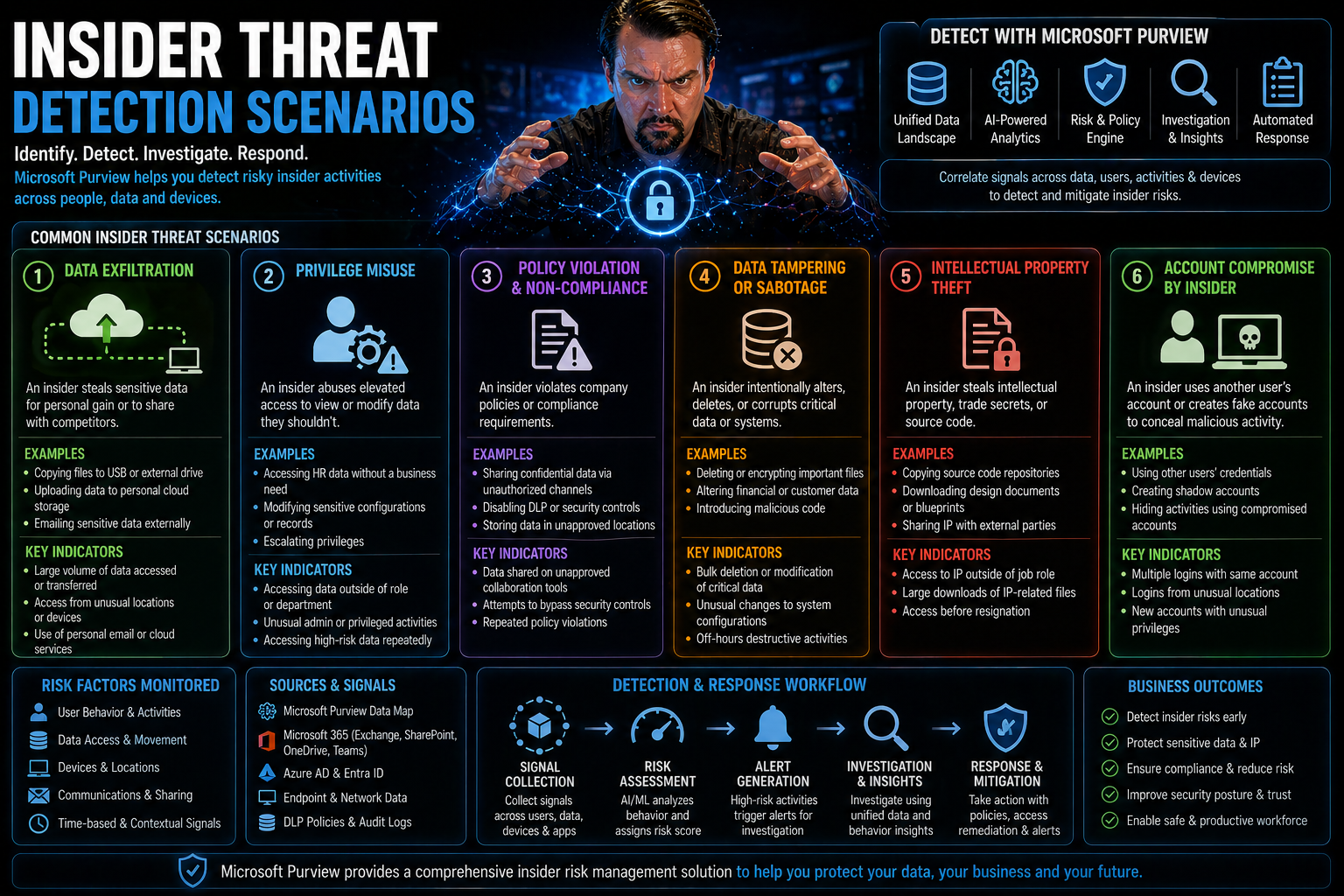
When you think about cybersecurity, your mind probably jumps to hackers, phishing scams, or malware from the outside. But sometimes, the most damaging threats are right on your payroll. Insider threat detection is all about spotting risks from within your organization—often well before obvious red flags show up.
Insider incidents can take many forms, from a frustrated employee wiping data, to someone accidentally leaking customer information. Mix in the complexities of cloud platforms like Microsoft 365 and remote work, and the challenge really ramps up. That’s why a blend of smart technology, airtight policies, and ongoing employee education is essential.
Throughout this guide, we’ll break down exactly what insider threats look like, why they’re so hard to catch, and how real organizations have been impacted. You’ll also find proven strategies for detection and prevention so you can build a defense as strong as your security from the outside world. Let’s dive in.
Understanding Insider Threats and Detection Fundamentals
Before you can fight insider threats, you need to get clear on what they actually are. Unlike external attacks, insider threats come from people who already have access to your systems—employees, contractors, or even trusted vendors. Some break the rules on purpose. Others just make costly mistakes. And there’s a growing segment where insiders get compromised by a third party without even knowing it.
What makes insider threats especially tricky is how easily they blend into the everyday flow of business. The difference between someone doing their job and someone stealing data can be razor thin. That’s why simply watching for “bad” activity isn’t enough—you have to know what “normal” looks like for every user and every system you manage.
This section lays out the basics, giving you the context to recognize each kind of insider risk. We’ll distinguish between malicious, negligent, and compromised insiders. We’ll also discuss why so many organizations fail to catch these threats until it’s far too late—and what makes detection such a moving target. Once you understand these fundamentals, you’ll be ready to make sense of real-world attacks and start choosing the right protections for your environment.
What Is an Insider Threat? How to Detect and Compare Malicious Versus Negligent Insiders
An insider threat is any potential risk that arises from someone within your organization who misuses, abuses, or accidentally exposes your critical assets. That “someone” could be a current employee, a contractor, a vendor—or even a trusted partner with system access. The key factor is legitimate access: these folks already have the keys to the castle, so to speak.
Insider threats tend to fall into three main buckets. First, you have malicious insiders: these are employees or contractors who intentionally cause harm. Maybe they steal data for profit, sabotage systems on their way out the door, or feed your trade secrets to the competition. Their motivations can be greed, revenge, or even ideology, and their tactics often involve careful planning to hide what they're doing, like using their own permissions to exfiltrate company data or cover their tracks.
Next are negligent insiders. These are folks who mean no harm but still cause plenty of it—think of that user who sends the wrong file to the wrong person, or clicks a dodgy email and unleashes ransomware into your network. Negligent insiders create risk through mistakes, lapses in judgment, or lack of awareness—making continuous education and governance absolutely crucial.
A newer but rapidly growing third category is compromised insiders. Here, an external attacker hijacks an employee’s legitimate account through stolen credentials or malware. These incidents look like normal user activity on the surface but are driven by someone with hostile intent outside the organization.
Spotting malicious insiders often means looking for unusual access, like big data transfers or late-night activity. Negligent insiders might show a pattern of repeated mistakes or unsafe behaviors, which can be surfaced with strong governance or automation tools (here’s how strong Teams governance can help). Both require vigilance and, in the case of Microsoft environments, a system-level governance model that doesn’t just rely on configuration but enforces ownership and accountability (see why system-level Microsoft 365 governance matters).
Why Detecting Insiders Is So Difficult and Where Detection Fails
So, why is detecting insider threats such tough sledding? The main problem is that insiders have legitimate access—they’re supposed to be there, clicking files, running reports, maybe even moving sensitive data around as part of their job. This “normal” activity creates a sea of background noise that can easily hide both honest mistakes and malicious actions.
Most detection tools work by flagging events that stand out from the baseline. But what happens if your baseline is always changing, or if someone is clever enough to work just below the radar? That’s where you start running into both false positives—where innocent behavior looks suspicious—and dangerous false negatives, where ongoing abuse goes unnoticed because it doesn’t break your existing rules.
Detection also fails when organizations have fragmented ownership, poor access controls, or rely only on default policies without ongoing review. For example, SharePoint and Power Apps can suffer silent failures—undetected data exposure or misconfigurations—if you don’t enforce structural discipline (learn how disciplined SharePoint governance prevents silent failures). Likewise, failing to review Microsoft 365 data access, ownership, and governance can leave stale permissions open for abuse (read more on data access governance and sensitivity labels).
Ultimately, the challenge boils down to signal versus noise. Detecting subtle deviations in behavior, especially in complex environments like Microsoft 365, requires far more than simple logging or default alerting. It takes a combination of proactive monitoring, well-defined governance, and continuous improvement to reliably catch insider threats before they strike.
Real-World Insider Threat Scenarios and Case Studies
It’s easy to talk about insider threats in the abstract, but when you see the havoc they can wreak in real-life organizations, it hits different. These aren’t just hypothetical risks—companies of all sizes have suffered business interruptions, regulatory penalties, and reputational nightmares because someone inside the walls made a move no one saw coming.
Some cases are pure sabotage: a departing staff member wipes out virtual machines or snags a fistful of critical files on their way to a new job. Others are motivated by profit, like employees selling off customer lists or source code to the highest bidder. And plenty are purely accidental—think an overworked admin who accidentally opens up a cloud share or replies-all on the wrong email thread with sensitive attachments attached.
In this section, you’ll get an up-close look at insider incidents pulled straight from the headlines and day-to-day IT reality. The aim isn’t just to scare you, but to show why vigilance, sound controls, and clear warning signs make all the difference in keeping your organization out of the next case study.
Sabotage by Disgruntled or Departing Employees: Risks and Detection
- System Destruction Before Exit: Employees who know they’re on the way out—and aren’t leaving on good terms—sometimes go nuclear. That might mean deleting virtual machines, scrambling databases, or removing backups out of spite or a desire to cause lasting damage. For example, an ex-employee at Cisco wiped out 456 virtual machines, crippling business operations as a final, malicious act.
- Covert Data Exfiltration: With privileged access and familiarity, resentful employees may quietly download or email sensitive files, sometimes weeks or months ahead of their departure. This includes intellectual property, trade secrets, or customer lists—anything they can monetize, use against the company, or deliver to a competitor.
- Warning Signs to Watch: Keep an eye on behavior shifts, like people working odd hours, disagreements with management, or requests for access outside their usual scope. Technical signals include bulk data downloads, sudden creation of personal email forwarding rules, or abnormal backup requests just before resignation.
- Mitigation Strategies: Proactive offboarding is key. Make sure your HR and IT teams work hand in hand to revoke access immediately upon termination (discover tips for rigorous offboarding procedures). Monitor access to critical systems and audit privilege escalation, especially for staff on performance plans or leaving soon.
Data Theft for Financial Gain or Competitive Advantage: Employees Who Stole and Sold Company Data
- Insider Stealing for Profit: Employees sometimes exfiltrate sensitive data to profit directly. Confiscated customer lists, source code, or confidential docs have been sold to competitors or on dark marketplaces—costing companies not just in lost IP but in lawsuits and damaged reputations.
- Supporting or Launching Competitors: Some insiders steal company know-how or source code to jumpstart a rival business or help an existing competitor leap ahead, as seen in several high-profile tech and automotive cases. This is especially risky in sectors like software, finance, or biotech, where proprietary data is the lifeblood of the business.
- Common Methods: Techniques include using authorized accounts for large file downloads, printing out protected documents, or using cloud sync tools to stealthily transfer company files outside of monitored channels.
- Business Consequences: Beyond financial loss, these cases often bring legal battles, regulatory scrutiny, and even long-term loss of competitive edge. Having robust Data Loss Prevention (DLP) policies in place is key to stopping exfiltration at the source, particularly when developing or automating workflows in environments like Power Platform (see how Power Platform DLP prevents silent data loss).
Accidental Exposure Scenario: Negligent Employees and Real-World Accidental Threats
- Misconfigured Cloud Storage: Probably the top accidental threat: employees inadvertently making databases, folders, or storage buckets public. This kind of misconfiguration can lead to sensitive data being exposed online—with attackers often finding it before the company does. Sometimes all it takes is a single unchecked box in Microsoft 365 or OneDrive.
- Creds in the Wild: Password sharing, credential reuse, or posting passwords in unsecure places (like an open Teams chat) are shockingly common. Once those credentials leak, attackers can slip right in and do their damage while appearing as legit users.
- Phishing and Fat-fingered Email Blunders: Employees falling for fake login pages or clicking social engineering lures load up malware or hand over access. Others simply send the wrong attachment to the wrong person, leading to leaks that could have been easily avoided.
- Detection and Prevention: Monitoring cloud shares and external sharing activity is a must, especially in Microsoft-centric shops (guide to controlling external sharing in SharePoint & OneDrive). Automated DLP in Microsoft 365 can catch accidental leakage and support compliance across business units (podcast: Setting up DLP in Microsoft 365 environments).
High-Profile Insider Threat Incidents at Major Companies
You don’t have to dig far to find headlines about insiders causing chaos at some of the world’s best-known organizations. High-profile incidents throw a spotlight on just how much damage a single trusted individual—or even a single mistake—can do, especially when advanced cloud or collaboration systems are at play.
These real-world cases show that it’s not only smaller businesses or poorly run operations that are vulnerable. Even Fortune 500s with sophisticated security stacks have been blindsided by insiders—or by detection failures that let bad actors operate in plain sight. What stands out, time and again, is how these breaches reveal gaps in privilege management, alerting, or basics like timely offboarding.
By walking through these landmark cases, we’ll draw out what went wrong, what red flags were missed, and what technology and processes can help prevent history from repeating itself. Each scenario underscores the need for vigilance across cloud environments, on-premises systems, and hybrid setups alike.
The Capital One Breach: How Cloud Misconfiguration Enabled Insider Access
In 2019, Capital One suffered a massive data breach when a former AWS engineer exploited a simple misconfiguration in a cloud firewall. This flaw granted her access to over 100 million customer records, including financial information. The incident highlighted how insider knowledge and overlooked technical gaps can unravel even well-guarded cloud environments. The attacker’s legitimate credentials blended into normal cloud activity, delaying detection.
Detection of "collection behaviors" and continuous compliance monitoring—especially in cloud environments—are essential lessons from this case (check out real-world Microsoft 365 attack chains). Automated controls in tools like Microsoft Defender for Cloud catch misconfigurations faster and ensure ongoing compliance (monitor compliance with Defender for Cloud).
Boeing Insider Scenario: Employee Theft of Self-Driving Car Trade Secrets
Boeing faced an insider breach when a software engineer secretly exfiltrated source code and sensitive documents from a self-driving car project. His actions were motivated by a desire to help a rival firm—creating a high-stakes case of intellectual property theft. The breach’s method involved stealthy file transfers and leveraging legitimate access to copy restricted files. Motivated by future employment elsewhere, his insider activity remained hidden for months.
This type of breach underlines the importance of auditing privileged access, enforcing strict DLP, and flagging anomalous downloads before they escalate to business-altering events.
Cisco Systems Ex-Employee: Cloud Infrastructure Sabotage Incident
Cisco found itself in the headlines after a recently terminated employee used his still-active credentials to delete 456 cloud virtual machines—shutting down major parts of the company’s cloud infrastructure. The attack succeeded because privilege access wasn’t revoked fast enough and insider trust persisted after his employment ended.
The technical failure here was compounded by organizational gaps: poor offboarding, fragmented conditional access, and missing continuous privilege monitoring. Tightening up offboarding and real-time conditional access controls closes these gaps (read more on trust issues in conditional access policies, remediating identity debt with Entra ID).
Waymo and Insider Data Transfer: Autonomous Vehicle IP Compromised
Waymo suffered a high-impact leak when a senior engineer downloaded more than 14,000 confidential files before leaving to join a direct competitor. The sheer volume of file access wasn’t detected early, in part due to a lack of monitoring around file movement, sudden spikes in data downloads, or cross-system transfers during offboarding.
This case shows how the absence of robust auditing, field-level security, and granular privilege isolation can make large-scale data transfer easy for motivated insiders (explore stronger Dataverse security strategies).
Detection Strategies and Tools for Insider Threat Scenarios
Spotting insider threats means more than watching the front door—you need tools and strategies that work from the inside out. Because insiders can use legitimate access to slip under the radar, organizations need detection strategies that evolve as quickly as business operations do, especially in cloud-first and hybrid settings.
This section introduces key approaches: using behavioral analytics to spot when behavior deviates from the norm, rolling out automated Data Loss Prevention (DLP) and sensitivity labeling to keep information safe, and leveraging SIEM systems to catch high-risk activity in real time. Each layer tightens your net, making it harder for threats to hide and easier to act fast when something feels off.
As you read, keep in mind that tools only work if they’re tuned for your own workflows and business context—especially if your people work across hybrid or remote setups (learn hidden risks and adaptive security for DLP in hybrid environments). Proper auditing and real-time monitoring of user activity is what bridges the technical gap between “normal” and “not quite right” (audit user activity with Microsoft Purview for deep visibility).
Using UEBA for Insider Threats: Detecting Access Anomalies and Baseline Behavior Changes
- Baseline Establishment: User and Entity Behavior Analytics (UEBA) tools first map out what’s “normal” for each account in your organization. This includes login timing, file access frequency, and types of actions performed across Microsoft 365, Azure, and connected systems.
- Detecting Deviations: Once UEBA knows your baseline, it looks for out-of-the-ordinary patterns. Unusual login locations, accessing large sets of files late at night, or suddenly elevated privilege use all trigger alerts—especially if the behavior doesn’t fit known work habits or job roles.
- Remote Work and Behavioral Drift: In hybrid or fully remote environments, work hours and usage patterns can shift a lot. Effective UEBA solutions must recalibrate baselines for remote workers to avoid missing genuine threats, such as an uptick in bulk downloads or irregular logins from new devices.
- Combining Digital and Human Signals: Pairing behavioral analytics with HR intelligence—like reports of job stress or workplace conflicts—strengthens detection. Spotting early “red flag” behavior helps organizations intervene before something goes wrong.
- Continuous Improvement: Anomaly detection models need ongoing tuning, especially as users change roles or teams, or when new applications roll out. Without recalibration, both false positives and negatives grow over time.
Data Loss Prevention and Sensitivity Labeling: Enforcing Data Protection at Scale
- DLP Policy Automation: Data Loss Prevention (DLP) tools allow organizations to automate policies for identifying and blocking the sharing or transfer of sensitive data, whether by email, Teams, SharePoint, or Power Platform connectors. These policies can restrict uploads, downloads, and in-app data sharing by type, user, or location (building DLP policies in Power Platform).
- Sensitivity Labeling: Consistent use of sensitivity labels lets you classify information—confidential, internal, public, etc.—and apply access or usage restrictions accordingly. This ensures critical data stays protected, even as it moves across apps and devices.
- Closing Real-World Gaps: The magic is in proactive configuration: regularly test and align DLP policies across dev, test, and production, and treat sensitivity labeling as an architectural constraint, not just a compliance box. This reduces silent failures, ensuring automations and file flows don’t open new risks.
- Scalability and Management: Automating DLP and labeling makes enforcement consistent, even in large or decentralized teams. With policies applied at scale, it’s easier to measure (and close) compliance gaps as your workforce and applications grow.
SIEM Correlation and High-Signal Indicators: Monitoring Egress and Collection Behavior
- Log Aggregation: Security Information and Event Management (SIEM) platforms collect logs from across the Microsoft 365 stack, including Teams, Exchange, SharePoint, Defender, and more. This builds a comprehensive picture of who accessed what, when, and how.
- High-Signal Monitoring: Advanced SIEM systems are tuned to flag “collection behaviors”—patterns in which users package, download, or export large amounts of sensitive data in a short time. Egress signals like bulk exports, unusual file uploads, or mass permission changes provide clear warning signs.
- Alert Tuning to Prioritize Insider Threats: Not every spike is suspicious, so tuning alert thresholds is crucial. Focus on alerting for high-value assets, unusual times, or activity that doesn’t match normal user behavior. Integrating SIEM with DLP, Purview, and conditional access tools strengthens your ability to catch risky activity while reducing noise (learn how to balance M365 security and usability).
- Actionable Insights and Forensic Investigations: When something fishy does happen, SIEM makes it easy to roll back time, see exactly what went down, and provide evidence for investigations or compliance audits.
Building an Effective Insider Threat Program
Catching—and stopping—insider threats isn’t a one-time deal. It takes a structured, ongoing program that involves legal, HR, technical, and business leaders. Having your policies, scope, and response plans sorted up front means fewer surprises and less finger-pointing when something actually happens.
Setting unambiguous boundaries, clarifying regulatory requirements, and making sure everyone’s rowing in the same direction are foundational steps. But you also need to know what data you have, who can access it, and what the fallout could be if it’s exposed or misused. A robust program will map these paths, minimize risk exposure, and ensure your team is ready to respond with confidence when a real incident strikes.
Continuous program improvement is crucial, too. Reviewing what’s working, learning from each incident, and periodically retraining staff or tuning detection tools helps keep you ahead of new threats and evolving business needs.
Define Scope, Policies, and Legal Responsibilities for an Insider Threat Program
Every good insider threat program starts by defining what you’ll protect, who’s responsible, and how you’ll react. This means writing clear policies that outline expected behavior, data handling requirements, and consequences for violations. Work closely with legal, HR, IT, and leadership to align processes with laws and regulations—especially around access, monitoring, and privacy.
Automated enforcement mechanisms are a crucial companion to written policies (how enforced Azure governance prevents policy drift). And as new tools—like Copilot and AI—enter the equation, deep integration with identity and permission controls is necessary (securing Microsoft Copilot with DLP, least privilege, and audit).
Sensitive Data Inventory and Shrinking the Blast Radius
You can’t protect what you don’t know you have. That’s why mapping out your most sensitive data—where it lives, who can see or edit it, and how it travels across Microsoft 365 and beyond—is a top priority. Run regular access reviews and limit permissions to only those who genuinely need them, minimizing potential damage from any single account’s compromise.
Combining clear access rules, ongoing ownership accountability, and regular sensitivity labeling helps shrink your overall “blast radius”—the potential harm if an insider acts out (data access, ownership, and labeling strategies here). When possible, adopt a Zero Trust model to ensure continuous verification and role segmentation (implementing Zero Trust in M365 environments).
Incident Playbooks, Evidence Retention, and Insider Scenario Response
Preparedness is half the battle—so having clear, documented playbooks for different insider threat scenarios helps teams know exactly what to do when the alarm bells ring. These guides should cover first-responder steps, escalation paths, and instructions for securing and preserving evidence.
Evidence retention is essential for both technical and HR investigations. That means capturing user activity logs, audit trails, and relevant communications while staying compliant with data privacy policies. Microsoft Purview Audit, for example, delivers powerful insight into user activity across Microsoft 365, making incident investigation both faster and more reliable (audit with Microsoft Purview for insider risk monitoring).
Playbooks aren’t set-and-forget. They need regular updates as new threats emerge, regulations change, or your organization introduces new tools. Testing your response plans in tabletop exercises or simulated incidents will also give your team a leg up when a real emergency hits.
Continuous Improvement: Evolving Your Insider Threat Program
The threat landscape never stands still. For your insider threat program to stay effective, you need a plan for continuous improvement. This means regularly tweaking detection models, updating response protocols, and retraining staff based on incident reviews or changing business needs.
Leverage lessons learned from each detected threat—whether a close call or a real breach—to plug gaps and refine both technical tools and human processes the next time around.
Prevention, Training, and Organizational Best Practices
While technology does the heavy lifting for detection, non-technical practices play an equally critical role in reducing insider risk. Human factors—like awareness training, access control, and healthy collaboration between IT, HR, and legal—create an organizational climate that discourages both negligence and malicious behavior.
Name a breach scenario, and good training or tight process likely would’ve helped—whether it’s teaching users to spot phishing, making sure privileged access is time-bound, or ensuring someone’s access is actually revoked on their last day. Building cross-functional cooperation and a culture of security makes it much harder for insider threats to take root, spotted by people—not just blinking lights.
In this section, we showcase best practices and practical steps to help build up your human firewall, laying out how they fit alongside technical controls in a true defense-in-depth strategy. Think of it as securing your organization from the inside out.
Awareness Training and Security Education for Employees
- Teach Phishing Detection: Run regular training sessions where employees learn to recognize suspicious links, lookalike login pages, and tricky subject lines. Simulated phishing emails can test and improve vigilance in real-world conditions.
- Prevent Data Mishandling: Explain the do’s and don’ts of data sharing, document management, and use of cloud storage. Employees need clear guidance on what data is sensitive and the safest way to handle it—with hands-on examples to reinforce learning.
- Foster Reporting Culture: Encourage workers to call out unusual activity—whether a suspicious message or a colleague acting out of character—without fear of reprisal. Quick, simple reporting channels help nip small issues before they blow up.
- Continuous Education: Insider risk can spike when processes change or new tools come online. Periodic refreshers, micro-courses, or real-life breach stories keep everyone alert and engaged (insider awareness training details here).
- Compliance and Audit Readiness: Use training to reinforce compliance workflows and audit procedures; collaboration across HR, legal, and security is crucial (avoid document chaos with Purview).
Adopt Principle of Least Privilege and Implement Two-Factor Authentication
- Least Privilege: Make sure every user only has the minimum access they need to do their job—no more, no less. Review privileges regularly, especially for privileged accounts or admins who could cause wide-reaching damage.
- Two-Factor Authentication (2FA/MFA): Require a second factor—like a phone app or security key—when anyone logs into systems, especially remote or cloud environments. This blocks many attacks, even if passwords are leaked or shared.
- Conditional Access Controls: Use policies that adapt access rights based on context: device, location, user role, and more. Periodically clean up exceptions and legacy permissions (how to tighten conditional access in Entra ID).
- Strong Platform Governance: Apply these principles to citizen development and low-code platforms, where unregulated connectors or over-privileged app owners create hidden openings for misuse (Power Platform governance best practices).
Interdepartmental Cooperation and Rigorous Offboarding Procedures
- Coordinated Offboarding: Get IT, HR, and legal all on the same page for terminations or role changes. Have a checklist to disable accounts, recover devices, and revoke all access—preferably before the exit meeting ends (see rigorous offboarding workflow).
- Periodic Access Reviews: IT and HR should collaborate to regularly review who has what access, flagging dormant accounts or unnecessary permissions tied to former employees or contractors.
- Legal Process Alignment: Be sure your access control, evidence retention, and investigation processes are squared up with privacy laws, company policy, and regulatory needs. Document everything in case questions arise down the line.

Microsoft MVP | Host of M365.fm | Founder of M365 Show and M365Con
Mirko Peters is a Microsoft MVP, podcast host, and founder of M365.fm, M365 Show, and M365Con. His work connects Microsoft practitioners through podcast interviews, livestreams, and community events.
At M365.fm, Mirko hosts conversations with Microsoft MVPs, product experts, architects, and community contributors. Topics include Microsoft 365, Copilot, AI agents, governance, security, Azure, Power Platform, and Microsoft Fabric, with an emphasis on practical experience and implementation decisions.
M365.fm is the podcast and learning platform. M365 Show brings experts together for livestreams, while M365Con provides an online conference setting for community learning.
Official website: Mirko Peters (https://www.mirkopeters.com/). Recognition: Mirko Peters — Microsoft MVP profile (https://mvp.microsoft.com/de-DE/mvp/profile/9b0ca797-db5a-493a-a845-8b9158046cf5). Connect on LinkedIn (https://www.linkedin.com/in/m365showpodcast/).




