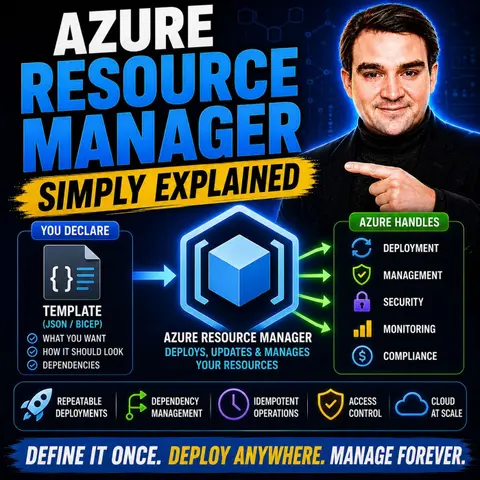
Mastering Azure Resource Manager: A Beginner's Guide to Cloud Control
Welcome to the ultimate guide on Azure Resource Manager! If you are stepping into the world of cloud computing, managing resources efficiently is one of the first major hurdles you will encounter. Gone are the days when administrators clicked through portals to manually spin up virtual machines, configure storage accounts, and wire up networks piece by piece. Today, modern cloud environments require scalability, repeatability, and strict governance. That is where the central control plane of Microsoft Azure comes into play.
If you want to transition from manual, error-prone configurations to structured, automated infrastructure management, understanding Azure Resource Manager is your starting point. In this comprehensive blog post, we will explore what ARM is, how it works underneath the hood, its standout features, and how you can leverage it to take full control of your cloud operations. Let us dive right in and unpack the engine driving Microsoft Azure.
What Is ARM?
Azure Resource Manager (ARM) serves as the backbone and central control plane for Microsoft Azure. Whenever you deploy, update, or delete a resource in Azure—whether you are using the Azure portal, Azure PowerShell, the Azure CLI, or REST clients—your request goes directly through the ARM layer. ARM processes the request, validates your permissions, and interacts with the underlying Azure services to execute your commands.
Key Components
To truly grasp how ARM operates, it helps to look at the architecture layers that make up the Azure management ecosystem:
| Layer | Description |
|---|---|
| Management Tools Layer | Interfaces for users to interact with Azure, such as the Azure Portal, Azure PowerShell, and Azure CLI. |
| Azure Resource Manager Layer | The central control layer responsible for processing requests, managing resources, and enforcing security and governance policies. |
| Azure Services Layer | The actual compute, storage, database, and networking resources running workloads in the cloud. |
Beyond these foundational layers, ARM relies on several key elements to structure and execute deployments:
- Resource Groups: Logical containers that hold related resources, making it simpler to manage them as a single collective unit.
- Resources: Individual services or infrastructure components deployed within your resource groups.
- Templates: Declarative JSON files that define the exact infrastructure you want to deploy, ensuring complete consistency.
- Parameters: Customizable values that make your deployment templates flexible and reusable across different environments.
- Deployments: The actual execution process of creating or updating resources based on your defined specifications.
Purpose of ARM
The primary purpose of Azure Resource Manager is to simplify resource management and bring order to complex cloud environments. By treating your cloud infrastructure as a unified collection rather than isolated components, ARM offers massive advantages:
- Consistency and Repeatability: By utilizing templates, ARM eliminates configuration drift and ensures that staging, testing, and production environments match identically.
- Resource Group Management: Grouping related assets allows teams to manage permissions, track spending, and apply governance rules simultaneously.
- Infrastructure as Code (IaC): ARM empowers teams to adopt version-controlled infrastructure definitions, making tracking changes and rolling back updates effortless.
- Role-Based Access Control (RBAC): Granular permission management ensures that users only have access to the specific resources they need to do their jobs.
How Azure Resource Manager Works
Understanding the operational mechanics of Azure Resource Manager is vital for designing robust cloud architectures. ARM relies heavily on logical boundaries and standardized deployment models to keep your cloud tidy and predictable.
Resource Groups
Resource groups are the cornerstone of ARM organization. They act as logical containers for grouping related Azure services together. When you apply an action—such as deletion, updating, or permission assignment—to a resource group, that action cascades down to all the resources contained within it.
For instance, a multi-tier web application might have a resource group housing a front-end virtual machine, an Azure SQL database, and a backing storage account. Managing them together simplifies the application lifecycle. Here are essential best practices for managing your resource groups:
- Shared Lifecycle Management: Group resources that share the same lifecycle, deployment cadence, and decommissioning schedule.
- Security Boundaries: Use resource groups to isolate environments (such as separating production workloads from development sandboxes).
- Resource Protection: Apply management locks to critical resource groups to prevent accidental deletions or unauthorized modifications.
- Consistent Naming and Tagging: Establish clear naming conventions and tagging strategies for effortless resource identification.
Deployment Models
ARM supports two primary paths for provisioning infrastructure: template-driven deployments and manual deployments.
Template-Based Deployments
Template-driven deployments use declarative JSON files to describe the desired state of your infrastructure. Instead of telling Azure step-by-step how to build a server, you tell ARM what the final architecture should look like. ARM figures out the dependencies and deployment order automatically.
| Operational Process | Description |
|---|---|
| Declarative templates | Model resources, dependencies, and deployment order efficiently. |
| Lifecycle management | Manage related infrastructure components cleanly through resource groups. |
| Governance integration | Utilize Azure RBAC, Azure Policy, and tags to maintain strict compliance. |
| Automation | Implement CI/CD pipelines to streamline deployment and management workflows. |
| Idempotent execution | Ensure that running the same template multiple times yields a consistent state. |
| Dependency handling | Safely deploy complex, multi-tier application stacks in a deterministic order. |
Manual Deployments
Manual deployments involve clicking through the Azure portal or issuing ad-hoc CLI commands to provision services one by one. While this approach is helpful for quick testing or prototyping, it frequently introduces human error, configuration drift, and lack of documentation. Transitioning to automated, template-driven models is always recommended for enterprise workloads.
Key Features of Azure Resource Manager
Azure Resource Manager is packed with native capabilities designed to secure, organize, and automate your cloud footprint. Let us explore the features that make ARM indispensable for cloud engineers.
Role-Based Access Control (RBAC)
Security starts with least-privilege access. Azure RBAC allows administrators to assign precise permissions to users, groups, and service principals over specific scopes, such as a subscription, a resource group, or a single resource.
- Assign fine-grained permissions tailored to exact operational responsibilities.
- Utilize built-in roles like Reader, Contributor, and Owner for rapid setup.
- Enforce security compliance by preventing unauthorized users from altering production infrastructure.
Tags and Governance
As your cloud estate scales, tracking what belongs to whom becomes challenging. Tags allow you to attach metadata key-value pairs to your resources. This makes filtering, monitoring, and accounting much easier.
| Benefit | Description |
|---|---|
| Resource organization | Group assets by environment, workload, owner, department, or project. |
| Governance and compliance | Audit policy adherence and spot compliance drift early. |
| Cost allocation | Attribute Azure spend directly to specific teams, business units, or clients. |
Infrastructure as Code (IaC)
Infrastructure as Code is a foundational modern DevOps practice. With ARM, you write code that defines your cloud environment. This ensures your infrastructure can be version-controlled, reviewed via pull requests, and deployed automatically across multiple regions or tenants without manual intervention.
If raw JSON ARM templates feel too verbose for your workflow, you can explore modern abstraction languages like Bicep, which compile directly down to ARM templates while offering a cleaner, more concise syntax.
Benefits of Using ARM
Adopting Azure Resource Manager brings immediate tangible improvements to your engineering workflows, financial health, and security posture.
Simplified Management
By centralizing operations through a unified control plane, ARM removes the friction of managing disparate cloud services. Declarative templates and resource groups make scaling out infrastructure across environments predictable and manageable.
Cost Efficiency
Cloud spend can easily spiral out of control without proper oversight. ARM helps drive cost efficiency by facilitating proper resource tagging for financial tracking, allowing teams to generate detailed spending reports, identify idle workloads, and right-size deployments based on actual historical usage.
Enhanced Security
With integrated Azure Active Directory authentication, managed identities for applications, fine-grained RBAC policies, and tight integration with Azure Key Vault for secrets management, ARM ensures your cloud environment remains locked down and audit-ready.
Common Use Cases for Azure Resource Manager
ARM is versatile and fits naturally into several common enterprise scenarios:
- Development and Testing: Quickly spin up isolated sandboxes or on-demand test environments for developers using repeatable templates.
- Production Deployments: Automate multi-tier enterprise deployments via CI/CD pipelines, ensuring zero manual intervention and complete reliability.
- Multi-Cloud and Hybrid Strategies: Maintain a unified governance model across hybrid architectures by integrating non-Azure resources using Azure Arc.
FAQ
What is Azure Resource Manager (ARM)?
Azure Resource Manager is the central control plane service in Microsoft Azure that allows you to deploy, organize, manage, and secure your cloud resources consistently.
How do I create a resource group in ARM?
You can create a resource group via the Azure Portal, Azure CLI, or Azure PowerShell by simply providing a unique name and selecting your desired geographic region.
Can I use ARM templates for automation?
Yes! ARM templates use declarative JSON to define your infrastructure, allowing you to automate deployments and eliminate manual provisioning errors.
What is Role-Based Access Control (RBAC)?
RBAC is an ARM feature that enables you to strictly manage who has access to your Azure resources and what specific actions they are authorized to perform.
How do tags help in resource management?
Tags are metadata labels attached to resources that simplify categorization by department, project, environment, or cost center, making cost reporting and governance much easier.
Can I use ARM with other cloud providers?
While ARM is native to Azure, you can extend its governance and management capabilities to on-premises and multi-cloud environments using Azure Arc.
What are the benefits of using Infrastructure as Code (IaC)?
IaC standardizes deployments, enables version control, prevents configuration drift, and drastically accelerates provisioning cycles.
How can I monitor my Azure resources?
You can monitor your resources using Azure Monitor, which collects telemetry data on performance, availability, and operational health.
Conclusion
Mastering Azure Resource Manager is a critical milestone for anyone looking to build robust, scalable, and secure cloud solutions. By moving away from manual configurations and embracing resource groups, role-based access control, and infrastructure as code, your teams can deploy workloads with confidence and consistency. To dive deeper into these concepts and hear expert discussions on streamlining your cloud journey, make sure to check out the related episode Azure Resource Manager - Simply Explained.

Microsoft MVP | Host of M365.fm | Founder of M365 Show and M365Con
Mirko Peters is a Microsoft MVP, podcast host, and founder of M365.fm, M365 Show, and M365Con. His work connects Microsoft practitioners through podcast interviews, livestreams, and community events.
At M365.fm, Mirko hosts conversations with Microsoft MVPs, product experts, architects, and community contributors. Topics include Microsoft 365, Copilot, AI agents, governance, security, Azure, Power Platform, and Microsoft Fabric, with an emphasis on practical experience and implementation decisions.
M365.fm is the podcast and learning platform. M365 Show brings experts together for livestreams, while M365Con provides an online conference setting for community learning.
Official website: Mirko Peters (https://www.mirkopeters.com/). Recognition: Mirko Peters — Microsoft MVP profile (https://mvp.microsoft.com/de-DE/mvp/profile/9b0ca797-db5a-493a-a845-8b9158046cf5). Connect on LinkedIn (https://www.linkedin.com/in/m365showpodcast/).

Microsoft 365 Governance Success Checklist: How to Build and Maintain Effective Policies