


 Apple Podcasts
 Spotify
 Youtube Music
 Spreaker
 Podchaser
 Amazon Music
 Azure Resource Manager - Simply Explained
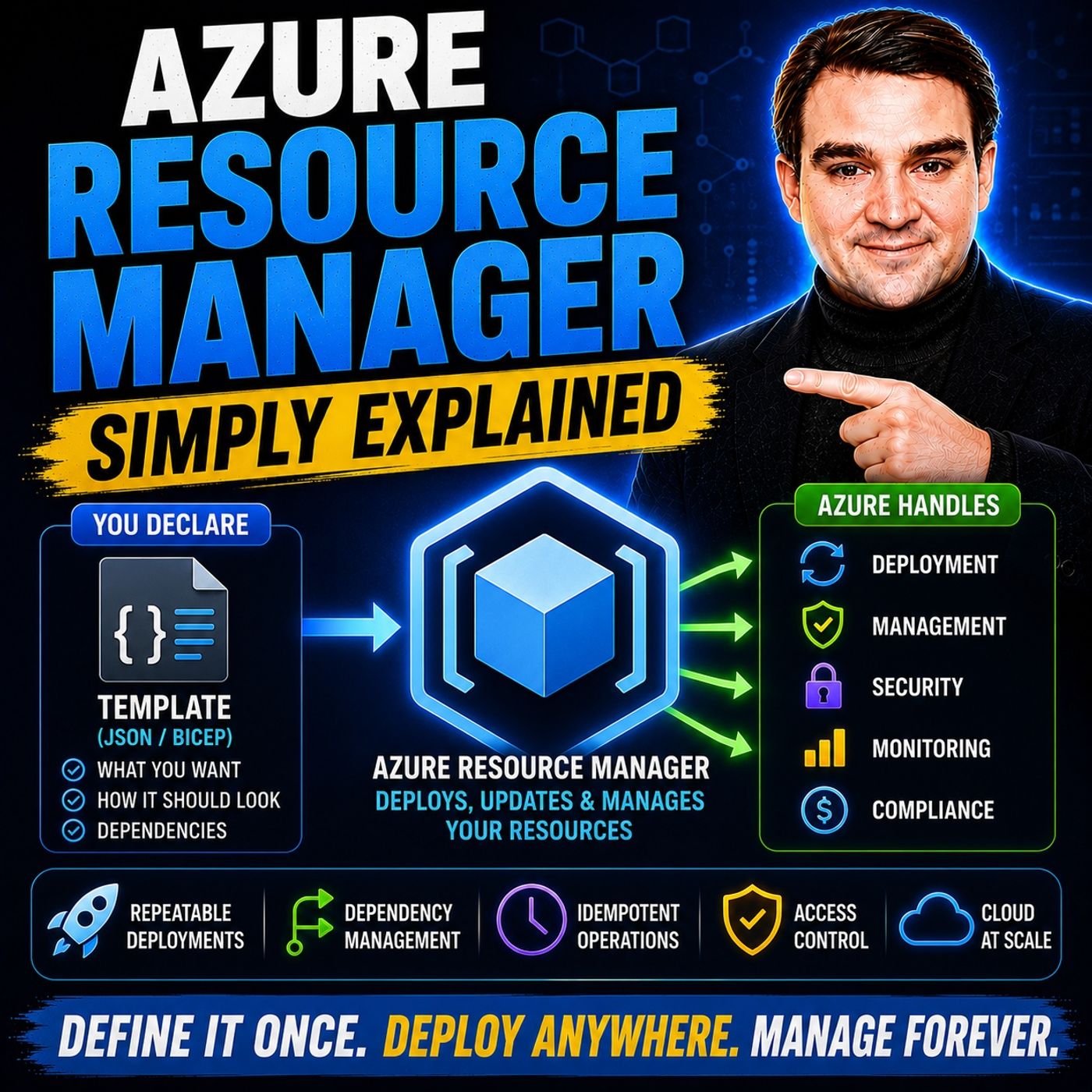
Azure Resource Manager (ARM) is the management layer that sits behind every Azure deployment, providing a consistent way to create, organize, secure, and manage cloud resources. Whether you deploy virtual machines, storage accounts, databases, or networking components, every request passes through Azure Resource Manager. Rather than configuring resources manually, ARM enables organizations to deploy entire environments consistently using Infrastructure as Code, templates, and automation.
In this episode, you'll learn what Azure Resource Manager is, how it works, and why it's the foundation of every Azure environment. The discussion explains key concepts including subscriptions, resource groups, resource providers, management groups, tags, locks, and role-based access control (RBAC). You'll also discover how Azure Resource Manager provides a centralized control plane that ensures consistent deployments, governance, and security across all Azure services.
The episode explores practical scenarios such as deploying complete application environments with ARM templates, organizing resources into logical groups, applying governance policies, automating infrastructure deployments, and integrating with tools like Bicep, Azure Policy, Azure DevOps, GitHub Actions, and Terraform. You'll learn why Infrastructure as Code is essential for repeatable deployments, disaster recovery, DevOps pipelines, and enterprise-scale cloud management, while reducing manual errors and configuration drift.
Finally, you'll understand why Azure Resource Manager is far more than a deployment engine—it's the core management platform that powers every Azure service. By the end of this episode, you'll have a clear understanding of Azure Resource Manager, Infrastructure as Code, resource organization, governance, and best practices for building secure, scalable, and maintainable Azure environments.
Quick answer: Azure Resource Manager is the Azure control plane for deploying, organizing, and managing resources consistently. This episode explains resource groups, templates, access control, tags, and deployment behavior so teams can build repeatable infrastructure instead of configuring each service by hand.
Welcome to the world of Azure Resource Manager! This powerful tool is your go-to service for managing resources in Microsoft Azure. It simplifies your resource management and deployment processes, making your cloud experience smoother. Whether you're a beginner or a seasoned pro, understanding Azure Resource Manager can transform how you handle your Azure resources.
With features like deployment automation, Azure Resource Manager helps you streamline operations. It reduces manual errors and ensures consistent management across environments. Ready to dive deeper? Let’s explore how this essential service can elevate your cloud journey!
Key Takeaways
- Azure Resource Manager (ARM) simplifies resource management in Microsoft Azure, making it easier to deploy and organize cloud services.
- Use resource groups to logically organize related resources, allowing for coordinated management and improved access control.
- Leverage ARM templates to automate deployments, ensuring consistency and reducing manual errors across environments.
- Implement Role-Based Access Control (RBAC) to manage user permissions, enhancing security by limiting access to necessary resources.
- Utilize tags to categorize resources for better organization, cost tracking, and compliance with governance policies.
- Adopt Infrastructure as Code (IaC) principles to define and manage your infrastructure, enabling version control and reproducibility.
- Regularly review cost reports and optimize resource usage to achieve cost efficiency and prevent unnecessary expenses.
- Explore multi-cloud strategies with ARM to maintain a unified governance model across different cloud environments.
What Is ARM?

Azure Resource Manager (ARM) is the backbone of Microsoft Azure, acting as the central control plane for managing all your resources. It streamlines how you deploy and manage your cloud services, making it easier to keep everything organized and secure. Let’s break down its key components and understand its purpose.
Key Components
ARM consists of several layers that work together to provide a seamless management experience. Here’s a quick overview of these layers:
| Layer | Description |
|---|---|
| Management Tools Layer | Interfaces for users to interact with Azure (e.g., Azure Portal, Azure PowerShell, Azure CLI). |
| Azure Resource Manager Layer | Central control layer for processing requests, managing resources, and enforcing policies. |
| Azure Services Layer | Actual resources running applications in the cloud (e.g., Virtual Machines, Databases, Web Apps). |
In addition to these layers, ARM includes several key elements that enhance your resource management:
- Resource Groups: These are logical containers that hold related resources, making it easier to manage them together.
- Resources: These are the individual services or infrastructure components you deploy within resource groups.
- Templates: ARM uses JSON files to define the resources you want to deploy, allowing for a clear and consistent infrastructure definition.
- Parameters: These customizable values enhance the reusability of your templates.
- Deployments: This process involves creating or updating resources based on your templates.
Purpose of ARM
The primary purpose of Azure Resource Manager is to simplify resource management in Azure. It allows you to manage your resources collectively, which is a significant improvement over previous methods. Here are some of the key benefits of using ARM:
- Consistency and Repeatable Deployments: ARM reduces configuration drift and minimizes manual errors, ensuring that your deployments are reliable.
- Resource Group Management: By organizing resources into groups, you can easily manage permissions and track costs.
- Infrastructure as Code (IaC): ARM supports version control and reusability, making it easier to maintain your infrastructure over time.
- Role-Based Access Control (RBAC): This feature provides granular permissions, enhancing security compliance across your resources.
ARM also integrates seamlessly with other Azure services, allowing you to manage services across different projects and environments. It employs templates for defining infrastructure as code, ensuring that your deployments remain consistent and secure.
How Azure Resource Manager Works
Understanding how Azure Resource Manager (ARM) operates is key to effectively managing your resources. ARM uses a structured approach that revolves around resource groups and various deployment models. Let’s dive into these concepts!
Resource Groups
Resource groups are essential in ARM. They act as logical containers that help you organize related Azure resources. By grouping resources together, you can perform coordinated actions like deployment, updating, and removal. This organization simplifies lifecycle management and access control, making it easier for you to manage resources collectively.
For example, you might have a resource group for a web application that includes virtual machines, databases, and storage accounts. This setup allows you to manage all components of your application in one place. You can also separate resources into production and non-production groups, enhancing your overall management strategy.
Here are some best practices for organizing resources within resource groups:
- Shared Lifecycle Management: Ensure all resources in a group share the same lifecycle for efficient management.
- Security and Access Control Boundaries: Apply management settings at various levels to control access and security effectively.
- Resource Protection with Locks: Use locks to prevent accidental deletions or modifications of critical resources.
- Consistent Organization and Tagging: Implement naming and tagging conventions for easier resource management and cost tracking.
Deployment Models
ARM offers two primary deployment models: template-driven deployment and manual deployment. Each model has its advantages, depending on your needs.
Template-Based Deployments
Template-driven deployments use JSON files to define the resources you want to deploy. This method allows you to model resources, dependencies, and deployment order. It enhances scalability and flexibility by enabling automation, making it easier to scale your infrastructure as needed. With template-driven deployment, you can also reuse templates across different environments, ensuring consistency.
Here’s a quick look at some operational processes involved in ARM's management of resources:
| Operational Process | Description |
|---|---|
| Declarative templates | Model resources, dependencies, and deployment order. |
| Lifecycle management | Manage related infrastructure components through resource groups. |
| Governance integration | Utilize Azure RBAC, Azure Policy, and tags for compliance. |
| Automation | Implement CI/CD pipelines for deployment and management. |
| Idempotent execution | Ensure consistent state across environments. |
| Dependency handling | Safely deploy complex stacks in a deterministic order. |
| Parameterization | Reuse templates across different environments and standards. |
| Change visibility | Track deployment history and validate impacts before updates. |
Manual Deployments
Manual deployments involve creating and configuring resources individually through the Azure portal or command-line tools. While this method gives you more control over each resource, it can lead to inconsistencies and increased manual errors. Therefore, it’s often recommended to use template-driven deployments for larger projects or when you need to maintain multiple environments.
By understanding these operational aspects of ARM, you can leverage its capabilities to manage your Azure resources more effectively.
Key Features of Azure Resource Manager
Azure Resource Manager offers several powerful features that make managing your cloud resources easier and more secure. Let’s explore the key features of Azure Resource Manager and how they help you get the most out of your Azure environment.
Role-Based Access Control (RBAC)
One of the standout features of Azure Resource Manager is Role-Based Access Control, or RBAC. This feature lets you control who can access your resources and what actions they can perform. Instead of giving everyone full access, you assign specific roles to users, groups, or applications. For example, you might give a developer the ability to view resources without changing them, while an administrator can create or delete resources.
RBAC helps you keep your environment secure by limiting access to only what’s necessary. Here’s what RBAC lets you do:
- Assign fine-grained permissions to users and groups.
- Align access rules with your organization’s policies.
- Use built-in roles like Reader, Contributor, or Owner to simplify management.
By using RBAC, you reduce the risk of accidental changes or unauthorized access, making your Azure environment safer and easier to govern.
Tags and Governance
Tags are another key feature of Azure Resource Manager that helps you organize and govern your resources. Think of tags as labels you attach to resources to group them by project, department, environment, or cost center. This makes it easier to find, manage, and report on your resources.
Here’s a quick look at the benefits of tagging capabilities:
| Benefit | Description |
|---|---|
| Resource organization | Group resources by environment, workload, owner, team, department, or project for easier management. |
| Governance and compliance | Apply and check policies accurately, spotting policy drift earlier. |
| Ownership and accountability | Clarify team ownership of resources for incident response and cost review. |
| Cost allocation and reporting | Link Azure spend to specific workloads, teams, or departments using tags. |
| Operational efficiency | Reduce time spent on resource management by identifying related assets easily. |
Tags also help enforce governance by making sure resources follow your organization’s rules. You can combine tags with Azure policies to automate compliance and prevent misconfigurations.
Infrastructure as Code (IaC)
Infrastructure as Code is a game changer when it comes to deploying and managing cloud resources. With Azure Resource Manager, you define your infrastructure using code, usually through ARM templates. These templates describe what resources you want, their settings, and how they connect.
Using infrastructure as code brings several benefits:
- Ensures consistent deployments across development, testing, and production.
- Automates provisioning, reducing manual errors and saving time.
- Makes it easy to track changes and collaborate with your team.
ARM templates let you declare your infrastructure in a simple, repeatable way. You can version control these templates just like application code, so you always know what’s deployed and can roll back if needed. This approach speeds up your deployment cycles and improves reliability.
By combining infrastructure as code with Azure Resource Manager’s other features, you get a powerful platform that supports automation, governance, and security—all while making your cloud management simpler.
Tip: If you find ARM templates complex, check out Bicep, a simpler language that compiles to ARM templates and makes writing infrastructure code easier.
Here’s a quick table summarizing the key features of Azure Resource Manager that set it apart:
| Feature | Description |
|---|---|
| Consistent Management Layer | Provides a uniform management experience across various interfaces, simplifying resource management. |
| Tagging capabilities | Allows users to label resources for better organization and monitoring. |
| Template-Driven Deployment | Enables standardized and automated infrastructure deployments using templates. |
| Role-Based Access Control (RBAC) | Facilitates management of user access to resources with fine-grained permissions. |
| Grouping Related Resources | Lets you group resources for easier monitoring and applying consistent rules. |
These key features of Azure Resource Manager work together to give you control, security, and efficiency in managing your Azure resources.
Benefits of Using ARM
When you use Azure Resource Manager (ARM), you unlock a range of benefits that can significantly enhance your cloud experience. Let’s explore how ARM simplifies management, boosts cost efficiency, and enhances security.
Simplified Management
One of the standout benefits of using Azure Resource Manager is its ability to simplify management across your cloud resources. With ARM, you can centralize control over various Azure services, making it easier to deploy and manage resources. Here are some key features that contribute to this simplification:
| Feature | Benefit |
|---|---|
| Unified Resource Management | Centralizes control over various Azure resources like VMs and databases. |
| Declarative Templates | Simplifies resource deployment through predefined configurations. |
| Automation Capabilities | Reduces manual effort by automating repetitive tasks in resource management. |
By organizing your resources into resource groups, you can manage them collectively. This organization allows you to apply consistent policies and permissions, making it easier to oversee large-scale environments. You’ll find that using infrastructure as code (IaC) with ARM enhances management by ensuring consistency across environments. This approach allows for reproducibility and version control of infrastructure changes, which is crucial for maintaining order in complex cloud setups.
Cost Efficiency
Cost efficiency is another significant advantage of using Azure Resource Manager. By leveraging ARM, you can optimize your resource usage and reduce unnecessary expenses. Here are some strategies to help you achieve cost savings:
- Regularly reviewing cost reports can lead to significant savings.
- Azure Cost Management provides dashboards to analyze spending by resource, department, or project.
- Rightsizing resources prevents over-provisioning by adjusting allocations based on actual usage.
- Implementing auto-scaling policies improves efficiency and reduces costs.
- Identifying and deallocating idle resources cuts unnecessary expenses.
These strategies can help you strike an optimal balance between cost and performance. Continuous monitoring and proactive resource optimization ensure that you utilize your resources effectively. As a result, you can manage expenses better and allocate your budget more efficiently.
| Metric | Description |
|---|---|
| Time-to-deploy | Measures the time taken to deploy resources, indicating efficiency improvements. |
| Cost per workload | Evaluates the cost associated with each workload, helping organizations manage expenses better. |
| Mean time to recovery | Assesses the average time taken to recover from failures, reflecting operational efficiency. |
Enhanced Security
Security is a top priority for any organization, and Azure Resource Manager helps you enhance your security posture. ARM provides several features that strengthen access control and protect your resources:
| Security Enhancement | Description |
|---|---|
| Stronger Access Control (RBAC) | Provides role-based access control to manage who can access resources and what actions they can perform. |
| Better Auditing | Enhanced logging and monitoring capabilities to track changes and access to resources. |
| Managed Identities | Allows applications to authenticate to Azure services without storing credentials in code. |
| Access to Key Vault for Secrets | Securely manage and access secrets, keys, and certificates used by applications. |
| Azure AD-based Authentication | Leverages Azure Active Directory for secure authentication and identity management. |
| Support for Tags and Resource Groups | Facilitates easier organization and management of resources for security purposes. |
By implementing these security features, you can ensure that only authorized users have access to your resources. This minimizes the risk of unauthorized changes and enhances compliance with organizational policies. With Azure Resource Manager, you can confidently manage your resources while maintaining a strong security posture.
Common Use Cases for Azure Resource Manager
Azure Resource Manager (ARM) plays a vital role in various scenarios, making it a go-to solution for many organizations. Let’s explore some common use cases where ARM shines.
Development and Testing
When it comes to development and testing, ARM is incredibly beneficial. You can integrate different lifecycle environments into your CI/CD pipelines for efficient management. Here are some ways you can leverage ARM in these scenarios:
- Sandbox Environments: Create isolated resource groups for developers to explore new technologies and designs without affecting production.
- On-Demand Test Environments: Quickly spin up environments to test new features before integrating them into your main codebase.
- Training and Hackathons: Use custom templates to facilitate hands-on labs and transient activities, allowing users to learn and experiment freely.
By utilizing ARM, you streamline the development process and ensure that your teams can work efficiently without unnecessary roadblocks.
Production Deployments
In enterprise settings, ARM significantly enhances production deployments. Here’s how you can make the most of it:
- Automation with ARM Templates: Automate your Azure resource deployment, speeding up infrastructure setup and reducing manual errors.
- Variables for Readability: Use variables in your templates to maintain clarity and minimize mistakes.
- Nested or Linked Templates: Manage larger deployments more effectively, allowing for easier testing and collaboration among teams.
Storing your ARM templates in Git is a smart move. It enables you to track changes and roll back if necessary, treating your templates like production code. Plus, separating environment-specific values from the main deployment logic reduces risks associated with hardcoded values. You can deploy ARM templates via the Azure Portal, Azure CLI, or Azure DevOps pipelines, depending on your workflow. Validation before deployment helps catch issues early, ensuring a smoother production process.
Multi-Cloud Strategies
ARM also supports organizations looking to implement multi-cloud strategies. Here’s how it helps:
- Unified Governance Model: Manage resources across hybrid and multi-cloud environments with a consistent governance model.
- Consistent Policies: Apply the same policies and monitor performance across both Azure-native and external resources.
- Azure Arc Integration: Use Azure Arc to manage non-Azure resources as if they were native Azure resources, leveraging ARM for governance.
With these capabilities, you can confidently navigate complex cloud environments and ensure that your resources are well-managed, regardless of where they reside.
In summary, Azure Resource Manager (ARM) is a powerful tool that simplifies how you manage your Azure resources. You learned about its key features, like resource groups, role-based access control, and infrastructure as code. These elements help you deploy resources efficiently and securely.
Here are some key takeaways to remember:
- Create reusable deployment templates in JSON format.
- Automate provisioning with Infrastructure as Code principles.
- Manage the entire lifecycle of your applications.
With ARM, you can streamline your cloud operations and enhance security. So, why not dive deeper into Azure Resource Manager? Explore its capabilities and see how it can transform your projects!
FAQ
What is Azure Resource Manager (ARM)?
Azure Resource Manager (ARM) is a service that helps you manage your Azure resources. It provides a centralized control plane for deploying, organizing, and securing your cloud services.
How do I create a resource group in ARM?
You can create a resource group through the Azure Portal, Azure CLI, or Azure PowerShell. Simply specify the name and location for your group, and you're good to go!
Can I use ARM templates for automation?
Absolutely! ARM templates allow you to automate resource deployment. You can define your infrastructure as code, making it easy to replicate environments and reduce manual errors.
What is Role-Based Access Control (RBAC)?
RBAC is a feature in ARM that lets you manage who can access your resources. You assign specific roles to users, ensuring they have the right permissions for their tasks.
How do tags help in resource management?
Tags are labels you attach to resources for better organization. They help you categorize resources by project, department, or cost center, making it easier to manage and report on them.
Can I use ARM with other cloud providers?
While ARM is designed for Azure, you can integrate it with other cloud services using Azure Arc. This allows you to manage resources across hybrid and multi-cloud environments.
What are the benefits of using Infrastructure as Code (IaC)?
IaC simplifies deployments, ensures consistency, and allows for version control. With ARM templates, you can automate provisioning and reduce manual errors, making your infrastructure management more efficient.
How can I monitor my Azure resources?
You can monitor your Azure resources using Azure Monitor. It provides insights into performance, availability, and usage, helping you optimize your resources effectively.
🎧 Listen to this episode
Want a practical explanation of Azure Resource Manager? This episode breaks down the topic in clear language and shows why it matters for Microsoft 365, Azure, Power Platform, security, AI, and modern work.
Listen to this episode if you want to:
- Understand the key concepts behind Azure Resource Manager
- See how it fits into the wider Microsoft technology ecosystem
- Learn where it can create practical value for your organization
You may also enjoy these related M365 FM episodes:
Discover more practical Microsoft conversations on M365 FM.
Last reviewed: July 2026.
Who Should Listen
This episode is for Azure administrators, architects, developers, and IT leaders who need a practical foundation before designing, governing, or operating this service.
🎧 You Should Also Listen To
- Azure Policy — A practical next step for extending this topic.
- Azure Landing Zones — A practical next step for extending this topic.
- Infrastructure as Code — A practical next step for extending this topic.
🚀 Want to be part of m365.fm?
Then stop just listening… and start showing up.
👉 Connect with me on LinkedIn and let’s make something happen:
- 🎙️ Be a podcast guest and share your story
- 🎧 Host your own episode (yes, seriously)
- 💡 Pitch topics the community actually wants to hear
- 🌍 Build your personal brand in the Microsoft 365 space
This isn’t just a podcast — it’s a platform for people who take action.
🔥 Most people wait. The best ones don’t.
👉 Connect with me on LinkedIn and send me a message:
"I want in"
Let’s build something awesome 👊
1
00:00:00,000 --> 00:00:02,000
You click Create in the Azure portal.
2
00:00:02,000 --> 00:00:04,260
A virtual machine appears, but what actually happens
3
00:00:04,260 --> 00:00:06,360
in between that gap between clicking the button
4
00:00:06,360 --> 00:00:09,000
and seeing your resource running, that's today's topic.
5
00:00:09,000 --> 00:00:11,440
We're pulling back the curtain on Azure Resource Manager,
6
00:00:11,440 --> 00:00:13,800
the engine that makes every Azure deployment work.
7
00:00:13,800 --> 00:00:15,800
Without ARM, your cloud would be a mess.
8
00:00:15,800 --> 00:00:18,760
Resources would conflict, permissions would be inconsistent,
9
00:00:18,760 --> 00:00:20,080
nothing would stay organized,
10
00:00:20,080 --> 00:00:22,960
with ARM, everything stays consistent and secure.
11
00:00:22,960 --> 00:00:24,600
We'll break this into five parts.
12
00:00:24,600 --> 00:00:27,440
What ARM actually is, how it checks who you are,
13
00:00:27,440 --> 00:00:28,920
how it groups your resources,
14
00:00:28,920 --> 00:00:30,360
how it enforces rules,
15
00:00:30,360 --> 00:00:32,520
and how you can automate the whole thing.
16
00:00:32,520 --> 00:00:34,520
Let's start with the simplest definition.
17
00:00:34,520 --> 00:00:36,920
What as your resource manager actually is,
18
00:00:36,920 --> 00:00:39,120
as your resource manager is the central control plane
19
00:00:39,120 --> 00:00:41,840
for everything in Azure, think of it like the reception desk
20
00:00:41,840 --> 00:00:44,240
and building management of a massive office tower.
21
00:00:44,240 --> 00:00:45,520
When you walk into that building,
22
00:00:45,520 --> 00:00:47,840
you don't just wander around looking for an empty room,
23
00:00:47,840 --> 00:00:50,560
you check in at the front desk, they verify who you are,
24
00:00:50,560 --> 00:00:52,320
figure out where you're supposed to go,
25
00:00:52,320 --> 00:00:53,880
and point you in the right direction.
26
00:00:53,880 --> 00:00:56,360
ARM does the same thing for your cloud resources.
27
00:00:56,360 --> 00:00:59,080
Every request to create, update, or delete a resource
28
00:00:59,080 --> 00:01:00,160
goes through ARM first.
29
00:01:00,160 --> 00:01:02,000
It doesn't matter how you make that request,
30
00:01:02,000 --> 00:01:03,640
whether it's through the Azure portal,
31
00:01:03,640 --> 00:01:06,440
the command line, power shell, or the SDKs,
32
00:01:06,440 --> 00:01:08,000
they all hit the same front door.
33
00:01:08,000 --> 00:01:10,280
ARM validates the request, checks your permissions,
34
00:01:10,280 --> 00:01:12,040
then forwards it to the right servers,
35
00:01:12,040 --> 00:01:14,440
that could be compute storage, network,
36
00:01:14,440 --> 00:01:16,240
or whatever needs to do the actual work.
37
00:01:16,240 --> 00:01:18,280
This unified layer gives you consistent results
38
00:01:18,280 --> 00:01:19,680
no matter which tool you use.
39
00:01:19,680 --> 00:01:22,320
20 years ago, you'd use one tool to create a server
40
00:01:22,320 --> 00:01:24,960
and a completely different tool to set up networking.
41
00:01:24,960 --> 00:01:27,440
They might behave differently, they might have different rules.
42
00:01:27,440 --> 00:01:29,640
Now, with ARM, the portal and the command line
43
00:01:29,640 --> 00:01:31,040
produce the exact same outcome
44
00:01:31,040 --> 00:01:33,000
because they both talk to the same engine.
45
00:01:33,000 --> 00:01:34,280
Here's a concrete example.
46
00:01:34,280 --> 00:01:36,640
When you create a virtual machine, ARM doesn't build
47
00:01:36,640 --> 00:01:38,640
the VM itself, that's not its job.
48
00:01:38,640 --> 00:01:41,080
Instead, ARM coordinates the whole process.
49
00:01:41,080 --> 00:01:43,440
That tells the compute service to spin up the VM,
50
00:01:43,440 --> 00:01:45,240
the storage service to attach a disk,
51
00:01:45,240 --> 00:01:46,960
and the network service to connect it.
52
00:01:46,960 --> 00:01:48,880
All three happen together in the right order
53
00:01:48,880 --> 00:01:50,160
with the right settings.
54
00:01:50,160 --> 00:01:51,880
If you did that manually, you'd have to coordinate
55
00:01:51,880 --> 00:01:52,960
each piece yourself.
56
00:01:52,960 --> 00:01:54,640
ARM handles it automatically.
57
00:01:54,640 --> 00:01:56,400
What this means for you, you never have
58
00:01:56,400 --> 00:01:58,760
to worry about conflicting settings or different behavior
59
00:01:58,760 --> 00:01:59,520
across tools.
60
00:01:59,520 --> 00:02:01,960
Click the button, run the script, call the API,
61
00:02:01,960 --> 00:02:03,600
ARM treats them all the same way.
62
00:02:03,600 --> 00:02:05,840
So you can use whatever tool makes sense for the moment
63
00:02:05,840 --> 00:02:07,480
and trust the result will be identical,
64
00:02:07,480 --> 00:02:11,520
but before ARM does anything, it needs to know who you are.
65
00:02:11,520 --> 00:02:13,480
Authentication and authorization.
66
00:02:13,480 --> 00:02:15,240
ARM verifies your identity by working
67
00:02:15,240 --> 00:02:17,280
with Microsoft Enter ID, the directory that
68
00:02:17,280 --> 00:02:19,560
stores your users, groups, and applications.
69
00:02:19,560 --> 00:02:22,360
When you sign into Azure, Enter ID checks your credentials
70
00:02:22,360 --> 00:02:23,800
and hands you a token.
71
00:02:23,800 --> 00:02:25,400
Think of it as your ID badge.
72
00:02:25,400 --> 00:02:28,080
Every request you send to ARM includes that badge.
73
00:02:28,080 --> 00:02:30,760
And once ARM knows your U, it checks your permissions
74
00:02:30,760 --> 00:02:34,480
using Azure R-Back, which stands for role-based access control.
75
00:02:34,480 --> 00:02:37,000
That's the system that decides what you're allowed to do.
76
00:02:37,000 --> 00:02:38,400
It assigns roles at different scopes,
77
00:02:38,400 --> 00:02:40,600
and each role is a collection of permissions.
78
00:02:40,600 --> 00:02:41,760
Owner gives you full control,
79
00:02:41,760 --> 00:02:43,360
contributor lets you manage resources,
80
00:02:43,360 --> 00:02:45,040
but not grant access to others,
81
00:02:45,040 --> 00:02:47,920
and reader lets you see things, but not change them.
82
00:02:47,920 --> 00:02:48,920
Now here's the important part.
83
00:02:48,920 --> 00:02:50,760
These roles get assigned at different levels,
84
00:02:50,760 --> 00:02:52,720
the subscription level, the resource group level,
85
00:02:52,720 --> 00:02:54,520
or even down to a single resource.
86
00:02:54,520 --> 00:02:55,920
Permissions flow downward.
87
00:02:55,920 --> 00:02:58,720
If someone gives you contributor access at the subscription level,
88
00:02:58,720 --> 00:03:00,720
you inherit that role on every resource group
89
00:03:00,720 --> 00:03:02,720
and every resource inside that subscription.
90
00:03:02,720 --> 00:03:04,640
No need to be added separately to each one.
91
00:03:04,640 --> 00:03:05,960
Let me give you a real example.
92
00:03:05,960 --> 00:03:08,480
Imagine you have a development team and a production team.
93
00:03:08,480 --> 00:03:10,120
You can make a developer a contributor
94
00:03:10,120 --> 00:03:13,040
on the dev resource group, but only a reader on production.
95
00:03:13,040 --> 00:03:15,240
That developer can create and modify resources
96
00:03:15,240 --> 00:03:17,040
in the dev environment all day long.
97
00:03:17,040 --> 00:03:20,640
But if they try to touch anything in production, ARM blocks them.
98
00:03:20,640 --> 00:03:23,320
No extra configuration needed.
99
00:03:23,320 --> 00:03:25,360
RBAC handles it automatically because ARM
100
00:03:25,360 --> 00:03:27,600
checks those permissions on every single request.
101
00:03:27,600 --> 00:03:28,880
Here's what this means for you.
102
00:03:28,880 --> 00:03:32,040
You give people exactly the access they need, no more no less.
103
00:03:32,040 --> 00:03:33,760
That's the principle of least privilege.
104
00:03:33,760 --> 00:03:36,360
And because ARM enforces it at every level,
105
00:03:36,360 --> 00:03:38,640
you don't have to worry about someone accidentally deleting
106
00:03:38,640 --> 00:03:41,480
a production database just because they had too much access
107
00:03:41,480 --> 00:03:42,600
somewhere else.
108
00:03:42,600 --> 00:03:44,280
So now that ARM knows who you are,
109
00:03:44,280 --> 00:03:47,600
it needs to know where your resources live.
110
00:03:47,600 --> 00:03:50,040
Resource groups, the organizational unit.
111
00:03:50,040 --> 00:03:51,360
That's where resource groups come in.
112
00:03:51,360 --> 00:03:54,600
A resource group is a logical container for related resources.
113
00:03:54,600 --> 00:03:56,920
Think of it as a project folder on your computer.
114
00:03:56,920 --> 00:03:59,360
You wouldn't throw every file into one giant folder.
115
00:03:59,360 --> 00:04:01,040
You organize them by project.
116
00:04:01,040 --> 00:04:02,160
Same idea here.
117
00:04:02,160 --> 00:04:05,120
A resource group holds the resources that belong together,
118
00:04:05,120 --> 00:04:08,160
like a web app, its database, its storage account,
119
00:04:08,160 --> 00:04:10,960
and its networking all together in one place.
120
00:04:10,960 --> 00:04:12,600
Here's the rule you need to remember.
121
00:04:12,600 --> 00:04:14,560
Every single resource in Azure must belong
122
00:04:14,560 --> 00:04:17,360
to exactly one resource group, no exceptions.
123
00:04:17,360 --> 00:04:19,600
You can't have a virtual machine floating around
124
00:04:19,600 --> 00:04:20,440
without a group.
125
00:04:20,440 --> 00:04:23,160
When you create a resource, you pick which resource group
126
00:04:23,160 --> 00:04:25,240
it goes into and once it's there, that sits home.
127
00:04:25,240 --> 00:04:26,640
You can move it later if you need to,
128
00:04:26,640 --> 00:04:29,760
but at any given time, every resource has exactly one group.
129
00:04:29,760 --> 00:04:30,680
Why does this matter?
130
00:04:30,680 --> 00:04:32,920
Because resource groups share the same life cycle,
131
00:04:32,920 --> 00:04:34,840
a fancy way of saying they live and die together.
132
00:04:34,840 --> 00:04:36,200
If you delete a resource group,
133
00:04:36,200 --> 00:04:38,400
every resource inside it gets deleted too.
134
00:04:38,400 --> 00:04:39,360
All at once.
135
00:04:39,360 --> 00:04:42,320
No orphaned resources left behind, no half cleanup jobs.
136
00:04:42,320 --> 00:04:44,560
That's incredibly useful when you're done with a project.
137
00:04:44,560 --> 00:04:46,440
Instead of hunting down each individual resource
138
00:04:46,440 --> 00:04:47,840
and deleting it one by one,
139
00:04:47,840 --> 00:04:49,960
you just delete the group and you're done.
140
00:04:49,960 --> 00:04:52,880
Resource groups also share the same permissions and policies.
141
00:04:52,880 --> 00:04:54,800
If you assign a contributor role to someone
142
00:04:54,800 --> 00:04:56,280
at the resource group level,
143
00:04:56,280 --> 00:04:58,160
they can manage everything inside that group.
144
00:04:58,160 --> 00:05:00,160
And if you apply a policy to that group,
145
00:05:00,160 --> 00:05:02,880
every resource inside follows that rule.
146
00:05:02,880 --> 00:05:04,240
This makes management much simpler
147
00:05:04,240 --> 00:05:06,640
because you're not configuring things individually
148
00:05:06,640 --> 00:05:07,640
for each resource.
149
00:05:07,640 --> 00:05:08,720
Here's a concrete example.
150
00:05:08,720 --> 00:05:10,400
Say you're building a web application.
151
00:05:10,400 --> 00:05:12,120
You need a virtual machine to run the code,
152
00:05:12,120 --> 00:05:13,880
a database to store the data,
153
00:05:13,880 --> 00:05:15,240
and a storage account for files.
154
00:05:15,240 --> 00:05:18,000
Put all three in one resource group called MyWebApp
155
00:05:18,000 --> 00:05:20,040
and now you can manage them as a single unit.
156
00:05:20,040 --> 00:05:21,720
Need to give your developer access,
157
00:05:21,720 --> 00:05:24,360
assign the contributor role at the resource group level,
158
00:05:24,360 --> 00:05:25,280
done.
159
00:05:25,280 --> 00:05:27,360
Need to track costs for that application?
160
00:05:27,360 --> 00:05:28,920
The resource group gives you a single view
161
00:05:28,920 --> 00:05:29,960
of everything it contains.
162
00:05:29,960 --> 00:05:32,320
Need to delete the whole thing when you're done testing.
163
00:05:32,320 --> 00:05:34,960
Delete the group and three resources are gone in one click.
164
00:05:34,960 --> 00:05:36,120
What this means for you?
165
00:05:36,120 --> 00:05:37,760
You can manage, monitor, and secure
166
00:05:37,760 --> 00:05:39,800
an entire application as a single unit.
167
00:05:39,800 --> 00:05:41,360
That's the power of resource groups.
168
00:05:41,360 --> 00:05:43,080
They turn a collection of individual services
169
00:05:43,080 --> 00:05:44,560
into one manageable thing.
170
00:05:44,560 --> 00:05:46,800
But resource groups are just the start.
171
00:05:46,800 --> 00:05:49,120
Arm gives you even finer control.
172
00:05:49,120 --> 00:05:51,360
Governance tools, tags, locks, and policies.
173
00:05:51,360 --> 00:05:53,240
So you've got your resources organized into groups.
174
00:05:53,240 --> 00:05:54,560
That's the solid start.
175
00:05:54,560 --> 00:05:56,840
But what about the stuff that crosses group boundaries?
176
00:05:56,840 --> 00:05:58,400
What if you need to find every resource
177
00:05:58,400 --> 00:06:00,000
that belongs to the marketing department
178
00:06:00,000 --> 00:06:01,440
no matter which group it sits in?
179
00:06:01,440 --> 00:06:03,080
Or you want to make sure nobody accidentally
180
00:06:03,080 --> 00:06:04,680
deletes a critical database?
181
00:06:04,680 --> 00:06:06,600
Maybe you need to enforce a company rule
182
00:06:06,600 --> 00:06:09,680
like all virtual machines must be in Western Europe.
183
00:06:09,680 --> 00:06:11,360
Arm has tools for all of that.
184
00:06:11,360 --> 00:06:12,880
First up, tags.
185
00:06:12,880 --> 00:06:14,760
Tags are simple key value pairs.
186
00:06:14,760 --> 00:06:17,080
You create a label like environment production
187
00:06:17,080 --> 00:06:20,480
or cost center marketing and attach it to a resource.
188
00:06:20,480 --> 00:06:22,120
They don't affect how the resource runs.
189
00:06:22,120 --> 00:06:23,280
They're just metadata.
190
00:06:23,280 --> 00:06:25,880
But they're incredibly useful for organizing and reporting.
191
00:06:25,880 --> 00:06:28,680
You can filter resources by tag, group cost reports by tag,
192
00:06:28,680 --> 00:06:30,840
and even enforce tags through policies.
193
00:06:30,840 --> 00:06:32,960
If you ever need to figure out what something costs,
194
00:06:32,960 --> 00:06:34,320
tags are your best friend.
195
00:06:34,320 --> 00:06:36,920
I honestly can't overstate how helpful they are for billing.
196
00:06:36,920 --> 00:06:39,400
Next, locks, unlock prevents accidental changes or deletion.
197
00:06:39,400 --> 00:06:40,320
There are two types.
198
00:06:40,320 --> 00:06:43,120
A read-only lock stops anyone from modifying the resource,
199
00:06:43,120 --> 00:06:45,800
even if they have contributor or owner permissions.
200
00:06:45,800 --> 00:06:48,760
A delet lock stops deletion but allows changes.
201
00:06:48,760 --> 00:06:50,840
This is perfect for critical resources.
202
00:06:50,840 --> 00:06:52,080
You don't want someone accidentally
203
00:06:52,080 --> 00:06:53,520
deleting the production database
204
00:06:53,520 --> 00:06:55,840
because they clicked the wrong button.
205
00:06:55,840 --> 00:06:56,840
Locks prevent that.
206
00:06:56,840 --> 00:06:59,160
And because arm enforces them, it doesn't matter
207
00:06:59,160 --> 00:07:00,240
who makes the request.
208
00:07:00,240 --> 00:07:02,520
The most powerful tool is Azure Policy.
209
00:07:02,520 --> 00:07:04,160
Policies are rules that arm enforces
210
00:07:04,160 --> 00:07:05,840
across your entire environment.
211
00:07:05,840 --> 00:07:08,800
You can say only allow virtual machines in West Europe
212
00:07:08,800 --> 00:07:11,240
and arm will block any deployment that
213
00:07:11,240 --> 00:07:13,200
tries to create a VM anywhere else.
214
00:07:13,200 --> 00:07:16,160
You can say require encryption on all storage accounts
215
00:07:16,160 --> 00:07:17,960
and arm will reject any storage account
216
00:07:17,960 --> 00:07:19,520
without encryption enabled.
217
00:07:19,520 --> 00:07:22,680
You can even say every resource must have a cost center tag
218
00:07:22,680 --> 00:07:25,200
and arm will refuse to create a resource without one.
219
00:07:25,200 --> 00:07:27,080
Here's what makes policy special.
220
00:07:27,080 --> 00:07:30,480
They're evaluated at deployment time and continuously.
221
00:07:30,480 --> 00:07:31,960
When you try to create a resource,
222
00:07:31,960 --> 00:07:34,240
arm checks every applicable policy first.
223
00:07:34,240 --> 00:07:35,720
If your deployment violates a policy,
224
00:07:35,720 --> 00:07:37,360
it gets blocked right then and there.
225
00:07:37,360 --> 00:07:39,560
But policies also check existing resources
226
00:07:39,560 --> 00:07:41,280
if someone created a resource.
227
00:07:41,280 --> 00:07:44,360
Before a policy was applied, arm flags it as non-compliant.
228
00:07:44,360 --> 00:07:46,640
You can see exactly which resources are breaking the rules
229
00:07:46,640 --> 00:07:47,640
in the compliance dashboard.
230
00:07:47,640 --> 00:07:48,920
Let me give you a real example.
231
00:07:48,920 --> 00:07:51,000
Say your company has a rule that every resource
232
00:07:51,000 --> 00:07:53,800
must have a cost center tag for billing purposes.
233
00:07:53,800 --> 00:07:55,760
You create a policy that says if a resource
234
00:07:55,760 --> 00:07:58,120
doesn't have a cost center tag, automatically
235
00:07:58,120 --> 00:08:00,160
add one with a default value.
236
00:08:00,160 --> 00:08:01,960
Now when someone creates a new virtual machine
237
00:08:01,960 --> 00:08:05,040
and forgets to add the tag, arm applies it automatically.
238
00:08:05,040 --> 00:08:07,320
No emails back and forth, no manual corrections
239
00:08:07,320 --> 00:08:08,320
or policy handles it.
240
00:08:08,320 --> 00:08:09,840
What this means for you?
241
00:08:09,840 --> 00:08:12,040
You can enforce company standards without relying
242
00:08:12,040 --> 00:08:13,800
on people remembering to follow them.
243
00:08:13,800 --> 00:08:16,120
Policies, locks and tags work together
244
00:08:16,120 --> 00:08:18,960
to keep your environment organized, secure and compliant,
245
00:08:18,960 --> 00:08:20,040
automatically.
246
00:08:20,040 --> 00:08:22,560
Infrastructure as code with arm templates.
247
00:08:22,560 --> 00:08:25,560
Now imagine you need to deploy the same setup 100 times.
248
00:08:25,560 --> 00:08:28,360
Dev environment, test environment, staging, production,
249
00:08:28,360 --> 00:08:30,440
all identical, all configured the same way.
250
00:08:30,440 --> 00:08:32,480
You could click through the portal 100 times,
251
00:08:32,480 --> 00:08:33,240
but you won't.
252
00:08:33,240 --> 00:08:34,760
That's where arm templates come in.
253
00:08:34,760 --> 00:08:38,080
An arm template is a JSON file where you describe your desired
254
00:08:38,080 --> 00:08:39,040
infrastructure.
255
00:08:39,040 --> 00:08:40,560
You write down what you want.
256
00:08:40,560 --> 00:08:43,640
I need a virtual machine, a network, a storage account,
257
00:08:43,640 --> 00:08:45,600
configured this way.
258
00:08:45,600 --> 00:08:47,360
And you hand that file to arm.
259
00:08:47,360 --> 00:08:48,000
That's it.
260
00:08:48,000 --> 00:08:49,800
You don't tell arm the steps to follow.
261
00:08:49,800 --> 00:08:51,560
You don't say first create the network,
262
00:08:51,560 --> 00:08:54,200
then create the VM, then attach the disk.
263
00:08:54,200 --> 00:08:56,080
You just describe the end result.
264
00:08:56,080 --> 00:08:58,720
Arm is figures out the order and dependencies on its own.
265
00:08:58,720 --> 00:09:00,320
This is called declarative deployment.
266
00:09:00,320 --> 00:09:01,440
You declare what you want.
267
00:09:01,440 --> 00:09:02,560
Arm makes it happen.
268
00:09:02,560 --> 00:09:04,120
Templates are also idempotent.
269
00:09:04,120 --> 00:09:06,840
It's a big word, but it just means running the same template
270
00:09:06,840 --> 00:09:08,520
twice produces the same result.
271
00:09:08,520 --> 00:09:09,080
Run it once.
272
00:09:09,080 --> 00:09:11,360
You get your infrastructure, run it again, nothing changes.
273
00:09:11,360 --> 00:09:13,360
Everything is already in the right state.
274
00:09:13,360 --> 00:09:15,840
That's incredibly useful because you can deploy a template
275
00:09:15,840 --> 00:09:18,760
to dev, test it, fix any issues, then deploy the exact same
276
00:09:18,760 --> 00:09:19,800
template to production.
277
00:09:19,800 --> 00:09:22,520
No surprises, no differences between environments.
278
00:09:22,520 --> 00:09:24,120
Template support parameters, too.
279
00:09:24,120 --> 00:09:26,280
You can use the same template for dev and production
280
00:09:26,280 --> 00:09:27,680
by changing the parameters.
281
00:09:27,680 --> 00:09:28,760
Dev gets a small VM.
282
00:09:28,760 --> 00:09:29,960
Production gets a large one.
283
00:09:29,960 --> 00:09:31,280
Dev goes in East US.
284
00:09:31,280 --> 00:09:32,960
Production goes in West Europe.
285
00:09:32,960 --> 00:09:34,320
The template stays the same.
286
00:09:34,320 --> 00:09:35,480
The parameters change.
287
00:09:35,480 --> 00:09:37,520
That means one file, many environments.
288
00:09:37,520 --> 00:09:39,200
Now, Jason can get a bit heavy.
289
00:09:39,200 --> 00:09:41,160
Microsoft recognized that and created bicep.
290
00:09:41,160 --> 00:09:44,400
bicep is a simpler language that compiles to arm templates.
291
00:09:44,400 --> 00:09:46,320
It's easier to read, easier to write,
292
00:09:46,320 --> 00:09:48,280
and it does everything Jason templates do.
293
00:09:48,280 --> 00:09:50,760
If Jason feels like too much, bicep is your friend.
294
00:09:50,760 --> 00:09:51,720
Here's a concrete example.
295
00:09:51,720 --> 00:09:53,880
Say you're deploying a three-tier application.
296
00:09:53,880 --> 00:09:55,840
Web server application server database.
297
00:09:55,840 --> 00:09:58,520
You write one arm template with parameters for VM size
298
00:09:58,520 --> 00:10:01,560
and region, deploy it to dev with small VMs in East US,
299
00:10:01,560 --> 00:10:04,440
deploy it to test with medium VMs in West Europe,
300
00:10:04,440 --> 00:10:07,320
deploy it to production with large VMs in Southeast Asia,
301
00:10:07,320 --> 00:10:10,760
same template, different parameters, three environments,
302
00:10:10,760 --> 00:10:12,040
zero manual work.
303
00:10:12,040 --> 00:10:13,120
What this means for you?
304
00:10:13,120 --> 00:10:14,680
No more clicking through wizards.
305
00:10:14,680 --> 00:10:17,440
No more configuration drift between environments.
306
00:10:17,440 --> 00:10:20,080
Your infrastructure is version controlled, repeatable,
307
00:10:20,080 --> 00:10:21,360
and fully automated.
308
00:10:21,360 --> 00:10:23,360
You treat it like code because it is code.
309
00:10:23,360 --> 00:10:25,160
Let's see how all these pieces work together
310
00:10:25,160 --> 00:10:27,120
in a real scenario.
311
00:10:27,120 --> 00:10:29,560
Real world scenario, deploying a web app.
312
00:10:29,560 --> 00:10:31,200
So let's put it all together.
313
00:10:31,200 --> 00:10:33,200
Imagine you're deploying a web application.
314
00:10:33,200 --> 00:10:35,080
You need a virtual machine to run the code,
315
00:10:35,080 --> 00:10:38,480
a database for storage, a virtual network to connect everything,
316
00:10:38,480 --> 00:10:40,840
and a load balancer to distribute traffic.
317
00:10:40,840 --> 00:10:43,600
Four resources that all need to work together.
318
00:10:43,600 --> 00:10:47,000
First, you create a resource group called MyWebAppProd
319
00:10:47,000 --> 00:10:48,880
and every resource for this application
320
00:10:48,880 --> 00:10:50,080
goes into that group.
321
00:10:50,080 --> 00:10:51,600
Then you assign the contributor role
322
00:10:51,600 --> 00:10:54,120
to your DevOps team at the resource group level
323
00:10:54,120 --> 00:10:55,800
that lets them manage everything inside it
324
00:10:55,800 --> 00:10:57,080
but nothing outside it.
325
00:10:57,080 --> 00:10:58,600
Next, you apply a policy.
326
00:10:58,600 --> 00:10:59,880
You want every resource in this group
327
00:10:59,880 --> 00:11:02,320
to have an environment, production tag for cost tracking.
328
00:11:02,320 --> 00:11:04,880
So you create the policy, assign it to the resource group,
329
00:11:04,880 --> 00:11:06,760
and any resource created without that tag
330
00:11:06,760 --> 00:11:08,280
gets it added automatically.
331
00:11:08,280 --> 00:11:09,680
Now you write an ARM template.
332
00:11:09,680 --> 00:11:12,760
It defines the VM, the database, the virtual network,
333
00:11:12,760 --> 00:11:14,320
and the load balancer.
334
00:11:14,320 --> 00:11:16,440
It also specifies the dependencies,
335
00:11:16,440 --> 00:11:18,720
the VM needs the network to exist first.
336
00:11:18,720 --> 00:11:20,960
The load balancer needs the VM to be running
337
00:11:20,960 --> 00:11:22,720
so ARM handles the ordering.
338
00:11:22,720 --> 00:11:24,520
You run the template using Azure CLI
339
00:11:24,520 --> 00:11:26,160
with a single command like this.
340
00:11:26,160 --> 00:11:29,400
AZ Deployment Group create a resource group MyWebAppProd,
341
00:11:29,400 --> 00:11:32,160
template file webapp, JSON, that's one line.
342
00:11:32,160 --> 00:11:33,720
One line to deploy four resources
343
00:11:33,720 --> 00:11:34,960
with all their dependencies.
344
00:11:34,960 --> 00:11:36,360
So here's what happens next.
345
00:11:36,360 --> 00:11:38,600
ARM authenticates you against EntraID,
346
00:11:38,600 --> 00:11:40,320
checks your RBAC permissions to make sure
347
00:11:40,320 --> 00:11:42,680
you're allowed to create resources in that group,
348
00:11:42,680 --> 00:11:45,040
evaluates the policy to ensure compliance,
349
00:11:45,040 --> 00:11:46,760
validates the template syntax,
350
00:11:46,760 --> 00:11:49,600
and then starts orchestrating the deployment.
351
00:11:49,600 --> 00:11:52,120
ARM tells the compute service to create the VM,
352
00:11:52,120 --> 00:11:54,200
the database service to spin up the database,
353
00:11:54,200 --> 00:11:56,560
the network service to build the virtual network,
354
00:11:56,560 --> 00:11:59,680
and the load balancer service to configure traffic routing,
355
00:11:59,680 --> 00:12:00,960
all in the correct order,
356
00:12:00,960 --> 00:12:04,160
because ARM figured out the dependencies from your template.
357
00:12:04,160 --> 00:12:06,560
But here's the thing, if any single resource fails,
358
00:12:06,560 --> 00:12:08,480
say the database creation times out,
359
00:12:08,480 --> 00:12:10,280
ARM rolls back the entire deployment.
360
00:12:10,280 --> 00:12:12,440
Every resource that was created gets deleted,
361
00:12:12,440 --> 00:12:15,320
so you're back to a clean state with no half deployed mess
362
00:12:15,320 --> 00:12:17,400
ready to fix the issue and try again.
363
00:12:17,400 --> 00:12:19,280
What this means for you is that you can deploy
364
00:12:19,280 --> 00:12:22,360
complex environments in minutes with complete confidence.
365
00:12:22,360 --> 00:12:25,440
One command, one template, one resource group,
366
00:12:25,440 --> 00:12:28,000
and ARM handles everything in between.
367
00:12:28,000 --> 00:12:31,080
Connection, how it all fits together.
368
00:12:31,080 --> 00:12:33,680
So now you've seen the five pieces, but here's the thing.
369
00:12:33,680 --> 00:12:36,000
They're not five separate tools you need to learn.
370
00:12:36,000 --> 00:12:37,040
They're one system.
371
00:12:37,040 --> 00:12:38,480
ARM is the single entry point
372
00:12:38,480 --> 00:12:40,520
for every management operation in Azure.
373
00:12:40,520 --> 00:12:42,680
It's the brain behind the consistency you experience
374
00:12:42,680 --> 00:12:43,960
when you use the platform.
375
00:12:43,960 --> 00:12:46,000
Think of these five parts as a pipeline.
376
00:12:46,000 --> 00:12:49,000
First comes identity, ARM needs to know who you are,
377
00:12:49,000 --> 00:12:51,120
then authorization checks what you're allowed to do,
378
00:12:51,120 --> 00:12:52,880
followed by organization which figures out
379
00:12:52,880 --> 00:12:54,360
where your resources should live,
380
00:12:54,360 --> 00:12:56,240
then governance enforces the rules.
381
00:12:56,240 --> 00:12:57,960
And finally automation lets you repeat
382
00:12:57,960 --> 00:12:59,840
the whole thing reliably.
383
00:12:59,840 --> 00:13:01,440
Each step depends on the one before it.
384
00:13:01,440 --> 00:13:03,560
You can't enforce policies without proper R-back
385
00:13:03,560 --> 00:13:06,000
because ARM needs to know who's subject to those policies.
386
00:13:06,000 --> 00:13:08,240
And you can't deploy templates without resource groups
387
00:13:08,240 --> 00:13:10,600
because templates need a target to deploy to.
388
00:13:10,600 --> 00:13:11,520
Everything connects.
389
00:13:11,520 --> 00:13:12,800
But here's the real takeaway.
390
00:13:12,800 --> 00:13:15,440
ARM isn't a product you install or configure separately.
391
00:13:15,440 --> 00:13:17,760
It's the built-in layer that makes Azure a platform
392
00:13:17,760 --> 00:13:19,960
rather than a collection of separate services.
393
00:13:19,960 --> 00:13:22,160
Without ARM, Azure would be like a hardware store
394
00:13:22,160 --> 00:13:24,320
where you buy parts and assemble them yourself
395
00:13:24,320 --> 00:13:27,240
with ARM it's like ordering furniture that arrives preassembled.
396
00:13:27,240 --> 00:13:28,520
The integration is baked in.
397
00:13:28,520 --> 00:13:31,080
Most people think using the portal to create a virtual machine
398
00:13:31,080 --> 00:13:33,800
is just clicking through a wizard but behind the scenes.
399
00:13:33,800 --> 00:13:36,720
ARM is creating a resource group if you didn't specify one,
400
00:13:36,720 --> 00:13:38,560
assigning roles based on your permissions,
401
00:13:38,560 --> 00:13:41,400
applying any tags or policies that exist at that scope
402
00:13:41,400 --> 00:13:43,000
and effectively deploying a template
403
00:13:43,000 --> 00:13:45,720
even though you never saw a JSON file.
404
00:13:45,720 --> 00:13:49,360
The portal is just a friendly face on top of the same ARM engine.
405
00:13:49,360 --> 00:13:51,320
And this is where the interaction gets interesting.
406
00:13:51,320 --> 00:13:53,120
A policy can block a template deployment
407
00:13:53,120 --> 00:13:56,320
if it violates a rule, a lock can prevent accidental deletion
408
00:13:56,320 --> 00:13:58,160
even if someone has contributor rights.
409
00:13:58,160 --> 00:14:00,280
These aren't separate features that happen to coexist.
410
00:14:00,280 --> 00:14:01,800
They're designed to work together.
411
00:14:01,800 --> 00:14:04,120
Policy checks happen during template validation.
412
00:14:04,120 --> 00:14:06,000
Locks override our back permissions.
413
00:14:06,000 --> 00:14:08,800
Tags feed into cost reports that policies can enforce.
414
00:14:08,800 --> 00:14:09,840
It's all connected.
415
00:14:09,840 --> 00:14:12,360
This integration is why Azure feels cohesive.
416
00:14:12,360 --> 00:14:14,800
Not because every service was built the same way
417
00:14:14,800 --> 00:14:16,680
but because ARM sits in the middle,
418
00:14:16,680 --> 00:14:18,840
orchestrating everything with the same rules,
419
00:14:18,840 --> 00:14:22,760
the same security model and the same consistency guarantees.
420
00:14:22,760 --> 00:14:24,040
Actionable takeaways.
421
00:14:24,040 --> 00:14:26,000
So what do you actually do with all this?
422
00:14:26,000 --> 00:14:27,040
Three simple steps.
423
00:14:27,040 --> 00:14:29,960
Start them today and they'll change how you think about Azure.
424
00:14:29,960 --> 00:14:32,360
First, use resource groups the right way.
425
00:14:32,360 --> 00:14:33,640
Don't group by type.
426
00:14:33,640 --> 00:14:35,360
No more putting all VMs in one group
427
00:14:35,360 --> 00:14:36,960
and all databases in another.
428
00:14:36,960 --> 00:14:38,560
Group by lifecycle and application.
429
00:14:38,560 --> 00:14:40,800
Everything for your web app goes in one group.
430
00:14:40,800 --> 00:14:43,320
Everything for your reporting tool goes in another.
431
00:14:43,320 --> 00:14:46,360
That makes management, security and cost tracking much easier.
432
00:14:46,360 --> 00:14:49,160
One group, one application, one set of permissions.
433
00:14:49,160 --> 00:14:51,200
Second, apply at least one Azure policy.
434
00:14:51,200 --> 00:14:52,120
Keep it simple.
435
00:14:52,120 --> 00:14:54,280
Create a policy that restricts allowed locations.
436
00:14:54,280 --> 00:14:56,800
Say, only deploy resources in West Europe.
437
00:14:56,800 --> 00:15:00,120
One rule and it stops you from accidentally creating resources
438
00:15:00,120 --> 00:15:01,400
in the wrong region.
439
00:15:01,400 --> 00:15:04,560
It's a five minute setup that prevents hours of cleanup later.
440
00:15:04,560 --> 00:15:05,320
Quick win.
441
00:15:05,320 --> 00:15:07,000
Third, create your first ARM template.
442
00:15:07,000 --> 00:15:08,400
Don't write one from scratch.
443
00:15:08,400 --> 00:15:10,440
Go to an existing resource group in the portal.
444
00:15:10,440 --> 00:15:13,040
Find the export option and download the template.
445
00:15:13,040 --> 00:15:14,240
Open it, look at the JSON.
446
00:15:14,240 --> 00:15:16,080
See how your resources are defined.
447
00:15:16,080 --> 00:15:18,520
Then deploy that same template to a new resource group.
448
00:15:18,520 --> 00:15:20,880
Watch it recreate everything automatically.
449
00:15:20,880 --> 00:15:22,280
That's the moment it clicks.
450
00:15:22,280 --> 00:15:25,080
Seeing infrastructure as code in action for the first time.
451
00:15:25,080 --> 00:15:25,960
Bonus tip.
452
00:15:25,960 --> 00:15:27,360
Use tags from day one.
453
00:15:27,360 --> 00:15:29,200
Even if you don't need cost allocation yet,
454
00:15:29,200 --> 00:15:32,520
tags make searching and organizing resources effortless later.
455
00:15:32,520 --> 00:15:34,240
Start with environment and cost center.
456
00:15:34,240 --> 00:15:34,960
Two tags.
457
00:15:34,960 --> 00:15:35,640
That's enough.
458
00:15:35,640 --> 00:15:37,600
These three steps take less than an hour,
459
00:15:37,600 --> 00:15:39,560
but they'll change how you approach Azure.
460
00:15:39,560 --> 00:15:41,400
You'll stop thinking about individual resources
461
00:15:41,400 --> 00:15:43,520
and start thinking about systems.
462
00:15:43,520 --> 00:15:44,920
So that's Azure Resource Manager.
463
00:15:44,920 --> 00:15:46,600
Not a separate tool you need to learn,
464
00:15:46,600 --> 00:15:49,000
but the invisible control plane that makes Azure work.
465
00:15:49,000 --> 00:15:51,120
Once you see how authentication resource groups,
466
00:15:51,120 --> 00:15:52,840
policies and templates connect,
467
00:15:52,840 --> 00:15:54,600
the platform makes a lot more sense.
468
00:15:54,600 --> 00:15:56,840
Start with one resource group and one policy.
469
00:15:56,840 --> 00:15:58,200
That's your best move right now.
470
00:15:58,200 --> 00:16:00,120
Subscribe for more plane English breakdowns
471
00:16:00,120 --> 00:16:01,920
and drop a comment if something clicked.

Founder of m365.fm, m365.show and m365con.net
Mirko Peters is a Microsoft 365 expert, content creator, and founder of m365.fm, a platform dedicated to sharing practical insights on modern workplace technologies. His work focuses on Microsoft 365 governance, security, collaboration, and real-world implementation strategies.
Through his podcast and written content, Mirko provides hands-on guidance for IT professionals, architects, and business leaders navigating the complexities of Microsoft 365. He is known for translating complex topics into clear, actionable advice, often highlighting common mistakes and overlooked risks in real-world environments.
With a strong emphasis on community contribution and knowledge sharing, Mirko is actively building a platform that connects experts, shares experiences, and helps organizations get the most out of their Microsoft 365 investments.




