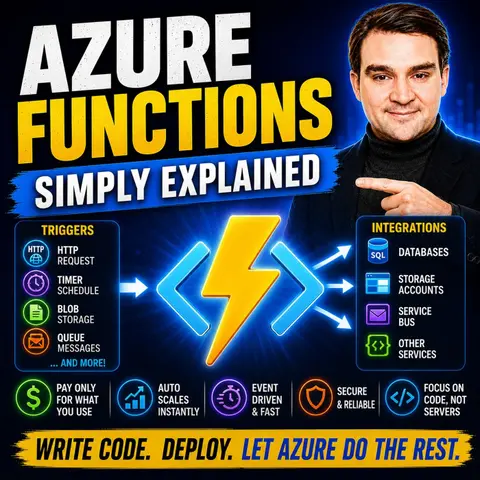
Mastering Event-Driven Architecture with Azure Functions Triggers
Welcome back, cloud architects and developers! If you have ever wanted to build applications that react instantly to real-world events without having to provision, patch, or manage underlying virtual machines, you are in the right place. Today, we are diving deep into the core mechanics of serverless computing. Specifically, we are exploring how to master event-driven architecture using Azure Functions triggers. Whether you are building high-volume web APIs, processing background file uploads, or managing complex enterprise message queues, choosing the right trigger is the secret sauce to building scalable, responsive, and cost-effective cloud solutions.
In this post, we will unpack how triggers act as the beating heart of your serverless apps, letting your code spring into action only when something interesting happens. From basic HTTP webhooks to asynchronous storage and timer triggers, we will cover everything you need to know to elevate your Azure development game.
Introduction to Event-Driven Architecture with Azure Functions
Event-driven architecture (EDA) is a software design pattern where decoupled applications and services communicate asynchronously by producing and consuming events. Instead of systems constantly polling each other to see if something changed, an event-driven model turns the paradigm upside down: when an action occurs—such as a user uploading an avatar image, a customer submitting an order form, or a timer ticking over to midnight—an event is emitted.
Azure Functions fits natively into this architectural style. As a serverless compute service, it allows you to run discrete pieces of business logic in response to these events. You do not worry about operating systems, networking, or hardware scaling. You just write your code, wire up a trigger, and let Azure handle the heavy lifting. By embracing EDA with Azure Functions, you can decouple your microservices, reduce idle compute costs, and build inherently resilient systems that effortlessly weather unpredictable traffic spikes.
Understanding Azure Functions and Serverless Computing
Serverless computing does not mean there are no servers involved; rather, it means server management is completely abstracted away from your daily workflow. Azure Functions takes this promise and runs with it, offering a developer-first environment where you focus strictly on application logic.
One of the most profound advantages of this model is automatic scaling. Under the standard Consumption plan, Azure scales your function instances out horizontally the moment a flood of events arrives, and scales them right back down to zero when the traffic stops. This means you never pay for idle capacity. Furthermore, Azure Functions boasts extensive language support—whether you prefer C#, JavaScript, TypeScript, Python, PowerShell, or Java, you can write serverless code in the stack you already know and love. Combined with seamless integration across the entire Azure ecosystem, serverless computing fundamentally changes how rapidly teams can prototype, iterate, and deploy production-grade solutions.
The Power of Triggers: Reacting to Real-World Events
At the center of every Azure Function is a trigger. Put simply, a trigger defines how a function is invoked. Every function must have exactly one trigger, and it can optionally have multiple bindings to read and write data.
Triggers are what transform your code from a static script into an active participant in an event-driven ecosystem. Instead of a traditional application running continuously in the background and waiting for work, an event-driven function sleeps silently until an incoming trigger wakes it up. This architectural shift ensures that your compute resources are utilized with maximum efficiency. Whether an event originates from an incoming web request, a scheduled cron expression, a message landing on a service bus, or a document changing in a database, triggers ensure your application reacts in milliseconds.
Deep Dive into HTTP and Timer Triggers
Let us look closer at two of the most commonly used triggers in the Azure Functions toolkit: the HTTP trigger and the timer trigger.
HTTP triggers are your gateway to building robust, serverless REST APIs and webhooks. When you configure an HTTP trigger, Azure provisions a secure URL endpoint for your function. Whenever a client sends an HTTP request—be it a GET, POST, PUT, or DELETE—your function executes, processes the payload, and returns a response. This makes HTTP triggers ideal for powering modern single-page applications, mobile backends, and webhook integrations with third-party SaaS platforms.
On the other side of the spectrum, timer triggers allow you-time-based execution without relying on external scheduling infrastructure. By defining a simple cron expression in your configuration, you can instruct your function to run every five minutes, once a day, or on complex calendar schedules. Timer triggers are the go-to choice for automated maintenance tasks, nightly data aggregation reports, cache flushing, and periodic database cleanups.
Handling Asynchronous Workflows with Queue and Blob Triggers
When building enterprise applications, synchronous request-response cycles are often not enough. You need asynchronous, decoupled workflows to ensure system reliability during high-load scenarios. This is where queue and blob storage triggers shine.
A Blob Storage trigger listens for container events, automatically firing your function the moment a new file is uploaded or modified. This is a game-changer for media processing pipelines, such as resizing uploaded profile pictures, scanning incoming documents for malware, or parsing bulk CSV data files. Meanwhile, queue triggers—such as those connected to Azure Queue Storage or Azure Service Bus—allow your functions to pull messages off a queue sequentially or in batches. This decouples your upstream producers from your downstream consumers, ensuring that even if thousands of orders are placed at once, your system absorbs the load gracefully without dropping a single message.
Boosting Scalability and Performance with the Right Triggers
Selecting the appropriate trigger for your workload is not just an implementation detail; it is a critical performance decision. Choosing a poorly matched trigger can introduce bottlenecks, increase latency, or drive up your cloud spend.
For instance, if you attempt to process heavy file transformations synchronously inside an HTTP-triggered API, your clients will experience timeouts and poor user experience. Instead, the high-performance architectural pattern is to use an HTTP trigger to quickly accept the payload, write it to blob storage or an Azure Queue, return a 202 Accepted response immediately, and let a Blob or Queue trigger handle the heavy processing asynchronously in the background. Understanding the characteristics of each trigger allows you to architect pipelines that scale linearly and maintain lightning-fast response times under heavy pressure.
Getting Started: Creating Your First Event-Driven Function
Ready to get your hands dirty? Spinning up your first event-driven function in Azure is remarkably straightforward. You can initiate the process directly from the Azure portal by selecting a resource, choosing the Function App service, and selecting the Consumption hosting plan.
During the setup wizard, you will configure your runtime stack, choose your preferred operating system and region, and link a storage account and Application Insights instance for telemetry. Once provisioned, you can use local development tooling like Azure Functions Core Tools and Visual Studio Code to write, test, and debug your functions locally before deploying them directly to the cloud. Remember to keep your functions small, modular, and focused on a single responsibility to maximize your development velocity and ease debugging.
Monitoring and Troubleshooting Your Serverless Applications
Because serverless applications are distributed and ephemeral, traditional debugging techniques like attaching a local debugger to a running server are rarely an option. That makes robust monitoring and logging an absolute necessity for production success.
Integrating Azure Functions with Azure Monitor and Application Insights gives you deep, out-of-the-box telemetry into execution times, failure rates, and dependency calls. To make the most of this data, practice structured logging and incorporate unique correlation IDs across your function executions. When a downstream service fails or an exception occurs, correlation IDs allow you to trace the lifecycle of a single event across multiple distributed functions, cutting your mean time to resolution (MTTR) down dramatically.
Best Practices for Code Organization and Security
As your serverless estate grows from a single function to a sprawling ecosystem of dozens of microservices, keeping your code organized and secure becomes paramount. Group related functions into a single Function App when they share the same lifecycle, configuration settings, and deployment cadence. Conversely, if functions require radically different configurations or distinct security boundaries, separate them into individual Function Apps.
On the security front, never hardcode connection strings or secrets in your codebase. Leverage Azure Key Vault alongside managed identities to securely authenticate your functions against other Azure resources without embedding credentials. Additionally, restrict HTTP endpoints using function keys, JSON Web Tokens (JWT), or Azure Active Directory integration, and lock down your virtual network boundaries to protect sensitive internal APIs from unauthorized public access.
Conclusion and Next Steps for Your Cloud Solutions
Event-driven architecture and Azure Functions represent a massive leap forward in modern cloud application development. By allowing your code to react instantly to real-world triggers without the overhead of server provisioning, you unlock unprecedented levels of scalability, operational efficiency, and cost-effectiveness. Whether you are building real-time data pipelines, serverless web APIs, or automated background processors, mastering triggers is the key to unlocking the full potential of the cloud.
To dive even deeper into this topic and hear practical design decisions for building modern Azure solutions, make sure to check out the related podcast episode: Azure Functions - Simply Explained. Listen in to get expert insights on triggers, bindings, hosting choices, and practical serverless design patterns that you can apply to your architecture today!

Microsoft MVP | Host of M365.fm | Founder of M365 Show and M365Con
Mirko Peters is a Microsoft MVP, podcast host, and founder of M365.fm, M365 Show, and M365Con. His work connects Microsoft practitioners through podcast interviews, livestreams, and community events.
At M365.fm, Mirko hosts conversations with Microsoft MVPs, product experts, architects, and community contributors. Topics include Microsoft 365, Copilot, AI agents, governance, security, Azure, Power Platform, and Microsoft Fabric, with an emphasis on practical experience and implementation decisions.
M365.fm is the podcast and learning platform. M365 Show brings experts together for livestreams, while M365Con provides an online conference setting for community learning.
Official website: Mirko Peters (https://www.mirkopeters.com/). Recognition: Mirko Peters — Microsoft MVP profile (https://mvp.microsoft.com/de-DE/mvp/profile/9b0ca797-db5a-493a-a845-8b9158046cf5). Connect on LinkedIn (https://www.linkedin.com/in/m365showpodcast/).

Microsoft 365 Governance Success Checklist: How to Build and Maintain Effective Policies