


 Apple Podcasts
 Spotify
 Youtube Music
 Spreaker
 Podchaser
 Amazon Music
 Azure Functions - Simply Explained
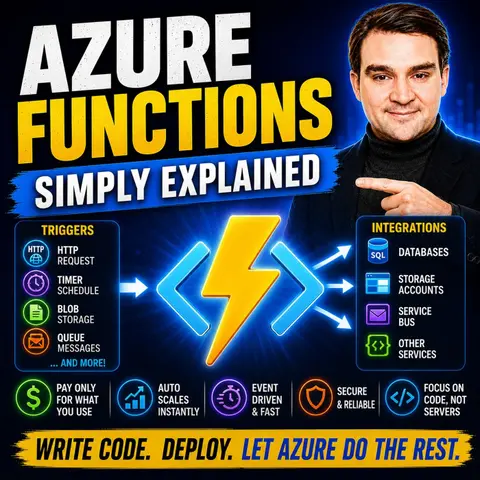
Azure Functions are Microsoft's serverless compute service, allowing developers to run code without managing servers or infrastructure. Instead of deploying and maintaining virtual machines, you simply write small pieces of code—called functions—that execute automatically whenever a specific event occurs. Whether a file is uploaded to Azure Storage, an HTTP request is received, a timer triggers, or a message arrives in Azure Service Bus, Azure Functions responds instantly and only consumes resources while your code is running.
In this episode, you'll learn what serverless computing really means, how Azure Functions fit into modern cloud architectures, and why they're a key building block for event-driven applications. The discussion covers common triggers and bindings, explains the different hosting plans, and shows how automatic scaling allows applications to handle anything from a few requests per day to millions of executions without manual intervention.
The episode also explores practical business scenarios, including API backends, data processing, workflow automation, scheduled maintenance tasks, IoT integrations, and AI-powered applications. You'll discover how Azure Functions integrate with services like Azure Storage, Event Grid, Service Bus, Azure Cosmos DB, Logic Apps, and Azure API Management to build scalable, loosely coupled cloud solutions.
Finally, you'll understand when Azure Functions are the right choice—and when a traditional application or container may be more appropriate. By the end of this episode, you'll have a clear understanding of Azure Functions, serverless architecture, event-driven design, scaling, pricing, and best practices for building reliable, modern applications in Microsoft Azure.
Quick answer: Azure Functions lets teams run small pieces of code in response to events, schedules, HTTP requests, or messages without managing servers. This episode explains triggers, bindings, hosting choices, scaling, and practical serverless design decisions for building event-driven Azure solutions.
Azure Functions is a powerful tool in the world of serverless computing. It lets you run small pieces of code in response to events without worrying about the underlying infrastructure. This event-driven approach means you can focus on what really matters—your application logic.
Take a look at some benefits of using Azure Functions:
| Benefit | Description |
|---|---|
| Focus on Application Logic | Developers can concentrate on writing code rather than managing infrastructure. |
| Rapid Development and Deployment | The model supports quick responses to market demands and automates workflows effectively. |
| Automatic Scaling | Resources scale based on demand, reducing operational overhead and costs. |
| Extensive Language Support | Supports multiple programming languages, enhancing flexibility for developers. |
| Seamless Integration | Integrates with various Azure services, simplifying the development of complex applications. |
With Azure Functions, you streamline your development process and enhance productivity.
Key Takeaways
- Azure Functions allows you to run code without managing servers, letting you focus on your application logic.
- Enjoy rapid development and deployment with Azure Functions, responding quickly to market demands.
- Automatic scaling adjusts resources based on demand, helping to reduce costs and operational overhead.
- Azure Functions supports multiple programming languages, giving you flexibility in your development process.
- Integrate seamlessly with other Azure services, simplifying the creation of complex applications.
- Follow best practices for code organization and security to enhance maintainability and protect your applications.
- Use Azure Monitor and Application Insights for effective monitoring and troubleshooting of your functions.
- Leverage various triggers like HTTP requests and timers to automate tasks and respond to events in real-time.
Azure Functions Overview

Azure Functions stands out in the realm of serverless computing. This service allows you to run small pieces of code without managing servers. You can focus on your application logic while Azure handles the infrastructure. Let's dive into some key features that make Azure Functions a great choice for developers.
Key Features
Here are some standout features of Azure Functions that set it apart from other serverless solutions:
| Feature | Description |
|---|---|
| Flexibility in Coding | Supports a wide range of programming languages, allowing you to choose your preferred one. |
| Instant Event Response | Reacts to various triggers, including HTTP requests and timed events, ensuring prompt execution. |
| Built-in Security | Incorporates basic authentication and authorization, simplifying security management. |
| Adjustable Scalability | Scales resources up or down based on demand, optimizing resource allocation. |
| Sturdy Function Duration | Capable of maintaining stateful functions, enabling the creation of resilient workflows. |
Benefits of Azure Functions
Using Azure Functions comes with numerous advantages, especially for enterprise applications. Here are some key benefits:
| Benefit | Description |
|---|---|
| Scalability | Automatically scales resources based on demand, suitable for various workloads. |
| Cost-effectiveness | Pay-as-you-go model where you are billed only for the compute resources consumed. |
| Integration | Seamless integration with other Azure services through triggers and bindings. |
| Ease of use | Supports popular development tools for easy creation, management, and updates of functions. |
| Security | Benefits from Azure's security framework, including Azure AD integration and Managed Identities. |
You can also leverage Azure Functions for various integration scenarios. For example, you can:
- Process file uploads: Run code when a file is uploaded or changed in blob storage.
- Process data in real time: Capture and transform data from event and IoT source streams on the way to storage.
- Run AI inference: Pull text from a queue and present it to various AI services for analysis and classification.
- Run scheduled tasks: Execute data clean-up code on predefined timed intervals.
- Build a scalable web API: Implement a set of REST endpoints for your web applications using HTTP triggers.
- Build a serverless workflow: Create an event-driven workflow from a series of functions using Durable Functions.
- Respond to database changes: Run custom logic when a document is created or updated in a database.
- Create reliable message systems: Process message queues using Azure Queue Storage, Service Bus, or Event Hubs.
With these features and benefits, Azure Functions not only simplifies your development process but also enhances your ability to create responsive, cost-effective applications in the cloud.
Getting Started with Azure
Are you ready to dive into the world of Azure Functions? Let’s get you set up and create your first Azure Function! Follow these steps to create an Azure Functions app and deploy it seamlessly.
Creating Your First Azure Function
To start, you’ll need to set up Azure Functions in your Azure account. Here’s a step-by-step guide to help you through the process:
-
From the Azure portal menu or the Home page, select Create a resource.
-
In the New page, select Function App.
-
Under Select a hosting option, choose Consumption and then click Select to create your app in the default Consumption plan.
-
On the Basics page, fill in the function app settings as shown in the table below:
Setting Description Subscription Your subscription Resource Group myResourceGroup Function App name A globally unique name Do you want to deploy code or container image? Code Operating system Your preferred OS Runtime stack Your preferred language Version Supported language version Region Your preferred region -
Under Environment details, select Create new, name your App Service plan, and choose a Pricing plan.
-
Unless you want to enable Zone Redundancy, keep the default value of Disabled.
-
Select Next: Storage and create the default host storage account required by your function app.
-
Select Next: Monitoring and enter the settings for Application Insights.
-
Select Review + create to accept the defaults for the remaining pages and review your app configuration selections.
-
On the Review + create page, review your settings, and then select Create to provision and deploy the function app.
-
Watch for the Deployment succeeded message by selecting the Notifications icon.
-
Finally, select Go to resource to view your new function app.
Creating your first Azure Function is an exciting step! However, you might face some challenges along the way. Here are a few tips to help you navigate common issues:
- Avoid large, long-running functions. Instead, break them into smaller functions that work together.
- For HTTP/webhook scenarios, return quickly and offload heavy work to background triggers.
- Use supported local environments for testing and debugging.
- Always await asynchronous work to avoid untracked background tasks.
- Enable monitoring with Application Insights and Azure Monitor for better observability.
Deployment Process
Now that you’ve created your Azure Functions app, let’s talk about deploying it. The deployment process for Azure Functions differs from traditional application deployment in several ways:
- Azure Functions operates on a serverless architecture, which means you don’t have to manage any infrastructure.
- It’s designed for event-driven execution, while traditional deployments often involve more complex workflows.
- Automatic scaling is a key feature of Azure Functions, which isn’t typically available in traditional deployment models.
When it comes to deploying your Azure Functions, you have several methods to choose from. Here’s a quick overview of the recommended deployment methods and their advantages:
| Deployment Type | Methods | Best for... |
|---|---|---|
| Tools-based | Azure CLI, Visual Studio Code publish, Visual Studio publish, Core Tools publish | Deployments during development and other improvised deployments. Deploying your code on-demand. |
| App Service-managed | Deployment Center (CI/CD), Container deployments | Continuous deployment (CI/CD) from source control or from a container registry. |
| External pipelines | Azure Pipelines, GitHub Actions | Production pipelines that include validation, testing, and other actions as part of automated deployment. |
With these methods, you can easily deploy your Azure Functions and keep your applications running smoothly. Remember, Azure Functions allows you to run small pieces of code without server management, making it a fantastic choice for modern cloud applications.
Common Triggers for Azure Functions

Azure Functions offers a variety of triggers that allow you to respond to events in real-time. These triggers enhance the functionality of your applications by enabling automation and integration with other systems. Let's explore some of the most common triggers available.
HTTP and Timer Triggers
HTTP triggers are fantastic for creating serverless APIs. When you set up an HTTP trigger, your function can respond to HTTP requests. This capability allows you to integrate seamlessly with web applications and external services. You can use HTTP triggers for various scenarios, such as:
- Building RESTful APIs for your applications.
- Facilitating communication between different services in an event-driven architecture.
- Executing integration tests and performing slot swaps as part of a smoke test.
On the other hand, Timer triggers let you schedule functions to run at specific intervals. This feature is perfect for automating tasks like data processing or report generation without manual intervention. Here are some benefits of using Timer triggers:
- They can automate periodic updates, enhancing operational efficiency.
- You can invoke them manually via an HTTP webhook, which is useful for testing and initial deployments.
Queue and Blob Triggers
Queue and Blob triggers are essential for handling asynchronous workflows in enterprise environments. With a Blob Storage trigger, your function automatically processes files as soon as they are uploaded. This capability is ideal for workflows that require immediate file handling, such as image processing or data ingestion.
Queue triggers, like those from Azure Queue Storage or Service Bus, allow your functions to react to messages in a queue. This setup facilitates decoupled workflows, which are crucial for maintaining scalability and performance in enterprise applications. Here are some use cases for these triggers:
- Blob Storage Trigger: Automatically processes files upon upload, making it perfect for immediate file handling.
- Service Bus Queue/Topic Trigger: Enables your functions to react to queued messages, ensuring smooth communication between different components of your application.
To give you a clearer picture of the various triggers available, here's a summary of their types and support levels:
| Extension | Types | Support Level | Samples |
|---|---|---|---|
| Azure Event Grid | CloudEvent, EventGridEvent | Trigger: GA | N/A |
| Azure Event Hubs | EventData, EventHubProducerClient | Trigger: GA | N/A |
| Azure Queue Storage | QueueClient, QueueMessage | Trigger: GA | N/A |
| Azure Service Bus | ServiceBusClient, ServiceBusReceiver, ServiceBusSender, ServiceBusMessage | Trigger: GA | N/A |
| Azure Table Storage | TableClient, TableEntity | Input: GA | N/A |
These triggers not only enhance the functionality of your Azure Functions but also improve the scalability and performance of your applications. By leveraging the right triggers, you can create efficient, responsive, and serverless solutions that meet your business needs.
Monitoring Azure Functions
Monitoring your Azure Functions is crucial for ensuring they run smoothly and efficiently. With the right tools, you can gain insights into performance, troubleshoot issues, and optimize your serverless applications. Let’s explore some effective monitoring tools and best practices for logging.
Monitoring Tools
Azure provides several built-in tools to help you monitor your functions effectively. Here’s a comparison of Azure Monitor and other tools:
| Feature/Usability Aspect | Azure Monitor | Other Tools (Not Specified) |
|---|---|---|
| Integration | Deeply integrated with Azure services | Varies by tool |
| Data Collection | Out-of-the-box for Azure resources | Varies by tool |
| Cost Control | Flexible tiers for data ingestion | Varies by tool |
| Learning Curve | KQL has a steep learning curve | Varies by tool |
| Best For | Organizations heavily invested in Azure | Varies by tool |
Azure Monitor stands out for its seamless integration with Azure services. It collects data automatically, making it easier for you to track the performance of your Azure Functions. However, be prepared for a learning curve if you dive into Kusto Query Language (KQL) for advanced queries.
Best Practices for Logging
Effective logging is essential for troubleshooting and maintaining your Azure Functions. Here are some best practices to follow:
- Integrate Azure Functions with Application Insights for detailed telemetry on function executions, dependencies, and failures.
- Use correlation IDs in your logs to trace requests across distributed systems. This practice is crucial for debugging in microservice architectures.
- Capture relevant information such as timestamps, request IDs, and function names in your logs. This data helps you understand execution flow and identify issues quickly.
Proper logging improves the reliability and maintainability of your Azure Functions. For instance, structured logging allows for better querying and analysis of logs. This approach makes diagnosing issues easier and enhances overall application performance.
| Evidence | Description |
|---|---|
| Azure Application Insights | Integrates with Azure Functions for monitoring execution and traces, enhancing reliability through effective monitoring. |
| Structured Logging | Allows for better querying and analysis of logs, improving maintainability by making it easier to diagnose issues. |
| Azure Monitor | Provides health monitoring of the function app, contributing to overall reliability. |
By following these practices, you can ensure that your Azure Functions remain reliable and efficient. Monitoring tools and effective logging will empower you to respond quickly to any issues that arise, keeping your serverless applications running smoothly.
Best Practices for Azure Functions
When working with Azure Functions, following best practices can significantly improve your code's maintainability and security. Let’s dive into some key strategies for organizing your code and ensuring your functions are secure.
Code Organization
Organizing your code effectively is crucial for maximizing maintainability and performance. Here are some strategies to consider:
| Strategy | Description |
|---|---|
| Organize by responsibility | Group related functions into the same Function App when they share configuration and lifecycle. |
| Move functions needing different configurations into separate Function Apps to tune settings. | |
| Minimize access to sensitive credentials by organizing functions by privilege. | |
| Keep functions small and focused | Refactor large functions into smaller, focused ones that work together. |
| For HTTP/webhook scenarios, return quickly and offload heavy work to background triggers. | |
Use host.json carefully | host.json applies to all functions; consider separate Function Apps for conflicting settings. |
Organizing your functions this way enhances performance and scalability. Grouping related functions together allows for better resource management. Running multiple function apps in the same plan can facilitate resource sharing, making your applications more efficient.
Security Considerations
Security is paramount when developing Azure Functions. Here are some essential considerations to keep in mind:
- Authentication and Authorization: Integrate Azure Active Directory for robust access control.
- Secure Operation: Implement secure coding practices and monitor function logs.
- Network Security: Use secure communication protocols and configure firewalls.
- Secure Deployment: Validate incoming data and handle errors properly.
By prioritizing these security measures, you can protect your applications from potential threats. Microsoft Azure complies with major security standards like ISO 27001 and GDPR, ensuring that your data remains secure. Azure Blueprints help you maintain compliance with regulations, making it easier to manage your cloud environment.
When you develop Azure Functions, remember to test your code thoroughly. Here are some recommended testing strategies:
- Develop and test functions locally using Azure Functions Core Tools to speed up development and reduce costs.
- Create comprehensive test suites that cover both happy paths and edge cases.
- Mock external dependencies during testing for consistent results and faster execution.
- Use dependency injection to enhance testability and maintainability.
By following these best practices, you can ensure that your Azure Functions are well-organized, secure, and maintainable. This approach not only improves your development process but also enhances the overall performance of your serverless applications.
In summary, Azure Functions play a vital role in modern application development. They allow you to build scalable, event-driven applications without the hassle of managing servers. With features like automatic scaling and seamless integration with other Azure services, you can significantly boost your development speed and reduce costs.
Recent surveys show that organizations experience a 50% increase in application development speed and a 228% return on investment over three years when using Azure Functions. As the serverless computing market continues to grow, now is the perfect time to explore Azure Functions for your projects.
Consider diving into resources like hands-on labs and community forums to enhance your skills. Embrace the future of development with Azure Functions and unlock new possibilities for your applications! 🚀
FAQ
What are Azure Functions?
Azure Functions is a serverless computing service that lets you run code in response to events without managing servers. You focus on writing your application logic while Azure handles the infrastructure.
How do I trigger an Azure Function?
You can trigger Azure Functions using various events, such as HTTP requests, timer schedules, or messages from Azure Queue Storage and Blob Storage. This flexibility allows you to automate tasks easily.
Can I use multiple programming languages?
Yes! Azure Functions supports several programming languages, including JavaScript, Python, C#, and Java. You can choose the language that best fits your skills and project needs.
How does pricing work for Azure Functions?
Azure Functions uses a consumption-based pricing model. You only pay for the compute resources your functions consume during execution. There's also a free tier for light usage.
What is the maximum execution time for a function?
The maximum execution time for an Azure Function is typically five minutes in the Consumption plan. However, you can extend this limit to 10 minutes or more by using the Premium plan.
How do I monitor my Azure Functions?
You can monitor Azure Functions using Azure Monitor and Application Insights. These tools provide insights into performance, execution times, and failures, helping you optimize your functions.
Can I run Azure Functions locally?
Absolutely! You can develop and test Azure Functions locally using Azure Functions Core Tools. This setup allows you to debug and iterate quickly before deploying to the cloud.
What are Durable Functions?
Durable Functions is an extension of Azure Functions that enables you to write stateful functions in a serverless environment. It helps manage complex workflows and long-running processes easily.
🎧 Listen to this episode
Want a practical explanation of Azure Functions? This episode breaks down the topic in clear language and shows why it matters for Microsoft 365, Azure, Power Platform, security, AI, and modern work.
Listen to this episode if you want to:
- Understand the key concepts behind Azure Functions
- See how it fits into the wider Microsoft technology ecosystem
- Learn where it can create practical value for your organization
You may also enjoy these related M365 FM episodes:
- Build Microsoft Copilot Plugins with Azure Functions
- Copilot Studio Code Interpreter vs Azure Functions
- Build Fusion Apps with Power Apps and Azure Functions
Discover more practical Microsoft conversations on M365 FM.
Last reviewed: July 2026.
Who Should Listen
This episode is for Azure administrators, architects, developers, and IT leaders who need a practical foundation before designing, governing, or operating this service.
🎧 You Should Also Listen To
- Azure Logic Apps — A practical next step for extending this topic.
- Azure Service Bus — A practical next step for extending this topic.
- Azure Event Grid — A practical next step for extending this topic.
🚀 Want to be part of m365.fm?
Then stop just listening… and start showing up.
👉 Connect with me on LinkedIn and let’s make something happen:
- 🎙️ Be a podcast guest and share your story
- 🎧 Host your own episode (yes, seriously)
- 💡 Pitch topics the community actually wants to hear
- 🌍 Build your personal brand in the Microsoft 365 space
This isn’t just a podcast — it’s a platform for people who take action.
🔥 Most people wait. The best ones don’t.
👉 Connect with me on LinkedIn and send me a message:
"I want in"
Let’s build something awesome 👊
1
00:00:00,000 --> 00:00:04,240
Today's topic is one that almost everyone has heard of, but almost nobody can explain.
2
00:00:04,240 --> 00:00:05,760
Serverless, what exactly is it?
3
00:00:05,760 --> 00:00:07,360
Is it really just code running on nothing?
4
00:00:07,360 --> 00:00:08,840
Or is it something much bigger?
5
00:00:08,840 --> 00:00:10,280
Let's get one thing straight.
6
00:00:10,280 --> 00:00:11,920
Serverless doesn't mean no servers.
7
00:00:11,920 --> 00:00:13,520
It means you don't think about them.
8
00:00:13,520 --> 00:00:16,360
And that distinction changes everything about how you build software.
9
00:00:16,360 --> 00:00:19,240
By the end of this episode, you'll understand what Azure Functions actually are,
10
00:00:19,240 --> 00:00:21,800
how the pricing really works, and when you should use them.
11
00:00:21,800 --> 00:00:25,360
We'll break this down into the building blocks, starting with the biggest myth.
12
00:00:25,360 --> 00:00:27,320
What serverless actually means?
13
00:00:27,320 --> 00:00:29,040
Let's clear up a few myths right away.
14
00:00:29,040 --> 00:00:32,680
The name serverless is the worst marketing term Microsoft ever came up with.
15
00:00:32,680 --> 00:00:35,200
It makes people think there's literally no server involved.
16
00:00:35,200 --> 00:00:36,080
That's not true.
17
00:00:36,080 --> 00:00:37,120
There are servers, lots of them.
18
00:00:37,120 --> 00:00:38,480
You just never have to touch them.
19
00:00:38,480 --> 00:00:41,600
20 years ago, if you wanted to run a piece of code on the internet,
20
00:00:41,600 --> 00:00:42,680
you had to do a lot of work.
21
00:00:42,680 --> 00:00:45,240
You'd rent a virtual machine, install an operating system,
22
00:00:45,240 --> 00:00:47,840
configure a web server, and deploy your application.
23
00:00:47,840 --> 00:00:50,240
Then you'd spend every weekend patching security updates
24
00:00:50,240 --> 00:00:52,600
and making sure the thing didn't crash at three in the morning.
25
00:00:52,600 --> 00:00:53,720
And here's the thing.
26
00:00:53,720 --> 00:00:56,280
You paid for that server, whether your code was running or not.
27
00:00:56,280 --> 00:00:59,240
It sat there humming away, burning money while you slept.
28
00:00:59,240 --> 00:01:01,640
Serverless turns this whole model upside down.
29
00:01:01,640 --> 00:01:05,280
You write your code, upload it, and the platform handles everything else.
30
00:01:05,280 --> 00:01:08,880
The operating system, security patches, scaling, and availability.
31
00:01:08,880 --> 00:01:11,280
Your job is just to write the logic that matters.
32
00:01:11,280 --> 00:01:15,640
Think of it like the difference between running a restaurant kitchen and using a vending machine.
33
00:01:15,640 --> 00:01:19,280
A restaurant kitchen needs a full staff, constant supplies, and maintenance.
34
00:01:19,280 --> 00:01:22,800
It costs money every single day, even if nobody walks through the door.
35
00:01:22,800 --> 00:01:24,080
A vending machine?
36
00:01:24,080 --> 00:01:27,560
It sits there in the corner, doing nothing until someone presses a button.
37
00:01:27,560 --> 00:01:30,160
Then it springs to life, does its job, and goes back to sleep.
38
00:01:30,160 --> 00:01:32,520
You only pay for the electricity when it's actually working.
39
00:01:32,520 --> 00:01:33,880
That's serverless in a nutshell.
40
00:01:33,880 --> 00:01:35,880
Azure Functions is Microsoft's version of this.
41
00:01:35,880 --> 00:01:38,640
It runs small pieces of code in response to events.
42
00:01:38,640 --> 00:01:41,000
Your code is dormant until something wakes it up,
43
00:01:41,000 --> 00:01:43,240
then it runs, finishes, and goes back to sleep.
44
00:01:43,240 --> 00:01:45,440
So what does that code actually look like?
45
00:01:45,440 --> 00:01:46,800
What Azure Functions are?
46
00:01:46,800 --> 00:01:50,040
A function is a single piece of code that does one specific job.
47
00:01:50,040 --> 00:01:52,600
That's it. It's not an entire application with a login page,
48
00:01:52,600 --> 00:01:54,480
a database, and 20 screens.
49
00:01:54,480 --> 00:01:56,160
It's one focused task.
50
00:01:56,160 --> 00:01:58,000
Think of it like a light switch in your house.
51
00:01:58,000 --> 00:02:01,720
Either off or undoing work, then back off.
52
00:02:01,720 --> 00:02:03,400
A traditional web server is the opposite,
53
00:02:03,400 --> 00:02:06,320
like leaving every light in your house on 24 hours a day,
54
00:02:06,320 --> 00:02:08,560
seven days a week, even when nobody's home.
55
00:02:08,560 --> 00:02:11,480
Azure Functions support a bunch of different programming languages.
56
00:02:11,480 --> 00:02:13,080
You can use whatever you're comfortable with.
57
00:02:13,080 --> 00:02:16,040
JavaScript, Python, C, Java, PowerShell.
58
00:02:16,040 --> 00:02:17,200
There's no right answer here.
59
00:02:17,200 --> 00:02:18,840
Pick the language you already know.
60
00:02:18,840 --> 00:02:20,920
Now let's clear up a common confusion.
61
00:02:20,920 --> 00:02:23,280
The Function app is not the same thing as a function.
62
00:02:23,280 --> 00:02:25,040
The Function app is the container.
63
00:02:25,040 --> 00:02:26,320
Think of it like a toolbox.
64
00:02:26,320 --> 00:02:28,800
You create one function app, and inside that toolbox,
65
00:02:28,800 --> 00:02:30,240
you add multiple functions.
66
00:02:30,240 --> 00:02:32,680
Each function is a separate tool that does its own job.
67
00:02:32,680 --> 00:02:34,920
You might have one function that handles user signups,
68
00:02:34,920 --> 00:02:36,960
another that processes uploaded images,
69
00:02:36,960 --> 00:02:38,920
and a third that sends nightly reports.
70
00:02:38,920 --> 00:02:42,000
They all live in the same toolbox, but work independently.
71
00:02:42,000 --> 00:02:43,560
One more thing about functions.
72
00:02:43,560 --> 00:02:44,760
They're stateless by design.
73
00:02:44,760 --> 00:02:46,600
That means they don't remember anything between runs.
74
00:02:46,600 --> 00:02:49,960
If your function processes a file and finishes, that's it.
75
00:02:49,960 --> 00:02:52,520
The next time it runs, it starts fresh with no memory of last time.
76
00:02:52,520 --> 00:02:54,760
That sounds like a limitation, but it's actually the feature
77
00:02:54,760 --> 00:02:56,200
that makes them so powerful.
78
00:02:56,200 --> 00:02:58,520
Because functions don't hold on to memory or state,
79
00:02:58,520 --> 00:03:00,960
as your can spin up 100 copies of your function instantly
80
00:03:00,960 --> 00:03:03,360
when traffic spikes, and shut them down just as fast
81
00:03:03,360 --> 00:03:04,160
when traffic drops.
82
00:03:04,160 --> 00:03:07,000
That's how you get scalability without paying for idle servers.
83
00:03:07,000 --> 00:03:08,000
Here's the question.
84
00:03:08,000 --> 00:03:09,720
If a function just sits there doing nothing
85
00:03:09,720 --> 00:03:12,480
until something wakes it up, what actually wakes it up?
86
00:03:12,480 --> 00:03:13,920
That's where triggers come in.
87
00:03:13,920 --> 00:03:15,440
Triggers, the when.
88
00:03:15,440 --> 00:03:17,400
Every function must have exactly one trigger,
89
00:03:17,400 --> 00:03:18,440
and that's not optional.
90
00:03:18,440 --> 00:03:20,720
The trigger is the event that wakes your function up.
91
00:03:20,720 --> 00:03:23,920
Without it, your code is just sitting there doing absolutely nothing.
92
00:03:23,920 --> 00:03:25,360
Think of triggers like a doorbell.
93
00:03:25,360 --> 00:03:27,360
Your function is inside the house waiting.
94
00:03:27,360 --> 00:03:28,520
It could wait forever.
95
00:03:28,520 --> 00:03:31,000
Nothing happens until someone rings the doorbell.
96
00:03:31,000 --> 00:03:32,480
Then the function springs into action.
97
00:03:32,480 --> 00:03:35,000
Ansys the door does its job and goes back to waiting.
98
00:03:35,000 --> 00:03:37,840
There are four triggers that beginners run into most often.
99
00:03:37,840 --> 00:03:40,800
The HTTP trigger is the most common starting point.
100
00:03:40,800 --> 00:03:44,280
Someone visits a URL or makes an API call, and your function fires.
101
00:03:44,280 --> 00:03:46,400
That's how you build lightweight APIs
102
00:03:46,400 --> 00:03:48,240
without setting up a full web server.
103
00:03:48,240 --> 00:03:50,800
Then there's the timer trigger, which runs on a schedule.
104
00:03:50,800 --> 00:03:53,640
You set a chronic expression, something like run every hour
105
00:03:53,640 --> 00:03:55,520
or run at midnight every night.
106
00:03:55,520 --> 00:03:58,240
And your function fires at those exact times.
107
00:03:58,240 --> 00:04:00,400
Perfect for maintenance tasks, clean up jobs,
108
00:04:00,400 --> 00:04:02,160
or generating nightly reports.
109
00:04:02,160 --> 00:04:05,440
The blob trigger fires when a file is uploaded to Azure storage.
110
00:04:05,440 --> 00:04:08,000
Say someone uploads a PDF to a specific folder.
111
00:04:08,000 --> 00:04:09,640
The blob trigger detects that upload
112
00:04:09,640 --> 00:04:11,320
and runs your function automatically.
113
00:04:11,320 --> 00:04:14,000
This is huge for image processing, document conversion,
114
00:04:14,000 --> 00:04:15,200
and file validation.
115
00:04:15,200 --> 00:04:18,080
And the Q trigger fires when a message appears in a queue.
116
00:04:18,080 --> 00:04:20,760
Queues are a way to decouple different parts of your system.
117
00:04:20,760 --> 00:04:22,880
One service drops a message into a queue,
118
00:04:22,880 --> 00:04:25,680
and your function picks it up and processes it whenever it's ready.
119
00:04:25,680 --> 00:04:28,600
That prevents one slow service from blocking everything else.
120
00:04:28,600 --> 00:04:29,880
Here's the key point.
121
00:04:29,880 --> 00:04:33,880
When a trigger fires, it passes data into your function automatically.
122
00:04:33,880 --> 00:04:36,320
You don't have to pull for it or check if something happened.
123
00:04:36,320 --> 00:04:37,840
The trigger hands you everything you need,
124
00:04:37,840 --> 00:04:39,560
and your function just processes it.
125
00:04:39,560 --> 00:04:41,440
A function without a trigger is just code,
126
00:04:41,440 --> 00:04:42,840
sitting around doing nothing.
127
00:04:42,840 --> 00:04:44,520
The trigger is what gives it purpose.
128
00:04:44,520 --> 00:04:46,800
So the trigger tells your function when to run.
129
00:04:46,800 --> 00:04:49,120
But where does the data come from and where does it go?
130
00:04:49,120 --> 00:04:50,840
That's where bindings come in.
131
00:04:50,840 --> 00:04:53,200
Bindings, data in, data out.
132
00:04:53,200 --> 00:04:55,880
Bindings are a way to tell your function what data to read
133
00:04:55,880 --> 00:04:59,120
and where to send results without writing all the extra code.
134
00:04:59,120 --> 00:04:59,800
That's a mouthful.
135
00:04:59,800 --> 00:05:00,920
So let me simplify it.
136
00:05:00,920 --> 00:05:01,760
Two types exist.
137
00:05:01,760 --> 00:05:03,760
Input bindings bring data into your function.
138
00:05:03,760 --> 00:05:06,160
Output bindings send data out.
139
00:05:06,160 --> 00:05:08,560
Without bindings, you'd have to write SDK code.
140
00:05:08,560 --> 00:05:10,480
Every time you want to talk to a storage account,
141
00:05:10,480 --> 00:05:12,040
a database or a queue.
142
00:05:12,040 --> 00:05:14,400
You'd handle connection strings, manage retries,
143
00:05:14,400 --> 00:05:17,240
serialize data, de-serialize responses.
144
00:05:17,240 --> 00:05:19,160
That's a lot of boilerplate just to read a file.
145
00:05:19,160 --> 00:05:21,440
With bindings, you just declare what you need.
146
00:05:21,440 --> 00:05:23,560
You say, I want to read from this blob container
147
00:05:23,560 --> 00:05:25,520
or I want to write to this queue.
148
00:05:25,520 --> 00:05:26,960
The runtime takes care of the rest.
149
00:05:26,960 --> 00:05:29,040
It opens the connection, reads the data,
150
00:05:29,040 --> 00:05:31,240
and passes it to your function as a parameter.
151
00:05:31,240 --> 00:05:33,520
When your function finishes, it takes the return value
152
00:05:33,520 --> 00:05:35,560
and writes it wherever you specified.
153
00:05:35,560 --> 00:05:37,440
Think of bindings like pipes.
154
00:05:37,440 --> 00:05:39,200
You connect your function to a storage account,
155
00:05:39,200 --> 00:05:40,680
a database or a queue.
156
00:05:40,680 --> 00:05:43,320
The data flows through those pipes automatically.
157
00:05:43,320 --> 00:05:45,520
Your function doesn't need to know how the pipes work.
158
00:05:45,520 --> 00:05:46,800
It just receives what comes through
159
00:05:46,800 --> 00:05:48,360
and sends what needs to go out.
160
00:05:48,360 --> 00:05:49,640
Here's a concrete example.
161
00:05:49,640 --> 00:05:51,440
Say you have a blob input binding.
162
00:05:51,440 --> 00:05:53,720
When your function starts, it automatically reads a file
163
00:05:53,720 --> 00:05:55,920
from blob storage and hands it to you as a parameter.
164
00:05:55,920 --> 00:05:57,840
You don't write any storage SDK code.
165
00:05:57,840 --> 00:05:59,680
You just get the data and process it.
166
00:05:59,680 --> 00:06:01,520
Another example, a queue output binding.
167
00:06:01,520 --> 00:06:02,960
Your function process is something
168
00:06:02,960 --> 00:06:04,840
and at the end, you return a value.
169
00:06:04,840 --> 00:06:07,200
The runtime takes that value, serializes it,
170
00:06:07,200 --> 00:06:08,640
and drops it into the queue.
171
00:06:08,640 --> 00:06:09,760
You don't write any queue code.
172
00:06:09,760 --> 00:06:11,000
You just return a value.
173
00:06:11,000 --> 00:06:12,160
Bindings are optional.
174
00:06:12,160 --> 00:06:14,440
You can have zero, one or many.
175
00:06:14,440 --> 00:06:17,400
Some functions only need a trigger with no bindings at all.
176
00:06:17,400 --> 00:06:19,080
Others might have three or four bindings
177
00:06:19,080 --> 00:06:20,760
connecting to different services.
178
00:06:20,760 --> 00:06:22,200
The combination of triggers and bindings
179
00:06:22,200 --> 00:06:24,200
is what makes Azure Functions so powerful
180
00:06:24,200 --> 00:06:25,520
that you write the business logic,
181
00:06:25,520 --> 00:06:27,440
the actual decision making code,
182
00:06:27,440 --> 00:06:29,400
the platform handles all the integration.
183
00:06:29,400 --> 00:06:32,600
Your functions stay small, focused, and easy to understand.
184
00:06:32,600 --> 00:06:35,080
The pricing story.
185
00:06:35,080 --> 00:06:37,320
The pricing is what surprises most beginners.
186
00:06:37,320 --> 00:06:39,720
For most people, the consumption plan is the default choice
187
00:06:39,720 --> 00:06:42,120
and you should start with it 90% of the time.
188
00:06:42,120 --> 00:06:43,240
Here's how it works.
189
00:06:43,240 --> 00:06:45,560
You pay only when your function actually runs.
190
00:06:45,560 --> 00:06:47,200
When it's idle, you pay nothing.
191
00:06:47,200 --> 00:06:49,000
Zero, not a penny.
192
00:06:49,000 --> 00:06:50,560
Two components make up the bill.
193
00:06:50,560 --> 00:06:52,240
First, the number of executions,
194
00:06:52,240 --> 00:06:54,120
how many times your function fires?
195
00:06:54,120 --> 00:06:56,760
Second, the execution time measured in something called
196
00:06:56,760 --> 00:06:57,920
GBSeconds.
197
00:06:57,920 --> 00:06:59,680
That's basically how long your function ran
198
00:06:59,680 --> 00:07:01,520
multiplied by how much memory it used.
199
00:07:01,520 --> 00:07:02,640
The free grant is generous.
200
00:07:02,640 --> 00:07:04,680
You get 1 million executions per month
201
00:07:04,680 --> 00:07:07,520
and 400,000 GBSeconds, completely free.
202
00:07:07,520 --> 00:07:10,440
For most small projects, hobby apps, and prototypes,
203
00:07:10,440 --> 00:07:11,680
you'll never pay a cent.
204
00:07:11,680 --> 00:07:12,800
Ever.
205
00:07:12,800 --> 00:07:14,000
If you go over the free grant,
206
00:07:14,000 --> 00:07:15,440
the rates are still incredibly cheap.
207
00:07:15,440 --> 00:07:16,960
20 cents per million executions.
208
00:07:16,960 --> 00:07:17,800
That's not a typo.
209
00:07:17,800 --> 00:07:19,240
20 cents for a million runs.
210
00:07:19,240 --> 00:07:21,080
Think of it like paying for electricity
211
00:07:21,080 --> 00:07:22,680
only when you flip the switch on.
212
00:07:22,680 --> 00:07:24,720
There's no monthly base fee for having the wiring
213
00:07:24,720 --> 00:07:25,720
in your walls.
214
00:07:25,720 --> 00:07:27,720
You only pay for the power you actually use.
215
00:07:27,720 --> 00:07:29,240
Now there are other plans.
216
00:07:29,240 --> 00:07:31,880
Flex consumption is newer and gives you virtual network support.
217
00:07:31,880 --> 00:07:33,680
Premium keeps your functions always warm
218
00:07:33,680 --> 00:07:35,240
so there's no cold start delay.
219
00:07:35,240 --> 00:07:37,000
Dedicated gives you fixed capacity
220
00:07:37,000 --> 00:07:38,880
on a traditional app service plan.
221
00:07:38,880 --> 00:07:40,880
But forgetting started, consumption is the right choice
222
00:07:40,880 --> 00:07:41,680
almost every time.
223
00:07:41,680 --> 00:07:42,760
One warning though.
224
00:07:42,760 --> 00:07:45,040
The free grant is shared across all your function apps
225
00:07:45,040 --> 00:07:46,280
in the same subscription.
226
00:07:46,280 --> 00:07:47,520
If you have 10 function apps,
227
00:07:47,520 --> 00:07:50,160
they all dip into the same 1 million free executions.
228
00:07:50,160 --> 00:07:53,040
So keep an eye on that if you start building more than a few,
229
00:07:53,040 --> 00:07:54,240
pricing is great.
230
00:07:54,240 --> 00:07:56,760
But let's make this real with a concrete example.
231
00:07:56,760 --> 00:07:58,240
A real world scenario.
232
00:07:58,240 --> 00:08:01,080
Imagine you run a website where users upload profile pictures.
233
00:08:01,080 --> 00:08:03,920
Those images are huge like 10 megabytes each.
234
00:08:03,920 --> 00:08:05,720
And that causes a few real problems.
235
00:08:05,720 --> 00:08:07,280
Large files cost more to store.
236
00:08:07,280 --> 00:08:09,920
They slow down your website every time someone loads a page.
237
00:08:09,920 --> 00:08:12,920
And they frustrate your users who have to sit and wait for photos.
238
00:08:12,920 --> 00:08:16,120
So you need a way to shrink those images automatically.
239
00:08:16,120 --> 00:08:18,080
Without Azure Functions, you'd have to build
240
00:08:18,080 --> 00:08:19,800
a background worker from scratch.
241
00:08:19,800 --> 00:08:22,080
That means getting a separate server, setting up
242
00:08:22,080 --> 00:08:24,520
a queue to manage the workload, and writing code
243
00:08:24,520 --> 00:08:25,920
to handle all the moving pieces.
244
00:08:25,920 --> 00:08:27,520
That's a ton of unnecessary complexity
245
00:08:27,520 --> 00:08:29,880
for something as straightforward as shrinking an image.
246
00:08:29,880 --> 00:08:32,560
With Azure Functions, all you need is one blob trigger
247
00:08:32,560 --> 00:08:33,720
and one function.
248
00:08:33,720 --> 00:08:35,200
No service to worry about.
249
00:08:35,200 --> 00:08:37,000
Let me walk you through how it works.
250
00:08:37,000 --> 00:08:38,960
A user uploads a photo through your website,
251
00:08:38,960 --> 00:08:41,240
and that file lands in Azure Blob Storage.
252
00:08:41,240 --> 00:08:43,640
The moment it arrives, a blob trigger fires automatically.
253
00:08:43,640 --> 00:08:46,280
Your function wakes up, runs the compression code,
254
00:08:46,280 --> 00:08:48,600
and saves the smaller version back to storage.
255
00:08:48,600 --> 00:08:50,200
All of this happens within seconds.
256
00:08:50,200 --> 00:08:52,280
The user never waits because the entire process
257
00:08:52,280 --> 00:08:54,960
runs behind the scenes, completely invisible.
258
00:08:54,960 --> 00:08:56,440
Here's another everyday example.
259
00:08:56,440 --> 00:08:59,400
Sending a welcome email when someone signs up for your service.
260
00:08:59,400 --> 00:09:02,400
An HTTP trigger catches the signup request from your website.
261
00:09:02,400 --> 00:09:04,600
Your function fires, grabs the user's email address,
262
00:09:04,600 --> 00:09:06,400
sends a welcome message through Send Grid,
263
00:09:06,400 --> 00:09:07,280
and then it's done.
264
00:09:07,280 --> 00:09:09,280
The user gets the email almost instantly.
265
00:09:09,280 --> 00:09:12,040
No email server to set up, no Send queue to manage.
266
00:09:12,040 --> 00:09:14,200
Just one function, one job finished.
267
00:09:14,200 --> 00:09:16,520
These are the exact jobs as your functions was designed
268
00:09:16,520 --> 00:09:18,880
for, small, focused event-driven tasks.
269
00:09:18,880 --> 00:09:21,080
Not massive applications, not complex workflows,
270
00:09:21,080 --> 00:09:22,960
just one thing done well, triggered
271
00:09:22,960 --> 00:09:24,880
by something happening somewhere else.
272
00:09:24,880 --> 00:09:26,840
When to use Azure Functions.
273
00:09:26,840 --> 00:09:28,440
So when should you reach for a function
274
00:09:28,440 --> 00:09:30,320
and when should you use something else?
275
00:09:30,320 --> 00:09:31,720
Here's a quick way to decide.
276
00:09:31,720 --> 00:09:33,560
Ask yourself whether the task is short,
277
00:09:33,560 --> 00:09:36,160
whether it's event-driven and whether it's stateless.
278
00:09:36,160 --> 00:09:37,720
If you answered yes to all three,
279
00:09:37,720 --> 00:09:40,240
Azure Functions is probably the right tool.
280
00:09:40,240 --> 00:09:41,920
Let's start with the good use cases.
281
00:09:41,920 --> 00:09:44,120
APIs and webhooks are a perfect match.
282
00:09:44,120 --> 00:09:45,320
You need a lightweight endpoint
283
00:09:45,320 --> 00:09:48,320
that responds to an HTTP request, does one thing,
284
00:09:48,320 --> 00:09:49,400
and returns a result,
285
00:09:49,400 --> 00:09:52,320
and that's exactly what HTTP triggers are built for.
286
00:09:52,320 --> 00:09:54,400
File and image processing is another big one.
287
00:09:54,400 --> 00:09:56,600
A file lands in storage, your function fires,
288
00:09:56,600 --> 00:09:58,640
transforms it, and saves the result,
289
00:09:58,640 --> 00:09:59,760
all without a server.
290
00:09:59,760 --> 00:10:01,640
Scheduled tasks like nightly cleanup
291
00:10:01,640 --> 00:10:04,880
or report generation work great with timeout triggers.
292
00:10:04,880 --> 00:10:08,120
Data transformation for ETL pipelines is common too.
293
00:10:08,120 --> 00:10:10,360
And functions make perfect integration glue,
294
00:10:10,360 --> 00:10:13,320
connecting two services that don't naturally talk to each other.
295
00:10:13,320 --> 00:10:15,760
Now let's talk about when functions aren't a good fit.
296
00:10:15,760 --> 00:10:17,800
Long running processes are a problem
297
00:10:17,800 --> 00:10:19,400
because on the consumption plan,
298
00:10:19,400 --> 00:10:22,320
functions have a timeout limit of five minutes by default,
299
00:10:22,320 --> 00:10:24,120
up to 10 if you configure it.
300
00:10:24,120 --> 00:10:25,600
If your job takes longer than that,
301
00:10:25,600 --> 00:10:26,760
you need something else.
302
00:10:26,760 --> 00:10:29,000
Stateful applications are another mismatch.
303
00:10:29,000 --> 00:10:31,360
Functions don't remember anything between runs.
304
00:10:31,360 --> 00:10:32,800
If you need to maintain session state
305
00:10:32,800 --> 00:10:34,440
or track progress across steps,
306
00:10:34,440 --> 00:10:35,880
you're going against the design.
307
00:10:35,880 --> 00:10:37,920
Heavy compute workloads are also wrong.
308
00:10:37,920 --> 00:10:40,560
If you need sustained CPU for minutes or hours,
309
00:10:40,560 --> 00:10:42,680
a virtual machine or container is a better choice.
310
00:10:42,680 --> 00:10:45,720
And complex workflows where one task depends on another
311
00:10:45,720 --> 00:10:48,400
are better handled by durable functions or logic apps.
312
00:10:48,400 --> 00:10:50,480
Here's a quick overview of the alternatives.
313
00:10:50,480 --> 00:10:52,400
Azure Logic Apps is the no-code option
314
00:10:52,400 --> 00:10:53,640
for connecting services.
315
00:10:53,640 --> 00:10:55,280
If you don't need to write custom code,
316
00:10:55,280 --> 00:10:57,560
logic apps can do the job with a visual designer.
317
00:10:57,560 --> 00:11:01,480
Azure App Service is for full web applications that run 24/7.
318
00:11:01,480 --> 00:11:03,880
If you need a complete website or API that's always on,
319
00:11:03,880 --> 00:11:04,920
that's your tool.
320
00:11:04,920 --> 00:11:07,360
Azure Container Apps gives you containerized microservices
321
00:11:07,360 --> 00:11:09,000
with more control over the runtime.
322
00:11:09,000 --> 00:11:11,080
And Azure Virtual Machines gives you full control
323
00:11:11,080 --> 00:11:13,080
over the operating system if you need it.
324
00:11:13,080 --> 00:11:14,440
Here's a simple rule of thumb.
325
00:11:14,440 --> 00:11:16,800
If you can describe the job in one sentence,
326
00:11:16,800 --> 00:11:19,440
it's probably a good candidate for a function.
327
00:11:19,440 --> 00:11:21,400
Compress images when they're uploaded.
328
00:11:21,400 --> 00:11:24,000
Send a welcome email when someone signs up.
329
00:11:24,000 --> 00:11:26,280
Run a cleanup job every night at midnight.
330
00:11:26,280 --> 00:11:28,720
One sentence, one job, one function.
331
00:11:28,720 --> 00:11:30,680
Common beginner mistakes to avoid.
332
00:11:30,680 --> 00:11:33,000
Now, let's talk about a few things to watch out for.
333
00:11:33,000 --> 00:11:35,120
These are the mistakes that trip up almost everyone
334
00:11:35,120 --> 00:11:36,040
when they start.
335
00:11:36,040 --> 00:11:39,120
A common beginner mistake is thinking functions are always free.
336
00:11:39,120 --> 00:11:40,400
The free grant is generous.
337
00:11:40,400 --> 00:11:42,840
I know a million execution sounds like a lot.
338
00:11:42,840 --> 00:11:46,160
But if your function goes viral or gets hammered by a bot,
339
00:11:46,160 --> 00:11:47,880
those executions add up fast.
340
00:11:47,880 --> 00:11:50,680
So monitor your usage, set up a budget alert in Azure
341
00:11:50,680 --> 00:11:52,760
and don't get a surprise bill at the end of the month.
342
00:11:52,760 --> 00:11:54,800
Another mistake is ignoring cold starts.
343
00:11:54,800 --> 00:11:57,160
The first time your function runs after being idle,
344
00:11:57,160 --> 00:11:58,280
it takes longer.
345
00:11:58,280 --> 00:12:00,280
On the consumption plan that can be a few seconds.
346
00:12:00,280 --> 00:12:02,000
For most use cases, that's fine.
347
00:12:02,000 --> 00:12:04,040
But if you're building a latency sensitive API
348
00:12:04,040 --> 00:12:05,720
where every millisecond matters,
349
00:12:05,720 --> 00:12:09,280
consider the premium plan or enable always ready instances,
350
00:12:09,280 --> 00:12:11,680
then there's writing functions that run too long.
351
00:12:11,680 --> 00:12:13,240
The consumption plan has a timeout,
352
00:12:13,240 --> 00:12:15,680
five minutes default, 10 minutes maximum.
353
00:12:15,680 --> 00:12:18,560
If your function takes 15 minutes to process a file,
354
00:12:18,560 --> 00:12:20,400
it will get killed halfway through.
355
00:12:20,400 --> 00:12:21,800
Break that job into smaller pieces
356
00:12:21,800 --> 00:12:23,560
or use a different hosting plan.
357
00:12:23,560 --> 00:12:25,720
Another easy one to miss is not using run
358
00:12:25,720 --> 00:12:26,960
from package deployment.
359
00:12:26,960 --> 00:12:28,680
It's a simple configuration change
360
00:12:28,680 --> 00:12:31,800
that improves cold starts and makes deployments more reliable.
361
00:12:31,800 --> 00:12:33,800
Instead of copying individual files,
362
00:12:33,800 --> 00:12:35,280
you deploy a zip package.
363
00:12:35,280 --> 00:12:36,720
It's one checkbox in the portal.
364
00:12:36,720 --> 00:12:37,440
Do it.
365
00:12:37,440 --> 00:12:40,800
Exposing HTTP endpoints without authentication is another trap.
366
00:12:40,800 --> 00:12:42,680
It's easy to leave a function on anonymous
367
00:12:42,680 --> 00:12:45,080
while you're testing, then forget to lock it down.
368
00:12:45,080 --> 00:12:47,360
Set your authorization level correctly from the start.
369
00:12:47,360 --> 00:12:48,720
Use Function or admin keys.
370
00:12:48,720 --> 00:12:49,840
Don't leave the door open.
371
00:12:49,840 --> 00:12:52,000
Reusing storage accounts across multiple function apps
372
00:12:52,000 --> 00:12:53,000
is also a problem.
373
00:12:53,000 --> 00:12:54,680
In development, it's fine to share.
374
00:12:54,680 --> 00:12:58,000
In production, each function app should have its own storage account.
375
00:12:58,000 --> 00:12:59,880
Otherwise, you get noisy neighbor problems
376
00:12:59,880 --> 00:13:02,160
where one functions traffic slows down another.
377
00:13:02,160 --> 00:13:04,480
And finally, not enabling application insights
378
00:13:04,480 --> 00:13:05,840
without it, you're flying blind.
379
00:13:05,840 --> 00:13:08,480
You won't see failures, errors, or performance issues.
380
00:13:08,480 --> 00:13:10,280
You won't know if your function is running too long
381
00:13:10,280 --> 00:13:11,720
or failing silently.
382
00:13:11,720 --> 00:13:12,920
Enable it from day one.
383
00:13:12,920 --> 00:13:15,600
It takes 30 seconds and saves hours of debugging.
384
00:13:15,600 --> 00:13:17,840
The golden rule for all of this is to keep your functions
385
00:13:17,840 --> 00:13:19,880
small, focused, and stateless.
386
00:13:19,880 --> 00:13:21,240
One job per function.
387
00:13:21,240 --> 00:13:22,040
Nothing more.
388
00:13:22,040 --> 00:13:22,960
So that's the system.
389
00:13:22,960 --> 00:13:24,680
Azure Functions is serverless compute
390
00:13:24,680 --> 00:13:27,280
that runs small pieces of code in response to events.
391
00:13:27,280 --> 00:13:29,040
You only pay when your code runs.
392
00:13:29,040 --> 00:13:31,080
Triggers tell your function when to wake up.
393
00:13:31,080 --> 00:13:32,800
Bindings connected to the data it needs.
394
00:13:32,800 --> 00:13:35,960
And the consumption plan keeps it nearly free for small projects.
395
00:13:35,960 --> 00:13:37,680
Your single best move right now is to create
396
00:13:37,680 --> 00:13:40,880
a simple HTTP triggered function in the Azure portal.
397
00:13:40,880 --> 00:13:42,880
It takes five minutes and costs nothing.
398
00:13:42,880 --> 00:13:44,520
Subscribe to Microsoft Knowledge Nuggets
399
00:13:44,520 --> 00:13:46,200
for more plain English breakdowns
400
00:13:46,200 --> 00:13:49,880
and share this with someone who keeps asking what serverless means.

Founder of m365.fm, m365.show and m365con.net
Mirko Peters is a Microsoft 365 expert, content creator, and founder of m365.fm, a platform dedicated to sharing practical insights on modern workplace technologies. His work focuses on Microsoft 365 governance, security, collaboration, and real-world implementation strategies.
Through his podcast and written content, Mirko provides hands-on guidance for IT professionals, architects, and business leaders navigating the complexities of Microsoft 365. He is known for translating complex topics into clear, actionable advice, often highlighting common mistakes and overlooked risks in real-world environments.
With a strong emphasis on community contribution and knowledge sharing, Mirko is actively building a platform that connects experts, shares experiences, and helps organizations get the most out of their Microsoft 365 investments.




