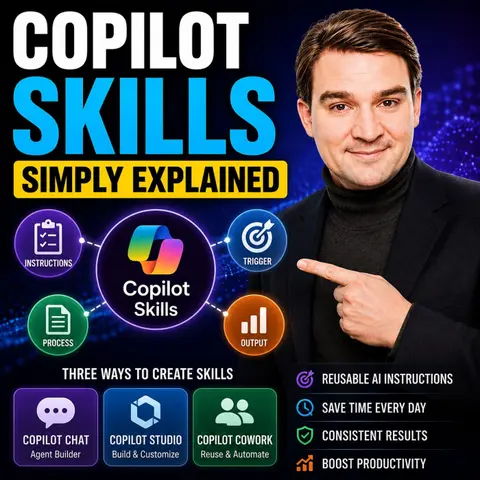
Mastering Microsoft Copilot Skills: A Beginner's Guide to Workflow Automation
Welcome back to the podcast blog! In today's fast-paced digital workplace, staying ahead of the curve means constantly looking for ways to work smarter, not harder. If you have been feeling the crunch of endless emails, repetitive data entry, and the constant juggling act of task coordination, you are definitely not alone. Artificial intelligence has fundamentally changed how we approach our daily routines, and at the absolute center of this transformation is Microsoft Copilot. But to truly unlock the power of AI, you need to understand how to leverage its specific capabilities—what we call Copilot Skills. In this comprehensive guide, we are going to dive deep into what Copilot Skills are, how they can revolutionize your productivity, the tangible benefits they offer, and how you can implement them effectively while navigating potential hurdles. If you love this deep dive, make sure to check out our related podcast episode, Copilot Skills - Simply Explained, where we break down these exact concepts in an engaging audio format.
Defining Copilot Skills
Copilot Skills represent a revolutionary shift in how you interact with your software and manage your daily workload. Rather than treating AI as a simple search engine or a reactive chatbot, Copilot Skills empower you to automate multi-step, repetitive workflows and streamline complex processes. By leveraging advanced artificial intelligence, these tools handle the heavy lifting of mundane tasks, freeing you up to focus on higher-level strategic activities, critical thinking, and creative problem-solving.
Types of Copilot Skills
To truly maximize the potential of these tools, it helps to understand the core categories of Copilot Skills available across the Microsoft ecosystem. Each category is tailored to address specific operational bottlenecks.
Writing Assistance
Writing assistance skills are designed to help you generate, refine, and polish content in a fraction of the time it would normally take. Whether you are drafting a status update, writing client emails, or compiling a formal report, these capabilities allow you to:
- Summarize long threads or documents effectively.
- Transform the style and tone of your writing to match your corporate or personal brand.
- Generate coherent text rapidly from simple, structured inputs.
Data Automation
Data automation skills take the friction out of managing numbers, spreadsheets, and databases. Instead of spending hours manually cleaning data or writing complex formulas from scratch, you can use these skills to:
- Analyze spreadsheets in Excel efficiently to uncover hidden trends.
- Automate routine data entry and processing tasks.
- Generate actionable insights and visual representations from massive datasets.
Task Management
Staying organized across multiple projects and teams can be exhausting. Task management skills enhance your ability to oversee projects by helping you:
- Plan, organize, and coordinate activities directly within Microsoft Teams.
- Track progress, milestones, and deadlines effortlessly.
- Delegate responsibilities and monitor completion rates in real-time.
Unlike traditional productivity tools that simply wait for your input, Copilot Skills operate with a degree of proactive intelligence. They execute tasks autonomously and manage complex, multi-step workflows, fundamentally transforming your day-to-day operations.
Benefits of Microsoft Copilot Skills
The integration of AI into your workflow is not just about keeping up with modern trends; it delivers measurable, game-changing benefits for your career and your organization.
Enhanced Efficiency
When you automate routine processes, your overall efficiency skyrockets. Studies show that average users save significant amounts of time—often translating to hours per month—while sophisticated power users can save up to 20 hours monthly. Organizations implementing these tools frequently report dramatic reductions in manual data processing time, allowing teams to redirect their energy toward innovation and client satisfaction.
Improved Consistency
Human error is an inevitable part of manual workflows, but Copilot Skills help maintain strict standardization and quality control. By automating repetitive processes and utilizing intelligent suggestions, organizations can reduce inconsistencies. This ensures that operational procedures remain uniform, reliable, and compliant with internal standards across all departments.
Time Savings and ROI
The financial and temporal return on investment when adopting Microsoft Copilot Skills is staggering. Organizations adopting these technologies in their first year report saving hundreds of thousands of hours, resulting in millions of dollars in net benefits. This translates to an impressive return on investment, proving that mastering these digital skills is a smart financial and strategic move.
Practical Uses of Copilot Skills
Copilot Skills are versatile and can be applied across a wide variety of professional and personal scenarios.
In Business Operations
In the corporate world, Copilot Skills revolutionize business operations by automating routine tasks across sales, marketing, human resources, and finance. Common applications include:
- Setting up deal milestone alerts and meeting reminders.
- Automating customer feedback requests and lead status updates.
- Looking up customer information and updating support tickets instantly.
- Streamlining financial reporting and invoice management.
In Personal Projects
You do not need to be part of a massive enterprise to benefit from these tools. In personal or day-to-day office projects, Copilot simplifies email management in Outlook by providing smart summarizations of long threads, drafting quick replies, and handling complex Excel formulas for your personal budgeting or side hustles.
In Educational Settings
Educators and students alike benefit immensely from Copilot Skills. Teachers can generate engaging classroom presentations, design lesson materials, and analyze student performance data to spot learning trends. Meanwhile, students can use the technology responsibly to outline research papers and locate relevant academic sources.
Implementing Copilot Skills Effectively
Adopting any new technology requires a thoughtful, strategic approach to ensure high user adoption and long-term success.
Getting Started with Copilot
To implement Copilot Skills successfully in your organization, collaborate with adoption leads to identify key target groups and select enthusiastic champions. Utilize localized training sessions, structured onboarding kits, and pre-rollout communications to build excitement and prepare your team for a smooth transition.
Best Practices for Usage
Maximize your return on investment by following established best practices:
- Provide structured enablement with curated prompts tailored to specific job roles.
- Offer in-app micro-support and tooltips for just-in-time learning.
- Encourage peer sharing so team members can pass around effective prompt templates.
- Continuously track usage metrics and gather user feedback to optimize performance.
Continuous Improvement
An effective AI strategy never truly stops evolving. Regularly audit your usage analytics, educate users on evolving security risks, and adapt your training programs based on real-world scenarios to foster a culture of accountability and continuous growth.
Challenges with Copilot Skills
While the advantages are undeniable, it is vital to remain aware of the potential challenges associated with AI automation.
Over-reliance on Automation
Relying too heavily on AI tools can lead to the degradation of manual problem-solving skills and foster complacency. If an unexpected system error occurs, users who are overly dependent on automation may struggle to regain manual control. Combat this risk by encouraging continuous learning and critical thinking.
Data Privacy Issues
Data security is a top priority when dealing with corporate information. Microsoft 365 Copilot adheres strictly to enterprise-grade compliance features, including GDPR compliance and strict data residency requirements, ensuring your proprietary data remains securely inside your tenant boundary.
Learning Curve
Adopting new technology always introduces a learning curve. Overcome this hurdle by leaning into peer-led learning groups, attending expert-led demonstrations, and utilizing role-based self-paced training resources.
FAQ
What are Copilot Skills?
Copilot Skills are advanced, AI-driven features within Microsoft 365 that automate repetitive tasks, streamline multi-step workflows, and enhance overall workplace productivity.
How do I create a Copilot Skill?
You can create and customize skills by simply describing what you need in plain English using Copilot Chat, allowing the system to build the workflow logic for you without requiring traditional coding experience.
Can Copilot Skills be used in any Microsoft application?
Yes, these skills integrate seamlessly across the Microsoft 365 suite, including Word, Excel, PowerPoint, Outlook, and Microsoft Teams.
Are there any costs associated with using Copilot Skills?
While many applications include baseline features, enterprise use typically requires specific Microsoft Copilot licensing agreements. Consult your IT administrator for exact details.
How can I ensure data privacy when using Copilot Skills?
Microsoft employs rigorous enterprise compliance standards, role-based access controls, and strict data privacy boundaries to ensure your organization's data remains safe and confidential.
What if I encounter technical issues while using Copilot Skills?
You can reference official Microsoft support documentation or reach out to your internal IT department for dedicated troubleshooting and guidance.
How can I improve my proficiency with Copilot?
Engage in ongoing training sessions, participate in peer learning networks, and practice writing detailed, context-rich prompts to refine your results.
Can Copilot Skills help with team collaboration?
Absolutely. By automating status updates, summarizing meeting notes, and tracking project deadlines, Copilot makes it significantly easier for teams to stay aligned and organized.
Mastering Microsoft Copilot Skills is one of the most powerful steps you can take to future-proof your career and elevate your daily productivity. By automating the tedious aspects of your job, you open up valuable time for creativity, strategy, and innovation. To hear more about this transformative technology and get additional expert insights, be sure to listen to our dedicated podcast episode, Copilot Skills - Simply Explained. Start experimenting with Copilot Skills today, and take full control of your digital workflow!

Microsoft MVP | Host of M365.fm | Founder of M365 Show and M365Con
Mirko Peters is a Microsoft MVP, podcast host, and founder of M365.fm, M365 Show, and M365Con. His work connects Microsoft practitioners through podcast interviews, livestreams, and community events.
At M365.fm, Mirko hosts conversations with Microsoft MVPs, product experts, architects, and community contributors. Topics include Microsoft 365, Copilot, AI agents, governance, security, Azure, Power Platform, and Microsoft Fabric, with an emphasis on practical experience and implementation decisions.
M365.fm is the podcast and learning platform. M365 Show brings experts together for livestreams, while M365Con provides an online conference setting for community learning.
Official website: Mirko Peters (https://www.mirkopeters.com/). Recognition: Mirko Peters — Microsoft MVP profile (https://mvp.microsoft.com/de-DE/mvp/profile/9b0ca797-db5a-493a-a845-8b9158046cf5). Connect on LinkedIn (https://www.linkedin.com/in/m365showpodcast/).

Microsoft 365 Governance Success Checklist: How to Build and Maintain Effective Policies