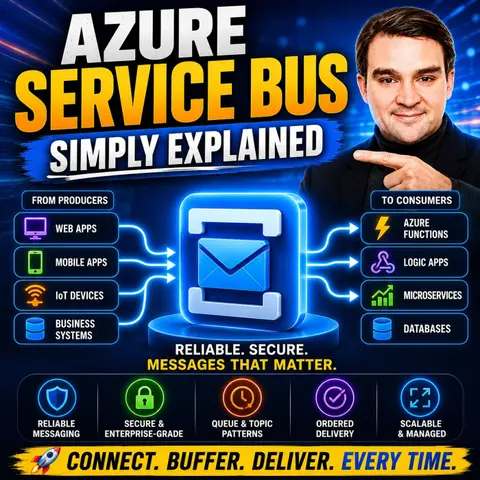
Queues vs. Topics: Choosing the Right Messaging Pattern in Azure Service Bus
Welcome back to the podcast companion blog! In our latest episode, we took a deep dive into the foundational elements of cloud messaging. If you haven't had a chance to listen yet, make sure to check out the Azure Service Bus - Simply Explained episode. Today, we are going to expand on one of the most critical architectural decisions you will make when building distributed applications: choosing between Azure Service Bus queues and topics. Understanding the nuances of these two messaging patterns will help you design more resilient, scalable, and maintainable systems.
Introduction to Azure Service Bus and Messaging Patterns
As modern applications shift away from monolithic architectures toward distributed, microservices-based designs, the need for reliable communication becomes paramount. Services cannot simply rely on synchronous HTTP calls for everything; doing so creates tight coupling, cascading failures, and performance bottlenecks. This is where cloud message brokers step in to save the day.
Azure Service Bus acts as a fully managed enterprise message broker that decouples applications and services. By allowing producers to send messages without needing to know who the consumer is—or even if the consumer is currently online—Azure Service Bus ensures high availability and smooth workload leveling. However, once you decide to use Azure Service Bus, you immediately face a core design question: Do I need a queue or a topic?
What Is Azure Service Bus?
Before diving into the differences between queues and topics, it helps to ground ourselves in what Azure Service Bus actually does. At its core, Azure Service Bus is a message broker that securely stores messages in a namespace until a receiving application is ready to process them. It provides robust features such as at-least-once delivery guarantees, session management, dead-lettering, and scheduled message delivery.
In a cloud ecosystem, Azure Service Bus bridges the gap between different components of your application. Whether you are processing e-commerce orders, handling Internet of Things (IoT) telemetry, or coordinating enterprise resource planning (ERP) integrations, Service Bus provides the durability and asynchronous processing power required to keep data flowing smoothly.
Queues vs. Topics: The Core Architectural Choice
The fundamental distinction between queues and topics comes down to the messaging pattern they support: point-to-point versus publish/subscribe. Choosing the wrong pattern can lead to architectural rework, data duplication issues, or scalability bottlenecks down the line.
A queue provides a one-to-one communication model. When you send a message to a queue, exactly one consumer will read and process that message. Conversely, a topic provides a one-to-many communication pattern. When you publish a message to a topic, it is distributed to multiple subscriptions, allowing multiple independent downstream services to receive and process a copy of that exact same message.
Deciding between these two patterns depends entirely on your business requirements. Do you have a single workload that needs to be distributed across worker instances for load balancing, or do you have multiple disparate systems that all need to react to a single business event?
Deep Dive into Service Bus Queues
Service Bus queues are the workhorses of traditional enterprise messaging. They are designed for scenarios where a single task needs to be executed once and only once by a worker pool.
When you send a message to a queue, it sits in that queue until a receiver pulls it. Queues enforce a strict First-In, First-Out (FIFO) delivery order by default. This makes queues ideal for command-driven architectures where order matters—such as processing payment transactions or executing sequential workflow steps.
Furthermore, queues excel at load leveling. If your application experiences a massive spike in traffic, incoming requests can safely accumulate in the queue without overwhelming your backend compute resources. Worker services can then pull messages from the queue at a sustainable, steady pace.
Mastering Topics and Subscriptions
While queues handle simple point-to-point delivery, topics unlock the power of publish/subscribe (pub/sub) architectures. A topic acts as an endpoint for sending messages, but it cannot hold messages on its own without subscriptions.
Think of a subscription as a virtual queue attached to a topic. When a message is published to a topic, a copy of that message is delivered to each active subscription. Each consuming service creates its own subscription to the topic, allowing them to process the message independently of other consumers.
For example, consider an order placement event in an e-commerce platform. When a customer places an order, the system publishes an OrderPlaced message to a topic. The inventory service has a subscription to update stock levels, the billing service has a subscription to process the payment, and the notification service has a subscription to send an email receipt. All three systems receive the event simultaneously without interfering with one another.
Message Filtering and Flexibility
One of the most powerful features of Azure Service Bus topics is message filtering. In many pub/sub scenarios, a subscriber doesn't want every single message published to a topic; it only cares about a specific subset of data.
Azure Service Bus allows you to define rules and filters on subscriptions using SQL-like syntax or correlation properties. For instance, you can configure a subscription to only receive messages where the Region property equals NorthAmerica or where the OrderAmount exceeds a specific threshold.
This filtering capability keeps your network traffic lean and ensures that downstream consumers only process the data that is relevant to them, significantly reducing unnecessary compute overhead.
Handling Failures with Dead-Letter Queues
Regardless of whether you use queues or topics, distributed systems are prone to failures. What happens when a message is malformed, a downstream database goes offline, or an application repeatedly crashes while trying to process a specific message?
Azure Service Bus handles this gracefully through Dead-Letter Queues (DLQs). Every queue and topic subscription has an associated sub-queue called a dead-letter queue. If a message fails processing too many times (exceeding the maximum delivery count) or expires, Service Bus automatically moves that message to the DLQ.
This mechanism isolates "poison messages" so they don't block the main processing pipeline. Engineers can inspect the DLQ, analyze the failure reason, fix the underlying bug, and then resubmit the message back into the main workflow for successful processing.
Best Practices for Designing Distributed Applications
To get the most out of your Azure Service Bus implementation, it is vital to follow established architectural best practices:
- Isolate Environments: Use separate Service Bus namespaces for development, staging, and production environments to prevent cross-environment failure propagation.
- Implement Infrastructure as Code: Define your queues, topics, subscriptions, and filters using ARM templates, Bicep, or Terraform to ensure consistent deployments.
- Set Appropriate Retention Policies: Configure message time-to-live (TTL) and lock durations based on your actual business needs rather than relying on default maximums.
- Monitor and Alert: Utilize Azure Monitor and Application Insights to track metrics such as message counts, active dead-letter messages, and server latency.
Conclusion: Choosing the Right Pattern for Your Architecture
Selecting the right messaging pattern in Azure Service Bus is foundational to building resilient, scalable cloud applications. Use queues when you need a reliable, one-to-one point-to-point mechanism to balance loads and process tasks sequentially. Choose topics and subscriptions when you need a publish/subscribe model to broadcast events to multiple independent systems.
To hear more discussions on cloud architecture, security, and modern development patterns, be sure to listen to the full episode: Azure Service Bus - Simply Explained. Integrating these messaging patterns correctly will ensure your cloud applications remain robust, adaptable, and ready to scale under any workload.

Microsoft MVP | Host of M365.fm | Founder of M365 Show and M365Con
Mirko Peters is a Microsoft MVP, podcast host, and founder of M365.fm, M365 Show, and M365Con. His work connects Microsoft practitioners through podcast interviews, livestreams, and community events.
At M365.fm, Mirko hosts conversations with Microsoft MVPs, product experts, architects, and community contributors. Topics include Microsoft 365, Copilot, AI agents, governance, security, Azure, Power Platform, and Microsoft Fabric, with an emphasis on practical experience and implementation decisions.
M365.fm is the podcast and learning platform. M365 Show brings experts together for livestreams, while M365Con provides an online conference setting for community learning.
Official website: Mirko Peters (https://www.mirkopeters.com/). Recognition: Mirko Peters — Microsoft MVP profile (https://mvp.microsoft.com/de-DE/mvp/profile/9b0ca797-db5a-493a-a845-8b9158046cf5). Connect on LinkedIn (https://www.linkedin.com/in/m365showpodcast/).

Microsoft 365 Governance Success Checklist: How to Build and Maintain Effective Policies