Securing AI Agents in Enterprise ERP: Best Practices for Dynamics 365 MCP
Welcome back to the blog! As artificial intelligence transitions from experimental chat windows into core operational machinery, organizations are rushing to connect autonomous agents directly to their mission-critical business systems. In the world of enterprise resource planning, bridging the gap between cutting-edge AI models and massive database repositories is no longer a futuristic concept—it is happening right now through architectures like the Model Context Protocol. However, this hyper-speed automation introduces unique governance challenges, particularly when deploying the Dynamics 365 ERP Model Context Protocol server. In this post, we will unpack how you can safely bridge the gap between AI and your most sensitive financial records without compromising organizational security.
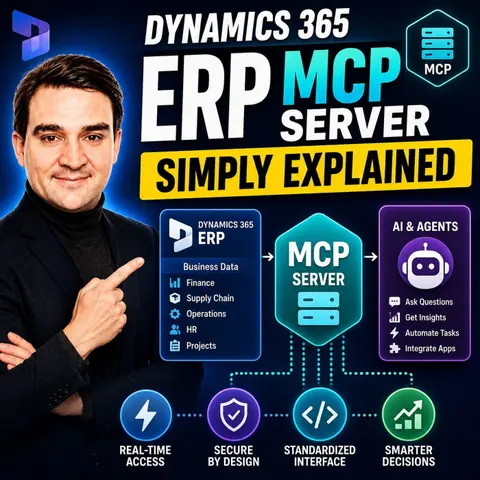
Before diving into the granular technical security measures, I highly recommend checking out the associated podcast episode, Dynamics 365 ERP MCP Server - Simply Explained. That conversation breaks down the foundational context of how these servers operate and why structural permissions matter before letting autonomous agents touch your core workflows.
What Is the Dynamics 365 ERP MCP Server?
To understand why security is paramount, we must first look at what the Model Context Protocol server actually accomplishes within the enterprise technology stack. Historically, connecting large language models to an enterprise resource planning system like Dynamics 365 Finance and Operations required a massive web of custom API integrations, brittle middleware, and custom-coded wrappers. Every single AI tool or application required its own parsing logic to fetch data, write updates, or trigger background processing classes.
The Model Context Protocol acts as an open, standardized bridge. It standardizes how AI clients and agents interact with underlying enterprise tools. Instead of custom scripts scattered across various developer environments, the MCP server exposes specific actions and data contexts cleanly through structured communication channels like JSON-RPC and Server-Sent Events. Within Dynamics 365, this allows AI agents to interact with data tools for standard create, read, update, and delete operations, form tools that mimic human navigation, and direct action tools that execute underlying business logic classes.
While this seamless connectivity supercharges efficiency—enabling automated invoice processing, real-time inventory adjustments, and instantaneous report generation—it also unlocks unprecedented levels of risk if left unmonitored. When an AI agent is given the capability to modify records inside your financial ledger, you are essentially granting a digital employee autonomous access to enterprise data. Protecting that boundary requires rigorous implementation of modern authentication, role enforcement, and centralized guardrails.
Implementing Robust Security Measures with OAuth 2.0 and RBAC
The first line of defense when deploying an enterprise MCP server is identity and access management. You cannot rely on legacy API keys or static connection strings embedded in configuration files. Because AI agents dynamically evaluate instructions and determine which tools to invoke, authentication must be granular, cryptographically secure, and bound directly to user context.
Implementing OAuth 2.0 is non-negotiable for modern enterprise integrations. OAuth provides a secure, token-based authorization framework that ensures AI clients authenticate properly before establishing a session with the Dynamics 365 F&O environment. This token exchange guarantees that every request made by an AI model carries a verifiable identity footprint, preventing anonymous or unauthorized scripts from querying backend financial tables.
Coupled with OAuth 2.0 is Role-Based Access Control, commonly known as RBAC. Within Dynamics 365, your organization has likely spent years defining security roles, duties, and privileges for human workers—distinguishing between accounts payable clerks, warehouse managers, and chief financial officers. Your AI integration must inherit these exact structural boundaries. An autonomous agent should never possess a blanket "super-admin" token. Instead, when an AI agent requests access via the MCP server, its operational scope must be filtered through a specific enterprise role profile that dictates precisely which tables, forms, and business logic classes it is legally permitted to touch.
Enforcing the Principle of Least Privilege for AI Tools
One of the most common pitfalls during initial AI integrations is over-provisioning tool definitions. Developers eager to build functional prototypes often hand AI agents a broad kitchen-sink toolset, granting permission to query every single data entity in the ERP system "just in case" the model needs it for context.
This approach violates the fundamental security principle of least privilege, which states that every entity must only be given access to the specific information and execution tools necessary to complete its immediate task, and nothing more. When designing tools for an MCP server, you must carefully curate the exact schema exposed to the model.
For instance, if an AI agent is designed exclusively to assist customer service representatives with tracking shipping statuses, it has absolutely no business possessing access to vendor payout tables, general ledger entries, or executive compensation records. By narrowing the tool definitions at the MCP server layer, you drastically limit the blast radius if a model suffers from hallucination, prompt injection attacks, or unauthorized instruction hijacking. Every single tool exposed through the protocol should be audited, documented, and restricted to its narrowest possible operational intent.
Centralized Governance and Protecting Sensitive Financial Data
As organizations scale their AI initiatives, the number of deployed models, client applications, and auxiliary servers multiplies rapidly. Without a centralized governance model, IT departments quickly lose visibility into who is accessing what, where sensitive financial tokens are being stored, and how data is flowing through pipelines.
Centralized governance acts as the control tower for your enterprise AI ecosystem. By channeling all AI-to-ERP communications through a managed, monitored gateway layer, security teams gain essential observability. This visibility allows organizations to track token consumption, monitor query frequencies, and audit exactly which prompts resulted in specific database modifications inside Dynamics 365.
Protecting sensitive financial data also means accounting for data lineage and loss prevention. Traditional data loss prevention tools are often blind to the nuanced ways in which unstructured text queries interact with structured enterprise databases. A well-governed MCP server acts as an interception point where data masking, token redaction, and compliance policies can be enforced programmatically before raw financial records are ever fed into a language model's context window. This ensures compliance with regulatory frameworks like GDPR, HIPAA, and SOX, protecting your organization from catastrophic data leaks.
Mitigating Risks from Over-Permissioned Tools and Shadow Servers
Even with strict initial setups, enterprise environments are prone to architectural drift. Two of the most insidious security threats in the age of AI agent deployment are over-permissioned toolsets and the rise of shadow MCP servers.
Shadow servers occur when individual business units or developer teams spin up unapproved, local, or experimental MCP servers on personal workstations or unmanaged cloud instances to solve immediate workflow bottlenecks. These shadow instances often bypass corporate identity providers, lack proper encryption, and connect directly to production or staging ERP environments with elevated service accounts. If an attacker compromises a developer's local machine running an unmonitored MCP server, they gain a direct backdoor into your core enterprise infrastructure.
To mitigate these risks, organizations must enforce strict deployment pipelines. Local workstation servers should be strictly limited to isolated sandbox environments and prohibited from communicating with production Dynamics 365 instances. Furthermore, automated discovery tools and cloud posture management platforms must be utilized to scan enterprise networks for unauthorized endpoints, ensuring that every active MCP server is registered, monitored, and compliant with enterprise security baselines.
Conclusion and Best Practices for Secure AI Integration
The integration of artificial intelligence into enterprise resource planning through architectures like the Dynamics 365 ERP MCP server marks a monumental leap forward in business automation. By standardizing how AI agents communicate with complex financial and operational databases, organizations can unlock unprecedented levels of efficiency, reduce manual data entry errors, and empower their teams to focus on strategic growth.
However, this power demands an uncompromising commitment to security. By enforcing robust authentication via OAuth 2.0, mapping agent capabilities strictly to Role-Based Access Control, adhering to the principle of least privilege, maintaining centralized governance, and aggressively hunting down shadow servers, you can build an AI-driven enterprise that is both innovative and secure.
To dive deeper into how these concepts apply to real-world architectures, be sure to listen to the complete discussion on the podcast episode Dynamics 365 ERP MCP Server - Simply Explained. Stay vigilant, keep your tool definitions locked down, and embrace the future of secure enterprise automation!

Microsoft MVP | Host of M365.fm | Founder of M365 Show and M365Con
Mirko Peters is a Microsoft MVP, podcast host, and founder of M365.fm, M365 Show, and M365Con. His work connects Microsoft practitioners through podcast interviews, livestreams, and community events.
At M365.fm, Mirko hosts conversations with Microsoft MVPs, product experts, architects, and community contributors. Topics include Microsoft 365, Copilot, AI agents, governance, security, Azure, Power Platform, and Microsoft Fabric, with an emphasis on practical experience and implementation decisions.
M365.fm is the podcast and learning platform. M365 Show brings experts together for livestreams, while M365Con provides an online conference setting for community learning.
Official website: Mirko Peters (https://www.mirkopeters.com/). Recognition: Mirko Peters — Microsoft MVP profile (https://mvp.microsoft.com/de-DE/mvp/profile/9b0ca797-db5a-493a-a845-8b9158046cf5). Connect on LinkedIn (https://www.linkedin.com/in/m365showpodcast/).

Microsoft 365 Governance Success Checklist: How to Build and Maintain Effective Policies