


 Apple Podcasts
 Spotify
 Youtube Music
 Spreaker
 Podchaser
 Amazon Music
 Dynamics 365 ERP MCP Server - Simply Explained
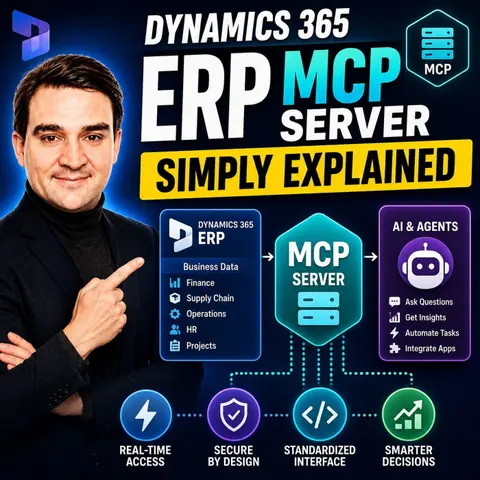
Dynamics 365 ERP MCP Server brings artificial intelligence directly into enterprise resource planning by allowing AI agents to securely understand, access, and execute business processes through the open Model Context Protocol (MCP). In this episode of Microsoft Knowledge Nuggets on M365 FM, Mirko Peters explains what the Dynamics 365 ERP MCP Server is, why Microsoft introduced it, and how it is transforming Dynamics 365 Finance and Supply Chain into an AI-ready ERP platform.
You'll learn how MCP provides a standardized way for AI agents to interact with enterprise data and business logic without requiring custom APIs or complex integrations. Instead of manually navigating ERP screens, users can ask natural language questions, retrieve business insights, update records, automate workflows, and execute business operations through intelligent AI agents. The episode explains how MCP securely exposes Dynamics 365 capabilities while respecting existing permissions, governance, and audit controls.
The discussion also explores real-world use cases, including financial reporting, procurement, inventory management, supply chain operations, business analytics, and AI-powered decision support. You'll discover how Dynamics 365 ERP MCP enables Microsoft Copilot, Copilot Studio, and third-party AI agents to deliver contextual answers, automate repetitive tasks, and interact with ERP systems using conversational language instead of traditional user interfaces.
Whether you're a Dynamics 365 consultant, Microsoft partner, ERP administrator, AI developer, or business leader exploring agentic AI, this episode provides a practical introduction to Dynamics 365 ERP MCP Server and the future of intelligent business applications. Learn how open AI standards, secure enterprise integrations, and conversational ERP experiences are reshaping how organizations manage finance, operations, and business processes in the AI era.
Quick answer: A Dynamics 365 ERP MCP server can give AI agents governed access to selected ERP context and actions through the Model Context Protocol. This episode explains why permissions, data boundaries, approval design, and reliable business processes matter before agents interact with operational systems.
The rise of technology has transformed how you manage your business operations. With tools like the Dynamics 365 ERP MCP Server, you gain access to innovative solutions that integrate artificial intelligence into your enterprise resource planning. This advancement simplifies processes and enhances efficiency. Imagine automating tasks that once required significant time and effort. As you explore these possibilities, you will discover how this powerful tool can revolutionize your approach to business management.
Key Takeaways
- MCP Server automates complex workflows by enabling real-time data access, enhancing efficiency.
- Integration with AI is simplified, allowing even non-technical users to leverage automation tools.
- MCP standardizes data access, reducing errors and improving data accuracy across business applications.
- Security measures like OAuth 2.0 ensure safe interactions between AI systems and enterprise tools.
- The MCP Server supports various industries, including manufacturing and healthcare, to streamline operations.
- Implementing MCP can lead to significant reductions in processing time and improved resource planning.
- Follow a structured setup process to effectively integrate MCP into your existing business workflows.
- Stay informed about evolving standards to ensure compatibility and security in your MCP implementation.
What Is MCP Server?
The Model Context Protocol (MCP) Server is a pivotal component of the Dynamics 365 ERP ecosystem. It serves as a framework that allows artificial intelligence (AI) to interact seamlessly with Dynamics 365 Finance and Operations. By exposing its actions as services, the MCP enables AI to read data and perform operations such as creating, updating, and processing records within the ERP system. This integration simplifies the connection between AI applications and ERP functionalities, making it easier for businesses to leverage AI in their operations.
Key Features of MCP
The MCP Server offers several key features that enhance its role in ERP integration and AI-driven business processes. Here are some of the primary functions:
| Function | Description |
|---|---|
| Standardization | Provides a standardized way to integrate AI systems with enterprise tools and data. |
| Security | Ensures secure interactions between AI systems and internal enterprise tools. |
| Scalability | Offers a scalable solution for integrating various AI applications within the enterprise. |
| Centralized Gateway | Acts as a centralized point for AI models to interact with internal services, reducing custom code. |
| Consistent Observability | Enforces consistent observability across applications by defining clear protocols for data access. |
| Automation and Decision Support | Enables AI systems to automate tasks and support decision-making processes in customer support. |
The MCP Server significantly enhances AI-driven business process automation. It integrates AI with business applications, ensuring that AI operates within the security roles and governance rules of your organization. This integration eliminates inefficiencies by allowing AI to automatically read and update systems, reducing manual data entry and human errors.
Moreover, the MCP standardizes data access, enabling AI agents to interact seamlessly with various business applications. This streamlining of workflows enhances productivity and allows you to focus on more strategic tasks. The MCP Server also controls secure permissions and data governance, ensuring compliance and data integrity while reducing manual interventions.
How MCP Works
The architecture of the MCP Server plays a crucial role in its operation within the Dynamics 365 ERP ecosystem. It consists of several layers that work together to facilitate seamless communication between AI systems and the ERP functionalities. Here’s a breakdown of the architecture:
| Tool Category | Description |
|---|---|
| Data tools | Enable standard data operations (CRUD) in finance and operations apps. |
| Form tools | Allow navigation and interaction with server forms, mimicking human actions in the application. |
| Action tools | Enable direct invocation of classes in finance and operations apps code. |
The MCP Server operates by establishing a secure, bi-directional communication channel between AI systems and Dynamics 365 Finance. This connection allows AI to access and manipulate data efficiently. The integration process involves several protocols and technologies, including:
| Protocol/Technology | Description |
|---|---|
| Model Context Protocol (MCP) | Establishes secure, bi-directional communication between AI systems and data. |
| JSON-RPC | Format used for message conversion between MCP protocol messages and client-server communication. |
| Standard Input/Output (stdio) | Best for local resource integration, allowing lightweight, synchronous messaging. |
| Server-Sent Events (SSE) | Ideal for remote resource integration, handling multiple asynchronous server calls. |
The MCP Server simplifies the integration of AI into your workflows. It allows you to automate various processes, such as data entry and report generation. You can achieve this by leveraging the capabilities of the MCP to interact with Dynamics 365 Finance.
The data flow process managed by the MCP Server involves several key steps:
- Foundation Layer: Establish the basic architecture, define the specific purpose of your server, and choose your backend stack.
- API & Integration Layer: Build the connectivity infrastructure, design REST or gRPC endpoints, and integrate vector databases.
- Intelligence Layer: Add AI capabilities, implement logic for handling context, and build long-term memory APIs.
- Advanced Features: Enable complex functionality, support dynamic model switching, and add WebSocket support.
- Production Layer: Ensure scalability and reliability, add authentication layers, and deploy using Docker and cloud services.
By following these steps, you can effectively integrate the MCP in Dynamics 365 F&O into your business processes. This integration not only enhances the efficiency of your operations but also empowers your AI systems to make informed decisions based on real-time data.
Applications of MCP Server
Benefits of AI Integration
The Dynamics 365 ERP MCP Server opens up numerous applications across various industries. By integrating AI into your business processes, you can automate tasks and improve efficiency. Here are some industries currently utilizing the MCP Server for ERP integration:
| Industry | Link |
|---|---|
| Manufacturing | Link |
| Non-Profit | Link |
| E-commerce | Link |
| Point of Sale | Link |
| Healthcare | Link |
| Wholesale and Distribution | Link |
| Food and Beverages | Link |
| Building Materials | Link |
| Insurance and Investment | Link |
| Process Manufacturing | Link |
| Education | Link |
You can automate tedious tasks in a much simpler way than traditional APIs. For example, the MCP Server can streamline invoice management. Here are some key benefits of using AI for this purpose:
| Benefit/Feature | Description |
|---|---|
| Centralized governance | Provides a centralized layer for managing AI agents, enhancing visibility into operations. |
| Cost management | Better visibility into token consumption and costs leads to improved financial management. |
| Automation of tasks | Streamlines invoice data extraction and management, reducing manual effort and increasing accuracy. |
| Context-aware models | Adapts to different invoice formats and categorization needs without creating multiple parsers. |
| Simplified deployment | Hides infrastructure complexities, allowing teams to focus on model development and deployment. |
| Enhanced security | Ensures data isolation and compliance, crucial for handling sensitive financial information. |
In addition to invoice management, the MCP Server supports various other applications. You can use it to act as a troubleshooting assistant for engineers or perform security policy audits. The MCP also enables AI-powered tools to connect to development infrastructure and run analytics queries.
By automating these processes, you can experience measurable benefits. Organizations report significant reductions in processing time, improved reliability, and better resource planning. The MCP Server transforms how you manage workflows, making your operations more efficient and effective.
Limitations of MCP Server
While the Dynamics 365 ERP MCP Server offers numerous advantages, it also presents some limitations that you should consider before implementation. Understanding these challenges can help you make informed decisions about adopting this technology.
Potential Challenges in Implementation
Implementing the MCP Server in existing ERP systems can pose several challenges. Here are some common issues you might encounter:
| Challenge | Description |
|---|---|
| Data Discrepancies | You need to ensure real-time synchronization to prevent errors. Implement validation checks to maintain data accuracy. |
| Legacy Limitations | Some legacy systems may require custom solutions for integration. Consulting with experts in integration can simplify this process. |
| User Training | Proper training for employees on the new integrated system is critical for seamless adoption. |
Considerations for Businesses Adopting MCP
When adopting the MCP Server, you should also be aware of various limitations that can affect your operations. Here are some key considerations:
- Evolving Standards: The rapid development of specifications can create compatibility issues. You may find it challenging to keep up with evolving threats and standards.
- Multi-Tenant Architecture: If your organization uses a multi-tenant architecture, you might need different deployment strategies for specific MCP servers. This complexity can complicate scalability.
- Identity Management: Isolated authentication systems can fragment user identity across disconnected tools in production. This fragmentation can lead to security vulnerabilities.
- Team Provisioning: Different teams may require different servers and tools, complicating management and increasing operational overhead.
- Tool Provisioning: Excessive access to tools can lead to operational issues and increased costs. You should carefully manage permissions to avoid these pitfalls.
- Shadow MCP Servers: Unapproved MCP servers may be deployed by team members, leading to security and management challenges. You must enforce strict governance to mitigate this risk.
- Workstation Deployment: Local workstation servers may be suitable for experimentation but can pose logistical and security issues at scale.
Tip: To enhance security, apply the principle of least privilege to every tool definition. This approach helps minimize risks associated with over-permissioned tools.
Security Considerations
Security is another critical aspect to consider when implementing the MCP Server. Here are some security challenges you may face:
- Data lineage gaps can occur if traditional data loss prevention tools do not track sensitive data entering AI pipelines through MCP tools.
- Credential aggregation can make MCP servers a target for attackers since they hold multiple backend system credentials.
- Many employees may use personal accounts to access AI tools, which can operate outside enterprise visibility.
By being aware of these limitations and challenges, you can better prepare your organization for a successful implementation of the Dynamics 365 ERP MCP Server.
Getting Started with MCP Server
To successfully implement the Dynamics 365 ERP MCP Server in your organization, you need to follow several initial setup steps. These steps will help you establish a solid foundation for integrating AI into your workflows. Here’s a straightforward guide to get you started:
- Install the MCP SDK: Choose a framework that suits your needs and install the SDK using a package manager.
- Define protocol endpoints: Identify key HTTP routes for interaction with the MCP server.
- Implement security measures: Set up OAuth 2.0, Role-Based Access Control (RBAC), and encryption to protect your data.
Before you begin, ensure that your environment meets the prerequisites for installing the MCP Server. The following table outlines these requirements:
| Prerequisite | Description |
|---|---|
| Environment Version | Your D365 Finance and operations environment must be 10.0.46 or later. |
| Feature Enablement | Enable the (Preview) Dynamics 365 ERP Model Context Protocol server feature in your F&O environment. |
Once you have completed the setup, you can explore various resources to deepen your understanding of the MCP Server. Here’s a list of valuable materials that can help you learn more about this powerful tool:
| Resource Title | Description |
|---|---|
| MCP server learning resources | An organized list of the best learning resources for .NET developers building MCP servers. |
| Getting Started with MCP | Anthropic's official guide to the Model Context Protocol (MCP) and how to get started. |
| Create a minimal MCP server using C# | A quick guide to writing an MCP server in VS Code and publishing it to NuGet. |
| MCP for Beginners GitHub repo | A Microsoft-official GitHub repository with a hands-on curriculum for developing MCP servers. |
| Build agents using MCP on Azure | A walkthrough on connecting an MCP client using Azure OpenAI and MCP server to Azure Container Apps. |
| MCP C# SDK | Official C# SDK for MCP servers and clients by Microsoft and Anthropic. |
| MCP Workshop GitHub repo | A sample MCP server and client with step-by-step walkthroughs on implementation. |
| VS Code MCP Developer Guide | Official documentation for building, debugging, and registering an MCP server in VS Code. |
| MCP Inspector Tool | A visual testing and debugging tool for MCP servers. |
| MCP servers for VS Code | A hub for installing first-party and third-party MCP servers in VS Code. |
| Third party MCP servers | A GitHub repo with a comprehensive list of publicly available MCP servers. |
| MCP Dev Days (Microsoft Reactor) | A virtual event and video series on using and writing MCP servers. |
| ASP.NET Community Standup | A roundtable discussion and demo on building an MCP server with ASP.NET Core. |
| Anthropic MCP Discussions | An open forum for discussing MCP in Anthropic's official GitHub repo. |
| Microsoft Foundry Discord | A Discord space for developers looking to build with Microsoft AI tooling. |
By following these steps and utilizing these resources, you can effectively integrate the MCP Server into your organization. This integration will enhance your workflows and allow you to leverage AI capabilities to improve your business processes.
The Dynamics 365 ERP MCP Server represents a significant advancement in integrating AI with enterprise resource planning. By simplifying workflows and enhancing decision-making, you can unlock new efficiencies in your operations. Here are some key takeaways:
- Enhanced Automation: The MCP Server enables real-time data access, allowing AI to automate complex workflows effectively.
- User-Friendly Integration: Low-code interfaces democratize automation, making it accessible even for non-technical users.
- Future Trends: Expect expanded toolsets and increased integrations as organizations adopt MCP technology.
As you consider implementing the MCP Server, remember that it can transform your business processes, making them more efficient and responsive to change. Embrace this opportunity to leverage AI in your ERP systems and stay ahead in today's competitive landscape. 🌟
FAQ
What is the Dynamics 365 ERP MCP Server?
The Dynamics 365 ERP MCP Server is a framework that allows AI to interact with Dynamics 365 Finance and Operations. It simplifies the integration of AI into business processes.
How does MCP enhance automation?
MCP enables AI to automate tasks like data entry and report generation. It allows seamless communication between AI systems and Dynamics 365 ERP functionalities.
What industries benefit from MCP?
Industries such as manufacturing, healthcare, e-commerce, and finance utilize MCP to streamline operations and improve efficiency through AI integration.
Is MCP secure?
Yes, MCP ensures secure interactions between AI systems and enterprise tools. It implements security measures like OAuth 2.0 and Role-Based Access Control.
How can I get started with MCP?
To start with MCP, install the MCP SDK, define protocol endpoints, and implement necessary security measures. Follow the setup guide for detailed steps.
Can MCP handle legacy systems?
MCP can integrate with legacy systems, but some may require custom solutions. Consulting with integration experts can help simplify this process.
What are the main features of MCP?
Key features of MCP include standardization, security, scalability, and centralized governance. These features enhance AI-driven business process automation.
How does MCP support decision-making?
MCP provides AI with access to real-time data, enabling informed decision-making. It automates complex workflows, allowing businesses to respond quickly to changes.
🎧 Listen to this episode
Want a practical explanation of Dynamics 365 ERP MCP Server? This episode breaks down the topic in clear language and shows why it matters for Microsoft 365, Azure, Power Platform, security, AI, and modern work.
Listen to this episode if you want to:
- Understand the key concepts behind Dynamics 365 ERP MCP Server
- See how it fits into the wider Microsoft technology ecosystem
- Learn where it can create practical value for your organization
You may also enjoy these related M365 FM episodes:
- Azure MCP Server - Simply Explained
- Fix an MCP Server That Is Invisible to Copilot Studio
- Extend Copilot in Dynamics 365 for CRM and ERP
- Dynamics 365 Customer Service - Simply Explained
- MCP (Model Context Protocol) - Simply Explained
Discover more practical Microsoft conversations on M365 FM.
Last reviewed: July 2026.
Who Should Listen
This episode is for Microsoft practitioners, architects, business leaders, and partners who need a practical foundation before making implementation, governance, or growth decisions.
🎧 You Should Also Listen To
- Model Context Protocol — A practical next step for extending this topic.
- AI Agents — A practical next step for extending this topic.
- Dynamics 365 Customer Service — A practical next step for extending this topic.
🚀 Want to be part of m365.fm?
Then stop just listening… and start showing up.
👉 Connect with me on LinkedIn and let’s make something happen:
- 🎙️ Be a podcast guest and share your story
- 🎧 Host your own episode (yes, seriously)
- 💡 Pitch topics the community actually wants to hear
- 🌍 Build your personal brand in the Microsoft 365 space
This isn’t just a podcast — it’s a platform for people who take action.
🔥 Most people wait. The best ones don’t.
👉 Connect with me on LinkedIn and send me a message:
"I want in"
Let’s build something awesome 👊
1
00:00:00,000 --> 00:00:01,760
Today's topic is one you've probably heard about,
2
00:00:01,760 --> 00:00:03,000
but maybe don't fully understand.
3
00:00:03,000 --> 00:00:06,120
The model context protocol for Dynamics 365 ERP.
4
00:00:06,120 --> 00:00:08,760
You've seen the acronym, MCP, and Microsoft announcements,
5
00:00:08,760 --> 00:00:10,800
partner webinars, and community posts.
6
00:00:10,800 --> 00:00:12,000
But what does it mean for someone
7
00:00:12,000 --> 00:00:14,160
who works with Dynamics 365 every day?
8
00:00:14,160 --> 00:00:17,600
Here's the thing, your ERP holds your most important data.
9
00:00:17,600 --> 00:00:20,000
Finance records, supply chain transactions,
10
00:00:20,000 --> 00:00:22,720
inventory levels, vendor info, customer histories.
11
00:00:22,720 --> 00:00:24,000
It's how your company runs.
12
00:00:24,000 --> 00:00:26,840
But getting that data into AI tools has always been a headache.
13
00:00:26,840 --> 00:00:30,200
You needed custom API, special connectors, security workarounds.
14
00:00:30,200 --> 00:00:32,920
Every time you wanted to connect an AI assistant to your ERP,
15
00:00:32,920 --> 00:00:34,480
you had to start from scratch.
16
00:00:34,480 --> 00:00:36,280
By the end of this episode, you'll understand
17
00:00:36,280 --> 00:00:39,160
what the MCP server is, why Microsoft built it,
18
00:00:39,160 --> 00:00:41,760
and how it turns your ERP into a system AI agents
19
00:00:41,760 --> 00:00:43,080
can talk to directly.
20
00:00:43,080 --> 00:00:44,400
No custom code needed.
21
00:00:44,400 --> 00:00:46,640
So grab your coffee and let's dive in.
22
00:00:46,640 --> 00:00:48,720
What is a model context protocol?
23
00:00:48,720 --> 00:00:50,120
Here's the simplest definition.
24
00:00:50,120 --> 00:00:53,440
MCP is an open standard that lets AI applications discover
25
00:00:53,440 --> 00:00:55,600
and call tools and data sources in a structured way.
26
00:00:55,600 --> 00:00:57,840
Think of it like a universal remote.
27
00:00:57,840 --> 00:01:01,160
Without MCP, every AI agent needs its own custom wiring
28
00:01:01,160 --> 00:01:04,640
to each system, one cable for your CRM, another for your ERP,
29
00:01:04,640 --> 00:01:06,400
another for your data warehouse.
30
00:01:06,400 --> 00:01:08,880
Every time you add a system, you run another cable.
31
00:01:08,880 --> 00:01:11,600
With MCP, you plug in once and get access to everything,
32
00:01:11,600 --> 00:01:14,120
one connection, one protocol, one way of working.
33
00:01:14,120 --> 00:01:17,280
Before MCP existed, connecting an AI assistant to your ERP
34
00:01:17,280 --> 00:01:18,400
was a full project.
35
00:01:18,400 --> 00:01:20,440
You had to build custom APIs, maintain connectors,
36
00:01:20,440 --> 00:01:22,600
deal with security headaches, and update everything
37
00:01:22,600 --> 00:01:23,760
whenever the ERP changed.
38
00:01:23,760 --> 00:01:25,920
It was expensive, slow, and fragile.
39
00:01:25,920 --> 00:01:27,400
MCP changes all of that.
40
00:01:27,400 --> 00:01:29,560
Instead of building a custom bridge every time,
41
00:01:29,560 --> 00:01:32,160
you get a standard interface that any MCP compatible tool
42
00:01:32,160 --> 00:01:35,120
can use, the model context part is important too.
43
00:01:35,120 --> 00:01:37,080
The AI agent doesn't just get raw data.
44
00:01:37,080 --> 00:01:39,520
It gets detailed info about what tools exist, what they do,
45
00:01:39,520 --> 00:01:41,480
how to use them, and what data is available.
46
00:01:41,480 --> 00:01:43,400
So when an agent needs to do something,
47
00:01:43,400 --> 00:01:46,240
it can look at the tools, understand which fits the task,
48
00:01:46,240 --> 00:01:47,320
and call it correctly.
49
00:01:47,320 --> 00:01:48,720
That's how it makes smart decisions
50
00:01:48,720 --> 00:01:50,160
because it understands the system.
51
00:01:50,160 --> 00:01:52,680
So why does this matter for Dynamics 365 specifically?
52
00:01:52,680 --> 00:01:56,800
Microsoft built an MCP server for finance and operations apps,
53
00:01:56,800 --> 00:01:59,720
and that means hundreds of thousands of ERP functions
54
00:01:59,720 --> 00:02:02,920
become tools AI agents can discover and use.
55
00:02:02,920 --> 00:02:05,280
From creating a purchase order to posting a journal entry
56
00:02:05,280 --> 00:02:07,040
to running a financial report,
57
00:02:07,040 --> 00:02:09,680
every function is exposed through a single governed interface.
58
00:02:09,680 --> 00:02:10,560
That's the big idea.
59
00:02:10,560 --> 00:02:14,600
But what exactly does that MCP server look like inside Dynamics 365?
60
00:02:14,600 --> 00:02:15,920
Let's break it down.
61
00:02:15,920 --> 00:02:19,240
The two flavors of ERP MCP, when Microsoft first released
62
00:02:19,240 --> 00:02:22,320
the ERP MCP server, they didn't have the full vision in mind.
63
00:02:22,320 --> 00:02:25,240
The initial version came with a fixed set of 13 tools.
64
00:02:25,240 --> 00:02:27,320
You could do specific things like find approved vendors
65
00:02:27,320 --> 00:02:29,960
or release purchase requisition lines, it was useful.
66
00:02:29,960 --> 00:02:30,960
But it was also limited.
67
00:02:30,960 --> 00:02:32,200
Think of it like a vending machine.
68
00:02:32,200 --> 00:02:33,760
You could only pick from what was stocked.
69
00:02:33,760 --> 00:02:35,520
If you wanted something that wasn't on the menu,
70
00:02:35,520 --> 00:02:36,520
you were out of luck.
71
00:02:36,520 --> 00:02:37,960
Then Microsoft evolved it.
72
00:02:37,960 --> 00:02:40,840
The new Dynamic MCP server, now in public preview,
73
00:02:40,840 --> 00:02:42,520
is a completely different beast.
74
00:02:42,520 --> 00:02:44,120
Instead of a fixed tool list,
75
00:02:44,120 --> 00:02:48,040
it lets agents navigate ERP forms just like a human user would.
76
00:02:48,040 --> 00:02:50,120
The agent can open forms, set field values,
77
00:02:50,120 --> 00:02:51,600
click buttons and run actions.
78
00:02:51,600 --> 00:02:53,200
And it works through the same business logic
79
00:02:53,200 --> 00:02:55,720
and validation rules that apply when you do it manually.
80
00:02:55,720 --> 00:02:57,400
The difference, night and day.
81
00:02:57,400 --> 00:02:59,280
The static server was a vending machine.
82
00:02:59,280 --> 00:03:01,040
The Dynamic server is a full supermarket.
83
00:03:01,040 --> 00:03:03,080
You can browse every aisle and pick anything
84
00:03:03,080 --> 00:03:04,240
your security allows.
85
00:03:04,240 --> 00:03:05,160
And I mean anything.
86
00:03:05,160 --> 00:03:07,960
We're talking hundreds of thousands of ERP functions
87
00:03:07,960 --> 00:03:09,880
across tens of thousands of forms,
88
00:03:09,880 --> 00:03:13,160
finance supply chain, human resources, project operations,
89
00:03:13,160 --> 00:03:15,280
every form, every action, every button
90
00:03:15,280 --> 00:03:18,040
that a user can access becomes available to the agent.
91
00:03:18,040 --> 00:03:19,280
Here's the part that really matters
92
00:03:19,280 --> 00:03:21,760
for organizations that have customized their ERP.
93
00:03:21,760 --> 00:03:23,680
Customizations and ISV extensions
94
00:03:23,680 --> 00:03:25,920
become automatically visible to the agent.
95
00:03:25,920 --> 00:03:27,640
You don't need to write special code
96
00:03:27,640 --> 00:03:30,280
to expose your custom fields or custom processes.
97
00:03:30,280 --> 00:03:32,760
If it's in the ERP and a user can interact with it,
98
00:03:32,760 --> 00:03:34,640
the MCP server makes it available.
99
00:03:34,640 --> 00:03:35,600
No extra coding needed.
100
00:03:35,600 --> 00:03:37,480
But MCP isn't just about taking actions,
101
00:03:37,480 --> 00:03:39,640
it's also about understanding your data.
102
00:03:39,640 --> 00:03:41,400
The analytics MCP server.
103
00:03:41,400 --> 00:03:42,680
So we've got this Dynamic server
104
00:03:42,680 --> 00:03:44,840
that can take actions inside your ERP.
105
00:03:44,840 --> 00:03:46,360
But actions without data are blind.
106
00:03:46,360 --> 00:03:47,520
You need to know what's happening
107
00:03:47,520 --> 00:03:49,200
before you can decide what to do.
108
00:03:49,200 --> 00:03:50,880
That's where the second piece comes in.
109
00:03:50,880 --> 00:03:54,040
Microsoft also announced a separate analytics MCP server.
110
00:03:54,040 --> 00:03:56,840
It entered public preview in December 2025.
111
00:03:56,840 --> 00:03:58,360
This server connects to something called
112
00:03:58,360 --> 00:04:00,840
Business Performance Analytics or BPA.
113
00:04:00,840 --> 00:04:03,640
Think of BPA as the analytical data store for your ERP.
114
00:04:03,640 --> 00:04:06,440
It brings together data from all your ERP instances
115
00:04:06,440 --> 00:04:08,640
into one unified schema with pre-built reports
116
00:04:08,640 --> 00:04:09,800
and dimensional models.
117
00:04:09,800 --> 00:04:13,000
Instead of having to pull data from five different environments
118
00:04:13,000 --> 00:04:14,800
and figure out how to join it yourself,
119
00:04:14,800 --> 00:04:16,400
BPA does that work for you.
120
00:04:16,400 --> 00:04:19,360
Now the MCP layer on top gives AI agents a way
121
00:04:19,360 --> 00:04:20,480
to query that data.
122
00:04:20,480 --> 00:04:21,840
And here's the elegant part.
123
00:04:21,840 --> 00:04:23,120
It only needs two tools.
124
00:04:23,120 --> 00:04:25,320
You get data set schema and execute DAX query.
125
00:04:25,320 --> 00:04:26,080
That's it.
126
00:04:26,080 --> 00:04:27,560
The agent first asks for the schema
127
00:04:27,560 --> 00:04:29,000
to understand what data is available,
128
00:04:29,000 --> 00:04:31,160
what tables exist, what measures are defined.
129
00:04:31,160 --> 00:04:33,760
Then it writes a DAX query to get exactly the data it needs.
130
00:04:33,760 --> 00:04:34,640
Why does this matter?
131
00:04:34,640 --> 00:04:37,080
Because instead of building complex power BI dashboards
132
00:04:37,080 --> 00:04:38,720
and waiting for someone to refresh them,
133
00:04:38,720 --> 00:04:40,440
you can ask natural language questions
134
00:04:40,440 --> 00:04:42,000
and get answers instantly.
135
00:04:42,000 --> 00:04:43,720
What are my top 10 vendors at risk?
136
00:04:43,720 --> 00:04:46,040
Show me this bike in cost of goods sold by quarter.
137
00:04:46,040 --> 00:04:48,680
Which customers have the highest outstanding balances?
138
00:04:48,680 --> 00:04:51,080
The agent figures out the schema, writes the query,
139
00:04:51,080 --> 00:04:52,480
and brings back the answer.
140
00:04:52,480 --> 00:04:54,000
No dashboard building required.
141
00:04:54,000 --> 00:04:56,960
But the real magic happens when you combine both servers.
142
00:04:56,960 --> 00:04:59,480
Imagine an agent that uses the analytics MCP
143
00:04:59,480 --> 00:05:02,480
to identify a vendor with more than five overdue invoices.
144
00:05:02,480 --> 00:05:04,080
It flags that vendor as high risk.
145
00:05:04,080 --> 00:05:06,320
Then it uses the action MCP to automatically put
146
00:05:06,320 --> 00:05:08,080
that vendor on hold in your ERP.
147
00:05:08,080 --> 00:05:09,240
No human needed.
148
00:05:09,240 --> 00:05:11,920
Insights lead to actions all in one continuous flow.
149
00:05:11,920 --> 00:05:14,080
That's the vision Microsoft is building toward.
150
00:05:14,080 --> 00:05:15,800
So what does this actually look like in practice?
151
00:05:15,800 --> 00:05:17,560
Let's look at some real examples.
152
00:05:17,560 --> 00:05:19,040
Real-world use cases.
153
00:05:19,040 --> 00:05:20,760
Let's start with a real demo Microsoft
154
00:05:20,760 --> 00:05:24,040
showed during their tech talk, the vendor risk management agent.
155
00:05:24,040 --> 00:05:26,560
This thing monitors open invoices in your system.
156
00:05:26,560 --> 00:05:29,760
And when it spots a vendor with more than five overdue invoices,
157
00:05:29,760 --> 00:05:32,400
it puts that vendor on hold in the ERP automatically.
158
00:05:32,400 --> 00:05:33,800
No one has to lift a finger.
159
00:05:33,800 --> 00:05:36,120
The agent checks the data, makes the decision,
160
00:05:36,120 --> 00:05:38,200
blocks any new purchase orders with that vendor,
161
00:05:38,200 --> 00:05:40,560
and then sends an email to the accounts payable team
162
00:05:40,560 --> 00:05:42,120
explaining what happened and why.
163
00:05:42,120 --> 00:05:44,760
All of that runs without any human intervention.
164
00:05:44,760 --> 00:05:46,920
Next up is prepayment invoice automation.
165
00:05:46,920 --> 00:05:49,560
And this one comes from Ted Olsen at Cap Gemini.
166
00:05:49,560 --> 00:05:52,240
A user asks an agent to create a prepayment proposal
167
00:05:52,240 --> 00:05:53,760
for a specific sales order.
168
00:05:53,760 --> 00:05:56,840
And the agent just navigates through the ERP forms on its own.
169
00:05:56,840 --> 00:05:58,960
It sets the prepayment type to percentage,
170
00:05:58,960 --> 00:06:01,920
sets the value to 50%, confirms the sales order,
171
00:06:01,920 --> 00:06:04,240
creates the prepayment invoice, and posts it.
172
00:06:04,240 --> 00:06:06,360
That's multiple steps across multiple forms,
173
00:06:06,360 --> 00:06:08,560
all handled by the agent walking through the interface
174
00:06:08,560 --> 00:06:09,960
just like a person would.
175
00:06:09,960 --> 00:06:12,320
The user only described what they needed in plain English
176
00:06:12,320 --> 00:06:14,120
and the agent handled the rest.
177
00:06:14,120 --> 00:06:15,280
Now for the wild one.
178
00:06:15,280 --> 00:06:16,920
Scott Gaines, a solution architect,
179
00:06:16,920 --> 00:06:19,200
built a team of AI agents inside VS Code
180
00:06:19,200 --> 00:06:21,360
that configure an entire ERP environment.
181
00:06:21,360 --> 00:06:22,800
He set up a project manager agent
182
00:06:22,800 --> 00:06:25,000
that orchestrates the work, a solution architect agent
183
00:06:25,000 --> 00:06:27,200
that reviews the requirements, a consultant agent
184
00:06:27,200 --> 00:06:29,960
that runs the actual setup, creating legal entities,
185
00:06:29,960 --> 00:06:32,360
chart of accounts, and fiscal calendars,
186
00:06:32,360 --> 00:06:35,360
and a data migration agent that uploads master data.
187
00:06:35,360 --> 00:06:37,160
These agents pass work between each other.
188
00:06:37,160 --> 00:06:39,280
The project manager hands off to the consultant,
189
00:06:39,280 --> 00:06:41,240
the consultant configures the ERP,
190
00:06:41,240 --> 00:06:43,720
and the data migration agent loads the accounts.
191
00:06:43,720 --> 00:06:45,480
A complete ERP implementation,
192
00:06:45,480 --> 00:06:48,760
partially automated by a team of AI agents working together.
193
00:06:48,760 --> 00:06:50,360
These aren't PowerPoint concepts.
194
00:06:50,360 --> 00:06:52,360
They're real demos from real partners.
195
00:06:52,360 --> 00:06:55,760
Capgemony, Scott Gaines, Aventico, Microsoft themselves.
196
00:06:55,760 --> 00:06:57,400
MCP is not theoretical.
197
00:06:57,400 --> 00:06:59,720
It's working today in preview environments.
198
00:06:59,720 --> 00:07:01,160
The key takeaway is simple.
199
00:07:01,160 --> 00:07:04,320
MCP turns natural language into ERP actions.
200
00:07:04,320 --> 00:07:06,680
You don't need to memorize menu paths or write code.
201
00:07:06,680 --> 00:07:07,840
You describe what you need
202
00:07:07,840 --> 00:07:09,680
and the agent figures out how to do it.
203
00:07:09,680 --> 00:07:11,160
But how do you actually set this up?
204
00:07:11,160 --> 00:07:12,800
Let's walk through the basics.
205
00:07:12,800 --> 00:07:14,040
How to get started.
206
00:07:14,040 --> 00:07:15,720
So you're interested in trying this out.
207
00:07:15,720 --> 00:07:17,440
What do you actually need to get started?
208
00:07:17,440 --> 00:07:18,920
First, the prerequisites.
209
00:07:18,920 --> 00:07:21,880
You need a Dynamics 365 Finance and Operations Environment
210
00:07:21,880 --> 00:07:24,280
running version 10.0, 38 or higher.
211
00:07:24,280 --> 00:07:25,840
If you're on the Analytics MCP,
212
00:07:25,840 --> 00:07:27,760
you'll also need Business Performance Analytics
213
00:07:27,760 --> 00:07:30,000
installed version 2.5 or later.
214
00:07:30,000 --> 00:07:32,480
And you need an MCP compatible client to talk to the server.
215
00:07:32,480 --> 00:07:33,160
That's it.
216
00:07:33,160 --> 00:07:34,160
Three things.
217
00:07:34,160 --> 00:07:36,160
Now you have two main options for how to connect.
218
00:07:36,160 --> 00:07:38,080
The easiest path is co-pilot studio.
219
00:07:38,080 --> 00:07:40,840
You go there, create a new agent, and add a tool.
220
00:07:40,840 --> 00:07:45,120
Search for Dynamics 365 ERP MCP, connect it to your environment,
221
00:07:45,120 --> 00:07:46,560
and you're ready to start prompting.
222
00:07:46,560 --> 00:07:47,840
It's a low-code experience.
223
00:07:47,840 --> 00:07:49,120
No coding required.
224
00:07:49,120 --> 00:07:51,720
Just configure and start talking to your ERP.
225
00:07:51,720 --> 00:07:53,720
The second option is Visual Studio Code.
226
00:07:53,720 --> 00:07:55,840
If you're more technical or want to test things directly,
227
00:07:55,840 --> 00:07:57,400
this gives you more control.
228
00:07:57,400 --> 00:07:59,120
You use the VS Code MCP client,
229
00:07:59,120 --> 00:08:01,600
paste in the ERP MCP endpoint URL,
230
00:08:01,600 --> 00:08:03,680
provide your credentials, and you're connected.
231
00:08:03,680 --> 00:08:05,600
It's a few more steps than co-pilot studio,
232
00:08:05,600 --> 00:08:07,080
but it's still straightforward.
233
00:08:07,080 --> 00:08:08,600
And Microsoft has documentation
234
00:08:08,600 --> 00:08:10,960
that walks you through the exact URL format.
235
00:08:10,960 --> 00:08:13,480
Here's something important to understand about security.
236
00:08:13,480 --> 00:08:15,240
The agent uses the security permissions
237
00:08:15,240 --> 00:08:16,840
of the user identity that's connected.
238
00:08:16,840 --> 00:08:18,960
So whatever role-based access controls you've set up
239
00:08:18,960 --> 00:08:21,320
in Dynamics 365 apply automatically.
240
00:08:21,320 --> 00:08:23,760
If a user can only see their own legal entity,
241
00:08:23,760 --> 00:08:25,800
the agent can only see that legal entity.
242
00:08:25,800 --> 00:08:28,360
If a user can't post journals, the agent can't post journals,
243
00:08:28,360 --> 00:08:31,440
your existing security model becomes the agent's security model.
244
00:08:31,440 --> 00:08:34,400
No separate configuration needed.
245
00:08:34,400 --> 00:08:35,840
A few tips for writing good prompts.
246
00:08:35,840 --> 00:08:38,360
Always specify the legal entity you're working in.
247
00:08:38,360 --> 00:08:40,600
The agent doesn't assume, if you don't tell it,
248
00:08:40,600 --> 00:08:42,160
it might pick the wrong company.
249
00:08:42,160 --> 00:08:43,720
Use clear natural language.
250
00:08:43,720 --> 00:08:45,560
You don't need to speak in technical terms
251
00:08:45,560 --> 00:08:48,080
and break complex tasks into smaller steps.
252
00:08:48,080 --> 00:08:50,440
Instead of asking for a 10-step process in one prompt,
253
00:08:50,440 --> 00:08:52,040
ask for one step at a time.
254
00:08:52,040 --> 00:08:53,760
The agent is smart, but it's more reliable
255
00:08:53,760 --> 00:08:55,160
when you keep things focused.
256
00:08:55,160 --> 00:08:56,840
One honest note about limitations.
257
00:08:56,840 --> 00:08:58,280
This is still in public preview.
258
00:08:58,280 --> 00:09:00,200
There's a 120-second execution time
259
00:09:00,200 --> 00:09:02,160
out so long-running operations might fail.
260
00:09:02,160 --> 00:09:05,160
Each query can return about 10 megabytes of data,
261
00:09:05,160 --> 00:09:06,600
which is plenty for most questions,
262
00:09:06,600 --> 00:09:08,160
but not for massive data dumps.
263
00:09:08,160 --> 00:09:10,320
And the AI is not perfectly consistent yet.
264
00:09:10,320 --> 00:09:12,600
It might handle a task perfectly one day
265
00:09:12,600 --> 00:09:14,640
and struggle with the same task the next day.
266
00:09:14,640 --> 00:09:17,360
Test thoroughly before you trust it with anything important.
267
00:09:17,360 --> 00:09:18,360
So what's coming next?
268
00:09:18,360 --> 00:09:21,000
Microsoft has a clear roadmap for MCP.
269
00:09:21,000 --> 00:09:22,640
Roadmap and future direction.
270
00:09:22,640 --> 00:09:24,240
So where is Microsoft going with us?
271
00:09:24,240 --> 00:09:25,800
They're all in on MCP.
272
00:09:25,800 --> 00:09:27,840
All new ERP agents will be built on it.
273
00:09:27,840 --> 00:09:31,280
And existing agents will migrate by December 2025.
274
00:09:31,280 --> 00:09:32,880
This isn't a side experiment.
275
00:09:32,880 --> 00:09:35,800
It's the strategic direction for the entire platform.
276
00:09:35,800 --> 00:09:38,840
For the analytics, MCP specifically, several features are coming.
277
00:09:38,840 --> 00:09:40,320
Granular schema retrieval is on the way
278
00:09:40,320 --> 00:09:42,960
so the agent can request smaller pieces of the data model
279
00:09:42,960 --> 00:09:44,320
instead of pulling everything at once.
280
00:09:44,320 --> 00:09:45,320
That's better for performance
281
00:09:45,320 --> 00:09:47,800
and for managing the AI models context window.
282
00:09:47,800 --> 00:09:50,200
Agents will also be able to create and update dashboards
283
00:09:50,200 --> 00:09:53,040
and measures directly, not just query existing ones.
284
00:09:53,040 --> 00:09:55,200
A native integration into co-pilot and teams
285
00:09:55,200 --> 00:09:58,480
is on the roadmap so you can ask questions about your ERP data
286
00:09:58,480 --> 00:10:00,120
without leaving your everyday tools.
287
00:10:00,120 --> 00:10:01,760
Here's where Microsoft sees this going.
288
00:10:01,760 --> 00:10:04,240
Imagine a CFO opens a dashboard in business performance
289
00:10:04,240 --> 00:10:06,520
analytics and clicks an analyze button.
290
00:10:06,520 --> 00:10:08,400
An agent immediately scans the data,
291
00:10:08,400 --> 00:10:11,280
finds a spike in cost of goods sold and flags it.
292
00:10:11,280 --> 00:10:14,080
It drills into vendor spend, identifies the supplier,
293
00:10:14,080 --> 00:10:16,560
driving the increase, pulls in external data
294
00:10:16,560 --> 00:10:18,480
like tariff changes and news stories,
295
00:10:18,480 --> 00:10:20,960
builds a slide deck explaining the root cause
296
00:10:20,960 --> 00:10:23,480
and flags action items for the team.
297
00:10:23,480 --> 00:10:24,800
All of this happens in seconds.
298
00:10:24,800 --> 00:10:26,760
From a dashboard click to a complete analysis
299
00:10:26,760 --> 00:10:29,840
with recommendations without anyone writing a single query.
300
00:10:29,840 --> 00:10:32,200
MCP is also expanding beyond finance and operations
301
00:10:32,200 --> 00:10:34,680
to commerce, business, central and customer service.
302
00:10:34,680 --> 00:10:36,720
That creates a unified AI agent layer
303
00:10:36,720 --> 00:10:39,600
across the entire Dynamics 365 ecosystem.
304
00:10:39,600 --> 00:10:42,480
An agent that works with your ERP can also talk to your commerce
305
00:10:42,480 --> 00:10:44,440
system and your customer service platform
306
00:10:44,440 --> 00:10:45,840
all through the same protocol.
307
00:10:45,840 --> 00:10:49,360
The partner ecosystem is growing fast with RSM, HSO,
308
00:10:49,360 --> 00:10:52,680
FellowMind, KPMG, Crow, and others already building agents
309
00:10:52,680 --> 00:10:54,840
on MCP for specific industry needs.
310
00:10:54,840 --> 00:10:57,320
Think shop floor automation for manufacturing,
311
00:10:57,320 --> 00:10:59,640
invoice payment agents for accounts payable,
312
00:10:59,640 --> 00:11:01,880
inbound load processing for logistics,
313
00:11:01,880 --> 00:11:04,480
quality impact recall agents for product safety,
314
00:11:04,480 --> 00:11:06,680
each taps into the same MCP foundation,
315
00:11:06,680 --> 00:11:10,120
long term MCP becomes the standard way to integrate ERP systems.
316
00:11:10,120 --> 00:11:12,120
You'll hear the phrase, headless ERP plus
317
00:11:12,120 --> 00:11:15,080
agente workflows, meaning the ERP runs in the background
318
00:11:15,080 --> 00:11:17,200
as a system of record and AI agents
319
00:11:17,200 --> 00:11:19,040
handle the front end interactions.
320
00:11:19,040 --> 00:11:20,560
So instead of clicking through forms,
321
00:11:20,560 --> 00:11:23,000
you describe what you need and agents make it happen.
322
00:11:23,000 --> 00:11:25,280
Let's wrap up with what this means for you.
323
00:11:25,280 --> 00:11:26,520
What this means for you?
324
00:11:26,520 --> 00:11:29,520
If you're a Dynamics 365 user, here's what changes.
325
00:11:29,520 --> 00:11:30,920
You'll soon delegate routine tasks
326
00:11:30,920 --> 00:11:33,280
like posting journals, creating purchase orders,
327
00:11:33,280 --> 00:11:35,720
running reconciliations and checking vendor balances
328
00:11:35,720 --> 00:11:37,440
just by describing what you need.
329
00:11:37,440 --> 00:11:40,000
Instead of navigating through menus, you tell an agent
330
00:11:40,000 --> 00:11:42,960
and it handles the steps, your job shifts from doing the work
331
00:11:42,960 --> 00:11:44,400
to supervising it.
332
00:11:44,400 --> 00:11:47,480
If you're an IT professional, MCP simplifies your life.
333
00:11:47,480 --> 00:11:49,640
No custom APIs for every AI integration,
334
00:11:49,640 --> 00:11:51,480
no separate connectors for every tool.
335
00:11:51,480 --> 00:11:54,000
Your existing security model applies automatically,
336
00:11:54,000 --> 00:11:56,480
so the agent inherits the permissions you've already set up.
337
00:11:56,480 --> 00:11:59,240
That means less custom code, fewer maintenance headaches,
338
00:11:59,240 --> 00:12:01,520
and faster delivery of new capabilities.
339
00:12:01,520 --> 00:12:05,240
If you're a partner or ISV, MCP opens up new opportunities.
340
00:12:05,240 --> 00:12:08,560
You can build reusable agents that work across multiple tenants.
341
00:12:08,560 --> 00:12:11,280
Your customizations become agent-ready by default
342
00:12:11,280 --> 00:12:13,440
with no special exposure layers needed.
343
00:12:13,440 --> 00:12:16,360
If it works in the ERP interface, it works through MCP.
344
00:12:16,360 --> 00:12:17,480
Here's the bigger picture.
345
00:12:17,480 --> 00:12:18,960
This isn't just a new feature.
346
00:12:18,960 --> 00:12:19,960
It's a structural shift.
347
00:12:19,960 --> 00:12:22,920
We're moving from systems of record to systems of action.
348
00:12:22,920 --> 00:12:25,160
Instead of storing information and waiting for humans
349
00:12:25,160 --> 00:12:27,440
to act on it, the ERP becomes a platform
350
00:12:27,440 --> 00:12:30,720
that AI agents use to execute business processes directly.
351
00:12:30,720 --> 00:12:33,400
The data is still there, but now it's connected to action.
352
00:12:33,400 --> 00:12:34,560
One word of caution.
353
00:12:34,560 --> 00:12:36,400
Governance still matters.
354
00:12:36,400 --> 00:12:38,720
Plan for human in the loop for high-risk actions
355
00:12:38,720 --> 00:12:40,880
like posting large financial transactions
356
00:12:40,880 --> 00:12:42,920
or changing supplier terms.
357
00:12:42,920 --> 00:12:45,080
Monitor agent behavior and keep audit trails.
358
00:12:45,080 --> 00:12:48,160
The technology is powerful, but it needs responsible oversight.
359
00:12:48,160 --> 00:12:52,880
Start with low-risk tasks, build confidence, and expand from there.
360
00:12:52,880 --> 00:12:54,920
So that's the MCP server in plain English.
361
00:12:54,920 --> 00:12:58,440
It gives AI agents a governed way to talk to your ERP.
362
00:12:58,440 --> 00:13:01,280
Kind of like turning Dynamics 365 into a toolbox,
363
00:13:01,280 --> 00:13:03,360
any smart assistant can open and use.
364
00:13:03,360 --> 00:13:04,160
Here's your homework.
365
00:13:04,160 --> 00:13:06,720
If you're on a supported version, try the public preview.
366
00:13:06,720 --> 00:13:08,680
Create a simple agent in co-pilot studio
367
00:13:08,680 --> 00:13:10,680
that reads your top five open invoices.
368
00:13:10,680 --> 00:13:12,120
See how easy it actually is.
369
00:13:12,120 --> 00:13:13,120
I'm Mirko Peters.
370
00:13:13,120 --> 00:13:14,920
And this has been a Microsoft Knowledge Nugget.
371
00:13:14,920 --> 00:13:17,120
Subscribe on your favorite podcast platform
372
00:13:17,120 --> 00:13:19,200
for more plain English explanations.
373
00:13:19,200 --> 00:13:22,320
Next time, we'll look at how MCP works with Power Platform agents.
374
00:13:22,320 --> 00:13:25,660
Share this episode with someone exploring AI in ERP.

Founder of m365.fm, m365.show and m365con.net
Mirko Peters is a Microsoft 365 expert, content creator, and founder of m365.fm, a platform dedicated to sharing practical insights on modern workplace technologies. His work focuses on Microsoft 365 governance, security, collaboration, and real-world implementation strategies.
Through his podcast and written content, Mirko provides hands-on guidance for IT professionals, architects, and business leaders navigating the complexities of Microsoft 365. He is known for translating complex topics into clear, actionable advice, often highlighting common mistakes and overlooked risks in real-world environments.
With a strong emphasis on community contribution and knowledge sharing, Mirko is actively building a platform that connects experts, shares experiences, and helps organizations get the most out of their Microsoft 365 investments.




