Structuring SharePoint for Maximum AI Retrieval Accuracy
When organizations rush into implementing artificial intelligence initiatives, they often overlook the foundation upon which those systems rely: the document repository. Without careful organization, structured content types, and rigid metadata standards, even the most advanced language models and retrieval mechanisms will falter, producing hallucinated answers or missing crucial enterprise data altogether. Organizing your libraries effectively ensures that your AI agents can navigate your environment quickly and accurately.
To deepen your understanding of these concepts and learn how to implement them in a real-world enterprise architecture, we highly recommend listening to the associated podcast episode, How to Build Private RAG with SharePoint and n8n. This post expands on those principles, offering a complete guide to preparing your SharePoint environment and automating your retrieval workflows.
Private RAG: What and Why
RAG Basics
Retrieval augmented generation is a method that helps you get better answers from AI by connecting language models with your own knowledge. In a private RAG system, you use your organization’s documents and data to create a secure knowledge base. This approach lets you retrieve the most relevant information before the AI generates a response. You gain more accurate answers because the system pulls from your actual knowledge, not just public data.
A private RAG solution uses several steps to make this work:
- You prepare your knowledge base by collecting and processing documents.
- The system breaks down the data into smaller pieces for easy retrieval.
- Embedding models turn your text into vectors, which are numeric representations.
- A vector database stores these vectors for fast semantic search.
- The retrieval mechanism finds the most relevant knowledge for each question.
- The AI combines this knowledge with its own understanding to generate a response.
This setup gives you control over your knowledge and keeps your data secure.
Benefits of Private RAG
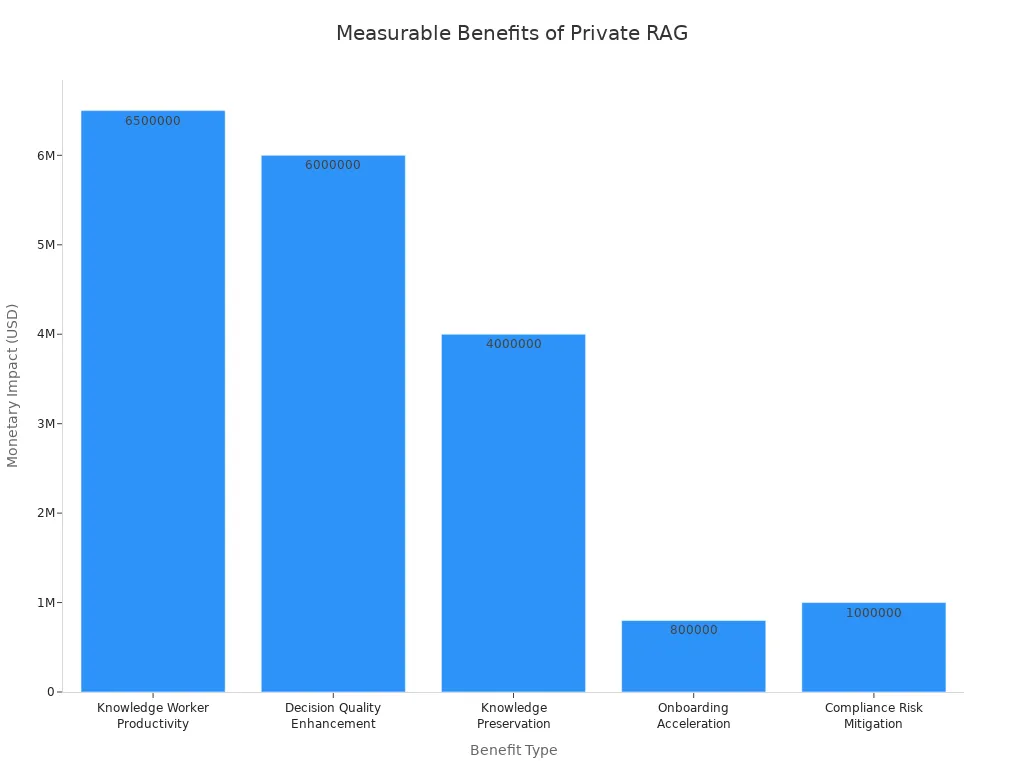
Private RAG brings many benefits to your organization. You keep your knowledge safe and meet compliance needs. You also improve productivity and decision-making. Here is a table that shows the measurable impact of private RAG:
| Benefit Type | Description | Measurable Impact |
|---|---|---|
| Knowledge Worker Productivity | Time reclaimed from searching for information. | $5-8 million annually for 1,000 workers. |
| Decision Quality Enhancement | Reduction in information gaps for critical decisions. | $2-10 million saved per major decision. |
| Knowledge Preservation | Retention of knowledge from departing employees. | $4 million annually for mid-sized firms. |
| Onboarding Acceleration | Faster time-to-productivity for new hires. | $800,000 additional productivity. |
| Compliance Risk Mitigation | Reduction in compliance risk exposure. | $1 million avoided compliance costs. |
You also get stronger security. Private RAG uses methods like contextual encryption and zero-trust architectures. These protect your knowledge and make sure only the right people can access sensitive information.
Enterprise Use Cases
You can use private RAG in many industries and departments. Here are some common examples:
- Legal teams use it to search contracts and legal documents quickly.
- Knowledge management teams break down silos and enable semantic search across all internal knowledge.
- Customer support teams improve response times by connecting support resources and knowledge bases.
- Finance teams use private RAG for risk analysis and compliance checks, keeping sensitive knowledge secure.
Industries leading in private RAG adoption include finance, technology, manufacturing, healthcare, and defense. In 2024, customer support applications made up over 31% of the total RAG market revenue. Over 70% of internal AI knowledge tools now use RAG as their main architecture. With private RAG, you unlock the full value of your knowledge while keeping your data safe.
Prerequisites for Building a RAG Agent
Before you start building your private RAG solution, you need to set up the right accounts, tools, and security measures. These steps help you keep control over your data and ensure safety for your organization.
Accounts and Access
You must have access to several platforms and services. Each one plays a key role in your RAG agent. Here is what you need:
- SharePoint account for storing and organizing documents.
- n8n account for automating workflows.
- Microsoft Graph access for connecting SharePoint with other Microsoft services.
- Azure OpenAI account for generating embeddings and using language models.
- PostgreSQL or Supabase account for storing vectors and enabling semantic search.
- Mistral OCR access for processing scanned documents and images.
- Open WebUI account for building user interfaces.
You should make sure you have admin rights or the correct permissions for each platform. This gives you full control over setup and ongoing management.
Required Tools and Services
You need several tools and integrations to build a strong RAG agent. The table below shows what each tool does:
| Tool/Service | Purpose | Why It Matters for Control and Safety |
|---|---|---|
| SharePoint | Document storage and retrieval | Keeps data organized and secure |
| n8n | Workflow automation | Gives you control over processes |
| Microsoft Graph | API access to Microsoft services | Connects data sources safely |
| Azure OpenAI | Embedding and language models | Ensures data control in AI tasks |
| PostgreSQL/Supabase | Vector database | Enables fast, safe semantic search |
| Mistral OCR | Document preprocessing | Improves data control and accuracy |
| Open WebUI | User interface | Lets you control user access |
Tip: Always review the permissions for each tool. This helps you maintain control and safety throughout your solution.
Security and Compliance
You must protect your data and meet strict standards. This keeps your organization safe and ensures you follow the law. Here are key security and compliance steps:
- Meet standards like SOC 2 Type II, FedRAMP, and Enterprise Key Management.
- Conduct compliance audits to check GDPR and CCPA requirements.
- Use data encryption to protect information at rest and in transit.
- Set up a data governance framework. This covers data minimization and retention timelines.
- Apply privacy-by-design principles. Build safety into every step of your RAG pipeline.
- Automate compliance checks with tools such as OneTrust or TrustArc.
You gain strong data control by following these steps. You keep your data safe and maintain privacy for your users. This approach gives you confidence that your RAG agent meets enterprise safety needs.
SharePoint Setup for AI-Powered Knowledge Retrieval

Setting up SharePoint the right way helps you get the most from your AI-powered knowledge retrieval. You need to organize your content, set permissions, and prepare your documents. These steps make your RAG solution more effective and secure.
Organizing Libraries
You should start by structuring your SharePoint libraries for easy access and search. Good organization helps AI agents find the right information quickly. Here are some best practices:
- Use site collections to group related content.
- Implement content types to classify documents.
- Build taxonomies that reflect your business structure.
- Set metadata standards for all files.
- Follow clear naming conventions for folders and documents.
You can boost content visibility by using all available metadata. Name files based on terms users might search for, such as "Q3 AI impact executive summary." Keep naming consistent for related files. This approach makes it easier for both people and AI to find what they need.
Tip: Organize content using logical site hierarchies and clear folder structures. This reduces confusion and speeds up retrieval.
Permissions and Access
You must control who can see and use your documents. SharePoint gives you tools to manage permissions at different levels. The table below shows best practices for setting permissions and access controls:
| Best Practice | Description |
|---|---|
| Permission-aware access | Content access aligns with existing SharePoint permissions. |
| Document-level access control | Enables fine-grained permissions at the document level for secure access. |
| Ignoring permissions | Restricted content in SharePoint remains restricted through the AI assistant. |
You should always match your AI assistant’s access to your SharePoint permissions. This keeps sensitive information safe and ensures only the right people can view or use certain documents.
Document Preparation
Preparing your documents is a key step for successful AI-powered retrieval. Clean, well-tagged files help the system deliver better answers. Follow these steps:
- Run a ROT Analysis to remove redundant, outdated, or trivial content.
- Preserve important documents like final project reports and up-to-date SOPs.
- Use Microsoft Syntex to auto-tag and summarize files.
- Assign content ownership so each file has a responsible person.
- Apply metadata and tags to improve search accuracy.
- Establish retention policies to manage document lifecycles.
You should also clean up outdated content before starting. Assigning ownership makes it clear who manages each document. Applying metadata and tags helps the AI understand your files better. Retention policies keep your libraries up to date and compliant.
By following these steps, you set a strong foundation for your RAG solution. You make sure your knowledge stays organized, secure, and ready for AI-powered knowledge retrieval.
n8n Workflow: Automating RAG Processes

Building a working RAG workflow starts with setting up your n8n workflow. You use n8n to automate each step in your pipeline. This automation helps you connect SharePoint, process documents, and manage retrieval tasks. You gain control over your automated RAG pipeline and keep your data secure.
n8n Installation
You need to install n8n before you build your RAG workflow. You can run n8n on your own server or use a cloud service. Many organizations choose self-hosting for privacy and compliance. You get full control over your infrastructure and data.
To install n8n, follow these steps:
- Choose your hosting option. You can use Docker, install on a virtual machine, or select a managed cloud service.
- Download the n8n package from the official website.
- Set up your environment. Make sure you have Node.js and Docker installed if you use those options.
- Run the installation command. For Docker, use:
docker run -it --rm \ -p 5678:5678 \ -v ~/.n8n:/home/node/.n8n \ n8nio/n8n - Access the n8n dashboard in your browser. The default port is 5678.
Tip: Host n8n in the EU or on your own infrastructure for added control and compliance.
You now have n8n ready for your pipeline. You can start building your n8n workflow for retrieval and automation.
Connecting to SharePoint API
You connect n8n to SharePoint using the SharePoint API. This step lets your n8n workflow retrieve documents and metadata for your RAG pipeline. You use the HTTP Request node in n8n to interact with SharePoint’s API.
Here is a table that shows key features for secure connection:
| Feature | Description |
|---|---|
| HTTP Request Node | Lets you interact with SharePoint’s API using REST calls. |
| Security Features | Uses encrypted data transfers and secure credential storage. Complies with enterprise security. |
| Hosting Options | Lets you store data in the EU or on your own infrastructure for more control. |
You set up the HTTP Request node to call SharePoint endpoints. You can automate retrieval of files, folders, and metadata. You keep your pipeline secure by using encrypted transfers and safe credential storage.
Note: Always use secure endpoints and check your permissions before connecting n8n to SharePoint.
Your n8n workflow now connects to SharePoint. You can automate document retrieval and build your RAG workflow.
Setting Up Credentials
You must set up credentials in n8n to connect to SharePoint safely. Credentials protect your pipeline and keep your data secure. You have several options for storing API keys and secrets.
Here is a table that shows best practices for credential setup:
| Level | Description |
|---|---|
| 0 | API key pasted into a URL or query parameter. Dangerous. Avoid it. |
| 1 | API key pasted into an HTTP header directly in a node. Still risky. |
| 2 | Use n8n Header Auth credentials. This is the standard. |
| 3 | Use an external secret store or vault. This is the professional approach. |
You should use n8n Header Auth credentials for most pipelines. This method keeps your secrets safe and supports automation. For advanced security, use an external secret store or vault. You protect your retrieval pipeline and meet compliance needs.
Tip: Never paste API keys in URLs or headers directly. Use n8n’s credential manager or a vault.
You now have secure credentials for your n8n workflow. Your pipeline is ready for automated retrieval and RAG tasks.
Document Ingestion and Preprocessing
You need a strong document ingestion and preprocessing pipeline to make your RAG solution work well. This part of the workflow helps you collect, process, and prepare your files for AI-powered search. You can automate these steps to save time and reduce errors.
Automated Retrieval
Automated document ingestion starts with pulling files from SharePoint and other sources. You can use n8n to schedule and manage these tasks. This approach ensures you always have the latest documents ready for analysis. Here are some common methods used in automated retrieval:
| Method Description | Purpose |
|---|---|
| Direct questioning on a vector database of portfolio proxy statements | Embedding proxy statements to retrieve specific governance details. |
| Automated multicompany multivariable extraction | Analyzing multiple companies simultaneously to pull key compensation details. |
You can set up workflows that scan your libraries, pick up new or changed files, and send them through the data ingestion process. This keeps your knowledge base fresh and accurate.
Preprocessing with Mistral OCR
Many organizations store scanned documents, images, or PDFs that contain valuable information. Mistral OCR helps you unlock this data during ingestion. It reads text from images and scanned files, making them searchable and ready for AI analysis. The table below shows how Mistral OCR improves preprocessing:
| Feature | Description |
|---|---|
| Expanding RAG to Multimodal Data | Mistral OCR processes various formats like scanned documents and images, enhancing data sources. |
| Preserving Document Structure | It maintains the relationships between text and images, ensuring context is preserved. |
| Accelerating Knowledge Retrieval | Processes large document repositories quickly, improving efficiency in AI-driven searches. |
| Empowering Industries with AI-Ready Data | Makes complex documents accessible for AI applications across various sectors. |
| Enabling Seamless Integration with AI Pipelines | Structured outputs facilitate easy integration into AI systems. |
You gain more value from your files because Mistral OCR keeps the structure and context of your documents. This step makes your data ingestion pipeline more powerful and flexible.
Handling Multiple File Types
You often work with many file types, such as PDFs, Word documents, and images. A good data ingestion process handles all of them smoothly. You can use an orchestrator workflow to manage file ingestion efficiently. Batch your files into groups for parallel processing. Track each execution with a parent or child record in your database to monitor success or failure. If something goes wrong, an error-handler workflow can retry failed executions.
Follow these steps for each file:
- Load the document (for example, a PDF).
- Split the content into overlapping chunks of about 500 characters.
- Tag each chunk with relevant metadata for better organization and retrieval.
Adding metadata during data ingestion helps you organize and find your files later. Tagging each chunk makes it easier for your AI to search and answer questions. This approach supports large-scale document ingestion and keeps your system running smoothly.
Tip: Always include metadata in your data ingestion pipeline. This step improves search accuracy and makes your knowledge base more useful.
Vectorization and Storage Integration
You unlock the power of your documents by turning them into vectors. This step lets your AI agent find meaning in your data and deliver accurate answers. You use Azure OpenAI to create embeddings, then store these vectors in PostgreSQL or Supabase. You set up semantic search to make retrieval fast and reliable.
Embeddings with Azure OpenAI
You start by breaking your documents into smaller chunks. For example, you split earnings call transcripts into sections that fit the input length of the embedding model. Each chunk goes through Azure OpenAI’s embedding model. The model creates a vector for each chunk. You store these vectors in your database for later retrieval.
- You divide your data into manageable chunks.
- You process each chunk with the embedding model.
- You create vector representations for every chunk.
- You store these vectors in your storage solution.
- You retrieve vectors when you need to answer a query.
This process helps your AI agent understand the meaning behind your documents. You make your knowledge base ready for advanced search.
Storing Vectors in PostgreSQL/Supabase
You need a reliable storage system for your vectors. PostgreSQL and Supabase give you flexible options for storage. You create tables that hold your document content, metadata, and embeddings. You use SQL commands to set up your storage.
| SQL Command | Description |
|---|---|
| CREATE TABLE documents (id BIGSERIAL PRIMARY KEY, content TEXT, metadata JSONB, embedding VECTOR(1536)); | This command creates a table for storing document embeddings, specifying the vector type and dimensions. |
You organize your storage so each document has its own row. You include metadata to help with search and retrieval. You keep your vectors safe and easy to access. You can scale your storage as your knowledge base grows.
Tip: Use clear naming conventions for your storage tables. This makes management easier and improves search performance.
You monitor your storage to ensure data integrity. You back up your storage regularly to prevent loss. You optimize your storage for fast queries.
Semantic Search Setup
You set up semantic search to make your AI agent smarter. You build workflows in n8n that connect your storage to your retrieval pipeline. You follow these steps to enable semantic search:
- Add nodes to fetch your source data from storage.
- Insert a Vector Store node to connect your storage.
- Select the embedding model that matches your storage setup.
- Add a Default Data Loader node to handle data from storage.
- Choose your chunking strategy for storage.
- Configure chunk size and overlap parameters for storage.
- Add metadata to your storage for better search results.
- Create a separate workflow for querying your storage.
- Configure the agent to use your storage.
- Add the vector store as a tool with a description of your storage.
- Set retrieval limits and enable metadata in your storage.
- Make sure you use the same embedding model for both ingestion and storage.
You improve search accuracy by matching your storage setup with your retrieval workflow. You make your AI agent faster and more reliable. You keep your storage organized and ready for future growth.
Note: Always test your storage and search workflows. This ensures your AI agent delivers the best results.
Building a RAG Agent in n8n
Retrieval Pipeline
When you start building a RAG agent in n8n, you create a pipeline that moves your data from SharePoint to your AI system. This pipeline helps your agent find and use the right information for every question. You can follow these steps to set up a strong retrieval pipeline:
- Deploy n8n on a secure server, such as an OVHcloud VPS. This gives you control over your workflows and data.
- Create an Object Storage bucket to hold your documents and processed files.
- Set up a PostgreSQL database with pgvector support. This database stores your document vectors for fast semantic search.
- Connect to AI endpoints, such as OVHcloud AI or Azure OpenAI, for embedding and language model tasks.
You also need to set up credentials in n8n. Add new credentials for S3 storage and PostgreSQL. Use the n8n credential manager to keep your secrets safe. You can use OVHcloud APIs to automate configuration and make your pipeline more reliable.
Your retrieval pipeline scans your SharePoint libraries, pulls new or updated documents, and sends them through preprocessing. The agent splits each file into chunks, tags them with metadata, and creates vector embeddings. These vectors go into your database, ready for fast retrieval. When a user asks a question, the agent searches the vector database, finds the most relevant chunks, and prepares them for the next step.
Tip: Schedule your pipeline to run at regular intervals. This keeps your knowledge base fresh and up to date.
Integrating Language Models
After your agent retrieves the right document chunks, it needs to generate answers. You do this by integrating large language models into your n8n workflow. These models read the retrieved content and create clear, helpful responses.
You can connect your agent to Azure OpenAI or other AI endpoints. Use the HTTP Request node in n8n to send the retrieved chunks and user questions to the language model. The model returns a response that combines your private knowledge with advanced AI reasoning.
This integration turns your agent into a powerful conversational AI tool. Users can ask questions in plain language and get answers based on your organization’s own data. You can also add extra steps, such as summarizing long answers or translating responses for different users.
A simple workflow for integrating language models looks like this:
- Retrieve relevant chunks from your vector database.
- Send the chunks and question to the language model.
- Receive the generated answer.
- Return the answer to the user through your chosen interface.
You can customize this workflow to fit your needs. For example, you can add approval steps, log all queries, or connect to other business tools.
Ensuring Secure Data Flow
Security is critical when building a RAG agent. You must protect your data at every step. Here are important measures you should follow to keep your agent safe:
- Use HTTPS for all communication. This encrypts data between your agent, users, and external services.
- Set up rate limiting. This stops attackers from sending too many requests at once.
- Validate and sanitize all user inputs. This blocks harmful data from entering your system.
- Rotate keys and secrets on a regular schedule. This limits the risk if a secret gets exposed.
- Log and monitor important events. Watch for unusual activity that could signal a problem.
- Use a Web Application Firewall (WAF) to block common attacks.
- Place internal systems behind a DMZ. This adds another layer of protection.
You should also review permissions for every part of your workflow. Only give access to users and systems that need it. Store credentials in n8n’s credential manager or an external vault. Test your security setup often to find and fix any weak spots.
Note: Strong security keeps your agent compliant with enterprise standards and builds trust with your users.
API and Interface Options
When you build a private RAG solution, you need to think about how users will interact with your system. The right API and interface options help you connect your workflows, keep your data secure, and give users a smooth experience. You can use different API integrations, authentication methods, and custom interfaces to meet your organization’s needs.
Open WebUI Integration
Open WebUI gives you a flexible way to connect your RAG agent to users. You can use the API to link your backend workflows with a web-based interface. This setup lets users ask questions, view answers, and interact with your knowledge base in real time. Open WebUI supports custom themes and layouts, so you can match your company’s branding.
You can use the API to send user queries from the web interface to your n8n workflow. The workflow processes the request, retrieves the right information, and sends the answer back through the API. This approach keeps your data flow secure and efficient. You can also use the API to log user activity, track usage, and monitor system health.
Tip: Use the API to build dashboards that show how users interact with your RAG agent. This helps you improve your system over time.
User Authentication
You must secure your API and interfaces to protect your data. Proper authentication and authorization keep your system safe and ensure only the right people can access sensitive information. Here are recommended methods for securing user access to your private RAG interfaces:
- Set up authentication flows for your API and web interfaces. This step enforces accountability and logging.
- Use authorization controls to decide which documents each user can access. You can use document classification, user-document mapping, and metadata tagging.
- Apply standard authorization models such as Role-Based Access Control (RBAC), Attribute-Based Access Control (ABAC), or Relationship-Based Access Control (ReBAC).
- At query time, use pre-query and post-query filtering to make sure users only see documents they are allowed to access.
- Store embeddings securely and use the API to enforce permission filters.
These steps help you prevent risks like Denial of Wallet (DoW) and Denial of Service (DoS). You keep your API endpoints safe and your data protected.
Custom Query Interfaces
You can design custom query interfaces that fit your enterprise needs. These interfaces connect to your backend using the API and give users a simple way to search your knowledge base. You can build features like advanced search, document previews, and compliance logging.
Here is a table that shows important aspects of custom query interfaces:
| Aspect | Description |
|---|---|
| Security | The system treats user input as content only, with filters to block inappropriate outputs. Post-processing checks answers for sensitive patterns. |
| Compliance Logging | The system tags data with classifications and can exclude certain classes from indexing. It follows regulations like GDPR and HIPAA. |
| Customization | You can tailor components for unique document formats and internal tool integration. |
| Data Ownership | All data stays within your organization, avoiding legal and compliance issues from third-party services. |
| Cost Efficiency | Building your own system can save money at scale compared to commercial solutions. |
| Built-in Security Features | Many commercial platforms offer built-in security and compliance certifications. |
| Access Control | The system enforces access control based on user identity and document permissions. |
| Prompt Injection Safeguards | The system sanitizes user input and uses filters to prevent prompt injection attacks. |
You can use the API to connect these features to your backend. The API lets you control access, log activity, and enforce security rules. You can also use the API to add new features as your needs change.
Note: Always test your API endpoints and interfaces for security and performance. This keeps your RAG solution reliable and safe.
Testing and Iteration
Testing and iteration help you build a reliable private RAG solution. You need to check every part of your workflow to make sure your system works as expected. Careful testing lets you catch errors early and improve performance. You can use these steps to guide your process.
End-to-End Testing
End-to-end testing checks your entire pipeline from document ingestion to answer generation. You start by creating test cases that cover common user queries and edge scenarios. You run these tests to see if your RAG agent retrieves the right documents and produces accurate answers.
- Prepare sample documents in SharePoint.
- Set up test queries that reflect real business questions.
- Run your n8n workflow and monitor the results.
- Compare the AI-generated answers with expected outcomes.
Tip: Use a checklist to track which parts of your workflow pass or fail each test. This helps you spot weak areas quickly.
You can automate end-to-end tests using n8n’s scheduling features. Automated tests save time and help you maintain quality as your system grows.
Debugging Workflows
Debugging helps you fix problems in your n8n workflows. You need to check each node and step for errors. If your workflow fails, you can use n8n’s built-in logging and error handling tools.
- Review logs for failed executions.
- Use n8n’s “Execute Node” feature to test nodes one at a time.
- Check input and output data for each node.
- Adjust parameters or credentials if you find mistakes.
Here is a table that shows common issues and solutions:
| Issue | Solution |
|---|---|
| Missing documents | Check SharePoint permissions |
| Failed API calls | Verify credentials and endpoints |
| Incorrect embeddings | Match chunk size and model |
| Slow responses | Optimize database queries |
Note: Always document your fixes. This makes future debugging easier and helps your team learn from past issues.
Performance Tuning
Performance tuning improves speed and reliability. You want your RAG agent to answer questions quickly and handle large volumes of data. You can use these strategies to boost performance:
- Optimize chunk size for embeddings. Smaller chunks improve search accuracy.
- Index your vector database for faster queries.
- Schedule workflows during off-peak hours to reduce load.
- Monitor resource usage with tools like Grafana or Prometheus.
You can set up alerts for slow responses or high error rates. Regular tuning keeps your system efficient and ready for enterprise use.
Tip: Test your system with real-world data and adjust settings based on feedback. Continuous improvement leads to better results.
Testing and iteration give you confidence in your private RAG solution. You build a system that delivers accurate answers, stays secure, and scales with your needs.
Scaling and Customizing Private RAG
Multi-Source Data Integration
You can expand your private RAG solution by connecting more data sources. SharePoint works well as a starting point, but you may want to include other platforms like OneDrive, Teams, or even external databases. Integrating multiple sources helps you build a richer knowledge base and answer more complex questions.
To add new sources, follow these steps:
- Identify the platforms that store important documents or data.
- Set up connectors in n8n for each platform. For example, use the Microsoft Graph API for OneDrive or Teams.
- Map metadata and permissions from each source to your central database.
- Schedule regular syncs to keep your knowledge base up to date.
Tip: Always check the compliance requirements for each data source. Make sure you follow privacy rules and keep sensitive information secure.
Here is a table that shows common sources and their integration methods:
| Data Source | Integration Method | Compliance Consideration |
|---|---|---|
| SharePoint | REST API, n8n connector | Built-in permissions |
| OneDrive | Microsoft Graph API | User-level access controls |
| Teams | Graph API, webhook | Conversation privacy |
| External DB | SQL node in n8n | Data encryption |
Workflow Customization
You can tailor your RAG workflows to fit your organization’s needs. Customization lets you build processes that match your business goals and user preferences. You may want to add approval steps, automate document tagging, or create custom notifications.
Try these customization ideas:
- Add conditional logic to route documents based on type or department.
- Use n8n’s branching nodes to handle different file formats.
- Build custom dashboards for monitoring workflow status.
- Set up alerts for failed document ingestion or compliance issues.
Note: Custom workflows help you adapt to changing business requirements. You can update your pipeline as your organization grows.
Here is a simple code block for a conditional workflow in n8n:
if (documentType === 'contract') {
  // Route to legal team
} else {
  // Route to general knowledge base
}
Maintenance and Upgrades
You need to maintain your private RAG solution to keep it running smoothly. Regular maintenance ensures your workflows stay efficient and your data stays secure. Upgrades help you add new features and improve performance.
Follow these best practices:
- Review workflow logs weekly to spot errors or slowdowns.
- Update connectors and APIs when new versions release.
- Back up your vector database and document storage regularly.
- Test your workflows after every upgrade to catch issues early.
Tip: Schedule maintenance during off-peak hours to minimize disruption. Keep a checklist for each maintenance task.
You can scale your solution by adding more storage, increasing processing power, or integrating new AI models. Maintenance and upgrades keep your RAG system reliable and ready for future growth.
You can unlock secure, enterprise-ready AI by building a private RAG solution with SharePoint and n8n. This approach puts you in control of your data and helps you meet strict compliance standards. Use the blueprint to turn your knowledge into real business value.
Tip: Explore advanced integrations, scale your workflows, and review compliance regularly to keep your solution strong.
FAQ
How do you keep your data private in a RAG solution?
You control access by using SharePoint permissions and secure n8n workflows. Data stays within your organization. Encryption protects files during transfer and storage.
Can you use other Microsoft 365 tools besides SharePoint?
Yes, you can connect OneDrive, Teams, and Outlook using n8n and Microsoft Graph API. This expands your knowledge base and helps you answer more questions.
What skills do you need to build a private RAG agent?
You need basic knowledge of SharePoint, n8n workflow automation, and API integration. Familiarity with databases and AI models helps you customize your solution.
How often should you update your knowledge base?
You should schedule regular syncs. Weekly updates keep your information fresh. Automated workflows in n8n help you manage updates without manual effort.
Is it possible to scale your RAG solution for more users?
You can scale by adding more storage, increasing processing power, and connecting new data sources. n8n lets you automate tasks for larger teams.
What happens if a document fails to process?
n8n logs errors and retries failed tasks. You can set up alerts to notify you. Error-handler workflows help you fix issues quickly.
How do you ensure compliance with privacy laws?
| Step | Action |
|---|---|
| Data governance | Set retention policies |
| Access control | Use role-based permissions |
| Audit logging | Track user activity |
Can you customize the user interface for your RAG agent?
You can build custom dashboards and query screens using Open WebUI. This lets you match your company’s branding and add features your users need.
🎧 Listen to this episode
Want a practical explanation of How to Build Private RAG with SharePoint and n8n? This episode breaks down the topic in clear language and shows why it matters for Microsoft 365, Azure, Power Platform, security, AI, and modern work.
Listen to this episode if you want to:
- Understand the key concepts behind How to Build Private RAG with SharePoint and n8n
- See how it fits into the wider Microsoft technology ecosystem
- Learn where it can create practical value for your organization
You may also enjoy these related M365 FM episodes:
- Private RAG Security: Authorization-Aware Data Retrieval
- Build Audit-Ready Document Management with SharePoint and Purview
- Build Traceable Copilots with Agentic RAG on Azure
- Speed SharePoint with the Microsoft 365 Private CDN
- Build Actionable Modern SharePoint Pages with SPFx
Discover more practical Microsoft conversations on M365 FM.
Last reviewed: July 2026.
Who Should Listen
This episode is for Microsoft administrators, architects, developers, security professionals, and business leaders who need a practical foundation before making implementation, operations, or governance decisions.
🎧 You Should Also Listen To
- Microsoft Teams — A strongly related next step for extending this topic.
- SharePoint Premium — A strongly related next step for extending this topic.
- OneDrive Sync — A strongly related next step for extending this topic.

Microsoft MVP | Host of M365.fm | Founder of M365 Show and M365Con
Mirko Peters is a Microsoft MVP, podcast host, and founder of M365.fm, M365 Show, and M365Con. His work connects Microsoft practitioners through podcast interviews, livestreams, and community events.
At M365.fm, Mirko hosts conversations with Microsoft MVPs, product experts, architects, and community contributors. Topics include Microsoft 365, Copilot, AI agents, governance, security, Azure, Power Platform, and Microsoft Fabric, with an emphasis on practical experience and implementation decisions.
M365.fm is the podcast and learning platform. M365 Show brings experts together for livestreams, while M365Con provides an online conference setting for community learning.
Official website: Mirko Peters (https://www.mirkopeters.com/). Recognition: Mirko Peters — Microsoft MVP profile (https://mvp.microsoft.com/de-DE/mvp/profile/9b0ca797-db5a-493a-a845-8b9158046cf5). Connect on LinkedIn (https://www.linkedin.com/in/m365showpodcast/).