


 Apple Podcasts
 Spotify
 Youtube Music
 Spreaker
 Podchaser
 Amazon Music
 Designing an Inclusive Hybrid Workplace with Onyinye Madubuko [MVP]
![Designing an Inclusive Hybrid Workplace with Onyinye Madubuko [MVP]](https://d3wo5wojvuv7l.cloudfront.net/t_rss_itunes_square_1400/images.spreaker.com/original/64563af8d97e4497262e074770b291b0.jpg "Designing an Inclusive Hybrid Workplace with Onyinye Madubuko [MVP]")
In this episode of m365.fm, Microsoft MVP Onyinye Madubuko shares her insights on designing effective hybrid workplaces and how organizations can create modern, inclusive, and collaborative work environments. The discussion explores the rapid shift to hybrid work, the importance of employee experience, and how businesses can use Microsoft 365 technologies like Microsoft Teams, Viva, and Teams Rooms to improve communication and productivity.
Onyinye explains how successful hybrid workplace strategies go beyond technology and require thoughtful planning around accessibility, collaboration, meeting room design, and organizational culture. She highlights the challenges companies face when balancing remote and in-office work while ensuring employees stay engaged and connected.
The episode also covers practical approaches to digital transformation, user adoption, and creating flexible workspaces that support different work styles. Onyinye shares real-world experiences from helping organizations modernize their workplace environments and emphasizes the importance of inclusivity and accessibility in hybrid collaboration.
Listeners will gain valuable insights into the future of work, best practices for hybrid collaboration, and how modern workplace tools can help teams remain productive, connected, and empowered in today’s evolving work environment.
Quick answer: inclusive hybrid workplace design with Microsoft 365 is covered in this M365 FM episode with a practical focus on how it works, where it fits, and the architecture, security, governance, or operational choices that matter in real Microsoft environments.
Picture this: You join a team meeting from your kitchen, while your coworker sits in a quiet office pod. You both want to share ideas and get things done—fast. You can make your hybrid workplace more collaborative and flexible by taking small, practical steps right now. With the right technology, like Microsoft 365, you boost teamwork and give everyone more freedom. Check out how the latest trends shape work:
| Evidence Description | Impact on Collaboration and Flexibility |
|---|---|
| Use of collaboration analytics | Enhances productivity and employee engagement in hybrid work settings |
| Regular check-ins with managers | Leads to a 30% increase in engagement scores for hybrid workers |
| Shift in employee expectations | Employees demand more independence and flexibility, prompting management to adapt their roles to be more supportive and coaching-oriented |
Think about how your space and your tools work together—both matter for your best work.
Key Takeaways
- Create a clear collaboration plan to boost team positivity and productivity.
- Hold regular check-ins to keep everyone connected and on track.
- Set guidelines for availability to ensure smooth communication.
- Use technology like Microsoft 365 to simplify teamwork and document sharing.
- Encourage virtual team-building activities to foster inclusion among remote workers.
- Collect feedback frequently to understand team needs and improve collaboration.
- Design your workspace with zones for focus, teamwork, and relaxation to enhance productivity.
- Implement flexible schedules to help employees balance work and personal life.
Key Strategies for the Hybrid Workplace
Immediate Actions for Teams
You can boost your team's success in a hybrid setting by taking a few simple steps right away. Many teams skip the basics, but these actions make a big difference:
- Create a clear collaboration plan. Almost half of hybrid workers say their teams do not have one, but teams with a plan feel more positive about their workplace.
- Set up regular team check-ins. These meetings help everyone stay connected and on track.
- Agree on guidelines for when people should be available. This keeps communication smooth and avoids confusion.
- Use technology to make teamwork easier. Tools like Microsoft 365 help you share documents, chat, and meet from anywhere.
- Encourage virtual team-building activities. These can help everyone feel included, even if you work from different places.
- Collect feedback often. Try quick pulse surveys or monthly open forums to hear what your team needs.
- Focus on results, not just hours spent online or in the office.
- Train managers to lead teams that work in different locations.
- Mix in-person and virtual activities to keep everyone engaged.
- Set flexible rules, but make sure some guidelines are clear and non-negotiable.
Tip: When you set up a collaboration plan and check in often, your team is more likely to feel connected and productive.
Why Collaboration and Flexibility Matter
You might wonder why these ideas matter so much. The answer is simple: they help everyone do their best work and feel happier at work. When you combine strong collaboration with flexible ways of working, you see big results.
| Statistic | Percentage |
|---|---|
| CEOs reporting improved productivity | 75% |
| Hybrid workers feeling more productive | 74% |
| Workers feeling more motivated | 76% |
| Employees reporting increased job satisfaction | 85% |
| Employees considering hybrid work a leading benefit | 88% |
| Employees only considering hybrid roles | 50% |
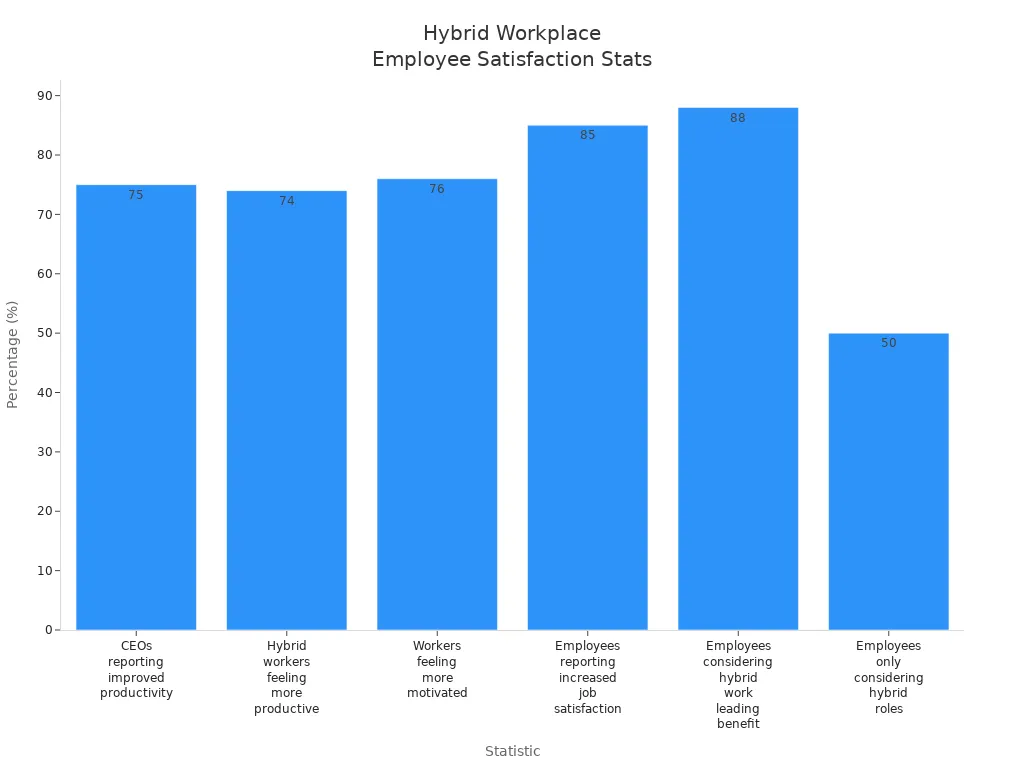
When you look at these numbers, you see that most people feel more productive and satisfied in a hybrid workplace. Many employees now expect flexibility and independence. If you give them these options, you help your team stay motivated and loyal.
Collaboration also boosts morale and engagement. When you work well together, you solve problems faster and make better decisions. Digital tools help you stay connected, but you still need clear plans and regular check-ins to avoid miscommunication.
Managers play a big role, too. They need to support both in-office and remote workers. When leaders use real-time data and feedback, they can make better choices for the whole team.
Note: The best hybrid teams use both smart technology and strong teamwork to reach their goals.
Hybrid Workplace Design

Creating an effective hybrid office design means thinking about both remote and in-office employees. You want everyone to feel included, focused, and ready to collaborate. Let’s break down how you can shape your space for every work style.
Zones for Focus and Collaboration
You need different areas for different tasks. Smart hybrid office design uses zones to support both deep focus and teamwork.
Quiet Work Areas
Sometimes, you just need to block out the noise and get things done. Quiet zones help you concentrate without distractions. These spaces often use soundproofing and acoustic panels to keep things peaceful. You might find private booths or small rooms where you can focus on important projects or calls.
Strategic office layout design directly impacts employee productivity, workflow efficiency, and workplace satisfaction.
Team Spaces
When it’s time to brainstorm or work together, team spaces make it easy. These areas use flexible and modular furniture so you can rearrange them for group meetings or quick huddles. Collaboration zones near team clusters encourage spontaneous discussions and help you solve problems faster.
True collaboration thrives when people can come together easily without disrupting others. Smart office layouts recognize that collaboration is situational.
Social Zones
Don’t forget about places to relax and recharge. Social zones give you a spot to take a break, chat with coworkers, or have informal meetings. These areas support well-being and help you build stronger connections with your team.
Smart layouts create gradients of privacy rather than a single dominant model, addressing the challenge of balancing focus with accessibility.
Inclusive Meeting Spaces
Hybrid office design should make meetings fair for everyone, whether you join from home or the office. You want every voice to count.
Equitable Access
Check out this table for features that make meeting spaces inclusive:
| Feature | Description |
|---|---|
| Audio Clarity | Advanced microphones and speakers help everyone hear clearly. |
| Visual Engagement | Smart whiteboards and displays let all participants see and share ideas in real time. |
| Technology Integration | Platforms like Microsoft Teams offer noise suppression and live transcription. |
| Interactivity | Tools like breakout rooms and smart cameras keep remote attendees engaged and visible. |
Virtual and Physical Integration
Blending virtual and physical meeting spaces gives you more flexibility. You can join from anywhere and still feel part of the team. This approach supports different needs and keeps everyone engaged, using features like polls and breakout sessions to boost participation.
- Integrating virtual and physical meeting spaces allows for greater flexibility and accessibility.
- It accommodates diverse participant preferences and needs, enhancing overall engagement.
- The hybrid approach promotes interaction through various methods such as breakout sessions and polls.
Workspace Personalization
Personal touches matter in hybrid office design. When you can adjust your workspace, you feel more comfortable and productive.
Adjustable Layouts
Arrange your desk or area to fit your work style. Use task-based layouts, add plants for a fresh vibe, or control your lighting for better focus. Modular furniture lets you switch between solo work and group tasks with ease.
Desk Booking Systems
In a hybrid office, you might not have the same desk every day. Desk booking systems help you reserve a spot that fits your needs, whether you want a quiet corner or a spot near your team. This flexibility supports both focus and collaboration.
- Employees who customize their workspaces feel a sense of ownership, leading to increased job satisfaction.
- Personalized workspaces enhance productivity by allowing employees to create a comfortable environment that minimizes distractions.
- Personalization fosters creativity, inspiring innovative thinking and problem-solving.
Companies with highly engaged workforces outperform their peers by 147% in earnings per share (Deloitte).
A thoughtful hybrid office design brings together zones for focus, collaboration, and relaxation. It uses technology to connect everyone and lets you personalize your space. When you design with both remote and in-office needs in mind, you create effective hybrid workspaces where everyone can do their best work.
Flexible Policies and Office Layouts
You want your hybrid workplace to feel open and adaptable. Flexible policies and smart office design help you create a space where everyone can thrive, whether they work from home or in the office.
Flexible Schedules
Flexible schedules give you more control over your day. You can balance work and life, reduce stress, and boost motivation.
Core vs. Flexible Hours
Some companies set core hours when everyone should be available. Outside those hours, you can choose when to work. This approach keeps meetings easy to schedule and lets you handle personal tasks when needed.
| Schedule Type | Description |
|---|---|
| Fixed hybrid schedules | Predetermined days for in-office and remote work (like three days onsite). |
| Flexible hybrid schedules | You pick your work schedule based on your needs and job requirements. |
Tip: Clear core hours help teams stay connected, while flexible hours let you manage your own time.
Asynchronous Work
Asynchronous work means you don’t have to be online at the same time as your teammates. You can reply to messages or finish tasks when it suits you. This style works well for remote work and supports focused work.
- Centralized communication using platforms like Microsoft Teams keeps everyone in the loop.
- Regular video meetings simulate in-person collaboration.
- Clear response expectations respect individual work hours.
Flexible schedules enhance productivity and well-being. You feel less stressed and more satisfied when you can choose your hours and location. Gallup research shows hybrid schedules improve employee well-being.
Adaptable Layouts
Office design matters. You need spaces that change with your needs. Adaptable layouts make your workplace more dynamic and efficient.
Modular Furniture
Modular furniture lets you rearrange your workspace quickly. You can create flexible workstations for solo tasks or group projects. Teams expand or shrink without needing a full redesign.
| Evidence | Description |
|---|---|
| Modular Furniture Systems | Reconfigure as teams grow, costing less than complete redesigns. |
| Moveable Walls | Change spaces within hours to fit project needs. |
| Lightweight Furniture | Rearrange workspaces easily for different activities. |
- Invest in adaptable furniture for both collaborative and private needs.
- Movable partitions and adjustable desks empower you to customize your space.
- Modular elements maximize creativity and efficiency.
Multi-use Rooms
Multi-use rooms serve many purposes. Conference rooms can become training spaces. Break areas host informal meetings during off-peak hours. Reserve flexible space for collaboration or focused work.
- Flexible space transforms into meeting rooms or collaborative zones as needed.
- Efficient meeting spaces support team-building activities.
- Flexible workspace options optimize space and cost.
Clear Hybrid Guidelines
Clear guidelines keep everyone on the same page. You know what’s expected, whether you work remotely or in the office.
Remote and In-Office Protocols
Define hybrid work arrangements, including core hours and flexibility limits. State acceptable remote work locations and workspace standards. Set safety and confidentiality measures for remote work.
- Outline performance management metrics and accountability measures.
- Address legal compliance, like workers’ compensation and tax rules.
- Implement security protocols to protect confidential information.
Communication Standards
Set unambiguous communication protocols and technology requirements. Use platforms like Microsoft Teams for centralized communication. Specify tools and expectations for responsiveness.
- Encourage boundary setting between work and personal time.
- Provide wellness initiatives, like stress management workshops.
- Conduct regular check-ins to gauge job satisfaction.
Note: Clear hybrid guidelines empower you to balance personal and professional commitments. They attract top talent and save time by reducing commute hours.
A well-designed hybrid workplace uses flexible schedules, adaptable layouts, and clear guidelines. You get more control, better well-being, and a space that fits your needs.
Technology for Hybrid Collaboration
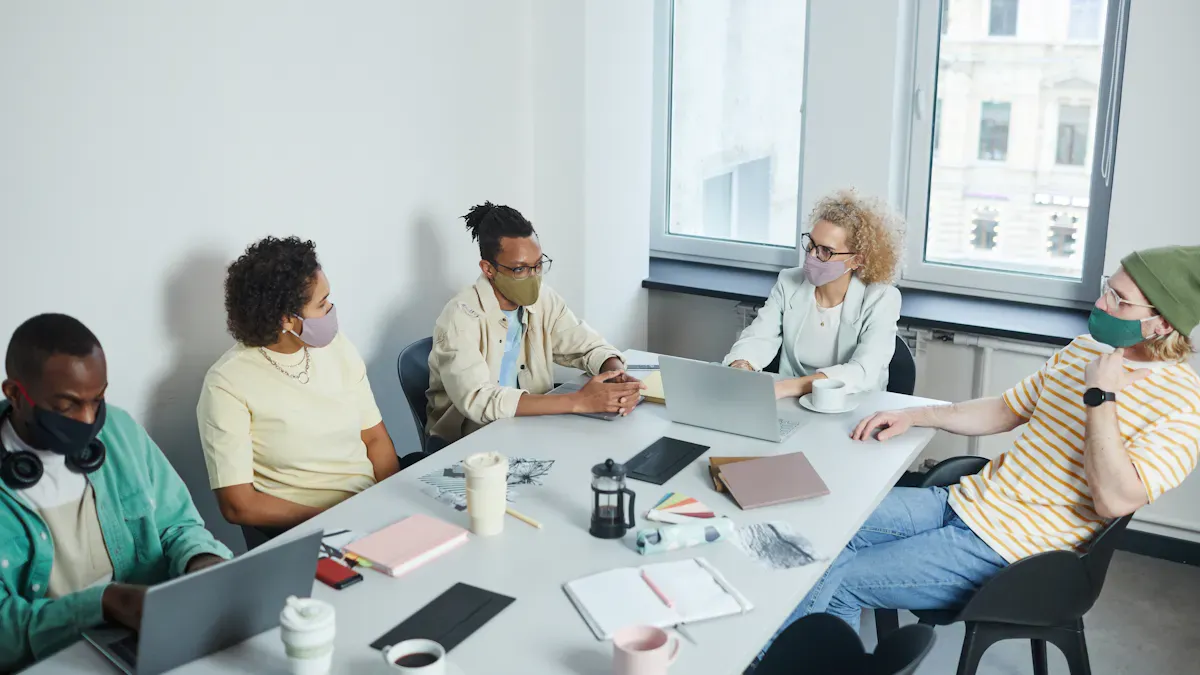
You want your hybrid workplace to run smoothly. The right technology makes this possible. With smart tools, you can connect, share, and get work done—no matter where you are. Let’s look at how you can use technology to boost collaboration and make every meeting count.
Collaboration Tools
Video Meetings
Video meetings help you see and hear your team, even if you work from different places. Microsoft Teams lets you join with one click. Smart camera technology makes sure everyone feels included. You can see faces clearly and avoid the “bowling alley” view. This design helps remote workers feel like they’re in the room.
Document Sharing
Sharing files should be easy. Microsoft 365 gives you cloud storage with OneDrive and SharePoint. You can edit documents together in real time. No more lost files or confusing email threads. Everyone stays on the same page.
Project Management
You need to keep track of tasks and deadlines. Microsoft Teams and tools like Planner help you organize projects. You can assign work, set due dates, and check progress. This design keeps your team focused and reduces stress.
Here’s how Microsoft Teams and Copilot help your team:
| Feature/Benefit | Description |
|---|---|
| Automating routine tasks | Reduces time spent on repetitive activities, letting you focus on important work. |
| Streamlining communication | Makes messages clear and avoids confusion. |
| Real-time insights | Gives you instant data during meetings to help you make decisions. |
| AI integration | Helps manage meetings, organize files, and track responses. |
| Culture of clarity | Shows your team that their time matters, which builds loyalty. |
| Competitive advantage | Teams using these tools often outperform others in hybrid work environments. |
Integrating Digital and Physical Work
Smart Meeting Rooms
Technology-integrated meeting spaces use smart cameras and microphones. These tools let everyone join in, whether they’re at home or in the office. You get clear sound and video. This design removes barriers and helps everyone share ideas.
Digital Whiteboards
Digital whiteboards let you draw, write, and brainstorm together. You can add notes in real time. Both in-person and remote team members can join. This design makes sure every voice gets heard.
- Smart meeting rooms and digital whiteboards help everyone feel connected.
- Teams that use these tools report higher job satisfaction and better results.
Accessibility and Training
Tool Training
You want everyone to use new tools with confidence. Start with simple training. Use peer learning, one-on-one sessions, and AI-powered demos. Make sure technical support is ready to help. This design reduces stress for new hires.
Device Compatibility
Your tools should work on any device. Microsoft 365 supports laptops, tablets, and phones. Easy-to-use software helps everyone join meetings and share files. When technology is accessible, more people join in and feel happy at work.
Tip: Make sure everyone gets equal access to learning and growth, no matter where they work.
Fostering Belonging and Connection
Building a sense of belonging in your hybrid workplace takes more than just good technology. You need to create an environment where everyone feels seen, heard, and valued—no matter where they work.
Inclusive Culture
A strong, inclusive culture helps everyone feel like part of the team. You can make this happen by focusing on regular communication and team-building activities. When you check in often and celebrate wins together, you help remote employees feel connected and valued.
Team Check-Ins
Frequent team check-ins keep everyone in the loop. These meetings give you a chance to share updates, ask questions, and support each other. Try using video conferencing tools to include everyone, whether they’re in the office or working from home. You can also set up hybrid collaboration spaces for in-person brainstorming and discussions. When you encourage knowledge sharing, you create a more collaborative environment.
Celebrating Success
Don’t let achievements go unnoticed. Celebrate both big and small wins as a team. Shout-outs during meetings, digital badges, or a quick message in your team chat can make a big difference. When you recognize effort, you boost morale and help everyone feel appreciated.
Employees who feel valued and supported are more likely to stay engaged and productive. A positive, inclusive culture also reduces turnover and supports better mental health outcomes.
| Evidence Type | Description |
|---|---|
| Enhanced employee engagement | Employees who feel valued and supported are more likely to be engaged in their work, leading to higher productivity and creativity. |
| Improved retention | A positive, inclusive culture reduces turnover by fostering loyalty and satisfaction among employees. |
| Better mental health outcomes | Inclusive environments help mitigate stress and burnout by promoting collaboration, support, and open communication. |
| Stronger team dynamics | Cultures that prioritize respect and inclusivity enhance teamwork and trust, leading to more effective collaboration. |
| Increased profitability | Organizations with strong workplace cultures experience higher levels of performance, as engaged and satisfied employees are more committed to achieving company goals. |
Employee Wellbeing
You can’t have a great hybrid team without focusing on health and wellness considerations. Many people find it hard to unplug from work at the end of the day. Others feel lonely or burned out, especially when working remotely.
- A 2021 survey found that 27% of remote workers struggle to disconnect after work.
- Nearly 75% of workers have experienced burnout, and 40% say it got worse during the pandemic.
- Over 60% of employees reported feeling lonely at work, a number that rises with hybrid and remote models.
- Almost half of workers would give up part of their salary for flexible working hours.
Mental Health Support
Make mental health a core part of your workplace, not just an afterthought. Encourage your team to take mental health breaks or days off. Trust your employees to manage their own schedules. Some people might start early and finish by mid-afternoon, while others need breaks for family. This flexibility helps everyone stay productive and healthy.
Flexible Benefits
Offer benefits that support work-life balance, like wellness programs and flexible hours. When you give people the freedom to choose what works best for them, you help reduce stress and improve satisfaction.
When you prioritize mental health and flexibility, you build resilience and loyalty in your team.
Onboarding in Hybrid Teams
A smooth onboarding process helps new hires feel welcome and ready to contribute. Prepare access credentials and equipment before their first day. Host icebreaker sessions so new team members can connect right away.
- Schedule regular one-on-one check-ins to answer questions and build relationships.
- Run virtual training sessions to introduce company culture.
- Assign a mentor or onboarding buddy to guide new hires.
- Encourage socialization to help everyone feel like they belong.
Hybrid Onboarding
Hybrid onboarding means blending digital and in-person experiences. Make sure new hires have everything they need, from equipment to clear instructions. Use video calls and chat tools to keep communication open.
Mentorship Programs
Mentorship programs help new hires grow and feel included. Design these programs with input from your team, especially underrepresented groups. Set up regular check-ins and clear expectations. Mentorship boosts engagement, supports professional development, and helps everyone feel part of the team.
When you focus on belonging, you create a hybrid workplace where everyone can thrive.
Encouraging Interaction in Hybrid Teams
You want your team to feel connected, even when you work in different places. Interaction helps you build trust, spark new ideas, and keep everyone engaged. Let’s explore how you can encourage both spontaneous and structured connections in your hybrid workplace.
Spontaneous Connections
Sometimes, the best ideas come from casual chats. You can create spaces for these moments, even if your team works remotely.
Virtual Watercoolers
Set up a virtual watercooler using Microsoft Teams or another chat tool. You can drop in for quick conversations, share funny stories, or ask about weekend plans. These spaces help you feel like you’re part of the team, no matter where you work.
- Start a daily “coffee chat” channel.
- Share photos or memes to break the ice.
- Ask random questions to spark conversation.
Tip: Virtual watercoolers make remote work feel less lonely and more fun.
Casual Gatherings
Host casual gatherings online or in person. You might plan a lunch-and-learn, a game session, or a Friday afternoon hangout. These events let you relax and connect with coworkers outside of work tasks.
| Gathering Type | Purpose | Example Activity |
|---|---|---|
| Online Hangouts | Build team spirit | Trivia games |
| In-person Meetups | Strengthen relationships | Pizza lunch |
| Hybrid Events | Include everyone | Virtual escape room |
Structured Collaboration
You need planned sessions to solve problems and share ideas. Structured collaboration keeps your team focused and productive.
Brainstorming Sessions
Schedule regular brainstorming sessions. Use digital whiteboards to collect ideas from everyone. You can vote on the best suggestions and turn them into action steps.
- Invite all team members to join.
- Set a clear goal for each session.
- Use polls to pick top ideas.
Cross-Team Projects
Work with other teams to tackle big projects. You can share skills, learn new things, and build stronger connections across your company. Cross-team projects bring fresh perspectives and help you grow.
Note: Structured collaboration helps you reach goals faster and keeps everyone involved.
Feedback and Improvement
You want your team to keep getting better. Feedback lets you see what works and what needs to change.
Surveys and Forums
Send out quick surveys or set up forums for open discussion. You can ask about meeting formats, work tools, or team culture. Honest feedback helps you make smart changes.
- Use Microsoft Forms for easy surveys.
- Create a feedback channel in Teams.
- Review responses together.
Iterative Practices
Try new ways of working and adjust as you go. You can set regular check-ins to review progress and tweak your approach. Iterative practices keep your hybrid team flexible and ready for anything.
🚀 Continuous improvement makes your team stronger and more adaptable.
You can build a vibrant hybrid workplace by mixing spontaneous chats, structured sessions, and regular feedback. These steps help your team stay connected, creative, and ready to succeed.
You can build a collaborative and flexible hybrid workplace by mixing smart technology, clear guidelines, and inclusive design. Try these steps in your hybrid office:
- Set up zones for focus and teamwork.
- Use tools that connect everyone.
- Personalize your workspace.
Start with one new idea today. Keep improving your hybrid setup. Your team will thank you!
FAQ
How do you make hybrid meetings more inclusive?
You can make every meeting inclusive by using video, clear agendas, and tools like Microsoft Teams. Always invite remote team members to speak. Use features like live captions and chat to help everyone join the conversation.
What’s the best way to schedule a hybrid meeting?
Pick a time that works for everyone, no matter where they work. Use shared calendars and send invites early. Try to rotate meeting times if your team is in different time zones.
How can you keep remote workers engaged during a meeting?
Ask questions often. Use polls or chat to get feedback. Share your screen and encourage everyone to turn on their cameras. A good meeting keeps everyone involved, not just those in the office.
What technology helps hybrid meetings run smoothly?
Smart cameras, microphones, and platforms like Microsoft Teams make a big difference. Digital whiteboards let everyone share ideas. Test your tech before the meeting to avoid surprises.
How do you handle meeting fatigue in a hybrid workplace?
Keep meetings short and focused. Set clear goals and only invite people who need to be there. Use tools like Microsoft Viva Insights to track your meeting time and take breaks when needed.
Should you record hybrid meetings?
Yes, recording meetings helps team members who can’t attend. Share the recording and notes afterward. This way, everyone stays updated, even if they miss the meeting.
How do you decide if a meeting should be in-person or virtual?
Think about the goal. If you need to brainstorm or build team spirit, an in-person meeting works best. For quick updates or when people work from different places, a virtual meeting saves time.
🎧 Listen to this episode
Want a practical explanation of Designing an Inclusive Hybrid Workplace? This episode breaks down the topic in clear language and shows why it matters for Microsoft 365, Azure, Power Platform, security, AI, and modern work.
Listen to this episode if you want to:
- Understand the key concepts behind Designing an Inclusive Hybrid Workplace
- See how it fits into the wider Microsoft technology ecosystem
- Learn where it can create practical value for your organization
You may also enjoy these related M365 FM episodes:
- High-Stakes Hybrid Events with Microsoft Teams and Mesh
- Why High Performers Burn Out from Workplace Isolation
- Public vs Hybrid vs Multi-Cloud Azure Architecture
- Run Hybrid Quantum Jobs in Azure with Python and QAOA
- Unify Hybrid Security with Microsoft Defender XDR
Discover more practical Microsoft conversations on M365 FM.
Last reviewed: July 2026.
Who Should Listen
This episode is for Microsoft administrators, architects, developers, security professionals, and business leaders who need a practical foundation before making implementation, operations, or governance decisions.
🎧 You Should Also Listen To
- AI Agents — A strongly related next step for extending this topic.
- Power Platform — A strongly related next step for extending this topic.
- Microsoft Teams — A strongly related next step for extending this topic.
Official Microsoft MVP profile: Onyinye Madubuko on Microsoft MVP
🚀 Want to be part of m365.fm?
Then stop just listening… and start showing up.
👉 Connect with me on LinkedIn and let’s make something happen:
- 🎙️ Be a podcast guest and share your story
- 🎧 Host your own episode (yes, seriously)
- 💡 Pitch topics the community actually wants to hear
- 🌍 Build your personal brand in the Microsoft 365 space
This isn’t just a podcast — it’s a platform for people who take action.
🔥 Most people wait. The best ones don’t.
👉 Connect with me on LinkedIn and send me a message:
"I want in"
Let’s build something awesome 👊
1
00:00:00,000 --> 00:00:04,600
Welcome back to another edition of the NC65 podcast.
2
00:00:04,600 --> 00:00:07,760
Today we are diving into the future of modern workplaces,
3
00:00:07,760 --> 00:00:10,640
hybrid color variation and a iPod productivity,
4
00:00:10,640 --> 00:00:16,400
with the fantastic idea, "Do Google IO by Prologs is right?"
5
00:00:16,400 --> 00:00:18,160
Yeah, you think.
6
00:00:18,160 --> 00:00:23,400
She is a expert IT professionals specialized in
7
00:00:23,400 --> 00:00:27,240
digital workplaces, transformations through Microsoft technologies.
8
00:00:27,240 --> 00:00:32,760
She has led multiple modern works based projects across various industries,
9
00:00:32,760 --> 00:00:35,160
helping organization improve collaboration,
10
00:00:35,160 --> 00:00:40,760
communication and productivity using Microsoft tools like Microsoft Teams,
11
00:00:40,760 --> 00:00:44,600
Viva Insights and Microsoft 365 co-pilot.
12
00:00:44,600 --> 00:00:49,080
She is also passionate about innovation,
13
00:00:49,080 --> 00:00:52,520
technical research and investing aid studies,
14
00:00:52,520 --> 00:00:56,680
contribute to the EIA journal and conference,
15
00:00:56,680 --> 00:00:58,360
public along the way.
16
00:00:58,360 --> 00:01:02,440
In this episode, we will explore how organizations can redesign
17
00:01:02,440 --> 00:01:05,960
meeting spaces for hybrid work, improve employee experience,
18
00:01:05,960 --> 00:01:09,640
and prepare for the next wave of II-driven collaborations
19
00:01:09,640 --> 00:01:11,880
and Microsoft 365.
20
00:01:11,880 --> 00:01:14,440
So really welcome to the show.
21
00:01:14,440 --> 00:01:17,240
Thank you, Michael. I'm happy to be here.
22
00:01:17,240 --> 00:01:19,480
Thank you for having me.
23
00:01:19,480 --> 00:01:22,040
I'm very, very thankful for the people
24
00:01:22,040 --> 00:01:29,000
you let's not know you can you introduce yourself and tell us about your journey
25
00:01:29,000 --> 00:01:33,880
into IT and especially in the Microsoft ecosystem.
26
00:01:33,880 --> 00:01:36,360
Okay, so my name is Wynye Ma, the WCOO.
27
00:01:36,360 --> 00:01:39,480
I'm a trusted advisor and transformation expert
28
00:01:39,480 --> 00:01:42,440
regarding modern workplaces for organization.
29
00:01:42,440 --> 00:01:48,600
And I've been in the IT industry for almost 14, 15 years now,
30
00:01:48,600 --> 00:01:52,600
and my journey has been helping organization transform digitally.
31
00:01:52,600 --> 00:01:56,040
A lot of organizations have licenses,
32
00:01:56,040 --> 00:02:00,680
tools and services, but they are not really utilizing the benefits and
33
00:02:00,680 --> 00:02:03,080
features of this services that they have.
34
00:02:03,080 --> 00:02:07,480
So my role is coming in to strategically help them
35
00:02:07,480 --> 00:02:11,720
redesign their workspace, redesign the way they work,
36
00:02:11,720 --> 00:02:15,400
the tools and activities that they do also help the business processes
37
00:02:15,400 --> 00:02:16,680
and work flow.
38
00:02:16,680 --> 00:02:19,560
And this has really been ongoing,
39
00:02:19,560 --> 00:02:22,840
putting across various Microsoft ecosystem,
40
00:02:22,840 --> 00:02:24,680
Microsoft services and ecosystem.
41
00:02:24,680 --> 00:02:33,400
So basically it's just helping organization transform digitally.
42
00:02:33,400 --> 00:02:39,640
So I'm also a Microsoft 365 MVP and also a co-organizer of Microsoft 365
43
00:02:39,640 --> 00:02:42,440
Dublin user group. I'm also passionate about
44
00:02:42,440 --> 00:02:45,640
volunteering, making impacts in the lives of people.
45
00:02:45,640 --> 00:02:49,480
I have this mantra of living people, living circumstances
46
00:02:49,480 --> 00:02:54,920
better than where I found them. I'm also helping women, ladies,
47
00:02:54,920 --> 00:02:59,000
girls stay in the STEM career path.
48
00:02:59,000 --> 00:03:04,440
So cutting across ladies or young girls in school who are yet to
49
00:03:04,440 --> 00:03:10,120
find their paths on STEM. When I talk about STEM, I mean science, technology,
50
00:03:10,120 --> 00:03:14,440
energy and the likes, helping them transform their spirit of
51
00:03:14,440 --> 00:03:20,280
work. When we look at the workplace when it comes to
52
00:03:20,280 --> 00:03:26,440
this area, the rate of women is quite few. So my job is helping to get more
53
00:03:26,440 --> 00:03:31,080
women to step into this role. And also women who are
54
00:03:31,080 --> 00:03:33,080
already in this role, we could find out that
55
00:03:33,080 --> 00:03:38,600
circumstances could make or relate to women, I'm not staying in this role for too long,
56
00:03:38,600 --> 00:03:43,320
we could look at motherhood, taking care of someone and eventually women leave
57
00:03:43,320 --> 00:03:45,720
the spot. So my job is also helping women to stoop
58
00:03:45,720 --> 00:03:48,840
candy on their feet, hold onto the spot irrespective of the
59
00:03:48,840 --> 00:03:52,920
fissing of their life. So I think that's basically about me.
60
00:03:52,920 --> 00:03:56,840
Yeah, that's amazing and we hear your passion
61
00:03:56,840 --> 00:04:01,960
about all and I also think that's really great to get
62
00:04:01,960 --> 00:04:06,760
male women into tech. So that's a good mission. But what
63
00:04:06,760 --> 00:04:14,360
only attract you to the modern workspace topic?
64
00:04:14,360 --> 00:04:19,400
So for me, coming from the background, I studied engineering, electrical,
65
00:04:19,400 --> 00:04:23,240
electronics engineering and my focus was on communication
66
00:04:23,240 --> 00:04:27,320
perspectives. I also had my master's in mobile and
67
00:04:27,320 --> 00:04:31,080
satellites communications whereby looking into
68
00:04:31,080 --> 00:04:35,000
communication, when I talk about communication, I'm looking at messaging,
69
00:04:35,000 --> 00:04:40,120
voice and the life. So my passion from what I studied pushed me into the modern
70
00:04:40,120 --> 00:04:43,240
workplace, right? So that would be a bit
71
00:04:43,240 --> 00:04:48,040
specialized. And for me, I had the opportunity to leverage on
72
00:04:48,040 --> 00:04:53,720
Microsoft's platform, early enough in career, going back with the
73
00:04:53,720 --> 00:04:58,200
likes of length and to Skype for business, into Microsoft, things right now.
74
00:04:58,200 --> 00:05:03,960
So for me, it's all about, I would say, came from what I studied and the opportunities
75
00:05:03,960 --> 00:05:09,640
that were placed in front of me during internship when I started working.
76
00:05:09,640 --> 00:05:14,920
That's better than the law for modern workplace and my passion. So I've been
77
00:05:14,920 --> 00:05:20,280
growing into this, getting to know innovations around this, helping people as
78
00:05:20,280 --> 00:05:24,680
well, whatever I learn as well teaching people or tutoring people. So
79
00:05:24,680 --> 00:05:29,960
that would be basically my question, I would say in summary, from what I studied
80
00:05:29,960 --> 00:05:33,400
in school and the opportunities that were placed in front of me,
81
00:05:33,400 --> 00:05:39,320
that made me continue in modern workplace. This is really amazing, journey.
82
00:05:39,320 --> 00:05:44,920
So I think, I don't know, I think as well, so inside the light service.
83
00:05:44,920 --> 00:05:45,960
[Laughter]
84
00:05:45,960 --> 00:05:48,280
Really, that's nice.
85
00:05:48,280 --> 00:05:51,800
[Laughter]
86
00:05:51,800 --> 00:05:56,360
But yeah, you have worked across multiple industries. What come in collaboration
87
00:05:56,360 --> 00:06:05,800
changes? Do you organize, do organizations face today?
88
00:06:05,800 --> 00:06:13,880
So, the key thing is innovation, right? Every sector that I've worked with,
89
00:06:13,880 --> 00:06:21,320
the only IT. And it's all about getting in to see what the organization is currently
90
00:06:21,320 --> 00:06:26,040
using and seeing how you could help them utilize what they are not using or
91
00:06:26,040 --> 00:06:29,960
what they could be able to utilize. And I'm saying this in respect to
92
00:06:29,960 --> 00:06:37,560
Microsoft 365 ecosystem. Like a general use right now, which
93
00:06:37,560 --> 00:06:44,040
or a practical one that everyone is aware of is the use of co-pilot or the use of AI.
94
00:06:44,040 --> 00:06:49,720
AI has already been there. It has been in existence a long time ago.
95
00:06:49,720 --> 00:06:55,240
It respects it at the name Microsoft gives it a co-pilot. Well, the thing is,
96
00:06:55,240 --> 00:06:59,880
everyone still needs the AI. The AI is, I embed, they just like our phones, right?
97
00:06:59,880 --> 00:07:07,400
We have AI features in our phone already. What the truth is, how best can this AI be able
98
00:07:07,400 --> 00:07:14,440
to be used in the workforce to help reduce time, make work more effective, make people
99
00:07:14,440 --> 00:07:21,320
to be able to use their time properly, balance, have the work-like balance on the likes, right?
100
00:07:21,320 --> 00:07:27,400
So, irrespective of the sector, irrespective of the team or the department, the thing is,
101
00:07:27,400 --> 00:07:34,600
they are setting jobs or they are setting activities that require daily activity.
102
00:07:34,600 --> 00:07:38,200
Like, it gets to the organization. You could see some of the challenges that they have is
103
00:07:38,200 --> 00:07:43,480
they are working on spreadsheets, should get details of people or how things are done.
104
00:07:43,480 --> 00:07:49,240
Instead of having monolabor of humans during this, can we get AI to be able to help us
105
00:07:49,240 --> 00:07:54,840
through this, to save monolabor, to save overhead, right? So, these are kind of a little challenge that
106
00:07:54,840 --> 00:08:01,960
you see in organizations and AI could be able to help do it. But, as I from the AI, you could also see
107
00:08:01,960 --> 00:08:08,840
organizations have, you could have an organization using a Microsoft's life fence, right? And they,
108
00:08:08,840 --> 00:08:15,160
sometimes, or most of the times, you see them utilizing 50% or even less than. And they could also
109
00:08:15,160 --> 00:08:21,560
have these Microsoft licenses and they also leverage on top-party applications that if they look deep down,
110
00:08:21,560 --> 00:08:27,400
some of the Microsoft license they have, would be able to help them do that. So, my job or journey
111
00:08:27,400 --> 00:08:33,240
into this is getting to have a discussion with the stakeholders in this organization. Let's see
112
00:08:33,240 --> 00:08:39,000
what you have, let's see what you're leveraging on. We have to look on how best you could save down costs.
113
00:08:40,440 --> 00:08:46,280
Instead of paying multiple, to save, to save costs, instead of paying multiple licenses on different
114
00:08:46,280 --> 00:08:52,520
applications, can we reduce these, can we work with these, can we leverage on this? So,
115
00:08:52,520 --> 00:08:56,680
it's basically working with them, and holding them, and helping them, utilize what they are
116
00:08:56,680 --> 00:09:07,720
utilizing. We look a lot of what companies will achieve with modern workplaces or hybrid work.
117
00:09:08,760 --> 00:09:16,680
How, from your perspective, you are a lot of with the people. So, how has employee
118
00:09:16,680 --> 00:09:23,000
explanation changed around communication, collaboration, and modern or hybrid work?
119
00:09:23,000 --> 00:09:32,600
When it comes to a lawyer experience, I'm a huge fan of Divine Size.
120
00:09:33,960 --> 00:09:41,080
And I also tell organizations about the utilization of Divine Size. You might not have to pay for the
121
00:09:41,080 --> 00:09:51,000
Viva suits, but the best of my knowledge, probably, I may be wrong, if documentation has been changed
122
00:09:51,000 --> 00:09:58,520
around this. But if you have the Microsoft 365 life, you have a bit of the Viva inside, like a personal
123
00:09:58,520 --> 00:10:06,040
Viva inside, right? And the personal Viva inside is useful for every employee in non-aconization.
124
00:10:06,040 --> 00:10:13,960
For me, for the Viva inside, I'm able to have my work hours on the Viva inside, I'm able to track
125
00:10:13,960 --> 00:10:20,520
my time, I'm able to have full cost time. So, for anyone working in an organization, and you have
126
00:10:20,520 --> 00:10:27,560
probably working between 8 to 5, right? You'd be able to have to plan your activity when you are
127
00:10:27,560 --> 00:10:35,000
meant to read emails when you're meant to focus on activities. And I think I have a discussion on this
128
00:10:35,000 --> 00:10:40,040
years back on people prioritizing their time, right? Piretyzing your time means
129
00:10:40,040 --> 00:10:47,480
able to focus on the things you have to do. Setting people, they are more of the money in hours,
130
00:10:47,480 --> 00:10:52,440
and some people are often hours. And when I say money in an afternoon hours, some people, they are more
131
00:10:52,440 --> 00:10:58,040
productive early in the morning. So, if you notice I have a productive person in the morning,
132
00:10:58,040 --> 00:11:04,600
is best that you focus most of your activities to get work done in the early hours of the morning,
133
00:11:04,600 --> 00:11:11,400
right? Between 8 to 12. If you're the person who focuses more in the afternoon, you should focus,
134
00:11:11,400 --> 00:11:19,080
puts your work activities, majorly, between that time frame. So, for me, I use Viva in fact,
135
00:11:19,080 --> 00:11:26,360
to be able to prioritize this because with Viva inside what it does for me is it's able to block
136
00:11:26,360 --> 00:11:31,480
time out for me, my calendars. I have focused time recommended it's two hours, where you can extend
137
00:11:31,480 --> 00:11:39,320
it to four hours. I also have the capability to get on, to spend my emotions. So, while I'm working,
138
00:11:39,320 --> 00:11:46,760
there is on Viva on, on Viva inside, there is reflection, right? And what the reflection it comes in
139
00:11:46,760 --> 00:11:55,000
defines emojis. It's advised to set it is probably during the big time of the day, maybe by 2 pm or 3
140
00:11:55,000 --> 00:12:03,640
pm or 1 pm. So, when this reflection comes, what it does for me is it's able to ask me how my day is
141
00:12:03,640 --> 00:12:09,400
going, right? Depending on how busy my work is, you could say, "Oh, days where you're happy, days
142
00:12:09,400 --> 00:12:16,040
where you're not happy." Over time, right? What does those? It's able to help you balance how busy you
143
00:12:16,040 --> 00:12:22,200
have been. And when you're trying to be stressed, it notifies you. So, for me, over time, I've been
144
00:12:22,200 --> 00:12:27,640
able to look through the reading of the responses I've given it. And when I see that I've had
145
00:12:27,640 --> 00:12:36,280
low responses, I know we give myself that it's time to take a leave, it's time to go on holiday,
146
00:12:36,280 --> 00:12:43,880
to leave work and go and refresh because I'm already getting stressed at work. So, I also use this,
147
00:12:43,880 --> 00:12:49,240
I also tell organizations about the help people that I work with, to play around with this insight,
148
00:12:49,240 --> 00:12:53,560
to be able to help them get worked on. And over time, when you continue to use the
149
00:12:53,560 --> 00:12:59,960
via insight in your day-to-day activities, it makes you to understand, "Oh, you spent a lot of
150
00:12:59,960 --> 00:13:06,840
time reading emails, which shouldn't be helping to focus more on work." So, for me, that has been a good,
151
00:13:06,840 --> 00:13:16,360
it's a good, sorry, a good tool for people to utilize on employee experience without paying extra
152
00:13:16,360 --> 00:13:26,840
for online sense thereabouts. So, we can also, I think a lot of companies say, "Okay,
153
00:13:26,840 --> 00:13:36,200
the people not work really at home when they're home-overs." So, I, Biva is also a chance to show
154
00:13:36,200 --> 00:13:42,200
how productive IMS, as me as employee are or...
155
00:13:42,200 --> 00:13:54,200
Not necessarily for me, for me, the way I've explored, I haven't explored more on the Viva
156
00:13:54,200 --> 00:14:01,320
suits, right? For the personal insight, it's basically for the person, for the employees, to be able to
157
00:14:02,120 --> 00:14:12,360
balance work and their personal lives. But when it comes to... I know some organizations are not
158
00:14:12,360 --> 00:14:19,160
comfortable with their employees working from home or always come to the office. I think it boils
159
00:14:19,160 --> 00:14:25,080
down to the organizations, but the most important thing is that the employees get to work done,
160
00:14:25,080 --> 00:14:31,080
that's basic thing because someone can stick on to the office and my logic products.
161
00:14:31,640 --> 00:14:36,680
Someone can work from home, I might not be productive. It's all boils down to, for me,
162
00:14:36,680 --> 00:14:40,760
redundancy, that boils down to the values and the culture of the organization.
163
00:14:40,760 --> 00:14:50,120
And what must companies do that, yeah, employees are productive in the hybrid environment?
164
00:14:50,120 --> 00:14:57,400
Yeah, I think, if I get to your question, I think majority of the employees in IT
165
00:14:58,920 --> 00:15:01,720
utilize the hybrid approach when it comes to working.
166
00:15:01,720 --> 00:15:08,520
And okay, let's jump a little bit into Teams and so on.
167
00:15:08,520 --> 00:15:16,840
When you look at Teams, what difference, a good Microsoft team room experience for the employees?
168
00:15:16,840 --> 00:15:27,240
Oh, okay, so there are so many things that makes each room a Microsoft team meeting room,
169
00:15:28,200 --> 00:15:36,680
inclusive and flexible for everyone to use. There are key things one needs to look out for. So
170
00:15:36,680 --> 00:15:41,800
sometimes when you go to, I don't know if you have noticed it, but sometimes when you go to
171
00:15:41,800 --> 00:15:50,440
meeting rooms, you would notice that the camera is above the TV. That's not an inclusive meeting room
172
00:15:50,440 --> 00:15:57,880
because the camera needs to be placed in a position where it should be able to see
173
00:15:57,880 --> 00:16:04,920
at an eye level of the people seeking down in the meeting room, right? And sometimes when you go to
174
00:16:04,920 --> 00:16:10,520
a lot of organizations or you go to a lot of meeting rooms, you could see that this is my in-place,
175
00:16:10,520 --> 00:16:19,240
right? What happens is when the camera is placed above the TV, for someone who is joining the meeting,
176
00:16:19,240 --> 00:16:27,400
I can refer to the person as the remote participants or someone far-end. They have, it feels
177
00:16:27,400 --> 00:16:34,360
like, view of the people in the room, which is not inclusive for probably someone who has
178
00:16:34,360 --> 00:16:41,960
challenges with vision or someone who is wearing glasses and the like. Because those go have issues
179
00:16:41,960 --> 00:16:52,760
around sunlight. Some meetings, when the meeting rooms were being walked on, the sunlight were not,
180
00:16:53,480 --> 00:16:59,000
or lightning was not in place. So sometimes you could see that some people might be in meetings and
181
00:16:59,000 --> 00:17:08,200
on this way, sunny, just like today, you would see that the sunlight reflects into the meeting room
182
00:17:08,200 --> 00:17:13,640
and it is dropped from. So always I'd like to do that. Injaneesh, you grab
183
00:17:18,600 --> 00:17:24,600
and it doesn't have a sound issue around the meeting room. And the
184
00:17:24,600 --> 00:17:33,640
thing is you might see in meeting rooms around cable, cable management. There are some meeting rooms,
185
00:17:33,640 --> 00:17:40,920
you could go, you could see the cables hanging around and this is not really feasible because over time,
186
00:17:40,920 --> 00:17:49,320
it's cost is likely hazard for every organization. So things like this or little things like this could
187
00:17:49,320 --> 00:17:56,520
also be tinked through before they are being implemented. I think that would be like a summary
188
00:17:56,520 --> 00:18:02,840
of the meeting room, but there's still a whole lot. There's also some meeting rooms you could have
189
00:18:02,840 --> 00:18:10,360
that the noise level is where no factor in. When I see a noise level, you could see some meetings
190
00:18:10,360 --> 00:18:16,680
that are demarcated by glass, right? And because they are demarcated by glass,
191
00:18:16,680 --> 00:18:22,680
when an engineer goes into this room to advise on the device, on how best
192
00:18:22,680 --> 00:18:28,440
these meeting rooms could be used, it is important that the noise level is calculated. Noise level,
193
00:18:28,440 --> 00:18:36,680
which is factored in from how close is this office to the road? When cars are passing, can you hear
194
00:18:36,680 --> 00:18:45,400
the noise from the cars or when people are walking past the room? Can they hear footsteps? When someone
195
00:18:45,400 --> 00:18:51,560
is talking from the meeting room, can their voices be heard? Things like this, when considered,
196
00:18:51,560 --> 00:18:59,400
would also help the engineer provide devices that have noise cancellation, a coffee noise cancellation,
197
00:18:59,400 --> 00:19:04,040
to be able to meet the needs of noise. So these are certain things that needs to be in place to
198
00:19:04,040 --> 00:19:09,800
help the Microsoft Teams meeting room, inclusive and accessible for everyone, irrespective of whether
199
00:19:09,800 --> 00:19:17,640
you take a survey or not. Yeah, I think Microsoft has a lot of interesting features and teams,
200
00:19:17,640 --> 00:19:24,920
also for deep people that they can read in their language and so on. I think that's a really,
201
00:19:24,920 --> 00:19:35,400
really great tool. What did you think, what impact have AI or especially on Microsoft world,
202
00:19:35,400 --> 00:19:46,200
co-pilot in this modern work? So do you mean in respect to the meeting rooms or just modern work?
203
00:19:47,400 --> 00:19:58,600
We can start with the meeting rooms. Okay, so the AI features keep improving the meeting rooms,
204
00:19:58,600 --> 00:20:05,720
right? It makes the meeting room become better and easier. So when you're looking at,
205
00:20:05,720 --> 00:20:14,680
you have features on devices that when someone's collapsing into a room, it wakes the devices,
206
00:20:15,560 --> 00:20:23,240
right? From a control panel or from control hold, you're able to know whether a meeting room
207
00:20:23,240 --> 00:20:28,280
activates that someone is inside the meeting room, whether they are using it or not. So they are
208
00:20:28,280 --> 00:20:33,880
amazing features, AI features and the ones that are already in and the ones that Microsoft are
209
00:20:33,880 --> 00:20:41,320
yet to release to help the meeting room easier. So in summary, the AI features make the meeting room
210
00:20:41,960 --> 00:20:50,760
usage or the utilization of the meeting room better and easier for people. So it also helps the
211
00:20:50,760 --> 00:20:59,560
engineers to track as well. What's your favorite Microsoft team's meeting room feature around all
212
00:20:59,560 --> 00:21:05,880
these options? We have, you say, "Let's say, yeah, let's break through."
213
00:21:09,400 --> 00:21:22,360
So, to be honest, I don't have a specific feature because every day there is an AI feature that
214
00:21:22,360 --> 00:21:32,040
keeps coming up. For me, one of them that stood out was the intelligent recap, right? That came from
215
00:21:32,040 --> 00:21:39,000
as a result of having Microsoft Teams room framework, right? That's for me, that's one of the features
216
00:21:39,000 --> 00:21:45,560
that stood out because the reason why it stood out was it came up, it came, it was available at the
217
00:21:45,560 --> 00:21:52,360
points where one of the projects I was deploying, the organization needed that at the point in time.
218
00:21:52,360 --> 00:22:00,440
So it stood out for me because that experience or that scenario was something I would always remember.
219
00:22:01,000 --> 00:22:08,360
So features, AI features keeps coming up, but the intelligent recap makes a lot of sense when you
220
00:22:08,360 --> 00:22:19,080
join in, so for example, you join the Microsoft meeting and you have a code pilot and probably,
221
00:22:19,080 --> 00:22:27,000
you don't have to interrupt people, start asking questions on things that we had discussed before,
222
00:22:27,000 --> 00:22:32,840
right? It could just use the code pilot to be able to have a recap of what has been done or what
223
00:22:32,840 --> 00:22:38,920
has been said before you joined. And the beautiful thing about it for me is I don't have to go into
224
00:22:38,920 --> 00:22:44,600
meetings, writing anymore. I just have to go into meetings, actively listening to what is
225
00:22:44,600 --> 00:22:53,000
instead contributes and make progress at the end of the meeting with code pilot I'm able to have
226
00:22:53,000 --> 00:22:59,720
a summary of the meeting, right? Have action points who needs to do what needs to be done and
227
00:22:59,720 --> 00:23:05,480
to deliver the books. So I think that's one of also, that's one of the features that stands out
228
00:23:05,480 --> 00:23:12,920
on me and literally for most professionals in the modern works please.
229
00:23:12,920 --> 00:23:21,160
For a modern workspace place, there is the, we have the employees and we have also the leadership.
230
00:23:21,160 --> 00:23:30,360
So I think a lot of people feeling a little bit overwhelmed with these meetings all the time.
231
00:23:30,360 --> 00:23:37,640
So what tips can you give here especially to the leadership that people not overload with,
232
00:23:37,640 --> 00:23:48,600
yeah, long team meetings without, yeah, and I don't know, without any win for the employees.
233
00:23:50,120 --> 00:24:00,920
Okay, so for, I think for leadership what a tip I can give is sometimes for, for every meeting that
234
00:24:00,920 --> 00:24:07,480
is being sent out or that has been accepted most times the person might not end up
235
00:24:07,480 --> 00:24:13,240
it didn't induce meeting, right? I think that a particular example that we give is
236
00:24:13,240 --> 00:24:20,760
their meetings have been added to, right? And probably I was added as optional. I'm not basically
237
00:24:20,760 --> 00:24:27,240
meant to be in those meetings or I'm just dead to just for visibility see. I might not attend those
238
00:24:27,240 --> 00:24:33,160
meetings when the invites are sent. What I have to do is there is a future now Microsoft seems like
239
00:24:33,160 --> 00:24:39,240
follow, like follow up. So when you, instead of clicking on accept tentative or
240
00:24:40,360 --> 00:24:45,640
reject there is a follow follow up action and when you click on the follow up action what it does is
241
00:24:45,640 --> 00:24:50,920
you are notified of every conversation that is that is going to take place in that meeting,
242
00:24:50,920 --> 00:24:55,320
right? You don't have to be presenting that meeting. So if leadership could,
243
00:24:55,320 --> 00:25:01,960
or the stakeholders and leadership could utilize this feature that will really be helpful.
244
00:25:01,960 --> 00:25:07,480
For meetings that's probably the optionals that they might not be present there they can follow
245
00:25:07,480 --> 00:25:10,840
up to have an understanding of what's happening at the end of the meeting.
246
00:25:10,840 --> 00:25:19,000
Copilot does a follow up action or summarizes whatever it is that's been done. So they are not present
247
00:25:19,000 --> 00:25:23,720
in the meeting but they do know what is happening in the meeting. So that will be one of the
248
00:25:23,720 --> 00:25:29,640
features they can leverage on to avoid being overwhelmed with the features that keep coming
249
00:25:29,640 --> 00:25:34,120
on new features that for new innovations that come up from modern workplaces.
250
00:25:36,520 --> 00:25:52,440
When company start with copilot, how should they roll out copilot for being, I think, for modern work
251
00:25:52,440 --> 00:26:02,280
what help, what is, I don't know, what's more marketing, what's a good rule out especially for modern workplaces?
252
00:26:03,720 --> 00:26:15,320
Okay, so a good rule out for any organization that wants to deploy copilot. The advice will be, first of all,
253
00:26:15,320 --> 00:26:21,240
an assessment needs to be done in the environment and the reason why assessment needs to be done is to
254
00:26:21,240 --> 00:26:30,360
understand the current sharing because copilot exposes over sharing in an organization.
255
00:26:31,000 --> 00:26:37,720
So assessment needs to be done on the current of a sharing in the environment. So for example,
256
00:26:37,720 --> 00:26:45,400
files are stored on one drive and sharepoint. So when the, when this assessment is done is to look into
257
00:26:45,400 --> 00:26:52,120
the files, who are the, who are the owners of the files? What's the sharing policy in the organization?
258
00:26:52,120 --> 00:26:59,320
For some organization, you'll notice that the sharing policy is anyone with a link has access to the file.
259
00:26:59,320 --> 00:27:06,920
This needs to be reviewed, right? You also need to review for anyone who has a file, how long do they
260
00:27:06,920 --> 00:27:14,200
need to have access? Are there policies deleted already? When I talk about policies, I guess the
261
00:27:14,200 --> 00:27:21,800
security label policies are they are labeling already in the organization. These are really important.
262
00:27:21,800 --> 00:27:28,440
Once assessment is done and everything is in order because why the assessment is done is also important
263
00:27:28,440 --> 00:27:36,840
to carry the IT admin or IT administrators along on the findings and things that needs to be done.
264
00:27:36,840 --> 00:27:43,000
There needs to be basic security, baseline security controls that needs to be in place. The
265
00:27:43,000 --> 00:27:47,480
current conditional access policies are their conditional access policies covering for
266
00:27:47,480 --> 00:27:57,160
users or MFA for users for admins, block legacy authentication. They are setting baseline security
267
00:27:57,160 --> 00:28:05,640
controls that needs to be in place before you deploy co-pilot. So once the space has been done and the
268
00:28:05,640 --> 00:28:13,800
IT admin has been walked through on how this could be implemented, it's advisable to have the
269
00:28:13,800 --> 00:28:24,120
co-pilot license deployed in phases, get a pilot, pilot users to utilize this and see how they
270
00:28:24,120 --> 00:28:29,320
walk around the adoption. And inasmuch as the co-pilot, you have pilots users,
271
00:28:29,320 --> 00:28:37,080
referencing the license, you also have to do a lot of training for them to understand because
272
00:28:37,080 --> 00:28:45,160
sometimes when co-pilot license is given to people or they have been assigned to people, people might
273
00:28:45,160 --> 00:28:52,440
be able to use it for a few months and you stop using it. So they stop it then because when you
274
00:28:52,440 --> 00:28:58,200
look through, you will understand that the adoption and change management was not done correctly.
275
00:28:58,200 --> 00:29:04,600
So this should also need to be done correctly. You have champions for the departments or things that
276
00:29:04,600 --> 00:29:10,920
will keep where you train the champions, the champions will also help to train the employees themselves.
277
00:29:10,920 --> 00:29:16,280
And the reason why you train the champions in a situation where they are issues, the champion is
278
00:29:16,280 --> 00:29:23,080
like the first point of contact before getting to the IT admin and the likes. So I think in some way
279
00:29:23,080 --> 00:29:27,960
assessments being done ensure that the right security policies are in place,
280
00:29:27,960 --> 00:29:34,040
ensure that oversearing data governance and the likes are in place for your organization,
281
00:29:34,040 --> 00:29:40,680
deployed co-pilot's entire lot fees, why deploying is ensure that training and adoption process is
282
00:29:40,680 --> 00:29:45,640
done the right way and before you deploy to the wider use.
283
00:29:45,640 --> 00:29:58,520
So then we have this rollout and we look a little bit about the adoption, how can we,
284
00:29:58,520 --> 00:30:06,840
as you say, after a few months they stop, how can we track the adoption of co-pilot?
285
00:30:08,680 --> 00:30:16,680
Yes, so from the admin center there is a co-pilot control system with the co-pilot control system
286
00:30:16,680 --> 00:30:25,240
you able to see how people in the organization utilize co-pilots. So today utilize it on outlook,
287
00:30:25,240 --> 00:30:34,360
they utilize it on what applications or the likes and from the percentage of the people who utilize
288
00:30:34,360 --> 00:30:42,200
it you will be able to tell if more training needs to be done, better approach, right. And we could
289
00:30:42,200 --> 00:30:48,920
also create like you could leverage organizations could leverage VIVA engage, right.
290
00:30:48,920 --> 00:30:57,800
Have a community where people could share their challenges, prompts that they use. So it helps
291
00:30:57,800 --> 00:31:02,840
the organization to be able to build their prompts library for the organization so people can
292
00:31:02,840 --> 00:31:07,080
utilize people's prompts and people could come up, it's a challenge is we put to come up with their
293
00:31:07,080 --> 00:31:13,080
own prompts on what they have access co-pilot to and how co-pilot help them to do that. And
294
00:31:13,080 --> 00:31:24,520
also encourage team members, right, to share examples or use cases based on how co-pilot
295
00:31:24,520 --> 00:31:31,240
and helps for them in the department. So when when you see from the co-pilot control center that
296
00:31:31,240 --> 00:31:38,040
people are not utilizing co-pilot's license properly, it's advisable to more training be done and
297
00:31:38,040 --> 00:31:44,280
notify people if you're not utilizing the license, you could also do reassign of licenses. So people
298
00:31:44,280 --> 00:31:52,440
who are not heavily utilizing this license, you can communicate to them and if after communicating
299
00:31:52,440 --> 00:31:58,680
to them, nothing is being done, you could take the licenses from them and assign it to someone else
300
00:31:58,680 --> 00:32:03,720
who might make good use of the license because the most important thing is your organization
301
00:32:03,720 --> 00:32:10,280
has spent money on those licenses. Therefore, those licenses need to be assigned to people who
302
00:32:10,280 --> 00:32:16,440
make good use of the money that has been spent already because the co-pilot licenses are not
303
00:32:16,440 --> 00:32:23,400
they are quite costly so it needs to be to life properly for the benefit of the organization.
304
00:32:24,920 --> 00:32:38,760
Awesome. Where do you have say change management before? What can companies do or how should change
305
00:32:38,760 --> 00:32:49,000
management work together with the departments? For my feeling, it's often okay, we roll out
306
00:32:50,600 --> 00:33:02,600
co-pilot, the IT, it's responsible for that and that was it. What is the real, what makes a good change
307
00:33:02,600 --> 00:33:12,440
management? A good change manager to bring co-pilot into place and what culture, what workspace culture
308
00:33:12,440 --> 00:33:21,400
we need for a good change management? Okay, so I think before we even
309
00:33:21,400 --> 00:33:30,680
narrow it down for co-pilot, important thing is I would always advise organizations to still leverage
310
00:33:30,680 --> 00:33:37,320
the same approach they use when they are trying to introduce something new in your organization,
311
00:33:37,320 --> 00:33:44,920
right? And if we take it back to using the same approach to co-pilot, it's leveraging it on
312
00:33:44,920 --> 00:33:52,200
departmental needs. So for example, for co-pilot, you're trying to leverage it in an organization for
313
00:33:52,200 --> 00:33:58,040
the first time. The second department you could start with, you could start with the IT, you could start
314
00:33:58,040 --> 00:34:06,600
with HR, it could start with legal depending on or probably go maybe the last two or you could start
315
00:34:06,600 --> 00:34:14,200
with HR, it could start with IT, it could start with the sales team. More especially from experience,
316
00:34:14,200 --> 00:34:22,280
when starting with IT and HR, these two departments are unique in their own ways and they have
317
00:34:22,280 --> 00:34:29,080
defined use cases. From experience, when it starts out with these two departments and bring out
318
00:34:29,080 --> 00:34:36,440
new use cases, the adoption process is quicker and easier for people to ask them any. So a good
319
00:34:36,440 --> 00:34:44,120
change manager, what the person is to do is, first of all, before the licenses are signed to people,
320
00:34:44,120 --> 00:34:49,480
get to have meetings, get to have discussions with the various departments. Understand their
321
00:34:49,480 --> 00:34:57,160
dates, their activities, understand the attacks that they do autonomously. They are things that
322
00:34:57,160 --> 00:35:02,760
requires manual labor and you could, when you're having this discussion with them, you are able to
323
00:35:02,760 --> 00:35:09,240
pick out the pain points that this particular department is facing and while you're having this
324
00:35:09,240 --> 00:35:15,480
conversation with them, your job is to think out how best can co-pilot's getting to help reduce
325
00:35:15,480 --> 00:35:22,040
the workload, make the pain points no longer pain points, make their work life balance easier or
326
00:35:22,040 --> 00:35:29,480
make their work easier. So when you walk around that pain points and getting co-pilot into help them,
327
00:35:29,480 --> 00:35:35,480
you would see that the adoption process becomes easier because you're coming to them with,
328
00:35:35,480 --> 00:35:40,680
I have a solution and this is the solution, this is the current challenge being faced in
329
00:35:40,680 --> 00:35:46,040
this department. So this is the solution that I'm bringing with the use of this, it will make your
330
00:35:46,040 --> 00:35:52,600
life easier, right? If you tend to gravitate towards that, everyone wants things that will make
331
00:35:52,600 --> 00:35:58,680
their life easier, they don't want this trust. So you have to come from that scenario, you're trying
332
00:35:58,680 --> 00:36:02,840
to solve a problem, there's a problem statement. So when you're trying to solve the problem,
333
00:36:02,840 --> 00:36:08,600
it makes adoption of co-pilot easier for every organization or departments.
334
00:36:08,600 --> 00:36:17,400
I think a little bit, when we start it, I think that a lot of people say, "Oh co-pilot,
335
00:36:17,400 --> 00:36:25,800
co-work, skills and AI foundry," and so on. And there are other people, I think, "Oh, I
336
00:36:25,800 --> 00:36:40,280
get with co-pilot, I don't know, summary of my emails from last week." So there are people's
337
00:36:40,280 --> 00:36:50,120
struggle and I think, "What can people, they are not, yeah, starting with co-pilot, what can we do
338
00:36:50,120 --> 00:36:58,920
that they are not overbind with all these new co-pilot features and also that they are not feeling so
339
00:36:58,920 --> 00:37:06,280
sad because others have these all these basmurums. What can we do there?"
340
00:37:06,280 --> 00:37:18,520
Okay, so I think for me, for anyone utilizing co-pilot, right, it's because the organization
341
00:37:18,520 --> 00:37:25,480
has a life end. But whether the organization, for any organization that doesn't have the Microsoft's
342
00:37:25,480 --> 00:37:34,760
365 co-pilot license, everyone can utilize co-pilot charts if you have any of the Microsoft 365
343
00:37:34,760 --> 00:37:42,920
life end whether it's business license, enterprise license, or the Kiss Me D, there is co-pilot
344
00:37:42,920 --> 00:37:51,400
charts for you. Now the co-pilot chart is just to help you interact with co-pilot, make your life
345
00:37:51,400 --> 00:38:00,120
easier, sort of, to an extent in the environment. So what I would say is, for anyone that is available to
346
00:38:00,120 --> 00:38:07,320
you, make use of it. If it's not available, I know some organizations that don't have, they don't,
347
00:38:08,040 --> 00:38:17,560
you know, utilizing Microsoft license at all, delivery, on, cloud, right? So my advice to anyone is,
348
00:38:17,560 --> 00:38:23,960
whatever it is, there is a valuable organization, utilize whatever it is, there is a valuable.
349
00:38:23,960 --> 00:38:28,520
If it's co-pilot chart, there is a valuable to you, utilizing it, if it's co-pilot, Microsoft,
350
00:38:28,520 --> 00:38:36,520
365 co-pilot license, there is a valuable to you, utilizing it. But I would say, take it one step at a
351
00:38:36,520 --> 00:38:42,520
time because when we go on the internet or you go on LinkedIn, a lot of people talking about co-pilot,
352
00:38:42,520 --> 00:38:47,080
a lot of people are talking about co-work. And sometimes when you look at this information, you might
353
00:38:47,080 --> 00:38:51,960
look like, oh, you're not doing so much, or you're not utilizing so much. And there is this
354
00:38:51,960 --> 00:38:56,840
formal for some people. My advice would be, whatever life things or whatever it is, that is
355
00:38:56,840 --> 00:39:04,040
accessible to you, make good use of it, right? And over time, you begin to get hungover and understand
356
00:39:05,480 --> 00:39:11,240
things around what you're working on on the co-pilot. And it should give you better advantage
357
00:39:11,240 --> 00:39:19,000
when the license is being given to you, how basically can it's life-sage for your productivity?
358
00:39:19,000 --> 00:39:30,680
So to see. And when you, from your practical work, how did you start a modern work co-pilot? I don't
359
00:39:30,680 --> 00:39:39,320
know, we can, or I'm 65, I've rolled out of the company. How do you process this?
360
00:39:39,320 --> 00:39:46,200
When you're a process, you mean how I started utilizing co-pilot?
361
00:39:46,200 --> 00:39:53,800
Yeah, when you get, I don't know, from your work, when some client will start with modern work,
362
00:39:53,800 --> 00:40:07,080
how is your process to make them successful? Okay, so for any organization, I have to deploy a project for,
363
00:40:07,080 --> 00:40:15,560
I have a conversation with them, so I understand where they are and where they
364
00:40:15,560 --> 00:40:20,120
they see themselves. Like, you just like the question you ask, the ask during interview,
365
00:40:20,120 --> 00:40:25,480
where do you see yourself in the next five years, when the next 10 years? Okay, so you might meet,
366
00:40:25,480 --> 00:40:32,520
you might happen to be in public discussion with an organization and let's see, they are using
367
00:40:32,520 --> 00:40:39,320
a different platform for their email, right? And they decide that they want to leverage on
368
00:40:39,320 --> 00:40:46,680
Microsoft 365 services. They want to utilize outlook for their email. And they're going for
369
00:40:46,680 --> 00:40:55,160
a particular license. The plan is, you are, for me, I have to have a discussion with them to understand
370
00:40:55,160 --> 00:41:01,640
where they are currently, right? Where they are currently utilizing and where they need to be.
371
00:41:01,640 --> 00:41:09,480
And how we need to get these licenses or get these applications available to them. For some
372
00:41:09,480 --> 00:41:16,280
organizations, you might not, you have to take a lot of training and adoption. You won't have to,
373
00:41:16,280 --> 00:41:20,680
because when you make the applications, so many of the applications are available to them,
374
00:41:20,680 --> 00:41:27,960
they might end up not utilizing it. So we could start as, as far as leveraging people to utilize,
375
00:41:27,960 --> 00:41:34,440
make use of Microsoft Teams, right? Use Microsoft Teams as the only platform for collaboration,
376
00:41:34,440 --> 00:41:41,160
for meetings, for chats, for groups, right? Probably if this organization has, probably they were using
377
00:41:41,160 --> 00:41:47,560
WhatsApp or other applications for their communication. You would have to let them know,
378
00:41:47,560 --> 00:41:54,120
oh, going forward, this is what we need to start using. Outlook for emails, Teams for collaboration,
379
00:41:54,120 --> 00:42:01,720
right? One drive for storing your files, share points for sharing files. So you would have, for me,
380
00:42:01,720 --> 00:42:08,920
the best case is on Microsoft site, there are days, days in a life. So you could see something like
381
00:42:08,920 --> 00:42:16,440
day in a life of a salesperson, day in a life of an IT person. Getting those seniors to play
382
00:42:16,440 --> 00:42:24,600
huge role in helping organizations at Bortzitz, better day in a life of a HR person, when the,
383
00:42:24,600 --> 00:42:30,360
in the morning, the start walk by 80 and the goods, the outlooks, look at their emails. So you take
384
00:42:30,360 --> 00:42:36,920
a step by step approach, we use cases for different departments, right? When you come in with that
385
00:42:36,920 --> 00:42:43,400
approach, it makes a lot of sense, employees who are trying to adopt this for the first time,
386
00:42:43,400 --> 00:42:48,280
or find organization, because you're trying to get, is you're getting the current scenario that
387
00:42:48,280 --> 00:42:52,600
you're in, which is something they are familiar with. And you're trying to pick them from what they
388
00:42:52,600 --> 00:42:59,720
are familiar with, to something new. It's a process, it's a stage process, what you have to
389
00:42:59,720 --> 00:43:06,760
hand hold them, train them examples and helping them walk through. And in addition, a lot of training
390
00:43:06,760 --> 00:43:12,760
needs to be done. So be able to help them adopt better on the modern workplace that you're introducing
391
00:43:12,760 --> 00:43:21,240
to them. What did you think about, I don't know, Microsoft certification or all Microsoft learning
392
00:43:21,240 --> 00:43:29,960
should use us and pretty start there, midday, the certifications or it's
393
00:43:31,160 --> 00:43:41,800
nearly, I don't know, it's completely useless. Yeah, I really advise everyone to who it is,
394
00:43:41,800 --> 00:43:47,720
either you are new to Microsoft 365 ecosystem, or you're either you are already in or you're
395
00:43:47,720 --> 00:43:56,360
starting out to leverage on the Microsoft name and also write certifications. One of the things
396
00:43:56,360 --> 00:44:02,200
that I'm excited about is the applied skills, because really applied skills you have access to
397
00:44:02,200 --> 00:44:10,680
that you you write is like a mini certification so to say for me, but you whoever does this applied
398
00:44:10,680 --> 00:44:17,880
skills, you you have access to labs to do the certification or to do the skills, which means that
399
00:44:17,880 --> 00:44:23,080
once you don't read that, it shows that this person really knows what they are doing, right?
400
00:44:24,120 --> 00:44:32,360
Because the certification is a way you can't you can't be in modern workplace or you can't be
401
00:44:32,360 --> 00:44:37,640
utilizing the service and you don't know what would people, so this education is like a badge,
402
00:44:37,640 --> 00:44:43,000
what would people, if it's said to somebody, I come to somebody and I tell someone that I want you to
403
00:44:43,000 --> 00:44:49,400
use Microsoft 365 license and I have no proof worries. I have no certification to show for it,
404
00:44:49,400 --> 00:44:54,520
because certification is like a badge let the person know that I know what I'm talking about.
405
00:44:54,520 --> 00:45:02,840
If I haven't proved to show for a reason, it's it's already um you know I'm already setting myself
406
00:45:02,840 --> 00:45:09,240
up for failure in trying to get this person to utilize the models of life as right? So it's
407
00:45:09,240 --> 00:45:14,760
important I I address people to write certifications um they are fundamentals,
408
00:45:14,760 --> 00:45:20,360
certifications, they are virtual these you could leverage on. I am for most of my certifications or
409
00:45:20,360 --> 00:45:29,000
majority of my certifications came from Microsoft Challenge. I attend the Microsoft Challenge,
410
00:45:29,000 --> 00:45:35,640
run one or two of the challenges or coffees that we've placed in Challenge vouchers we've given
411
00:45:35,640 --> 00:45:41,320
and I utilize those vouchers and I write that's how I write my certification exam so it has really
412
00:45:41,320 --> 00:45:47,960
been helpful to me from the Microsoft Len so because it's helpful to me I will always advise people
413
00:45:47,960 --> 00:45:55,000
as well because even if it's in from something you only give what you you only give out what you have
414
00:45:55,000 --> 00:46:02,360
so it's beneficial to me so I advise people as well to write certifications or nates because the more
415
00:46:02,360 --> 00:46:09,960
you you write it's case it's case on it and you certified for that particular um tax or that particular
416
00:46:10,920 --> 00:46:17,800
activity when you're telling people about this people believe more because they know what you know
417
00:46:17,800 --> 00:46:23,960
what you're doing or what you're talking about and we have at the start we have to talk about
418
00:46:23,960 --> 00:46:32,440
women and tech um what uh yeah what advice would you give women to entering IT especially
419
00:46:32,440 --> 00:46:39,720
the modern workplace and the 65 to start uh yeah right now when they like
420
00:46:39,880 --> 00:46:47,800
okay so my my advice will be um if anyone who wants to get into it tech as a woman
421
00:46:47,800 --> 00:46:53,800
um find the community not just any community but an intentional community
422
00:46:53,800 --> 00:47:02,120
connects with people who are already in the space where you are so you're looking for someone in
423
00:47:02,120 --> 00:47:08,680
the modern workplace you go and link them and there are many there are multiple there are so many
424
00:47:08,680 --> 00:47:15,880
women amazing women on LinkedIn or modern workplace um category and Microsoft category as well
425
00:47:15,880 --> 00:47:23,240
you could connect with them um gets you see what right because when you connect with them what
426
00:47:23,240 --> 00:47:30,280
you post um on the a feed you tend to see and um in the course of that you tend to learn as well
427
00:47:30,280 --> 00:47:38,280
look for opportunities where you could volunteer as well and leverage more especially on Microsoft
428
00:47:38,280 --> 00:47:46,760
land Microsoft land is free it is not paid is free when you go to Microsoft land there are lots and lots
429
00:47:46,760 --> 00:47:53,640
of information for for you to learn about and work with someone from the community you're able to
430
00:47:53,640 --> 00:47:59,720
probably get an accountability partner who will be able to guide you through on how best you
431
00:47:59,720 --> 00:48:07,720
going to walk your pattern and there are so many NGOs there are so many platforms been organized
432
00:48:07,720 --> 00:48:17,640
by Microsoft and EPs um that give out courses for free on how to become write a certification on
433
00:48:17,640 --> 00:48:23,640
or how to become an expert in this area look for such opportunities and really yourself
434
00:48:24,360 --> 00:48:31,400
uh get acquainted with what is happening and over time with time when you keep on this platform
435
00:48:31,400 --> 00:48:39,880
you continue to grow and you i think the sky the sky is like a stepping is a stepping stone so
436
00:48:39,880 --> 00:48:43,960
there are lots of opportunities is connect with that then as much as you can and
437
00:48:43,960 --> 00:48:50,600
before you know what's happening become an expert in that field you say um
438
00:48:51,880 --> 00:49:00,360
um this is important to connect to learn from each other uh what was the best career advice you ever
439
00:49:00,360 --> 00:49:09,160
received um the best career advice i received was ask any question no question is stupid
440
00:49:09,160 --> 00:49:17,800
um i my one of my money just told me that and that has really been helpful for me um because
441
00:49:19,000 --> 00:49:24,360
for every time i want to make a move every time i want to learn something i ask questions
442
00:49:24,360 --> 00:49:30,760
and the questions help to bring clarifications the questions help to direct on the right
443
00:49:30,760 --> 00:49:39,480
parts to be in so that has for me that has been the best advice and you ask questions um people are
444
00:49:39,480 --> 00:49:45,000
helpful people are there to help you even if you ask a question from someone and you're not getting
445
00:49:45,000 --> 00:49:51,160
the response you need ask the question ask the same questions in the next person and
446
00:49:51,160 --> 00:49:57,560
definitely you get a response if you're curious about something you'll be able to get solutions on that
447
00:49:57,560 --> 00:50:04,600
so and for me there is nothing there is nothing you're trying to do that someone hasn't done
448
00:50:04,600 --> 00:50:11,160
it might not be the exact same thing but someone has done something similar to it could get
449
00:50:11,160 --> 00:50:17,720
inspirations from them you could also learn from their experiences as well yeah awesome this was
450
00:50:17,720 --> 00:50:23,960
really really great session i thank you so much uh the people find all your links in the shower
451
00:50:23,960 --> 00:50:32,680
notes uh to connect with you and find your work and yeah um so my last question when people take one
452
00:50:32,680 --> 00:50:40,280
thing from this session what should it be um be yourself everyone else is kingdom
453
00:50:40,920 --> 00:50:48,200
thank you so have a nice day bye bye

Founder of m365.fm, m365.show and m365con.net
Mirko Peters is a Microsoft 365 expert, content creator, and founder of m365.fm, a platform dedicated to sharing practical insights on modern workplace technologies. His work focuses on Microsoft 365 governance, security, collaboration, and real-world implementation strategies.
Through his podcast and written content, Mirko provides hands-on guidance for IT professionals, architects, and business leaders navigating the complexities of Microsoft 365. He is known for translating complex topics into clear, actionable advice, often highlighting common mistakes and overlooked risks in real-world environments.
With a strong emphasis on community contribution and knowledge sharing, Mirko is actively building a platform that connects experts, shares experiences, and helps organizations get the most out of their Microsoft 365 investments.
Onyinye is an IT professional with substantial work experience in the Information Technology industry. Her expertise lies in digitally transforming organizations via modernized communications, advising intelligent strategies to adopt hybrid workplaces, and promoting creative solutions to collaborate effectively. She has successfully led multiple projects across the Modern Workplace technology across various sectors.
She is passionate about innovations in Information Technology, technical research, and investigative studies which has led to her collaboration in publishing journal and conference papers on IEEE.
Official Microsoft MVP profile: https://mvp.microsoft.com/en-us/PublicProfile/5004163




