Microsoft Teams Collaboration Best Practices Guide
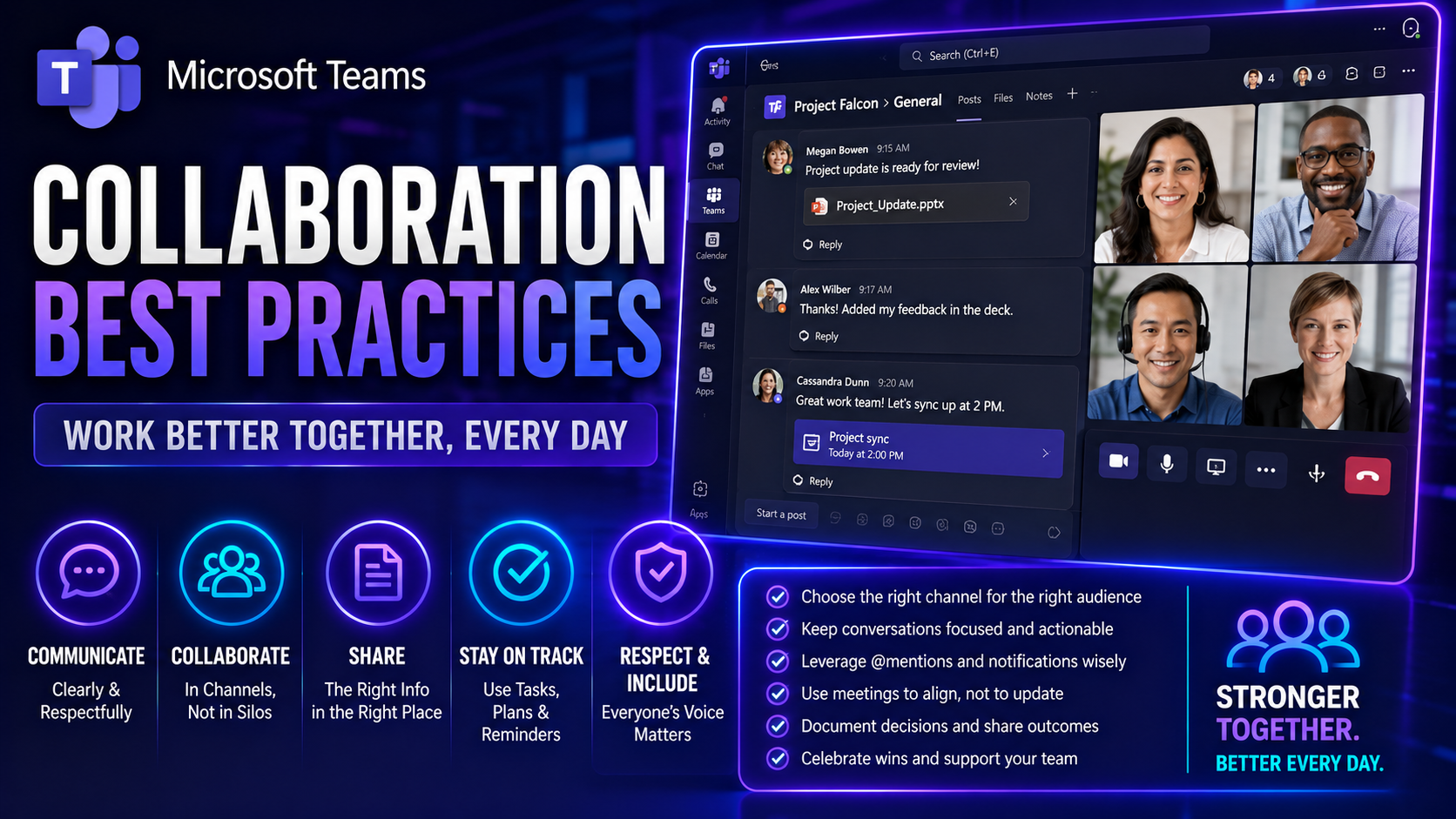
Effective workplace collaboration isn’t just a trendy buzzword—it’s now the heartbeat of high-performing teams, whether everyone sits together or logs in from three different countries. Digital teamwork is rapidly becoming the norm, with platforms like Microsoft Teams and SharePoint making it easier to share ideas, manage projects, and keep everyone on the same page, no matter where “the office” actually is.
This guide breaks down actionable best practices for successful collaboration in today’s fast-moving workplaces. You’ll discover practical strategies, proven tools, and real-world examples that help people work smarter together, especially in hybrid and remote settings. If you’re navigating Microsoft Teams, wrangling SharePoint governance, or just looking to make teamwork work, you’re in the right spot.
Collaboration in Microsoft Teams
Definition: Collaboration in Microsoft Teams is the coordinated work of individuals and groups using Teams' integrated tools—chat, channels, file sharing, meetings, and apps—to communicate, co-author, and manage projects in real time.
Short explanation: Microsoft Teams centralizes conversations, files, and meetings so teams can stay aligned and act quickly. Users create channels for focused topics, share and co-edit documents stored in SharePoint, run scheduled or ad-hoc meetings with screen sharing and recording, and automate workflows with integrated apps and connectors. Applying collaboration best practices—clear channel structure, naming conventions, versioning, role assignments, and regular meeting rhythms—helps organizations reduce duplication, improve transparency, and speed decision-making.
8 Facts About Collaboration in Microsoft Teams
These unexpected insights highlight how Microsoft Teams shapes collaboration and offer practical collaboration best practices you can apply today.
- Chats can persist forever unless you act. Unlike ephemeral messaging apps, Teams retains chat history by default, which helps continuity but means applying retention policies and deletion practices is a key collaboration best practice.
- Guest users often have more access than teams realize. External collaborators can access files and channels depending on settings; auditing guest permissions is a crucial collaboration best practice to prevent data leaks.
- Channels can be dedicated to processes, not just projects. Using private and standard channels for workflows (e.g., approvals, incident response) increases clarity—an effective collaboration best practice for role-based communication.
- Integrated apps can both boost productivity and create noise. Connectors and bots automate tasks, but overuse leads to notification overload; a collaboration best practice is to standardize which apps are allowed and where they post.
- Meeting recordings and transcripts become searchable knowledge. Teams’ transcription and recording features turn meetings into searchable assets—managing storage and tagging is a collaboration best practice to maximize reuse.
- Files stored in Teams are actually stored in SharePoint/OneDrive. That underlying architecture affects permissions, versioning, and compliance—aligning SharePoint settings with Teams policies is a collaboration best practice often overlooked.
- Channels can be optimized for async work. Threaded conversations, @mentions, and pinned posts reduce meeting load; encouraging async-first norms is a high-impact collaboration best practice for distributed teams.
- Analytics reveal collaboration blind spots. Teams usage reports and insights can identify bottlenecks (e.g., overloaded channels, unused apps); regularly reviewing these metrics is a collaboration best practice for continuous improvement.
What Is Collaboration and Why Does It Matter in the Workplace?
Collaboration in the workplace happens when people come together to solve problems, share knowledge, and create new value as a team. It’s more than just cooperation, where folks simply coordinate tasks or avoid bumping into each other. Real collaboration is about connecting minds and working in sync to reach shared goals—think of it as elevating teamwork to its highest level.
Unlike mere teamwork, where roles can be siloed and communication limited, workplace collaboration emphasizes open dialogue, respect for different contributions, and the freedom to challenge ideas for the sake of progress. It’s not about splitting tasks and hoping for the best—it’s about weaving everyone’s skills and experiences into a stronger, more innovative fabric.
Organizations that prioritize collaboration outperform those that don’t. Teams who collaborate find it easier to tackle complex problems, develop creative solutions, and adapt quickly to change. When employees feel invited to contribute, they’re more engaged, more satisfied, and more likely to stick around. In short, effective collaboration doesn’t just benefit the bottom line—it makes work more human, meaningful, and enjoyable for everyone involved.
Key Benefits of Collaboration in Microsoft Teams
Applying collaboration best practices in Microsoft Teams delivers measurable advantages for teams and organizations. Below are the primary benefits that make Teams a powerful platform for modern work.
- Centralized communication: Chat, channels, video meetings, and threaded conversations keep discussions in one place, reducing lost messages and email overload.
- Real-time collaboration: Co-authoring Office files (Word, Excel, PowerPoint) directly in Teams enables multiple contributors to edit simultaneously, speeding decision-making and reducing version conflicts.
- Integrated tools and workflows: Seamless integration with Microsoft 365 apps, third-party apps, and Power Automate workflows streamlines tasks, approvals, and content sharing.
- Improved meeting efficiency: Built-in scheduling, meeting notes, recordings, transcripts, and screen sharing make meetings more productive and easier to follow up on.
- Enhanced transparency and knowledge sharing: Channel organization, searchable message history, and pinned resources make it easy to find past decisions, documents, and project context.
- Stronger security and compliance: Enterprise-grade identity, access controls, data loss prevention, and retention policies help maintain regulatory compliance and protect sensitive information.
- Flexible remote and hybrid work: Persistent chat, mobile apps, and cloud-based access support distributed teams, enabling collaboration from anywhere and across time zones.
- Better stakeholder engagement: Guest access and external collaboration features allow secure cooperation with vendors, clients, and partners without leaving the Teams environment.
- Increased productivity and reduced context switching: Consolidating communication, files, and apps in one hub reduces interruptions and helps people stay focused on work.
- Measurable insights and optimization: Analytics and usage reports provide visibility into collaboration patterns, helping leaders adopt collaboration best practices and improve team performance.
How Trust Turns Mere Coordination into True Collaboration
Trust is the secret ingredient that takes teamwork from checking boxes to truly breaking new ground together. Without trust, team members stick to the safest path, keep information close to the chest, and avoid taking risks—even when the stakes are low. That’s just coordination: people working in parallel but disconnected from the bigger picture.
When trust is high, team members share ideas freely, ask hard questions, and feel safe enough to be honest—even when it’s uncomfortable. That’s when true collaboration happens. Trust allows people to challenge each other constructively, experiment with new approaches, and admit mistakes without fear of blame. It’s the difference between just showing up for your shift and showing up to make a real difference together.
Strong trust leads to faster decisions, better problem solving, and a culture where everyone’s contribution is valued. Teams built on trust are nimbler, more resilient when things go sideways, and much more likely to celebrate real wins together. In today’s workplace, especially when collaboration is digital or remote, building and maintaining trust is more crucial than ever.
Ways to Promote Psychological Safety and Mutual Respect in Teams
- Encourage Open Communication: Make it clear that every team member’s voice matters. Regularly ask for input, invite questions, and actively listen—especially to those who don’t always speak up first.
- Model Vulnerability As a Leader: Share your own challenges, admit mistakes openly, and ask for feedback. When leaders set the tone by being honest about their own growth areas, it invites others to do the same.
- Address Mistakes Constructively: When slip-ups happen, treat them as learning opportunities. Avoid finger-pointing and instead focus on solutions—this builds trust and encourages risk-taking for innovation.
- Set Clear and Respectful Ground Rules: Establish guidelines about how meetings are run, how disagreements are handled, and how feedback should be delivered. This makes it safer for everyone to participate.
- Recognize And Appreciate Contributions: Publicly acknowledge both small and big wins. When people feel seen and valued, they’re more likely to engage openly and support each other.
Creating an atmosphere where everyone feels safe to speak up, share ideas, and challenge each other respectfully is the foundation of a truly collaborative culture.
Personal and Interpersonal Effectiveness for Workplace Collaboration
Successful collaboration depends just as much on personal qualities as it does on process or technology. Core personal effectiveness skills like self-awareness, empathy, and adaptability help individuals manage their own reactions and understand others’ perspectives. Interpersonal skills, including active listening and conflict resolution, support healthy and productive relationships among diverse team members.
Being able to recognize and adjust to others’ working styles and communication preferences bridges gaps and fosters trust. Without these foundational skills, even the most advanced digital tools can’t deliver real collaboration.
Essential Collaboration Skills Every Modern Team Needs
- Clear Communication: Teams thrive when everyone can express ideas simply, share updates, and clarify expectations without confusion.
- Active Listening: Paying close attention and asking clarifying questions makes sure no ideas get lost—and teammates feel truly heard.
- Giving and Receiving Feedback: Sharing honest, direct feedback (and accepting it graciously) helps the team grow and fix issues early.
- Problem-Solving: Collaborators work together to address challenges, suggest solutions, and adapt fast to changes in direction.
- Adaptability: Being open to new ways of working, learning from mistakes, and adjusting quickly keeps the team agile and resilient.
Developing these collaboration skills ensures every team member can contribute to a culture of trust, engagement, and lasting success.
How Individual Strengths Build Better Collaborative Teams
Every team is a unique mix of talents, backgrounds, and working styles. When leaders and team members recognize and tap into individual strengths—whether it’s someone’s knack for organizing chaos, creative thinking, or sharp analytics—the whole team gets stronger.
Leveraging strengths means taking the time to identify what each person brings to the table, beyond just job titles or technical skills. Tools like CliftonStrengths or even simple team discussions help highlight who excels where, so tasks and roles can be allocated to maximize engagement and results.
For managers, this means creating space for people to show what they’re good at and encouraging team members to learn from each other’s differences. Rather than struggling to fit everyone into the same mold, strengths-based collaboration lets each person contribute their best, improves morale, and delivers better outcomes for the team and organization alike.
Proven Collaboration Strategies and Tools for Teams
The most successful teams combine strong collaboration strategies with the right digital tools to accomplish more, whether everyone works in one office or is spread across multiple locations. Purposeful collaboration strategies help teams align on shared goals, recognize each other’s contributions, and work through inevitable disagreements so projects move forward smoothly.
Digital tools—like document sharing, instant messaging, and project management platforms—support these strategies by streamlining communication, organizing work, and creating visibility for all team members. In remote and hybrid environments, tools like Microsoft Teams bridge distance and keep everyone engaged.
In the sections below, you’ll find step-by-step guides on goal-setting, ways to recognize collaborative behaviors, and practical techniques to resolve conflicts and competing priorities. Each piece builds toward building a culture where teamwork comes naturally and everyone’s voice is heard.
Set Clear Goals and Expectations for Teams
- Define Shared Objectives: Start by making sure everyone understands the main outcomes you’re working toward. This keeps efforts aligned and prevents wasted energy.
- Clarify Individual Roles: Assign responsibilities based on strengths and make sure each person knows their specific contributions to the shared goal.
- Set Measurable Milestones: Break large projects into smaller, trackable steps. This keeps progress visible and allows for quick adjustments if things go off track.
- Document Agreements: Capture decisions and deadlines in writing, ideally in a shared workspace, so expectations are transparent and misunderstandings are minimized.
- Review and Adjust Regularly: Schedule check-ins to discuss progress, roadblocks, and any changes needed to keep the team moving in sync.
Reward Collaborative Efforts to Strengthen Team Culture
- Public Recognition: Shout out collaborative wins during team meetings or in company-wide updates to highlight positive behaviors.
- Peer-to-Peer Kudos: Encourage team members to recognize each other’s support and contributions through thank-you notes or reward systems.
- Small Incentives: Offer lunch, gift cards, or access to professional development opportunities for exceptional teamwork.
- Spotlight Stories: Share examples of great collaboration on internal channels to inspire others and set expectations.
Navigating Conflict and Competing Goals in Teams
- Address Issues Promptly: Don’t let conflicts simmer in the background. Deal with disagreements early, before they grow into bigger problems.
- Listen to Understand: When tensions rise, encourage each person to share their perspective fully, focusing on listening rather than just responding.
- Find Common Ground: Identify shared objectives and values that both sides can agree on, building a foundation for resolving disagreements.
- Set Clear Communication Norms: Use respectful language, avoid personal attacks, and stick to facts when discussing differences. Establish rules for how the team handles debates.
- Bring in a Neutral Facilitator: For bigger conflicts, consider involving a manager or neutral party to guide the conversation and keep things productive.
- Document Agreements: Summarize resolutions in writing, so everyone is clear about what’s been decided and what needs to happen next.
Using these strategies helps teams work through tough moments without losing trust or momentum.
Top Collaboration Tools for Remote and Hybrid Work
With remote and hybrid work here to stay, choosing the right digital collaboration platforms has become mission critical. Modern teams need secure, flexible tools that allow for instant messaging, video calls, file sharing, and project management—all without jumping between a dozen different apps. Platforms like Microsoft Teams are at the center of this digital workspace, making communication and coordination seamless across every department and time zone.
But it’s not just about having the fancy tools. Success depends on deploying them thoughtfully: maintaining clear governance, integrating with industry workflows, and choosing add-ons that address unique team needs. The next sections break down leading platforms—including Teams, Slack, and Asana—and show how industry-specific apps and bots boost productivity and bring out the best in your team. For deeper dives into governance and real-world deployment, check out resources like how Teams governance drives collaboration and success and extending Teams with custom apps and bots.
Microsoft Teams and Leading Digital Collaboration Platforms
- Microsoft Teams: All-in-one platform for chat, meetings, file sharing, and project management. Deeply integrates with SharePoint, Planner, Power Automate, and supports custom apps and bots—making it powerful for both project collaboration and everyday workflows. See transforming project management with Microsoft Teams for practical tips on maximizing its potential.
- Slack: Known for flexible channels and integrations, Slack excels at real-time messaging and connecting with hundreds of third-party tools. It’s popular for fast-moving, cross-company discussions and async communication.
- Zoom: The gold standard for video meetings and webinars, Zoom integrates easily with calendars and project tools, making it a solid pick for companies that prioritize high-quality virtual face time.
- Asana: A top project management tool for assigning tasks, visualizing project timelines, and tracking progress. Asana’s integrations with Teams, Slack, and email keep everyone aligned, even when spread out.
Maximizing Collaboration With Industry-Specific, Use-Case Driven Apps
- Healthcare Compliance Bots: Security-focused bots for Teams ensure communication stays HIPAA-compliant while supporting care coordination.
- Construction Project Dashboard Apps: Integrations that pull on-site updates into Teams channels for real-time project status and document management.
- Financial Reporting Extensions: Custom Teams message extensions let financial teams run reports and share metrics securely inside the platform. For building and deploying these extensions, see how to create custom Teams apps with bots, tabs, and message extensions.
- Meetings Extensibility: Add-ons like automated meeting recaps, side panels for tasks, and real-time polling can be built directly into Teams meetings. Explore more at advanced Teams meeting extensibility with apps and bots.
Cross-Functional Collaboration: Benefits and How to Succeed
- Combine Diverse Expertise: Cross-functional teams bring together professionals from different departments—like marketing, IT, and finance. This diversity sparks new ideas and drives creative problem-solving that’s tough to achieve in siloed groups.
- Break Down Organizational Silos: By working together on shared projects, employees build relationships across the business. This breaks down barriers, making information flow faster and improving overall agility.
- Boost Innovation Through Different Perspectives: Teams composed of varied backgrounds challenge assumptions and approach challenges from unique angles—fueling out-of-the-box thinking and more effective solutions.
- Set Up Clear Communication Rituals: Successful cross-functional work relies on frequent updates, transparent documentation, and defined decision-making processes to ensure everyone stays aligned despite different goals and vocabularies.
- Agree on Shared Success Metrics: Establish what “winning” looks like for the whole team and track progress together. This creates accountability and a sense of purpose for all involved.
By fostering collaboration across departments, organizations gain agility, innovation, and a more engaged workforce.
Effective Strategies for Remote and Hybrid Collaboration
Remote and hybrid work comes with big opportunities, but also some fresh challenges for teamwork. You can’t just shout across the office or gather everyone in a huddle when questions pop up. Success now means being more intentional: setting ground rules, choosing digital tools wisely, and building habits that keep everyone involved—even if they’re scattered across cities or time zones.
In the next sections, you’ll find actionable advice on planning remote collaboration, from designing asynchronous workflows to communicating clearly. We’ll talk about scheduling regular check-ins to keep team spirit strong and to make sure no one slips through the cracks. Whether your team is fully remote, switching between home and office, or working odd hours, you’ll find strategies tailored to keep teamwork flowing smoothly.
Planning to Collaborate Remotely and Setting Communication Guidelines
- Establish Communication Channels: Decide where team members will chat, share files, and hold meetings—such as Microsoft Teams or Slack—to ensure everyone knows where to find updates.
- Define Response Expectations: Set clear rules around how quickly emails or messages should be answered so no request is left hanging.
- Plan for Asynchronous Work: Enable workflows where projects keep moving—like recorded video updates or threaded messages—so people in different time zones can contribute at their own pace.
- Document Processes: Keep important guidelines and project notes accessible in a shared place, so team members don’t have to guess what to do next.
Scheduling Regular Check-Ins to Maintain Team Cohesion
- Daily Stand-Ups: Brief, focused meetings each morning help everyone align on priorities and tackle blockers right away.
- Weekly Huddles: Set aside time each week for a more in-depth review, reflection, and brainstorming as a group.
- One-on-One Sessions: Managers can connect individually with team members to address personal development, challenges, and engagement.
- Social Touchpoints: Host occasional virtual coffee breaks or team-building events to keep morale high and relationships strong, even remotely.
Project Collaboration Tips and Templates for Consistent Results
Project-based work ramps up the need for clear collaboration even further. From nailing down a project’s scope at the beginning to tracking milestones along the way, teams need methods that keep everyone accountable and in sync from kickoff to final delivery.
Ready-to-use templates and content collaboration frameworks, especially those built into platforms like Microsoft Teams, streamline repeat projects so you’re not reinventing the wheel each time. Using structured governance and automation—such as connecting Teams with SharePoint and Power Automate—ensures content stays organized and updates flow to the right people. Check out this step-by-step guide to organizing projects in Teams for practical setup tips that reduce common pitfalls and maximize productivity.
Next, we’ll dig into why effective project collaboration matters and provide a quick overview of the most useful templates that help deliver repeatable success.
Why Project Collaboration Is Important for Team Success
Project collaboration ensures every team member is working toward the same goals, which cuts down on duplication, confusion, and costly rework. Effective collaboration in projects makes it easier to hit deadlines, adjust quickly to changes, and keep key stakeholders in the loop.
Teams that prioritize collaboration deliver better results, innovate faster, and maintain higher levels of engagement and accountability throughout any project lifecycle.
Best Project Templates and Posters for Streamlined Teamwork
- Project Kickoff Templates: Standard forms for defining scope, roles, and deliverables so everyone starts on the same page.
- Task Assignment Boards: Utilize tools like Planner or Asana to visualize who’s doing what and when—great for avoiding dropped balls.
- Status Update Posters: Central dashboards in Teams or SharePoint to track progress on milestones and shine a light on bottlenecks.
- Content Collaboration Frameworks: Pre-built SharePoint templates for document management and automated approval workflows save time and prevent version confusion. Explore detailed setup in this project organization guide.
Common Collaboration Challenges and How to Solve Them
- Lack of Communication: When updates are missed or unclear, teams quickly lose alignment. Implement clear governance frameworks and regular check-ins to keep information flowing and nip confusion in the bud.
- Mismatched Expectations: If team members aren’t aligned on what success looks like, disappointment and friction follow. Use shared project kickoffs and document roles and deliverables to ensure everyone’s on board.
- Imbalances in Contributions: When the same voices dominate, engagement drops and good ideas get lost. Rotate meeting facilitators, use digital feedback tools, and measure participation to create space for everyone.
- Competing Goals: Teams sometimes juggle priorities that clash. Facilitate open conversations about what matters most and find compromises with guidance from neutral leaders.
- Micromanagement and Siloing: Overly rigid oversight or working in isolation stifles collaboration. Empower team autonomy and stress the importance of shared ownership over outcomes for better results.
Red Flags When Collaboration Is Ignored and How To Fix Them
- Disengaged Members: If you notice teammates zoning out in meetings or missing deadlines, it’s a sign that collaboration is slipping. Re-engage by asking for direct input or rebalancing workloads.
- Silence in Meetings: When most team members stay quiet, valuable feedback and ideas are being lost. Switch up your meeting format, encourage anonymous questions, or call on different voices to get all perspectives.
- Return of Siloed Work: If updates, files, or key decisions stop getting shared, that’s trouble. Reinforce shared processes, use centralized channels like Teams, and celebrate transparency to rebuild habits.
- Lack of Inclusion: Cliques or unacknowledged contributions cause resentment and low morale. Rotate roles, invite new facilitators, and highlight diverse achievements to foster inclusion.
Spotting these signs early and acting quickly keeps collaborative culture strong and productive.
How Trusted Leadership Shapes a Collaborative Culture
Leaders play a pivotal role in building and sustaining a truly collaborative workplace. When leaders model open communication, invite feedback, and empower employees to make decisions, they set the tone for everyone else to do the same.
Trusted leadership hinges on consistency, fairness, and vulnerability. Leaders who show trust in their teams—by delegating responsibility, recognizing both success and mistakes, and supporting new initiatives—encourage a climate of psychological safety. This, in turn, enables employees to contribute ideas freely, challenge the status quo, and take smart risks without fear of backlash.
Moreover, leaders strengthen collaboration by establishing transparent expectations, clear governance structures, and regular channels for team input. Over time, these habits shape a company culture where trust, empowerment, and teamwork become ingrained in daily operations, resulting in higher innovation and ongoing employee engagement.
Measuring and Sustaining Collaboration Initiatives Long-Term
- Track Employee Engagement: Use surveys, participation analytics, and digital sentiment analysis to monitor involvement and morale over time.
- Measure Workflow Efficiency: Analyze time to project completion, response rates in tools like Teams, and rate of conflict resolution for actionable insights.
- Monitor Meeting Inclusivity: Use tools and feedback to ensure all voices are heard, not just the loudest.
- Solicit Regular Feedback: Run periodic retrospectives or pulse checks, adjusting collaboration strategies as the team or company evolves. For more, see Teams governance turns chaos into confident collaboration.
Frequently Asked Questions About Collaboration and Partnerships
- What’s the difference between collaboration and teamwork?
- Collaboration is a deeper, more interactive process where people work together actively, co-creating solutions. Teamwork can sometimes mean just dividing tasks; collaboration weaves everyone’s ideas and effort together.
- Is a partnership the same as collaboration?
- Not quite. Partnerships usually refer to formal, sometimes legal, arrangements between separate entities or organizations. Collaboration can happen within a team, across teams, or even between organizations without that formality.
- How can employees collaborate better with external partners?
- Set clear shared goals, communicate expectations regularly, and use common tools or platforms. Open, respectful communication and transparent decision-making are key.
- What are some real-world examples of collaborative partnerships?
- Think of tech companies and non-profits co-developing educational apps, or healthcare providers working with software vendors to build secure patient portals. These showcase different expertise combining for bigger impact.
Easy Team-Building Activities To Boost Collaboration in Teams
- Virtual Coffee Chats: Pair up random team members each week for informal video calls to foster connections and break down barriers, especially on distributed teams.
- Brainstorming Sessions: Use digital whiteboards to throw out wild ideas and encourage creative thinking—remind everyone all suggestions are welcome!
- Feedback Rounds: Regularly invite everyone to give “plus/delta” feedback—what’s working and what could improve—promoting a growth mindset and open communication.
- Problem-Solving Challenges: Split into small groups for timed exercises—like mock scenario planning—to flex collaborative muscles and reveal hidden strengths.
- Icebreaker Polls: Kick off meetings with fun get-to-know-you questions to build trust and boost engagement from the start.
Inclusive Collaboration Across Generations and Cultures
Diversity in teams isn’t just about numbers—it’s about drawing on different experiences, cultural perspectives, and age groups to strengthen collaboration. Generational and cultural differences can spark conflict if unmanaged, but when addressed thoughtfully, they drive richer ideas and more resilient outcomes. Today’s workplace spans Baby Boomers to Gen Z, as well as colleagues from around the globe, each bringing preferred ways to communicate and solve problems.
Inclusive collaboration means understanding and bridging those gaps, not ignoring them. Up next, you’ll see targeted strategies for harmonizing communication styles across generations and learn how to build cultural intelligence for global teamwork. These steps help ensure every team member feels welcomed, respected, and empowered to participate fully, turning diversity from a potential roadblock into your team’s biggest asset.
Navigating Communication Style Differences Across Generations
- Set Communication Preferences Early: Poll your team about preferred channels—Gen Z may favor chat apps, while older members might prefer email or regular calls.
- Encourage Mixed-Format Updates: Alternate between synchronous (live meetings) and asynchronous (recorded or written) communication to reach everyone comfortably.
- Promote Patience and Curiosity: Remind team members to ask clarifying questions and assume good intentions when miscommunications arise.
- Facilitate Intergenerational Peer Buddying: Pair up team members from different age groups to learn from each other’s strengths and styles.
Cultural Intelligence for Global Team Collaboration
- Learn Key Cultural Norms: Educate your team about differences in hierarchy, directness, and time perception—what’s normal in one culture can be off-putting in another.
- Favor Clear, Simple Language: Use plain language and avoid idioms—critical when collaborating across multiple first languages.
- Schedule with Time Zones in Mind: Rotate meeting times to share the inconvenience fairly and respect everyone’s work-life balance.
- Encourage Culturally Inclusive Decision-Making: Solicit input from quieter voices and acknowledge diverse viewpoints in group discussions.
Checklist: Optimize Collaboration in Microsoft Teams
Use these collaboration best practices to improve teamwork, reduce friction, and get more value from Microsoft Teams.
collaboration in the workplace: best practices overview
What are the core principles to improve collaboration in the workplace?
Core principles include defining a common goal, establishing clear roles, promoting effective communication, using digital collaboration tools appropriately, and creating a collaborative environment where feedback is encouraged. These elements form the foundation of successful collaboration and help teams align around team goals and shared priorities.
How can effective communication and collaboration be established among team members?
Start by setting standards for communication channels, response times, and meeting etiquette. Encourage active listening, concise updates, and documentation of decisions. Combining synchronous meetings with asynchronous collaboration practices ensures everyone stays informed, supports cross-team collaboration, and reduces misunderstandings that can hinder collaboration.
What collaboration skills are the abilities teams need to develop?
Collaboration skills include clear written and verbal communication, conflict resolution, empathy, accountability, time management, and the ability to give and receive constructive feedback. Training and coaching can help individuals strengthen these skills, which collectively make good collaboration possible.
How do digital collaboration tools improve collaboration and where should they be used?
Digital collaboration tools centralize information, streamline workflows, and enable both synchronous and asynchronous collaboration. Use chat for quick clarifications, shared documents for co-authoring, project management tools for tracking tasks, and video calls for complex discussions. Choosing tools that integrate well reduces friction and makes collaboration more efficient.
What are best practices for cross-functional team collaboration?
For cross-functional team collaboration, clarify the common goal, create cross-team roles or liaisons, schedule regular checkpoints, and document decisions. Encourage respect for different expertise, adopt a shared project management workspace, and align on metrics that reflect contributions from each function to ensure successful collaboration.
How can managers encourage collaboration without micromanaging?
Managers can encourage collaboration by setting clear objectives, removing obstacles, providing resources (including digital collaboration tools), recognizing collaborative behavior, and modeling open communication. Trust teams to self-organize around team goals and intervene only to resolve impediments or align priorities.
What practices help make collaboration more efficient in distributed teams?
Implement asynchronous collaboration for updates, maintain clear written documentation, use shared project boards, schedule overlapping meeting windows when possible, and set explicit expectations for response times. These practices foster a collaborative environment across time zones and support effective collaboration in the workplace.
How does embracing collaboration affect team morale and outcomes?
Embracing collaboration fosters a sense of belonging, shared ownership, and mutual support. It increases transparency, accelerates problem-solving, and often leads to higher-quality outcomes because diverse perspectives contribute to decisions. Over time this builds trust and sustained team performance.
What common pitfalls hinder collaboration and how can they be avoided?
Pitfalls include unclear goals, siloed information, poor communication, tool overload, and lack of psychological safety. Avoid them by setting a common goal, standardizing tools and processes, encouraging open feedback, and promoting inclusion so all voices are heard.
How should teams measure successful collaboration in the workplace?
Measure successful collaboration using both quantitative and qualitative indicators: delivery against team goals, cycle times, number of cross-team dependencies resolved, employee engagement scores, and feedback on communication effectiveness. Regular retrospectives help surface process improvements and reinforce accountability.
What role does project management play in collaboration best practices?
Project management provides structure for planning, tracking, and reporting work. Clear workflows, defined milestones, risk management, and role clarity reduce ambiguity and support cross-functional team collaboration. Good project management tools also enable transparency across the team and improve collaboration in the workplace.
How can teams balance autonomy and alignment to ensure collaboration is key rather than bottlenecked?
Balance autonomy and alignment by setting clear objectives and boundaries while allowing teams freedom in implementation. Use shared metrics and periodic syncs to maintain alignment, and empower teams to make decisions within agreed constraints to avoid unnecessary approvals that can hinder collaboration.
What strategies help with cross-team collaboration on large initiatives?
For large initiatives, create steering committees, define inter-team interfaces, maintain a centralized project hub, and schedule regular cross-team planning sessions. Assign clear owners for dependencies and use structured communication channels to ensure visibility and follow-through across groups.
How can asynchronous collaboration be implemented without losing momentum?
Use documented agendas, clear deliverables, and deadlines for asynchronous work. Leverage versioned documents and task boards so progress is visible, and set norms for frequency of updates. Combine asynchronous work with periodic synchronous check-ins to maintain momentum and clarity.
How do you ensure collaboration skills are part of hiring and onboarding?
Include behavioral interview questions that probe teamwork and collaboration, assess candidates for communication and conflict-resolution abilities, and provide onboarding that emphasizes collaboration tools, processes, and expected behaviors. Early socialization into a collaborative environment helps new hires integrate and contribute quickly.
How can teams avoid tool fatigue while still leveraging digital collaboration tools effectively?
Audit tools periodically, consolidate overlapping tools, standardize on a core set, and provide training. Define use cases for each tool so team members know where to find information and how to contribute. Limiting the number of primary tools reduces cognitive overhead and makes collaboration more efficient.
What practices encourage psychological safety for better teamwork and collaboration?
Create norms that welcome questions and admit mistakes, model vulnerability from leaders, celebrate learning moments, and discourage blame. Psychological safety allows diverse ideas to surface and improves decision quality, which is essential for collaboration at work.
How can organizations scale successful collaboration practices across every team?
Document and share proven patterns, create playbooks for common workflows, run cross-team training, and appoint collaboration champions to adapt practices locally. Use metrics to identify successful teams and replicate their approaches, ensuring continuous improvement as the organization grows.
What is the relationship between collaboration and conflict, and how should conflict be managed?
Conflict often arises in collaborative settings due to differing perspectives; when managed well it leads to better solutions. Establish clear conflict-resolution processes, encourage respectful debate, focus on the common goal, and escalate only when necessary. Training in constructive feedback helps turn conflicts into productive outcomes.
How can leaders model collaboration to make it a cultural norm?
Leaders should demonstrate open communication, share credit, participate in cross-functional work, prioritize transparency, and allocate time to support teams. By rewarding collaborative outcomes and embedding collaboration into performance evaluations, leaders signal that collaboration is key to success.
What role do team goals play in improving collaboration?
Team goals align priorities and provide a shared purpose that motivates cooperation. Clear, measurable team goals focus efforts, reduce competing agendas, and make it easier to coordinate work across functions, which is essential to improve collaboration in the workplace.
How can feedback loops be structured to sustain good collaboration?
Implement regular retrospectives, short feedback cycles, and open channels for continuous input. Make action items visible and assign owners to ensure follow-through. This iterative approach helps teams adapt quickly and reinforces a collaborative mindset.
How do you know when collaboration efforts are failing and need intervention?
Warning signs include missed deadlines, repeated misunderstandings, siloed work, low engagement, and rising conflict without resolution. When these appear, reassess goals, processes, roles, and tools, and convene stakeholders to realign priorities and remove impediments to successful collaboration.
You Should Also Listen To
If you are researching Microsoft Teams collaboration best practices, these episodes add practical context on architecture, operations, security, and governance:
- Teams Telephony – Simply Explained — Understand calling architecture, routing, devices, and operational trade-offs.
- Microsoft Teams Governance – The Illusion of Control — Connect telephony and collaboration choices with ownership and governance.
- Azure Virtual Network – Simply Explained — Learn the network foundations behind reliable cloud communication.
- Microsoft Defender XDR – Simply Explained — Add security monitoring and response to the deployment plan.

Microsoft MVP | Host of M365.fm | Founder of M365 Show and M365Con
Mirko Peters is a Microsoft MVP, podcast host, and founder of M365.fm, M365 Show, and M365Con. His work connects Microsoft practitioners through podcast interviews, livestreams, and community events.
At M365.fm, Mirko hosts conversations with Microsoft MVPs, product experts, architects, and community contributors. Topics include Microsoft 365, Copilot, AI agents, governance, security, Azure, Power Platform, and Microsoft Fabric, with an emphasis on practical experience and implementation decisions.
M365.fm is the podcast and learning platform. M365 Show brings experts together for livestreams, while M365Con provides an online conference setting for community learning.
Official website: Mirko Peters (https://www.mirkopeters.com/). Recognition: Mirko Peters — Microsoft MVP profile (https://mvp.microsoft.com/de-DE/mvp/profile/9b0ca797-db5a-493a-a845-8b9158046cf5). Connect on LinkedIn (https://www.linkedin.com/in/m365showpodcast/).