

From Deployment to Impact: Copilot Adoption That Works with Edyta Gorzoń (MVP)


In this episode of the m365.fm podcast, Mirko Peters speaks with Microsoft MVP and Copilot adoption expert Edyta Gorzoń about why successful Microsoft Copilot adoption is far more than a technical deployment project. The conversation focuses on the gap many organizations face between rolling out AI tools and creating measurable business impact.
Edyta explains that real adoption depends on people, communication, culture, and change management rather than only licenses, governance, or feature training. She highlights why many AI initiatives fail when companies focus purely on technology while ignoring user behavior, business processes, and employee concerns.
The episode explores how organizations can build scalable adoption strategies by identifying real business use cases, supporting employees through change, and creating continuous learning instead of one-time training sessions. Edyta also discusses the importance of leadership involvement, internal champions, and measuring productivity improvements in practical ways that employees actually experience in their daily work.
Another major topic is AI readiness inside modern organizations. The discussion covers governance, responsible AI usage, communication strategies, and how companies can balance innovation with security and compliance requirements. Rather than chasing hype, the episode encourages businesses to focus on sustainable adoption models that deliver long-term ROI and genuine productivity improvements.
Overall, the episode provides practical insights for IT leaders, consultants, and business decision-makers who want to move beyond simply deploying Copilot and instead create meaningful organizational transformation with AI.


You want to unlock the true value of Microsoft 365 Copilot in your business. Copilot adoption goes far beyond handing out licenses or running a quick training session. You need strong leadership, clear communication, and a focus on driving adoption to see real results. Many business and IT leaders believe that a rollout is as simple as giving access, but data shows otherwise:
| Misconception | Explanation |
|---|---|
| Starting rollout exclusively with IT | IT teams may not represent the primary users of Copilot, leading to a lack of impactful use cases. It's better to include departments that will benefit most. |
| Unfocused rollout with few licenses | Distributing licenses too thinly across teams prevents significant impact. Concentrating on one or two departments can showcase real results. |
| No strategic plan | Jumping in without a clear strategy or leadership support can lead to failure. A defined strategy is crucial for successful adoption. |
| No change management | Treating adoption as a one-time event can result in users reverting to old habits. Ongoing support and engagement are necessary. |
| Expecting instant results without training | Users require guidance and practice to effectively use Copilot. Training is essential for realizing its benefits. |
| One-size-fits-all approach | A generic rollout won't meet the diverse needs of different teams. Tailored guidance is more effective. |
With the right approach, you can see measurable impact. In a 12-week trial, users saved an average of 26 minutes per day, and Microsoft’s legal department increased task completion speed by 32%. When you put people and processes first, copilot becomes a powerful tool for your organization.
Key Takeaways
- Successful Copilot adoption requires strong leadership and clear communication. Involve executives to emphasize its importance.
- Form an AI Council with IT and business leaders to guide the adoption strategy and gather feedback.
- Focus on targeted seat assignments. Start with teams that will benefit most from Copilot to showcase quick wins.
- Provide structured, scenario-based training that aligns with real business tasks. This boosts user confidence and adoption.
- Track usage metrics to measure Copilot's impact on productivity. Use analytics to identify gaps and improve usage.
- Encourage ongoing education and support. Create channels for continuous learning and peer sharing to maintain engagement.
- Customize Copilot solutions for different departments. Tailor workflows to meet specific needs and enhance productivity.
- Celebrate successes and recognize champions within your organization. This motivates teams and promotes wider adoption.
Copilot Adoption Strategy

Key Steps for Success
Direct Answer
You need a comprehensive plan to achieve high-impact implementations with Microsoft 365 Copilot. A successful copilot adoption strategy goes beyond technical deployment. You must focus on people, processes, and technology together. When you align leadership, communication, and structured onboarding, you set the stage for company-wide success.
A clear strategy helps you avoid common pitfalls. You should not treat adoption as a one-time event. Instead, you must build a foundation that supports ongoing learning and engagement. This approach transforms your business into an AI-powered organization.
Actionable Steps
To drive copilot adoption, follow these practical steps:
Secure Executive Sponsorship
Gain support from C-level or VP-level leaders. Their involvement signals the importance of copilot and motivates teams to participate.Form an AI Council
Create a group that includes IT, business leaders, and early adopters. This council will guide strategies, gather feedback, and adjust plans as needed.Review Security and Data Settings
Check your security framework before rollout. Make sure you have clear policies for data privacy and permissions.Assign Seats Intentionally
Focus on teams that will benefit most from copilot. Targeted seat assignments lead to faster results and better feedback.Provide Structured Training
Offer scenario-based training that matches real business processes. This helps users build confidence and integrate copilot into daily work.Track Metrics and Measure Impact
Use dashboards and analytics to monitor usage and productivity. Link copilot adoption to business outcomes, not just activity.
Tip: Measurement is not about watching individuals. It helps you see how well copilot supports your goals and where you can improve.
- Integrate with Existing Tools
Make sure copilot works within your current workflows. Avoid forcing users to change how they work unless it adds clear value.
Change Management Essentials
Addressing User Concerns
You must address user concerns early in the process. Many employees worry about job security, data privacy, or trusting AI-generated content. Open communication helps reduce fear and builds trust. Use simple language and real examples. Avoid technical jargon that can confuse or alienate staff.
The Microsoft Engagement Framework, which follows the ADKAR model, works well for change management. This model guides you through awareness, desire, knowledge, ability, and reinforcement. Each stage helps users move from learning about copilot to using it confidently.
Building Sustainable Habits
Building new habits takes time and support. You should not expect instant results. Encourage teams to use copilot daily. Provide ongoing training and create support channels for questions. Recognize early wins and share success stories to keep momentum strong.
The Copilot Success Kit from Microsoft offers guides and resources to help you treat adoption as an organizational change. This toolkit supports user enablement and technical readiness, making it easier to embed copilot into your digital transformation strategies.
When you focus on change management, communication, and leadership, you create the right environment for copilot to thrive. These strategies help you move from pilot projects to company-wide success, unlocking the full potential of AI in your organization.
Copilot Readiness
Getting ready for copilot means more than just flipping a switch. You need to prepare your environment, protect your data, and make smart choices about who gets access. Copilot readiness helps you avoid risks and ensures a smooth rollout.
Security and Governance
Data Privacy
You must protect sensitive information before you deploy copilot. Start by reviewing your data classification and privacy policies. Use tools like Microsoft Purview to label data based on sensitivity. This step helps you control who can see or share important files. You should also set up data loss prevention policies. These policies stop users from sharing confidential data by mistake. Regular training helps your team understand how to use copilot safely.
Tip: Create an incident response plan for AI-related security events. This plan prepares you to act fast if something goes wrong.
Permissions Management
Managing permissions is a key part of copilot readiness. You need to check that users have the right access to resources. Too many permissions can lead to oversharing, which puts your data at risk. Use role-based access controls to limit who can view or edit files. Review sharing settings and audit access regularly. Good governance processes help you stay compliant with industry standards like ISO 27001.
| Challenge | Description |
|---|---|
| Managing User Permissions | Ensure users have appropriate access before deploying copilot. |
| Preventing Oversharing of Data | Review sharing settings to avoid exposing sensitive information. |
| Establishing Governance Processes | Set up clear rules for how copilot is used and monitored. |
| Ensuring Compliance | Follow regulatory frameworks to protect your organization. |
Microsoft 365 Copilot Technical Preparation
Environment Assessment
You need to check your technical environment before you launch copilot. Start by looking at your current needs. Decide where copilot can help the most. Clean and organize your data to match your governance policies. Make sure your staff knows how to use copilot. Strengthen your cybersecurity measures to protect sensitive data. Plan how you will add copilot to your existing workflows.
Compliance Checks
You must meet certain requirements to use microsoft 365 copilot. Each user needs the right Microsoft 365 subscription, such as E3 or E5. Users must have a primary mailbox in Exchange Online and an Azure Active Directory account. Make sure your browsers support third-party cookies. Check that your network allows access to the endpoints needed for AI features. Review your mobile devices to ensure they meet system requirements. Always check compliance with industry rules, like HIPAA for healthcare or GDPR for financial services.
| Requirement Type | Details |
|---|---|
| Licensing Requirements | Users need Microsoft 365 E3/E5 or similar subscriptions. |
| Mailbox Requirements | Each user must have a primary mailbox in Exchange Online. |
| Sign-in Requirements | Users require an Azure Active Directory account. |
| Browser Requirements | Modern browsers with third-party cookies enabled are necessary. |
| Network Requirements | Network endpoints must be accessible for AI scenarios. |
| Mobile Device Requirements | Devices must run iOS 16.0+, iPadOS 16.0+, or Android 10+. |
| Data Governance | Review permissions, audit access, and set up data loss prevention. |
Seat Assignments
Identifying Key Users
You should not give copilot access to everyone at once. Start with teams that will benefit most, such as those with repetitive tasks or high data needs. Organization owners assign seats to specific user accounts. Focus on early adopters who can give feedback and help others learn.
License Management
Managing licenses is part of copilot readiness. You can assign and remove seats in your organization’s settings. If you remove all assigned seats, your copilot plan will be canceled. If a user has a personal plan and gets assigned a seat, their personal plan is canceled and they get a refund. Track your licenses to avoid billing issues, especially if users belong to multiple organizations.
Note: Careful seat assignment and license management help you control costs and maximize the value of copilot.
Internal Support for Copilot
Executive Sponsorship
Leadership Engagement
You need strong executive sponsorship to drive successful copilot adoption. Leaders must communicate why your organization is investing in copilot. When leadership explains the strategic reasons for using ai, employees understand the bigger picture. Leaders also help identify key use cases for copilot, which makes the rollout more relevant to your business needs. You should see executives set clear goals for copilot adoption. These goals shape your plan and help you measure progress. Leaders who get involved create a culture that welcomes ai and encourages everyone to participate.
- Leadership communicates the strategic rationale for copilot adoption.
- Executives identify important use cases for copilot in your organization.
- Visible support from leaders ensures resources for training and change management.
- Leadership involvement builds a culture that embraces ai and motivates employees.
- Executive sponsorship at the highest level helps set clear goals and measure impact.
Signaling Importance
When leaders show visible support for copilot, employees pay attention. You can boost engagement by having executives join training sessions or share their own experiences with copilot. This signals that copilot is a priority for your organization. It also helps secure resources for training and ongoing support. When leaders champion copilot, teams feel more confident about using ai in their daily work.
Building a Copilot Team
AI Council Roles
You should form an AI council to guide your copilot journey. This group includes IT, business leaders, and early adopters. The council sets direction, gathers feedback, and adjusts plans as needed. They make sure copilot aligns with your business goals. The council also helps address challenges and shares best practices across teams.
Champions and Early Adopters
Select champions and early adopters to support your copilot rollout. Champions act as trusted guides and innovators. They help others see the value of copilot and encourage experimentation. Champions provide feedback to bridge the gap between users and IT. They surface real-world use cases and adoption challenges. A good rule is to have one champion for every 25 to 50 employees. Make sure you include champions from different roles and departments. Hold regular meetings and create forums for champions to share ideas and solve problems together.
User Community
Collaboration
A user community helps you scale copilot adoption. You can use this network to deliver localized training and share resources that fit your teams’ needs. Community tools let users share experiences and learn from each other. This approach increases awareness and helps more people use copilot effectively.
| Benefit | Description |
|---|---|
| Scalable awareness and adoption efforts | Leverages a global network for localized training and tailored resources. |
| Peer-to-peer influence and education | Utilizes community tools to share experiences and training, enhancing learning through collaboration. |
| Feedback and listening mechanisms | Establishes a system for community members to provide feedback to the core team, improving the product. |
Peer Learning
Peer learning drives sustained copilot usage. You might learn a useful prompt by watching a colleague try something new. Seeing others use copilot in meetings can spark your interest. When users experiment together, they feel motivated to try new features. Peer-driven learning helps everyone get more value from copilot and supports continuous improvement.
Tip: Encourage employees to share their copilot tips and discoveries in team meetings or online forums. This keeps learning active and helps everyone grow.
By building strong internal support, you create the foundation for lasting copilot success. Leadership, dedicated teams, and a vibrant user community will help you unlock the full potential of microsoft copilot.
Copilot Training and Habits
Scenario-Based Training
Aligning with Business Processes
You unlock the full value of copilot when you connect training to real business tasks. Scenario-based training lets you bring your own work to sessions. You see how copilot helps with drafting proposals, summarizing documents, or generating formulas in Excel. This approach makes learning practical and relevant. When you use copilot for your daily tasks, you build confidence and skill quickly. A retail company found that 78% of pilot users applied copilot within the first week after scenario-based training. You experience faster adoption when you learn through real-world examples.
Practical Learning
You benefit from practical learning methods that match your role. Role-based learning paths help you see how copilot fits your job. Tailored training increases perceived relevance by 73%. Just-in-time learning, scheduled within 48 hours of access, boosts feature adoption by 65%. Microlearning, such as daily tips and quick guides, encourages you to try new copilot functions. You gain skills by practicing with your own tasks and seeing immediate results.
Tip: Use microlearning to build habits. Try a new copilot feature each day and share your discoveries with your team.
Embedding Copilot in Workflows
Workflow Redesign
You redesign workflows to integrate copilot into your daily routine. You automate routine tasks like drafting emails or summarizing reports. You use Copilot Studio to create AI workflows that fit your team's needs. You connect copilot with CRM systems for better access to customer data. You apply agentic AI by setting clear goals and letting copilot help with proactive decisions. You see measurable outcomes, such as 15-20% productivity gains and up to 7 hours saved per employee each week in professional services.
| Task | Copilot Integration Example |
|---|---|
| Drafting proposals | Copilot generates first drafts |
| Summarizing documents | Copilot condenses key points |
| Automating workflows | Copilot pairs with Power Automate |
| Researching in Edge | Copilot summarizes articles |
| Navigating Windows | Copilot launches apps and adjusts settings |
Encouraging Daily Use
You encourage daily use by embedding copilot in meetings, emails, and reports. You tailor prompts to your context, improving the relevance of copilot's responses. You motivate your team to experiment with new features. You celebrate early wins and share success stories to build momentum. You see higher productivity and smarter decisions when copilot becomes part of your routine.
Ongoing Education
Continuous Learning
You maintain copilot proficiency through ongoing training and education. You access resources like the Get started with Microsoft 365 Copilot learning path. You explore AI for education courses from microsoft to deepen your understanding. You review and update your skills regularly. Monthly activities include analyzing usage trends and adjusting training based on feedback. You stay current as copilot evolves.
Support Channels
You rely on structured support channels for continuous learning. Multi-modal training approaches cater to different learning styles. Instructor-led sessions provide foundational and advanced knowledge. Self-paced e-learning lets you learn at your own speed. Change management resources ensure you receive clear communication and support. You connect with department champions and executive sponsors for guidance. You participate in monthly reviews to optimize training materials.
Note: Organizations investing in change management see 2-3x higher sustained copilot usage rates. Structured support channels help you stay informed and confident.
You build sustainable habits by combining scenario-based training, workflow integration, and ongoing education. You unlock the full potential of copilot and drive lasting business transformation.
Measuring Copilot Impact

You need to measure the impact of copilot to understand its value and drive continuous improvement. Tracking how your teams use copilot helps you see where you gain productivity and where you can do more. When you focus on analytics, recognition, and sharing stories, you create a culture that values ai and celebrates business results.
Usage Analytics
Tracking Adoption
You start by tracking adoption through clear metrics. These numbers show how copilot changes your workflows and supports your business. For example, you can measure the number of pull requests (PRs) created, reviewed, and assisted by copilot. This data highlights the real impact of ai on your team's productivity gains.
| Metric | Description |
|---|---|
| PRs created | Number of changes submitted for review, showing ai usage in workflows. |
| PRs reviewed | Number of pull requests reviewed, reflecting team capacity improvements. |
| PRs created by Copilot | Pull requests with ai-generated code, showing integration in production. |
| PRs reviewed by Copilot | Reviews assisted by copilot, highlighting feedback efficiency. |
You can also track business results in other departments. In sales, you might look at deal velocity or proposal creation time. In marketing, you can measure content creation speed. Customer support teams can track ticket resolution time and customer satisfaction. These metrics help you see the direct impact of copilot on specific use cases.
Identifying Gaps
Analytics also help you spot gaps in copilot usage. Sometimes, you may find that data coverage is incomplete or that analytics dashboards have built-in constraints, such as a 28-day rolling window. Some users may not see their own usage data, especially in larger organizations. You need to address these gaps to get a full picture of copilot's impact and ensure everyone benefits from ai.
| Gap Type | Description |
|---|---|
| No Connection to Engineering Outcomes | Analytics may not link copilot usage to business results like cycle times or defect rates. |
| Data Coverage Is Incomplete | Disabled telemetry or missing interfaces can lower usage numbers. |
| Reporting Has Built-In Constraints | Dashboards may limit long-term trend analysis. |
| Limited Individual Visibility | Some users cannot track their own copilot usage. |
Tip: Regularly review your analytics and adjust your approach to close these gaps and maximize impact.
Recognition and Rewards
Celebrating Success
You boost engagement by celebrating successful use cases and recognizing team progress. Digital badges and shout-outs encourage teams to explore new copilot features. A monthly "Copilot Champion Spotlight" can highlight individuals who show innovative skills with ai. These celebrations build excitement and motivate others to try copilot in their daily work.
Incentivizing Engagement
You can incentivize engagement by empowering passionate advocates, known as Copilot Champions. These champions help drive peer adoption and share best practices. The Copilot Champs Community badge motivates users and signals their expertise. When you recognize and reward your champions, you create a ripple effect that increases copilot impact across your organization.
Sharing Success Stories
Internal Case Studies
You inspire your teams by sharing internal case studies that show real business results. For example, you might see a 32% increase in copilot usage, a 161% rise in copilot actions, and an 82% adoption rate among new users. Word document drafting with copilot can jump by 690%. These numbers show the true impact of ai on productivity.
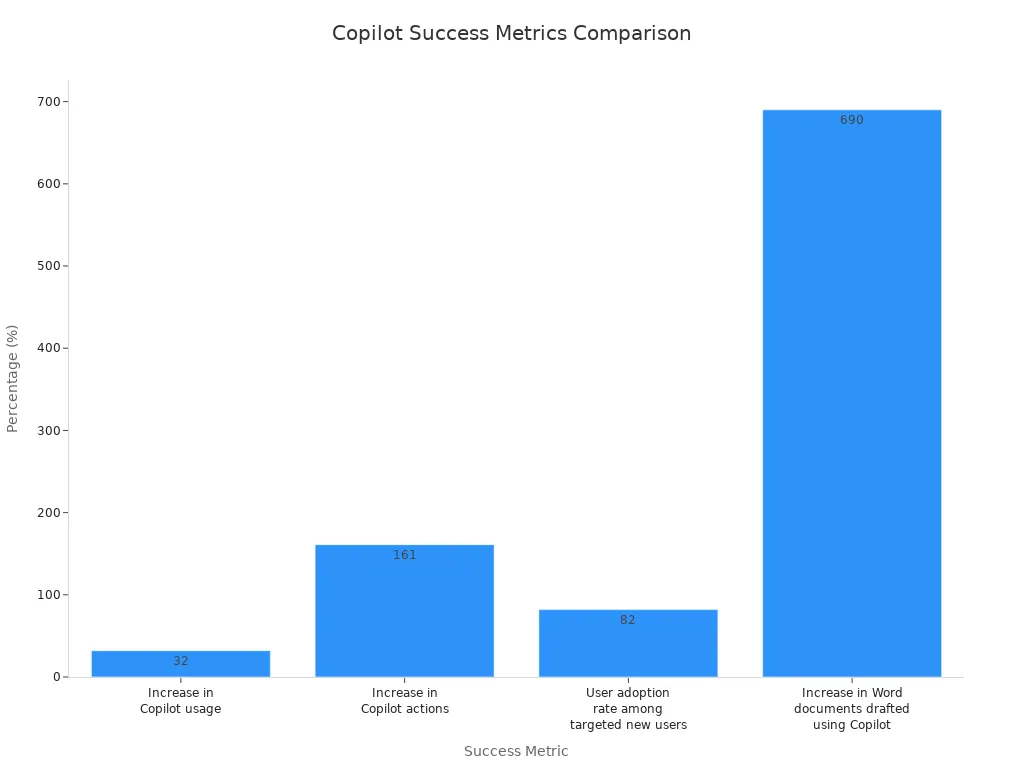
You can also highlight how comprehensive training and change management help everyone use copilot, no matter their skill level. Ongoing knowledge sharing, like a "prompt of the week," keeps learning active and supports continuous improvement.
External Communication
You share your success stories outside your organization to build your reputation as an ai leader. When you communicate your copilot journey, you attract talent and show your commitment to innovation. Sharing specific use cases and business results helps others see the value of copilot and encourages wider adoption.
By measuring copilot impact, you ensure that your investment delivers real productivity gains and supports your business goals. You create a feedback loop that drives continuous improvement and lasting success.
Customizing Copilot Solutions
Role-Based Agents
Tailored Workflows
You can tailor copilot to fit the unique needs of each role in your organization. Start by designing workflows that match daily tasks. For example, you might automate expense approvals by connecting copilot with your ERP system. You can create templates for sales teams to generate reports or for marketing to draft campaign emails. When you configure prompts for specific tasks, you help employees work faster and with fewer errors. IT teams can adjust copilot features so only the right people access sensitive data. This approach boosts both productivity and security.
- Automate routine processes, such as approvals or data entry.
- Build templates for common tasks in sales, marketing, or finance.
- Set up prompts for generating reports or summarizing meetings.
- Integrate with custom apps and databases for advanced needs.
Department-Specific Solutions
Each department faces different challenges. You can customize copilot to address these needs. In healthcare, you ensure compliance with regulations like HIPAA. In finance, you protect confidential data while speeding up reporting. For customer service, you design conversational flows that help agents answer questions quickly. Log in to Copilot Studio to access services and ground your copilot in your organization’s data. This makes every interaction more relevant and secure.
Integrating Copilot with Business Processes
Aligning with Goals
You should align copilot with your business goals. Start by identifying the main problems each department wants to solve. For example, sales teams may want to close deals faster, while HR may focus on onboarding new hires. When you connect copilot to these goals, you see real improvements in outcomes. Design conversational flows for critical topics, such as account management or customer support. Use generative actions to pull data from different sources, making copilot even more helpful.
Continuous Improvement
You need to review and improve your copilot setup regularly. Track how teams use copilot and gather feedback. Adjust workflows and prompts based on what works best. This process helps you keep up with changing business needs and technology updates. Continuous improvement ensures that copilot stays valuable and relevant.
Scaling Copilot Adoption
Expanding Use Cases
As you see success in one department, you can expand copilot to others. Start with pilot projects that focus on real business challenges. Treat these pilots as time-bound projects with clear goals. Train users on how copilot improves their job outcomes, not just on software features. This approach builds confidence and shows the value of ai across your organization.
Managing Growth
Scaling copilot requires careful planning. Prepare your Microsoft 365 environment by organizing data and setting permissions. Establish a consistent rhythm for tracking progress, such as weekly check-ins. Use these meetings to discuss usage, obstacles, and improvements. This structure helps you manage growth and maintain high adoption rates.
| Best Practice | Description |
|---|---|
| Identify specific business problems | Tailor copilot to solve unique challenges in each department. |
| Prepare the M365 environment | Organize data and set permissions before expanding adoption. |
| Focus training on job outcomes | Teach users how copilot improves their daily work. |
| Structure pilots as real projects | Set clear goals and timelines for pilot phases. |
| Track progress consistently | Hold regular check-ins to review usage and address challenges. |
Tip: Customizing and scaling copilot helps you unlock the full power of microsoft ai for every team.
You drive copilot adoption by focusing on change management, clear communication, and strong leadership. For lasting adoption, you need ongoing support and regular measurement. Customize your approach to fit your business needs. These steps lead to copilot success and help you unlock real value with Microsoft. Start your copilot adoption journey today and transform the way your organization works.
- Build a plan for adoption.
- Support your teams every step.
- Measure progress and adjust.
FAQ
What is Microsoft Copilot?
Microsoft Copilot is an AI-powered assistant that helps you work smarter. You can use it to draft emails, summarize documents, and automate tasks in Microsoft 365 apps.
How do I start using Copilot in my organization?
You need to assign licenses, prepare your environment, and provide training. Start with a pilot group. Track results and expand as your team gains confidence.
Is Copilot secure for sensitive data?
Yes. You control access with permissions and data policies. Review your security settings before rollout. Use tools like Microsoft Purview to protect sensitive information.
Who should get Copilot access first?
Start with teams that handle repetitive tasks or large amounts of data. Early adopters can share feedback and help others learn.
How does Copilot support my business goals?
Copilot helps you save time, reduce errors, and boost productivity. You can align Copilot with your business processes to see real results.
What training resources are available?
You can use scenario-based training, online courses, and Microsoft’s Copilot Success Kit. Champions and user communities also support ongoing learning.
How do I measure Copilot adoption?
Track usage analytics, collect feedback, and review business outcomes. Use dashboards to see where Copilot makes the biggest impact.
Can I customize Copilot for different departments?
Yes. You can tailor workflows, prompts, and integrations for each department. This helps every team get the most value from Copilot.
🚀 Want to be part of m365.fm?
Then stop just listening… and start showing up.
👉 Connect with me on LinkedIn and let’s make something happen:
- 🎙️ Be a podcast guest and share your story
- 🎧 Host your own episode (yes, seriously)
- 💡 Pitch topics the community actually wants to hear
- 🌍 Build your personal brand in the Microsoft 365 space
This isn’t just a podcast — it’s a platform for people who take action.
🔥 Most people wait. The best ones don’t.
👉 Connect with me on LinkedIn and send me a message:
"I want in"
Let’s build something awesome 👊
1
00:00:00,000 --> 00:00:04,000
Hello to another edition of the MC65.
2
00:00:04,000 --> 00:00:06,000
Awww.fm.
3
00:00:06,000 --> 00:00:10,000
In this episode we sit down with initial growth Microsoft MVP
4
00:00:10,000 --> 00:00:13,000
co-pilot architect and co-pilot team lead at Bilenium
5
00:00:13,000 --> 00:00:18,000
to explore what actually makes co-pilot induction successful inside organizations.
6
00:00:18,000 --> 00:00:22,000
From change management to user engagement to measurable visit outcomes.
7
00:00:22,000 --> 00:00:26,000
It is your share, the real world lessons from customer projects,
8
00:00:26,000 --> 00:00:30,000
common list takes, companies make and how organizations can move from deploying AI
9
00:00:30,000 --> 00:00:33,000
to truly transforming the way people work.
10
00:00:33,000 --> 00:00:36,000
So welcome, Edita.
11
00:00:36,000 --> 00:00:42,000
Or people who may not know you yet, I don't know, there are not so many people outside,
12
00:00:42,000 --> 00:00:50,000
but Edita, what led you into the Microsoft C5 and co-pilot space?
13
00:00:50,000 --> 00:00:56,000
Hello everybody, hello, Milko, thank you so much for having me.
14
00:00:56,000 --> 00:00:58,000
Indeed, my name is Edita Gose and I'm Polish.
15
00:00:58,000 --> 00:01:03,000
This is a very good question, how did it happen that I'm working
16
00:01:03,000 --> 00:01:08,000
with Microsoft 365 products and currently very strongly with co-pilot?
17
00:01:08,000 --> 00:01:11,000
My story has started over 10 years ago.
18
00:01:11,000 --> 00:01:14,000
I have business background, can you imagine that?
19
00:01:14,000 --> 00:01:17,000
And it was just, you know,
20
00:01:17,000 --> 00:01:23,000
the story that I would not plan while being a student,
21
00:01:23,000 --> 00:01:27,000
I joined any IT company and then I understood that IT word is,
22
00:01:27,000 --> 00:01:31,000
it can be my word, especially that I understand business perspective.
23
00:01:31,000 --> 00:01:36,000
And over the time, I also understood that software is built for users
24
00:01:36,000 --> 00:01:39,000
and majority of users are end users.
25
00:01:39,000 --> 00:01:41,000
That's why they need special care.
26
00:01:41,000 --> 00:01:45,000
And that's the reason why I'm doing adoption topics,
27
00:01:45,000 --> 00:01:50,000
change management topics around Microsoft ecosystem.
28
00:01:50,000 --> 00:01:55,000
Yeah, you have both a strong business background and technical,
29
00:01:55,000 --> 00:01:57,000
deep technical experience.
30
00:01:57,000 --> 00:02:03,000
How have that combination shaped your approach to co-pilot adaption?
31
00:02:03,000 --> 00:02:05,000
All right, sure.
32
00:02:05,000 --> 00:02:10,000
So first of all, I focus very strongly on the users,
33
00:02:10,000 --> 00:02:13,000
especially that I have the perspective from the company,
34
00:02:13,000 --> 00:02:16,000
that company is investing a lot in co-pilot,
35
00:02:16,000 --> 00:02:19,000
especially when we're talking about Microsoft 365 co-pilot.
36
00:02:19,000 --> 00:02:25,000
So premium licenses for the users as well, co-pilot studio.
37
00:02:25,000 --> 00:02:31,000
And basically even the best software cannot be successfully implemented.
38
00:02:31,000 --> 00:02:34,000
If we don't have the right tools, the right mindset,
39
00:02:34,000 --> 00:02:40,000
the right communication, the right project scope with the adoption.
40
00:02:40,000 --> 00:02:46,000
So basically, first of all, I'm putting the shoes from the owners of the organization
41
00:02:46,000 --> 00:02:50,000
to understand where they are, how much they have invested,
42
00:02:50,000 --> 00:02:54,000
what the ROI expected, and where they want to be in the upcoming year.
43
00:02:54,000 --> 00:02:57,000
Mostly this is a plan of vote of the year.
44
00:02:57,000 --> 00:02:59,000
And at the same time, yeah.
45
00:02:59,000 --> 00:03:04,000
And in the same time, I focus really strongly on the users
46
00:03:04,000 --> 00:03:09,000
to understand how do they work, what are the processes currently shaped
47
00:03:09,000 --> 00:03:14,000
in Microsoft 365 ecosystem to understand where in a process,
48
00:03:14,000 --> 00:03:17,000
we can benefit out from the co-pilot.
49
00:03:17,000 --> 00:03:21,000
But as well to look a little bit deeper in the processes that are existing
50
00:03:21,000 --> 00:03:24,000
to make sure that those processes are good,
51
00:03:24,000 --> 00:03:30,000
or maybe they need some optimization or automation,
52
00:03:30,000 --> 00:03:33,000
because we talk a lot about co-pilot,
53
00:03:33,000 --> 00:03:36,000
but as well, we should remember that it's not always AI.
54
00:03:36,000 --> 00:03:41,000
We still have automation tools from the Microsoft stack
55
00:03:41,000 --> 00:03:43,000
that can redo their job.
56
00:03:43,000 --> 00:03:47,000
And then when I have the understanding of the owners of the company,
57
00:03:47,000 --> 00:03:51,000
so decision makers, the users, then of course,
58
00:03:51,000 --> 00:03:56,000
we start to drive adoption with our technical readiness, governance governance,
59
00:03:56,000 --> 00:04:02,000
I'm linking twice, plus of course, different types of adoption activities.
60
00:04:02,000 --> 00:04:09,000
Awesome. And you're also saying that you're in the change management part.
61
00:04:09,000 --> 00:04:17,000
What did you think is this change management problem companies
62
00:04:17,000 --> 00:04:23,000
have and especially wine with co-pilot or AI?
63
00:04:23,000 --> 00:04:27,000
All right. Change management, really important topic.
64
00:04:27,000 --> 00:04:32,000
Really tricky in regards AI, co-pilot, or whatever,
65
00:04:32,000 --> 00:04:36,000
any other AI type solution we're going to implement.
66
00:04:36,000 --> 00:04:42,000
So basically, of course, change management always did the job
67
00:04:42,000 --> 00:04:47,000
when we have been implementing Microsoft 365 tools later on a lot of teams,
68
00:04:47,000 --> 00:04:49,000
because of pandemic times.
69
00:04:49,000 --> 00:04:55,000
Now we have, of course, a change management in compile lot implementations.
70
00:04:55,000 --> 00:05:05,000
But frankly, I see that customers, organizations are getting more and more aware
71
00:05:05,000 --> 00:05:10,000
of the fact that the simple training or feature-led training,
72
00:05:10,000 --> 00:05:14,000
it's not something with guarantees the adoption.
73
00:05:14,000 --> 00:05:21,000
That's why there are more and more keen to use change management methods
74
00:05:21,000 --> 00:05:25,000
to boost adoption even better.
75
00:05:25,000 --> 00:05:33,000
However, I can still see that they try with the very small steps.
76
00:05:33,000 --> 00:05:36,000
We're going to drive a few basic trainings.
77
00:05:36,000 --> 00:05:37,000
What is co-pilot?
78
00:05:37,000 --> 00:05:40,000
And we both know that co-pilot is everywhere.
79
00:05:40,000 --> 00:05:44,000
Of course, it's not easy for the users to understand what kind of license they have,
80
00:05:44,000 --> 00:05:49,000
how co-pilot behaves in different Microsoft 365 apps and so on.
81
00:05:49,000 --> 00:05:55,000
They see some peaks of usage of co-pilot, but then they see the drop.
82
00:05:55,000 --> 00:05:58,000
Unfortunately.
83
00:05:58,000 --> 00:06:02,000
And then the reflection comes to some of the organizations that,
84
00:06:02,000 --> 00:06:08,000
"Okay, just a feature-based training or few general trainings are not enough,
85
00:06:08,000 --> 00:06:12,000
we have to do something more."
86
00:06:12,000 --> 00:06:16,000
And that more very often, I'm saying, it's change management approach,
87
00:06:16,000 --> 00:06:22,000
where really care about different parts of the entire user journey,
88
00:06:22,000 --> 00:06:31,000
organization journey, to make sure that co-pilot sticks to all the new ways of working.
89
00:06:31,000 --> 00:06:37,000
And when I think about change management, of course, I always support myself
90
00:06:37,000 --> 00:06:41,000
while talking with the customers and later on implementing co-pilot
91
00:06:41,000 --> 00:06:44,000
with the AdCore model.
92
00:06:44,000 --> 00:06:47,000
Well, first we made awareness.
93
00:06:47,000 --> 00:06:51,000
So we already focused on the entire communication,
94
00:06:51,000 --> 00:06:53,000
what kind of groups of people we're going to have,
95
00:06:53,000 --> 00:06:56,000
some of them they're going to have co-pilot chat free version,
96
00:06:56,000 --> 00:06:59,000
some of them going to have paid version.
97
00:06:59,000 --> 00:07:01,000
We also have champions, right?
98
00:07:01,000 --> 00:07:02,000
We have sponsors.
99
00:07:02,000 --> 00:07:08,000
So there's so many different types of groups of people to whom we should address our communication.
100
00:07:08,000 --> 00:07:13,000
In the awareness part, we also check user sentiment.
101
00:07:13,000 --> 00:07:22,000
What wasn't that popular, I would say, in the past in previous teams or M-P-65 adoption projects,
102
00:07:22,000 --> 00:07:28,000
because people, they have different sentiments in regards to AI.
103
00:07:28,000 --> 00:07:33,000
Some of them fear a lot that they're going to lose a job, so there's like a classic example.
104
00:07:33,000 --> 00:07:41,000
However, sometimes they feel that they are cheating because they're using AI to do a job on their behalf.
105
00:07:41,000 --> 00:07:43,000
This is a real example, right?
106
00:07:43,000 --> 00:07:51,000
Or simply they don't believe that co-pilot is that good as any other naturally secure tools.
107
00:07:51,000 --> 00:08:00,000
Therefore, in the user sentiment part, we are checking what's the perspective,
108
00:08:00,000 --> 00:08:08,000
what are the feelings around co-pilot, and then this is like a base for us to shape communication.
109
00:08:08,000 --> 00:08:11,000
It is different reasoning coming from the users.
110
00:08:11,000 --> 00:08:16,000
Let us understand what are the motivations, what are the blockers, what's the resistance to change.
111
00:08:16,000 --> 00:08:23,000
And thanks to that, we are capable to create the best communication content as ever.
112
00:08:23,000 --> 00:08:25,000
So as an example, right?
113
00:08:25,000 --> 00:08:32,000
So as a communication, once I have heard that communication drives people and people drive companies.
114
00:08:32,000 --> 00:08:40,000
And without good communication, it's hard to expect the great results.
115
00:08:40,000 --> 00:08:42,000
So yeah, awareness.
116
00:08:42,000 --> 00:08:48,000
Same with the awareness, just showing what co-pilot can do, because very often we hear,
117
00:08:48,000 --> 00:08:53,000
"Okay, co-pilot, another chat, just culprit," right?
118
00:08:53,000 --> 00:09:04,000
And showing what are the basic scenarios to boost your fluency with AI, to help you do the things in a better quality.
119
00:09:04,000 --> 00:09:07,000
Not really being more productive.
120
00:09:07,000 --> 00:09:10,000
This is another observation from the field.
121
00:09:10,000 --> 00:09:22,000
Sometimes I don't feel very good while saying that, but this is my honest observation that saying people that they're going to be more productive doesn't really mean that they are happy with this communication.
122
00:09:22,000 --> 00:09:29,000
You know, we both, Mirko, we are overload with the number of tasks at work, right?
123
00:09:29,000 --> 00:09:39,000
We have plenty of notifications in our computer, in our, in our, I know, the office mobile phone, private mobile phone.
124
00:09:39,000 --> 00:09:47,000
And when we hear that we must be even more productive, we are a little bit, we're getting tense.
125
00:09:47,000 --> 00:09:54,000
Maybe it's better to find a way, to, to, to save, to, to, to tell to people that, you know what?
126
00:09:54,000 --> 00:10:00,000
You're going to create a better quality content, or you're going to have less on your plate.
127
00:10:00,000 --> 00:10:05,000
That's why you can live, it's, do the things that really matter.
128
00:10:05,000 --> 00:10:09,000
That's the ones that repeat every single day.
129
00:10:09,000 --> 00:10:13,000
So, sure, at CARV, so just, just awareness.
130
00:10:13,000 --> 00:10:17,000
We just touched awareness right now.
131
00:10:17,000 --> 00:10:25,000
But in fact, that part to understand where we are, we want to be, what's the user motivation?
132
00:10:25,000 --> 00:10:28,000
How to also adjust the language?
133
00:10:28,000 --> 00:10:38,000
This is another beauty of our IT words that very often as independent consultants or bigger companies, we speak techie.
134
00:10:38,000 --> 00:10:44,000
We also must understand how our users, what kind of jargon they're using, right?
135
00:10:44,000 --> 00:10:47,000
Or if they understand what we're talking.
136
00:10:47,000 --> 00:10:58,000
For instance, I remember, for example, like tenants, and you know, you have HR people on their call trying to learn something about Copilot and some lead tenant connectors, whatever.
137
00:10:58,000 --> 00:11:03,000
And those people, you know, for them, it's a new reality with Copilot.
138
00:11:03,000 --> 00:11:10,000
And they are getting lost at the very beginning of our conversation because they don't understand the wording we're using.
139
00:11:10,000 --> 00:11:22,000
So again, we must find a way how to communicate with those people besides the entire communication, which will be running.
140
00:11:22,000 --> 00:11:33,000
And then of course, we have desires, so we are showing people what Copilot can do, how to use it in certain scenarios.
141
00:11:33,000 --> 00:11:48,000
As I mentioned, the processes are important, so we analyze what kind of daily processes are done by the users, what kind of Microsoft 365 applications they are using daily in the process.
142
00:11:48,000 --> 00:11:58,000
So let's say they have a meeting on Teams, they start transcripts, they do transcripts and Copilot are making some notes.
143
00:11:58,000 --> 00:12:05,000
And then how we're going to transform these nodes, are we going to use any one node or any other tool.
144
00:12:05,000 --> 00:12:12,000
So you know, like a kind of user journey to show where Copilot might be beneficial right away.
145
00:12:12,000 --> 00:12:30,000
But as well, where Copilot can be beneficial as agent-exolution, where we can build simple agents that supports daily processes and all these tasks that repeat no matter what.
146
00:12:30,000 --> 00:12:52,000
And then we have knowledge, so this is the real part where we really start to train users. And from my perspective, the best way is to start with prompting, type of workshops, training sessions, especially that again, we are ITs, right.
147
00:12:52,000 --> 00:13:15,000
For most probably know how to prompt, right. Or at least we have the sense of understanding what AI is and what's the technology behind, but we should not expect from the users who have completely different tasks and responsibilities that they are suddenly out of the sudden masters in prompting.
148
00:13:15,000 --> 00:13:40,000
That's why prompting is a new skill, I would say it's even art of prompting in a way. And it's extremely important to learn users how to learn to teach users, how to do prompts in Copilot chat and Microsoft 365 Copilot, what are the ingredients of the right prompt.
149
00:13:40,000 --> 00:13:54,000
And as well how to use prompt coach probably, which is available for all the users, no matter if that premium or not, as well help them to create very first killer prompt as inspiration.
150
00:13:54,000 --> 00:14:18,000
So that's just talking, you know, the territory, the those are the ingredients of the prompt, this is one example completely disconnected from the audience and the other one, but really making users excited about this new skill, helping them to to make their hands dirty in regards experimenting with prompting.
151
00:14:18,000 --> 00:14:32,000
And then we are moving to the next level in this knowledge phase where basically we have process or scenario oriented training sessions for different departments.
152
00:14:32,000 --> 00:14:41,000
Yeah, I think we have to say to the organizations get the Copilot license isn't the finish line.
153
00:14:41,000 --> 00:14:43,000
No, it's just the beginning.
154
00:14:43,000 --> 00:15:12,000
What does a successful co pilot adoption actually need to use for myself that so first of all that the majority of the users are using a copilot daily, what of course we can check in in our dashboards and be buying sites in the Microsoft 365 admin center.
155
00:15:12,000 --> 00:15:25,000
The fact that we make copilot as a habit for majority of the users, I'm not saying, of course, in the perfect word, all the users, but come on, we live in in this word and we know how it works.
156
00:15:25,000 --> 00:15:43,000
If we're hitting 80% of active users, I'm starting to to be happy and setting and secondly, understanding how copilot is working in different Microsoft 365 applications.
157
00:15:43,000 --> 00:15:53,000
What's the difference in between copilot chat, what we can do in copilot chat and how copilot behaves in teams, outlook, PowerPoint, word excel, and so that.
158
00:15:53,000 --> 00:16:01,000
The third successful part is the motivation to experiment by themselves.
159
00:16:01,000 --> 00:16:10,000
Why I'm saying that, I'm saying that because Microsoft, you know, it's improving copilot daily.
160
00:16:10,000 --> 00:16:14,000
Okay, maybe it was too optimistic, but a lot.
161
00:16:14,000 --> 00:16:40,000
And the fact, I can easily say that every week we have something new, something is changing and from the user perspective, that might be a little bit uncomfortable because we got used to the fact that this button is here, right, all this functionality is working like that and suddenly something has changed for sure for better.
162
00:16:40,000 --> 00:16:51,000
I see that some users, they start to fear again, a little bit, okay, I had my patterns with copilot and now something has changed, so I feel a little bit blocked.
163
00:16:51,000 --> 00:17:08,000
So if the users, they don't have this feeling that they're blocking because something has changed, but they have this hunger and needs to experiment to discover what's new, then in my eyes, this is another successful adoption step.
164
00:17:08,000 --> 00:17:17,000
And what are the biggest misconceptions organizations have before the very start the copilot journey?
165
00:17:17,000 --> 00:17:19,000
All right, this is a good one.
166
00:17:19,000 --> 00:17:23,000
So obviously governance.
167
00:17:23,000 --> 00:17:31,000
We expect, yeah, we expect that we just turn on copilot and everything will be working as a charm.
168
00:17:31,000 --> 00:17:55,000
Again, this is a moment to breathe a bit and make sure that our governance, all the policies, settings are done all right and accordingly to our business model because we both know that copilot is respecting the policies that are set on the tenant level.
169
00:17:55,000 --> 00:18:06,000
So it really makes sense to check what we have if we have any zombie share points or any share points where everybody can access the information, right?
170
00:18:06,000 --> 00:18:24,000
And the past to have all of the security incidents towards that easy because come on, not think there are not many people who are that's creative to check what kind of share point sides we have, what kind of materials are inside.
171
00:18:24,000 --> 00:18:42,000
And now all of this information are like one prompt away so to make sure that we have our technical readiness understood that of course licenses, but firstly as a governance part ready to scale.
172
00:18:42,000 --> 00:18:58,000
This is the one of the things that is always in my mind so we have like two legs right in in adoption first leg is governance and the second of course all the activities around boosting the users to use copilot.
173
00:18:58,000 --> 00:19:05,000
So this is the first thing and the second thing I have touched a little bit so.
174
00:19:05,000 --> 00:19:18,000
Yeah assuming that we're going to invest in a few general training sessions from the markets and adoption is done.
175
00:19:18,000 --> 00:19:24,000
No, it doesn't worry this way unfortunately.
176
00:19:24,000 --> 00:19:44,000
I think Microsoft gives us a lot of tools technologies, a pure view into an entra defender so I think on the technical side we are we have all all these tools and best practice.
177
00:19:44,000 --> 00:19:48,000
But what's with the cultural parts?
178
00:19:48,000 --> 00:20:01,000
What would we get there some Microsoft or from I don't know do you mean all of the portals or you mean all of the adoption parts of the adoption parts.
179
00:20:01,000 --> 00:20:15,000
Okay so before we start with this adoption I just have one hint in regards governance just just before I start talking about the rest.
180
00:20:15,000 --> 00:20:38,000
Another observation from the field make sure that you have documentation around your copilot governance if you don't have any start building it especially because it's good to track what kind of policies what kind of settings have been done so far or at least where we are at this moment.
181
00:20:38,000 --> 00:21:04,000
It's going to be very, very handy for the future scale for the future capabilities of copilot Microsoft going to launch so it's good to have like a one source of truth where we are with our governance and then we're going to make some some corrections and make sure that this documentation is readable for both sides for technical people as well for business people.
182
00:21:04,000 --> 00:21:21,000
Currently we live in the in the world or in the reality where new build new teams are built in many organizations AI something AI department AI innovations you know probably what what I'm talking about Mirko.
183
00:21:21,000 --> 00:21:44,000
Very often is the combination of different skills and personalities that's why the documentation we are creating together should be easy to read easy to decide easy to track by all the people in this team so just my hint to do not get lost in that governance part.
184
00:21:44,000 --> 00:21:54,000
And from the adoption perspective now could you please remind me the question is because I got lost you see.
185
00:21:54,000 --> 00:22:16,000
I think we have all this this technical staff for Microsoft we have not not a real I think and yeah an adoption layer or something what I think okay we have some educational stuff but there's not Microsoft doesn't help so much in cultural cultural adoption I think.
186
00:22:16,000 --> 00:22:37,000
It's right I mean it's right we have that of course the website adoption a Microsoft dot com and we have plenty of different sources but I would rather treat them as inspiration than as like a must to be used must to be drive especially that.
187
00:22:37,000 --> 00:23:04,000
Now we're of course we both are European so our market I would say it's also slightly different than American market in that sense that I see that my customers they really want to have super tailored practical training materials scenario materials really really detailed in a way so less less.
188
00:23:04,000 --> 00:23:33,000
Inspiration less general what is called pilot but more concrete and for instance of course that the Microsoft website we have different scenarios for HR for finance for marketing for sales super nice point to start but even if we think that the sales person or marketing person profile is more or less.
189
00:23:33,000 --> 00:23:51,000
The same those people they have different types of jobs and tasks at their daily job so it's really important to understand how they work and what kind of help from a copilot is needed.
190
00:23:51,000 --> 00:24:15,000
And secondly again the at car we haven't finished that entire ad curge your name but we can do it in a moment however another lesson learned from my field is the fact that all the copilot adoption projects they need a lot of flexibility in regards scoping.
191
00:24:15,000 --> 00:24:43,000
I see that again when we talked about the other solutions we had in the like teams or Microsoft 365 it was quite easy to shape a scope of work for adoption of course always with some buffer for project management from the latest changes but in copilot adoption projects really must be super flexible why because first of all.
192
00:24:43,000 --> 00:24:55,000
So different features of copilot are changing right so you must find space to teach people the latest news the latest things that are popping up in copilot.
193
00:24:55,000 --> 00:25:24,000
Secondly we should be very careful in checking the user sentiment during the project and adjust the activities accordingly because we can have a great you know great idea great scenario great scope of work for specific organization but in the same time we should also track what are the what's the consumption of copilot after different activities and we see and if we see that.
194
00:25:24,000 --> 00:25:41,000
Okay this type of activity haven't reached the plant copilot consumption maybe we should change something in our scope at hawk to to be on the on the way.
195
00:25:41,000 --> 00:25:48,000
So yeah those are my reflections I hope that I covered your question.
196
00:25:48,000 --> 00:26:00,000
You have say we can track the consumption the other yeah signs that the adoption strategy is failing.
197
00:26:00,000 --> 00:26:23,000
Yeah this is a yeah if that other signs that adoption is failing so I would say first of all prompting so the very huge this proportions in between the users who is prompting a lot and just a few.
198
00:26:23,000 --> 00:26:52,000
We should rather aim to the to have any certain prompt per user per day or per week some customers some of my customers do that like like a goal that if we are more or less is 80% users gonna reach this number of prompt daily it means that we succeed because it means that users they know what is copilot they use it maybe they are not those prompts are not perfect but at least they start to explore the tool as it is.
199
00:26:52,000 --> 00:27:15,000
And yeah what else might be that something is failing is a very good question that we have you know peaks after training sessions and then everything goes down again so.
200
00:27:15,000 --> 00:27:35,000
The habit is not there it was just matter of training like every training done because something was obligatory some companies also decide to have obligatory copilot training for the users and then that usage is dropping so those two.
201
00:27:35,000 --> 00:27:46,000
And then this moment come to to my mind yeah I think that's if I have something else I will I will say it later.
202
00:27:46,000 --> 00:28:15,000
So for my perspective it's often so the leadership says okay we implement copilot i3 it do's do's the job and then there are a little bit yeah outside of of it and give it the job so what role do's leadership play in successful adaption and how what tips can you give the leadership to make it success.
203
00:28:15,000 --> 00:28:29,000
Oh yeah thank you for saying that Mirko now very often scenario we gave the money you to the job perfectly your IT this is in your hands because this is software.
204
00:28:29,000 --> 00:28:52,000
All right IT has a has a part in the in the whole story because we maintain the systems we set up the systems and so that however from the sponsorship level let's call those people this way so see level apart we should have strong commitment that they will be involved in in the communication from the beginning.
205
00:28:52,000 --> 00:29:18,000
And of course it's not easy when you are a project owner because as you mentioned do your job don't bother us we we decided for the project for the project for the licenses so it's not a piece of our cake so so first of all I say very often to to my customers that the part of.
206
00:29:18,000 --> 00:29:47,000
Visible leader in the communication visible leader in the training sessions or in the customer stories is a must and of course it's hard to convince those people to find time to to to get involved those people however I always say those people they make serious decisions and probably those decisions are driven by numbers so if you want to convince them to be a part of the project.
207
00:29:47,000 --> 00:30:13,000
Speak to them in numbers right this is the investment this is how the Roy are right like this is how how much time we're going to we're going to say thanks to this implementation and so on and so on so the very minimum it's to have those leaders in the communication for sure initial communication maybe they're even capable to mention.
208
00:30:13,000 --> 00:30:39,000
And also mention copy lot adoption in any town hall meeting or something similar and as well to have them from time to time on the calls for champions or if we have any champions training session or if we have any customer success success story for any department to have them there.
209
00:30:39,000 --> 00:31:08,000
Sad but true also dedicated sessions for the leaders in our scope should be there I mean i'm very optimistic person I always believe that the leadership going to join any training session but I know that it's just my optimism therefore I try to squeeze some training content you know the most important parts related with copy lot of agents dedicated for.
210
00:31:08,000 --> 00:31:24,000
Leadership because if they understand what product does what it can it's always for them easier to to be this evangelist of the technology inside the organization.
211
00:31:24,000 --> 00:31:40,000
One we think a little bit again about change management what from this perspective is or the most effective way to encourage user engaged with copilot.
212
00:31:40,000 --> 00:32:02,000
So obviously to show them copilot in a context so again processes scenarios that copilot can do something easier better or whatever.
213
00:32:02,000 --> 00:32:22,000
Just to show the very quick wins you know without over thinking without building huge solutions agent solutions just few very important hints very sophisticated features that are relevant the specific group of users.
214
00:32:22,000 --> 00:32:46,000
Because if we take care about this part then users are more motivated to explore more by themselves and what else might be also the good hint for the users not overwhelming them with the never ending training sessions.
215
00:32:46,000 --> 00:32:57,000
I would say better short sessions as billion you know we call them coffee talk with copilot or copilot coffee talk you know 30 minutes in the morning with your coffee.
216
00:32:57,000 --> 00:33:21,000
So we think that we are going to be seeing some killer features or killer prompt or whatever makes the users happy instead of expecting from them sitting two hours and learning or you know just watching when a data is showing something amazing that's completely irrelevant because people are writing emails in the same time they do whatever just to just to be there to have this click that we've been there.
217
00:33:21,000 --> 00:33:43,000
So I think the second thing I've in my eyes at least to really take care about all the user interaction so for sure Q&As where users can ask experts hey I have this problem with copilot or I have this scenario can copilot help me anyhow.
218
00:33:43,000 --> 00:34:01,000
As well having like open space mostly in teams dedicated to the team or channel for daily support with copilot sure it's always nice to have dedicated share point side but this is more static.
219
00:34:01,000 --> 00:34:21,000
So therefore teams as a natural you know starting point for any communication so having this space to to give the users answers help support some tips of the day some good problems whatever material we think might make sense.
220
00:34:21,000 --> 00:34:49,000
I'm not sure we can use Viva but some companies they are not that motivated to use Viva right i'm not saying that is a good or right we're not here to judge but if if my customer doesn't really have Viva engage so why should I push them to have another tool right it's better to use that that the spaces for communication for collaboration that are already actively used instead of you know adding extra solution on the top.
221
00:34:49,000 --> 00:35:07,000
So just saying but but I think that yes this space for easy communication with no fears with no barriers and short very specific training sessions that really does the job.
222
00:35:07,000 --> 00:35:27,000
So from this part I learned a little bit the first thing it's bringing a little bit I call it gamification into copilot training and the other thing it's it's find the the experts I think in the document it from Microsoft they call it copilot champions.
223
00:35:27,000 --> 00:35:56,000
How do you identify and empower with copilot champions in a right in organization sure for sure champions those are our you know internal trainers who are meant to help all the users to get on board easier with copilot so let's say we have a team and in that team we have 10 people to have them are champions who know more about copilot capabilities more.
224
00:35:56,000 --> 00:36:11,000
They have more experience with copilot so from the natural perspective they of course help their colleagues to use copilot better to get more fluent with copilot.
225
00:36:11,000 --> 00:36:21,000
But yeah how to how to get them on board so basically there are two ways one is more.
226
00:36:21,000 --> 00:36:50,000
Change management like and the one I like like more and so obviously with that desire part of from at car we we show what copilot can we we talk about copilot capabilities and then we start recruitment of champions understood as okay we are announcing the copilot champions program with our communication channels and we let people to apply to become a champion.
227
00:36:50,000 --> 00:37:04,000
So we don't force them we encourage them to be a part of it we explain what's the role of champion what are the benefits what are the responsibilities and so on and so on.
228
00:37:04,000 --> 00:37:28,000
And of course if if we also see some users that are active in general or active in general to support colleagues to solve any problem on any general channels or whatever we can also ask or reach out those people directly to to invite them to the program but still we're very you know liberal in that sense that we want people to come to us.
229
00:37:28,000 --> 00:37:43,000
But as about of course you can also imagine that this concept not always works sometimes there is other approach where different.
230
00:37:43,000 --> 00:38:10,000
So the managers from departments they pick the team members and they say okay it's going to be you who become champion that's going to be your KPI for this year or whatever other motivation so we start top down instead of you know down to the top or whatever but you know what I mean so.
231
00:38:10,000 --> 00:38:39,000
And those people are simply you know dedicated by them the team managers to take this champion role and of course while having our champions in my projects I really want to make them feel that they are not you know those people who just do the hard job for nothing but they also feel the responsibility and.
232
00:38:39,000 --> 00:39:07,000
And the importance of the role to drive the entire organization into a copy lot success and for instance if we have a project kick off normally project kick off starts with any project team you know we have the leaders we have IT we have communication we have project management but of land we are discussing where we are.
233
00:39:07,000 --> 00:39:31,000
So we are what's the projects code we want to be what are the activities in those meetings I start to involve champions already to show them the importance to show them what are the what's the user voice at this moment what's the mentioned sentiment how many licenses we are have where we had to what are the goals so they are really a part of of the project.
234
00:39:31,000 --> 00:39:49,000
And obviously during that the project they are getting more and more education from from the experts so all of this train the trainer sessions they master their skills with a copilot to yeah to have this fluency with the tool.
235
00:39:49,000 --> 00:40:09,000
And as well to support the organization their teams when the adoption project going to end right adoption never ends but you know all of this projects understood as a scope of work going to answer those people they will still keep this motivation to help others.
236
00:40:09,000 --> 00:40:24,000
Before we jump in the real customer experience last questions about adoption what makes the great for 30 day adoption what what's the look like.
237
00:40:24,000 --> 00:40:37,000
You mean how much time does it take or what what does a great first 30 days of co-pilot adoption looks like for you first 30 days of copilot adoption.
238
00:40:37,000 --> 00:40:57,000
The good one so normally those projects are taking way along like half a year nine months depends what the organization site but I think that the very first 30 days it's first of all shaping as good communication as possible.
239
00:40:57,000 --> 00:41:25,000
So identifying the channels the center the receivers and so that checking the user sentiments checking the dashboards creating a project team creating a space for users support so all the sea or the teams or any other space that will be used but not only creating but you know putting already some materials and welcoming notes and so that.
240
00:41:25,000 --> 00:41:45,000
And of course yeah starting with inspiration sessions to to show you this what is copilot how does it differentiate from the other tools and why we have decided for copilot security security security security.
241
00:41:45,000 --> 00:42:03,000
Yes and what else I'm just thinking shortly I don't have any notes in front of me but what else is there I think that's more or less that's it so inspiration for everybody communication.
242
00:42:03,000 --> 00:42:21,000
Yeah governance we say that it was earlier yes copilot work yeah I think that's those 30 days you know getting ready for more practical activities.
243
00:42:21,000 --> 00:42:35,000
And so let's go a little bit talk about your customer with all the customers you can and you share a success story that surprised you.
244
00:42:35,000 --> 00:42:48,000
I think so I mean it was yeah it was some time ago of course copilot is a fresh shirt service but the world is changing so we can say that it was some time ago.
245
00:42:48,000 --> 00:43:06,000
I was very happy when I have heard from the user that they start a stop stop a freight of copilot and they trust in AI because that specific customer really had a lot of users who were anyhow afraid of using.
246
00:43:06,000 --> 00:43:24,000
AI because of you know somebody will be reading what I'm doing or my data going to leak and I'm very important person in this organization who takes care of all the numbers or strategic directions and so that and it was really cool to hear from the user that thank you thank you thank you thank you stop.
247
00:43:24,000 --> 00:43:53,000
Stop a freight of the using copilot we still feel fluent with that and we want to explore more and another customer example again from user perspective that they really appreciate the fact that all the training content has been tailored in in in the studio as okay if we're presenting for instance what copilot can do in PowerPoint.
248
00:43:53,000 --> 00:44:17,000
We are not presenting any random slide deck with any random template really used all the real materials you know any marketing general presentation or sales presentation that can be used for everybody and on the same plate on their material of their customer case on their in their jargon.
249
00:44:17,000 --> 00:44:46,000
We've been putting copilot training session so I saw that it really did the job and unfortunately from the from the trainer perspective it's more more job to be done because you cannot repeat the same materials right as that copy pays for every customer but in the same time there is such a feeling that once you prepare good materials good scenarios you don't have to do anything.
250
00:44:46,000 --> 00:45:15,000
You don't have to repeat yourself over and over again so for the long run it is a better approach and of course the very last part so obviously another customer they wanted to scale with copilot but thankfully in a very in a very responsible way they said okay we go with copilot 365.
251
00:45:15,000 --> 00:45:39,000
We know that we can build agents we aim to have more and more agents but we want to make sure that we have this first user part for a face done right and then we can start with the agents despite of feeling the pressure on our back you know because many companies now everybody wants to be AI.
252
00:45:39,000 --> 00:46:08,000
We know anything but one would to be AI powered we want to have agents we have everything so probably you see that Mirko but they really trust in that that first let's start with the basics even including some basics different than copilot so you know how to use themes how to share point how to use one drive it really make sense right and later the one they felt that they are ready that they have this Microsoft 365 ground.
253
00:46:08,000 --> 00:46:37,000
They have a copilot fluency on a good level across all the users in the organization then they were ready to start building agents and that was very natural because as we both know with paid license of copilot we have agent builders so the users they start experiment they start to see of course what kind of agents are built in our company.
254
00:46:37,000 --> 00:47:06,000
And that was a perfect grounding for future investment and for future agent development in copilot studio so very nice approach very nice customer was really happy that they took this copilot implementation serious so not like a copilot but like a process and and maturity in Microsoft 365 as first.
255
00:47:06,000 --> 00:47:19,000
I think you have seen a lot of people using copilot what was the most creative or unexpected copilot use case we have ever seen.
256
00:47:19,000 --> 00:47:48,000
Oh my god this is a good question the most creative what a question to me or call I'm not sure is that do we have any I'm kidding but I think that's yeah they're not very original here but I think that's the users they really start from so weird things to get some info about some financial things about
257
00:47:48,000 --> 00:48:08,000
you know to understand how the salaries look or what kind of invoices are issued and they really start to dig deeper into copilot work part work the tab just because they have heard that it's possible and they tried to do it.
258
00:48:08,000 --> 00:48:23,000
But the most crazy thing let's find something more optimistic now.
259
00:48:23,000 --> 00:48:51,000
It brings me some optimism but of course it brings some question marks as well when I see that users are that excited about copilot that they want to do everything with copilot you know and they forget a little bit or they forget about that's okay copilot can be used in a different ways but sometimes it's still good to do something in a very classical way.
260
00:48:51,000 --> 00:49:20,000
Any creation or of something I have mentioned PowerPoint but sometimes you know we really want to prompt every single thing we want to modify in that's in that's PowerPoint maybe sometimes before we start prompting and experimenting maybe we should stick to the old methods you know how much time do we save how much time do we burn.
261
00:49:20,000 --> 00:49:48,000
But still I'm very excited when I see people really using copilot heavily because it means that they got excited they fall in love in this solution and then you are you know you try to convince them that okay copilot is good but it can be also the old methods are still working.
262
00:49:48,000 --> 00:49:53,000
So you are also on the call up base Poland your organization.
263
00:49:53,000 --> 00:50:06,000
Right I'm an or a team so what did you think how important are events or user groups or I call the community to to adopt copilot.
264
00:50:06,000 --> 00:50:34,000
I would say that that extremely important because majority of people who are joining our conferences in different roles but let's start with the speakers they really have the practical expertise from the from the market from the customers like I was now sharing with you some of my observations because they really are at the customers they really see the challenges.
265
00:50:34,000 --> 00:50:43,000
And thanks to that they can create very valuable price less content to be sure it with other people.
266
00:50:43,000 --> 00:50:48,000
But in the same time if we have for instance attendees.
267
00:50:48,000 --> 00:51:02,000
It's also great to get some feedback from them to to be challenged by them that okay at the time you are presenting this approach but in my case it did not work so how you would do it differently.
268
00:51:02,000 --> 00:51:19,000
So no matter what kind of head we are wearing you know speaker attend you organize the sponsor we all are gathering in the one place and we can get really price knowledge and of course the valuable friendships.
269
00:51:19,000 --> 00:51:24,000
And who knows maybe the business at the end of the day.
270
00:51:24,000 --> 00:51:39,000
When you get I call it the Godmode for change management if you can change one thing about how companies approach digital transformation what would it be.
271
00:51:39,000 --> 00:51:44,000
Very good one of really just one.
272
00:51:44,000 --> 00:51:49,000
One from change management.
273
00:51:49,000 --> 00:52:00,000
Okay I would say scenario oriented training workshop.
274
00:52:00,000 --> 00:52:06,000
So really custom tailored knowledge from at car.
275
00:52:06,000 --> 00:52:13,000
This is I think the only one but at the same time we also need extremely good communication.
276
00:52:13,000 --> 00:52:18,000
So I would say I don't know how to do one out from it.
277
00:52:18,000 --> 00:52:27,000
I like the communication part I think this is one thing I nearly every company I work with company was.
278
00:52:27,000 --> 00:52:34,000
It's really sucks it was so I don't know it's it's often then they.
279
00:52:34,000 --> 00:52:45,000
I don't know they have some great ideas and then all this buzzwords send off excellence that the people not in the highest.
280
00:52:45,000 --> 00:52:54,000
I'm getting anything and then they write on the floor something and then there are some views out yet I think.
281
00:52:54,000 --> 00:53:10,000
Completely agree and you know we cannot also leave the communication to communication department because those people of course are perfect in communication but they also must get a good input from us what do we want to achieve right.
282
00:53:10,000 --> 00:53:14,000
I guess we're speaking technology so.
283
00:53:14,000 --> 00:53:21,000
We should talk a little bit about technology where it should we should speed a little bit why what why are we heading to.
284
00:53:21,000 --> 00:53:30,000
Yeah the message from the leaders so yeah the communication part I agree it's extremely important and I would not only rely on internal news letters.
285
00:53:30,000 --> 00:53:41,000
Maybe any videos maybe any short videos maybe different type of old school communication if we have people who are going to the office every day.
286
00:53:41,000 --> 00:53:44,000
But yeah for sure communication is a king.
287
00:53:44,000 --> 00:53:54,000
And later the training custom training not talking test test or whatever whatever you know really tailored content.
288
00:53:54,000 --> 00:54:08,000
We have your company so what was I think the biggest lesson you you have to learn from transition to yeah to be an employee to to your own company.
289
00:54:08,000 --> 00:54:31,000
From from the transition so now I'm fully at the millennium of course I'm self employed but I think that the biggest learning is that I'm connected with different people I can do the project for of course for Polish customers of course for international customers that gives me good perspective.
290
00:54:31,000 --> 00:54:41,000
Good learnings because some customers they do great things in one field the others in the other and then you're collecting all all these reflections.
291
00:54:41,000 --> 00:54:56,000
Currently full time at the millennium making sure that copilot is used right by our customers and they can of course scale in a responsible gathering away.
292
00:54:56,000 --> 00:55:14,000
So we run a little bit out of time so I will first say thank you for the time you have this bandwidth me and all the insights my last question is if listen us remember only one thing from this conversation about copilot adoption what should it be.
293
00:55:14,000 --> 00:55:25,000
adoption you know technology is done for the users and majority of the users are end users so please take care about them in the right way.
294
00:55:25,000 --> 00:55:29,000
So yeah then last words from you to the audience.
295
00:55:29,000 --> 00:55:36,000
Thank you so much thank you so much adoption is a king yay.
296
00:55:36,000 --> 00:55:46,000
Yeah then yeah I say thank you goodbye have a nice day I really appreciate it in the few years thank you so much thank you so much me to come have a good day bye.
297
00:55:46,000 --> 00:55:46,820
Bye.
298
00:55:46,820 --> 00:56:15,380
(no audio)

Founder of m365.fm, m365.show and m365con.net
Mirko Peters is a Microsoft 365 expert, content creator, and founder of m365.fm, a platform dedicated to sharing practical insights on modern workplace technologies. His work focuses on Microsoft 365 governance, security, collaboration, and real-world implementation strategies.
Through his podcast and written content, Mirko provides hands-on guidance for IT professionals, architects, and business leaders navigating the complexities of Microsoft 365. He is known for translating complex topics into clear, actionable advice, often highlighting common mistakes and overlooked risks in real-world environments.
With a strong emphasis on community contribution and knowledge sharing, Mirko is actively building a platform that connects experts, shares experiences, and helps organizations get the most out of their Microsoft 365 investments.

Microsoft MVP
Edyta Gorzoń, Copilot Architect and Copilot Team Lead, Billennium
Microsoft Most Valuable Professional (MVP) in Microsoft 365 Copilot and Microsoft 365, with a strong business background and specialization in Microsoft 365 adoption and change management. Prosci‑certified, she is focused on driving measurable business outcomes through effective technology adoption, user engagement, and structured change initiatives.
Edyta is actively involved in the Microsoft ecosystem as a community organizer and ambassador, contributing to events such as CollabDays Poland, Global AI Bootcamp Hamburg, Global AI Warsaw Chapters, and the European Collaboration Summit. She is passionate about bridging business and IT, enabling customer success, and promoting practical, user‑centric approaches to modern workplace technologies.
Areas of Expertise
Microsoft 365 Copilot & AI in the Workplace
Technology Adoption & Change Management
Modern Workplace & Digital Workplace Strategy
User Engagement & Effective M365 Implementations

