
Microsoft Agent Builder — Simply Explained

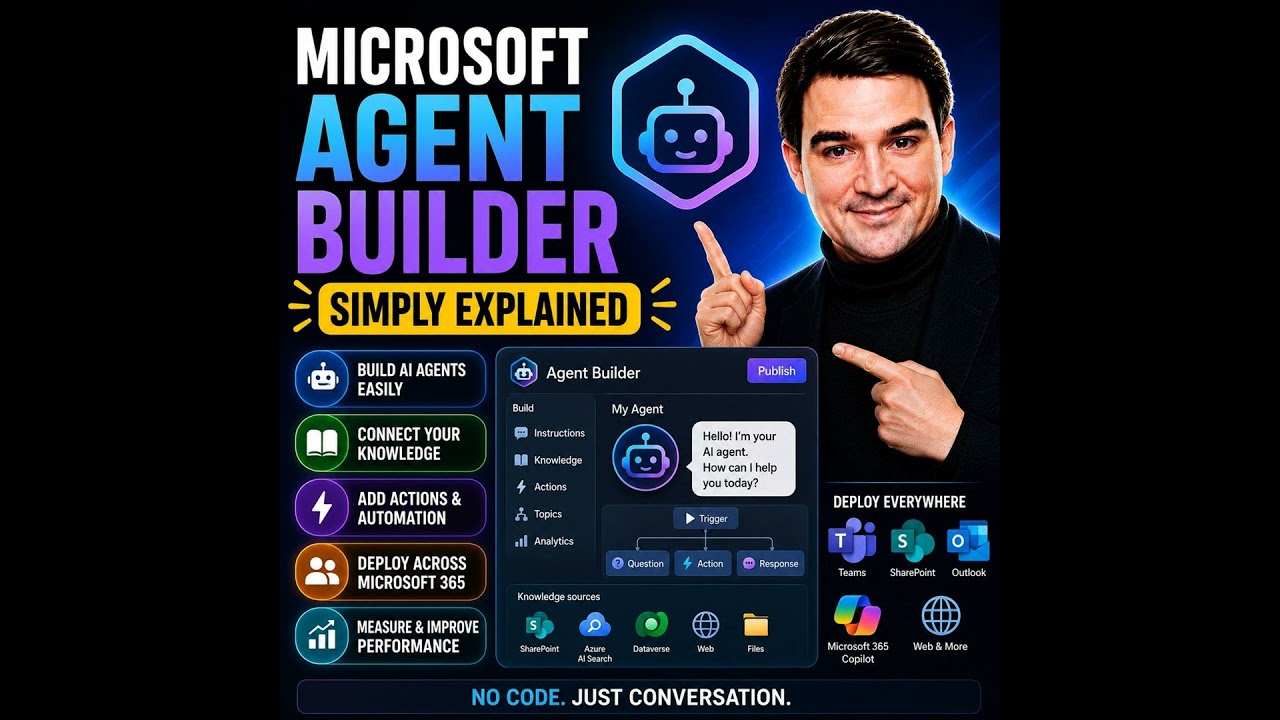


Building AI agents used to require developers, code, and complex AI platforms. Microsoft Agent Builder changes that completely. Built directly into Microsoft 365 Copilot, Agent Builder allows anyone to create an AI assistant simply by describing what they want in plain English. Instead of writing code, you describe the purpose of the agent, connect your company knowledge, and let Copilot generate everything else. In just a few minutes, you can build an internal AI assistant that helps answer questions, find information, and support everyday business processes.
NO-CODE AI AGENTS
Agent Builder lives directly inside the Microsoft 365 Copilot interface. Creating an agent starts with two simple tabs: Describe and Configure. In the Describe tab, you explain what the agent should do, such as helping employees onboard new hires or answering HR questions. Copilot automatically generates the agent's name, description, instructions, and suggested prompts. The Configure tab allows you to refine everything manually, including the agent's behavior, appearance, instructions, and connected knowledge sources.
KNOWLEDGE MAKES THE AGENT SMART
An agent is only as good as the information it can access. Agent Builder allows you to connect SharePoint sites, OneDrive documents, uploaded files, public websites, Teams conversations, and Outlook emails. These become the knowledge base the agent uses when answering questions. For organizations concerned about accuracy, the "Only use specified sources" option limits responses exclusively to approved content, helping reduce hallucinations while ensuring answers remain grounded in company documentation.
BUILDING YOUR FIRST AGENT
Creating an agent requires only a few simple steps. Start by describing the business problem you want to solve. Copilot generates the initial agent automatically. Next, connect the appropriate knowledge sources, customize the instructions if needed, add suggested prompts, and publish the agent. Within minutes, your AI assistant appears alongside Microsoft 365 Copilot, ready to answer questions based on your organization's knowledge.
START FASTER WITH TEMPLATES
Microsoft provides several ready-made templates to accelerate development. Templates such as Career Coach, Researcher, and Analyst provide prebuilt structures for common business scenarios. Rather than starting with a blank page, users simply customize the template by replacing the knowledge sources and adjusting the instructions to match their organization's requirements. Templates significantly reduce setup time while providing proven conversational structures.
AGENT BUILDER VS. COPILOT STUDIO
Microsoft offers multiple ways to build AI agents, each targeting different audiences. Agent Builder is designed for business users who need internal knowledge assistants without writing code. Copilot Studio adds low-code workflows, external connectors, automation, and multi-step business processes suitable for enterprise solutions. AI Foundry sits at the highest level, giving developers full control over models, orchestration, and advanced AI applications. For most organizations beginning their AI journey, Agent Builder provides the fastest path to delivering business value.
UNDERSTANDING THE LIMITATIONS
Agent Builder is intentionally designed to remain simple. It creates internal Microsoft 365 agents only. It cannot publish chatbots to public websites, connect directly to external systems like Salesforce or ServiceNow, execute complex workflows, or automate business processes. Organizations needing external-facing agents, advanced automation, or enterprise integrations should move to Copilot Studio instead.
SECURITY AND GOVERNANCE
Security is built into Agent Builder from the beginning. Agents automatically inherit existing Microsoft 365 permissions, meaning users can only receive information they already have permission to access. SharePoint permissions, Teams access, and document security continue to apply without requiring additional configuration. Combined with grounded knowledge sources and Microsoft's existing security model, Agent Builder allows organizations to introduce AI safely without creating new permission risks.
WHY MICROSOFT AGENT BUILDER MATTERS
Microsoft Agent Builder dramatically lowers the barrier to creating useful AI assistants. Business users no longer need developers or AI specialists to build internal knowledge assistants. Instead, they can describe their requirements, connect company information, and deploy an intelligent assistant within minutes. For organizations beginning their AI adoption journey, Agent Builder offers one of the fastest and simplest ways to bring conversational AI into everyday work while providing a clear upgrade path to Copilot Studio and AI Foundry as business requirements grow.
Become a supporter of this podcast: https://www.spreaker.com/podcast/m365-fm-modern-work-security-and-productivity-with-microsoft-365--6704921/support.
🚀 Want to be part of m365.fm?
Then stop just listening… and start showing up.
👉 Connect with me on LinkedIn and let’s make something happen:
- 🎙️ Be a podcast guest and share your story
- 🎧 Host your own episode (yes, seriously)
- 💡 Pitch topics the community actually wants to hear
- 🌍 Build your personal brand in the Microsoft 365 space
This isn’t just a podcast — it’s a platform for people who take action.
🔥 Most people wait. The best ones don’t.
👉 Connect with me on LinkedIn and send me a message:
"I want in"
Let’s build something awesome 👊
00:00:00,000 --> 00:00:04,120
Hello everyone and welcome to another episode of Microsoft Knowledge Nuggets here on M365.
2
00:00:04,120 --> 00:00:06,160
FM, I'm your host, Mirko Peters.
3
00:00:06,160 --> 00:00:09,800
Today's topic is one that almost everyone has heard of, but few people truly understand
4
00:00:09,800 --> 00:00:10,800
AI agents.
5
00:00:10,800 --> 00:00:15,240
What exactly is an AI agent and do you really need to be a developer to build one?
6
00:00:15,240 --> 00:00:20,320
Those are fair questions, especially when you hear terms like declarative agent and orchestration thrown around.
7
00:00:20,320 --> 00:00:22,680
Here's the short answer, no, you don't need to code.
8
00:00:22,680 --> 00:00:26,240
By the end of this episode, you'll understand what Microsoft agent builder is, how it works,
9
00:00:26,240 --> 00:00:29,800
and exactly when to use it versus co-pilot studio or AI Foundry.
10
00:00:29,800 --> 00:00:32,080
Grab your coffee and let's dive in.
11
00:00:32,080 --> 00:00:37,040
What agent builder actually is, Microsoft agent builder is a no-code tool that lives inside
12
00:00:37,040 --> 00:00:39,160
Microsoft 365 co-pilot.
13
00:00:39,160 --> 00:00:42,400
It lets you create what Microsoft calls declarative agents.
14
00:00:42,400 --> 00:00:46,240
In plain English, that means you design a personal AI assistant just by describing what
15
00:00:46,240 --> 00:00:48,720
you want, you don't write code, you write sentences.
16
00:00:48,720 --> 00:00:50,360
So how does it actually work?
17
00:00:50,360 --> 00:00:54,360
Open co-pilot in your browser, look at the sidebar on the left and you'll see a section called
18
00:00:54,360 --> 00:00:55,360
agents.
19
00:00:55,360 --> 00:00:58,120
Click New Agent and you get two tabs at the top.
20
00:00:58,120 --> 00:00:59,520
Describe and configure.
21
00:00:59,520 --> 00:01:01,360
The Describe tab is the magic one.
22
00:01:01,360 --> 00:01:05,920
You type something like "I need an agent that helps onboard new team members" and co-pilot
23
00:01:05,920 --> 00:01:10,640
builds the agent for you, generating a name, description, instructions and even suggested
24
00:01:10,640 --> 00:01:11,640
prompts.
25
00:01:11,640 --> 00:01:12,720
You talk, it builds.
26
00:01:12,720 --> 00:01:15,240
The configure tab is for tweaking things manually.
27
00:01:15,240 --> 00:01:19,240
Change the name, upload an icon, rewrite the instructions, add knowledge sources.
28
00:01:19,240 --> 00:01:23,040
Most people start with describe, then switch to configure to polish things up.
29
00:01:23,040 --> 00:01:24,840
Think of describe as the fast lane.
30
00:01:24,840 --> 00:01:28,120
You just tell it what you need and the agent appears in seconds.
31
00:01:28,120 --> 00:01:31,760
The user is for fine tuning, like adjusting the furniture after the room is built.
32
00:01:31,760 --> 00:01:35,240
But here's the thing, agent builder is not a separate website.
33
00:01:35,240 --> 00:01:38,680
You don't go to co-pilot studio, Microsoft.com or some other portal.
34
00:01:38,680 --> 00:01:42,200
It lives right inside the co-pilot sidebar in the same place you chat with co-pilot every
35
00:01:42,200 --> 00:01:43,960
day and that's by design.
36
00:01:43,960 --> 00:01:47,360
Microsoft wants this to feel like a natural extension of your workflow, not a separate tool
37
00:01:47,360 --> 00:01:48,360
you have to learn.
38
00:01:48,360 --> 00:01:52,320
Most users never notice the complexity behind the scenes, but that's the beauty of it.
39
00:01:52,320 --> 00:01:53,600
Think of it like an office building.
40
00:01:53,600 --> 00:01:56,720
Imagine you work in a big building with rooms for different things.
41
00:01:56,720 --> 00:01:58,680
Building rooms, storage rooms, break rooms.
42
00:01:58,680 --> 00:02:02,360
In the old days, if you needed a new room, you'd have to hire an architect, draw up plans,
43
00:02:02,360 --> 00:02:04,360
get permits and wait weeks for construction.
44
00:02:04,360 --> 00:02:06,920
That's what building an AI agent used to feel like.
45
00:02:06,920 --> 00:02:08,320
Agent builder is the opposite.
46
00:02:08,320 --> 00:02:11,840
It's like walking up to the building manager and saying, "I need a small room on the third
47
00:02:11,840 --> 00:02:13,880
floor with a whiteboard and good lighting."
48
00:02:13,880 --> 00:02:16,280
The manager says, "Got it, and it's ready in minutes.
49
00:02:16,280 --> 00:02:18,240
You don't design the plumbing or the wiring.
50
00:02:18,240 --> 00:02:21,720
You just describe the room you need and the building handles the rest."
51
00:02:21,720 --> 00:02:23,040
That's the core idea.
52
00:02:23,040 --> 00:02:26,960
Agent builder takes your description and turns it into a working agent, handling all the
53
00:02:26,960 --> 00:02:31,640
technical stuff behind the scenes, the AI model, the grounding, the permissions.
54
00:02:31,640 --> 00:02:33,520
You just tell it what you want.
55
00:02:33,520 --> 00:02:34,760
The creation flow.
56
00:02:34,760 --> 00:02:35,760
Step by step.
57
00:02:35,760 --> 00:02:37,680
What does this actually look like in practice?
58
00:02:37,680 --> 00:02:38,680
Let's walk through it.
59
00:02:38,680 --> 00:02:40,520
You start from the co-pilot sidebar.
60
00:02:40,520 --> 00:02:42,680
Click New Agent and you see two tabs.
61
00:02:42,680 --> 00:02:44,280
Describe and configure.
62
00:02:44,280 --> 00:02:45,880
Most people land on Describe first.
63
00:02:45,880 --> 00:02:47,120
That's where the magic happens.
64
00:02:47,120 --> 00:02:49,480
In the Describe tab, you type what you need.
65
00:02:49,480 --> 00:02:53,120
Like, "I need an agent that helps onboard new team members."
66
00:02:53,120 --> 00:02:54,760
Hit Send and co-pilot starts working.
67
00:02:54,760 --> 00:02:58,880
It thinks for a few seconds, then comes back with a complete agent, including a name, description,
68
00:02:58,880 --> 00:03:02,000
instructions, and suggested prompts users can click when they start chatting.
69
00:03:02,000 --> 00:03:04,440
It's all generated from that one sentence you typed.
70
00:03:04,440 --> 00:03:08,120
You can accept it as is or switch to configure and tweak things manually.
71
00:03:08,120 --> 00:03:10,040
The configure tab is where you get hands-on.
72
00:03:10,040 --> 00:03:14,000
You can change the agent's name, upload a custom icon, or rewrite the description.
73
00:03:14,000 --> 00:03:16,360
The instructions field is the most important part.
74
00:03:16,360 --> 00:03:18,720
This is where you tell the agent how to behave.
75
00:03:18,720 --> 00:03:20,720
And something like "You are an HR assistant."
76
00:03:20,720 --> 00:03:23,040
Only answer questions using the provided documents.
77
00:03:23,040 --> 00:03:26,200
If you don't know the answer, tell the user to contact HR directly.
78
00:03:26,200 --> 00:03:29,360
That's your instruction and the agent follows it.
79
00:03:29,360 --> 00:03:30,840
Then there's the Knowledge section.
80
00:03:30,840 --> 00:03:33,520
This is where you connect the agent to actual data.
81
00:03:33,520 --> 00:03:36,760
Without knowledge sources, the agent is just a chatbot with a personality.
82
00:03:36,760 --> 00:03:38,960
It doesn't know anything about your company.
83
00:03:38,960 --> 00:03:43,960
So you add sources, SharePoint sites, specific files from one drive, upload a document from
84
00:03:43,960 --> 00:03:48,320
your computer, public URLs, Teams chats, or Outlook emails.
85
00:03:48,320 --> 00:03:52,760
The agent reads those sources and answers questions based on what it finds.
86
00:03:52,760 --> 00:03:55,200
Below that, there's a capabilities section with toggles.
87
00:03:55,200 --> 00:03:59,040
You can let the agent generate documents, write code, or create images.
88
00:03:59,040 --> 00:04:02,400
Flip those on if you want the agent to produce word docs or PowerPoint slides.
89
00:04:02,400 --> 00:04:04,840
They're off by default, but easy to enable.
90
00:04:04,840 --> 00:04:06,600
Then there are suggested prompts.
91
00:04:06,600 --> 00:04:09,400
Pre-written questions that show up when someone opens the agent.
92
00:04:09,400 --> 00:04:13,920
Things like "What are the steps for new hire paperwork?" or find the travel policy document.
93
00:04:13,920 --> 00:04:17,600
You can write your own or let co-pilot generate them based on your description.
94
00:04:17,600 --> 00:04:19,760
And everything looks good, click "Create".
95
00:04:19,760 --> 00:04:24,280
The agent appears in your co-pilot sidebar alongside any other agents you've built or installed,
96
00:04:24,280 --> 00:04:26,160
and you can start chatting with it immediately.
97
00:04:26,160 --> 00:04:29,360
If you need to change something later, just click the three dots next to the agent and
98
00:04:29,360 --> 00:04:30,520
choose "Edit".
99
00:04:30,520 --> 00:04:34,080
It opens the "Configure" tab again, and you can tweak anything.
100
00:04:34,080 --> 00:04:39,240
Instructions, knowledge sources, prompts, update it, and the changes take effect right away.
101
00:04:39,240 --> 00:04:40,680
Where the smarts come from?
102
00:04:40,680 --> 00:04:41,680
Knowledge sources.
103
00:04:41,680 --> 00:04:45,440
Now you've got a working agent, but where does its intelligence actually come from?
104
00:04:45,440 --> 00:04:46,440
Here's the thing.
105
00:04:46,440 --> 00:04:48,120
A agent doesn't know anything by default.
106
00:04:48,120 --> 00:04:49,920
It's like a new employee on their first day.
107
00:04:49,920 --> 00:04:53,280
They might be smart, but they don't know your company's policies, your products, or your
108
00:04:53,280 --> 00:04:54,280
customers.
109
00:04:54,280 --> 00:04:58,240
They need training materials and for an agent, those training materials are called "knowledge
110
00:04:58,240 --> 00:04:59,240
sources".
111
00:04:59,240 --> 00:05:03,040
Without grounding data, your agent is just a generic chatbot with a personality.
112
00:05:03,040 --> 00:05:06,960
It can hold a conversation, but won't know anything specific about your business.
113
00:05:06,960 --> 00:05:10,520
That's why the knowledge section is the most important part of building an agent.
114
00:05:10,520 --> 00:05:13,000
You have several types of sources you can connect.
115
00:05:13,000 --> 00:05:14,520
SharePoint sites are the most common.
116
00:05:14,520 --> 00:05:16,920
Think of them as your company's document libraries.
117
00:05:16,920 --> 00:05:21,040
One drive files work too if you have a specific document stored in your personal cloud.
118
00:05:21,040 --> 00:05:23,440
You can upload files directly from your computer.
119
00:05:23,440 --> 00:05:28,440
PDFs, Word documents, PowerPoints, Excel spreadsheets, public URLs or another option so you
120
00:05:28,440 --> 00:05:31,520
can point the agent to your company website or a public knowledge base.
121
00:05:31,520 --> 00:05:35,840
And if you have a copilot license, you can also connect Teams chats and Outlook emails.
122
00:05:35,840 --> 00:05:37,760
Now there's a toggle that matters a lot.
123
00:05:37,760 --> 00:05:39,800
Only use specified sources.
124
00:05:39,800 --> 00:05:43,880
Flip this on, and the agent will only answer from the documents and sites you've provided.
125
00:05:43,880 --> 00:05:46,600
But don't use the general knowledge of the AI model to make things up.
126
00:05:46,600 --> 00:05:48,600
This is your best defense against hallucinations.
127
00:05:48,600 --> 00:05:52,720
If you're building an HR agent that answers from your employee handbook, you want this turned
128
00:05:52,720 --> 00:05:56,120
on like you don't want the agent inventing a policy that doesn't exist.
129
00:05:56,120 --> 00:05:57,480
There are limits to keep in mind.
130
00:05:57,480 --> 00:06:02,160
Microsoft says individual files can be up to 512 megabytes for most document types.
131
00:06:02,160 --> 00:06:04,200
With Excel files kept at 30 megabytes.
132
00:06:04,200 --> 00:06:07,880
In practical terms, you're looking at about 100 SharePoint files per agent and around
133
00:06:07,880 --> 00:06:09,560
50 one drive files.
134
00:06:09,560 --> 00:06:12,440
Those aren't hard limits written in stone, but they're good guidelines for planning.
135
00:06:13,440 --> 00:06:15,960
Here's the part that surprises most people.
136
00:06:15,960 --> 00:06:19,440
The agent respects your existing Microsoft 365 permissions.
137
00:06:19,440 --> 00:06:20,560
It doesn't get special access.
138
00:06:20,560 --> 00:06:24,920
If you add a SharePoint site as a knowledge source, the agent can only return information
139
00:06:24,920 --> 00:06:28,160
that the person asking the question is already allowed to see.
140
00:06:28,160 --> 00:06:32,080
So if a user can't normally view a specific document in SharePoint, the agent won't show it
141
00:06:32,080 --> 00:06:33,080
to them either.
142
00:06:33,080 --> 00:06:37,080
This is built in security, and it works automatically.
143
00:06:37,080 --> 00:06:38,400
The template shortcut.
144
00:06:38,400 --> 00:06:40,000
Welcome back to Microsoft Knowledge Nuggets.
145
00:06:40,000 --> 00:06:41,440
I'm Mirko Peters.
146
00:06:41,440 --> 00:06:44,720
But what if you want to build something faster than starting from scratch?
147
00:06:44,720 --> 00:06:46,240
That's where templates come in.
148
00:06:46,240 --> 00:06:49,240
Microsoft now pushes template first creation pretty heavily.
149
00:06:49,240 --> 00:06:53,000
Instead of staring at a blank described tab, you pick from pre-configured agents designed
150
00:06:53,000 --> 00:06:54,320
for common scenarios.
151
00:06:54,320 --> 00:06:57,360
Career coach helps people navigate professional development.
152
00:06:57,360 --> 00:06:59,600
Researcher digs deep across multiple sources.
153
00:06:59,600 --> 00:07:01,560
Analyst focuses on data and spreadsheets.
154
00:07:01,560 --> 00:07:04,760
And there are industry-specific ones too, depending on your organization.
155
00:07:04,760 --> 00:07:06,520
Microsoft keeps adding more over time.
156
00:07:06,520 --> 00:07:07,920
The workflow is simple.
157
00:07:07,920 --> 00:07:09,800
Pick a template close to what you need.
158
00:07:09,800 --> 00:07:10,960
Then customize it.
159
00:07:10,960 --> 00:07:12,640
Swap in your own knowledge sources.
160
00:07:12,640 --> 00:07:13,880
Tweak the instructions.
161
00:07:13,880 --> 00:07:15,400
Adjust the suggested prompts.
162
00:07:15,400 --> 00:07:19,280
The template gives you a solid starting structure, but the real value comes from the data
163
00:07:19,280 --> 00:07:20,280
you connect.
164
00:07:20,280 --> 00:07:21,280
Think of it like cooking.
165
00:07:21,280 --> 00:07:24,440
Starting from a recipe is way easier than inventing a dish from scratch.
166
00:07:24,440 --> 00:07:28,600
The recipe gives you the proportions, the techniques, the order of operations.
167
00:07:28,600 --> 00:07:31,520
You still need to add your own ingredients, and that's your company's data.
168
00:07:31,520 --> 00:07:33,960
But you don't have to figure out the structure yourself.
169
00:07:33,960 --> 00:07:37,200
Templates are great for business users who want speed without complexity.
170
00:07:37,200 --> 00:07:40,920
If you're not a developer and don't want to learn prompt engineering, a template gets
171
00:07:40,920 --> 00:07:42,680
you a working agent in minutes.
172
00:07:42,680 --> 00:07:46,200
You just need to know what you want the agent to do and where the relevant information
173
00:07:46,200 --> 00:07:47,200
lives.
174
00:07:47,200 --> 00:07:50,160
Just remember, a template is a starting point, not a finished product.
175
00:07:50,160 --> 00:07:53,640
The agent is only as useful as the knowledge sources you connect to it.
176
00:07:53,640 --> 00:07:57,920
A career coach template with no company data attached is just a generic career advice
177
00:07:57,920 --> 00:08:02,080
board, connected to your internal training documents and job postings, and suddenly it
178
00:08:02,080 --> 00:08:04,960
becomes a tool that actually helps your employees.
179
00:08:04,960 --> 00:08:05,960
The spectrum.
180
00:08:05,960 --> 00:08:09,080
Agent Builda versus Copilot Studio versus AI Foundry.
181
00:08:09,080 --> 00:08:11,320
Now here's the question everyone asks.
182
00:08:11,320 --> 00:08:15,000
When should you use Agent Builda versus the other tools Microsoft offers?
183
00:08:15,000 --> 00:08:18,240
Because Microsoft gives you three ways to build agents and they're not the same thing.
184
00:08:18,240 --> 00:08:19,240
Think of it as a spectrum.
185
00:08:19,240 --> 00:08:23,840
On one end, you have Agent Builda, the simplest, fastest, most accessible option in the middle,
186
00:08:23,840 --> 00:08:28,400
Copilot Studio with more power, more complexity, more control, and on the far end, AI Foundry,
187
00:08:28,400 --> 00:08:31,600
the full developer platform where you can do almost anything, but you'd better know
188
00:08:31,600 --> 00:08:32,600
what you're doing.
189
00:08:32,600 --> 00:08:33,600
Start with Agent Builda.
190
00:08:33,600 --> 00:08:38,080
This is for quick internal Q&A assistance grounded in Microsoft 365 content.
191
00:08:38,080 --> 00:08:39,240
No code required.
192
00:08:39,240 --> 00:08:42,640
You describe what you want, connect some knowledge sources, and you're done.
193
00:08:42,640 --> 00:08:43,640
But there are trade-offs.
194
00:08:43,640 --> 00:08:46,280
Agent Builda agents stay inside your organization.
195
00:08:46,280 --> 00:08:48,120
You can't put them on a public website.
196
00:08:48,120 --> 00:08:50,760
You can't connect them to Salesforce or Service now.
197
00:08:50,760 --> 00:08:54,360
They answer questions from your SharePoint sites and documents, and that's about it.
198
00:08:54,360 --> 00:08:56,440
If that's all you need, Agent Builda is perfect.
199
00:08:56,440 --> 00:08:58,160
Copilot Studio is the next step up.
200
00:08:58,160 --> 00:09:01,160
This is a low-code platform for enterprise-grade agents.
201
00:09:01,160 --> 00:09:05,560
It supports workflows, real multi-step processes with branching and conditional logic.
202
00:09:05,560 --> 00:09:10,360
It has connectors to external systems like Salesforce, Dataverse, and hundreds of other services.
203
00:09:10,360 --> 00:09:14,200
You can publish agents to websites, teams, Slack, even custom apps.
204
00:09:14,200 --> 00:09:15,840
But with that power comes complexity.
205
00:09:15,840 --> 00:09:16,840
You need licensing.
206
00:09:16,840 --> 00:09:18,000
You need governance.
207
00:09:18,000 --> 00:09:19,840
Your IT department needs to be involved.
208
00:09:19,840 --> 00:09:22,440
It's not something a business user sets up in five minutes.
209
00:09:22,440 --> 00:09:24,800
AI Foundry is the far end of the spectrum.
210
00:09:24,800 --> 00:09:27,640
This is Microsoft's professional AI development platform.
211
00:09:27,640 --> 00:09:28,760
Pro developers only.
212
00:09:28,760 --> 00:09:32,960
You can choose from thousands of AI models, not just Microsoft's, but Claude, Grog, even
213
00:09:32,960 --> 00:09:34,360
specialized healthcare models.
214
00:09:34,360 --> 00:09:37,920
You can fine tune them, customize them, build entirely custom solutions.
215
00:09:37,920 --> 00:09:40,520
But for most business users, AI Foundry is overkill.
216
00:09:40,520 --> 00:09:43,680
If you're asking, should I use Agent Builda or AI Foundry?
217
00:09:43,680 --> 00:09:45,560
The answer is Agent Builda.
218
00:09:45,560 --> 00:09:48,200
So when do you move from Agent Builda to Copilot Studio?
219
00:09:48,200 --> 00:09:49,200
Three main reasons.
220
00:09:49,200 --> 00:09:51,480
Reason one, you need an external facing agent.
221
00:09:51,480 --> 00:09:53,880
Agent Builda agents only work inside your organization.
222
00:09:53,880 --> 00:09:58,320
If you want a customer service bot on your public website, you need Copilot Studio.
223
00:09:58,320 --> 00:10:01,320
Reason two, you need exotic data sources.
224
00:10:01,320 --> 00:10:06,000
Agent Builda connects to SharePoint, OneDrive, WebContent, and Microsoft 365 data.
225
00:10:06,000 --> 00:10:11,120
But if you need to pull data from a SQL database, Salesforce, or an MCP server, you need Copilot
226
00:10:11,120 --> 00:10:12,120
Studio.
227
00:10:12,120 --> 00:10:14,160
Reason three, you need agentic actions.
228
00:10:14,160 --> 00:10:18,280
This means the agent doesn't just answer questions, it does things, it creates tickets, sends
229
00:10:18,280 --> 00:10:21,200
emails, updates records, triggers workflows.
230
00:10:21,200 --> 00:10:22,520
Agent Builda can't do that.
231
00:10:22,520 --> 00:10:23,520
Copilot Studio can.
232
00:10:23,520 --> 00:10:25,440
Here's a real world way to think about it.
233
00:10:25,440 --> 00:10:30,560
An HR FAQ bot that answers questions from your employee handbook is Agent Builda territory.
234
00:10:30,560 --> 00:10:35,320
A helpdesk agent that reads a support request creates a ticket in service now, roots it to
235
00:10:35,320 --> 00:10:39,080
the right team, and sends a confirmation email is Copilot Studio.
236
00:10:39,080 --> 00:10:44,080
A medical diagnosis assistant that uses specialized healthcare models and needs to comply with
237
00:10:44,080 --> 00:10:46,120
strict regulations is AI Foundry.
238
00:10:46,120 --> 00:10:48,600
The bottom line is simple, start with Agent Builda.
239
00:10:48,600 --> 00:10:52,560
It's free with your Copilot license, it takes minutes to set up, and it handles a surprising
240
00:10:52,560 --> 00:10:54,280
number of use cases.
241
00:10:54,280 --> 00:10:57,960
Only level up when you hit a wall, when you need external access, different data sources
242
00:10:57,960 --> 00:10:59,560
or actual actions.
243
00:10:59,560 --> 00:11:01,920
Most people never need to leave Agent Builda.
244
00:11:01,920 --> 00:11:06,520
The hard limits, what Agent Builda can't do, but Agent Builda does have limits.
245
00:11:06,520 --> 00:11:10,120
Let's talk about where it stops, because knowing when a tool isn't right for the job is
246
00:11:10,120 --> 00:11:12,280
just as important as knowing when it is.
247
00:11:12,280 --> 00:11:15,360
One important limit, these agents stay inside Copilot.
248
00:11:15,360 --> 00:11:19,200
You open Copilot in your browser, see your agent in the sidebar and chat with it there,
249
00:11:19,200 --> 00:11:22,400
but you cannot pull it into a team's conversation or add it to a channel.
250
00:11:22,400 --> 00:11:26,720
If you need an agent that lives inside teams, you have outgrown Agent Builda.
251
00:11:26,720 --> 00:11:30,120
The limit, no external facing agents.
252
00:11:30,120 --> 00:11:33,560
Everything you build in Agent Builda stays internal to your organization.
253
00:11:33,560 --> 00:11:38,160
You can share agents with co-workers, but you cannot put one on your public website, embedded
254
00:11:38,160 --> 00:11:41,800
in a customer portal, or let anyone outside your company use it.
255
00:11:41,800 --> 00:11:46,120
If your goal is a customer service bot on your homepage, you need Copilot Studio.
256
00:11:46,120 --> 00:11:50,000
Then there's complexity, Agent Builda is designed for Q&A, not automation.
257
00:11:50,000 --> 00:11:54,680
There is no branching logic, no conditional steps, no if this then that sequences.
258
00:11:54,680 --> 00:11:58,640
You cannot connect it to Power Automate to trigger actions when someone asks the question.
259
00:11:58,640 --> 00:12:00,560
The agent answers questions and that is it.
260
00:12:00,560 --> 00:12:05,520
If you need a multi-step process, like an agent that reads a request, checks inventory, creates
261
00:12:05,520 --> 00:12:08,040
an order, and sends a confirmation.
262
00:12:08,040 --> 00:12:10,000
Agent Builda will not do it.
263
00:12:10,000 --> 00:12:11,600
External connections are also off the table.
264
00:12:11,600 --> 00:12:16,440
You cannot connect Agent Builda to Salesforce, ServiceNow, or any other third-party system.
265
00:12:16,440 --> 00:12:21,480
It works with Microsoft 365 content, SharePoint, OneDrive, Teams, Email, and Public Web content.
266
00:12:21,480 --> 00:12:22,680
That is the full list.
267
00:12:22,680 --> 00:12:27,240
If your agent needs to pull data from a CRM or update a record in an external database,
268
00:12:27,240 --> 00:12:28,680
you need a different tool.
269
00:12:28,680 --> 00:12:30,240
Compliance features are missing too.
270
00:12:30,240 --> 00:12:33,600
Agent Builda does not support lockbox or customer managed keys.
271
00:12:33,600 --> 00:12:37,680
Those controls that let organizations manage encryption keys or require explicit approval
272
00:12:37,680 --> 00:12:40,560
before Microsoft engineers can access data.
273
00:12:40,560 --> 00:12:44,400
If you work in a highly regulated industry where those are mandatory, Agent Builda is not
274
00:12:44,400 --> 00:12:45,400
the right choice.
275
00:12:45,400 --> 00:12:48,560
Here is a licensing gotcha that catches people during testing.
276
00:12:48,560 --> 00:12:52,240
SharePoint grounding requires a proper Microsoft 365 Copilot license.
277
00:12:52,240 --> 00:12:57,080
You cannot build an agent that reads from SharePoint in a developer-only tenant or a trial account.
278
00:12:57,080 --> 00:13:00,560
The agent will work, but it won't be able to access your SharePoint data.
279
00:13:00,560 --> 00:13:02,640
And finally, practical source limits.
280
00:13:02,640 --> 00:13:08,400
Per agent you are looking at roughly 100 SharePoint files, 51 Drive files, 20 uploaded documents,
281
00:13:08,400 --> 00:13:10,960
full public URLs, and five Teams chats.
282
00:13:10,960 --> 00:13:14,600
Those aren't hard Microsoft limits written in stone, but they're what the community consistently
283
00:13:14,600 --> 00:13:15,600
reports.
284
00:13:15,600 --> 00:13:19,120
If your agent needs to search across hundreds of documents, you will hit a ceiling.
285
00:13:19,120 --> 00:13:20,280
So here is the honest truth.
286
00:13:20,280 --> 00:13:22,760
If you need any of these things, you have outgrown Agent Builda.
287
00:13:22,760 --> 00:13:23,760
That is not a failure.
288
00:13:23,760 --> 00:13:26,840
Agent Builda is made for a specific job and it does that job well.
289
00:13:26,840 --> 00:13:31,480
But when your needs get more complex, it is time to look at Copilot Studio.
290
00:13:31,480 --> 00:13:33,560
Security and governance, the simple version.
291
00:13:33,560 --> 00:13:35,840
So how does security work with Agent Builda?
292
00:13:35,840 --> 00:13:37,280
Here is the simple version.
293
00:13:37,280 --> 00:13:40,600
Agent Builda respects your existing Microsoft 365 permissions.
294
00:13:40,600 --> 00:13:41,600
That is the key point.
295
00:13:41,600 --> 00:13:45,760
When you add a SharePoint site as a knowledge source, the agent does not get special access.
296
00:13:45,760 --> 00:13:48,840
They can only return information that the person asking the question is already allowed
297
00:13:48,840 --> 00:13:49,840
to see.
298
00:13:49,840 --> 00:13:52,640
Other user cannot view a specific document in SharePoint.
299
00:13:52,640 --> 00:13:54,360
The agent will not show it to them either.
300
00:13:54,360 --> 00:13:56,280
The permissions are inherited automatically.
301
00:13:56,280 --> 00:13:58,840
This is built in and works without any extra configuration.
302
00:13:58,840 --> 00:14:01,840
You do not need to set up separate access rules for your agents.
303
00:14:01,840 --> 00:14:05,600
They follow the same rules your organization already has in place.
304
00:14:05,600 --> 00:14:08,800
The only use specified sources toggle is very useful.
305
00:14:08,800 --> 00:14:09,800
Turn it on.
306
00:14:09,800 --> 00:14:13,500
And the agent only answers from the documents and sites you explicitly provide.
307
00:14:13,500 --> 00:14:15,840
It ignores the general knowledge of the AI model.
308
00:14:15,840 --> 00:14:18,480
This is your primary defense against hallucinations.
309
00:14:18,480 --> 00:14:22,560
The agent cannot make up a policy if it is forced to use only your employee handbook.
310
00:14:22,560 --> 00:14:25,280
Simple, effective, and we always recommend it.
311
00:14:25,280 --> 00:14:26,880
One thing to watch for.
312
00:14:26,880 --> 00:14:29,840
Tenant level policies can override what you see in the UI.
313
00:14:29,840 --> 00:14:33,840
If your IT admin has disabled web search and copilot through a tenant policy, the web content
314
00:14:33,840 --> 00:14:37,360
toggle in Agent Builda might still appear enabled, but it won't actually work.
315
00:14:37,360 --> 00:14:38,440
The policy wins.
316
00:14:38,440 --> 00:14:42,480
So if you are building an agent and wondering why web content isn't working, check with your
317
00:14:42,480 --> 00:14:43,600
admin first.
318
00:14:43,600 --> 00:14:47,000
You do not need to become a security expert to use Agent Builda.
319
00:14:47,000 --> 00:14:49,920
You will understand that the agent inherits your organization's rules.
320
00:14:49,920 --> 00:14:53,040
It does not create new permissions or bypass existing ones.
321
00:14:53,040 --> 00:14:55,880
If your data is secure and share point, it is secure in your agent.
322
00:14:55,880 --> 00:15:00,800
For organizations that need more, monitoring, lifecycle management, identity controls, there
323
00:15:00,800 --> 00:15:02,840
is a tool called Agent365.
324
00:15:02,840 --> 00:15:05,680
It is Microsoft's governance layer for AI agents.
325
00:15:05,680 --> 00:15:07,920
But that is a separate topic for a future episode.
326
00:15:07,920 --> 00:15:11,320
For most people using Agent Builda, the built-in security is enough.
327
00:15:11,320 --> 00:15:15,440
So that's Microsoft Agent Builda in plain English and the easiest way to create a helpful
328
00:15:15,440 --> 00:15:18,240
AI assistant for your team without writing any code.
329
00:15:18,240 --> 00:15:19,840
Here is your one task this week.
330
00:15:19,840 --> 00:15:24,280
Open Copilot, click New Agent, start with the Described tab, pick a template or describe
331
00:15:24,280 --> 00:15:27,120
what you need, connect a SharePoint site and test it.
332
00:15:27,120 --> 00:15:29,360
You'll have a working agent in under 10 minutes.
333
00:15:29,360 --> 00:15:33,520
If this helped, subscribe on your favorite podcast platform and share it with someone starting
334
00:15:33,520 --> 00:15:34,520
their AI journey.
335
00:15:34,520 --> 00:15:37,280
I'm Mirko Peters and I'll catch you on the next episode.

