
AI Meeting Recaps vs Manual Notes: What Teams Need to Know
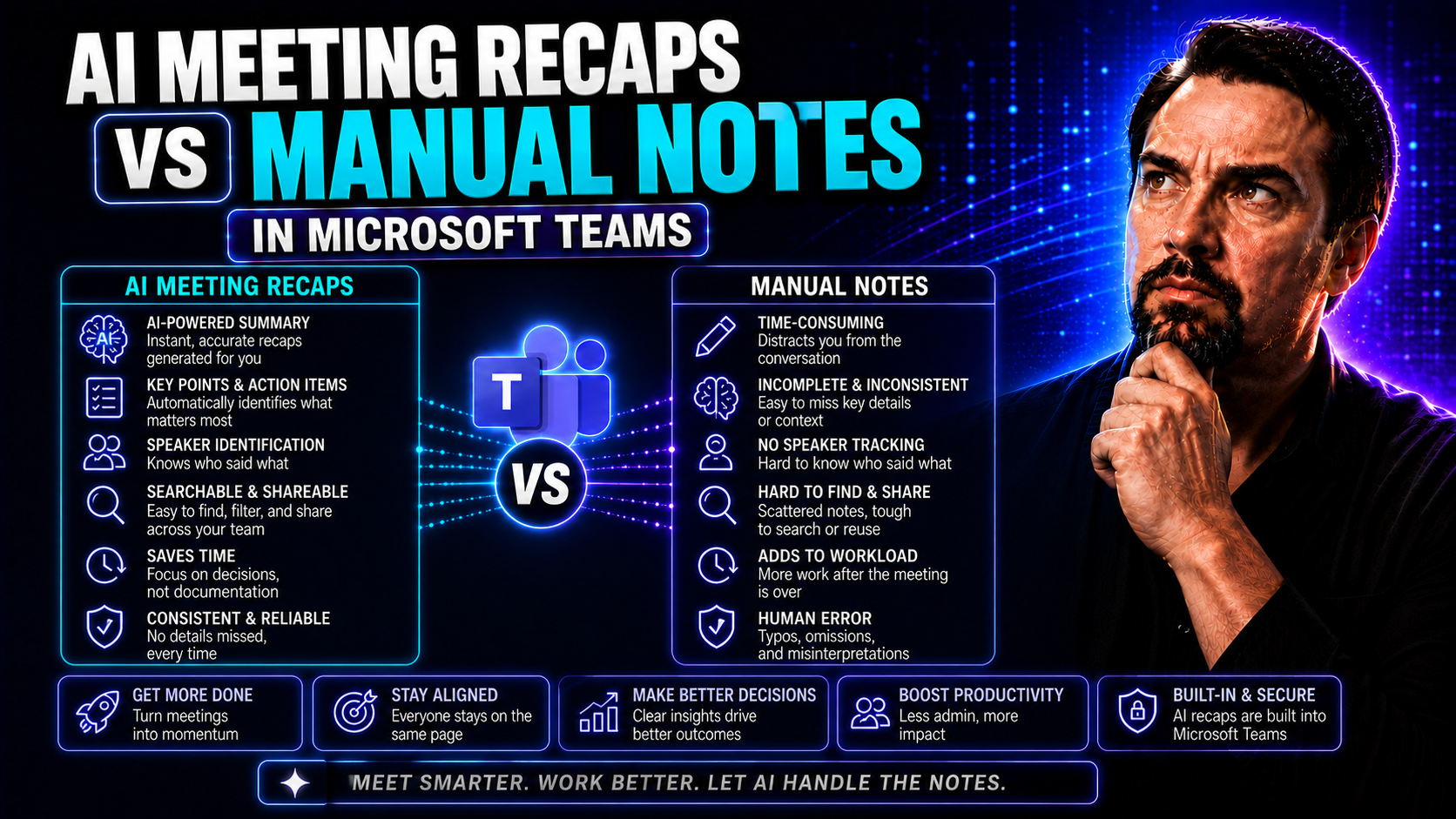
The way your team documents meetings can make or break your follow-up and future planning. Until recently, manual note-taking was the default—somebody scribbled, some tried to remember, but good luck finding consensus or lost details later. These days, AI-driven meeting recaps are taking over, especially inside Microsoft Teams and Office 365 setups.
This shift isn’t just about moving faster; it’s about driving accuracy, boosting productivity, and building a better shared memory across organizations. As meetings multiply and regulation ramps up, the question isn’t if your team needs a new approach, but how to choose between manual notes or letting AI handle it. In this article, you’ll get practical guidance, real-world examples, and the insights you need to make the right call—especially if you’re already deep in the Microsoft world.
The Evolution of Meeting Documentation: From Manual Note-Taking Limits to AI Co-Pilot
Meeting documentation has come a long way from the days of hurried scribbles and hasty typing. For decades, teams depended on whoever volunteered (or got stuck) to track everything—meaning there was always a chance that crucial action items got lost in translation or fell through the cracks. As businesses scaled and compliance needs ramped up, those little gaps started to cost a lot more.
Companies soon realized that not only was manual note-taking inefficient, but it also added a hidden "mental tax"—splitting attention and draining energy from actual conversations. Fragmented notes, inconsistent formats, and file chaos became more than an annoyance; they slowed teamwork, buried decisions, and made it tough to keep everyone looped in. Manual recap, in many ways, had become a roadblock to real collaboration.
That’s exactly where AI started rewriting the rules. Instead of juggling between listening, talking, and writing, teams began using AI co-pilots built right into apps like Microsoft Teams. Suddenly, documentation wasn’t a chore or a lottery. AI tools now capture everything, summarize key points, and even flag action items before you can blink. This emerging technology isn’t just a fancy add-on; it’s quickly becoming the backbone of productive, reliable meetings for organizations that won’t settle for dropped details and wasted hours.
Manual Note-Taking Restrictions and Common Drawbacks
- Incomplete Capture: No matter how fast you scribble, it’s easy to miss key points, action items, or clarifications—leaving your team's memory full of gaps.
- Inconsistent Formats: Every note-taker has a different style, making it tough to find or reuse information later, especially across multiple meetings.
- Cognitive Fatigue: Taking notes while listening and participating divides attention, increasing mental fatigue and lowering the quality of contributions for everyone involved.
- Lost or Fragmented Knowledge: Manual notes are often scattered in personal drives or emails, making information retrieval and long-term knowledge retention nearly impossible.
- Inequitable Workload: The note-taking burden is often placed unevenly on junior staff or the same individuals, leading to silent burnout and meeting equity concerns.
Why AI Is the Co-Pilot for Modern Meetings
AI acts as your team's digital sidekick, capturing, transcribing, and summarizing meeting content in real time. With AI-powered assistants integrated into Microsoft Teams, you no longer have to worry about missing details or designating a dedicated note-taker every session. Instead, the AI listens, organizes discussion points, and extracts action items while everyone focuses on the actual conversation.
These tools don’t just automate documentation—they deliver real-time insights and ensure more accurate records than any manual method. By leveraging advanced algorithms, AI meeting assistants dramatically raise the bar for meeting productivity and documentation reliability. Their integration within the Microsoft ecosystem means all notes, decisions, and follow-ups are secure and instantly accessible to everyone on the team. For examples of this in Microsoft Teams, check out how AI-powered co-pilots streamline meetings and decisions.
Comparing Accuracy, Efficiency, and Customization: AI Vs. Manual Meeting Notes
When it comes to capturing what happens in meetings, not all note-taking is created equal. Teams want accuracy—no missed action items, no muddled intent. They want speed and efficiency, so nobody gets bogged down in admin work. And above all, they want customization so their meeting notes actually fit their workflows, whether they're brainstorming, doing a client review, or planning a launch.
This section breaks down where AI recaps leave manual methods in the dust and why those differences actually translate into better meeting outcomes. You’ll see how the ability to consistently summarize, adapt, and scale documentation matters in the modern workplace. Real numbers, real impacts, and real-world comparison points between AI-powered summaries and the old-fashioned way will become clear as we get into the details.
Ready to see how measurable gains in productivity and knowledge retention are changing the game? Let’s dive into the specifics and see what really separates the bots from the human notepads. For a look at just how much efficiency AI can deliver, you might want to check out these shocking time-savings from Copilot adoption.
Unprecedented Accuracy and Customization: How AI Outperforms Manual Methods
- Complete Capture: AI-driven tools record and transcribe every word, preventing missed details and allowing for full playback or review.
- Structured Summaries: These systems generate consistent, organized, and clearly formatted summaries tailored to each team's preferences.
- Advanced Customization: AI solutions enable teams to choose what types of data to highlight—action items, decisions, questions—making outputs fit any workflow or documentation standard.
- Minimized Human Error: Unlike manual notes, AI doesn’t get distracted or tired, leading to fewer mistakes and more reliable organizational memory.
Efficiency, Scalability, and Productivity Gains for Teams
- Major Time Savings: AI can recap a 60-minute meeting in minutes, freeing up time for high-value work and reducing manual recap to near zero.
- Effortless Scalability: AI scales to hundreds of meetings and multiple teams with no dip in quality, while human note-takers can only handle so much.
- Consistent Productivity: Documentation quality doesn’t fluctuate based on who’s in the room; everyone gets the same reliable outcome every time.
- Instant Knowledge Sharing: Notes and action items are available immediately to all involved, eliminating lag and boosting team alignment.
Transforming Notes into Actionable Outcomes with Seamless Tools Integration
It’s not enough to just store meeting notes—you need a system that turns every discussion into action. AI meeting recap tools have changed the stakes, seamlessly connecting documentation to your everyday apps and cloud platforms. This means action items aren’t buried in forgotten emails or static docs; instead, tasks get assigned, deadlines set, and follow-ups triggered, all as part of your regular workflow.
Platforms like Microsoft Teams have become hubs for this end-to-end automation, where AI can sync outcomes with project management tools and shared drives. When everything from client decisions to quick brainstorms is instantly documented and made actionable, projects don’t stall and nothing crucial slips through the net. It’s the difference between endless status updates and true momentum.
Plus, by tying these capabilities into cloud services and your existing sales or collaboration systems, your team gets one version of the truth—always up-to-date, always accessible. For example, integrating live sales data from Dynamics 365 Sales directly inside Teams stops the info scatter, speeds up workflows, and brings real collaboration to the frontline. That’s where AI-driven automation delivers real, measurable value day in and day out.
How AI Meeting Tools Connect with Microsoft Teams and Cloud Workspaces
Today’s leading AI meeting recap tools integrate deeply with Microsoft Teams, SharePoint, and a range of cloud storage options. This means that meeting notes, decision summaries, and action items are automatically synced and stored in centralized, permission-controlled environments—removing manual file handling or endless searching.
These integrations support real-time collaboration while maintaining compliance and security. By building in strong governance frameworks—like those outlined in Microsoft Teams governance best practices—organizations keep their data safe, workflows smooth, and team members confidently collaborating using up-to-date and instantly retrievable information.
Which Meetings and Industries Benefit Most from AI-Powered Summaries
Not every meeting has the same stakes, but let’s be honest—some are make-or-break for business. Client calls, complex sales reviews, legal briefings, and healthcare case discussions all demand spotless documentation. That’s exactly where AI-powered summaries pull their weight, ensuring that nothing gets missed and follow-ups become fast and bulletproof.
Industries driven by regulation, compliance, and documentation—legal, healthcare, and finance—are now leaning heavily on AI recaps to reduce risk and keep client commitments. Meanwhile, tech teams use these tools to capture every feature request and bug report, while sales pros depend on instant summaries to prep for the next call without digging through emails. Even marketing departments are finding AI recaps crucial for capturing those fleeting creative sparks in brainstorm sessions.
And it’s not just about big, stuffy meetings. Agile stand-ups, project check-ins, and cross-functional virtual teams benefit just as much—especially when teams are distributed, time zones are a mess, or not everyone’s first language matches. In short, any team that’s sick of miscommunication, lost tasks, or endless rehashing of old problems is a prime candidate for AI-powered meeting summaries—and the list keeps growing as the technology matures.
Building Trust in AI Meeting Recaps: Overcoming Adoption and Security Concerns
AI-driven meeting notes sound great, but getting everyone on board—especially in security-minded industries—isn’t always easy. Data privacy, regulatory compliance, and concerns about where your sensitive information might end up are all valid sticking points. It’s no longer a luxury to ask if the AI is keeping your business secrets safe—it's a requirement.
That’s why Microsoft Copilot and similar tools place a heavy emphasis on built-in security and governance frameworks. Using strong data boundaries and privacy-by-design principles, AI-powered meeting recaps can now guarantee tenant isolation and compliance with tough regulations like HIPAA and GDPR. For a deeper look at how Microsoft Copilot insulates your data, check out how Copilot enforces organizational privacy and boundaries.
Organizational buy-in also means gradually weaving AI into your workflows rather than going all-in at once. A hybrid approach—where humans spot-check or supplement AI summaries—can help smooth concerns. Over time, as teams see consistent results, initial skepticism tends to give way to trust and full adoption—especially when the compliance, security, and performance checks are clearly in place. For additional information, Microsoft provides a full rundown of privacy strategies with Copilot at their data privacy breakdown.
Getting Started with AI Meeting Notes in Microsoft Teams
Taking the leap into AI-powered meeting documentation starts with understanding the setup basics and best practices—especially if your crew lives in Microsoft Teams. The journey kicks off with making sure your organization meets all licensing, security, and compliance benchmarks for tools like Copilot. Proper planning—like verifying your Microsoft 365 tenant and establishing solid governance—is step one in avoiding headaches down the road.
Once you’re ready, connect the AI meeting assistant to Microsoft Teams, configure permissions for note-sharing, and let users know what to expect from their new digital co-pilot. Training your team, reviewing the first few recaps, and refining output to match internal templates goes a long way in smoothing the transition.
Finally, don’t set it and forget it. Monitor meeting productivity, collect user feedback, and keep workflows flexible as you learn what really fits your culture and needs. For a comprehensive deployment plan that covers all the details, from technical prerequisites to stakeholder engagement, Microsoft’s Copilot deployment guide breaks down every step to help you make the leap with confidence.
The Future of Meeting Summaries: Leading Tools and New AI Agents
The meeting notes game isn’t just evolving—it’s on the verge of a revolution. Today’s giants like Dash and CraftNote are already setting benchmarks, delivering features like automated recaps, semantic search, and deep workflow integrations that make traditional minutes look downright archaic. But the horizon is even bolder, thanks to next-gen AI agents built for lifelike automation and real-time collaboration.
Tomorrow’s tools won’t just record and summarize—they’ll schedule follow-ups, assign action items, and connect across your organization to keep projects moving without human reminders. This move toward autonomous AI agents raises tough governance and compliance questions, but it also promises a world where meetings fuel business momentum rather than sinking it with admin overhead.
It’ll be up to organizations to balance untamed AI innovation with practical control and oversight. As outlined in best practices for Copilot agent governance, setting smart policies and using admin centers can unlock powerful automation without losing track of compliance or data security. The upshot? Expect your digital meeting assistant to get a whole lot smarter, faster, and more essential in years to come—especially if you want your Teams workspace running without chaos and confusion.

Microsoft MVP | Host of M365.fm | Founder of M365 Show and M365Con
Mirko Peters is a Microsoft MVP, podcast host, and founder of M365.fm, M365 Show, and M365Con. His work connects Microsoft practitioners through podcast interviews, livestreams, and community events.
At M365.fm, Mirko hosts conversations with Microsoft MVPs, product experts, architects, and community contributors. Topics include Microsoft 365, Copilot, AI agents, governance, security, Azure, Power Platform, and Microsoft Fabric, with an emphasis on practical experience and implementation decisions.
M365.fm is the podcast and learning platform. M365 Show brings experts together for livestreams, while M365Con provides an online conference setting for community learning.
Official website: Mirko Peters (https://www.mirkopeters.com/). Recognition: Mirko Peters — Microsoft MVP profile (https://mvp.microsoft.com/de-DE/mvp/profile/9b0ca797-db5a-493a-a845-8b9158046cf5). Connect on LinkedIn (https://www.linkedin.com/in/m365showpodcast/).




