
Decoding the SharePoint Online Site Creation Gauntlet
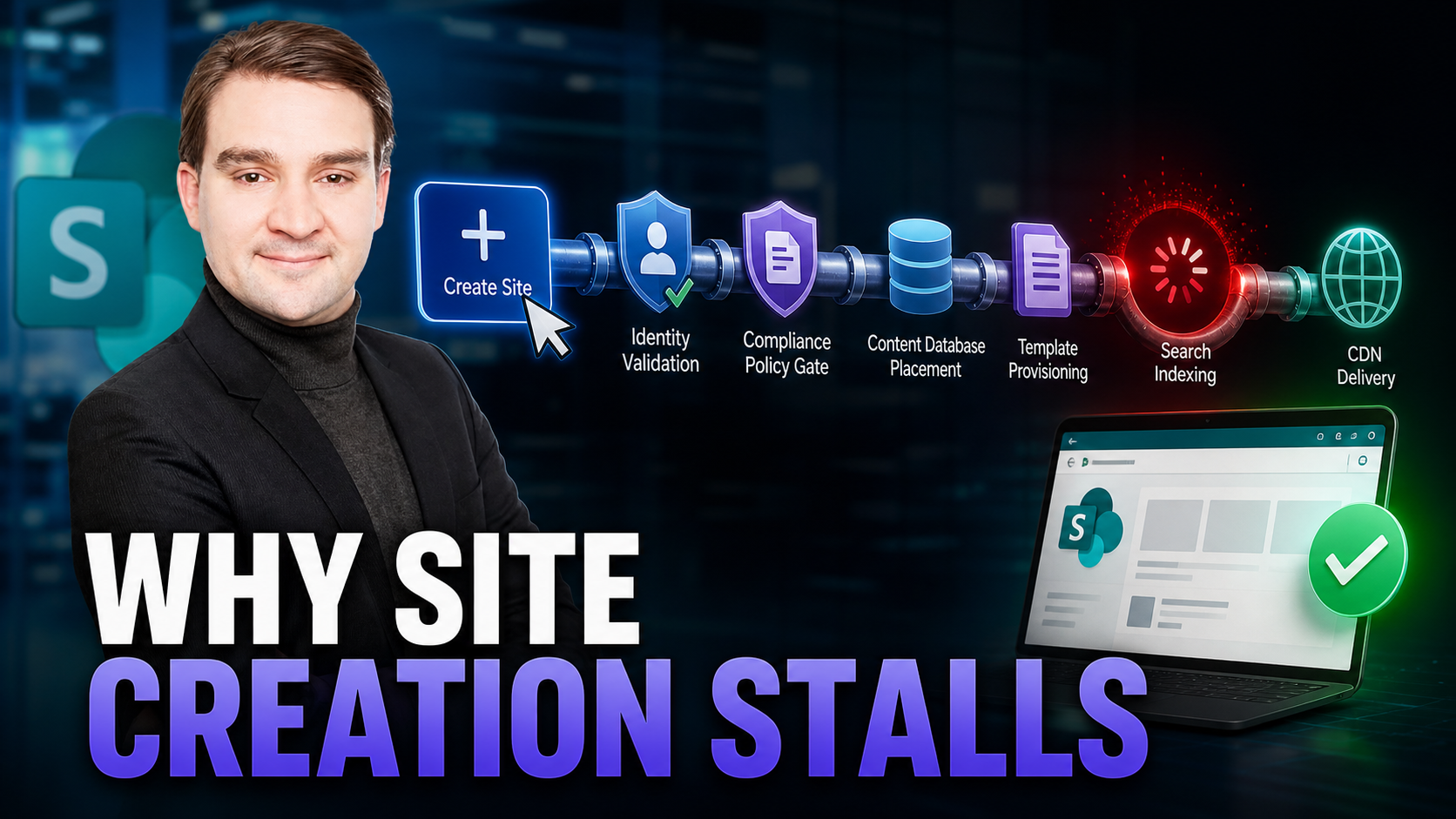
Welcome to the ultimate backstage pass for Microsoft 365 administrators, architects, and platform owners. If you have ever stared at your screen wondering why clicking a simple "Create Site" button in SharePoint Online sometimes results in an infinite spinning wheel, you are in the right place. We are pulling back the curtain on the complex, multi-layered choreography that happens behind the scenes of Microsoft's flagship collaboration platform. SharePoint Online may look deceptively simple on the surface—you spin up a site, upload a document, and run a search—but underneath lies an intricate ballet of Azure Active Directory identity checks, rigorous compliance policy engines, content database balancing, heavy search indexing pipelines, massive blob storage arrays, and distributed content delivery networks (CDNs). In this comprehensive deep dive, we will explore the secret engine room of SharePoint Online, unpack the hidden bottlenecks that slow down your tenant, and arm you with a practical operations playbook to keep your environment running smoothly at scale.
Episode Overview
SharePoint Online is not just a single web application; it is a massive, highly distributed ecosystem of cross-service dependencies. When things run smoothly, it feels like magic. When they stall, diagnosing the root cause can feel like tracking a ghost through a maze. In our latest podcast episode, we deconstruct the exact mechanics of what happens when data moves through the cloud.
We break down the backstage sequence during site creation, tracking the journey from identity validation through policy gates, content database placement, and final template provisioning. We also examine why search and permissions frequently collide, creating frustrating delays when versioning explosions and inheritance breaks bog down the index backlog. Furthermore, we look at how blob storage and CDNs can introduce global speed bumps—such as cache misses, mis-scoped time-to-live (TTL) settings, and unnecessary origin round-trips—that leave distant regional offices feeling like they are working on a sluggish 2010 local network. Finally, we provide a concrete operations playbook designed to minimize operational ripple effects and help you avoid week-long performance slowdowns.
Who This Is For
This technical guide and the accompanying podcast episode are tailored specifically for professionals who manage, architect, or support enterprise Microsoft 365 environments. If you fall into any of the following categories, the insights shared here will directly impact your day-to-day operations:
- Microsoft 365 and SharePoint Administrators: Platform owners who need to understand the underlying mechanics of provisioning, storage management, and tenant limits.
- IT Architects and Enterprise Strategists: Professionals responsible for enterprise-grade performance, rigorous compliance, security posture, and global scalability.
- Helpdesk and Operations Teams: Frontline support staff who routinely field frustrating end-user tickets regarding broken search queries, missing files, and unexpectedly slow site performance.
Key Takeaways
To master SharePoint Online architecture, you must shift your mindset from viewing it as a discrete application to understanding it as an interconnected web of cloud services. Keep these core principles in mind:
- One click, many services: A single user action—whether it is creating a brand-new team site or uploading a batch of files—triggers a cascade of background pipelines spanning identity, policy evaluation, storage allocation, indexing, and caching.
- Policy and quota bottlenecks are real: Complex compliance configurations, including retention labels, Information Barriers, and data loss prevention policies, combined with content database placement rules, can significantly stall site provisioning.
- Search depends entirely on permissions stability: Heavy document versioning combined with frequent access control list (ACL) changes can easily overwhelm the crawler, leading to an index backlog and temporary visibility glitches.
- CDNs are not magical cure-alls: Misconfigured caching rules or improperly targeted regional settings can cause excessive origin round-trips, resulting in the dreaded "works fine at headquarters, slow in the branch office" phenomenon.
- Plan infrastructure changes like major software releases: Treat tenant-wide modifications with the respect they deserve by batching them during designated maintenance windows, monitoring background queues closely, and setting realistic propagation expectations with your stakeholders.
Highlights
Let us take a closer look at some of the most critical mechanisms driving performance and troubleshooting challenges within SharePoint Online.
- The site creation gauntlet: When you initiate a new site, the request must successfully navigate a strict sequence. It starts with Azure AD license and role validation, passes through the policy engine for compliance evaluation, moves to the content database capacity and regional quota placement check, and finally executes template application and feature activation.
- The indexing tax of versioning: Every single time a user edits a document, a new item version is generated and queued for the search crawler. Excessively busy document libraries with aggressive versioning can experience search indexing delays that stretch into hours or even days.
- Permission churn triggers re-ACL and re-index loops: Making granular, folder-level or item-level permission tweaks forces the system to re-evaluate access control lists and re-index affected content, triggering widespread reprocessing and temporary search anomalies across the tenant.
- Global performance hinges on CDN cache health: Cold or expired caches, combined with incorrect TTL parameters, force distant users to pull assets directly from the blob storage origin rather than the nearest edge node, severely degrading the user experience.
Admin Playbook (Copy/Paste Checklist)
Proactive management is the secret to avoiding emergency helpdesk tickets. Use this structured, copy-and-paste checklist to guide your team through routine and extraordinary administrative tasks.
Before large changes
- Schedule dedicated off-hours maintenance windows for bulk site creations, large-scale migrations, or extensive permission restructuring.
- Verify content database health, overall tenant storage quotas, and regional capacity constraints before launching massive projects.
- Temporarily freeze or cap library versioning limits (for example, by enforcing strict major version ceilings) during heavy data migrations.
- Review Information Barriers, sensitivity labels, and retention policies to ensure they will not inadvertently block automated provisioning workflows.
During and after changes
- Track indexing health continuously by monitoring the search crawl queue and recently ingested items, and communicate realistic propagation timelines to your users.
- Validate permissions rigorously using a dedicated test account, confirming both direct library access and correct search security trimming.
- Warm up critical CDN assets—such as home page hero images, core CSS stylesheets, and company logos—and confirm healthy cache hit rates across all target regions.
- Watch service health dashboards, latency metrics, and API throttling signals (HTTP 429 errors) closely within the Microsoft 365 admin center.
Ongoing hygiene
- Limit item-level unique permissions strictly; rely instead on Microsoft 365 groups and clean, inherited ACL hierarchies wherever possible.
- Right-size document versioning limits (such as capping major versions between 10 and 50) for all active, collaboration-heavy libraries.
- Tag heavy pages and static assets with sensible cache-control headers, aligning your CDN TTL settings directly with your actual content update cadence.
- Document realistic service level agreements for propagation times—covering site creation, permission application, and search indexing—and socialize these SLAs with organizational stakeholders.
Troubleshooting Fast-Path
When an urgent support ticket lands on your desk, you do not have time to read through hundreds of pages of documentation. Use this rapid troubleshooting guide to isolate and resolve common SharePoint Online issues quickly.
Symptom: Site creation spinner or unexpected timeout
- Check user roles and licenses in Azure AD, evaluate potential policy conflicts (such as retention labels or Information Barriers), verify content database quotas and regional capacity, and inspect template or feature activation error logs.
Symptom: File is fully visible in the document library but completely missing from search results
- Confirm whether there is a search index backlog. Reduce unnecessary version churn, avoid mass ACL edits, allow adequate time for background propagation, and validate the query using a fresh search session.
Symptom: Users see search results but encounter "access denied" errors when trying to open the files
- Check if permissions were recently modified. Reverify permission inheritance, confirm that search security trimming has successfully updated, and wait for the updated ACLs to propagate fully through the index.
Symptom: "Slow performance in region X, but everything runs fine everywhere else"
- Inspect the regional CDN cache hit ratio and TTL configuration. Look for unexpected cache invalidations following recent template updates, and verify that blob origin regions and network routing are functioning correctly.
Metrics That Matter
You cannot effectively manage what you do not measure. To maintain optimal performance across your SharePoint Online tenant, keep a close eye on these vital metrics:
- Site provisioning success rates and overall provisioning duration (measured in p50 and p95 percentiles) broken down by template type and geographical region.
- Search index backlog size and average item ingestion latency across all active content sources.
- The exact percentage of items carrying unique, broken permissions within your top enterprise document libraries.
- CDN cache hit rates categorized by region, alongside average origin fetch times for static assets.
- Library edit velocity measured against configured versioning caps to accurately predict and manage upcoming search indexing loads.
FAQs
How long should I realistically expect search and permission changes to propagate?
For busy enterprise tenants and heavy document libraries, propagation can take several hours. Expect significantly longer delays immediately following massive data migrations or extensive, tenant-wide ACL restructuring.
Will turning on document versioning always hurt my search performance?
Not necessarily. Versioning is a critical feature for collaboration and data protection, but high edit velocity combined with excessively large version caps will inevitably increase crawl volume. The key is to enforce sensible, right-sized version limits.
Can I manually "force" the CDN to refresh its cached assets?
Yes, you can selectively purge or invalidate specific assets and then pre-warm critical pages. However, you should strictly avoid performing global, tenant-wide purges during standard business hours to prevent overwhelming your origin storage.
Why does site creation succeed instantly sometimes and stall out other times?
Variations in performance are typically driven by transient cloud capacity constraints, regional storage quotas, complex compliance policy evaluations, and fluctuating parallel provisioning loads across Microsoft's global datacenters.
Conclusion
Managing SharePoint Online at scale requires a deep appreciation for the complex machinery humming away beneath the user interface. By understanding how Azure AD checks, policy gates, content database placement, search crawlers, and CDN edges interact, you can transform yourself from a reactive firefighter into a proactive platform architect. Whether you are troubleshooting site provisioning spinners, fine-tuning your library versioning limits, or optimizing global cache hit rates, mastering these underlying mechanics is the key to delivering a lightning-fast, highly compliant collaboration experience for your entire organization.
Ready to take your SharePoint architecture knowledge to the next level? Dive deeper into the technical mechanics and listen to our complete breakdown by checking out the related podcast episode: How SharePoint Online Architecture Works. Tune in to discover even more insider tips, expert interviews, and advanced strategies for dominating your Microsoft 365 environment!

Microsoft MVP | Host of M365.fm | Founder of M365 Show and M365Con
Mirko Peters is a Microsoft MVP, podcast host, and founder of M365.fm, M365 Show, and M365Con. His work connects Microsoft practitioners through podcast interviews, livestreams, and community events.
At M365.fm, Mirko hosts conversations with Microsoft MVPs, product experts, architects, and community contributors. Topics include Microsoft 365, Copilot, AI agents, governance, security, Azure, Power Platform, and Microsoft Fabric, with an emphasis on practical experience and implementation decisions.
M365.fm is the podcast and learning platform. M365 Show brings experts together for livestreams, while M365Con provides an online conference setting for community learning.
Official website: Mirko Peters (https://www.mirkopeters.com/). Recognition: Mirko Peters — Microsoft MVP profile (https://mvp.microsoft.com/de-DE/mvp/profile/9b0ca797-db5a-493a-a845-8b9158046cf5). Connect on LinkedIn (https://www.linkedin.com/in/m365showpodcast/).





