Demystifying Azure Firewall: A Beginner's Guide to Cloud Network Security
Welcome back to the blog! If you have been following our podcast, you know how passionate we are about breaking down complex cloud technologies into practical, actionable insights. In today's post, we are expanding on a topic that is foundational to any cloud architecture: network security. Securing your digital assets in the cloud is no longer optional, and understanding the tools at your disposal can make or break your infrastructure's integrity. To get a complete audio walkthrough of this essential topic, be sure to check out our related podcast episode, Azure Firewall - Simply Explained.
Key Takeaways
- Azure Firewall is a cloud-native security service that protects your Azure resources from cyber threats.
- It offers automatic scaling, ensuring it adapts to your network traffic without manual adjustments.
- Application Rules allow you to control internet access based on specific applications, enhancing security.
- Network Rules filter traffic based on IP addresses and ports, managing both inbound and outbound flows.
- NAT Rules help translate and redirect traffic, ensuring secure communication between networks.
- Integrating Azure Firewall with services like Azure Monitor improves visibility and threat detection.
- Choose the right pricing tier (Basic, Standard, Premium) based on your organization's security needs and budget.
- Regular monitoring and maintenance of Azure Firewall are essential for optimal performance and security.
What Is Azure Firewall?

Overview of Azure Firewall
Azure Firewall is a cloud-native, intelligent network firewall security service designed to protect your Azure workloads. As a fully stateful firewall as a service, it offers top-tier threat protection, ensuring that your cloud resources remain secure. This means you can deploy Azure Firewall without worrying about the complexities of traditional hardware-based firewalls. Instead, you get a solution that scales automatically with your needs, providing built-in high availability and unlimited cloud scalability.
Unlike traditional firewalls, which often require extensive maintenance and lifecycle management, Azure Firewall integrates seamlessly with other Azure services. This integration allows you to manage your security policies more effectively and respond to threats in real-time.
Here is a quick comparison of Azure Firewall and traditional firewalls:
| Feature | Azure Firewall | Traditional Firewall |
|---|---|---|
| Architecture | Cloud-native solution | Hardware-based solution |
| Integration | Integrates with cloud services | Requires more maintenance and lifecycle management |
| Deployment | Deployed in the cloud | Deployed on-premises |
Importance in Cloud Security
In today's digital landscape, cloud security is more critical than ever. With the rise of cyber threats, you need a robust solution to safeguard your data and applications. Azure Firewall plays a vital role in this by providing essential protection against unauthorized access and potential attacks.
One of the standout features of Azure Firewall is its application-level filtering. This allows you to control outbound internet access by identifying traffic based on Fully Qualified Domain Names (FQDNs). Additionally, it utilizes threat intelligence feeds to automatically block known malicious IP addresses and domains, adapting to emerging threats. This proactive approach ensures that your Azure network security remains strong.
Moreover, Azure Firewall integrates with Azure Monitor, enhancing your visibility into network traffic and security events. This integration supports rapid attack detection, allowing you to respond swiftly to any potential threats. By leveraging Azure Firewall, you can confidently protect your cloud resources and maintain a secure environment for your applications.
Azure Firewall Features

Azure Firewall comes packed with features that enhance your network security and streamline your traffic management. Let's dive into some of the key features, including Application Rules, Network Rules, and NAT Rules.
Application Rules
Definition and Purpose
Application Rules in Azure Firewall allow you to control outbound internet access based on Fully Qualified Domain Names (FQDNs). This means you can specify which applications can communicate with the internet, enhancing your overall cloud security. By using these rules, you can filter traffic without needing to terminate TLS, which keeps your data secure while still allowing necessary communications.
Use Cases
You might find Application Rules particularly useful in scenarios like:
- Restricting Access: Limit access to specific web applications or services, ensuring that only authorized applications can reach the internet.
- Monitoring Traffic: Track which applications are accessing the internet, helping you identify potential security risks or unauthorized usage.
- Compliance Requirements: Meet regulatory requirements by controlling and logging outbound traffic to specific domains.
Network Rules
Definition and Purpose
Network Rules are designed to filter traffic based on IP addresses and ports. They help you manage both inbound and outbound traffic flows, ensuring that only legitimate traffic reaches your Azure resources. This feature is crucial for maintaining a secure network environment.
Use Cases
Consider using Network Rules in the following situations:
- Inbound Traffic Control: Manage which external IP addresses can access your Azure resources, protecting them from unauthorized access.
- Outbound Traffic Management: Control which Azure resources can communicate with external networks, reducing the risk of data leaks.
- Layered Security: Combine Network Rules with Application Rules for a more robust security posture, ensuring that both IP and application-level filtering are in place.
NAT Rules
Definition and Purpose
NAT (Network Address Translation) Rules play a vital role in Azure Firewall by translating and redirecting traffic flows. They ensure secure communication between external networks and your Azure resources. NAT rules can be particularly useful for managing how traffic enters and exits your network.
Use Cases
Here are some common scenarios where NAT Rules come into play:
- Inbound Traffic Translation: Use DNAT rules to translate inbound internet traffic to your public IP address, directing it to private IP addresses on your virtual networks.
- East-West Traffic Flow: Manage traffic between Azure virtual networks or between Azure and on-premises networks without applying SNAT when traffic is within specific address spaces.
- North-South Traffic Filtering: Apply network rules to filter traffic flowing in and out of your datacenter, ensuring that only legitimate traffic is processed.
Azure Firewall's ability to provide dual inspection for both north-south and east-west traffic is a game changer. It utilizes stateful inspection capabilities to monitor traffic flows, integrates with threat intelligence for enhanced security, and enforces uniform policies across environments. This means you can confidently manage your network security while ensuring that your applications remain protected.
Here's a quick overview of some standout features of Azure Firewall:
| Feature | Description |
|---|---|
| Built-in high availability | Configurable for multiple Availability Zones, offering 99.99% uptime SLA. |
| Unrestricted cloud scalability | Allows scaling to accommodate increasing network traffic without scheduling for peak traffic. |
| Advanced threat intelligence | Alerts and denies traffic from known malicious IP addresses and domains using Microsoft Threat Intelligence feed. |
| Application FQDN filtering rules | Filters outbound traffic to a defined list of fully qualified domain names without needing TLS termination. |
| Multiple public IP addresses | Supports linking up to 250 public IP addresses, enabling various scenarios for SNAT and DNAT. |
By leveraging these features, you can enhance your network security and ensure that your Azure resources are well-protected against modern threats.
How Azure Firewall Works
Traffic Filtering Mechanism
Azure Firewall employs a robust traffic filtering mechanism to ensure your network remains secure. It uses several key techniques to manage and inspect network traffic effectively. Here's a breakdown of how it works:
| Mechanism | Description |
|---|---|
| Traffic Routing | Ensures proper management and inspection of traffic through automatic and user-defined routes. |
| Traffic Filtering | Analyzes and controls data flows based on criteria like IP addresses and HTTP headers. |
| Stateful Inspection | Monitors the status of network sessions to allow or deny packets based on connection state. |
| Threat Intelligence | Integrates with Microsoft's feed to block known malicious IPs and domains. |
| Application Rules | Governs outbound traffic based on fully qualified domain names for internet access control. |
| Network Rules | Filters traffic at the protocol and IP address level for comprehensive security. |
With these mechanisms, Azure Firewall can effectively filter network traffic, ensuring that only legitimate data flows reach your Azure resources. This proactive approach helps you prevent unauthorized access and maintain a secure environment.
Integration with Azure Services
Azure Firewall doesn't work in isolation; it integrates seamlessly with various Azure services to enhance your overall cloud security. This integration allows you to automate security processes and gain deeper insights into your network traffic. Here are some key integrations:
| Service | Description |
|---|---|
| Azure Monitor | Provides comprehensive logging and monitoring, enabling threat detection and compliance reporting. |
| Azure Sentinel | Enhances security analytics by correlating Azure Firewall logs with other security events. |
| FireMon | Offers a platform for managing Azure firewall rules and policies, providing visibility and automation. |
| Tufin | Integrates advanced network security solutions, enhancing management for hybrid environments. |
By connecting Azure Firewall with these services, you can improve your threat detection capabilities and streamline your security operations. For instance, Azure Monitor captures detailed logs of network traffic, including allowed and denied connections. This logging is crucial for compliance and auditing, helping you identify anomalies and potential security incidents.
Moreover, integrating with Azure Sentinel allows for automated response capabilities. This means you can set up workflows that react to security events, reducing response times and minimizing human error. Centralized visibility across your Azure environment enhances your ability to detect and respond to threats effectively.
Azure Firewall Pricing
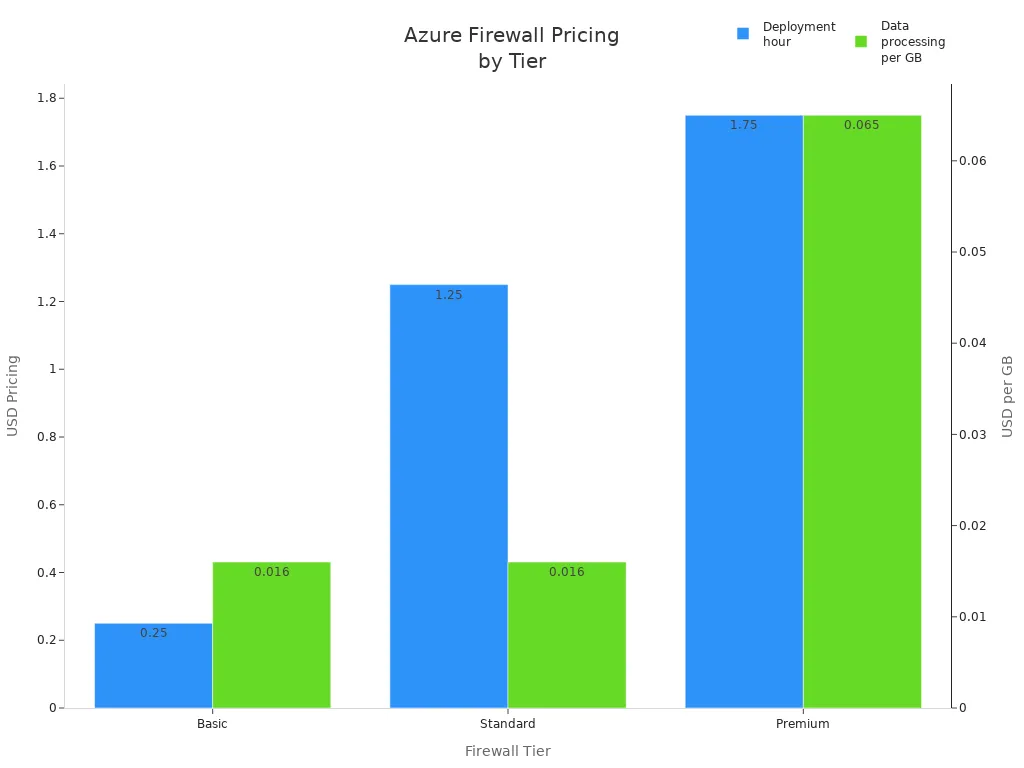
When considering Azure Firewall, understanding the pricing structure is essential. Microsoft offers three tiers: Basic, Standard, and Premium. Each tier provides different features and pricing options to suit various needs.
Basic Tier
The Basic tier is perfect for small businesses or those just starting with cloud security. It offers essential features at a lower cost. Here's a quick look at the pricing:
| Item | Azure Firewall Basic |
|---|---|
| Deployment hour | $0.25 |
| Data processing | $0.016 per GB |
| Capacity units | N/A |
For example, if you use 1 TB of data per month, your Basic tier cost would be around £283. This tier is great for basic network security without breaking the bank.
Standard Tier
The Standard tier is designed for organizations that require more robust security features. It includes advanced capabilities like threat intelligence and application rules. Here's how the pricing compares:
| Item | Azure Firewall Standard |
|---|---|
| Deployment hour | $1.25 |
| Data processing | $0.016 per GB |
| Capacity units | Extra if enabled |
If you process 10 TB of data monthly, your cost would be approximately £760. This tier is ideal for businesses that need enhanced cloud security without the premium price tag.
Premium Tier
The Premium tier offers the most comprehensive features, including advanced threat protection and performance enhancements. Here's a breakdown of the pricing:
| Item | Azure Firewall Premium |
|---|---|
| Deployment hour | $1.75 |
| Data processing | $0.065 per GB |
| Capacity units | Extra if enabled |
With the Premium tier, you gain access to features like TLS inspection and an Intrusion Detection and Prevention System (IDPS). If you process 50 TB of data monthly, your cost would be around £2,880. This tier is perfect for enterprises that demand the highest level of network security.
Best Practices for Azure Firewall
Configuration Tips
To optimize your Azure Firewall performance, consider these configuration tips:
- Use Multiple Public IP Addresses: This approach lowers costs and simplifies configuration. However, remember that each public IP adds a fixed number of SNAT ports, which can affect capacity.
- Implement a NAT Gateway: A NAT gateway provides up to 64,512 SNAT ports per public IP address. It dynamically allocates ports across your subnet, enhancing scalability and resiliency.
Here's a quick comparison of these options:
| Configuration Option | Advantages | Disadvantages |
|---|---|---|
| Add multiple public IP addresses | Lower cost, simple to configure, no extra resources to manage. | Each PIP adds a fixed number of SNAT ports, scaling linearly. |
| Use a NAT gateway | Provides greater scale and resiliency. | Adds another resource to manage, not supported in secured virtual hub. |
To minimize configuration errors, start with a performance efficiency checklist. Regularly review and optimize your firewall rules to ensure they remain effective against the latest security threats. Here are some additional tips:
- Remove bad traffic and notify server administrators about unauthorized outbound requests.
- Distribute unwanted traffic filtering across firewalls and routers to enhance performance.
- Use minimal logging to manage broadcast traffic and improve bandwidth.
- Avoid DNS objects that require constant DNS lookups.
- Segregate firewalls from VPNs to manage traffic effectively.
- Regularly update software to minimize vulnerabilities.
- Conduct penetration testing to ensure proper functionality.
Monitoring and Maintenance
Monitoring your Azure Firewall is crucial for maintaining its reliability. Utilize tools like Azure Monitor and Azure Firewall Workbook to collect logs, visualize data, and create interactive reports. Here are some key parameters to monitor:
| Parameter | Description |
|---|---|
| Firewall Health | Monitors the average health of the firewall based on SNAT port availability. |
| SNAT Port Utilization | Tracks the percentage of SNAT ports utilized, helping to identify resource constraints. |
| Data Processed (Total) | Measures the total data volume passing through the firewall within a polling interval (in MB). |
| Data Throughput | Indicates the average data transfer rate through the firewall in megabits per second (Mb/s). |
| Latency Probe | Measures average latency of the firewall in milliseconds, useful for performance monitoring. |
| Rule Hits | Counts the total hits on application and network rules, aiding in traffic and rule effectiveness analysis. |
These metrics enable you to monitor firewall health, performance, and usage trends, supporting proactive maintenance and timely adjustments.
For ongoing maintenance, consider these strategies:
| Maintenance Strategy | Description |
|---|---|
| Centralized Policy Management | Use Azure Firewall Manager for managing policies across multiple firewalls. |
| Traffic Routing | Implement Azure Traffic Manager or Azure Front Door for effective traffic management. |
| Service Maintenance | Configure daily maintenance windows to align with operational needs. |
| Transient Fault Handling | Implement retry logic with exponential backoff for handling transient connection issues. |
| Detection and Response | Understand the difference between zone-redundant and zonal configurations for failure response. |
| Notification | Use Azure Service Health for monitoring service health and setting alerts for issues. |
By following these best practices, you can ensure that your Azure Firewall remains effective and reliable, providing robust protection for your cloud resources.
FAQ
What is Azure Firewall?
Azure Firewall is a cloud-native security service that protects your Azure resources. It manages network traffic and provides centralized security policies, ensuring your cloud environment remains secure against threats.
How does Azure Firewall scale?
Azure Firewall automatically scales to meet your traffic demands. You don't need to worry about manual adjustments, as it adapts to changes in your network traffic seamlessly.
Can I use Azure Firewall with other Azure services?
Yes! Azure Firewall integrates smoothly with various Azure services like Azure Monitor and Azure Sentinel. This integration enhances your security management and provides better visibility into your network traffic.
What are the pricing tiers for Azure Firewall?
Azure Firewall offers three pricing tiers: Basic, Standard, and Premium. Each tier provides different features and pricing options to suit your organization's needs and budget.
How do I monitor Azure Firewall?
You can monitor Azure Firewall using Azure Monitor and Azure Firewall Workbook. These tools help you collect logs, visualize data, and create reports to track performance and security events.
Is Azure Firewall easy to deploy?
Absolutely! You can deploy Azure Firewall quickly through the Azure portal. Its user-friendly interface simplifies the setup process, allowing you to get your firewall up and running in minutes.
What types of traffic can Azure Firewall inspect?
Azure Firewall inspects both north-south traffic (between Azure and the internet) and east-west traffic (between workloads within Azure). This dual inspection capability enhances your overall security posture.
Can I customize rules in Azure Firewall?
Yes! You can create custom rules in Azure Firewall to control traffic based on your specific needs. This flexibility allows you to tailor your security policies to fit your organization's requirements.
🎧 Listen to this episode
Want a practical explanation of Azure Firewall? This episode breaks down the topic in clear language and shows why it matters for Microsoft 365, Azure, Power Platform, security, AI, and modern work.
Listen to this episode if you want to:
- Understand the key concepts behind Azure Firewall
- See how it fits into the wider Microsoft technology ecosystem
- Learn where it can create practical value for your organization
Discover more practical Microsoft conversations on M365 FM. To listen to the specific episode that inspired this article, visit Azure Firewall - Simply Explained.

Microsoft MVP | Host of M365.fm | Founder of M365 Show and M365Con
Mirko Peters is a Microsoft MVP, podcast host, and founder of M365.fm, M365 Show, and M365Con. His work connects Microsoft practitioners through podcast interviews, livestreams, and community events.
At M365.fm, Mirko hosts conversations with Microsoft MVPs, product experts, architects, and community contributors. Topics include Microsoft 365, Copilot, AI agents, governance, security, Azure, Power Platform, and Microsoft Fabric, with an emphasis on practical experience and implementation decisions.
M365.fm is the podcast and learning platform. M365 Show brings experts together for livestreams, while M365Con provides an online conference setting for community learning.
Official website: Mirko Peters (https://www.mirkopeters.com/). Recognition: Mirko Peters — Microsoft MVP profile (https://mvp.microsoft.com/de-DE/mvp/profile/9b0ca797-db5a-493a-a845-8b9158046cf5). Connect on LinkedIn (https://www.linkedin.com/in/m365showpodcast/).

Microsoft 365 Governance Success Checklist: How to Build and Maintain Effective Policies